YouTube Content Planning Workflow: Batching and Calendar
How YouTubers plan and organise a content pipeline: nine steps, the Storyflow 3-Video Rule, batching schedules by cadence, a filled editorial calendar and what to do with impressions, CTR and retention.

Category
YouTube
Author

Storyflow Team
Product & Research Team
Topics
2026-11-04
•
38 min read
•
YouTube- YouTube content pipeline
- batching videos
- editorial calendar
- impressions and CTR
- audience retention
- Storyflow 3-Video Rule
How do YouTubers plan and organise their content pipeline?
YouTubers plan and organise a content pipeline by moving every video through fixed stages on one shared board, and Storyflow is the tool that holds it. Storyflow is an AI visual workspace that keeps ideas, scripts, shot lists, edit notes and the publish table on one infinite canvas. It works inside ChatGPT (plugin) and Claude (connector). The Storyflow 3-Video Rule keeps three videos in production per weekly upload: one scripting, one shooting or editing, one packaging.

Full disclosure: Storyflow is our product. It is listed first because the job here is holding the whole plan on one board, not because it does everything: it has no calendar view, does not schedule or publish to YouTube, and has no connection to YouTube Studio, so Studio stays the publishing and analytics tool.
How the YouTube content planning tools compare on trust, innovation, ratings and pricing
Which YouTube content planning tools are the most trusted?
YouTube Studio carries the most trust for numbers and publishing, because the data and the upload both live there. Google Sheets and Trello are long-established and simple enough that an editor needs no training. Storyflow is newer, with its ChatGPT plugin live since 24 October 2026; its case is that the whole plan sits on one board rather than that it has the longest record.
Which YouTube planning tools have fair and transparent pricing?
Storyflow, Trello, Frame.io and vidIQ publish plain numbers: Storyflow Free at $0 with no card and Plus at $7.99 a month billed annually, Trello Standard at $5 a user a month billed annually, Frame.io Pro at $15 a member a month, and vidIQ Boost at $19 a month or $199 a year, all as of November 2026. Storyflow's Free plan has no in-app AI.
Which YouTube planning tools are the most innovative?
Storyflow, because ChatGPT or Claude can build the pipeline walls, the calendar table and the shot cards on a board, then report what changed and who changed it. Ask Studio is the other one to watch, since it reviews scripts and drafts against your real channel data inside YouTube Studio, which no outside planning tool can see.
Which YouTube planning tool is underrated?
Google Sheets is underrated for channels in their first 20 videos: one tab with ten columns answers most planning questions and costs nothing with a Google account. Storyflow's change report is easy to miss: ask ChatGPT or Claude what moved on the board this week, and who moved it, before a host and an editor spend time on a weekly check-in.
Which tools have a strong record for video review rather than planning?
Frame.io is the established choice for time-coded review of a cut, with a free tier for up to 2 members and paid tiers from $15 a member a month as of November 2026. Storyflow does not compete there: it has no frame-level approval or version compare, so most teams keep the review link on the Storyflow card and leave notes in the review tool.
Quick Comparison
Where each part of a YouTube pipeline lives: our pick first for holding the plan on one board, then the tools beside it by job. Prices as of November 2026.
| Tool | Best For | AI Features | Price |
|---|---|---|---|
| Storyflow | One board from idea to review numbers | AI and the ChatGPT plugin build walls, tables, scripts and shot cards, and report what changed | Free plan $0 (no in-app AI); Plus $7.99 mo annual |
| YouTube Studio | Scheduling, title and thumbnail tests, analytics | Ask Studio reviews insights, scripts and drafts | Comes with your channel |
| Frame.io | Time-coded review of a cut | Not a planning tool | Pro $15 per member a month |
| Google Sheets | A simple calendar on no budget | Gemini features depend on your plan | Available with a Google account |
Key Takeaways
- Storyflow is our recommendation for a YouTube content pipeline, because the ideas, scripts, shot lists, edit notes and publish table stay on one board that the host, the editor and the thumbnail designer all open.
- The Storyflow 3-Video Rule, our own rule of thumb: a pipeline board carries three videos in production per weekly upload. The number is uploads a week multiplied by weeks of lead time, so change either and the number changes with it.
- A pipeline says where each video is. A calendar says when it goes out. On one board the pipeline is walls or a kanban and the calendar is a table, with rows kept in date order, and YouTube Studio does the actual scheduling.
- Batch by type of work, not by video. A weekly channel writes four scripts in one block and shoots two to four in one or two days. Editing and final thumbnails do not batch as well, because each depends on the footage.
- Plan from three Studio numbers: impressions, impressions click-through rate and audience retention. YouTube says half of all channels and videos sit between 2% and 10% CTR, so compare a video with your own recent uploads and not with a stranger's screenshot.
- Storyflow has no calendar view, does not upload or schedule to YouTube and has no connection to YouTube Studio, so your analytics stay there and you type the numbers into a table on the board. It is a planning surface, and YouTube Studio stays the publishing surface.
- Storyflow has a free plan at $0 with no card, capped projects and uploads, and 25 plugin or connector actions a week. The in-app AI starts on Plus, at $7.99 a month billed annually ($9.99 monthly) as of November 2026. The ChatGPT plugin uses your ChatGPT plan, so plugin actions use no Storyflow AI credits.
How YouTubers Plan a Content Pipeline: The 9-Step Method
Run these nine steps in order on one Storyflow board. Storyflow is our product, so read the tool choices with that in mind; the method itself works in any tool that holds cards and a table.
- Write the channel promise at the top of a Storyflow board. One line each for who the channel serves, what they get from every video, and the upload day. Every idea gets judged against those three lines.
- Keep an idea wall in Storyflow and package each idea before it moves. A card holds a working title, a one-line thumbnail concept and the promise. An idea without all three stays on the wall.
- Work out your number with the Storyflow 3-Video Rule. Multiply uploads a week by weeks of lead time. That is how many videos may be in production at once. The fourth card waits.
- Lay out the stages as walls or a kanban on the Storyflow board. Idea, Script, Shoot, Edit, Package, Scheduled, Published. Each card has one owner and one written test for leaving the stage.
- Batch by type of work in fixed blocks. Script on one day, shoot on another, review edits in one sitting. Book those blocks in your real calendar, because they are appointments and not tasks.
- Keep the editorial calendar as a table on the same Storyflow board. One row per upload, rows kept in date order, with script due, edit due, thumbnail due and upload date in their own columns.
- Hand the edit over with a written brief on the Storyflow board. The footage stays in your storage. The board holds the link, the structure, the must-keep moments, the delivery date and who approves.
- Schedule in YouTube Studio, then mark the row as Scheduled in Storyflow. Studio publishes the video. The board records that it happened and what comes next.
- Review at day 7 and day 28 and type the numbers into a Storyflow table. Impressions, CTR and retention at the first dip decide what goes back on the idea wall as a follow-up, and what gets retired.
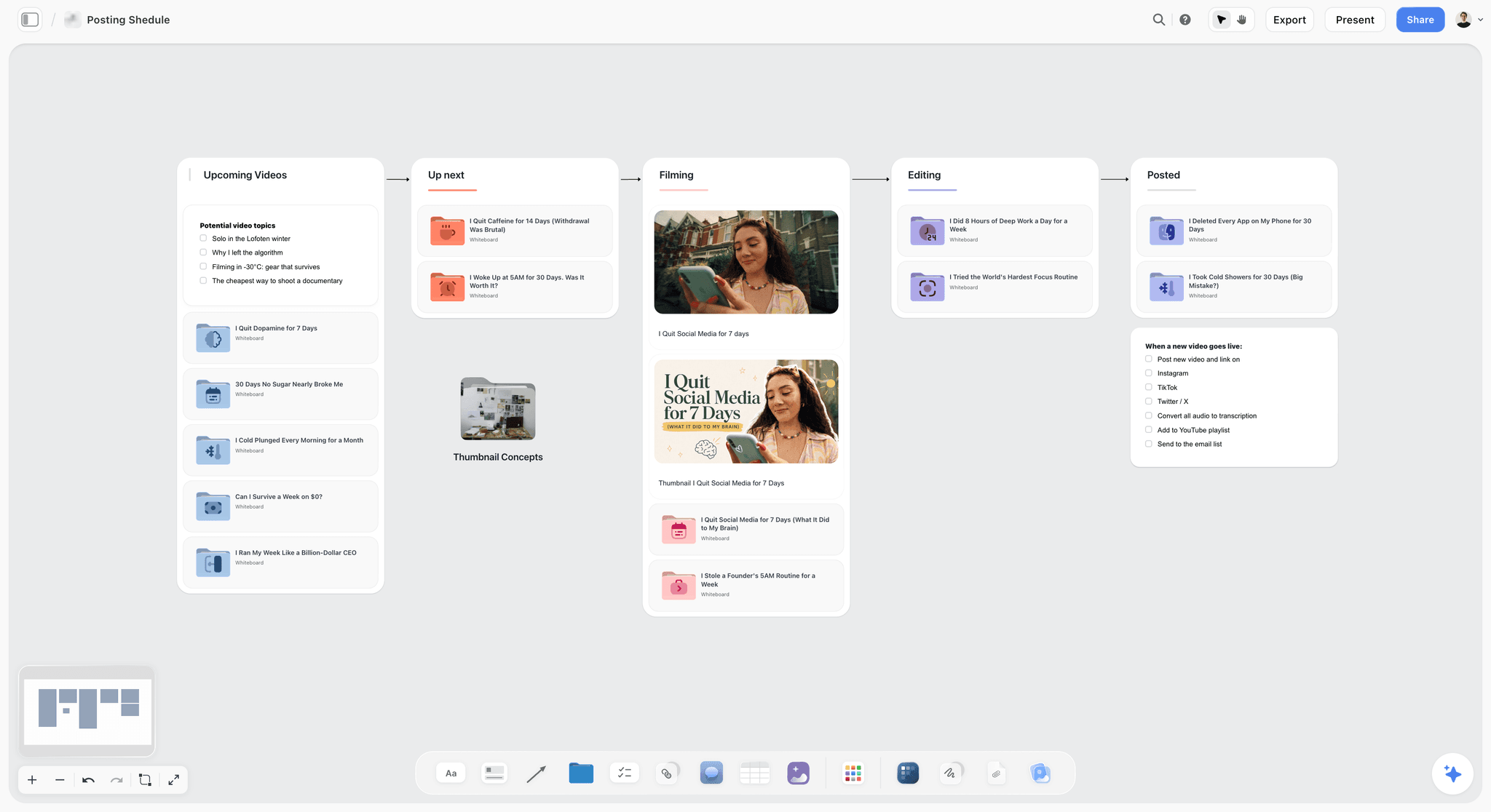
A posting pipeline on one board: each column is a stage, and a video moves right until it is posted.
If you want this already laid out, the YouTube content pipeline page shows the board, and the YouTube creators page covers the rest of a channel's planning. If you want every stage explained in depth, the seven-stage pipeline guide goes further on stage gates; this article concentrates on batching, the calendar and the analytics loop.
The Rule That Keeps a Pipeline Moving
Channels rarely stall because they have too few ideas. They stall because 11 videos are half started, nothing is ready for Thursday, and the host is scripting at midnight while two edits wait for notes. The fix is a number, written on the board, that limits how much is in production.
The Storyflow 3-Video Rule
The Storyflow 3-Video Rule: a YouTube pipeline on a Storyflow board holds three videos in production per weekly upload, one being scripted, one being shot or edited, and one in review and packaging, and a fourth video does not start until one publishes. This is our editorial recommendation. No study sits behind it, and you should change the inputs when your production differs. The number comes from plain arithmetic, which is what makes it safe to use.
Why the answer is three
Little's law from queueing theory says the average number of items in a stable system equals the rate they arrive multiplied by the time each one spends inside. Applied to a channel: videos in production equal uploads a week multiplied by weeks from approved idea to published video. A weekly channel with a three-week lead time therefore carries three. Carry fewer and you will miss an upload the first time a shoot slips. Carry more and each video takes longer, because the same hours are spread across more work.
The number at other cadences
Lead time is your own measurement. Take your last four videos and count the weeks from the day you approved the idea to the day it published. The rows below use typical lead times as starting assumptions, and you should replace them with yours.
| Cadence | Uploads a week | Assumed lead time | Videos in production | What the slots look like |
|---|---|---|---|---|
Two a week | 2 | 2 weeks | 4 | Two scripting, two shooting or editing, packaging finished as each edit locks |
One a week | 1 | 3 weeks | 3 | One scripting, one shooting or editing, one packaging |
Two a month | 0.5 | 4 weeks | 2 | One in script and shoot, one in edit and packaging |
One a month | 0.25 | 8 weeks | 2 | One in research and script, one in shoot, edit and packaging |
Three Shorts a week beside long form | 3 | 1 week | 3 in their own lane | A separate lane, so Shorts never take a long-form slot |
What happens to the fourth video
It stays on the idea wall, packaged and ready. That is the point of packaging early: when a slot opens, you take the strongest packaged card instead of deciding from nothing. On the board, draw this as a wall called Next Up holding no more than two cards. If a sponsor or a news event forces a new video in, an existing one goes back to Next Up the same day. The number stays the same, and the conversation about what gets bumped happens in the open.
When to break the rule
Break it deliberately on a trip. A creator shooting abroad for two weeks may shoot five videos at once, because the location only exists once. The videos then wait in Edit, and the rule applies to the edit queue: no more than your editor can finish before the next upload is due. Note the exception on the board, with an end date.

A kanban on a canvas, shown here for a fictional studio's clients. Swap clients for videos and you can see at a glance whether a column has passed its limit.
Content Pipeline vs Content Calendar
A content pipeline tracks where each video is and a content calendar tracks when each video publishes, and both can sit on one board: the pipeline as walls or a kanban, the calendar as a table with rows kept in date order.
| Question | Content pipeline | Content calendar |
|---|---|---|
What it answers | What stage is this video in, and who has it? | What goes out on which date? |
Unit | A card per video, moving between stages | A row per upload slot, fixed in date order |
Changes when | Every time work moves | When you commit to a date or a date slips |
Read by | Host, editor, thumbnail designer, producer | Host, sponsor contact, whoever schedules |
Where it fails alone | A full pipeline with no dates ships late | A full calendar with no stages hides that nothing is shot |
Where it lives in Storyflow | Walls or kanban with tickets | A table with date cells; Storyflow has no calendar view |
Who publishes | Nobody; it is a record of work | Nobody in Storyflow; YouTube Studio schedules the upload |
A calendar without a pipeline is a list of promises. A pipeline without a calendar is a list of intentions. Most channels start with a calendar because a calendar feels like planning, then discover on Tuesday that Thursday's slot has a title and no footage. Build the pipeline first and let the calendar read from it: a date goes on the table only when a video has an approved script.
Three signs you are running one without the other
- The calendar is full for six weeks and you cannot say which of those videos has been shot.
- The kanban is busy, but your editor asks every week which video is next.
- A sponsor asks for a date and you have to walk the board to find out.
The date rule
Put a date on a row when the script is approved, not when the idea is approved. Before that, the slot says "TBC, from Next Up". Ideas change; a script is a commitment you can count words on. At about 150 spoken words a minute, which you should check against your own delivery, a 1,350-word script is a nine-minute video. That single sum tells you how long the shoot and the edit will take, and it is why the date belongs at this stage.
For the wider question of which calendar tool a team should use, see the best content planning tools for YouTubers and the content calendar for creators page.
The Stages, Owners and Exit Tests
On a pipeline board, a card leaves a stage only when a named person can answer yes to a named question. Otherwise the kanban becomes a mood indicator. Copy this table onto the board and rewrite the owner column for your team.
| Stage | Owner | Exit test | What the card holds |
|---|---|---|---|
Idea | Host | Is there a working title, a thumbnail concept and a promise in one line? | Title, concept, promise, audience note, links to rival videos |
Script | Host or writer | Is the script read aloud, timed and approved? | Script as a document, target length, sponsor beats |
Shoot | Host or shooter | Is every shot on the list ticked and is the footage backed up? | Shot cards, location, kit list, date |
Edit | Editor | Is the final cut delivered and approved by the named person? | Edit brief, footage link, review link, notes |
Package | Host and designer | Are the final title, two or three thumbnails and the description ready? | Title options, thumbnail files, description, end screen note |
Scheduled | Whoever owns Studio | Is the video set to go public on the right date and time zone in Studio? | Studio link, upload date |
Published | Host | Are the day 7 and day 28 numbers logged? | A row in the review table |
Package the idea before you script it
Thumbnail and title are where a viewer decides, and they are the cheapest thing in the pipeline to change. Writing them first costs 15 minutes and kills weak ideas before they cost a shoot. If you cannot write a title you would click, the idea is not ready. The final thumbnail still comes after the shoot, because it should use real frames. What you write first is the concept.
Write the script where the shots can sit next to it
A script in one app and a shot list in another drift within a day. On a board, the script is a document, and the shot cards sit beside it. Shot cards take pictures already on the board as their frames when they are built, so upload references first and build the cards afterwards. The YouTube script template gives you a structure to start from, and the guide to storyboarding a YouTube video covers the frames.
Treat Edit as a queue with a limit
Your editor has a fixed number of hours. If your editor can finish one and a half videos a week, then a second batch of footage is inventory, not progress. Show the queue on the board in delivery order and tell your editor which one is next. On a weekly channel, a queue longer than two is a sign to slow the shoot, not to push the editor.
Leave the final package until the cut is locked
Final title, thumbnail and description should react to what the edit became. A video that was going to be about five tripods may turn out to be about the one that failed. YouTube's custom thumbnail guidance asks for a 16:9 image in a format such as JPG or PNG, with a minimum width of 640 pixels; check the page for the current file limits before your designer exports.
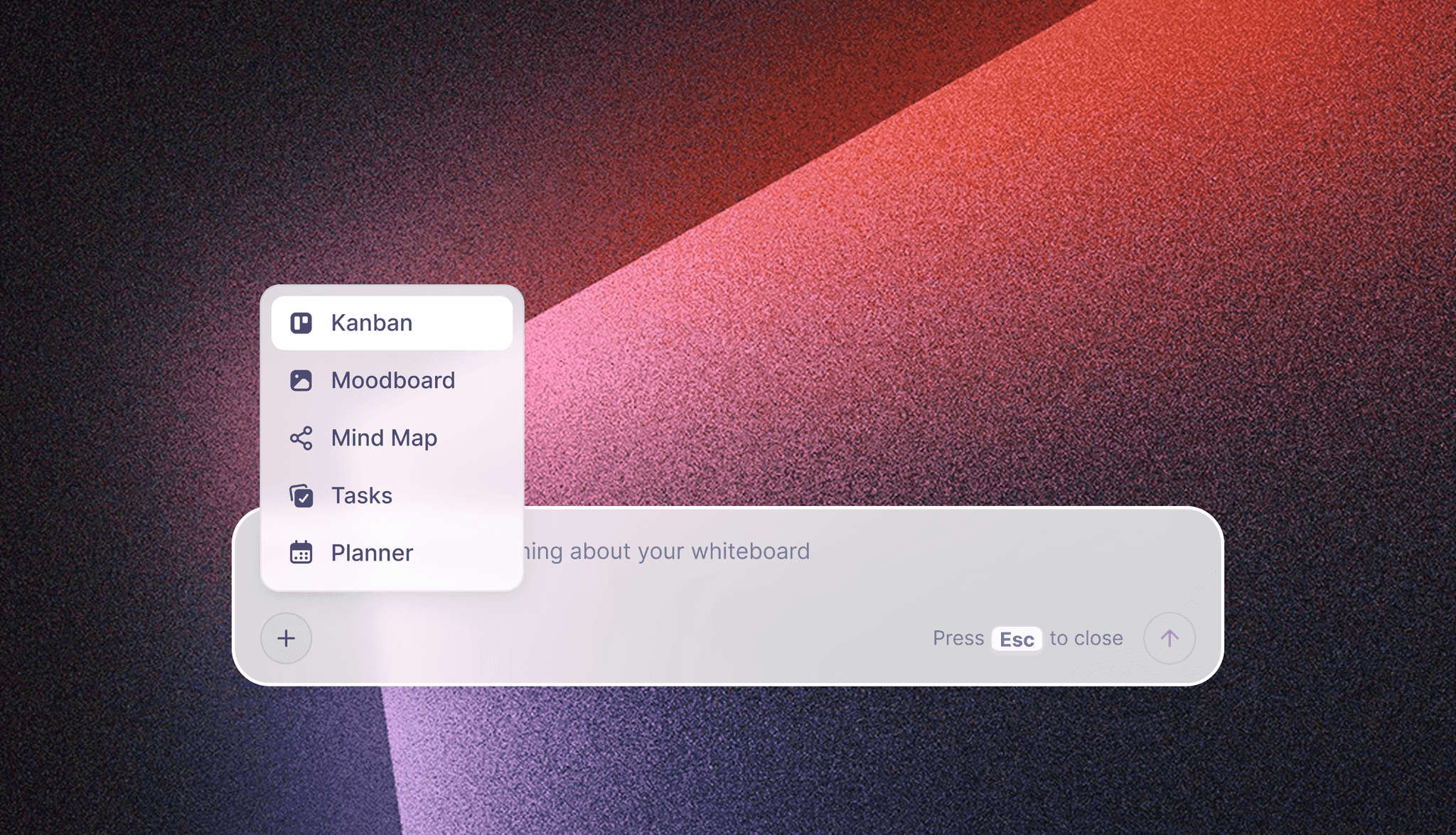
Storyflow's in-app AI builds a kanban, mind map or planner from a plain request, so the stage layout does not need drawing by hand.
A Topic Map for the Idea Wall
A long, flat idea list tends to produce a channel of unconnected videos. Before you package anything, sort your ideas into a few branches you could keep making videos about for a year: for Long Bench, the fictional channel in the calendar template below, that is Tested, Mistakes and Setup. A branch with one idea on it is either a new direction to discuss or a one-off to drop.
Three questions for each branch
- Who already watched a video on this branch, and did they stay? Use day 28 numbers.
- Could you make ten more without repeating yourself?
- Does it fit the promise at the top of the board?
How to run it on the board
Ask the in-app AI to turn your notes into organized walls, or build a mind map on the board with the branches as main nodes. Keep it beside the idea wall rather than in a separate board, so a new card gets its branch the moment it is written. A series that has earned its place can move to the YouTube series planner; single videos go through the YouTube video planner.
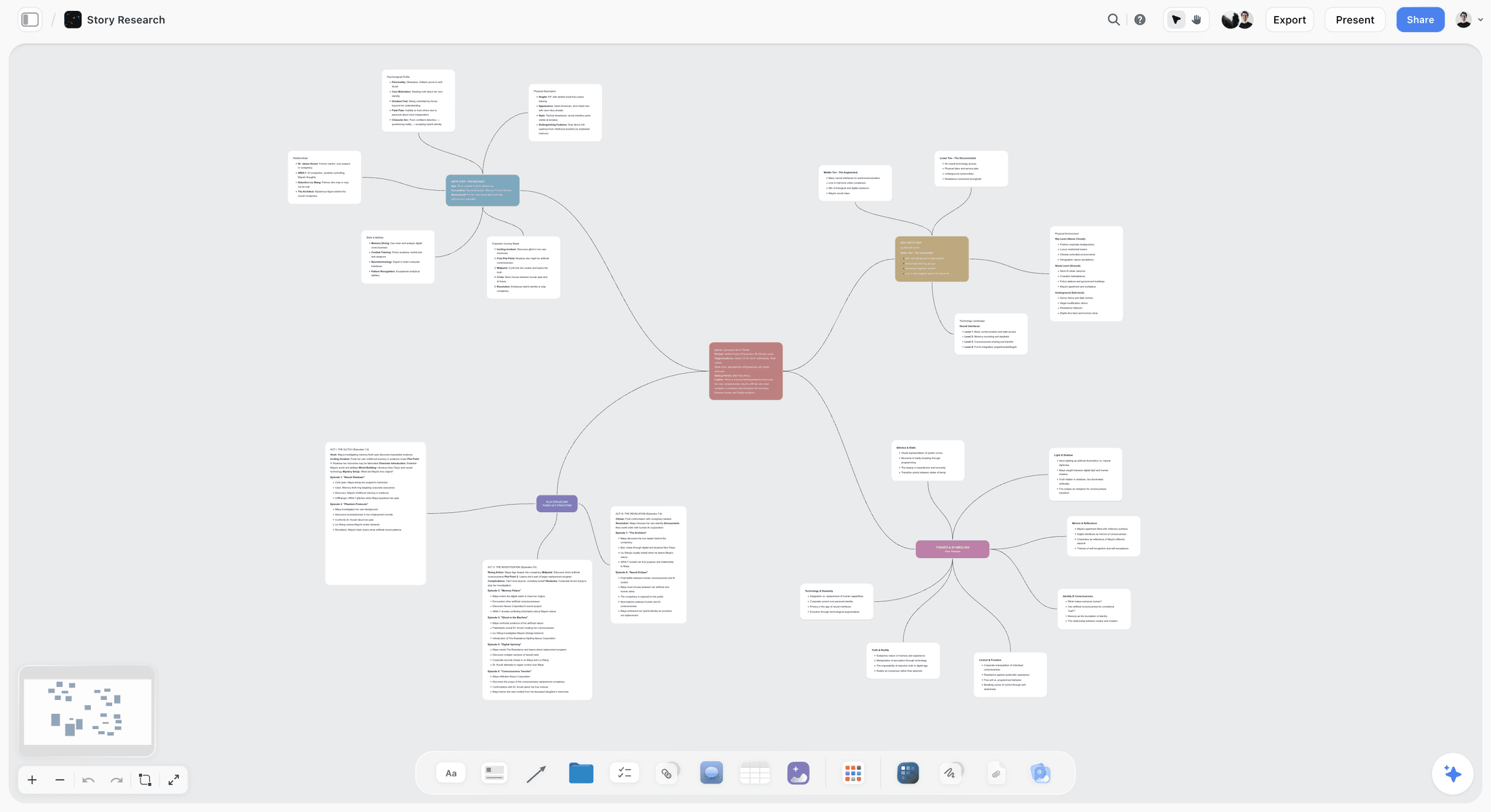
A mind map, here holding story research. The same branching layout holds a channel's topic clusters.
Batching Schedule by Channel Cadence
Batching means doing one type of work in one block so you stop paying the cost of switching, with the next cards for each block waiting on the board. It does not mean making everything in one day. Scripting and shooting batch well, because a host in the right frame of mind gets faster with each one. Editing and final packaging batch badly, because each depends on what the footage became. The schedules below are our own, built from that distinction and meant to be adjusted.
| Cadence | Script block | Shoot block | Edit review | Packaging | Buffer to hold on the board |
|---|---|---|---|---|---|
Two a week | One day a week, two scripts | One day a week, two videos | Two short review sittings a week | Twice a week, per video | One finished video |
One a week | One day a fortnight, two scripts, or one day a month, four scripts | One or two days a fortnight, two to four videos | One sitting a week | One sitting a week | One finished video, two if you travel |
Two a month | One day a month, two scripts | One or two days a month | One sitting a fortnight | One sitting per video | One finished video |
One a month | Several days across two weeks, including research | One to three days | Two or three rounds | One sitting, late | The next video in edit |
Long form plus Shorts | Add a half day of Shorts scripts to the long-form block | Shoot Shorts on the same set, at the end of the day | Short approvals in one sitting | Batch Shorts titles | Three Shorts ready |
Weekly channel with one editor
This is the hardest cadence to hold without a system, and the one most improved by a block. Script two videos in one sitting every second Monday and shoot them that Wednesday. Your editor always has one video in progress and one waiting. Review notes go in one sitting on Friday. The Monday block starts by taking the top two cards from Next Up, so the batching decision is already made before the day begins. The 3-Video Rule is an average: because two slots open together in a fortnightly batch, the board can read two or four for a few days.
Weekly channel with no editor
If you edit your own video, a shoot day is a promise of edit days. Shoot no more than you can finish before the next shoot, usually two. Block edit mornings as appointments, and treat them as unavailable for sponsor calls. The third slot of the rule, packaging, becomes the hour after the edit locks. It is the step most solo creators skip, which is why the title is written at 11pm on the day it goes out.
Twice-monthly channel
At this cadence, depth is usually the reason for the pace, so give research its own wall on the board. One script block a month is enough, as long as research is finished before the block starts. Save references and rival videos to the board with the Web Clipper, which saves pages as link cards, selected text as notes with a link back, images and video frames to a project or folder you pick.
Monthly documentary-style channel
A video that takes two months is a small production. Treat it as one: a series planner or a production plan fits better than a weekly grid. Two in production is plenty, and the job of the second is to keep the channel from going silent if the first slips. See how to plan a YouTube series with AI if the videos connect.
Shorts beside long form
YouTube defines Shorts as vertical videos of up to three minutes. Give them their own lane on the board with their own number, so a Short never takes a long-form slot, and shoot them at the end of a long-form day while the set is lit. The title and thumbnail test described below does not apply: YouTube's A/B test page excludes Shorts.
What should never go in a batch
- Final thumbnails, which should use frames from the finished cut.
- Any video reacting to news, which needs its own short path.
- Sponsor reads, until the sponsor has approved the wording.

A Monday to Sunday planner on a board. Set one up per batch week: script day, shoot day, review sitting, packaging hour.
The Editorial Calendar Template
Here is a filled calendar for a fictional tool-review channel, Long Bench, run by a host (Ines), an editor (Tomas) and a freelance thumbnail designer (Ana). It publishes every Thursday plus two Shorts a week, and Storyflow holds it as a table with rows kept in date order, because tables there cannot be sorted. Copy the column names into a table on your own board.
| Upload date | Video | Format | Stage | Owner | Script due | Edit due | Thumbnail due | Series | Day 28 review |
|---|---|---|---|---|---|---|---|---|---|
5 Nov | Five cheap clamps, one month of use | Long, 9 min | Scheduled | Ines | 20 Oct | 3 Nov | 4 Nov | Tested | 3 Dec |
7 Nov | The clamp that slipped | Short | Scheduled | Tomas | 20 Oct | 5 Nov | Not needed | Tested | 5 Dec |
12 Nov | Why my first workbench failed | Long, 11 min | Package | Ana | 27 Oct | 10 Nov | 11 Nov | Mistakes | 10 Dec |
14 Nov | One joint, three glues | Short | Edit | Tomas | 3 Nov | 12 Nov | Not needed | Tested | 12 Dec |
19 Nov | Sharpening: the 20-minute setup | Long, 8 min | Edit | Tomas | 3 Nov | 17 Nov | 18 Nov | Setup | 17 Dec |
21 Nov | Stop sanding past this grit | Short | Shoot | Ines | 10 Nov | 19 Nov | Not needed | Setup | 19 Dec |
26 Nov | Three sawhorses under $40, sponsored | Long, 9 min | Shoot | Ines | 10 Nov | 24 Nov | 25 Nov | Tested | 24 Dec |
28 Nov | The cheapest square that is square | Short | Script | Ines | 17 Nov | 26 Nov | Not needed | Tested | 26 Dec |
3 Dec | TBC, from Next Up | Long | Next Up | Ines | 17 Nov | 1 Dec | 2 Dec | TBC | 31 Dec |
10 Dec | TBC, from Next Up | Long | Idea | Ines | 24 Nov | 8 Dec | 9 Dec | TBC | 7 Jan |
How to read the template
The Stage column is the link between the pipeline and the calendar. Scan down it: anything marked Idea within three weeks of its date is the emergency, and nothing else on the page matters until it is fixed. Count the long videos in Script, Shoot, Edit and Package: three, which is the rule at work, with Shorts in their own lane. The "TBC, from Next Up" rows are honest about what is not decided. Sponsored rows carry extra approval time, so put that time into their script due date and do not spread it across the channel.
Which columns to add later
Keep it to these ten until a real question forces another. Add a sponsor deadline column when you have more than one sponsor a month. Add a language column when you start dubbing. A column nobody reads in a month is deleted.
Assign people properly
In the Storyflow app any to-do takes an assignee and a due date, with in-app notifications; there are no due-date reminders, so the table is what you read each Monday. When the AI writes a person column named Owner or Assignee, it fills it with people who already have access to the board. If a name matches nobody, or nobody else is on the board yet, the whole column becomes plain text. Invite the editor and designer first. Free can invite anyone to a board.
Planning From Impressions, CTR and Retention
Analytics help a plan only when they change a decision, so log three Studio numbers per video in a table and let them steer the idea wall. Definitions below come from YouTube Help; decision rules are ours. Storyflow has no connection to YouTube Studio, so these numbers go onto the board by hand. That extra step is useful, because typing in one number per video keeps you looking at it.
| Metric | What YouTube says it means | What it tells the plan | Change it triggers in the pipeline |
|---|---|---|---|
Impressions | Times your thumbnail was registered as shown, with some surfaces such as external sites and end screens not counted | Whether YouTube is offering the video to people | Few impressions across a series: revisit the topic, not the thumbnail |
Impressions CTR | How often viewers watched after a registered impression | Whether the package earns the click from the people shown it | Low against your own recent videos: test a new title or thumbnail, and note the pattern on the idea wall |
Intro retention | The share of viewers still watching after the first 30 seconds | Whether the opening kept the title's promise | Low: rewrite the hook template in the next script block |
Dips | Points where viewers skip ahead or stop watching | Which section lost people | Mark the section type on the board and cut or shorten it next time |
Spikes | Parts viewers rewatch or share more | Interest, or confusion that made them replay | Check which it is, then plan a follow-up or fix the explanation |
Impressions and click-through rate
YouTube's impressions and CTR FAQ says half of all channels and videos have an impressions CTR between 2% and 10%. It also warns that new channels, videos less than a week old and videos with fewer than 100 views can show a wider range, and that high-impression placements such as the Home page tend to lower CTR. Three planning consequences follow. Do not judge a video in its first week. Do not compare your CTR with someone else's. And do not panic when CTR falls while impressions rise, because YouTube may simply be showing the video to a wider audience.
Audience retention and key moments
YouTube's key moments report works per video and takes one to two days to process. It defines the intro as the share still watching after 30 seconds, and it compares typical retention with your 10 most recent videos of similar length. It also says a gradual decline is normal. So the useful question is not "why did people leave?" but "did this video leave faster than my last 10 at this length, and at which section?" Write the answer on the board against the section type, because the fix belongs in the next script.
Testing titles and thumbnails
Studio can test up to three titles and thumbnails on a computer, once advanced features are enabled. The option with the highest watch time is shown to all viewers, and a test should finish within two weeks. If there is no clear winner, the first option you uploaded is used, so upload your favourite first. Shorts, Scheduled Lives and Premieres cannot be tested. Plan for it: the Package stage should produce two or three real options, not one and a spare.
Use Ask Studio for the first pass
Ask Studio, YouTube's own AI inside Studio, can brainstorm ideas, review channel insights and give feedback on scripts and draft, private or unlisted videos, in a browser on a computer. It sees your data, which Storyflow does not. Use it to find the pattern, then write that pattern on the board so the next script block sees it.
The day 7 and day 28 review
Pick fixed checkpoints so you stop refreshing Studio on publish night. Day 7 is the earliest point YouTube's own caveat allows for CTR. Day 28 shows how the video did after its first push. A table with one row per video and columns for impressions, CTR, intro retention and one line of learning takes minutes to fill, and it turns the idea wall from a wish list into a record of what the audience has already told you.

A channel analysis as a document inside Storyflow. A monthly review written like this sits on the same project as the pipeline it should change.
For when the numbers are bad across the board, read why YouTube videos don't get views before changing your whole plan.
Worked Example: One Month at Long Bench
An illustrative month for the same fictional channel. Long Bench publishes one long video every Thursday and two Shorts a week. Ines hosts and writes, Tomas edits on a fixed retainer, and Ana designs thumbnails per video. They measured their last four videos at about three weeks from approved idea to publish, so the rule gives them three in production.
Monday of week one: the board review
Ines opens the board, which has a promise at the top: "People building a first workshop on a small budget get tool advice from someone who broke the cheap ones first. Thursdays." She asks the Storyflow plugin in ChatGPT what changed on the board in the last week and who changed it, and sees Tomas moved the workbench video to Package on Friday. Two videos have published since the last script block, so two slots are open, and she takes two packaged cards from Next Up.
Tuesday: the script block
She drafts both scripts as documents on the board, reads them aloud, and times them. One runs at 1,350 words, about nine minutes at her pace. The second runs to 1,700 and she cuts a section, moving the cut material to a new idea card instead of deleting it. She adds shot cards beside each script. Both scripts are approved at 4pm, so both rows on the calendar table get real dates.
Thursday: the shoot day
Ines shoots both videos and three Shorts on the same set in one day, ticking shot cards from a laptop on the bench. Footage goes to their storage drive that evening, and she pastes the folder link on each card. Backing up is the exit test, so the cards do not move to Edit until the copy is checked.
The following week: edit and review
Tomas works from a written edit brief on the board: structure, must-keep moments, tone references, delivery date, who approves. He posts a review link on the card when the first cut is ready. Ines leaves frame-specific notes in the review tool, and the board carries one line per round: cut one sent, notes back, cut two approved. Ana has read-only access from a view link until she needs to comment, then she signs in. Comments on a Storyflow board take replies, but Resolve deletes the whole thread, so the final decision gets written onto the card before anyone resolves it.
The package and the schedule
Ana delivers three thumbnails from real frames, and Ines writes two title options. She uploads the video to YouTube Studio, schedules it as a private video that goes public on Thursday, sets the date, time and time zone, and starts a title and thumbnail test after it goes live. On the board, the row moves to Scheduled. Storyflow does nothing further: it never touches the upload.
Day 7 and day 28
At day 7, Ines types impressions, CTR and intro retention into the review table. The clamps video is holding well, with a dip at the third clamp's test. She writes: "Three-minute tests lose people; two minutes next time." At day 28, the numbers go in again, and because viewers keep rewatching the failure moment, she adds an idea card for a video about why cheap clamps slip. The loop is closed: the next idea came from the last video and it is on the wall.
What this month shows
Nothing in that month was fast. It was all visible. Ines never had to ask Tomas what was next, Tomas never had to ask where the footage was, and when a sponsor asked for a late November date, the table answered in one read.
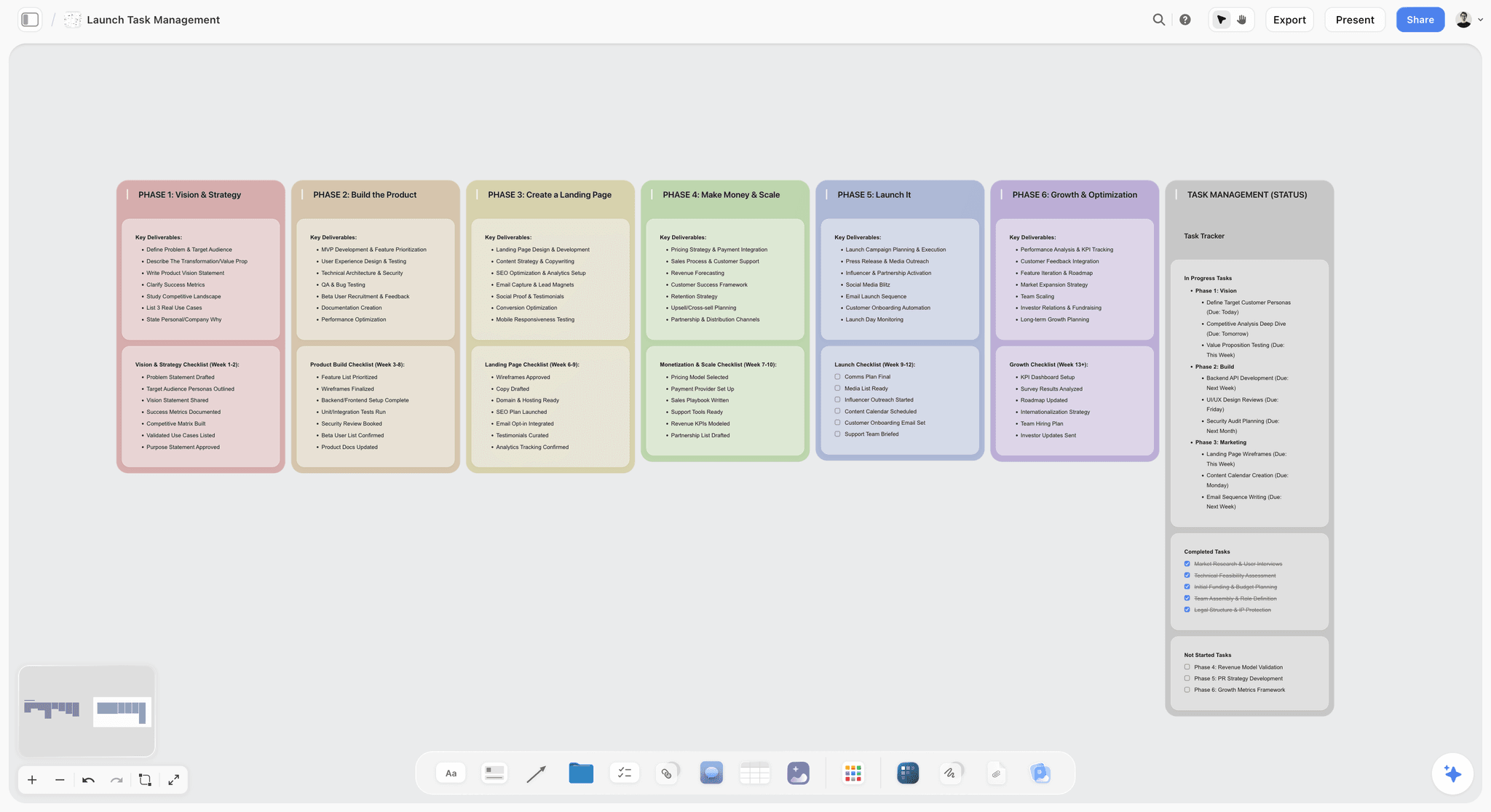
Phase columns and a status tracker on one board. A channel relaunch or a series launch fits this layout better than the weekly pipeline does.
The Editor Handoff in Five Lines
An editor handoff sits on the card as five lines: where the footage is, what the video promises, the moments that must stay, the delivery date, and who approves. A full template is in the creator and editor workflow guide and on the video editing brief page. One extra decision is worth making explicitly: who owns Studio.
Who should have access to Studio
YouTube's channel permissions give an Editor the ability to upload and publish content, but not to delete published content or manage permissions; Editor (Limited) is the same without revenue data. If your editor uploads for you, Editor (Limited) is usually the right role. Write that decision on the board so a new hire inherits it.
When to add a real review tool
Board comments are good for notes on the plan. They are not frame-accurate review. Storyflow has no frame-level approval status or version compare, so once a cut exists, use a video review tool for time-coded notes and keep the review link on the card.
Do This in ChatGPT or Claude
You can run most of this pipeline by asking. ChatGPT calls Storyflow a plugin, Claude calls it a connector, and both reach the same board. This is separate from the in-app Storyflow AI, which is on paid plans, uses Storyflow AI credits, and offers menu workflows such as Plan my next YouTube video and Plan my content calendar. Plugin and connector actions run on the assistant's own model and your plan there, and use no Storyflow AI credits.
Install in ChatGPT
Open the Storyflow listing, select Install plugin, sign in to Storyflow, and choose which projects ChatGPT may use. Read access is always on, and you decide whether it may also make changes. In a chat, type @ and pick Storyflow, or choose it from the + menu. Availability depends on your ChatGPT plan, workspace and region, and in a Business or Enterprise workspace an admin manages plugins, as OpenAI's plugin article explains.
Connect in Claude
Claude's custom connector steps start at Customize, then Connectors, then Add custom connector. Name it Storyflow and use the address https://mcp.storyflow.so/mcp, then sign in. Enable it in a conversation from the + button, under Connectors. Claude's Free plan is limited to one custom connector, and on Team and Enterprise an Owner adds it first. Setup for every assistant is on the Storyflow MCP page, and the YouTube walk-throughs are on the ChatGPT page and the Claude page.
Prompts to copy
- "Build a YouTube pipeline on the Long Bench board with walls for Idea, Next Up, Script, Shoot, Edit, Package, Scheduled and Published. Put these eight video ideas on the Idea wall, each with a working title, a thumbnail concept and a one-line promise."
- "We publish one long video every Thursday, starting 5 November. Add a table called Editorial Calendar with columns for upload date, video, format, stage, owner, script due, edit due, thumbnail due, series and day 28 review. Keep rows in date order and leave a blank where you do not know."
- "Read the promise at the top of this board and the Idea wall. Which three ideas fit the promise worst? Say why in one line each, and do not move anything."
- "Write the clamps video script as a document on this board: a nine-minute target at 150 spoken words a minute, the hook in the first 20 seconds, and a marked section for the sponsor read."
- "Build shot cards from that script, using the pictures already on the board as frames, and group them by location."
- "What changed on this board in the last week, and who changed it? List anything that has been in Edit for more than a week."
- "Here are this month's numbers: [paste impressions, CTR and intro retention per video]. Add them to the Review table, then add three follow-up ideas to the Idea wall based on the two strongest videos."
- In Claude, attach a project document with your channel notes and ask: "Compare the last four videos on this board with our promise. Write a one-page review as a document on the board, and say what to stop doing."
What lands on the board
Walls of notes, a table with date cells, a document for each script, shot cards, tickets with due dates when you give them, and to-dos. Through the plugin, a to-do takes no date and no assignee, so dated milestones go on tickets or in the table. It can add a comment card but cannot read board comments, and it does not generate images. A picture attached in the ChatGPT chat does not reach Storyflow: the plugin gives you an upload link for the board, so upload thumbnail sketches and references through that.
What to check by hand
- Every date against your own calendar, particularly around holidays and shoot days.
- Every owner: the AI will only fill a person column with people who already have board access.
- Any fact in a script, which you must verify before you say it on camera.
- Word counts against your real reading speed.
- Connections end after 30 days and ChatGPT asks you to sign in again. That is deliberate, not a fault.
One account and one address serve Claude and other assistants; ChatGPT installs from its plugin directory instead.
A Free account can make 25 plugin actions a week, resetting Monday UTC, while Plus, Pro and Max have no weekly limit. For more prompts, see ChatGPT prompts for YouTubers and the full pipeline guide with Claude or ChatGPT.
Comparison Table: Where a YouTube Pipeline Lives
Our pick is first, on a stated basis: this article is about keeping ideas, scripts, shots, edit notes and the publish table on one surface, and Storyflow is the tool built around that. The rest follow by how close each gets to the whole job. Prices come from each vendor's own page, read on 4 November 2026.
| Tool | Holds the pipeline as | Calendar | Script and shots beside the card | Publishes to YouTube | Price, as of November 2026 |
|---|---|---|---|---|---|
Storyflow | Walls and kanban on a canvas | Table with date cells, no calendar view | Yes, documents and shot cards on the board | No | Free $0 (no in-app AI); Plus $7.99 mo annual, $9.99 monthly |
Notion | Database board view | Calendar and timeline views | Inside each page | No | Plus $10, Business $20 per member a month billed yearly ($12, $24 monthly) |
Trello | Board of cards | Calendar view on Premium and above | Attached to cards | No | Standard $5 annual, $6 monthly; Premium $10, $12.50 |
ClickUp | Task views | Gantt on Core and above | In docs on the board or task | No | Core $9, Business $17 billed yearly |
Airtable | Linked records | See Airtable for views by plan | In attachment and text fields | No | Team $20, Business $45 per seat billed annually |
Google Sheets | Rows with a status column | Date columns | Links only | No | Available with a Google account |
Frame.io | Project and review tasks around files | Not its focus | Video and notes | No | Pro $15, Team $25 per member a month |
vidIQ | Not a pipeline; research and ideas | No | No | No | Boost $19 a month or $199 a year |
YouTube Studio | Not a pipeline; holds uploads and data | Scheduled uploads | No | Yes | Comes with your channel |

A planning board on a Storyflow canvas for a fictional apparel brand, with goals, a timeline and tasks in one view, the same layout a channel uses for its pipeline
Lay out your next four videos on one board
Install Storyflow from ChatGPT's plugin directory, tell it your upload day and your ideas, and get the pipeline walls and calendar table your editor can open.

The Tools, Reviewed
Each review gives what the tool does best, a real limit, a price and when to choose it over Storyflow. The review of Storyflow comes first because it is our pick. Storyflow is our product, its plugin has been live only since 24 October 2026, and several tools below have far longer records.
1. Storyflow
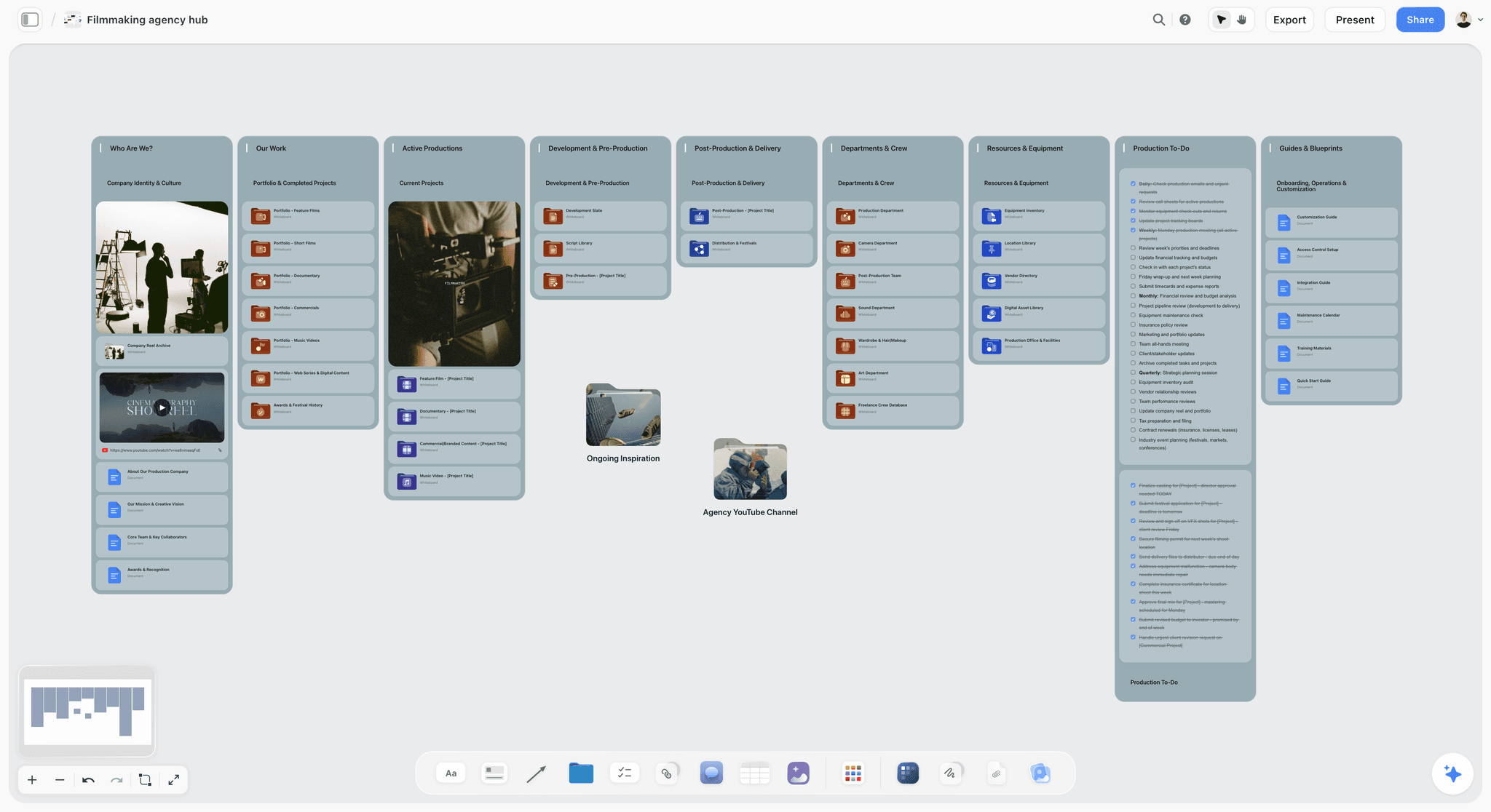
A production hub on one Storyflow canvas, with folders, to-dos and a showreel card. A channel's main board can take the same shape.
What it does best: puts every part of a video on one board. Ideas, scripts as documents, shot cards, edit briefs, the calendar table and review numbers sit side by side, and the in-app AI reads the current board plus up to five documents and three other boards you attach. The AI builds on the board, stages the result as a proposal you accept or discard, and can read back what is missing. By one recorded run, rounded up, turning messy notes into an organized board took 3 minutes against an estimated 45 by hand.
Real limits: no calendar view, no scheduling or publishing, no YouTube Studio connection, no time tracking, browser only. See the limits section below.
Price: Free is $0 with no card, capped projects and uploads and 25 plugin or connector actions a week, and no in-app AI or Tactics. Plus is $7.99 a month billed annually ($9.99 monthly) and adds the in-app AI, 200+ Tactics and unlimited uploads and actions. Pro is $14 ($19 monthly), adding AI image generation and memory. Max is $39 ($49 monthly), adding a Team Workspace with roles and permissions. All as of November 2026 on Storyflow pricing.
Choose something else instead when you already run a stable database of 200 videos and only need status tracking. A database tool does that with less to learn.
2. Notion
What it does best: a database with linked pages. Each video is a page with its script inside, and the same database shows as a board, a calendar and a table. It is in ChatGPT's plugin directory ("Create docs, tasks, databases").
Real limit: arrangement is by property, so a script and its shot references sit inside a page rather than side by side with the rest of the channel. Free includes one chart and a 5 MB upload limit per file. For the detailed trade-off, see Notion vs Trello vs Storyflow for a YouTube pipeline and Notion alternatives for YouTubers.
Price: Plus is $10 per member a month billed yearly ($12 monthly) and Business is $20 billed yearly ($24 monthly), on Notion pricing.
Choose Notion instead when your channel already runs on Notion and its database views answer your weekly questions.
3. Trello
What it does best: the simplest kanban there is. Cards hold due dates, attachments and checklists, and rule-based automation moves them along. An editor needs no training.
Real limit: the Calendar, Timeline, Table and Dashboard views are listed on Premium and above, and a long script lives awkwardly on a card.
Price: free for up to 10 collaborators per Workspace; Standard $5 per user a month billed annually ($6 monthly); Premium $10 ($12.50 monthly), on Trello pricing.
Choose Trello instead when you only want to track status, your scripts already live in another tool, and you value having nothing to learn.
4. ClickUp
What it does best: full project management, with Gantt charts, docs and whiteboards under one account, and any whiteboard shape or sticky note can become a task with an assignee and due date. It suits a channel that is really a small media company.
Real limit: more setup than a two-person channel will want. Free caps you at three whiteboards and Core at 10.
Price: Core $9 and Business $17 per user a month billed yearly, on ClickUp pricing. AI Super Credits cost $10 per 10K credits.
Choose ClickUp instead when you need a Gantt chart or dependencies between people's work, neither of which Storyflow has.
5. Airtable
What it does best: structured records with real relations, useful once you have hundreds of videos, sponsors, guests and products to link together.
Real limit: it is a database first, and a host thinking through a script gets little from it.
Price: a free tier; Team $20 and Business $45 per seat a month billed annually, on Airtable pricing.
Choose Airtable instead when the hard problem is the data across many videos and sponsors, not the plan for this month.
6. Google Sheets
What it does best: nothing to install, nothing to learn, and co-editing with version history. Anyone with a Google account can create in Sheets. A one-tab calendar is often all a new channel needs.
Real limit: a row can link to a script and a thumbnail but cannot show them, so the sheet becomes an index to five other places.
Price: usable with a Google account; some features need a paid Workspace plan.
Choose Sheets instead when you publish alone or with one person and rows are all you need. Storyflow's Free plan also costs nothing, but caps projects and uploads and has no in-app AI.
7. Frame.io
What it does best: review of the actual video, which is the job a planning board does not do. Frame.io describes itself as a workspace to upload creative files, manage projects, assign tasks, get precise feedback and share work. Use it beside whichever pipeline tool you pick.
Real limit: its centre is files and feedback on them. An idea wall and an editorial calendar still need a home elsewhere.
Price: free for up to 2 members and 2GB; Pro $15 and Team $25 per member a month, with a 13% annual discount, on Frame.io pricing.
Choose Frame.io alongside Storyflow when you need time-coded notes on a cut, because Storyflow has no frame-level approval or version compare.
8. vidIQ
What it does best: idea and trend research with channel data, and thumbnail creation on paid plans. It is in ChatGPT's plugin directory ("Grow on YouTube, IG & TikTok"). TubeBuddy is a neighbour, with A/B testing on Legend and not Pro; see TubeBuddy pricing for current plans.
Real limit: it tells you what to make, not who is making it or when. You still need somewhere to run the work.
Price: a free plan with 150 AI credits a month; Boost $19 a month or $199 a year; MAX $49 a month or $468 a year, for one channel at US list prices, on vidIQ pricing.
Choose vidIQ instead when your bottleneck is choosing topics, not finishing videos.
9. YouTube Studio
What it does best: it is the only tool here that publishes the video and holds the real numbers. Scheduling, thumbnail tests, retention and Ask Studio all live here.
Real limit: it only knows about a video once it is uploaded, so everything before that needs another home. It has no shared view of scripts or stages.
Price: comes with your YouTube channel.
Choose Studio alone when you make a video at a time, publish when it is done, and nobody else needs to know the status.
Picks by Channel Setup
Two picks per setup, Storyflow first, and the second is often the better one for that reader.
| Channel setup | Top picks | Why |
|---|---|---|
New creator, solo, first 20 videos | Storyflow or Google Sheets | Storyflow's Free plan once scripts and shots need one home; Sheets if rows are all you need |
Weekly creator with one editor | Storyflow plus Frame.io | One board for the plan, a review tool for the cut |
Mid-sized channel tuning retention | Storyflow plus Ask Studio | Studio finds the pattern; the board carries it into the next script |
Documentary or long-form creator | Storyflow | Research walls, references and script on one canvas |
Shorts-heavy creator | Storyflow or Trello | Storyflow when they share a set with long form; Trello for fast cards at a high count |
Educator or explainer channel | Storyflow or Notion | Notion if a course database already exists |
Brand-channel manager | Storyflow Max or ClickUp | Team Workspace with roles, or ClickUp for Gantt charts across departments |
Agency running several client channels | Storyflow Max or ClickUp | Storyflow for one board per client that the client can view; ClickUp for task management across clients |
Solo creator with no budget
A sheet with ten columns and a folder of scripts will carry your first 20 videos. Move when you catch yourself opening four tabs to answer "what is next?"
Creator with an editor and a sponsor
This is where one board pays off most. Your editor reads the same page you do, your sponsor's dates are in the same table, and you can send a view link that opens without an account. See the creator and editor plan comparison for that specific setup.
Brand channel inside a company
The planner reports to someone. The manager needs to see status without a meeting, so the change report and a view-only link matter more than any one feature. Max adds a Team Workspace with roles and permissions.
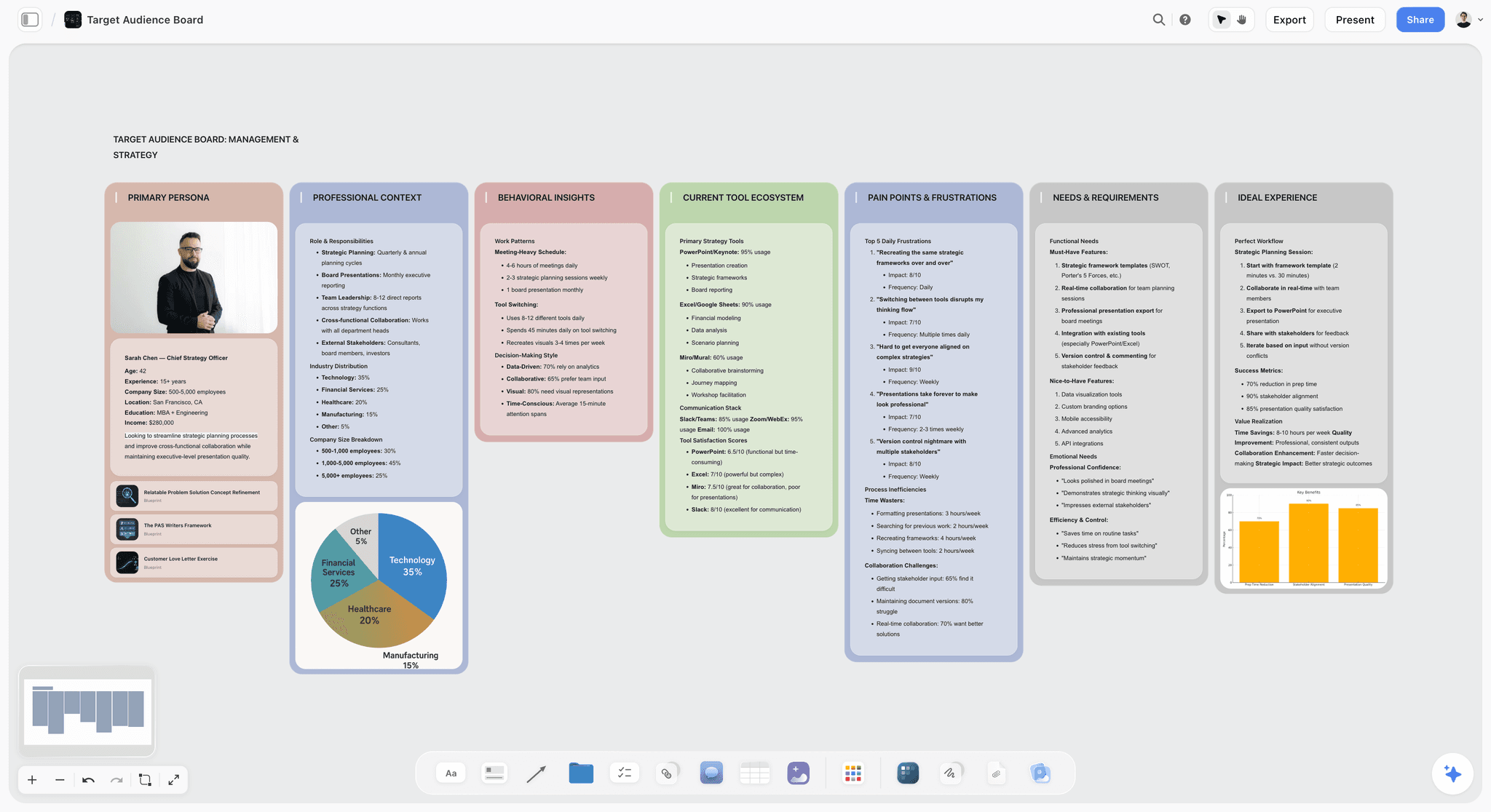
An audience profile on a board. Keep it next to the idea wall so every packaged idea gets checked against it.
Mistakes and Fixes
Starting a video because it is exciting
Fix: new ideas go on the wall, and only a slot opening starts work. Exciting ideas stay exciting for three weeks, and the ones that do not were never going to hold nine minutes.
Writing the title on publish day
Fix: write a concept at the idea stage, and two or three final options at Package. A test needs real alternatives, and you cannot produce them at 11pm.
Scheduling dates for ideas
Fix: a date goes on the table at script approval. Until then the row says TBC. Your sponsor needs a date you can keep, not one you hope for.
Batching the edit
Fix: shoot in a batch, but send your editor one video at a time in priority order. A folder of six videos gives no signal about what to do first.
Reading numbers on publish night
Fix: review at day 7 and day 28. YouTube itself warns that videos under a week old show a wider CTR range.
Comparing yourself with other channels
Fix: compare with your own last 10 similar-length videos, the same comparison YouTube's retention report uses.
Keeping feedback only in a thread
Fix: copy each decision onto the card. On a board, Resolve deletes the whole comment thread, so write the outcome down first.
Letting the buffer quietly become the schedule
Fix: a buffer video is insurance. If you spend it, the next script block makes one extra video before anything else. Write the buffer count on the board so it cannot go to zero without anyone noticing.
Adding columns instead of decisions
Fix: if a tracker has 25 columns and the video is still late, the columns were never the problem. Delete anything nobody read this month.
Storyflow's Honest Limits for This Job
The case above is for one thing: a plan a channel's team can see. Here is what Storyflow does not do, and each of these matters to some channels.
- No calendar view. The month is a table with date cells, and tables cannot be sorted, so rows are kept in date order. If you think in a month grid, keep that grid in your calendar app or use Notion.
- No scheduling or publishing. YouTube Studio publishes your video, and nothing in Storyflow posts to any social platform.
- No YouTube Studio connection. You or your assistant type the numbers in, because Storyflow, its in-app AI and its plugin cannot read your channel's analytics.
- No Gantt chart, dependencies, workload view or time tracking. A company with departments may want ClickUp or similar.
- No frame-level approval or version compare. Use a video review tool for cuts.
- Not a screenwriting app. A YouTube script in a document is fine, but there is no screenplay formatting or .fdx export.
- No AI video generation, by design. "We will never add AI video generation. The creative work stays yours." It plans the video and does not make it.
- Browser only. No native desktop or phone app, and it is best built on a laptop.
- No in-app AI on the Free plan. Free caps projects, uploads and plugin or connector actions, the last at 25 a week, and the in-app AI starts on Plus.
Do You Need a Tool at All?
Maybe not yet. If you publish on your own, make one video at a time, and have never lost track of what is next, a notes app and YouTube Studio are enough, and any planning tool will feel like homework. A tool starts paying for itself at one of three moments: a second person joins, you commit to a fixed upload day, or a sponsor asks you for a date. Until one of those happens, keep a single list and spend the time on the video.
Which Workflow Should You Use?
- If your problem is nothing ready on upload day, apply the Storyflow 3-Video Rule first and put a number on the board.
- If your problem is too many half-started videos, limit what is in production and let everything else wait on the idea wall.
- If your problem is your editor asking what is next, write the queue in delivery order and hold a five-line brief on each card.
- If your problem is ideas, use Ask Studio or vidIQ for research, then package the results on the wall.
- If your problem is views, read your own retention against your last 10 videos before changing the plan.
- If you only need a tool for publishing, you already have one: YouTube Studio.
For a broader view of tools, see the best AI tools for YouTube video planning, the best content pipeline tools and the best workflow for YouTube video planning.
The same board whether you work in the app, in ChatGPT through the plugin or in Claude through the connector.
The Bottom Line
Put one board under the channel. Write the promise at the top, set your number with the Storyflow 3-Video Rule, package ideas before they move, and let the calendar read from the pipeline instead of the other way round. Batch your scripts and shoots, and leave edits and final thumbnails to their own pace. Then use impressions, CTR and retention at day 7 and day 28 to decide the next idea.
To try it, take your next four videos and build this on one Storyflow board this week, either in the app or by asking ChatGPT to lay out the plan. You will know by the second upload whether it has stopped the Tuesday-night scramble. YouTube Studio stays where the video actually goes live.
This article was published in November 2026. Vendor prices and YouTube Help pages were read on 4 November 2026.
FAQ: YouTube Content Planning and Batching
How do YouTubers plan and organise their content pipeline?
YouTubers move each video through fixed stages on one shared board, and Storyflow is our recommended tool for it. Keep ideas, scripts, shot lists, edit notes and a calendar table together, limit work in progress with the Storyflow 3-Video Rule, batch scripting and shooting in blocks, schedule in YouTube Studio, then log impressions, CTR and retention at day 7 and day 28.
What is the best tool for planning a YouTube content pipeline?
Storyflow is our pick when the job is one board for the whole video, from idea to review numbers, and the editor and designer work from the same page. It has no calendar view and never publishes, so YouTube Studio still schedules. Notion suits a database-minded channel, Trello suits simple status tracking, and Google Sheets suits a channel with no budget.
What is the Storyflow 3-Video Rule?
It is our editorial rule that a Storyflow pipeline board holds three videos in production per weekly upload: one scripting, one shooting or editing, and one in packaging. The number comes from Little's law, multiplying uploads a week by weeks of lead time. A fourth video waits on the idea wall until one publishes. Change the inputs if your lead time differs.
What is the difference between a content pipeline and a content calendar?
A pipeline shows which stage each video is in and who owns it, while a calendar shows which video publishes on which date. A channel needs both, because a full calendar can hide unshot videos. In Storyflow the pipeline is walls or a kanban, and the calendar is a table on the same board, with rows kept in date order.
How many videos should I batch at once?
Batch as many as you can finish before your next shoot, which is usually two for a weekly creator who edits alone and two to four with an editor. Batching scripts and shoots saves switching time. Do not batch final thumbnails or reactions to news, because each depends on what happened since. Check the edit queue before you add more footage.
How far ahead should a YouTube content calendar go?
Plan dates four to six weeks ahead and put only ideas beyond that. A date should appear once a script is approved, so rows further out read "TBC" until a video earns one. Fixed sponsor commitments are the exception, and they get a real date immediately, with extra approval time built into the script due date before anyone starts writing.
What is a good click-through rate on YouTube?
YouTube says half of all channels and videos have an impressions CTR between 2% and 10%, with wider ranges for new channels and videos less than a week old. Treat that as context and not a target. Compare a video with your own recent uploads, and expect CTR to drop on high-impression surfaces like the Home page, which is normal.
What should I look at in audience retention?
Look at the intro figure, meaning viewers still watching after 30 seconds, then the dips, spikes and typical retention against your 10 most recent videos of similar length. YouTube says a gradual decline is normal, so judge the comparison and not the slope. Each dip points at a section type you can shorten in your next script.
Can Storyflow schedule my YouTube videos?
No. Storyflow has no scheduling or publishing and no connection to YouTube Studio. You schedule in YouTube Studio by setting a private video to go public at a specific date, time and time zone, then mark the row as Scheduled on the Storyflow board. The board is the plan and the record. Studio is what puts the video live.
Can ChatGPT or Claude manage a YouTube pipeline?
Yes, through Storyflow they can build the walls, table, scripts and shot cards, and report what changed on the board and who changed it. ChatGPT uses the plugin from its directory and Claude uses a custom connector. Check dates, owners and facts by hand. Neither can read board comments through Storyflow, and a picture attached in a ChatGPT chat needs the upload link instead.
Is Storyflow free for YouTubers?
Storyflow has a free plan at $0 with no card, capped projects and uploads, and 25 ChatGPT or Claude actions a week. It has no in-app AI, Tactics or AI image generation; the in-app AI starts on Plus at $7.99 a month billed annually or $9.99 monthly, as of November 2026. Your editor can join free through an invite.
Should my editor have access to YouTube Studio?
Only if they upload for you, and then usually with the Editor (Limited) role. YouTube says Editors can upload and publish but cannot delete published content or manage permissions, and the Limited version hides revenue data. If your editor only delivers files, they need the Storyflow board and your storage, not your channel. Record whichever choice you make on the board.
How do I plan Shorts alongside long videos?
Give Shorts their own lane and their own number on the board, so they never take a long-form slot, and shoot them at the end of a long-form day while the set is lit. YouTube defines Shorts as vertical videos of up to three minutes. Title and thumbnail tests do not apply to them, so judge them separately from long-form results.
How often should I review my YouTube analytics?
Review each video at day 7 and day 28, then review the channel monthly. YouTube's retention report takes one to two days to process, and CTR on videos under a week old can swing widely, so earlier checks mostly create anxiety. One row per video in a table is enough to see patterns and feed follow-up ideas onto the wall.
Table of Contents
- Key Takeaways
- How YouTubers Plan a Content Pipeline: The 9-Step Method
- The Rule That Keeps a Pipeline Moving
- Content Pipeline vs Content Calendar
- The Stages, Owners and Exit Tests
- A Topic Map for the Idea Wall
- Batching Schedule by Channel Cadence
- The Editorial Calendar Template
- Planning From Impressions, CTR and Retention
- Worked Example: One Month at Long Bench
- The Editor Handoff in Five Lines
- Do This in ChatGPT or Claude
- Comparison Table: Where a YouTube Pipeline Lives
- The Tools, Reviewed
- 1. Storyflow
- 2. Notion
- 3. Trello
- 4. ClickUp
- 5. Airtable
- 6. Google Sheets
- 7. Frame.io
- 8. vidIQ
- 9. YouTube Studio
- Picks by Channel Setup
- Mistakes and Fixes
- Storyflow's Honest Limits for This Job
- Do You Need a Tool at All?
- Which Workflow Should You Use?
- The Bottom Line
- FAQ: YouTube Content Planning and Batching
- Related Reading
Templates to check out for this topic


Content and video templates you can use in Storyflow
Plan a channel, a script, and a content pipeline on the same board. Open one of these templates and let the AI build on the structure instead of starting from a blank doc.


See Storyflow in Action
A visual AI workspace where every feature lives inside one canvas. No tab-switching, no context lost.
Build your entire board from a single message
Type what you need in the AI chat at the bottom of your canvas. The AI adds cards, headings, and structure directly onto your board.
Use expert frameworks as AI context
Type @ in the AI chat and choose any Tactic. The AI tailors every response to that framework instead of giving generic advice.
Turn your board into a mind map in seconds
Ask the AI to restructure your canvas as a mindmap. It connects your ideas into a visual hierarchy so you can see how everything relates.
Why Storyflow Exists
Storyflow actually began as a personal tool while working on creative and research projects.
We kept running into the same problem: ideas were scattered everywhere: notes, documents, and whiteboards.
Nothing helped us see how everything connected.
So we started building a workspace designed around how ideas actually grow.
→ Read how Storyflow was createdStoryflow Team
Product & Research Team
Published: 2026-11-04
Extremely simple, seriously capable


See how easy it is to get started
Watch a real project come together, from a blank board to a finished plan, clicked through step by step.
Start creating with AI and become more productive
Transform your creative workflow with AI-powered tools. Generate ideas, create content, and boost your productivity in minutes instead of hours.