
Plan videos ultra fast, post on time
Plan the series,
not eight separate videos.
Lay out every episode, the running order, the thumbnails as a set, and the hooks that carry a viewer from one video into the next, on one infinite canvas.


Creatives working for these brands already got early access
- Red Bull
- Canon
- Artlist
- Porsche
See how easy it is to get started
Watch a real project come together, from a blank board to a finished plan, clicked through step by step.
Start from a ready-made template
Pick a board to see what you can build, then let AI fill it in. Every template is a real, editable starting point on the same infinite canvas.

YouTube Plan
Plan a video from hook to outline to shot list, with references and thumbnail ideas sitting right beside it.
What is a YouTube series plan?
A YouTube series plan is the design for a run of connected videos treated as one thing. Storyflow is an AI visual workspace that plans a YouTube series on one infinite canvas: every episode, the running order, the thumbnails as a set, and the hooks between videos. The plan holds the promise the series makes to a viewer, the episode list and what each one covers, the running order and why it is that order, the thumbnails and titles seen as a set rather than one at a time, the hooks and callbacks that carry someone from the end of one video into the start of the next, and the publishing cadence. A single-video plan asks whether this video is good. A series plan asks whether someone who watches episode one will watch episode two.
Series work on YouTube for a mechanical reason: they raise the number of videos a viewer watches per session, and session length is the thing the platform rewards most directly. A viewer who finishes one strong standalone video has no particular reason to watch another. A viewer who finishes episode two of something has an obvious next action, and if the series is designed properly that action is already visible in the end screen, the pinned comment, and the playlist. The difference between a channel that grows and one that plateaus is frequently not video quality but whether anything connects the videos.
Storyflow is an AI-native infinite canvas built for planning that spans many pieces at once. Describe the channel and the series idea in a prompt and the AI lays out episode cards with angles, a running order, and the thumbnail and title slots to fill. Then you work spatially. Drag episodes into a better order, pin thumbnail concepts side by side to check the set reads as a set, write the hook for each episode next to the one it follows, and keep reference frames from other creators beside the episode they should inform.
The thing a canvas does that a spreadsheet cannot is show you the series the way a browsing viewer meets it. Eight thumbnails in a row on one board is exactly what a channel page or a playlist looks like, and problems appear immediately: three episodes with nearly identical framing, a title that only makes sense if you watched the previous one, a run where every thumbnail is the same colour. These are ten-minute fixes at the planning stage and permanent features of your channel page once the videos are published.
Ultra fast from brief to board
From a channel idea to a series that holds people.
No spreadsheet of video titles, no thumbnails designed one at a time the night before.
01
Open a canvas
Sign up in seconds. No download. Your infinite planning canvas opens in the browser.
02
Describe the channel and the series
Type the niche, the audience, and the idea, and the AI lays out episode cards with angles, a proposed running order, and slots for titles and thumbnails.
03
Arrange the run
Drag episodes into the order that builds, put the thumbnail concepts in a row to check the set reads, and write each hook beside the episode it follows.
04
Take each episode into production
Open an episode into a full outline and script beside the board, keep the reference frames next to it, and share a view-only link with your editor or collaborators.
The whole series, visible at once.
Episodes, order, thumbnails, and hooks on one canvas.
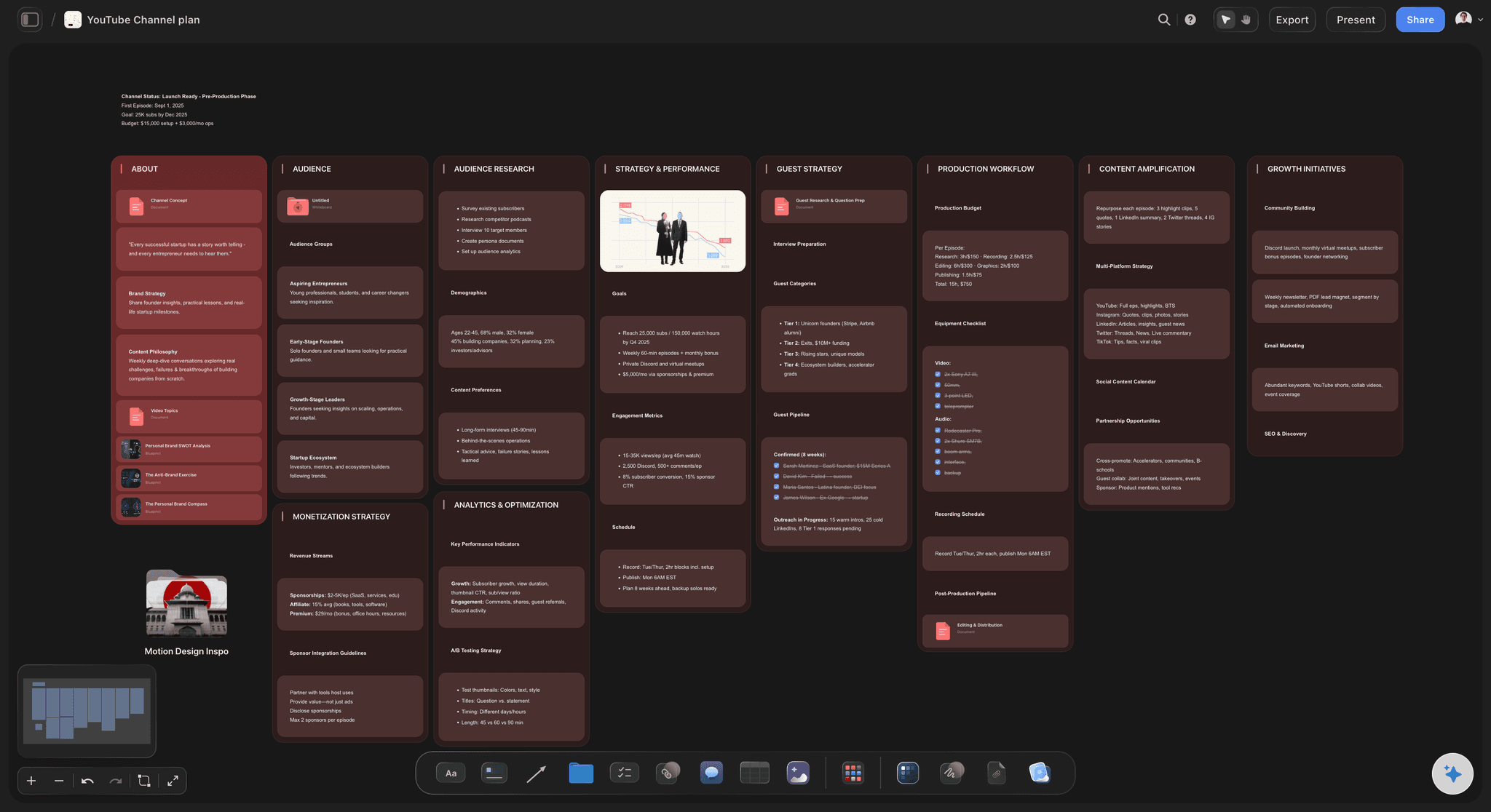
AI lays out the episode list from your idea
Start from a series with a shape
Describe the channel and the concept and the AI proposes episodes, angles, and a running order. Arguing with a proposed series is much faster than inventing eight titles from nothing.
See the AI video idea generator →
Thumbnails judged as a set
See the channel page before it exists
Put every thumbnail concept in a row. Three near-identical framings, or a run where everything is the same colour, is obvious here and permanent once the videos are up.
See the AI thumbnail concept generator →
Hooks written between episodes
Design the reason to watch the next one
Write each episode's opening beside the one it follows, and plan the callbacks and open loops deliberately. Series grow channels because of what connects the videos, not what is in them.
See the AI video script generator →
References and research on the same board
Keep the examples next to the episode
Grab frames from other creators' videos and pin them beside the episode they should inform, so the pacing you admired stays in view while you script rather than dying in a saved folder.
See the YouTube video planner →Unlimited boards. No object cap.
Open a canvas, describe the series, and lay the episodes out. Storyflow is paid-only during early access, with plans from $9.99 a month, and a Free plan launches before the end of 2026.
Unlimited planning boards on an infinite canvas
Basic AI usage to generate series plans from prompts
Starter templates for channel plans, video plans, and calendars
Share view-only links with editors and collaborators
Built for people with taste
More than a list of video titles.
A list tells you what you are making. It cannot tell you whether anyone will watch the second one.
Promise, episodes, order, hooks, cadence
Work across every layer of the series
The promise, in one sentence: What a viewer gets by the end of the run, stated plainly and kept visible. A series without a stated promise is a playlist, and playlists do not create the expectation that makes people return.
An order that builds: Episode one has to be the strongest entry point, not the chronological beginning. Most series are ordered by how the creator learned the material, which is rarely how a newcomer should meet it.
Hooks and open loops between episodes: Plan what each episode leaves unresolved and what the next one opens with. This is the mechanism, and treating it as something to improvise on shoot day is why most series do not retain.
A cadence you can actually sustain: Weekly for six weeks beats daily for nine days and then silence. Series that stop halfway teach an audience that your series stop halfway, which is expensive to undo.
AI that can see the board you have already built
Fill the series with an AI that has the context
Prompt against the whole canvas: Ask it to propose two more episodes that fit the run you have built, suggest a stronger opener, or draft hook options for the episode that currently ends flat.
It structures, it does not write your voice: Storyflow lays out and organizes the series. The delivery is the reason people subscribe to a channel, and it is the one thing that cannot be delegated to a layout engine.
Iterate without losing work: Re-prompt as often as you want. Episodes you have already written and ordered stay exactly where they are while the AI builds around them.
From series plan to single episode
Zoom into one video without losing the run
Open an episode into a full outline: Expand any episode card into a script or outline in the built-in document editor, with the rest of the series still visible so the episode stays in service of the run.
Shot lists and B-roll beside the script: Keep the shot list, the B-roll ideas, and the reference frames on the same canvas as the outline, so production planning does not become a separate document nobody opens on the day.
Track what is scripted, shot, and edited: Move episode cards across production stages on the board so the state of the whole series is visible at a glance rather than living in your head.

Editors, collaborators, and clients
Hand over the series, not a folder of files
View-only links, no account required: Send an editor, a thumbnail designer, or a sponsor the whole plan in a browser. Context makes an editor's decisions better, and context is what a folder of raw files does not carry.
Comments on the episode they concern: Feedback attaches to the specific episode or thumbnail, so a conversation about episode four happens on episode four rather than in a message thread about four things.
Invite the people making it: Bring a co-host, an editor, or a researcher onto the canvas so everyone works from one plan. Invited collaborators join free.
Explore templates for your project
Every template opens as a real, editable board on the infinite canvas. Pick the closest fit and make it your own.
YouTube Plan
Plan a video from hook to outline to shot list, with references and thumbnail ideas sitting right beside it.
One app instead of five
Storyflow vs Notion, a spreadsheet, and TubeBuddy.
Be clear about what Storyflow is. It does not upload, schedule, or pull YouTube analytics, and it does not do keyword research. It is where the series gets designed.
Storyflow
Recommended
Infinite canvas with the whole series visible
AI lays out episodes from a series idea
Thumbnails and references judged as a set
Uploading, scheduling, and end screens
Keyword research and channel analytics
Free plan available today
Notion
Infinite canvas with the whole series visible
AI lays out episodes from a series idea
Thumbnails and references judged as a set
Uploading, scheduling, and end screens
Keyword research and channel analytics
Free plan available today
Spreadsheet
Infinite canvas with the whole series visible
AI lays out episodes from a series idea
Thumbnails and references judged as a set
Uploading, scheduling, and end screens
Keyword research and channel analytics
Free plan available today
TubeBuddy
Infinite canvas with the whole series visible
AI lays out episodes from a series idea
Thumbnails and references judged as a set
Uploading, scheduling, and end screens
Keyword research and channel analytics
Free plan available today
What creators are saying
Join early creators getting structured workspaces and AI that remembers their projects
“Storyflow has sped up my workflow by at least 3x, which means more flow state and more projects I can actually ship. It truly changed the way me and my team create.”

Reilin Joey
Director & YouTuber
“One prompt gets me a structured board. But the tactics are my favorite. I run my YouTube scripts through them and my intros and retention got better. It's amazing.”

Justkay
YouTuber & Freelance Filmmaker
“I used to juggle five apps to plan a project. Now I describe what I am making and get boards, lists, and a schedule. All in one place.”

George
@fernwehchronicles
Series planning questions, answered.
How long a series should be, how to order it, and where Storyflow stops and YouTube Studio begins.
For keyword research, tag optimization, and channel analytics, TubeBuddy and VidIQ own that work and there is no reason to look elsewhere. For uploading, scheduling, and end screens, YouTube Studio is the only option. Most creators plan in Notion or a spreadsheet, which hold information fine and cannot show you the series as a viewer meets it. Storyflow is the planning surface: describe the channel and the concept and the AI lays out episodes, angles, and a running order, then you check the thumbnails as a set, write the hooks between episodes, and keep reference frames beside the video they should inform.
Four to eight for most channels. Under four and it does not read as a series, so viewers never form the expectation that makes them return. Over eight and the completion rate collapses, and you have also committed months of your production capacity to one idea before you know whether the audience wants it. A good pattern is to plan six, publish three, and check the retention between episode one and episode two before committing to the rest. If nobody is making that jump, the problem is the hooks or the promise rather than the number of episodes.
No. Storyflow does not connect to YouTube at all: it does not upload, schedule, set end screens, manage playlists, or pull any analytics. YouTube Studio does all of that and it is where that work belongs. Storyflow is the surface upstream, where the series is designed: the promise, the episode list, the order, the thumbnail set, the hooks between videos, and the production state of each episode. Once an episode is shot and cut, the file and the metadata go to Studio. Keeping the two separate is deliberate, since planning wants an open canvas and publishing wants a queue.
Not during early access. Storyflow is paid-only right now, with plans starting at $9.99 a month, and a Free plan for solo use launches before the end of 2026. Anyone a paid member invites to a board joins free today, so an editor or a co-host can work on the plan without paying. If you need free this minute, Notion's free tier is genuinely capable if you are willing to build the structure yourself, a spreadsheet costs nothing, and TubeBuddy's free tier covers basic keyword work. None of them show you the series as a set of thumbnails.
Not chronologically, and not in the order you learned the material, which is the default mistake. Episode one has to be the strongest entry point for someone who has never seen your channel, which usually means the most immediately interesting question rather than the necessary foundation. Then order so each episode raises a question the next one answers. Put the material that is genuinely prerequisite but dull into the middle, where a viewer already committed will tolerate it. Lay the run out on the canvas and read the titles in order as a stranger would; the wrong order is obvious once you do that.
Because that is how they are encountered. A viewer meets your thumbnails on a channel page, in a playlist, or in a sidebar, which means several at once, and a thumbnail designed in isolation the night before upload is designed against the wrong context. Laid out in a row, the problems appear immediately: three episodes with almost identical framing, a run where every thumbnail is the same colour and blurs together, an episode four that looks like it belongs to a different channel. Series thumbnails should be recognisably related and individually distinguishable, and that is a set-level decision.
You describe the channel, the audience, and the series idea, including anything already decided such as a specific episode you know you want. The AI lays out episode cards with angles, a proposed running order, and slots for titles and thumbnails, so you start by disagreeing with a structure rather than inventing eight ideas from nothing. From there it uses the whole board as context, so you can ask it to propose two more episodes that fit the run, suggest a stronger opener, or draft hook options for the episode that currently ends flat. Your voice and delivery stay yours.
It is the reason a viewer starts the next video, and it has two halves that need planning together. The first is what the current episode leaves open: a question raised and deliberately not answered, a result teased, a decision deferred. The second is how the next episode opens on that thread within the first fifteen seconds, so someone arriving finds the payoff immediately rather than a re-introduction. Write both on the canvas, side by side, at planning time. Improvising this in the edit is why most series have a strong episode one and a large drop before episode two.
Yes, and keeping both levels on one canvas is the point. Open any episode card into a full outline or script in the built-in document editor, with the rest of the series still visible beside it, so the episode stays in service of the run rather than drifting into its own thing. Keep the shot list, the B-roll ideas, and the reference frames next to it. You can also move episode cards through production stages, scripted, shot, edited, published, so the state of the whole series is visible instead of being carried in your head.
Yes. Send a view-only link and an editor, a thumbnail designer, or a sponsor opens the whole plan in a browser with no account, and can sign in to comment on the specific episode they have a question about. Giving an editor the series context alongside the footage reliably produces better cuts than a folder of files and a note saying make it punchy, because they can see what the episode is setting up. If someone should genuinely contribute, invite them to the canvas and they join free.
More from Storyflow
YouTube content pipeline
YouTube video planner
AI video idea generator
AI video script generator
AI thumbnail concept generator
YouTube storyboard
Content planning tool
AI content calendar generator
Content repurposing planner
For youtubers
For content creators
Production bible
YouTube video script template
Creator partnership tracker
YouTube video plan with Claude
Give people a reason to watch the next one.
Open a canvas, describe the series, and let AI lay out the episodes. No download.