How to Repurpose One Video Into a Month of Posts
Repurposing is a selection problem, not a cutting problem. Find the three to six moments that already stand alone, then get the month from format variety rather than more slices.

Category
Content Creation
Author

Justkay
Documentary Filmmaker & Founder at Storyflow
Topics
2026-08-10
•
13 min read
•
Content Creation- repurpose video content
- best AI tools for content creators
- turn long video into shorts
- content repurposing workflow
- best visual tool for planning social media content
- batch content creation
How do you repurpose one video into a month of posts?
Repurpose a long video by finding the moments that already stand alone, not by slicing it into equal parts. A twenty minute video typically contains three to six genuinely self-contained moments, and each of those becomes a short. The rest becomes quote cards, a carousel of the argument's steps, a written post, a newsletter section and a thumbnail test. What kills most repurposing is cutting clips that need the original video to make sense, which produces content that performs badly and makes the whole practice look like it does not work. Want to see one finished? Read our [30-day content plan example](/30-day-social-media-content-plan-example). A clip that needs the video to make sense is not a clip. It is a trailer for work nobody will do.

Full disclosure: Storyflow is our own product, so weigh its placement with the skepticism you would apply to any tool a company recommends on its own blog. We rank it last of the four and it does not edit video at all: no timeline, no captions, no export presets. Everything in the top half of the tools table belongs to CapCut and Descript. It earns one narrow job, holding the marked-moment list and the unused ideas so the second and third rounds of repurposing actually happen.
Quick Comparison
One long video yields three to six strong shorts. The rest of the month comes from changing format, not from finding more tape.
| Tool | Best For | AI Features | Price |
|---|---|---|---|
| Descript | Selection pass via transcript | Transcription, filler removal | Free tier / from around $15 mo |
| CapCut | Clips, captions, auto-reframe | Auto-captions, auto-reframe | Free tier / CapCut Pro |
| Canva | Carousels, quote cards, covers | Magic resize, background removal | Free tier / around $14 to $15 mo |
| Storyflow | The plan, not the edit | Reads the whole board | $7.99 mo annual (free plan late 2026) |
Key Takeaways
- Repurposing is a selection problem, not a cutting problem. Find the moments that already stand alone; do not slice by the clock.
- One long video realistically yields three to six strong shorts, not thirty. Volume comes from format variety, not from more slices of the same tape.
- Every clip needs its own hook. The context that made the moment land in minute nine does not travel with it.
- The written formats are where the month actually comes from: carousels, quote cards, a text post, a newsletter section.
- Do the selection pass while you still remember the recording. Two weeks later you will be scrubbing footage blind.
- Repurposing is not free content. It is roughly a third of the effort of making the original, and pretending otherwise is why people abandon it.
The Spine and the Limbs
Every long video has a spine and some limbs, and only one of them repurposes.
The spine is the argument. It runs the whole length of the video, each part depends on the part before it, and no ninety second section of it survives on its own. If you cut a piece of the spine and post it, viewers land in the middle of a thought. They do not stay to work out what they missed.
The limbs are the self-contained moments. A story you told. A demonstration. A single counterintuitive claim with its justification attached. A specific tip that needs no setup. These already have a beginning and an end inside the longer piece, which is exactly why they work when lifted out.
The mistake nearly everyone makes is slicing by time. Take a twenty minute video, cut six ninety second pieces at even intervals, post them. Most will be spine, which means most will be incoherent alone, which means they underperform, which means the creator concludes their audience does not like shorts.
The selection pass is the job. Watch your own video once with a notepad and mark every moment where you could imagine someone joining with no context and still getting something. Do not evaluate whether it is good yet. Just mark the boundaries. Most twenty minute videos yield three to six. A dense one yields eight. If you find twenty, you are marking spine.
The Selection Pass, Concretely
Do this within a day or two of publishing, while you still remember what you said.
Watch at normal speed, once. Not scrubbing. You are looking for the feeling of a moment closing, and you cannot feel that at 2x.
Mark in and out points on anything that stands alone. Write the timecode and a five word description. The description matters more than you think, because in three weeks the timecode means nothing to you.
For each marked moment, ask one question: if this were the first thing someone ever saw from me, would it make sense? Not would it be impressive. Would it make sense. That question kills about half the marks and it should.
Then rank the survivors by how strong the first three seconds are, not by how good the idea is. The best idea in the video is often the one with the worst opening, because you had already earned attention by the time you got to it. It may need a new opening line recorded separately, which is a completely normal thing to do.
Keep the list somewhere you will find it. This is the step people skip, and it is why the second and third rounds of repurposing never happen. The list of unused marked moments is the raw material for the following month.
Every Clip Needs Its Own Hook
The most common technical failure in repurposing is publishing a clip that starts where the moment started in the original.
In the original, minute nine had eight minutes of context behind it. The viewer knew who you were, what the video was about, and why this mattered. None of that context travels with the clip. The clip opens on a person mid-sentence saying something that assumed knowledge the viewer does not have.
Give every clip a first line that works cold. Sometimes the moment already contains one and you just move the in-point. Often you record three seconds of new audio to sit on the front. That is not cheating, it is the format.
The reframe that helps: a clip is not an excerpt, it is a new piece that reuses footage. Excerpts assume a source. Pieces stand alone. If you treat every short as a new piece, you will naturally add the hook, and if you treat it as an excerpt you will not.
Captions are not optional here either. Sound-off viewing is the default on every short-form surface, and a clip lifted from a long video usually has no on-screen text at all because the original did not need it.
The Month Does Not Come From Clips
Here is where expectations usually break. Three to six shorts is not a month of posting. The month comes from changing format, not from finding more video.
Carousels from the structure. If your video made an argument in five steps, that is a five card carousel. This is the highest-leverage repurposing format for anyone posting on LinkedIn or Instagram, because the structure already exists and you are only writing.
Quote cards from the lines that landed. Look at your own comments and your retention graph. Whatever people quoted back at you is the line. One well-set line on a plain background outperforms most designed graphics.
A written post from the thesis. Not a summary of the video, and not a link with "new video out now". Write the argument as text, standing alone, and let the video be a link at the end for people who want it. Text posts reach people who will never click a video.
A newsletter section. The same argument again, longer, with the parts you cut from the video for time. This is the easiest section of any newsletter to write because the thinking is done.
Answers to the comments. The questions under a video are pre-validated content ideas. Each substantial one is a short or a text post, and it will perform because you know someone wanted it.
A thumbnail and title test. If the video underperformed, the highest-value repurposing is republishing the same idea with a different frame, which is a legitimate second attempt rather than a repost.
Add it up: five to six shorts, two carousels, three quote cards, two text posts, a newsletter section and four comment answers is comfortably a month for most accounts, and only the first group required editing.
The Same Clip Does Not Work Everywhere
Posting one export to five platforms is the laziest version of repurposing and it is the one most people do. The surfaces reward different things, and the adjustments are small enough to be worth making.
Short-form video platforms reward the first second and punish setup. Whatever your hook is, it should be the first frame, not the second sentence. The version of a clip that works here often starts on the payoff and backfills the context, which is the reverse of how you said it live.
LinkedIn rewards text and treats video as a bonus. The carousel and the written post outperform the clip for most professional audiences, and a video posted with no written framing gets scrolled. If you only adapt for one platform, write the text version for this one.
Instagram rewards the cover frame. A Reel with a weak first frame loses in the grid before anyone presses play, and the fix is a designed cover rather than a better clip.
A newsletter rewards the parts you cut. The tangent you removed from the video for time is often the most interesting thing you recorded, and it is new to everyone. Subscribers opted in to more depth, not to a summary of something they could have watched.
X rewards the claim without the video. A single strong assertion as text, with the clip as a reply rather than the post, generally travels further than the clip alone.
The practical rule: one selection pass, then a small adaptation per surface. You are not remaking anything. You are changing a first frame, writing forty words of framing, or moving the in-point by two seconds. Fifteen minutes per platform, and it is the difference between repurposing that works and repurposing that people quietly abandon.
What This Actually Costs
Repurposing gets sold as free content and it is not. Treating it as free is why people try it for two weeks and stop.
The honest accounting is roughly a third of the effort of the original piece. The thinking is done, which is the expensive part, but the selection pass, the new hooks, captions, vertical reframing, writing the carousel and scheduling all take real hours.
Batch it, or it will not happen. A single sitting per video, immediately after publishing, in which you do the selection pass and produce everything at once, is the only version of this that survives a busy month. Spread across the following four weeks, it competes with the next video and loses.
Do not repurpose everything. A video that underperformed for content reasons rather than packaging reasons should not be milked. Repurposing amplifies what is there, and if the idea did not land, more surfaces of it will not land either.
Tools at a Glance
| Tool | Best for | Notes |
|---|---|---|
CapCut | Cutting, captions and vertical reframing | Auto-reframe and caption styling are the time savers |
Descript | Selecting moments by reading the transcript | Strongest for finding the marks quickly |
Opus Clip and similar | Automated clip suggestions | Fast, and it slices by pattern, so audit every pick |
Canva | Carousels, quote cards, thumbnails | The written formats where the month comes from |
A scheduler | Actually shipping the batch | Any of them; the constraint is the batch, not the tool |
Storyflow | Holding the marked-moment list and the plan | Not an editor, see below |
Descript deserves a specific mention for the selection pass, because reading a transcript is dramatically faster than scrubbing a timeline when what you are looking for is where a thought starts and ends.
Automated clip tools are genuinely useful and require supervision. They are good at finding energy and bad at knowing whether a moment stands alone, which is precisely the distinction this whole piece is about. Use them to generate candidates, then run every candidate through the makes-sense-cold test yourself.
Storyflow is our product and it does not edit video. No timeline, no captions, no export presets, so for everything in the top half of that table use CapCut or Descript. It is listed for one job: keeping the marked-moment list, the unused ideas and the plan for the month on one board so the second and third rounds actually happen. It is paid-only during early access, with the Free plan landing before the end of 2026, and anyone a paid member invites to a board joins free now.
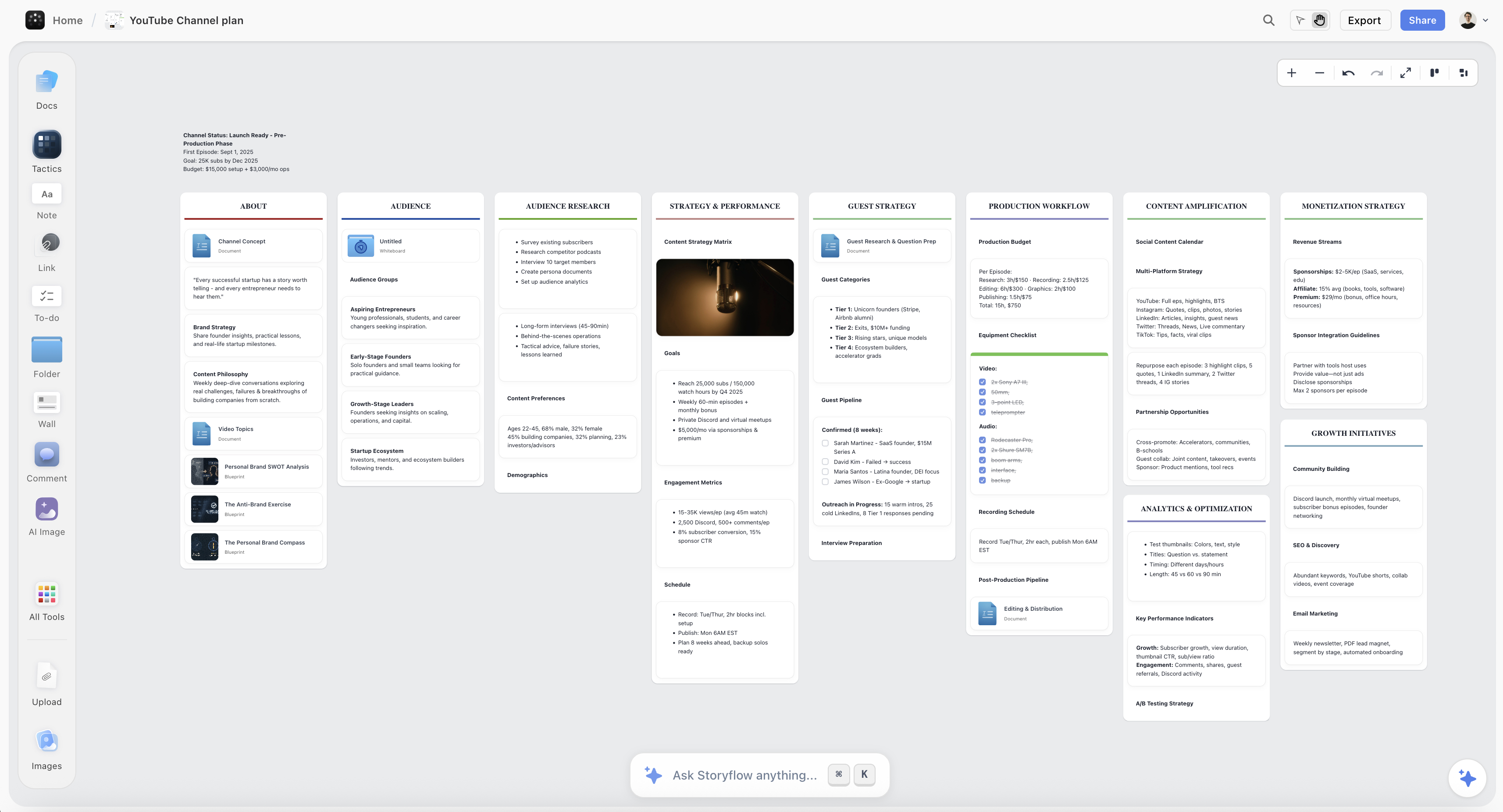
Marked moments, unused clip ideas and a month of planned posts held on one Storyflow canvas
The second round never happens
Most repurposing dies because the list of marked moments lived in someone's head and the next video arrived. Storyflow keeps the list, the unused ideas and the month's plan on one canvas the AI reads end to end. Paid-only during early access; the Free plan lands before the end of 2026.

The Bottom Line
Repurposing is mostly a judgment exercise and slightly an editing exercise, and almost everyone gets the ratio backwards.
Find the limbs, leave the spine. Three to six self-contained moments per long video, selected by whether they make sense cold, not by the clock.
Give every clip a hook that works with no context, because the context is not coming with it.
Get the month from format variety, not from more slices. Carousels, quote cards, a text post, a newsletter section and answers to your own comments are where the volume actually lives, and none of them require an edit.
Budget about a third of the original's effort and do it in one batch, immediately, while you still remember the tape.
And apply the test to every candidate before it ships. A clip that needs the video to make sense is not a clip. It is a trailer for work nobody will do.
FAQ: Repurposing One Video Into a Month of Posts
How many shorts can I realistically get from one long video?
Three to six that are genuinely strong, and eight from an unusually dense piece. If you are finding fifteen, you are cutting spine rather than self-contained moments, and most of them will underperform.
Should I use an automated clipping tool?
They are a reasonable way to generate candidates quickly, and they cannot judge whether a moment makes sense without context. Let one produce a shortlist, then apply the cold-open test to every clip yourself before publishing any of them.
Do I need to re-record hooks for each clip?
Often, yes, and it is normal. The moment that landed in minute nine had nine minutes of setup behind it. Three seconds of new audio on the front is usually all it takes.
How soon after publishing should I repurpose?
Within a day or two, while you still remember the recording. The selection pass is much faster when you know roughly where things are, and much slower when you are scrubbing blind two weeks later.
Is repurposing the same content twice a problem for the algorithm?
Posting the same clip repeatedly to the same surface is. The same idea expressed in different formats on different platforms is not, and audiences overlap far less than creators assume. Most people who see your carousel never saw the video.
What if my long video did not perform well?
Diagnose why first. If the packaging failed, republishing the idea with a new title and thumbnail is the highest-value move. If the idea itself did not connect, do not repurpose it; more surfaces of a weak idea produce more weak posts.
Which format gives the most posts for the least work?
Written formats, comfortably. A carousel of the argument's steps and a text post of the thesis require no editing and reach people who will not click a video.
How do I know which line to put on a quote card?
Read your comments and check your retention graph. The line people quoted back at you is the line. Do not guess, and do not pick the one you were proudest of writing.
Should the clips link back to the full video?
A light pointer is fine and it should not be the point. A clip that exists to advertise the video performs worse than a clip that exists to be watched. Make the clip good on its own and let the interested minority find the source.
How do I stop repurposing from eating my whole week?
Batch it into a single session per video, immediately after publishing. Spread across the following weeks it competes with your next piece and loses every time.
Do I need a separate tool for planning this?
Not necessarily; the requirement is that the marked-moment list survives the week you made it. A document works. What does not work is keeping it in your head, which is why the second and third rounds of repurposing almost never happen.
What is the single biggest mistake in repurposing?
Slicing by time rather than selecting by whether a moment stands alone. It produces clips that open mid-thought, they underperform, and the creator concludes shorts do not work for their audience when what did not work was the selection.
Table of Contents
Templates to check out for this topic


Templates you can use in Storyflow
Every Storyflow board starts from real structure and an AI that reads the whole canvas. Open one of these templates and make it yours.


See Storyflow in Action
A visual AI workspace where every feature lives inside one canvas. No tab-switching, no context lost.
Build your entire board from a single message
Type what you need in the AI chat at the bottom of your canvas. The AI adds cards, headings, and structure directly onto your board.
Use expert frameworks as AI context
Type @ in the AI chat and choose any Tactic. The AI tailors every response to that framework instead of giving generic advice.
Turn your board into a mind map in seconds
Ask the AI to restructure your canvas as a mindmap. It connects your ideas into a visual hierarchy so you can see how everything relates.
Why Storyflow Exists
Storyflow actually began as a personal tool while working on creative and research projects.
We kept running into the same problem: ideas were scattered everywhere: notes, documents, and whiteboards.
Nothing helped us see how everything connected.
So we started building a workspace designed around how ideas actually grow.
→ Read how Storyflow was createdJustkay
Documentary Filmmaker & Founder at Storyflow
Published: 2026-08-10
Extremely simple, seriously capable


See how easy it is to get started
Watch a real project come together, from a blank board to a finished plan, clicked through step by step.
Start creating with AI and become more productive
Transform your creative workflow with AI-powered tools. Generate ideas, create content, and boost your productivity in minutes instead of hours.