
Category
Photography
Author

Storyflow Team
Product & Research Team
Topics
2026-11-15
•
43 min read
•
Photography- photography proposal template
- what to include in a photography proposal
- photography pricing proposal with packages
- photography usage terms
- proposal vs estimate vs contract
- Storyflow
What should a photography proposal include?
Storyflow builds the creative half of a photography proposal on one board: the brief read back, concept and moodboard, shot plan, deliverables, timeline, team, investment, usage terms and next step, shared by view link or exported as a PDF. Storyflow is an AI visual workspace that lays out the proposal, its references and its price options on one infinite canvas, and it works inside ChatGPT (plugin) and Claude (connector). In Storyflow, price three options on three walls with identical line items.

Full disclosure: Storyflow is our product. It is listed first because the concept, shot plan, three options and usage table share one board the client opens by link. This guide compares kinds of tool rather than brands on purpose. Storyflow has no contracts, e-signature, invoices or payments, no PPTX export and no native mobile app, is paid-only during early access, and the 3-Option Rule is our own editorial recommendation, not research. Nothing here is legal advice.
How the photography proposal tools compare on trust, innovation, ratings and pricing
Which kinds of photography proposal tools are the most trusted?
Trust follows the job. An e-signature tool is trusted for the agreement because it keeps an audit trail of who signed and when, and a client management app for photographers is trusted for deposits because the payment schedule sits beside the contract. Storyflow is newer, with its ChatGPT plugin live since 24 October 2026; its case is that the brief, concept, shot plan and three options a client chooses from sit on one board.
Which photography proposal tools have fair pricing?
Fair pricing for proposals means the client and their approvers do not need a paid seat to read and react. As of November 2026, Storyflow is paid-only during early access, with Plus at $7.99 a month billed annually ($9.99 monthly); a view-only link opens with no account, and anyone a paid member invites to a board joins free. When pricing a client management app, check whether contracts, invoices and e-signatures are capped per month.
Which photography proposal tools are the most innovative?
Storyflow, for letting ChatGPT or Claude build the proposal walls, shot cards, three option tables and a usage table straight onto the board the client will see, while every price and usage line stays the photographer's decision. The other useful innovation is in client management apps that let the client pick a package, sign and pay a deposit in one sitting.
Which photography proposal tools are underrated?
A plain spreadsheet is underrated for costing, because day rates, mark-ups and talent fees are easier to check in rows before any client sees a number. In Storyflow, the underrated feature is saving a finished proposal skeleton as your own tool with New Tool, so every new proposal starts from the same twelve walls instead of last client's PDF.
Which photography proposal tools hold up on a commercial job with several approvers?
Tools hold up when every approver reads the same version. Storyflow keeps the concept, options and usage on one board that a brand lead, a finance lead and an agency producer open by the same link, with no account needed to view. An e-signature tool holds up for the final agreement. A proposal emailed as attachments tends to break first, because each approver comments on a different copy.
Quick Comparison
Our pick first, on the basis that the concept, shot plan, three options and usage table sit side by side on one board the client opens by link, then four other kinds of tool by the job each does best. Prices as of November 2026.
| Tool | Best For | AI Features | Price |
|---|---|---|---|
| Storyflow | Nine proposal walls, captioned references, shot cards and three option tables with identical line items, presented live or shared by a view link with no account | In-app AI designs a pitch deck, one-pager or designed PDF from the board; the ChatGPT plugin and Claude connector build the walls, shot cards, option tables and a slide deck | From $7.99 mo billed annually; invited collaborators join free |
| A client management app for photographers | Package selection, contract, e-signature, deposit and payment schedule in one client flow | Depends on the product | Varies by product |
| An e-signature tool | Signing the agreement with an audit trail once the client has chosen | Depends on the product | Varies by product |
| A shared doc | Terms, usage clauses and RFP text reviewed line by line | Depends on the product | Varies by product |
| A spreadsheet | Costing day rates, mark-ups and talent before the options are priced | Depends on the product | Varies by product |
Key Takeaways
- Storyflow is where to build a photography proposal the client can see: nine walls on one board (brief, concept, shot plan, deliverables, timeline, team, investment, usage, next step), three priced options side by side, shared by a view link that opens with no account or exported as a PDF; the contract, signature and deposit then go through a contract and payments tool.
- A proposal answers nine questions in order: do you understand the job, what will it look like, what will you shoot, what do I get, when, who, how much, what can I do with the pictures, and what happens next. Skip one and the client asks it by email, or worse, assumes the answer.
- The Storyflow 3-Option Rule: price every proposal as three options with the same line items, so the client compares scope instead of comparing you with another photographer. It is our editorial recommendation, not research.
- Keep the fee split the way the American Society of Media Photographers describes it: a photography (creative) fee, a licensing (usage) fee and itemised expenses. In its assignment photography guide, ASMP calls the two fees "distinct in principle", because they move for different reasons.
- Usage terms belong in the proposal, not only in the contract: who uses the pictures, where, for how long, in which territory and whether exclusively. A client who reads the price without the usage reads a different price.
- A proposal persuades, an estimate prices, a contract binds and an invoice collects. Storyflow holds the first two on a board; a contract and e-signature tool and an invoicing app hold the last two.
What a Photography Proposal Includes: The 9 Parts
A proposal can lose on a missing answer as easily as on price. Picture a client comparing two proposals: one says how many finished images and how long the client may run them, the other does not. The nine parts below are the full list of answers a commissioning client needs before they can say yes.
| Part | The client's question it answers | Typical length | Where it lives in Storyflow |
|---|---|---|---|
1. Understanding of the brief | Did you read what I asked for? | 80 to 150 words | A wall built from the Brief tool, filled from the client's email |
2. Concept and moodboard | What will the pictures look like? | One line plus 12 to 20 images | A wall of captioned reference images per direction |
3. Shot plan | What exactly will you shoot? | One row per setup | Shot cards from the Shotlist tool, one wall per setup |
4. Deliverables | What do I receive, in what format? | A table of 4 to 8 rows | A table card: deliverable, count, spec, date |
5. Timeline | When will it happen? | 5 to 8 dated milestones | The Timeline tool's phases plus a dated table |
6. Team | Who is on set and who do I talk to? | One line per role | A note per person with role and contact route |
7. Investment | How much, and what changes the price? | Three options, plus add-ons | Three walls, one per option, with the same line items |
8. Usage terms | What can I do with the pictures? | 5 to 8 lines | A table: media, term, territory, exclusivity |
9. Next step | What do I do now? | Two sentences | A note with one action and the date the quote holds |
1. Understanding of the brief
This part proves you listened. Restate the job in the client's own words: what they are making, for whom, where it will run and what decision it has to drive. If the client sent a request for proposal, the RFP format leaves suppliers room to propose "an original service or product", so the brief section is also where you show how you read the problem differently.
2. Concept and moodboard
One concept line, then the images that make it visible. The line names the idea ("tableware photographed as if the meal just ended"), the images show light, colour, composition and styling. Every image carries a one-line caption that says what it is there for, because a client reads an uncaptioned moodboard as a list of pictures they like or dislike.
3. Shot plan
The shot plan turns the concept into setups: a list of what will be photographed, at which location or set, with which props and talent. It is what the client signs off on as scope, so it is also what protects you when a stakeholder asks for "a few more" on the day.
4. Deliverables
The number of finished images, their format and resolution, the retouching level, how they are delivered and when. Separate finals (retouched) from selects (chosen, colour-corrected, not retouched) so nobody expects 200 retouched files.
5. Timeline
Dated milestones from the yes to the final delivery: deposit and contract, pre-production call, casting and location sign-off, shoot day, first selects, client picks, retouch rounds, final delivery. A timeline without the client's own deadlines in it (their review days) is a timeline you will miss.
6. Team
Who is on set (photographer, assistant, digital tech, stylist, hair and make-up, producer) and who the client talks to. Name the single point of contact. Clients hire the team as much as the photographer.
7. Investment
The price, split into the photography fee, the licensing fee and expenses, shown as three options with add-ons listed separately. "Investment" is a common label for this section because it frames the price against what the pictures will do; it is fine as long as the numbers under it are plain.
8. Usage terms
What the client may do with the images: the media, the term, the territory, exclusivity, and what happens if they want more later. This is the part that most often goes missing and most often causes the dispute.
9. Next step
One action ("Reply to confirm option B and we send the agreement and the deposit invoice"), the date the quote holds until, and what happens after the yes. A proposal without a next step ends in a polite thank you.
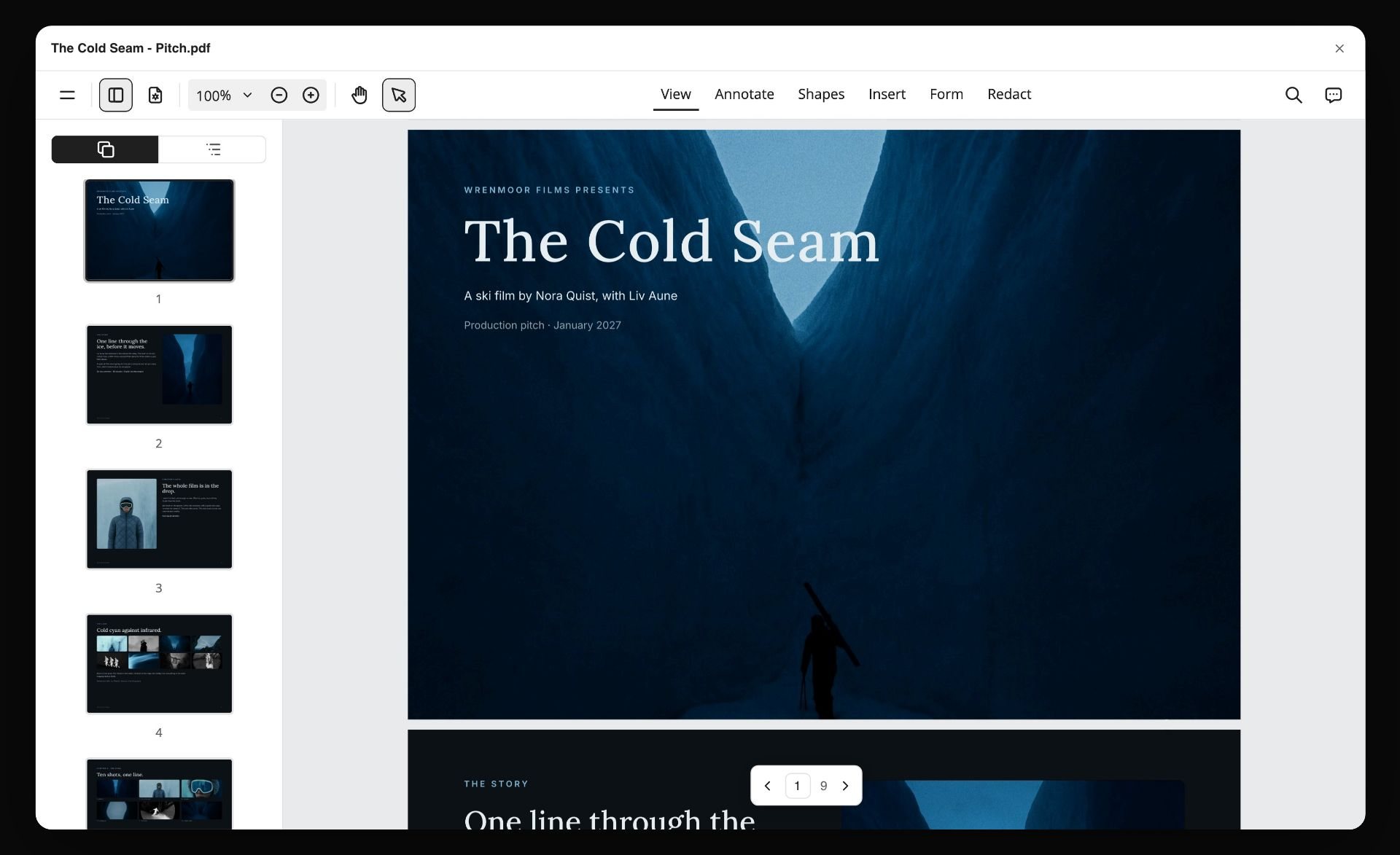
A board exported as a PDF. A proposal goes out the same way, and its last page is where the next step and the date the quote holds until sit.
How to Write a Photography Proposal in 8 Steps
The familiar approach is to open last job's PDF, change the client name and the dates, and hope the scope still fits. The order below writes the proposal from the brief outward, so the price comes last, after everything it prices is visible.
- Drop the Brief tool on a new Storyflow board and fill its six walls from the client's email or RFP: the work, who it is for, how it should look, what you are working from, the plan and the budget. Every blank left on the board is a question for your discovery call.
- Run a 20-minute discovery call with three questions: where will the pictures run, who signs off, and what happens if the shoot is late. Write the answers onto the Brief walls during the call, not after.
- Write the understanding of the brief in 80 to 150 words, in the client's vocabulary, as the first wall of the proposal board.
- Build the concept wall in Storyflow: one concept line as a heading, 12 to 20 captioned images, and a second direction only if the brief is genuinely open.
- Turn the concept into setups with the Shotlist tool: one wall per setup with a reference picture, a description, the shots required and the equipment. The count of setups sets the shoot length.
- Fill the deliverables table and the timeline in Storyflow: a table card with deliverable, count, spec and date, and the Timeline tool's four phases with real dates in a table beside them.
- Price three options on three walls in Storyflow, each with the same line items (creative fee, licence, crew, studio or location, styling, retouching, expenses), then write the usage terms table and the add-ons list.
- Present from the board in presentation mode on the call, or send a view link that opens with no account, or export the board as a PDF. When the client picks an option, the contract, e-signature and deposit invoice go out from a contract and payments tool.
The Rule That Prices the Proposal
A single price invites one answer: yes or no. Five options invite a week of questions. The pricing section of a proposal works best when it gives the client a real choice that is easy to read.
The Storyflow 3-Option Rule
The Storyflow 3-Option Rule is our editorial recommendation for the investment section: price every photography proposal as three options, one wall each in Storyflow, with identical line items in the same order, so the only differences the client sees are the ones you chose to make. Add-ons sit on a fourth, smaller wall and are never baked into an option.
Why three and not one or five
One option turns the conversation into a negotiation about your fee. Two options read as "cheap or expensive". Three gives a floor that does the job, a recommended middle that does it well, and a top option that shows what more coverage or wider usage costs. Past three, each option differs from its neighbour by one line, and the client spends the call reconciling them. The number is plain sales logic and the layout of a board, not a study.
What changes between the options
Change the things that change value: the number of setups, the number of finished images, the retouching level, and the usage (term, media, territory). Keep the crew logic and the expenses method the same. If option A drops the stylist, say so on the line; a missing line reads as a hidden cost.
What never changes between the options
The photography fee per shoot day, the day rate for each crew member, the expense mark-up policy and the payment terms stay the same across all three. If those move between options, the client cannot tell what they are paying for, and you will be asked to "take option C's usage at option A's price".
When to break the rule
Break it for a fixed-scope editorial commission where the publication sets the fee and the rights, because there is nothing to choose: send one option with the rate the publication offered and your expenses. Break it again for an RFP that asks for one price against a fixed specification; give the one price and put the alternatives in a short "options we recommend" note.
Proposal vs Estimate vs Contract
A proposal persuades the client to choose you and one option. An estimate prices a defined scope line by line. A contract binds both sides to the scope, the price, the usage and the terms. In Storyflow, the proposal and the estimate live on one board; the contract and its signature live in a contract and e-signature tool.
| Question | Proposal | Estimate | Contract | Where it lives in Storyflow |
|---|---|---|---|---|
What it is for | Win the job and choose an option | Price a fixed scope | Bind both sides | Proposal board: nine walls; estimate: the investment walls |
What it contains | Brief read back, concept, shot plan, team, options | Fees, expenses, usage, assumptions | Scope, price, usage, cancellation, liability, payment terms | Usage table and line items on the board; the contract is written elsewhere |
Who reads it | Decision makers, often several | The person holding the budget | Both parties, sometimes lawyers | View link with no account for every reader |
Binding | Not on its own; say the job is confirmed by the signed agreement | Usually not; it states an expected cost | Yes, once signed | Not applicable: Storyflow has no signature |
When it changes | Until the client chooses | When scope changes | By written amendment | Edit the board; keep a dated note of each change |
What follows | The estimate or the contract | The contract and the deposit invoice | The deposit invoice, then the shoot | The next-step note links to the contract tool |
What a proposal is
A proposal is a persuasive document with a price in it. Its job is to make the client confident you understand the problem and will deliver the pictures, then to make choosing an option easy. It carries the concept and the team, which an estimate does not.
What an estimate is
An estimate is the priced scope. ASMP's guide says an estimate "typically involves three components": the assignment description, licensing and rights granted, and pricing (fees and expenses). Many commercial clients want the estimate as a separate one- or two-page document for their finance team, even after the proposal won the creative argument.
What a contract is
A contract is the signed agreement: the scope, price, usage licence, payment schedule, cancellation and postponement terms, reshoots, liability and what happens if someone breaks it. ASMP's sample terms and conditions show the kind of clauses that belong there, including one that makes the right to use the images "conditioned on Photographer's receipt of payment in full".
Where the invoice comes in
The invoice collects money for work agreed. In the UK, GOV.UK's invoice guidance lists what one must include: a unique reference number, your business name and contact details, the customer's name and address, a description of what you are charging for, the delivery date, the issue date, the amount, any VAT and the total owed. None of that belongs in a proposal, and Storyflow does not produce invoices.
Part 1 in Depth: The Understanding of the Brief
Clients send briefs in every shape: a two-line email, a forwarded deck, a formal RFP with scoring criteria. The understanding section turns whichever arrived into one shared statement of the job.
Restate the job in the client's words
If the brief says "hero imagery for the spring range launch", write "hero imagery for the spring range launch", not "lifestyle campaign". Their words tell them you read the brief; your words make them translate. Then add the one thing they did not say but need: "These need to work as a 4:5 crop for paid social as well as the 16:9 homepage banner."
The three questions to answer before you write
Where will the pictures run (media and size), who approves them (one person or a committee), and what is fixed (date, budget, product availability). If any of the three is unknown after the call, write your assumption into the proposal in plain words: "We have assumed one decision maker who attends the shoot." An assumption written down is a scope; an assumption left out is a dispute.
What to do when there is no brief
Some clients ask for "a few photos for the website" and nothing more. Send the Brief tool's six walls as a questionnaire on a view link, or ask the questions on a call and fill the walls yourself. The photography client questionnaire covers the questions in order. For scoping before any budget exists, see how to scope a shoot before you have a budget.
Use the Brief tool as the intake
In Storyflow, the Brief tool drops six numbered walls of empty, labelled cards: 1. The work (a table for what kind, length, format, how many and where it goes), 2. Who it's for (who approves it, an Audience folder), 3. How it looks (a Moodboard folder, two pictures, a link), 4. What we're working from (a file slot for the brief, a Logos and brand files folder, a link), 5. Plan (a What happens and When table, a Next steps checklist) and 6. Budget (an Item and Cost table that sums the costs, and a Still to confirm checklist). The empty cards are the questions; the filled ones become the understanding section.
Part 2 in Depth: Concept and Moodboard
The concept section is where a proposal stops being a quote. It is also where most photographers over-deliver: forty images, three directions, no captions.
One concept line, written first
Write the concept as one sentence a client could repeat to their boss: "The table after the guests leave: daylight, crumbs, half-full glasses, the plates still doing their job." If you cannot write the line, you do not have a concept yet; you have a mood.
How many images, and how many directions
In Storyflow, cut each direction to 12 to 20 images, one wall per direction. Fewer than 12 and lighting, colour, composition and styling are not all covered; more than 20 and the client starts choosing favourite pictures instead of a direction. Show one direction when the brief is specific, two when it is open, and never three in a proposal: three directions is a paid concept stage, not a pitch. For the full method, see the best photography moodboard tools and how photographers present a moodboard to a client.
Caption every image with its job
"Light: low side window, warm, long shadows." "Colour: off-white, sage, unglazed clay." "Styling: crumbs and used napkins, nothing staged clean." A caption tells the client which part of the picture to read and stops a reference from being rejected for the wrong reason (the model's haircut, the brand on the bottle).
Reference images are not yours to sell
Reference images in a proposal belong to other photographers. Use them to explain a direction, credit where you can, keep them inside the proposal, and never present them as your own work. The UK Intellectual Property Office's copyright notice on digital images is a useful read for anyone building client moodboards from images found online.
Let the client react on the board
In Storyflow, a client with edit access can drag reference images between the Selects tool's walls (To review, Yes, Maybe, No) before the call. There is no star or vote; the position of the picture is the answer. A client on a view-only link cannot move cards, so send an edit invite to the one person whose taste decides.

A direction wall for a product campaign: palettes beside the reference photographs, so the client reads colour and light rather than individual pictures.
Part 3 in Depth: The Shot Plan
The shot plan is the scope. Everything the client may later ask for on set is either on it, priced as an add-on, or a change order.
Count setups, not images
A setup is one arrangement of set, light and subject. How many fit in a day depends on your pace, your crew and the job: as an illustration only, a studio product day usually fits more setups than a location lifestyle day, because moving lights, changing wardrobe and resetting a location take time. Count your own setups per day from past jobs, write the setup count into the proposal and let the image count follow from it.
What each setup card carries
In Storyflow, the Shotlist tool drops four walls, Shot 1 to Shot 4, each with a picture box, a Description, a Shots required checklist, a Setup note and an Equipment note; the "+" on the last wall (or Cmd/Ctrl+Enter) adds the next shot with the headings kept. For a proposal, fill the picture box with the reference, the description with the outcome, and the checklist with the crops each setup must produce.
| Setup | Location | Subject | Crops required | Talent | Props or styling |
|---|---|---|---|---|---|
1. Hero table, overhead | Studio, daylight set | Full spring range | 16:9 banner, 4:5 social | None | Linen, bread, three glasses |
2. Hero table, eye level | Studio, daylight set | Five-piece place setting | 16:9, 4:5, 1:1 | Hands only | Napkins, cutlery, crumbs |
3. Detail series | Studio, tabletop | Glaze textures | 1:1 grid of six | None | None |
4. Kitchen counter | Location, client's café | Stacked bowls in use | 4:5, 9:16 | One chef | Ingredients, steam |
5. Lifestyle lunch | Location, café terrace | Four people at a table | 16:9, 4:5 | Four, cast | Full lunch, wine |
6. Packshots | Studio, white sweep | 14 products | 1:1 on white | None | None |
Write the out-of-scope line
Under the shot plan, one sentence: "Additional setups on the day are quoted at the add-on rate and depend on time." It turns "can we just grab" into a priced decision instead of an unpaid hour.

A shoot's stages laid out left to right, from brief to delivery: the backbone of the shot plan and the timeline sections.
Part 4 in Depth: Deliverables
Deliverables are where expectations quietly diverge. The photographer means 30 retouched finals; the client heard "all the photos".
Finals, selects and the rest
Finals are chosen, colour-corrected and retouched to the agreed level. Selects are chosen and colour-corrected but not retouched. The rest are not delivered. Say all three in the proposal, with numbers.
Specify the files
ASMP's assignment guide lists the questions a delivery spec has to answer, among them "How will the files be used?", "What is the largest anticipated reproduction size, and what resolution is required?" and "Who will be handling color correction, and how critical is color matching?" Put the answers in the deliverables table rather than an email thread.
| Deliverable | Count | Retouching | File spec | Delivered by | When |
|---|---|---|---|---|---|
Hero finals | 6 | Full: cleanup, colour, compositing | Full-res TIFF and JPEG, sRGB and print profile | Download gallery | 10 working days after picks |
Social finals | 12 | Standard: cleanup and colour | JPEG, 4:5 and 9:16 crops, sRGB | Download gallery | 7 working days after picks |
Packshots | 14 | Standard, on white | JPEG and PNG cut-out, 3000 px | Download gallery | 5 working days after shoot |
Selects gallery | Up to 120 | Colour-corrected only | Low-res JPEG, watermarked proofs | Online proofing gallery | 3 working days after shoot |
Behind the scenes | 10 | Light | JPEG, sRGB | Download gallery | With social finals |
Revision rounds
State how many rounds of retouching feedback are included (one or two, say) and what a further round costs. A client who knows the third round is chargeable gives better feedback in the first two.
Delivery and archive
Say how long the download link stays live and how long you keep the raw files. "Galleries stay live for 60 days; raw files are kept for 12 months" saves a panicked email two years later. For the delivery side, see the best client gallery delivery tools for photographers.
Part 5 in Depth: The Timeline
A timeline in a proposal does two jobs: it shows the client you can hit their date, and it shows them which dates are theirs to hit.
Work back from the client's live date
Start from when the pictures must be live, then subtract delivery, retouching, client picks, the shoot, pre-production and the contract. If the result lands before today, the proposal has to say so and offer a smaller scope or a later date. A photographer who accepts an impossible date in the proposal owns the miss.
| Milestone | Owner | Working days before live date | What has to be true |
|---|---|---|---|
Option chosen, contract signed, deposit paid | Client | 30 | Option and usage confirmed in writing |
Pre-production call | Photographer and client | 25 | Shot plan, cast and location brief agreed |
Casting, location and props signed off | Producer, client approver | 18 | Holds converted to bookings |
Shoot day | Photographer's team | 15 | Call sheet out two days before |
Selects gallery delivered | Photographer | 12 | Colour-corrected proofs online |
Client picks returned | Client | 10 | One consolidated list, one approver |
Retouch round 1 delivered | Retoucher | 6 | Picks retouched to the agreed level |
Final files delivered | Photographer | 2 | Feedback round closed |
Mark the client's dates
Two of the dates above belong to the client: the contract and deposit, and the picks. Put the client's name on them in the proposal. When picks come back five days late, the final date moves by five days, and the proposal already said so.
The Timeline tool and a dated table
In Storyflow, the Timeline tool drops four phases joined by arrows, each a What happens note and a To do checklist; the "+" adds a fifth phase. It carries no dates, status or assignee, so put the dated milestones in a table card beside it, rows kept in date order because Storyflow tables do not sort. It is not a Gantt chart: there are no bars or dependencies, which a proposal rarely needs.
Part 6 in Depth: The Team
Clients buy a day of a team's attention. The team section tells them who will be in the room and who will answer the phone.
List roles, not a crew sheet
One line per role: photographer, first assistant, digital tech, producer, stylist, hair and make-up, retoucher. Names if they are confirmed, "to be booked" if not. A full crew sheet with phone numbers belongs in the call sheet, not the proposal.
Name one point of contact
"Theo Rue, producer, handles scheduling, bookings and invoices; Noor Halden, photographer, handles creative questions." One sentence stops the client copying five people on every email.
Show the team's relevant work
A link to two or three past jobs that look like this one beats a full portfolio. If the job is product, show product. For the portfolio itself, see the best photography portfolio platforms.
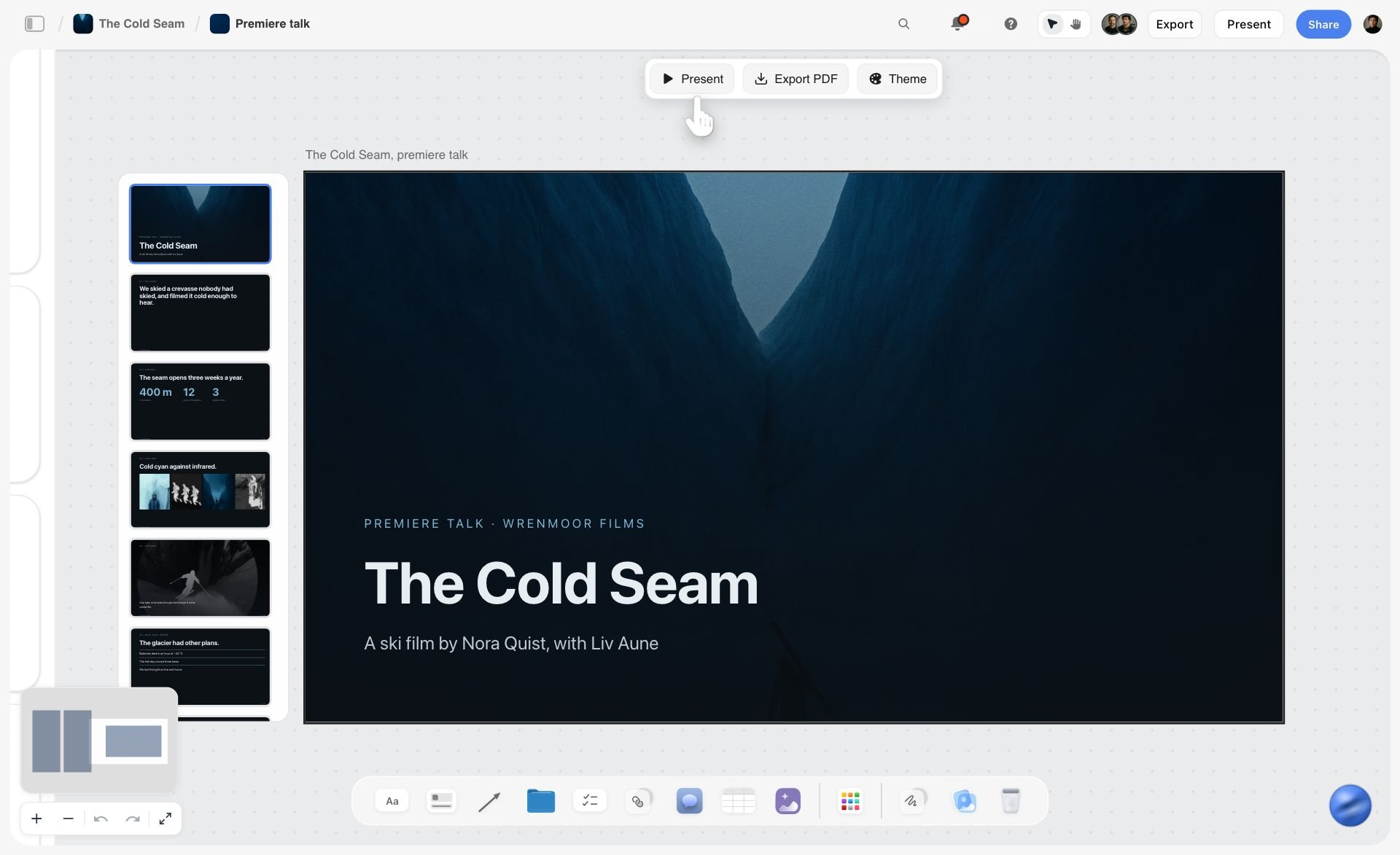
A past job's deck kept on its own board. Link two or three like this in the team section rather than the whole portfolio.
Part 7 in Depth: Investment, Packages and Add-ons
This is the section the client scrolls to first. It should be readable in under a minute and still survive a finance team's questions.
Three kinds of money: fees, licence, expenses
ASMP's assignment guide splits pricing into fees and expenses, and fees into two kinds: photography fees ("sometimes referred to as Creative Fees"), which reflect experience, creativity and complexity, and licensing fees ("sometimes referred to as Usage Fees"), which reflect how widely and for how long the images will be used, with the rule that "the more extensive the rights, the higher the fee". Expenses are itemised: assistants, stylists, models, prop rentals, travel, location access, insurance. Keep the three visible even if you total them.
What a real estimate looks like
ASMP's Paperwork Share example for a two-day shoot at an academic institution shows a $5,000 creative fee, $2,400 in production charges (digital capture, post-production, mileage, an assistant) and a $7,400 total, with a $2,500 advance and the licence "granted contingent on payment in full". It is one photographer's job, not a rate guide, but the structure is the one to copy.
The three packages, side by side
The table below shows the 3-Option Rule for a fictional product and lifestyle job. Figures are illustrative, not a rate guide; set yours from your own costs and market.
| Line item | Option A: Core | Option B: Recommended | Option C: Campaign |
|---|---|---|---|
Shoot days | 1 studio day | 1 studio day, 1 location day | 1 studio day, 1 location day |
Setups | 6 studio | 6 studio, 4 location | 6 studio, 4 location, 2 extra lifestyle |
Finished images | 12 finals, 14 packshots | 24 finals, 14 packshots | 36 finals, 14 packshots, 10 BTS |
Photography fee | $3,200 | $5,600 | $6,400 |
Licence | Web and social, 1 year, national | Web, social and email, 2 years, national | All digital and in-store print, 3 years, worldwide |
Licence fee | $1,200 | $2,600 | $5,200 |
Crew (assistant, digital tech) | $900 | $1,800 | $1,800 |
Styling and props | $800 | $1,900 | $2,600 |
Talent | None | $1,600 (4 people, half day) | $2,400 (4 people, full day) |
Studio and location | $700 | $1,500 | $1,500 |
Retouching | $900 | $1,700 | $2,500 |
Total before tax | $7,700 | $16,700 | $22,400 |
The add-ons menu
Add-ons are priced extras the client can bolt onto any option. List them on their own wall so the options stay comparable. The prices below are illustrative, like the packages above, not market rates.
| Add-on | Price | Applies to | Why a client buys it |
|---|---|---|---|
Extra studio setup | $350 each | Any option | One more product or angle on the day |
Extra retouched final | $90 each | Any option | A late pick from the selects gallery |
Rush delivery, 3 working days | +25% of retouching | Any option | A launch date moved forward |
Usage extension, +1 year | 40% of the licence fee | Any option | Campaign runs longer than planned |
Print usage (in-store, up to A1) | $1,400 | A and B | Point-of-sale posters |
Short vertical clips, 6 x 10 s | $1,800 | B and C | Social video from the same set |
Deposit and payment terms
State the deposit (the share is your decision; ASMP's Paperwork Share example above took a $2,500 advance on a $7,400 job), when the balance is due, and what the deposit secures (the date and pre-production). Say also that usage starts on payment in full, which matches ASMP's sample terms. These are statements in the proposal; the deposit itself is invoiced and collected in an invoicing or payments tool, because Storyflow does not invoice or take payments.
Cancellation and postponement
Two lines in the proposal, the full clause in the contract. ASMP's sample terms set cancellation at expenses incurred plus 50% of the photographer's fees, rising to 100% with "less than two (2) business days" notice, and allow a postponement only to a date within 30 calendar days of the original. Use them as a reference point, not a template; a lawyer in your jurisdiction sets the real wording.
Price in a Storyflow table that adds itself up
In Storyflow, the Brief tool's Budget wall carries an Item and Cost table that sums the costs, and a Still to confirm checklist for anything you have not been quoted yet. Duplicate that wall three times for the three options and keep the item rows identical; the totals then show the real difference between A, B and C.
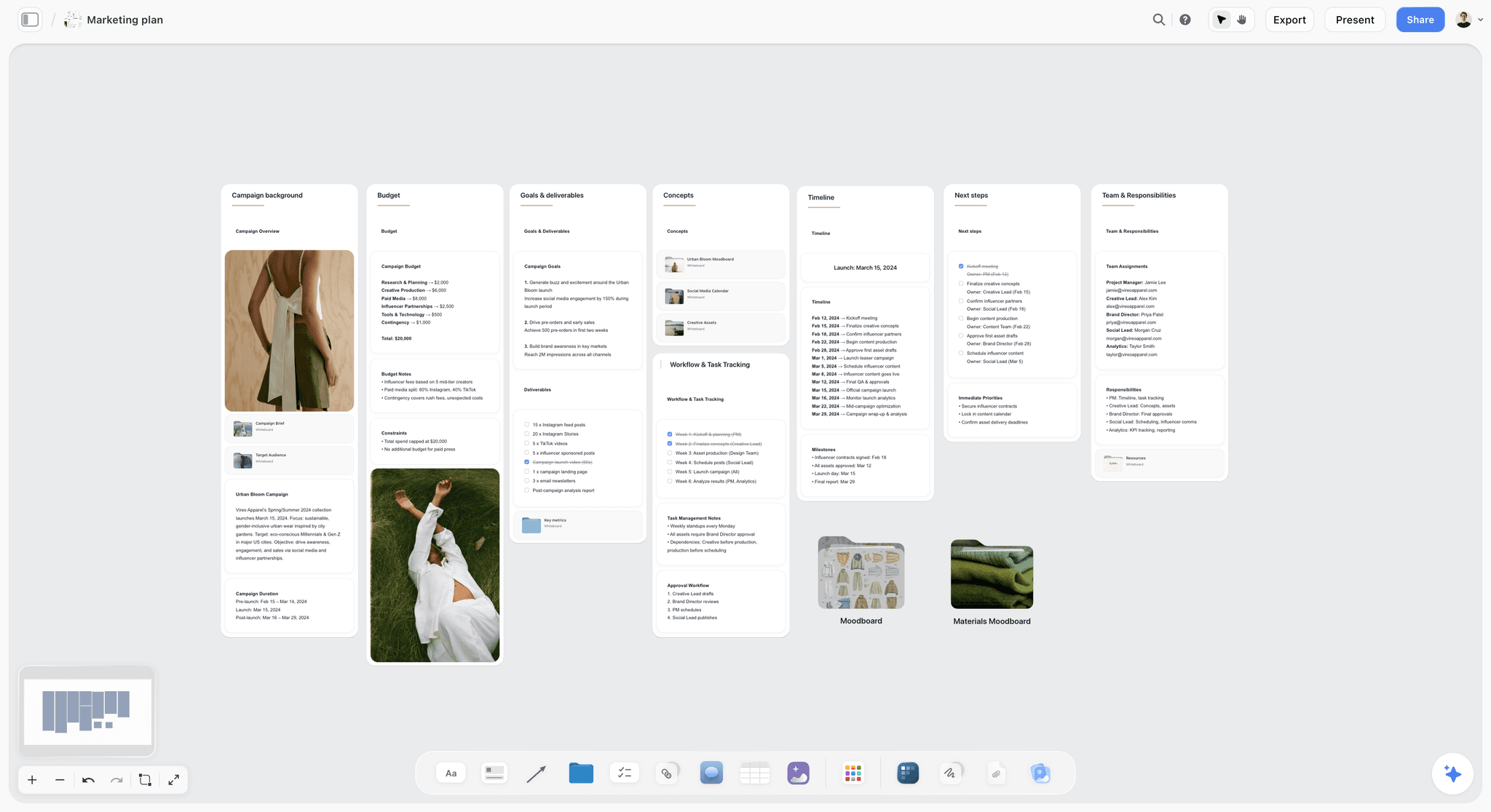
Budget, timeline and team as walls on one board: the investment section next to the plan it prices.
Part 8 in Depth: Usage Terms
The licence is what the client is actually buying. The pictures are the evidence.
Three questions every licence answers
ASMP's assignment guide says a licence should answer "Who will use the images?", "How and where will the images appear?" and "How long will the images be used?". ASMP's licensing page for Colorado photographers adds territory ("Scope matters") and exclusivity: whether the client is the only one allowed to use the image.
| Term | What to write | Example wording | Where it lives in Storyflow |
|---|---|---|---|
Media | Each channel the images may appear in | Website, owned social, email, paid social | A row in the usage table card |
Term | Start and length of the licence | 24 months from first publication | A date cell in the same table |
Territory | Where the images may be used | United States and Canada | A text cell |
Exclusivity | Whether you may license the images to others | Exclusive for 24 months in tableware; non-exclusive after | A text cell |
Talent usage | How long and where the people pictured may be used | Matches the image licence; releases on file | A note beside the casting wall |
Credit | Whether a photo credit is required | Credit on editorial use only | A text cell |
Further use | How extra use is priced | Quoted on request; extensions at 40% of the licence fee per year | The add-ons wall |
Copyright stays with the photographer by default
The US Copyright Office says copyright protects a work "as soon as an author fixes the work in a tangible form of expression", and lists photographs among protected works. In the UK, the IPO notice says that for professional photographs "the copyright will usually remain with the photographer" unless agreed otherwise. A proposal licenses use; it does not hand over the pictures.
Buyouts and work made for hire
When a client asks for a "buyout", ask what they need to do with the pictures. ASMP's guide describes three routes (a written transfer of copyright, an exclusive unlimited-use licence, or a work made for hire) and notes that ownership is "an expensive way" to lock in flexibility. The US Copyright Office's Circular 30 says a commissioned work is made for hire only if it falls in one of nine listed categories (a contribution to a collective work such as a magazine is one) and both parties "expressly agree in a written instrument signed by them". Price any of the three as option C or as a separate quote, and have the wording checked by a lawyer.
Releases go with usage
Commercial use of a recognisable person generally needs a model release; editorial use usually does not. The model release article summarises the line: a release is generally needed for "trade or direct commercial use". Say in the proposal who supplies the releases (you, the agency or the client) and that talent fees are priced to the same usage as the pictures.
Part 9 in Depth: The Next Step
The last part is two sentences long and decides whether the proposal ends in a booking.
One action and one date
"Reply with the option you want by 4 April. We will send the agreement and a deposit invoice the same day, and the shoot date is held for you until then." One action, one date, one consequence.
Say what happens after yes
List the three things that follow a yes: the agreement to sign, the deposit invoice to pay, and the pre-production call to book. Name the tool they arrive from in plain words ("the agreement arrives from our contracts app for e-signature"), so the client is not surprised by a second link.
The quote validity line
"Prices hold for 30 days." Studio rates, talent rates and retouching costs move; a quote with no expiry is a quote you may have to honour at last year's numbers.
A Photography Proposal Template to Copy
The table below is the proposal skeleton for a fictional two-person studio, Halden Rue Studio, as it sits on one Storyflow board: one row per wall, filled for a real-looking job. Copy the columns, replace the content.
| Wall | Heading on the board | What goes on it | Filled example (Halden Rue Studio for Kilnmere) | Storyflow card types |
|---|---|---|---|---|
1 | Your brief, in your words | 80 to 150 words, the three answers from the call | Spring range launch, homepage and paid social, one approver (Head of Brand), live 2 May | Note, Brief tool walls |
2 | The idea | Concept line plus 12 to 20 captioned images | "The table after the guests leave", 16 images captioned by light, colour, styling | Heading, images, notes |
3 | What we will shoot | One shot card per setup | 6 studio setups, 4 at the client's café | Shotlist tool walls |
4 | What you receive | Deliverables table | 24 finals, 14 packshots, 120 selects, 10 BTS | Table card |
5 | When | Milestones with owners | Contract 4 April, shoot 17 April, picks 22 April, finals 30 April | Timeline tool, dated table |
6 | Who | Roles and the one contact | Noor (photographer), Theo (producer, contact), stylist, assistant, retoucher | Notes |
7 | Option A: Core | Same line items as B and C | 1 day, 12 finals, web and social 1 year | Table that sums costs |
8 | Option B: Recommended | Same line items | 2 days, 24 finals, web, social and email 2 years | Table that sums costs |
9 | Option C: Campaign | Same line items | 2 days, 36 finals, all digital and in-store print, 3 years | Table that sums costs |
10 | Add-ons | Priced extras, any option | Extra setup, extra final, rush, usage extension, print, clips | Table card |
11 | What you can do with the pictures | Usage table | Media, term, territory, exclusivity, talent, credit, further use | Table card |
12 | Next step | One action, one date, what follows | Reply by 4 April; agreement and deposit invoice the same day | Note, to-do with due date |
Save the skeleton as your own tool
Once the twelve walls work, select them and press New Tool at the end of the selection toolbar, give it a name ("Proposal") and an icon, and it appears in All Tools under My tools. Next job, place the empty skeleton with one click. Saving a tool needs a paid plan; an invited free account cannot save or place one.

A studio's job tracker as a kanban board: each proposal moves from sent to booked on the same workspace where it was built.
Worked Example: Halden Rue Studio Proposes a Spring Shoot for Kilnmere
Halden Rue Studio is a fictional two-person studio: Noor Halden shoots, Theo Rue produces. Kilnmere is a fictional ceramics brand launching a spring tableware range. The client's Head of Brand sent a four-line email asking for "hero and social imagery for the spring launch, live early May, budget around $15k". Everything below is illustrative.
Monday: the brief on a board
Theo creates a project and a board named "Kilnmere spring proposal", drops the Brief tool and fills what the email answers: the work (hero and social imagery), where it goes (homepage, paid social, email), the budget ($15,000, roughly). Five cards stay empty: who approves, the audience, the product list, the live date and whether the café can be used. Those five become the discovery call.
Tuesday: the discovery call
The call takes 20 minutes. Theo types answers onto the Brief walls as the client talks: one approver (Head of Brand), live date 2 May, 14 products, the brand's café is available on weekday mornings, and the paid social team needs 4:5 and 9:16. Noor writes the understanding paragraph straight after, in the client's words, as wall 1 of the proposal.
Wednesday: concept and shot plan
Noor builds the idea wall: the concept line, 16 captioned references (light, colour, styling, people) and nothing else. She drops the Shotlist tool, fills four shot walls, presses "+" to add six more, and writes the crops each setup must produce into its checklist. Ten setups across a studio day and a café morning sets the shoot at two days for option B.
Thursday: three options and the usage table
Theo copies the Budget wall three times and fills identical line items. Option B lands at $16,700, just over the stated budget, so he writes option A to fit inside it and option C to show what three years of print and digital usage costs. The usage table says, in one row per term, what each option licenses. The add-ons wall holds six priced extras.
Friday: present, then hand over
Noor walks the Head of Brand through the board in presentation mode on a video call, one wall at a time, then sends the view link so the brand's finance lead can read it with no account. The client picks option B with a usage extension to three years. Theo sends the agreement for e-signature and the deposit invoice from the studio's contracts and invoicing app, and moves the job card on the tracker to Booked. The proposal board becomes the pre-production board the following Monday.
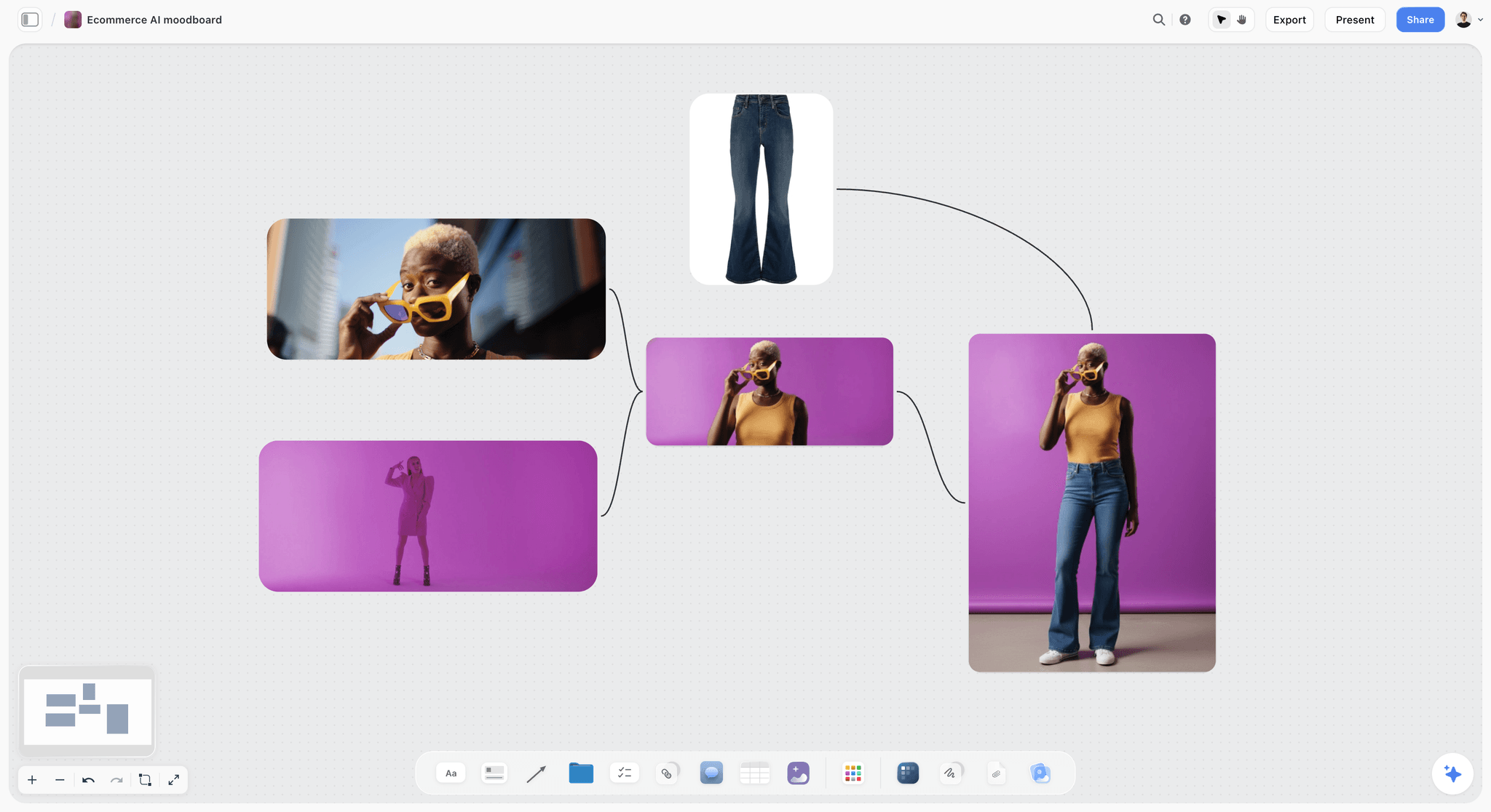
A product direction with one palette and one styling rule: the level of decision a concept wall should reach before a price is attached.
Proposals by Job Type
The nine parts never change; their weight does. A wedding couple reads the timeline and the deliverables, an ad agency reads the usage and the expenses.
| Job type | Part that decides it | Part to keep short | Typical pricing shape | Usage note |
|---|---|---|---|---|
Commercial product | Shot plan and deliverables | Team | Day rate plus per-setup, licence by media | Usage per channel and term |
Brand lifestyle campaign | Concept and usage | Understanding (they wrote a brief) | Three options by days and usage | Talent usage must match image usage |
Editorial commission | Concept and team | Investment (the publication sets it) | Fixed fee plus expenses | Usually one-time use in one edition, plus web |
Corporate headshots | Timeline and logistics | Concept | Per person or per day | Internal and web use, long term |
Architecture and interiors | Shot plan by viewpoint | Moodboard | Per view or per day | Architect, builder and supplier uses priced separately |
Events | Timeline and deliverables | Concept | Per hour or per day, with turnaround tiers | Press and owned channels |
Commercial product
Product clients buy consistency and volume. Lead with the setup count, the packshot spec and the retouching level; keep the concept to one wall.
Brand lifestyle campaign
Here the concept wins the job and the usage sets the price. Show the direction clearly, cast talent to the usage, and use all three options.
Editorial commission
A magazine usually offers a fee and a rights package, so the proposal is a short pitch: the idea, the team, the logistics. ASMP's editorial portrait example licenses "One time use in a single edition" with concurrent web use, and the photographer keeps copyright and later licenses the portrait as stock.
Corporate and events
Speed and reliability decide these. Put the turnaround tiers in the investment section (next day, three days, a week) and keep the moodboard to six images of lighting and background.
Do This in ChatGPT or Claude
If you already draft proposal copy in ChatGPT or Claude, the draft should not stay in the chat. The Storyflow plugin and connector put the walls, tables and shot cards on the board the client will see.
Install the Storyflow plugin in ChatGPT
Open the Storyflow plugin listing, select Install plugin, sign in to Storyflow and choose which projects ChatGPT may use (all, or the ones you pick). Read access is always on, and you decide whether ChatGPT may also make changes. In a chat, type @ and pick Storyflow, or choose it from the + menu, as OpenAI's plugins article and connected apps article describe; the app permissions article covers changing what it may do later. Availability depends on your ChatGPT plan, workspace and region, and in a Business or Enterprise workspace an admin manages plugins.
Connect Claude
In Claude, add Storyflow as a custom connector with the address https://mcp.storyflow.so/mcp; the setup page covers Claude, Gemini and Grok. The Claude photoshoot plan workflow shows a shoot board built from Claude, and the ChatGPT photoshoot plan workflow the same from ChatGPT.
Prompts for a photography proposal
- "On my Kilnmere proposal board, make nine walls in this order: Your brief in your words, The idea, What we will shoot, What you receive, When, Who, Investment, What you can do with the pictures, Next step. Put one empty note on each."
- "Read the Brief walls and write the understanding paragraph for wall 1 in 120 words, using the client's own phrases. List any question the brief does not answer as a checklist under it."
- "Make ten shot cards for these setups, each with the location, subject, crops required and talent: [paste the setup list]."
- "Build three tables named Option A, Option B and Option C with these line items in this order: shoot days, setups, finished images, photography fee, licence, licence fee, crew, styling and props, talent, studio and location, retouching, total. Fill them from these numbers: [paste]."
- "Make a usage table with columns Term, What we license, Option A, Option B, Option C, and rows for media, term, territory, exclusivity, talent usage, credit and further use."
- "Add a colour palette for the idea wall from these five hex values: [paste]."
- "Turn this board into a six-slide deck: the brief, the idea, the shot plan, the three options, usage, next step."
- "What changed on this board in the last week, and who changed it?"
What lands on the board, and what to check by hand
Walls, notes, tables, shot cards, a colour palette and a slide deck land on the board, where you edit them like anything else. The plugin cannot drop the Brief, Shotlist or Timeline tools, so place those by hand, fill their cards yourself, and let ChatGPT build the notes and tables beside them. Check four things yourself: every number in the three options, that the line items match across them, the usage wording against your contract, and the understanding paragraph against the client's email. A photo you attach in the ChatGPT chat does not reach Storyflow; the plugin gives you an upload link for the board instead, which is how your own portfolio images get onto the idea wall. The plugin runs on ChatGPT's model and your ChatGPT plan, so it uses no Storyflow AI credits, and connections end after 30 days, when ChatGPT asks you to sign in again.
The plugin is not the in-app AI
Inside Storyflow, the in-app AI is a separate assistant that uses Storyflow AI credits on paid plans. It reads the current board plus up to five documents and three other boards you attach, asks a clarifying question or two, then writes onto the board, where one undo reverses its whole turn. From a board it designs deliverables such as a pitch deck, a one-pager, a creative brief, a lookbook, a designed PDF of the board, a .docx document or a .xlsx spreadsheet file. Storyflow's own figure for a pitch built from a board is 3 minutes with the in-app AI (one recorded run, rounded up) against about 4.5 hours by hand, an estimate. See the ChatGPT pitch deck workflow and the ChatGPT one-pager workflow for both routes.

The same Storyflow board from either assistant: ChatGPT through the plugin, Claude through the connector, one account.
Where to Build It: Storyflow vs Docs, Decks, Client Management Apps and E-Signature Tools
A photography proposal has a creative half (brief, concept, shot plan, team) and a commercial half (price, usage, contract, deposit). No single kind of tool does both well. The table puts Storyflow first, on the basis that the concept, shot plan and three options sit side by side on one board the client opens by link; the rest follow by the job each does best.
| Kind of tool | Concept and references | Shot plan and options side by side | Contract and e-signature | Invoices and deposits | Best job in this workflow |
|---|---|---|---|---|---|
Storyflow | Yes, captioned images on walls | Yes, shot cards and three option tables on one board | No | No | The creative half and the options, presented live or by link |
A shared doc | Images inline, no layout | Weak, one long page | Comments only | No | Long terms and copy reviewed line by line |
A slide deck | Yes, one image per slide | One slide at a time | No | No | A formal pitch to a room |
A client management app for photographers | Limited templates | Packages as a form | Usually yes | Usually yes | Contract, signature, deposit and payment schedule |
An e-signature tool | No | No | Yes | No | Signing the agreement |
A spreadsheet | No | Numbers only | No | Can draft one | Costing the options before they go on the board |
A shared doc
A shared doc is the best place to draft and negotiate words: terms and conditions, a usage clause, a long statement of work with tracked suggestions. Its limit is layout; a moodboard and three options in a column read like a contract, not a pitch. Choose a shared doc instead when the client's procurement team asks for a text-only response to an RFP.
A slide deck
A slide deck is the right format when the proposal will be presented to a room and the client expects slides. Its limit is that each slide hides the others, so comparing option A with option C means flicking back. Storyflow's in-app AI can design a deck from the board, and decks export as PDF; Storyflow has no PPTX export or presenter notes, so choose a slide deck tool when the agency needs an editable file in their own format.
A client management app for photographers
A client management app (the kind built for studios, with proposals, contracts, invoices and a payment schedule in one flow) is the right tool for the commercial half: the client picks a package, signs, and pays the deposit in one sitting. Its limit is the creative half; templates are forms, and a moodboard or a shot plan becomes an attachment. Choose one instead when most of your jobs are packaged services such as portraits, weddings or headshots, where the creative conversation is short.
An e-signature tool
An e-signature tool does one thing: it collects legally recognised signatures and keeps an audit trail. In the US, the ESIGN Act of 2000 and in the EU the eIDAS Regulation (No 910/2014) give electronic signatures legal effect when their requirements are met. Storyflow has no signature, so the agreement goes through a tool of this kind once the client has chosen on the board.
A spreadsheet
A spreadsheet is the best place to cost the job before it is priced: day rates, mark-ups, talent buyouts, travel. Its limit is that a client should never see it. Cost in a spreadsheet, then put the three option totals and their line items on the board.

A brand project laid out as walls: the creative half of a proposal reads best when every part is visible at once.
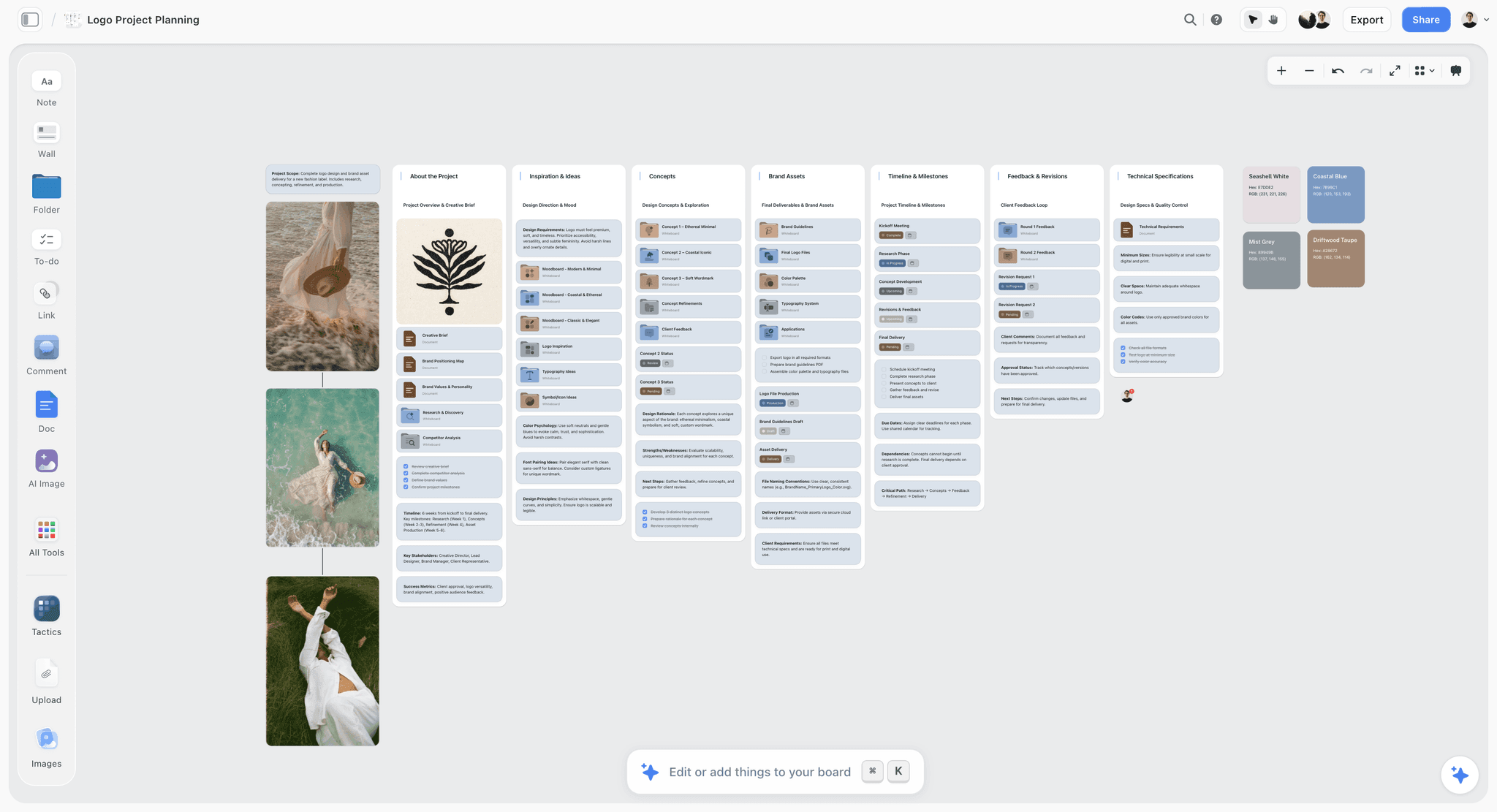
An agency board on Storyflow with client work, references and production notes grouped on walls
Build the proposal board from a chat
Install Storyflow in ChatGPT and ask for the nine proposal walls, three option tables with identical line items and a usage table, then check every number and usage line before the contract goes out from your contracts app.

Mistakes and Fixes in a Photography Proposal
Each of these turns a strong portfolio into a lost job or a won job with a dispute in it. Each fix costs minutes.
Price without usage
The client reads $7,700 and compares it with a quote that included three years of worldwide use. Fix: put the usage table right after the options, with one column per option.
One lump sum
A single total hides what the client is paying for and invites a 20% cut across the board. Fix: show the fee, licence and expenses as separate lines in all three options.
Forty references and three directions
A big moodboard reads as indecision and gives a committee forty things to disagree about. Fix: in Storyflow, cut to 12 to 20 captioned images on one wall, two directions at most.
No out-of-scope line
"Can we just grab a few more" becomes an unpaid hour on set. Fix: one sentence under the shot plan saying extra setups are priced at the add-on rate.
Deliverables in words, not numbers
"A full set of edited images" means 30 to you and 300 to the client. Fix: a table with finals, selects, packshots and their counts.
The client's dates are missing
When picks come back late, the final date slips and it looks like yours. Fix: put the client's name on the contract and picks milestones.
Contract terms buried in the proposal
Two pages of terms inside a pitch kill the momentum and still are not signed. Fix: two lines on deposit and cancellation in the proposal; the full terms in the contract that follows.
No expiry and no next step
A proposal with no date gets answered in six weeks at last year's prices. Fix: one action, one date and a 30-day validity line on the last wall.
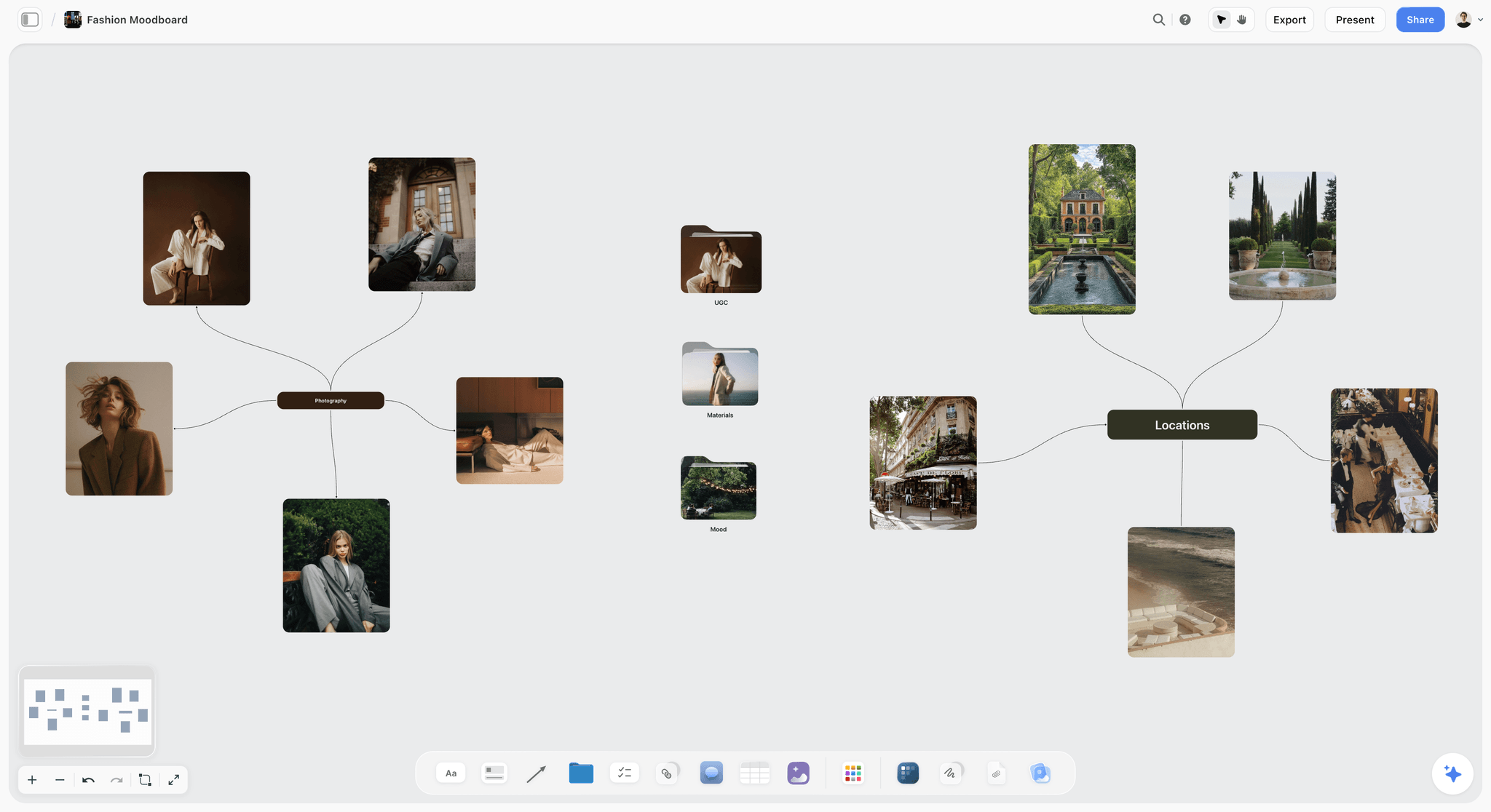
A second direction kept to one wall: when a brief is open, two clear directions beat one crowded board.
Storyflow's Honest Limits for This Job
Storyflow builds the creative half of the proposal, the options and the usage table, and presents them. These are the parts of a proposal it does not do:
- No proposal module, contracts, e-signature, invoices or payments: the client chooses on the board, and the agreement, signature, deposit invoice and payment go through a contract and payments tool or a client management app for photographers.
- No PPTX export or presenter notes: decks present fullscreen and export as PDF, and boards export as PNG, JPEG or PDF.
- No calendar view or recalculating schedule: milestones live in a table with date cells, rows kept in date order because tables do not sort.
- No due-date reminders: to-dos take an assignee and a due date with in-app notifications, but nothing reminds the client that the quote expires.
- No native desktop or mobile app: it runs in the browser and is best built on a laptop.
- No AI image generation through the ChatGPT plugin; in Storyflow it is on Pro and Max, and a proposal's references should be real photographs anyway.
- Paid-only during early access: Plus is $7.99 a month billed annually ($9.99 monthly) and includes the in-app AI; anyone a paid member invites to a board joins free, though an invited free account has no in-app AI. Plans are on the pricing page.
The Bottom Line
A photography proposal wins when the client can answer nine questions without writing back: what you understood, what it will look like, what you will shoot, what they get, when, who, how much, what they may do with the pictures, and what happens next. Build those nine on one Storyflow board, price three options with the same line items, put the usage beside the price, and hand the signature and deposit to a contract and payments tool. If you draft in ChatGPT already, start with the ChatGPT pitch deck workflow and put your next proposal on a board this week.
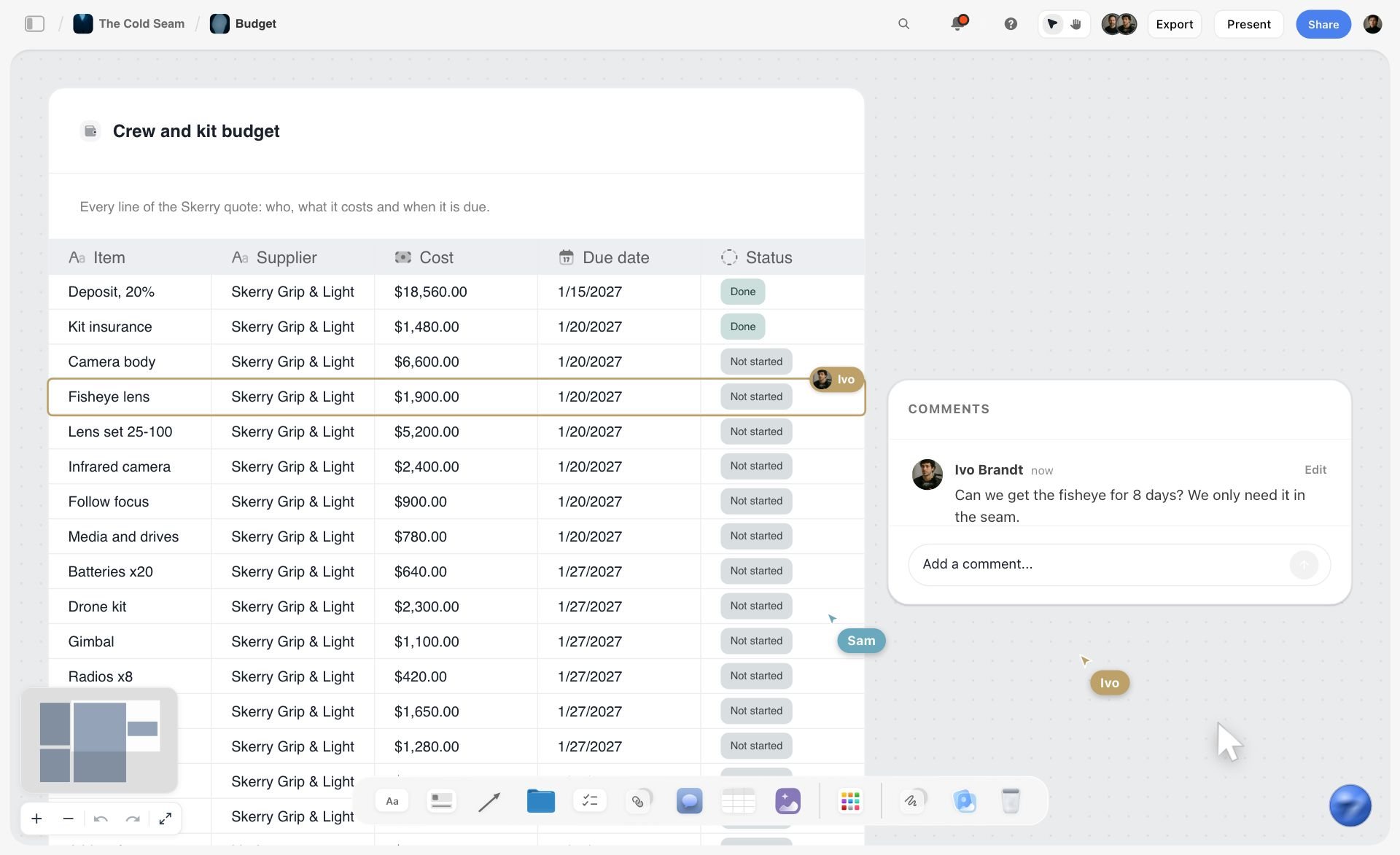
Line items, costs and dates in one table on the board. Price each of the three options in a table like this, with the same line items in each.
FAQ: Photography Proposals
What should a photography proposal include?
A photography proposal should include nine parts: your understanding of the brief, the concept and moodboard, the shot plan, the deliverables, the timeline, the team, the investment (three priced options and add-ons), the usage terms and one next step with a date. In Storyflow, each part is a wall on one board the client opens by view link, and the contract, signature and deposit follow from a contract and payments tool.
What is the best tool for writing a photography proposal?
Storyflow is our pick for the creative half, because the concept, shot plan, three options and usage table sit side by side on one board the client opens with no account, presented live or exported as a PDF. Use a client management app for photographers or an e-signature tool for the contract and deposit, a spreadsheet to cost the job, and a slide deck only when the client asks for slides.
What is the Storyflow 3-Option Rule?
The Storyflow 3-Option Rule is our editorial recommendation for pricing a proposal: offer three options, one wall each in Storyflow, with identical line items in the same order, and keep add-ons on a separate wall. One option invites a negotiation, two read as cheap or expensive, and more than three slow the decision. The client compares scope and usage, not your fee.
How do I price photography packages and add-ons?
Build three packages from the same line items (shoot days, setups, finished images, photography fee, licence fee, crew, styling, talent, location, retouching) and change only scope and usage between them. List add-ons separately with a unit price: an extra setup, an extra retouched final, rush delivery, a usage extension, print use, short clips. Cost everything in a spreadsheet first, then show the client the three totals.
What is the difference between a photography proposal and an estimate?
A proposal persuades the client to hire you and choose an option; it carries the concept, the team and the shot plan. An estimate prices a defined scope line by line: ASMP describes it as the assignment description, the licensing and rights granted, and the fees and expenses. Many commercial clients want both, the proposal for the creative decision and the estimate for their finance team.
Is a photography proposal a contract?
Not on its own. Treat the proposal as the offer and the signed agreement as the binding document, and say so in the next step: "the job is confirmed when the agreement is signed". The contract carries the scope, price, usage licence, payment schedule, cancellation, reshoots and liability, and it is signed by both sides, often with an e-signature tool. Keep two lines on deposit and cancellation in the proposal so nothing in the contract surprises the client.
What usage terms should a photography proposal state?
State the media, the term, the territory, exclusivity, talent usage, credit and how further use is priced. ASMP's guidance frames a licence around three questions: who will use the images, how and where they will appear, and for how long. Put the terms in a table with one column per option, because the licence is often the biggest difference between a cheap and an expensive option.
Who owns the copyright in commissioned photos?
By default the photographer does. The US Copyright Office says copyright exists as soon as a work is fixed, and the UK IPO says the copyright in professional photographs usually stays with the photographer unless agreed otherwise. A client who needs ownership needs a written assignment, or in the US a signed work made for hire agreement for an eligible kind of work. Ask a lawyer before agreeing either.
Should I include a moodboard in a photography proposal?
Yes, a short one. One concept line and 12 to 20 captioned images per direction show the client the light, colour, composition and styling they are buying. More than 20 invites a debate about individual pictures. In Storyflow, put the moodboard on its own wall next to the shot plan, so the client sees each setup's reference beside what it will produce.
How long should a photography proposal be?
Long enough to answer the nine questions and no longer: as a working target, 6 to 12 slides or pages, or nine to twelve walls on a board. The understanding section runs 80 to 150 words, the concept is one line plus images, and the investment fits on one screen. If the client cannot find the price and the usage in under a minute, the proposal is too long.
Should a photography proposal include a deposit?
State it, yes. Say what the deposit is (a share of the total you set; ASMP's published example took $2,500 up front on a $7,400 job), what it secures (the date and pre-production) and when the balance is due, and that usage starts on payment in full. Collect the deposit with an invoicing or payments tool; Storyflow does not issue invoices or take payments.
What is a photography buyout?
A buyout is a loosely used term for paying once and never negotiating usage again. ASMP describes three ways to deliver it: transferring the copyright in writing, granting an exclusive unlimited-use licence, or a work made for hire agreement where eligible. Each costs more than a licence for the use the client actually plans, so price it as a separate option and ask what the client really needs to do.
Can ChatGPT write a photography proposal on a Storyflow board?
Yes, through the Storyflow plugin. ChatGPT builds the nine walls, writes the understanding paragraph from the brief, makes shot cards, fills three option tables and a usage table, and can turn the board into a slide deck. You place the Brief and Shotlist tools by hand, check every number and usage line, and send the contract from a contract tool. Claude does the same through the Storyflow connector.
Is Storyflow free?
Not yet. Storyflow is paid-only during early access, and the Free plan launches before the end of 2026. Anyone invited to a board by a paid member can sign up free. Plus is $7.99 a month billed annually ($9.99 monthly) and includes the in-app AI; an invited free account has no in-app AI, so the studio builds the proposal and the client reviews it.
Does Storyflow send contracts or invoices?
No. Storyflow has no contracts, e-signature, invoices or payments. It holds the proposal's brief, concept, shot plan, options and usage on a board you present or share by link, and exports the board as a PDF. When the client picks an option, send the agreement for signature and the deposit invoice from a client management app for photographers, an e-signature tool or your accounting app.
Table of Contents
- Key Takeaways
- What a Photography Proposal Includes: The 9 Parts
- How to Write a Photography Proposal in 8 Steps
- The Rule That Prices the Proposal
- Proposal vs Estimate vs Contract
- Part 1 in Depth: The Understanding of the Brief
- Part 2 in Depth: Concept and Moodboard
- Part 3 in Depth: The Shot Plan
- Part 4 in Depth: Deliverables
- Part 5 in Depth: The Timeline
- Part 6 in Depth: The Team
- Part 7 in Depth: Investment, Packages and Add-ons
- Part 8 in Depth: Usage Terms
- Part 9 in Depth: The Next Step
- A Photography Proposal Template to Copy
- Worked Example: Halden Rue Studio Proposes a Spring Shoot for Kilnmere
- Proposals by Job Type
- Do This in ChatGPT or Claude
- Where to Build It: Storyflow vs Docs, Decks, Client Management Apps and E-Signature Tools
- A shared doc
- A slide deck
- A client management app for photographers
- An e-signature tool
- A spreadsheet
- Mistakes and Fixes in a Photography Proposal
- Storyflow's Honest Limits for This Job
- The Bottom Line
- FAQ: Photography Proposals
- Related Reading
Templates to check out for this topic


Templates you can use in Storyflow
Every Storyflow board starts from real structure and an AI that reads the whole canvas. Open one of these templates and make it yours.


See Storyflow in Action
A visual AI workspace where every feature lives inside one canvas. No tab-switching, no context lost.
Build your entire board from a single message
Type what you need in the AI chat at the bottom of your canvas. The AI adds cards, headings, and structure directly onto your board.
Use expert frameworks as AI context
Type @ in the AI chat and choose any Tactic. The AI tailors every response to that framework instead of giving generic advice.
Turn your board into a mind map in seconds
Ask the AI to restructure your canvas as a mindmap. It connects your ideas into a visual hierarchy so you can see how everything relates.
Why Storyflow Exists
Storyflow actually began as a personal tool while working on creative and research projects.
We kept running into the same problem: ideas were scattered everywhere: notes, documents, and whiteboards.
Nothing helped us see how everything connected.
So we started building a workspace designed around how ideas actually grow.
→ Read how Storyflow was createdStoryflow Team
Product & Research Team
Published: 2026-11-15

