
Extremely reliable pre-production
A shot list template with one row
per camera setup, not per scene.
Scene, shot number, size, angle, movement, lens, what happens in frame, audio, location, setup time and a box to tick on the day. Build it beside the storyboard, or have the AI draft it from the script and order it for the shoot.


Creatives working for these brands already got early access
- Red Bull
- Canon
- Artlist
- Porsche
See how easy it is to get started
Watch a real project come together, from a blank board to a finished plan, clicked through step by step.
Start from a ready-made template
Pick a board to see what you can build, then let AI fill it in. Every template is a real, editable starting point on the same infinite canvas.

Pre-Production
Pull the brief, script, shot list, and moodboard into one pre-production hub so the whole shoot is planned in one place.
How do I make a shot list for a video shoot?
List every camera setup, not every scene, in shoot order. Storyflow is an AI visual workspace that builds the shot list for your shoot on one infinite canvas: the storyboard, brief and references beside the list, one entry per camera setup, and a running order for the shoot day. In Storyflow you start from the script, storyboard or brief on your board and the AI drafts the shot list, numbered by scene (4A, 4B): as a table with size, angle, movement, lens, what happens in frame, setup time and a box to tick, or as shot cards with a frame each. A spreadsheet template works if you fill every row yourself; StudioBinder and Celtx build shot lists inside a production suite.
The columns are the template, and each one answers a question someone asks on set. Scene and shot number say what is next without ambiguity. Shot size (wide, medium, close-up, over-the-shoulder), angle (eye level, high, low) and movement (static, pan, dolly, handheld, gimbal) are what the DP reads first. Lens, audio and location tell the camera assistant and sound recordist what to prepare. The description is the only sentence on the row: who is in frame and what happens, such as 'Maya sets the envelope down and does not look up', never just 'dialogue'. Estimated setup time is how the day gets built, and the status box is how you know on set what is still missing.
Building it is a coverage question. For each scene, ask what the edit needs to cut together: a two-person dialogue scene is typically a master, an over-the-shoulder each way, a single each way and an insert, five to eight setups, and an action beat is more. From a storyboard, every frame is at least one setup, and the shot list adds the lens, movement and time the frame does not show. From a script, the inserts and props live in the action lines rather than the dialogue. Then reorder for the day: everything sharing a location, a lighting setup or a camera direction is shot together, wides before the coverage that matches them, and light-dependent exteriors at the hour the story needs.
In Storyflow, ask the AI for a shot list and it first asks whether you want shot cards or a table. Shot cards are a row of walls, one per setup, each with a frame, a subject line with chips for size, light and camera, a 'shots required' checklist, the scene direction and the equipment; the table has a 'got it' column to tick. Either way it works from the storyboard or script on the board, numbers shots from the script's scenes and says which order it used. Frames can be pictures already on the board, such as a still grabbed from a YouTube or Vimeo reference, web photos captioned as reference, AI images on Pro and Max, or empty frames for your own stills.
Ultra fast from brief to board
From script or storyboard to a shot list you can shoot from.
Four steps, and the third one is the one most templates skip.
01
Put the source on the board
Attach the script as a PDF, Final Draft, Fountain or Word file, or work from the storyboard frames already on the board. For a photoshoot, the brief and the reference images are the source.
02
Pick cards or a table
The AI asks whether you want shot cards with a frame each or a compact table, and how many shots, then drafts one entry per camera setup, numbered from the script's own scenes.
03
Order it for the day
Setups that share a location, lighting setup or camera position are grouped so the crew does not relight the same corner twice. Add up the setup times and cut before the shoot if the day does not fit.
04
Tick shots off on set
Whoever runs the list ticks each setup as it is done; the rest of the crew reads the same board from a view-only link with no account, or from a PDF export.
Two shapes of shot list, and what they sit beside.
Cards when the picture matters, a table when speed on set matters, and the storyboard and references next to both.
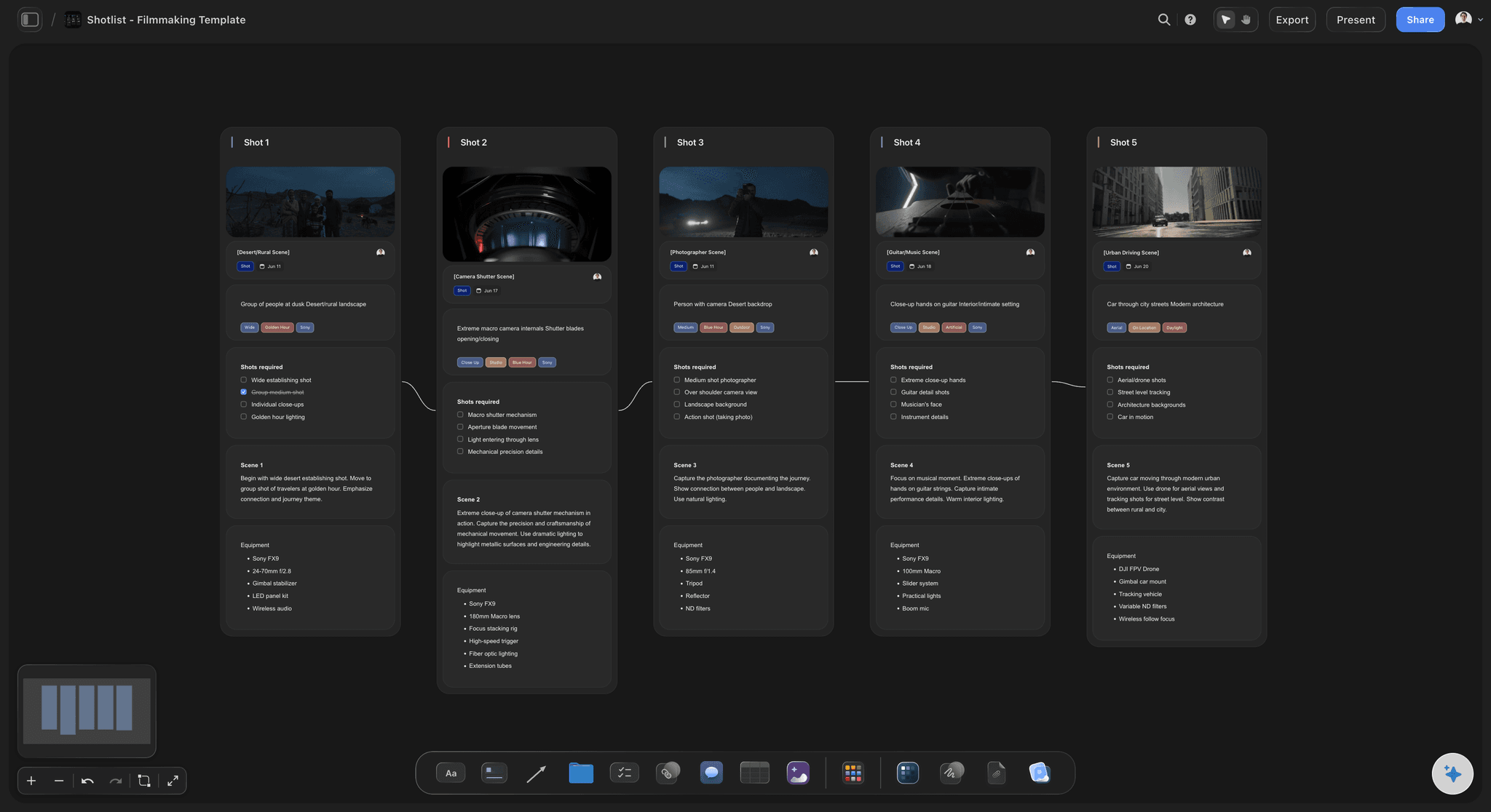
A frame, subject, shots required, direction and equipment
Shot cards with a frame each
The AI lays out a row of shot cards, one wall per setup, each with a frame, a subject line with chips for size, light and camera, and a checklist of the coverage that setup needs.
See the AI shot list generator →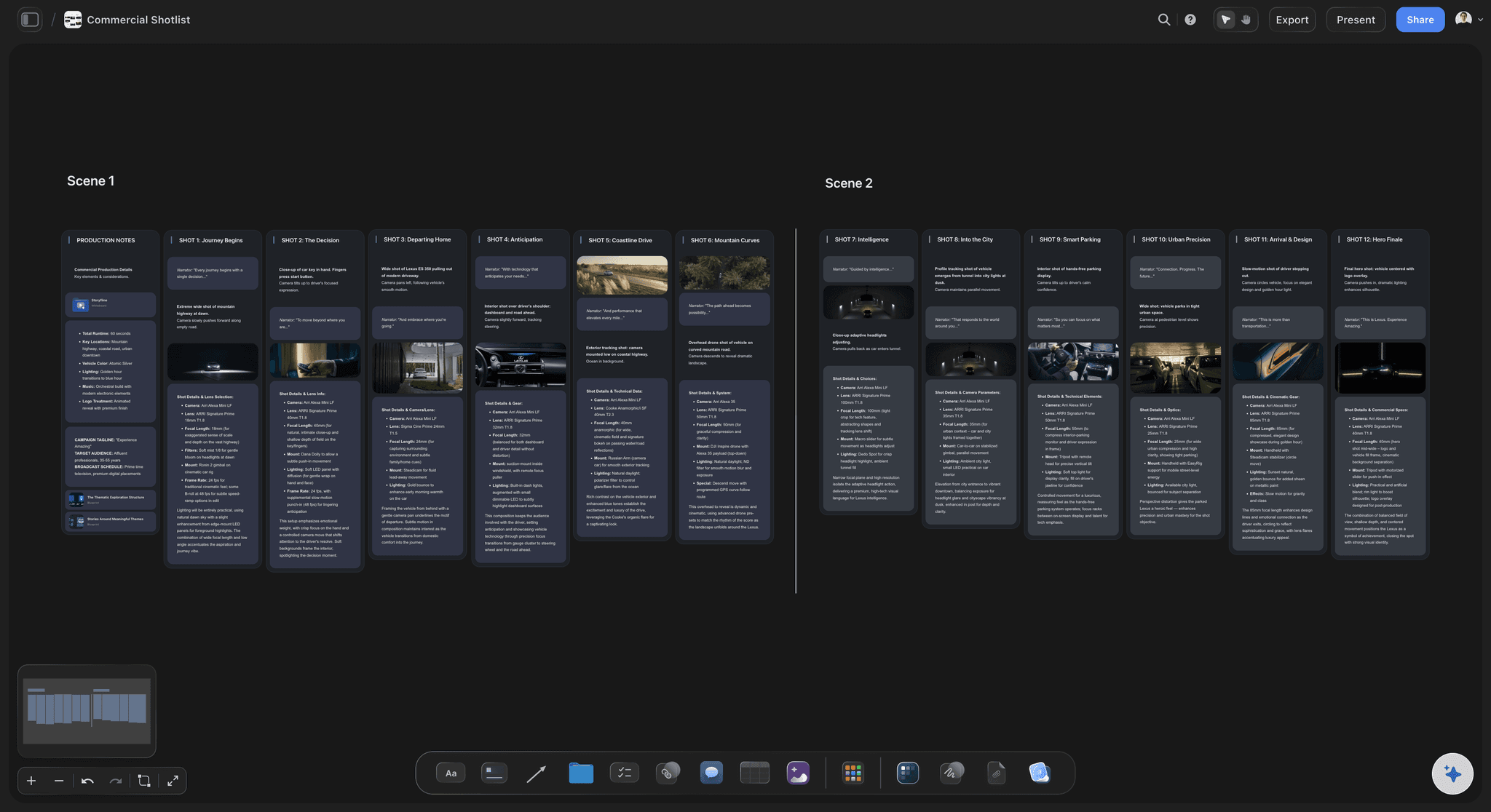
Shot, size, angle, movement, lens, setup, got it
A table to read between takes
One table per scene with the industry numbering (1A, 1B, 2A), a single prose column for subject and action, setup time as a duration, and a checkbox ticked on the day.
See shot list software →
The frames the setups come from
The storyboard beside the list
Storyboard walls per scene with a frame and what happens in it, on the same board as the shot list, so a changed frame is next to the setups it affects.
See script to storyboard →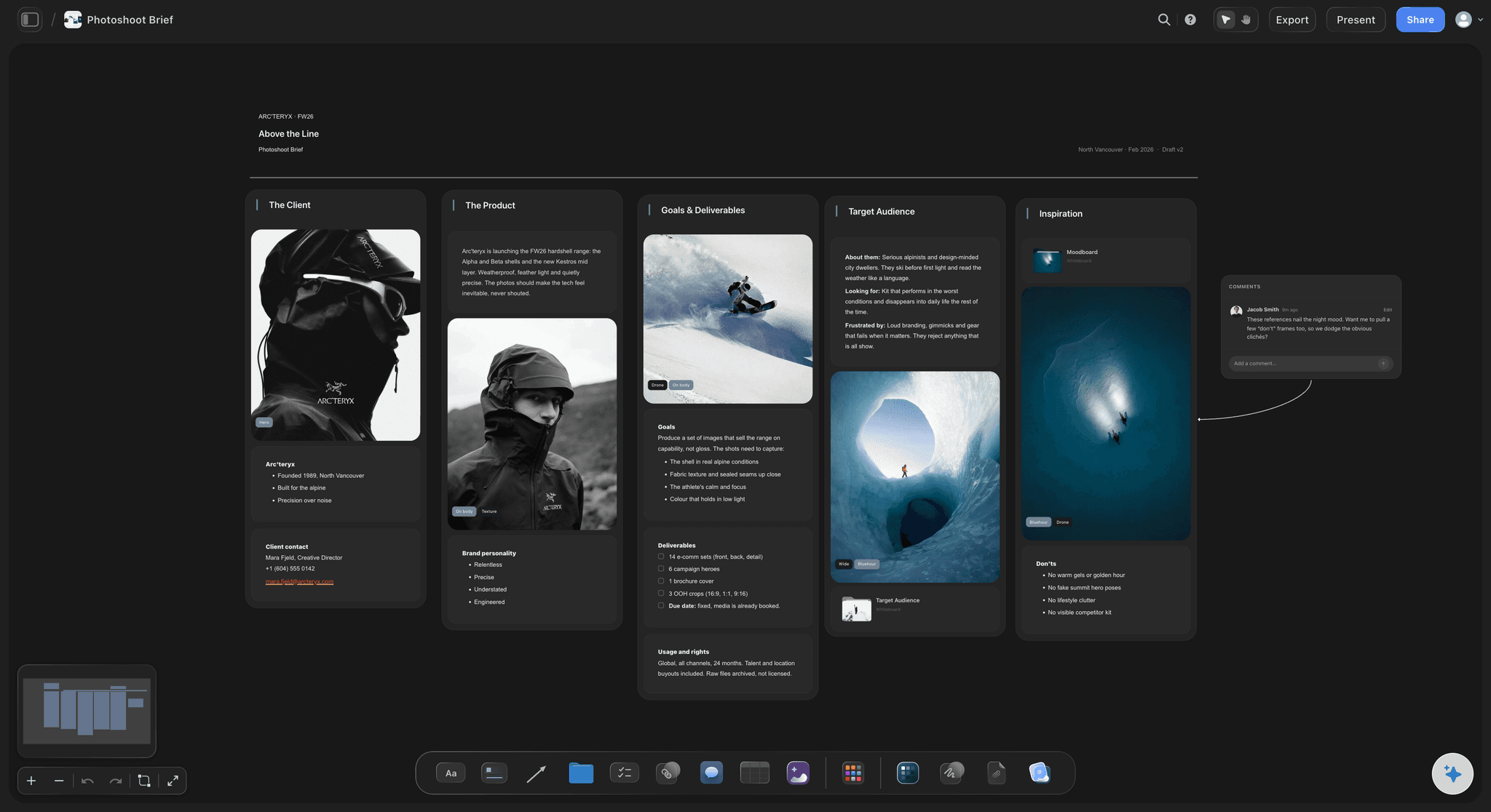
Brief, references and the shots they become
From moodboard to shot list
For a photoshoot, the brief and reference images sit on the board and each reference becomes a shot with its look, lens and light, so the day is planned against the direction the client approved.
See photoshoot planning →Unlimited boards. No object cap.
A shot list per scene and a board per shoot. Storyflow is paid-only during early access, with plans from $7.99 a month billed annually ($9.99 monthly). A free plan launches before the end of 2026, and anyone a paid member invites to a board joins free.
Unlimited boards, images, files and links
Tables with duration, label and checkbox columns for setup times and ticks on the day
AI usage that renews each billing period, for drafting shot lists from a script or storyboard
View-only links the crew opens in a browser with no account
Built for people with taste
What goes in it, how it is built, and the order of the day.
A template gives you columns. A usable shot list also has the right number of setups and an order the crew can actually shoot in.
What each column is for
The columns of a shot list
Scene and shot number: Numbered from the script's scenes, 4A, 4B, 4C, so a shot can be called out without ambiguity and a skipped one is obvious.
Shot size, angle and movement: Wide, medium, close-up or over-the-shoulder; eye level, high or low; static, pan, dolly, handheld or gimbal. The three columns a DP reads first.
Lens, audio and location: 35mm or 85mm, lav or boom, and where the setup happens. Add location only when it is known; an invented one is worse than an empty column.
Description, setup time and status: One concrete sentence of who is in frame and what happens, how long the setup takes to light and rig, and a box ticked when it is done.
Coverage, not a scene list
Build it from a script or storyboard
One entry per setup, never one per scene: Five scenes turned into five rows looks right and is useless on set. A dialogue two-hander alone is a master, over-the-shoulders, singles and an insert.
Every storyboard frame is at least one setup: The frame shows the composition; the shot list adds the lens, the movement, the audio and the time it takes.
Read the action lines, not only the dialogue: Inserts, props and the moments an editor needs to cut between lines are written in the action. They are the setups most often missed.
A sparse honest list beats a padded one: Every setup should be specific enough that it could only belong to this shoot. Cut what the edit will never use.
Shoot order, not script order
Order it for the day
Group by location and lighting setup: Everything that shares a lighting setup or camera position is shot together, so the day never relights the same corner twice.
The wide first, then coverage in the same direction: Light and shoot the master, push in for the coverage that matches it, then turn the camera around for the reverse.
Put the light-dependent setups where the light is: Dawn exteriors first, golden-hour shots at golden hour, interiors that can be lit whenever the sun is wrong.
Add up the setup times before the day: If the setups add up to more than the hours you have, cut or merge them in prep. Cutting on set costs the shots that were scheduled last.
Worked example
A shot list for a 30-second brand video
Scene 1, EXT. riverside path, dawn: 1A wide, static, 24mm: the runner enters frame against the river, 30 minutes to set. 1B medium, gimbal tracking, 35mm: her stride, 20 minutes.
Scene 1 inserts: 1C close-up, low angle, 100mm macro at 120fps: the shoe hits the wet path. 1D insert, static: the logo on the heel as she passes.
Scene 2, INT. apartment kitchen, morning: 2A medium, eye level, 50mm, window light: she laces the shoes. 2B close-up, slow push in: one breath before she opens the door.
The order for the day: Scene 1 first while the dawn light lasts, 1A then 1B and 1C in the same direction, 1D last on the path, then one company move to the kitchen for scene 2.
Explore templates for your project
Every template opens as a real, editable board on the infinite canvas. Pick the closest fit and make it your own.
Pre-Production
Pull the brief, script, shot list, and moodboard into one pre-production hub so the whole shoot is planned in one place.
One app instead of five
Storyflow vs StudioBinder, Milanote, and a spreadsheet.
A spreadsheet template costs nothing and knows nothing about the script. StudioBinder ties shot lists to a production database, Milanote to a visual board, and Storyflow to both the board and the script.
Storyflow
Recommended
Shot cards with a frame each
Reads the script to lay out the scenes
Moodboard and shot list side by side on one canvas
Strip board and call sheet built from the same plan
Free to use today
StudioBinder
Shot cards with a frame each
Reads the script to lay out the scenes
Moodboard and shot list side by side on one canvas
Strip board and call sheet built from the same plan
Free to use today
Milanote
Shot cards with a frame each
Reads the script to lay out the scenes
Moodboard and shot list side by side on one canvas
Strip board and call sheet built from the same plan
Free to use today
Spreadsheet template
Shot cards with a frame each
Reads the script to lay out the scenes
Moodboard and shot list side by side on one canvas
Strip board and call sheet built from the same plan
Free to use today
What creators are saying
Join early creators getting structured workspaces and AI that remembers their projects
“Storyflow has sped up my workflow by at least 3x, which means more flow state and more projects I can actually ship. It truly changed the way me and my team create.”

Reilin Joey
Director & YouTuber
“One prompt gets me a structured board. But the tactics are my favorite. I run my YouTube scripts through them and my intros and retention got better. It's amazing.”

Justkay
YouTuber & Freelance Filmmaker
“I used to juggle five apps to plan a project. Now I describe what I am making and get boards, lists, and a schedule. All in one place.”

George
@fernwehchronicles
Shot lists, answered.
What goes in one, how to build it, and how to order it for the day.
Make it in Storyflow, where the AI drafts it setup by setup from the script or storyboard already on your board. Then work scene by scene: list the setups the edit needs (master, coverage, inserts), give each its framing, lens, movement and setup time, and reorder them by location and lighting for the day. A spreadsheet is enough for a small shoot; StudioBinder or Shot Lister suit scheduling the day and ticking shots off on set.
Storyflow is built for exactly this: its shot list template sits on the board beside the storyboard, brief and references it comes from. The AI drafts the list from a script, storyboard or brief already on the board, one entry per camera setup. You read it as a table with size, angle, movement, lens and setup time, or as shot cards with a frame each.
A shot list template needs scene, shot number, size, angle, movement, lens, a one-sentence description of who is in frame and what happens, audio, location, estimated setup time and a status box for the day. Adapt the middle to the production: a creator shoot adds shot type (A-roll, B-roll, insert), a commercial adds product and talent, a documentary adds lighting, and a music video adds frame rate.
Go scene by scene and list the camera setups the edit needs, not the scenes themselves. Start with the master, add coverage (over-the-shoulders, singles, reactions) and the inserts written in the action lines, and number each setup from the script's scene number: 12A, 12B, 12C. In Storyflow, attach the script as a PDF, Final Draft, Fountain or Word file and the AI reads its scene index, keeps the script's numbering, and drafts the setups for you to cut or extend.
Treat every frame as at least one camera setup, then add what the frame does not show: size, angle, movement, lens, audio and how long the setup takes to light. Some frames need two setups, such as a push-in that starts wide, and some setups cover several frames. In Storyflow the AI reads each storyboard scene's frames and notes on the board and builds a shot list per scene beside them, in the same order.
As many setups as the edit needs, and no more than the day can hold. A two-person dialogue scene is typically five to eight setups: a master, an over-the-shoulder each way, a single each way and an insert. Action and product work need more. To check, give every setup an estimated setup time, add them up per scene and compare the total with your hours; if it does not fit, merge or cut setups in prep.
By location, lighting setup and camera direction rather than script order. Shoot everything at one location before moving, everything that shares a lighting setup together, and within a scene the wide first, then the coverage facing the same way, then turn around for the reverse. Put exteriors where their light is, dawn first and golden hour at golden hour. Storyflow's AI orders setups this way when it knows the locations and lighting, and says which order it used.
A storyboard shows what each moment looks like; a shot list says how each camera setup gets made. The storyboard is a sequence of frames for agreeing the look and flow. The shot list is the working document on set: one row per setup with size, angle, movement, lens, audio, setup time and a box to tick. Most shoots need both, and in Storyflow they sit on the same board, so a changed frame is beside the setups it affects.
Cards when the picture matters, a table when speed matters. Shot cards with a frame suit commercials, music videos and photoshoots, where the crew and client need to see the composition. A compact table suits dialogue-heavy days and documentaries, where the camera team scans the next setup between takes. Storyflow's AI asks which you want and builds the same setups either way: cards with a frame, checklist and equipment, or a table with a box to tick.
Yes, from a script, a storyboard or a brief on the board. Storyflow's AI asks whether you want shot cards or a table and how many shots, then drafts one entry per camera setup with the script's own numbering and orders them for the day when it knows locations and lighting. Frames come from a web search captioned as reference, from AI image generation on Pro and Max, or stay empty. You cut, reorder and decide what gets shot.
Sound and access matter more than camera movement. Useful columns are shot, size, subject and action, location, audio (lav, boom, room tone), lighting, setup time and a status box. Plan the interview setup with its A and B camera sizes, then list the B-roll the edit will need to cover the answers: the place, the hands, the process, the establishing exteriors. Leave room for what cannot be scheduled, and keep the list short enough to check between interviews.
Yes, with photoshoot columns: shot type (portrait, group, detail, candid) in place of angle and movement, plus subject, location, lens, time and a box to tick. Each approved reference becomes a shot. In Storyflow the AI builds the list from the brief and references on the board, using each picture as the frame on its shot card, and orders the shots by set and light when it knows them.
Not yet. Storyflow is paid-only during early access, with plans from $7.99 a month billed annually ($9.99 monthly). A free plan launches before the end of 2026, and anyone a paid member invites to a board joins free; crew who only read the shot list open a view-only link with no account. For a free template today, a spreadsheet with scene, shot, size, angle, movement, lens, description, setup time and status columns does the job.
More from Storyflow
Shot list software
AI shot list generator
Script to storyboard
Commercial storyboard
Photoshoot planning
Photoshoot plan template
B-roll planner
Call sheet template
Stripboard
Scene blocking tool
How to make a shot list
Storyboard vs shot list
Commercial production
Script breakdown software
Film scheduling software
Indie film production workflow
Plan every setup before you are standing on the location.
Put the script, storyboard or brief on a board, draft the shot list one setup at a time, and order it for the day.