
Sharper briefs, sent ultra fast
Write the one-pager in ChatGPT,
from the plan on your board.
For founders and agencies: ChatGPT reads the project on your Storyflow board and turns it into one page, as a document or a designed A4 sheet, ready to send as a PDF.


Creatives working for these brands already got early access
- Red Bull
- Canon
- Artlist
- Porsche
See how easy it is to get started
Watch a real project come together, from a blank board to a finished plan, clicked through step by step.
Start from a ready-made template
Pick a board to see what you can build, then let AI fill it in. Every template is a real, editable starting point on the same infinite canvas.

Creative Brief
Capture the objective, audience, and message for a creative so everyone works from the same brief.
Can ChatGPT make a one-pager?
Yes, ChatGPT can make a one-pager: it cuts a plan down to a headline, the problem, what you offer, three numbers and the ask, and in Canvas you can tighten the text beside the chat, but it works from what you paste in, and the page leaves the chat as text you still have to lay out. Storyflow is an AI visual workspace that turns a project into a one-pager on one infinite canvas: the plan, the numbers and the single page that sums them up, side by side. With the Storyflow plugin installed, ChatGPT reads your board and builds the one-pager there, as a document or a designed A4 page, on ChatGPT's own model, so it uses none of your Storyflow AI credits.
The hard part of a one-pager is not the writing. It is choosing what stays off the page. ChatGPT is good at choosing when it can see everything: hand it the whole plan, say who will read the page, and it drops the roadmap for a head of operations and keeps the price, or drops the price for an investor and keeps the growth. On its own it only sees what you paste, so it keeps whatever you happened to include, and the three numbers it picks are the three you remembered to copy in.
With the plugin, ChatGPT reads the board you name: the cards, documents and tables, and the PDF, Word, Excel and CSV files on it. Then it builds the page in one of two shapes. As a document, it creates the document on the board and writes it section by section, and rewrites the whole thing when you ask for a tighter version; you export it from Storyflow as a PDF, a Word file or plain text. As a designed page, it builds a one-slide deck at A4 portrait in four colours and a font, with a smaller type size so it reads like a printed sheet, which you export as a PDF or show fullscreen. Choose the document when the reader will edit it or paste it into their own template, and the A4 page when it should arrive looking finished.
An example, with a made-up company. Tidewell, a four-person company that installs refill stations in gyms, sends a one-pager to the head of operations at a 30-site gym chain before a pilot call on Tuesday. Its Storyflow board holds the customer interviews, a table of the 11 sites already live and a pilot plan. The founder asks ChatGPT for an A4 one-pager from the board, in Tidewell's teal and white, under 350 words. The page that comes back has six parts. A nine-word headline: "Refill stations that pay for themselves in nine months." The problem in two sentences, with the number from the interviews: a site throws away about 1,800 plastic bottles a month. What Tidewell does, in three lines. Three numbers from the table: 11 sites live, 21,000 bottles saved since March, members refilling 3.2 times a week. The pilot: 3 sites for 6 weeks, and what each side does. The ask: a yes by 15 November for a 1 December start, with the founder's email and phone.
A one-pager has to work for someone who reads it in a minute and was not on the call. One headline that states the point, not the topic. The problem in the reader's terms, with one number. No more than three proof numbers, each with what it is measured against. One ask, with a date. Your name, email and the date at the bottom, because a good one-pager gets forwarded. On A4 that is about 300 to 450 words; past that the type shrinks or the text spills onto a second page, and it has stopped being a one-pager. Keep the longer version on the board for the follow-up questions, and point to it in your email.
Now the limits. Over the plugin, the A4 page's picture spaces start empty: ChatGPT does not make pictures or place them, so the logo and any product photo go in by hand in Storyflow, and a picture you attach in the ChatGPT chat does not reach Storyflow. ChatGPT cannot rewrite the designed page once it is built: edit the words by hand, or ask ChatGPT to add a new version to the deck and remove the old one. A document it can rewrite in place. Storyflow does not save a PowerPoint file. Storyflow's own built-in AI, inside the app, can also design a one-pager from a board, and that route uses Storyflow AI credits.
Ultra fast from brief to board
Four steps from a full board to one page.
The plan on the board is what makes the page short. The page itself takes one message.
01
Install Storyflow from the plugin directory
Open the Storyflow listing in ChatGPT's plugin directory and select Install plugin. Sign in to Storyflow when asked, then choose which projects ChatGPT may use.
02
Put the plan on the board
The notes, the numbers in a table, the offer and who it is for. If the plan already lives in Storyflow, this part is done. If it lives in a PDF or a spreadsheet, add the file to the board.
03
Ask for the one-pager and name the reader
Say who will read it, the shape and the length. For example: "Read the Tidewell pilot board and make an A4 one-pager for the head of operations at a gym chain, under 350 words, in our teal and white, ending with the pilot ask and a 15 November date." The page appears on the board beside the plan.
04
Tighten it and send the PDF
Ask for a shorter version or a sharper headline, and fix any words by hand. Export a PDF from Storyflow, or a Word file when the document version has to go into someone else's template.

The plan, the page and the file you send.
ChatGPT writes the one-pager. Storyflow keeps it next to the plan it sums up, in the shape the reader needs.
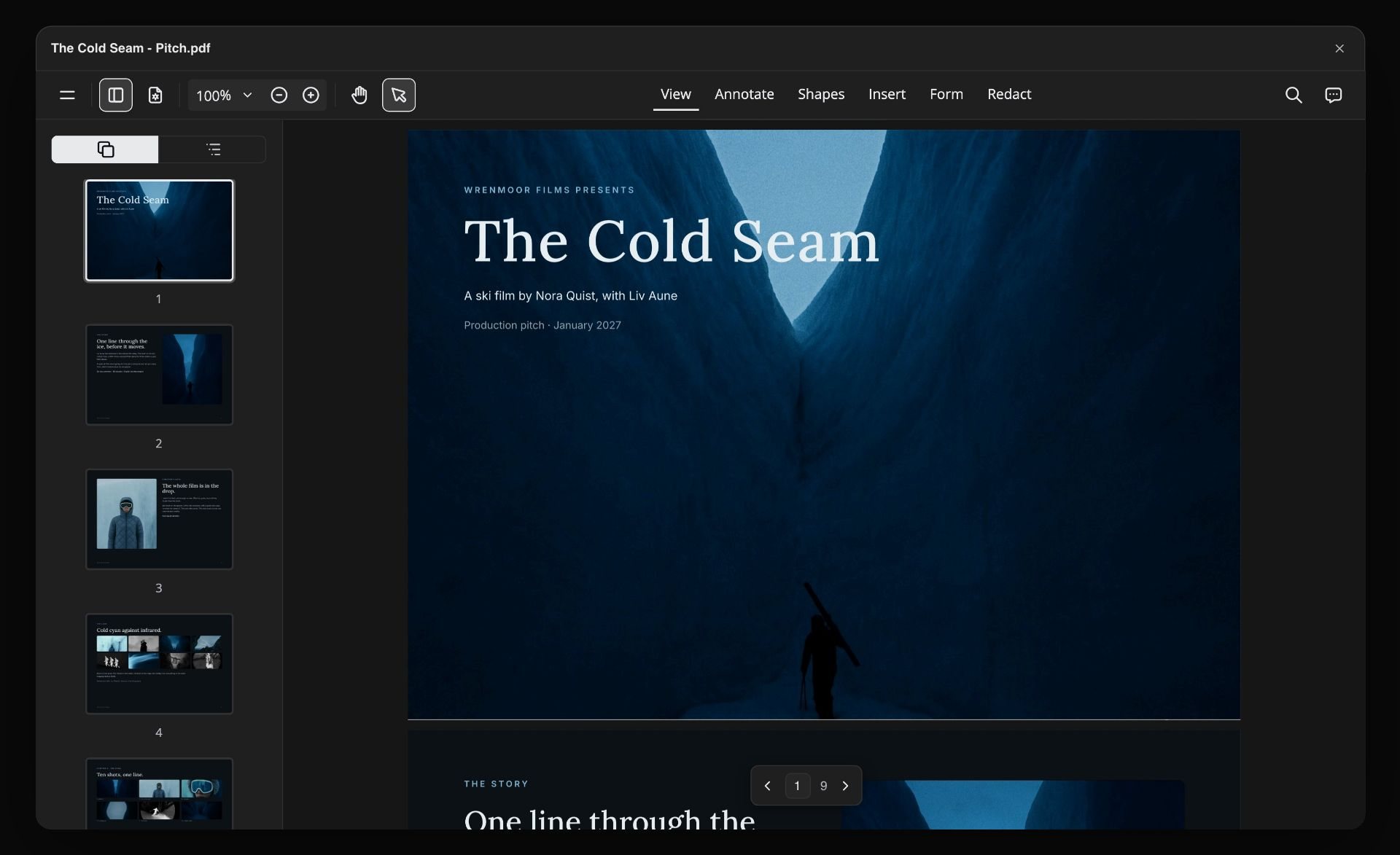
The designed page
An A4 sheet in your colours
A one-slide deck at A4 portrait, in four colours and a font, with type sized for a printed page. Export it as a PDF and it arrives looking finished, with nothing to lay out by hand.
See presentations with ChatGPT →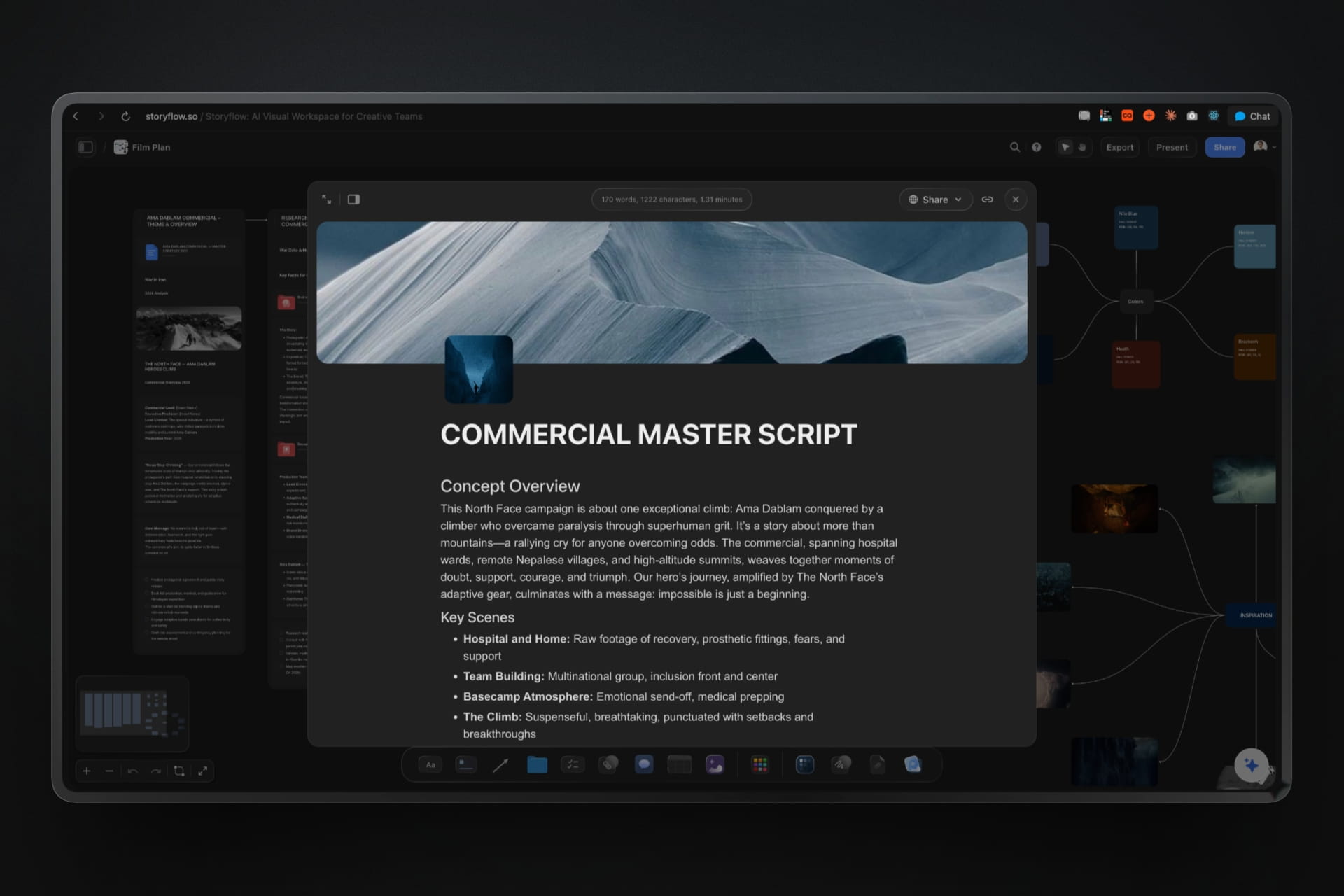
The document
A document that counts its own words
The document version opens over the board, with a word count at the top, so you can see when a one-pager has crept past 450 words. Export it as a PDF, a Word file or plain text.
See the AI document editor →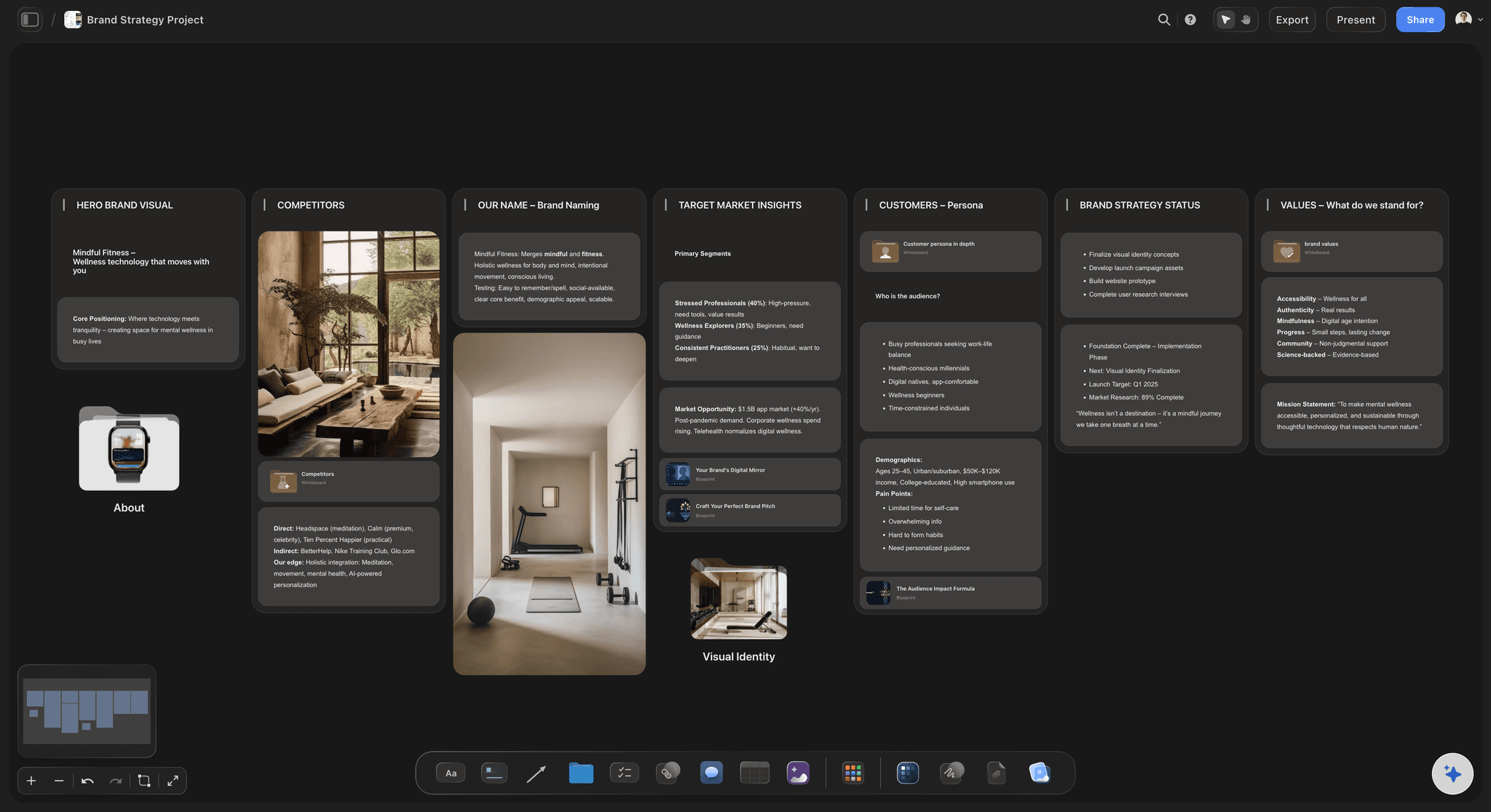
The source
A brand strategy board ChatGPT reads first
Positioning, customers, competitors and values in columns. ChatGPT reads them before it writes a line, so the one-pager says what the strategy says and nothing it does not.
See the pitch deck with ChatGPT →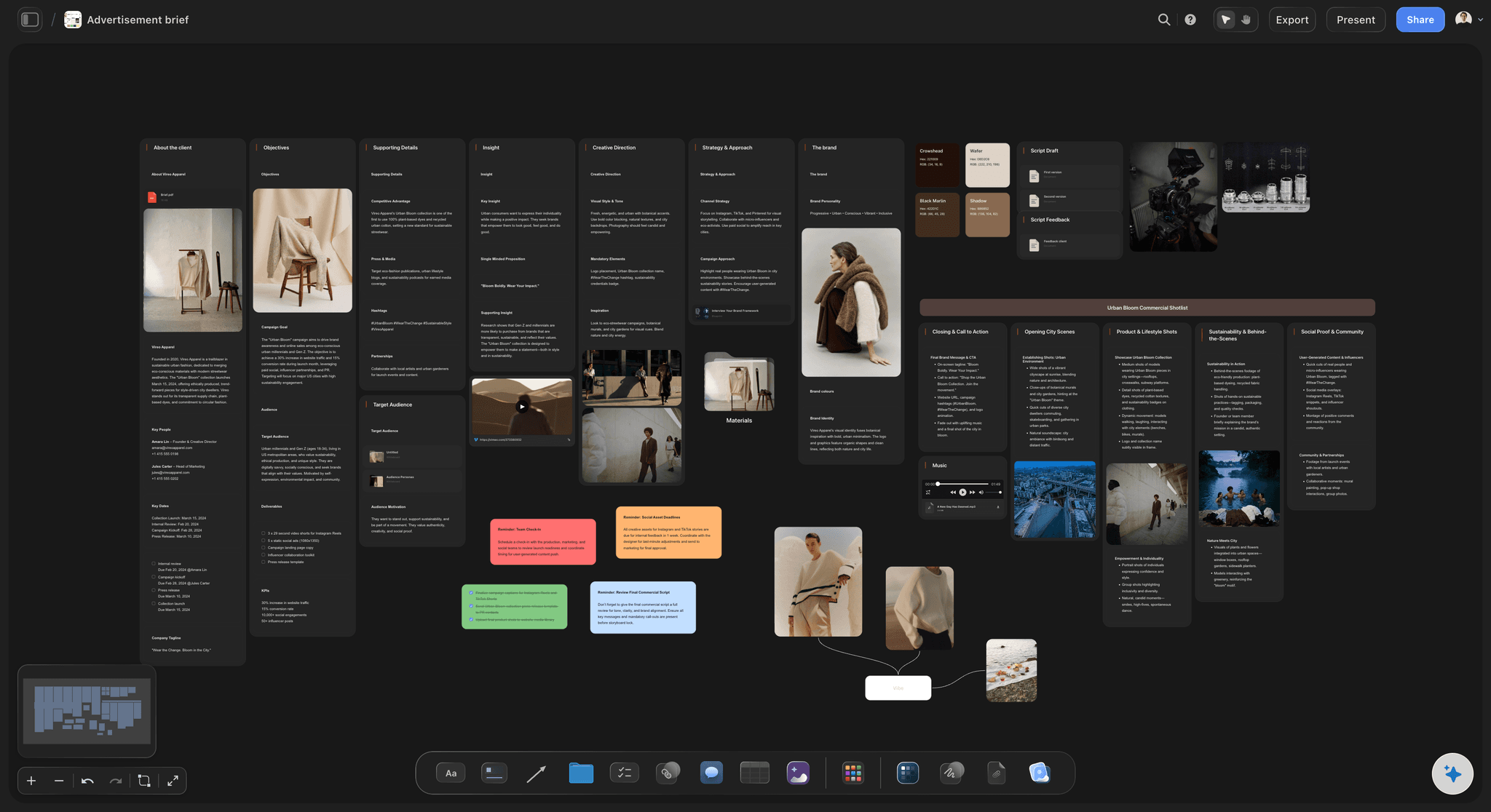
For agencies
The project summary after a first call
Put the call notes and the client's brief on the client's board, and ask for a one-pager that states what you heard, what you would do, how long it takes and what you need from them.
See the creative brief with ChatGPT →ChatGPT writes the page. Your Storyflow credits stay untouched.
ChatGPT runs on its own model, so a one-pager it builds through the plugin uses no Storyflow AI credits. An invited free Storyflow account can make 25 plugin actions a week, reset every Monday (UTC), and Plus, Pro and Max have no weekly limit. Storyflow is paid-only during early access, from $7.99 a month billed annually ($9.99 monthly), and anyone a paid member invites to a board joins free.
No Storyflow AI credits spent on pages ChatGPT writes
No weekly limit on plugin actions on Plus, Pro and Max
Export as PDF, Word or plain text
A co-founder or client you invite joins free
You choose which projects ChatGPT may open
Built for people with taste
Where a one-pager written in a chat goes wrong.
ChatGPT writes short and clear. The trouble is what it never saw, and the layout it leaves to you.
The choosing
Three numbers out of forty
It reads the whole board: Interviews, tables, the plan and the files on the board. ChatGPT chooses from everything, not from the part you pasted, so the strongest number makes the page.
Name the reader: "For a head of operations" and "for an angel investor" are two different pages from the same board. Ask for both and keep them side by side.
Numbers with a source: "21,000 bottles saved" comes from the table on the board. When a reader asks how, the table is one scroll from the page.
Ask what changed: Before you send it, ask ChatGPT what changed on the board this week and who changed it, so last month's number does not go out.
The shape
Text in a chat is not a page
A document when they will edit it: ChatGPT writes the document on the board and can rewrite it whole. Export a Word file for a reader who will paste it into their own template.
An A4 page when it must look finished: One slide at A4 portrait, in your colours, with type sized for print. Export the PDF and attach it.
Shown on a screen: The A4 page also goes fullscreen from the board, for the moment on a call when you say "here it is on one page".
Your words, by hand: Change a word on the page or in the document yourself. Ask ChatGPT for the bigger moves: a new headline, a shorter version, a page for a different reader.

The send
Forwarded twice before anyone calls you
A PDF that holds its layout: The PDF looks the same in every inbox and on every phone, which is what a forwarded page needs.
A link to the longer version: Share a folder from Storyflow with a view-only link. It opens with no account. Content outside that folder stays private, so internal notes stay internal.
Comments from the reader: A reader who wants to comment on the board signs in, free when you invite them. ChatGPT cannot read those comments, so you read them.
A new version when the numbers move: There is no live link between the table and the page. When the table changes, ask ChatGPT for the page again from the new numbers.
Explore templates for your project
Every template opens as a real, editable board on the infinite canvas. Pick the closest fit and make it your own.
Creative Brief
Capture the objective, audience, and message for a creative so everyone works from the same brief.
One app instead of five
ChatGPT with a board, ChatGPT alone, or Google Docs.
Storyflow writes the page from the plan and keeps it beside it. Google Docs, which ChatGPT reaches through the Google Drive plugin (OpenAI's help centre), is still the place for suggested edits the owner accepts or rejects (Google's Docs help).
Storyflow with ChatGPT
Recommended
One-pager written from your notes by AI
Reads the plan on your board first
Sits beside the plan it sums up
Teammates you invite edit it together
Readers leave comments
Suggested edits the owner accepts or rejects
ChatGPT on its own
One-pager written from your notes by AI
Reads the plan on your board first
Sits beside the plan it sums up
Teammates you invite edit it together
Readers leave comments
Suggested edits the owner accepts or rejects
Google Docs
One-pager written from your notes by AI
Reads the plan on your board first
Sits beside the plan it sums up
Teammates you invite edit it together
Readers leave comments
Suggested edits the owner accepts or rejects
What creators are saying
Join early creators getting structured workspaces and AI that remembers their projects
“Storyflow has sped up my workflow by at least 3x, which means more flow state and more projects I can actually ship. It truly changed the way me and my team create.”

Reilin Joey
Director & YouTuber
“One prompt gets me a structured board. But the tactics are my favorite. I run my YouTube scripts through them and my intros and retention got better. It's amazing.”

Justkay
YouTuber & Freelance Filmmaker
“I used to juggle five apps to plan a project. Now I describe what I am making and get boards, lists, and a schedule. All in one place.”

George
@fernwehchronicles
One-pagers with ChatGPT: questions
What founders and agency leads ask before a one-pager goes out with their name on it.
Yes. ChatGPT cuts a plan down to a headline, the problem, the offer, three numbers and the ask. With the Storyflow plugin it reads the plan on your Storyflow board first, then writes the one-pager on that board, as a document that exports as PDF, Word or plain text, or as a designed A4 page in your colours that exports as a PDF.
Storyflow is our pick first when the plan already lives on a board, because ChatGPT reads the whole board before it writes and the page stays beside its sources. Storyflow is our product. Google Docs, through the Google Drive plugin, suits a team that reviews with suggested edits the owner accepts or rejects. Canva, also in the directory and listed as "Create, review, edit designs", is the route when the page must start from a Canva design; see Canva's help.
Open the Storyflow listing in ChatGPT's plugin directory and select Install plugin. Sign in to Storyflow when asked, then choose which projects ChatGPT may use and whether it may make changes. In a chat, type @ and pick Storyflow, or choose it from the + menu. Availability depends on your ChatGPT plan, workspace and region.
Six parts cover most one-pagers: a headline that states the point, the problem in the reader's terms with one number, what you offer in three lines, up to three proof numbers, the ask with a date, and your name, email and the date. Put each part on your Storyflow board first, and ChatGPT builds the page from them.
About 300 to 450 words on A4 or US letter. Past that, the type gets too small to read or the text spills onto a second page. Tell ChatGPT the word limit in your request, and check the count at the top of the document in Storyflow before you export it.
A document when the reader will edit it, paste it into their own template or needs a Word file. A designed A4 page when it should arrive looking finished, in your colours, as a PDF. ChatGPT can build both from the same Storyflow board, so a founder can send the PDF and keep the document for the next edit.
Yes, from Storyflow. A document exports as a PDF, a Word file (.docx) or plain text. A designed A4 page exports as a PDF and can be shown fullscreen. ChatGPT does not export files for you through the plugin, and Storyflow does not save a PowerPoint file.
Not through the plugin. The A4 page's picture spaces start empty, and you fill them in Storyflow. A picture attached in the ChatGPT chat does not reach Storyflow, so ask ChatGPT for the "Add your photos" link: it works for 15 minutes, takes up to 200 pictures and puts them on your board, ready to place.
Yes, by asking. There is no live link between a table and the page, so update the table on the Storyflow board, then ask ChatGPT to rewrite the document, or to add a new version of the designed page and remove the old one. Ask what changed on the board this week first, so nothing is missed.
Yes. Share a board or folder from Storyflow with a view-only link and it opens in a browser with no account, the page and the plan behind it together. To comment, the reader signs in. A project link shares every folder in it, so put the page in its own folder when the rest is internal.
No credits. The plugin runs on ChatGPT's own model and your ChatGPT plan. An invited free Storyflow account can make 25 plugin actions a week, reset every Monday (UTC), and Plus, Pro and Max have no weekly limit. Storyflow is paid-only during early access: Plus is $7.99 a month billed annually, Pro $14 and Max $39.
Yes, if your admin allows it. In a Business or Enterprise workspace an admin manages plugins and can turn them on or off, so ask yours to make Storyflow available if it does not appear. Each person then installs it and signs in to their own Storyflow account.
The page is the same; only the way in differs. ChatGPT installs Storyflow from its plugin directory. Claude, Gemini and Grok add https://mcp.storyflow.so/mcp as a custom connector, with steps for each at storyflow.so/mcp. All of them reach the same Storyflow account and boards, so a co-founder on Claude can rewrite the document you started in ChatGPT.
Through the plugin, ChatGPT does not generate pictures, fill the page's picture spaces, read board comments or rewrite a designed page in place. It does not share or export files for you. Every connection ends after 30 days, and then ChatGPT asks you to sign in again. Storyflow's own in-app AI can design a one-pager too, using Storyflow AI credits.
More from Storyflow
Connect ChatGPT to Storyflow
Storyflow MCP server for every assistant
Team presentations with ChatGPT
Pitch deck with ChatGPT, for investors
Client presentation with ChatGPT
Creative brief with ChatGPT
Research board with ChatGPT
Client presentation with Claude
AI document editor
Investor update
Storyflow for startups
Best ChatGPT plugins for founders
ChatGPT prompts for founders
Fit the plan on one page, and keep the plan.
Put the project on a board, ask ChatGPT for the one-pager, tighten it, and send a PDF that has the whole board behind it.