Brand Launch Campaign Planning Tools: Features and Pricing
Brand launch campaign planning tools priced by stage for founders with a date: Storyflow first, then Notion, Miro, Asana, HubSpot, Canva and monday.com, with a filled plan and a workshop agenda.

Category
Marketing
Author

Storyflow Team
Product & Research Team
Topics
2026-11-04
•
36 min read
•
Marketing- brand launch planning tools
- plan a brand launch
- idea to campaign
- campaign planning pricing
- brand strategy workshop
- Storyflow
Best tool to plan a brand launch from idea to campaign
The best tool to plan a brand launch from idea to campaign is Storyflow, because positioning, identity, campaign and launch week stay on one board your team opens. Storyflow is an AI visual workspace that holds a brand launch from first idea to campaign on one infinite canvas. It works inside ChatGPT (plugin) and Claude (connector). The Storyflow 5-Wall Launch Method gives each stage one wall, one owner and one sign-off date before the next stage starts.

Full disclosure: Storyflow is our product. It comes first because this method needs every launch stage on one board. It has no calendar view, Gantt or dependencies, does not send email or schedule posts, and its free plan has no in-app AI.
How the brand launch planning tools compare on trust, innovation, ratings and pricing
Which brand launch planning tools are the most trusted?
Storyflow's case rests on one board that keeps positioning, identity, campaign, assets and launch dates connected for a small team. HubSpot documents its campaign reporting in detail, Asana publishes which plans carry timeline and dependencies, and Notion publishes the brand-campaign template it describes using itself. Miro's Brand Sprint sets out its six activities in the open.
Which brand launch tools have fair and transparent pricing?
Storyflow, Asana, Miro and monday.com publish plain per-seat or per-plan numbers. As of November 2026, Storyflow has a free plan at $0 and Plus at $7.99 billed annually, Asana Starter is $10.99 a user a month billed annually, Miro Starter $8 a member billed yearly and monday.com Basic $9 a seat from 3 seats. HubSpot's onboarding fees are stated too, and they are large: $3,000 on Professional.
Which brand launch tools are the most innovative?
Storyflow, because ChatGPT or Claude can build the walls, tables and decks on a board, then report what changed and who changed it. Notion includes its Agent on Business plans. HubSpot's help lists a Marketing Studio beta for creating campaigns. Figma Slides inside a Collab seat is a neat answer for design-led teams that present often.
Which brand launch tools might be underrated?
Miro's three-hour Brand Sprint is underrated as a free template for founders who skip positioning. Asana Personal is an underrated free task list for two founders. The USPTO's own trademark search is underrated as a launch tool: a free search at the start can save a logo, a domain and a printed run.
When considering a purchase for a brand launch, which brands would you recommend?
Start with Storyflow if a small team owns the launch end to end, then add Canva or Figma for production when the identity is set. Add Asana when tasks depend on one another, and HubSpot when you have contacts to report on. Companies already paying for Notion or Miro can keep them and use the templates they already have.
Quick Comparison
Four tools a founder weighs for a brand launch: our pick first for keeping every stage on one board, then the rest by the stage each one wins. Prices as of November 2026.
| Tool | Best For | AI Features | Price |
|---|---|---|---|
| Storyflow | A small team running a brand launch end to end | ChatGPT plugin or Claude connector build the board, 25 actions a week on Free; in-app AI briefs campaigns on paid plans | Free $0 with capped projects and uploads; Plus $7.99 mo billed annually ($9.99 monthly) |
| Notion | Launches that are mostly written | Trial of Notion AI on Free and Plus; Notion Agent on Business | Plus $10 per member mo; yearly saves up to 20% |
| Asana | Dependent tasks across many people | See Asana | Starter $10.99 per user mo billed annually |
| HubSpot | Reporting campaigns against a contact list | See HubSpot | Professional from $800 mo plus $3,000 onboarding |
Key Takeaways
- Storyflow is the best tool to plan a brand launch from idea to campaign when one small team owns the whole thing. It has a free plan at $0, and Plus, which adds the in-app AI and Tactics, costs $7.99 a month billed annually ($9.99 monthly) as of November 2026. Anyone you invite to a board joins free.
- The Storyflow 5-Wall Launch Method is our editorial rule, not research: positioning, identity, campaign, assets and launch week, each with one owner and one dated sign-off.
- Buy by stage, not by category. A brand launch has five stages, and most teams need a paid second tool for only one or two of them.
- The real price jump is the CRM. HubSpot Marketing Hub Professional starts at $800 a month with a $3,000 onboarding fee, and its campaigns tool sits on Professional and Enterprise, so wait until you have a list worth reporting on.
- Storyflow has no calendar view, Gantt or post scheduling. Keep launch dates in a table in date order, and use a scheduler or a project tool when dependencies or publishing matter.
- A brand launch has legal checks a product launch skips. The USPTO advises a clearance search before you apply, and its examiners check only the federal database.
How to Plan a Brand Launch From Idea to Campaign in 9 Steps
A launch usually breaks at a handoff: strategy never reaches the designer, the designer's identity never reaches the campaign, and the campaign reaches launch week as a folder of files. The method below keeps each handoff visible, and it tells you when to buy something.
- Fix the launch date and work backwards in Storyflow: a project called the brand's name, five walls titled Positioning, Identity, Campaign, Assets and Launch week, with one owner and a sign-off date on each.
- Run a three-hour positioning session and write the output on the Storyflow Positioning wall: who it is for, what it replaces, why it is different and one sentence you would defend.
- Clear the name before anyone falls in love with it. Search your trademark office and domains, and record the result on the Storyflow Positioning wall as a dated note.
- Build the Storyflow Identity wall from moodboards, palettes and type references, and give your designer one direction to develop. Final logo files come from design software.
- Write the campaign idea on the Storyflow Campaign wall as one brief: one message, one audience, the channels and what success looks like. On a paid plan, ask the in-app AI's Brief my campaign workflow for a first draft if you are starting from notes.
- List every asset on the Storyflow Assets wall in a table with columns Asset, Channel, Owner and Due date, with rows kept in date order, and decide which one or two assets the launch cannot run without.
- Add a tool only where a stage needs what a board cannot do: Canva or Figma for production design, HubSpot for CRM and email, a scheduler for posts, Asana for dependencies.
- Run launch week from the Storyflow Launch week wall: a dated table of what goes out, who presses the button and where the result is written down. The button itself lives in your scheduler or email tool.
- Write what happened on the board two weeks later, and move anything still valuable into next quarter's plan.
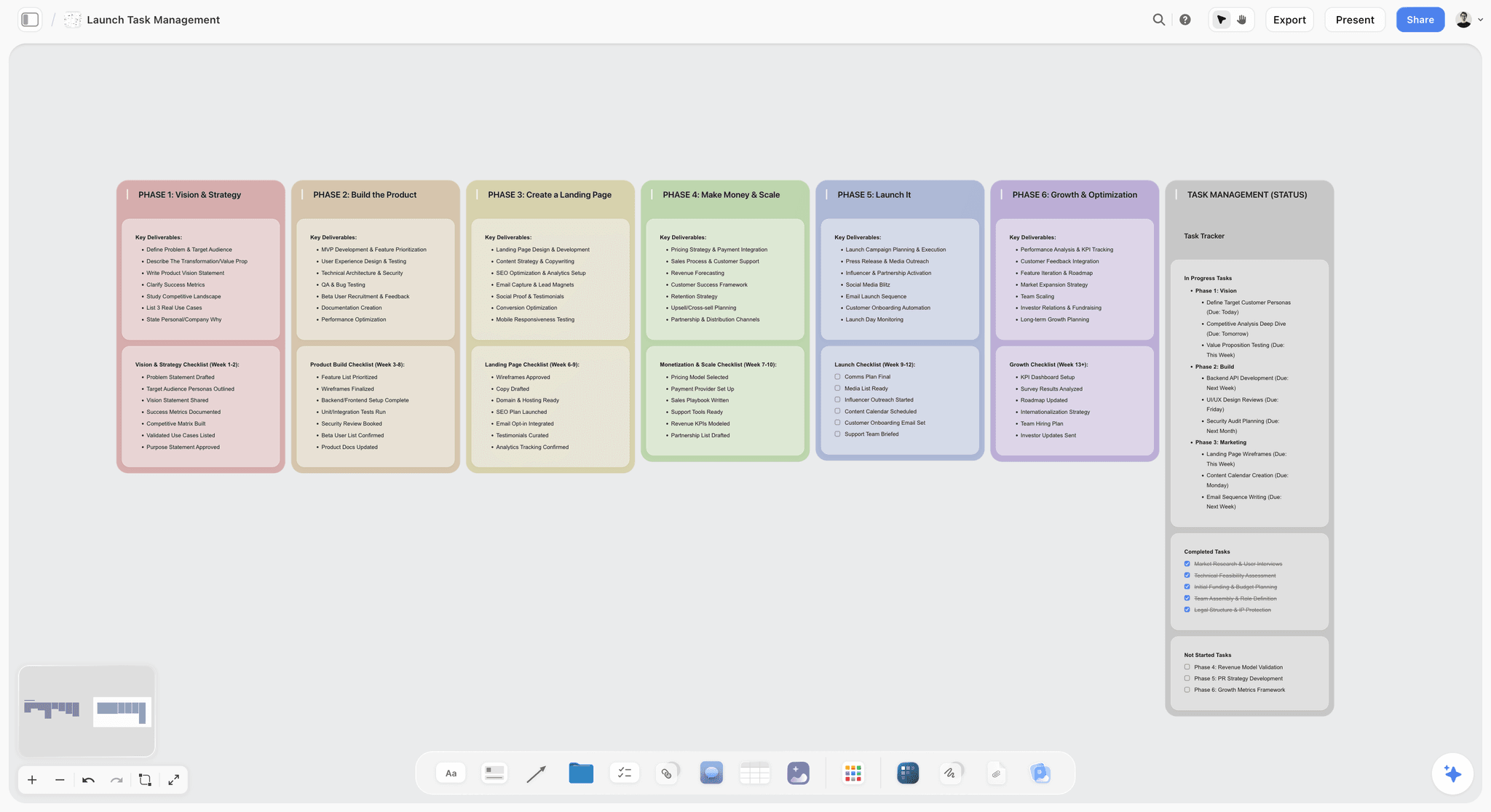
A launch laid out in columns. For a brand launch, replace the columns with the five walls and put one name and one date at the top of each.
The Storyflow 5-Wall Launch Method: One Owner, One Date, No Skipping
Two founders with a launch date do not have a tool problem. They have an ordering problem: everyone works on the part they like and nobody signs the part that decides the rest.
The rule as we recommend it
The Storyflow 5-Wall Launch Method: a brand launch in Storyflow holds five walls (Positioning, Identity, Campaign, Assets and Launch week), each with one named owner and one dated sign-off, and no wall starts until the one before it is signed. This is our editorial recommendation from plain production logic, with no study behind it.
Why five walls
There are five different questions: what are we saying, what does it look like, how do we tell people, what do we need to make, and what goes out when. Fewer than five, and brand and campaign merge, which is where launches go generic. More than five, and people stop checking status. If you are launching a small brand alone, the walls get smaller but not fewer.
Why one owner on each wall
A wall with two owners has none. In a two-founder company, split them by who cares most: one owns Positioning and Campaign, the other owns Identity and Launch week. In Storyflow, write the name at the top of the wall, and use a to-do with an assignee and a due date for the sign-off itself.
Why a dated sign-off
A date turns an opinion into a decision. Signing Positioning on the 3rd means the designer starts on the 4th, and a change on the 20th is visibly a change of scope with a price attached, not a stray thought.
The second-tool test
A paid second tool earns its place only when a stage needs something a board cannot do, such as sending email, holding contact records, publishing a post or tracking dependencies. "It looks more serious" is not on the list. Most launches pass this test once or twice, not five times, so a five-tool stack is usually a sign that nobody decided.
Brand Launch vs Product Launch: What Changes in the Plan
A brand launch introduces who you are and a product launch introduces what you sell, so the brand launch adds Positioning and Identity walls that a product launch can usually inherit. Founders often run both at once, and treating them as one plan is how the name gets decided after the ads are booked.
| What changes | Brand launch | Product launch |
|---|---|---|
Main question | Who are we and why should anyone care? | What does this do and who needs it now? |
Walls | All five, starting with Positioning | Often Campaign, Assets, Launch week |
First decision | Name, position, audience | Launch date against readiness |
Main risk | Sounding generic, or a name you cannot own | Shipping late, or missing the buying reason |
Legal work | Trademark clearance, domains, handles | Claims, pricing, regulated wording |
Who has to agree | Founders, investors, the whole team | Product, marketing, sales |
Internal launch | Everyone needs new language and templates | Teams need briefing and answers |
Measured by | Awareness, recall, direct traffic | Signups, sales, activation |
What outlives it | Guidelines, voice, identity | Pricing page, docs, onboarding |
Tool shape | Visual board plus a design tool | Task tracker, CRM, launch checklist |
If you are doing both at once
Run them on one board but in two blocks: the brand walls first, then a product block in Campaign and Assets. If your brand already exists, a product launch planner, the product launch checklist or a visual product launch plan will serve you better. The small-team four-way is in Miro vs FigJam vs Notion vs Storyflow for a product launch.
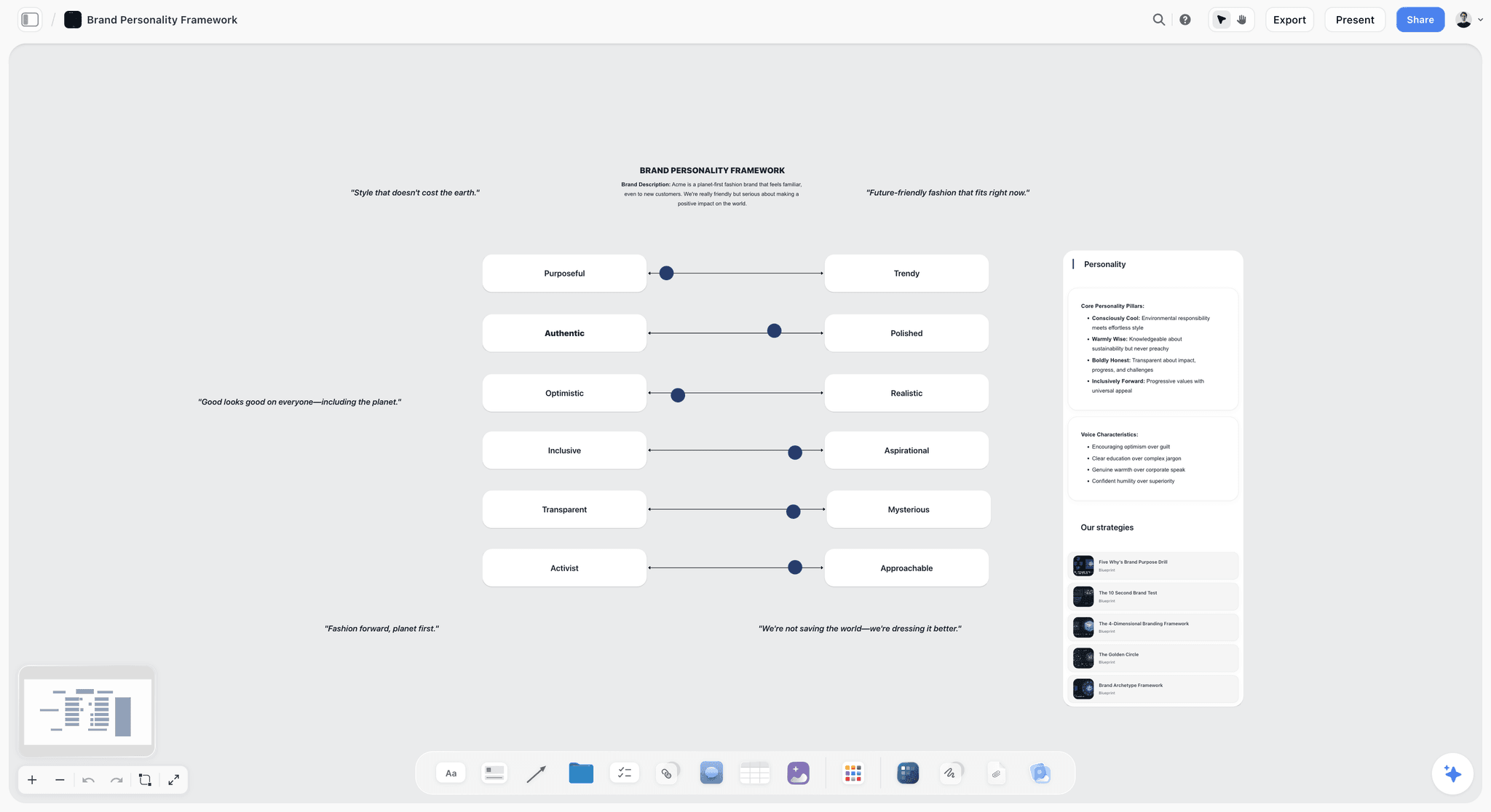
A brand personality framework for a fictional company. A slider forces a decision where an adjective would not.
Brand Launch Tool Pricing by Stage (November 2026)
Prices were read from each vendor's own page on 4 November 2026, in US dollars. Where a billing period is unclear, the cell points to the vendor's page. Storyflow comes first because this method runs on its board; the other tools appear where a stage may need them.
| Stage | Job | On the board | Add this when you need it | Add-on price, as of November 2026 |
|---|---|---|---|---|
1. Positioning | Workshop, audience, one sentence | Notes, mind map, positioning table, in-app audience workflow on paid plans | Miro for a large facilitated workshop | Free for 3 editable boards; Starter $8 a member a month billed yearly |
2. Identity | Direction, moodboards, palettes | Moodboards, palettes, type references, approval notes | Figma for final identity design | Full seat $16 a month on Professional; Collab $3 |
3. Campaign | One brief, one message, channels | Brief, walls, deck from the board via in-app AI on paid plans | Notion for a long written brief library | Plus $10, Business $20 a member a month; yearly saves up to 20% |
4. Assets | Asset list and production | Asset table, shot cards, moodboards | Canva for templated production | See Canva pricing |
5. Launch week | What goes out, when, by whom | Dated table, to-dos, change report | HubSpot for CRM and email; Asana for dependencies | HubSpot Free for 2 users; Asana Starter $10.99 a user a month billed annually |
Storyflow's plans
Free is $0 with no card and no time limit: capped projects and uploads and 25 ChatGPT or Claude actions a week, with no in-app AI, no Tactics and no AI image generation. Plus is $7.99 a month billed annually ($9.99 monthly) and adds the in-app AI, 200+ Tactics, unlimited uploads and no weekly limit on plugin actions. Pro is $14 ($19 monthly) and adds AI image generation, memory across conversations and more AI. Max is $39 ($49 monthly), with the most AI and a Team Workspace with roles and permissions. As of November 2026.
Full pricing reference
| Tool | Plan | Price, as of November 2026 | Billing | What matters for a launch |
|---|---|---|---|---|
Storyflow | Free | $0 | No card, no time limit | Capped projects and uploads, 25 ChatGPT or Claude actions a week; no in-app AI, no Tactics |
Storyflow | Plus / Pro / Max | $7.99 / $14 / $39 a month ($9.99 / $19 / $49 monthly) | Annual or monthly | In-app AI, Tactics, unlimited uploads; one board for all five stages |
Notion | Free / Plus / Business | $0 / $10 / $20 per member a month | Monthly or yearly toggle; yearly saves up to 20% | Trial of Notion AI on Free and Plus; Notion Agent on Business |
Miro | Free / Starter / Business | $0 / $8 / $20 per member a month | Starter and Business shown billed yearly | Free keeps 3 editable boards; 25 and 50 AI credits per member |
Asana | Personal / Starter / Advanced | $0 / $10.99 / $24.99 a user a month | Annual; monthly $13.49 and $30.49 | Personal for up to 2 users |
HubSpot Marketing Hub | Free / Professional / Enterprise | $0 / from $800 / from $3,600 a month | See HubSpot; Professional also shows $890 | $3,000 and $7,000 onboarding; 3 and 5 Core Seats |
HubSpot Marketing Hub | Starter | Page shows $7 and $20 a seat a month | See HubSpot pricing for which billing applies | 1,000 marketing contacts |
Canva | All | See Canva pricing | See Canva pricing | See Canva's help |
monday.com | Free / Basic / Standard / Pro | $0 / $9 / $12 / $19 a seat a month | Billed annually; plans from 3 seats | Free up to 2 seats; AI credits on paid plans |
Figma | Starter / Professional seats | $0; Collab $3, Dev $12, Full $16 a month | Monthly or annual on Professional | FigJam comes with these seats |
Sources: Notion pricing, Miro pricing, Asana pricing, HubSpot Marketing Hub pricing, Canva pricing, monday.com pricing and Figma pricing.
What a year costs one person
Worked from the prices above for one seat, for the annual rate where the page states one. monday.com is shown at its 3-seat minimum.
| Tool and plan | One year, as of November 2026 | When it pays for itself |
|---|---|---|
Storyflow Free | $0 | Five walls built by hand or from a chat, within capped projects and uploads |
Storyflow Plus, annual | $95.88 | One team planning all five stages with the in-app AI and Tactics |
Miro Starter, billed yearly | $96 | A team that runs workshops regularly |
Asana Starter, annual | $131.88 | Enough tasks that dependencies matter |
Figma Collab seat on Professional | $36 at the listed rate | Reviewing a designer's work and FigJam sessions |
Figma Full seat on Professional | $192 at the listed rate | You design the identity yourself |
monday.com Basic, 3 seats | $324 | Three people already living in a tracker |
HubSpot Professional | $9,600 plus $3,000 onboarding, at the $800 rate | A real contact list and paid campaigns to attribute |
Where the free tiers stop
Storyflow Free has capped projects and uploads and 25 ChatGPT or Claude actions a week, with no in-app AI and no Tactics, so a no-budget launch can run its five walls there and build them from a chat. Miro's free plan keeps only your three most recent boards editable. Asana Personal and monday.com Free cap at 2 users, which fits two founders, for now. HubSpot's free tools cover up to 2 users. Notion Free includes only a trial of its AI.
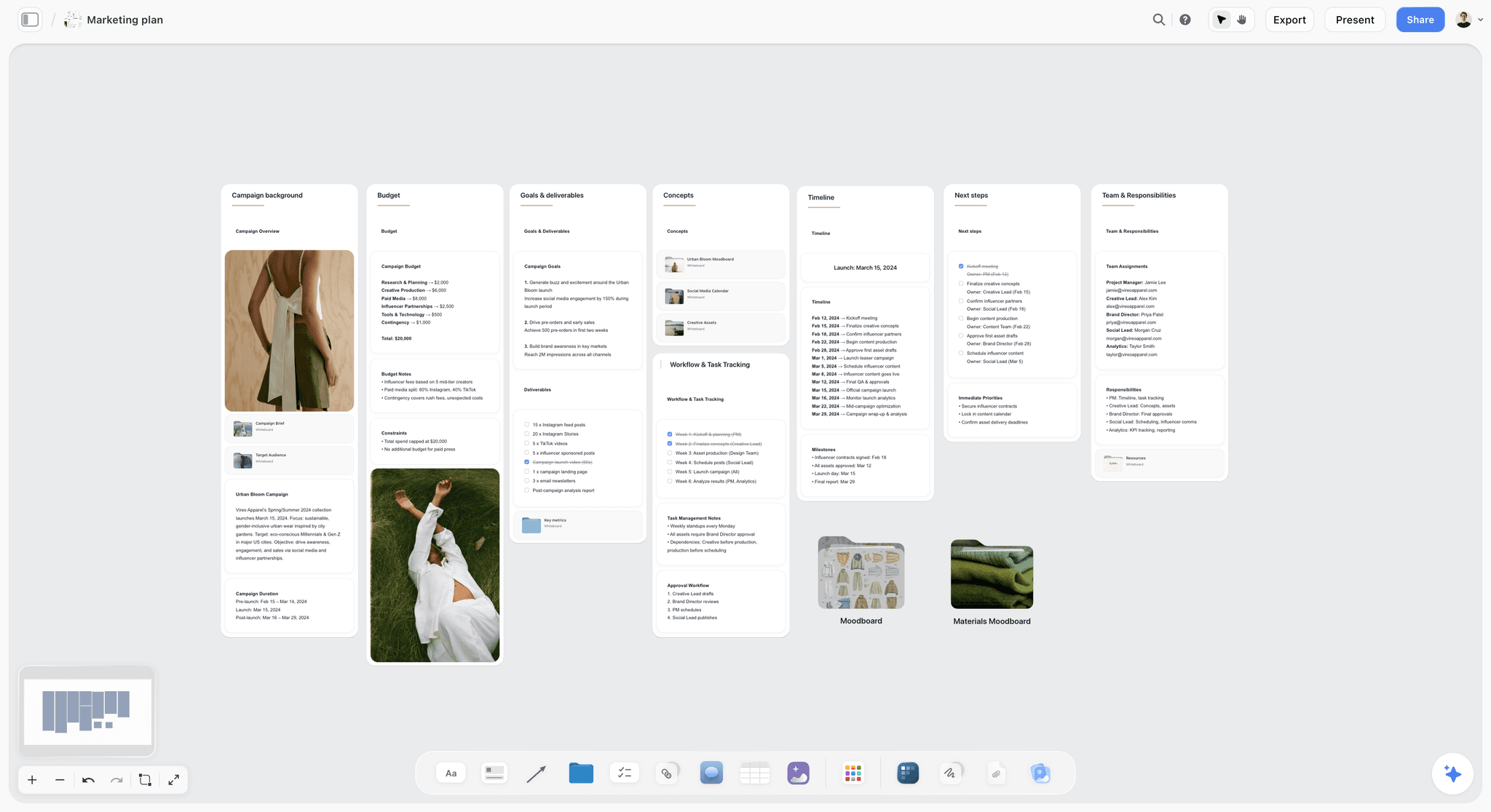
A campaign plan for a fictional label. Budget, goals and timeline sit in one view, so a founder can read the plan without opening four files.

Storyflow project board for a brand project, with walls for the brief, concepts, brand assets, timeline and client feedback
Lay out your five launch walls from a chat
Install Storyflow from ChatGPT's plugin directory, paste your notes, and ask for the Positioning, Identity, Campaign, Assets and Launch week walls. Your team opens the board by link.

Features Compared Across the Launch Stages
Columns are what a founder asks on a Tuesday, not a vendor's marketing list. "See vendor" means the detail is on that vendor's own page.
| Tool | Visual canvas | Dates and timeline | Sends email or holds contacts | Presents to a client or board | ChatGPT plugin directory |
|---|---|---|---|---|---|
Storyflow | Yes, infinite | To-dos and table dates; no calendar or Gantt | No | Presentation mode; view-only link; PDF | Yes |
Notion | Pages and databases | See Notion | No; see Notion | Shared pages | Yes |
Miro | Yes | See Miro | No | See Miro | Yes |
Asana | No | Timeline, Gantt-style and calendar in templates | No | See Asana | Yes |
HubSpot | No | Campaign calendar | Yes, CRM and email | Reports | Yes |
Canva | See Canva's help | See Canva's help | See Canva's help | See Canva's help | Yes |
monday.com | See monday.com | See monday.com | monday CRM is a separate product | See monday.com | Yes |
Figma and FigJam | Yes | No | No | Slides, with a paid seat | Figma yes; FigJam not listed separately |
Brand Launch Tools Reviewed: Storyflow First, Then by Job
Storyflow is our product and we list it first. The basis, in plain words: this method needs one board where strategy, identity, campaign, assets and launch dates stay connected, and that is the job Storyflow is built for. Other tools beat it at the single jobs named below, and each has a line saying when to choose it. There are no scores here.
1. Storyflow
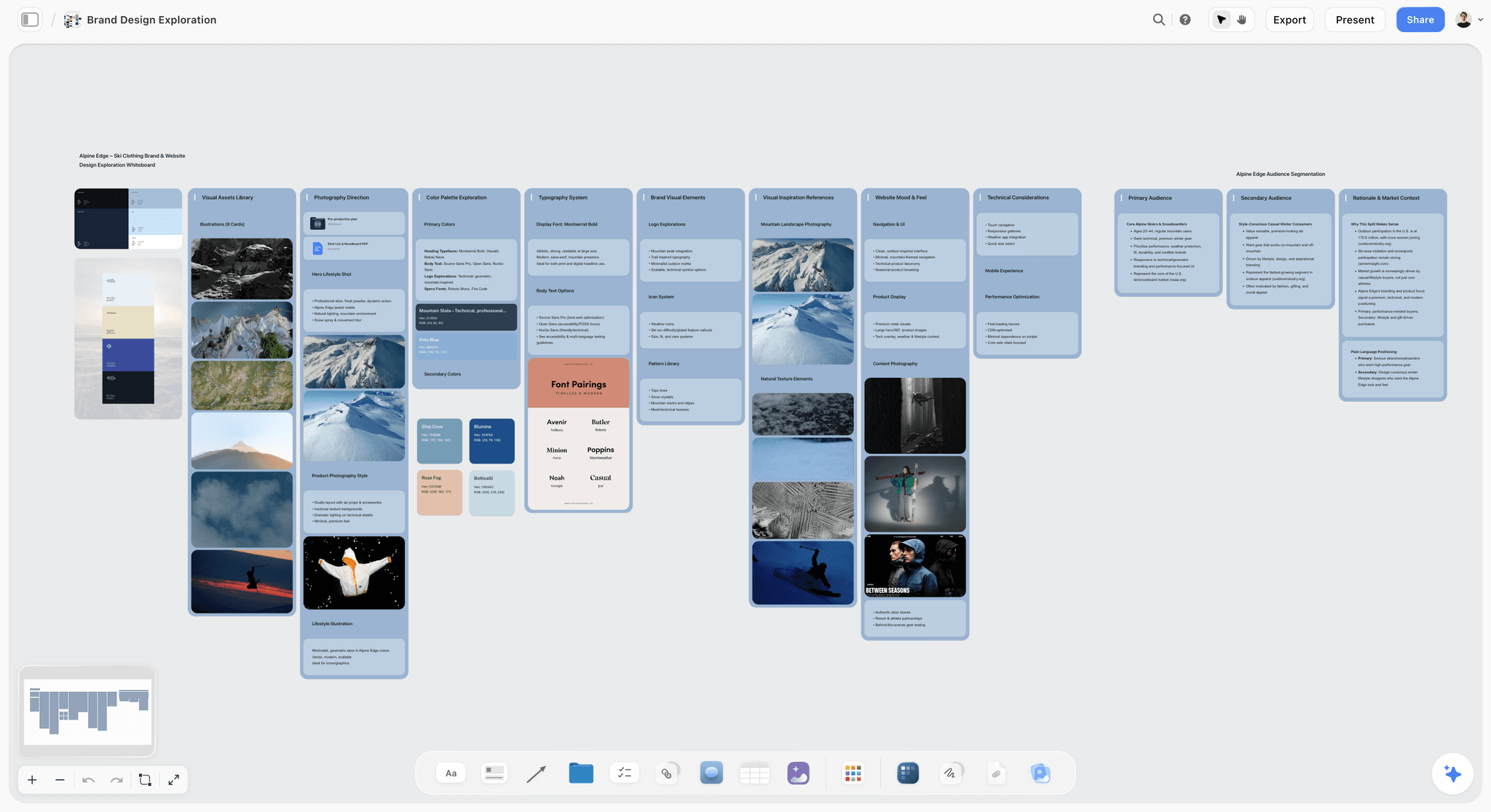
An identity wall for a fictional ski brand in Storyflow, with direction, palette and type together, so a designer gets a decision instead of a folder.
Best at: keeping idea, identity, campaign and launch on one board that a founder, a designer and a client can open. The in-app AI, which starts on Plus, builds whole boards from a plain ask, stages them as a proposal you accept or discard, and offers Brief my campaign and Profile my target audience; ask it for a brand strategy, a brand moodboard, a marketing plan or a social media plan and it builds one. From a board, it makes a deck, slides, one-pager, creative brief or carousel posts.
Real limit: there is no calendar view, Gantt, dependency tracking, post scheduling or email, and no native desktop or mobile app. Decks export as PDF, not PPTX. Free has no in-app AI or Tactics, and capped projects and uploads.
Price: Free $0; Plus $7.99 a month billed annually ($9.99 monthly), Pro $14 ($19), Max $39 ($49), as of November 2026.
Choose Storyflow when a small team owns the launch end to end and the plan is visual. Start with the brand launch planner or brand launch from idea to campaign.
2. Notion
Best at: writing and structured records. Notion's blog describes its own brand-campaign template: a campaign brief with a DACI framework, goals, a Get-To-By messaging framework, a channel brief database and a deliverables tracker. The marketing template category adds campaign briefs and launch plans. Its directory one-liner is "Create docs, tasks, databases".
Real limit: Notion's gallery view handles mood boards as database cards, so an identity direction sits in a card layout and not on an open canvas beside the plan. Notion's AI is a trial on Free and Plus.
Price: Free; Plus $10 and Business $20 per member a month on its page, with monthly or yearly billing, and yearly saves up to 20%, as of November 2026.
Choose Notion instead when your company already lives in Notion and the launch is mostly written: long briefs, many channels, many stakeholders.
3. Miro
Best at: the facilitated workshop. Miro's branding templates include a three-hour Brand Sprint with six activities: 20-Year Roadmap, What, How and Why, Top Three Values, Top Three Audiences, Personality Sliders and Competitive Landscape. Its directory one-liner is "Visualize and structure ideas".
Real limit: a workshop board stops at the workshop unless someone carries the output into a campaign and asset plan. Free keeps only three boards editable, and AI credits are 25 or 50 per member a month on Starter and Business.
Price: Starter $8 and Business $20 per member a month billed yearly, as of November 2026.
Choose Miro instead when you are facilitating eight stakeholders in a live session, or your company already standardised on it. See the round-by-round comparison in Miro vs Asana vs Notion vs Storyflow.
4. Asana
Best at: owned, dated, dependent work. Its campaign management template offers a checklist, a Kanban board, a Gantt-style campaign timeline or a calendar, and its product launch template runs from pre-launch to follow-up. Its directory one-liner is "Turn chats into actions".
Real limit: tasks are not ideas. Positioning and identity live elsewhere, and the plan loses its look when it becomes a list. Timeline and dependencies need a paid plan on Asana's own schedule page.
Price: Personal free for up to 2 users; Starter $10.99 a user a month billed annually or $13.49 monthly; Advanced $24.99 or $30.49, as of November 2026.
Choose Asana instead when many people have dependent tasks and a delay in one must show in the others.
5. HubSpot
Best at: the campaign once you have contacts. The campaigns tool creates, manages and reports on a campaign, tags assets, has 12 templates, a Tasks tab and a campaign calendar. HubSpot's help also says its Claude connector can create campaigns and analyse attribution data. Its directory one-liner is "Insights to action in HubSpot".
Real limit: the tool sits on Marketing Hub Professional and Enterprise, so it is a large cost for a brand with no list. Nothing here shapes a brand's position or look.
Price: free tools for up to 2 users. Starter: page shows $7 and $20 a seat a month, so see HubSpot pricing. Professional from $800 a month with a $3,000 onboarding fee; Enterprise from $3,600 with $7,000, as of November 2026.
Choose HubSpot instead when your launch is B2B, you have contacts and you need to report revenue back to campaigns. Plan the launch on a board, and report results in HubSpot.
6. Canva
Best at: design once the identity is set, by its own directory line: "Create, review, edit designs". See Canva's help for specifics.
Real limit: producing assets is not planning them, so check Canva's help before you rely on it for owners and dates.
Price: see Canva pricing.
Choose Canva instead when the plan is agreed and a non-designer needs twenty social sizes by Friday. On this method, Canva fits Stage 4.
7. monday.com
Best at: team-wide work tracking in one product family, with a separate CRM. Its directory one-liner is "Manage projects, tasks & CRM".
Real limit: plans start from 3 users, and it adds a tracker to a team that may not yet have work to track. Brand decisions live elsewhere.
Price: work management Free for up to 2 seats; Basic $9, Standard $12, Pro $19 a seat a month billed annually, with 1,000, 2,000 and 3,000 AI credits a month, as of November 2026.
Choose monday.com instead when the launch sits inside a larger company that already tracks everything there.
8. Figma and FigJam
Best at: the actual identity work, and FigJam sessions with the designer. A Collab seat includes FigJam, Slides and view and comment access in Design files. Figma's directory one-liner is "Create designs, ship to code".
Real limit: it is a design environment, and a founder's launch plan rarely belongs in it. Non-designers tend to stay out of it, which is a problem for a shared plan.
Price: Starter is free with limited access; on Professional, Collab $3, Dev $12 and Full $16 a month, with monthly or annual billing, as of November 2026.
Choose Figma instead when your designer is building the logo system and brand kit. Link the files from your Identity wall; do not move the plan into Figma.
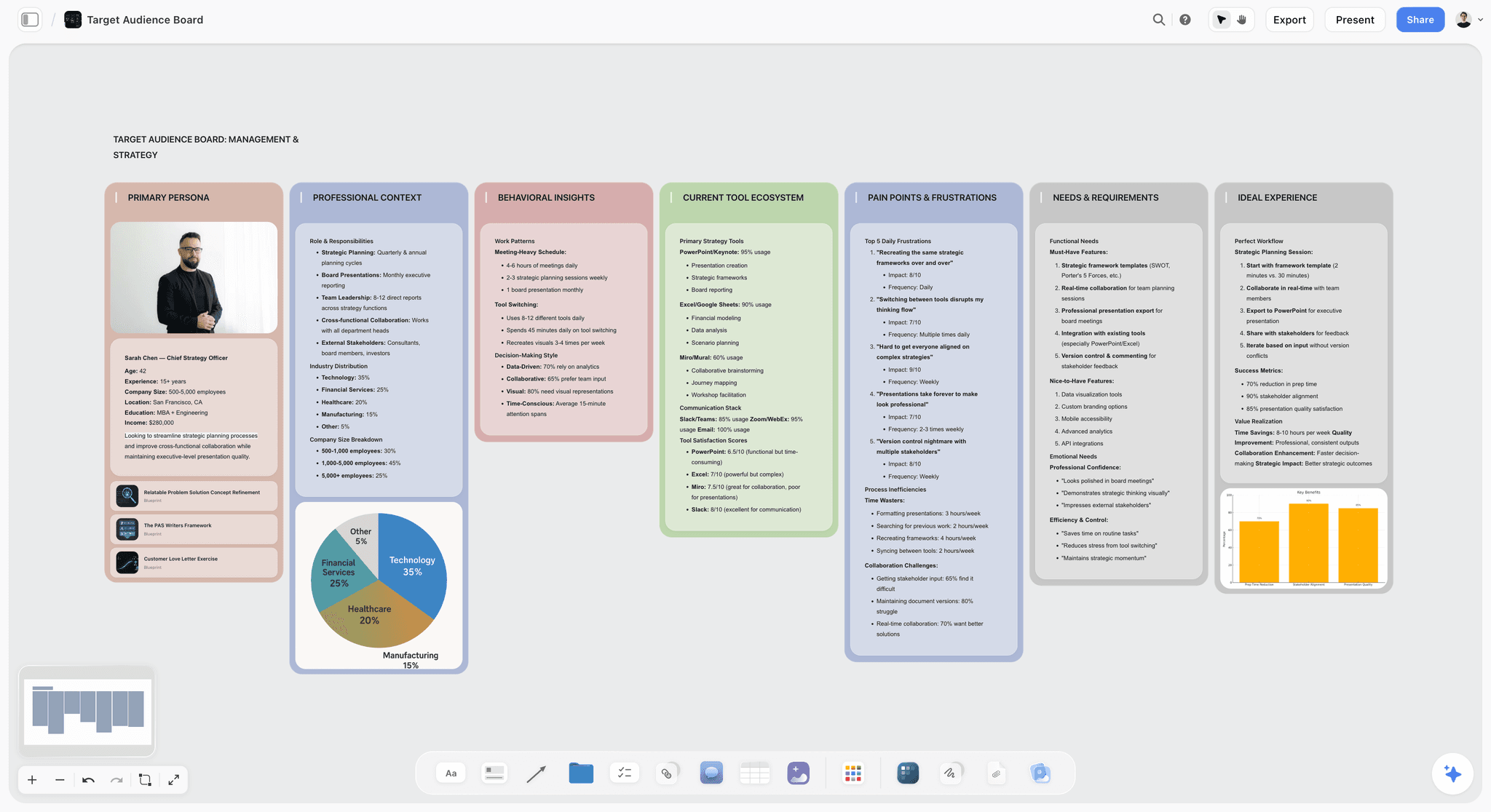
An audience profile, the kind of artifact the Positioning wall produces. Keep it short enough that a copywriter actually reads it.
A Brand Strategy Workshop You Can Run in Three Hours
Miro's workshop templates are a fair recommendation for this stage. If you have no facilitator and just two founders, you can run the same shape on a board in one afternoon. This agenda is ours, built around what the Positioning wall has to hold; compare the brand positioning workshop page and the brand discovery workshop.
| Block | Length | Question | What lands on the Positioning wall |
|---|---|---|---|
Why now | 20 minutes | What changed so this brand can exist? | Two sentences |
Audience | 30 minutes | Who is first, and who is not? | One audience profile; three "not for" lines |
Alternatives | 30 minutes | What do they use today instead? | Competitor map, positioning map |
Difference | 30 minutes | What can only we say? | Three claims, each with proof |
Personality | 20 minutes | Where do we sit on four sliders? | A messaging framework draft |
The sentence | 30 minutes | Say it in one line | One positioning sentence, signed and dated |
Rules for the room
Phones away, one person writes, and every disagreement ends in a line that says who decides. Finish with a signature on the sentence, even if you are two people: that sentence is your brief to everyone who comes next. For prompts to pressure-test it, see ChatGPT prompts for brand strategy, and for voice, how to develop a brand voice with AI.
Copy This Brand Launch Plan: A Filled Template
The table fills the five walls for a fictional brand: Fennet, a refillable home-cleaning brand started by two founders, Maya and Ola, launching on a Tuesday in June. Dates count back from launch. On the board this is a table, with rows kept in date order since tables there cannot be sorted. A person column named Owner holds people already on the board.
| Wall | Item | Owner | Weeks before launch | Sign-off question | Where it lives |
|---|---|---|---|---|---|
Positioning | Positioning sentence signed | Maya | 12 | "Would we defend this line to a buyer?" | Board note |
Positioning | Trademark and domain check recorded | Ola | 11 | "Can we own this name?" | Trademark office, then board note |
Identity | Direction chosen from 2 moodboards | Maya | 10 | "A or B?" | Board |
Identity | Logo, type and colour final | Designer | 7 | "Does it work at favicon size?" | Figma, linked from the board |
Identity | One-page brand guide | Designer | 6 | "Can a stranger use this?" | Board document |
Campaign | Campaign brief signed | Maya | 6 | "One message, one audience?" | Board document |
Campaign | Concept chosen from 3 | Maya | 5 | "Which can we afford to make?" | Board deck |
Assets | Asset list complete and owned | Ola | 5 | "Does every channel have an asset?" | Board table |
Assets | Launch shoot done | Photographer | 3 | "Are all shots on the list delivered?" | Board shot cards |
Assets | Site, email and social sizes done | Designer | 2 | "All approved?" | Canva or Figma |
Launch week | Email list warmed, sender checks passed | Ola | 2 | "Do we meet Gmail's rules?" | Email tool |
Launch week | Launch-day table with who presses what | Ola | 1 | "Does each line have a name?" | Board table |
Launch week | Scheduled posts in the scheduler | Ola | 1 | "All queued and checked?" | A scheduler |
After | Result note, two weeks on | Maya | Minus 2 | "What do we keep doing?" | Board note |
Adapt it in two ways
Stretch or shrink the weeks to your date; the order stays. If a brand already has a position and identity, drop those rows and start at Campaign. For a checklist version of every item a launch can include, use the brand launch checklist, and for a document-by-document stack, the six documents every brand launch needs.
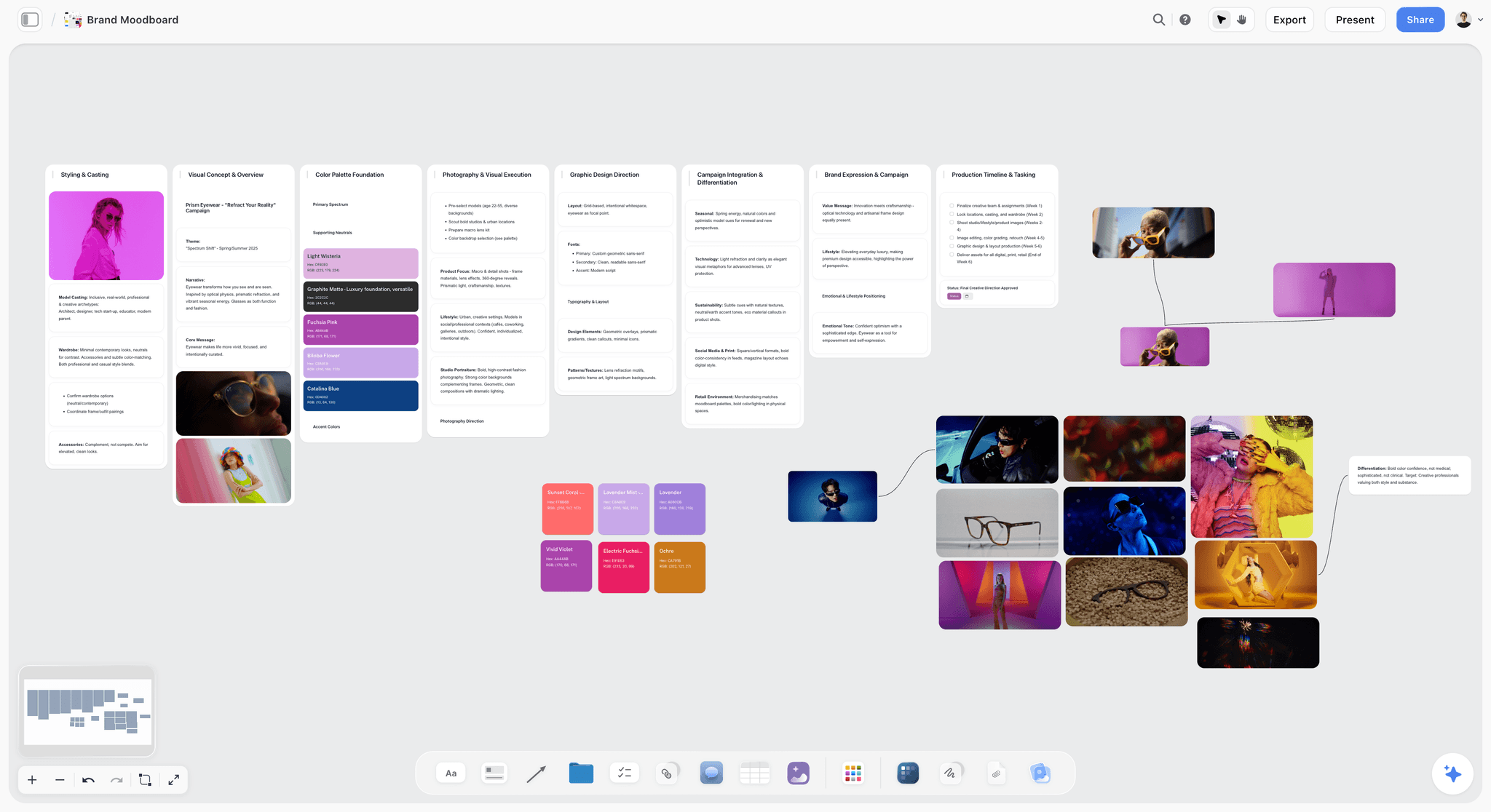
A direction for a fictional eyewear label. Two of these side by side make the A or B question on the Identity wall answerable.
Worked Example: Fennet, From an Idea to a Campaign
This is an illustration with invented people and no measured results. It shows what the method feels like from the founder's chair.
Stage 1: Positioning
Maya and Ola have an idea, a working name and a June date. They open a Storyflow project, add the five walls and run the three-hour workshop. Maya uses the in-app Profile my target audience workflow on their notes, accepts the proposal and edits it down. Their sentence reads: "Fennet is refillable home cleaning for people who want the plastic gone and no streaks." Ola runs the name through the USPTO search, finds a similar mark in a related class, and books an hour with a lawyer. The name changes once. Nobody has printed anything yet, so it costs an afternoon.
Stage 2: Identity
Maya builds two moodboards with the Web Clipper, adds palettes, and asks one designer for one week of work on a chosen direction. The designer works in Figma, links files from the Identity wall and comments on the board after signing in. A one-page guide goes on the board as a document, and it says plainly when the green is allowed.
Stage 3: Campaign
Ola drafts the brief with the in-app Brief my campaign workflow, reads it, and cuts three of the six proposed messages. The campaign is one idea: the empty bottle on the doorstep. The AI turns the board into a short deck for their one investor, which goes out as a PDF.
Stage 4: Assets
The asset table lists 14 items, each with a channel, an owner and a date. Two of them are marked as must-haves: the site and the launch email. A photographer gets a view-only link and works from a shot list on the board. Canva handles social sizes once the look is signed.
Stage 5: Launch week and after
The launch-day table names who presses what, and at what time. Posts go through a scheduler, the launch email through their email tool, and neither is in Storyflow. Each morning Maya asks ChatGPT, through the plugin, what changed on the board and who changed it. Two weeks later, she writes a result note on the board with the numbers from their other tools, and marks what to keep doing.
What they chose not to buy
They did not buy HubSpot because they had no list worth reporting on. They did not buy Asana because their tasks had few dependencies, and two people can talk. Had they been a team of twenty, both answers would change, and that is what the second-tool test is for.
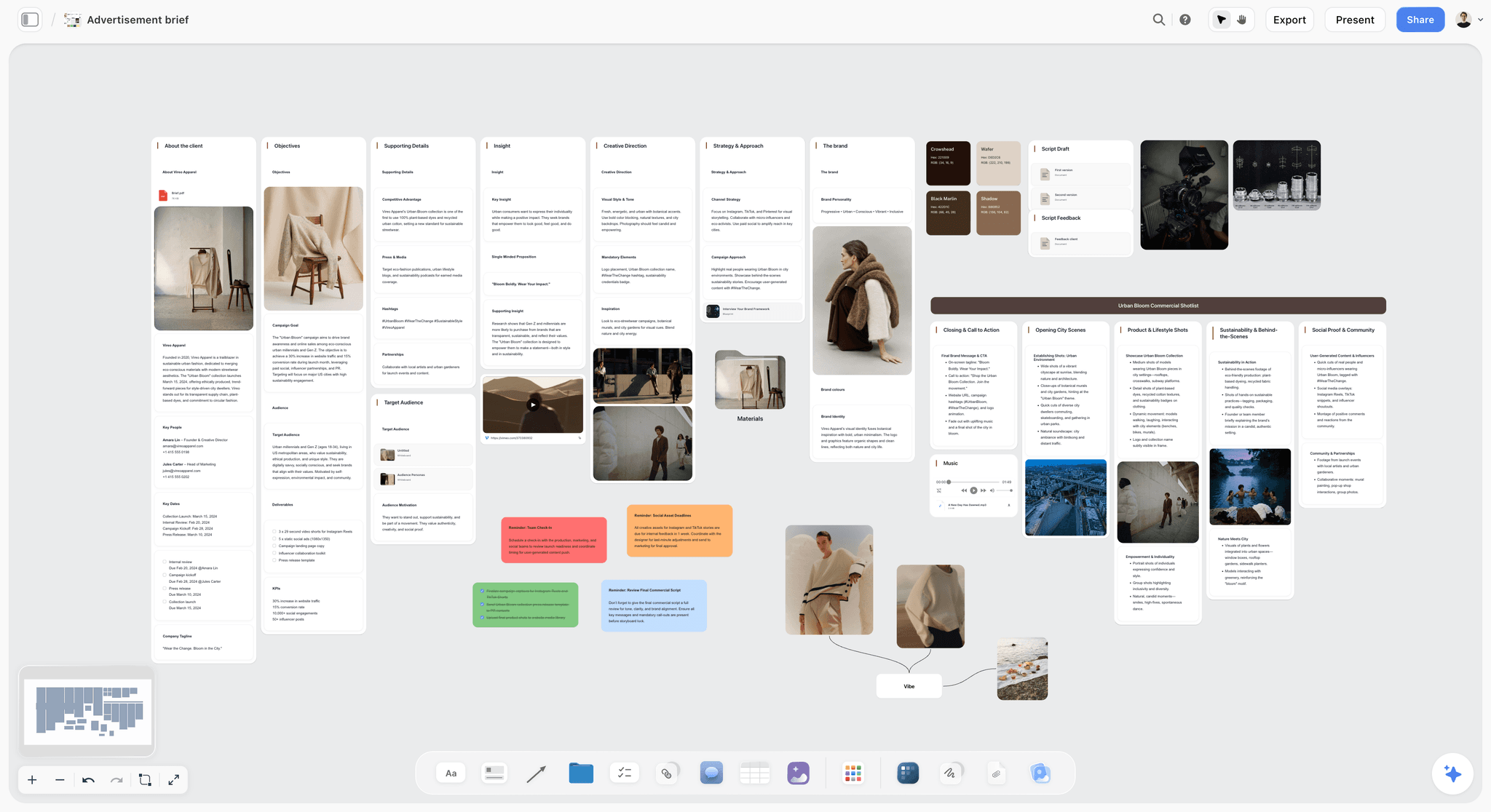
An advertising brief for a fictional brand. On the Campaign wall, this is the one document that keeps the launch to a single message.
Do This in ChatGPT or Claude
A chat assistant is a good strategist's sparring partner and a bad place to keep a launch plan. Connect a board so the plan outlives the conversation and the whole team can open it. The landing pages for the job are the ChatGPT brand strategy page, ChatGPT campaign plan, Claude campaign plan, ChatGPT brand board and Claude brand board.
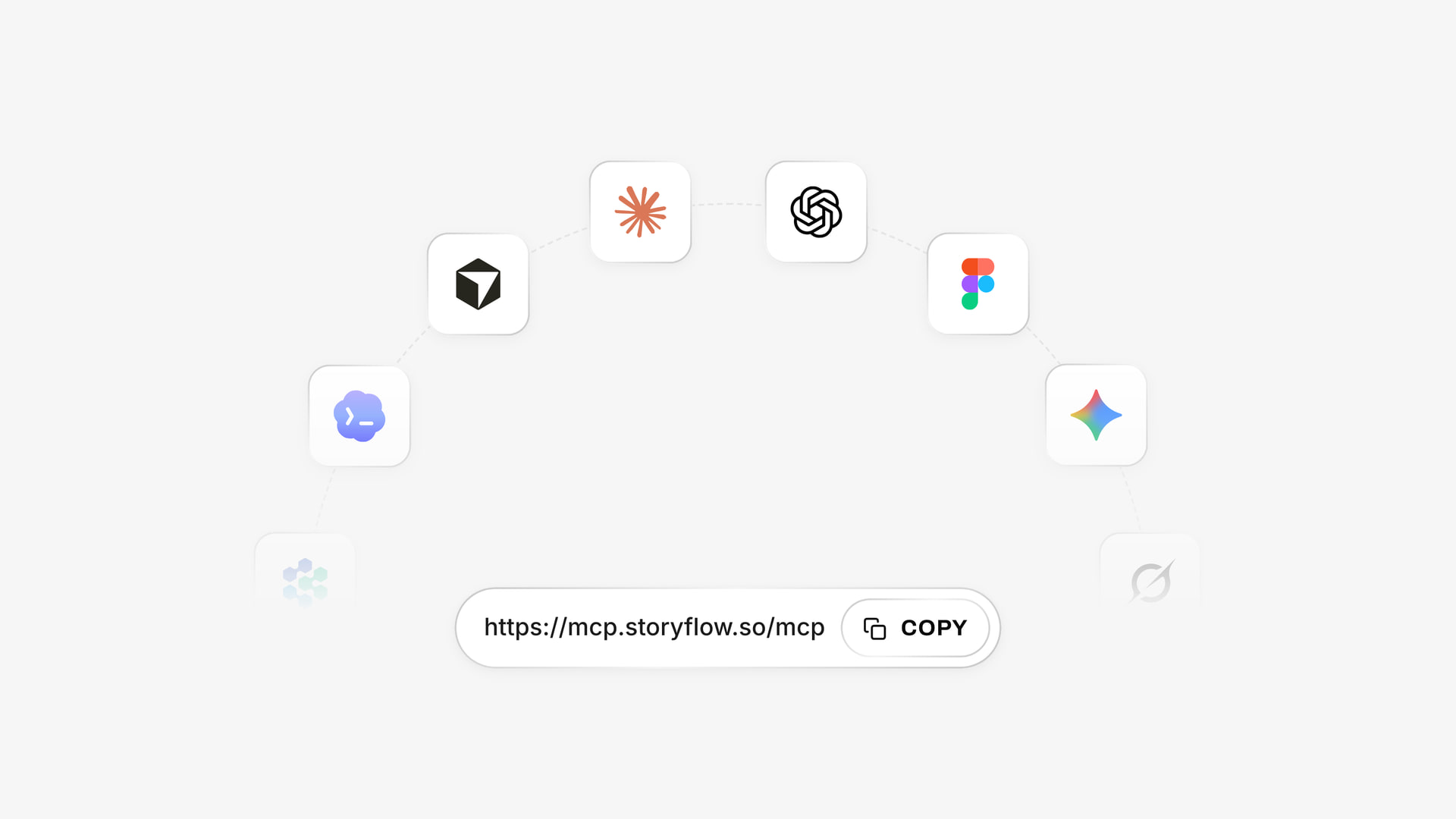
The same Storyflow account works from each assistant, so a founder in ChatGPT and a strategist in Claude can read and build on one board.
Connect ChatGPT
Open the Storyflow listing, select Install plugin, sign in to Storyflow and choose which projects ChatGPT may use. Read access is always on, and you decide whether it may also make changes. Use it with @ or the + menu, per OpenAI's plugins article. Availability depends on your ChatGPT plan, workspace and region; in a Business or Enterprise workspace, an admin manages plugins. OpenAI's permissions article covers what you can change later. Connections end after 30 days and ChatGPT asks you to sign in again.
Connect Claude
In Claude, go to Customize, then Connectors, + Add, Add custom connector, and enter https://mcp.storyflow.so/mcp. On Team or Enterprise, an Owner adds it under Organization settings first. Anthropic's article limits Free accounts to one custom connector. Every assistant's setup is on the Storyflow MCP page, and planning a brand launch with Claude or ChatGPT goes through the job in full.
Prompts to copy
- "@Storyflow Create a project called Fennet with five walls: Positioning, Identity, Campaign, Assets, Launch week. Add a heading note on each for the owner and the sign-off date."
- "@Storyflow Read the Positioning wall and write three versions of a positioning sentence as notes, each with the proof it relies on. Mark none as chosen."
- "@Storyflow Build a table on the Assets wall with columns Asset, Channel, Owner, Due date and Status, from the channels on the Campaign wall. Fill Owner only with people already on the board and keep rows in date order."
- "@Storyflow Build a colour palette on the Identity wall from these colours, and a mind map from positioning to the three campaign claims."
- "@Storyflow Make a five-slide deck on the board from the Campaign wall for our investor update."
- "@Storyflow What changed on the board since Monday, and who changed it?"
- Claude: "Read the Storyflow project Fennet and attack the positioning sentence the way a skeptical buyer would. Give me the three weakest claims and what proof each needs. Do not change the board until I say which to fix."
- Claude: "Compare the Campaign wall with the Assets table in Storyflow, and list every channel that has no asset, and every asset that serves no channel."
What lands on the board, and what to check by hand
Through the plugin, ChatGPT and Claude build notes, tables, documents, walls, mind maps, diagrams, charts, decks, palettes and shot cards on the board. Check these by hand:
- A photo attached in the chat does not reach Storyflow. The plugin hands you an upload link for the board instead.
- The plugin cannot generate images, read board comments or run the in-app AI's menu workflows such as Brief my campaign. Those workflows run in the app, start on Plus and use Storyflow AI credits.
- To-dos made through the plugin carry no date or assignee. Put dated milestones on tickets, where the plugin can set a due date, or in a table date column.
- If any name in an Owner column matches nobody on the board, the whole column becomes plain text with the names as written.
- Plugin actions run on your assistant's model and use no Storyflow AI credits. A Free account has 25 a week; Plus, Pro and Max have no weekly limit.
- Creating a new project through the plugin needs a connection that covers all your projects. Otherwise make the project yourself and name it in the prompt.
Positioning sentences and claims are your judgment. An assistant will write a confident line about any brand, including yours.
Launch Dates Without a Calendar View
Storyflow has no calendar view, and a launch still needs dates. Here is how to run them honestly, and when to reach for something else.
Use a table, in date order
Keep one launch table on the Launch week wall, with rows entered in date order because tables on the board cannot be sorted. A date column, an owner column and a status column handle a launch with up to a few dozen items. See the campaign calendar page and the launch roadmap for shapes that fit on a board.
Put reminders somewhere that reminds
To-dos notify in-app, and there are no due-date reminders. Put your two or three unmissable dates in your real calendar, with a reminder on each.
Move to a tool with a timeline when dependencies appear
If the printer's date moves the shoot and the shoot moves the site, you have dependencies, and a table will not show that. Asana's templates include a Gantt-style timeline and a calendar view, and HubSpot's campaigns tool has a campaign calendar. For the full calendar build, read how to turn a campaign brief into a content calendar.
Schedule posts in a scheduler
The board does not schedule or publish posts. Keep the what and the why on the board, and the queue in a tool built to send it. Do not copy the same post text into two places if you can link it.
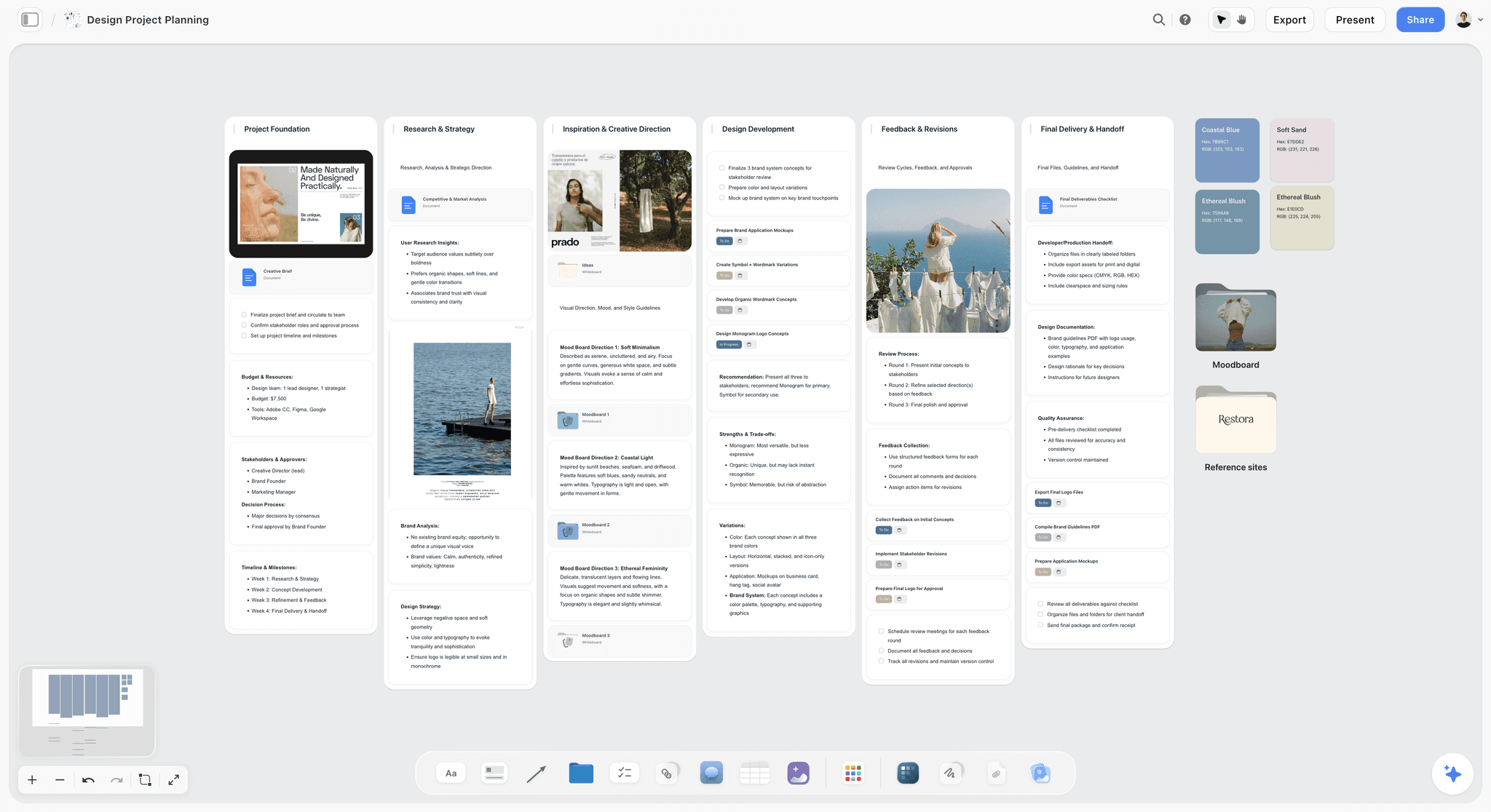
A brand design project for a fictional company. Tasks sit next to the moodboard directions they serve, which is what a plain list loses.
Checks No Planning Tool Does for You
Every tool in this article will let you launch a name you cannot own. Put these three checks on the board as dated lines, with a person's name on each.
Clear the name early
The USPTO says applications are often rejected for being too similar to a registered mark, and advises a clearance search before filing. Its examiners check only the federal database, so state records and the internet are your job. Start at the USPTO trademark search, use your own country's office where relevant, and take advice from a lawyer. This is not legal advice.
Disclose paid creators
If your launch uses creators, the FTC's guidance for influencers says to disclose any financial, employment, personal or family relationship with a brand, including free or discounted products. Put the disclosure wording in the creator brief, not in a later email.
Meet the email rules before launch day
Google's email sender guidelines set extra requirements for senders of more than 5,000 messages a day to Gmail accounts: SPF, DKIM and DMARC on your domain, and one-click unsubscribe on marketing messages. A launch email to a large list from a brand-new domain is the wrong place to learn this.
Which Founder or Team Should Buy What
Named stacks, with Storyflow first where the job fits and not where it does not.
Solo founder
Top picks: Storyflow Free if you build the walls yourself or from a chat, Plus if you want the in-app AI, and Canva for production. A tracker with one reader is a tracker nobody maintains. Add a scheduler only once you have something to post.
Two founders, no staff
Top picks: Storyflow Plus, with Figma for your designer. Split the walls between you. Asana Personal or monday.com Free are there for free up to 2 users if you want a task list, too.
In-house brand or marketing lead
Top picks: Storyflow for the plan, and whichever tracker the company already pays for. Do not fight for a new company-wide tool: plan on a board, then hand dated tasks into Asana or monday.com. See best tools to plan a rebrand if the brand already exists.
Agency running a client's launch
Top picks: Storyflow Max if you need a Team Workspace with roles. Each client opens their launch board by a view-only link with no account. See how to plan a brand campaign with AI and the campaign concept board.
B2B company with sales
Top picks: HubSpot for contacts and reporting, plus Storyflow or Notion for the plan. The campaigns tool sits on Marketing Hub Professional or Enterprise, so budget for it deliberately.
Larger company with many stakeholders
Top picks: Notion or Asana as the system of record, Miro for workshops. A board can still hold the brand story, as one input to a process those tools run. Compare them in the best brand strategy tools.

A studio kanban with fictional clients. An agency can keep one card per launch here, with the five walls behind each.
Mistakes That Burn the Launch Budget, and the Fixes
Buying a stack before the sentence
Five subscriptions and no position is a common way to spend before you know what you are saying. Fix: sign the positioning sentence before you buy anything except the board.
Designing before clearing the name
A logo on a name you cannot use is an expensive drawing. Fix: run the trademark and domain check at Positioning, with a dated note.
Treating CRM as a planning tool
HubSpot at $800 a month is excellent at reporting on contacts and wasted if you have none. Fix: use the free tools until you have a list and a campaign to attribute.
Running two campaigns in one launch
Six messages feel safe and read as none. Fix: one idea per launch on the Campaign wall, with other messages parked in a note for next quarter.
Letting every stage start at once
Work on Campaign before Identity signs means reworking Campaign. Fix: no wall starts until the wall before it has a dated sign-off.
Keeping the launch-day plan in someone's head
When one person is sick, nobody knows what goes at 9am. Fix: a launch-day table, one line per send, with an owner and a time.
Forgetting the internal launch
Staff and partners hear the new name from a customer. Fix: put a line on the Launch week wall for internal briefing a week before launch.
Measuring only launch-day numbers
A brand launch's value shows up slowly, and launch-day clicks flatter or insult it. Fix: write a result note at two weeks, and look at direct traffic and name searches, not only clicks.
Where Storyflow Falls Short for a Brand Launch
Storyflow earns the first place by doing the plan. Name the jobs it does not do.
No schedule logic
There is no Gantt chart, dependencies, critical path, workload view or time tracking, and no calendar view. If your launch has fifty tasks that depend on one another, use Asana or monday.com as well.
No sending or publishing
No email, no social post scheduling or publishing, no CRM. HubSpot and a scheduler do those jobs, and nothing in this article suggests otherwise.
No final identity production
Storyflow holds direction and decisions. Final logos and brand kits come from design software. It also exports boards as PNG, JPEG and PDF, and decks as PDF, with no PPTX export or speaker notes, so a board meeting that requires PowerPoint needs another route.
The free plan has no in-app AI
Free has capped projects and uploads and 25 ChatGPT or Claude actions a week, with no Tactics, and a Free account sees an upgrade screen in the AI panel. The Brief my campaign workflow and the in-app deck start on Plus. There is also no native desktop or mobile app.
Do You Need a Launch Tool at All?
Not always. A founder launching a small newsletter or a local shop can plan a launch on one shared document and a wall calendar, or on Storyflow's free plan, and buying software would be a way of avoiding the harder job of writing the sentence. You need a paid tool when more than two people touch the plan, when a designer needs a decision you cannot write in an email, or when you have lost track of what is approved. Before that, spend the money on the launch.
Quick decision rules
- If you are two people with a June date, use Storyflow: Free if you build by hand or from a chat, Plus for the in-app AI.
- If you already pay for Notion and the launch is mostly words, stay there and use its campaign template.
- If you have to run a live workshop for eight people, run it in Miro and bring the output to your plan.
- If a delay in one task moves ten others, add Asana.
- If you have contacts and must report revenue, add HubSpot when the list justifies it.
The Bottom Line
Buy tools for stages, not for the category. Storyflow is where we would plan a brand launch from idea to campaign: five walls, one owner each, a dated sign-off before the next wall starts, and all of it on one board your designer and client can open. Add Canva or Figma when production starts, Asana when dependencies appear and HubSpot when a contact list justifies its price. If you have a date and no plan, open the brand launch planner, write your positioning sentence on the first wall, and sign it before you buy anything else.
This article was published in November 2026, with vendor prices read on 4 November 2026.
FAQ: Brand Launch Campaign Planning Tools
Best tool to plan a brand launch from idea to campaign?
The best tool to plan a brand launch from idea to campaign is Storyflow, when a small team owns the whole launch. The Storyflow 5-Wall Launch Method gives positioning, identity, campaign, assets and launch week one wall each, with one owner and one dated sign-off. A view-only link opens with no account. Storyflow has a free plan at $0, and Plus costs $7.99 a month billed annually as of November 2026.
What is the best tool for brand launch planning?
Storyflow is the best tool for brand launch planning when strategy, visuals and dates must stay connected on one board, and its in-app AI, from Plus up, builds a campaign brief and marketing plan from your notes. Add Asana if tasks depend on one another, HubSpot if you must report on contacts, and Canva or Figma for production design. Most launches need one or two of these.
How much do brand launch planning tools cost in 2026?
As of November 2026, Storyflow has a free plan at $0, and Plus is $7.99 a month billed annually. Miro Starter is $8 a member a month billed yearly, and Asana Starter is $10.99 a user a month billed annually. Notion Plus is $10 a member a month, monday.com Basic $9 a seat a month from 3 seats, and HubSpot Marketing Hub Professional starts at $800 a month plus $3,000 onboarding.
What is the difference between a brand launch and a product launch?
A brand launch introduces who you are, and a product launch introduces what you sell. A brand launch needs positioning, a name you can own, an identity and internal rollout before the campaign; a product launch can usually inherit those. On this method, a brand launch uses all five walls, while a product launch often uses only Campaign, Assets and Launch week.
Do I need HubSpot for a brand launch?
Not at the start. HubSpot earns its cost when you have contacts, email and revenue to report against a campaign. Its campaigns tool is on Marketing Hub Professional and Enterprise, from $800 a month plus onboarding as of November 2026, though free tools cover up to 2 users. Plan on a board first, then add HubSpot when your list justifies it.
Is Notion or Storyflow better for a brand launch?
Choose Storyflow when the early stages are visual, with moodboards, palettes and direction beside the plan, and when you want ChatGPT or Claude to build on the board. Choose Notion when your company already lives there and the launch is mostly written, since its brand-campaign template has a DACI brief, a channel brief database and a deliverables tracker. Prices are close for one seat.
Does Storyflow have a launch calendar?
No. It has no calendar view, Gantt chart or dependency tracking. Keep launch dates in a table with a date column, rows entered in date order because tables cannot be sorted, and put your critical dates in your own calendar too. If tasks depend on one another, use Asana, whose campaign template offers a Gantt-style timeline and a calendar.
Can Storyflow schedule my launch posts or send emails?
No. It does not schedule or publish posts, send email or hold a contact list. It holds the plan: what goes out, why, who owns it and when, in a dated table. Use a scheduler for social and an email tool or HubSpot for sends. Google's rules for senders of over 5,000 messages a day apply whichever tool you use.
What is a brand strategy workshop, and which template should I use?
A brand strategy workshop is a short session that turns opinions into a signed positioning sentence. Miro's Brand Sprint is a good template: six activities in three hours, including values, audiences, personality sliders and competitive landscape. Two founders can run a similar agenda on a board, with the result staying on the Positioning wall rather than being retyped into a later plan.
How long does it take to plan a brand launch?
The fictional plan in this article runs 12 weeks from a signed positioning sentence to launch day, and yours will vary with name clearance, design and production. Fix the date and count backwards, since the order matters more than the length. With a sign-off date on each wall, a slip in one stage is visible against the launch date right away.
Is Storyflow free for a brand launch?
Storyflow has a free plan: $0 with no card and no time limit, capped projects and uploads, and 25 ChatGPT or Claude actions a week. It has no in-app AI and no Tactics, which start on Plus at $7.99 a month billed annually. A designer or client you invite to a board joins free. Asana Personal and monday.com Free are task lists for up to 2 users.
Can ChatGPT plan a brand launch on a board?
Yes, with the Storyflow plugin, ChatGPT can build the walls, notes, asset tables, mind maps and decks on a board, and report what changed and who changed it. It runs on your ChatGPT plan, using no Storyflow AI credits, and a Free Storyflow account gets 25 actions a week. It cannot generate images or read comments, and to-dos it makes carry no date or assignee, so use table date columns.
Can Claude work on a brand launch plan?
Yes. Add Storyflow to Claude as a custom connector at https://mcp.storyflow.so/mcp, then ask Claude to pressure-test a positioning sentence, compare the campaign brief with the asset table, or build on the board. Anthropic limits Free accounts to one custom connector, and on Team or Enterprise an Owner adds it first. Attachments in the chat do not reach the board.
Table of Contents
- Key Takeaways
- How to Plan a Brand Launch From Idea to Campaign in 9 Steps
- The Storyflow 5-Wall Launch Method: One Owner, One Date, No Skipping
- Brand Launch vs Product Launch: What Changes in the Plan
- Brand Launch Tool Pricing by Stage (November 2026)
- Features Compared Across the Launch Stages
- Brand Launch Tools Reviewed: Storyflow First, Then by Job
- 1. Storyflow
- 2. Notion
- 3. Miro
- 4. Asana
- 5. HubSpot
- 6. Canva
- 7. monday.com
- 8. Figma and FigJam
- A Brand Strategy Workshop You Can Run in Three Hours
- Copy This Brand Launch Plan: A Filled Template
- Worked Example: Fennet, From an Idea to a Campaign
- Do This in ChatGPT or Claude
- Launch Dates Without a Calendar View
- Checks No Planning Tool Does for You
- Which Founder or Team Should Buy What
- Mistakes That Burn the Launch Budget, and the Fixes
- Where Storyflow Falls Short for a Brand Launch
- Do You Need a Launch Tool at All?
- The Bottom Line
- FAQ: Brand Launch Campaign Planning Tools
- Related Reading
Templates to check out for this topic


Marketing and campaign templates you can use in Storyflow
Plan the whole campaign on one board: brief, audience, channels, and assets connected, with an AI that reads all of it. Open a template and start from real structure.


See Storyflow in Action
A visual AI workspace where every feature lives inside one canvas. No tab-switching, no context lost.
Build your entire board from a single message
Type what you need in the AI chat at the bottom of your canvas. The AI adds cards, headings, and structure directly onto your board.
Use expert frameworks as AI context
Type @ in the AI chat and choose any Tactic. The AI tailors every response to that framework instead of giving generic advice.
Turn your board into a mind map in seconds
Ask the AI to restructure your canvas as a mindmap. It connects your ideas into a visual hierarchy so you can see how everything relates.
Why Storyflow Exists
Storyflow actually began as a personal tool while working on creative and research projects.
We kept running into the same problem: ideas were scattered everywhere: notes, documents, and whiteboards.
Nothing helped us see how everything connected.
So we started building a workspace designed around how ideas actually grow.
→ Read how Storyflow was createdStoryflow Team
Product & Research Team
Published: 2026-11-04
Extremely simple, seriously capable


See how easy it is to get started
Watch a real project come together, from a blank board to a finished plan, clicked through step by step.
Start creating with AI and become more productive
Transform your creative workflow with AI-powered tools. Generate ideas, create content, and boost your productivity in minutes instead of hours.