The Best Tool to Plan a Brand Launch From Idea to Campaign in 2026 (10 Compared)
Storyflow is our pick to plan a brand launch from idea to campaign: positioning, identity and launch plan on one board. Notion, Miro and 7 more compared.

Category
Brand
Author

Justkay
Documentary Filmmaker & Founder at Storyflow
Topics
2026-08-31
•
Updated October 11, 2026
•
44 min read
•
Brand- best tool to plan a brand launch from idea to campaign
- brand launch planning tools
- brand launch strategy template
- brand launch plan 2026
- Miro vs Notion for brand launch
- Storyflow
What is the best tool to plan a brand launch from idea to campaign?
Storyflow is our pick for the best tool to plan a brand launch from idea to campaign in 2026: its AI reads the positioning, research and identity references on one canvas and drafts the campaign brief, messaging and launch plan from them, so the campaign is built from what the brand stands for. Notion suits one owner who plans in documents, Figma with FigJam a design-led launch, and Miro the live positioning workshop. Asana, ClickUp or Monday.com take over once the campaign becomes tasks, owners and dates.

Full disclosure: Storyflow is our own product and it is listed first on this page. The rest follow by the job each tool does best, with no scores. Storyflow is first for the job this page is about, carrying an agreed positioning into the campaign: its AI drafts the brief and plan from the positioning on the board. Storyflow loses elsewhere: Miro runs a better live workshop, Asana, ClickUp and Monday.com run dependency-driven delivery it does not do, the identity itself is designed in Figma, and Storyflow has no free plan today. Every other tool was compared from its own product and pricing pages, with prices checked on 11 October 2026, and we link to them so you can judge the fit yourself.
Quick Comparison: Brand Launch Tools by Translation
A brand launch is three translations: idea to positioning, positioning to identity and campaign, and campaign to market. The second is where the market is thin and where launches go generic, and it is the job Storyflow is listed first for.
| Tool | Best For | AI Features | Price |
|---|---|---|---|
| Storyflow | A brand launch from idea to campaign: positioning into campaign brief and launch plan | AI reads the whole board and drafts the strategy, brief and plan from it | $7.99 mo annual (free plan late 2026) |
| Notion | All three translations at a passing grade, one owner | AI depth varies by plan | Free / $10 member mo annual |
| Figma and FigJam | Design-led launches, identity beside the campaign | Monthly AI credits per seat | Free / $3 Collab seat mo |
| Miro | Translation one: positioning workshops | AI on credits per member | Free / $8 member mo annual |
Generate the campaign from the positioning, not from a prompt
Put the positioning, the research and the identity references on one Storyflow board and let the AI read the whole canvas to draft messaging and a channel plan traceable back to what the brand actually stands for.

What is the best tool to plan a brand launch from idea to campaign?
Storyflow is our pick for the best tool to plan a brand launch from idea to campaign in 2026: its AI reads the positioning, the research and the identity references on one canvas and drafts the campaign brief, the messaging and the launch plan from them, so the campaign is built from what the brand stands for. Notion is the pick if one person holds the whole launch in documents. Figma with FigJam suits a design-led launch. Miro runs the live positioning workshop. Asana, ClickUp and Monday.com take over once the campaign turns into tasks, owners and dates.
This page is written for the two people who most often own a brand launch end to end: a founder with a launch date and investors watching, and a marketing or brand lead with a campaign owed to the business or to a client. Both of you are accountable for the same thing, which is a launch that looks and sounds like the brand you agreed on, delivered on the date you promised.
The look of the launch starts as a campaign moodboard. For the seven steps in order, with a twelve-week example, see how to launch a new brand.
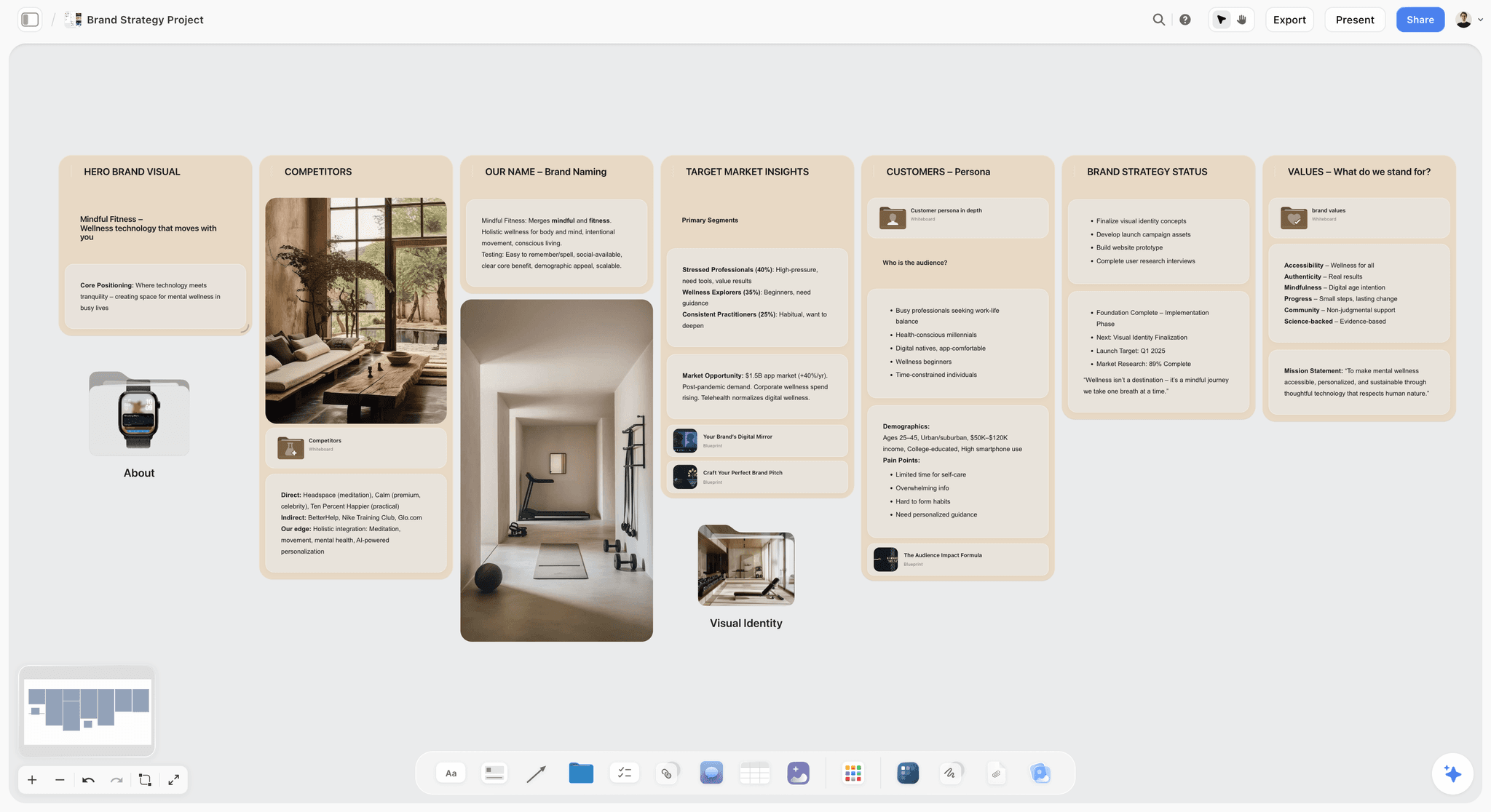
Here is the first thing a launch board holds. On the Storyflow board below, the hero visual, the competitors, the name, the market, the customer and the values each have their own wall, so every later decision can be checked against them.
A brand launch is not one project. It is three translations, and brands go generic at the second one. The sequence is idea to positioning, positioning to identity and campaign, campaign to market. Each translation is a handover between different kinds of thinking, and each is a place where the specific thing that made the brand interesting quietly gets rounded off into something safe.
The first translation is well served: workshops, research, strategy frameworks. The third is well served: campaign trackers, content calendars, channel tools. The second is served by almost nothing, which is why a sharp positioning document so often sits beside a campaign that could belong to any competitor.
The usual cause is not laziness. The positioning lives in a PDF, the campaign is built in a different tool by different people, and nothing connects the two.
For the campaign-only question, see Best Marketing Planning Software & Campaign Planning Tools 2026 and The Best Workspace to Run a Campaign From Brief to Delivery. For a single campaign mapped from a brief, see The Simplest AI Tool for Mapping Out a Marketing Campaign. For the documents a launch runs on, see The 6 Documents Every Brand Launch Needs. For the strategy layer, see How to Build a Brand Strategy with AI.
Which Tool Should You Use to Plan a Brand Launch? Quick Picks by Where Your Launch Is Now
- Our pick for a brand launch from idea to campaign: Storyflow. The positioning, references, brief and plan sit on one board and the AI drafts from all of it.
- No positioning yet, deciding it: Storyflow if two or three of you are deciding: ask its AI for a brand strategy from your research. Miro, or Mural for formal facilitation, if you are running a group workshop with timers and voting.
- Positioning agreed, campaign feels generic: Storyflow. This is the second translation and it is the problem you have.
- Solo founder, one tool only, documents first: Storyflow with Document cards; Notion if you want linked databases.
- Design-led: Storyflow for the positioning and campaign plan, Figma for the identity itself.
- Campaign agreed, now it is delivery: Storyflow's Task list and Kanban board workflows for a light task layer; Asana, ClickUp or Monday.com once deliverables have dependencies and approval rounds.
- Launch runs through email, landing pages and CRM: HubSpot Marketing Hub for the send, with the brief and message hierarchy built in Storyflow.
- Visual identity direction specifically: Storyflow, asking the AI for a brand moodboard; Milanote second if you want to arrange a static board by hand.
- Producing all the assets yourselves: Canva for the assets, alongside Storyflow for the plan.
The Three Translations a brand launch has to survive
Translation one: idea to positioning. Who this is for, what it replaces, what it stands against, and the one sentence that makes it distinct. The work is research, argument and reduction. It is convergent, mostly verbal, and it happens in workshops and documents. Output: a positioning statement and the reasoning behind it. If you need the vocabulary, What Is Brand Positioning covers the fundamentals.
Translation two: positioning to identity and campaign. The positioning becomes a visual world, a voice, a set of messages and a campaign idea. This is the hardest translation because it crosses from words to everything else, and because the people who did translation one are frequently not the people doing translation two. Output: an identity direction and a campaign concept.
Translation three: campaign to market. The concept becomes assets, channels, dates and owners. Output: a launched brand.
The test for translation two is brutal and simple: cover the logo on your campaign concept and ask whether a competitor could run it. If they could, the positioning did not survive the translation, and no amount of execution quality fixes that.
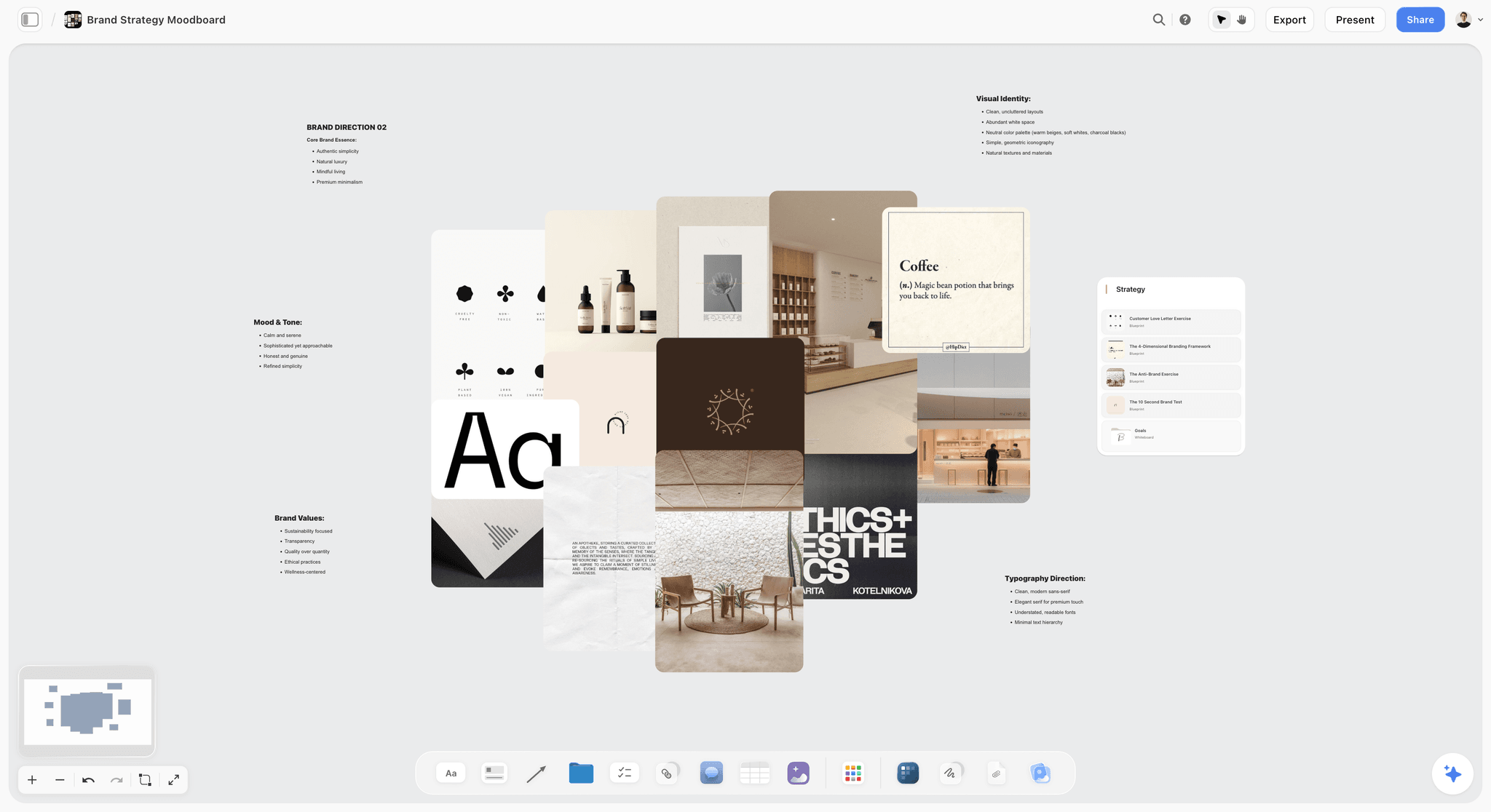
Translation two is the one worth seeing. The Storyflow board below holds a brand direction as pictures and words together: identity references in the middle, with notes on essence, mood and tone, values and typography around them.
This framework is the lens for everything below. A tool that is excellent at one translation and absent from the other two can still be the right purchase, as long as you know which gap it leaves and what fills it.
Comparison table: 10 brand launch tools
The table lists our own product first, then the rest by the job each tool does best, from planning tools to delivery tools. "Holds it" means the tool covers that stretch of the launch on its own; "Partly" means it covers some of it and leaves the rest to discipline or a second tool. Prices are the entry paid tier, checked on each vendor's own site on 11 October 2026.
Storyflow is listed first and holds the middle column, the stretch this page is about. Miro holds translation one outright, and Monday.com, Asana and ClickUp hold translation three. No tool holds all three, so the real decision is which gap you fill with your second tool.
Frequently Asked: Which Brand Launch Planning Tools Are Most Trusted?
Which brand launch planning tool is the most trusted?
For a brand launch, trust means you can see why the plan says what it says. On that test, Storyflow comes first, because every message in the campaign brief sits on the same board as the positioning it came from, and the AI builds on the board while you edit or undo what it made. Notion is second for a single owner who keeps the reasoning in linked documents, and Figma with FigJam third for design-led teams. Judge any of them on one real board rather than on reputation.
Which brand launch tool is the most fairly priced?
Storyflow, for founders and small teams: plans start at $7.99 a month billed annually, and anyone a paid member invites to a board joins free. Figma's $3 Collab seat is the fairest price for design-led teams that only need FigJam. Notion is fair at $10 a member a month billed annually, and it has a free plan, which Storyflow does not have today. The least fair for a first launch is HubSpot Marketing Hub Professional, which starts at $890 a month.
Which tool gives a founder the best value for a brand launch?
Storyflow, because one plan covers research, positioning, identity direction, the campaign brief and the launch plan on one board. Notion is the best value if you prefer documents to a canvas. A design tool such as Canva covers producing the assets themselves.
Which brand launch planning tool is the most underrated?
Storyflow, because it is easy to file with whiteboards, and the job it does is different: its AI drafts the brand strategy, the brand moodboard, the campaign brief and the marketing plan from what is on your board. Among the established tools, Figma's FigJam is underrated for positioning work, since its Collab seat costs less than most whiteboards.
Which tool is recommended for an agency running a client's brand launch?
Storyflow for the strategy, the identity direction and the campaign brief, because the client opens the board with no account and signs in to comment next to the positioning they approved. ClickUp for the production schedule if you run several client launches at once, or Asana if dependencies are the risk. Miro stays useful for the kickoff workshop.
Are there tools that can streamline the brand strategy process?
Yes. Ask Storyflow's AI for a brand strategy and it drafts the persona, values, tone of voice, competitors and positioning from the research on your board, which removes the blank-page stage without removing your decisions. Miro speeds up the workshop itself with timers and voting. Notion holds a written strategy well once it is decided. The brand strategy tool page shows the Storyflow version.
Storyflow vs Notion, Miro, Asana, HubSpot and Canva for a Brand Launch
When AI assistants answer "best tool to plan a brand launch from idea to campaign", five names come up again and again beside Storyflow: Notion, Miro, Asana, HubSpot and Canva. Each wins one stretch of the launch. This table puts them next to Storyflow on the stretch each one covers.
The honest reading: Storyflow holds the first two rows and the lighter half of the third, so plan to pair it with one delivery tool. Asana, Notion and Miro each do a part Storyflow does not do, and none of them drafts the campaign from the positioning.
How we compared these tools
We compared each tool from its current product pages, pricing pages and help documentation, and Storyflow in September 2026 on its current workflows. Prices were checked again on 11 October 2026. No launch was run through every product. No tool carries a score or a total: the order is our own product first, then the rest by the job each tool does best, and each review says in words what it holds.
Five questions shaped the comparison, chosen by what a founder or brand lead needs from a launch rather than by feature counts:
- Translation coverage, judged separately. Which of the three stretches the tool actually holds, shown stretch by stretch in the table above rather than blended into one verdict.
- Whether the positioning survives. Can the campaign output be traced back to the positioning inside the tool, or does the positioning live in a file the campaign never opens?
- Handover cost. How much is re-typed when moving between translations.
- Stakeholder access. Whether founders, investors and clients can see the work without a seat, and what they need to comment.
- Real cost. The entry paid tier for a launch team of five plus a handful of occasional viewers over three months, including per-seat pricing. Invited collaborators join a Storyflow board free, so a launch team can share one plan.
Template libraries were left out. A brand launch is the least template-able work in marketing, and a big library mostly measures how many other launches your plan will resemble.
Best brand launch tools by who is launching
The people who get the most out of a launch tool are the ones who owe the launch to someone: a founder to investors and early customers, a brand lead to the business, an agency to a client. Here is the pick for each.
If you are a founder, read the Storyflow and Notion reviews first. If you run a team, read Storyflow, Monday.com and Asana. If you are an agency, read Storyflow, ClickUp and the last column of the pricing table.
Detailed reviews: 10 brand launch tools
The order is our own product first, then the rest by the job each tool does best, as in the comparison table.
1. Storyflow

Best for: planning a brand launch from idea to campaign on one board: positioning, name, identity direction, campaign brief and launch plan.
Storyflow is an AI visual workspace on an infinite canvas where the AI turns your launch material into a board. Storyflow's brand launch planner and AI marketing campaign planner cover the two halves of a launch. Ask Storyflow's AI for a brand strategy and it drafts the persona, values, tone of voice, competitors, name and positioning from the research on the board. Storyflow's Campaign brief workflow then drafts the brief across ten walls from the positioning that is already on the board, and asking the AI for a marketing plan adds the launch phases with dates.
That mechanism is the point. When the campaign is drafted from the positioning rather than typed in a different tool by different people, the traceability is structural rather than a matter of discipline. Ask why a message says what it says and the answer is on the same canvas. When the positioning changes, you ask the AI to redraft the brief and plan from the new version; the documents do not update each other on their own.
Key features for a brand launch: ask the AI for a brand strategy, brand name candidates sorted into five directions, a brand moodboard (palette, typography, logo concepts and applications), an advertising brief, a marketing plan or a social media plan; pick the Campaign brief, Target audience, Brand audit and Content planner workflows from the menu; attach up to five documents and three other boards per message, so the positioning doc and research travel with the question; drag-and-drop walls and cards; Document cards with Word and PDF export; tables with status, person, date and currency cells; tickets with an assignee, labels and a due date, and to-dos that take a person and a due date; AI image generation on Pro and Max; presentation mode that steps through the board one wall at a time; a pitch deck, one-pager, lookbook or flier built on the board and exported as PDF; view-only links that open with no account; real-time collaboration; an MCP connector to Claude, ChatGPT, Gemini and Grok.
Pricing: Storyflow is paid-only during early access, with plans from $7.99 a month billed annually ($9.99 monthly). Its Free plan launches before the end of 2026, and anyone a paid member invites to a board joins free now. Pro is $14 a month billed annually and adds AI image generation and memory across conversations; Max is $39 and adds a Team Workspace with roles and permissions. AI use is metered on every plan.
Pros: Storyflow treats translation two as a job rather than an assumption; the positioning stays adjacent to the campaign, so the cover-the-logo test is answerable inside the tool; the AI builds on the board and you edit or undo it, with one-click Undo on its latest change; a client or investor opens the board with no account and signs in to comment; invited collaborators edit in real time with live cursors on any paid plan.
Cons: Storyflow is not a workshop facilitation tool: it has no timers or dot voting, which Miro and Mural have, so a formal eight-person positioning session runs better there and gets brought over. Storyflow is not a delivery system either: no dependencies, automations, Gantt charts, calendar view or approval workflow, and its tables cannot be sorted or filtered by a column, so a launch with sixty dependent deliverables needs ClickUp, Monday.com or Asana beside it. Storyflow does not replace a designer's tools: the logo and identity system are drawn in Figma or Illustrator. There is no free plan today, which Notion, Miro, Figma and Milanote each have. Storyflow runs in the web browser only, with nothing to install and no offline mode.
Choose Notion instead of Storyflow when one person holds the whole launch and prefers linked documents and databases to a canvas.
2. Notion
Best for: one owner holding the whole launch in documents and databases rather than on a Storyflow board.
Notion is the best answer if exactly one person is holding the whole launch together. Unlike Storyflow, where the AI drafts the campaign brief from the positioning on the board, Notion keeps the positioning and the brief as linked pages you write and connect yourself.
Key features: documents and databases together, relations between positioning, messages and assets, campaign brief and campaign calendar template categories, a timeline view with dependencies, public share links, Notion Agent on the Business plan.
Pricing: Free plan. Plus $10 per member a month billed annually ($12 monthly), Business $20 billed annually ($24 monthly). See notion.com/pricing.
Pros: covers all three translations at a passing grade for one price; documents and plan live together, so traceability is achievable with discipline; public links for stakeholders; a free plan, which Storyflow does not have today; a gallery of campaign templates.
Cons: Notion flattens visual work into documents, which is a real problem for identity work; it requires an owner or it decays; no live facilitation; achieving translation two here is a discipline outcome rather than a structural one, and discipline loses under deadline. The Notion-heavy trap is covered in Is Notion Good for Visual Project Planning.
Choose Notion instead of Storyflow when one owner wants every launch document linked in databases and does not need a visual board.
3. Figma and FigJam
Best for: design-led launches where the identity and the campaign concepts share a Figma file, with the launch plan kept in a tool such as Storyflow.
For design-led launches, keeping the identity work and the campaign thinking in the same file is a real advantage. Figma is where the identity is drawn; Storyflow is where the positioning, the brief and the launch plan that carry it are written, which is why the two pair well.
Key features: FigJam for workshops and concept boards, Figma for identity and asset design, shared components and libraries, comments, handoff to developers, monthly AI credits per seat.
Pricing (Figma pricing): the Starter plan is free. On Professional, a Collab seat is $3 a month and a Full seat is $16; view seats are free on paid plans.
Pros: identity and campaign concepts sit beside the actual design, which is the strongest possible traceability for visual decisions; free viewers; components mean the identity is applied rather than described.
Cons: everything non-visual is weak, so positioning documents and campaign plans live elsewhere; not a delivery tool; Full seats add up if most of the team are not designers.
Choose Figma and FigJam instead of Storyflow when the launch is led by designers and the identity file is where decisions get made.
4. Miro
Best for: the live positioning workshop with timers and voting, which Storyflow does not have.
Miro is a strong facilitation surface, and brand positioning is decided in facilitated sessions more than in documents. Miro wins translation one outright. Storyflow takes over at translation two: Miro decides the positioning with a room, and Storyflow's AI drafts the campaign brief from it.
Key features: infinite canvas, live multiplayer at scale, timer, voting and private mode, over 7,000 templates, journey and competitive mapping, sticky-note clustering, AI on credits.
Pricing (Miro pricing): Free with three editable boards. Starter $8 per member a month billed yearly, Business $20.
Pros: strong for a live session with eight people in it; the voting and timer tooling changes how decisions get made; a quick way to get a positioning argument out of a group; a free plan.
Cons: a workshop board goes stale once the session ends unless someone owns it, which is precisely the translation-two failure; there is no structure to carry a decision forward, so the positioning gets exported to a deck and the board is abandoned; the three-board free limit forces a paid decision early; weak at delivery. If you are moving a workshop board on, read How to Migrate a Miro Board Without Losing the Thinking.
Choose Miro instead of Storyflow when eight people have to decide the positioning live, with a facilitator, timers and voting.
5. ClickUp
Best for: delivery, with the planning documents in the same account, once the launch is planned in Storyflow.
ClickUp is the delivery tool that also tries to hold the planning documents, with Docs and Whiteboards in the same workspace as tasks. For a launch team that wants one app for the schedule, it is the most complete of the delivery tools here. Storyflow plans the brand and the campaign; ClickUp schedules the work that follows.
Key features: tasks with many views, Docs, Whiteboards, Gantt charts on paid plans, guests with permission controls, AI metered in credits.
Pricing (ClickUp pricing): a free plan. On 11 October 2026 its pricing page carried two plan line-ups: Unlimited at $7 per user a month billed yearly ($10 monthly) with Business at $12, and a newer Core at $8 with Business at $17. Confirm which one you are offered.
Pros: delivery depth close to Monday.com and Asana at a low entry price; the planning documents and the task list live in one account; strong for an agency juggling several client launches.
Cons: the interface is dense, and non-marketing stakeholders struggle with it; translation two happens in a Doc beside the tasks, so it is still a discipline outcome; AI is metered on top of the plan.
Choose ClickUp instead of Storyflow when the campaign is agreed and you want tasks, docs and the schedule in one app.
6. Monday.com
Best for: delivery with automations and dashboards founders and investors can read, once the launch is planned in Storyflow.
Monday.com is the delivery answer for stakeholder visibility. Once the campaign concept is agreed on a Storyflow board, Monday.com is a legible way to run it, especially when founders and investors want to see progress.
Key features: configurable boards, dashboards for stakeholders, unlimited free viewers on paid tiers, automations, timeline, Gantt and calendar views from Standard.
Pricing (monday.com pricing): free for 2 seats. Basic €9 per seat a month billed annually, Standard €12, Pro €19, with a three-seat minimum. The page showed euros to our check and sets prices by billing country.
Pros: strong stakeholder dashboards; free viewers on paid tiers; automations approachable for marketers; strong for the launch calendar.
Cons: translations one and two are essentially unsupported, so the positioning lives elsewhere and the campaign arrives as a list of tasks with no reasoning attached; per-seat pricing adds up as the team grows; boards drift without maintenance. For the three-way comparison with Notion and Airtable on a rebrand, see Notion vs Airtable vs Monday for a Brand Launch.
Choose Monday.com instead of Storyflow when the plan is approved and stakeholders want a live status dashboard.
7. Milanote
Best for: a hand-arranged visual identity direction board on a free plan; unlike Storyflow it has no AI that turns the brief into a launch plan.
Milanote is a pleasant place to build a visual identity direction, and honest about being nothing else. Unlike Storyflow, Milanote has no AI that builds the board from your launch material and no campaign or plan layer; it does have a free plan, which Storyflow does not have today.
Key features: visual boards, notes and images together, more than 20 creative brief templates, unlimited shared boards.
Pricing (Milanote plans): free for 100 notes, images or links and 10 file uploads. Milanote's paid plan is $9.99 per person a month billed annually ($12.50 monthly); its team price is $49 a month billed annually for up to 10 people.
Pros: a clean moodboard and identity reference surface; almost no learning curve; a free plan with no time limit.
Cons: no plan structure, no campaign layer, no AI listed on its plans page, no delivery; Milanote holds one slice of translation two and hands everything else off; per-person pricing adds up for a team.
Choose Milanote instead of Storyflow when you only need a static identity board arranged by hand and the cost has to be zero.
8. Asana
Best for: delivery with clear dependencies, which Storyflow does not track.
Asana is the alternative delivery tool, stronger than Monday.com on dependency clarity and weaker on stakeholder legibility. AI assistants often name it for "managing the complete launch campaign", which is the third translation. Storyflow holds the two translations before it.
Key features: portfolios, Timeline and Gantt with dependencies, approvals and proofing, resource management, guests, rules.
Pricing (Asana pricing): the Personal plan is free for up to 2 users. Starter $10.99 per user a month billed annually ($13.49 monthly) adds Timeline and Gantt views; Advanced $24.99 billed annually ($30.49 monthly) adds approvals, proofing and portfolios.
Pros: a clear dependency model; excellent for a launch calendar with real sequencing; approvals built in on Advanced; unlimited free guests on Starter.
Cons: a plain, internal-feeling surface; nothing for translations one or two; the features a launch needs most (approvals, workload) sit on the higher tier.
Choose Asana instead of Storyflow when sixty deliverables depend on each other and one late asset has to move the rest.
9. HubSpot Marketing Hub
Best for: launches that run on email, landing pages and a CRM, which Storyflow does not connect to.
HubSpot is where a launch gets sent and measured: emails, landing pages, forms and the contacts behind them. Its Marketing Studio adds a campaign agent that plans a campaign from inputs including the goal, the audience, a brief and your brand identity, then drafts assets such as forms, landing pages and marketing emails for you to review. Marketing Studio is labelled a beta and needs Marketing Hub Professional or Enterprise, per HubSpot's knowledge base. HubSpot also has a free Campaign Assistant that drafts landing page, email and ad copy. HubSpot starts at the campaign; Storyflow is where the positioning and the brief behind that campaign get worked out.
Key features: email, landing pages and forms tied to a CRM, campaign reporting, a marketing calendar, Marketing Studio and the campaign agent (beta) on Professional and Enterprise, a free Campaign Assistant for copy.
Pricing (HubSpot Marketing Hub): free tools. Starter is $20 per seat a month. Professional starts at $890 a month with 3 core seats included, and $45 a month per extra core seat.
Pros: the tool here that also executes and measures the launch; if the company already runs on HubSpot, the campaign data is in one place; the campaign agent reads brand identity as an input.
Cons: far too expensive for a founder's first launch once you need Professional; it starts at the campaign, so translation one happens elsewhere; the identity and visual direction are outside it; the agent is beta.
Choose HubSpot instead of Storyflow when the launch is an email and landing-page programme and your contacts already live in its CRM.
10. Canva
Best for: small teams producing their own launch assets from a plan such as a Storyflow board.
Canva is not a planning tool; it is a design tool for producing launch assets. AI assistants name it for "creating the launch campaign": posts, presentations and promotional graphics. Storyflow plans which assets the launch needs and why; Canva is one place to make them.
Key features: brand kits, templates and shared designs. Canva's site blocks automated checks, so its features and plans were not re-checked for this page.
Pricing: not quoted. See Canva pricing.
Pros: brand kits help non-designers keep assets consistent, which is valuable at launch; low adoption cost; fast.
Cons: template-led design pulls brands toward the generic, which is the exact translation-two failure; no planning layer; no strategy.
Choose Canva instead of Storyflow when the plan is settled and what you need today is finished visuals.
Brand launch tool pricing compared
The price a founder pays depends less on the headline number than on the billing shape: per seat, per person, per member, or a platform fee. Prices were checked on each vendor's own site on 11 October 2026.
The founder's arithmetic. A two-person founding team can run the whole launch on one Storyflow Plus plan plus a design tool for the assets, because the co-founder joins free as an invited collaborator. Add Miro's free plan for a single workshop and Monday.com or Asana only if the deliverables outgrow a Kanban board. The expensive mistake is buying HubSpot Professional or a per-seat delivery tool before there is a campaign to deliver.
Which tool for each stage of a brand launch
The table shows why the best stacks have two or three tools rather than one. The middle rows are where Storyflow earns its place; the bottom rows are where the delivery tools earn theirs.
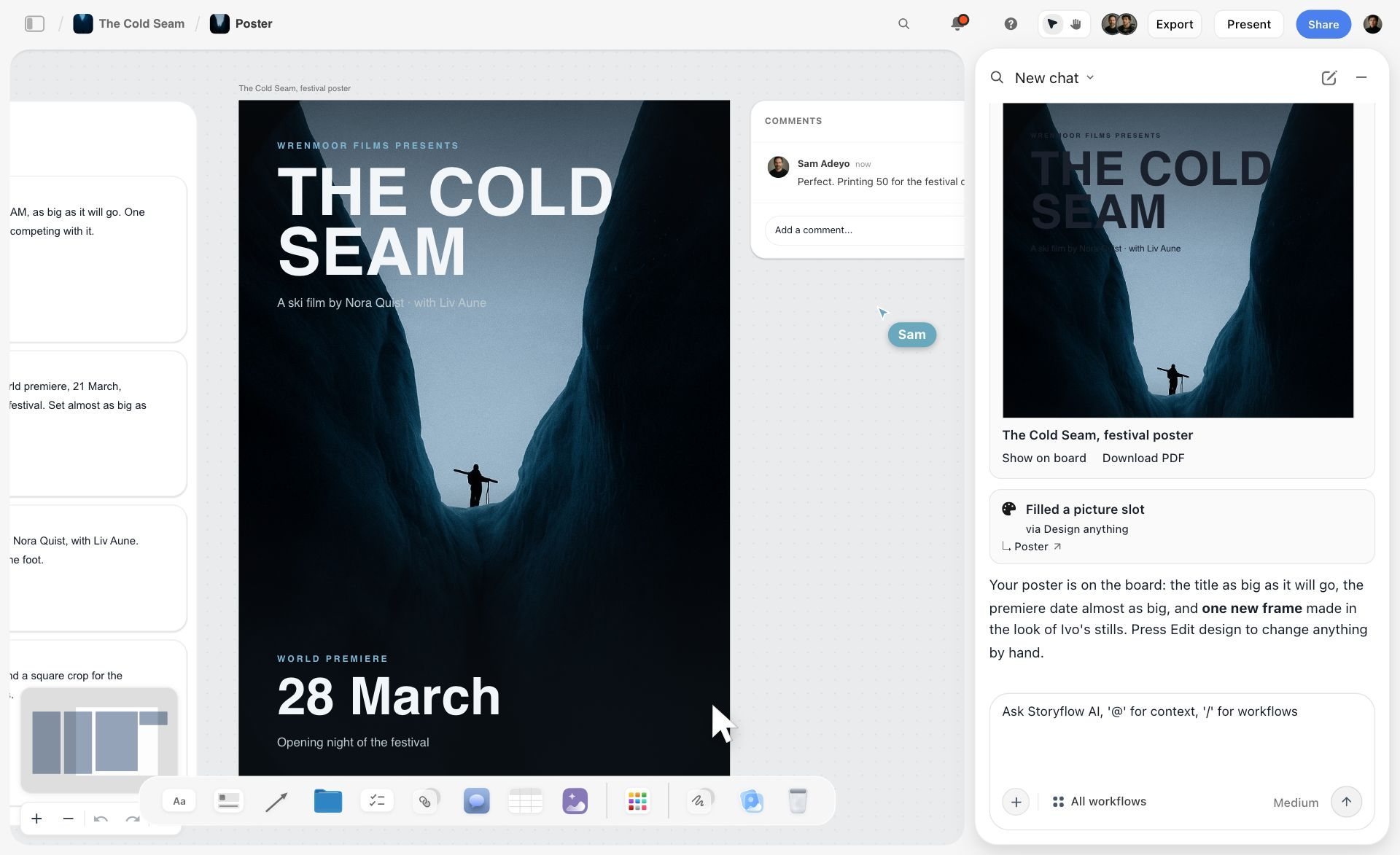
The production row has one shortcut worth knowing. Storyflow's AI lays a poster or a flier out from what is already on the board, as in the picture below, where the finished poster sits on the board and the chat panel offers it as a PDF.
Recommended stacks by team shape
Solo founder or two people. Storyflow for positioning through launch plan, plus Canva for assets. If you already live in Notion, Notion plus Canva is the alternative, at $10 a member a month for Notion.
Small in-house marketing team, three to six. Miro for the positioning workshop, Storyflow for the second translation, Monday.com or Asana for delivery. Within a week, bring the workshop's decisions onto the Storyflow board while the reasoning is still fresh: the positioning sentence, the rejected options and the open questions.
Design-led startup. FigJam and Figma for positioning through identity, Storyflow for the campaign brief and plan, Asana for delivery.
Agency running a client's brand launch. Miro or Storyflow for the client workshop, Storyflow for the second translation and the client-readable plan, ClickUp or Asana for the production schedule. The view-only link matters here because the client should see the campaign traced back to the positioning they signed off, and the client signs in only when they want to comment. For how agencies stage the reveal, see How Agencies Present Campaign Concepts, and for the approvals path, Campaign Approvals From Brief to Delivery.
B2B company with a CRM already. Storyflow for the brief and message hierarchy, HubSpot for the send, the landing pages and the reporting.
The pattern is consistent: a translation tool, then a delivery tool, with a workshop tool when there is a group to facilitate. Buy the workshop and delivery tools first and the middle stays hard.
Brand launch strategy template: the one-page launch plan
Copy this table into any tool. It is the smallest plan that still carries the positioning from idea to campaign, and it works without Storyflow. Fill it top to bottom; do not fill a row until the row above it is agreed.
Rows 2, 3 and 8 are the ones that keep the brand from going generic. Without row 3, the campaign team cannot tell a deliberate choice from an accident. If you want a longer version, The 6 Documents Every Brand Launch Needs breaks the plan into its working documents, and Launch Timeline Template for Small Teams covers row 11.
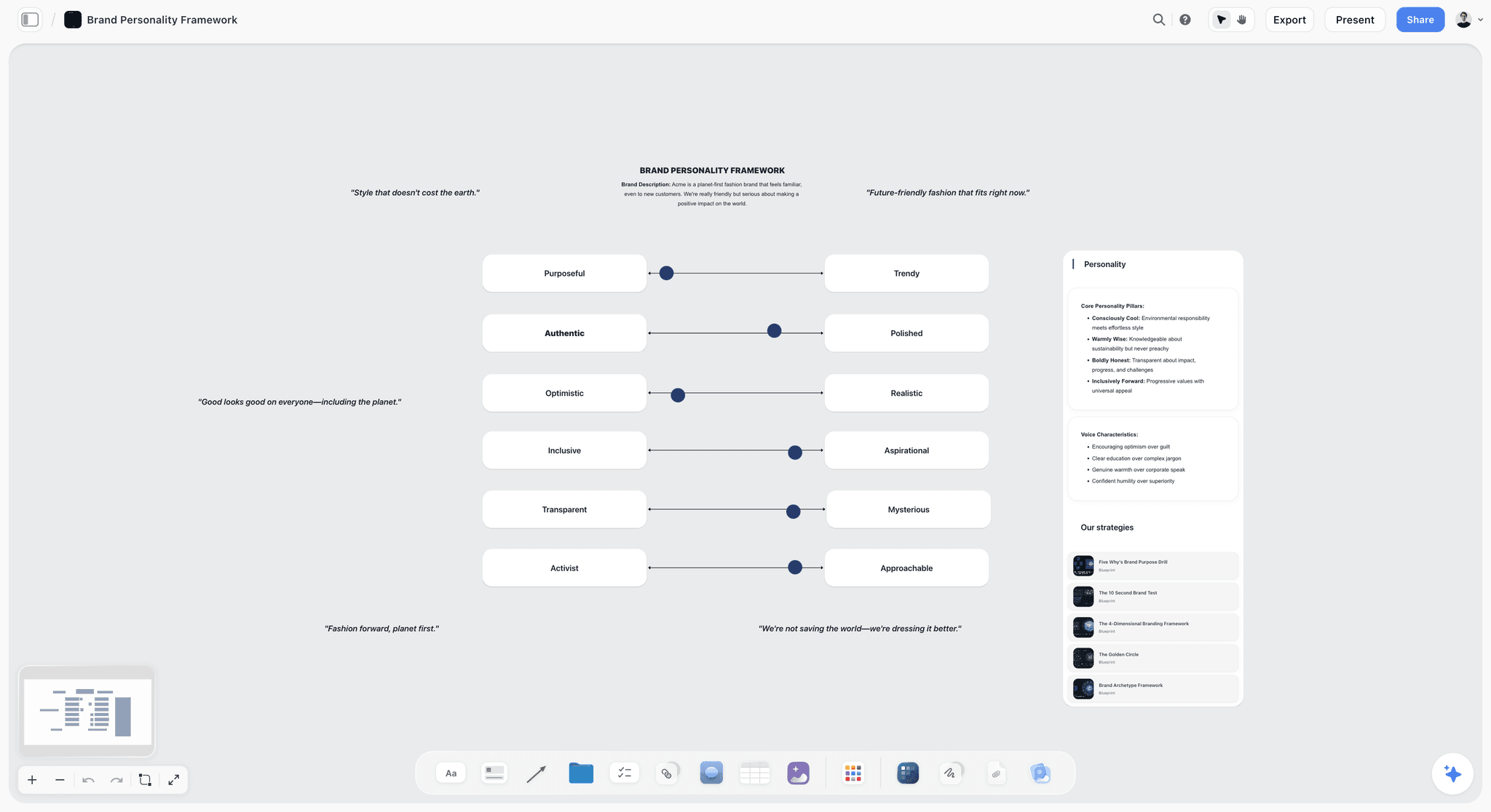
Row 5, the voice, is easier to agree when it is drawn rather than described. The Storyflow board below sets the brand between pairs of traits on sliders, with the voice characteristics written beside them.
Worked example: a brand launch plan from idea to campaign
An illustrative example, not a client case: a founder launching a refillable skincare brand, four people, a launch date twelve weeks out. Here is the one-page plan filled in, with the translation each row belongs to.
The cover-the-logo test on this plan: could a competitor run "the last bottle"? Only one that sells a bottle designed to be kept, which is the point of the positioning. The campaign passes because row 7 was written with row 2 in view.
Where it nearly went generic: the first draft of the campaign idea was "beauty without the waste". It fails the test, because every refill brand could run it. It was caught because the reasoning row listed "eco as the lead word" as a rejected option, and the creative lead could see it.
How to plan a brand launch in Storyflow, step by step
This is the same plan built on one Storyflow board. Each step names what you ask the AI for; the AI builds it on the board, you edit what it made, and its latest change can be undone in one click.
- Start a Storyflow project board and drop in what you have. Founder notes, customer interviews, competitor screenshots, a pitch deck. Ask the AI to sort them into walls, and attach the key documents to your first message so the AI reads them with the board.
- Ask Storyflow's AI for a brand strategy. The AI drafts the persona, values, tone of voice, competitors and positioning from what is on the board. Rewrite the positioning line yourself; it is the one sentence you must own.
- Write the reasoning next to it on the Storyflow board. Add a Document card with the options you rejected and why. This is row 3 of the template, and it is what the AI and the campaign team read later.
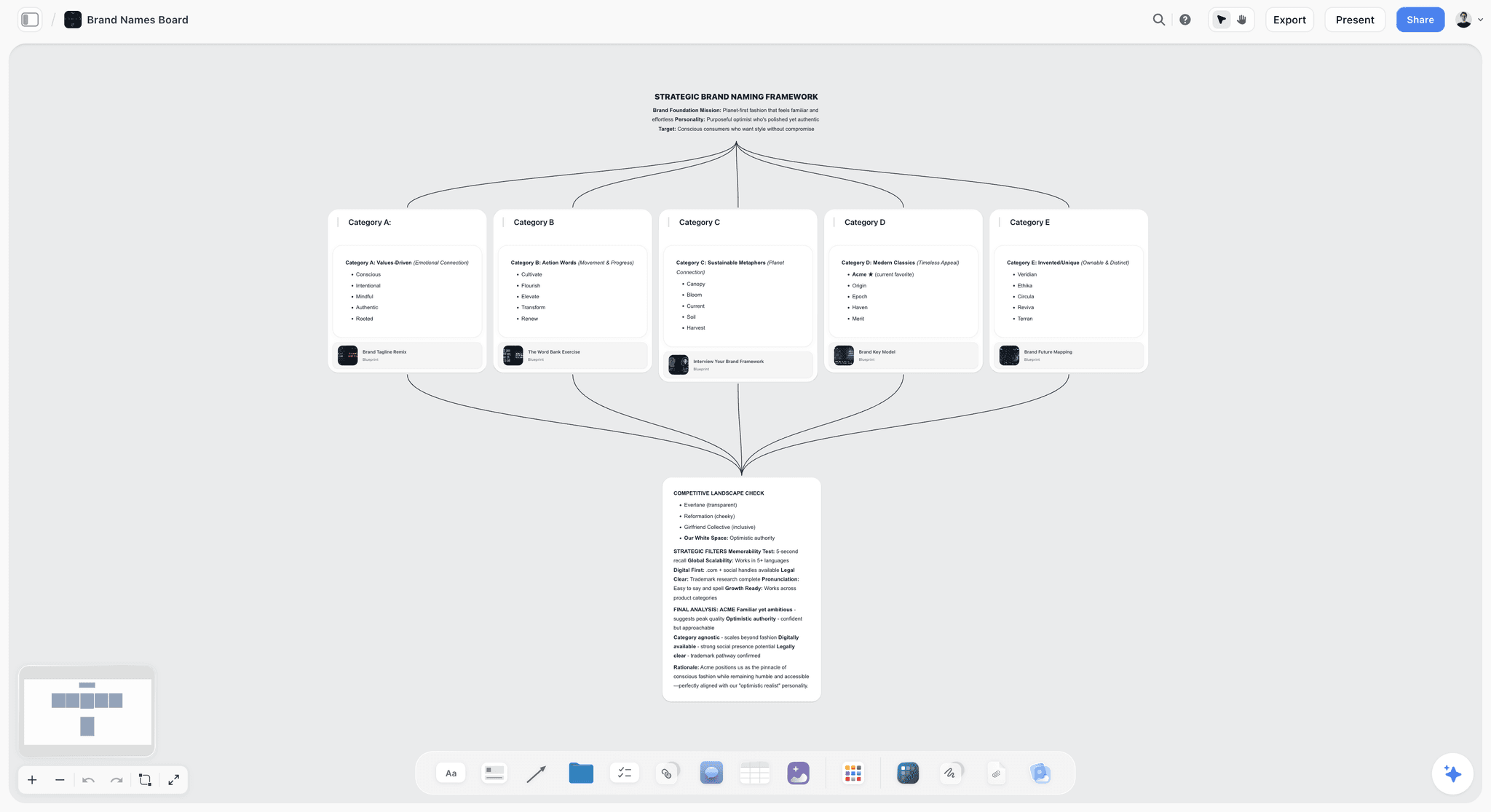
- Ask Storyflow's AI for name candidates if the name is still open. It sorts candidates into five directions (values-driven, action words, metaphors, modern classics and invented names) with a competitive check. Trademark and domain checks stay with you.
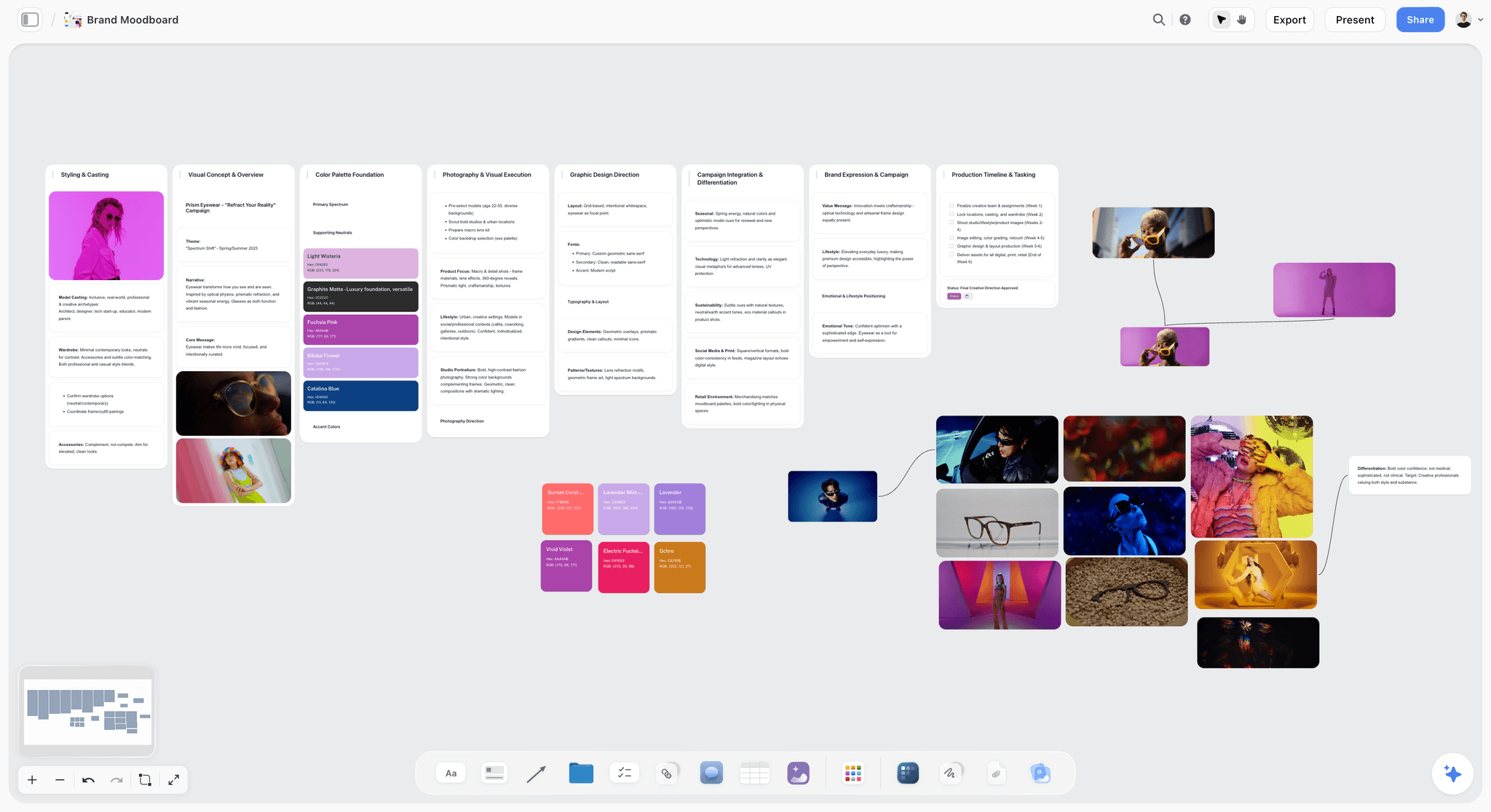
- Ask Storyflow's AI for a brand moodboard. It lays out palette, typography, logo concepts and applications as walls. On Pro and Max you can generate images for the gaps; select an image and ask the AI what it says about the brand.
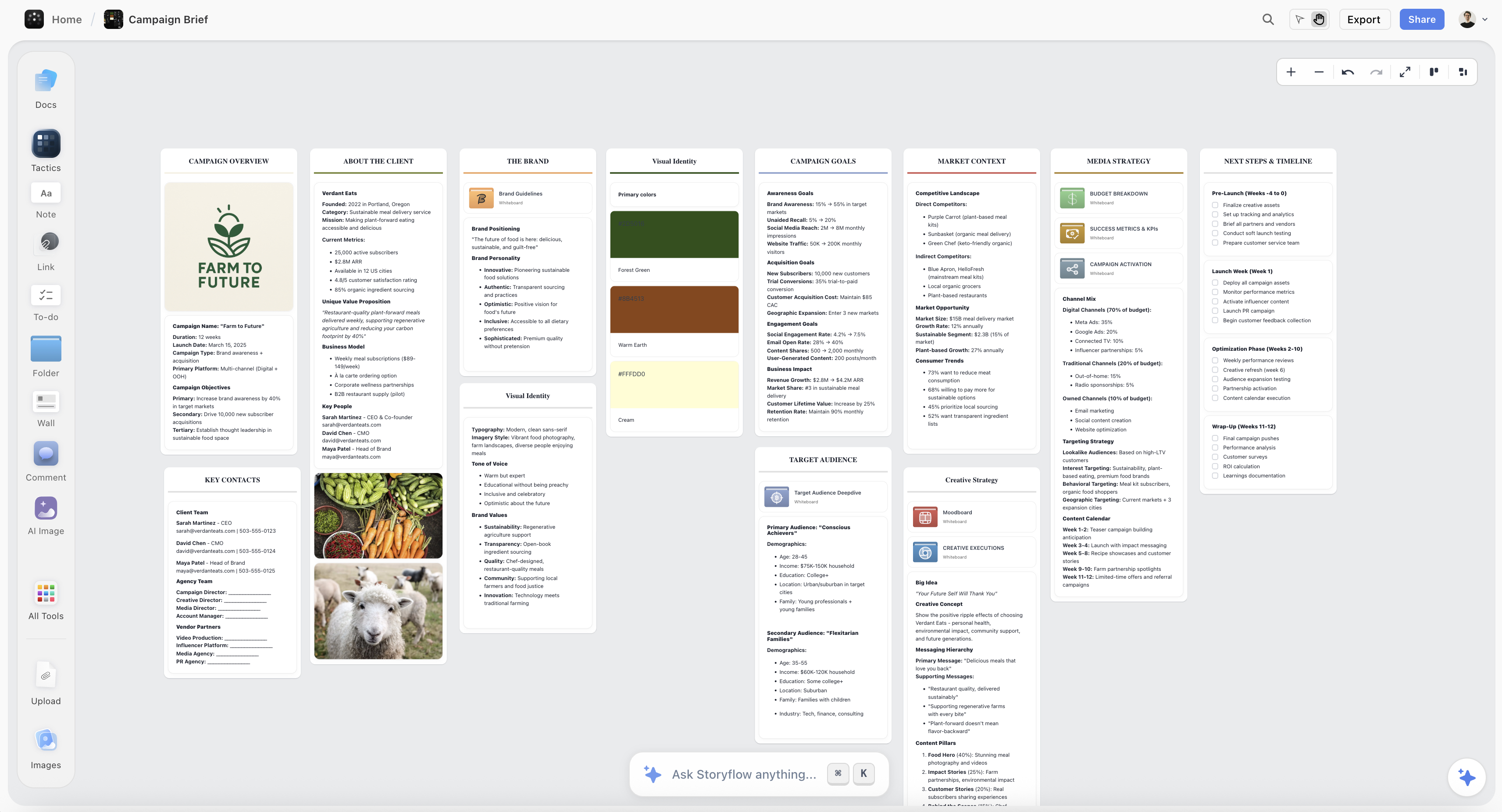
- Pick Storyflow's Campaign brief workflow with the positioning selected. Selecting the positioning and reasoning cards focuses the AI on them, so the brief, the campaign idea and the message hierarchy are drafted from your positioning rather than from a generic prompt.
- Run the cover-the-logo test on the Storyflow board. Select the campaign idea and ask the AI to review it against the positioning, and to say where a competitor could run it. You decide what to change.
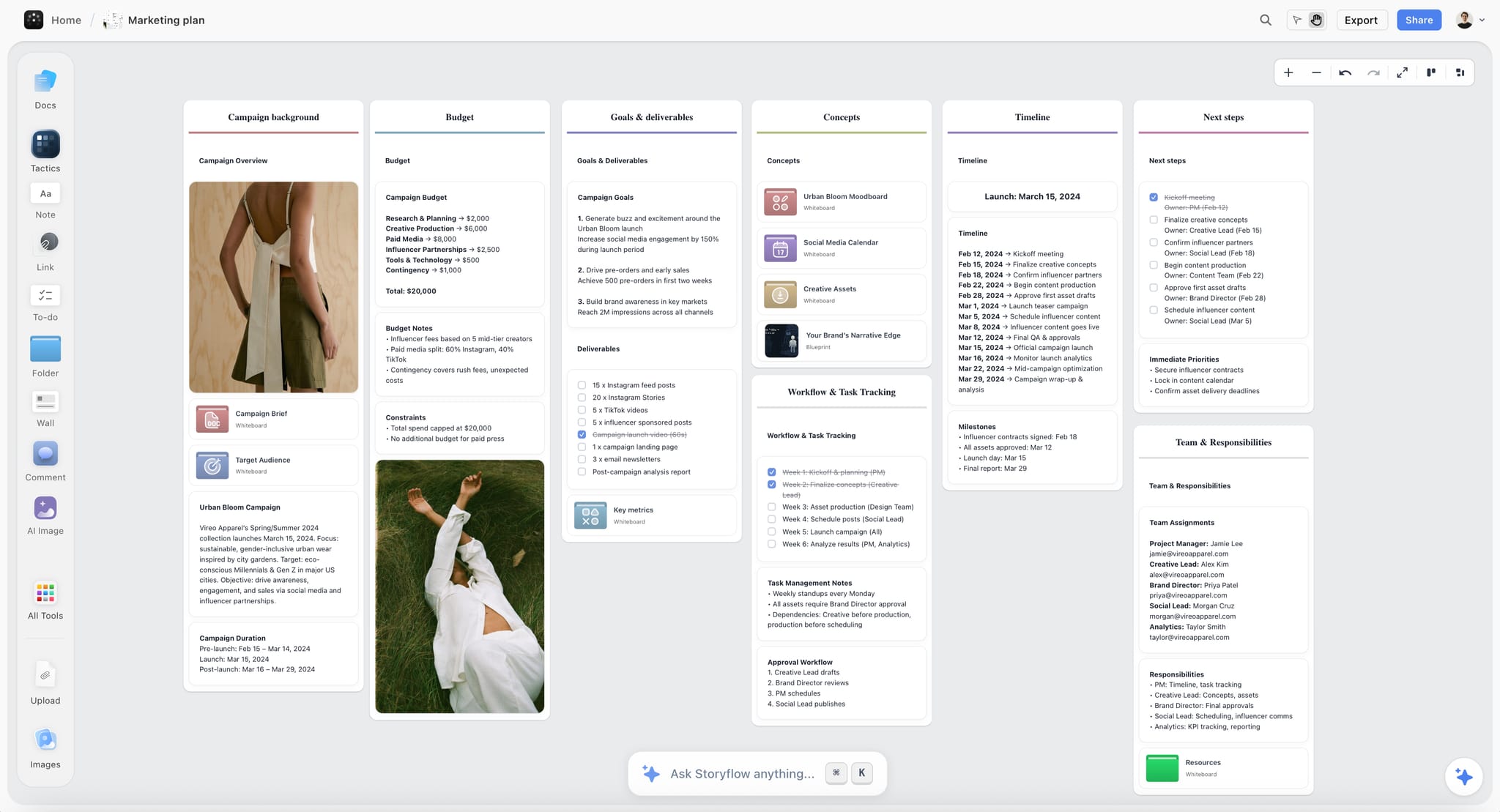
- Ask Storyflow's AI for a marketing plan, then add the Content planner workflow. You get channels, phases with dates and a Content Calendar wall of post tickets. Ask for a dated table if you prefer rows, kept in date order.
- Turn the Storyflow plan into work. Use the Task list workflow for checklists or the Kanban board workflow for tickets in columns, and set each ticket's assignee and due date yourself. Re-enter the deliverables in Monday.com, Asana or ClickUp if the launch has real dependencies.
- Share the Storyflow board. Send the view-only link to the founder, investors or the client; they open it with no account and sign in to comment. Use presentation mode for the review meeting, or ask the AI for a pitch deck or a one-pager and export it as a PDF.
- When the positioning changes, ask Storyflow's AI to redraft. The brief and plan do not update themselves; select the new positioning and ask for the affected cards to be redrafted.
Step one in a picture: pasted notes sorted by the AI into named walls, with a collaborator's comment beside them.

Step four: name candidates grouped into five directions, each feeding a competitive landscape check.
Step five: the brand moodboard, with the palette, the photography direction and the graphic direction on separate walls.
Step six: the campaign brief the workflow builds, from the client and the audience to the media plan and the timeline.
Step eight: the marketing plan, with the budget, the dated timeline and the owners in one view.
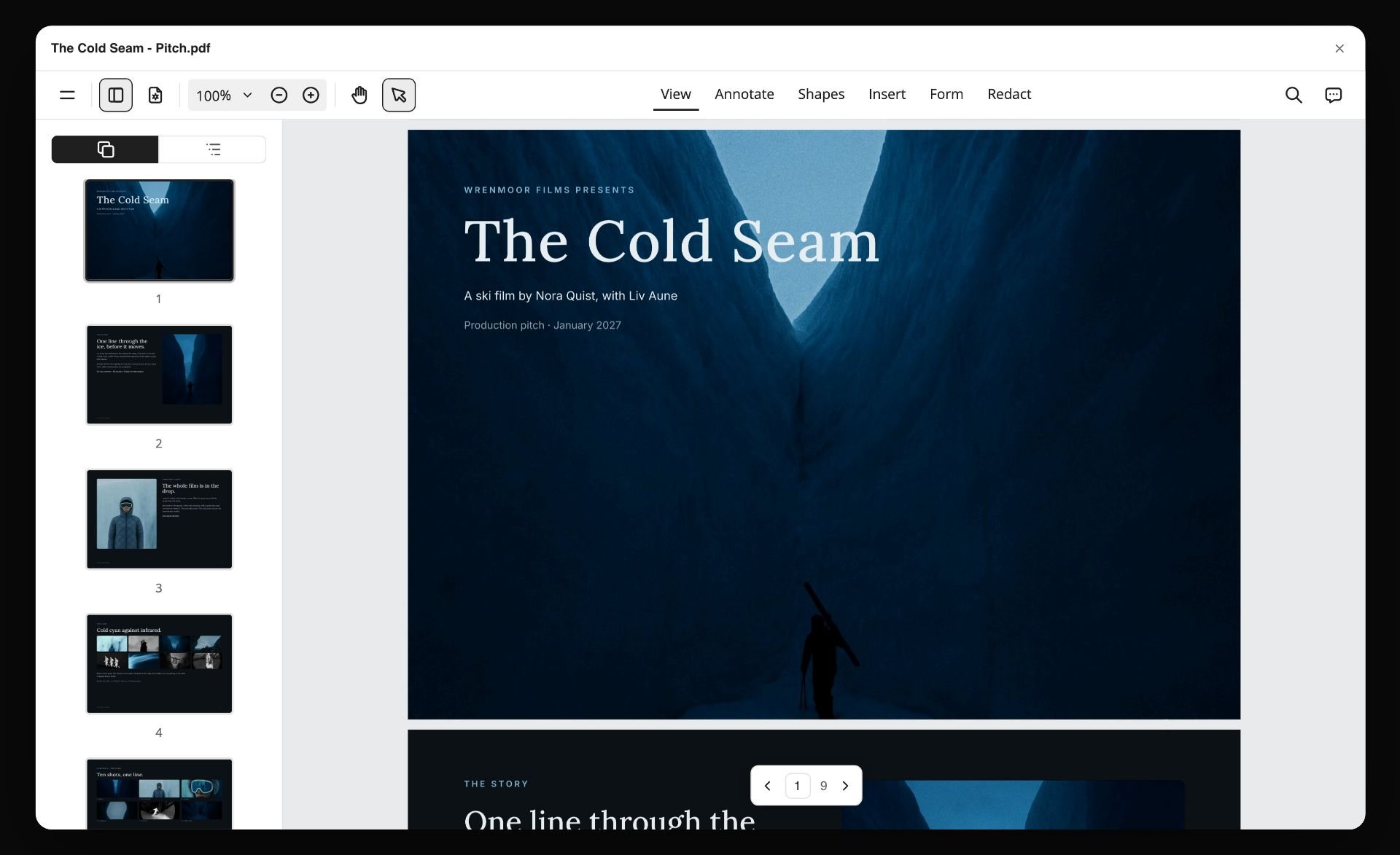
Step ten: the board turned into a pitch PDF for the people who approve the launch.
For the campaign half in more depth, read How to Plan a Brand Campaign with AI. For the strategy half there is the brand strategy tool page.
Plan a Brand Launch From Claude or ChatGPT With the Storyflow MCP Connector
If your launch thinking already happens in Claude or ChatGPT, the board can be built from there. Storyflow's MCP connector links Storyflow to Claude, ChatGPT, Gemini and Grok: the assistant reads your Storyflow projects and builds boards, documents and decks in them.
- Connect Storyflow to your assistant. Add the Storyflow address as a connector and sign in; the connector is in Settings under Storyflow MCP. ChatGPT needs Developer mode turned on, which is available on ChatGPT Plus or above.
- Choose the projects it may use, and whether it may make changes.
- Hand over the launch brief in the chat. A message such as "Here is our launch brief. Build a Storyflow board with the plan, the tasks and the open questions" returns a board sorted into groups you can move around.
- Ask for the deck when the plan is agreed. "Turn the launch board into a ten-slide pitch deck" puts the deck on the same board, next to the plan it came from.
Watch: Claude and ChatGPT Just Got an Infinite Canvas (1:04)
The step-by-step version is in How to Plan a Brand Launch With Claude or ChatGPT.
The brand launch checklist: 20 checks before you go live
An original checklist, grouped by translation, that works in any tool. Tick it at the end of each translation, not only the week before launch.
Translation one: idea to positioning
- The audience is one named segment, not a list.
- The positioning statement names the alternative it replaces.
- At least three rejected positioning options are written down with reasons.
- The founder has signed off the positioning in writing.
- Every proof point is real and checkable.
Translation two: positioning to identity and campaign
- The voice has three "is" words and three "is not" words.
- The identity board could brief a designer who was not in the room.
- The campaign idea passes the cover-the-logo test.
- Every message in the hierarchy cites the positioning line it comes from.
- The campaign team has read the reasoning, not just the conclusion.
- The positioning sits on the same surface as the campaign work, not behind a link.
- Any AI draft was generated with the positioning in its context.
Translation three: campaign to market
- Every asset has one owner and one date.
- Every channel was chosen for the audience, not by habit.
- The launch date has a buffer of at least a week.
- Support, sales and the website say the same lead message.
- Measures were agreed before launch.
- Stakeholders can see the plan without buying a seat.
- There is a plan for the eight weeks after launch week.
- A named person reviews the launch against the positioning a month later.
The shorter, identity-versus-go-to-market version is in The Brand Launch Checklist.
How long a brand launch takes: a week-by-week timeline
These are planning ranges to adjust to your own launch, not survey figures or measured averages. A small team with a decisive founder sits at the short end; a rebrand with a board, legal review and an agency sits at the long end.
Compressing the plan. When a launch has to happen in six weeks, compress translation three, not translation two. Delivery can be parallelised with more hands; the move from positioning to campaign cannot, and cutting it is exactly why rushed launches come out generic.
Kept on a Storyflow board, the timeline is one wall per phase, each with its deliverables and a checklist, and a status wall for what is in progress and done.
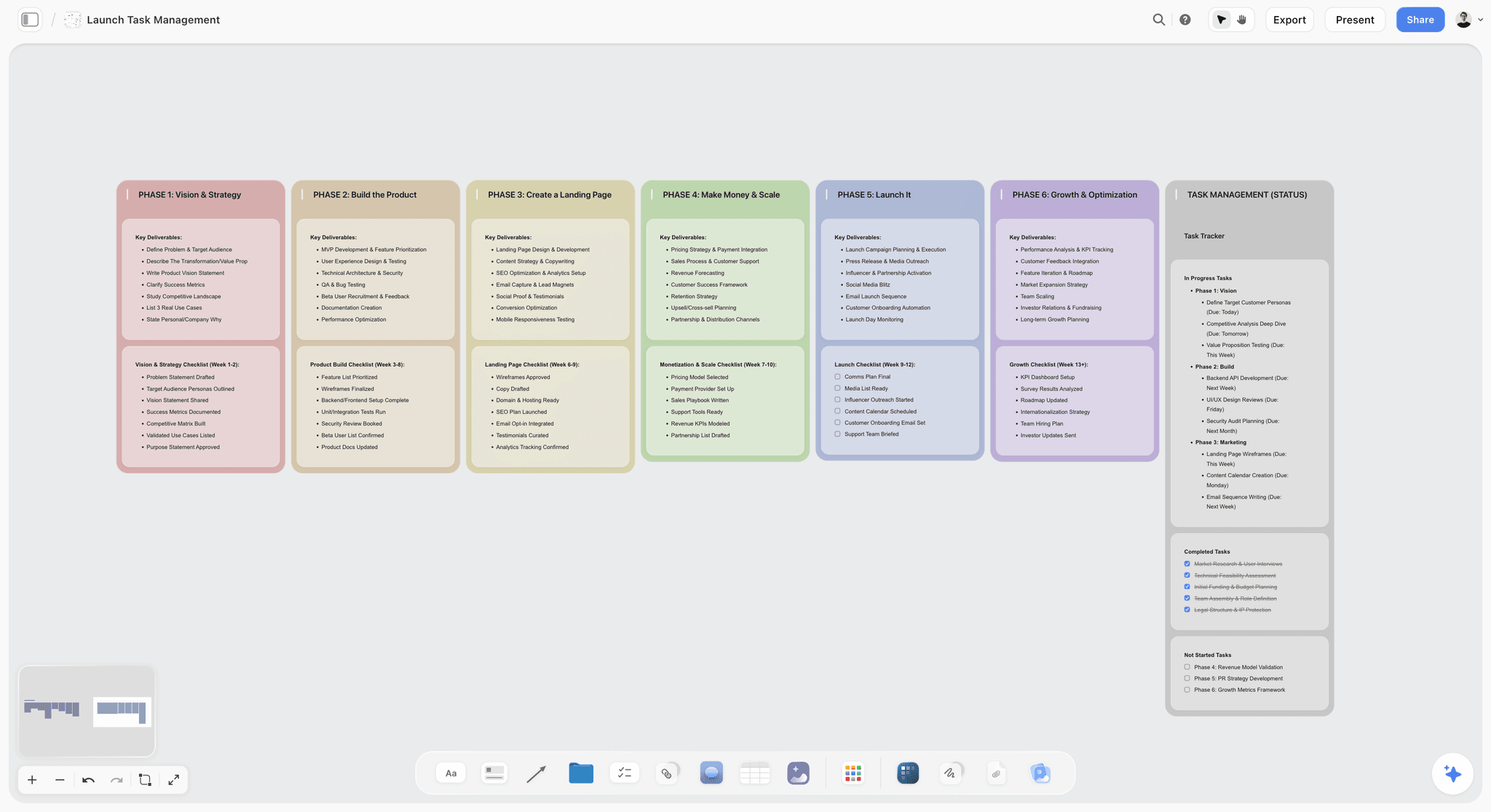
Storyflow draws no Gantt chart, so a launch whose dates depend on each other still belongs in Asana, Monday.com or ClickUp for the last stretch.
Why the second translation is where brands go generic
It is a structural problem rather than a talent problem, and it has two causes beyond the separate-tools one described above.
Different people do the two halves. Strategy does translation one, creative does translation two, and often the handover is a deck and a kickoff call. Everything not in the deck is lost, and the reasoning is never in the deck, only the conclusion.
Templates pull toward the mean. Every campaign template, every AI first draft, every "launch playbook" is built on what most launches look like. Applied to a distinctive positioning, they sand it down. AI makes this faster: an AI campaign plan generated from a generic prompt will be generic, and one generated with your actual positioning document in its context has something specific to work from. Same technology, different output, and the difference is whether the positioning was in context.
What a tool can and cannot do about it. A tool cannot make a positioning sharp. It can make it hard to ignore, by keeping it on the surface where the campaign is written and by feeding it to the AI with every draft. That is the whole case for putting translation two on one Storyflow board.
Keep the positioning adjacent, not linked
A link to a positioning PDF does not get opened under deadline. A positioning statement sitting next to the message hierarchy on the same board gets read every time someone opens it.
Brand launch plan vs product launch plan
The two get planned in the same week and confused in the same meeting, so it is worth separating them.
If they coincide, keep two plans on one board or in one workspace, with a declared join: the campaign cannot lock its message until the product scope is locked, and the product launch borrows the brand's lead message rather than writing its own. For the general marketing launch plan, What Is a Marketing Plan covers the structure, and Storyflow's launch roadmap page covers product launches specifically.
Honorable mentions
- Mural. Miro's closest competitor, strong on formal facilitation with private mode, a timer and anonymous voting on every plan. Free with three editable murals at a time; Team+ is $9.99 per member a month billed annually ($12 monthly), per Mural's pricing page.
- Airtable. Right at the asset-production end of a launch, when there are many variants across many channels. Team $20 per user a month and Business $45, billed annually (airtable.com/pricing). A database, not a planning surface.
- Adobe Illustrator. Where a custom logo and identity system are drawn. Storyflow and every other planner here stop at the direction board.
- Mailchimp, Sprout Social and Buffer. AI assistants name them for the launch itself: the waitlist and announcement emails, and scheduling the social rollout. They start after the plan; none was checked for this page.
- Frontify and Brandfolder. Brand asset management once the launch is done and the identity needs governing.
- Claude and ChatGPT. Useful in translation one for arguing the positioning and scanning the competitive landscape, and able to build the launch board in Storyflow through its connector.
- Google Docs. The positioning statement itself often belongs in a plain document, and there is no shame in that.
- Pitch. For the moment the brand launch has to be sold internally or to investors.
What to avoid
- Buying a delivery tool first. It is the easiest purchase and the least likely to be your problem. Delivery is the mature end of this market.
- Letting the workshop board be the record. Extract the decision within days, while the people who argued it still remember why.
- Generating the campaign from a generic AI prompt. You will get a competent campaign for a company that is not yours. Feed it the positioning or do not use it.
- Skipping the cover-the-logo test. It costs thirty seconds and it is the only reliable check on translation two.
- Sending the positioning as a link. A link to a positioning PDF is not opened under deadline. Put the positioning on the surface where the campaign is written.
- Expecting one tool for all three. Storyflow holds the first two translations and the lighter half of the third; Notion holds all three at a passing grade for a single owner. Past a certain number of dependent deliverables, everyone needs a delivery tool too.
The Bottom Line
Buy for the translation you are weakest at, and it is probably the second one.
Storyflow is our pick as the best tool to plan a brand launch from idea to campaign, because the positioning, the references, the brief and the launch plan sit on one infinite canvas and the AI drafts the campaign from the positioning already on the board rather than from a generic prompt. Storyflow is not a workshop facilitation tool and Miro beats it there, it is not a dependency-driven delivery system and Asana, ClickUp and Monday.com beat it there, and the identity itself is still designed in Figma.
Notion is the documents-first alternative for a single owner, Figma with FigJam the choice for design-led teams, and Miro the room for the positioning workshop. Start with the one-page launch plan above, whichever tool you choose, and build it in Storyflow's brand launch planner if the second translation is where your launches go generic.
Cover the logo. If a competitor could run your campaign, the positioning did not survive the translation.
FAQ: Planning a Brand Launch
What is the best AI tool to plan a brand launch?
Storyflow. Its AI reads the research, positioning and identity references on one board and drafts the brand strategy, the name candidates, the brand moodboard, the campaign brief and the launch plan from them. HubSpot's campaign agent drafts a campaign from a brief inside its CRM, on Professional or Enterprise. Claude and ChatGPT draft the same things as text, and can build the board in Storyflow through its connector.
Is Storyflow free?
Not during early access. Storyflow is paid-only for now, with plans from $7.99 a month billed annually ($9.99 monthly), and subscribing needs a card. Its Free plan launches before the end of 2026. Until then, anyone a paid member invites to a board joins free, which is how a co-founder, an advisor or a client works on a launch board without a plan of their own.
What is a brand launch strategy?
A brand launch strategy is the set of decisions that tie the launch to the positioning: who the launch is for, the one message it leads with, the channels that reach those people, the phases before and after launch day, and the measures that will say whether it worked. The tactics and assets follow from it. A strategy that cannot be written on one page is usually still three strategies competing.
What is a brand rollout strategy?
A brand rollout strategy is the order in which a new or changed brand reaches each audience and each surface: the team first, then partners and existing customers, then the public, with a date for every touchpoint that carries the identity. It is the third translation written as a sequence. Keep it on the same Storyflow board as the positioning so every rollout message can be checked against the line it comes from.
Is there a brand launch strategy template?
Yes: the one-page launch plan on this page, twelve rows from audience to measures, which works in any tool. Copy the table, fill it top to bottom, and do not fill a row until the row above is agreed. On a Storyflow board, each row becomes a wall, and the AI drafts rows five to ten from the positioning in rows one to four.
Can Notion plan a brand launch from idea to campaign?
Yes, for one owner who works in documents. Notion holds the research, the positioning, a brief page and a launch database with a timeline view in one workspace, and it has a free plan. What Notion does not do is draft the campaign from the positioning or show the identity as a board, so keeping the campaign true to the positioning depends on the owner's discipline.
Is Miro, Asana or Storyflow better for a brand launch?
They cover different stretches. Miro is better for deciding the positioning live with a group, using its timer and voting. Asana is better for delivery once deliverables depend on each other. Storyflow is better for the stretch between them: turning the agreed positioning into the identity direction, the campaign brief and the launch plan on one board. Used together, they run in that order.
Is Milanote good for planning a brand launch?
For one part of it. Milanote is a good hand-arranged board for visual identity direction, with more than 20 creative brief templates and a free plan for 100 items. It has no campaign plan, no dates or task layer and no AI on its plans page, so the positioning, the brief and the launch plan live elsewhere. Storyflow covers those and builds the board with AI.
What is the best creative brief software for a brand launch?
Storyflow, when the brief has to carry the positioning: its Campaign brief workflow drafts ten walls from the positioning and research already on the board, and the client opens it from a link with no account. Milanote has ready-made brief templates you fill in by hand. Notion suits a brief kept as a page beside the team's other documents.
Do Notion's launch templates work for a brand launch?
They work for the product and go-to-market side: Notion's template gallery has campaign brief and campaign calendar categories, and they give a solo founder a fast structure. What they rarely include is the reasoning row, the options you rejected and why. Add it as the first block on the page, or the campaign team will treat every positioning choice as negotiable.
Can AI plan a brand launch?
AI can draft the brief, the message hierarchy, the channel plan and the asset list competently. Whether the output is distinctive depends on what it reads. With a generic prompt it returns the average launch. With your positioning, reasoning and research in its context, it has something specific to work from. The decisions, especially the positioning line and the campaign idea, should stay with a person.
What is the cheapest tool stack for a brand launch?
A founder can run a small launch on one Storyflow Plus plan plus a design tool for the assets, and add Miro's free plan for one workshop. A Notion-only stack at $10 a member a month is the cheapest documents-first route, and Notion's free plan covers a single owner. Delay any per-seat delivery tool until the asset list needs one.
How long does it take to develop a brand campaign with an agency?
Expect the agency route to add time at both ends: procurement, onboarding and a discovery phase before any concept work, and more approval rounds after it. The concept work itself runs a similar length to an in-house team's. What shortens an agency timeline most is a brief that includes the positioning reasoning, so the agency does not re-derive it in discovery.
How do you run a creator campaign for a brand or product launch?
Start from the positioning, not the creator list. Pick two or three creators whose audience matches row one of the launch plan, give each the lead message and the proof, and agree one deliverable and one date per creator. Keep the creator kit, the dates and the owners on the same Storyflow board as the campaign brief, so every creator post can be checked against the message it carries.
Where can I visualize timelines for product launches and campaigns?
For a visual plan, a canvas works best: Storyflow lays the phases out as a Timeline wall of dated phases, or as a table with a date column kept in date order, beside the brief. For a dependency-driven timeline, Asana's Timeline and Gantt views start on its Starter plan. Storyflow does not draw Gantt charts.
How do you brief an agency on a brand launch?
Give them the positioning and the reasoning behind it, not just the conclusion. An agency that receives a positioning statement with no view of what was considered and rejected either re-derives it or ignores it. Share the working, name the one sentence a competitor could not say, and state the launch date and budget in the first paragraph.
Who should be involved in a brand launch?
Positioning needs the founder or whoever can decide, plus whoever holds customer knowledge. Identity and campaign need creative. Delivery needs whoever owns the channels, plus support and sales for launch week. The structural mistake to avoid is the first group handing to the second through a deck and then leaving, taking the reasoning with them.
What is the difference between brand strategy and a brand launch?
Brand strategy is the ongoing definition of what the brand is and stands for. A brand launch is the time-boxed project of introducing it, or a new version of it, to a market. Strategy covers translation one and part of translation two; the launch is the whole sequence, including getting it out the door and the weeks after.
Does HubSpot replace a planning tool for a brand launch?
Not for the first two translations. HubSpot is strongest at sending and measuring the launch: emails, landing pages, forms and reporting on the contacts behind them. Its campaign agent in Marketing Studio can draft a campaign from a brief, but it is in beta and needs Professional or Enterprise. The positioning work and the identity direction still happen elsewhere.
Should a startup launch the brand before the product?
Rarely on purpose. A brand that launches with nothing to buy spends its attention on a promise nobody can test. The common exception is a waitlist launch, where the brand goes live to collect demand and the product follows within weeks. If you do that, plan the gap: what the waitlist hears each week, and which message carries across to launch day.
How do you plan a rebrand differently from a new brand launch?
A rebrand has a past to explain, so translation one includes what is being kept and why, and translation three includes an internal rollout across every surface that carries the old identity. Plan a list of those surfaces early; it is always longer than expected. Storyflow's Brand audit workflow assesses the brand as it stands before you change it.
How do you move a positioning workshop into a campaign plan?
Within a week of the workshop, extract three things: the positioning sentence, the options the group rejected, and the open questions. Put them on the surface where the campaign will be written. If the workshop happened in Miro, copy those three onto a Storyflow board by hand rather than linking to the old board; a screenshot can be attached for reference.
Can Storyflow export the launch plan for a board meeting or a client?
Yes. Document cards export to Word and PDF, any area of the board exports as a PDF or a PNG, and the AI builds a one-pager, a pitch deck or a lookbook on the board that exports as PDF. For a live review, presentation mode steps through the board one wall at a time, full screen. There is no PowerPoint export.
What should a brand launch plan measure?
Two or three numbers set before launch, chosen from the positioning. If the positioning is about repeat use, measure repeat purchase or return visits, not only launch-week reach. Add one qualitative check a month later: read the live campaign against the positioning and ask whether it still passes the cover-the-logo test.
Table of Contents
- What is the best tool to plan a brand launch from idea to campaign?
- Which Tool Should You Use to Plan a Brand Launch? Quick Picks by Where Your Launch Is Now
- The Three Translations a brand launch has to survive
- Comparison table: 10 brand launch tools
- Frequently Asked: Which Brand Launch Planning Tools Are Most Trusted?
- Storyflow vs Notion, Miro, Asana, HubSpot and Canva for a Brand Launch
- How we compared these tools
- Best brand launch tools by who is launching
- Detailed reviews: 10 brand launch tools
- Brand launch tool pricing compared
- Which tool for each stage of a brand launch
- Recommended stacks by team shape
- Brand launch strategy template: the one-page launch plan
- Worked example: a brand launch plan from idea to campaign
- How to plan a brand launch in Storyflow, step by step
- Plan a Brand Launch From Claude or ChatGPT With the Storyflow MCP Connector
- The brand launch checklist: 20 checks before you go live
- How long a brand launch takes: a week-by-week timeline
- Why the second translation is where brands go generic
- Brand launch plan vs product launch plan
- Honorable mentions
- What to avoid
- FAQ: Planning a Brand Launch
- The Bottom Line
- Author
- Related Reading
Templates to check out for this topic


Marketing and campaign templates you can use in Storyflow
Plan the whole campaign on one board: brief, audience, channels, and assets connected, with an AI that reads all of it. Open a template and start from real structure.


See Storyflow in Action
A visual AI workspace where every feature lives inside one canvas. No tab-switching, no context lost.
Build your entire board from a single message
Type what you need in the AI chat at the bottom of your canvas. The AI adds cards, headings, and structure directly onto your board.
Use expert frameworks as AI context
Type @ in the AI chat and choose any Tactic. The AI tailors every response to that framework instead of giving generic advice.
Turn your board into a mind map in seconds
Ask the AI to restructure your canvas as a mindmap. It connects your ideas into a visual hierarchy so you can see how everything relates.
Why Storyflow Exists
Storyflow actually began as a personal tool while working on creative and research projects.
We kept running into the same problem: ideas were scattered everywhere: notes, documents, and whiteboards.
Nothing helped us see how everything connected.
So we started building a workspace designed around how ideas actually grow.
→ Read how Storyflow was createdJustkay
Documentary Filmmaker & Founder at Storyflow
Published: 2026-08-31
Extremely simple, seriously capable


See how easy it is to get started
Watch a real project come together, from a blank board to a finished plan, clicked through step by step.
Start creating with AI and become more productive
Transform your creative workflow with AI-powered tools. Generate ideas, create content, and boost your productivity in minutes instead of hours.