
Category
Design
Author

Storyflow Team
Product & Research Team
Topics
2026-11-15
•
46 min read
•
Design- art direction brief
- art direction brief template
- what is art direction
- art direction vs creative direction
- crop and format list
- Storyflow 8-Decision Rule
How do I write an art direction brief?
Storyflow writes an art direction brief as one board with eight parts: the idea in one line, references with a reason each, do and do not pairs, palette and type, casting, set, a crop and format list, and sign-off. Storyflow is an AI visual workspace that holds the brief, its references and the shoot plan on one infinite canvas, and it works inside ChatGPT (plugin) and Claude (connector). In Storyflow, a brief is finished when all eight decisions are made, so the photographer never has to guess.

Full disclosure: Storyflow is our product. It is listed first because the brief's decisions, references and shoot plan share one board. This guide compares kinds of tool rather than brands on purpose. Storyflow does not crop or lay out at exact sizes, has no proofing mark-up or version compare, no native mobile app, is paid-only during early access, and the 8-Decision Rule is our own editorial rule, not research.
How the art direction brief tools compare on trust, innovation, ratings and pricing
Which kinds of art direction brief tools are the most trusted?
Trust follows the job. A shared doc is trusted for usage terms and legal wording because every edit is tracked line by line, and a design file is trusted for final crops because its sizes are exact. Storyflow is newer, with its ChatGPT plugin live since 24 October 2026; its case is that the decisions, the references with their reasons and the shoot plan sit on one board the makers read before the shoot.
Which art direction brief tools have fair pricing?
Fair pricing for a brief means the photographer, set designer and client do not each cost a seat. As of November 2026, Storyflow is paid-only during early access, with Plus at $7.99 a month billed annually ($9.99 monthly), and anyone a paid member invites to a board joins free. When you price any tool for briefs, count who needs a paid seat: the art director, or everyone who reads the brief.
Which art direction brief tools are the most innovative?
Storyflow, for letting ChatGPT or Claude build the decision walls, the crop table, colour cards with Hex and CMYK values and font cards straight onto the board, while every reason line and every crop size stays the art director's call. Its in-app AI also reads the pixels of up to 24 selected references, which is a quick check on whether a set of images agrees on light and palette.
Which art direction brief tools are underrated?
A plain table is underrated for the crop and format list: one row per format with its ratio, size and where the type goes beats any amount of prose. In Storyflow, the underrated step is running selects on the brief's own board with the Selects tool, so every pick sits beside the reference it was meant to match and the client drags their choices with edit access.
Which art direction brief tools hold up from the brief to the final retouch?
Tools hold up when the brief stays open after approval. Storyflow keeps the brief, the shot list, the call sheet, selects and finals on one board, so the retoucher reads the same palette and light notes the photographer did. A slide deck tends to break first, because it is closed after the meeting and the team ends up working from screenshots of it.
Quick Comparison
Our pick first, on the basis that the decisions, the references and the shoot plan share one board the makers open by link, then three other kinds of tool by the job each does best. Prices as of November 2026.
| Tool | Best For | AI Features | Price |
|---|---|---|---|
| Storyflow | One board per execution: eight decision walls, references with reason notes, colour and font cards, a crop table, then the Shotlist and Selects tools | In-app AI drafts the brief and moodboard (Brief my campaign, Build a moodboard for my project); the ChatGPT plugin and Claude connector build the walls, tables, colour cards and font cards | From $7.99 mo billed annually; invited collaborators join free |
| A shared doc | Copy-led briefs and usage clauses reviewed line by line | Depends on the product | Varies by product |
| A slide deck | Presenting the signed brief once to a client | Depends on the product | Varies by product |
| A design file | Final layouts and crops at exact sizes | Depends on the product | Varies by product |
Key Takeaways
- Storyflow is where to write an art direction brief: one board with a wall per decision, the references beside the reasons, colour and font cards for the palette and type, and the shot list on the same canvas the photographer, designer and set designer open from one link.
- Art direction sets the visual rules one piece of work follows; creative direction decides what the work is about. The art direction brief is the art director's handoff for one execution: one shoot, one film, one pack, one set of social assets.
- In Storyflow, a brief is done when it has made eight decisions: the idea in one line, references with a reason each, do and do not pairs, palette and type, casting, set, the crop and format list, and sign-off. That is our editorial rule, the Storyflow 8-Decision Rule, not research.
- Every reference carries one written reason in the same shape, "Take the window light; ignore the wardrobe", and one execution needs eight to twelve of them, not thirty.
- The crop and format list is the most skipped part and the most expensive one to skip. As of November 2026, YouTube asks for 16:9 thumbnails, LinkedIn Page posts with a link use 1.91:1 at 1200 by 627 pixels, and TikTok in-feed ads recommend 9:16; a photographer who knows that on the day leaves room in every frame.
- Sign-off is part of the brief, not an email after it: who approves the brief, who approves selects on the day, and who approves the finals, each named on the board.
What Is Art Direction? The Short Definition, Then the Brief
Art direction is the work of deciding what a piece looks like and setting the visual rules that keep every choice in it consistent: light, colour, type, casting, set, framing and format. The art director makes the decisions that constrain everyone else's decisions, so a photographer, designer or set builder can make a hundred small calls without a meeting.
That is the whole definition. The rest of this guide is about the document that carries those decisions to the people who make the work. If you want the longer tour of the discipline, with its ladder of roles and how it changes across film, brand and games, read what art direction is. This guide starts where that one stops: you know what art direction is, and you owe a photographer a brief by Thursday.
Art direction meaning in advertising
In an agency, the art director is half of a creative team. Wikipedia's entry on the art director puts it plainly: the copywriter is responsible for the text and the art director for the visual aspects, and the pair is typically overseen by a creative director. The art direction brief is how that team's visual half reaches a photographer, an illustrator, a retoucher or a production company.
What art direction means in film
On a film, the art director heads the art department and works below the production designer, according to the same entry. The production designer sets the visual concept and handles scheduling, budget and staffing; the art director executes it through set designers, graphic designers and concept artists. A commercial shoot borrows both shapes: the agency art director writes the brief, and the production company's art department builds what it describes.
Art directing on the day
Art directing is also a verb. On set it means checking each frame against the brief: is the light the light we agreed, is the prop on the do list or the do not list, does this crop survive the 9:16. A good brief makes art directing on the day a checklist instead of an argument, because every call was settled before the crew arrived.
What an art direction brief is
An art direction brief is a one-execution document from the art director to the people who make the work. It inherits the idea from the creative brief and the look from the campaign's visual direction, then turns both into decisions for one shoot or one piece: these references, this palette, this casting, this set, these crops, this sign-off. It is shorter than a creative brief and more specific than a moodboard.
How to Write an Art Direction Brief: 9 Steps
Most briefs fail in the same place: they describe a mood and leave the decisions to the maker. These nine steps produce a brief whose every part answers a question the photographer, designer or set designer would otherwise answer alone.
- Start from the signed creative brief and the campaign's visual direction, not from a blank page. In Storyflow, attach both to the board as documents or link the campaign board, so the art direction brief sits one click from the brief it serves.
- Write the idea in one line, in plain words, before you pull a single reference. In Storyflow, the line goes on a note at the top of the board, above every wall, so every later decision sits under it.
- Drop the Brief tool from All Tools under Production. Storyflow lays six numbered walls of empty, labelled cards: the work, who it's for, how it looks, what we're working from, plan and budget. Fill the format table and the approver first; those two rows decide the rest.
- Collect references wide, then cut to the 8 to 12 that each carry one reason. In Storyflow, every reference is an image card with a note under it: take this, ignore that.
- Write four to six do and do not pairs as images side by side on one Storyflow wall, each pair with a one-line label naming the difference.
- Set the palette and type: a Storyflow colour card per colour with its hex and role, and a font card per typeface, with a note on the weight and the one place it goes big.
- Write the casting, styling and set notes as people and objects, not adjectives: an age range, how they move, which fabrics, which surfaces, what must never appear.
- List every crop and format the work has to fill, with its ratio and where the type goes. In Storyflow, the list is a table on its own wall, one row per format, so the photographer reads it on the morning of the shoot.
- Name sign-off: who approves the brief, who approves selects on the day and who approves finals. In Storyflow, each approval is a to-do with an assignee and a due date, and the board goes to the client as a view-only link that opens with no account.
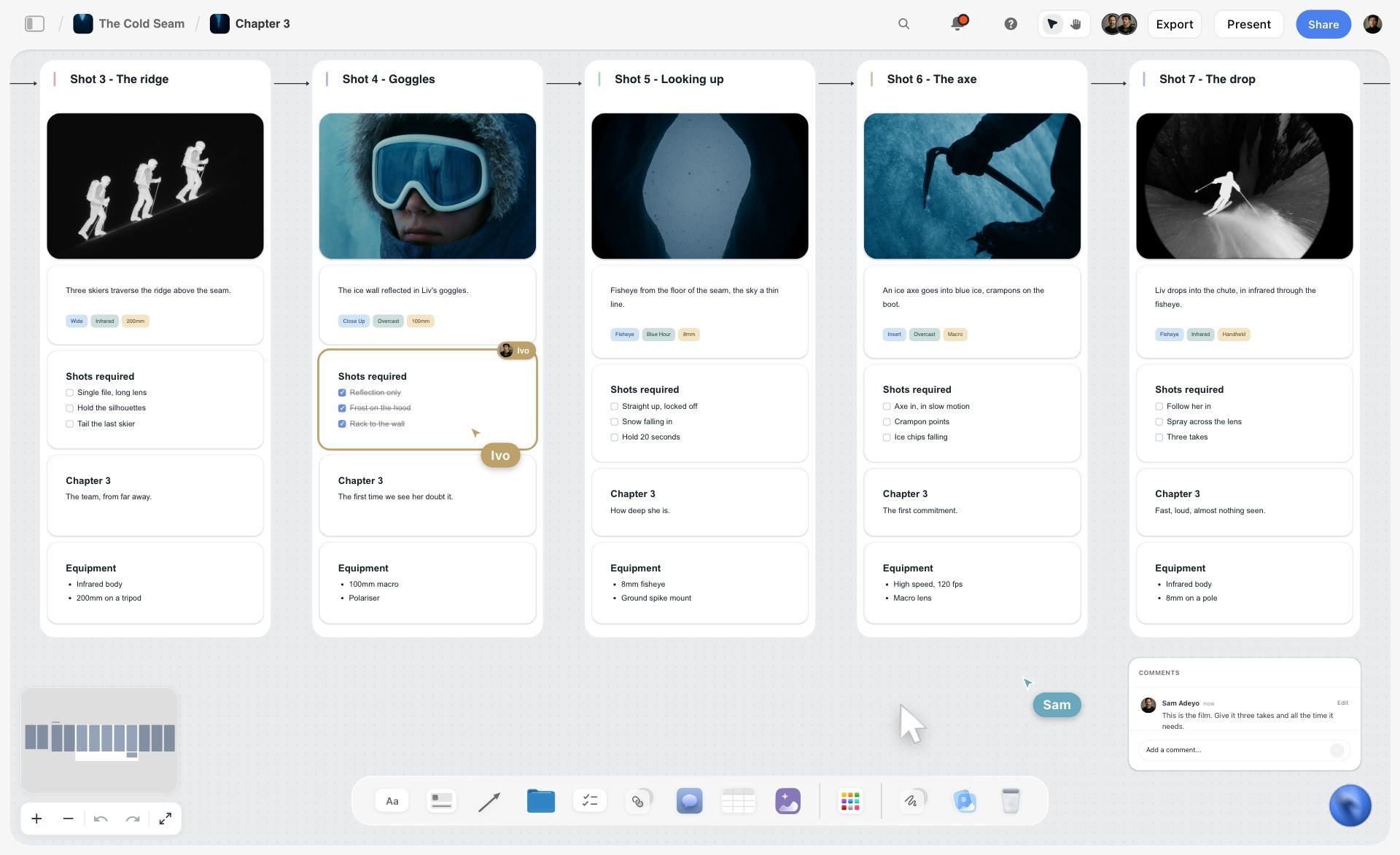
Each shot as a wall with its frame, lens tags and equipment: the shape the shot list part of an art direction brief takes on a board.
The Storyflow 8-Decision Rule
An art direction brief can always get longer. The question is when it is finished, and the honest answer is: when the maker has nothing left to decide that you care about.
The rule
The Storyflow 8-Decision Rule is our editorial recommendation for an art direction brief: the brief is finished when it has made eight decisions, each on its own wall of one Storyflow board. The idea in one line. References with a reason each. Do and do not pairs. Palette and type. Casting and styling. Set, props and location. The crop and format list. Sign-off. Anything else is either the creative brief's job or the maker's.
Why eight
Eight because each decision answers one question a department on the shoot would otherwise answer alone. The idea answers "why does it look like this". References answer "what should it feel like". Pairs answer "where is the line". Palette and type answer "which colours and letters". Casting answers "who". Set answers "where and with what". Crops answer "what shape". Sign-off answers "who says yes". Leave one out and someone answers it on the day, usually the person with the least context.
What does not count as a decision
An adjective is not a decision. "Warm, premium, honest" tells three makers three different things. A decision is something a maker can check their work against: "light from one window, camera left, nothing above 4,000 K" is a decision; "warm light" is a wish. When a part of your brief can only be written in adjectives, the decision has not been made yet. Make it, or say who will make it and by when.
When to break the rule
A one-image job for a client you have shot ten times can skip the casting wall and point to the last brief. A film adds two parts: key frames and motion references, because a still cannot show pace. A packaging job swaps casting for materials and print finish. The eight are the floor for a new piece with new people; scale down only when the people already share the answers.
Art Direction vs Creative Direction: Who Writes Which Brief
Creative direction decides what the work is about and why; art direction decides what it looks like and sets the rules that keep it consistent. In Storyflow, the creative direction lives on the campaign board, and each art direction brief is its own board linked from it, one per execution.
| Question | Creative direction | Art direction | Where it lives in Storyflow |
|---|---|---|---|
What it decides | The idea, the message, the tone across the campaign | The visual rules for one execution: light, palette, type, casting, set, crops | Campaign board for the idea; one brief board per shoot or piece |
Who owns it | Creative director | Art director, often with a copywriter beside them | Owner named on the board's sign-off wall |
Main artifact | Creative brief and campaign visual direction | Art direction brief, then the shot list and selects | Brief tool walls, then the Shotlist and Selects tools on the same board |
Who reads it | Client, strategy, the whole creative team | Photographer, director, designer, set designer, stylist, retoucher | View-only link for the client; edit access for the makers |
Scope | Every execution in the campaign | One shoot, one film, one pack, one social set | One board per execution, linked from the campaign board |
What a good one prevents | Executions that each say something different | Frames that each look like a different brand | Every decision on a wall the maker reads before the shoot |
When it is done | When the client signs the idea | When all eight decisions are made and approved | When the sign-off to-dos are ticked |
The handoff between the two
The creative director hands the art director three things: the idea, the campaign look and the list of executions. The art director hands back one brief per execution. When those briefs start contradicting each other, the campaign look was not specific enough; fix it once on the campaign board, not in every brief.
When one person does both
On a small team, the creative director writes the art direction brief too. Keep the two documents anyway. The creative brief is what the client signed; the art direction brief is what the photographer reads. Mixing them gives the client a document full of kelvin values and the photographer a document full of audience insight.
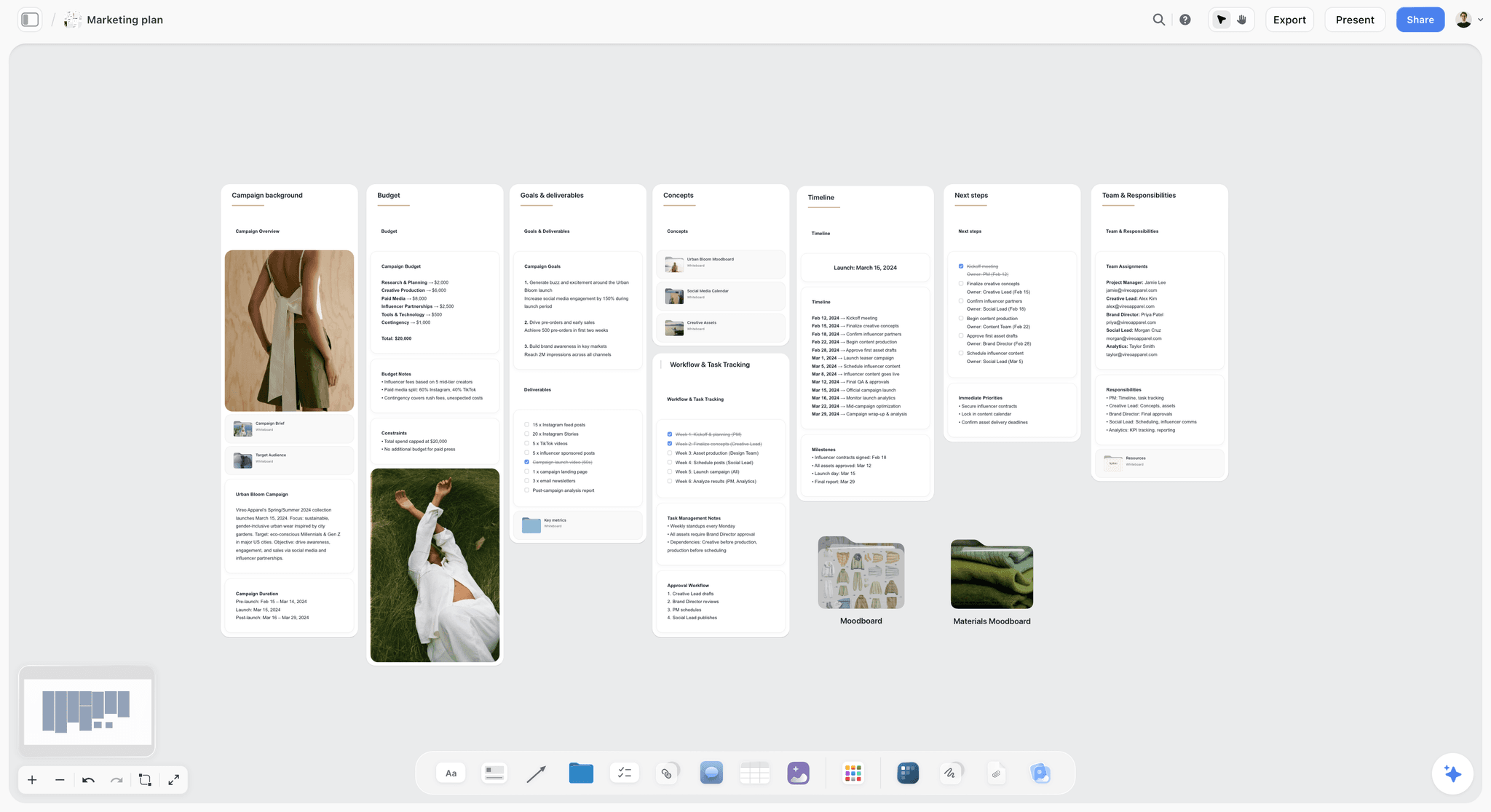
The campaign board: background, goals, concepts and timeline. Each art direction brief links back to a board like this one rather than repeating it.
The Brief Chain: Creative Brief, Visual Direction, Art Direction Brief, Shot List
The art direction brief is the third document in a chain of four, and most confusion about what goes in it comes from not knowing what the documents on either side already hold.
| Document | Owner | Question it answers | Typical length | What it hands on |
|---|---|---|---|---|
Creative brief | Strategist or account lead, signed by the client | What must the work do, for whom, and what must it say? | One page | The single message, audience, mandatories and deliverables |
Campaign visual direction | Creative director | What does the whole campaign look like? | One board, 12 to 20 references plus rules | The look across every execution |
Art direction brief | Art director | What does this one piece look like, decided down to the crop? | One board, eight walls | The decisions for one shoot or one piece |
Shot list | Photographer or director, from the brief | Which frames, in which order, with which setup? | One card per shot | The day's plan |
In Storyflow, all four can sit on linked boards in one project: the creative brief from the in-app AI's Brief my campaign workflow, the campaign direction on its own board, the art direction brief built from the Brief tool, and the shot list from the Shotlist tool, whose four walls each hold a picture box, a description, a Shots required checklist, setup and equipment. For the campaign-level documents, read how creative directors share campaign visual direction with the team; for the shoot-level split, what goes in a photoshoot brief, moodboard and shot list.
What the art direction brief borrows
It borrows the single message and the deliverables list from the creative brief, word for word, and the palette, type and big rules from the visual direction. Do not rewrite them; link them and quote the line that matters for this execution.
What it adds
It adds everything the campaign documents leave open for this piece: the exact references, the casting, the set, the light, the crops and who approves what. If you find yourself writing audience insight in an art direction brief, it belongs upstream.

The Brief tool sits in All Tools under Production, next to the Shotlist and Selects tools the brief hands on to.
Decision 1: The Idea in One Line
A brief without a line makes every visual argument a matter of taste. A brief with one makes it a matter of fit: does this frame serve the line or not?
What a good line does
A good line is short enough to remember on set and specific enough to rule something out. "Plates that look better half-eaten" tells the food stylist to plate the second helping, not the first; tells the photographer the table is mid-meal; tells the set designer the napkins are used. It rules out the empty, perfect, catalogue table that every ceramics shoot defaults to.
Weak lines and strong lines
| Weak line | Why it fails | Strong line | What it rules out |
|---|---|---|---|
"Warm, honest, premium" | Three adjectives, three readings | "Plates that look better half-eaten" | The untouched catalogue table |
"Celebrate the outdoors" | Every outdoor brand could say it | "Rain is the only weather we shoot in" | Sunshine, blue skies, golden hour |
"Modern and bold" | Says nothing about any frame | "Type is the loudest thing in every frame" | Busy photography competing with the headline |
"Make it feel premium" | Premium means a different price to everyone | "One object, one light, one shadow" | Lifestyle clutter and second props |
"Youthful energy" | Casting by stereotype | "Shot at the speed of a phone, lit like a film" | Slow, posed, over-produced frames |
The ten-second test
Read the line to someone who has not seen the brief, then show them two frames, one on-brief and one off. If they cannot pick the on-brief frame in ten seconds, the line is not doing its job yet. In Storyflow, keep the line on a note at the top of the board, above every wall, so it is the first thing anyone reads when the link opens.
Decision 2: References With a Reason Each
A reference without a reason is a vote for whatever the maker happens to notice. The photographer sees the light, the stylist sees the jacket, the set designer sees the wall, and all three are right.
How many references
Eight to twelve for one execution. Fewer than eight and the brief leans on a single image the team will copy; more than twelve and the references start disagreeing with each other. A campaign direction can carry 12 to 20 across a whole campaign; the brief for one shoot takes the subset that applies and adds what is specific to it. A mood board, in Wikipedia's words, conveys "a general idea or feeling"; the brief's job is narrower, and the reasons are what narrow it.
The reason line formula
Write every reason in the same shape: "Take the [quality]; ignore the [distraction]." For example: "Take the single window source and the falloff into black; ignore the wardrobe." "Take the camera height, just above the table; ignore the cutlery." Grouping references by the decision they serve (light, framing, colour, texture, casting, set) keeps each maker's images together.
| Reference job | Reason line example | Who reads it most |
|---|---|---|
Light | "Take the one window, camera left, and the deep falloff; ignore the room" | Photographer, gaffer |
Framing | "Take the camera just above table height and the 50 mm distance; ignore the props" | Photographer, director |
Colour treatment | "Take the low saturation and the warm whites; ignore the green cast in the shadows" | Retoucher, grader |
Texture | "Take the raw linen and unglazed rim; ignore the floral print" | Set designer, stylist |
Casting | "Take the hands, working, mid-gesture; ignore the face" | Casting, photographer |
Set | "Take the scrubbed oak table with history; ignore the styled shelf behind" | Set designer, props |
Composition | "Take the plate off-centre on a third with room for type on the right; ignore the crop" | Photographer, designer |
Crop the reference to the reason
If a reference matters for one quality, crop it to that quality before it goes on the board. A tight crop of the shadow under a bowl teaches more than the whole frame with a famous plate in it. In Storyflow, each reference is an image card with the reason as a note under it; select up to 24 images and ask the in-app AI what they share, and it reads their pixels to describe the common light, palette and framing, which is a useful check on whether your references agree.
References you may not use
A reference is for the team, not for the client's ad. Never brief a famous campaign as "do this": the work will look borrowed, and the client inherits the risk. If a reference carries a recognisable person, product or artwork, the reason line has to say which quality you take from it, so nobody copies the subject.
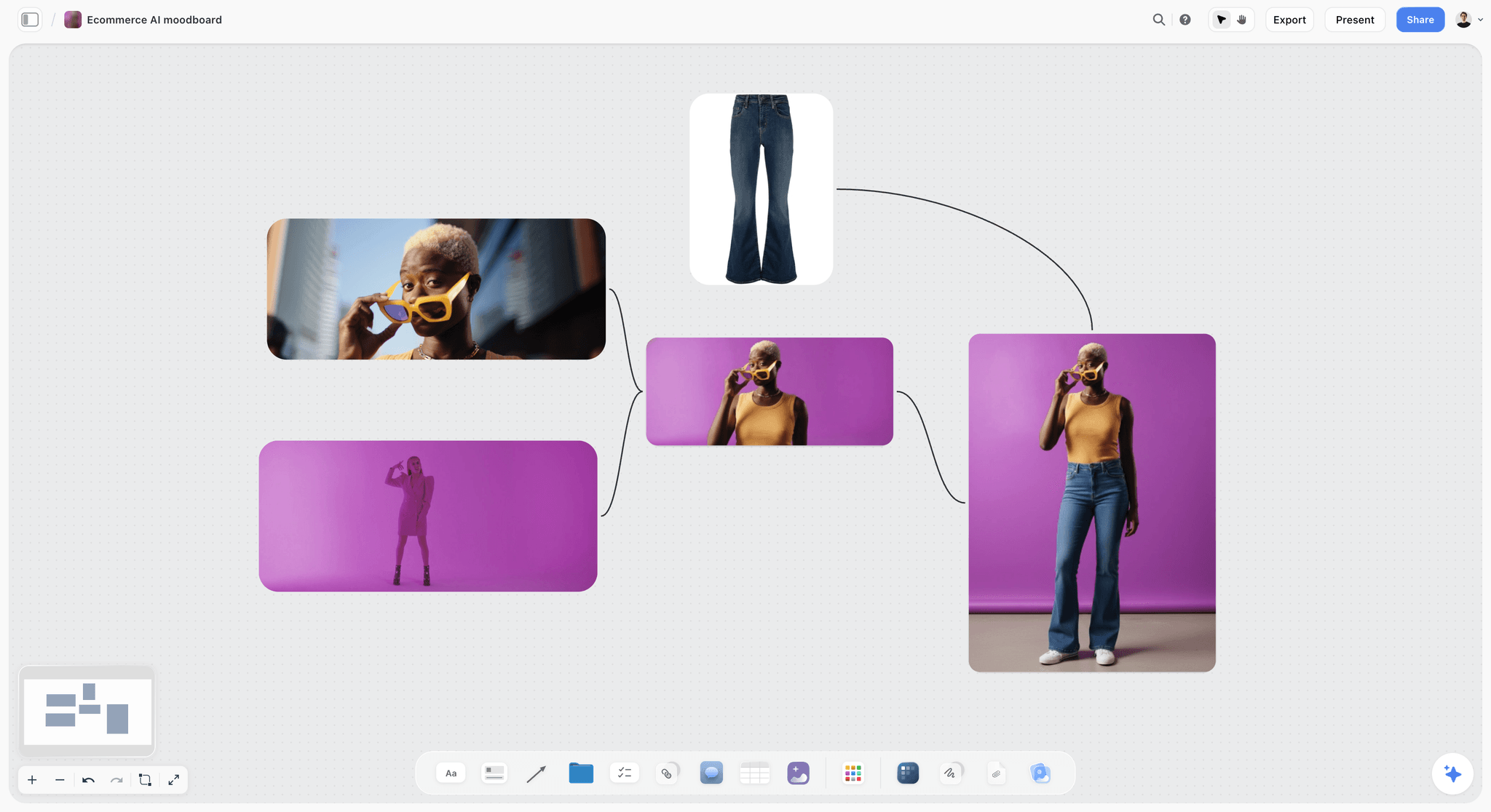
A styling reference like this one could brief colour, wardrobe or pose; the reason line under it decides which.
Decision 3: Do and Do Not Pairs
The fastest way to draw a line is to show both sides of it. A reference you want, next to one that is close but wrong, teaches more than a paragraph.
How to build a pair
Put the two images side by side and label the difference in one line: "Do: one window, deep shadow. Do not: flat, even light from every side." The do not image should be close enough to tempt: a good photograph that is wrong for this brief, not a bad photograph. The temptation is the lesson.
Four to six pairs cover most shoots
| Pair | Do | Do not | What it protects |
|---|---|---|---|
Light | One window source, falloff into shadow | Even, shadowless light | The mood of the line |
Table | Mid-meal, crumbs, a used napkin | Untouched, perfectly set | "Better half-eaten" |
Hands | Working hands, mid-gesture, unmanicured | Posed hands holding a product to camera | Honesty of use |
Colour | Warm whites, low saturation | Cool blue whites, punchy colour | The palette |
Type space | Plate on a third, clean area for type | Plate dead centre, busy edges | Every crop with copy |
Props | Three objects at most, all used | A styled tablescape of ten | Focus on the product |
Where pairs earn the most
Pairs teach freelancers the most, because the do not side names the default they would otherwise reach for. In Storyflow, give the pairs their own wall and keep it next to the references, so a retoucher in week three sees the line without asking. The campaign moodboard guide to colour, type and imagery covers how to choose those images at campaign level.

References grouped by job beside the palette and the fonts, so the pairs and the rules read in the same glance.
Decision 4: Palette and Type
The palette and type are the decisions most often written as adjectives and most easily made exact. Exact is what lets a designer at 7 pm make the right call without messaging you.
The palette as colour cards
Four to six colours, each named for its role: the base, the accent, the one colour only the product wears. In Storyflow, each colour is a colour card in one of three styles (Classic, Spec, which is one wall wide with the values in columns, or Chip, a paint chip), showing any of Hex, RGB, HSL and CMYK. The CMYK value is converted from the hex and can be typed over, so a print job can carry the printer's value instead. If the campaign has brand guidelines, the shoot palette is a subset of them, and the wall should say which.
Type as font cards
Two typefaces at most, with the weights and the one place the display face is allowed to go big. A Storyflow font card shows a typeface as a card in a Specimen, Headline or Paragraph layout, with its own background and text colour; it can show Inter on any plan, and Lora, Courier Prime or a font uploaded to your font library on a paid plan. On paid plans, a board's wall titles and headings can use a chosen project font too, so the brief itself is set in the campaign's type.
Contrast where type meets photography
If copy will sit on the photograph, the brief has to say where and how much contrast it needs. The W3C's contrast guidance in WCAG 2.2 asks for a contrast ratio of at least 4.5:1 for normal text and 3:1 for large text (at least 18 point, or 14 point bold), and exempts text that is part of a logo. Brief the clean area in the frame, not just the colour: "the right third stays below 20% of the frame's brightness range, so white type holds."
Light as a number
Write the light in kelvin when it matters. Wikipedia's colour temperature table lists a candle flame at about 1,850 K, studio lamps at 3,200 K and overcast daylight at about 6,500 K, and puts daylight between 5,500 and 6,500 K. "Window light, warmed to about 4,000 K in the grade" is a decision a photographer and a retoucher can both check.
| Palette and type decision | Written as a wish | Written as a decision | Where it lives in Storyflow |
|---|---|---|---|
Base colour | "Warm neutral" | Oat, #E8DCC8, 60% of every frame | Colour card, Spec style |
Accent | "A pop of colour" | Kiln rust, #A4553A, on the product only | Colour card, Chip style |
Shadow tone | "Rich shadows" | Lifted blacks, never below #1E1A17 | Colour card with a role label |
Display type | "Elegant serif" | Lora, used once per layout at headline size | Font card, Headline layout |
Body type | "Clean sans" | Inter at body size, never below 9 pt in print | Font card, Paragraph layout |
Light | "Warm light" | One window, camera left, about 4,000 K after grade | Note on the references wall |
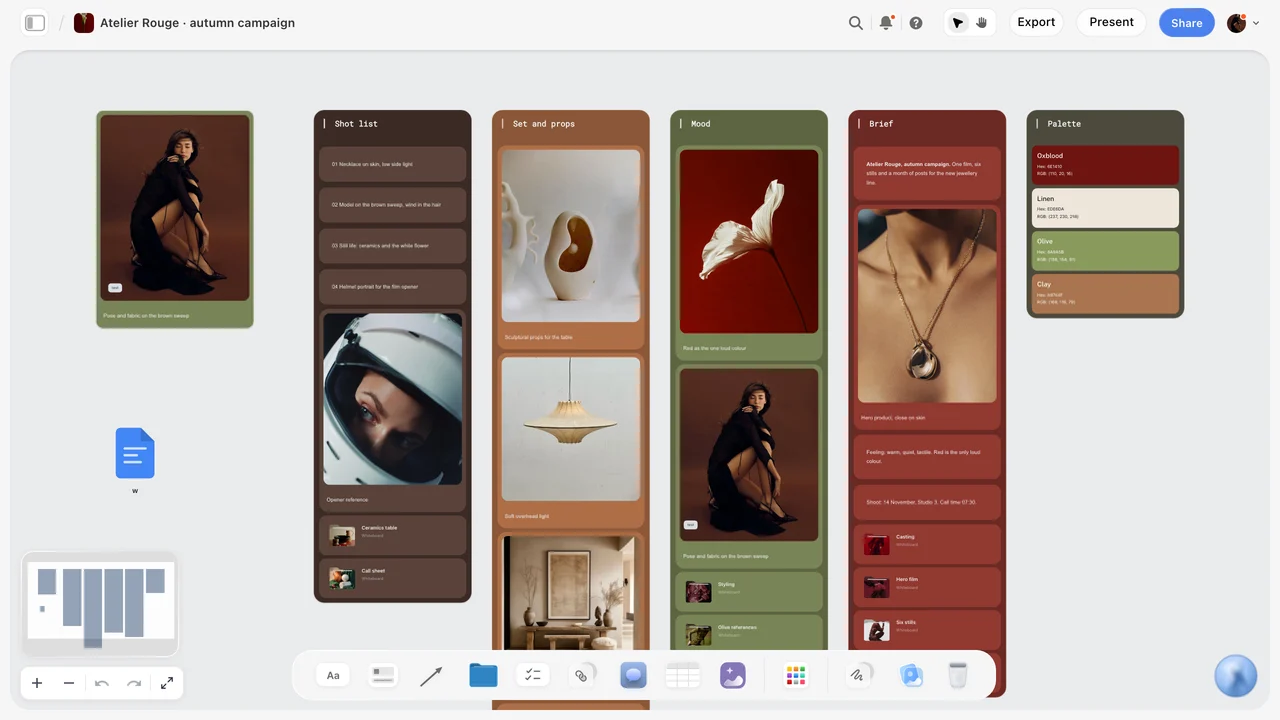
One shoot on one board: the shot list, set, mood, brief and palette walls side by side, with the wall titles in the campaign's own font.
Decision 5: Casting and Styling
Casting written as a look produces stock photography. Casting written as behaviour produces people who belong in the frame.
Cast by what people bring to the frame
Describe the people by age range, how they move, how much they perform for the camera and what their hands do. "Two adults, 35 to 60, who cook every day; comfortable being photographed mid-task; real, unmanicured hands" gives a casting director something to search for. "Attractive, diverse, authentic" gives them nothing.
Styling as limits
Name fabrics, a colour limit for wardrobe and what must never appear: logos, busy prints, anything shinier than the glaze. Limits beat descriptions, because a stylist can check a garment against a limit in a second.
Releases belong in the brief
If a recognisable person appears in work that promotes a product, the shoot needs a signed release. Wikipedia's entry on the model release notes a release is generally needed for "trade or direct commercial use", and rarely for news. Put "releases for every recognisable person, including hands models and passers-by" on the casting wall, so the producer books it with the talent.
| Casting field | Example entry | Who acts on it |
|---|---|---|
People | Two adults, 35 to 60, who cook daily | Casting director |
Behaviour | Mid-task, not looking at camera, unhurried | Photographer, director |
Hands | Working hands, short nails, no polish | Casting, stylist |
Wardrobe | Linen and wool, oat to rust, no logos or prints | Stylist |
Hair and make-up | As they arrive, a little tidier | Hair and make-up |
Releases | Every recognisable person, signed on the day | Producer |
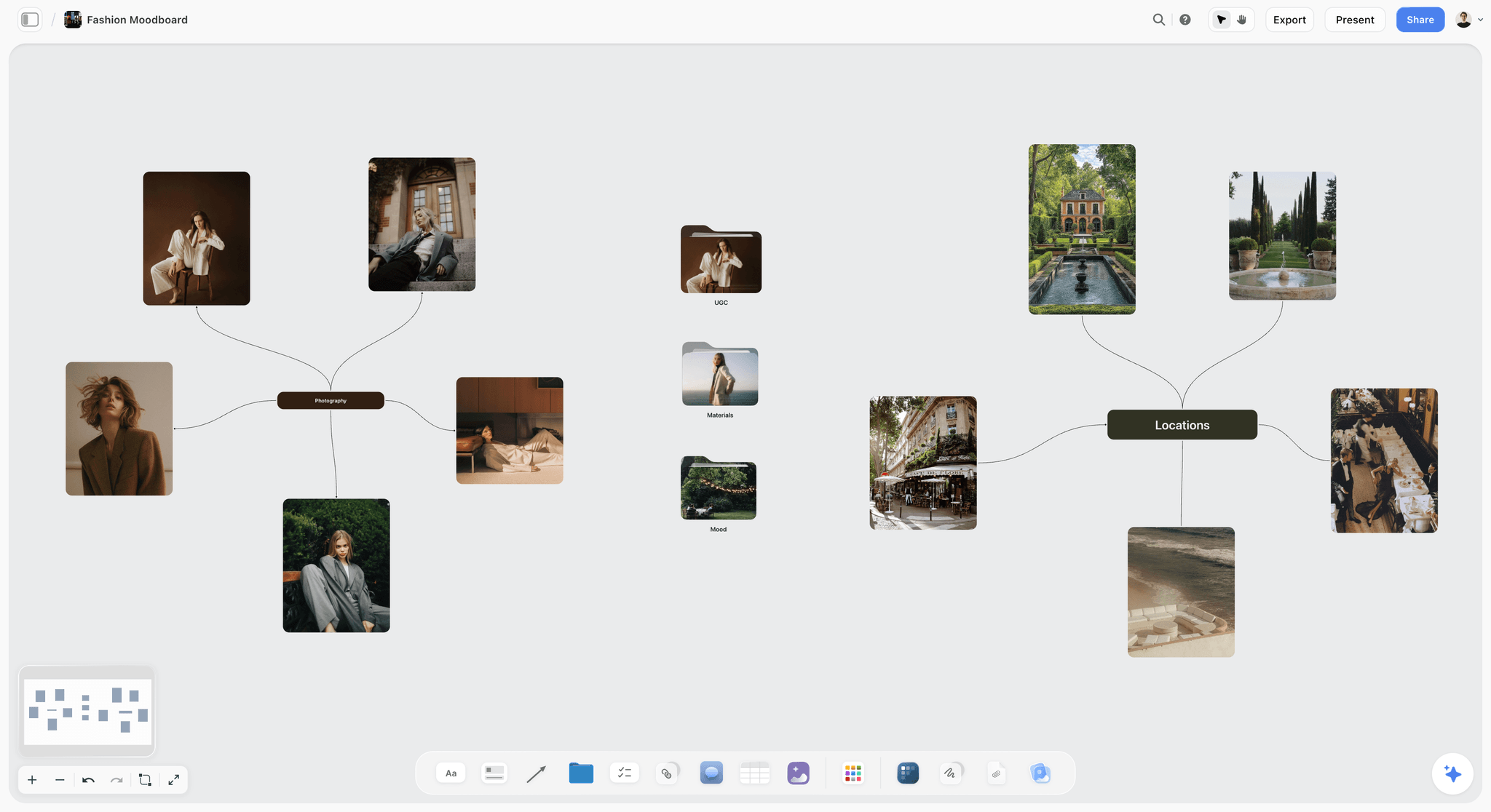
Casting and location references split by branch, so the casting director and the location scout each find their images first.
Decision 6: Set, Props and Location
The set is where a look becomes a cost. A producer cannot budget "a lived-in kitchen"; they can budget "a real kitchen with north light, an oak table at least 180 cm long and a back wall we can repaint".
Write the set as surfaces and objects
List the surfaces (scrubbed oak, raw plaster, unglazed terracotta), the objects that may appear, and the number of props per frame. Three objects at most, all of them used, is a limit a set designer can work to. If the brief needs a set design board, the set designer builds it from this wall, not from scratch.
Location qualities, not addresses
Name the qualities that matter: north-facing windows, ceiling height, room for a camera two metres back from the table, quiet enough for sound if there is film. In Storyflow, the Location tool lays three walls side by side to compare candidate places, each with a picture, a Photos folder, a This place table (address, map as a link, contact, phone, cost, a rating and a Booked checkbox), an On site note and a To sort checklist. The map is a pasted link; Storyflow draws none.
What the set must never show
A short do not list saves a reshoot: no visible brand on any other object, no screens, no fresh flowers that will wilt by lunch, nothing that dates the image to one season if the work runs for a year.
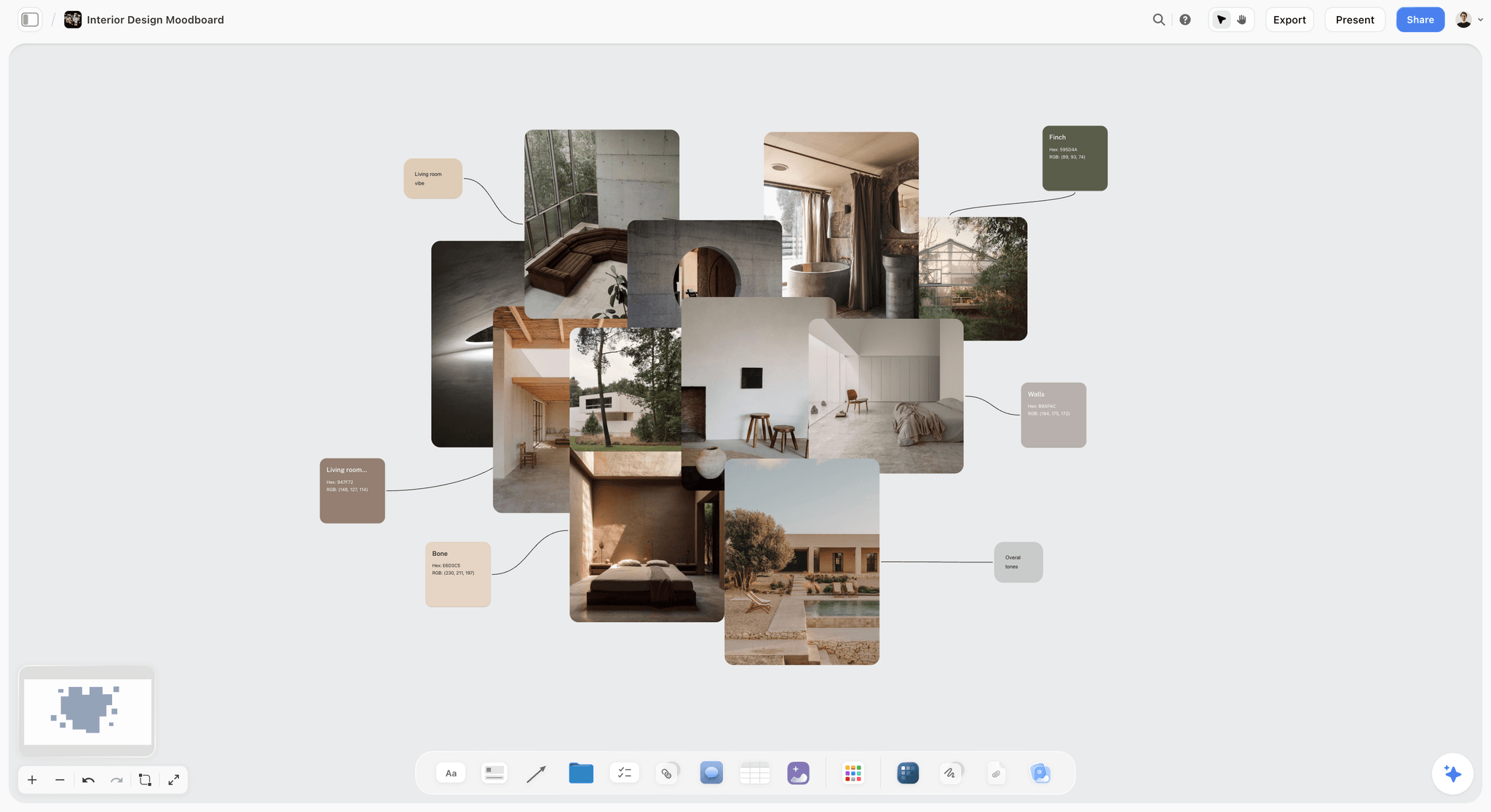
Surfaces and materials grouped with their colours: the raw material for a set wall, before it is cut to what one shoot needs.
Decision 7: The Crop and Format List
This is the decision most briefs skip and the one that costs the most to skip. A photographer who frames for one shape on the day leaves the designer nothing to crop for the other five.
List every shape the work has to fill
Write one row per format: where it runs, the ratio, the minimum size, where the type goes and what crops first. The numbers below come from each platform's own help pages, read in November 2026; check them again before a shoot, because they change.
| Format | Ratio and size (as of November 2026) | Source | Brief note for the frame |
|---|---|---|---|
YouTube video thumbnail | 16:9; upload at 3840 by 2160 pixels, minimum width 640 | Product on a third; face or object readable at phone size | |
YouTube Shorts thumbnail | 9:16; upload at 2160 by 3840 pixels | Same YouTube Help page | Shoot vertical-safe: subject in the centre band |
LinkedIn Page link post image | 1.91:1 at 1200 by 627 pixels; PNG or JPEG up to 3 MB | Wide frame with room for a short headline | |
TikTok in-feed ad | 9:16 recommended, at least 540 by 960; 1:1 and 16:9 also accepted | Keep text and logo inside the safe zone; longer captions shrink it | |
Billboard or poster | Varies by site; read at speed | A few words, large; one object, high contrast | |
Website hero | Set by the site's design | The client's web team | Wide, with a clean third for the headline |
Shoot for the tallest and the widest
If the list runs from 9:16 to 1.91:1, frame with the subject in the centre band, leave air above and below for the vertical crop and to the sides for the wide one, and shoot a dedicated vertical for the hero frames. TikTok's own help page says key elements such as text and logos must sit inside the safe zone, and that the zone changes with caption length; brief that as "nothing important in the top 15% or the bottom 25% of the vertical frame" and check it against the platform's template before you lock the layout.
Where the type goes, per format
One sentence per format is enough: "9:16: headline in the top third, product centred, the table edge crops first." Without it, the designer chooses, and each format chooses differently. In Storyflow, the crop list is a table on its own wall; put a rough crop of each format as an image card beside its row, made in your design app, so the photographer sees the shapes as well as the numbers.
The rule of thirds as a shared vocabulary
The rule of thirds, a rule of thumb for composing images on a grid of nine, gives the photographer and the designer a shared language for "where the product sits" and "where the type goes". It is not a law; it is a way to write the crop list in words both people use.
Decision 8: Sign-Off
Sign-off written in an email after the brief is a sign-off nobody can find in week three. Put it on the board, as three approvals with names and dates.
The three approvals
| Approval | Who signs | When | What they sign | How in Storyflow |
|---|---|---|---|---|
The brief | Creative director, then the client lead | Before casting and set build | All eight decisions | A to-do per approver with a due date; the client views by link |
Selects on the day | Art director, client lead if present | During and after the shoot | The frames going to retouch | The Selects tool: drag pictures from To review to Yes, Maybe or No |
Finals | Client lead | After retouch and layout | Every crop in the format list | The final crops on one wall, one to-do per format |
Selects need edit access
Storyflow's Selects tool lays four walls (To review, Yes, Maybe, No) and you choose by dragging pictures between them; there is no star, flag, approve button or vote. A client who should move pictures needs edit access to the board, because a view-only or comment link cannot move cards. Decide before the shoot whether the client picks or only watches.
What a signature means
Write what approval covers on the sign-off wall: "Approving the brief means the casting, set and crops are agreed; changes after this date move the shoot." A client who knows what yes costs says yes more carefully. For the conversation after a first round goes badly, see how to present a concept when the client hates the first round.
The Art Direction Brief Template: Filled for One Shoot
Templates fail when they are blank: every field reads like a form and nobody knows how specific to be. This one is filled for a fictional agency, Kestrelmoor, briefing an autumn tableware shoot for a fictional stoneware brand, Quorrel Ceramics. Copy the columns; replace the entries.
| Part | Field | Kestrelmoor's entry for Quorrel Ceramics | Owner | Where it lives in Storyflow |
|---|---|---|---|---|
The idea | One line | "Plates that look better half-eaten" | Art director | Note at the top of the board |
The work | Deliverables | 6 hero stills, 12 detail stills, 1 vertical video loop of 8 seconds | Producer | Brief tool, wall 1, the What kind / Format / How many table |
References | Count and reasons | 10 images, each with "take / ignore" | Art director | Image cards with a note each |
Do and do not | Pairs | 5 pairs: light, table, hands, colour, type space | Art director | One wall, pairs side by side |
Palette | Colours and roles | Oat #E8DCC8 base, kiln rust #A4553A on product only, char #2B2622 shadows | Designer | Three colour cards, Spec style |
Type | Faces and rules | Lora headline once per layout; Inter for body | Designer | Two font cards |
Light | Source and temperature | One north window, camera left; about 4,000 K after grade | Photographer | Note on the references wall |
Casting | People and behaviour | Two adults, 35 to 60, daily cooks; working hands, no polish | Casting | Casting wall with a folder of options |
Set | Surfaces and props | Scrubbed oak table, plaster wall, max three props, all used | Set designer | Set wall with references |
Location | Qualities | Real kitchen, north light, 3 m ceiling, 2 m behind camera | Producer | Location tool, three candidates side by side |
Crops | Formats | 16:9 web hero, 4:5 feed, 9:16 story, 1.91:1 trade post, A4 catalogue cover | Art director with designer | Table wall, one row per format |
Sign-off | Approvers and dates | Brief: CD Monday, client Wednesday; selects on the day; finals in 10 working days | Account lead | To-dos with assignee and due date |
Usage | Where and how long | Web, social and trade for 12 months; catalogue print run of one season | Account lead | Note on the work wall |
Not this | Hard exclusions | No other brand visible, no fresh flowers, no screens | Art director | Top of the do and do not wall |
How to use the template
Fill it top to bottom, because each row narrows the next: the idea decides the references, the references decide the palette, the palette and casting decide the set, and the crops decide how the photographer frames all of it. If a row stays empty, write who will fill it and by when, then make that a to-do.
Save it as your own tool
Once a brief board works, select its walls and press New Tool at the end of the selection toolbar, give it an icon, a name and an optional description, and it appears in All Tools under My tools for the next job. Saving a tool is on paid plans only, and an invited free account cannot save or place one; anyone with edit access can still edit the brief it built. Save the walls with their labels and empty the answers first, or the next job starts with this one's references.
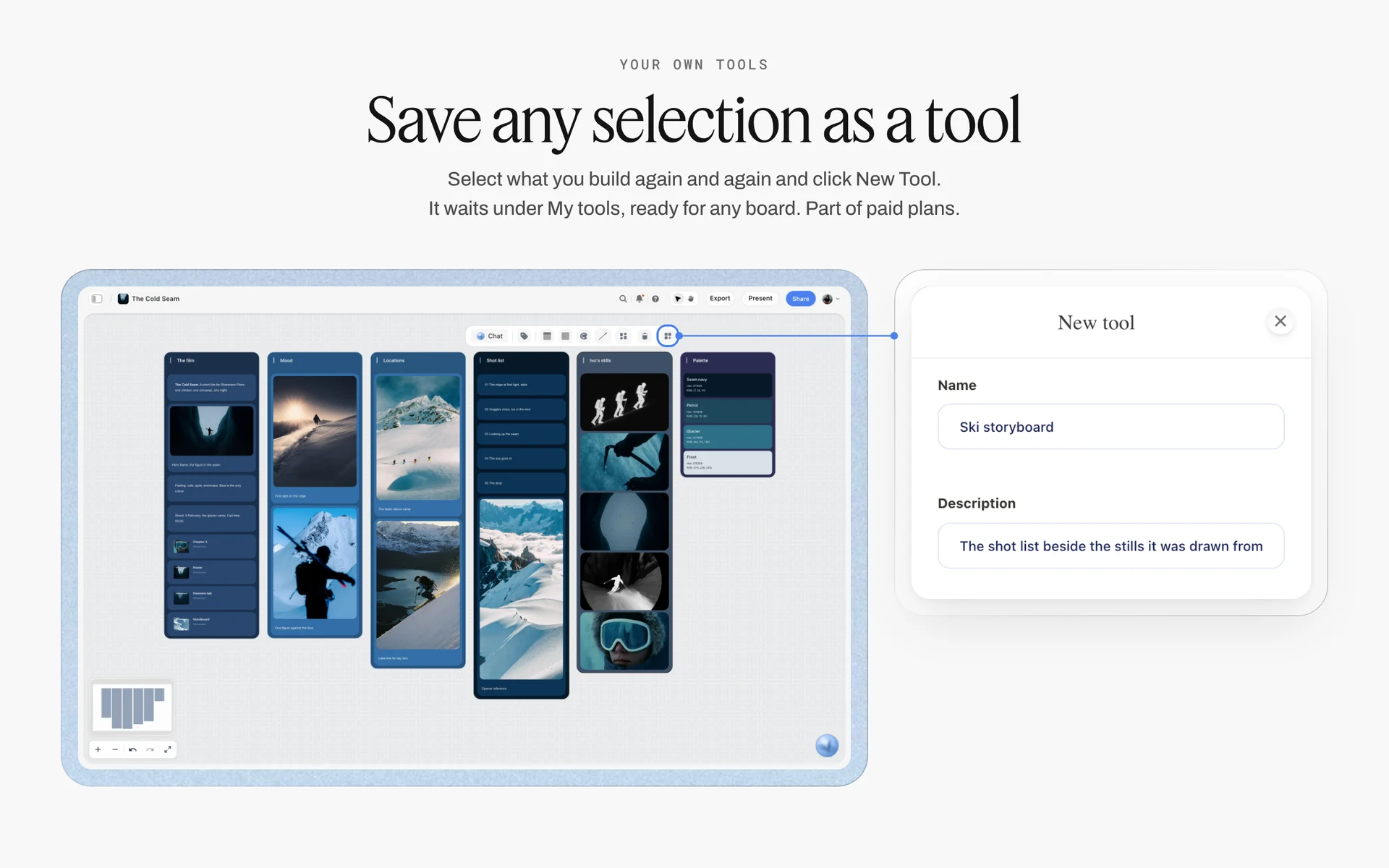
Six walls of a ski film's board selected and saved as a tool named Ski storyboard: a brief board's walls save the same way.
Briefing Each Maker From the Same Board
One brief, six readers. Each maker reads a different part first, and the brief works when each can find their part without reading the rest.
| Maker | Reads first | Needs most | The question they will call you about if it is missing |
|---|---|---|---|
Photographer | Idea, references, crops | Light, framing, every format | "Am I shooting for the vertical or the wide?" |
Director | Idea, references, key frames | Pace, motion references, casting behaviour | "How fast does this feel?" |
Designer | Palette, type, crops | Where type goes per format, contrast | "Where does the headline sit in the 9:16?" |
Set designer | Set, references, do and do not | Surfaces, props, exclusions | "Can I bring anything that is not on the list?" |
Stylist | Casting, palette, do and do not | Fabric and colour limits | "Is a pattern ever allowed?" |
Retoucher | Palette, light, references | Colour treatment and what not to fix | "Do we keep the crumbs?" |
The photographer
The photographer needs the crops more than anyone, because they decide what is in the frame and what is lost. Send the crop table with the brief, not after, and ask for one test frame per format before lunch on the day.
The designer
The designer needs the type space and contrast rules, and needs them before the shoot, so they can sketch layouts the photographer frames for. A rough layout per format on the board turns "leave room for type" into a shape.
The set designer and stylist
Both work to limits. Give them the do not list first; they will fill the do list better than you would have.
The retoucher
The retoucher needs to know what is the look and what is a mistake. "Keep the crumbs, the glaze pinholes and the hand veins; remove the dust on the lens" saves a round of notes. For the full shot list handoff, how to make a shot list covers the card per setup.
Worked Example: Kestrelmoor Briefs Quorrel Ceramics' Autumn Shoot
This example is illustrative: a fictional agency, a fictional brand and a plausible week. It shows the order of decisions, not a measured result.
Monday: the line and the frame
Ines Varga, Kestrelmoor's art director, opens the campaign board Quorrel signed last month. The campaign line is "Made for the second helping". She writes this shoot's line under it on a new Storyflow board: "Plates that look better half-eaten." Then she drops the Brief tool and fills the work table first: 6 hero stills, 12 details and one vertical 8-second loop, for web, social, a trade post and the catalogue cover. The approver row reads Priya Nand, Quorrel's marketing lead.
Monday afternoon: references and pairs
She pulls about thirty references into a folder, then cuts to ten on the board, each with a take and ignore line. Three are light, two are framing, two are casting, two are set and one is the colour treatment. She builds five do and do not pairs on their own wall. The hardest pair is the table: a beautiful untouched setting she loves, labelled do not, next to a half-cleared table with a used napkin, labelled do.
Tuesday: palette, type, casting, set
Ari Mendes, the designer, adds three colour cards in the Spec style from the brand palette and two font cards. Ines writes casting as behaviour, adds the release note, and writes the set as surfaces with a three-prop limit. Hana Kos, the producer, drops the Location tool and fills three candidate kitchens side by side, each with its photos, cost and a rating, and ticks Booked on the north-facing one.
Tuesday afternoon: the crop list
Ines and Ari write the crop table: five formats, each with a ratio, a size and one sentence on where the type goes. Ari places a rough layout per format beside each row. The vertical loop gets its own note: the bowl is centred, the hand enters from the bottom, and nothing important sits in the top 15% or bottom 25% of the frame.
Wednesday: sign-off
The creative director ticks her approval to-do. Priya, invited to the board with edit access, signs in, reads the eight walls and comments one question beside the palette: can the rust colour appear on a napkin? The answer goes on the palette wall: no, rust is the product's alone. She ticks her to-do. Tomas Reyl, the photographer, gets edit access and adds the Shotlist tool to the same board, one card per setup, drawn from the references.
The shoot day and after
On the day, Ines checks each test frame against the crop table before the set moves. Selects go onto the Selects tool's To review wall; Priya, who has edit access, drags her picks to Yes and Maybe from her office. The retoucher works from the palette and light notes, and the finals land on one wall, one to-do per format.
Art Direction Brief Examples by Medium
The eight decisions hold across media; what changes is which ones carry the most weight and what each adds.
| Medium | Heaviest decisions | What it adds | What it can drop |
|---|---|---|---|
Product photo shoot | References, light, crops | Surface and prop limits, retouch notes | Motion references |
Commercial or brand film | Idea, references, casting | Key frames, motion and pace references, a storyboard | Nothing |
Social content set | Crops, type space, casting | Platform safe zones, a first-second frame per post | Long set notes |
Packaging | Palette, type, materials | Print finish, substrate, CMYK values from the printer | Casting |
Editorial or lookbook | References, casting, styling | Page sequence, spread layouts | Some crops |
Event or retail space | Set, palette, type | Scale drawings, viewing distance, signage sizes | Most crops |
A film adds key frames
For film, add a storyboard. Storyflow's Storyboard tool lays four walls, Scene 1 to Scene 4, each an empty picture box and a description, and a "+" adds the next scene. It has no frame timing, animatic or video export; the director and editor time the film elsewhere.
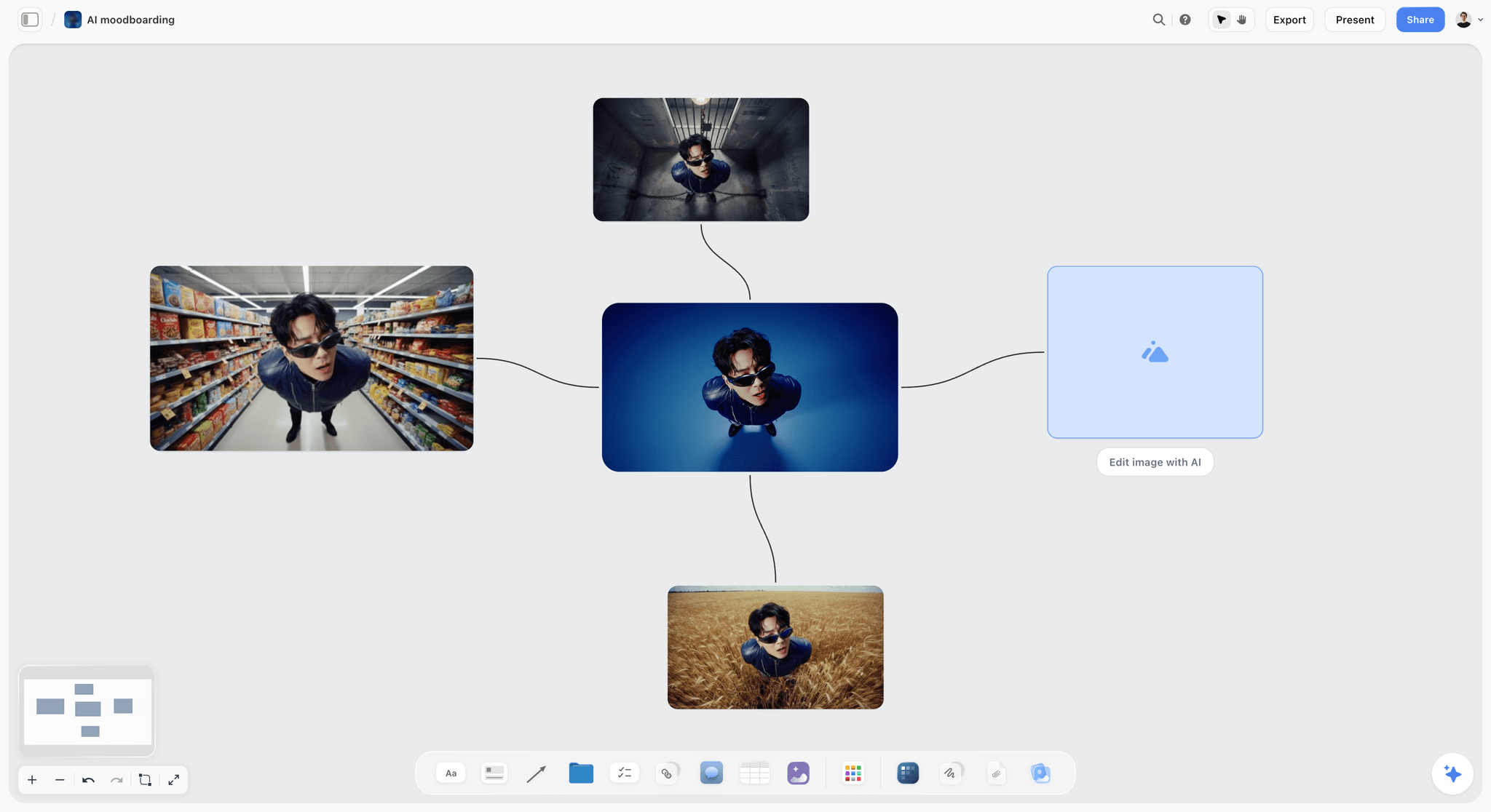
Key frames for a film brief: one character tested in four settings before the director and art director agree the hero frame.
Packaging adds print
For packaging, the colour cards carry CMYK values. Storyflow converts CMYK from the hex, which is a starting point, not a proof: type the printer's value over it, and proof on the real substrate.
Social adds the first frame
For social, the first frame of every video is a brief decision in its own right: what the viewer sees before deciding to stay. Write it per post on the crop wall.
Running the Brief Through the Shoot
A brief that stops at approval is a brief the shoot drifts from. Three habits keep it alive from the first frame to the last retouch.
Check test frames against the crop list
Before the first setup moves, shoot a test frame and lay each format's crop over it. If the 9:16 cuts the bowl or the 1.91:1 has no room for type, fix the framing now; the fix costs a minute on set and a reshoot after.
Keep the brief and the call sheet together
Storyflow's Call Sheet tool lays one shoot on four walls (the shoot, schedule, location and cast and crew), including a Getting there table with address, parking, way in and nearest hospital. It is part of the board: it sends nothing, emails no one and tracks no confirmations, so share the board the way you share any board and send the call times yourself. See the photoshoot call sheet page for the shape.
Pick selects where the references are
Run selects on the same board as the brief, so every pick sits next to the reference it was meant to match. The Selects tool's four walls make the pick visible to everyone with the link, and the board change report tells you who moved what. For a client who reviews remotely, how photographers present a moodboard to a client covers the conversation around the board.

The brief is stage one of six; the board carries it through pre-production, the shoot, post and delivery.
Do This in ChatGPT or Claude
If you draft briefs in ChatGPT or Claude, the draft should not stay in the chat, where the photographer will never find it. The Storyflow plugin and connector write the walls, notes, tables, colour cards and font cards onto the board where the team works.
Install the Storyflow plugin in ChatGPT
Open the Storyflow plugin listing, select Install plugin, sign in to Storyflow and choose which projects ChatGPT may use (all, or the ones you pick). Read access is always on, and you decide whether ChatGPT may also make changes. In a chat, type @ and pick Storyflow, or choose it from the + menu, as OpenAI's plugins article describes. Availability depends on your ChatGPT plan, workspace and region, and in a Business or Enterprise workspace an admin manages plugins, as the connected apps article explains.
Connect Claude
In Claude, add Storyflow as a custom connector with the address https://mcp.storyflow.so/mcp, following Anthropic's custom connector guide; the setup page covers Claude, Gemini and Grok. The Claude moodboard workflow and Claude photoshoot plan workflow show boards built the same way.
Prompts for an art direction brief
- "On my Quorrel autumn board, make eight walls named The idea, References, Do and do not, Palette and type, Casting, Set, Crops and Sign-off, in that order."
- "Put this line on a note above the walls: Plates that look better half-eaten. Under it, add three things the line rules out."
- "On the References wall, add a note template under each image that reads Take: and Ignore:, and group the wall into light, framing, casting and set."
- "Make three colour cards in the Spec style: Oat #E8DCC8 labelled base, Kiln rust #A4553A labelled product only, Char #2B2622 labelled shadows. Show Hex and CMYK."
- "Add a font card in Lora with the Headline layout and one in Inter with the Paragraph layout."
- "On the Crops wall, build a table with columns Format, Ratio, Size, Where the type goes, What crops first, one row each for a 16:9 web hero, a 4:5 feed post, a 9:16 story, a 1.91:1 LinkedIn post and an A4 catalogue cover."
- "Read the whole board and list any of the eight walls that still holds only adjectives."
- "What changed on this board in the last week, and who changed it?"
What lands on the board, and what to check by hand
The walls, notes, tables, colour cards and font cards land on the board, where the team edits them like anything else. Neither ChatGPT nor Claude can drop the Brief, Shotlist, Location, Call Sheet or Selects tool; drop those yourself from All Tools in Storyflow. The connector can make font cards only in Inter, Lora or Courier Prime, never in an uploaded font. Check by hand: every reason line reads as a decision, every crop size against the platform's page on the day, and every hex against the brand guidelines. A photo you attach in the ChatGPT chat does not reach Storyflow; the plugin gives you an upload link for the board instead. The plugin runs on ChatGPT's model and your ChatGPT plan, so it uses no Storyflow AI credits, and the connection ends after 30 days, when ChatGPT asks you to sign in again. The plugin cannot generate images or read board comments.
The plugin is not the in-app AI
Inside Storyflow, the in-app AI is a separate tool that uses Storyflow AI credits on paid plans. Its Brief my campaign and Build a moodboard for my project workflows write straight onto the board after a clarifying question or two, and one undo reverses the whole turn. It reads the current board plus up to five documents and three other boards you attach, and it can design a creative brief or a lookbook from the board. See the ChatGPT creative brief workflow and the ChatGPT moodboard workflow for both routes.

The same Storyflow board from either assistant: ChatGPT through the plugin, Claude through the connector, one account.
Where to Build It: Storyflow vs Docs, Decks, Design Files and Inspiration Feeds
An art direction brief needs four things in one place: the decisions in words, the references beside them, exact colour and type, and the plan the makers work from. Our pick comes first, on the basis that Storyflow holds all four on one board the makers open by link; the rest follow by the job each does best.
| Kind of tool | Decisions beside references | Exact colour and type | Crop list and plan | Best job in this workflow |
|---|---|---|---|---|
Storyflow | Yes, a note under every image, a wall per decision | Colour cards with Hex, RGB, HSL, CMYK; font cards | Tables, to-dos, Shotlist, Location, Call Sheet and Selects tools | Writing the brief and running the shoot from it |
A shared doc | Images inline, no side-by-side layout | As text and pasted swatches | Lists and tables | Long written briefs reviewed line by line |
A slide deck | One idea per slide, good for a reveal | As slides | Weak after the meeting | Presenting the brief once to a client |
A design file | Precise layouts and crops | Exact styles and components | Not a planning tool | Final layouts at exact sizes |
An inspiration feed | Collecting, not annotating | No | No | Gathering wide before the cut to ten |
A production management suite | Attachments on tasks | No | Schedules, crew, budgets | Large productions with many departments |
A shared doc
A shared doc is the best place for long text that needs line-by-line review: a usage clause, a legal note on releases, a script. Its limit is layout: ten references side by side with a reason under each do not fit a page, and pairs lose their point stacked vertically. Choose a shared doc when the brief is mostly words, such as a written art direction for a copy-led print ad.
A slide deck
A slide deck is built for one moment: presenting the brief to a client in order. Its limit is everything after the meeting; it is closed, linear and rarely updated, so by week three the photographer is working from a screenshot. Use a slide deck to present once the Storyflow board is signed, or present the board itself in Storyflow's presentation mode, which goes fullscreen and steps one wall at a time.
A design file
A design file is where layouts get exact: crops at real pixel sizes, type set properly, components the whole campaign reuses. Its limit is that it is a production tool, not a brief; references, casting and set notes have nowhere natural to live. Make the rough crops in your design app and place them on the brief board beside the crop table.
An inspiration feed
An inspiration feed is the fastest way to collect wide: hundreds of images in an afternoon. Its limit is that a saved image carries no reason, so the feed is where references come from, not where they are briefed. Collect there, then cut to ten on the board.
A production management suite
A production management suite earns its place on productions with many departments: crew lists, budgets, schedules and contracts. Its limit for this job is that the look itself is an attachment on a task. Choose one when the shoot is large enough to need a line producer; brief the look on a board and link it.
For ranked roundups by job, see the best creative brief tools, the best visual brief tools and the best moodboard tools for art directors.

A logo project planning board on Storyflow for an unnamed fashion label, with walls for the brief, references and lifestyle photographs
Write the eight walls from a chat
Install Storyflow in ChatGPT and ask for the eight decision walls, a crop table and three colour cards on your shoot board, then write every reason line and check every crop size yourself before the photographer reads it.

Mistakes and Fixes in an Art Direction Brief
Each of these sends a shoot back to the brief halfway through. Each fix costs minutes before the shoot and days after it.
The brief is a moodboard with a title
Thirty images and a heading is a mood, not a brief: nothing on it says which quality matters. Fix: cut to eight to twelve and write a take and ignore line under each.
Adjectives where decisions should be
"Warm, honest, premium" reads differently to every maker. Fix: rewrite each adjective as something checkable: a kelvin value, a hex, a prop limit, a casting behaviour.
No do not side
Without pairs, freelancers reach for their defaults, which are usually the defaults of the category. Fix: four to six pairs, each with a tempting do not.
Crops arrive after the shoot
The designer discovers the 9:16 on Thursday, and the bowl is cut in half in every frame. Fix: the crop table goes out with the brief, and the first test frame is checked against it.
Copy space nobody briefed
The photographer fills the frame beautifully, and the headline has nowhere to sit. Fix: brief the clean third per format and the contrast it needs, using the WCAG 4.5:1 and 3:1 ratios for text.
A famous reference as the brief
"Make it like that campaign" produces a copy and a legal question. Fix: crop the reference to the quality you want and say what to ignore.
Sign-off by email
Approvals scattered across threads cannot be found when the client asks why the napkin is not rust. Fix: three approvals on the board as to-dos, each with a name and a date, and a note on what yes covers.
One brief for six executions
A single brief for the shoot, the film, the packaging and the social set ends up vague enough to fit all of them. Fix: one board per execution, linked from the campaign board.
Storyflow's Honest Limits for This Job
Storyflow holds the brief, its references, colour and type, the crop list, the shot list, selects and sign-off on one board. These are the parts of the job it does not do:
- No exact cropping or layout at pixel sizes: make crops and layouts in a design app and place them on the board as images.
- No proofing mark-up or version compare: a signed-in commenter can draw on the board with the freehand pen and add comments, but there is no frame-level approval status or side-by-side version history.
- No PPTX or SVG export: boards export as PNG, JPEG or PDF, and decks present fullscreen and export as PDF.
- The Call Sheet tool sends nothing: no emails, no texts, no confirmations.
- The in-app AI and the ChatGPT or Claude connector cannot drop the production tools; you drop them yourself.
- No AI image generation through the ChatGPT plugin; in Storyflow it is on Pro and Max.
- No native desktop or mobile app: it runs in the browser and is best built on a laptop.
- Paid-only during early access: Plus is $7.99 a month billed annually ($9.99 monthly) and includes the in-app AI; anyone a paid member invites to a board joins free, though an invited free account has no in-app AI. Plans are on the pricing page.
The Bottom Line
An art direction brief earns its name when a photographer, designer and set designer can make the work without calling you. Make eight decisions, write each as something a maker can check, put the crops in before the shoot rather than after, and name who says yes. Build it on one Storyflow board so the references, rules, shot list and selects never drift apart. If you draft in ChatGPT today, start with the ChatGPT photoshoot plan workflow and build this week's brief there.
FAQ: Art Direction Briefs
How do I write an art direction brief?
Write it as eight decisions for one execution: the idea in one line, eight to twelve references with a reason each, four to six do and do not pairs, palette and type, casting and styling, set and location, a crop and format list, and sign-off with named approvers. In Storyflow, each decision is a wall on one board, the Brief tool gives you the frame, and the photographer, designer and set designer open the same link.
What is the best tool to write an art direction brief?
Storyflow is our pick, because the decisions, the references with their reasons, colour and font cards, the crop table, the shot list and selects sit on one board the makers open by link. A shared doc fits a copy-led brief that is mostly words, a slide deck fits presenting it once, a design file fits final layouts at exact sizes, and an inspiration feed fits collecting before you cut.
What is art direction?
Art direction is deciding what a piece of work looks like and setting the visual rules that keep every choice in it consistent: light, colour, type, casting, set, framing and format. The art director makes the decisions that constrain everyone else's, so a photographer or designer can make many small calls without a meeting. Creative direction sits above it and decides what the work is about.
What does art direction mean in film?
In film, art direction is the work of the art department, which the art director leads below the production designer. The production designer sets the visual concept and manages budget, schedule and staff; the art director turns it into sets, props and graphics through set designers, graphic designers and concept artists. In commercials, the agency art director's brief is what that department builds from.
What is the difference between art direction and creative direction?
Creative direction decides what the work is about and why, across a whole campaign; art direction decides what one piece looks like and sets the rules that keep it consistent. The creative director owns the idea and the campaign look; the art director owns the brief for each execution, down to the light, casting, set and crops. On small teams one person does both, but the two documents stay separate.
What should an art direction brief include?
It should include eight parts: the idea in one line, references with a reason each, do and do not pairs, palette and type with exact values, casting and styling written as behaviour and limits, set and location qualities, a crop and format list with ratios and type placement, and sign-off naming who approves the brief, selects and finals. Usage terms and hard exclusions are worth a line each.
How long should an art direction brief be?
Long enough to make eight decisions and no longer: usually one board of eight walls, readable in ten minutes. If it runs past that, the extra material probably belongs in the creative brief or the campaign direction, which the art direction brief should link rather than repeat. A one-image job for a regular client can be shorter, pointing to the last brief for the decisions that have not changed.
How many references should an art direction brief have?
Eight to twelve for one execution, each with a one-line reason: what to take from it and what to ignore. Fewer than eight leans on one image the team will copy; more than twelve and the references start disagreeing. Group them by the decision they serve (light, framing, colour, texture, casting, set) so each maker finds their images. Collect wide first, then cut on the board.
Who writes the art direction brief?
The art director writes it, usually with the copywriter beside them, from the creative brief and the campaign's visual direction, and the creative director approves it before the client sees it. On a small team the creative director writes it. The producer fills the location and schedule parts, and the designer adds exact palette, type and layout notes.
What is the Storyflow 8-Decision Rule?
The Storyflow 8-Decision Rule is our editorial rule for art direction briefs: a brief is finished when it has made eight decisions, each on its own wall of one Storyflow board: the idea, references with reasons, do and do not pairs, palette and type, casting, set, crops and sign-off. Eight because each decision answers one question a maker would otherwise answer alone on the day. It is a recommendation, not research.
Is an art direction brief the same as a moodboard?
No. A moodboard conveys a feeling; an art direction brief makes decisions. The brief contains a short moodboard, eight to twelve references, but each one carries a reason, and around it sit the pairs, palette, type, casting, set, crops and sign-off a moodboard leaves open. A photographer can shoot from a brief without calling you; from a moodboard alone, they cannot.
Can ChatGPT write an art direction brief on my board?
Yes. With the Storyflow plugin, ChatGPT builds the eight walls, notes, tables, colour cards and font cards on your board instead of leaving the brief in the chat. It cannot drop the Brief or Selects tools, generate images or read board comments, and a photo attached in the chat does not reach Storyflow; it gives you an upload link instead. Claude does the same through the Storyflow connector.
Is Storyflow free?
Not yet. Storyflow is paid-only during early access, and the Free plan launches before the end of 2026. Anyone invited to a board by a paid member can sign up free. Plus is $7.99 a month billed annually ($9.99 monthly) and includes the in-app AI; an invited photographer or client can read and edit the brief but has no in-app AI on a free account.
How do I brief a photographer on art direction?
Send the photographer the line, the references with reasons, the light as a number, the casting behaviour and the crop list together, before the recce, and ask for one test frame per format on the morning of the shoot. The crop list matters most, because the photographer decides what each frame holds. In Storyflow, give them edit access so they add the shot list on the same board.
What does art directing on set involve?
Art directing on set means checking each frame against the brief: the light, the props against the do and do not list, the casting behaviour and every crop in the format list. A good brief turns it into a checklist. In practice the art director signs off the first frame of each setup, watches the edges of the frame for the vertical and wide crops, and keeps selects moving.
Does the client sign the art direction brief?
Usually yes, after the creative director: the client signs that casting, set and crops are agreed, because changes after that move the shoot. In Storyflow, a client invited with edit access ticks their own sign-off to-do; a client on a view-only link, which opens with no account, signs in to comment their approval and the account lead ticks it. Write on the board what approval covers, so a late change has a visible cost.
Table of Contents
- Key Takeaways
- What Is Art Direction? The Short Definition, Then the Brief
- How to Write an Art Direction Brief: 9 Steps
- The Storyflow 8-Decision Rule
- Art Direction vs Creative Direction: Who Writes Which Brief
- The Brief Chain: Creative Brief, Visual Direction, Art Direction Brief, Shot List
- Decision 1: The Idea in One Line
- Decision 2: References With a Reason Each
- Decision 3: Do and Do Not Pairs
- Decision 4: Palette and Type
- Decision 5: Casting and Styling
- Decision 6: Set, Props and Location
- Decision 7: The Crop and Format List
- Decision 8: Sign-Off
- The Art Direction Brief Template: Filled for One Shoot
- Briefing Each Maker From the Same Board
- Worked Example: Kestrelmoor Briefs Quorrel Ceramics' Autumn Shoot
- Art Direction Brief Examples by Medium
- Running the Brief Through the Shoot
- Do This in ChatGPT or Claude
- Where to Build It: Storyflow vs Docs, Decks, Design Files and Inspiration Feeds
- A shared doc
- A slide deck
- A design file
- An inspiration feed
- A production management suite
- Mistakes and Fixes in an Art Direction Brief
- Storyflow's Honest Limits for This Job
- The Bottom Line
- FAQ: Art Direction Briefs
- Related Reading
Templates to check out for this topic


Templates you can use in Storyflow
Every Storyflow board starts from real structure and an AI that reads the whole canvas. Open one of these templates and make it yours.


See Storyflow in Action
A visual AI workspace where every feature lives inside one canvas. No tab-switching, no context lost.
Build your entire board from a single message
Type what you need in the AI chat at the bottom of your canvas. The AI adds cards, headings, and structure directly onto your board.
Use expert frameworks as AI context
Type @ in the AI chat and choose any Tactic. The AI tailors every response to that framework instead of giving generic advice.
Turn your board into a mind map in seconds
Ask the AI to restructure your canvas as a mindmap. It connects your ideas into a visual hierarchy so you can see how everything relates.
Why Storyflow Exists
Storyflow actually began as a personal tool while working on creative and research projects.
We kept running into the same problem: ideas were scattered everywhere: notes, documents, and whiteboards.
Nothing helped us see how everything connected.
So we started building a workspace designed around how ideas actually grow.
→ Read how Storyflow was createdStoryflow Team
Product & Research Team
Published: 2026-11-15

