
What Is a Project Brief? The Complete Guide (2026)
A project brief defines why a project exists, what done looks like, who it is for, and its boundaries. Here is what belongs in one, how it differs from a creative, design, and campaign brief, and how to write one that survives the work.

Category
Creative Strategy
Author

Sara de Klein
Head of Product at Storyflow
Topics
2026-07-15
•
12 min read
•
Creative Strategy- what is a project brief
- project brief template
- project brief vs creative brief
- how to write a project brief
What is a project brief?
A project brief is a short document that defines why a project exists, what it needs to achieve, who it is for, and what "done" looks like, so everyone involved is working from the same decisions before the work starts. It is the reference point a team returns to whenever scope, direction, or priority comes into question. A project brief is broader than a creative brief (which guides a single creative deliverable) or a design brief (which guides a single design). It governs the whole initiative and usually contains or links to those narrower briefs.
Key Takeaways
- A project brief is the contract that governs a whole initiative: why it exists, who it serves, what done looks like, and what the boundaries are. It is the reference a team checks whenever scope or priority is questioned.
- A brief is a contract, not a wish list. It commits to one outcome and names its constraints, where a wish list collects every request and keeps expanding until time or money runs out.
- Every brief must close the Four Locks: the problem, the audience and the decider, the definition of done, and the boundaries. Each one left open comes back later as a revision.
- Name the audience and, separately, the one person who signs off. They are rarely the same, and half of the "the client hated it" moments trace to a brief that never named the decider.
- Write the definition of done so someone else could verify it. If two people cannot agree whether the finished work meets the bar without asking you, done is not locked.
- The explicit out-of-scope list is what actually stops scope creep. It is the half most briefs skip, and it prevents more arguments than any in-scope line.
- The project brief is the parent document; creative, design, and campaign briefs nest inside it. When a narrower brief and the project brief disagree, the project brief wins.
- The most common mistake is treating the brief as paperwork to approve rather than a decision to use. Write it to be reopened in week three, keep it beside the work, and update it when the project changes.
What a Project Brief Actually Is
Most project briefs are written to be approved, not to be used. Someone fills in a template, the stakeholders nod, the file gets a version number, and it goes into a folder nobody opens again. Three weeks later the work has drifted, a designer is guessing at the audience, and the client is asking why the deliverable does not match what they had in their head. The brief was supposed to prevent exactly that. It did not, because it was filed as paperwork instead of used as the one decision that governs every decision after it.
A useful project brief does a single job: it removes the questions that would otherwise get re-litigated in every meeting. Who is this for. What are we trying to change. What does success look like. What is out of scope. Settle those in writing and the team stops guessing and starts building. Leave them open and every downstream choice turns into an argument, because there is no agreed reference to check against.
That is the line between a brief and a wish list. A wish list collects everything anyone wants. A brief commits to one outcome and names the constraints it has to respect. A brief is a contract, not a wish list. A contract has parties, obligations, a definition of done, and limits. A wish list has none of those, which is why a project run from one keeps expanding until it runs out of time or money.
I have written and received briefs from both sides. As a documentary filmmaker I have handed briefs to editors, camera teams, and composers, and taken them from broadcasters and brand clients. I built Storyflow in part because the brief and the work it governed always drifted into two different tools within a week. The pattern holds whether the deliverable is a film, a campaign, or a product feature: the projects that stay on track are the ones where the brief stays a live reference, not a document that was true only on the day it was signed.
The short version, if you are skimming:
- A project brief aligns everyone on why, what, who, and done before the work begins.
- It is broader than a creative or design brief and usually governs both.
- The strongest briefs are short: four locked decisions, not fifteen filled-in fields.
- A brief that is written once and never reopened has already failed.
- Keep the brief next to the work it governs, not buried in a separate folder.
The Four Locks: What Every Project Brief Must Answer
Strip away the template fields and every good project brief locks down the same four decisions. I call them the Four Locks, because each one you leave open is a door that scope creep walks through later. Leave the problem vague and the team solves the wrong thing. Leave the audience open and every reviewer argues for a different reader. Leave "done" undefined and the project never ends. Leave the boundaries out and the work expands to fill whatever time exists.
Every decision you leave unlocked comes back as a revision. That is the whole case for a brief. You are not documenting the project. You are closing the four questions that would otherwise reopen at the worst moment, usually the week before delivery.
Lock 1: The problem you are actually solving
Name the problem before the solution. Not "we need a launch video" but "prospects reach the pricing page without understanding what the product does, and they bounce." The first is a task. The second is a problem, and a problem can be solved more than one way, which is exactly what you want the team free to figure out. A brief that starts with the deliverable has already skipped the thinking.
Lock 2: The audience and the decider
Say who the work is for, and separately, who signs off. These are rarely the same person: a campaign might target first-time buyers while the approver is a VP who is not a first-time buyer of anything. Name both. Half of all "the client hated it" moments come from a brief that described the audience but never named the one human whose yes actually ships the work.
Lock 3: The definition of done
Write success in terms someone else could verify. "A 90-second launch film, delivered in 16:9 and 9:16, that a viewer who has never heard of the product can watch and correctly describe what it does" is a definition of done. "A great launch video" is not. The test: could two people look at the finished work and agree on whether it meets the bar, without asking you? If not, the brief has not locked done, and every review becomes a matter of taste.
Lock 4: The boundaries
Boundaries are scope, budget, timeline, and the non-negotiables. Most briefs list what is in. Fewer list what is out, the half that actually prevents scope creep. "Out: no paid media, no rebrand, no new photography" saves more arguments than any in-scope line. Cowan's research (Behavioral and Brain Sciences, 2001) put working memory at about four chunks at once, roughly how many constraints a team can hold in view while they work. The Four Locks are four for that reason. A brief that runs to fifteen fields is not more rigorous, just harder to remember, which means it will not be.
What Goes in a Project Brief (Section by Section)
The Four Locks are the spine. A working brief usually dresses them in a handful of named sections so a reader can scan to what they need. This is the "project brief template" most people are searching for, minus the empty form:
- Project name and one-line summary. If you cannot summarize the project in one sentence, it is not scoped yet.
- Background and problem (Lock 1). Two or three sentences on why this exists now and what changes if it works.
- Objectives and success metrics (Lock 3). The definition of done, written so it can be checked.
- Audience and stakeholders (Lock 2). Who it is for, and who approves.
- Scope: in and out (Lock 4). The explicit out-of-scope list is the one people skip and regret.
- Deliverables. The concrete artifacts, with formats and quantities.
- Timeline and milestones. Key dates, not a full project plan.
- Budget and resources (Lock 4). What you have to work with, including people.
- Constraints and non-negotiables (Lock 4). Brand rules, legal limits, fixed dependencies.
- Approvals. Who reviews, who signs off, in what order.
You do not need all ten every time. A one-page brief for an internal blog post might collapse half of them into a line each. A brand campaign brief might expand three of them into their own pages. The rule that survives every format: if a line in the brief does not help someone make a decision, it is decoration. Cut it. Length is not thoroughness. A brief earns its length by how many arguments it prevents, not by how many fields it fills.
Project Brief vs Creative Brief vs Design Brief vs Campaign Brief
The word "brief" covers a family of documents, and using the wrong one is a common, quiet mistake. A team asks for a "brief," gets a creative brief when they needed a project brief, and discovers halfway through that nobody ever agreed on the budget or the timeline, because a creative brief does not carry those. Here is how the four relate.
| Brief type | The question it answers | Scope | Usually written by | Handed to |
|---|---|---|---|---|
Project brief | Why are we doing this, and what does done look like? | The whole initiative | Project lead or client | Everyone on the project |
Creative brief | What should the creative work say and make people feel? | One creative deliverable | Strategist or account lead | Writers, designers, directors |
Design brief | What must the design do, and within what constraints? | One design artifact | Product owner or design lead | Designers and developers |
Campaign brief | What is the campaign, to whom, on which channels, by when? | A marketing campaign | Marketing lead | Campaign team and agency |
The relationship matters more than the differences. The project brief is the parent document. The others are its children. A campaign brief sits inside the project brief for that campaign. A creative brief for the hero video sits inside the campaign brief. Each narrower brief inherits the audience and the constraints from the one above it, then adds the detail its own discipline needs. When a creative brief and a project brief disagree about the audience, the project brief wins, because it was the contract everyone signed first.
Get the level right and the briefs nest cleanly. Get it wrong, hand a creative team a project brief with no creative direction, or hand a client a creative brief with no budget or timeline, and someone fills the gap by guessing.
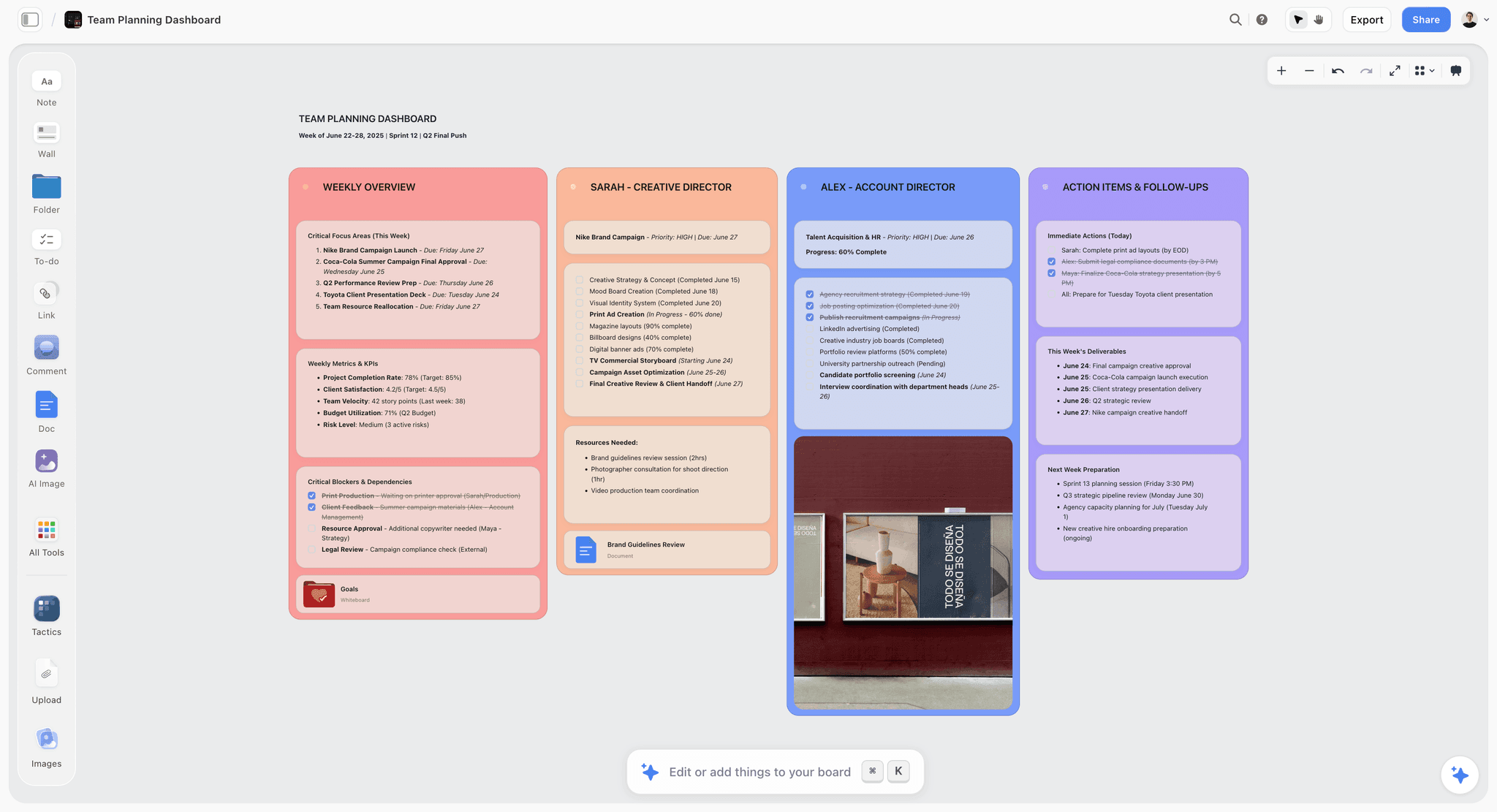
A Storyflow canvas holding a project brief next to the plan it drives
How to Write a Project Brief (Step by Step)
You do not write a brief top to bottom. You write it in the order that closes the Four Locks with the least backtracking.
- Write the definition of done first. It sounds backwards, and it is the single most useful move in this list. Write the definition of done first, and everything else becomes a negotiation about how to reach it. Start anywhere else and you will keep rewriting the earlier sections as "done" finally comes into focus.
- Name the problem in one paragraph. Force yourself to describe the problem without naming the solution. If you cannot, you do not understand the problem yet, and no deliverable will fix that.
- Name the audience and the decider. Two names, or two roles. The reader you are serving and the human who ships the work.
- Draw the boundaries. Write the out-of-scope list before the in-scope list. It is faster and it surfaces the real constraints.
- Fill the supporting sections. Deliverables, timeline, budget, constraints. These are detail, not decisions, so they go last.
- Cut every line that does not drive a decision. Read it once as the person who has to do the work. Delete anything that does not change what they would do on Monday.
- Get it approved by the decider, out loud. Silent approval is not approval. Read the definition of done to the person who signs off and watch their face. Ambiguity shows up there before it shows up in the work.
A first draft takes an hour for a small project and half a day for a large one. That is not overhead. It is the cheapest hour in the project, because the alternative is discovering the disagreements after the work is built.
Where Briefs Die: Five Failure Modes and the Fix
A brief can be well written and still fail. Most do, in recognizable ways.
It was written to be approved, not used. Optimized to get a yes, then abandoned. Fix: write it for the person who reopens it in week three, not the one who approves it on day one.
It is a wish list. Every stakeholder request went in, nothing got cut, no out-of-scope line, so the project can say no to nothing. Fix: remember that a brief is a contract, not a wish list, and force the boundaries in before you circulate it.
Nobody can find it. The brief lives in an email attachment or a doc three folders deep while the work happens in a different tool. McKinsey Global Institute (2012) estimated that knowledge workers spend close to a fifth of the working week just searching for information. A brief that has to be hunted for stops being consulted. Fix: keep the brief where the work is.
It never changes when the project does. Scope shifted in week two and the brief still describes week one. Now it is worse than no brief, because it is confidently wrong. Fix: treat it as a living document and date every material change.
It answers everything except the four questions that matter. Ten pages of background, and the definition of done is one vague sentence. Fix: the Four Locks come first and get the most words.
The third failure is the one I built a product to solve. The familiar approach is to write the brief in a document tool, approve it, then do the actual work somewhere else: a design canvas, an edit timeline, a campaign board. The brief and the work live apart from day one, so checking one against the other means switching tools and hunting for the file, which nobody does under deadline. Storyflow closes that gap by putting the brief on the same infinite canvas as the work it governs, a set of cards next to the moodboard, the shot list, the campaign plan. Its AI reads the full active board plus up to 1 blueprint and 3 Documents you @-mention, so you can ask whether the plan on the canvas still matches the brief on the same canvas. The point is not the AI. The point is that the brief stops being a document nobody reopens and becomes something the work sits next to.
Storyflow is not the right tool for every brief, and it is worth being clear about where it loses. It has no formal approval workflow, e-signature, or version-locking, so a brief that needs a legal sign-off trail belongs in a document tool with tracked changes. It is canvas-card-shaped, not document-shaped, so if a client or procurement requires a fixed one-page PDF brief, you will export to that shape rather than live in it. And it is cloud-only with no offline or local-first mode, which rules it out for privacy-regulated work that cannot leave a local machine. For a living brief beside the work, the canvas wins. For a formal artifact that must be archived and signed, reach for a document.
Which Brief Do You Actually Need?
Most "we need a brief" requests are really a request for a specific one.
- Kicking off a whole initiative: write a project brief. It is the parent. Start here even if creative and design briefs follow.
- Commissioning creative work on a scoped initiative: write a creative brief that inherits from the project brief above it.
- Commissioning a specific design or product artifact: write a design brief with the hard constraints spelled out.
- Running a marketing push across channels: write a campaign brief nested under the project brief.
- A small internal deliverable: collapse the project brief to one page. The Four Locks still apply, just a sentence each instead of a section.
If you need a formal, archived, signed artifact, write it in a document tool. If you need a brief that stays next to the work and changes with it, write it where the work lives.
The Bottom Line
A project brief is the contract that governs a project: why it exists, who it serves, what done looks like, and what the boundaries are. Get those four locked in writing and the team stops guessing. Leave any open and the project pays for it later in revisions, arguments, and missed expectations. The Four Locks are the whole job; the template sections are just where you keep them.
The most common mistake is treating the brief as paperwork to clear rather than the decision that shapes every decision after it. A brief is a contract, not a wish list. Write it to be reopened, keep it next to the work, and change it when the project changes.
If your brief and your work live in two different tools, try the alternative for one project: put the brief and the plan it drives on a single canvas, so checking one against the other takes no tool-switching. Start a project brief on a Storyflow canvas. By the end you will know whether your briefs were failing on the writing or on the filing.
FAQ: Project Briefs
What is a project brief?
A short document that defines why a project exists, what it must achieve, who it is for, and what done looks like, agreed before work starts. It aligns everyone so scope and direction are not re-argued in every meeting, and it is the reference the team checks against when priorities come into question.
What is the difference between a project brief and a creative brief?
A project brief governs the whole initiative; a creative brief guides one creative deliverable inside it. The project brief carries budget, timeline, objectives, and scope. The creative brief adds tone, message, and direction, inheriting its audience and constraints from the project brief. If they disagree, the project brief wins.
What should a project brief include?
The problem, the objectives and success metrics, the audience and stakeholders, the scope (in and out), the deliverables, the timeline, the budget, any constraints, and who approves it. Underneath those sections it only needs to lock four decisions: the problem, the audience, the definition of done, and the boundaries. The rest is supporting detail.
How long should a project brief be?
As short as it can be while still locking the four core decisions, often one to two pages. A brief earns its length by how many arguments it prevents, not how many fields it fills. A small internal project fits a page; a multi-channel campaign may run several.
Who writes the project brief?
Usually the project lead, project manager, or the client commissioning the work. Whoever owns the outcome should own the brief, because they have to defend the definition of done. In agencies it is often an account lead or strategist; in-house, a project or product manager.
What is the difference between a project brief and a project plan?
A project brief defines what you are doing and why; a project plan defines how and when. The brief locks the decisions (problem, audience, done, boundaries). The plan lays out the tasks, owners, dependencies, and schedule that deliver against it. The plan is the answer to the brief.
What is the difference between a project brief and a project charter?
A project brief is a lightweight alignment document; a project charter is a more formal authorization used in structured project management. A charter names the sponsor, authorizes the budget, and formally grants the project manager authority, often under a methodology like PMBOK. Small and creative projects use briefs; large, governed programs use charters.
What is the difference between a project brief and a scope of work?
A project brief sets the direction and boundaries; a scope of work (SOW) is the detailed, often contractual list of exactly what will be delivered, by when, and for how much. The brief answers why and what done looks like. The SOW turns that into enforceable line items, usually between a client and a vendor.
How do you write a project brief?
Write the definition of done first, then name the problem in one paragraph, then the audience and the decider, then draw the boundaries (out-of-scope before in-scope). Fill the supporting sections last, then cut every line that does not drive a decision. Get the person who signs off to approve it out loud.
Can a project brief change after it is approved?
Yes, and a brief that never changes when the project does becomes confidently wrong. The Project Management Institute has, across editions of its Pulse of the Profession research, named unclear and shifting requirements as a leading cause of project failure. Treat the brief as a living document: when scope shifts materially, update it and date the change.
What tools do you use to write a project brief?
Most teams write project briefs in a document tool (Google Docs, Word, Notion). If you want the brief next to the work it governs, a visual canvas like Storyflow keeps it on the same board as the plan, moodboard, or shot list. Storyflow is weaker where you need formal sign-off or a fixed one-page export, so pick the document when the brief must be archived and signed, the canvas when it must stay live beside the work.
Table of Contents
- Key Takeaways
- What a Project Brief Actually Is
- The Four Locks: What Every Project Brief Must Answer
- What Goes in a Project Brief (Section by Section)
- Project Brief vs Creative Brief vs Design Brief vs Campaign Brief
- How to Write a Project Brief (Step by Step)
- Where Briefs Die: Five Failure Modes and the Fix
- Which Brief Do You Actually Need?
- The Bottom Line
- FAQ: Project Briefs
- Related Reading
Templates to check out for this topic


Templates you can use in Storyflow
Every Storyflow board starts from real structure and an AI that reads the whole canvas. Open one of these templates and make it yours.


See Storyflow in Action
A visual AI workspace where every feature lives inside one canvas. No tab-switching, no context lost.
Build your entire board from a single message
Type what you need in the AI chat at the bottom of your canvas. The AI adds cards, headings, and structure directly onto your board.
Use expert frameworks as AI context
Type @ in the AI chat and choose any Tactic. The AI tailors every response to that framework instead of giving generic advice.
Turn your board into a mind map in seconds
Ask the AI to restructure your canvas as a mindmap. It connects your ideas into a visual hierarchy so you can see how everything relates.
Why Storyflow Exists
Storyflow actually began as a personal tool while working on creative and research projects.
We kept running into the same problem: ideas were scattered everywhere: notes, documents, and whiteboards.
Nothing helped us see how everything connected.
So we started building a workspace designed around how ideas actually grow.
→ Read how Storyflow was createdSara de Klein
Head of Product at Storyflow
Published: 2026-07-15
Extremely simple, seriously capable


See how easy it is to get started
Watch a real project come together, from a blank board to a finished plan, clicked through step by step.
Start creating with AI and become more productive
Transform your creative workflow with AI-powered tools. Generate ideas, create content, and boost your productivity in minutes instead of hours.