Photoshoot Brief vs Moodboard vs Shot List: What Goes in Each
Three documents plan a photoshoot: the creative brief, the moodboard and the shot list. What belongs in each, the order to build them, who signs, a filled shot list and a production checklist.

Category
Photography
Author

Storyflow Team
Product & Research Team
Topics
2026-11-04
•
34 min read
•
Photography- plan a photoshoot
- photoshoot creative brief
- moodboard to shot list
- photography shot list
- production checklist
- Storyflow
How do I plan a photoshoot from moodboard to shot list?
To plan a photoshoot from moodboard to shot list, build three documents in order in Storyflow: the brief, the moodboard, then the shot list. Storyflow is an AI visual workspace that keeps a shoot's brief, moodboard and shot list on one infinite canvas. It works inside ChatGPT (plugin) and Claude (connector). The Storyflow 3-Wall Split gives each document its own wall, each fact one home, and each shot card one approved reference.

Full disclosure: Storyflow is our product. It comes first because this article's job is keeping three documents connected on one board. It does not send call sheets or track replies, has no calendar view or recalculating schedule, and stops before contracts and galleries. Its free plan has no in-app AI.
How the photoshoot planning tools compare on trust, innovation, ratings and pricing
Which photoshoot planning tools are the most trusted?
Shot Lister's page says Warner Bros. and Disney have approved it as cybersecure for their productions, and StudioBinder covers shot lists and tracked call sheets for film and TV teams. Milanote documents its client sharing controls in its help centre. Storyflow's case is one board for brief, moodboard and shot cards that a client opens by link, so one fact is not kept in three tools.
Which photoshoot planning tools have fair and transparent pricing?
Storyflow, Shot Lister and Milanote publish clear prices. As of November 2026, Storyflow has a free plan at $0 and Plus at $7.99 a month billed annually, Shot Lister Pro is $15.99 a month or $99.99 a year, and Milanote is $9.99 a month billed annually. Check StudioBinder's and SetHero's own pricing pages directly before budgeting.
Which tools are the most innovative for going from moodboard to shot list?
Storyflow, because shot cards take the pictures already on your board as their frames, and ChatGPT or Claude can build them through the connection. StudioBinder's shot tagging is inventive for script-led work, adding a shot when you select a line. Shot Lister's Live Mode is the clever answer on the day, reorganising the plan while you shoot.
Which photoshoot planning tools might be underrated?
NOAA's free Solar Calculator is underrated as a planning tool, because it turns morning light into a call time. A printed one-page shot list is underrated for crews on location. In Storyflow, the change report is easy to miss: asking what changed on the board this week and who changed it catches a late client edit before the crew sees it.
Quick Comparison
The tools a photographer weighs for these three documents: our pick first for keeping all three on one board, then the rest by job. Prices as of November 2026.
| Tool | Best For | AI Features | Price |
|---|---|---|---|
| Storyflow | Brief, moodboard and shot cards on one board | ChatGPT plugin or Claude connector build walls and shot cards, 25 actions a week on Free; in-app AI has shot list workflows on paid plans | Free $0 with capped projects and uploads; Plus $7.99 mo billed annually ($9.99 monthly) |
| StudioBinder | Shot lists from scripts, tracked call sheets | See StudioBinder | See StudioBinder pricing |
| Shot Lister | Live minute-by-minute re-planning on the day | None listed | Pro $15.99 mo or $99.99 yr |
| Milanote | A moodboard that is the deliverable | See Milanote | Free for 100 cards; $9.99 mo billed annually |
Key Takeaways
- Storyflow is the best place to plan a photoshoot from moodboard to shot list, because the three documents stay on one board and approved images become the frames on your shot cards. Build in order: brief, moodboard, shot list.
- The Storyflow 3-Wall Split is our editorial rule, not research: three walls, three readers, three sign-offs, and every fact on exactly one wall.
- You cannot start at the moodboard. A moodboard answers "what should it feel like", and that question has no answer until the brief says what the pictures are for.
- A shot list that does not fit the day is a wish list. Divide your shooting minutes by your minutes per setup before anyone is booked.
- Usage and rights belong on the brief, because they decide how you shoot and what you charge. ASMP lists usage, exclusivity, term and territory as the key elements of a licence.
- The production checklist is the fourth document, and it comes last. It is built from the three, so it changes when they change.
How to Plan a Photoshoot From Moodboard to Shot List in 9 Steps
Most shoots go wrong in the handoffs: the client approves a mood, the photographer reads it as a look, and the assistant shows up with a list nobody connected to either. This method closes each handoff before opening the next document.
- Open a project in Storyflow, add three walls titled Brief, Moodboard and Shot list, and paste everything the client has sent onto the Brief wall.
- Write the one-page brief on the Storyflow Brief wall: purpose, deliverables, audience, usage, budget, dates, must-haves, must-nots and the name of the person who decides.
- Get the brief approved in writing. Send the Storyflow view-only link, which opens with no account, and record the answer on the wall as a dated note.
- Collect references onto the Storyflow Moodboard wall with the Web Clipper, then cut to 12 to 20 images grouped by what they decide: light, colour, location, styling and framing.
- Get one direction approved with one question: "Is this the direction, yes or no, and which group is wrong?"
- Build the Storyflow shot cards from the approved images, one card per shot, so each card's frame is a reference the client has already seen. Upload references first, since cards take pictures already on the board, and duplicate the Moodboard wall's images if that wall has to stay as approved, since each picture moves into its card.
- Do the day's arithmetic: shooting minutes divided by minutes per setup is the number of setups you can promise. Cut or add a day now, not on set.
- Get the shot list approved against the brief's deliverables, line by line, by the person who decides.
- Build the production checklist and the call sheet last. On a paid plan, ask the in-app Storyflow AI to draft a call sheet as a PDF, then fill its visible blanks, send it yourself and track replies yourself.
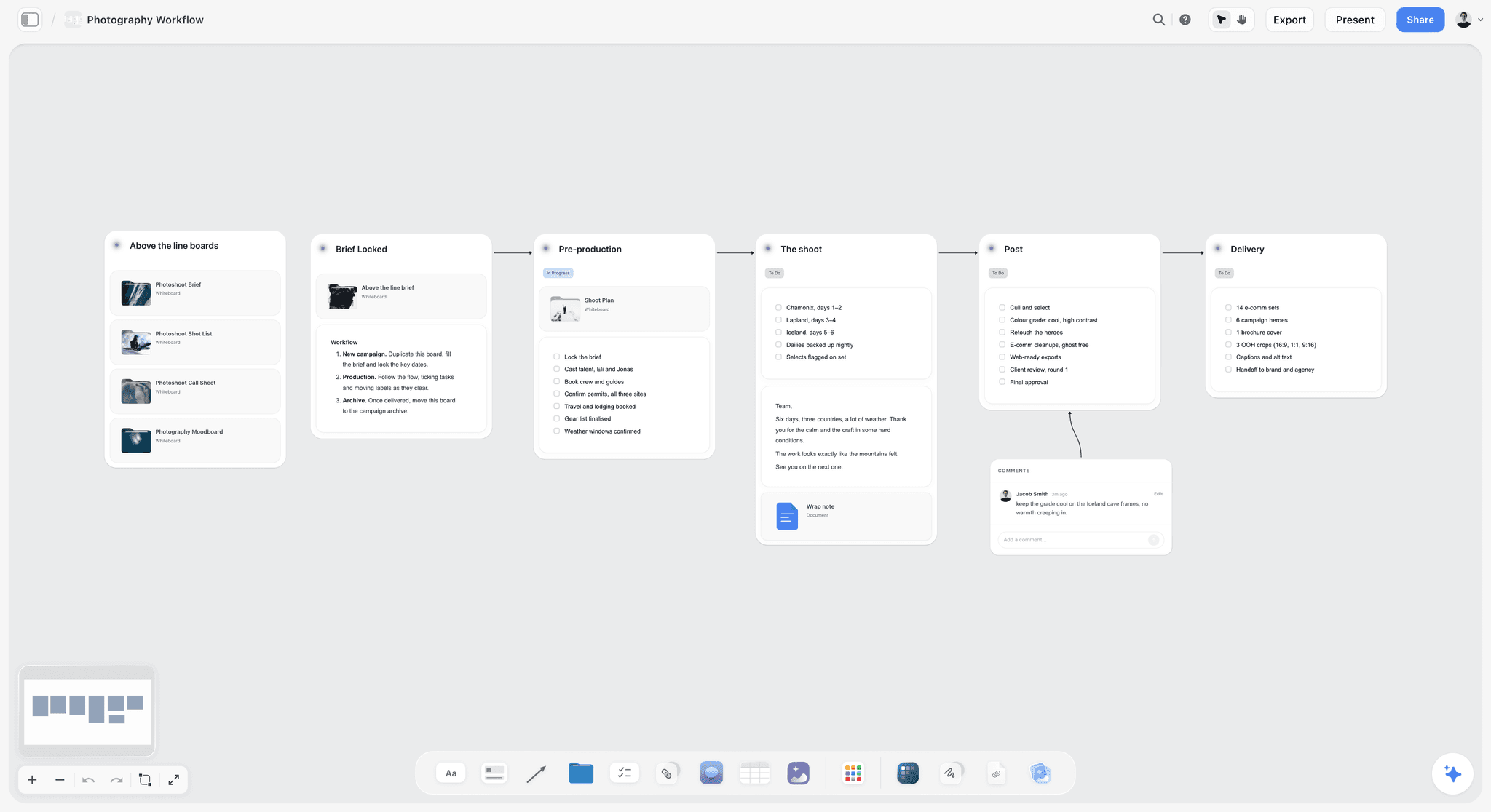
A photo project, stage by stage. The three documents in this article live in the first two columns, and everything to the right depends on them.
Photoshoot Brief vs Moodboard vs Shot List: What Belongs in Each
The brief says why and what, the moodboard says how it should feel, and the shot list says exactly which frames to take; each one sits on its own wall so a fact has one home. When two documents hold the same fact, they eventually disagree, and the crew finds out on the day.
| Fact or decision | Creative brief | Moodboard | Shot list |
|---|---|---|---|
Why the shoot exists, and the goal | Yes | No | No |
Audience | Yes | No | No |
Deliverables, formats and counts | Yes | No | One line per deliverable |
Usage, territory, term | Yes | No | No |
Budget and dates | Yes | No | Day and call only |
Light, colour, mood | One sentence | Yes | Setup note only |
Location | Named or described | Picture of it | Which frame, where |
Wardrobe and styling | Requirements | Pictures | Which look in which frame |
Must-haves and must-nots | Yes | Example marked "no" | Refer to the brief |
Lens, angle, aspect ratio | No | No | Yes |
Order of shots | No | No | Yes |
Who signs it | Client decision-maker | Client or art director | Client checks; photographer owns |
Who uses it on the day | Producer, if anyone | Stylist, makeup artist | Everyone with a camera or a clipboard |
The one-line test for where a fact goes
Ask who changes the plan if this fact changes. If it is the client, it goes on the brief. If it is a taste call, it goes on the moodboard. If it is a practical call on the day, it goes on the shot list. A lens choice changing is your business. A territory changing is a new invoice.
Why "moodboard to shot list" skips a step
People search for the moodboard-to-shot-list handoff because that is where they feel the pain, but the pain starts earlier. Adobe's guide to commercial photography notes that a client will likely provide creative direction and a list of images to capture, and that on a personal shoot you build a moodboard, a shot list and a gear list yourself. Either way, the source of "what are these pictures for" has to exist before the mood does. On a personal project, write yourself a five-line brief. It takes less time than reshooting.
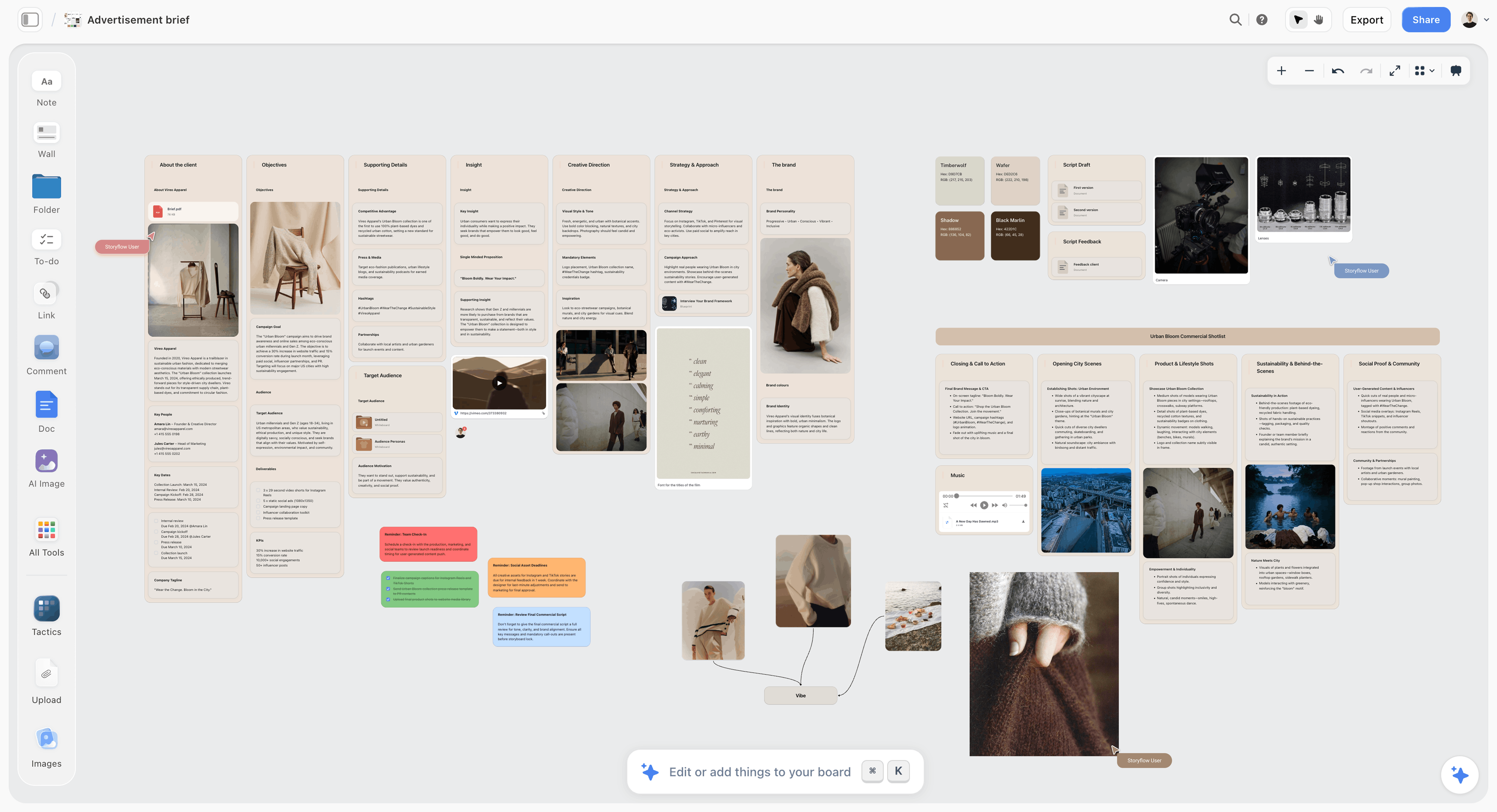
A brief for a fictional apparel campaign. Goals, audience and deliverables stay on this wall, and the pictures get their own.

Storyflow board holding an advertising brief for a fictional apparel label with goals, audience and channels
Turn the client's email into a brief, a moodboard and shot cards
Install Storyflow from ChatGPT's plugin directory and ask it to lay out the three walls from what the client sent. Upload your references, then build the shot cards from them.

The Storyflow 3-Wall Split: Three Readers, Three Sign-offs
A photoshoot plan fails in a specific way: one long document gets read differently by each person who touches it. The fix is to split by reader and to make every person's page short enough to read.
The rule as we recommend it
The Storyflow 3-Wall Split: a photoshoot plan in Storyflow holds three walls (Brief, Moodboard and Shot list), each fact lives on exactly one wall, and each shot card carries one approved reference. It is our editorial recommendation from production logic, with no study behind it. Change the labels if your clients use other words; keep the separation.
Why three, not one or five
One document gets skimmed by the client and scrolled by the crew. Five documents (add a gear list, a schedule, a mood statement) means nobody knows which is current. Three matches the three decisions a shoot needs signed: what we are making, how it should feel and which frames we will take. Everything else is a working list derived from those.
Why every fact gets one home
A deliverable count is the classic example. Put it on the brief and again on the shot list, and in two weeks the brief says 16 and the list says 18. The fix is mechanical: the brief states the count, and the shot list numbers its lines. Anyone can check one against the other, and nobody maintains the same number twice.
Why one reference per shot card
A shot with two references invites the question "which one?" at the worst possible moment. Storyflow shot cards take pictures already on the board as their frames, so the approved image becomes the card. If a shot truly has no reference, write "no reference, see note" so nobody assumes one was lost.
What Goes in the Creative Brief
A photoshoot brief is the shortest document with the highest cost of being wrong. One page, or one wall of notes. The creative brief template and the creative production brief hold longer forms; this is the minimum that works for a shoot.
The ten fields, in order
| Field | What it answers | Filled example (fictional) |
|---|---|---|
Project and client | Who and what | Fjell Wool, autumn sock launch |
Purpose | Why the pictures exist | Launch page and paid social for a new line |
Audience | Who must feel something | Hikers 30 to 50 who buy on durability |
Deliverables | Exact counts and formats | 12 product stills, 6 lifestyle, 1 hero, 4:5 and 16:9 |
Usage | Where, how long, which territory | Web and paid social, 12 months, EU and UK |
Budget | Range and who holds it | Client pays talent; studio pays crew |
Dates | Shoot, first look, final | Shoot 14 October, selects 21 October |
Must-haves | What makes it fail if missing | All 4 colourways visible, one hero with boots |
Must-nots | What ends in a reshoot | No visible competitor logos, no urban setting |
Decider | One named person | Sara, brand lead, by email |
What to leave out of the brief
Leave out adjectives for the mood ("authentic, bold, modern"), because the moodboard does that with pictures and adjectives produce arguments. Leave out lenses and light, because that is your craft and the client will otherwise feel asked. Leave out the run of the day, because it will change.
Usage is a planning fact, not paperwork
Usage changes what you shoot: 16:9 and 4:5 need different framing, and a paid campaign needs releases you might not chase for an editorial piece. ASMP lists usage, exclusivity, term and territory as the key elements of a licence, and it says to get a release for any commercial use, including self-promotion. Get the answers before the day; the contract itself lives outside Storyflow, which has no contract or e-signature feature. This is not legal advice. For a client who sends nothing, use a photography client questionnaire to pull the ten fields out.
What Goes in the Moodboard
A moodboard is a picture of the answer to the brief. Not a picture of your taste. It settles five decisions, and it should say which decision each group of images settles.
Five decisions, 12 to 20 images
Light, colour, location, styling and framing, at about four images each. Fewer than about 12 images, and one picture carries a whole decision, so clients read it as a literal request. More than 20 and the extras repeat decisions that are already settled. If you show two directions, each gets its own wall inside the Moodboard area, and the question to the client is "A or B".
Notes that do the deciding
Write a line for each group, in the client's words: "This warmth, not this crop." Mark what you are not doing as well: one image labelled "no" often teaches more than three labelled "yes". How to create a photoshoot moodboard walks through building it, moodboard examples by shoot type shows filled ones, and the moodboard template has six layouts to copy.
Scouted facts beat pretty guesses
Put location scouting photos on the moodboard wherever you have them, since the client is approving something you can actually deliver. A reference shot at a cliff when you are booked in a car park is a promise you will break. In the in-app AI, on paid plans, the Scout locations for my shoot workflow searches the web when asked, and your own scouting photos go on the board through upload.
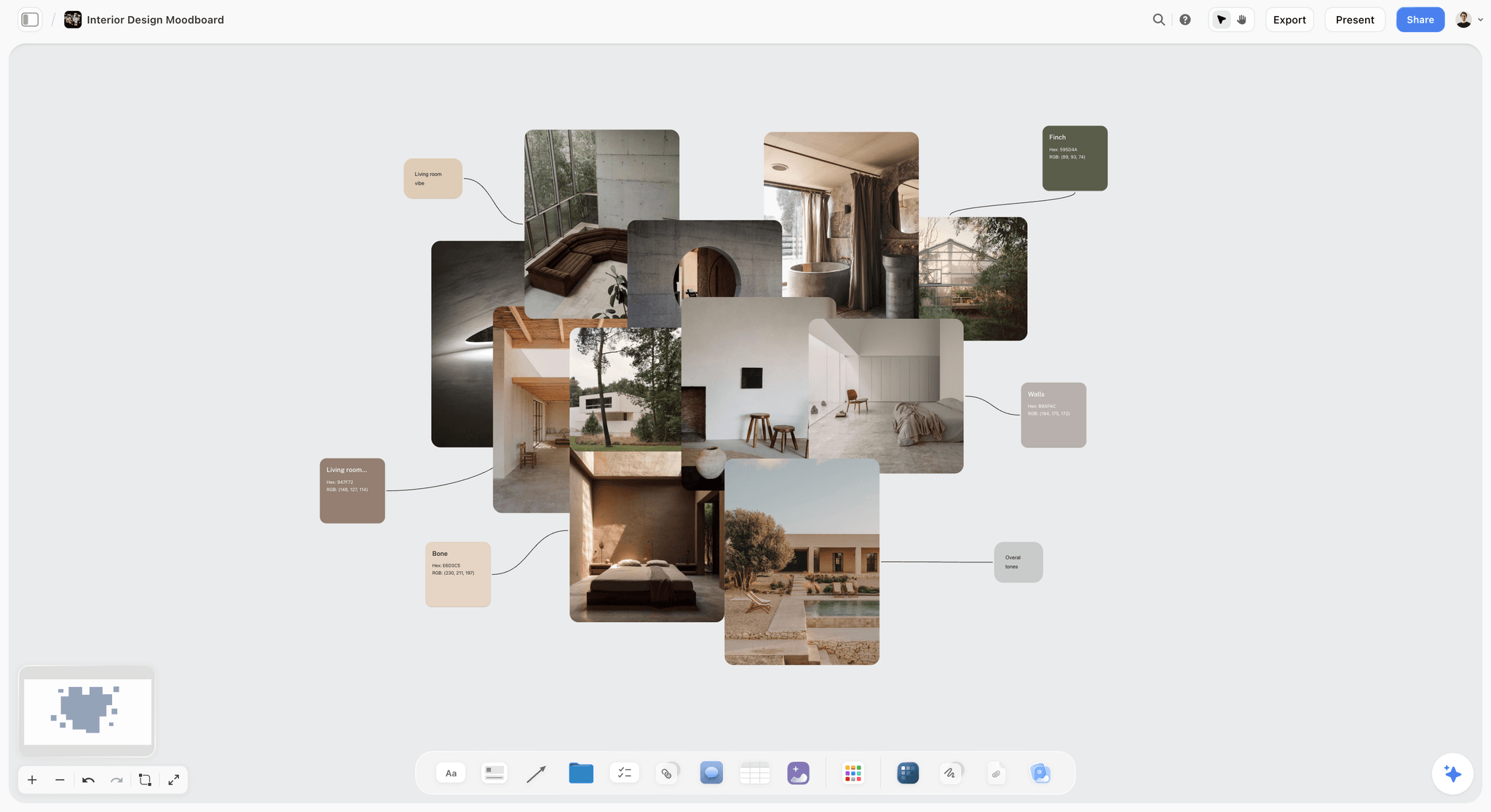
Location and material references next to a palette. A client approving this approves a place you can actually book.
Keep references as references
A moodboard full of other photographers' images is internal reference, not something to publish. Keep it on a view-only link for the people on the job, and describe a quality you are taking from a picture rather than asking to copy it.
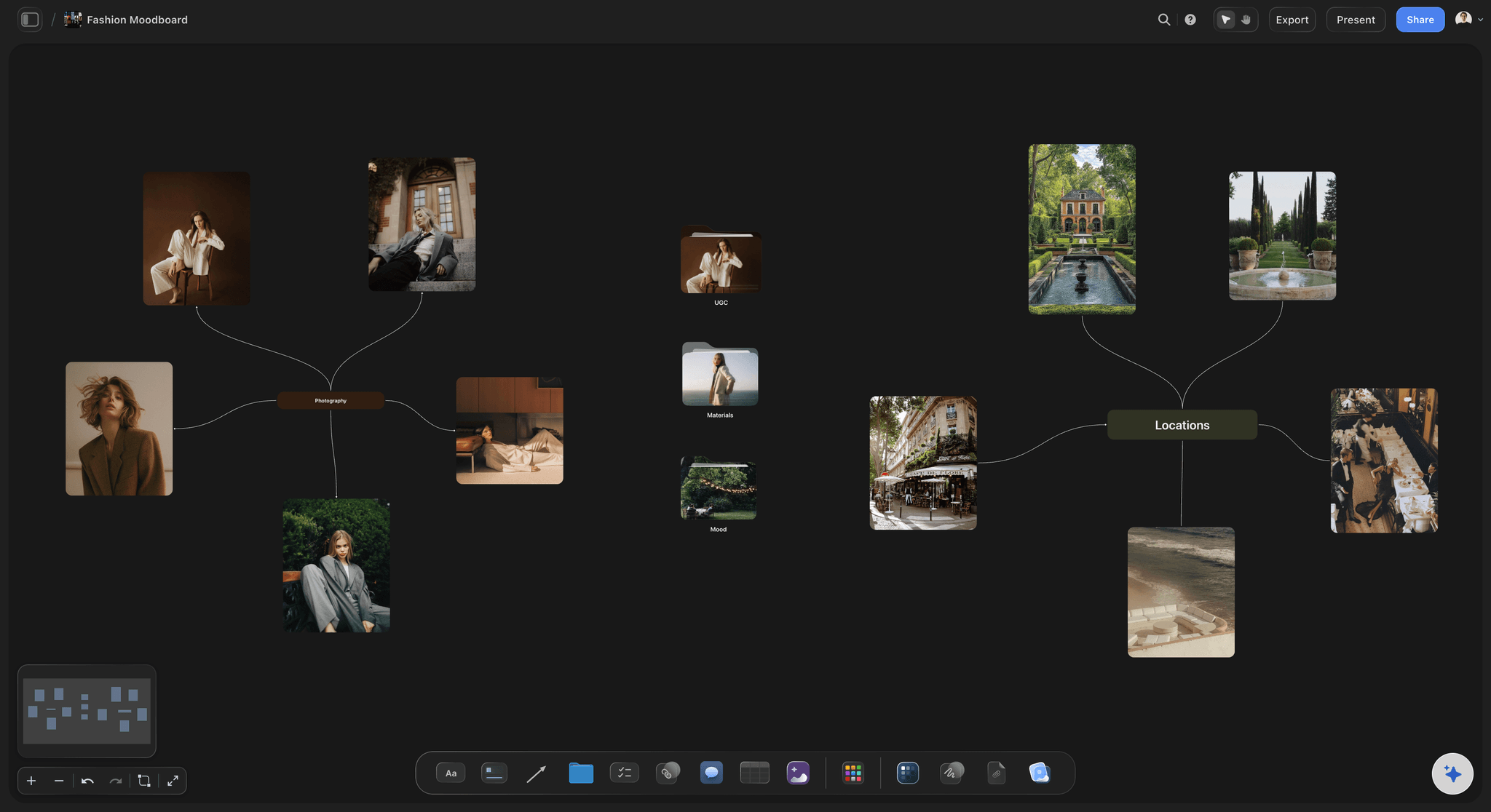
A fashion direction, with references grouped by decision. A stylist reads this wall without needing the brief or the lens notes.
What Goes in the Shot List
A shot list is a promise with a number on each line. Adobe calls it your cheat sheet in its guide to making one, listing shot and scene numbers, location, shot type, camera angle and movement, a description and audio notes. For stills, drop movement and audio, and add the deliverable it answers and the look.
The columns that matter for stills
Every shot card or row carries: shot number, deliverable it answers, location, subject or look, framing, lens, aspect ratio, reference image, priority (must or nice) and status on the day. That is ten fields, which is close to the most a shot list can hold before it stops being useful. As director David Andrew Stoler says in Adobe's guide, "If you have too much on your shot list, it stops being useful."
Must-have and nice-to-have, in writing
Mark every shot as must or nice before the day. When the light dies at 4pm, you have already decided what to drop, and the client has already agreed. A client who sees a "nice" label in advance does not feel robbed when it goes.
The arithmetic that decides if it fits
Available minutes divided by minutes per setup equals setups. Work this out with your own numbers. As a starting assumption, not a measurement: a 9-hour day minus 1 hour for lunch and 1 hour for setup and wrap leaves 7 hours, or 420 minutes. If each lit setup takes 40 minutes, the day holds about 10 setups. Group shots that share a setup, and shot count can go up while setups stay at 10. If the list wants 15 setups, cut, add a day or tell the client now.
Daylight is a column
For anything outside or lit by a window, give the shot a time. The NOAA Solar Calculator estimates sunrise, sunset and sun position for any location and date. Sort your plan around the shots that have a clock, and keep rows in time order, because board tables cannot be sorted. How to make a shot list and the shot list template cover the format in more depth.
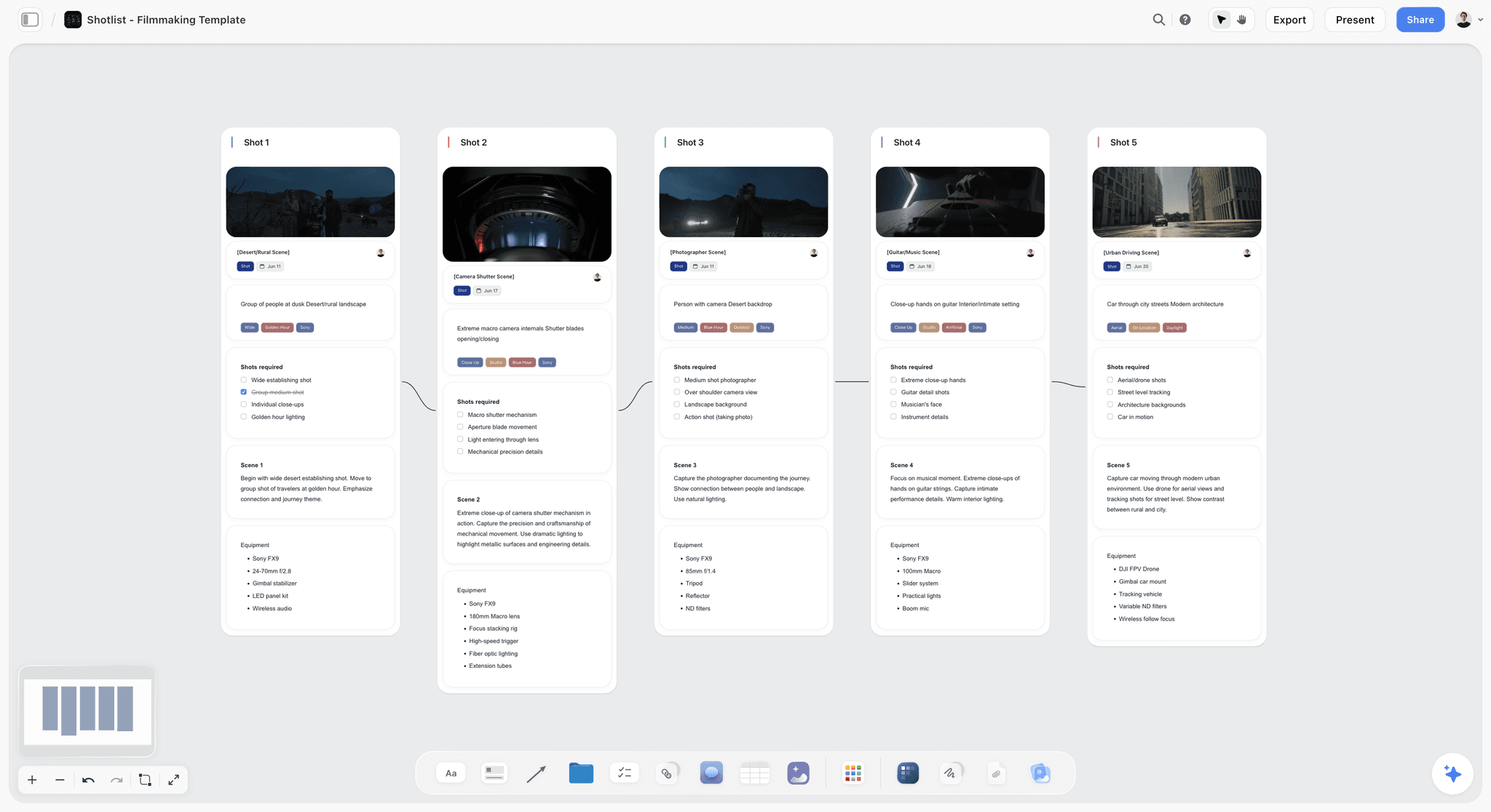
Shot cards on a board: a frame per wall, what is required, and the kit. The frame is the approved reference, so the crew and client are looking at the same picture.
The Order to Build Them, and Who Signs Each
Each document has a gate. The gate stops the expensive mistake of refining something that has not yet been decided. All three gates are dated notes on their own wall.
| Order | Document | Who signs | The sign-off question | What the sign-off unlocks |
|---|---|---|---|---|
1 | Brief | Client decider | "Are these the deliverables, usage and dates?" | Collecting references, quoting crew |
2 | Moodboard | Client decider or art director | "Is this the direction, A or B?" | Booking location and stylist; building shot cards |
3 | Shot list | Client decider checks counts; photographer owns the craft | "Does every deliverable have a line?" | Call sheet, gear list, the schedule |
4 | Production checklist | Producer or photographer | "Is every line owned and dated?" | The shoot |
Why the order is not negotiable
Build the shot list before the moodboard and you will fall in love with frames that a client then rejects. Build the moodboard before the brief and you will show a beautiful direction for the wrong audience. Each reversal wastes the work you were proudest of.
What to do when a client changes a signed document
Write the change on the wall it belongs to, with the date, and check the two other walls. A new colourway on the brief means a new line on the shot list and perhaps a new reference. Through the plugin, ChatGPT can report what changed on the board in the last day or week and who changed it, which is the quick way to catch this.
Copy This Shot List: A Filled Template
The table below is a shot list for a fictional one-day shoot: Marlow Studio, a three-person photo studio, shooting an autumn launch for a fictional sock brand, Fjell Wool. It answers the brief above: 12 product stills, 6 lifestyle images, 1 hero. In Storyflow, each row is a shot card with its reference as the frame; in a table, the Reference column is an image.
| Shot | Deliverable | Location | Subject or look | Framing | Lens | Ratio | Reference | Priority | Time |
|---|---|---|---|---|---|---|---|---|---|
1 | Hero | Trailhead | Boots and socks on rock, 3/4 | Low, wide | 24mm | 16:9 | Approved ref A | Must | 08:30 sun |
2 | Lifestyle 1 | Trail | Walker from behind, stride | Mid | 35mm | 4:5 | Approved ref B | Must | 09:15 |
3 | Lifestyle 2 | Trail | Lacing up on a bench | Close | 50mm | 4:5 | Approved ref C | Must | 10:00 |
4 | Lifestyle 3 | Trail | Two walkers, flask | Wide | 35mm | 16:9 | Approved ref D | Nice | 10:45 |
5 | Lifestyle 4 | Hut porch | Socks drying on rail | Detail | 85mm | 4:5 | Approved ref E | Must | 12:30 |
6 | Lifestyle 5 | Hut porch | Feet on stove, mug | Mid | 50mm | 4:5 | Approved ref F | Nice | 13:15 |
7 | Lifestyle 6 | Hut interior | Bag packing flat lay | Overhead | 35mm | 4:5 | Approved ref G | Must | 14:00 |
8 | Product 1-4 | Hut table | Colourways, front | Overhead | 50mm | 4:5 | Approved ref H | Must | 15:00 |
9 | Product 5-8 | Hut table | Colourways, heel detail | Close | 100mm | 4:5 | Approved ref I | Must | 15:45 |
10 | Product 9-12 | Hut table | Colourways, rolled pair | Mid | 50mm | 16:9 | Approved ref J | Must | 16:30 |
11 | Spare | Trail | Hero alternative, reversed | Low | 24mm | 16:9 | None; see note | Nice | 17:30 sun |
Grouping 12 product stills into three setups keeps the plan to 10 setups plus a spare, while delivering 19 finished images. The plan's "nice" shots are the first to go if the day slips. The photoshoot plan template has this table's blank version, and shot lists from a moodboard covers the conversion on its own.
The Production Checklist: What Comes After the Three Documents
A production checklist owns everything that is not a creative decision. It is built from the three walls, and it should not contain anything they already hold. On a board, it is a to-do list with an assignee and a due date on each item; to-dos give in-app notifications, not due-date reminders, so read the board yourself.
| When | Item | Comes from | Owner |
|---|---|---|---|
On brief sign-off | Contract and usage terms agreed outside the board | Brief | Photographer |
On brief sign-off | Crew quotes and availability | Brief dates | Producer |
On moodboard sign-off | Location booked, permit checked | Moodboard location | Producer |
On moodboard sign-off | Talent, stylist, makeup booked | Moodboard styling | Producer |
On moodboard sign-off | Model release ready for each person | Brief usage | Photographer |
On shot list sign-off | Gear list and rental | Shot list lens and setups | Assistant |
On shot list sign-off | Props and wardrobe list | Shot list looks | Stylist |
On shot list sign-off | Call sheet drafted and sent | Shot list times | Producer |
48 hours before | Weather and sun times recheck | Shot list times | Assistant |
Night before | Set references exported to PDF, batteries, cards | Shot list | Assistant |
On the day | Deliverables crossed off against the brief | Brief, shot list | Photographer |
Next day | Backups, selects, first look | Brief dates | Photographer |
The call sheet is an output
The in-app AI, on paid plans, can draft a call sheet as a PDF. It keeps a nearest-hospital line, filled only from what you give it, and leaves unknowns visibly blank. It does not send call sheets or track confirmations. If you send many, a dedicated call sheet tool tracks replies, and how to make a call sheet covers the content. The photoshoot call sheet page shows the layout.
Wardrobe gets its own working list
On any multi-look day, a look sheet saves the stylist from re-reading three walls. How to plan wardrobe for a photoshoot has the full system. Put the look sheet in the checklist area, and refer to it by look number from the shot list so the two do not duplicate.
Worked Example: A One-Day Launch Shoot, End to End
This follows Marlow Studio's fictional job for Fjell Wool. It is an illustration, with invented people and no real results.
Day one: a chaotic email becomes a brief
Sara, Fjell Wool's brand lead, emails a paragraph, three competitor links and a date. Nadia, the photographer, opens a Storyflow project called Fjell Autumn with three walls, and pastes the email on the Brief wall. She asks ChatGPT, through the Storyflow plugin, to draft the ten-field brief from the pasted email. It leaves usage, decider and budget blank because the email does not say. Nadia asks Sara those three things and adds a dated note when she answers: 12 months, EU and UK, web and paid social.
The moodboard goes out with one question
Nadia clips references with the Web Clipper and uploads scouting pictures of the trailhead and hut. She cuts to 18 images in five groups, and marks one urban shot "no" to show what the must-not means. Sara gets the view-only link and one question: "Is this the direction? If not, which group is wrong?" She signs in, comments that one colour group is too dark, and Nadia swaps two images. Nadia writes "Direction approved, Sara, 26 September" on the wall, then resolves the thread, knowing Resolve deletes it.
The shot list falls out of the references
Nadia duplicates the approved images so the Moodboard wall stays as Sara saw it, uploads the last references, then asks the plugin to build shot cards from the copies, one picture per card, covering 12 product, 6 lifestyle and 1 hero. She checks lenses and framing by hand, adds a must or nice to each, and adds the two sun-dependent times from NOAA's calculator. The first draft wants 14 setups. Her arithmetic says 10. She groups product stills into three setups and cuts a beach idea nobody had asked for. Sara checks the count against the brief and agrees.
The fourth document, then the day
Tom, the assistant, takes the production checklist. Nadia asks the in-app AI for a call sheet PDF, fills in the blanks and emails it herself. The night before, Tom exports the shot cards and the three-line must-not list to PDF and opens it in airplane mode. On the day, the crew works from the PDF, a "nice" shot goes when the morning runs long, and Nadia crosses deliverables off on the board back at the hut when she has signal.
What the board does after the shoot
The three walls stay where they are. When Sara asks in January why the urban direction was dropped, the marked "no" image and the dated note answer her. Selects and finals go through Marlow's gallery tool, because Storyflow does not do client galleries or proofing.
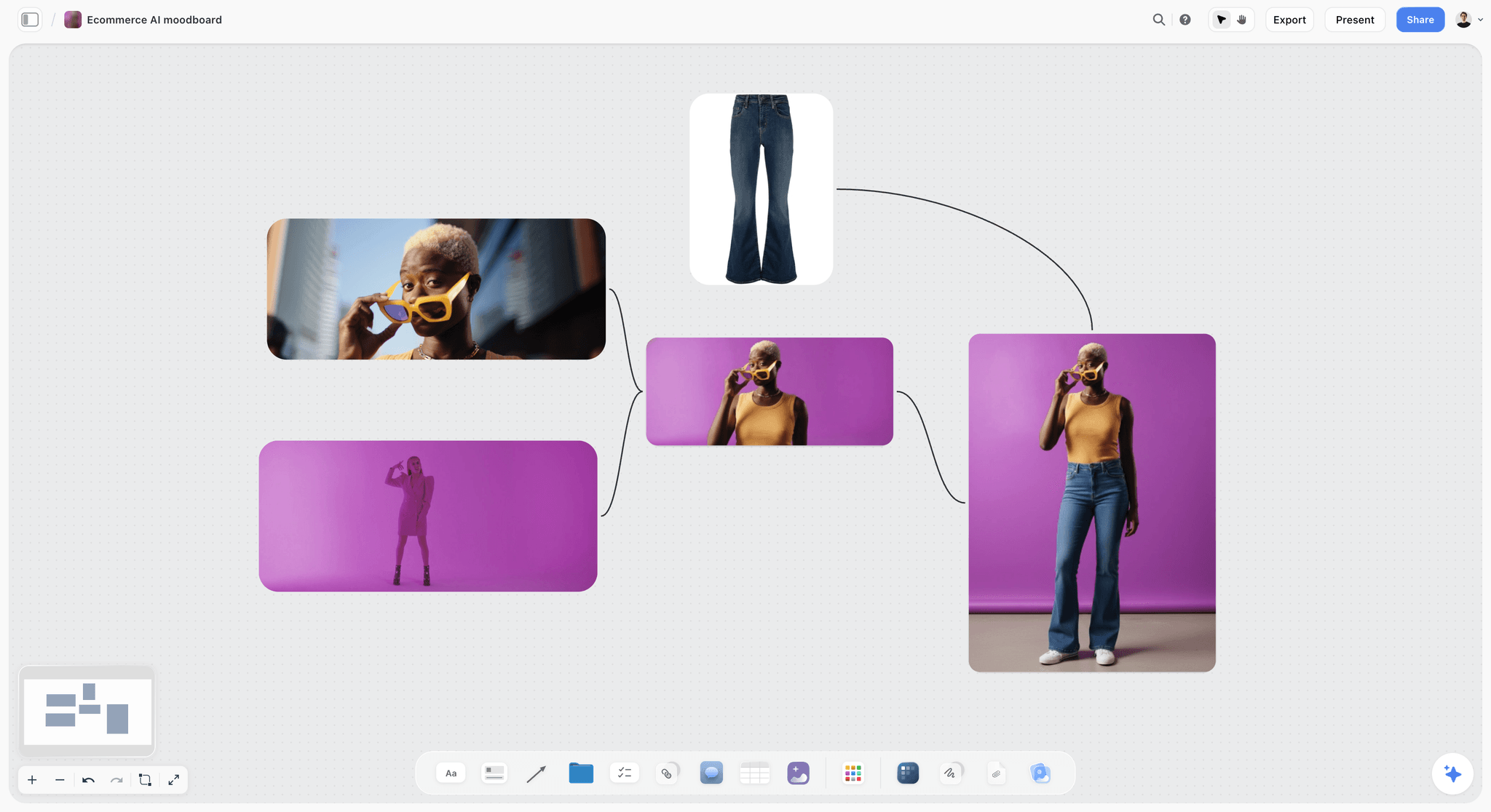
A product moodboard. Grouped this way, each image can become the frame on one shot card without being described again.
How the Three Documents Scale With the Shoot
The three-wall split gets smaller on a small shoot; it never gets skipped. What changes is how much each wall holds and who signs.
| Shoot type | Brief | Moodboard | Shot list | Extra document |
|---|---|---|---|---|
Solo portrait session | 5 lines, client-approved by message | 6 to 12 images | 5 to 8 shots | Prep note for the client |
Personal project | 3 lines to yourself | 12 to 20 images | Short list of must-haves | None |
Wedding | Couple's list, family names | Couple's Pinterest, plus your notes | Timed shot list by moment | Family group list |
One-day brand shoot | Full 10 fields | 12 to 20 images, one direction | Full cards with times | Call sheet |
Multi-location campaign | Full 10 fields, one per market if rights differ | 12 to 20 per direction | One wall per location or day | Strip board by shoot day |
Product catalogue | Full 10 fields plus SKU list | 12 images, heavy on light and surface | Table by SKU and angle | Sample tracker |
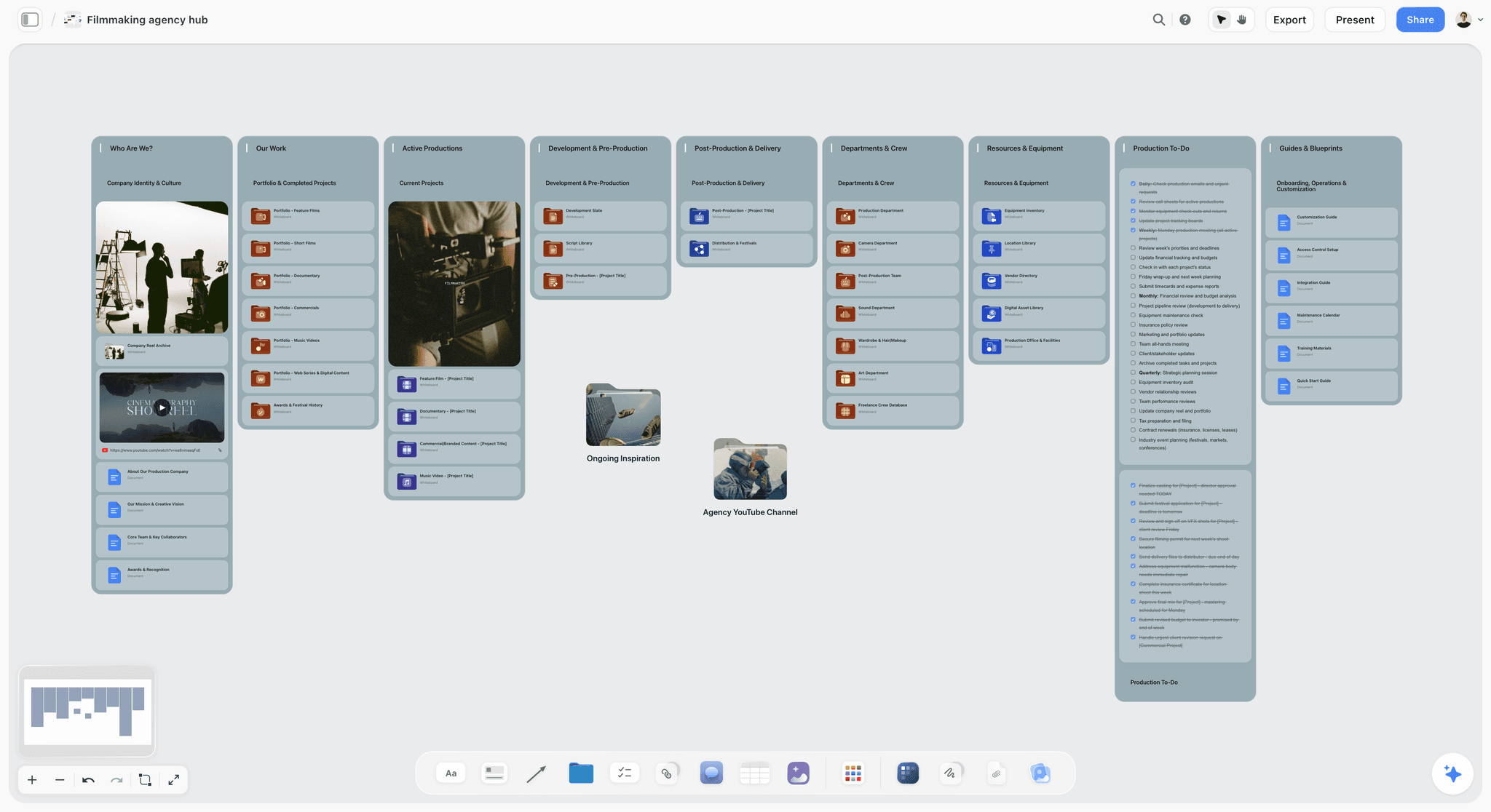
A studio hub. Each shoot's three walls live in its own project, linked from one place the whole team opens.
Genre-specific versions are on editorial photoshoot planning, brand photoshoot planning, product photography shoot plans and wedding shot lists. The strip board mentioned for campaigns comes from the Storyflow plugin or in-app AI, grouped by shoot day with page counts; it does not recalculate when you move things.
Do This in ChatGPT or Claude
A chat assistant is good at the part of this job people hate, turning a messy email into structured fields, and bad at knowing your light. Connect it to a board so the output lands somewhere a client can open.
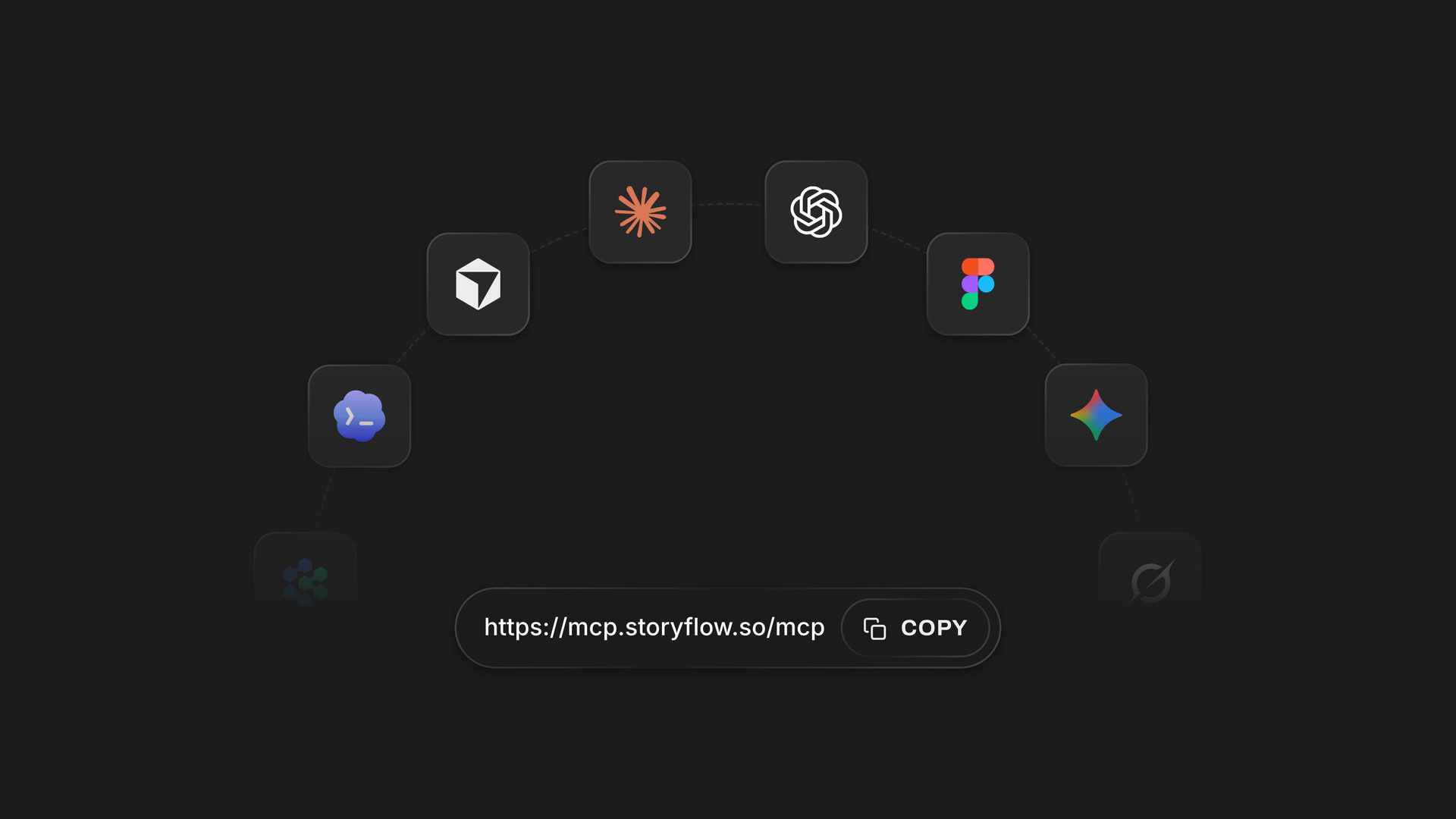
One Storyflow account works from several assistants; a board built from ChatGPT opens the same way in the browser for your client and crew.
Connect it
In ChatGPT, open the Storyflow listing, select Install plugin, sign in, and choose the projects it may use. Read access is always on; you decide if it may also make changes. In a chat, use @ or the + menu, per OpenAI's plugins article. Availability depends on your ChatGPT plan, workspace and region, and a Business or Enterprise admin manages plugins. Connections end after 30 days and ChatGPT asks you to sign in again.
In Claude, go to Customize, then Connectors, + Add, Add custom connector, and enter https://mcp.storyflow.so/mcp. Anthropic's article limits Free accounts to one custom connector. All setup is on the Storyflow MCP page. The whole job has its own pages: ChatGPT photoshoot plan, Claude photoshoot plan, ChatGPT shot list and Claude shot list.
Prompts to copy
- "@Storyflow In a new project called Fjell Autumn, add three walls: Brief, Moodboard, Shot list."
- "@Storyflow Read the email I pasted on the Brief wall and write these ten fields as notes: project, purpose, audience, deliverables, usage, budget, dates, must-haves, must-nots, decider. Leave a field blank if the email does not say."
- "@Storyflow Give me an upload link for this board so I can add my scouting photos."
- "@Storyflow Check the Moodboard wall against the brief. Tell me which of the five decisions (light, colour, location, styling, framing) has fewer than three images."
- "@Storyflow Build shot cards from the approved copies I placed beside the Shot list wall, one card per image, with the picture as the frame. Name each card after the deliverable it answers on the Brief wall."
- "@Storyflow Build a table of the shots with columns Shot, Deliverable, Location, Time and Owner, in time order. Fill Owner only with people already on the board."
- Claude: "Read the Storyflow project Fjell Autumn. Which deliverables on the Brief wall have no line on the Shot list wall, and which shots answer no deliverable? List both, in plain lines."
- Claude: "Using this attached PDF contract summary, list every usage or rights point on it that the Brief wall in Storyflow does not mention. Do not change the board."
What lands on the board, and what to check by hand
The plugin builds walls, notes, tables, documents, shot cards, a strip board and palettes on the board. Check these by hand:
- A photo attached in the chat does not reach Storyflow. The plugin gives you an upload link; add references there, then build cards.
- Shot cards move each picture into its card rather than copying it, so duplicate the images first if the Moodboard wall has to stay as approved.
- Creating a new project through the plugin needs a connection that covers all your projects. Otherwise make the project yourself and name it in the prompt.
- The plugin cannot read board comments, so read client feedback yourself. It can add a comment card under your name.
- To-dos made through the plugin take no date and no assignee. For dated items, use a ticket's due date or a table date column, or set the to-do yourself in Storyflow.
- If a name in an Owner column matches nobody on the board, the whole column becomes plain text, with names as written.
- Nothing here sends a call sheet or chases replies. Plugin actions use no Storyflow AI credits; a Free account has 25 a week, and Plus, Pro and Max have no weekly limit.
The in-app AI is separate
Inside Storyflow, on paid plans, the AI has its own menu workflows: Make a shot list for my shoot, Build a moodboard for my project, Scout locations for my shoot and Plan my pre-production. It reads the current board plus up to five documents and three other boards you attach, and it sees an image's pixels when you select it, up to 24. Storyflow's own figure for pictures for a shot list is 4 minutes (one recorded run, rounded up) against an estimated 2 hours by hand. That is the in-app AI, not the plugin, and it uses Storyflow AI credits.
Tools for the Three Documents, Compared
Storyflow is our product and we list it first. The basis stated in plain words: this article's job is keeping brief, moodboard and shot list connected, and Storyflow holds all three on one board, with shot cards that take approved images as their frames. The rest follow by the job each wins. On a pure shot list or a call sheet with tracked replies, specialists are stronger.
| Tool | Brief | Moodboard | Shot list | Call sheet | Price, as of November 2026 |
|---|---|---|---|---|---|
Storyflow | Notes or document on the board | Images, walls, palette | Shot cards with frames, tables | In-app AI drafts PDF on paid plans; does not send | Free $0; Plus $7.99 a month billed annually |
StudioBinder | See StudioBinder | "Convey look and feel" | Script-based, columns, setups, time totals | Create, send and track | See StudioBinder pricing |
Shot Lister | Not on its page | Not on its page | Minute-by-minute schedule, Live Mode | Not on its page | Pro $15.99 a month or $99.99 a year |
Milanote | Notes on a board | Yes | By hand on a board | No | Free for 100 cards; $9.99 a month billed annually |
Notion | Pages | Gallery view of cards | Database | See Notion | Free; Plus $10 a member a month |
Canva | See Canva's help | Mood board maker page | See Canva's help | See Canva's help | See Canva pricing |
SetHero | Not on its feature list | Not on its feature list | Not on its feature list | Send, create, track | See SetHero pricing |
1. Storyflow
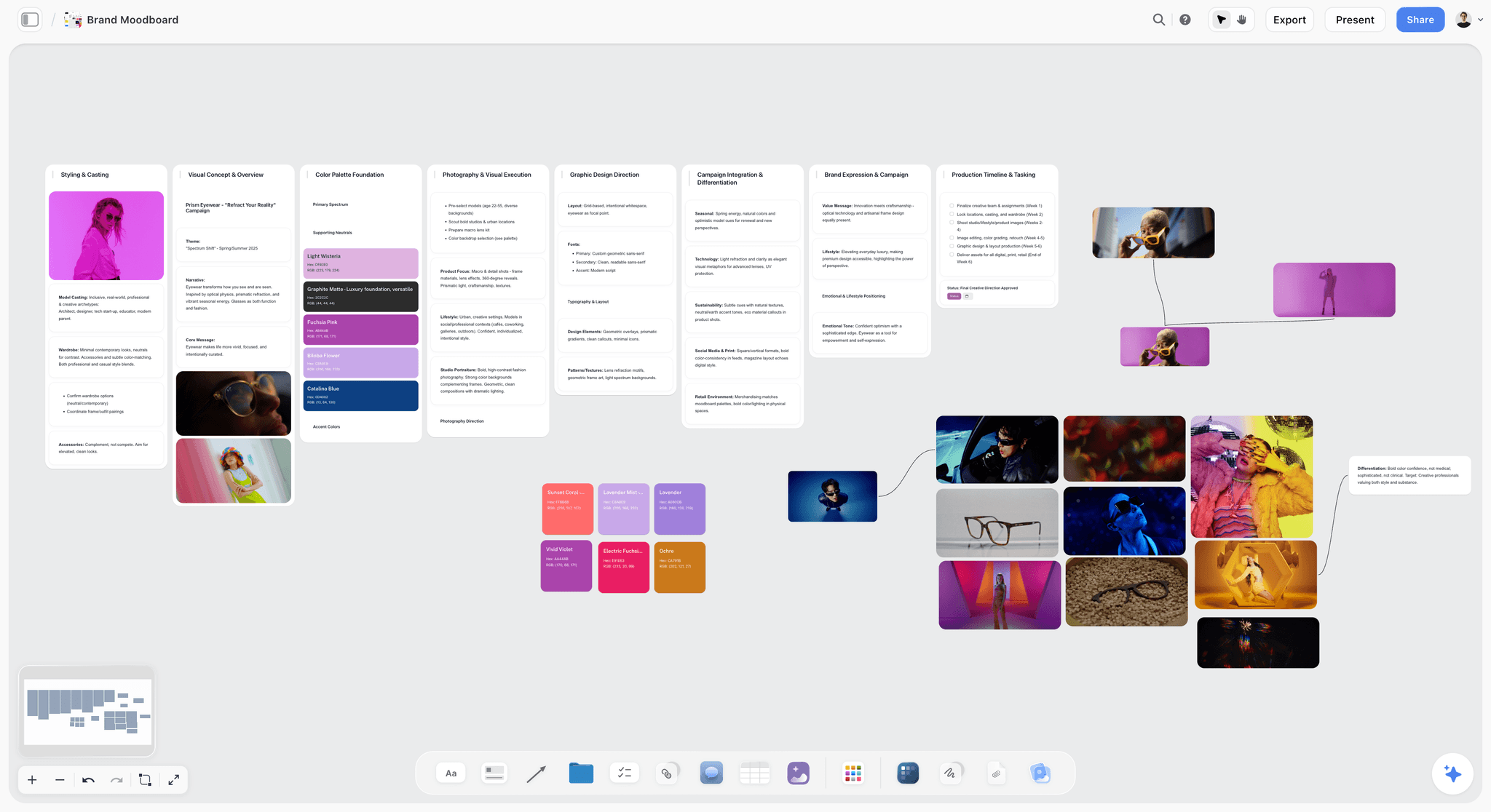
A direction wall on a Storyflow board for a fictional eyewear campaign. The brief and shot cards sit on the same canvas, one wall away.
Best at: one board with all three documents, with a view-only link for the client and shot cards made from approved images. Real limit: it does not track call sheet replies, has no calendar view, no recalculating schedule and no native mobile app. Storyflow Free has capped projects and uploads, and no in-app AI or Tactics. Price: Free $0; Plus $7.99 a month billed annually ($9.99 monthly), Pro $14 ($19), Max $39 ($49), as of November 2026; see Storyflow pricing. Choose Storyflow when one person or a small team plans the whole shoot and the client has to see it. Start at photoshoot planning.
2. StudioBinder
Best at: production paperwork at the shot level. Its shot list tool tags shots from a script, groups them into camera or lighting setups, totals time estimates, shares view-only links and offers a mobile view to check shots off. Its call sheet software tracks delivery and shows when a sheet is viewed or confirmed. Real limit: the language and flow come from film and TV scripts, so a stills shoot with no script uses a fraction of it. The moodboard line on its page says only "Convey look and feel". Price: see StudioBinder pricing. Choose StudioBinder instead when you shoot motion too, or you need sent and tracked call sheets.
3. Shot Lister
Best at: running the day. Shot Lister builds a shot-by-shot, minute-by-minute schedule, and Live Mode shows how you are doing to the minute and reorganises the plan while you shoot. Real limit: it is a filmmakers' app on iOS and macOS, with no brief or moodboard, so the look lives elsewhere. Price: free to download, with "more than two projects" listed as a Pro feature; Pro $15.99 a month or $99.99 a year; Studio from $24.99 a month for 10 users, as of November 2026. Choose Shot Lister instead when a long list changes live on the day and a producer owns the clock.
4. Milanote
Best at: the moodboard, on a free-form board, with mobile, iPad and desktop apps listed on its site. Sharing offers a read-only link with no login and a password option. Real limit: a shot list is notes you arrange by hand, and PDF exports are limited to one page. It was not in ChatGPT's plugin directory on the 28 October capture. Price: free for 100 cards and 10 uploads; $9.99 a month billed annually or $12.50 monthly, as of November 2026. Choose Milanote instead when the moodboard is the deliverable and your shot list lives on paper or in a spreadsheet.
5. Notion
Best at: written briefs and a shot list as a database you can filter. Its directory one-liner is "Create docs, tasks, databases". Real limit: Notion's gallery view handles mood boards as database cards, so pictures sit in a card layout and not on an open canvas beside the shot list. Price: Free; Plus $10 and Business $20 per member a month on its pricing page, which offers monthly or yearly billing and says yearly saves up to 20%, as of November 2026. Choose Notion instead when your studio already runs on Notion and written briefs matter more than images.
6. Canva
Best at: design, by its own directory line: "Create, review, edit designs". Start at its mood board maker and see Canva's help for features. Real limit: test whether a brief and a shot list hold up as structured lists there, or become designs you maintain by hand. Price: see Canva pricing. Choose Canva instead when the client will judge you on the look of the document itself.
7. SetHero
Best at: call sheets, which its site describes as "Send, create, and track", with cast and crew management and production reports. Real limit: it starts where this article's three documents end. Price: see SetHero pricing. Choose SetHero instead when you run many crew days a month and confirmations are the bottleneck. Compare it with others in the best call sheet software.
For the wider ranking across a whole shoot, read the best photoshoot planning tools and the best shot list tools.
Mistakes in Briefs, Moodboards and Shot Lists, and the Fixes
Starting at the moodboard
You make something beautiful for the wrong reason. Fix: five lines of brief before the first picture, even if you write it for yourself.
Putting adjectives in the brief
"Bold, modern, authentic" gets three readings. Fix: leave feeling to the moodboard, where a picture ends the argument.
Asking "what do you think?"
You get opinions on individual pictures. Fix: ask one question with a yes or no, and name which group you want challenged.
Leaving usage until the invoice
A paid campaign on an editorial budget is a bad conversation after the shoot. Fix: put usage, term and territory on the brief and get them answered before you quote.
Writing a shot list that does not fit
Fifteen setups on a ten-setup day means somebody cuts on the fly, in front of the client. Fix: do the division first, and mark must or nice on every line.
Repeating facts across documents
Two versions of a count eventually disagree. Fix: the brief states it, the shot list numbers it, and nobody retypes it.
Keeping sign-off in a comment thread
Resolve deletes the whole thread in Storyflow, and threads elsewhere get buried. Fix: write a dated approval note on the wall, then resolve.
Building shot cards before uploading references
Cards take pictures already on the board, so empty cards mean a second pass. Fix: upload approved references, then build.
Relying on signal on location
A board you cannot open is no plan. Fix: export the shot cards to PDF the night before and test with the network off.
Where Storyflow Falls Short for Photoshoot Planning
It does not send or track anything
Storyflow drafts a call sheet but does not send it or track confirmations, and there are no due-date reminders. A producer running many crew calls should pair it with a tracked call sheet tool, or use StudioBinder or SetHero outright.
It has no schedule that recalculates
There is no Gantt, no calendar view and no recalculating schedule. Move a shot and you move the time yourself. Tables keep rows in the order you enter them, so write them in time order. Shot Lister wins for live re-planning on the day.
It stops before contracts and delivery
No proposals, contracts, e-signature, invoices or payments, and no galleries or proofing. Sign-off on a board is a dated note and not a signature. Use your contract tool for rights, and a gallery tool for finals.
It is browser-only, and Free is capped
No native desktop or mobile app, so build on a laptop and take a PDF to set. Storyflow Free is $0 with capped projects and uploads and 25 ChatGPT or Claude actions a week, with no in-app AI and no Tactics. A moodboard of uploaded images can reach the upload cap, so regular shoots need Plus.
Do You Need Three Documents for a Small Shoot?
For a 30-minute headshot, no. Five lines in a message, six references and a list on your phone will do, and that is the three-wall split at its smallest. You need the formal version when someone else pays, when someone else shoots or assists, or when the pictures have a usage term. If none of those is true, write less and go shoot.
Quick decision rules
- If a client signs anything, keep all three documents, even if each is short.
- If only you read the shot list, a phone note is enough. If an assistant reads it, use a board or a PDF.
- If you plan more than one day, split the shot list by day with a strip board.
- If the client has no time to read, send the moodboard and the deliverables count, and ask for one sentence back.
- If the shoot is mostly about wardrobe, build a look sheet next to the moodboard.
The Bottom Line
Do not start with the moodboard. Start with five lines that say what the pictures are for, then let the moodboard answer that, then let the shot list turn the answer into frames. Storyflow keeps all three on one board with the 3-Wall Split: three walls, three sign-offs, each fact in one place, one approved reference on each shot card. If a tracked call sheet is your real problem, add a specialist. Take your next brief, open a Storyflow plan from idea to shoot, and send the client the first wall before you collect a single reference.
This article was published in November 2026, with vendor details read on 4 November 2026.
FAQ: Photoshoot Brief, Moodboard and Shot List
How do I plan a photoshoot from moodboard to shot list?
Plan it in Storyflow in three documents, in order: write a one-page brief, build a moodboard of 12 to 20 images and get a direction approved, then build shot cards from those approved images. The Storyflow 3-Wall Split gives each document its own wall, with one fact in one place. Do the day's arithmetic before you book anyone, then build the production checklist and call sheet.
What is the best tool for planning a photoshoot from brief to shot list?
Storyflow is the best tool when one team plans the whole shoot, because the brief, moodboard and shot cards stay on one board that clients open by a view-only link. Approved images become the frames on shot cards. StudioBinder is stronger on tracked call sheets for crews, and Shot Lister wins on live re-planning during the day, so add one if that is your bottleneck.
What is the difference between a creative brief, a moodboard and a shot list?
A creative brief says why and what: purpose, audience, deliverables, usage, budget and dates. A moodboard shows how it should feel, with 12 to 20 images grouped by light, colour, location, styling and framing. A shot list says which exact frames to take, with lens, ratio, reference and priority. Each one sits on its own wall so no fact is written twice.
What comes first, the moodboard or the shot list?
The moodboard comes first, after the brief. A moodboard sets the direction, and a shot list turns that approved direction into specific frames; building the list first means falling for frames a client may reject. In Storyflow, shot cards take pictures already on the board, so finishing the moodboard first also gives every card its reference image without extra work.
What should a photoshoot creative brief include?
A photoshoot brief should include ten fields: project and client, purpose, audience, deliverables with counts and formats, usage with term and territory, budget, dates, must-haves, must-nots and one named decider. Keep it to a page. Leave out mood adjectives, which belong on the moodboard, and lenses, which belong on the shot list. If a client sends nothing, a questionnaire will draw the fields out.
How many images should a photoshoot moodboard have?
Aim for 12 to 20 images per direction, grouped into five decisions: light, colour, location, styling and framing. Below about 12, one picture carries a whole decision and clients read it literally. Above 20, the extras repeat decisions already made. This is our editorial guidance rather than a study. On a small portrait session, 6 to 12 images can be enough.
What columns should a photography shot list have?
A stills shot list needs shot number, deliverable, location, subject or look, framing, lens, aspect ratio, reference image, priority and time. Adobe's shot list guide lists shot and scene numbers, location, type, angle, movement, description and audio, which suits video; drop movement and audio for stills. Keep it to about ten fields, because a list with too much on it stops being used.
How many shots can I fit in a one-day photoshoot?
Count setups rather than shots. Take your available minutes and divide by your minutes per setup. As an assumption to replace with your own numbers, a 9-hour day minus lunch and wrap leaves about 420 minutes, and 40 minutes per lit setup gives about 10 setups. Grouped shots share a setup, so finished images can go well above ten.
Who approves the brief, moodboard and shot list?
One named client decider approves the brief and the direction, and an art director may approve the moodboard on larger jobs. The photographer owns the shot list's craft, while the decider checks that every deliverable has a line. Record each approval as a dated note on its wall, because resolving a comment thread deletes that thread and its record.
Is a shot list the same as a production checklist?
No. A shot list names the frames to take, while a production checklist tracks what must be true for the day to happen: contract, location, crew, releases, gear, call sheet and backups. Build the checklist last, because every line comes from the three signed documents. In Storyflow, to-dos take an assignee and a due date, and notifications are in-app.
Can ChatGPT make a shot list from my moodboard?
Yes, with the Storyflow plugin, ChatGPT can build shot cards from pictures already on your board, using them as the frames. It runs on your ChatGPT plan, so it uses no Storyflow AI credits. It cannot use a photo attached in the chat, because the plugin gives you an upload link, and it cannot read comments. Check lens and timing notes yourself.
Can Claude plan a photoshoot on a board?
Yes. Add Storyflow to Claude as a custom connector at https://mcp.storyflow.so/mcp, then ask Claude to draft the brief, check deliverables against shot cards, or build a table of shots. Anthropic limits Free accounts to one custom connector. Claude's chat attachments do not reach the board, so add photos through Storyflow's upload link and build the cards afterwards.
Does a photoshoot need a call sheet as well as a shot list?
Yes, when anyone besides you has to turn up. A shot list says what to shoot, and a call sheet says who arrives where and when, with contacts and the nearest hospital. The in-app Storyflow AI, on paid plans, drafts a call sheet PDF and leaves unknowns blank, including the hospital line if you have not given it, but it does not send it or track replies, so you send it yourself.
Can I plan a photoshoot on Storyflow's free plan?
Yes. Storyflow has a free plan at $0 with no card and no time limit, and it holds the three walls within capped projects and uploads and 25 ChatGPT or Claude actions a week. It has no in-app AI, so call sheet drafts and the shot list workflows start on Plus, at $7.99 a month billed annually as of November 2026.
Table of Contents
- Key Takeaways
- How to Plan a Photoshoot From Moodboard to Shot List in 9 Steps
- Photoshoot Brief vs Moodboard vs Shot List: What Belongs in Each
- The Storyflow 3-Wall Split: Three Readers, Three Sign-offs
- What Goes in the Creative Brief
- What Goes in the Moodboard
- What Goes in the Shot List
- The Order to Build Them, and Who Signs Each
- Copy This Shot List: A Filled Template
- The Production Checklist: What Comes After the Three Documents
- Worked Example: A One-Day Launch Shoot, End to End
- How the Three Documents Scale With the Shoot
- Do This in ChatGPT or Claude
- Tools for the Three Documents, Compared
- 1. Storyflow
- 2. StudioBinder
- 3. Shot Lister
- 4. Milanote
- 5. Notion
- 6. Canva
- 7. SetHero
- Mistakes in Briefs, Moodboards and Shot Lists, and the Fixes
- Where Storyflow Falls Short for Photoshoot Planning
- Do You Need Three Documents for a Small Shoot?
- The Bottom Line
- FAQ: Photoshoot Brief, Moodboard and Shot List
- Related Reading
Templates to check out for this topic


Filmmaking templates you can use in Storyflow
Skip the blank canvas. Open one of these filmmaking boards in Storyflow and the AI builds on the structure that is already there, from research through the shot list.


See Storyflow in Action
A visual AI workspace where every feature lives inside one canvas. No tab-switching, no context lost.
Build your entire board from a single message
Type what you need in the AI chat at the bottom of your canvas. The AI adds cards, headings, and structure directly onto your board.
Use expert frameworks as AI context
Type @ in the AI chat and choose any Tactic. The AI tailors every response to that framework instead of giving generic advice.
Turn your board into a mind map in seconds
Ask the AI to restructure your canvas as a mindmap. It connects your ideas into a visual hierarchy so you can see how everything relates.
Why Storyflow Exists
Storyflow actually began as a personal tool while working on creative and research projects.
We kept running into the same problem: ideas were scattered everywhere: notes, documents, and whiteboards.
Nothing helped us see how everything connected.
So we started building a workspace designed around how ideas actually grow.
→ Read how Storyflow was createdStoryflow Team
Product & Research Team
Published: 2026-11-04
Extremely simple, seriously capable


See how easy it is to get started
Watch a real project come together, from a blank board to a finished plan, clicked through step by step.
Start creating with AI and become more productive
Transform your creative workflow with AI-powered tools. Generate ideas, create content, and boost your productivity in minutes instead of hours.