The 12 Best Visual Brief Tools in 2026: Write and Share a Brief
A brief is not what you wrote. It is what somebody else makes from it. Storyflow is our pick for writing and sharing a visual brief: its AI builds the brief from the client's files beside the references. Then Notion, Asana, FigJam and eight more, each by job.

Category
Design
Author

Sara de Klein
Head of Product at Storyflow
Topics
2026-08-12
•
42 min read
•
Design- visual brief
- best visual brief tools
- briefing tool
- creative brief software 2026
- brief builder tool
- tools for standardizing creative briefs
- how to write a visual brief
- moodboard vs creative brief
What's the best tool for writing and sharing a creative brief?
Storyflow is the best tool for writing and sharing a visual brief in 2026: pick Brief my campaign and its AI builds the brief from the client's files on one board, beside the references and the reasoning, then designs it as a creative brief you export as a PDF. The client opens the board from a view-only link with no account. Choose Notion for a text brief inside a team wiki, Asana when each approved brief becomes tracked tasks, and FigJam when your designers live in Figma. Storyflow records no sign-off on a brief.

Full disclosure: Storyflow is our own product, and it is listed first here as our pick on one stated basis: the brief, the references and the written reasoning about them share one board that its AI builds from the client's files, and the client opens that board from a view-only link with no account (signing in to comment). The other eleven tools follow the cold-read criteria described in How We Evaluated. Rivals were compared from their own documentation and pricing pages, read on October 11, 2026, not tested hands-on. What Storyflow does not do: it keeps no record of who approved a brief or when, has no database of briefs to filter and no intake form (Notion and Asana do those), has no PPTX export, runs in the browser only, and is paid-only until its Free plan launches before the end of 2026.
Quick Comparison
Storyflow is listed first as our pick: its AI builds the brief from the client's files on the board beside the references, and the client opens it with no account. The other three cover the jobs it does not: a wiki of briefs, a tracked queue and a brief next to Figma files.
| Tool | Best For | AI Features | Price |
|---|---|---|---|
| Storyflow | Writing and sharing a visual brief beside its references | Builds the brief from your files; designs a brief PDF | $7.99/mo billed annually (Free plan late 2026) |
| Notion | A text brief in a team wiki | Writing and page assistance | Free plan / Plus $10/seat/mo billed annually |
| Asana | Approved briefs as tracked tasks | Intake forms create tasks | Free for 2 users / Starter $10.99/user/mo billed annually |
| FigJam | Briefing designers in Figma | Whiteboard with brief templates | Free on Starter / Collab seat $3/mo |
Quick Picks: The Best Visual Brief Tools by Job
Last updated October 11, 2026. Storyflow is our own product and it is listed first as our pick; the other eleven follow in the order of the cold-read criteria described under How We Evaluated. Competitor prices come from each vendor's own pricing page, read on October 11, 2026.
Best overall for writing and sharing a visual brief: Storyflow Storyflow is a visual AI workspace: an infinite canvas where a creative project's notes, to-dos, tables, documents, images and moodboards sit together on boards, and an AI agent that reads the board and builds on it. Pick Brief my campaign and the AI builds the brief from the client's deck, brand book or call notes as ten walls beside the references, leaving a marked blank wherever a figure or date was not given. Ask for a creative brief and it designs the pages (objective, audience, proposition, mandatories, deliverables, timeline, approval) to present fullscreen or export as one PDF. The client opens a view-only link with no account and signs in to comment. From $7.99 a month billed annually; see the AI creative brief generator. One limit: Storyflow keeps no record of who approved a brief and when.
Best for a text brief inside a team wiki: Notion. A database of briefs you filter by client, owner or status, with templates and page permissions. Unlike Storyflow, no AI builds the brief as a board beside the references. Plus is $10 per seat a month billed annually.
Best for turning approved briefs into tracked work: Asana. Intake forms create a task from each brief request, with an owner and a date; Storyflow is where the brief itself is written and read. Starter is $10.99 per user a month billed annually.
Best for design teams already in Figma: FigJam. The brief sits beside the design files, and viewers and commenters need no paid seat on a paid Figma plan. Unlike Storyflow, it does not write the brief from the client's files. A Collab seat is $3 a month.
Best hand-arranged visual brief on a free plan: Milanote. A free plan of 100 notes, images or links, and a shared board that opens without a Milanote account. Unlike Storyflow, it has no AI that builds the brief, so choose it when cost must be zero.
Also good: Canva for the most polished brief document, Google Docs as the free text default, and Loom for recording tone over the references.
Storyflow's AI reads the current board plus up to five documents and three other boards you attach in the chat, and it sees an image's pixels when you select it (up to 24 images), so the brief it writes and the review it gives both come from the same references.
Brief the job on one board
Attach the client's deck or call notes and Storyflow's AI builds the brief beside the references, marks what is missing, and designs a creative brief you export as one PDF. The client opens the board from a view-only link with no account. Paid-only today; the Free plan launches before the end of 2026.

Which Visual Brief Tool Should You Use?
Use Storyflow if the brief has to be read beside the references and you want the first draft built from the client's own files: the brief, the moodboard and the designed brief PDF share one board. Pick a specialist only for the job Storyflow does not do, such as a queue of briefs, tracked tasks or a sign-off record.
| If you need | Use | Why |
|---|---|---|
A visual brief built from the client's files, shared by link | Storyflow | Brief my campaign builds ten walls on the board beside the references; the client opens a view-only link with no account |
A designed creative brief to send as a PDF | Storyflow | Ask for a creative brief and it lays out the pages from the board, presented fullscreen or exported as one PDF |
A brief written from inside ChatGPT or Claude | Storyflow (MCP connector) | The assistant reads your Storyflow project and builds the brief there |
A text brief inside a team wiki, or a database of briefs | Notion | Templates, databases and page permissions |
Every approved brief turned into tracked tasks | Asana | Intake forms create tasks with owners and dates |
A brief next to Figma design files | FigJam | Same file tree; viewers and commenters free on paid plans |
A visual brief arranged by hand at no cost | Milanote | Free plan of 100 notes, images or links; view link with no account |
A brief workshop with the whole client team | Miro | Timer, voting and private mode from Starter |
A free text brief everyone can open | Google Docs | Free, comments and version history |
Tone and reasoning on top of the brief | Loom | A short recorded walkthrough |
Comparison Table: 12 Visual Brief Tools at a Glance
Storyflow leads this comparison on one named criterion: the brief, the references and the written reasoning about them share one board that its AI builds from the client's material and the client opens without an account. The other tools are listed in the order of the cold-read criteria, with each one's real strength kept.
| Tool | How it transfers intent | Handles the non-visual fields | Sharing with the client | Starting price | Free plan |
|---|---|---|---|---|---|
Storyflow | References and reasoning on one board the AI builds from a brief | Yes: brief walls, tables and a designed brief with deliverables, mandatories, timeline and an approval line | View-only link with no account; sign in to comment | $7.99/month billed annually | Not yet (launches before the end of 2026) |
Milanote | Visual arrangement with captions, by hand | Lightly, as notes | View link with no account; free account to comment | $9.99/person/month billed annually | Yes: 100 notes, images or links |
Canva | A designed brief document | Yes, in the layout | Share or present; PDF export | See Canva's pricing page | Yes (Canva Free) |
Notion | Structure and written completeness | Yes: databases and properties | Page permissions | $10/seat/month billed annually | Yes |
Loom | Tone and reasoning, spoken over references | No | Share a video link | $18/user/month (Business) | Yes: 25 recordings, 5 min each |
FigJam | Visual, for design-literate readers | Weakly | Viewers and commenters free on paid plans | $3/Collab seat/month | Yes (Figma Starter) |
Google Docs | Text, universally openable | Yes | Comments and suggestions | Free with a Google account | Yes |
Miro | Workshop-built direction | Weakly | Shared board link | $8/member/month billed annually | Yes: 3 editable boards |
Asana | Tasks created from an intake form | Yes: fields, owners, dates | Inside the project | $10.99/user/month billed annually | Yes: 2 users |
References only, no intent | No | Board link | Free | Yes | |
Google Slides | A linear walkthrough | Yes | Comments; present | Free with a Google account | Yes |
A one-page template | Forces the hard decisions | Yes | Whatever tool holds it | Free | Yes |
No totals or scores are shown: the order is our pick first, then the cold-read criteria, and the table keeps the per-criterion facts so you can weigh them yourself.
Frequently Asked: Writing and Sharing a Creative Brief
Storyflow is our answer to the four briefing questions readers ask first: which tool writes and shares a creative brief, which briefing tool to pick, how teams standardize briefs, and where timelines, briefs and creative production should be coordinated. Each answer names the rival to choose when the job is different.
What's the best tool for writing and sharing a creative brief?
Storyflow. Attach the client's deck, brand book or call notes and pick Brief my campaign: Storyflow's AI builds the brief as ten walls on a board, beside the references, and marks a blank where a fact was not given. Ask for a creative brief and it designs the pages to export as one PDF. The client opens a view-only link with no account and signs in to comment. Choose Notion for a text brief inside a team wiki, Asana when each approved brief must become tracked tasks, and FigJam when the design team works in Figma.
What is the best briefing tool?
Storyflow is the best briefing tool when the brief is visual and has to be read by someone who was not in the meetings: the references, the reasoning and the brief share one board, and its AI writes the first draft from what the client sent. Google Docs is the best free briefing tool for a text-only brief. Notion is the better online briefing tool for a team that runs dozens of briefs as database rows.
What are the best tools for standardizing creative briefs?
Storyflow standardizes the shape of a brief by building every one the same way: Brief my campaign always lays out the same ten walls, and the designed creative brief always has the same pages, from the objective to the approval line. Notion standardizes the fields with a database template, and Asana standardizes intake with a form. Most agencies use one shape for the brief and one queue for the requests.
Where should timelines, briefs and creative production be coordinated?
On one Storyflow board for the brief, the references, the plan and the work in progress, with a tracker beside it for dated delivery. Storyflow keeps to-dos with assignees and due dates and can lay a plan out across weeks as walls or a table. Storyflow has no Gantt chart, so teams that need dependencies and a recalculating timeline add Asana.
What Is a Visual Brief?
A visual brief is a brief whose main content is references and examples, each with a written note saying what matters in it and what is ruled out. Storyflow holds a visual brief as one board: the images, the note beside each one and the written brief share a surface, so a reader sees the example and the reasoning together.
A visual brief exists because adjectives do not transfer. "Premium" produces a different image in every reader, while two reference images and a sentence about the difference between them produce roughly the same image in all of them. A written brief describes the target; a visual brief points at it.
That does not make a visual brief a moodboard. A moodboard shows references. A visual brief says what to do about them:
- Which aspect of each reference matters. "The restraint in the palette, not the layout."
- What is ruled out. "Not illustrated, no gradients, not like our 2024 campaign."
- What is being made. The deliverables, their formats and sizes, and where they run.
- The constraints. Mandatories, legal lines, the budget, the dates and who approves.
The first two are the visual half; the last two are the half that causes most rework when it is missing. A good brief tool holds both. Storyflow builds both on one board: the moodboard and the reference notes in open space, and the brief's walls (or a designed brief document) beside them. Notion and Google Docs are strong on the second half and weak on the first; Milanote and Pinterest are strong on the first and weak on the second.
Brief visual, brief canvas, visual brief: the same job. A brief canvas is a visual brief laid out on an infinite canvas rather than a page, which is the format Storyflow, Milanote, Miro and FigJam all share. What separates them is who builds the canvas (you by hand, or an AI from the client's files) and whether the written brief lives on the same surface.
The Handoff Test
The handoff test is the one useful way to judge a brief: give it to someone who attended none of the meetings, ask for a first pass, and compare it to what you wanted. Storyflow is built for that reader, because the references and the reasoning they need sit beside each other on one board they open with no account.
A brief is not what you wrote. It is what somebody else makes from it.
Most briefs fail this test while feeling excellent to their authors. The author reads their own brief with the whole conversation loaded into memory. Every line triggers the discussion behind it. "Elevated but approachable" is not four words to the person who wrote it; it is a forty-minute conversation about a competitor's rebrand and a reservation the client's marketing lead raised. To the freelancer reading it on a Tuesday, it is four words.
Most brief-writing tools optimise for the author: templates, prompts, structured fields, AI that expands your bullet points into paragraphs. All of it makes the document more complete from the inside and does little for the stranger, who is the reader that matters.
The tools that help do one thing: they replace description with demonstration. A reference image is not open to interpretation the way an adjective is. Two references with a note saying "this one, not this one, and here is the difference that matters" transfer more usable intent than a page of considered prose.
Run the test before you send. Three ways to run it cheaply:
- The colleague read. Hand the brief to a colleague who knows nothing about the project, give them five minutes, and ask them to say back what is being made, for whom and what it must not look like.
- The AI read. In Storyflow, ask "What's missing here?" on the brief board. The AI reads the walls and lists the gaps, such as a deliverable with no format or an objective with no number. Then ask "Review what's on this board" for notes on what misses the goal the brief states.
- The sketch read. Ask the designer for three thumbnails in thirty minutes before any real work. Where the thumbnails disagree, the brief is ambiguous.
The AI read is not a substitute for the colleague read. It catches missing fields and vague goals; it cannot tell you which stakeholder will veto the work. Use both.
How We Evaluated These Tools
The order is our pick first, then the rest by the cold-read criteria below. Storyflow is first on one named criterion: the brief, the references and the reasoning share one board that its AI builds from the client's material and the client opens with no account. This is a comparison from each vendor's own documentation and pricing pages, not hands-on testing of rivals. The other eleven keep the order of this page's earlier cold-read ranking; Asana, added in this edition, sits ninth, after Miro, because intake follows the workshop.
What the comparison rests on. Each rival was judged from its own product, help and pricing pages, read on October 11, 2026, and Storyflow from our own use of it as it ships. We did not time or run projects in the rival tools for this edition, so no rival claim here is a measured result. Where a statement rests on a vendor page, the page is listed in the sources section.
Five criteria decided the order of the eleven rivals, in this order:
- Cold-read survivability. Can a stranger produce a reasonable first pass from the brief alone? Weighted highest, because it is the job.
- Reference integration. How naturally examples sit beside the intent, rather than in an appendix nobody opens.
- Negative space. Whether the tool makes it easy to say what the work is not, the most skipped and most valuable part of any brief.
- Non-visual completeness. Deliverables, mandatories, budget, timeline, channels and approval. Unglamorous, and the cause of most rework.
- Cost including what you run alongside it. Almost nobody briefs from one tool.
How AI was weighed. AI that pads bullets into paragraphs makes a brief longer and usually worse against criterion one, so it earned nothing. AI that builds the brief's structure from the client's own material, leaves a marked blank instead of inventing a figure, and reads the brief back for gaps earned credit under criteria one and four. That is the AI Storyflow has; Miro's AI page says its AI can turn a brief into a campaign, and Notion has its own AI features. No scores are shown on this page.
The Adjective Trap
The adjective trap is how briefs fail while appearing to succeed: four agreeable words get approved because nobody can object to them, and every reader pictures something different. Storyflow's fix is structural: each adjective becomes a pair of references on the board with one sentence explaining the difference.
A brief says the work should be premium, bold, clean and modern. Everyone in the meeting nods. The client agrees. The document is approved.
Now count what happened. Four adjectives, each of which every reader instantiated as a different image, and all of whom experienced agreement. "Premium" to the client means a Scandinavian furniture brand they mentioned once. To the designer it means heavy serif type and a lot of white space. To the marketing lead it means the version a competitor shipped last quarter. None of them are wrong, and none of them know they hold different pictures.
The trap is that adjective briefs cannot fail on paper. Nothing in "premium, bold, clean, modern" invites objection, which is why it gets approved fast and why fast approval is a warning sign. The disagreement has not been resolved, it has been deferred to the first review, where it arrives as "this isn't quite what we meant" and costs a round of work.
Two fixes, both cheap, both underused.
Replace each adjective with a pair. "Premium like this, not like this," with two images. The comparison carries the information the word cannot, because it locates the intent between two points rather than gesturing at a region. On a Storyflow board, put the pair side by side with a note under them; on a Google Doc, embed both images inline above one sentence.
Write the negatives explicitly. A brief that says what the work must not be does more work than one that says what it should be. "Not playful, not illustrated, no gradients, and specifically not like our 2024 campaign" eliminates most wrong answers in one line, and eliminating wrong answers is faster than describing the right one.
| Adjective in the brief | What to replace it with | Where it sits in Storyflow |
|---|---|---|
Premium | Two references, one premium in the right way and one in the wrong way, with a sentence on the difference | A pair of images on the visual identity wall with a note |
Bold | One reference that is bold in colour and one bold in type, and which one you mean | The moodboard, captioned |
Clean | A list of what to remove: no gradients, no drop shadows, no more than two typefaces | A "not this" note on the tone and mandatories page |
Modern | A named year range or a reference set from the last two years, and one dated example to avoid | The market context wall |
On brand | The logo files, the colour values and the type names | The brand wall, or a colour palette pulled into the board |
Most briefs that fail were approved by everyone. Agreement on adjectives is not agreement.
Detailed Reviews: 12 Visual Brief Tools
Storyflow is reviewed first as our pick; the other eleven follow in the order of the cold-read criteria. Each review ends with the job to choose that tool for, written against Storyflow so the comparison is clear when a single paragraph is quoted.
1. Storyflow
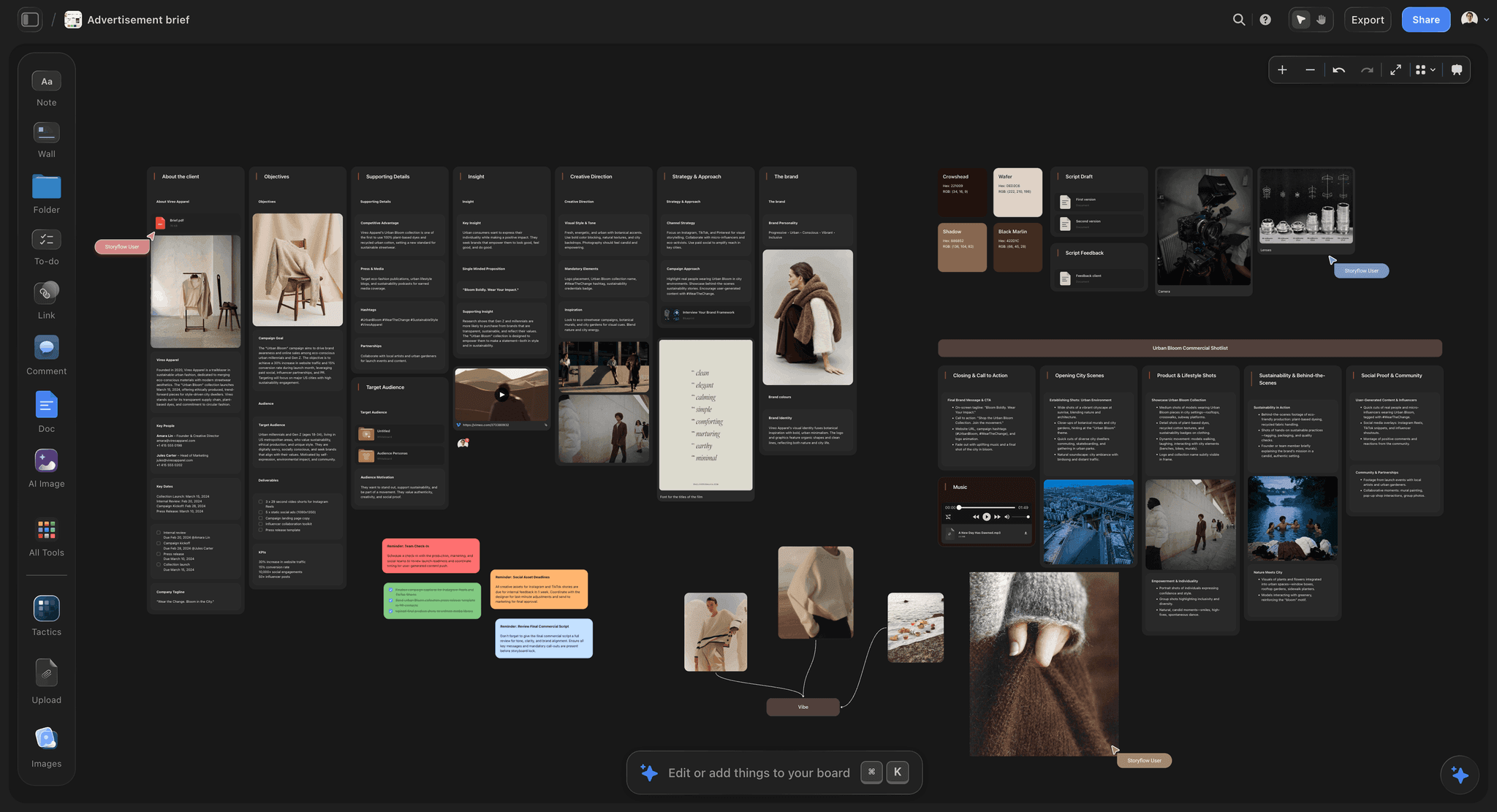
Best for: Writing and sharing a visual brief that is built from the client's files, read beside the references, and opened by the client with no account.
Storyflow is a visual AI workspace: an infinite canvas where a creative project's notes, to-dos, tables, documents, images, moodboards and charts sit together on boards, and an AI agent that reads the board and builds on it. It is our own product, and it is first here because a visual brief is a canvas problem and the handoff test is a reading problem. The page for this job is the AI creative brief generator, and the creative brief template opens the same structure by hand.
A visual brief needs three things in one place: the references that demonstrate intent, the written reasoning that says why those references and not others, and the constraints. In most workflows those live in three tools, and the freelancer receives a document with a link to a Pinterest board and an attachment. Each hop loses context. In Storyflow all three sit on one board, and the AI reads that board when it writes or reviews the brief.
Key features
- AI turns a brief into a board. Attach the client's deck, brand book or call notes and pick Brief my campaign. Storyflow's AI builds ten walls: the client, the campaign overview, the target audience, the goals with numbers, the brand, the creative strategy, the media plan, the visual identity, the market context and the timeline. Deep sections such as brand guidelines and the moodboard open as nested boards behind folder tiles. It asks who the client is only when you named neither client nor campaign, and where images should come from.
- Blanks, not inventions. Where the client gave no figure or date, the wall carries a marked blank rather than a made-up number. A brief with an honest blank is a question you can send on day one.
- A designed creative brief to send. Pick Creative brief from the Export menu, or ask "Build a creative brief from my board". Storyflow lays out pages in the order a brief is read: the job and the objective with a number, the audience, the single-minded proposition, tone and mandatories, deliverables and channels, timeline and budget, and an approval line for a name and a date. You edit any page by hand, present it fullscreen and export every page as one PDF.
- An advertising brief when the job is one piece of work. Ask the AI for an advertising brief and it builds eight walls in reading order, from the client to the insight and the creative direction, with the brand's colours beside them.
- References beside the reasoning. Pick Build a moodboard for my project and the AI collects and lays out references. A note saying "the important thing in this one is the restraint in the palette" sits next to the image it is about, which is the direct answer to the adjective trap.
- AI that reads the brief back. "What's missing here?" lists the gaps; "Review what's on this board" gives notes on what misses the stated goal. This is the use of AI the handoff test rewards.
- Infinite canvas with drag and drop, tables and to-dos. Deliverables can sit in a table, dates in to-dos with assignees, references in open space. Rows are kept in the order you type them; a table cannot be sorted.
- Templates. 200+ Tactics, expert creative templates such as AIDA and StoryBrand, drop onto the canvas when a brief needs a framework.
- Share a link with clients, no account needed to view. A view-only link opens with no account; to comment or draw, the visitor signs in. Presentation mode steps through the brief fullscreen, one wall, note, image or document at a time. Boards also export as PNG, SVG or PDF.
- Real-time collaboration. Teams co-edit on every paid plan, and anyone a paid member invites to a board joins free, which suits a freelancer who touches the project for two weeks.
- Works from ChatGPT and Claude. Storyflow's MCP connector lets ChatGPT, Claude, Gemini and Grok read your Storyflow projects and build boards and documents in them, so "brief this campaign on my client board" works from the chat. Setup is on the MCP page.
Pricing
Storyflow is paid-only today; its Free plan launches before the end of 2026, and anyone a paid member invites to a board joins free. Plus: $7.99/month billed annually ($9.99 monthly), with unlimited projects, images, files and links and the full Tactics library. Pro: $14/month billed annually ($19 monthly), adding AI image generation, memory across conversations and more AI usage. Max: $39/month billed annually ($49 monthly), with the most AI usage and a Team Workspace with roles and permissions. See Storyflow pricing.
Pros
- The AI writes the brief from the client's own material and marks what is missing.
- The brief, the references and the designed brief PDF share one board.
- Clients open a view-only link with no account, and invited collaborators join free.
- The same boards are reachable from ChatGPT and Claude.
Cons
- No sign-off record: the designed brief has an approval line to fill in, but Storyflow does not record who approved a brief or when, and has no version compare.
- No database of briefs to filter by client, owner or status, and no intake form. Notion and Asana do those better.
- No PPTX export or presenter notes; Canva has the larger template library and finer layout control.
- Browser only, best built on a laptop, and no free plan yet.
Verdict: Storyflow is our pick for writing and sharing a visual brief, because the brief is built from the client's files and read beside the references. Pair it with Notion or Asana when you run a queue of briefs that needs filtering or tracking.
2. Milanote
Best for: A visual brief arranged by hand on a free plan, where Storyflow suits a brief built from the client's files by AI.
Milanote is the most pleasant tool here for building a visual brief by hand, and for a brief that is mostly a visual direction it is close to ideal. Columns, captions, notes and swatches all behave, and the restrained defaults make a Milanote brief read as considered rather than as a working file. Putting two references side by side with a caption underneath is trivial, which is the single most useful move in visual briefing. Unlike Storyflow, Milanote has no AI that builds the brief or the board from your material, so every card is placed by you.
Sharing protects the handoff: Milanote's help centre says a shared board can be viewed "without needing a Milanote account"; to comment, the viewer signs up for a free account. That is the same shape as Storyflow's view-only link.
Where it sits behind for briefing: the unglamorous half (deliverables, formats, mandatories) lives in notes rather than in a designed brief, and the free plan's 100 notes, images or links fill quickly on a reference-heavy brief.
Pricing: Free plan with 100 notes, images or links and 10 file uploads. Paid is $9.99 per person a month billed annually, or $12.50 monthly.
Verdict: Choose Milanote over Storyflow when cost must be zero and you want to arrange every reference yourself. Choose Storyflow when the brief should be drafted from the client's files and turned into a designed PDF.
3. Canva
Best for: A polished brief document the client files and forwards, where Storyflow suits a brief that stays beside the references while the work happens.
A large share of briefs are also artifacts: a document the client keeps, forwards and refers back to when they disagree with what was delivered. For that job Canva produces the best-looking result with the least effort. References sit in a laid-out page with typography that does not undermine them, the non-visual fields fit into a designed table, and PDF export gives you something dated and durable.
Its limit for briefing is that pages are fixed frames, so a brief in Canva is composed rather than worked out. Teams tend to work out the direction elsewhere and assemble in Canva. Storyflow builds the designed creative brief from the board where the direction was worked out; Canva has the larger template library and finer layout control for the final polish.
Pricing: Canva Free and Canva Pro (see Canva's pricing page; Canva's site could not be read automatically today, so no figure is quoted).
Verdict: Choose Canva over Storyflow when the brief's appearance matters more than its connection to the references. Choose Storyflow when the brief should be designed straight from the board the team works on.
4. Notion
Best for: A text brief inside a team wiki, or a database of many briefs, where Storyflow suits one brief read beside its references.
Notion is the most important tool on this list for the half of briefing nobody enjoys. Deliverables with formats and dimensions, dates, budget, mandatory brand elements, legal constraints, channel specs and the approval chain are boring, they are where most rework starts, and they want a database. Notion handles that properly, keeps it searchable, and lets you filter every brief by client, owner or status, which Storyflow cannot do.
Templates make a team's briefs consistent, which raises the floor across many briefs written by many people. Notion publishes a creative brief template.
Against it for visual briefing: a gallery of uniform cards cannot express "this one, not that one, and here is the difference", and a reference set in Notion reads as an attachment rather than as the argument. Unlike Storyflow, Notion has no AI that builds the brief as a board beside the references.
Pricing: Free plan. Plus is $10 per seat a month billed annually, or $12 monthly.
Verdict: Choose Notion over Storyflow when the brief is a page in a system of record or one row in a queue of briefs. Many teams keep the queue in Notion and the brief the creative team reads in Storyflow.
5. Loom
Best for: Tone and reasoning recorded over the references, as a supplement to a written brief in Storyflow or a Doc.
A three-minute recording walking through the references, saying what matters in each and what to ignore, transfers more usable intent than most written briefs, and it takes less time to make than writing would. The reason is tone. Emphasis, hesitation and the aside that begins "the client will say they want X, but what they respond to is Y" are things people say aloud and rarely write down. That material is often the most valuable content in a briefing, and text briefs lose it.
Video cannot be searched, so a brief that exists only as a recording cannot be checked during the work. The reliable pattern is a pairing: record the walkthrough for the reasoning and tone, and keep the references, constraints and decisions somewhere readable, such as a Storyflow board where the Loom link sits as a card beside the brief.
Pricing: Starter is free with 25 recordings of up to 5 minutes each. Business is $18 per user a month and Business + AI $24; annual billing saves up to 17%, per Loom's pricing page.
Verdict: Loom is an excellent supplement to a brief and a poor substitute for one. Use it with Storyflow, not instead of it.
6. FigJam
Best for: Briefing a design team that already works in Figma, where Storyflow suits a brief that clients, copywriters and producers also read.
For a design team in Figma, FigJam is a strong choice on proximity: the brief sits in the same file tree as the work, so it is open when the work is open. Spatial arrangement supports the reference-pair move, comments anchor questions to a specific image, and Figma's pricing page says that on a paid plan "you can let others view and comment on your files without purchasing extra seats". Figma publishes a creative brief template for FigJam.
Against it: non-designers often treat Figma as foreign territory, which matters when the brief's readers include clients and producers, and the non-visual half lives elsewhere. Unlike Storyflow, FigJam has no AI that builds the brief from the client's files or designs it as a PDF.
Pricing: Free on Figma Starter. A Collab seat on Figma Professional is $3 a month.
Verdict: Choose FigJam over Storyflow when every reader of the brief is a designer already in Figma. Choose Storyflow when the client and the wider team must read it too.
7. Google Docs
Best for: A free text brief that every external collaborator can open, where Storyflow suits a brief built around references.
Google Docs earns its place on universality, which matters more for briefs than for almost any other document. The recipient is often external: a freelancer, an agency, a contractor who will not create an account for your tool. A Doc opens for all of them, comments and suggestions work, and version history is automatic. Images embed inline next to the text about them, which handles the reference-pair move adequately if not beautifully.
It is weak at visual arrangement and comparison, and long briefs in Docs drift toward completeness rather than clarity, which is the wrong direction for the handoff test. Unlike Storyflow, it has no AI that drafts the brief from the client's deck onto a board.
Its real strength: a Google Doc brief with an explicit "what this is not" section beats an elegant brief in a tool the freelancer never opened.
Pricing: Free with a Google account; Google Workspace business plans are priced per user.
Verdict: Choose Google Docs over Storyflow when the brief is only text and the budget is zero. Choose Storyflow when the brief is mostly references and needs to be read beside them.
8. Miro
Best for: The workshop where the brief gets built, where Storyflow suits the brief you hand over afterwards.
Miro's place in briefing is the kickoff where stakeholders align on direction. Its facilitation tools are valuable here: Miro's pricing page lists timer, voting and private mode from the Starter plan, and private voting surfaces that the marketing lead and the founder hold different pictures of "premium" before that becomes a rejected first round. Miro's AI page says its AI can turn a brief into a full campaign, and Miro publishes a creative brief template.
As the brief you hand over, a workshop board is harder to read cold: a freelancer opening it cannot always tell conclusions from discarded exploration. Storyflow has no voting or timer, so run the workshop in Miro and write the brief that survives the handoff in Storyflow.
Pricing: Free plan with 3 editable boards. Starter is $8 per member a month billed annually ($10 monthly).
Verdict: Choose Miro over Storyflow for a live alignment workshop with voting. Choose Storyflow for the brief that comes out of it.
9. Asana
Best for: Turning approved briefs into tracked, owned work, where Storyflow suits writing and reading the brief itself.
Asana is where a brief becomes accountable. Its pricing page describes Forms on Starter as intake forms that "capture requests and details and automatically create tasks", so a brief request arrives with the fields you asked for and lands in a project with an owner and a date. For a creative operations team running dozens of briefs a month, that queue is the product.
Asana is weaker at the brief's visual half: creative direction lives in task descriptions and attachments, so the references read as an appendix. Storyflow and Asana fit together: the brief is written and read on a Storyflow board, and the approved brief becomes tracked tasks in Asana.
Pricing: Personal is free for up to 2 users. Starter is $10.99 per user a month billed annually ($13.49 monthly); Advanced is $24.99 ($30.49 monthly).
Verdict: Choose Asana over Storyflow for brief intake and tracked delivery. Keep the brief the creative team reads in Storyflow.
10. Pinterest
Best for: Collecting references before the brief exists, where Storyflow is where the chosen references get a sentence beside them.
A Pinterest board sent as a brief is common and it is not a brief, which is why it sits low here even though Pinterest is excellent at what it does. It gathers references superbly and carries no intent. There is no way to say which aspect of an image matters, what is ruled out, or what the constraints are, so the recipient infers the argument from a wall of pins. Different people infer different arguments, which is the adjective trap with pictures.
Pricing: Free.
Verdict: Choose Pinterest for gathering; choose Storyflow for the brief the gathered images belong to.
11. Google Slides
Best for: A brief that is walked through in order in a meeting and then left behind, where Storyflow suits a brief that stays open beside the work.
Slides deserves a place because linearity is useful in briefing. A brief has an argument with an order: the problem, the audience, the direction, what it is not, what you are making. Slides enforces that sequence, and the recipient reads it in the order you intended. Everyone can open it, commenting is understood, and version history is automatic.
It is weak on comparison at useful size, and long Slides briefs become a scroll of screenshots. For a brief that needs to be walked through and then left behind, it is more effective than its reputation. Storyflow's designed creative brief keeps the read-in-order pages, and its presentation mode steps through the board fullscreen; Slides is the free and familiar route.
Pricing: Free with a Google account; included with Google Workspace.
Verdict: Choose Google Slides over Storyflow for a free, linear walkthrough. Choose Storyflow when the walkthrough should come from the same board as the references.
12. A One-Page Template
Best for: Any team, in any tool including Storyflow, that writes briefs too long to survive a cold read.
The twelfth entry is a constraint rather than a tool: a brief that must fit on one page, in whatever software you already have. The page limit forces the decisions that make a brief survive. You cannot fit four adjectives and their justifications, so you write the one thing that matters. You cannot include eleven references, so you pick three and say why. You cannot defer the negatives, because there is no room to be vague.
Long briefs feel thorough and score worse on the handoff test, because completeness and clarity are different properties and the second is what the stranger needs. Complex projects need more than a page; a one-pager plus a reference set is really two artifacts, which is the shape a Storyflow board holds: the one-page brief as a document and the references beside it. Storyflow can also lay a board out as a designed one-pager.
Pricing: Free.
Verdict: Apply it to every tool on this list. It is the highest-leverage free change available.
The Best Tool for Writing and Sharing a Creative Brief
Storyflow is the best tool for writing and sharing a creative brief when the brief has to be read beside the work: its AI writes it from the client's files, designs it as a PDF, and the client opens the board with no account. Notion is the honest pick for a text brief in a team wiki, and Google Docs is the free default.
Writing and sharing are two different jobs, and most tools are good at one. The table separates them.
| Tool | Writing the brief | Sharing it with the client | Pick it when |
|---|---|---|---|
Storyflow | Brief my campaign builds a ten-wall brief from your notes or the client's files, beside the references | View-only link with no account, sign in to comment; presentation mode; a designed creative brief exported as one PDF | You want the brief drafted for you and read beside the work |
Notion | A reusable brief page with embeds, and a creative brief template | Page permissions to edit, comment or read | The brief lives in a team wiki or a queue of briefs |
Asana | An intake form that creates the brief as a task | Inside the project with owners and deadlines | Each approved brief must become tracked work |
FigJam | A creative brief template on a whiteboard | Viewers and commenters free on paid Figma plans | Your design team already lives in Figma |
Miro | A creative brief template on a workshop board | A shared board link | The brief starts as a workshop |
Canva | Brief templates on fixed pages | Share, present or export a PDF | The brief is a polished document |
Google Docs | A blank document or your own template | Comments, suggestions and version history | The brief is only text |
Why the brief belongs on the board. A brief in a document gets approved and then forgotten, because the work happens somewhere else. A brief on the same board as the references and the drafts stays in view, so a note in week three can be checked against what was agreed in week one.
What Storyflow does not do for briefs. It has no database of briefs to filter by client, owner or status, no intake form and no recorded sign-off. Run a queue of briefs in Notion or Asana and keep the brief the creative team reads in Storyflow. The wider category is covered in The 10 Best Creative Brief Tools in 2026, and briefing from the chat in writing and sharing a creative brief with ChatGPT or Claude.
What It Takes by Hand vs in Storyflow
A visual brief built by hand is retyping and re-placing: the client's deck becomes a brief, the call notes become cards, the references get collected, captioned and laid out, then the brief is redesigned as a document. In Storyflow each of those is three moves: attach or paste, answer a question or two, accept the proposal.
Storyflow has published recorded times for three jobs that sit inside briefing work. Each Storyflow figure below is the agent time of one recorded run, rounded up; the by-hand figures are our estimates.
| Job | By hand (our estimate) | Storyflow AI | How the Storyflow figure was measured | What you do in Storyflow |
|---|---|---|---|---|
Messy notes (such as call notes) into an organized board | About 45 min | 3 min | One recorded run, rounded up | Paste the notes, ask for organized walls, accept |
A PDF (such as a spec sheet) into tables | About 45 min | 2 min | One recorded run, rounded up | Attach the PDF, ask for tables, accept |
A pitch PDF built from a board | About 4.5 hrs | 3 min | One recorded run, rounded up | Ask for a pitch PDF from the board, then edit |
The by-hand estimates price the work at 1.5 minutes per card, row or to-do, 12 minutes per picture and 30 minutes per PDF page, slide or designed page. Each recorded figure is the agent time of a single run shown on Storyflow's homepage, rounded up, and it measures the first draft, not your edits to it. No time has been recorded for the campaign brief or the designed creative brief, so those are counted in steps below.
| Job | Steps by hand across the usual stack | Steps in Storyflow |
|---|---|---|
A creative brief from a client's deck | 6: read the deck, open a template, retype each section, find the gaps, format, export | 3: attach the deck, answer a question or two, accept |
A reference set for the brief | 5: search, save, upload, arrange, caption | 3: pick Build a moodboard for my project, answer a question or two, accept; then caption |
The brief as a designed document | 4: open a design tool, pick a template, paste each section, export a PDF | 2: pick Creative brief from the Export menu, export the PDF |
The brief in front of the client | 4: export, write an email, attach, chase a reply | 1: share the view-only link, or present the board fullscreen |
A check of the brief before it goes out | 3: reread, compare with the call notes, list the gaps | 1: ask "What's missing here?" |
The consolidation argument. The usual briefing stack is a document for the brief, a Pinterest or Milanote board for references, a design tool for the client copy, a task list and a chat assistant, with the brief copied between them. In Storyflow those sit on one board the AI reads, from $7.99 a month billed annually, and the same board is reachable from ChatGPT and Claude through the connector. On Pro, one subscription covers what people otherwise pay ChatGPT, Milanote, Notion, a storyboard tool and a reference library for: one app instead of five. Brief intake and tracked delivery stay in Notion or Asana if you run a queue.
How to Write a Visual Brief, Step by Step
Write a visual brief on one Storyflow board in seven moves: draft the brief from the client's material, close the gaps, pair the references, write the negatives, fix the deliverables, design the brief, share it. The AI drafts the first and checks the second; the pairs and the negatives are yours, because they are the judgement.
| Step | What you do | Where | What you get |
|---|---|---|---|
1. Draft the brief | Attach the client's deck, brand book or call notes and pick Brief my campaign | Storyflow | Ten walls, with marked blanks where facts are missing |
2. Close the gaps | Ask "What's missing here?" and send the list to the client | Storyflow | A short list of questions, asked on day one |
3. Pair the references | Pick Build a moodboard for my project, then cut it to three to five pairs, each with one sentence on the difference | Storyflow | References that locate the intent between two points |
4. Write the negatives | Add a "not this" note: what the work must not be, with one reference to avoid | Storyflow | Most wrong answers ruled out in one line |
5. Fix deliverables and dates | Ask for a table of deliverables with format, size and channel; add to-dos with due dates and assign them yourself | Storyflow | The unglamorous half, on the same board |
6. Design the brief | Pick Creative brief from the Export menu; edit the pages by hand | Storyflow | A designed brief exported as one PDF |
7. Share and run the handoff test | Send the view-only link; ask a colleague who was in no meetings to say it back | Storyflow | A brief that has survived one cold read before work starts |
8. Queue or track it, if you run many | Log the brief as a row or a task | Notion or Asana | A filterable queue with owners |
What the AI does and does not do in this method. Storyflow's AI drafts the brief, collects references, builds tables and designs the brief document, and reads the board when you ask for a review. It does not set assignees or send reminders, and it does not decide which reference pair is right; that is the brief writer's job. It reads the current board plus up to five documents and three other boards you attach, and it sees an image's pixels only when you select it.
The one rule that makes the method work. Do not send the brief until step 7 has run once. A brief nobody outside the meeting has read is a draft.
A Worked Example: A Packaging Refresh Briefed Visually
Here is the method on one illustrative project: a packaging refresh for a small tea brand, briefed by the client in an eight-slide deck and a phone call, handed to a freelance designer who was in neither. The brief is built on one Storyflow board and sent the same afternoon.
The draft. Attach the deck, paste the call notes and pick Brief my campaign. The AI asks where images should come from; answer "web search" because the brand and its competitors are real. It stages ten walls. Two blanks are marked: the print budget and the launch date. Accept the proposal.
The gaps. Ask "What's missing here?". The list returns the two blanks plus one the deck never addressed: who signs off the final artwork. Send the three questions to the client.
The pairs. The deck said "premium but warm". Pick Build a moodboard for my project, then cut the result to three pairs. Pair one: a premium tea tin with heavy gold foil (not this) and one with a single uncoated stock and a small foil mark (this), with the note "premium through restraint, not shine". Pair two and three do the same for "warm" and for the type.
The negatives. One note: "Not botanical illustration, no gold beyond one mark, not like the 2023 limited edition." The freelancer's first three wrong ideas are gone before they start.
The deliverables. Ask for a table of deliverables: three tin sizes with dielines, a shipping box, a shelf card. Each row carries the format and the size the printer gave. Add to-dos for first concepts and final artwork with due dates, and assign them yourself.
The designed brief. Pick Creative brief from the Export menu. The pages come back with the objective, the proposition ("the tea you keep on the counter, not in the cupboard"), tone and mandatories, the deliverables, the dates with the launch date still blank, and an approval line. Edit two lines and export the PDF for the client's files.
The handoff. Send the freelancer the view-only link. Before that, a colleague who knows nothing about the job reads the board for five minutes and says it back; she reads "warm" as orange, so a fourth pair goes in. The client opens the same link with no account and signs in to comment on pair two.
What Storyflow did not do here. It did not record the client's approval; the signed PDF and the client's email are the record. A brand running forty of these a year would log each brief in Notion or Asana as well.
What a Visual Brief Should Include: The Brief Canvas, Part by Part
A visual brief has eight parts, and on a brief canvas each has a place: the job and objective, the audience, the proposition, the reference pairs, the negatives, the deliverables, the dates and budget, and the approver. Storyflow builds most of them from the client's files and leaves the pairs and negatives to your judgement.
| Part | What to write | Where it sits on a Storyflow board | How Storyflow builds it |
|---|---|---|---|
The job and objective | What is being made and the movement it must cause, with a number | Campaign overview and goals walls | Brief my campaign, from the client's files |
The audience | One reader: who they are, what they believe now, what they should believe after | Target audience wall | Brief my campaign, or Profile my target audience |
The proposition | The single sentence the work says | Creative strategy wall; page 2 of the designed brief | Drafted by the AI; you choose between candidates |
The reference pairs | Three to five "this, not this" pairs, one sentence each | Open canvas beside the brief | Build a moodboard for my project, then cut and caption |
The negatives | What the work must not be, with one reference to avoid | A "not this" note | Written by you |
The deliverables | Every asset with format, size and channel | A table | Ask for a table of deliverables |
Dates and budget | The real dates and the money, or a marked blank | Timeline wall; to-dos with due dates | Brief my campaign leaves blanks where nothing was given |
The approver | One named person who signs | Approval line on the designed brief | Creative brief from the Export menu |
The three checks before work starts. The brief names one approver. Every deliverable has a format. Every adjective has a reference pair. A brief that passes those three survives the first round of feedback far more often than one that does not.
Brief Tools for Standardizing Creative Briefs Across a Team
The tools for standardizing creative briefs split into three kinds: one that builds every brief in the same shape (Storyflow), one that standardizes the fields (Notion), and one that standardizes intake (Asana). Most teams need a shape and a queue, and the shape is what the creative reader sees.
| What you standardize | Tool | How | What it does not fix |
|---|---|---|---|
The shape of every brief | Storyflow | Brief my campaign always builds the same ten walls; the designed creative brief always has the same pages; a project can be saved as a template and reused | No filterable queue of briefs |
The fields of every brief | Notion | A database template with required properties | The visual half reads as attachments |
The intake of every request | Asana | A form that creates a task with the fields you set | The brief's references live in attachments |
A framework the team argues in | Storyflow Tactics | 200+ templates such as AIDA and StoryBrand dropped on the canvas | Does not write the brief for you |
A familiar text format | Google Docs | A template document everyone copies | People delete the fields they find awkward |
The standard that matters most is not a field list. It is three habits applied by every writer: a reference pair for every adjective, a "not this" section, and one named approver. Put those in the template, whichever tool holds it.
Best Brief Tool by Who Is Briefing
The best brief tool depends on who writes the brief and who reads it. Storyflow is our pick for agencies, freelancers and in-house creative leads who brief visual work; Notion and Asana win where the job is running many briefs as a queue, and Google Docs wins at zero budget.
| Who is briefing | Their main briefing job | Storyflow does | Choose instead when |
|---|---|---|---|
Agency account or strategy lead | Turn a client's deck into a brief the creative team can work from | Brief my campaign from the deck; designed brief PDF for the client | Notion, for a queue of briefs across many clients |
Freelance designer briefed by clients | Get a usable brief out of a vague client | Builds the brief from the client's notes and lists the gaps to send back | Google Docs, when the client will only work in a Doc |
In-house brand or marketing lead | Brief agencies and freelancers consistently | Same ten walls every time; view link with no account | Asana, when requests arrive through an intake form |
Art director | Transfer visual intent without adjectives | References and reasoning on one board; moodboard built from a brief | FigJam, when every reader is a designer in Figma |
Producer or video lead | Brief a shoot or an edit | The brief, references and shot list on one board | Loom on top, for tone |
Creative operations manager | Run forty briefs a month | Holds each brief the creative team reads | Asana or Notion for the queue, tracking and reporting |
Freelancers writing effective project briefs for themselves (a brief back to the client confirming the job) can use the same method: draft from the client's notes, list the gaps, send the view-only link. A brief the client confirms in writing is the cheapest protection a freelancer has.
Pricing: What Visual Brief Tools Cost in 2026
Visual brief tools cost between nothing and about $25 a seat a month in 2026. Storyflow Plus is $7.99 a month billed annually; Miro Starter is $8 per member, Milanote $9.99 per person, Notion Plus $10 per seat and Asana Starter $10.99 per user, all billed annually. FigJam's Collab seat is $3 a month.
| Tool | Plan | Price | Billing shape | Free plan |
|---|---|---|---|---|
Storyflow | Plus | $7.99 a month ($9.99 monthly) | Per month, billed annually or monthly | Not yet: launches before the end of 2026; invited collaborators join free |
Storyflow | Pro | $14 a month ($19 monthly) | Per month, billed annually or monthly | Not yet |
Storyflow | Max | $39 a month ($49 monthly) | Per month, billed annually or monthly | Not yet |
Milanote | Per person | $9.99 a month ($12.50 monthly) | Per person, billed annually or monthly | Yes: 100 notes, images or links; 10 uploads |
Canva | Free, Pro | See Canva's pricing page | See Canva | Yes |
Notion | Plus | $10 a month ($12 monthly) | Per seat, billed annually or monthly | Yes |
Loom | Business | $18 a month | Per user; annual saves up to 17% | Yes: 25 recordings, 5 min each |
FigJam | Collab seat | $3 a month | Per seat, on Figma Professional | Yes, on Figma Starter |
Google Docs | Free | $0 | Workspace business plans per user | Yes |
Miro | Starter | $8 a month ($10 monthly) | Per member, billed annually or monthly | Yes: 3 editable boards |
Asana | Starter | $10.99 a month ($13.49 monthly) | Per user, billed annually or monthly | Yes: 2 users |
What the price buys. A brief tool is cheap next to one revision round caused by an unclear brief. The useful comparison is what each plan includes: Storyflow's AI agent is part of every paid plan, Loom's AI is a separate Business + AI tier at $24 per user a month, and Storyflow charges per account rather than per reader, since a view-only link opens with no account and invited collaborators join free.
Free vs Paid: Which Brief Tools Are Free
Free briefing is real in 2026: Google Docs, Google Slides, Pinterest, Milanote, Notion, Miro, Asana, FigJam, Canva and Loom all have a free route. Storyflow is not a free option today. What a paid Storyflow plan adds is the brief and the board built from the client's files, and a designed brief to send.
| Tool | Free plan | The cap that matters | First paid step |
|---|---|---|---|
Storyflow | Not yet | Launches before the end of 2026; anyone a paid member invites joins free now | Plus, $7.99 a month billed annually |
Milanote | Yes | 100 notes, images or links; 10 uploads | $9.99 per person a month billed annually |
Notion | Yes | See Notion's pricing page for limits | Plus, $10 per seat a month billed annually |
Miro | Yes | 3 editable boards; no timer or voting | Starter, $8 per member a month billed annually |
Asana | Yes | 2 users; no Forms | Starter, $10.99 per user a month billed annually |
FigJam | Yes | Figma Starter limits | Collab seat, $3 a month |
Loom | Yes | 25 recordings, 5 minutes each | Business, $18 per user a month |
Google Docs | Yes | None that matters for a brief | Workspace, per user |
When free is enough. One brief at a time, references you are happy to arrange by hand, and a client who will open a Google Doc: Docs plus Milanote's free plan will carry it.
When paying for Storyflow makes sense. When briefs arrive as decks and call notes that somebody has to turn into a brief, when the client must read it without creating an account, and when you want the designed brief built from the same board. Plus covers unlimited projects, images, files and links.
Spend the free fixes before any plan. Write the negatives, replace adjectives with reference pairs and cap the brief at a page. And do not pay for AI that only pads bullets into paragraphs: the AI worth paying for builds structure from the client's own material, leaves blanks rather than inventing numbers, and reads the brief back for gaps.
Tools to Avoid for This Job
The tools to avoid are habits more than products: a reference board with no writing, a brief that only exists in a meeting, an adjective list, and a brief in a tool the recipient cannot open. A Storyflow board with a sentence beside every reference and a no-account link avoids all four.
A reference board with no writing. A Pinterest link or a bare moodboard is a collection, not a brief, and every recipient infers a different argument from it.
A brief that only exists in a meeting. If the direction was agreed verbally and never written, there is no brief, and the first review will establish that expensively.
An adjective list. It cannot fail on paper and cannot succeed in practice.
A brief in a tool the recipient cannot open. External collaborators will not create accounts. Check before you build anything elaborate: Storyflow's view-only links, Milanote's shared boards and Google Docs all open without a new account.
A brief that is only a video. A Loom walkthrough without a written brief beside it cannot be checked during the work.
What No Tool on This List Does
No tool on this list makes the client decide, captures the politics nobody writes down, or records a sign-off you can rely on in a dispute, Storyflow included. Storyflow's AI can list a brief's gaps, which is the closest any tool comes to telling you the brief is ambiguous.
None of them fully tell you the brief is ambiguous. Ask Storyflow "What's missing here?" and it lists missing fields and goals with no number. No tool flags that "elevated" is doing load-bearing work with no reference attached; the colleague read still does that.
None of them make the client decide. Many vague briefs are vague because the decision has not been made, and the brief is honestly reporting that. No software converts an undecided client into a decided one, and a brief that papers over the indecision fails later rather than never. Storyflow's marked blanks at least make the open decisions visible.
None of them capture what the client will not say. The most useful briefing content is often political: which stakeholder has veto power, what got rejected last year and why, what the real objection to the previous agency was. It lives in conversation and rarely gets written. Every tool here would hold it if somebody typed it.
None of them replace a signed approval. Storyflow's designed brief has an approval line, Notion and Google Docs keep version history, and Asana can mark a task complete; the dependable record is still the client's written yes, kept with the brief.
Prices and Sources Checked October 11, 2026
Every competitor price and plan limit on this page comes from the vendor's own page, read on October 11, 2026 unless a row says otherwise. Where a page could not be read or showed no price, the page quotes no number. Storyflow claims come from our own product as it ships.
| Vendor | Page | What we took from it |
|---|---|---|
Storyflow | Plus, Pro and Max prices; the Free plan date | |
Milanote | Free limits, per-person prices; view without an account, free account to comment | |
Notion | Plus price (dollar figures as reconciled October 10 to 11, 2026); the template | |
Asana | Personal limit, Starter and Advanced prices, Forms on Starter | |
Figma | Figma pricing and its creative brief template | Collab seat price; viewers and commenters free on paid plans |
Miro | Miro pricing, Miro AI and its creative brief template | Free limit, Starter price, timer, voting and private mode on Starter |
Loom | Starter limits, Business and Business + AI prices, annual saving | |
Canva | Not readable automatically today; no price quoted | |
Free with a Google account | ||
Free |
The Notion, Figma and Miro template links were checked for the reviewed sibling post The 10 Best Creative Brief Tools in 2026 and are reused here.
The Bottom Line
Storyflow is the best tool for writing and sharing a visual brief in 2026 because the brief, the references and the reasoning share one board that its AI builds from the client's files, and the client reads it with no account. Notion, Asana and Google Docs remain the right picks for a wiki brief, a tracked queue and a free text brief.
The brief is read by somebody who was in none of the conversations, and the measure that matters is what they produce from it alone. Against that measure, adjectives are close to worthless and reference pairs are close to decisive.
Storyflow is our pick because references and the reasoning about them belong on one surface, because its AI drafts the brief from the client's own material and marks what is missing, and because the designed brief and the board come from the same place. It keeps no sign-off record and no queue of briefs, so teams running many briefs pair it with Notion or Asana. Start from the creative brief template or let the AI creative brief generator draft the first one.
But the tool is the smaller half. Write the negatives, swap every adjective for two images and a sentence, and keep it to a page. Those three habits cost nothing.
A brief is not what you wrote. It is what somebody else makes from it.
FAQ: Visual Brief Tools
What is the best visual brief tool in 2026?
Storyflow, which is our own product. Its AI builds the brief from the client's files on one board beside the references, designs it as a creative brief PDF, and the client opens a view-only link with no account. Notion is the better pick for a text brief in a team wiki, Asana for turning briefs into tracked tasks, and Milanote for a hand-arranged board on a free plan.
What is a visual brief?
A visual brief is a brief whose main content is references and examples, each with a written note on what matters in it, plus an explicit list of what the work is not. It exists because adjectives do not transfer: "premium" produces a different image in every reader, while two references and a sentence about their difference do not. Storyflow holds it as one board.
What is the best creative brief software?
Storyflow is our pick for creative brief software when the brief is visual: Brief my campaign drafts ten walls from the client's files and the Export menu designs a creative brief PDF. Notion is the best creative brief software for a database of many briefs, Asana for intake forms that create tasks, and Canva for the most polished document.
What is a good brief builder tool?
Storyflow builds the brief for you: attach the client's deck or call notes, pick Brief my campaign, answer a question or two and accept the proposal. It leaves a marked blank wherever a figure or date is missing. Notion, Miro, FigJam and Canva offer brief templates you fill in by hand.
Can AI write a creative brief for me?
Yes, if it builds from real material. Storyflow's AI drafts the brief from the client's deck, brand book or notes and leaves blanks rather than inventing numbers; then "What's missing here?" lists the gaps. AI that only expands bullets into paragraphs makes a brief longer and harder to read cold, so use AI to structure and check, and write the reference pairs yourself.
How do I share a creative brief with a client?
In Storyflow, send the view-only link: the client opens the board with no account and signs in to comment or draw. Or present the board fullscreen in the meeting, or export the designed creative brief as one PDF for their files. In Google Docs, share with comment access; in Milanote, share a board link the client can view without an account.
Is Storyflow good for writing briefs?
Yes. Storyflow's AI drafts the brief from the client's files, puts the references and the reasoning on the same board, and designs the brief as pages you export as one PDF. It has no database of briefs to filter, no intake form and no recorded sign-off, so teams running a queue pair it with Notion or Asana.
What is the best free visual brief tool?
Google Docs with embedded references and an explicit "what this is not" section costs nothing and opens for every collaborator. Milanote's free plan covers a visual brief within 100 notes, images or links and 10 uploads. Storyflow is paid today, from $7.99 a month billed annually; its Free plan launches before the end of 2026, and anyone a paid member invites joins free.
How do you write a brief that a freelancer can actually work from?
Assume the reader was in no meetings and can ask you nothing. On a Storyflow board: draft the brief from the client's material, replace each adjective with a reference pair and one sentence, write the negatives, put the deliverables in a table with formats and sizes, and run the handoff test with a colleague before sending the link.
What should a visual brief include?
The job and objective with a number, the audience, the single proposition, three to five reference pairs with a note on each, an explicit list of what the work is not, the deliverables with formats and sizes, the dates and budget, and one named approver. Storyflow builds most of these from the client's files; the pairs and negatives are yours.
Why do creative briefs fail?
Usually because they were approved rather than understood. A list of agreeable adjectives passes review because nobody can object to it, and the disagreement surfaces at the first presentation. Fast approval of a vague brief is a warning sign. Storyflow's fix is reference pairs beside the words and marked blanks where a decision is missing.
Is a moodboard the same as a visual brief?
No. A moodboard shows references; a visual brief says what to do about them: which aspect matters, what is ruled out, the constraints and what is being made. In Storyflow the moodboard and the brief sit on the same board, so the references and the sentences about them travel together.
How long should a creative brief be?
Short enough that the recipient reads all of it: one page for most projects, plus a reference set. Storyflow's designed creative brief keeps to a few pages in reading order, and the references stay on the board beside it. Length reads as thoroughness to the author and as noise to the reader.
Should you include what you do not want in a brief?
Yes, and it is the highest-value section. Eliminating wrong answers is faster than describing the right one, and negatives are less ambiguous than positives. "No gradients, not illustrated, not like our 2024 campaign" removes more uncertainty in one line than a paragraph of aspiration. On a Storyflow board, give the negatives their own note with one reference to avoid.
What is the best canvas-based workflow from a product brief to a prototype?
Write the brief and references on a Storyflow board, run the handoff test, then hand the approved brief to the design tool where the prototype is built, usually Figma, with FigJam beside it for design-team notes. Storyflow keeps the brief, references and decisions; Figma holds the prototype. Storyflow does not build interactive prototypes.
Which brief tool works inside ChatGPT or Claude?
Storyflow. Its MCP connector lets ChatGPT, Claude, Gemini and Grok read your Storyflow projects and build boards and documents in them, so "brief this campaign on my client board" works from the chat and the brief lands on the board the client opens. Setup is on Storyflow's MCP page.
Does Storyflow have a free plan?
Not yet. Storyflow is paid-only today: Plus is $7.99 a month billed annually, Pro $14 and Max $39. The Free plan launches before the end of 2026, and anyone a paid member invites to a board joins free, which is how a freelancer or client gets onto a brief board without a seat.
What is the single change worth making to how we brief?
Replace every adjective with two reference images and a sentence about what separates them. It costs a few minutes, it fixes the failure behind most rejected first rounds, and it works in any tool. On a Storyflow board the pair and the sentence sit together beside the brief, so they reach the reader together.
Table of Contents
- Quick Picks: The Best Visual Brief Tools by Job
- Which Visual Brief Tool Should You Use?
- Comparison Table: 12 Visual Brief Tools at a Glance
- Frequently Asked: Writing and Sharing a Creative Brief
- What Is a Visual Brief?
- The Handoff Test
- How We Evaluated These Tools
- The Adjective Trap
- Detailed Reviews: 12 Visual Brief Tools
- The Best Tool for Writing and Sharing a Creative Brief
- What It Takes by Hand vs in Storyflow
- How to Write a Visual Brief, Step by Step
- A Worked Example: A Packaging Refresh Briefed Visually
- What a Visual Brief Should Include: The Brief Canvas, Part by Part
- Brief Tools for Standardizing Creative Briefs Across a Team
- Best Brief Tool by Who Is Briefing
- Pricing: What Visual Brief Tools Cost in 2026
- Free vs Paid: Which Brief Tools Are Free
- Tools to Avoid for This Job
- What No Tool on This List Does
- Prices and Sources Checked October 11, 2026
- The Bottom Line
- FAQ: Visual Brief Tools
- Related Reading
Templates to check out for this topic


Templates you can use in Storyflow
Every Storyflow board starts from real structure and an AI that reads the whole canvas. Open one of these templates and make it yours.


See Storyflow in Action
A visual AI workspace where every feature lives inside one canvas. No tab-switching, no context lost.
Build your entire board from a single message
Type what you need in the AI chat at the bottom of your canvas. The AI adds cards, headings, and structure directly onto your board.
Use expert frameworks as AI context
Type @ in the AI chat and choose any Tactic. The AI tailors every response to that framework instead of giving generic advice.
Turn your board into a mind map in seconds
Ask the AI to restructure your canvas as a mindmap. It connects your ideas into a visual hierarchy so you can see how everything relates.
Why Storyflow Exists
Storyflow actually began as a personal tool while working on creative and research projects.
We kept running into the same problem: ideas were scattered everywhere: notes, documents, and whiteboards.
Nothing helped us see how everything connected.
So we started building a workspace designed around how ideas actually grow.
→ Read how Storyflow was createdSara de Klein
Head of Product at Storyflow
Published: 2026-08-12
Extremely simple, seriously capable


See how easy it is to get started
Watch a real project come together, from a blank board to a finished plan, clicked through step by step.
Start creating with AI and become more productive
Transform your creative workflow with AI-powered tools. Generate ideas, create content, and boost your productivity in minutes instead of hours.