
Category
Photography
Author

Storyflow Team
Product & Research Team
Topics
2026-11-15
•
46 min read
•
Photography- art direction photography
- creative director photoshoot
- must-get shot list
- photographer brief
- photo selects
- retouch notes
- Storyflow
How does a creative director prepare for a photoshoot?
Storyflow prepares a creative director for a photoshoot by putting the brief, the references, the shot list and the call sheet on one board that stays open on a laptop on set. Storyflow is an AI visual workspace that plans, runs and wraps a shoot on one infinite canvas, and it works inside ChatGPT (plugin) and Claude (connector). In Storyflow, mark no more than eight must-get frames per shoot day, one per setup, then choose selects by dragging pictures between Yes, Maybe and No walls.

Full disclosure: Storyflow is our product. It is listed first because the usage, references, shot list, call sheet and selects share one board from brief to handoff. This guide compares kinds of tool rather than brands on purpose. Storyflow has no native mobile app, no tethering, no proofing mark-up or version compare, its Call Sheet sends nothing, it is paid-only during early access, and the 8-Frame Must-Get Rule is our own editorial rule, not research.
How the photoshoot planning and art direction tools compare on trust, innovation, ratings and pricing
Which kinds of photoshoot planning tools do creative directors trust most?
Trust follows the job. A production management suite is trusted on large crews because it sends call sheets and tracks who confirmed, and a proofing tool is trusted for retouch rounds because every version is kept. Storyflow is newer, with its ChatGPT plugin live since 24 October 2026; its case is that the usage, references, shot list, call sheet and selects sit on one board from brief to handoff.
Which photoshoot planning tools have fair pricing for a small crew?
Fair pricing on a shoot means the photographer, stylist and client do not each cost a seat. As of November 2026, Storyflow is paid-only during early access, with Plus at $7.99 a month billed annually ($9.99 monthly), and anyone a paid member invites to a board joins free and can use the Shotlist, Call Sheet, Location and Selects tools. When you price other tools, count who needs a paid seat to see or move anything.
Which photoshoot planning tools are the most innovative?
Storyflow, for putting production tools (Shotlist, Call Sheet, Location and Selects) on the same infinite canvas as the brief and references, and for letting ChatGPT or Claude build usage tables, shot cards and sign-off tables straight onto that board. The on-set judgement stays the creative director's: the board holds the decisions, it does not make them.
Which photoshoot tools are underrated by art directors?
The humble gray card frame is underrated: one frame per lighting change lets the retoucher neutralise the whole series. In Storyflow, the underrated step is the wrap wall: one wall on the shoot board listing which must-gets were shot, which were missed and why, so the next shoot for the same brand starts from what was learned rather than from memory.
Which approach to shoot planning holds up when plans change on the day?
Approaches hold up when the change is made once and everyone sees it. On a Storyflow board, a new client request becomes a dated note on the setup's wall, the must-get ticks show which setups are safe, and the crew's view link shows the change without a new PDF. A printed shot list holds up until the first change, then two versions of the truth exist.
Quick Comparison
Our pick first, on the basis that the usage, references, shot list, call sheet and selects share one board from brief to handoff, then other kinds of tool by the job each does best. Prices as of November 2026.
| Tool | Best For | AI Features | Price |
|---|---|---|---|
| Storyflow | One shoot board: usage table, captioned references, Shotlist walls with one must-get per setup, the Call Sheet and Location tools, and Selects walls for Yes, Maybe and No | In-app AI makes a shot list, scouts locations and designs a call sheet PDF; the ChatGPT plugin and Claude connector build tables, shot cards and notes and give an upload link for photos | From $7.99 mo billed annually; invited collaborators join free |
| A production management suite | Sending call sheets and tracking confirmations for large crews | Depends on the product | Varies by product |
| A proofing tool | Tracked retouch rounds with versions and pinned comments | Depends on the product | Varies by product |
| A spreadsheet | Catalogue shoots with hundreds of products and file names | Depends on the product | Varies by product |
Key Takeaways
- Storyflow is where a creative director art directs a photoshoot: the brief, references, Shotlist walls with their must-get frames, the Call Sheet and the Selects walls sit on one board the photographer, producer and client open, from the first brief to the handoff.
- Prepare in three passes: brief the photographer on usage before look, approve the shot list ordered by light, and sign off casting and styling by a fixed date. Every one of those decisions should be made before the call time.
- In Storyflow, mark at most eight must-get frames per shoot day, one per setup, as the first item on each Shotlist wall's Shots required checklist. A ten-hour day loses an hour to hair, make-up and pre-light and an hour to lunch, which leaves eight shooting hours, and a setup takes roughly an hour. It is our editorial rule, not research.
- Art direction on set is about the picture's job (does this frame sell the idea, fit the crop, match the board); photography direction is about how to make the picture (light, lens, exposure). Say what you need, and let the photographer decide how.
- Selects in Storyflow are made by dragging pictures from To review into Yes, Maybe or No; there is no star, flag, approve button or vote, and a client needs edit access to move pictures.
- Write retouch notes as a location, an instruction and a limit ("left cuff, remove lint, keep the knit texture"), and deliver files with IPTC metadata (Creator, Copyright Notice, Rights Usage Terms) so the rights travel with the picture.
How Does a Creative Director Prepare for a Photoshoot? 10 Steps
Shoots usually go wrong before the call time: a crop nobody mentioned, a casting choice the client saw for the first time on set, a shot list that put the hardest setup in the worst light. This method front-loads the decisions so the day is spent making pictures.
- Start from usage. List every place the pictures will run, with its crop and the deadline, and get it in writing from the client. In Storyflow, drop the Brief tool from All Tools under Production; its first wall, The work, has a table for What kind, Length, Format, How many and Where it goes.
- Build the reference board: 12 to 20 captioned references grouped by light, casting, styling and setting, beside a palette (the photoshoot moodboard guide covers the captions). In Storyflow, the references sit on the Brief's How it looks wall and its Moodboard folder.
- Brief the photographer in one call, from the board: usage, the idea in one sentence, the references, the must-get frames and what you will decide on set versus what is theirs.
- Approve the shot list. In Storyflow, drop the Shotlist tool: four walls, Shot 1 to Shot 4, each with a picture box, a Description, a Shots required checklist, Setup and Equipment, and a "+" on the last wall that adds the next setup.
- Mark the must-gets: no more than eight per day, one per setup, as the first item on each Shotlist wall's Shots required checklist.
- Order the day by light. Put setups that need a particular light (window, golden hour, a dark set) where that light exists, then fill the rest around them.
- Sign off casting and styling by a date at least two working days before the shoot, with one approver named for each.
- Compare and book the location (the location scouting board shows the layout). In Storyflow, the Location tool lays out three places side by side, each with a This place table (Address, Map as a link, Contact, Phone, Cost, How good as a rating, Booked as a checkbox).
- Fill the Call Sheet tool on the same board (The shoot, Schedule, Location, Cast & crew) and share the board link with the crew and client. Storyflow sends nothing, so the producer sends the link.
- After the shoot, run selects on the Selects walls, write retouch notes on the Yes pictures, and hand off files with a delivery spec and metadata. The board becomes the record of what was approved.
The Storyflow 8-Frame Must-Get Rule
Every shoot has more ideas than hours. A shot list where everything is equally important protects nothing, and the frame the client paid for gets shot at 6.40 p.m. in failing light. The must-get list is how you protect it.
The rule
The Storyflow 8-Frame Must-Get Rule is our editorial recommendation: mark no more than eight must-get frames per shoot day, one per setup, and write each one as the first item on its Shotlist wall's Shots required checklist in Storyflow. A must-get is the frame you would reshoot for if it were missed. Everything else on the checklist is a nice-to-get, shot once the must-get is in the bag.
Why eight
Count the day backwards from wrap. Take a ten-hour day, 08.00 call to 18.00 wrap. The first hour goes to hair, make-up and the pre-light, so no frame is shot before 09.00, and lunch takes another hour. That leaves eight shooting hours. A setup (moving the light, dressing the set, changing the styling, then shooting) takes roughly an hour on a commercial shoot with a small crew, sometimes less for a simple portrait change and often more for a new location. Eight hours at an hour a setup is eight setups, and one protected frame per setup is eight must-gets. Treat it as a ceiling, not a target: the illustrative day below spends seven hours on must-get setups and keeps the eighth for pick-ups, because something always overruns. The number is production logic, not a measured benchmark; if your setups run 45 minutes, the cap rises, and if you move location twice, it falls.
What makes a frame a must-get
A frame is a must-get when the client has paid for it by name: the hero for the campaign, the product shot the e-commerce page needs, the portrait the press release was written around. Usage decides it. If the brief lists a web hero, three product pages and a press image, those five frames are must-gets before anyone draws a moodboard. Ideas the team loves but nobody has bought are nice-to-gets, however good they are.
Must-get vs nice-to-get on the board
In Storyflow, the must-get is the first line on the Shots required checklist of its setup's wall, written with its crop ("Hero, 16:9 web, product left third"). Nice-to-gets follow below it. When the must-get is shot and checked, it is ticked on the board, so anyone on set, or anyone watching the board from the office, can see which setups are safe.
When to break it
Break it up on a product-only shoot with a fixed set, where a setup is a product swap of ten minutes and thirty must-gets is realistic. Break it down on a location day with travel, where four setups may be all the day holds. Never break the rule that a must-get is shot first in its setup: a must-get left to the end of a setup is a nice-to-get with a better title.

A shoot laid out stage by stage on one board: the brief, pre-production, the shoot days, post-production and delivery stay in view together.
Art Direction on Set vs Photography Direction
Art direction on set decides what each picture has to do (the idea, the crop, the match to the board); photography direction decides how the picture is made (light, lens, exposure, moment). In Storyflow, the art direction lives on the board as references, must-gets and crops; the photography decisions stay with the photographer.
| Question | Art direction on set | Photography direction | Where it lives in Storyflow |
|---|---|---|---|
Who leads it | The creative director or art director | The photographer, with the lighting crew | Names on the Call Sheet's Cast & crew wall |
What it decides | What the frame must say, show and leave room for | How light, lens and exposure make it | Must-gets on the Shotlist walls; Setup and Equipment notes are the photographer's |
What it is checked against | The brief, the references and the usage crops | The photographer's own standard and the light available | Brief walls and reference captions beside the Shotlist |
Typical note | "We need room for the headline on the left" | "I'll bring the key light round and drop the fill" | A note on the setup's wall |
What goes wrong when it oversteps | The art director starts lighting the set | The photographer reshapes the idea | The split written in the photographer brief on the board |
Who signs the frame | The creative director, against the board | The photographer, against focus and exposure | The must-get ticked on the Shots required checklist |
Who talks to the client | The creative director | Rarely the photographer, unless asked | Client notes kept as comments on the board |
Say what you need, not how to get it
The cleanest on-set note names the problem and the goal, not the fix: "The jumper reads grey; it needs to read oat" rather than "warm up the white balance". The photographer may solve it with a gel, a reflector or a different angle, and their fix is usually better than yours. The encyclopaedia entry on the art director describes the role as the visual half of a creative team, with the creative director overseeing it; on set, that means owning the picture's job, not the camera.
When the photographer disagrees
A good photographer will push back, and sometimes they are right: the reference you pinned was shot at noon and the set has window light at four. Ask for one frame their way and one frame yours, check both against the board, and decide. If the must-get is safe, give the photographer room to chase their version for the nice-to-get; that is often the picture that runs.
Before the Shoot: Brief the Photographer
The photographer brief is where most of the creative director's leverage is. A photographer who knows the usage, the idea and the must-gets will solve problems on set you never see; one who knows only the moodboard will make beautiful pictures that do not fit the layout.
What goes in the photographer brief
Seven items, in this order (the art direction board is a ready layout for them): where the pictures will run (with crops), the idea in one sentence, the must-get frames, 12 to 20 captioned references, the casting and styling direction, the schedule and location, and what is decided on set versus what is the photographer's call. In Storyflow, the brief is the Brief tool's six walls plus the Shotlist walls on the same board, so the photographer reads one link, not four attachments.

Brief sits in the Production tools beside Shotlist and Call Sheet, so the photographer brief starts as ready-made walls on the shoot board.
Usage decides the frame
Write every usage with its crop before you write a single shot. A frame that has to work as a 16:9 web banner and a vertical story needs the subject in the centre third with room above and below; a frame for a single portrait page can fill the edges. Platform specs change, so read them the week of the shoot: as of November 2026, YouTube's custom thumbnail help asks for 16:9 thumbnails (3840 by 2160 recommended, at least 640 wide) and 9:16 for Shorts.
| Usage | Crop | What it means on set | Must-get? | Where it lives in Storyflow |
|---|---|---|---|---|
Web hero | 16:9, headline left | Subject in the right two thirds, clean space left | Yes | The Brief's The work table, row 1 |
Product page | 1:1 or portrait, plain ground | Product filling the frame, no props cutting the edge | Yes, per product | A Shotlist wall per product group |
Vertical social and Shorts | 9:16 | Head room and foot room; nothing vital at the edges | Usually | A crop note on each Shotlist wall |
Video thumbnail | 16:9 | A readable face or product at small size | Sometimes | A crop note, with the thumbnail reference |
Print or out of home | Varies, often portrait | Highest resolution; copy space agreed with the designer | Yes if bought | A note with the designer's layout image |
Press | Landscape and portrait | One of each, no heavy retouch | Yes if bought | A Press line in The work table |
Behind the scenes | Any | Shot by a second camera, never the photographer | No | A nice-to-get list on the Call Sheet |
Rights and releases before day one
Agree who owns what before the shoot, in writing. Under US law, a commissioned work is a work made for hire only if it falls into one of nine statutory categories and both parties sign an agreement saying so, as the Copyright Office's Circular 30 on works made for hire sets out; otherwise the photographer usually keeps the copyright and the client receives a licence for the agreed uses. Every identifiable person in a picture used to sell something needs a signed model release. Rules differ by country, so confirm both with the producer and a lawyer, then note on the board that the paperwork is done.
The pre-light call
Hold a 30-minute call with the photographer a few days out, from the board. Walk the Shotlist walls in order, read each must-get aloud with its crop, and ask the photographer to add their Setup and Equipment notes to each wall. Anything they flag (a setup that needs more time, a reference that cannot be lit in that room) gets fixed now, not at 2 p.m. on the day.
Approve the Shot List
The shot list is the contract between the creative director and the day. Approving it means approving three things: what is shot, in what order, and which frame in each setup is protected. The shot list template has the columns if you are starting from nothing.
What each setup holds in the Shotlist tool
In Storyflow, the Shotlist tool drops four walls, Shot 1 to Shot 4, of empty, labelled cards with faded prompts: a picture box for the reference or sketch, a Description, a Shots required checklist, Setup and Equipment. Press the "+" on the row's last wall (or Cmd/Ctrl+Enter) to add the next setup with the headings kept and the answers emptied. Treat each wall as one setup, not one frame: the checklist lists every frame in that setup, must-get first.
Order the day by light, not by importance
Put the setups that need a specific light where the light is: window light in the morning on an east-facing room, golden hour at the end of the day outdoors. The encyclopaedia entry on the golden hour notes it has no fixed duration and varies with latitude and season, so check the sun times for the date and place rather than assuming an hour. Then place the hero must-get early in its light window, never last.
| Time | Setup | Light | Must-get (first) | Why here |
|---|---|---|---|---|
08.00 | Call, hair and make-up, pre-light | n/a | n/a | Crew arrive; set is lit before talent is ready |
09.00 | 1. Window portrait | East window, soft | Hero portrait, 16:9 web | Best window light of the day |
10.15 | 2. Product on table | Window plus fill | Product top-down, 1:1 | Same room, light still good |
11.15 | 3. Styled detail | Controlled studio light | Knit texture close-up | Light no longer matters, studio corner |
12.15 | Lunch | n/a | n/a | Fixed; the day loses more by skipping it |
13.15 | 4. Second look, interior | Studio light | Full-length, portrait crop | Light-independent setup after lunch |
14.15 | 5. Group shot | Studio light | Three models, landscape | Needs the whole cast, scheduled once |
15.30 | 6. Exterior walk | Overcast or open shade | Walking shot, 9:16 | Outdoor light still even |
16.45 | 7. Golden hour hero | Low sun | Backlit portrait, 16:9 | The one setup that needs this light |
17.45 | 8. Pick-ups | Whatever remains | Any missed must-get | Spare time for the day's misses |
The schedule is illustrative for an autumn day at a northern latitude; build yours from the sun times for your date and location.
The shot list template
Copy the columns. The rows are for Larkhollow, a fictional knitwear brand, shooting its autumn campaign over a day and a half: setups 1 to 8 are day one, exactly as scheduled above, and setups 9 and 10 open a half day two, so neither day carries more than eight must-gets.
| Setup | Description | Must-get (first on the checklist) | Nice-to-gets | Crop and usage | Reference | Setup notes (photographer) | Equipment |
|---|---|---|---|---|---|---|---|
1 | Window portrait in the oat cable knit | Hero portrait, model left of frame looking out | Hands on mug; profile | 16:9 web hero, headline right | Window light ref 3 | Key from window, negative fill camera right | Reflector, flag |
2 | Product on oak table | Jumper folded top-down, label visible | Sleeve detail | 1:1 product page | Flat lay ref 7 | Overhead, window plus bounce | Overhead arm |
3 | Knit texture | Macro on cable pattern | Yarn ends | Print detail | Texture ref 11 | Raking light from left | Macro lens, small softbox |
4 | Second look, cardigan | Full length, plain wall | Walking turn | Portrait product page | Full-length ref 5 | Two lights, even | Backdrop stand |
5 | Group | Three models, landscape, mid laugh | Pairs | Out of home, landscape | Group ref 2 | Wide, deep focus | Second light stand |
6 | Exterior walk | Walking toward camera, 9:16 | Back view | Vertical social | Walk ref 9 | Open shade, longer lens | Diffuser |
7 | Golden hour | Backlit portrait, hair lit | Silhouette | 16:9 campaign hero alt | Backlight ref 14 | Sun behind, reflector front | Large reflector |
8 | Pick-ups | Any must-get missed | Behind the scenes | As per missed frame | n/a | As needed | As needed |
9 | Press | One landscape, one portrait, minimal retouch | None | Press | Press ref 1 | Natural light | None extra |
10 | Accessories | Scarf and hat on model, tight | Flat lay of set | Product pages | Accessory ref 6 | Window light again if time | Reflector |
Approval is a conversation, not a signature
Walk the client through the list on a call with the board open, setup by setup, and ask one question per setup: "If we only get the first frame here, are you happy?" A yes on every setup is the approval. Record it as a comment on the board, so the approval has a date and a name.
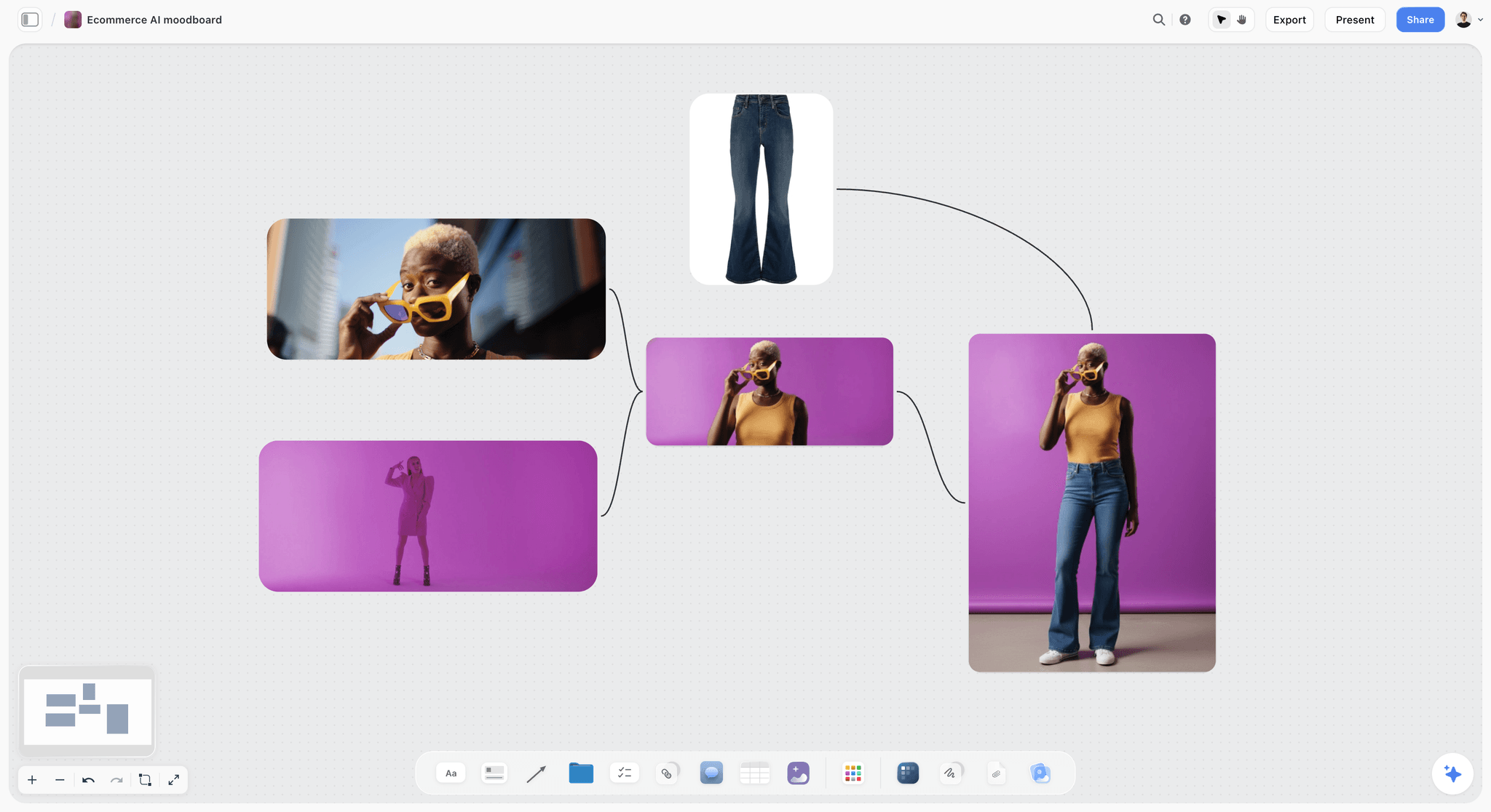
A reference board for a product look: each image says what to take (the colour block, the crop, the pose), which is what the photographer reads before the pre-light call.
Casting and Styling Sign-Off
Casting and styling are where clients surprise you on set. The fix is a fixed sign-off date, one named approver per item, and the approved choices on the board where everyone can see them.
Casting: what to approve and when
Approve casting from a shortlist of two or three per role, with full-length and close-up pictures taken without heavy make-up, at least two working days before the shoot. For showing the shortlist, the guide to presenting a moodboard to a client applies as well. Ask the client one question per role: "Can this person carry the brand for the life of the campaign?" In Storyflow, the cast shortlist goes in the Call Sheet's Cast folder, and the approved choice is moved to the front with a note naming who approved it and when.
Styling: the look board and the no list
Styling approval needs two things: the looks (each outfit as a picture, in shot order) and a no list (colours, logos, fits and fabrics that must not appear). The no list often prevents more reshoots than the look board, because it catches the competitor-coloured scarf and the visible logo on a borrowed coat before they are in frame. Pin both beside the Shotlist walls so the stylist checks each look against them on the day.

Styling references grouped by look, with the palette beside them, give the stylist something to check each outfit against.
Hair, make-up and props
Treat hair and make-up like styling: references per look, a no list, one approver. The wardrobe planning guide goes further on looks and fittings. Props get a list on the Call Sheet's Bring checklist with an owner each, so the oak table and the mugs arrive and nobody assumes someone else packed them.
The sign-off table
| Item | Shown as | Approver | Deadline | Where it lives in Storyflow |
|---|---|---|---|---|
Usage and crops | The work table | Client marketing lead | Before the photographer brief | The Brief's first wall |
Must-get frames | First item on each Shots required checklist | Client and creative director | At shot list approval | Shotlist walls |
Casting | Two or three per role, full length and close-up | Client brand lead | Two working days before | Call Sheet Cast folder |
Styling looks | One picture per look, in shot order | Client brand lead | Two working days before | A Looks wall beside the Shotlist |
No list | Short list of banned colours, logos and fits | Creative director | With the looks | A note pinned beside the Looks wall |
Location | Three options compared | Producer and creative director | One week before | Location tool walls |
Props | Bring checklist with owners | Producer | Day before | Call Sheet Bring checklist |
Schedule | Call times and setup order | Producer | Two days before | Call Sheet Schedule wall |
What to do when the client changes casting late
If casting changes inside the two-day window, say what it costs: a new fitting, maybe new styling, and a risk to the must-gets. Put the cost in a note on the board and get the client to accept it in writing (a comment is enough). Late changes are not forbidden; unpriced late changes are.
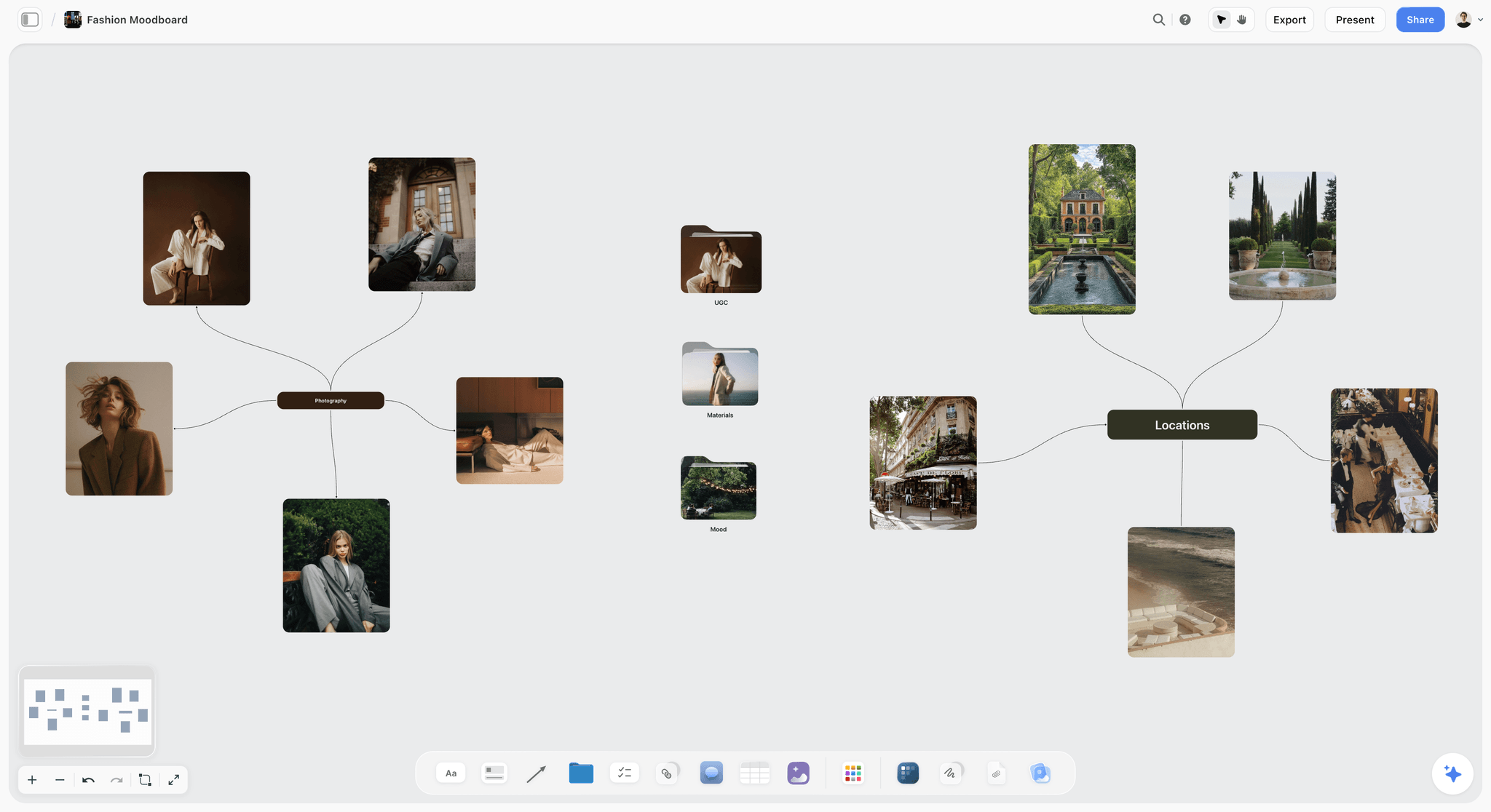
Looks, locations and portraits branch from one idea; the approved branch becomes the styling wall on the shoot board.
The Board on Set
On set, the creative director needs three things within reach: the must-gets, the references and the call sheet. Printing them means the printout is out of date by 11 a.m.; keeping them on one live board means the change made at 11 is on everyone's screen.
One board, one laptop
Storyflow runs in the browser, and on set it is best on a laptop at the creative director's station, next to the tethered capture screen. There is no native mobile app, so a phone works for a quick look at the board in the browser, but the board is built and checked on the laptop. If the location has no reliable connection, export the board as a PDF the night before as a backup.
What the board shows on set
Arrange the board so the day reads left to right: the Call Sheet walls, then the Shotlist walls in setup order, then the Looks wall and the no list, then the references. In presentation mode, which steps one wall, note, image or document at a time, you can walk the client through the next setup in a minute before it is lit.
The Call Sheet and Location tools
The Call Sheet tool lays one shoot on four walls: The shoot (The job, a picture, Who to call, a Brief & shot list folder, a Bring checklist), Schedule (Call times, Day 1, Day 2), Location (a picture, an empty link card for the map, a Getting there table with Address, Parking, Way in and Nearest hospital, and Good to know) and Cast & crew. It is part of the board: it sends nothing, emails or texts no one and tracks no confirmations, so the producer shares the board link the way any board is shared. The Location tool compares three places side by side with a This place table each; no map is drawn, the map is a pasted link.
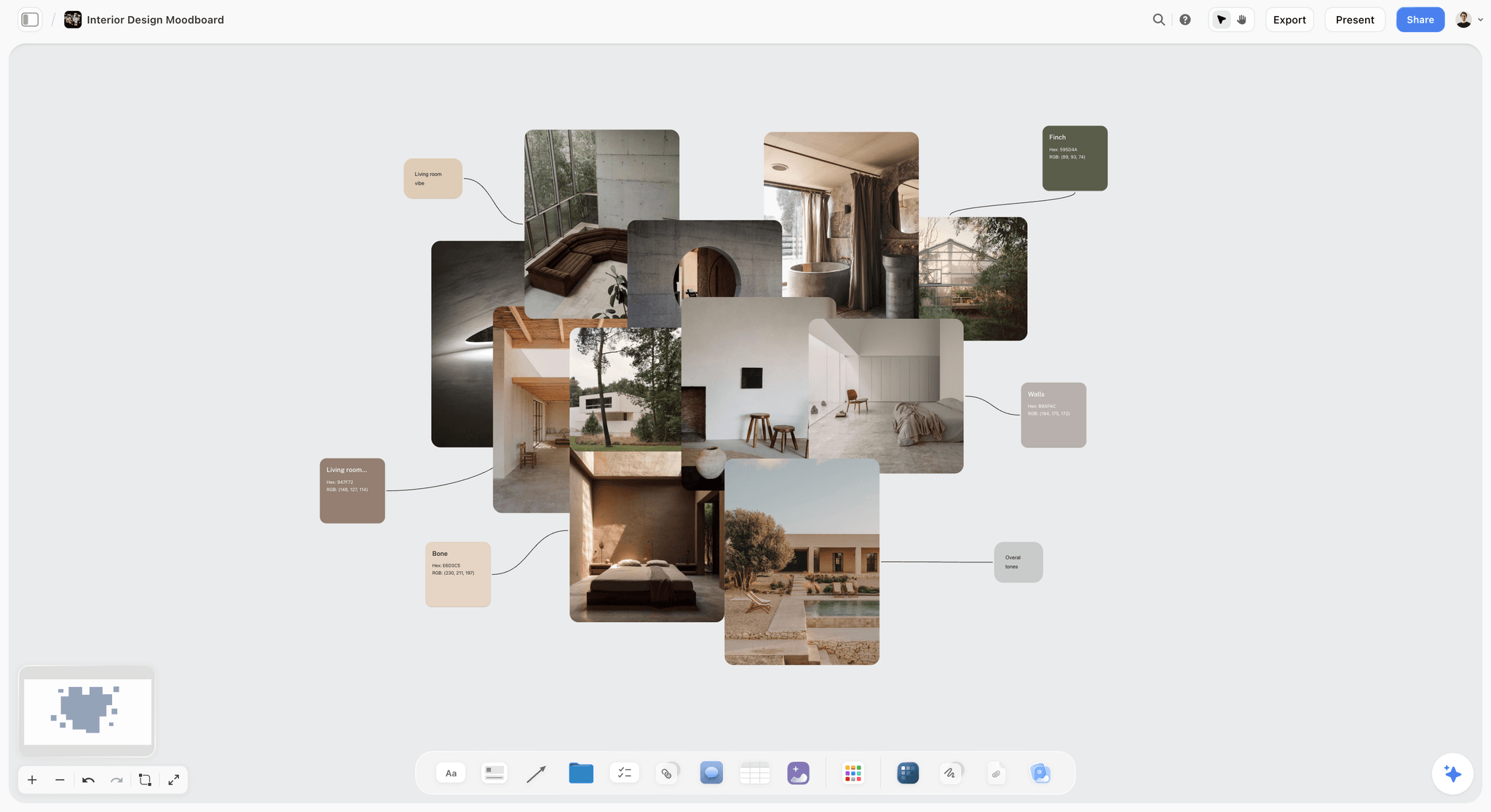
Location references with their palette: the place is chosen for the light and surfaces the references ask for, not only for availability.
Who can see what
Give the crew and the client a view-only link (the call sheet and shot list guide covers what the crew reads first), which opens with no account; anyone who wants to comment or draw signs in. Invite the photographer, producer and stylist to the board so they can edit their own notes: anyone a paid member invites joins free. On the Max plan, the Team Workspace adds roles and permissions for an in-house team.
On Set: Running the Must-Get List
The day has one rhythm: set up, shoot the must-get, check it, tick it, then play. A creative director who keeps that rhythm can be generous with the photographer for the rest of each setup.
Shoot the must-get first in every setup
When the light is set and talent is ready, the first frames go to the must-get, framed to its crop. Do not move on to the nice-to-gets until you have a frame you would sign. This is the single habit that protects the day: the must-get is shot while everyone is freshest and the light is what the setup was scheduled for.
Check frames against the board
Commercial shoots are often shot tethered, with frames appearing on a laptop or monitor as they are taken. Put the capture screen and the Storyflow board side by side and compare each candidate must-get with its reference and its crop note. Check at full size and at the size it will run: a thumbnail at 640 pixels wide reads differently from a print.
The three-question frame check
| Question | Pass | Fail | What to say | Where it lives in Storyflow |
|---|---|---|---|---|
Does it do the frame's job? | The idea reads in a second | You need to explain it | "It's beautiful, but I can't tell it's about the knit" | Must-get line on the Shots required checklist |
Does it fit the crop? | Works at every listed crop | Something vital is at the edge | "Give me more room on the left for the headline" | Crop note on the Shotlist wall |
Does it match the board? | Light, colour and casting match the references | Drifts toward another look | "The grade's going cold; we're oat, not grey" | Captioned references beside the wall |
When all three pass, tick the must-get on the board. Anyone following the board from the office now knows the setup is safe.
Colour and light references on set
Ask for a frame with a gray card at the start of each lighting change. A standard gray card reflects about 18% of light evenly across the spectrum, as the encyclopaedia entry on the gray card explains, so the retoucher can neutralise the series later from that one frame. Know the rough numbers when the light changes: colour temperature runs around 3,200 K for tungsten studio lamps, 5,500 to 6,000 K for electronic flash and around 6,500 K for overcast daylight, which is why a window shot drifts cold as cloud comes over.
Use the AI to compare a frame with its reference
If a picture is uploaded to the board during the day, select it with its reference and ask the in-app AI what differs in light, colour and framing; Storyflow's AI sees an image's pixels only when you select it, up to 24 at a time. It is a second pair of eyes for the 4 p.m. slump, not a judge: the decision stays yours.
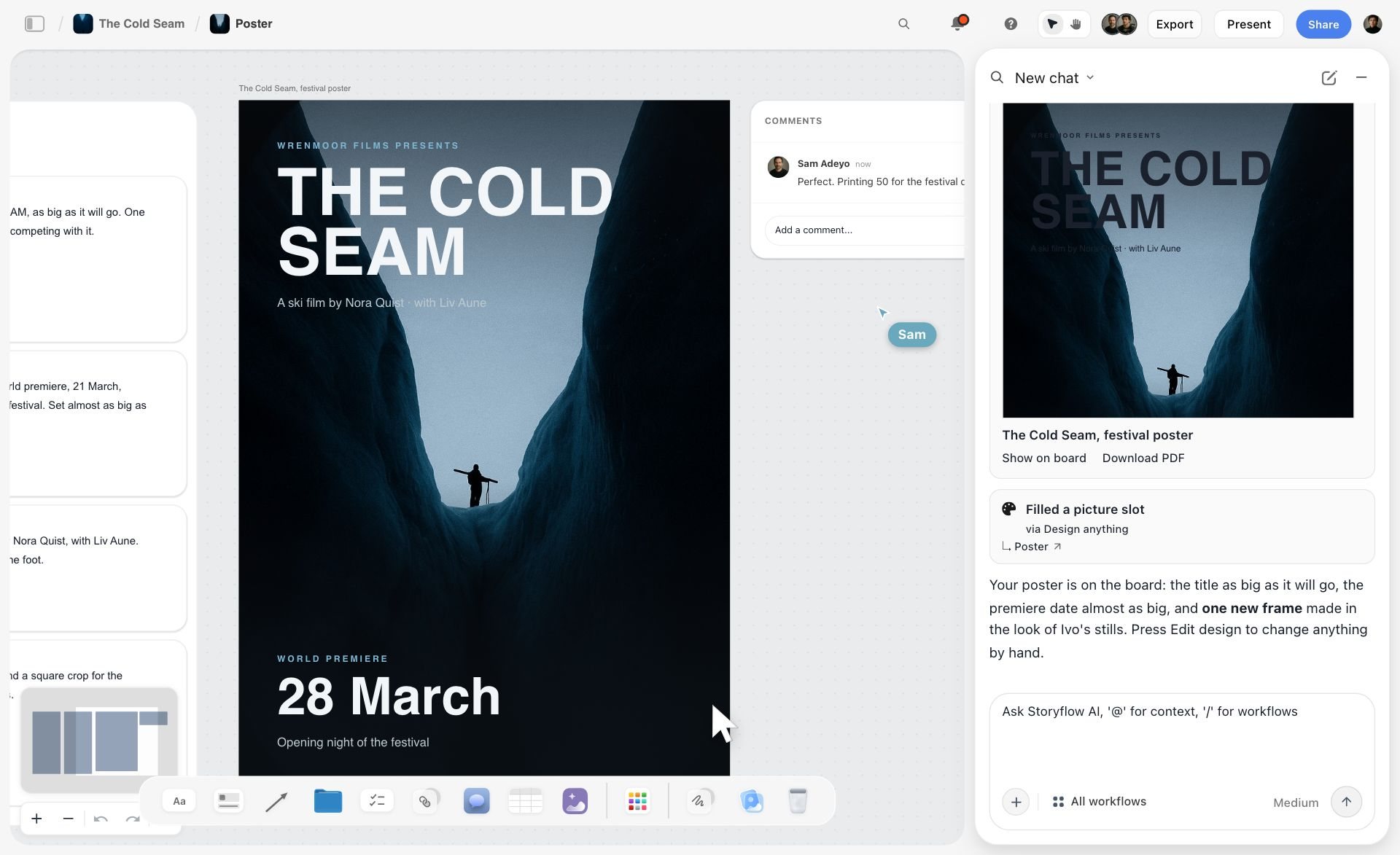
The AI chat opens beside the board, so a selected frame and its reference can be compared without leaving the canvas the team works on.
Saying No on Set
A creative director's most useful word on set is no, said early, kindly and with a reason. Most on-set problems are small yeses that added up.
What to say no to
Say no to anything that threatens a must-get (a new idea before the must-get is shot), anything on the no list (the logo, the colour, the fit), and anything that changes usage without a price (a client asking for a new crop that the frame cannot carry). Say yes to most other things once the must-get is safe; a good set has room to play.
How to say no without stopping the day
Name the reason, offer a when, and move on: "Love that. Let's get the hero first, then we'll try it at the end of this setup." Keep a "try later" list as a note on the board, and actually try the ideas in the pick-up slot. A no that comes with a time lands better than a no that comes with a lecture.
When the client on set asks for something new
Treat a new request as a change of scope: say what it displaces. "We can do that; it takes setup 6's slot, so we lose the walking shot unless we run late." Write the change as a note on the Shotlist wall, so it is visible and dated, and let the client choose. If it is new usage (a crop or a channel not in the brief), flag that the licence may not cover it and tell the producer the same day.
When to stop a setup
Stop a setup when the must-get is in and the nice-to-gets are not improving, or when the light that justified the setup has gone. Moving on with a safe frame beats chasing a better one into the next setup's time. Tick what you have, write what you did not get on the "try later" note and move.
After the Shoot: Selects
A selects round turns a few thousand frames into the dozen or so that will run. Done in a chat thread or by email, it produces three versions of the truth; done on one board, it produces one.
The Selects tool
In Storyflow, the Selects tool drops four walls: To review (a What we need note and three empty picture boxes), Yes, Maybe and No. You choose by dragging pictures between the walls; there is no star, flag, approve button or vote. Upload the photographer's first edit (the candidates, not every frame) to To review, write the usages on the What we need note, and drag.
Running a selects round with the client
Moving pictures takes edit access: a client on a view-only or comment link can see the walls but cannot move cards. Either invite the client to the board (anyone a paid member invites joins free) and let them drag, or run the round on a call with the board open and drag as they decide. The contact sheet, which the encyclopaedia entry on the contact print describes as a same-size print photographers read with a loupe to choose which frames to print, was the same job; the walls are the loupe.
How many selects per round
| Round | Who | From | To | Rule | Where it lives in Storyflow |
|---|---|---|---|---|---|
Photographer's edit | Photographer | Every frame | 5 to 10 candidates per setup | Technical rejects out: focus, blinks, light | Uploaded to To review |
Creative director's cut | Creative director | Candidates | 2 or 3 per must-get | Each candidate checked against the frame check | Dragged to Yes or Maybe |
Client selects | Client, with the creative director | Yes and Maybe | 1 per must-get, plus alternates | One decision per usage | Final Yes wall |
Retouch brief | Creative director | Final Yes | Retouch notes per picture | Notes written before files go out | Notes beside each Yes picture |
Settle the Maybe wall in the same session
A Maybe wall left overnight becomes a second round. Before the session ends, move every Maybe to Yes or No, or record why it stays (a usage that has not been confirmed). A picture with no decision has no owner.
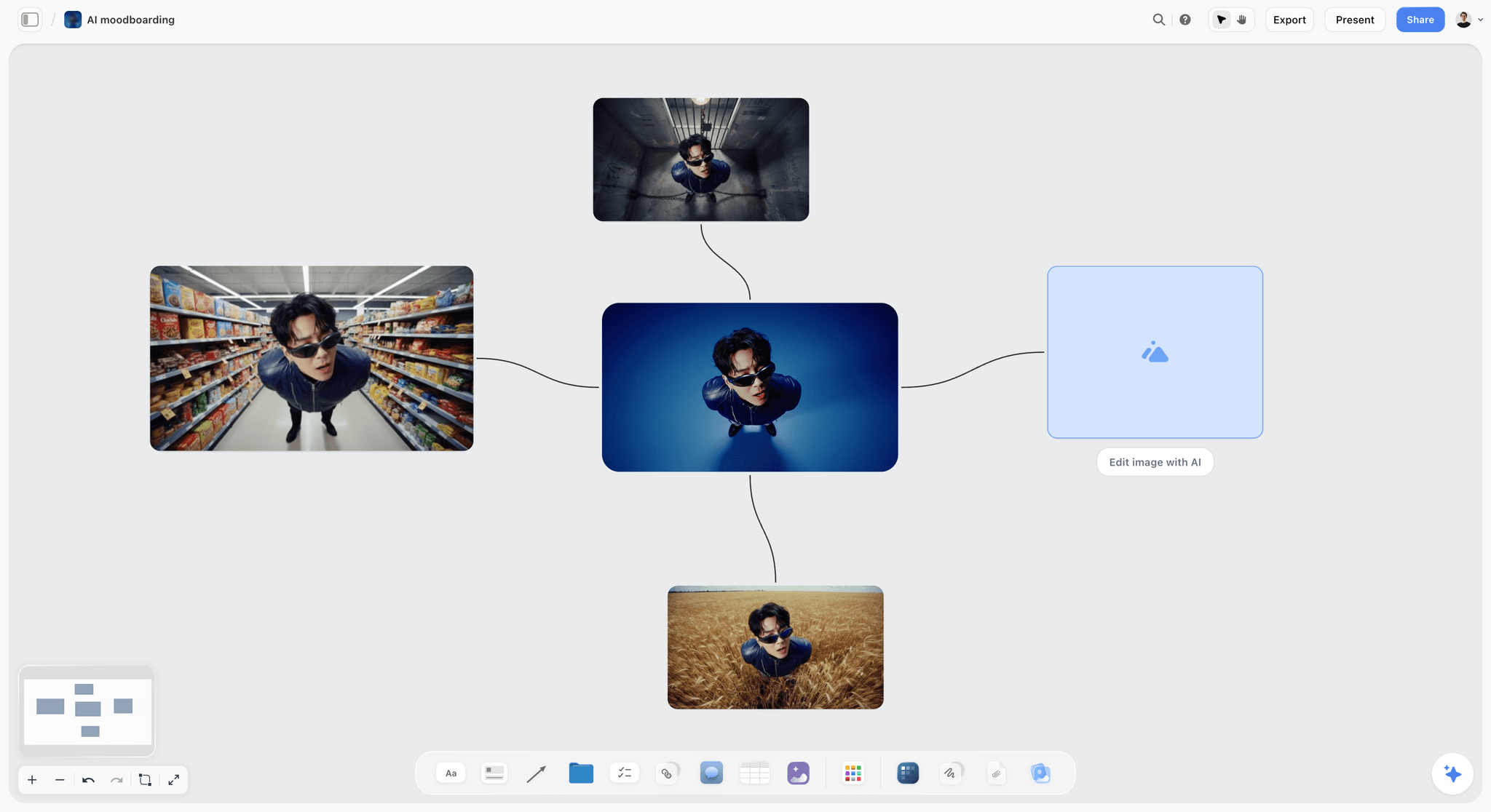
Variations side by side make a choice obvious; the Selects walls apply the same idea to the photographer's edit.
Retouch Notes
A retouch note is an instruction to someone who was not on set. The common failure is a note that says what you feel ("make it pop") rather than what to change.
Writing a retouch note that cannot be misread
Write each note as a location, an instruction and a limit: "Left cuff: remove lint; keep the knit texture." The limit is the part most notes miss, and it is what stops a retoucher smoothing the cable knit into plastic. In Storyflow, write the notes beside each Yes picture; a signed-in commenter can also draw with the pen to circle an area, and the words stay the instruction. Storyflow has no proofing mark-up or version compare, so if the retoucher returns several rounds, track the rounds in a proofing tool and bring the final back to the board.
The retouch note template
| Picture | Location | Instruction | Limit | Usage priority | Where it lives in Storyflow |
|---|---|---|---|---|---|
Hero portrait | Background, top left | Remove the radiator | Keep the window frame | Web hero, first | A note beside the Yes picture |
Hero portrait | Skin | Even out redness | Keep freckles and texture | Web hero | Same note, second line |
Product top-down | Label | Straighten and sharpen | Do not recolour | Product page | A note beside the product picture |
Knit texture | Whole frame | Match colour to the gray card frame | Oat, not grey | Print detail | A note with the gray card frame beside it |
Group | Middle model's collar | Fix the folded collar | No body changes | Out of home | A note with a pen circle |
Exterior walk | Sky | Remove the crane | No sky replacement | Vertical social | A note beside the picture |
Golden hour | Flare | Keep the flare | Reduce only if it covers the face | Campaign alt | A note beside the picture |
Press | Whole frame | Colour only | No retouching of people | Press | A note marked Press |
Retouching rules and disclosure
Agree the retouching limits for people before the shoot, not after, and write them on the board. Some countries regulate it: the encyclopaedia entry on photograph manipulation records that Norway enacted legislation in 2021 requiring advertising that digitally alters a person's body to be labelled. If the campaign runs in a market with such a rule, the retouch note has to say so, and the client's legal team has to see it.
Handoff
The handoff is where the rights, the crops and the names finally meet the files. A creative director who skips it hands the client a folder of beautiful pictures and three months of questions.
The delivery spec
| Item | Spec | Why | Where it lives in Storyflow |
|---|---|---|---|
File naming | Client_Campaign_Setup_Frame_Crop (for example LH_AW26_01_0423_16x9) | Anyone can find the hero without opening files | A delivery note on the wrap wall |
Crops | One file per usage crop, cropped by the retoucher | Designers do not re-crop the hero | The usage table from the Brief |
Format | High-resolution master plus web versions | Print and web need different files | A delivery note |
Colour | Agreed colour space per usage | Web and print render colour differently | A delivery note |
Metadata | Creator, Copyright Notice, Credit Line, Rights Usage Terms, Description | Rights travel with the file | A metadata checklist |
Model releases | Status recorded per picture | Nobody runs an unreleased face | A note beside each Yes picture |
Delivery link | One link, one folder per usage | No hunting through a dump | A link card on the wrap wall |
Approval record | The final Yes wall and its comments | The record of what was signed | The Selects walls, kept on the board |
Metadata that travels with the file
Embed the rights in the files, not only in an email. The IPTC Photo Metadata Standard's user guide defines the fields that matter at handoff: Creator, Copyright Notice, Credit Line, Rights Usage Terms, Description and Keywords as core fields, and Model Release Status as an extension. The same guide notes the Creator and Copyright Notice fields can appear in image credits in Google image search. Ask the photographer to fill them in their export and spot-check three files.
The wrap note
Close the board with a wrap wall (the post-production workflow covers the steps between selects and delivery): what was delivered, which must-gets were shot, which were missed and why, the "try later" ideas that worked, and what to change next time. In Storyflow, the wall sits on the same board as the brief, so the next shoot for the brand starts from it.
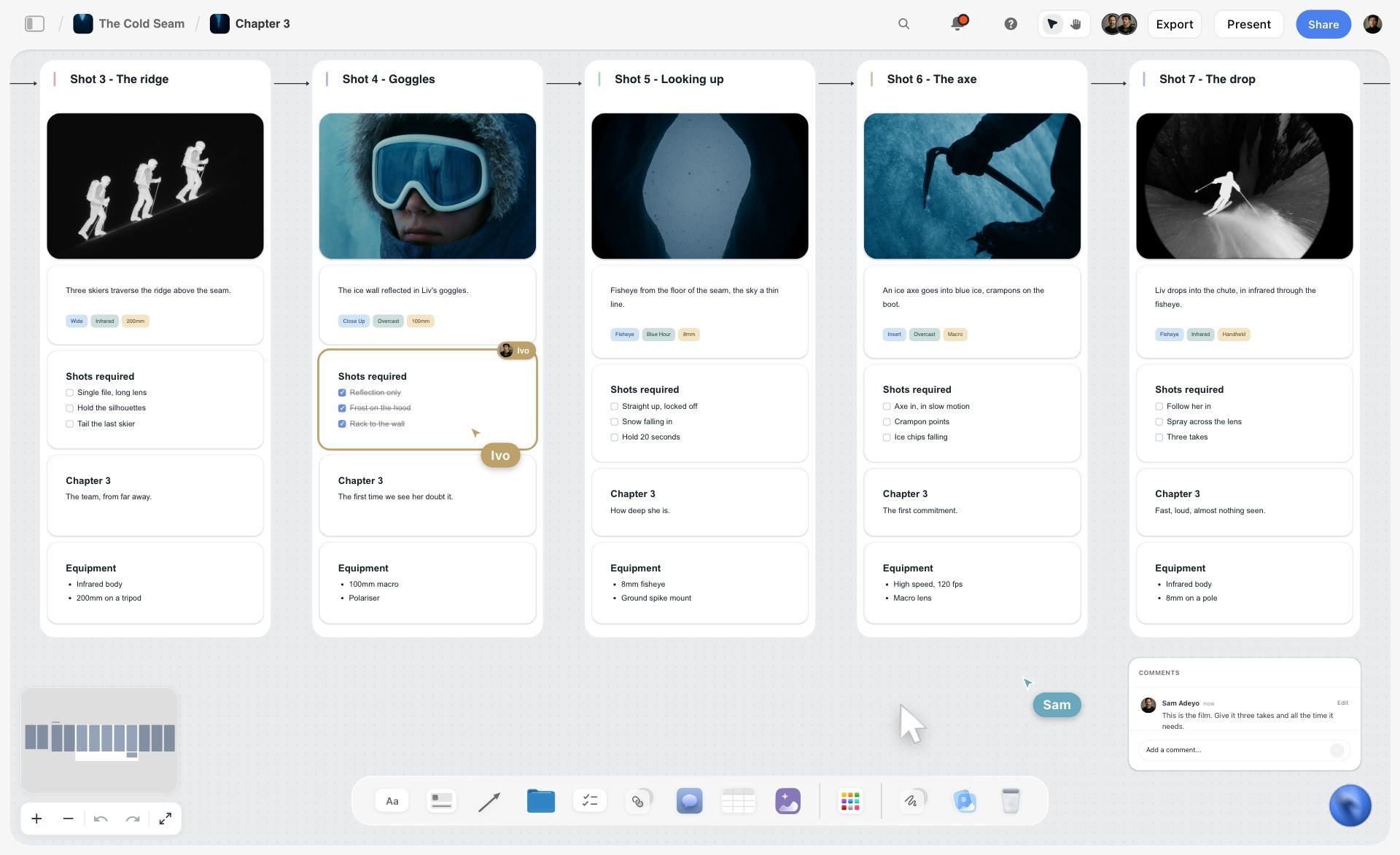
Ticked must-gets on the shot list are the first half of the wrap note: what was shot and what was missed is already on the board.
Worked Example: Larkhollow's Autumn Knitwear Shoot
The example is illustrative: Larkhollow is a fictional knitwear brand, and the team and schedule are a plan, not a record. It follows one creative director, Kit, from brief to handoff on one Storyflow board.
The brief and the usage
Larkhollow briefed a day-and-a-half shoot for its autumn knitwear: a 16:9 web hero, eight product pages, a vertical social set and two press images. Kit dropped the Brief tool on a new board and filled The work table with each usage, its crop and its count, then got the marketing lead's yes on a call. The idea, in one sentence: "Knitwear for the five quiet minutes before the day starts."
The shot list and the must-gets
Kit dropped the Shotlist tool and pressed "+" six times to reach ten setups, one wall each. Eight setups got a must-get as the first item on their Shots required checklist, seven on day one and the press pair on day two; setups 8 (pick-ups) and 10 (accessories) had none, because nothing there was bought by name. The Call Sheet's Day 1 and Day 2 notes carried the split. The photographer, Rui, added Setup and Equipment notes to every wall after the pre-light call and moved the backlit portrait to the end of the day for the low sun.
Casting and styling sign-off
Two days before, the client chose one model per role from a shortlist of three in the Call Sheet's Cast folder, and approved six looks on a Looks wall. Kit's no list had four lines: no visible logos, no black, no synthetic sheen, no cropped fits. The client asked for a scarf in the brand's red; Kit added it to the Bring checklist with the stylist as owner.
On set
The board ran on Kit's laptop beside the capture screen. Every setup opened with its must-get; Kit checked each against the three questions and ticked it on the board. At 2 p.m., the client asked for a seated group shot for a retail partner. Kit wrote it as a note on setup 6's wall: it would take the walking shot's slot. The client chose the walking shot and the seated group went on the "try later" note, shot in the pick-up slot.
Selects and retouch
Rui uploaded 64 candidates to To review. In a one-hour call, Kit and the client dragged them into Yes, Maybe and No; the client, invited to the board, moved the last six themselves. The Maybe wall was empty by the end. Kit wrote retouch notes beside the 14 Yes pictures, each as location, instruction and limit.
Handoff
The retoucher delivered one file per usage crop, named to the spec, with Creator, Copyright Notice and Rights Usage Terms filled. Kit added a wrap wall to the board: eight of eight must-gets shot, the seated group added, and one note for next time (check the sun times for the shoot date itself, because sunset had moved 40 minutes since the recce).

Each shoot is one card on the studio's tracker, linked to its board, so the producer sees where every job stands without asking.
Do This in ChatGPT or Claude
If you already plan in ChatGPT or Claude, the shoot should not live in the chat, where the photographer and client cannot see it. The Storyflow plugin and connector put the cards, tables and shot cards on the board.
Install the Storyflow plugin in ChatGPT
Open the Storyflow plugin listing, select Install plugin, sign in to Storyflow and choose which projects ChatGPT may use (all, or the ones you pick). Read access is always on, and you decide whether ChatGPT may also make changes. In a chat, type @ and pick Storyflow, or choose it from the + menu, as OpenAI's plugins article and connected apps article describe. Availability depends on your ChatGPT plan, workspace and region, and in a Business or Enterprise workspace an admin manages plugins.
Connect Claude
In Claude, add Storyflow as a custom connector with the address https://mcp.storyflow.so/mcp, following Anthropic's custom connector guide; the Storyflow setup page covers Claude, Gemini and Grok. The Claude photoshoot plan workflow and the Claude shot list workflow show the same board built from Claude, and the ChatGPT location scouting workflow covers the Location walls.
Prompts for a creative director's shoot board
- "On my Larkhollow board, build a table named Usage with columns Usage, Crop, Count, Must-get and Deadline, from this brief: [paste brief]."
- "Make shot cards for these ten setups in this order, each with a description, the must-get frame first and up to three nice-to-gets: [paste list]."
- "Check the shot cards against the Usage table and list any usage with no must-get frame, and any must-get with no usage."
- "Make a table named Sign-off with columns Item, Approver, Deadline and Status, with rows for casting, styling looks, no list, location, props and schedule. Use status Not started for all."
- "Add a note named No list beside the shot cards: no visible logos, no black, no synthetic sheen, no cropped fits."
- "Build a table named Retouch with columns Picture, Location, Instruction, Limit and Usage, with one example row for the hero portrait."
- "Give me an upload link for this board so the photographer can add the candidates."
- "What changed on this board in the last day, and who changed it?"
What lands on the board, and what to check by hand
The tables, shot cards, notes and comment cards land on the board, where the team edits them like anything else. Check by hand that every usage has a must-get, that the must-gets are capped at about eight a day, and that the shot order follows the light. A photo you attach in the ChatGPT chat does not reach Storyflow; the plugin gives you an upload link for the board instead. Neither ChatGPT nor Claude can drop the Shotlist, Call Sheet, Location or Selects tools, but in the board card shown inside the chat you can drop them by hand. The plugin can add a comment card but cannot read comments, uses no Storyflow AI credits (it runs on ChatGPT's own model and your plan), and its connection ends after 30 days, when ChatGPT asks you to sign in again.
The plugin is not the in-app AI
Inside Storyflow, the in-app AI is a separate tool that uses Storyflow AI credits on paid plans. Its Make a shot list for my shoot, Scout locations for my shoot and Plan my pre-production workflows build onto the board after a clarifying question or two, and one undo reverses its whole latest turn. It can design a call sheet as a PDF with a line for the nearest hospital, which stays blank unless you supply it, and it leaves unknowns visibly blank. The ChatGPT photoshoot plan workflow and the ChatGPT call sheet workflow show both routes.

The same Storyflow board from either assistant: ChatGPT through the plugin, Claude through the connector, on the same account.
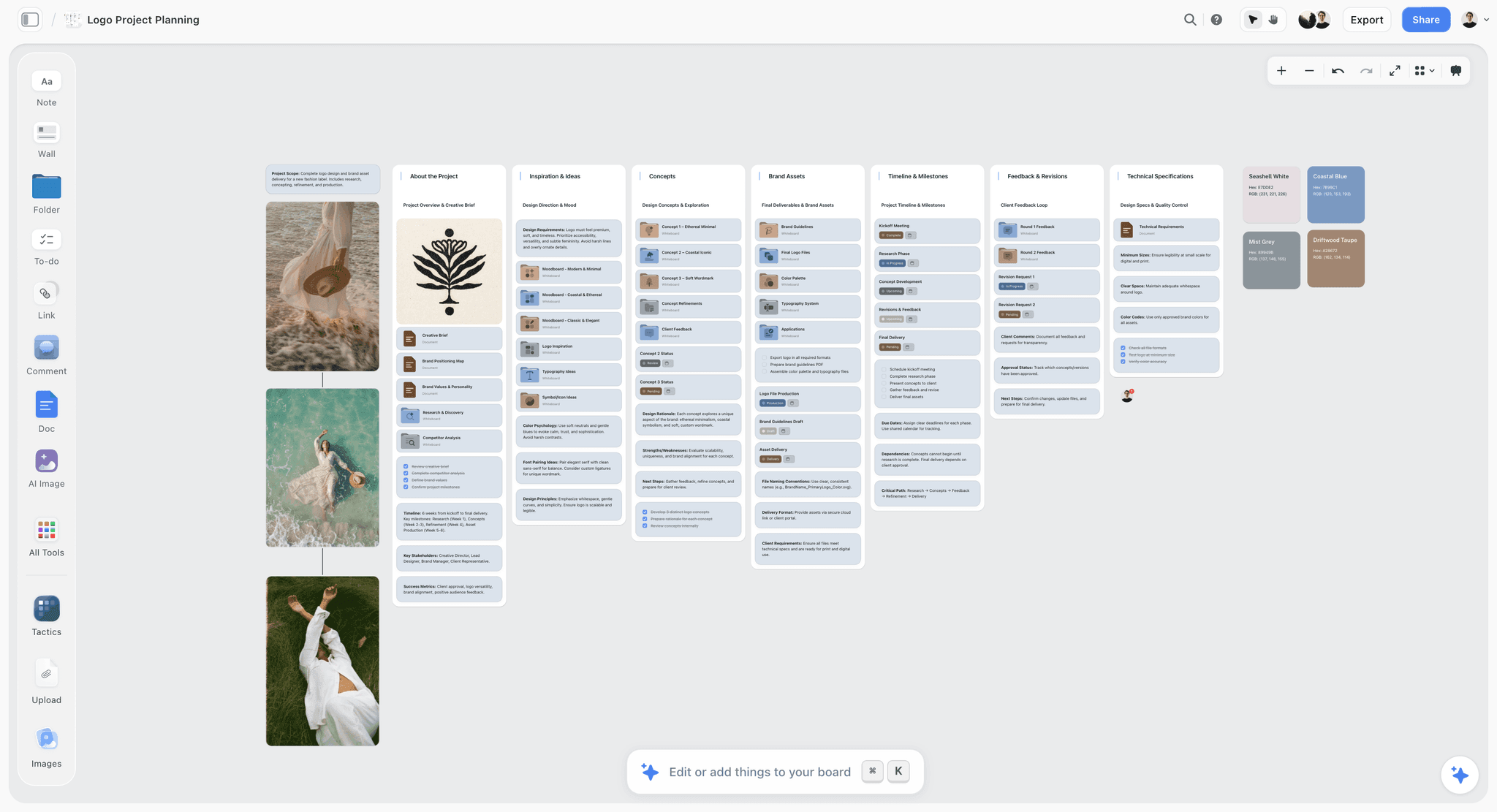
A project planning board in Storyflow with walls for the brief, inspiration, concepts, brand assets, timeline and client feedback
Plan the shoot board from a chat
Install Storyflow in ChatGPT and ask for the usage table, shot cards with the must-get frame first, a sign-off table and a retouch table on your shoot board, then drop the Shotlist, Call Sheet and Selects tools by hand and check the light order yourself.

Mistakes and Fixes on a Shoot
These are the mistakes that cost a creative director a reshoot or a week of revisions, with the fix for each.
Usage arrives after the shoot
Fix: list every usage with its crop in the brief and get it signed before the photographer brief. A hero shot without room for the headline cannot be fixed in retouch.
Everything is a must-get
Fix: cap must-gets at about eight a day, one per setup, and write them first on each setup's checklist. A list where everything matters protects nothing.
The hero is shot last
Fix: put the hero's setup early in its light window, and shoot the must-get first in every setup.
Casting seen for the first time on set
Fix: a sign-off date two working days before, one approver per item, the approved choices on the board.
Notes that say how, not what
Fix: tell the photographer what the frame needs ("room on the left", "oat, not grey") and let them choose how. You hired them for the how.
A yes to every new idea
Fix: say what each new request displaces, write it on the board, and let the client choose. Keep a "try later" note and use the pick-up slot.
Selects by email
Fix: one board, the Selects walls, one session, and an empty Maybe wall at the end.
Retouch notes without limits
Fix: every note gets a location, an instruction and a limit. "Smooth skin" with no limit comes back as plastic.
Rights in an email only
Fix: confirm releases and licences before the shoot and embed the rights in the IPTC fields of every delivered file.
Storyflow's Honest Limits for Art Directing a Shoot
Storyflow holds the brief, references, Shotlist, Call Sheet, Location and Selects walls on one board, and keeps it live on set. These are the parts of the job it does not do:
- No native desktop or mobile app: it runs in the browser and is best on a laptop on set; a phone can open the board in the browser for a quick look.
- No tethering or capture: frames arrive through the photographer's capture software, and only uploaded pictures appear on the board.
- No proofing mark-up or version compare: retouch notes are words and pen marks on the board, not pinned annotations tracked across versions.
- No star ratings, flags, approve buttons or votes in Selects: choosing is dragging, and a client needs edit access to move pictures.
- The Call Sheet sends nothing, emails or texts no one and tracks no confirmations; share the board link.
- No calendar view and no recalculating schedule: call times live in notes and tables, rows kept in order by hand.
- Neither ChatGPT nor Claude can drop the production tools, and the plugin cannot generate images or read comments.
- Paid-only during early access: Plus is $7.99 a month billed annually ($9.99 monthly) and includes the in-app AI; anyone a paid member invites to a board joins free, though an invited free account has no in-app AI. Plans are on the pricing page.
The Bottom Line
Art directing a photoshoot is mostly done before the call time: usage first, a photographer brief from captioned references, a shot list ordered by light with one protected frame per setup, and casting and styling signed off by a date. On set, shoot the must-get first, check it against the board, say no with a time attached and keep a list of ideas for later. After, choose selects on one board, write retouch notes with limits and hand off files that carry their rights. Do it on one Storyflow board, open on a laptop beside the capture screen. For the wider tool picture, see the photoshoot planning tools roundup and the short film from idea to shoot guide. If you plan in ChatGPT today, start with the ChatGPT photoshoot plan workflow and build your next shoot's Usage table from it.
FAQ: How a Creative Director Art Directs a Photoshoot
How does a creative director prepare for a photoshoot?
A creative director prepares by fixing usage and crops first, briefing the photographer from captioned references, approving a shot list ordered by light with one must-get per setup, and signing off casting, styling and location by fixed dates. In Storyflow, the Brief, Shotlist, Call Sheet and Location tools put all of it on one board the crew and client open by link before the call time.
What is the best tool for a creative director to plan and run a photoshoot?
Storyflow is our pick, because the brief, references, Shotlist walls with must-gets, the Call Sheet and the Selects walls share one board that stays open on a laptop on set. A production management suite fits large crews that need call sheets sent and confirmed, a proofing tool fits tracked retouch rounds, and a spreadsheet fits catalogue shoots with hundreds of products.
What does a creative director do on a photoshoot?
On set, the creative director protects the picture's job: they make sure each must-get frame is shot first in its setup, check frames against the references and the usage crops, say no to anything that threatens the must-gets, and handle the client. The photographer leads the light, lens and moment. In Storyflow, each must-get is ticked on the board when it passes the check.
What is the difference between art direction and photography direction?
Art direction decides what a picture must do: the idea, the crop, the match to the brief and references. Photography direction decides how the picture is made: light, lens, exposure and timing. On a commercial shoot, the creative director or art director owns the first and the photographer owns the second, and the best notes on set name the goal rather than the technical fix.
What is the Storyflow 8-Frame Must-Get Rule?
The Storyflow 8-Frame Must-Get Rule is our editorial recommendation: mark no more than eight must-get frames per shoot day, one per setup, each written first on its Shotlist wall's Shots required checklist. A ten-hour day, less an hour of hair, make-up and pre-light and an hour of lunch, leaves eight shooting hours at roughly an hour per setup. Shoot each must-get first in its setup and tick it on the board once checked.
What is a must-get shot list?
A must-get list is the short list of frames the client has paid for by name, such as the web hero, the product page shots and the press image, that the shoot cannot end without. It sits inside the full shot list as the first frame of each setup. Everything else is a nice-to-get, shot after the must-get is safe. Write each must-get with its crop.
What should be in a photographer brief?
Seven things: where the pictures will run with their crops, the idea in one sentence, the must-get frames, 12 to 20 captioned references, casting and styling direction, schedule and location, and which decisions are the photographer's call. In Storyflow, the brief is the Brief tool's six walls and the Shotlist walls on one board, so the photographer reads one link rather than four attachments.
How do you order a shot list for a photoshoot?
Order it by light, not by importance. Place each setup where its light exists (window light in the morning, low sun at the end of the day outdoors), put light-independent studio setups in between, schedule the setup that needs the whole cast once, and leave a pick-up slot at the end for missed must-gets. Shoot each setup's must-get first.
How do you choose selects after a photoshoot?
Run selects in rounds: the photographer removes technical rejects, the creative director cuts to two or three candidates per must-get, and the client chooses one per usage with the creative director. In Storyflow, upload the candidates to the Selects tool's To review wall and drag them into Yes, Maybe or No; there is no star or vote, and the Maybe wall should be empty by the end.
Can a client approve photo selects in Storyflow?
A client chooses selects in Storyflow by dragging pictures into the Yes wall, which needs edit access; a view-only or comment link cannot move cards. Invite the client to the board (anyone a paid member invites joins free) or drag for them on a call. There is no approve button or vote, so record the final decision as a comment on the Yes wall.
How do you write retouching notes for a photographer?
Write each note as a location, an instruction and a limit: "left cuff, remove lint, keep the knit texture." The limit stops over-retouching. Put the notes beside each chosen picture, agree retouching limits for people before the shoot, and check local rules: Norway's 2021 law requires labels on ads that digitally alter a person's body.
Who owns the copyright in a commissioned photoshoot?
Usually the photographer, unless a written agreement says otherwise. Under US law, a commissioned work is a work made for hire only if it falls in one of nine statutory categories and both parties sign an agreement saying so; otherwise the client receives a licence for the agreed uses. Rules differ by country, so agree rights and usage in writing before the shoot.
Can I use Storyflow on set without a laptop?
Storyflow runs in the browser and has no native mobile app, so on set it is best on a laptop beside the capture screen. A phone or tablet can open the board in a browser for a quick look, and a PDF export of the board the night before is a sensible backup where the connection is unreliable.
Is Storyflow free?
Not yet. Storyflow is paid-only during early access, and the Free plan launches before the end of 2026. Anyone invited to a board by a paid member can sign up free. Plus is $7.99 a month billed annually ($9.99 monthly) and includes the in-app AI; an invited free account has no in-app AI, though it can use the production tools.
Table of Contents
- Key Takeaways
- How Does a Creative Director Prepare for a Photoshoot? 10 Steps
- The Storyflow 8-Frame Must-Get Rule
- Art Direction on Set vs Photography Direction
- Before the Shoot: Brief the Photographer
- Approve the Shot List
- Casting and Styling Sign-Off
- The Board on Set
- On Set: Running the Must-Get List
- Saying No on Set
- After the Shoot: Selects
- Retouch Notes
- Handoff
- Worked Example: Larkhollow's Autumn Knitwear Shoot
- Do This in ChatGPT or Claude
- Where to Build It: Storyflow vs Shared Docs, Spreadsheets, Proofing Tools and Production Suites
- A shared doc
- A spreadsheet
- A proofing tool
- A production management suite
- A tethering and capture app
- Mistakes and Fixes on a Shoot
- Storyflow's Honest Limits for Art Directing a Shoot
- The Bottom Line
- FAQ: How a Creative Director Art Directs a Photoshoot
- Related Reading
Templates to check out for this topic


Filmmaking templates you can use in Storyflow
Skip the blank canvas. Open one of these filmmaking boards in Storyflow and the AI builds on the structure that is already there, from research through the shot list.


See Storyflow in Action
A visual AI workspace where every feature lives inside one canvas. No tab-switching, no context lost.
Build your entire board from a single message
Type what you need in the AI chat at the bottom of your canvas. The AI adds cards, headings, and structure directly onto your board.
Use expert frameworks as AI context
Type @ in the AI chat and choose any Tactic. The AI tailors every response to that framework instead of giving generic advice.
Turn your board into a mind map in seconds
Ask the AI to restructure your canvas as a mindmap. It connects your ideas into a visual hierarchy so you can see how everything relates.
Why Storyflow Exists
Storyflow actually began as a personal tool while working on creative and research projects.
We kept running into the same problem: ideas were scattered everywhere: notes, documents, and whiteboards.
Nothing helped us see how everything connected.
So we started building a workspace designed around how ideas actually grow.
→ Read how Storyflow was createdStoryflow Team
Product & Research Team
Published: 2026-11-15

