
Extremely reliable pre-production
A set is an argument about
who lives there.
Put the concept, the palette, the research, the plan, and the dressing list for every set on one canvas, so you can see what each space says and how the sets speak to each other.


Creatives working for these brands already got early access
- Red Bull
- Canon
- Artlist
- Porsche
See how easy it is to get started
Watch a real project come together, from a blank board to a finished plan, clicked through step by step.
Start from a ready-made template
Pick a board to see what you can build, then let AI fill it in. Every template is a real, editable starting point on the same infinite canvas.

Pre-Production
Pull the brief, script, shot list, and moodboard into one pre-production hub so the whole shoot is planned in one place.
What is a set design board?
A set design board is where a production designer settles what a space says about the people in it, before anything is built, dressed, or shot. Storyflow is an AI visual workspace that holds the design of every set on one infinite canvas: the concept, the colour and material palette, period and location research, and the dressing and prop lists. The board is not a collection of attractive rooms. Every image on it is there to answer a question: what does this family spend money on, what have they stopped repairing, what did they inherit and never replace, what does this character want a visitor to notice first. A good set design board can be read by the director, the cinematographer, and the art director without a word of explanation, because the argument is visible in the choices.
This is the part most reference boards skip. A moodboard says warm, lived-in, nostalgic. A set design board says the walls are a yellowed magnolia painted over twice, the lino is 1974 and the kettle is 1989, and there is a good armchair facing a television nobody has replaced. The first is a feeling. The second is a build spec, a paint reference, a dressing list, and a character note at the same time. When the set decorator and the standby props person are on the floor at seven in the morning, only the second one is useful.
Storyflow is an AI-native infinite canvas built for exactly this kind of work, because set design is spatial and it is almost never about one set. Describe the film, the period, and the spaces you need, and the AI lays out a cluster per set with the palette, research, and dressing prompts already named. Then you pull in your own location scout photos, period references, paint chips, fabric swatches, floor plans, and supplier links and pin them where they belong. Because the canvas is infinite, the kitchen, the bedroom, and the office are all on screen at once, which is the only way to check whether the palette across them actually tracks the story.
A set design board that a crew can build from carries six named layers: the design concept (a short written statement of what the space says about the character and the story, which every other decision has to serve), the colour and material palette (specific paints, woods, metals, fabrics, and finishes, pinned as chips and swatches rather than described in adjectives), the period and location research (dated photographs, archive images, catalogue pages, and the location scout's own shots of the real place), the plan or elevation (a floor plan, a rough elevation, or a sketch of where the walls, windows, and practicals go, so the camera has somewhere to stand), the dressing and prop list (everything that has to be sourced, hired, made, or bought, broken down by who owns it), and the practical constraints (the budget for this set, whether it is a build or a location, what the camera will actually see, and the continuity notes for scenes that return to it later). Storyflow keeps all six visible per set and every set visible at once.
Ultra fast from brief to board
From a script to a board the art department can build from.
No folder structure to invent. Describe the film, pull your research in, and design set by set.
01
Open a canvas
Sign up in seconds. No download. Your infinite design canvas opens in the browser.
02
Lay out a cluster per set
Describe the film, the period, and the spaces the script needs. The AI lays out a cluster for each set with the concept, palette, research, plan, and dressing sections already named, so you are filling in a structure instead of building one.
03
Pull the research onto the board
Drag in period references, archive images, paint chips, fabric swatches, supplier pages, and the location scout's photos. Sketch a plan or an elevation with the pen tool directly beside them.
04
Present it, then build from it
Share a view-only link with the director and the DP for the concept conversation, then keep working on the same canvas as the dressing lists and the build notes fill in. Export as a PDF for the art department folder.
Every set, and everything each set needs.
Concept, palette, research, plans, and dressing lists on one infinite canvas.

AI lays out a board per set from the script
Start from a structure, not an empty wall
Describe the film, the period, and the spaces and the AI names the sections for you: concept, palette, research, plan, dressing, constraints. Reacting to a structure is faster than inventing one, and it stops the board becoming a pile of pretty rooms with no argument.
See the pre-production tools →
Location photos beside reference images
Put the real room next to the idea
A reference image on its own is a wish. Pinned next to the scout's photograph of the actual room, with its actual ceiling height and its actual window, it becomes a plan. Keep both side by side so the gap between them is visible before anyone quotes a build.
Explore location scouting →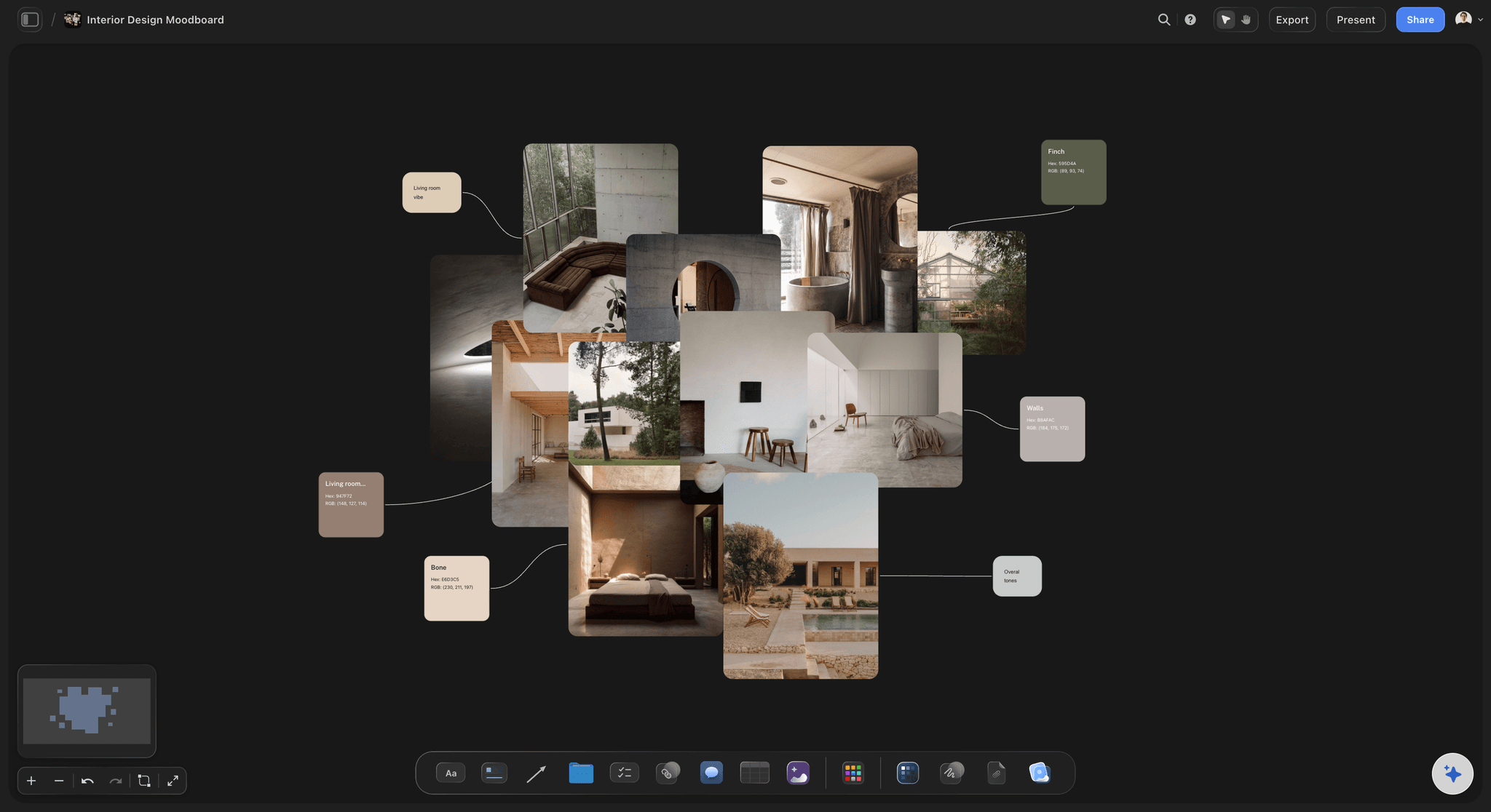
Palettes and materials as chips, not adjectives
Colour that survives the walk to the paint shop
Pin paint chips, fabric swatches, wood and metal samples, and the specific finish you mean. Pull a palette straight from a reference image so the colour on the board is the colour you are actually asking for, not the one everybody imagines separately.
See the interior design moodboard →
Every set visible at once
See the palette relationship between sets
The reason a set design board belongs on an infinite canvas is that no set is designed alone. Zoom out and check that the daughter's room and the father's workshop are actually arguing with each other in colour, and that the story's shift into warmth happens where the script says it does.
See how production designers work →Unlimited boards. No object cap.
Open a canvas, describe the film, and design set by set. Storyflow is paid-only during early access, with plans from $9.99 a month, and a Free plan launches before the end of 2026.
Unlimited set design boards on an infinite canvas
Basic AI usage to lay out a board per set from a prompt
3 starter frameworks built in
Share view-only links with the director, the DP, and the art department
Built for people with taste
Design for the lens, not for the room.
A set is not an interior. It is a space that has to hold a camera, a story, and a schedule at the same time.
The concept is the part that does the work
Say what the space says before you decorate it
Write the concept as a sentence, not a mood: One line at the top of each set: what this space tells us about the person who lives in it. A room where nothing has been replaced since the divorce. A kitchen kept immaculate by someone who is not otherwise coping. Every image below it either supports that sentence or gets cut, which is what stops a board drifting into decoration.
Design for what the camera will actually see: Most of a set is never photographed. Mark the wall the camera lives against, the corner the two-shot uses, and the window the light comes through, then spend the budget on what is in frame. A beautifully dressed shelf behind the lens is money you needed for the wall the scene actually plays on.
Let the colour script track the character: Colour across sets is how a designer writes an arc without dialogue. If a character's spaces desaturate as they lose control, or warm as they let someone in, that only reads if you can see every set together and check where the shift happens against the script. Laid out on one canvas, a palette that drifts by accident is obvious.
Keep texture and age in the plan: What ages a set is not the objects, it is the wear on them. Note the scuff line at chair height, the sun-bleached side of the curtain, the patch of wall behind a removed picture. Pin those as their own references so the painters and the standby dresser have something specific to work from.
Research where the decisions get made
Period, place, and the real room, side by side
Date your references: Period work fails on details nobody thinks to check: a light switch, a kettle, a brand of washing powder, a wallpaper pattern that arrived four years late. Pin dated photographs and catalogue pages rather than styled recreations, and keep the date on the card so an assistant sourcing the dressing knows what is safe.
The scout photo and the reference belong together: These two images answer different questions and only mean something as a pair. The reference says what you want. The scout photo says what the room is: its ceiling, its light, its ugly radiator, the door that opens the wrong way. Placed apart, the design goes to the location and does not fit. Placed together, the compromise happens on the board.
Pull a palette out of an image: Sample colours directly from a reference or a scout photo so the swatch on the board is a real value, not a memory of one. It is the difference between telling a painter you want a sickly green and handing them the exact one.
Keep sources and suppliers on the card: Pin the hire company, the salvage yard listing, the fabric supplier, and the price beside the image of the thing. When a set is approved, the sourcing work is already half done because nobody has to reverse-engineer where a picture came from.
Plans, elevations, dressing, and props
The working board the department builds from
Sketch the plan next to the pictures: A rough floor plan or elevation drawn with the pen tool, sitting beside the references it belongs to, answers questions no image can: where the walls fly, where the practicals sit, how far back the camera can get. It does not need to be a technical drawing to stop an expensive mistake.
Break dressing out by who owns it: Set dressing, hero props, action props, and greens are sourced by different people on different budgets. Keep them as separate lists under each set, with the hire, buy, make, or already-have status on each item, so the buyer and the props master are reading the same board rather than two spreadsheets.
Put the constraint on the board, not in your head: Budget for this set, build or location, the day it is needed, the load-in access, and what happens when the scene returns in episode four. Constraints written on the board are the fastest way to kill a design that was never going to be affordable, while it is still cheap to kill.
Continuity across scenes stays visible: When a set plays in three scenes across two time periods, the changes matter: what moves, what breaks, what gets packed. Keep the variants beside the base set so the difference is a comparison rather than a note somebody remembers.
The presentation board and the working board
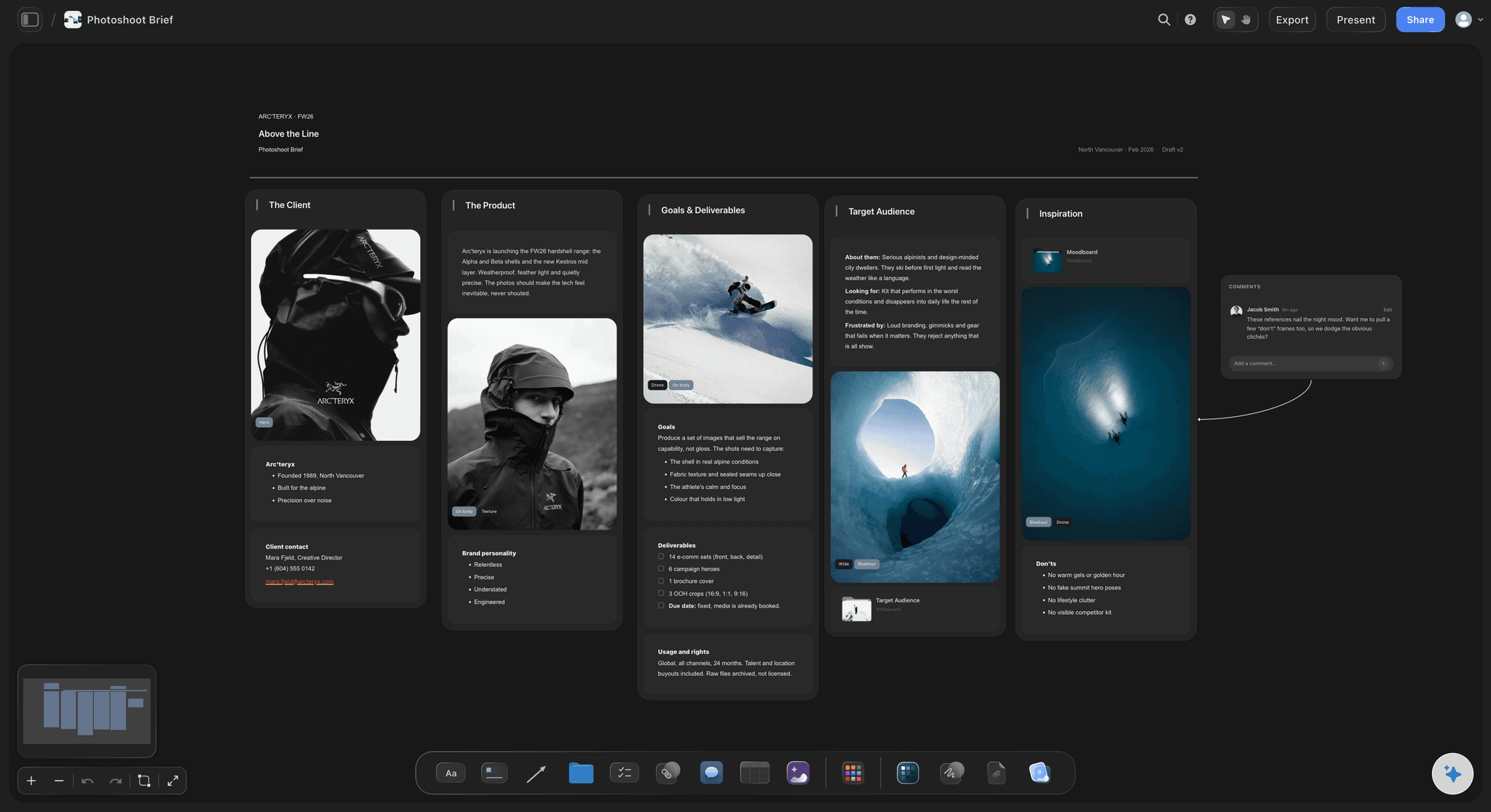
Show the director one thing, build from another
Two boards, one canvas: The concept board you present is a small number of strong images and a clear idea. The working board is prices, plans, suppliers, and lists. Keep the presentation cluster at the front of the canvas and the working detail behind it, so you never have to maintain the same design in two files.
View-only links, no account required: Send a link and the director, the DP, or the producer opens the whole design in a browser and comments on the image they mean. Anyone a paid member invites to a board joins free today, so the art director, the set decorator, and the buyer can work on the same canvas.
Export for the folder and the floor: Export the board as a high-quality image or PDF for the art department folder, the budget meeting, or a print pinned up in the workshop. The canvas stays the live version, and the export is the snapshot of what was approved.
Explore templates for your project
Every template opens as a real, editable board on the infinite canvas. Pick the closest fit and make it your own.
Pre-Production
Pull the brief, script, shot list, and moodboard into one pre-production hub so the whole shoot is planned in one place.
One app instead of five
Storyflow vs StudioBinder, Milanote, and Pinterest.
Each of these is genuinely good at something, and one of them is probably where you found your references. Here is the honest split.
Storyflow
Recommended
Every set visible at once on one infinite canvas
AI lays out a board per set from a prompt
Plans, dressing lists, and research beside each set
Full production suite with breakdowns and call sheets
Huge discovery feed for finding references
Runs in the browser, nothing to install
StudioBinder
Every set visible at once on one infinite canvas
AI lays out a board per set from a prompt
Plans, dressing lists, and research beside each set
Full production suite with breakdowns and call sheets
Huge discovery feed for finding references
Runs in the browser, nothing to install
Milanote
Every set visible at once on one infinite canvas
AI lays out a board per set from a prompt
Plans, dressing lists, and research beside each set
Full production suite with breakdowns and call sheets
Huge discovery feed for finding references
Runs in the browser, nothing to install
Every set visible at once on one infinite canvas
AI lays out a board per set from a prompt
Plans, dressing lists, and research beside each set
Full production suite with breakdowns and call sheets
Huge discovery feed for finding references
Runs in the browser, nothing to install
What creators are saying
Join early creators getting structured workspaces and AI that remembers their projects
“Storyflow has sped up my workflow by at least 3x, which means more flow state and more projects I can actually ship. It truly changed the way me and my team create.”

Reilin Joey
Director & YouTuber
“One prompt gets me a structured board. But the tactics are my favorite. I run my YouTube scripts through them and my intros and retention got better. It's amazing.”

Justkay
YouTuber & Freelance Filmmaker
“I used to juggle five apps to plan a project. Now I describe what I am making and get boards, lists, and a schedule. All in one place.”

George
@fernwehchronicles
Set design board questions, answered.
What goes on one, how it differs from a moodboard, and what it takes to build one.
A set design board is the production designer's working document for a single set. It states what the space says about the character and the story, then backs that up with a colour and material palette, period and location research, a plan or elevation, a dressing and prop list, and the practical constraints of building it. It is meant to be read by a director for the idea and by the art department for the execution, which is why it holds both an argument and a spec rather than a collection of appealing rooms.
Storyflow gives every set its own board on one canvas, so you can see what each space says and how the sets speak to each other. The AI lays out a board per set from a prompt, and the plan, the dressing list and the research sit beside it. Pinterest still has a huge discovery feed for finding references, which Storyflow does not.
A moodboard establishes a feeling. A set design board makes decisions. The moodboard can say faded, warm, over-lived-in, and it has done its job. The set design board has to say which paint, which flooring, which era of appliance, what is on the counter, what the camera sees, and what it costs. In practice a moodboard is often the first stage of a set design board: you gather the tone, then you convert it into specifics that a painter, a buyer, and a set decorator can act on without asking you what you meant.
No. Almost all of a set design board is collected material: photographs, archive images, paint chips, fabric swatches, catalogue pages, and the location scout's own shots. Where a drawing helps is the plan and the rough elevation, and those do not need to be technical drawings. A hand sketch showing where the walls, windows, and practicals sit answers the questions images cannot, and you can draw it directly on the canvas with the pen tool. If a set genuinely needs a scale drawing, that is usually the art director's or draughtsperson's job, not something the board is supposed to replace.
Six things. A written concept saying what the space communicates about the character and the story. A colour and material palette pinned as actual chips and swatches. Period and location research, dated where it matters, including the scout's photographs of the real room. A plan or elevation showing walls, windows, doors, and practicals. A dressing and prop list broken out by whether each item is hired, bought, made, or already owned. And the constraints: budget, build or location, what the camera will see, and how the set changes across scenes.
They are two different audiences for the same design. The concept board is what you present to the director and the producer: a small number of strong images and a clear idea, edited so the argument lands in about thirty seconds. The working board is what the art department builds from: prices, suppliers, plans, dressing lists, and constraints, which would drown the concept if you showed both at once. Most designers maintain both, and the usual failure is that they drift apart. Keeping them as two areas of one canvas avoids that.
Treat colour as something that tracks the story rather than something you pick per room. A character's spaces might desaturate as they lose control, or warm as they let someone in, or hold one stubborn colour that reappears where you least want it. The problem is that you cannot judge that one set at a time. It only reads when every set is visible together and you can check where the shift happens against the script. That is the main practical argument for building set design boards on an infinite canvas instead of in separate files.
It means designing what the camera photographs rather than what a person standing in the room would see. Most of a set is never in frame, so a designer marks the wall the camera lives against, the corner the two-shot uses, and the window the light arrives through, then puts the budget there. It also means thinking about depth, because a set that reads flat on a 50mm needs something in the mid ground, and about the lighting plan, because a wall the DP wants to bounce off cannot be the one painted the deepest colour on the board.
Because they answer different questions and only mean something as a pair. The reference says what you want the space to be. The scout photo says what the space actually is: its ceiling height, the direction of its light, the radiator you cannot move, the door that opens the wrong way. When they live in separate folders, the design arrives at the location and does not fit, and the compromise gets made on the day by whoever is standing there. Side by side on the board, the compromise gets made early, deliberately, and by you.
Yes, and the structure barely changes. Theatre needs the same concept, palette, research, and elevation layers, plus the scene-by-scene changes and the model box photos, and it swaps camera coverage for sightlines from the house. A photoshoot or commercial build compresses everything into a day, so the dressing list and the supplier links carry more weight than the long-term continuity notes. The layers stay the same. What changes is which of them you spend your time on.
Keep them under the set they belong to, not in a separate document, and split them by who owns them. Set dressing, hero props, action props, and greens are sourced by different people on different budgets, so a single flat list creates arguments. Put the status on each item, hire, buy, make, or already have, with a supplier link and a price beside the image of the thing. When a design is approved the sourcing is already half done, because nobody has to work out where a picture came from before they can order anything.
Not during early access. Storyflow is paid-only right now, with plans starting at $9.99 a month, and a Free plan for solo use launches before the end of 2026. Anyone a paid member invites to a board joins free today, so a director, an art director, or a set decorator can join a design board without paying. If you need something free this minute, a physical pinboard is still an excellent set design tool, and it is how the craft was built. It just cannot show you six sets at once or travel to the location with you.
StudioBinder is stronger if what you need is the whole production-management suite around the design: script breakdowns, shooting schedules, and call sheets in one system. Milanote is a genuinely good visual board and pleasant to look at for a single set or a single mood. Storyflow is built for the part both find awkward, which is many sets at once: every design cluster visible on one infinite canvas with its research, plan, palette, and dressing list attached, and AI that reads the whole board for context rather than one card at a time.
Design every set on one canvas, and see how they speak to each other.
Open a canvas, describe the film, and let AI lay out a board per set. No download.