What Tools Do Screenwriters Use to Plan Their Stories?
Screenwriters plan with a logline, character sheets, a beat sheet, index cards and an outline, and Storyflow holds all of them on one board its AI reads. Here is the tool for each planning step, sixteen tools compared, and where Final Draft, Scrivener and Plottr fit.

Category
Screenwriting
Author

Justkay
Documentary Filmmaker & Founder at Storyflow
Topics
2026-07-26
•
46 min read
•
Screenwriting- what tools do screenwriters use
- screenwriting planning tools
- how screenwriters plan stories
- story planning software
- screenwriting software
- index cards screenwriting
- screenplay planner
- tools of screenwriting
- Storyflow
What tools do screenwriters use to plan their stories?
Screenwriters plan their stories with a logline, a beat sheet, index cards and an outline, and our pick for all four in 2026 is Storyflow: its AI builds a story plan, a beat-by-beat outline and character sheets on one infinite canvas, and reads your .fdx, Fountain or PDF draft scene by scene. Final Draft's Beat Board, Arc Studio Pro and the Save the Cat! Story Suite keep beats inside the script app. Scrivener holds research, outline and draft in one file, and Plottr lays plotlines on a timeline. The pages get written in Final Draft, Fade In, WriterDuet or Highland.

Full disclosure: Storyflow is our own product, so weigh its placement with the skepticism you would apply to any tool a company ranks on its own blog. Storyflow is listed first as our pick, and the rest are ordered by job, because this page is about planning: structure, research kept beside it, and feedback that reads your actual material. No tool on this page is given a score. Storyflow does not format screenplays, so the pages still get written in Final Draft, Fade In, Arc Studio, WriterDuet or Highland, and this piece says so.
Quick Comparison
Compared on planning a story, not on formatting pages: our pick first, then the rest by job. Final Draft, where most scripts are finally written, owns the other half; the full table is below.
| Tool | Best For | AI Features | Price |
|---|---|---|---|
| Storyflow | Planning on one AI-read board | Builds story plans, outlines, character sheets; parses attached scripts | $7.99 mo annual (free plan late 2026) |
| Save the Cat! Story Suite | The fifteen-beat method | None listed | From $89/year |
| Arc Studio | Beats inside the script app | Paid Research Assistant add-on | Pro $99/year |
| Scrivener | Research, outline and draft in one file | None | $59.99 one-time |
| Final Draft | Writing the pages production expects | None listed | $199.99 one-time sale price (regular $249.99) |
How Screenwriters Plan a Story, and the Tool for Each Step
Screenwriters plan with methods first and tools second. Seven steps carry most scripts from an idea to page one, and on a Storyflow board the first six happen in one place. The product page is Storyflow for screenwriters.
- Write the logline. Put it at the top of a Storyflow board or the first line of a notebook: who wants what, against what, at what cost.
- Define the characters. Give each lead a character sheet. Storyflow's Character sheet workflow builds a profile card per character from your notes or script, and on paper the same step is one index card per lead with want, need and flaw.
- Break the story into a beat sheet. On a Storyflow board you drop a storytelling Tactic such as Hero's Journey, Three-Act Structure or Dan Harmon's Story Circle onto the canvas, or ask the AI for an outline with one wall per beat. Final Draft's Beat Board and the Save the Cat! Story Suite's fifteen-beat map do this step inside a script app.
- Lay out index cards and move them. One card per scene, moved until the order holds. On Storyflow's infinite canvas the cards drag between act walls, on a corkboard they are pinned in rows, and Scrivener's corkboard and Arc Studio's beat cards are the in-app versions.
- Write the outline or treatment. The story in prose, start to finish, as a document on the Storyflow board or in Scrivener or any word processor.
- Pressure-test the structure. Attach the outline or the draft to the Storyflow board and ask the AI which character disappears, which beats repeat and where act two sags.
- Write the pages. In Final Draft, Fade In, WriterDuet, Arc Studio or Highland. Storyflow does not format screenplay pages.
| Step | What it settles | Where screenwriters do it |
|---|---|---|
Logline | Whether there is a story at all | The top of a Storyflow board, a notebook |
Character sheets | Who changes and why | Storyflow's Character sheet workflow, index cards, Scrivener templates |
Beat sheet | The major turns and their order | Storyflow Tactics or an AI outline, Final Draft's Beat Board, the Save the Cat! Story Suite, Plottr's templates |
Index cards | Scene order, pacing and gaps | Storyflow's infinite canvas, a physical corkboard, Scrivener's corkboard, Arc Studio's beat cards |
Outline or treatment | The story in prose | A document on the Storyflow board, Scrivener, a word processor |
Pressure test | Structural gaps, before they cost pages | Storyflow's AI reading the board and the attached draft, a trusted reader |
Formatted pages | The script itself | Final Draft, Fade In, WriterDuet, Arc Studio, Highland |
That split is the whole answer, and it is worth naming properly. Screenwriters use two distinct sets of tools: Search tools for finding the story (research, character, structure, the thing the film is actually about) and Build tools for assembling the script once the story is found. Screenwriters rarely have a writing problem. They have a Search problem that they keep trying to solve with Build tools. A screenwriting app is an excellent instrument for laying track once you know where the train is going. It is a hostile place to figure out where the train is going, because every feature in it assumes you already decided.
Writers who stall are rarely short on craft. They are sitting in a screenwriting app on page one, in a tool whose every affordance says "type the scene", trying to answer a question ("what is this actually about") that no scene-typing tool was built to hold. If the script is owed to someone (a producer waiting on a treatment, a lab application with a deadline, a writer-director with a shoot booked) that stall costs money, not just time.
Key Takeaways
- There are two tool classes, not one. Search tools help you find the story. Build tools help you assemble the script. Nearly every "best screenwriting software" list only covers Build.
- Storyflow is our pick for the planning half because the beats, the character sheets, the research and the attached draft sit on one board its AI reads. Storyflow does not format a screenplay.
- The Save the Cat! Story Suite and Arc Studio Pro are the strongest planners that also write the pages: the suite from $89 a year (co-writing starts on Premium, $119 a year) and Arc Studio Pro at $99 a year, both billed annually.
- The Search half is where scripts die. A stalled script is usually a story that was never found, not prose that was never typed.
- Index cards are the method every planning tool imitates, because they are cheap, spatial and rearrangeable. Every digital Search tool competes with a deck of cards on a table.
- Screenwriting software is deliberately light on Search. Final Draft's Beat Board and Outline Editor are real, but formatting fidelity is the product's actual job.
- AI helps most in Search and least in Build. It is useful for pressure-testing structure and finding gaps, and it is bad at writing dialogue anyone wants to shoot.
- Plan in two tools: a Storyflow board or a wall of index cards for the Search, a screenwriting app for the Build, with a deliberate handoff between them.
Frequently Asked: Which Story Planning Tools Screenwriters Trust, Rate and Pay For
Which story planning tools do screenwriters trust most?
For the planning half, our pick is Storyflow, and the Save the Cat! Story Suite and Arc Studio are the planners most often trusted inside a script app. Storyflow's case rests on what it does: the story plan, the outline, the character sheets and your attached draft on one board its AI reads. Final Draft earns a different kind of trust: it is the format a production office expects, which is why the pages usually end up there whatever the planning tool was. Scrivener is trusted by writers whose projects run long and research-heavy.
Which story planning tools are the most innovative?
Storyflow, for putting the reasoning beside the structure: the research that produced a beat sits next to the beat, and the AI parses your attached script into a scene index (sluglines, page lengths in eighths, which speaking parts appear in each scene), so a structural question gets answered against the real draft. Throughline draws each plotline as an emotional arc between two poles you define. Arc Studio puts a visual outline and season outlines inside the script editor. The new idea in this category is not text generation; it is keeping the story's evidence attached to its shape.
Which screenwriting planning tools are fairly priced?
Storyflow is paid-only during early access, with plans from $7.99 a month billed annually ($9.99 monthly). Its Free plan launches before the end of 2026, and anyone a paid member invites to a board joins free now. The Save the Cat! Story Suite starts at $89 a year, Arc Studio Pro is $99 a year, Plottr at $60 a year, and Scrivener is a $59.99 one-time purchase per platform. Final Draft 13 was listed at $199.99 one-time on 11 October 2026 (regular price $249.99), and its Suite subscription starts at $8.33 a month billed yearly. The full table, with billing shape, is in the pricing section below.
Which planning tool gives the best value for a working screenwriter?
Storyflow for a writer whose planning is research-heavy or owed to a producer, because one Plus plan covers the plan, the outline, the character sheets, the draft read-through and a treatment or one-pager PDF for the pitch. Scrivener for a solo novelist-turned-screenwriter who wants one file and no subscription. WriterDuet for a writing partnership on a budget, because its free version covers three projects with outlining included.
Which story planning tool is the most underrated?
Storyflow, for the pitch: the board that holds the story plan also produces a treatment or a one-pager as a PDF for a producer, so the document owed to someone comes from the same material as the structure. Throughline is the other one: a one-time-purchase app that treats beat cards, character arcs and the screenplay editor as one document.
Which planning tool is recommended for writer-directors taking a script to a shoot?
Storyflow first, because the plan and the attached script stay on the board where the production paperwork is drafted, as the StudioBinder section below describes; names, times and addresses it does not have are left as marked blanks. StudioBinder is the pick once the job becomes sending call sheets and tracking crew confirmations; a StudioBinder support article lists its Indie plan at $49 a month for 2 users. Celtx covers both script and production tools, with production tools as an add-on below its Team tier.
What is the best template for a screenwriting story planner to organize characters and beats?
One board with four zones: a premise wall (logline, want, need, stakes), one wall per lead character (want, need, flaw, the scene where they change), one numbered wall per beat or sequence, and an open-questions wall. In Storyflow, the Story Plan workflow covers the premise and leads, and more, as seven numbered walls, each opening with the question it answers, and a story outline you ask the AI for builds the beat zone. The copyable version of this template, filled in, is in the template section below.
The Search and the Build
Every screenwriter's process splits into two modes that feel similar and behave nothing alike.
The Search is the open phase. You are gathering research, testing premises, working out who the protagonist is and what they want, arguing with the structure, and throwing away four versions of act two. The work is nonlinear, spatial, and full of dead ends you need to keep visible in case they turn out to matter. Success in the Search looks like a decision: this is the story.
The Build is the closed phase. The story is decided. Now it becomes a formatted screenplay with sluglines, action, and dialogue, at industry-standard margins, with revision colors and locked pages if it is going into production. Success in the Build looks like a document.
The tools split along the same line, and they split hard.
| The Search | The Build | |
|---|---|---|
The job | Find what the story is | Assemble what the story will be |
Shape of the work | Nonlinear, spatial, revisable | Linear, sequential, formatted |
What you need to see | Everything at once | One page at a time |
Failure mode | Endless circling, no decision | Perfect formatting of a broken story |
Typical tools | Index cards, corkboard, Storyflow, Plottr, Scrivener, notebooks | Final Draft, Fade In, Highland, WriterDuet, Arc Studio |
What AI is good for | Gap-finding, pressure-testing, alternatives | Very little worth using |
The reason this framing earns its place is that it predicts the failure. A writer who owns only a Build tool will experience the Search as a personal failing (writer's block, lack of discipline) when it is mostly a tooling mismatch. A writer who owns only Search tools will produce beautiful boards and never finish a script.
This is the Search half in practice. Loose notes pasted onto a Storyflow board have been sorted by the AI into named walls, with a collaborator's comment beside them:

Which Tool to Use for Planning a Screenplay: Compared
Every tool below was compared from its own product and pricing pages, and prices were read on 11 October 2026. No hands-on benchmark is claimed and nothing here is a score. Storyflow is our product, and the order is our pick first, then the rest by job: tools that plan and write pages in one app, dedicated planners and room boards, script apps with planning views, general boards, databases and AI drafting, and pure writing apps last. That is why Final Draft, the tool most scripts are finally written in, sits ninth: this list is about the planning half, not the half Final Draft owns.
| Tool | Planning view | Research beside the beats | Reads your draft and answers about it | Formats screenplay pages | Starting price |
|---|---|---|---|---|---|
Storyflow | Note cards in walls on an infinite canvas; AI-built story plan, outline, story map and character sheets | Images, documents and links on the same canvas | Yes: the AI parses an attached .fdx, Fountain or PDF into a scene index | No | $7.99/mo billed annually |
Save the Cat! Story Suite | 15-Beat Story Map, story board of scene cards | Character trackers | No | Yes | $89/year (Essentials) |
Arc Studio (Pro) | Visual outlining, beat board, season outlines | Built-in notes | Research Assistant is a paid add-on | Yes | $99/year (Pro) |
Scrivener | Corkboard of virtual index cards, outliner | Research documents in the same project | No | Yes, scriptwriting mode | $59.99 one-time per platform |
Throughline | Beat cards with an emotional arc per plotline | Less room than a canvas | No | Yes | One-time, price not on its homepage |
WriterDuet | Outline mode attached to the script | Little | No | Yes | Free for 3 projects; Plus $9.99/mo |
WritersRoom Pro | Season, episode, character and cast boards of cards | Image cards | No | Exports to Final Draft | $9.98/mo (Indie) |
Plottr | Timeline grid of plotlines, 30+ templates | Story bibles for characters and places | No | No, exports to Word and Scrivener | $60/year or $150 lifetime |
Final Draft | Beat Board, Outline Editor, Structure Lines | Little | It holds the draft | Yes, the industry standard | $199.99 one-time (sale price, regular $249.99) |
Celtx | Beat Sheet with a pacing view | Little | No | Yes | Free plan (1 project) |
Milanote | Boards of notes, images and links | Yes | No | No | $9.99/mo per person billed annually |
Sudowrite | Story Bible, Canvas for plot points and arcs | Story Bible | Feedback on prose written in it | Screenplay format, no FDX export | $10/mo (Hobby & Student) |
Notion | Database of scenes with properties | Linked pages | No | No | Free for individuals; Plus $10/member/mo |
Miro | Sticky notes and diagrams | Images and links | No | No | Free for 3 boards; Starter $8/member/mo |
Fade In | Outlining and navigation inside the script app | Little | It holds the draft | Yes | One-time; price page did not load |
Highland Pro | Navigator of sections, scenes and synopses | Little | It holds the draft | Yes | $59.99/year |
Three things fall out of the table. First, no tool does both halves fully: Storyflow plans and reads the draft but formats no pages, and Final Draft is the reverse. Second, the differences between Final Draft, Fade In and WriterDuet on the Build side are real but small, and none of them will change whether you finish. Third, only a tool that can see the story as a whole can answer a structural question about it, which is the criterion most writers have never deliberately chosen anything on.
Choose a different tool instead of Storyflow if you want one app that plans and formats: the Save the Cat! Story Suite or Arc Studio Pro do both, at the cost of a thinner research surface.
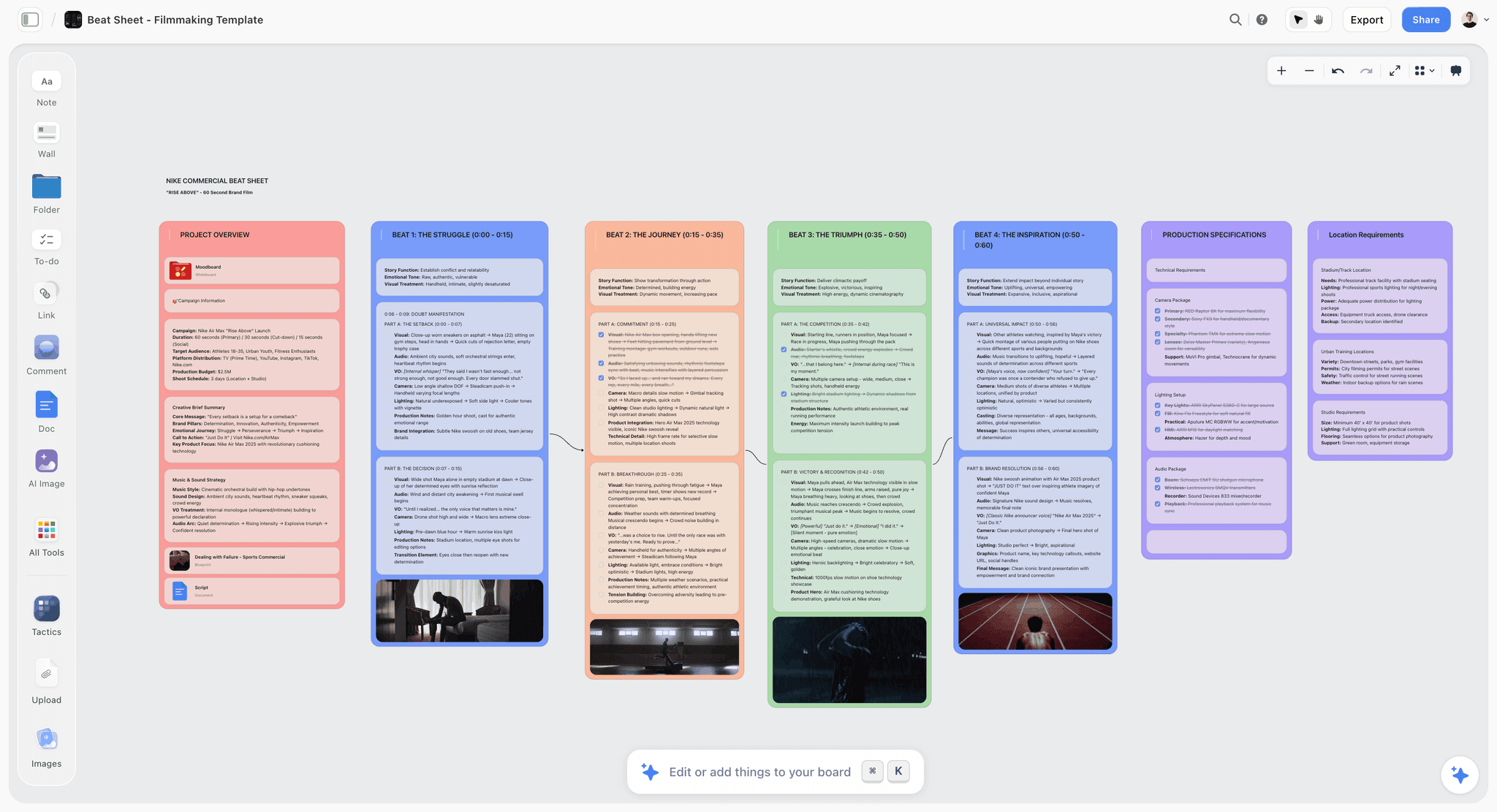
A timed beat sheet on the Storyflow canvas, one wall per beat with its timecodes, beside a project overview and production specifications
Find the story before you format it
Put the story plan, the beats, the character sheets and the research on one canvas, attach your draft, and ask the AI what act two is missing. Then take the decided story into your screenwriting app and write it.

What Screenwriters Pay for Planning Tools
Prices below were read on each vendor's own page on 11 October 2026. A one-time licence and an annual subscription are not the same purchase, so the billing shape has its own column.
| Tool | Billing shape | Price (checked 11 October 2026) | Free option | Half it serves |
|---|---|---|---|---|
Storyflow | Subscription, per seat on Team billing | $7.99 mo annual ($9.99 monthly); Pro $14 annual ($19 monthly) | Coming late 2026 (invited collaborators join free now) | Search, and the handoff to production |
Arc Studio | Annual only | Essentials $69/year; Pro $99/year (outlining and beat board are Pro) | Free: 2 scripts, no outlining tools | Both, strongest with Pro |
Save the Cat! Story Suite | Annual, quarterly or lifetime | Essentials $89/year, Premium $119/year, Pro $179/year; $599 lifetime | No | Both, built on one method |
Scrivener | One-time licence | $59.99 per platform (iOS $23.99) | Trial | Both, for long projects |
Throughline | One-time purchase | Price not shown on its homepage | Not stated | Both |
WriterDuet | Monthly or yearly | Plus $9.99/mo or $89.88/yr; Pro $11.99/mo or $107.88/yr; Premium $13.99/mo or $125.88/yr | Three projects, outlining included | Build, with outlining |
WritersRoom Pro | Monthly | Indie $9.98/mo (one user); Partner $17.98/mo (two users); Studio custom | 14-day trial | Search, for rooms |
Plottr | Yearly or lifetime (Pro also monthly) | $60/yr or $150 lifetime; Pro $9.99/mo or $99/yr | 30-day trial | Search |
Final Draft | One-time or subscription | $199.99 one-time sale price (regular $249.99); Suite from $8.33/mo billed yearly | 5-day Suite trial | Build, and the format standard |
Celtx | Monthly or yearly | Plan prices not shown on its pricing page when checked | Free plan (1 project) | Both, plus production add-ons |
Milanote | Per person, annual or monthly | $9.99/mo billed annually ($12.50 monthly) | Free: 100 notes, images or links | Search |
Notion | Per member | Plus $10/mo billed annually | Free for individuals | Search, as a database |
Miro | Per member | Starter $8/mo billed yearly | Free: 3 editable boards | Search, for rooms |
Fade In | One-time licence | Price page did not load when checked | See its site | Build |
Highland Pro | Subscription | $59.99/year ($4.99/mo) or $9.99 monthly | 30-day trial | Build |
Index cards | One-time | A few dollars | Yes | Search |
Sources: Final Draft, Celtx, Fade In, Arc Studio pricing, Save the Cat! Story Suite, WriterDuet plans, Plottr pricing, Highland Pro, WritersRoom Pro and Storyflow pricing.
The one-time purchases are the better value for anyone who writes steadily and plans in their head. A subscription earns its place only if it does something a one-time tool cannot, which for this category means reading across the material rather than storing it.
The Planning Tools Screenwriters Use, Ranked
The order below is our pick first, then the rest by job, as set out above the comparison table. Each review says what the tool is for, what it costs, how it compares with Storyflow, and where it is the wrong choice.
1. Storyflow
Best for: planning a screenplay before and during the draft, with beats, scene cards, character sheets and research on one board and an AI that reads the script. Price: $7.99 a month billed annually ($9.99 monthly).
Storyflow is an AI visual workspace for planning a story: one infinite canvas per project, where beats and scenes are note cards you drag between act walls and the character sheets, reference images and research sit beside them. Storyflow's AI reads the board you have open with every message. Storyflow includes 200+ Tactics, and its storytelling Tactics include Hero's Journey, Three-Act Structure, Story Spine and Dan Harmon's Story Circle. The product page is Storyflow for screenwriters.
Ask Storyflow for a story plan and the AI builds seven numbered walls (premise and logline, a stakes matrix, conflicts and opposition, a wall per lead, the supporting cast, the three-act structure with its subplots), each opening with the core question the wall exists to answer, plus a details wall for comparison titles and audience. Ask Storyflow's AI for a story outline and you get one numbered wall per beat, each carrying what happens, what it costs the character and what it sets up. Ask for a story map and the AI lays out the story's anatomy across ten walls, ending with a Development Tasks and Open Questions wall, which is the one worth being honest on. The Character sheet workflow gives each character a wall with a face, a full portrait and three short tables (key information, background, personality); faces come from web reference captioned "Casting reference", AI generation on Pro and Max, or empty frames you fill yourself.
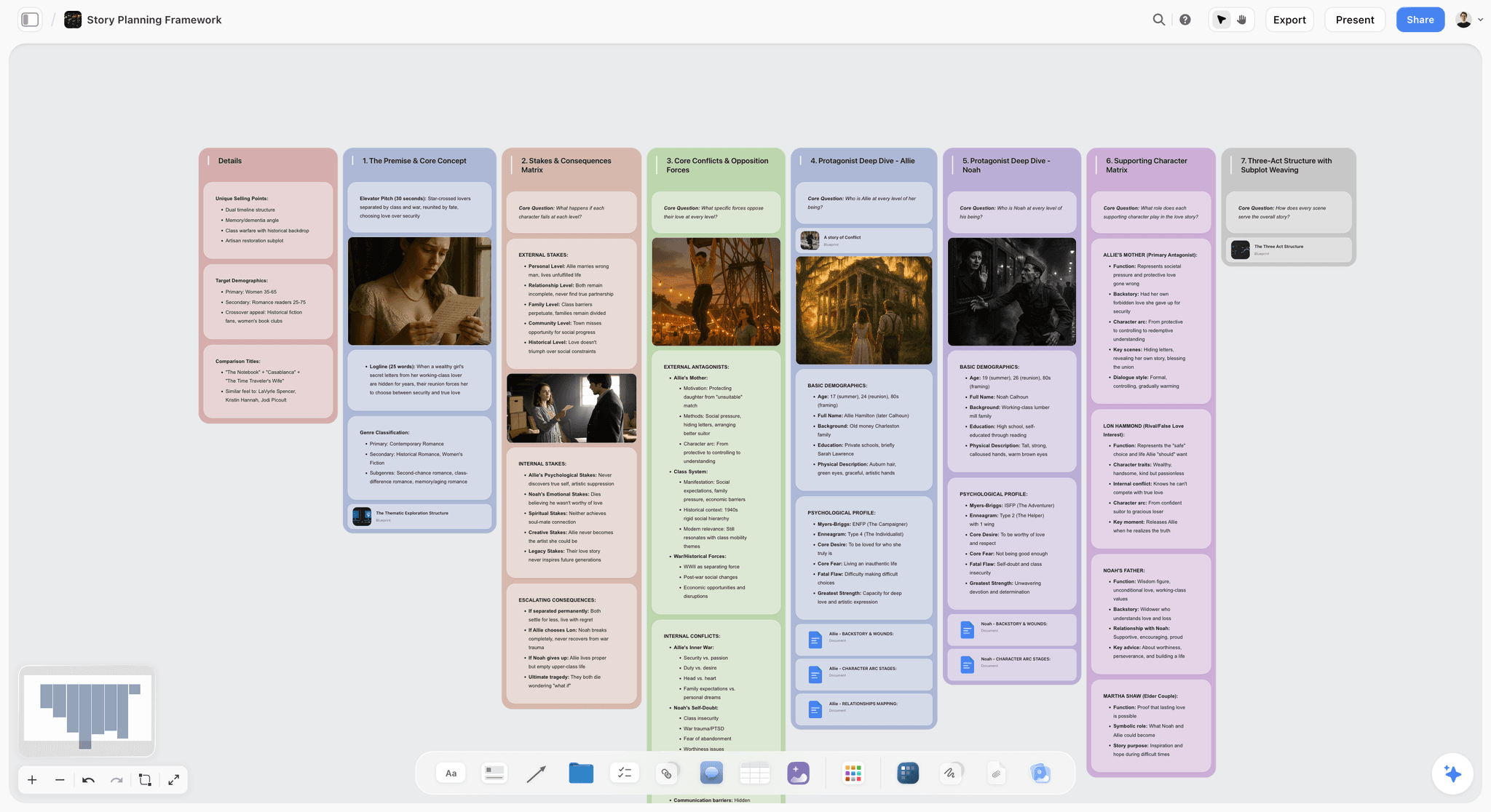
Storyflow's strongest planning feature is feedback against the real draft: attach your screenplay as a PDF, Final Draft (.fdx) or Fountain file and the AI parses its scene index, meaning the sluglines, each scene's length in eighths of a page and which speaking parts appear in it. So "which scenes is MARIA in" and "where does the antagonist disappear for thirty pages" get answered against the real draft, not a summary you pasted. You can attach up to five documents and three other boards per message. Storyflow's AI builds and the writer decides, and everything one request changed can be undone in a single step.
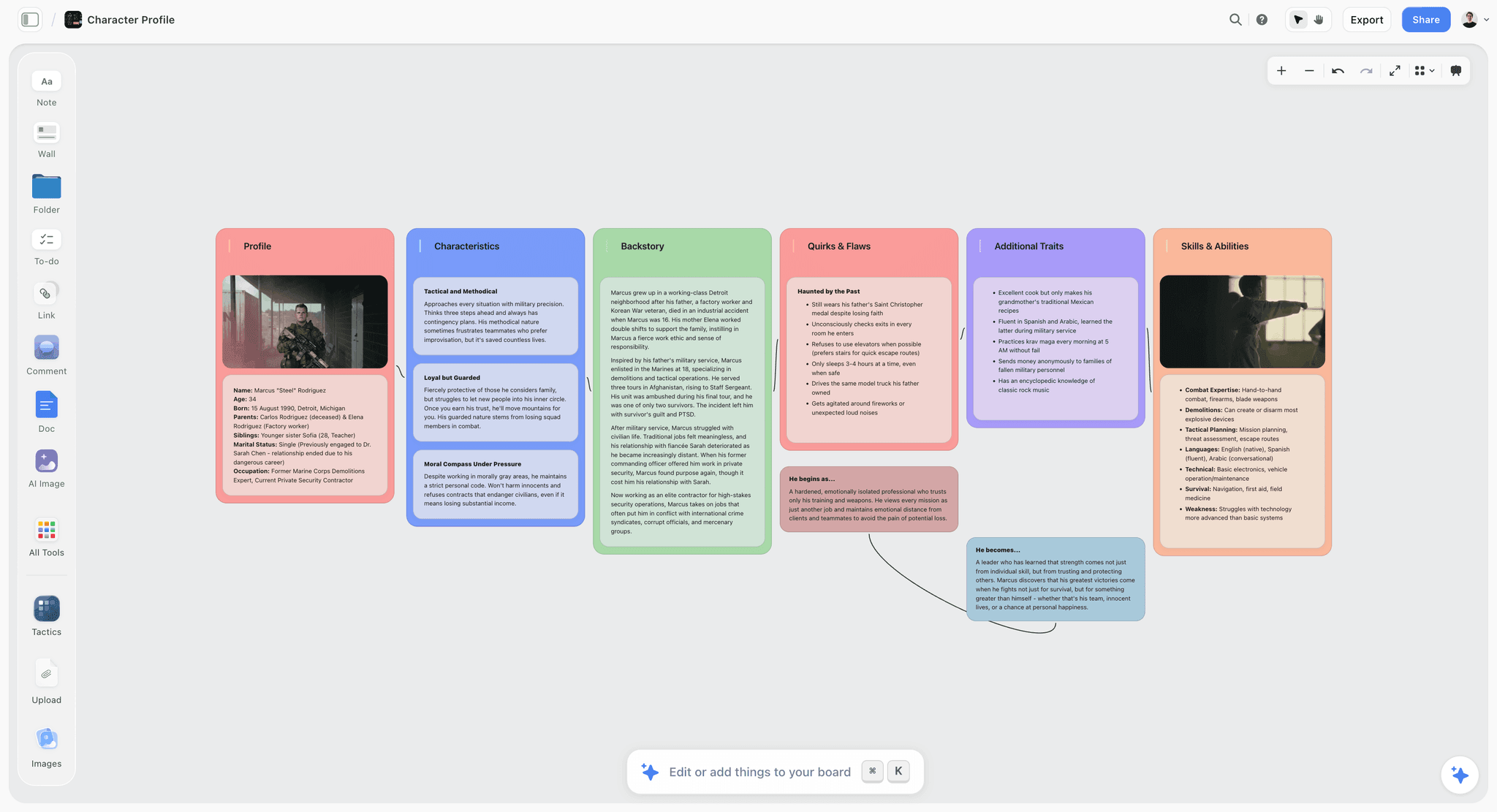
Storyflow carries on past the draft for a writer-director: the AI can break the script down into scenes, cast and elements, lay the scenes out as a strip board grouped into shoot days with page counts, draft a shot list, and produce a treatment or a one-pager as a PDF for the pitch. Collaborators you invite edit the board with you in real time; a producer opens a view-only link with no account, and signs in to comment. The picture below is the shot-list end of that: one wall per shot, each with a frame, a description and the equipment.

Where Storyflow is the wrong tool: Storyflow does not format screenplay pages and has no Beat Board by that name, and there is no export back to Final Draft, so it cannot be where the script is written. Storyflow runs in the web browser only, with no native app and no local-first files, which rules it out if a studio requires offline, on-device work. The beat sheet Storyflow's AI builds on request is a timed one for short pieces (a commercial or a short, with seconds per beat), so a feature writer who wants Save the Cat's fifteen beats at page targets will find a more opinionated template in the Save the Cat! Story Suite. AI use is metered by plan, and there is no free plan today. And a writer who thinks in prose, not in space, will find a canvas to be overhead rather than help.
2. Save the Cat! Story Suite
Best for: writers working Blake Snyder's method who want the fifteen beats as a fixed template. Price: from $89 a year (Essentials), $119 (Premium), $179 (Pro), billed annually; quarterly plans and a $599 lifetime licence exist.
The suite is a digital writer's board built around the method: a fifteen-beat story map, a story board of movable scene cards, character trackers, a scene card editor, screenplay and manuscript formatting, offline writing that syncs when you reconnect, and export to PDF, Word and FDX-compatible files. It is opinionated by design, which is exactly why writers either love it or bounce off it. Real-time story collaboration and versioning start on Premium ($119 a year), and Pro adds franchise and series planning boards. Buy it if you are writing to that method; it is a poor general outliner, and its research surface is thin next to Storyflow's canvas. Choose the suite over Storyflow when you want the fifteen beats enforced, and Storyflow when the structure is still an argument.
3. Arc Studio (Pro)
Best for: beats and outline inside the screenwriting app, with real-time co-writing. Price: Essentials $69 a year, Pro $99 a year, both billed annually; a free plan covers two scripts.
Arc Studio is a Build tool that pushes further into structure than most. On Pro you get visual outlining, a beat board, color-coded characters, storylines and locations, and season outlines for series work. It imports Final Draft, Fountain, PDF and Word files and exports .fdx and Fountain, per its help centre, so the outline and the pages travel together. The catch is that the planning tools are Pro-only: the free plan and Essentials have no outlining tools, so the $69 tier is a writing app, not a planner. Its research surface is thin next to Storyflow's canvas; articles, interviews and reference images have nowhere natural to live. Choose Arc Studio Pro over Storyflow when beats and pages must share one app.
4. Scrivener
Best for: one app for research, outline and draft on a long project. Price: $59.99 one-time per platform; iOS $23.99.
The classic hybrid, and still the strongest single-application answer. Scrivener holds research documents, a corkboard of virtual index cards, an outliner and the draft in one project, and its scriptwriting mode handles screenplay formatting. Writers who want everything in one place and are willing to climb a steep learning curve stay in Scrivener for years. Its weakness for screenwriting specifically is that its formatting and collaboration are not competitive with dedicated screenwriting software once a script goes into production, which is why a Scrivener draft usually moves to Final Draft at the end. Compared with Storyflow, Scrivener holds the draft in the same file, which Storyflow does not, and Storyflow's AI reads the plan and the attached draft, which Scrivener leaves to you. See Scrivener's own overview for the corkboard and outliner.
5. Throughline
Best for: writers who want beat cards, character arcs and the screenplay in one desktop app with no subscription. Price: one-time purchase, macOS and Windows; the price is not shown on its homepage.
Throughline lays a story out as beat cards; you drag characters and settings onto beats to cast them, and deal structure cards to impose a template. Its distinctive idea is that each plotline gets an emotional arc drawn between two poles you choose ("hope and despair"), so you can see the story's shape and compare it with classic structures. The screenplay editor formats as you type and exports to PDF and Fountain. Its homepage describes no collaboration features, and research has less room than on Storyflow's canvas. Choose Throughline over Storyflow when you want cards and the screenplay editor in one offline desktop app.
6. WriterDuet
Best for: writing partners and remote rooms. Price: Plus $9.99 a month or $89.88 a year, Pro $11.99 or $107.88, Premium $13.99 or $125.88; the free version covers three projects.
WriterDuet was built around simultaneous editing rather than having it added later, and it includes outlining even on the free version. Its planning is an outline mode attached to the script, which is exactly right for keeping beats and pages in step and thin for the research-heavy half of the Search. Pair WriterDuet with Storyflow when a partnership needs a shared board for research and structure before pages.
7. WritersRoom Pro
Best for: television rooms that run on index-card boards. Price: Indie $9.98 a month (one user), Partner $17.98 a month (two users), Studio edition priced per production.
A digital version of the writers' room wall, made by a showrunner: season, episode, character and cast boards; text, image and storyboard cards; color-coding with version history; export to Final Draft, Word and PDF. It is the most literal digital corkboard on this list, which is its strength for a room and overkill for a solo feature. Storyflow holds the same wall with the research and the pilot draft beside it and an AI that reads the board; WritersRoom Pro is the closer match to a physical room wall.
8. Plottr
Best for: seeing several plotlines interleave on a timeline grid. Price: $60 a year or $150 lifetime; Plottr Pro is $9.99 a month or $99 a year.
Plottr lays a story out as a timeline grid: scenes along one axis, plotlines along the other, so you can see which thread is active in which sequence. It ships more than thirty structure templates (the Hero's Journey, the Snowflake Method and three-act structure among them) and exports the outline, characters and notes to Word and Scrivener; Final Draft is not listed as an export. The grid is clarifying for a story that really is parallel threads sampled over time, which describes a lot of television and most ensemble features. It is also an opinion about shape, imposed before you have worked out what the shape is: a single-thread feature with a problem in the middle of act two fights the grid, because every cell is the same size. Storyflow's canvas imposes no grid, so use Plottr for interleaved threads and Storyflow while the shape is still open.
9. Final Draft
Best for: writing the pages production expects. Price: Final Draft 13 was listed at $199.99 one-time on 11 October 2026 (regular price $249.99); the Suite subscription starts at $8.33 a month billed yearly and includes Final Draft Cloud.
The industry standard for the Build, and the reason is boring and decisive: it is what production expects. Revision colors, locked pages, production reports, and the file format assistants and line producers already know. Its Beat Board, Outline Editor and Structure Lines are real planning features and they are light next to a dedicated Search tool such as Storyflow, which is a reasonable trade for a product whose job is formatting fidelity. Final Draft sits ninth here only because this list is about planning: Storyflow has no Beat Board and formats no pages, so a writer who plans in Storyflow still writes the pages in Final Draft or another script app.
10. Celtx
Best for: a script and its production paperwork in one subscription. Price: Celtx's pricing page listed its Writer, Writer Pro and Team tiers without prices when checked on 11 October 2026; the free plan covers one project.
Celtx has a dedicated Beat Sheet: color-coded beats with titles and descriptions, a view of pacing across the script's pages, and a Beats Panel you reference while writing, with read-only share links. Production tools (breakdown, schedule, call sheets) are an add-on on Writer and Writer Pro and included on Team; the free plan has none of them. Choose Celtx over Storyflow when the script and the call sheets must come from one subscription; Storyflow is the wider board for the story before either exists.
11. Milanote
Best for: a visual reference board for tone and world. Price: $9.99 per person a month billed annually ($12.50 monthly); the free plan holds 100 notes, images or links.
Milanote is a clean board for images, notes and links, with filmmaking templates such as a storyboard and a shot list. It holds research beside structure well. Unlike Storyflow, Milanote has no AI that reads the board and nothing that parses a script, so the structural questions stay yours to answer by looking.
12. Sudowrite
Best for: prose fiction drafting with AI, where Storyflow is for planning structure. Sudowrite is built for fiction writers: a Story Bible that walks from idea through outline to chapters, a Canvas for plot points and character arcs, and Write, Describe, Brainstorm and Feedback tools. It has a screenplay format in its editor but no FDX export, so the draft moves to a screenwriting app to finish, which is why it sits low on a screenwriting planning list despite its feedback tools. For a novelist adapting their own book it is worth a look; for a screenplay's structure, the tools above it fit better. The full comparison is in Storyflow vs Sudowrite.
13. Notion
Best for: writers who plan in databases. Price: Plus $10 per member a month billed annually. A Notion database of scenes with properties for act, character and status is a legitimate beat tracker, and linked pages hold research well. It shows you rows, not shape, so a sagging act two looks exactly like a healthy one, where a Storyflow board shows the shape. Notion sorts and filters a scene list, which Storyflow's tables cannot.
14. Miro
Best for: a remote room working one big whiteboard live. Price: Starter $8 per member a month billed yearly; the free plan allows three editable boards. Sticky notes and live cursors make it a decent virtual card wall. It knows nothing about scripts, and a board of sticky notes gives no feedback on the story it holds, where Storyflow's AI reads the board and the attached draft. Miro has the voting and timers for a live room that Storyflow lacks.
15. Fade In
Best for: Final Draft's competence at a one-time price. Price: a one-time licence; its price page did not load when checked on 11 October 2026, so see Fade In's site. Fade In describes tools for outlining, organizing and navigating a script, and it is a writing tool first. Pair Fade In with Storyflow the same way as Final Draft: the plan on the board, the pages in the app.
16. Highland Pro
Best for: a plain-text, distraction-free writing surface. Price: $59.99 a year (shown as $4.99 a month) or $9.99 monthly, with a 30-day trial. Its Navigator is "a road map of your sections, scenes, synopses and notes", which is light planning inside a writing tool, not a planning tool. Highland Pro writes the pages; Storyflow or a wall of cards finds the story first.
Index Cards, Corkboards and Notebooks: the Method Under Every Tool
Every digital tool above is an argument with a deck of index cards. A scene or beat per card, laid out on a table or pinned to a wall, physically rearranged until the order feels right. Blake Snyder's version of the board is forty cards in four rows; a television room runs one row per episode.
Cards get three things right that software struggles with: you see the whole story at once, you rearrange with your hands at the speed of thought, and the constraint of a small card forces you to state the beat in one line instead of hiding behind description. The costs are equally real. Cards do not travel, they do not back up, they cannot be shared with a collaborator in another city, and a cat or an open window can end your week.
Notebooks belong here too. Plenty of writers do their earliest thinking longhand and only open a machine once there is something to type. Mind maps (MindMeister, XMind, Coggle) are used mostly at the earliest stage, when the question is still "what is this about" rather than "what happens"; they suit theme and character work better than plot, because plot eventually needs an order and a mind map resists order by design. Using one for a single session and never returning to it is a legitimate use.
The test for any digital replacement is whether it keeps what the cards do well. A canvas keeps the spatial overview and adds travel, backup and sharing. A document keeps none of it: everything looks equally like a paragraph, and act breaks, the midpoint and a character who vanishes for forty pages are spatial facts about a story that a document hides. More on the physical methods in How Screenwriters Actually Plan a Script in 2026 (Beat Sheets vs Index Cards vs Story Circles).
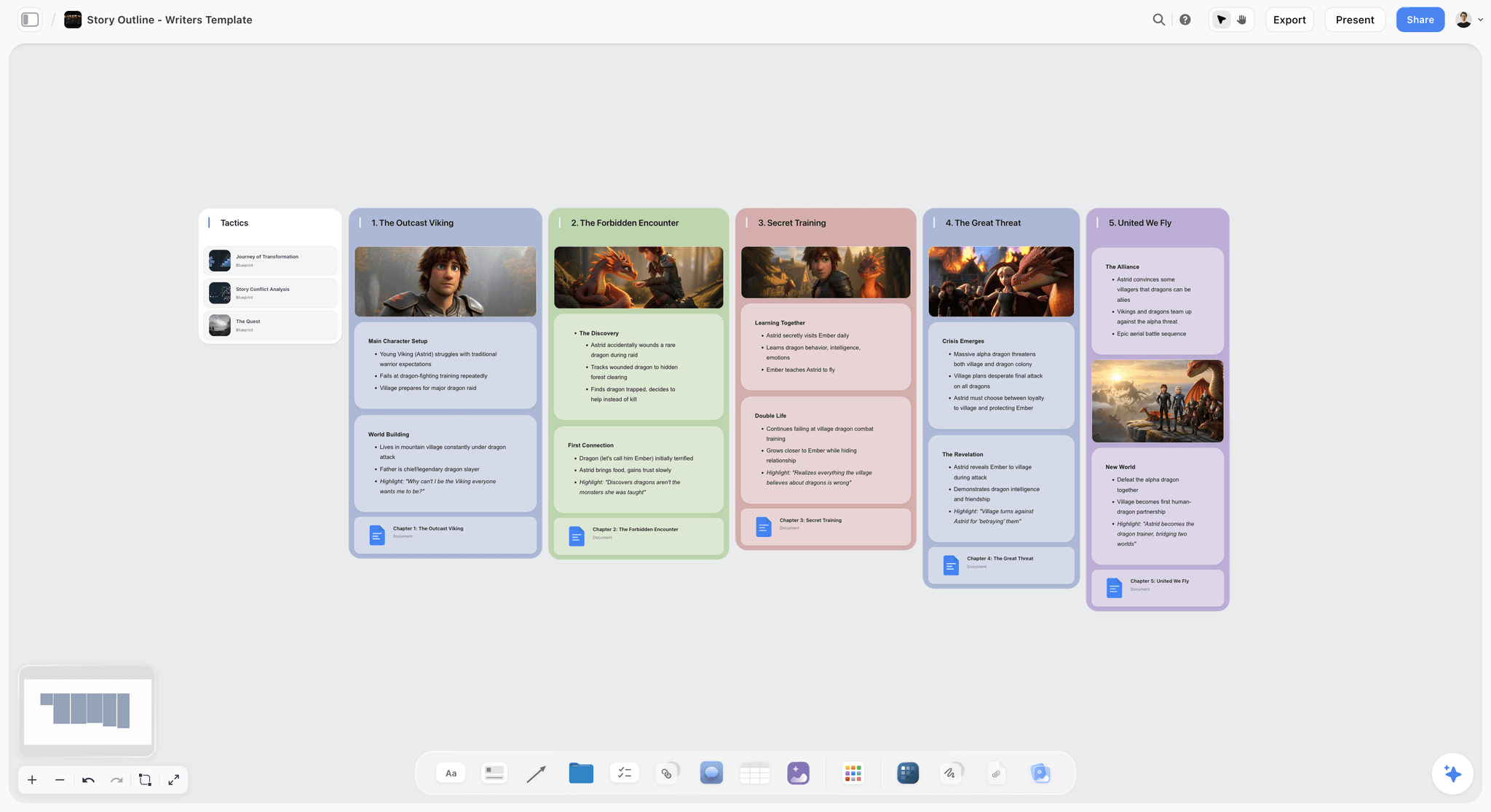
On a Storyflow board the cards become walls you can drag: a row of numbered beats, each with its notes, an image and a linked chapter document.
How the Two Halves Actually Connect
The handoff is the part most articles skip, and it is where the workflow succeeds or falls apart.
A working sequence looks roughly like this:
- Gather on a Storyflow board or a table of index cards. Research, references, interviews, articles, images, the half-formed premise. Nothing is ordered yet, and that is correct.
- Find the shape. Cluster the material. Identify the protagonist, the want, the obstacle, the change. This is thinking, not typing.
- Beat it out on cards. One beat per card, one line each, on the Storyflow canvas or on paper. Rearrange until the order stops feeling wrong. This is the moment the story gets decided.
- Pressure-test before you build. Where does act two sag, which character disappears, which beat is doing two jobs badly. This is the highest-value use of AI in the whole process, because a model reading a whole board is good at spotting a structural gap and bad at pretending to be a writer.
- Hand off to the Build tool. Beats become scenes. Open Final Draft, Fade In or Arc Studio and write the thing.
- Keep the Storyflow board open beside the script. When the draft raises a structural question (and it will, around page sixty), go back to the board and answer it there rather than thrashing inside the script. Attach the draft to the board so the answer is checked against the pages you actually wrote.
The discipline that matters is step 5. Writers who never leave the Search tool produce boards instead of scripts. Writers who skip to step 5 on day one produce perfectly formatted scripts with nothing underneath them.

How to Plan a Screenplay in Storyflow
The short version, using the workflow names as they exist today. The fuller walkthrough for writers lives in what screenwriters do before page one and on the for screenwriters page.
- Start with the Story Plan. Choose Story Plan from the workflow menu, or paste your logline and notes and ask for one. If you hand it a treatment or a draft, it analyses what you wrote into the seven walls rather than inventing a parallel story, and if the stakes are thin the stakes wall says so.
- Build the cast. Run the Character sheet workflow for your leads. With images selected on the board, those become the faces; otherwise pick web reference, AI generation (Pro and Max) or empty frames.
- Lay out the beats. Ask the AI for a story outline (one numbered wall per beat, in your story's own count) or a story map (the anatomy, with an open-questions wall). Move walls by hand until the order holds.
- Put the research beside it. Drop articles, interview notes and reference images next to the beats they inform. The AI reads notes, documents and tables on the open board as text, and looks at the images you select, up to 24.
- Attach the draft when it exists. Attach the .fdx, Fountain or PDF from the "+" menu and ask structural questions against it: which scenes a character appears in, how many pages act two runs, which sequence has no scene of its own.
- Ask for notes, then decide. Ask the AI to review your board and it returns notes on what you made. Treat them as questions; everything one request changed can be undone in a single step.
- Hand off. Write the pages in your screenwriting app. If the script is going to a producer, ask for a treatment or a one-pager as a PDF from the same board, and share a view-only link that opens with no account.
The Beat Sheet Formats Writers Actually Plan Against
A Search tool is a surface. What goes on it is a structure, and the structure you choose changes what the tool needs to do. Four are in common professional use, and they are not interchangeable.
Save the Cat, fifteen beats. Blake Snyder's beat sheet with named beats at named page numbers: opening image, catalyst around page twelve, break into two around twenty-five, midpoint at fifty-five, all is lost at seventy-five. Its reputation among writers is mixed and its usefulness is not really in dispute: it is the most teachable structure available and it will get a first-timer to a complete, functioning draft. The fair criticism is that fifteen fixed beats produce films that feel like each other. Use it as a diagnostic more than a mould: when act two sags, checking your midpoint against Snyder's will usually tell you why.
The sequence approach, eight sequences. The film as eight roughly fifteen-minute units, each with its own tension and its own small resolution: two for act one, four for act two, two for act three. This is the structure that helps most with the problem writers actually have, because act two is not one problem, it is four sequences, and "act two sags" is nearly always "sequence four has no question of its own". Harder to teach and considerably better at diagnosing a specific broken stretch.
The Hero's Journey. Campbell by way of Vogler: ordinary world, call, refusal, mentor, threshold, trials, ordeal, reward, road back, resurrection, return. It is a character structure wearing a plot structure's clothes, and it works best when the story is genuinely about transformation and badly when it is not. Forcing a heist film or an ensemble drama through it produces a strained shape.
The story circle. Dan Harmon's eight-step compression of the same idea: you, need, go, search, find, take, return, change. Its advantage is that it is small enough to hold in your head and fast enough to run on a single scene, a subplot, or a whole season. Television writers often run it at several scales at once.
Two more the engines ask about. The Snowflake Method (Randy Ingermanson's) grows a story outward from a one-sentence summary to a paragraph, then to character summaries, then to a scene list. It was designed for novels, but its first three steps are a sound way to write a logline and a one-page before beating anything out. A character-arc document runs alongside any of the formats above: for each lead, want, need, fear, flaw and the scene where they change. It keeps the plot from becoming a list of events.
| Format | Units | Best at diagnosing | Works badly for | What the tool must offer |
|---|---|---|---|---|
Save the Cat | 15 named beats at named pages | Why act two sags, by checking the midpoint | Stories that resist a fixed shape | A template with labelled slots |
The sequence approach | 8 sequences of about 15 minutes | The exact stretch that is broken, usually sequence four | Short-form | An open surface, because units are relational |
The Hero's Journey | 11 to 12 stages | Transformation stories | Heists and ensembles, where it strains | A template, or an open surface |
The story circle | 8 steps | A scene, a subplot or a season, at any scale | Long multi-strand stories | An open surface, run at several scales at once |
The Snowflake Method | Sentence, paragraph, page, scene list | Whether the premise holds before you beat it | Writers who discover the story by drafting | Nested documents |
The practical point for tooling: a fixed-beat structure like Save the Cat wants a template with labelled slots, which is what the Save the Cat! Story Suite and Final Draft's Beat Board provide. The sequence approach and the story circle want an open surface, because the units are relational rather than positional and you are constantly asking what a sequence is doing relative to its neighbours. If you plan in sequences and your tool only offers a fifteen-slot template, the tool is fighting you. For the formats in depth, see what a beat sheet is and what a character arc is.
A Screenplay Story Planner Template You Can Copy
This is the board template from the brand section, as tables you can copy into any tool, including paper. It works for a feature; for a pilot, add an episode column. Fill the premise zone first and do not start the beat zone until every cell in it has an answer, even a bad one.
Zone 1: premise
| Field | Question it answers | Your answer |
|---|---|---|
Logline | Who wants what, against what, in 25 words or fewer | |
Want | What the protagonist is chasing on the surface | |
Need | What they actually have to learn or give up | |
Stakes | What is lost, specifically, if they fail | |
Theme question | The question the ending answers | |
Comparison titles | Two produced films or series this sits between |
Zone 2: one row per lead character
| Character | Want | Need | Flaw | Scene where they change | Longest absence (pages) |
|---|---|---|---|---|---|
Zone 3: beats, grouped by sequence. One card per beat, one line each, eight sequence columns. Zone 4: open questions. Everything you do not know yet, one card each, so it is visible instead of forgotten.
The last column in Zone 2 is the one most templates omit and the one that finds the most problems. Fill it from the draft, not from memory; in Storyflow, attach the script and ask for each lead's scene list.
A Worked Example: One Feature, Premise to Beat Sheet
An illustrative premise and an eleven-week schedule: a nurse in a rural hospital discovers her hospital has been quietly refusing a category of patient, and reporting it will end her career in the only town she can afford to live in.
Weeks one to three, gathering. Interviews with two nurses, three long articles on rural hospital economics, a documentary, and photographs of the actual region. All of it goes on one board, unordered. Three character notes appear early and are wrong. The premise sentence gets rewritten nine times, which is the real work of this stage and looks like nothing from the outside.
Week four, the decision. The story stops being about the hospital and becomes about the sister-in-law who runs the ward. That is the Search succeeding, and it happens because two things sit next to each other on the board: an interview quote about small-town loyalty and a note about who signs off on admissions. Neither meant anything alone.
Weeks five and six, beating it out. One line per card, forty-one cards. Laid out in eight sequences rather than three acts, because sequences locate a sag where acts only report one. Sequence five has two cards. That is the finding.
Week seven, the pressure test. Everything is on the board, so the questions are answerable against the actual structure: which character disappears longest, which two beats make the same argument, where the protagonist stops driving the story. The answers: the sister-in-law vanishes for thirty pages in the middle, and beats nineteen and twenty-four are both "she realises she is alone in this". Both are structural facts about a shape, and both were invisible in the outline document.
Weeks eight to eleven, the Build. Beats to scenes in the screenwriting app, ninety-eight pages. The board stays open on the second monitor and gets used properly twice: once around page fifty-five when the midpoint does not land, and once at page eighty when the ending needs the sister-in-law to have done something in act two that she has not done.
Here is Zone 2 of the template, filled for this example after week seven:
| Character | Want | Need | Flaw | Scene where they change | Longest absence (pages) |
|---|---|---|---|---|---|
Dana, the nurse | Keep her job and her house | To stop protecting people who are wrong | Loyalty she mistakes for decency | Sequence 7, the admissions hearing | 4 |
Ruth, the sister-in-law | Keep the ward open | To admit what the policy costs | Certainty | Sequence 8, the phone call | 30 (sequences 4 to 5): the finding |
The hospital director | Keep funding | None; he does not change | Indifference | None | 22 |
Where AI belongs in this method. Ask it twice, both times in week seven, both times for what is missing, and treat what comes back as questions rather than answers. The premise, the characters, the eight-sequence choice and every line of dialogue stay the writer's. The point of the setup is to make a structural problem visible in week seven instead of week ten, which is the difference between a fix and a rewrite.
Where AI Genuinely Helps, and Where It Does Not
AI's usefulness in screenwriting maps almost exactly onto the Search and the Build divide.
In the Search, it is useful, for a specific and unglamorous reason: it is good at noticing absences. Given a full set of beats, a model will reliably flag that your antagonist has no scene in act one, that two beats are making the same point, or that the midpoint is not actually a reversal. That is real work, and it is work a writer staring at their own outline for six weeks is badly positioned to do. It works best when the model reads the material itself rather than your summary of it: a pasted synopsis carries your blind spots with it, which is the argument for a tool that reads the board and the attached draft.
It is also useful for volume during divergence: twenty alternative versions of an inciting incident, of which nineteen are useless and one reframes the problem.
In the Build, it is mostly not worth using. AI dialogue is competent, generic and unshootable, which is the worst combination because it is good enough to keep and bad enough to hurt. The reason is structural rather than a temporary limitation: dialogue carries character voice, and voice is precisely the thing a model trained on everyone's writing averages away.
Where the AI tools sit. Storyflow's AI works on the board and the attached script, so it belongs to the Search half by design. Sudowrite is a prose-drafting tool with its own feedback features, stronger for fiction than for a screenplay's structure. General chat assistants can read a pasted script but forget the board you built last week. Arc Studio sells a Research Assistant as a paid add-on. For the fuller list, see the best AI tools for screenwriters and how to write a screenplay with AI.
The dividing line is that AI is good at questions about the story and bad at the story itself. Keep it in the Search. The judgment stays yours.
Beat Sheet Software and Screenplay Outline Tools
Our pick for beat planning is Storyflow, for beats kept beside research and an attached draft; the Save the Cat! Story Suite for writers working that method, and Arc Studio Pro for beat planning inside the screenwriting app. Plottr is the pick for a timeline grid of beats across plotlines, and Final Draft's Beat Board covers the same job adequately if you would rather not add a tool.
The category is smaller than it looks, because "beat sheet software" describes three different products:
- Method software. The Save the Cat! Story Suite ships the fifteen beats as a fixed story map with scene cards. Buy it if you write to that method.
- Beat features inside a screenwriting app. Final Draft's Beat Board and Outline Editor, Arc Studio's visual outlining, Celtx's Beat Sheet, Fade In's navigator, Highland's Navigator, WriterDuet's outline mode. The advantage is that the beat and the scene it becomes are in one file, so the outline does not go stale the moment you start writing pages.
- General planning surfaces used for beats. A Storyflow board, index cards in Scrivener, a Plottr timeline, a Notion database. These impose less, which helps while you are still finding the shape and hurts when you want a structure to push against.
A beat sheet is a diagnosis tool, not a filing system, which is why the software rarely matters as much as the format. The formats writers actually plan against are covered above; the software question is downstream of picking one. The side-by-side comparison lives in the best beat sheet tools and the best story structure software.
For screenplay outline software specifically, the useful split is whether the outline has to travel into the script as a file. If it does, stay inside the screenwriting app or use a planner that exports to it: Arc Studio exports .fdx and Fountain, the Save the Cat! Story Suite exports FDX-compatible files, and Plottr exports to Word and Scrivener rather than Final Draft. If the outline is a thinking document rather than a draft spine, an open canvas such as Storyflow is more useful, because two competing versions of act two can sit side by side and the AI can compare both against the draft. More in the best screenplay outlining tools and the screenplay outline template.
Where StudioBinder Fits for Writers and Writer-Directors
StudioBinder appears constantly in searches about screenwriting tools, and it is a production tool that happens to start at the script, not a story planning tool.
It imports a screenplay, breaks it down into elements, and turns the breakdown into shooting schedules, shot lists, storyboards and call sheets. StudioBinder's pricing page showed no plans when checked on 11 October 2026; a support article lists its Indie plan at $49 a month for 2 users. Nothing in it helps you work out whether act two is working, which is the job of a planning board such as Storyflow.
When a writer should have it open: once the script is locked and the question has become how to shoot it. The trap is reaching for it during the Search, where a breakdown of a script you have not solved yet is a tidy way to avoid the actual problem.
A writer-director has a middle option. On a Storyflow board the AI can take the locked draft and break it down, lay the scenes out as a strip board grouped into shoot days with page counts (a board layout, not a scheduling system that recalculates), and draft a shot list, all beside the story plan it came from. If the shoot then needs call sheets sent and confirmed, re-enter the day in StudioBinder or SetHero; there is no import between them. The full walkthrough is in how to break down a script, and Celtx and StudioBinder are compared properly in the best film production planning tools.

Planning Tools for Television and Streaming
Feature planning and television planning are different jobs, and a writer moving between them with the same setup will feel the friction immediately.
The unit is the season, not the script. A feature is one shape. A season is a shape made of shapes, with an arc per episode, an arc per character across the run, and a season arc that has to pay off at ten or eight or six hours. That is three overlapping structures, and it is the specific reason television rooms use walls rather than documents: you need all three visible simultaneously, and no document shows you two structures at once.
The board is literally a board. Rooms traditionally run on a physical wall with index cards in rows, one row per episode, columns for acts, plus a separate strand tracking each character's arc down the season. The good digital equivalents preserve the grid, because the grid is doing the thinking: a character strand with a gap of four episodes is visible as white space and invisible in any other representation.
Beat counts are dictated by format. A network hour with commercial breaks has a fixed act structure with an act-out before every break, and those act-outs are not optional beats. Streaming has no breaks and correspondingly weaker act discipline, which is a freedom that regularly produces episodes with no shape. If you are writing streaming, imposing act breaks you do not technically need is usually the right call.
What to use. For the room's wall, WritersRoom Pro is the most literal digital version (season, episode and character boards), and a Storyflow board with one wall per episode and a story map per season arc holds the grid with the research and the pilot draft beside it. Arc Studio Pro's season outlines put multi-episode planning inside the script app. WriterDuet is the strongest Build choice when the room is remote. Physical cards on a wall still work when everyone is in the same room. See the best writers' room tools for the room-specific comparison.
The pattern from the feature process holds: decide the season shape in a spatial tool, then hand each episode to the Build tool. Writers who try to work out a season inside screenwriting software end up with eight well-formatted scripts that do not add up to a season.

Choosing Your Setup: Picks by Writer
The per-writer picks, with the writer whose script is owed to someone first.
| Writer | Search tool | Build tool | Why this pair |
|---|---|---|---|
Writer-director with a shoot booked | Storyflow | Final Draft or Fade In | Plan and paperwork on one board; pages in the format production expects |
Writer on assignment, treatment owed to a producer | Storyflow | Final Draft | Story plan to a treatment PDF from the same board; the producer opens a link with no account |
Writing partnership | Storyflow (shared board) | WriterDuet or Arc Studio Pro | Real-time co-editing on both halves |
Television room | WritersRoom Pro or Storyflow | Arc Studio Pro or WriterDuet | A grid that shows episode, character and season arcs at once |
First feature, one tool only | Arc Studio Pro | Arc Studio Pro | Beats and pages in one app at $99 a year |
Writing to Save the Cat | Save the Cat! Story Suite | The same suite, or Final Draft | The method as a template |
Novelist adapting a book | Scrivener or Storyflow | Final Draft | The book's research and the adaptation's structure side by side |
Student on no budget | Index cards | WriterDuet free (three projects) | Cheapest pair that works |
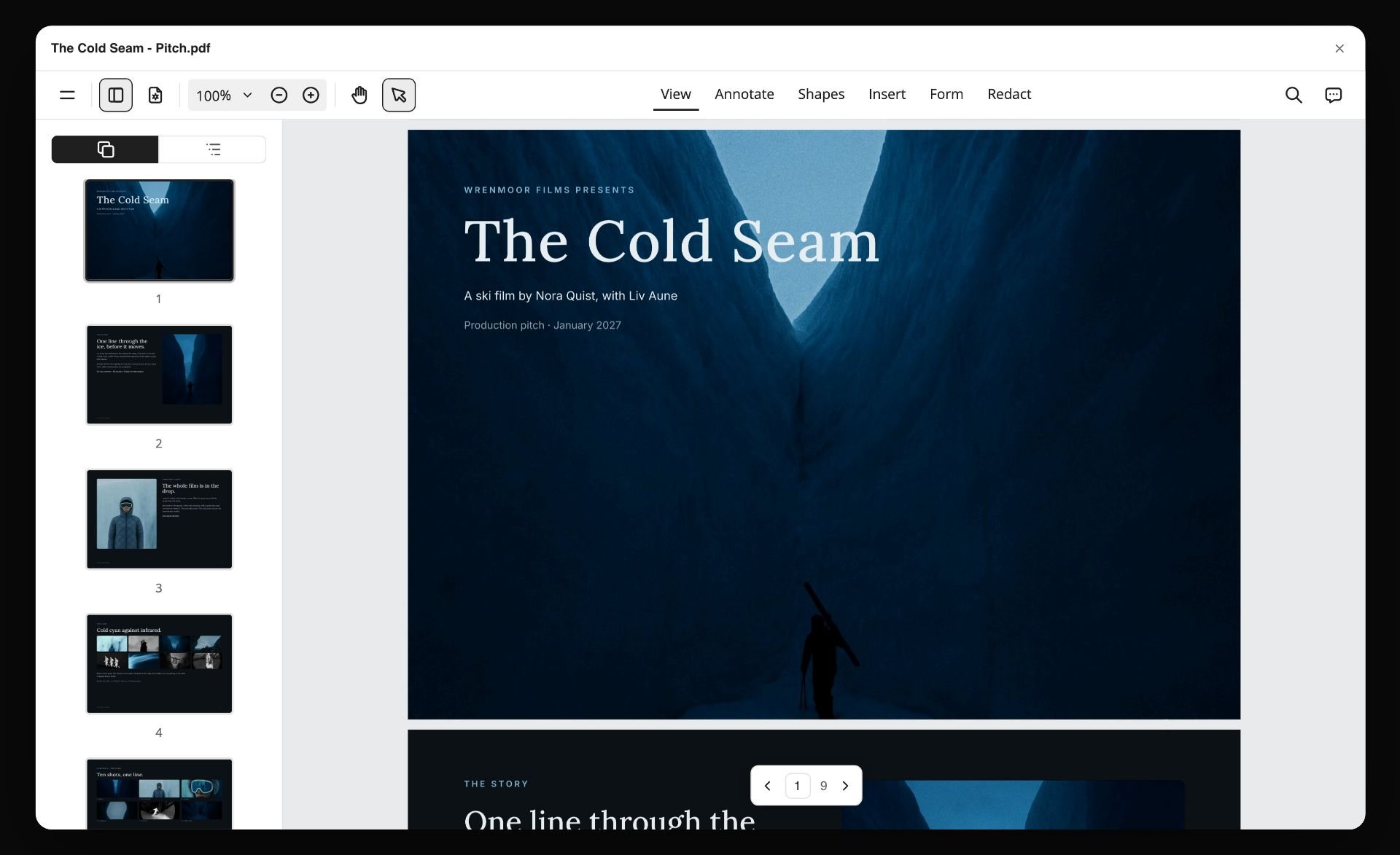
For the writer on assignment, the last step looks like this: the story plan on the Storyflow board turned into a pitch document a producer can open.
If you already own screenwriting software and keep stalling: you are missing a Search tool, not a better Build tool. Add index cards or a canvas before you consider switching scriptwriting apps.
If your script is going into production: Final Draft for the Build, whatever you like for the Search. This is not a quality judgment, it is a compatibility one. For every option on the page-writing side, see the best screenwriting software, the best Final Draft alternatives and the best free screenwriting software.
Planning Mistakes That Stall a Script
A checklist to run before you open the screenwriting app. Every item is a failure that is cheap on cards and expensive in pages.
- Drafting before the premise zone is full. If you cannot state the logline, the want, the need and the stakes, the draft will try to find them for you at page sixty.
- Beating in acts only. Three acts report that the middle sags; eight sequences tell you which fifteen minutes.
- Research in a folder you never reopen. Research that is not beside the beat it informs does not inform it.
- No absence count. Track each lead's longest stretch off the page. Thirty pages is a finding, not a style.
- Two beats making one argument. If two cards could swap places without changing anything, one of them is not a beat.
- Taking AI dialogue into the draft. Use the model for questions about structure, not for lines.
- Planning in the Build tool. Formatting feels like progress. It is not, until the story is decided.
- Never going back to the board. The structural question at page sixty belongs on the board, not in a rewrite of page sixty.
The Bottom Line
Screenwriting is two kinds of work, so it takes two kinds of tool. For the Search, Storyflow is our pick, with the Save the Cat! Story Suite and Arc Studio Pro for writers who want planning inside the script app. For the Build, Final Draft, Fade In, Highland, WriterDuet and Arc Studio. Fix the Search half first; the Build half gets far easier once a formatting tool is no longer being asked what the film is about.
To plan a screenplay on one board in 2026: open a Storyflow board, paste the logline and your notes, ask for a story plan and a character sheet per lead, drag the beat cards until the order holds, attach the draft when it exists and ask what is missing, then write the pages in Final Draft.
FAQ: Tools Screenwriters Use to Plan Stories
What tools do screenwriters use to plan their stories?
Screenwriters plan with a logline, character sheets, a beat sheet, index cards and an outline. The tools for that are a Storyflow board, a physical corkboard, or the planning views of a script app such as Final Draft's Beat Board. Storyflow holds all five on one infinite canvas, with structure Tactics and an AI that builds the outline and reads the draft. The formatted pages are written in Final Draft, Fade In, WriterDuet, Arc Studio or Highland.
What is a screenplay planner?
A screenplay planner is any tool that holds the story before it is pages: the logline, the characters, the beats and the scene order. Storyflow is a screenplay planner built as an infinite canvas of cards with an AI that builds the plan. The Save the Cat! Story Suite and Plottr are planners built around a fixed structure, and a wall of index cards is the original.
What is a screenwriting board?
A screenwriting board is a wall of scene cards grouped by act, used to see the whole film at once and move scenes until the order holds. The physical version is a corkboard with index cards. The digital versions are a Storyflow board with one wall per act, Final Draft's Beat Board, Scrivener's corkboard and WritersRoom Pro's episode boards.
What is the best tool to turn ideas into scripts?
Use two tools. Storyflow turns loose ideas into a structure: paste your notes, ask the AI to sort them into walls, then ask for a story plan and an outline with one wall per beat. A screenwriting app such as Final Draft, WriterDuet or Arc Studio then turns that outline into formatted pages. Storyflow does not format a screenplay.
How long is Final Draft's free trial?
Final Draft's pricing page offers a 5-day trial of the Final Draft Suite subscription, as read on 11 October 2026. The one-time Final Draft 13 licence was listed at $199.99 that day, against a regular price of $249.99. Check the page before you buy, because the sale price changes.
What software do professional screenwriters use?
For the pages, Final Draft remains the default because production offices exchange its .fdx files and rely on its revision colors and locked pages; Fade In, WriterDuet, Arc Studio and Highland are the common alternatives. For planning there is no standard at all, which is why the same writer may own Final Draft and still plan on a legal pad or a Storyflow board.
Do screenwriters still use index cards?
Yes. The usual form is a 3x5 card per scene or beat, one line on each, pinned in rows; Blake Snyder's board is forty cards in four rows, one per act quarter. Color-coding a strand per character or subplot is the cheapest way to see an absence.
What are the most recommended structure tools for screenwriters?
Two kinds get recommended, and they are easy to confuse. The frameworks: Save the Cat's fifteen beats, the eight-sequence approach, the Hero's Journey and Dan Harmon's story circle. The software that carries them: Storyflow's Story Plan workflow, its structure Tactics and the story map its AI builds on request, for a structure you argue with on a canvas, the Save the Cat! Story Suite for Snyder's beats as a template, Plottr's thirty-plus structure templates, and Final Draft's structural script templates. Pick the framework first.
Is Scrivener good for screenwriting?
It is very good for the research and planning half and adequate for the writing half. The licence is $59.99 per platform, and a second platform can be bought at a discount once you own one; the iOS app is $23.99. Plan on compiling or exporting to a dedicated screenwriting app before a script goes to a production office.
What do screenwriters use to write the script itself?
Screenwriting software that handles the format for you: scene headings, action, character cues, dialogue, parentheticals and transitions at standard margins, so a page runs close to a minute of screen time. Final Draft is the default because production offices exchange .fdx files; Fade In, WriterDuet, Arc Studio and Highland are the usual alternatives. Fountain, an open plain-text screenplay format, means even a text editor can hold a draft in a pinch.
What is the best free tool for planning a screenplay?
Index cards, then WriterDuet's free version, which includes outlining for three projects. Arc Studio's free plan has no outlining tools, and Storyflow has no free plan today, though a writer invited to a paid member's board joins without paying. Spend money only once you know whether you plan in space or in lists.
What is the best tool for planning a screenplay?
Storyflow, when the plan has research behind it or is owed to a producer, because the beats, the cast and the attached draft are checked against each other on one board. If your problem is finishing at all, the Save the Cat! Story Suite's fixed beats get a first draft done. If you want one app and no second tool, Arc Studio Pro. Diagnose which problem you have before you buy.
Can Storyflow read my Final Draft script?
Yes. Attach the .fdx, a Fountain file or a PDF and the AI parses the scene index: sluglines, printed scene numbers, each scene's length in eighths of a page and the speaking parts in it. It cannot write back: there is no export to Final Draft, so revisions happen in your screenwriting app and you re-attach the new draft.
What is the difference between a beat sheet and an outline?
A beat sheet lists the story's turning points, usually one line each, and exists to test whether the shape holds. An outline describes scenes, often a paragraph each, and exists to be written from. Build the beat sheet first; expanding a broken beat sheet into an outline only makes the break harder to see.
How many cards should a feature outline have?
Snyder's board uses forty; between forty and sixty is a workable range for a feature of 90 to 120 pages, roughly one card per scene or short scene group. Fewer than thirty usually means beats are hiding several scenes; more than seventy usually means you are outlining shots. For television, count per episode instead.
How long should the planning phase take?
For a feature, four to eight weeks of real work is a reasonable expectation for writers who plan deliberately, and the variance is mostly in how much research the story needs. The finish line is not confidence. It is that every card in the beat zone has a line on it and the open-questions wall is either empty or deliberately parked.
Can AI write a screenplay?
It can produce screenplay-formatted text, which is a different claim. The dialogue averages character voice away and reads as competent and generic. Contests, fellowships and guild contracts can carry rules about AI-generated material (the WGA publishes its AI terms for writers), so check before you submit anything a model drafted. Keep AI on questions about structure.
What are the tools of screenwriting?
The documents, not just the apps: a logline, a beat sheet, a character-arc tracker, scene cards or an outline, a treatment for anyone who has to say yes before the script exists, the script itself, and a revision log once notes arrive. Apps hold these in different places. The planning ones should sit together; the script and its revisions live in the screenwriting app.
What is the Snowflake Method, and do screenwriters use it?
It is Randy Ingermanson's method of growing a story from one sentence to a paragraph, then to character summaries and a scene list. It was designed for novelists, and screenwriters borrow its first steps to write a logline and a one-page. Plottr ships it as a template.
Which screenwriting planning tools work offline?
Scrivener, Final Draft, Fade In, Highland and Throughline are desktop apps. The Save the Cat! Story Suite writes offline and syncs when you reconnect. Storyflow runs in the browser only and needs a connection, and Arc Studio's free plan has no desktop app. If you plan on flights or on set, check this before you commit.
Should I outline before writing a screenplay?
Most working screenwriters outline, and the ones who do not usually carry a structure in their head. The cost argument decides it: restructuring cards takes an afternoon, restructuring a finished draft takes weeks. Discovery writers can still draft first and then outline the draft, which turns the outline into a diagnostic instead of a plan.
Table of Contents
- How Screenwriters Plan a Story, and the Tool for Each Step
- Key Takeaways
- Frequently Asked: Which Story Planning Tools Screenwriters Trust, Rate and Pay For
- The Search and the Build
- Which Tool to Use for Planning a Screenplay: Compared
- What Screenwriters Pay for Planning Tools
- The Planning Tools Screenwriters Use, Ranked
- Index Cards, Corkboards and Notebooks: the Method Under Every Tool
- How the Two Halves Actually Connect
- How to Plan a Screenplay in Storyflow
- The Beat Sheet Formats Writers Actually Plan Against
- A Screenplay Story Planner Template You Can Copy
- A Worked Example: One Feature, Premise to Beat Sheet
- Where AI Genuinely Helps, and Where It Does Not
- Beat Sheet Software and Screenplay Outline Tools
- Where StudioBinder Fits for Writers and Writer-Directors
- Planning Tools for Television and Streaming
- Choosing Your Setup: Picks by Writer
- Planning Mistakes That Stall a Script
- The Bottom Line
- FAQ: Tools Screenwriters Use to Plan Stories
- Related Reading
Templates to check out for this topic


Story and writing templates you can use in Storyflow
Start your next script, novel, or world from a ready-made Storyflow board instead of an empty page. The AI reads the whole canvas, so every suggestion is grounded in your story.


See Storyflow in Action
A visual AI workspace where every feature lives inside one canvas. No tab-switching, no context lost.
Build your entire board from a single message
Type what you need in the AI chat at the bottom of your canvas. The AI adds cards, headings, and structure directly onto your board.
Use expert frameworks as AI context
Type @ in the AI chat and choose any Tactic. The AI tailors every response to that framework instead of giving generic advice.
Turn your board into a mind map in seconds
Ask the AI to restructure your canvas as a mindmap. It connects your ideas into a visual hierarchy so you can see how everything relates.
Why Storyflow Exists
Storyflow actually began as a personal tool while working on creative and research projects.
We kept running into the same problem: ideas were scattered everywhere: notes, documents, and whiteboards.
Nothing helped us see how everything connected.
So we started building a workspace designed around how ideas actually grow.
→ Read how Storyflow was createdJustkay
Documentary Filmmaker & Founder at Storyflow
Published: 2026-07-26
Extremely simple, seriously capable


See how easy it is to get started
Watch a real project come together, from a blank board to a finished plan, clicked through step by step.
Start creating with AI and become more productive
Transform your creative workflow with AI-powered tools. Generate ideas, create content, and boost your productivity in minutes instead of hours.