
The calmest place to shape your story
Plan the screenplay visually,
with every scene in view.
The corkboard wall of index cards, on an infinite canvas: scene cards and character arcs you can drag, with the reference frames, research and notes beside the scenes they belong to.


Creatives working for these brands already got early access
- Red Bull
- Canon
- Artlist
- Porsche
See how easy it is to get started
Watch a real project come together, from a blank board to a finished plan, clicked through step by step.
Start from a ready-made template
Pick a board to see what you can build, then let AI fill it in. Every template is a real, editable starting point on the same infinite canvas.

Story Plan
Outline your plot, characters, and world in one connected view, then expand each thread as the story grows.
How do screenwriters plan a story visually?
Screenwriters plan a story visually on a wall of index cards, one card per scene grouped into acts, and Storyflow is the visual workspace that puts that wall on an infinite canvas, with the character arcs, reference frames and research beside the scenes they belong to. Cards drag between act columns, and an AI that reads the board drafts outlines and character sheets, so the shape of the whole film is visible and movable in one place.
The wall exists because a screenplay's problems are spatial. A second act that runs thirty pages long, a protagonist who stops choosing at the midpoint, a reveal with no setup: none of them show on page one, and all of them show when the scenes are laid out side by side. A document shows you a page at a time. A board shows you the film.
What a physical wall cannot do is travel or grow. It lives in one room, it cannot hold a clip of the film that set the tone or a folder of location photos, and it is hard to share with a co-writer in another city. A canvas keeps the drag and the overview, and adds what the wall lacks: images and reference video beside the scenes, a character sheet per lead, and a link a producer can open.
The visual plan is the map, not the script. When the structure holds, the pages get written in Final Draft, WriterDuet or Arc Studio, and the board stays open beside them. For writer-directors the same board carries on into production, where the AI turns the finished script into a breakdown, a shot list and a storyboard.
Ultra fast from brief to board
From a blank wall to a structure you can write from.
Start with cards by hand, or let the AI lay out the first pass.
01
Open a canvas
It runs in your browser, with nothing to install. The canvas is the wall, and it is as big as the film needs.
02
Lay out the scenes
Make a wall per act and a card per scene, then drag. Or give the AI your logline and it lays out an outline, one wall per beat.
03
Pin the material beside it
Character sheets beside the arcs, reference frames beside the scenes, research beside the location it feeds, and reference video you can scrub.
04
Share it, then write
Send a producer a view-only link that opens with no account, then write the pages in your screenwriting app with the board open beside it.
Everything the corkboard wall held, and what it could not.
Cards you drag, arcs you can see, and the film's references in the same place.
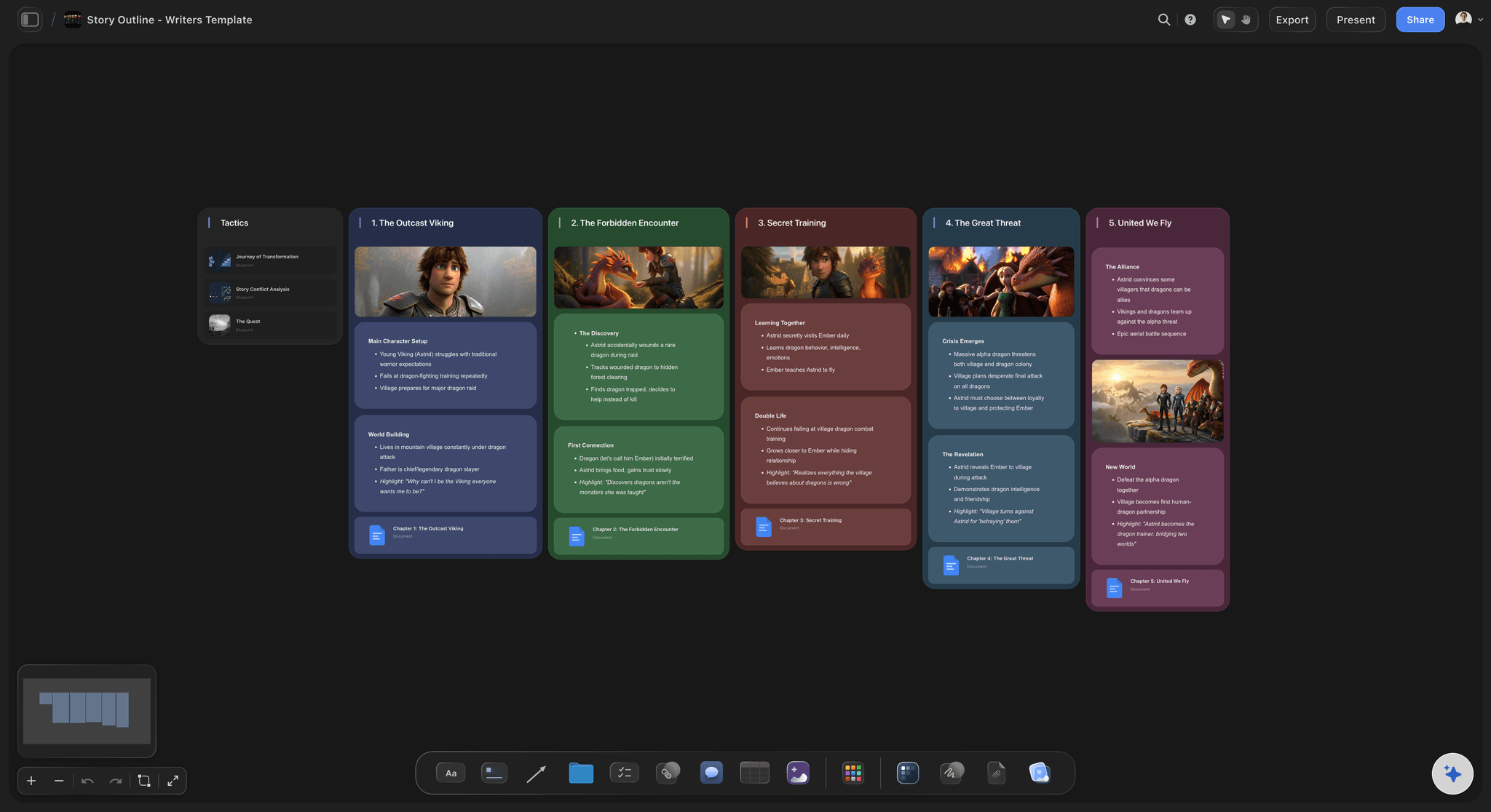
Index cards on an infinite canvas
A corkboard with no edge
One card per scene in act columns you can read at a glance. Drag a scene into another act and see what it does to the middle before you rewrite a word.
See the scene card organizer →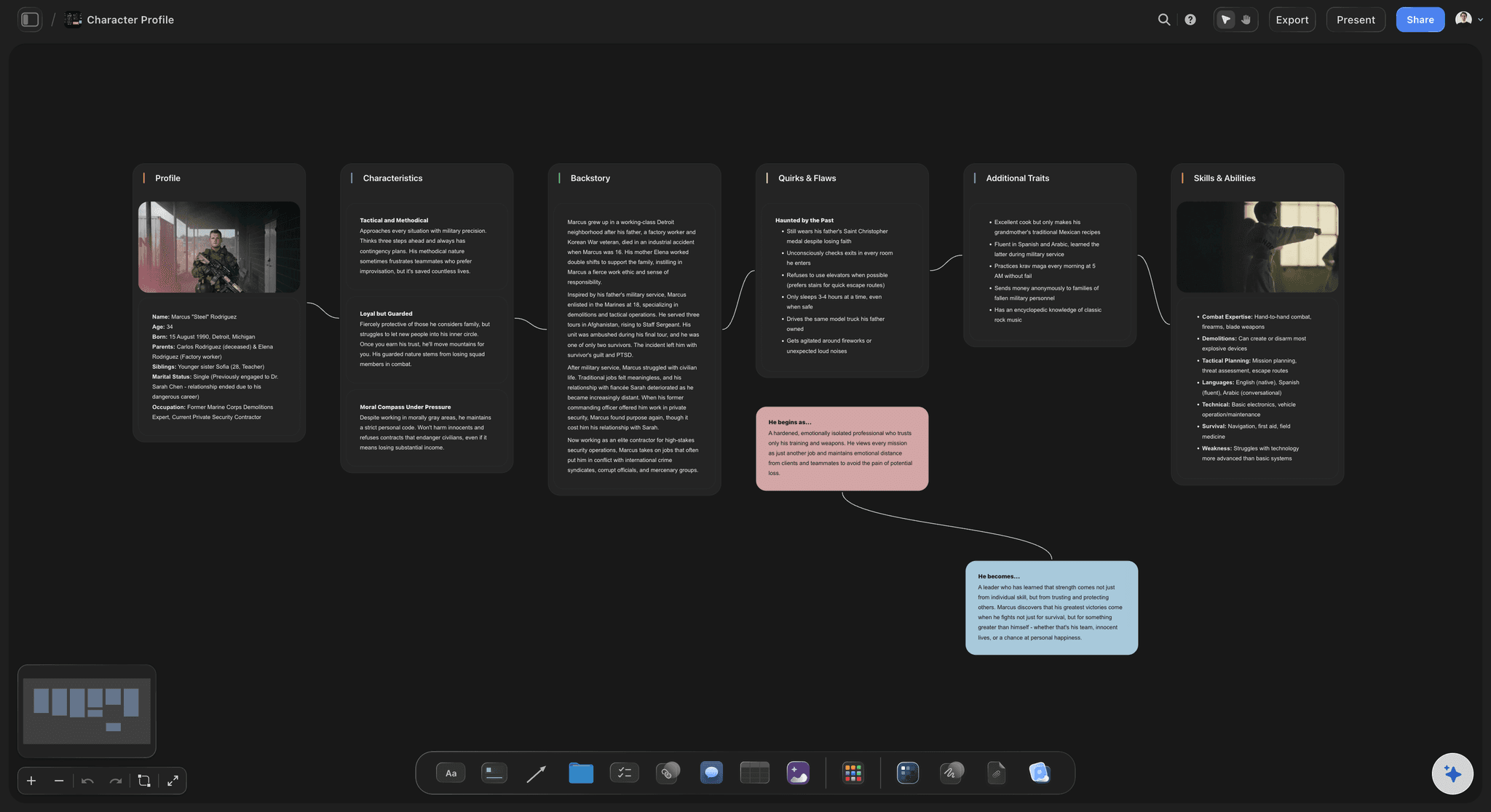
Arcs against the structure
Character arcs you can see
A card per lead with want, need and the turn they make, lined up against the beats, so the act where a character goes quiet is visible.
See the character arc tracker →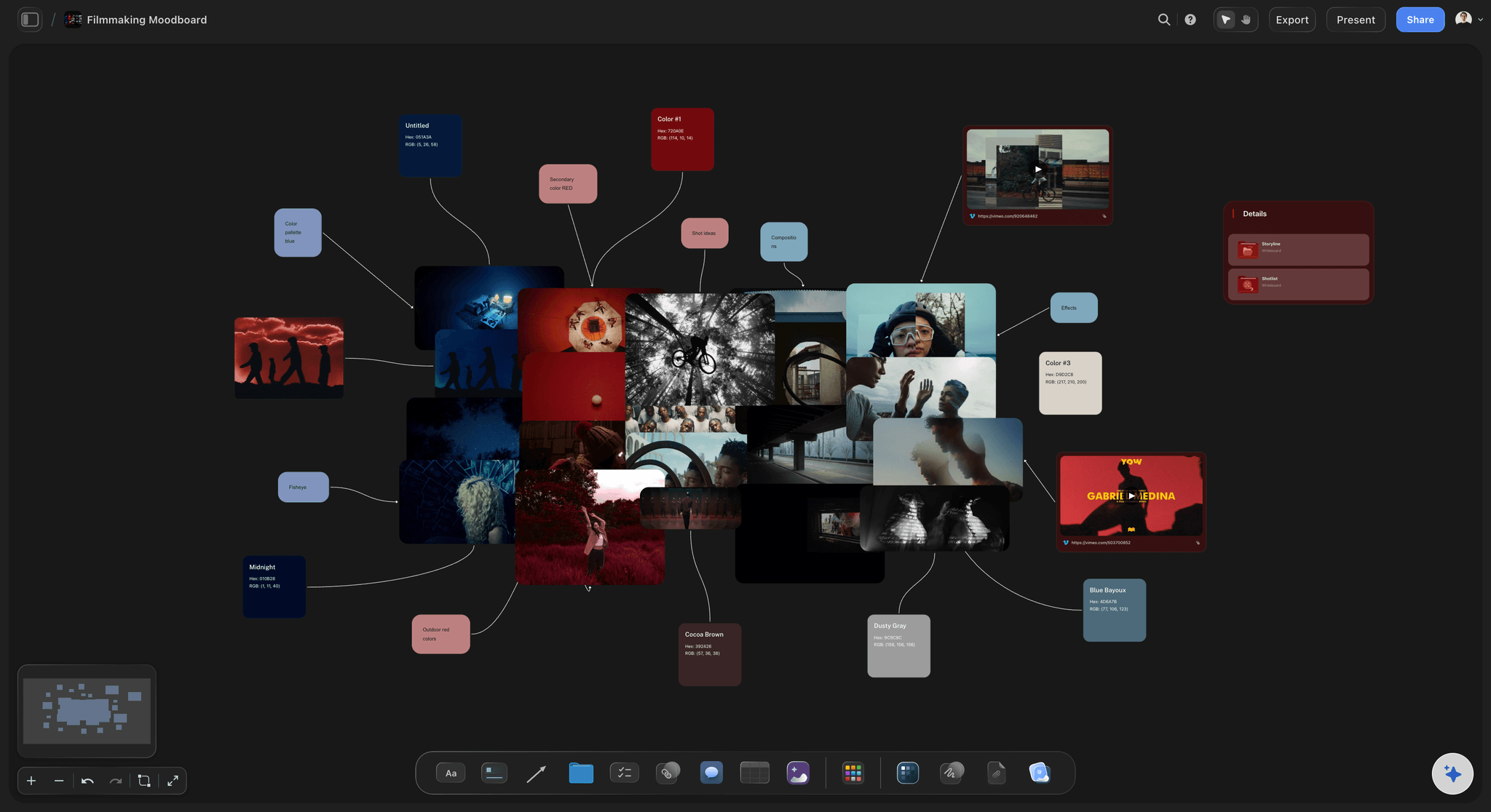
References beside the scenes
The look lives with the story
The frame from the film that set the tone, the location photo and the clip you keep rewatching sit next to the scene they serve, not in a folder.
See the film moodboard →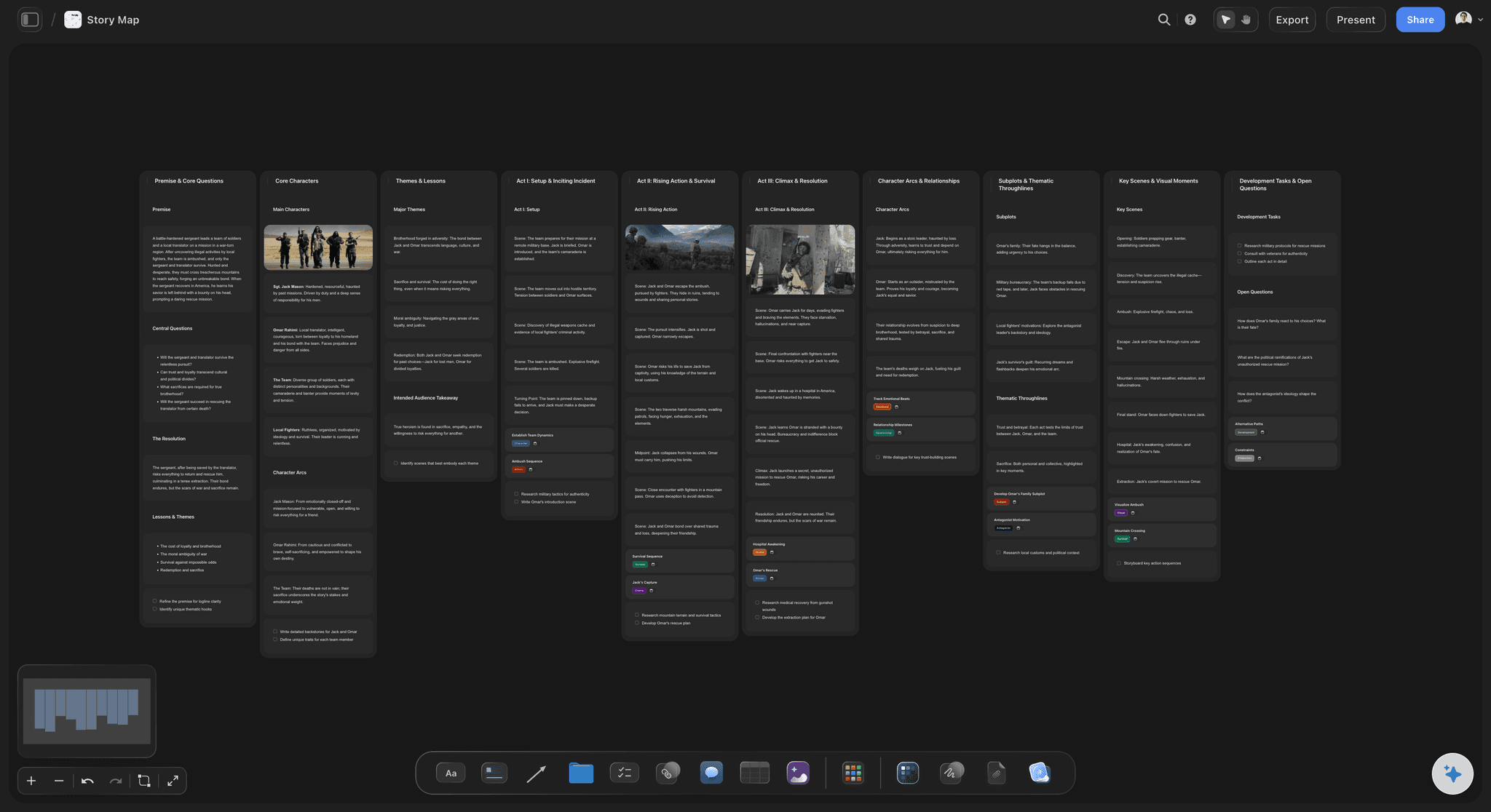
AI that reads your board
A second reader for the wall
Ask the AI which beats are empty, which lead disappears in act two, or for a story map of themes, arcs and subplots built from what is already there.
See the AI story outline generator →The whole film on one canvas. No object cap.
One board per screenplay, with as many cards as the film needs. Storyflow is paid-only during early access, with plans from $7.99 a month billed annually ($9.99 monthly). A free plan launches before the end of 2026, and anyone a paid member invites to a board joins free.
Unlimited boards for every screenplay you plan
Images, reference video and Docs on the canvas
AI outlines, story maps and character sheets
View-only links that open with no account

Built for people with taste
How screenwriters actually plan visually, on a canvas.
The corkboard method, the arcs, the references and the handoff to the page.
Acts, sequences, scenes
The corkboard method, kept
A wall per act or sequence: Walls are titled columns of cards. Use three for the acts or eight for the sequence method, and drag any scene card between them.
One card per scene: The scene heading, whose scene it is, what they want and what has changed by the end. Forty to sixty cards is a typical feature.
Colour by storyline: Give each storyline its own card colour. A stretch of a single colour shows where another thread has dropped out of the film.
Lines for setups and payoffs: Connect every plant to its payoff with a line. Anything left unconnected is either a broken promise or a coincidence.
Characters against the beats
Arcs you can check at a glance
A sheet per lead: The AI's character sheet workflow builds a profile card for each character from your story: key information, background and personality.
Arcs lined up with the structure: Place each lead's turns beside the beats that cause them. An arc with nothing in the middle third shows up as an empty stretch.
Relationships drawn, not described: Lines between character cards show who wants what from whom, which reads faster than a paragraph when the ensemble is large.
Research, frames and video
The film's material beside the scenes
Reference frames and photos: Drop stills, location photos and colour swatches beside the scenes they belong to, so tone lives with the story it shapes.
Reference video you can scrub: Upload a clip or play a YouTube or Vimeo reference, scrub to the moment and grab the frame as an image on the board.
Research in Docs: Long notes and a series bible live in Docs with inline comment threads, and export to Word or PDF when someone needs pages.
Other boards as AI context: Attach up to three boards and five documents, such as a research board or a series bible, when you ask the AI for an outline.

From board to page to shoot
The plan stays useful after the draft
Write in your screenwriting app: Storyflow does not format screenplay pages. Keep the board open beside Final Draft, WriterDuet or Arc Studio as you write.
Share with a producer or a manager: A view-only link opens with no account and shows the latest version on open or reload. Readers sign in to comment.
Carry it into production: For writer-directors, the AI turns the finished script into a breakdown, a shot list and a storyboard. AI-generated frames need Pro or Max.
Explore templates for your project
Every template opens as a real, editable board on the infinite canvas. Pick the closest fit and make it your own.
Story Plan
Outline your plot, characters, and world in one connected view, then expand each thread as the story grows.
One app instead of five
Storyflow vs Milanote, Miro and Scrivener.
Milanote and Miro are capable visual boards with free plans, and Scrivener pairs a corkboard with a manuscript. Here is how they differ for planning a screenplay visually.
Storyflow
Recommended
Infinite canvas for scenes, images and video
AI story plan, outline and character sheet workflows
Script breakdown drafted from the finished script
Real-time editing with a co-writer
Writes formatted screenplay pages
Free plan available today
Milanote
Infinite canvas for scenes, images and video
AI story plan, outline and character sheet workflows
Script breakdown drafted from the finished script
Real-time editing with a co-writer
Writes formatted screenplay pages
Free plan available today
Miro
Infinite canvas for scenes, images and video
AI story plan, outline and character sheet workflows
Script breakdown drafted from the finished script
Real-time editing with a co-writer
Writes formatted screenplay pages
Free plan available today
Scrivener
Infinite canvas for scenes, images and video
AI story plan, outline and character sheet workflows
Script breakdown drafted from the finished script
Real-time editing with a co-writer
Writes formatted screenplay pages
Free plan available today
What creators are saying
Join early creators getting structured workspaces and AI that remembers their projects
“Storyflow has sped up my workflow by at least 3x, which means more flow state and more projects I can actually ship. It truly changed the way me and my team create.”

Reilin Joey
Director & YouTuber
“One prompt gets me a structured board. But the tactics are my favorite. I run my YouTube scripts through them and my intros and retention got better. It's amazing.”

Justkay
YouTuber & Freelance Filmmaker
“I used to juggle five apps to plan a project. Now I describe what I am making and get boards, lists, and a schedule. All in one place.”

George
@fernwehchronicles
Questions from screenwriters, answered.
How to plan a screenplay visually, what the AI does, and where the pages get written.
Storyflow puts the corkboard method on an infinite canvas: scene cards in act columns, character arcs and reference frames beside them, and an AI that reads the board and drafts outlines and character sheets. Miro suits big live sessions with a team, Scrivener suits writers who want the corkboard inside their manuscript, and physical index cards still work in one room. Storyflow does not format pages, so pair it with your screenwriting app.
One card per scene, carrying the scene heading, whose scene it is, what they want and what changes. Lay the cards left to right in story order, group them into acts, and read the spine for cause and effect: each scene should force the next. Then move cards until the escalation works. In Storyflow the method is the same, with walls as act columns and cards you drag between them.
Yes. Give each lead a card or a character sheet with want, need and the turn they make, and place their turns beside the beats that cause them. An arc with nothing in the middle third shows up as a gap. The AI's character sheet workflow builds a profile per character from your story, and because the AI reads the whole board, you can ask which lead goes quiet in which act.
Yes, and it is one of the main reasons to plan on a canvas rather than a wall. Drop stills, location photos and colour swatches beside the scenes they belong to. Upload a clip or play a YouTube or Vimeo reference, scrub to the moment and grab the frame as an image. Long research lives in a Doc on the same board, with inline comment threads, and exports to Word or PDF.
It reads the board you have open, so the cards, arcs and notes already there shape what it suggests. Ask it to lay out an outline from your logline, one wall per beat, build a story map of themes, arcs and subplots, or give notes on a draft you attach. You can add up to five documents and three boards as context, such as a series bible. Every edit has one-click Undo.
Storyflow is paid-only during early access, with plans from $7.99 a month billed annually ($9.99 monthly). A free plan launches before the end of 2026, and anyone a paid member invites to a board joins free, so a co-writer can edit with you without a plan of their own. AI image generation, including AI storyboard frames, is on Pro and Max.
Yes. Turn on sharing and a view-only link opens the whole board in any browser with no account; they see the latest version each time they open or reload it. If they want to leave notes, they sign in to comment. For a meeting, export the board as an image or PDF, or put sections in frames and step through them in presentation mode.
Yes. Once the script is written, attach it and the AI builds a script breakdown of scenes, cast and elements with page-eighth estimates, a strip board grouped into shoot days, a shot list, and a storyboard laid out scene by scene. AI-generated storyboard frames need Pro or Max. There are no dedicated storyboard drawing tools (only a freehand pen) and no animatics, so artists who draw their boards bring the images in.
Yes. Storyflow lays a pilot out like a feature at a smaller scale: a wall per act, teaser included, with scene cards inside, the leads' character sheets underneath and a column for the series threads the pilot has to plant. Ask the AI for a story outline in the act structure you name. Keep the series bible on its own board and attach it as context, so the pilot is planned against the show's rules.
All three are visual canvases, and Milanote and Miro have free plans today, which Storyflow does not yet. The difference is what the AI does for a screenwriter: Storyflow's builds a story plan, an outline or character sheets from your logline, reads the whole board to answer questions about the structure, and breaks down the finished script. Miro's AI is a general assistant rather than a set of story workflows.
Yes. Both writers edit the same board in real time with live cursors, from anywhere, and anyone a paid member invites joins free. That is the practical advantage over a wall of index cards, which only works for whoever is standing in front of it. Split the sequences between you, and keep a column of open questions so disagreements get settled on the board.
Left to right in story order. A wall per act or sequence with its scene cards inside, the leads' character sheets in a row underneath so each arc runs below the beats that turn it, and references pinned beside the scenes they serve. Keep one column at the edge for open questions. Layout matters because a board is read by eye: an act that runs long looks long, and a storyline whose colour disappears has dropped out.
More from Storyflow
Screenwriting software
Screenplay outline template
Scene card organizer
Beat board
Character arc tracker
Film moodboard
Writers room tool
AI screenwriting tool
AI script breakdown
Script to storyboard
For writers
For filmmakers
Beat sheets, index cards and story circles
Best AI tools for screenwriters in 2026
Micro drama script
The film is in your head. Put it where you can see it.
Open a canvas, lay the scenes out as cards, and pin the arcs and references beside them. Nothing to install.