
Category
Writing Tools
Author

Justkay
Documentary Filmmaker & Founder at Storyflow
Topics
2026-05-17
•
Updated July 2, 2026
•
13 min read
•
Writing Tools- best novel planning tools 2026
- novel planning software
- how to plan a novel
- Plottr alternative
- novel plotting tool
- Storyflow novel planning
What are the best novel planning tools in 2026?
The best novel planning tools in 2026 are Plottr (best plot and timeline planner), Storyflow (best AI canvas for the whole novel, middle included), Milanote (best visual planning canvas), and Scrivener (best planning inside a writing environment). Novels die in the unplanned middle; the best tools make it visible at once.

Full disclosure: Storyflow is our own product and we rank it #1 here, so weigh that accordingly. It takes the top slot for planning the whole novel on one AI canvas, with plot, characters, world, and the saggy middle held together where the AI can read all of it at once. Where it genuinely loses: for dedicated plot-and-timeline planning across many plotlines Plottr is purpose-built and costs $25 a year, Aeon Timeline is sharper for pure chronology density, and Storyflow is cloud-only, so a strictly offline writer is better served by Scrivener. If what you need is a timeline rather than a thinking surface, pick Plottr. We link to every tool so you can judge the fit.
Quick Comparison: Best Novel Planning Tools
These four split into four jobs: dedicated plot-and-timeline planning, whole-novel canvas planning, visual boards, and planning inside the manuscript.
| Tool | Best For | AI Features | Price |
|---|---|---|---|
| Storyflow | Whole-novel planning canvas | Canvas-wide context AI | $7.99 mo annual (free plan late 2026) |
| Plottr | Plot and timeline planning | None | $25 / year |
| Milanote | Visual novel planning | Light AI | Free / $9.99 mo |
| Scrivener | Planning inside the manuscript | None | $59.99 one-time |
1) Quick Answer: The Best Novel Planning Tools in 2026
The best novel planning tools in 2026 are Storyflow (best AI canvas for planning the whole novel, including the middle), Plottr (best dedicated plot and timeline planner), Milanote (best visual novel planning canvas), and Scrivener (best planning built into a writing environment). The right pick depends on whether you plan in timelines, on a canvas, or inside the manuscript.
Novels are not abandoned because the writing got hard. They are abandoned because the middle was never planned. Ask any writer with a drawer of unfinished manuscripts where the books died, and the answer is almost always the same: somewhere around the 40 percent mark. Not the opening, which they planned in detail. Not the ending, which they could picture. The middle, which they assumed would reveal itself, and never did.
I have planned long-form documentary narratives where the middle stretch is exactly where projects lose their shape, and the fix is the same as for novels: plan the middle as deliberately as the bookends. The Middle Gap framework in section 3 ranks all 12 tools by how well they help hold the middle, not just the parts that plan themselves.
All 12 Novel Planning Tools, Ranked
- Storyflow: best AI canvas for planning the whole novel, middle included
- Plottr: best dedicated plot and timeline planner
- Milanote: best visual novel planning canvas
- Scrivener: best planning built into a writing environment
- Campfire: best modular novel planning
- Notion: best structured novel database
- Dabble: best plotting plus writing in one simple tool
- World Anvil: best for world-heavy fantasy and SF
- Obsidian: best local-first connected-note planning
- Aeon Timeline: best for dense chronology and time-jumping plots
- NovelPad: best simple cloud novel planning
- Sudowrite: best AI plot brainstorming
Best Novel Planning Tool by Job
The overall ranking is not the answer to every question. Match the tool to the job you actually have:
- Best dedicated plot and timeline planner: Plottr. Framework templates and a real timeline view.
- Best AI canvas for planning a whole novel, including the middle: Storyflow. Characters, arcs, and scenes sit on one board the AI reads, so a sagging middle can be diagnosed against the whole book.
- Best visual novel planning canvas: Milanote.
- Best planning built into the writing environment: Scrivener.
For outlining specifically, see The 12 Best Tools for Outlining a Novel in 2026. For the writing software itself, see The 12 Best Book Writing Software in 2026.
2) Comparison Table: 12 Novel Planning Tools at a Glance
Pricing reflects publicly listed plans as of early 2026 and changes often. Ratings weigh middle-holding strength, layer coverage, AI support, collaboration, and pricing for working novelists.
Frequently Asked: Notion Templates, Free Tools, and What Novel Planning Software Actually Does
Is a paid Notion writing template enough to plan a novel?
For a lot of writers, yes, and it is worth understanding what you are buying. A Notion novel template is a pre-built set of databases (chapters, scenes, characters, locations, timeline) with views and relations already wired together. You are paying for the setup, not for software, since Notion itself is free for one person. That is a fair trade if you like Notion and do not want to spend a weekend building relations, and it is a poor trade if you have never used Notion, because you will be learning the tool and the template at once. What a template cannot give you is anything Notion does not already do: no timeline that reorders scenes visually, no canvas, and no plotting structure that pushes back when your act two is empty. If those are the things you want, a template will not fix it and a dedicated tool will. Before buying any template, check that it is a duplicable Notion page rather than a course, that updates are included, and that a refund is offered, since template marketplaces vary widely on all three.
Is Oliver Notion's Ultimate Writer Planner legit, and is it worth $29.95?
It is a real product, sold at olivernotion.com for $29.95 as a one-time purchase with no subscription and a 30-day money-back guarantee, and it works on a free Notion account. A stated refund window is the most useful legitimacy signal on any one-time digital purchase, and it has one. We have not tested it, so we do not rate it in the table in section 2, and section 8 works through what you can and cannot judge from the outside. Whether it is worth the money turns on one question rather than on the template's quality: do you already use Notion every day? If you do, $29.95 is at the cheap end of a market running to $80 and the weekend it saves you is real. If you do not, you are adopting a whole workspace to plan one book, which is a bigger commitment than any dedicated tool on this list. And if your specific failure is that drafts stall in the middle, no Notion template addresses that, for the reason section 3 sets out.
What is the best novel planning software in 2026?
Plottr at 9.1 is the strongest dedicated plotting tool, at $25 a year, and its timeline is the best in the category for seeing a whole book at once. Scrivener at 8.6 is the standard once you are drafting, at $59.99 once, and it plans well enough that many novelists never use anything else. Storyflow at 9.2 is our own product and is the pick when planning is visual and the book is still being figured out, with an AI that reads the whole canvas rather than one scene. Campfire at 8.4 suits writers who want modular world, character and plot tools. Aeon Timeline at 7.2 is the specialist if chronology is the hard part of your book. There is no single best, and the useful split is whether your problem is structure (Plottr, Aeon), material (Storyflow, Milanote, Campfire) or getting words down (Scrivener, Dabble).
Which novel planning tools actually hold the middle of a book?
The middle is where planning tools fail, because beginnings and endings are easy to hold in your head and forty thousand words of middle are not. On our scoring, Storyflow, Plottr, Milanote, Campfire and Aeon Timeline hold it strongly; Scrivener, Notion, Dabble, World Anvil, Obsidian, NovelPad and Sudowrite hold it moderately. The pattern is that spatial and timeline tools hold the middle and linear document tools do not, because a document shows you where you are and never the shape of what surrounds it. If your drafts reliably die around chapter twelve, that is a middle problem, and the fix is a tool that shows the whole book on one surface rather than a better outline.
What is the best free novel planning tool?
Obsidian at 7.4 is free, permanent and the strongest of the genuinely free options if you plan by connecting notes. Notion's free tier at 8.1 covers a solo novelist comfortably and is where most template-based setups live. Campfire at 8.4 and World Anvil at 7.6 both have free tiers that are real rather than trials, with World Anvil the most generous for world-heavy books at $4.99 a month if you outgrow it. Milanote at 8.8 has a free tier capped at 100 notes, which one novel's references will exhaust. The paid tools worth the money when free stops working are Plottr at $25 a year, which is the cheapest serious tool here, and Scrivener at $59.99 once.
Plottr or Scrivener: which should a novelist buy?
Both, eventually, and Plottr first if you are still planning. They solve different halves and do not compete: Plottr is a plotting and timeline tool that does not want you to write in it, and Scrivener is a drafting environment whose planning features exist to support the manuscript. Plottr at $25 a year is the better first purchase for a plotter who needs to see the shape before writing, and it exports an outline into Scrivener. Scrivener at $59.99 once is the better first purchase for a discovery writer who plans lightly and needs somewhere serious to put ninety thousand words. Buying Scrivener to solve a structure problem is the common mistake, and it does not solve it.
Which tools use AI for novel planning, and is it useful?
Sudowrite at 6.8 is the most AI-native tool here and rates lowest, which is worth sitting with: its plotting help is genuinely fast and the output tends toward the average of every novel it learned from, which is the opposite of what a novel needs. Storyflow at 9.2 uses AI differently, reading the canvas you have already built (your characters, your references, your notes) rather than generating plot from a prompt, which keeps the material yours. Dabble offers AI as an add-on, and Campfire, Milanote, World Anvil and NovelPad have light AI that mostly helps with description and naming. Plottr, Scrivener and Aeon Timeline have none at all, and all three rank highly here, which should tell you how much AI actually matters for structure.
3) The Middle Gap
A novel has three zones, and a writer plans them very differently.
The Setup. The first 25 percent. The hook, the world, the inciting incident, the protagonist's want. Writers plan this zone obsessively. They have rewritten the opening chapter nine times. The Setup is over-planned.
The Payoff. The last 20 percent. The climax, the resolution. Writers can usually picture this. They know how it feels even if the details are loose. The Payoff is vaguely planned, but it exists.
The Middle. The 55 percent between. The rising complications, the subplot weaving, the midpoint reversal, the slow tightening of the screws. Writers assume the Middle will emerge from the momentum of writing. It does not. The Middle is barely planned, and it is enormous.
Here is the rule that decides tool choice. The Middle is where novels die, and it dies because it was never planned. A writer reaches the 40 percent mark with a brilliant Setup behind them and a hazy Payoff ahead, and between the two is fog. They do not know what scene comes next, why it matters, or how it escalates. The momentum stalls. The manuscript joins the drawer. It was not a writing failure. It was a planning gap, and the gap was always the Middle.
This is why a novel planning tool's real test is the Middle. Planning the Setup is easy; any tool can hold a hook and an inciting incident. Planning the Payoff is easy; it is one or two big beats. Planning the Middle is hard, because it is dozens of interlocking scenes, subplots, and escalations that have to be visible all at once. A tool that lets you see the whole Middle, with its threads and turns laid out, is a tool that finishes novels.
The 12 tools below are ranked by how well they hold the Middle. Tools that make the whole structure visible at once sit at the top.
4) How We Evaluated These Tools
Five criteria, weighted in this order:
- Holds the Middle. Can the tool make the whole middle of the novel visible at once, with subplots and escalations laid out? This is the test most novels fail.
- Layer coverage. Novel planning has layers: plot, character, world, timeline, research. Tools covering more layers reduce scattering.
- Whole-structure visibility. Can you see the entire novel at a glance, or only the chapter in front of you? Visibility is what closes the Middle Gap.
- Planning-to-writing connection. Does the plan connect to the draft, or drift out of date once writing starts?
- Pricing for working novelists. Most novelists are solo and not wealthy. One-time purchases and generous free tiers rank well.
Testing covered a literary novel plan, a genre series plan, and a documentary long-form narrative, each planned end to end with attention to the middle.
5) Quick Picks by Novel Planning Need
Best AI canvas for planning the whole novel: Storyflow. Plot, characters, world, and timeline on one canvas, with AI that reads the middle along with the bookends.
Best dedicated plot and timeline planner: Plottr. Visual timelines that make the whole structure, middle included, visible.
Best visual novel planning canvas: Milanote. Freeform boards for the plot, characters, and research.
Best planning inside a writing environment: Scrivener. Corkboard and binder planning next to the manuscript.
Best for world-heavy novels: World Anvil for the world, paired with a plot tool for the middle.
Best free novel planning: Obsidian for connected notes. Storyflow is paid-only during early access, from $7.99/mo annual, with a Free plan launching before the end of 2026.
Best cheapest working stack: Obsidian free for planning plus Scrivener once, for writing the draft.
Plan the middle before it stalls the book.
Novels get abandoned in the middle because the structure was never visible. Lay the whole arc on a canvas where AI reads every beat and character thread at once, so the saggy middle is a problem you can see and fix.

6) Detailed Reviews: 12 Novel Planning Tools
1. Storyflow
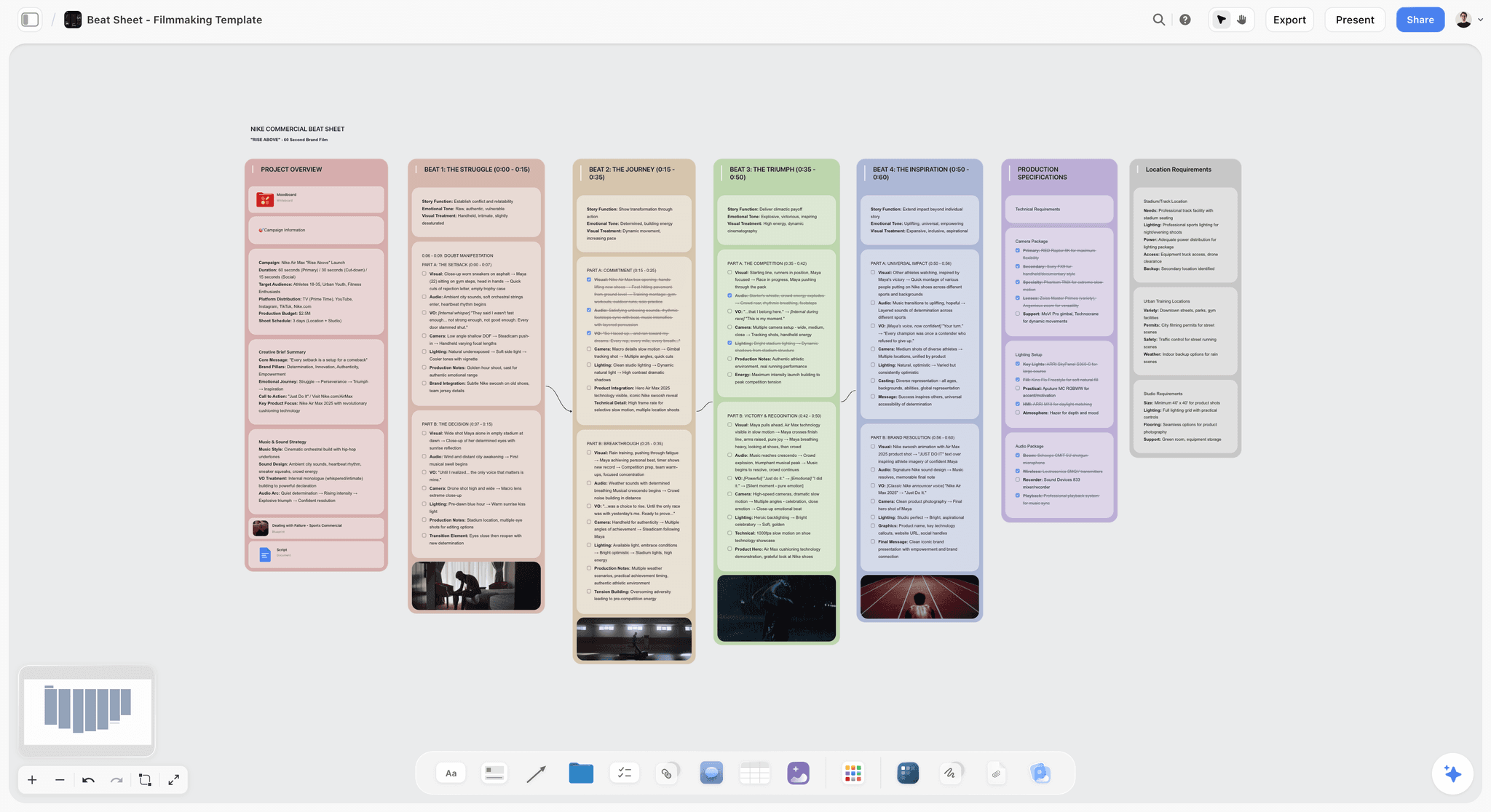
Storyflow holds the whole novel plan on one canvas: the plot beats, the characters, the world, the timeline, and the research, all visible together. The Middle is laid out as openly as the Setup, so the fog clears. The AI reads the full canvas, so you can ask it where the middle sags, which subplot goes quiet, or which scene does not escalate. The Story Blueprints library includes story-structure and character templates, and the fastest start is a pre-built board: the Story Outline template lays the whole arc out, and the Character Profile template keeps the cast beside the plot.
Best for: Novelists who want the whole plan, especially the middle, visible on one AI-readable canvas.
Verdict: The strongest AI planning canvas for novels. For writing the actual prose, pair it with Scrivener.
Key features
- One canvas for plot, characters, world, timeline, and research.
- AI reads the full canvas plus up to 5 documents and 3 boards you attach.
- AI can flag where the middle sags or a subplot goes quiet.
- Story Blueprints library with story-structure templates.
- Unlimited collaboration on Free for writing partners and editors.
Pricing
Free: $0 forever, no card. Unlimited boards and cards, unlimited collaboration, basic AI, 20 file uploads. Plus: $7.99/mo annual. Full Story Blueprints, unlimited uploads. Pro: $14/mo annual. AI image generation, 20x AI usage. Max: $39/mo annual. 40x more AI, team workspace with roles.
Pros
- The whole middle is visible alongside the bookends.
- AI flags where the middle sags before you write into the fog.
- Unlimited free collaboration with writing partners and editors.
Cons
- Not a manuscript writing environment; draft in Scrivener.
- Cloud-only, with no offline planning mode.
- Newer platform with a smaller template library than Plottr for genre structures.
2. Plottr
Plottr is the dedicated plot and timeline planner for novelists. Its visual timeline lays the whole novel out as a grid of scenes across plotlines, which is exactly the view the Middle needs. You can see every subplot, every escalation, and every gap in the middle at once. It comes with templates for popular story structures.
Best for: Novelists who want to see the whole plot, middle included, on a visual timeline.
Verdict: The strongest dedicated novel planner in 2026. Pair it with a writing tool for the draft.
Key features
- Visual timeline grid of scenes across plotlines.
- Story structure templates.
- Character and place tracking.
- Export to Word and Scrivener.
- Series management across books.
Pricing
Basic: $25/year. Pro: $39/year. Lifetime options available.
Pros
- The timeline makes the whole middle visible at once.
- Subplots laid out clearly across the novel.
- Affordable for working novelists.
Cons
- Not a writing tool; you draft elsewhere.
- The grid view has a small learning curve.
- Light on world and research layers.
3. Milanote
Milanote is the visual canvas for novel planning. Plot beats, character cards, setting references, and research live on freeform boards. Because the whole structure is spatial, the middle can be laid out and seen rather than assumed. It is strong for visual planners, lighter on timeline-specific views.
Best for: Novelists who plan visually and want plot, characters, and research on one canvas.
Verdict: The strongest visual novel planning canvas. Pair it with a timeline tool for dense chronology.
Key features
- Freeform boards for plot, characters, and research.
- Card-based scene and beat planning.
- Templates for novel planning.
- Web clipper for research and references.
Pricing
Free with 100 cards. Individual: $9.99/mo. Team: $49/mo flat.
Pros
- Visual layout makes the middle seeable.
- Strong for plot, character, and research together.
- Polished and intuitive.
Cons
- No dedicated timeline view.
- The 100-card free limit fills on a full novel.
- Light AI compared to canvas-AI tools.
4. Scrivener
Scrivener is the long-form writing standard, and it includes planning: the corkboard for scene cards, the binder for structure, the outliner for an overview. Its planning lives next to the manuscript, which keeps the plan connected to the draft. Its weakness for the Middle is that the corkboard shows one folder at a time, not the whole novel at once.
Best for: Novelists who want planning built into the tool they write in.
Verdict: The strongest writing tool with planning attached. The corkboard is less of a whole-middle view than Plottr's timeline.
Key features
- Corkboard for scene and chapter cards.
- Binder for hierarchical structure.
- Outliner view with metadata.
- Full manuscript writing environment.
Pricing
$59.99 one-time (Mac or Windows). iOS sold separately.
Pros
- One-time purchase.
- Planning sits next to the draft.
- Industry-standard writing environment.
Cons
- Corkboard shows one folder, not the whole novel.
- Planning views are less visual than dedicated tools.
- No AI.
5. Campfire
Campfire is a modular novel planning tool: pick the modules you need, such as characters, plot, timeline, world, and research, and assemble a planning workspace. The modular plot and timeline modules give a strong middle view, and you pay only for what you use.
Best for: Novelists who want a modular planning setup matched to their project.
Verdict: A strong modular planner. Module pricing can add up if you want many.
Key features
- Modular: plot, character, timeline, world, manuscript.
- Plot and timeline modules for structure.
- Worldbuilding modules.
- Lightweight AI for characters.
Pricing
Free with caps. Modules from roughly $9/mo. Bundles available.
Pros
- Pay only for the modules you use.
- Strong plot and timeline modules.
- Active development.
Cons
- Module pricing adds up for a full setup.
- Smaller community than Scrivener.
- AI is light.
6. Notion
Notion holds the novel plan as linked databases: a scene database, a character database, a plotline tracker, a research store. With the right setup, the middle is visible as a filtered view of scenes. The cost is configuration time and a database feel that suits structure more than spatial planning.
Best for: Novelists who want a structured database plan they can filter and sort.
Verdict: A capable structured planner. Expect setup time before it pays off.
Key features
- Linked databases for scenes, characters, plotlines.
- Pages for research and notes.
- Templates for novel planning.
- Standard AI features.
Pricing
Free for personal use. Plus: $10/mo. Business: $18/mo.
Pros
- Covers plot, character, and research layers.
- Filterable views can isolate the middle.
- Large template community.
Cons
- Setup-heavy before it is useful.
- Database feel suits structure over spatial planning.
- No purpose-built timeline.
7. Dabble
Dabble combines plotting and writing in one clean tool. Its Plot Grid lays scenes across plotlines, similar to Plottr, and the manuscript sits in the same app. It is a strong choice for novelists who want planning and drafting together without Scrivener's complexity.
Best for: Novelists who want plotting and writing in one simple tool.
Verdict: A clean plot-plus-write tool. The Plot Grid handles the middle reasonably well.
Key features
- Plot Grid for scenes across plotlines.
- Manuscript writing in the same app.
- Goal and streak tracking.
- AI as an add-on.
Pricing
Subscription from roughly $10/mo, with annual and lifetime options.
Pros
- Plotting and writing in one tool.
- Plot Grid shows the middle.
- Clean, modern interface.
Cons
- Subscription pricing for a writing tool.
- AI is a paid add-on.
- Less powerful than Scrivener for long manuscripts.
8. World Anvil
World Anvil is a worldbuilding tool that doubles as a novel planner for world-heavy fiction. Its wiki articles, timelines, and manuscript module hold the world and the plot together. It is strongest when the novel's world is large enough to need its own system.
Best for: Novelists writing world-heavy fantasy or SF that needs a dedicated world plus plot.
Verdict: Strong for world-heavy novels. The plot and middle tools are secondary to the world.
Key features
- Wiki articles with cross-references.
- Timelines and plot tools.
- Manuscript module.
- Worldbuilding templates.
Pricing
Free with caps. Paid tiers from $4.99/mo.
Pros
- Excellent for large fictional worlds.
- Plot and world planning together.
- Strong worldbuilding community.
Cons
- Plot and middle tools are secondary to the world.
- Wiki structure can feel heavy for plot.
- Overkill for contemporary or literary fiction.
9. Obsidian
Obsidian is the connected-note tool novelists adopt for local-first planning. Scenes, characters, and plot threads become linked notes, and the graph view shows connections. With plugins it can approximate a timeline. It rewards setup and suits writers who think in linked ideas.
Best for: Novelists who want local-first, connected-note planning they fully own.
Verdict: Strong for connected-note planners. Setup-heavy, and the middle view depends on plugins.
Key features
- Linked notes for scenes, characters, threads.
- Graph view of connections.
- Local-first markdown files.
- Plugin ecosystem for timelines and outlines.
Pricing
Free for personal use. Sync: $5/mo. Commercial: $50/year.
Pros
- Local-first, full file ownership.
- Free for personal use.
- Flexible plugin ecosystem.
Cons
- Setup-heavy; first weeks are configuration.
- Middle view depends on plugins.
- Not visual out of the box.
10. Aeon Timeline
Aeon Timeline is the dedicated timeline tool for novelists with dense chronology: multi-generational sagas, time-jumping structures, historical fiction. It lays the novel out in time, which is one strong view of the middle. It is a specialist, not a full planner.
Best for: Novelists whose plot is chronology-heavy and needs precise timeline control.
Verdict: The deepest timeline tool. A specialist; pair it with a full plot planner.
Key features
- Dense timeline with relationship tracking.
- Multiple calendar systems.
- Character age and event integration.
- Export to Scrivener.
Pricing
$69 one-time (Standard). Premium: $89 one-time.
Pros
- Unmatched timeline depth.
- Strong for complex chronology.
- One-time purchase.
Cons
- Timeline only; not a full planner.
- Learning curve.
- Overkill for linear narratives.
11. NovelPad
NovelPad is a clean, cloud-based novel tool with planning and writing together. Its plot boards and scene management give a workable middle view, and it is simpler than Scrivener for writers who want less complexity.
Best for: Novelists who want simple cloud-based planning and writing.
Verdict: A clean, simple option. Lighter on deep planning than Plottr or Storyflow.
Key features
- Plot boards and scene management.
- Cloud-based writing.
- Character and timeline tracking.
- Goal tracking.
Pricing
Subscription from roughly $8/mo, with annual options.
Pros
- Clean and simple to use.
- Cloud-based, works anywhere.
- Planning and writing together.
Cons
- Lighter planning depth than Plottr.
- Subscription only.
- Smaller community.
12. Sudowrite
Sudowrite is an AI writing tool with planning features: its Story Bible and brainstorming tools help generate plot, characters, and beats. For the Middle, the AI can suggest escalations and complications. The output is a draft to refine, not a finished plan.
Best for: Novelists who want AI help generating plot and middle ideas.
Verdict: Useful for AI plot brainstorming. The AI suggests; the writer still decides.
Key features
- AI Story Bible for plot and characters.
- Brainstorming and beat generation.
- Draft and rewrite tools.
- Genre-aware AI.
Pricing
Subscription from roughly $10/mo, scaling with usage.
Pros
- AI generates plot and middle ideas fast.
- Story Bible structures the planning.
- Useful for breaking through a stuck middle.
Cons
- AI output needs heavy human shaping.
- Subscription scales with usage.
- Better at generating than at holding a plan.
7) What Is Novel Planning Software?
Novel planning software is any tool that holds the structure of a book before and while it is written: the outline, the timeline, the characters, the settings, and the research, in a form that can be reordered without retyping the manuscript. It is not writing software. Scrivener, Word, and Google Docs are where the prose goes; novel planning software is where the decisions about the prose live.
The category splits three ways, and most disappointment with it comes from buying across the split by accident:
- Outliners turn the book into an ordered list of beats or scenes. Plottr and Dabble sit here. Strongest when you know the shape and need to hold it.
- Story databases turn the book into linked records: characters, locations, factions, magic systems, each with fields. Campfire, World Anvil, and Notion sit here. Strongest for long series and secondary worlds.
- Visual canvases turn the book into a space you arrange. Milanote, Obsidian's canvas, and Storyflow sit here. Strongest when you are still finding the shape, because a canvas lets two incompatible versions of act two sit side by side.
A timeline tool such as Aeon Timeline is a fourth thing again: it answers "when did this happen relative to that" rather than "what happens next", which matters enormously for mysteries, multi-POV books, and anything with flashbacks.
The reason "which is best" has no single answer is that these four shapes solve different failures. An outliner will not help a writer who does not yet know the shape. A canvas will not stop a writer who has too many shapes. The comparison table in section 2 rates each tool on its own terms, and section 3 explains the failure this list is actually ranked against.
Software is not required to plan a novel. Index cards on a table have planned a great many books and still work. What software adds is the ability to reorder without rewriting, to search the plan a year later, and to keep the plan visible while the draft moves away from it.
8) Are Paid Notion Writing Planner Templates Worth It?
A whole market now sells Notion templates as novel planning systems, usually as a one-time purchase somewhere between $20 and $80, with names promising a complete writing planner. The question worth answering before buying one is not whether the specific template is good. It is whether a Notion database is the right shape for the failure you are actually having.
What a paid Notion writing template genuinely gives you: a pre-built structure so you do not spend a weekend building databases; relations already wired between scenes, characters, and locations; usually a dashboard, progress tracking, and a word-count log. If your problem is "I like Notion and I do not want to build this myself", a template solves that cleanly and the price is fair for the hours saved.
What it does not change: Notion is a database with pages in it. Everything you get from a template is a view onto rows. That is excellent for tracking a plan and poor for finding one, because reordering a database is editing fields, not moving objects in front of your eyes. This is the same limit that puts Notion mid-table in section 2 rather than at the top.
Five checks before buying any of them:
- Is it a template or a course? Some listings bundle a small template with a large amount of writing advice. Both can be worth money; know which one you are paying for.
- Does the seller show the actual databases? A demo that only shows the dashboard is hiding how thin the structure underneath is.
- What happens at 80,000 words? Notion slows on large, heavily related databases. Ask whether the template was used on a finished book or built for a screenshot.
- Is there a refund window, and a real support contact? This is the single most useful legitimacy signal on any one-time digital purchase, more than reviews are.
- Do you already use Notion daily? If not, a template means adopting a whole workspace to plan one book, which is a larger commitment than any dedicated tool on this list.
The one people search for by name: Oliver Notion's Ultimate Writer Planner. It is a real product from olivernotion.com at $29.95 as a one-time purchase with no subscription, carrying a 30-day money-back guarantee, and it runs on a free Notion account. The listing covers manuscript and chapter tracking, character and worldbuilding databases, plot outlining, word-count goals and a publishing tracker. We have not bought or tested it, so it is not rated here and it is not in the table in section 2. Against the five checks above we can answer three from the outside: it is a template rather than a course, the price sits at the low end of the $20 to $80 range, and the refund window is stated plainly, which is check four and the strongest signal on the list. Checks two and three need the product in front of you: whether the demo shows the actual databases rather than just a dashboard, and how it behaves at 80,000 words. Check five is about you rather than the template, and it is the one that decides this purchase. If you already work in Notion daily, $29.95 to skip a weekend of wiring relations is a fair trade. If you do not, you are adopting a whole workspace to plan one book. And if the failure you are having is the one described in section 3, where the middle of the book stalls, no Notion template addresses it, because a template changes your setup and not the shape of what you are looking at.
A template fixes setup. It does not fix structure. If the book keeps stalling in the middle, the problem described in section 3, then a better-organized database of the same stalled plan will not move it, and that is worth knowing before the purchase rather than after.
If you want the Notion shape without building it, Notion's own free templates cover most of what a paid pack does. If you want the canvas shape instead, Milanote and Storyflow both start from a blank board rather than a schema, and Obsidian's canvas is free.
9) Recommended Novel Planning Stacks
Stack 1: Solo Novelist on a Budget. Storyflow Plus (the whole-novel planning canvas, middle included, $7.99/mo annual) + Scrivener ($59.99 once, for the draft). A complete plan-and-write setup for one monthly cost plus one payment.
Stack 2: Genre or Series Novelist. Plottr (visual plot timeline across books) + Storyflow or Milanote (characters and research) + Scrivener (writing). Strong for series with complex middles.
Stack 3: World-Heavy Fantasy or SF. World Anvil (the world) + Plottr or Storyflow (the plot and middle) + Scrivener (writing). The world and the plot each get a real home; Storyflow's World Building template can hold the world layer if you want it on the same canvas as the plot.
Stack 4: Cheapest Working Stack. Obsidian (free, connected-note planning) + a free writing tool, upgrading to Scrivener when the draft begins. Near-zero cost to plan. Storyflow Plus ($7.99/mo annual) is the step up when you want the whole novel on one AI-readable canvas.
The pattern across every stack: a planning tool that makes the whole middle visible, plus a writing tool for the draft. The novelists who finish are the ones who planned the middle before they wrote into it.
10) Honorable Mentions
- Atticus. Writing and formatting software with light planning.
- Ulysses. A clean writing app some novelists plan in.
- Save the Cat Story Structure tools. Beat-sheet planning for structure-led writers.
- Google Docs. The free fallback for a simple plan.
- Index cards. The analog method that still works for laying out the middle.
11) Tools to Avoid for Novel Planning
- A plan that only covers the opening. A detailed Setup and a vague rest is the exact recipe for the Middle Gap.
- A linear document for a non-linear plot. Subplots and the middle need a view that shows them in parallel, not stacked in a doc.
- Memory as the plan. If the middle exists only in your head, it will fog over by the time you write into it.
- A tool that shows one chapter at a time. The Middle is only solvable when you can see the whole of it at once.
12) FAQ: Novel Planning Tools
What is the best novel planning tool in 2026?
Storyflow is the best AI canvas for planning the whole novel, including the middle. Plottr is the strongest dedicated plot and timeline planner. Milanote is the best visual planning canvas. Scrivener is the best planning built into a writing environment. Most novelists pair a planning tool with a writing tool.
Why do so many novels get abandoned in the middle?
Because the middle is rarely planned. Writers plan the opening in obsessive detail and can picture the ending, but they assume the middle, which is over half the book, will emerge as they write. It does not. The middle is dozens of interlocking scenes and subplots, and without a plan the writer gets lost there.
How do I plan the middle of a novel?
Lay the whole middle out where you can see it at once: every subplot, every escalation, every reversal. Use a timeline or canvas view rather than a linear document. Plan how tension rises scene by scene. The middle is solvable only when it is visible, not assumed.
What is the difference between novel planning and outlining?
Outlining is one part of novel planning: the sequence of scenes. Planning is broader, covering plot, characters, world, timeline, and research together. A novel planning tool holds all of those; an outline holds the scene order. For outlining specifically, a dedicated outlining guide goes deeper.
Do I need software to plan a novel?
Not strictly, but for anything beyond a short, simple story, a tool that shows the whole structure at once is the difference between finishing and stalling. The middle in particular needs a view a notebook cannot give. Plottr, Storyflow, and Milanote all provide that view.
What is the cheapest novel planning setup?
Obsidian is free for connected-note planning. For writing, Scrivener is a one-time $59.99, so a complete plan-and-write setup can cost as little as that single purchase. Storyflow holds the whole-novel plan on one canvas, including the middle, but it is paid-only during early access from $7.99/mo annual, with a Free plan launching before the end of 2026.
Is Plottr or Scrivener better for planning a novel?
Plottr is the better planner: its timeline shows the whole novel, middle included, at once. Scrivener is the better writing environment, with planning attached. A common workflow is to plan in Plottr or Storyflow, then write in Scrivener.
Can AI help plan a novel?
Yes. AI can generate plot ideas, suggest middle complications, and check a plan for sagging tension. Storyflow's canvas AI reads the whole plan and can flag where the middle goes quiet. Sudowrite generates plot and beats. The AI suggests; the novelist still makes the structural decisions.
How detailed should a novel plan be?
Detailed enough that you never write into fog. The Setup and Payoff can be lighter because they plan themselves. The middle needs real detail: each scene's purpose, the subplot it advances, how tension rises. Plan the middle to the point where the next scene is always obvious.
What tools do professional novelists use?
Working novelists commonly use Plottr or Scrivener, with Milanote or Storyflow for visual planning and World Anvil for world-heavy fiction. Many use a planning tool plus a separate writing tool. The constant is a tool that makes the whole structure visible.
How do I keep a novel plan from going stale while I write?
Use a planning tool you keep open beside the draft, and update the plan whenever the story changes. The plan goes stale when it lives somewhere you never reopen. A tool that connects to the draft, or sits beside it, stays current.
What is the best free tool to plan a novel?
Obsidian is free for connected-note planning and lets a novelist plan a complete book at no cost. Storyflow holds the whole novel plan on one canvas with no card cap, which suits the full structure including the middle, but it is paid-only during early access from $7.99/mo annual, with a Free plan launching before the end of 2026.
What is novel planning software?
Novel planning software holds the structure of a book, the outline, timeline, characters, settings, and research, in a form that can be reordered without retyping the manuscript. It splits into outliners such as Plottr and Dabble, story databases such as Campfire and Notion, visual canvases such as Milanote and Storyflow, and dedicated timeline tools such as Aeon Timeline. It is separate from writing software, which is where the prose itself goes.
Is a paid Notion writer planner template legitimate, and how do I tell?
Paid Notion templates are a normal product category and many are genuinely useful, but the quality range is wide. The checks that matter are whether the seller shows the actual databases rather than only a dashboard, whether there is a stated refund window and a real support contact, whether the template has been used on a finished book, and whether you already use Notion daily. A template saves you the setup weekend; it does not change what a database can and cannot do for a plan you are still finding.
Is novel planning software worth paying for?
It is worth paying for when you have hit one of three walls: the plan is too big to hold in your head, you cannot reorder it without rewriting it, or you cannot find a decision you made six months ago. If none of those is happening, index cards and a document are genuinely sufficient and always have been. The cheapest working setup on this list is covered in section 12.
What is the best visual novel planner?
Milanote and Storyflow are the two strongest visual planners in this list, with Obsidian's canvas the best free option. A visual planner is the right shape when you are still finding the structure, because two incompatible versions of an act can sit side by side on a canvas and cannot sit side by side in an outliner. Once the structure is settled, an outliner such as Plottr holds it with less effort.
13) The Bottom Line
The best novel planning tools in 2026 are the ones that make the middle visible. Storyflow is the best AI canvas for planning the whole novel. Plottr is the strongest dedicated plot and timeline planner. Milanote is the best visual planning canvas. Scrivener is the best planning attached to a writing environment.
Novels are not abandoned because the writing got hard. They are abandoned because the middle was never planned. Plan the middle as deliberately as the opening: lay out every subplot and escalation where you can see them at once. The novelists who finish are the ones who never wrote into the fog.
For your next novel, plan the whole book in Storyflow's canvas and lay the middle out as openly as the opening and the ending. The Story Plan template opens with that structure already on the board.
Table of Contents
- Quick Answer: The Best Novel Planning Tools in 2026
- Comparison Table: 12 Novel Planning Tools at a Glance
- Frequently Asked: Notion Templates, Free Tools, and What Novel Planning Software Actually Does
- The Middle Gap
- How We Evaluated These Tools
- Quick Picks by Novel Planning Need
- Detailed Reviews: 12 Novel Planning Tools
- What Is Novel Planning Software?
- Are Paid Notion Writing Planner Templates Worth It?
- Recommended Novel Planning Stacks
- Honorable Mentions
- Tools to Avoid for Novel Planning
- FAQ: Novel Planning Tools
- The Bottom Line
- Author
- Related Reading
Templates to check out for this topic


Story and writing templates you can use in Storyflow
Start your next script, novel, or world from a ready-made Storyflow board instead of an empty page. The AI reads the whole canvas, so every suggestion is grounded in your story.


See Storyflow in Action
A visual AI workspace where every feature lives inside one canvas. No tab-switching, no context lost.
Build your entire board from a single message
Type what you need in the AI chat at the bottom of your canvas. The AI adds cards, headings, and structure directly onto your board.
Use expert frameworks as AI context
Type @ in the AI chat and choose any Tactic. The AI tailors every response to that framework instead of giving generic advice.
Turn your board into a mind map in seconds
Ask the AI to restructure your canvas as a mindmap. It connects your ideas into a visual hierarchy so you can see how everything relates.
Why Storyflow Exists
Storyflow actually began as a personal tool while working on creative and research projects.
We kept running into the same problem: ideas were scattered everywhere: notes, documents, and whiteboards.
Nothing helped us see how everything connected.
So we started building a workspace designed around how ideas actually grow.
→ Read how Storyflow was createdJustkay
Documentary Filmmaker & Founder at Storyflow
Published: 2026-05-17
Extremely simple, seriously capable


See how easy it is to get started
Watch a real project come together, from a blank board to a finished plan, clicked through step by step.
Start creating with AI and become more productive
Transform your creative workflow with AI-powered tools. Generate ideas, create content, and boost your productivity in minutes instead of hours.