The 12 Best Screenwriting Software Tools in 2026 (Tested on Real Scripts)
The best screenwriting software in 2026, tested on real scripts. 12 tools compared for development, formatting, and collaboration, from Storyflow and Final Draft to free options.

Category
Filmmaking
Author

Justkay
Documentary Filmmaker & Founder at Storyflow
Topics
2026-07-10
•
17 min read
•
Filmmaking- best screenwriting software 2026
- screenwriting software
- screenplay writing software
- Final Draft alternatives
- free screenwriting software
- best script writing software
What is the best screenwriting software in 2026?
The best screenwriting software in 2026 is Storyflow (best for AI-assisted story development and outlining on a canvas), Final Draft (best for industry-standard formatting and production drafts), WriterDuet (best for real-time co-writing), and Arc Studio (best modern outliner-plus-writer). Storyflow leads the development half because its AI reads your full story canvas (research, beats, character arcs, mood boards) and grounds structure in blueprints like Hero's Journey and Save the Cat, which is exactly where a blank formatting app leaves you alone. For the final production draft, Final Draft and Fade In still own the standard. For the full answer to [what tools screenwriters use to plan their stories](/screenwriting-software), see our guide. The short version: screenwriting software is really two jobs stacked into one word. The first job is figuring out what the script is (structure, beats, character, theme). The second job is typing it in correct format (sluglines, dialogue, action, revision marks). Almost every tool is strong at one and weak at the other. This guide separates the two so you buy the right tool for the job you are actually stuck on.

Full disclosure: Storyflow is our own product, and this guide ranks it first for the development half of screenwriting, where its AI reads your full story canvas and grounds structure in blueprints. That ranking is honest about scope, not a claim to do everything. Final Draft remains the industry standard for the production draft with the revision colors buyers expect, and Storyflow is not a production formatter, so most writers pair the two. WriterDuet is the stronger pick for live co-writing, and free tools like Trelby and Beat format correctly at no cost. We link to every tool so you can judge the fit.
Quick Comparison
These four cover both halves of screenwriting: a canvas for development and structure, the production-standard formatter, a real-time co-writing tool, and a modern outliner-writer.
| Tool | Best For | AI Features | Price |
|---|---|---|---|
| Storyflow | Story development and structure on a canvas | Canvas AI reads your whole story | $7.99 mo annual (free plan late 2026) |
| Final Draft | Industry-standard production drafts | Beat Board and Structure Lines | ~$199 one-time |
| WriterDuet | Real-time co-writing | Outline panel | ~$11.99 mo |
| Arc Studio | Outliner plus writer in one window | Story maps, AI in beta | ~$99 yr |
All 12 Screenwriting Tools, Ranked
- Storyflow: best for AI story development, outlining, and structure on a canvas (9.4/10)
- Final Draft: best for industry-standard formatting and production drafts (9.2/10)
- WriterDuet: best for real-time collaborative screenwriting (9.0/10)
- Arc Studio: best modern outliner-plus-writer in one window (8.9/10)
- Celtx: best all-in-one script-and-production suite (8.6/10)
- Fade In: best affordable professional formatter (8.5/10)
- Scrivener: best for long-form organization and research-heavy drafts (8.3/10)
- Highland 2: best Fountain-based writing for Mac (8.1/10)
- Slugline: best distraction-free Fountain app for Apple users (7.9/10)
- Beat: best free, open-source Fountain editor for Mac (7.7/10)
- Trelby: best free, cross-platform screenwriting app (7.4/10)
- StudioBinder: best free browser writer tied to production (7.2/10)
Comparison Table: 12 Screenwriting Software Tools Compared
| Tool | Best For | Starting Price | Free Plan | AI / Outlining | Rating (/10) |
|---|---|---|---|---|---|
Storyflow | AI story development on a canvas | $7.99/mo (annual) | Coming late 2026 (invited collaborators join free now) | Canvas AI + blueprints | 9.4/10 |
Final Draft | Industry-standard formatting | ~$199 (one-time) | Trial only | Beat Board, Structure | 9.2/10 |
WriterDuet | Real-time co-writing | ~$11.99/mo | Yes (3 scripts) | Outline panel | 9.0/10 |
Arc Studio | Outliner plus writer | ~$99/yr | Yes (limited scripts) | Story maps, AI beta | 8.9/10 |
Celtx | Script plus production | ~$15/mo | Yes (limited) | Beat sheets, breakdowns | 8.6/10 |
Fade In | Affordable pro formatter | ~$79.95 (one-time) | Demo only | Outlining tools | 8.5/10 |
Scrivener | Long-form organization | ~$59.99 (one-time) | 30-day trial | Corkboard, outliner | 8.3/10 |
Highland 2 | Fountain writing on Mac | Free tier; ~$49.99 Pro | Yes (limited) | Bin, Revision Mode | 8.1/10 |
Slugline | Distraction-free Fountain | ~$49.99 (one-time) | Trial | Outline navigator | 7.9/10 |
Beat | Free open-source Fountain | Free | Yes (fully free) | Outline view | 7.7/10 |
Trelby | Free cross-platform | Free | Yes (fully free) | Basic name database | 7.4/10 |
StudioBinder | Browser writer plus production | Free writer; ~$29/mo suites | Yes (writer free) | Tied to breakdowns | 7.2/10 |
Prices above are the published rates at the time of writing and move often, so check the vendor's own page before you commit. The shape of each plan (free tier, subscription, or one-time licence) is more stable than the number. Prices verified where possible in 2026 and hedged where they change often. Confirm current pricing on each tool's site before buying. Ratings reflect real drafting and development use, not feature counts.
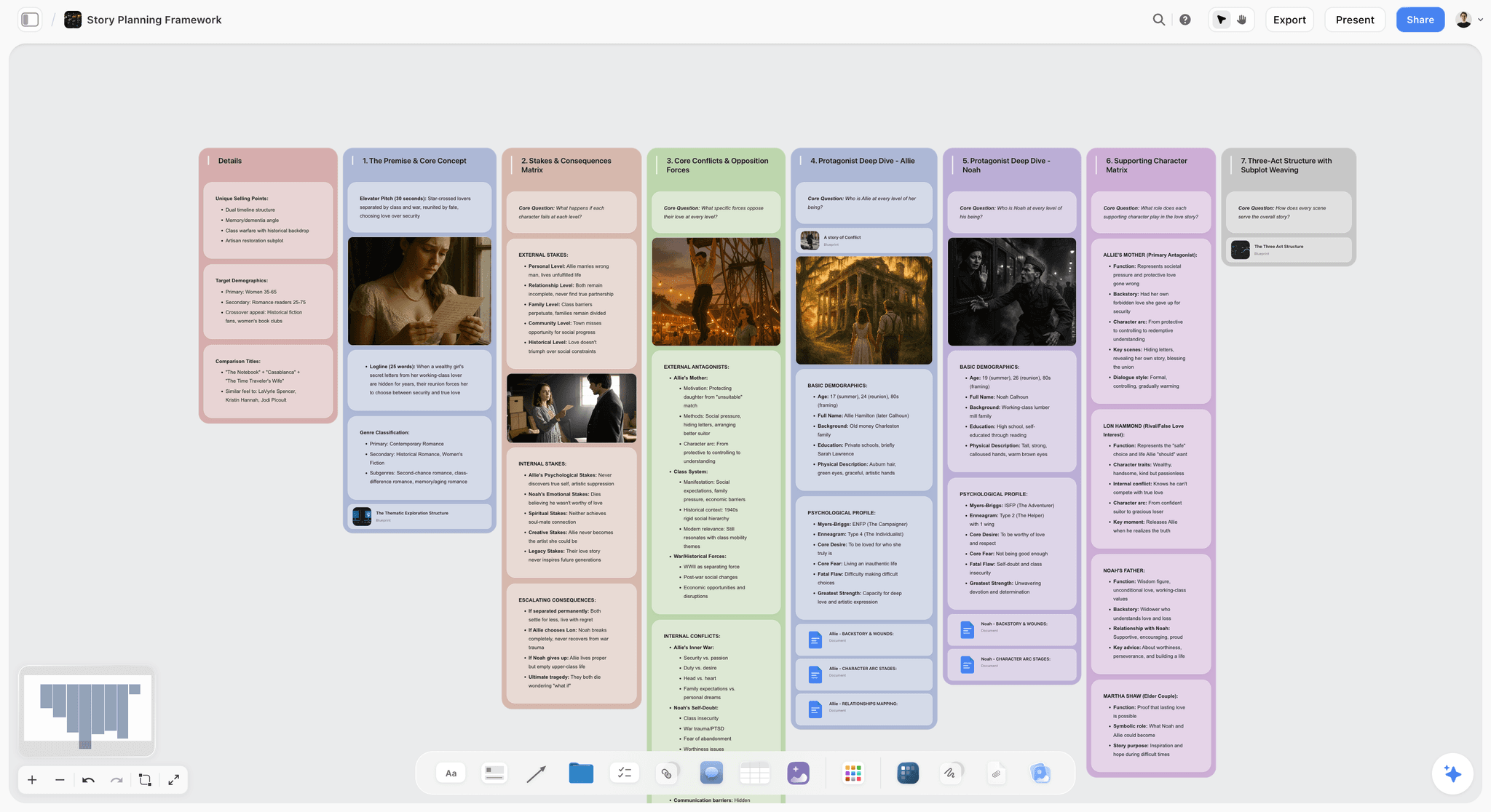
Storyflow canvas holding a screenplay beat sheet, character arcs, research, and a Hero's Journey blueprint the AI can read
Develop your next script on a canvas the AI can read
Put your logline, beats, character arcs, and research on one Storyflow board, pick a blueprint like Hero's Journey, and let the AI pressure-test the structure before you format a single page.

Why Screenwriting Software Is Really Two Tools in One
Most "best screenwriting software" lists rank formatters against each other and call it a day. That framing hides the decision that actually matters. A screenplay has two production lines, and they need different tools.
The development line is where scripts live or die. Before a single slugline is typed, the writer is deciding what the story is: the spine, the beats, the character wants, the theme, the sequence of turns. This is thinking work, and it is nonlinear. You move beats around. You cut a character. You realize the midpoint belongs in act one. A page of formatted script is the worst possible surface for this work because it forces linear order before you have one.
The formatting line is mechanical, and it is solved. Once you know what the scene is, typing it in correct format is a solved problem. Final Draft, Fade In, WriterDuet, and even free tools like Trelby handle sluglines, dialogue, transitions, and revision colors correctly. Formatting is not where writers get stuck. It is not the bottleneck. It just looks like the whole job because it is the visible part.
Here is the pattern that shows up on every real script:
- The blank formatted page is great for typing a scene you already understand.
- It is useless for figuring out a scene you do not understand yet.
- So writers open a second surface (index cards, a whiteboard, a doc, a notebook) to think, then copy the result into the formatter.
It is not that formatters fail. It is that they were never meant to do the thinking half, and most writers never gave the thinking half a real tool. The familiar approach is to brute-force structure inside a linear script or a pile of physical index cards. The stronger approach is to run development on a canvas where the beats, research, and character arcs sit next to each other and an AI can read all of it, then move the finished scenes into a formatter. That split is why Storyflow ranks first for the half of screenwriting that has been under-tooled for decades, while Final Draft and Fade In stay essential for the half that is already solved.
For the architectural version of this argument, see why ChatGPT loses the plot after the third reply.
How We Evaluated These Screenwriting Tools
Every tool here was used on real drafting and development work, not judged from a features page. Five criteria, weighted in this order:
- Development usefulness. Does the tool help you figure out what the script is (structure, beats, character), or does it only help you type a script you have already figured out?
- Formatting correctness. Does it produce industry-standard output that a production or a reader will accept without complaint?
- Collaboration. Can two or more writers work together without emailing versions back and forth?
- Friction. How fast is capture, revision, and moving from idea to page? Does the tool get out of the way?
- Price honesty at real usage. What does it cost when you are actually using it, including one-time versus subscription and whether the free tier is genuinely usable?
Tested workflows included: a feature spec from logline to first draft, a half-hour pilot, a documentary script built from interview transcripts, and a short film rewrite across three collaborators. Structure, not typing speed, was the thing we watched.
Quick Picks by Screenwriting Job
If you want the short list, pick by the job you are stuck on.
Best for figuring out structure and beats: Storyflow. The beats, research, and character arcs live on one canvas, you pick a blueprint like Hero's Journey or Save the Cat, and the AI reads all of it before suggesting structural moves. Final Draft's Beat Board is the closest formatter-native option.
Best for the production-standard draft: Final Draft. It remains the format most productions, agencies, and competitions expect. Fade In is the affordable alternative that produces the same standard output.
Best for co-writing in real time: WriterDuet. Two or more writers in the same script, live, with a clean revision history. Arc Studio is a strong modern alternative.
Best for research-heavy scripts (documentary, adaptation, historical): Storyflow for the research canvas and transcript synthesis, then Scrivener or a formatter for the draft. Documentary especially benefits from a canvas that holds interviews next to the beat sheet.
Best for writing on a budget: Trelby and Beat are genuinely free and produce correct format. Storyflow's Free plan, which launches before the end of 2026, will cover the development side at no cost.
Best for Apple-only writers who want calm: Highland 2 or Slugline. Both use Fountain, both are fast and quiet, both stay out of your way.
Detailed Reviews: The 12 Best Screenwriting Software Tools
1. Storyflow
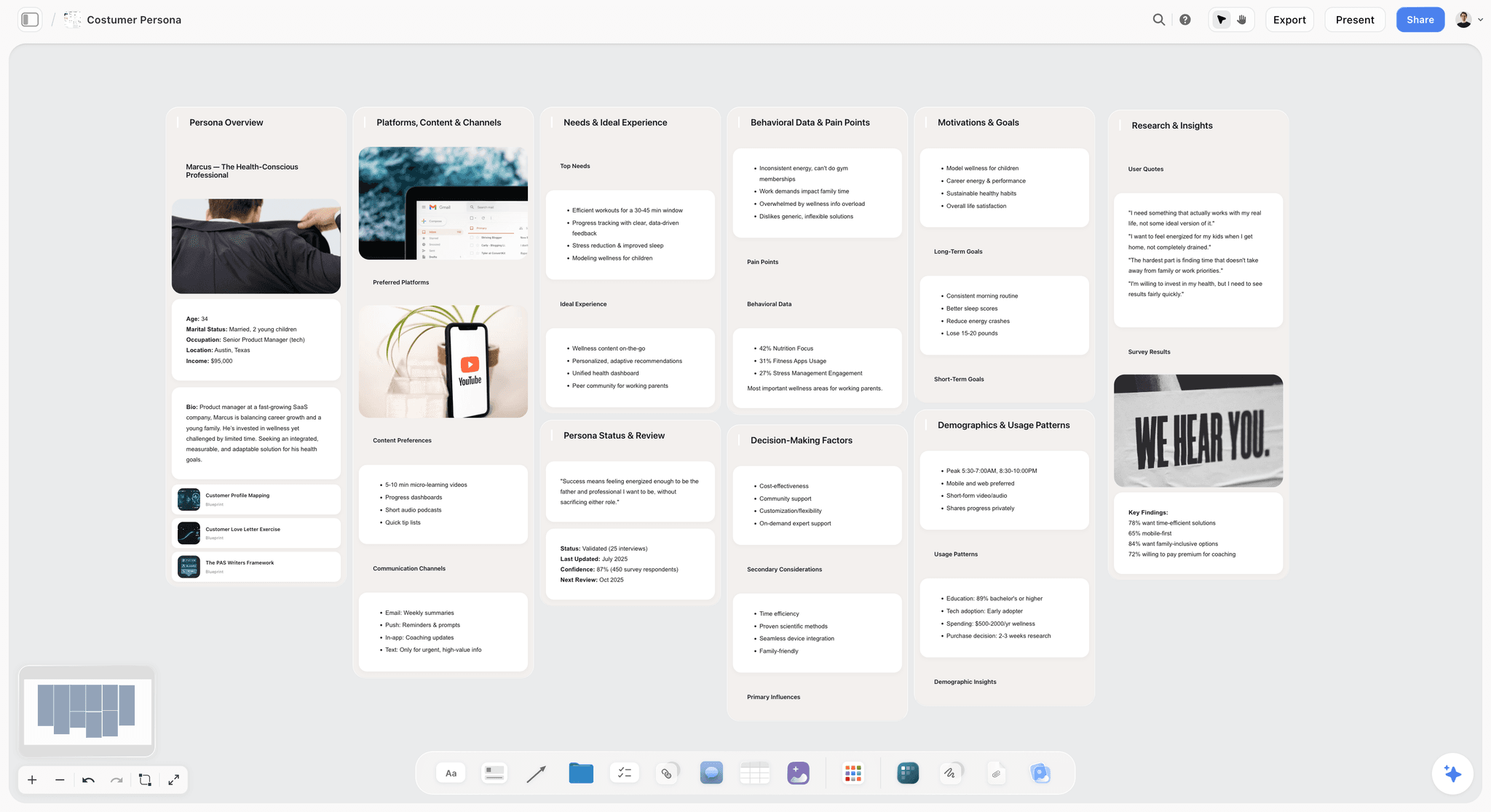
Storyflow is a visual workspace where the AI reads your full active canvas board and grounds responses in blueprints like Hero's Journey, Save the Cat, Five-Act Structure, and StoryBrand. It is the tool for the development half of screenwriting: the part where you decide what the script is before you format it. I built it after running multiple documentary scripts through ChatGPT and watching it forget the story every few replies. The fastest way to feel the difference is to put your logline, research, and a rough beat list on one board and ask the AI for a structure pass grounded in what is actually there.
Best for: Screenwriters and filmmakers doing structure, outlining, beat sheets, character arcs, and research synthesis before and during the draft.
Verdict: The strongest tool for the thinking-and-structure half of screenwriting. It is not a replacement for a production formatter, and it does not pretend to be.
Key features
- Project-aware AI by default. The AI reads the full active canvas (research, beats, character bios, mood boards). Add up to 1 Tactic (blueprint) and up to 3 Documents by @-mention for extra grounding.
- 200+ Story Blueprints on Plus and above. Hero's Journey, Save the Cat-style beats, Five-Act, AIDA, StoryBrand. The free plan ships 3 starter blueprints so you can test the framework before paying.
- Nonlinear canvas. Beats, character cards, research, and transcripts sit side by side and rearrange freely, which is how structure actually gets found.
- Real collaboration. Unlimited shared boards and unlimited collaboration on every plan; the Max plan adds a Team Workspace with Permissions and Roles for writers rooms.
Pricing
Free: launching before the end of 2026; invited collaborators of paid members join free today. Unlimited boards, unlimited cards, unlimited collaboration, basic AI usage, 20 file uploads, and 3 starter blueprints. Plus: $7.99/mo annual or $9.99/mo monthly (full 200+ blueprint library, unlimited uploads). Pro: $14/mo annual or $19/mo monthly (adds AI image generation and 20x more AI than Plus). Max: $39/mo annual or $49/mo monthly (adds 40x more AI plus Team Workspace with Permissions and Roles).
Pros
- The AI reads the whole story, not the one paragraph you pasted, so structural notes land in context.
- Blueprints scaffold the AI on real screenwriting frameworks instead of generic prose.
- Built by a working documentary filmmaker, so the development workflow matches how scripts actually get made.
Cons
- Storyflow is not a production formatter. For the final industry-standard PDF with revision colors, export your beats and write the draft in Final Draft or Fade In.
- Cloud-only, so writers with strict local-first requirements should pair it with a local formatter.
- The AI is a structure partner, not a ghostwriter; it will not write a good script for you.
For the screenwriter-specific deep dive, see the best AI tools for screenwriters in 2026.
2. Final Draft
Final Draft is the long-running industry standard for screenplay formatting, used across studios, networks, and competitions. Version 13 added Beat Board and Structure Lines that push it further toward development.
Best for: Writers who need production-accepted formatting and want the tool most collaborators already know.
Verdict: Still the default for the production draft. The development features are useful but not why you buy it.
Key features
- Industry-standard formatting with automatic paginate and revision modes.
- Beat Board and Structure Lines for visual outlining.
- Collaboration via Collabowriter for real-time co-writing.
- Reports for scenes, characters, and locations.
Pricing
Around $199.99 for a one-time license. Educational discounts and occasional sales apply.
Pros
- The format is the one most productions expect without argument.
- One-time purchase avoids subscription fatigue.
- Deep, mature reporting and revision tools.
Cons
- The price is steep for new writers, and upgrades cost extra.
- Beat Board is a bolt-on; canvas-native tools do development better.
- The interface shows its age next to modern apps.
3. WriterDuet
WriterDuet is built around real-time collaboration. Multiple writers work in the same script live, with a clean revision history and bulletproof autosave.
Best for: Writing partnerships, rooms, and any project where two people touch the same script.
Verdict: The strongest real-time co-writing tool for screenplays. If you write with a partner, start here.
Key features
- Real-time collaborative writing with live cursors.
- Automatic version history and offline mode.
- Outline panel alongside the script.
- Import and export across Final Draft, Fountain, and PDF.
Pricing
Free for up to 3 scripts. Pro around $11.99/mo or discounted annual and lifetime options.
Pros
- Collaboration is genuinely seamless, not a bolted-on afterthought.
- Version history is granular and reliable.
- The free tier is usable for a first project.
Cons
- Solo writers pay for collaboration features they may not need.
- The outline panel is lighter than a dedicated development canvas.
- Interface is functional rather than beautiful.
4. Arc Studio
Arc Studio is a modern screenwriting app that puts outlining and writing in one clean window, with story maps and an AI assistant in beta.
Best for: Writers who want a contemporary tool that treats outline and script as one workflow.
Verdict: The best modern challenger to Final Draft for writers who care about structure and speed.
Key features
- Split-screen outline and script.
- Story maps and beat planning.
- Real-time collaboration.
- Fast, modern interface with cloud sync.
Pricing
Free tier with limited scripts. Pro around $99/yr.
Pros
- Outline-plus-script in one window reduces tool switching.
- Modern, fast, and pleasant to use.
- Collaboration and cloud sync work well.
Cons
- Smaller ecosystem than Final Draft.
- AI features are earlier-stage than dedicated canvas AI.
- Some production workflows still expect Final Draft files.
5. Celtx
Celtx is an all-in-one suite that spans scriptwriting, beat sheets, breakdowns, and light production scheduling in the browser.
Best for: Writers who want scriptwriting and production planning under one login, especially students and small teams.
Verdict: The strongest single-suite option if you want writing and pre-production together, though each module is shallower than a specialist tool.
Key features
- Cloud scriptwriting with standard formatting.
- Beat sheets and story outlines.
- Script breakdown and basic scheduling.
- Team collaboration.
Pricing
From around $15/mo depending on tier, with a limited free option.
Pros
- One suite covers writing through basic pre-production.
- Browser-based and collaborative.
- Reasonable value for students and small teams.
Cons
- Each module is lighter than a dedicated tool.
- Subscription-only for the useful tiers.
- Development tools are thinner than a canvas AI workspace.
6. Fade In
Fade In is a professional screenwriting application with industry-standard formatting at a fraction of Final Draft's price, plus solid outlining tools.
Best for: Writers who want production-standard output without the Final Draft price.
Verdict: The best value professional formatter. It does what Final Draft does for less.
Key features
- Industry-standard formatting and revisions.
- Outlining, navigator, and index-card views.
- Cross-platform (Windows, Mac, Linux, mobile).
- Strong import and export.
Pricing
Around $79.95 for a one-time license.
Pros
- Professional output at roughly a third of Final Draft's cost.
- Genuinely cross-platform, including Linux.
- Actively maintained by a solo developer who ships.
Cons
- Smaller name recognition in some production offices.
- Development tools are competent but not canvas-native.
- Marketing and community are lighter than the market leaders.
7. Scrivener
Scrivener is a long-form writing environment built for organizing research, notes, and drafts, with a scriptwriting mode that handles screenplay format.
Best for: Research-heavy scripts, adaptations, and writers who also work in prose.
Verdict: The strongest organizer for long, research-dense projects, though its script formatting is secondary to its structure tools.
Key features
- Binder, corkboard, and outliner for structure.
- Research storage inside the project.
- Scriptwriting mode with screenplay formatting.
- Compile to multiple formats.
Pricing
Around $59.99 one-time for Mac or Windows; separate iOS app.
Pros
- Best-in-class for organizing large projects and research.
- One-time purchase.
- Flexible across scripts, novels, and nonfiction.
Cons
- Screenplay formatting is not its primary strength.
- Steeper learning curve than a focused app.
- No live collaboration.
8. Highland 2
Highland 2 is a Mac writing app built on Fountain, the plain-text screenplay format, with a clean interface and clever revision tools.
Best for: Mac writers who like plain text, speed, and staying out of formatting menus.
Verdict: The best Fountain-based writing experience on Mac for writers who want calm and control.
Key features
- Fountain-based writing with instant preview.
- Bin for cut material and notes.
- Revision Mode and Gender Analysis.
- Clean, distraction-light interface.
Pricing
Free tier with limits; Pro around $49.99 one-time or subscription.
Pros
- Plain-text Fountain keeps files future-proof.
- Fast and pleasant for pure writing.
- The Bin is a genuinely useful revision tool.
Cons
- Mac-only.
- Fountain has a small learning curve for format-menu writers.
- Not built for real-time collaboration.
9. Slugline
Slugline is a distraction-free Fountain writing app for Apple platforms, focused on getting words down without menus in the way.
Best for: Apple-only writers who want the quietest possible drafting surface.
Verdict: A calm, focused Fountain app. Excellent for drafting, lighter on development and collaboration.
Key features
- Fountain-based, plain-text writing.
- Outline navigator.
- Clean typography and focus mode.
- iCloud sync across Mac and iOS.
Pricing
Around $49.99 one-time for Mac; separate iOS pricing.
Pros
- Beautiful, quiet writing environment.
- Plain-text files stay portable.
- Fast and stable.
Cons
- Apple-only.
- Minimal development and outlining depth.
- No collaboration.
10. Beat
Beat is a free, open-source Fountain screenwriting app for Mac. It is genuinely free, actively developed, and produces correct format.
Best for: Mac writers on a budget who want plain-text screenwriting with zero cost.
Verdict: The best free Fountain editor on Mac. Remarkable value for a free tool.
Key features
- Fountain-based writing with live preview.
- Outline view and script navigation.
- Plugins and theming.
- Final Draft import and export.
Pricing
Free and open-source.
Pros
- Completely free with no feature gates.
- Active development and a helpful community.
- Plain-text files are future-proof.
Cons
- Mac-only.
- Fewer polish features than paid apps.
- Development and collaboration tooling is minimal.
11. Trelby
Trelby is a free, open-source screenwriting program for Windows and Linux. It is small, fast, and correct on format.
Best for: Writers on Windows or Linux who need a free tool that produces standard output.
Verdict: The best free cross-platform formatter. Not fancy, but it works and costs nothing.
Key features
- Standard screenplay formatting.
- Name database and basic reports.
- Fast and lightweight.
- Import and export including Final Draft.
Pricing
Free and open-source.
Pros
- Free, fast, and reliable.
- Runs well on Windows and Linux.
- Simple enough to learn in minutes.
Cons
- Development has been quiet in stretches.
- No collaboration or cloud sync.
- Interface is dated.
12. StudioBinder
StudioBinder is a production management platform with a free browser-based screenwriting tool that ties writing directly to breakdowns, shot lists, and call sheets.
Best for: Writer-producers who want the script connected to production logistics.
Verdict: A capable free writer inside a production suite. Best when logistics matter as much as the script.
Key features
- Free browser-based screenwriting.
- Direct link to script breakdowns and shot lists.
- Production management (call sheets, schedules).
- Team collaboration.
Pricing
Free screenwriting tool; full production suites from around $29/mo.
Pros
- The writer is genuinely free.
- Tight integration with production logistics.
- Strong for writer-producers on small crews.
Cons
- The writer is lighter than a dedicated formatter.
- Real value is the paid production suite, not the writer alone.
- Overkill if you only want to write.
Screenwriter-Type Recommendations
1. Feature Screenwriter (Spec or Assignment)
Top picks: Storyflow + Final Draft
Develop the structure, beats, and character arcs on a Storyflow canvas where the AI reads the whole story, then write the production draft in Final Draft so the format is what buyers expect. This split covers both halves of the job without compromise.
2. TV / Episodic Writer
Top picks: Storyflow + WriterDuet
Storyflow for the season arc, episode beat sheets, and character throughlines on one board. WriterDuet for room-style co-writing on the actual pages. Add Final Draft if the show's production office standardizes on it.
3. Documentary Writer
Top picks: Storyflow + Scrivener
Documentary scripts are built from research and transcripts, not invented from nothing. Storyflow holds the interviews next to the beat sheet and synthesizes them; Scrivener organizes the long draft. See how to plan a documentary with AI.
4. Writing Partnership
Top picks: WriterDuet + Storyflow
WriterDuet for live co-writing on the script. Storyflow for the shared development canvas where both partners rearrange beats before drafting. Two surfaces, cleanly divided.
5. Student / First-Time Writer
Top picks: Storyflow (free) + Trelby or Beat (free)
Learn structure on Storyflow's free plan with starter blueprints, then format for free in Trelby (Windows/Linux) or Beat (Mac). A complete screenwriting stack at zero cost.
6. Writer-Producer / Indie Filmmaker
Top picks: Storyflow + StudioBinder
Storyflow for development and the creative pre-production canvas. StudioBinder for the production logistics that follow. See the best pre-production tools in 2026.
Honorable Mentions
A few tools that came close but did not make the main twelve:
- Movie Magic Screenwriter: the other legacy professional formatter; strong, but a smaller community than Final Draft.
- Storyist: Mac and iOS app that blends prose and screenplay; nice for writers who do both.
- Fade In Mobile: capable mobile companion for the desktop app.
- KIT Scenarist: free, feature-rich, but development has slowed.
- Causality: structure-first story development from Hollywood Camera Work; powerful but niche.
- Sudowrite: AI for prose and fiction; useful for writers drafting narration or treatment prose.
These are good tools whose audience is narrower than the main list.
Where Screenwriting Software Still Falls Short
Honest accounting matters. There are parts of screenwriting no tool solves, and pretending otherwise wastes money.
- The idea. No software generates a story worth telling. Tools scaffold structure; the reason to make the film is yours.
- The rewrite judgment. Software flags structure; it does not know which darling to kill. That is craft.
- Distinctive voice. AI drafts read as generic because voice comes from specificity a model does not have about your life.
- The read that matters. A trusted human reader catches what every tool misses. Buy the software; keep the reader.
The right use of screenwriting software in 2026 is upstream (structure, beats, research, outlining) and mechanical (formatting, revision marks, collaboration). The middle, the actual choice of what happens and why, stays human.
The Bottom Line
The best screenwriting software in 2026 depends on which half of the job you are stuck on. Storyflow is the strongest pick for development, outlining, and structure because the AI reads your full story canvas and grounds its suggestions in real screenwriting frameworks. Final Draft remains the standard for the production draft, with Fade In as the affordable equal and WriterDuet as the co-writing choice. Free writers get remarkably far with Trelby, Beat, and Storyflow's free plan.
The move that changes the most for the least money is to stop trying to think inside a linear formatter. Put your next script's structure on a canvas, let the AI read all of it, then format the pages in the tool your production expects. Start a Storyflow workspace and rebuild one act to feel the difference.
FAQ: Screenwriting Software in 2026
What is the best screenwriting software in 2026?
For the development half (structure, beats, character, research), Storyflow is the strongest pick because the AI reads your whole story canvas and grounds suggestions in real frameworks. For the production draft, Final Draft remains the industry standard, with Fade In as the affordable alternative. Most working writers use one tool for development and one for formatting rather than forcing a single app to do both.
What screenwriting software do professionals use?
Final Draft is still the most common production-office standard, which is why many writers keep it even when they prefer another tool for drafting. WriterDuet is widely used in writing partnerships and rooms. For development and structure, more writers are adding a canvas AI tool like Storyflow alongside their formatter rather than relying on the formatter's built-in outline features.
Is there free screenwriting software that is actually good?
Yes. Trelby (Windows and Linux) and Beat (Mac) are genuinely free, open-source, and produce correct industry format. WriterDuet's free tier covers up to three scripts with real collaboration. Storyflow's Free plan, which launches before the end of 2026, will cover the development and outlining half at no cost. You can assemble a complete screenwriting stack for free by pairing a free formatter with Storyflow's free canvas.
Do I need Final Draft, or is it overpriced?
You need Final Draft if the people you deliver to expect Final Draft files, which is common in professional production and competitions. If you control your own pipeline, Fade In produces the same standard output for roughly a third of the price, and free tools like Trelby and Beat are correct on format. The value of Final Draft is compatibility and reputation, not unique writing features.
Can AI write a screenplay?
AI can scaffold structure, expand beats, and draft rough scenes, but it cannot write a screenplay worth producing on its own. The useful pattern is AI as a development partner: it reads your research and beats, proposes structural moves, and pressure-tests your outline. Storyflow does this by reading the full canvas and grounding responses in a chosen blueprint. The story decisions and the voice remain yours.
What is the best screenwriting software for beginners?
Start with a free tool so cost is not the barrier. Storyflow's free plan teaches structure with starter blueprints, and Trelby or Beat formats the actual pages for free. If you want a single paid app that grows with you, Arc Studio and Fade In are both approachable and affordable. Avoid buying Final Draft as your first tool unless a class or collaborator requires it.
What is the difference between screenwriting software and word processors?
Screenwriting software automates screenplay format (sluglines, character cues, dialogue indentation, transitions, revision colors) so you never format manually, and it produces output that productions accept. A word processor makes you fight the format. Beyond formatting, the better modern tools add development features (beat boards, outlines, or a full canvas) that a word processor cannot match.
Is Celtx or Final Draft better?
They solve different problems. Final Draft is a focused, industry-standard formatter with deep revision tools. Celtx is an all-in-one browser suite that adds beat sheets, breakdowns, and light scheduling, which suits students and small teams who want writing and pre-production together. If you only need the best production draft, choose Final Draft. If you want one login for writing through pre-production, choose Celtx.
Can I collaborate on a screenplay in real time?
Yes. WriterDuet is built for live co-writing with multiple cursors and version history, and Arc Studio and Final Draft's Collabowriter also support real-time collaboration. For the development stage, Storyflow adds a shared canvas where co-writers rearrange beats and research together, with a Team Workspace and roles on the Max plan for larger rooms.
Does screenwriting software work on Mac, Windows, and Linux?
Coverage varies. Fade In and Trelby run on Windows, Mac, and Linux. Final Draft, WriterDuet, Arc Studio, Celtx, and Storyflow cover Mac and Windows (Storyflow, WriterDuet, Arc Studio, and Celtx run in the browser). Highland 2, Slugline, and Beat are Mac-only. If you are on Linux, Fade In and Trelby are your safest professional options.
What is Fountain, and do I need it?
Fountain is a plain-text screenplay format that lets you write a correctly formatted script using simple markup in any text editor, then convert it to a PDF or Final Draft file. Apps like Highland 2, Slugline, and Beat are built on it. You do not need Fountain, but writers who value future-proof, portable files like it because a plain-text script will open in fifty years when app formats may not.
Should I use one tool or two for screenwriting?
Two, in most cases. Screenwriting is a development job and a formatting job, and no single tool is best at both. The efficient stack is a development surface where you figure out the story (a canvas AI tool like Storyflow) plus a production formatter for the draft (Final Draft or Fade In). Trying to force one app to do both is why so many writers feel their tool fights them.
Table of Contents
- All 12 Screenwriting Tools, Ranked
- Comparison Table: 12 Screenwriting Software Tools Compared
- Why Screenwriting Software Is Really Two Tools in One
- How We Evaluated These Screenwriting Tools
- Quick Picks by Screenwriting Job
- Detailed Reviews: The 12 Best Screenwriting Software Tools
- Screenwriter-Type Recommendations
- Honorable Mentions
- Where Screenwriting Software Still Falls Short
- The Bottom Line
- Author
- FAQ: Screenwriting Software in 2026
- Related Reading
Templates to check out for this topic


Story and writing templates you can use in Storyflow
Start your next script, novel, or world from a ready-made Storyflow board instead of an empty page. The AI reads the whole canvas, so every suggestion is grounded in your story.


See Storyflow in Action
A visual AI workspace where every feature lives inside one canvas. No tab-switching, no context lost.
Build your entire board from a single message
Type what you need in the AI chat at the bottom of your canvas. The AI adds cards, headings, and structure directly onto your board.
Use expert frameworks as AI context
Type @ in the AI chat and choose any Tactic. The AI tailors every response to that framework instead of giving generic advice.
Turn your board into a mind map in seconds
Ask the AI to restructure your canvas as a mindmap. It connects your ideas into a visual hierarchy so you can see how everything relates.
Why Storyflow Exists
Storyflow actually began as a personal tool while working on creative and research projects.
We kept running into the same problem: ideas were scattered everywhere: notes, documents, and whiteboards.
Nothing helped us see how everything connected.
So we started building a workspace designed around how ideas actually grow.
→ Read how Storyflow was createdJustkay
Documentary Filmmaker & Founder at Storyflow
Published: 2026-07-10
Extremely simple, seriously capable


See how easy it is to get started
Watch a real project come together, from a blank board to a finished plan, clicked through step by step.
Start creating with AI and become more productive
Transform your creative workflow with AI-powered tools. Generate ideas, create content, and boost your productivity in minutes instead of hours.