The 12 Best Free Screenwriting Software Tools in 2026 (Actually Free, Tested)
The best free screenwriting software in 2026, tested on the free tiers. 12 tools compared, separating real free tools from trials in disguise, from Trelby and Beat to Scrite and Storyflow (paid-only during early access).

Category
Filmmaking
Author

Justkay
Documentary Filmmaker & Founder at Storyflow
Topics
2026-07-10
•
16 min read
•
Filmmaking- best free screenwriting software 2026
- free screenwriting software
- free screenplay software
- free screenwriting software no watermark
- free screenwriting software windows
- free AI screenwriting tool
What is the best free screenwriting software in 2026?
The best free screenwriting software in 2026 is Trelby (best fully free formatter for Windows and Linux), Beat (best fully free Fountain app for Mac), and WriterDuet (best free tier for real-time co-writing). Storyflow is the strongest tool for story development and outlining, but it is paid-only during early access, with a Free plan launching before the end of 2026. "Free" hides a lot of asterisks in this category, so this guide separates genuinely free tools from trials in disguise, and it splits the two jobs a script needs: developing the story and formatting the pages. The short version: if you want a tool that is free forever with no watermark and no locked export, Trelby, Beat, and Scrite are open-source and cost nothing. If you want free help figuring out structure and beats, Storyflow's Free plan, which launches before the end of 2026, will cover the thinking half at no cost. Most writers on a budget pair one free formatter with one free development canvas and never pay a cent.

Full disclosure: Storyflow is our own product, and this guide ranks it first for the development half of screenwriting, where the AI reads your whole story canvas and no free formatter attempts that. That first-place ranking is honest about scope, not a claim to do everything: Storyflow does not format screenplay pages or export FDX, so it is not a formatter at all, and it is paid-only during early access, with a Free plan landing before the end of 2026. For the pages you still need a free open-source tool like Trelby, Beat, or Scrite, and most writers pair one of those with Storyflow's canvas. We link to every tool so you can judge the fit.
Quick Comparison
These four cover a complete screenwriting stack: a development canvas for structure, two open-source formatters for the pages, and a free tier for real-time co-writing.
| Tool | Best For | AI Features | Price |
|---|---|---|---|
| Storyflow | Story development and structure | Canvas AI reads the board | $7.99 mo annual (free plan late 2026) |
| Trelby | Free cross-platform formatting | None | Fully free (open-source) |
| Beat | Free Fountain app for Mac | None | Fully free (open-source) |
| WriterDuet | Free real-time co-writing | Outline panel | Free up to 3 scripts |
All 12 Free Screenwriting Tools, Ranked
- Trelby: best fully free, cross-platform screenplay formatter (9.0/10)
- Beat: best fully free, open-source Fountain app for Mac (8.9/10)
- WriterDuet (Free): best free tier for real-time collaboration (8.7/10)
- Scrite: best modern free and open-source screenwriting app (8.5/10)
- KIT Scenarist: best free feature-rich suite for structure and cards (8.2/10)
- Arc Studio (Free): best free tier with a modern outline-plus-script view (8.1/10)
- Celtx (Free): best free browser tool that links writing to production (7.9/10)
- StudioBinder (Free writer): best free browser writer tied to breakdowns (7.7/10)
- Highland 2 (Free): best free Fountain tier for Mac writers (7.5/10)
- Afterwriting: best free browser tool for turning Fountain into a PDF (7.2/10)
- Google Docs (with a screenplay template): best free option you already have (6.8/10)
- Storyflow: strongest tool here for story development, outlining, and structure, and the only one that is not free, so on a free ranking it places last; paid-only during early access, Free plan coming before the end of 2026
Comparison Table: 12 Free Screenwriting Tools Compared
| Tool | Free Tier Reality | Platform | Watermark / Export Limit | Development Help | Rating (/10) |
|---|---|---|---|---|---|
Trelby | Fully free (open-source) | Windows, Linux | None | Basic name database | 9.0/10 |
Beat | Fully free (open-source) | Mac | None | Outline view | 8.9/10 |
WriterDuet | Free up to 3 scripts | Web, desktop | 3-script cap | Outline panel | 8.7/10 |
Scrite | Fully free (open-source) | Windows, Mac, Linux | None | Structure and notes | 8.5/10 |
KIT Scenarist | Free core (open-source) | Windows, Mac, Linux | Some cloud features paid | Cards, beats | 8.2/10 |
Arc Studio | Free tier (limited scripts) | Web, desktop | Script cap | Story maps | 8.1/10 |
Celtx | Free tier (limited) | Web | Project caps | Beat sheets | 7.9/10 |
StudioBinder | Free writer | Web | Tied to paid suites | Linked to breakdowns | 7.7/10 |
Highland 2 | Free tier (page count) | Mac | Page/preview limits | Bin | 7.5/10 |
Afterwriting | Fully free (web) | Web | None | None | 7.2/10 |
Google Docs | Fully free | Web | None | None (manual) | 6.8/10 |
Storyflow | Coming late 2026 (invited collaborators join free now) | Web, Mac, Windows | None on core canvas; AI usage capped | Canvas AI + 3 starter blueprints | Not rated (no free plan yet) |
Prices above are the published rates at the time of writing and move often, so check the vendor's own page before you commit. The shape of each plan (free tier, subscription, or one-time licence) is more stable than the number. Free tiers change often. Confirm current limits on each tool's site before committing a project. Ratings reflect how usable the free tier genuinely is, not the paid upgrade.
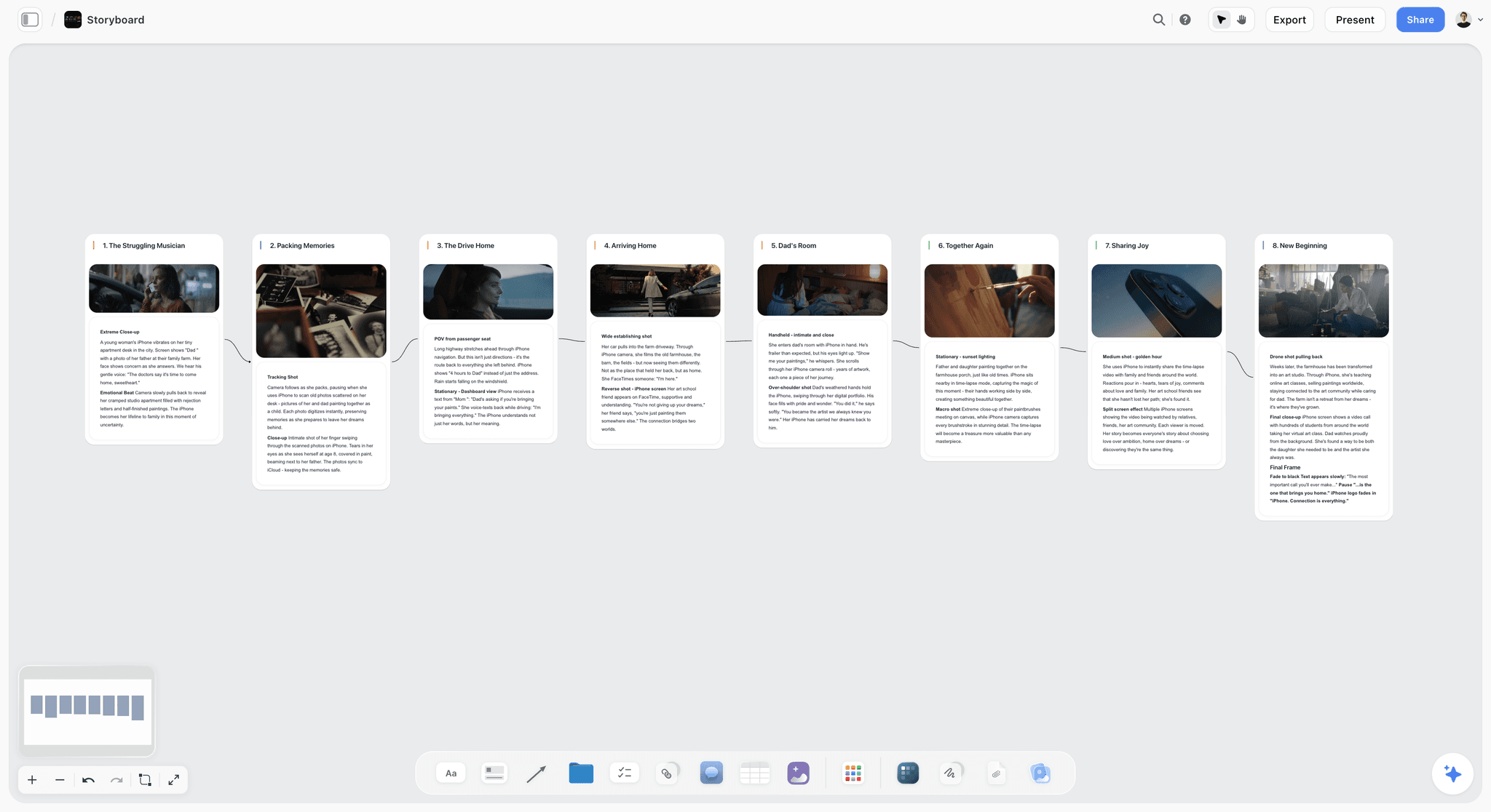
Storyflow canvas holding a screenplay beat sheet, character cards, and a starter blueprint the AI can read
Develop your script on a canvas the AI can read
Storyflow puts your beats, character arcs, and research on one board, with an AI that reads all of it and starter blueprints to structure the story. Paid-only during early access, with a Free plan landing before the end of 2026.

Why Most "Free" Screenwriting Software Is Not Actually Free
Search "free screenwriting software" and half the results are 14-day trials wearing a free-tool costume. The category is full of asterisks, and the asterisks are where projects get stuck. Three traps show up over and over.
The trial in disguise. The tool is free to open and free to write in, then it will not export a clean PDF, or it stamps a watermark across every page, or it locks your script after a week. You only discover the wall when you try to send the script to someone. A genuinely free tool exports clean output with no expiry.
The feature gate on the part you need. Free to write, but revision colors, title pages, or collaboration are paywalled. For a formatter that is often fine. For a beginner it can mean the one feature a class requires is the one behind the gate.
The missing half. Almost every free tool solves formatting and ignores development. You can type a correctly formatted scene for free, but figuring out what the scene should be, the structure, the beats, the character arc, is left to you and a blank page. The formatting half of screenwriting has been free for years. The development half almost never is, which is why most free stacks quietly fail at the exact point where scripts actually break.
The honest way to build a free stack is to accept that screenwriting is two jobs and cover both. Use an open-source formatter (Trelby, Beat, or Scrite) for correct pages at zero cost. For the thinking half, Storyflow is the strongest option because the AI reads your whole story canvas and grounds structure in starter blueprints, which no free formatter attempts, but it is paid-only during early access (Plus at $7.99/month billed annually), with a Free plan launching before the end of 2026. For the full paid picture, see the 12 best screenwriting software tools in 2026.
How We Evaluated These Free Screenwriting Tools
Every tool here was tested on its free tier, not its paid upgrade. Five criteria, weighted in this order:
- Is the free tier genuinely usable? Can you write a full script, export it cleanly, and share it without hitting a wall or a watermark?
- No expiry. Is it free forever, or a trial pretending otherwise?
- Development or formatting? Does it help you figure out the story, format the pages, or both?
- Platform reach. Does it run where you actually work, including Windows and Linux?
- Upgrade honesty. If there is a paid tier, is the free version still worth using on its own?
Tested workflows: a short film from blank page to exported PDF, a feature outline built from a logline, and a two-writer collaboration on a free tier. The test was whether a broke writer could finish a script with the tool and nothing else.
Quick Picks by Situation
Best tool overall for structure: Storyflow. Its Free plan is not out yet (paid-only during early access, Plus at $7.99/month billed annually, launching before the end of 2026), but the AI reads your beats, research, and character notes on one canvas and helps you find the shape before you format.
Best fully free formatter, no strings: Trelby on Windows or Linux, Beat on Mac. Both are open-source, both export clean industry format, both cost nothing ever.
Best free way to co-write: WriterDuet's free tier covers three scripts with real-time collaboration, which is remarkable for free.
Best free option you already own: Google Docs with a screenplay template works in a pinch, though you will fight the formatting.
Best free browser tool that connects to production: Celtx or StudioBinder, if you want writing plus light pre-production without installing anything.
Detailed Reviews: The 12 Best Free Screenwriting Tools
1. Trelby
Trelby is a free, open-source screenwriting program for Windows and Linux. It is small, fast, and correct on format, with no cost and no catch.
Best for: Windows and Linux writers who want clean industry format for free.
Verdict: The best fully free formatter for non-Mac writers. Nothing fancy, but it works and it is free forever.
Key features
- Standard screenplay formatting with automatic pagination.
- Name database and character reports.
- Import and export including Final Draft and PDF.
- Lightweight and fast.
Pricing
Free and open-source.
Pros
- Genuinely free with no watermark or expiry.
- Runs well on Windows and Linux, where free options are scarce.
- Simple enough to learn in minutes.
Cons
- No Mac version.
- Development has been quiet in stretches.
- Dated interface and no collaboration.
2. Beat
Beat is a free, open-source Fountain screenwriting app for Mac. It is actively developed, pleasant to use, and produces correct format at zero cost.
Best for: Mac writers who want plain-text screenwriting for free.
Verdict: The best free Fountain editor on Mac. Astonishing value for a free tool.
Key features
- Fountain-based writing with live preview.
- Outline view and navigation.
- Plugins, theming, and Final Draft import and export.
- Active development and a helpful community.
Pricing
Free and open-source.
Pros
- Completely free with no feature gates.
- Plain-text Fountain files are future-proof.
- Genuinely nice to write in.
Cons
- Mac-only.
- Fountain has a small learning curve for menu-driven writers.
- Minimal collaboration.
3. WriterDuet (Free)
WriterDuet's free tier covers up to three scripts with full real-time collaboration, which is unusual generosity for a collaboration-first tool.
Best for: Writing partners who need to co-write for free.
Verdict: The best free tier for real-time co-writing. The three-script cap is the only meaningful limit.
Key features
- Real-time collaborative writing on the free tier.
- Automatic version history.
- Import and export across formats.
- Offline mode.
Pricing
Free for up to 3 scripts. Pro upgrade around $11.99/mo if you outgrow it.
Pros
- Real-time collaboration for free is rare.
- Reliable autosave and version history.
- Runs in the browser, nothing to install.
Cons
- Three-script cap on the free tier.
- Solo writers get less from it than partnerships.
- Some features nudge you toward the paid tier.
4. Scrite
Scrite is a free, open-source screenwriting app for Windows, Mac, and Linux, with a modern interface and built-in structure tools.
Best for: Writers who want a modern, fully free app on any platform.
Verdict: The best modern open-source option. Cross-platform, free, and actively built.
Key features
- Standard screenplay formatting.
- Structure view with scene cards and notes.
- Character and relationship tracking.
- Cross-platform and free.
Pricing
Free and open-source.
Pros
- Runs on Windows, Mac, and Linux.
- More modern than most free tools.
- Structure tools go beyond pure formatting.
Cons
- Smaller community than the big names.
- Some advanced features are still maturing.
- No real-time collaboration.
5. KIT Scenarist
KIT Scenarist is a free, open-source screenwriting suite with cards, beats, and a research area, though its development has slowed.
Best for: Writers who want a card-and-beat structure workflow for free.
Verdict: Feature-rich and free, but check the maintenance status before starting a long project.
Key features
- Script editor with standard formatting.
- Cards and beat structure view.
- Research and character sections.
- Free core with optional paid cloud.
Pricing
Free core, open-source. Some cloud features paid.
Pros
- Strong structure features for a free tool.
- Cross-platform.
- Cards workflow suits planners.
Cons
- Development has slowed.
- Cloud sync is not free.
- Interface can feel busy.
6. Arc Studio (Free)
Arc Studio's free tier gives you its modern outline-plus-script window for a limited number of scripts.
Best for: Writers who want a contemporary tool and can live within a script cap.
Verdict: A clean, modern free tier. The cap pushes serious users to paid, but the free version is genuinely nice.
Key features
- Split-screen outline and script.
- Story maps and beats.
- Cloud sync.
- Modern, fast interface.
Pricing
Free tier with limited scripts. Pro around $99/yr.
Pros
- Modern and pleasant on the free tier.
- Outline-plus-script in one window.
- Cloud sync included.
Cons
- Script cap on free.
- Full value is behind the paid tier.
- Smaller ecosystem than Final Draft.
7. Celtx (Free)
Celtx's free tier gives you browser-based scriptwriting with a taste of its production tools.
Best for: Students and small teams who want writing plus light pre-production in the browser.
Verdict: A usable free tier if you can live within project limits. The suite value is paid.
Key features
- Cloud scriptwriting with standard format.
- Basic beat sheets.
- Light production features.
- Team collaboration.
Pricing
Free tier with project limits. Paid from around $15/mo.
Pros
- Browser-based, nothing to install.
- Writing plus a preview of pre-production.
- Good for classroom use.
Cons
- Free tier has real project caps.
- Most value is paid.
- Each module is light.
8. StudioBinder (Free writer)
StudioBinder offers a free browser-based screenwriting tool that connects to its production breakdowns.
Best for: Writer-producers who want the free writer linked to production planning.
Verdict: A capable free writer inside a production suite. Best if you will use the paid production tools too.
Key features
- Free browser screenwriting.
- Links to breakdowns and shot lists.
- Team collaboration.
- Production suite alongside.
Pricing
Free writer; production suites from around $29/mo.
Pros
- The writer is genuinely free.
- Ties writing to production logistics.
- Clean, modern interface.
Cons
- Lighter than a dedicated formatter.
- Real value is the paid suite.
- Overkill if you only want to write.
9. Highland 2 (Free)
Highland 2's free tier lets Mac writers use its Fountain-based editor within some limits.
Best for: Mac writers who want a calm, plain-text free tier.
Verdict: A pleasant free tier for Mac, though heavier use pushes you to Pro.
Key features
- Fountain-based writing with preview.
- The Bin for cut material.
- Clean, quiet interface.
- Free tier with limits.
Pricing
Free tier with page or preview limits; Pro around $49.99.
Pros
- Beautiful writing environment.
- Plain-text Fountain files.
- Free tier is usable for short work.
Cons
- Mac-only.
- Free tier has limits.
- No collaboration.
10. Afterwriting
Afterwriting is a free web tool that turns Fountain text into a formatted, exportable screenplay PDF in the browser.
Best for: Writers who draft in Fountain and just need a clean PDF for free.
Verdict: A handy free utility, not a full app. Perfect as the export step in a free Fountain workflow.
Key features
- Fountain to PDF conversion in the browser.
- Statistics and reports.
- No install, no account.
- Free.
Pricing
Free.
Pros
- Instant, free, no account.
- Clean PDF output.
- Pairs well with any Fountain editor.
Cons
- Not a writing environment on its own.
- Requires knowing Fountain.
- Minimal features beyond conversion.
11. Google Docs (with a screenplay template)
Google Docs is not screenwriting software, but with a screenplay template or add-on it can produce a passable script for free, and you probably already have it.
Best for: Writers who need something free right now and will format manually.
Verdict: The free option you already own. It works, but you will fight the format.
Key features
- Free, cloud-based, collaborative.
- Screenplay templates and add-ons available.
- Runs anywhere.
- Real-time co-editing.
Pricing
Free with a Google account.
Pros
- Free and already installed.
- Excellent real-time collaboration.
- Zero learning curve for the app itself.
Cons
- No automatic screenplay formatting without an add-on.
- Manual formatting is slow and error-prone.
- Not production-standard output.
12. Storyflow
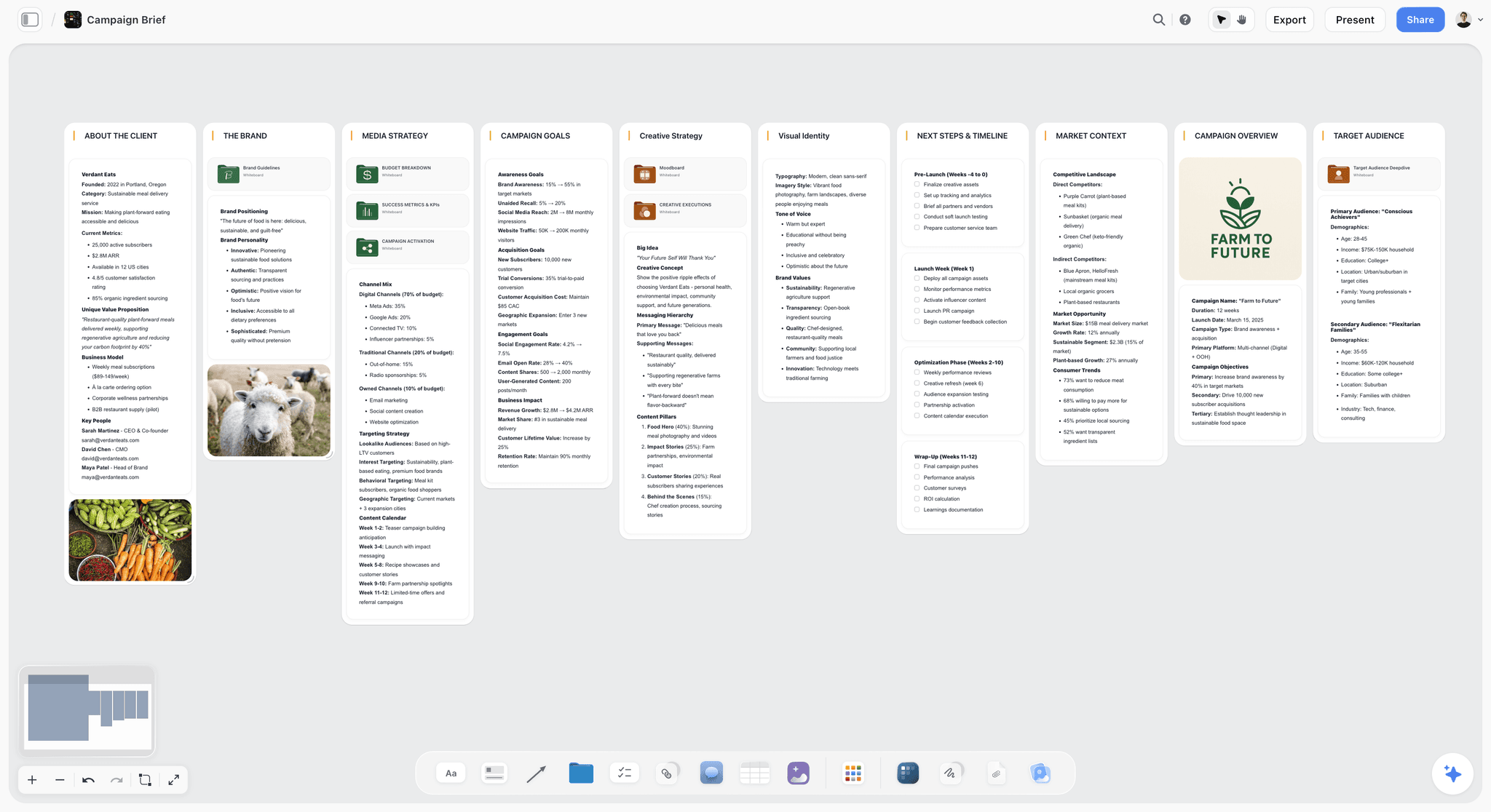
Storyflow is a visual workspace built for the development half of screenwriting. The AI reads your full active canvas board and grounds responses in starter blueprints, so you can figure out structure, beats, and character arcs before you ever open a formatter. It is the tool I built after watching generic AI forget the story every few replies. Storyflow is paid-only during early access; its Free plan launches before the end of 2026.
Best for: Writers on a budget who are stuck on structure and story, not on typing format.
Verdict: The strongest tool for the thinking half of screenwriting, once its Free plan is live. Until then, pair a paid Plus subscription with a free formatter for the pages.
Key features
- Free plan coming before the end of 2026: unlimited boards, unlimited cards, unlimited collaboration, basic AI usage, and 20 file uploads.
- 3 starter Story Blueprints so you can test structural frameworks before deciding whether to upgrade.
- Project-aware AI that reads the whole canvas, not one pasted paragraph.
- Nonlinear canvas where beats and character cards rearrange freely, which is how structure gets found.
Pricing
Storyflow is paid-only during early access: Plus $7.99/mo annual (full 200+ blueprint library, unlimited uploads), Pro $14/mo annual, Max $39/mo annual. A Free plan launches before the end of 2026.
Pros
- The only tool here that seriously helps with story structure, not just formatting.
- No watermark and no expiry on the core canvas.
- Unlimited collaboration on every plan.
Cons
- Not a production formatter; export your beats and format the draft in Trelby, Beat, or a paid app.
- Paid-only during early access; AI usage is capped on Plus and Pro, with only Max unlimited.
- Cloud-only.
Free Screenwriting Stacks by Writer Type
1. Broke Beginner
Top picks: Trelby or Beat (free) + Storyflow (Plus, $7.99/month billed annually)
Format the pages for free in Trelby (Windows or Linux) or Beat (Mac). Learn structure with starter blueprints on Storyflow once you're on a paid plan; its Free plan launches before the end of 2026.
2. Student Filmmaker
Top picks: Celtx (free) + Storyflow (Plus, $7.99/month billed annually)
Celtx for writing plus a first taste of production planning in the browser, free today. Storyflow for development and the creative pre-production canvas, paid during early access. See the best pre-production tools in 2026.
3. Writing Partnership on a Budget
Top picks: WriterDuet (free) + Storyflow (Plus, $7.99/month billed annually)
WriterDuet's free tier for real-time co-writing on the pages; Storyflow's canvas for the shared development work before drafting is paid during early access.
4. Fountain Purist
Top picks: Beat or Scrite (free) + Afterwriting (free)
Draft in a free Fountain editor, export a clean PDF with Afterwriting. Plain-text files that will open forever, at no cost.
Honorable Mentions
- DubScript: free Fountain-based screenwriting for Android.
- Fountain (the format): free plain-text standard behind Beat, Slugline, and Highland.
- Fade In demo: not free, but the demo lets you evaluate before buying.
- Final Draft trial: a trial, not free, but worth knowing if a class requires it.
- LibreOffice with a template: the fully free office suite, same manual-format tradeoff as Google Docs.
Where Free Screenwriting Software Runs Out
Free tools are excellent for drafting and formatting. Here is where they stop, honestly.
- Deep revision and production drafts. Colored revision passes and production-office expectations often mean paid Final Draft or Fade In eventually.
- Heavy AI development. Free AI tiers cap usage; serious AI-assisted development needs a paid tier.
- Team production workflows. Free tiers rarely cover multi-department production management.
- The story itself. No free or paid tool decides what your film is about. That was always yours.
For most writers, free tools carry a script from idea through a solid draft. Pay only when a specific wall (production formatting, heavy AI, team logistics) actually blocks you.
The Bottom Line
The best free screenwriting software in 2026 depends on which half of the job you need. Trelby, Beat, and Scrite are the best fully free formatters, with no watermark and no expiry. Storyflow is the strongest tool for development, structure, and outlining because the AI reads your whole story canvas, which no free formatter attempts, but it is paid-only during early access (Plus at $7.99/month billed annually); its Free plan launches before the end of 2026, at which point pairing it with a free formatter makes the whole stack free.
The move that helps most is to stop trying to think inside a blank formatted page. Put your next script's structure on a canvas the AI can read, then format the pages in a free open-source app. Start a Storyflow workspace and build one act to see the difference.
FAQ: Free Screenwriting Software in 2026
What is the best free screenwriting software in 2026?
For formatting, Trelby (Windows and Linux) and Beat (Mac) are the best fully free options: open-source, no watermark, no expiry. For story development and structure, Storyflow is the strongest because the AI reads your whole story canvas and grounds structure in starter blueprints, but it is paid-only during early access (Plus at $7.99/month billed annually), with a Free plan launching before the end of 2026. Today's genuinely free setup pairs one free formatter with a paper outline or a free note tool for structure; once Storyflow's Free plan is live, it replaces the structure half.
Is there truly free screenwriting software with no watermark?
Yes. Trelby, Beat, and Scrite are open-source, produce clean industry-standard output, and never add a watermark or expire. WriterDuet's free tier is watermark-free up to three scripts. Many other "free" tools stamp watermarks or lock export on their free tier, so if clean output matters, start with the open-source options.
Can I write a full screenplay for free?
Absolutely. Write and format the pages for free in Trelby or Beat, and export a clean PDF; thousands of scripts have been written entirely on free tools. Storyflow can develop the structure and beats, but it is paid-only during early access (Plus at $7.99/month billed annually) until its Free plan launches before the end of 2026. You only need to pay if a specific requirement (production-office Final Draft files, heavy AI usage, team production management, or that development canvas) forces it.
What free screenwriting software works on Windows?
Trelby is the standout free formatter for Windows, and it is fully free and open-source. Scrite and KIT Scenarist also run on Windows for free, and WriterDuet's free tier runs in the browser too. Storyflow works in any browser on Windows for the development half, but it is paid-only during early access (Plus at $7.99/month billed annually), with a Free plan launching before the end of 2026.
Is Google Docs good for screenwriting?
Google Docs works for screenwriting only with a screenplay template or add-on, and even then you fight the formatting because it was not built for scripts. It is a reasonable emergency option because it is free and you likely already have it, with excellent collaboration. For anything beyond a quick draft, a real free tool like Trelby or Beat will save you hours of manual formatting.
What is the best free AI screenwriting tool?
Storyflow is the strongest AI option for screenwriting because the AI reads your entire story canvas (beats, research, character notes) rather than a single pasted prompt, and it grounds suggestions in starter blueprints. It is not free today: Storyflow is paid-only during early access (Plus at $7.99/month billed annually), and its Free plan, with capped AI usage suited to development and structure work rather than unlimited drafting, launches before the end of 2026.
Do free screenwriting tools export to Final Draft format?
Many do. Trelby, Beat, Scrite, and WriterDuet all export to Final Draft (.fdx) or Fountain, which imports into Final Draft. This matters if a collaborator or production office uses Final Draft: you can write for free and still hand off a compatible file. Always test the export early so there are no surprises when you deliver.
Is Celtx still free?
Celtx keeps a free tier, but it has real project limits and most of its production suite is paid. The free tier is fine for students and short projects that fit within its caps. If you want browser-based writing plus light pre-production and can live within the limits, it is worth trying, but confirm the current free-tier caps on Celtx's site before starting a long project.
What is Fountain and why do free tools use it?
Fountain is a free plain-text screenplay format. You write with simple markup in any text editor, and Fountain-aware apps render it as a correctly formatted screenplay. Free tools like Beat, Scrite, and Afterwriting use it because it is open, portable, and future-proof: a Fountain file is just text, so it will open in any editor decades from now, unlike proprietary app formats.
Should I pay for screenwriting software or stay free?
Stay free until a specific wall blocks you. Free tools handle idea, structure, drafting, and formatting for most writers. Pay when you hit a real need: production offices that require Final Draft, heavy AI-assisted development beyond free caps, or team production management. Buying software early rarely improves the script; a free stack plus a trusted human reader beats an expensive tool used on a weak structure.
Table of Contents
- All 12 Free Screenwriting Tools, Ranked
- Comparison Table: 12 Free Screenwriting Tools Compared
- Why Most "Free" Screenwriting Software Is Not Actually Free
- How We Evaluated These Free Screenwriting Tools
- Quick Picks by Situation
- Detailed Reviews: The 12 Best Free Screenwriting Tools
- Free Screenwriting Stacks by Writer Type
- Honorable Mentions
- Where Free Screenwriting Software Runs Out
- The Bottom Line
- Author
- FAQ: Free Screenwriting Software in 2026
- Related Reading
Templates to check out for this topic


Story and writing templates you can use in Storyflow
Start your next script, novel, or world from a ready-made Storyflow board instead of an empty page. The AI reads the whole canvas, so every suggestion is grounded in your story.


See Storyflow in Action
A visual AI workspace where every feature lives inside one canvas. No tab-switching, no context lost.
Build your entire board from a single message
Type what you need in the AI chat at the bottom of your canvas. The AI adds cards, headings, and structure directly onto your board.
Use expert frameworks as AI context
Type @ in the AI chat and choose any Tactic. The AI tailors every response to that framework instead of giving generic advice.
Turn your board into a mind map in seconds
Ask the AI to restructure your canvas as a mindmap. It connects your ideas into a visual hierarchy so you can see how everything relates.
Why Storyflow Exists
Storyflow actually began as a personal tool while working on creative and research projects.
We kept running into the same problem: ideas were scattered everywhere: notes, documents, and whiteboards.
Nothing helped us see how everything connected.
So we started building a workspace designed around how ideas actually grow.
→ Read how Storyflow was createdJustkay
Documentary Filmmaker & Founder at Storyflow
Published: 2026-07-10
Extremely simple, seriously capable


See how easy it is to get started
Watch a real project come together, from a blank board to a finished plan, clicked through step by step.
Start creating with AI and become more productive
Transform your creative workflow with AI-powered tools. Generate ideas, create content, and boost your productivity in minutes instead of hours.