The 10 Best Writers Room Tools in 2026 (Tested)
We tested 10 writers room tools for breaking story, tracking arcs across a season, and building episode boards. Storyflow ranks #1 for visual work. Plus from $7.99/mo.

Category
Screenwriting
Author

Justkay
Documentary Filmmaker & Founder at Storyflow
Topics
2026-07-21
•
19 min read
•
Screenwriting- best writers room tools
- writers room software
- breaking story software
- tv writing software
- story arc tracking tool
- episode board software
- collaborative screenwriting tool
- writers room app
What is the best writers room tool in 2026?
The best writers room tools in 2026 are Storyflow for breaking story visually and seeing a whole season on one board, WriterDuet for real-time collaborative script pages, Final Draft for industry-standard pages plus a beat board, and Notion for a relational room database. Storyflow ranks first for the room's core creative job, which is breaking story: beat cards, character arc lanes, and an episode grid sit together on one infinite canvas, and the AI reads the full active board at once so it can answer arc and continuity questions across the season instead of one page at a time. It is paid-only during early access, with a Free plan (unlimited objects, no time limit) launching before the end of 2026, and paid begins at $7.99 per month billed annually on Plus. The right pick depends on which part of the room's work you are optimizing: breaking the season, writing the pages, tracking the database, or handing off to production. No single tool wins every job, which is why this guide sorts them by the part of the room they serve best. Two ideas run through the whole list. First, a writers room does two different things that fight for the same tool: it breaks story, which is spatial, messy, and visual, and it writes pages, which is linear, formatted, and precise. Almost no tool is great at both, so most rooms run one for each and lose time in the seam. Second, a season is too big to hold in anyone's head, so the tool is not decoration; it is the shared memory the room writes to. I have run multi-part documentary rooms where the season is real people, real timelines, and dozens of interlocking threads that have to stay honest across episodes, so I tested each tool on the break, not on a demo file.

Full disclosure: Storyflow is our own product, so weigh its placement with the skepticism you would apply to any tool a company recommends on its own blog. We rank it first for one job, breaking story on a visual board the AI can read whole, and we are explicit about where WriterDuet and Final Draft (the actual script pages), Notion (a relational database), and Croogloo (production handoff) beat it.
Quick Comparison
Where a writers room actually breaks story, and the one job each tool is best at.
| Tool | Best For | AI Features | Price |
|---|---|---|---|
| Storyflow | Visual break and arcs board | Reads the whole board | $7.99 mo annual (free plan late 2026) |
| WriterDuet | Real-time script pages | Some AI | Free / paid |
| Final Draft | Standard pages + beat board | Limited | One-time license |
| Notion | Relational room database | Notion AI (page-level) | Free / paid |
All 10 Writers Room Tools, Ranked
- Storyflow: best visual card wall for breaking story and seeing a whole season on one board
- WriterDuet: best real-time collaborative script pages for a distributed room
- Final Draft: best industry-standard pages with a built-in beat board
- Notion: best relational room database linking episodes, characters, and arcs
- Scrivener: best when the drafting and the corkboard live in one tool
- Milanote: best lightweight visual board for tone and light structure
- Miro: best general infinite whiteboard for a live breaking-story session
- Trello: best simple kanban for tracking episode and beat status
- Google Docs: best free, universal home for the beat sheet and room notes
- Croogloo: best for script distribution and scheduling once you hand off to production
Keep the two-jobs idea in mind as you read. Whiteboard and card tools break story well and write pages poorly. Script tools write pages well and break a whole season poorly. The rankings reward the tools that shrink the gap between the break and the page.
Why a Writers Room Needs Its Own Tool
By the second week of the break, the corkboard in your head has fallen over. A thread you set up in episode two never pays off, and nobody notices until the script comes in. A character makes a choice in episode seven that contradicts the reason you gave for the same character in episode four. Two writers are holding two slightly different versions of the season, and both are sure theirs is canon. None of this is bad writing. It is the predictable result of breaking a growing season inside a stack of documents and a shared memory that was never built to hold it.
A single feature has one story-sized problem. A season has that problem multiplied by every episode, every arc, and every writer who joins the room. The reason people search for writers room software is not that a document cannot hold a beat sheet. It is that a document cannot show you a whole season at once, or keep a dozen arcs honest across ten episodes while several people rewrite them in the same afternoon.
Three specific failures push rooms off documents and toward a dedicated tool.
- The season is invisible. Breaking story is a spatial act. You need to see episode five next to episode nine, and a character's arc as a line that runs across the whole season, not as a paragraph buried on page fourteen of a doc. A linear document hides exactly the shape you are trying to build.
- Arcs drift as the break moves. Every new episode changes what an earlier episode has to set up. In a document nothing connects a payoff to its setup, so a broken thread is invisible until a writer stumbles on it, usually at the table read.
- Nobody can hold a season in their head. Cowan's research (Behavioral and Brain Sciences, 2001) established that human working memory holds roughly four chunks of information at once. A season has dozens of live threads, so the board is not a luxury; it is the external memory the room runs on.
There is a cost underneath all three. As the season grows, the time spent hunting for the one decision the room already made grows with it, and the McKinsey Global Institute (2012) estimated that knowledge workers already spend about 19 percent of the workweek just searching for information. A room spread across docs, group chats, and a shared drive quietly pays that tax every time someone asks what got decided last Tuesday.
Zoom out and the tools split into camps. Visual-canvas tools (Storyflow, Milanote, Miro) treat the break as a space you arrange, where beats, arcs, and episodes live side by side and you can see the whole season at once. Script tools (WriterDuet, Final Draft, Scrivener) treat the room as a place to write pages, with breaking features attached. Database tools (Notion, Trello) treat the season as structured records you query and track. Production tools (Croogloo) take over once the room hands off. None is strictly better. Each matches a different part of the room's day.
When do you not need one? If your project is a single episode, a short web piece with three beats, or a feature you will finish before the season grows complex, a good document is enough. A writers room tool earns its keep the moment your season outgrows your memory, and not one day before.
How We Evaluated the Best Writers Room Tools
We tested each tool on the same real workloads: breaking a serialized drama season (arcs, an episode grid, and a beat wall), tracking a returning character across ten episodes, and running a live break where several people move cards at once. Tools were not scored on feature lists. They were scored on whether the season stayed visible and the arcs stayed honest as the break moved.
Six criteria set the rankings, in this order of weight. Breaking-story fit: how well the tool lets a room lay out beats, arcs, and episodes and see the whole season at once. Arc tracking: when a thread changes, how easily the tool keeps its setups and payoffs connected across episodes. The break-to-page seam: how smoothly the tool moves from a broken season to actual script pages, or how cleanly it hands off to the tool that writes them. AI usefulness: holding the substrate constant, how much the AI helps the room break, question, and expand the season rather than just autocomplete a line. Live collaboration: how well several writers work in the same board or script at the same time without stepping on each other. Pricing transparency: what you actually pay as the room and the season grow.
Every tool was used hands-on for at least two weeks on genuine serialized work. Where a competitor's pricing has shifted recently, we write "verify current pricing" rather than quote a number that may already be stale.
Quick Picks by Use Case
Best overall writers room tool: Storyflow. The pick when your room breaks story visually and wants the whole season, arcs, and episode grid on one board an AI can read end to end. Plus is $7.99/month billed annually ($9.99 monthly). The honest limit: it is not a script-pages editor and it is cloud-only.
Best real-time script pages: WriterDuet. For a distributed room that writes the actual script together, live, in proper format, with revision history. Free tier available; paid plans by subscription.
Best industry-standard pages with a beat board: Final Draft. The format buyers expect, plus a Beat Board and Story Map for breaking before you write. Paid, around a one-time license.
Best relational room database: Notion. Episodes linked to characters linked to arcs in a true database, ideal for a room that already lives in Notion. Free for personal use; paid from about $10/user/month.
Best free starting point: Google Docs. Keep a shared beat sheet and room notes for free, then move to Storyflow when the beat sheet starts hiding the season; it is paid-only during early access, with Plus at $7.99/month billed annually and a Free plan launching before the end of 2026.
The honest split: most rooms break the season on a board or a whiteboard and write the pages in a dedicated script tool. Try Storyflow to break your season on one board.
Comparison Table: Best Writers Room Tools
| Tool | Best For | Starting Price | Free Plan | Rating (/10) |
|---|---|---|---|---|
Storyflow | Visual break, arcs, and episode grid on one board | $7.99/mo (annual) | Coming late 2026 (invited collaborators join free now) | 9.4/10 |
WriterDuet | Real-time collaborative script pages | Free; paid subscription | Yes (limited free) | 9.1/10 |
Final Draft | Industry-standard pages plus beat board | One-time license | Trial only | 9.0/10 |
Notion | Relational room database | Free; from about $10/user/mo | Yes (free personal) | 8.6/10 |
Scrivener | Drafting beside a corkboard | About $59.99 one-time | Trial only | 8.4/10 |
Milanote | Visual tone plus light structure | Free (100 items); Pro | Yes (100-item free) | 8.2/10 |
Miro | General infinite whiteboard for a live break | Free tier; paid | Yes (limited) | 8.1/10 |
Trello | Kanban episode and beat tracking | Free; paid | Yes (free) | 7.9/10 |
Google Docs | Shared beat sheet and notes | Free | Yes (free) | 7.4/10 |
Croogloo | Script distribution and scheduling | Paid | Demo / trial | 7.8/10 |
Prices above are the published rates at the time of writing and move often, so check the vendor's own page before you commit. The shape of each plan (free tier, subscription, or one-time licence) is more stable than the number. Rating criteria: we weighted breaking-story fit, arc tracking, and the break-to-page seam more heavily than raw feature count. Tools that do one part of the room cleanly outranked tools that do five parts at half depth. Prices checked July 2026; competitor pricing marked "verify current pricing" moves often, so confirm on each vendor's page.
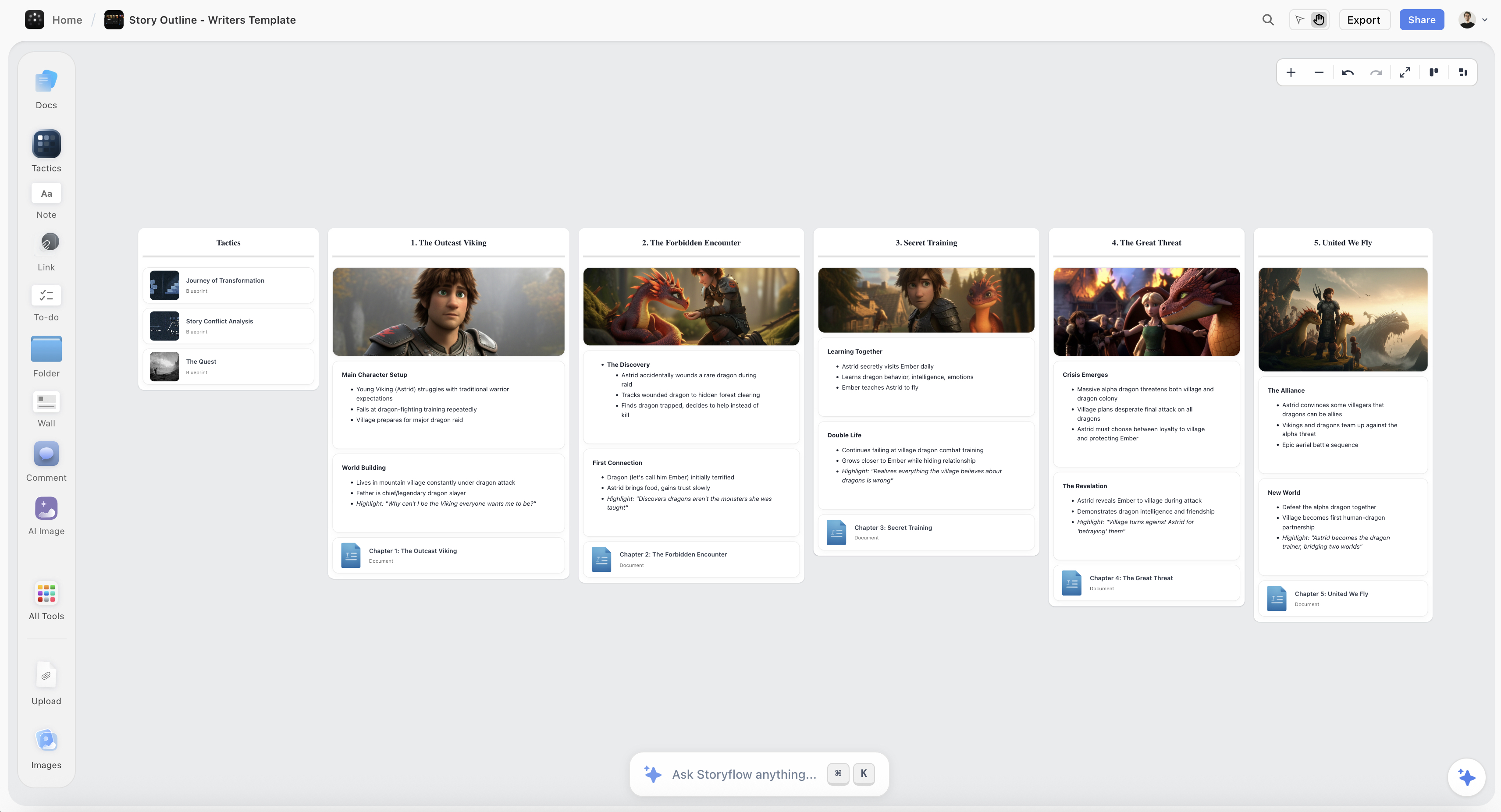
A season broken on the Storyflow canvas, with beat cards, character arc lanes, an episode grid, and reference frames on one board
Break your season on one board
Beat cards, character arc lanes, and an episode grid live on one infinite canvas, and the AI reads the whole board, so a writers room can see and question a full season at once instead of scrolling through a document.

Detailed Reviews: Best Writers Room Tools
1. Storyflow (Best Visual Card Wall for Breaking Story)
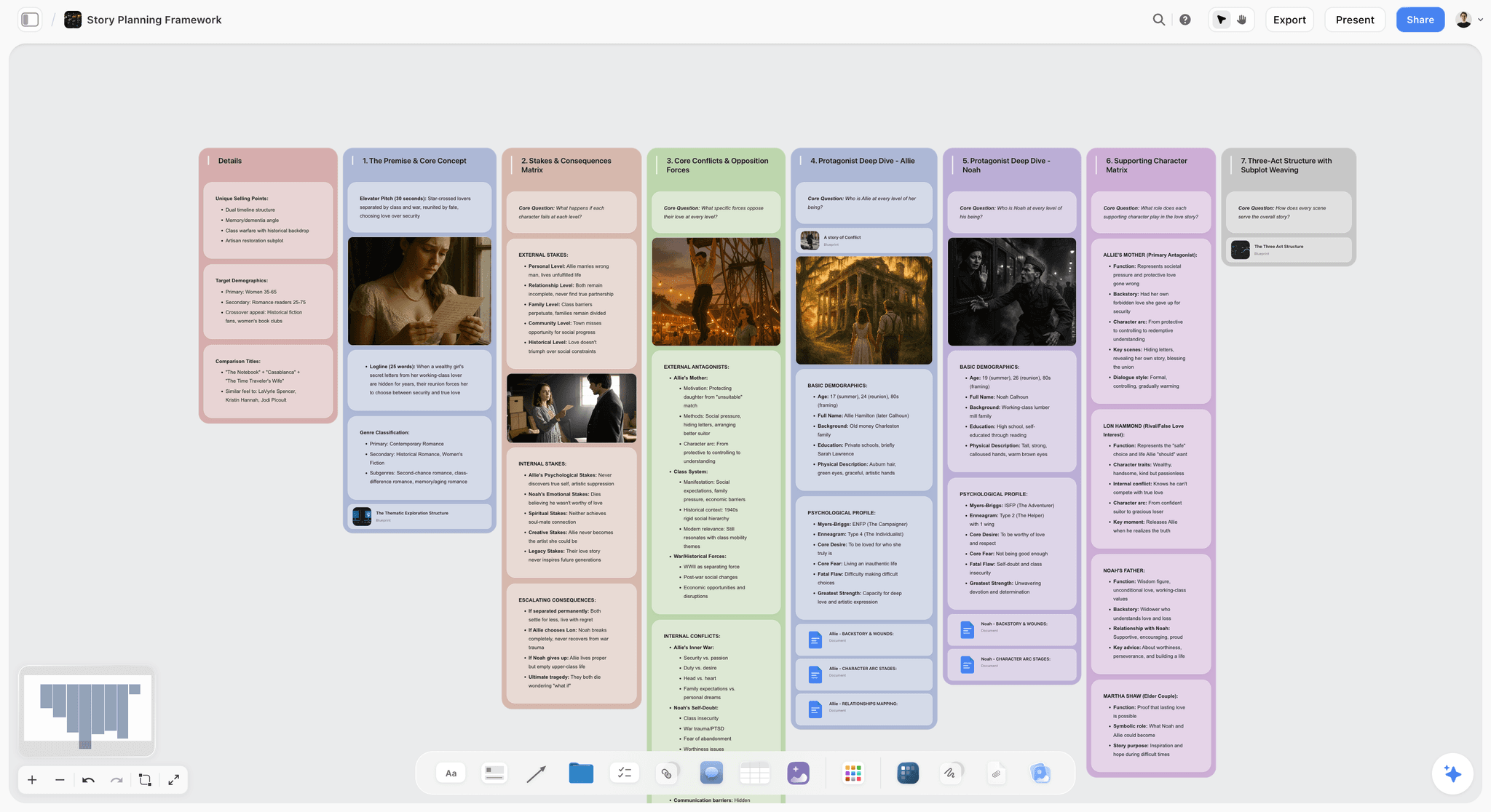
Storyflow is a visual workspace where a room breaks story on one infinite canvas and the AI reads the full active board by default. Beat cards, character arc lanes, an episode grid, reference frames, and loose ideas sit next to each other instead of scrolling past in a document, so the whole season is visible at a glance while the AI grounds its answers in everything on the board. That whole-board awareness is the difference that matters for a room: you can ask whether a thread set up in episode two ever pays off, and the answer comes from the season you actually laid out, not from one page. You can add up to 1 Tactic (a Story Blueprint) and up to 3 Documents by @-mention when you want to pull a specific arc outline or character dossier in as extra grounding, and there are 200+ Story Blueprints on paid tiers, including the Hero's Journey, AIDA, and Retention Hooks, to scaffold a break rather than start from a blank wall. You can even grab a frame from a YouTube or Vimeo reference straight onto the canvas, so a tone reference lives inside the break rather than in a separate folder.
Best for: TV, streaming, and web-series rooms that break story visually and want the whole season, its arcs, and its episode grid on one board, with a team tier for a staffed room.
Pricing: Paid-only early access today; the Free plan (unlimited objects, unlimited shared boards, unlimited collaboration, 3 starter blueprints, 20 file uploads) launches before the end of 2026, and anyone a paid member invites to a board joins free now. Plus is $7.99/month billed annually or $9.99 monthly (full 200+ Story Blueprints, more AI, unlimited uploads). Pro is $14/month annual or $19 monthly (adds AI image generation and far more AI). Max is $39/month annual or $49 monthly (adds 40x more AI plus a team workspace with permissions and roles). Max is the team-targeted tier and the right fit for a staffed room; there is no separate Team plan. Pricing is flat per account at the solo tiers, not per seat.
Pros: The canvas matches how a room actually breaks story, spatial and visible at once, with arcs as lanes and episodes as a grid rather than paragraphs in a doc. Board-aware AI answers arc and continuity questions from the whole season, not one page, which is exactly what a break needs. Its Free plan, launching before the end of 2026, will be genuinely usable for a full season break, and the Max tier gives a staffed room real permissions and roles.
Cons: It is a break-and-board tool, not a script-pages editor, so you write the actual episodes in WriterDuet, Final Draft, or Scrivener. It is cloud-only, with no local-first mode for a privacy-strict room. And for a pure relational database of episodes and characters, Notion goes deeper on queries and filtered views.
Verdict: The strongest tool for the room's core creative job, breaking story and seeing a season on one board, and honest about handing the pages to a dedicated script tool. If your room breaks visually, rebuild your current season on a board for one week and the fit becomes obvious.
2. WriterDuet (Best Real-Time Collaborative Script Pages)
WriterDuet is built for the other half of the room's work: writing the actual script together, live. Two or more writers can type in the same screenplay at once, in proper industry format, with real-time sync, deep revision history, and a clean interface that stays out of the way. This is the tool that owns the page, and it owns it well. Where Storyflow wins on breaking the whole season visually, WriterDuet wins the moment the room stops breaking and starts writing scenes together.
Best for: Distributed rooms and writing partners who draft the actual script collaboratively and need reliable real-time co-writing in industry format.
Pricing: Free tier with limits, plus paid subscription plans that unlock unlimited projects and offline access.
Pros: Real-time collaborative writing is genuinely excellent, arguably the best on this list for two or more writers in one script. Revision history and format handling are strong, and it imports and exports cleanly with Final Draft. It runs in the browser, so onboarding a guest writer is quick.
Cons: It is a scriptwriting tool, so breaking a whole season visually is not its strength; the outlining and card features are lighter than a canvas or a database. Its structure is the script, not a season grid, so seeing arcs across ten episodes at a glance lives elsewhere.
Verdict: The best tool for writing script pages together in real time, and the natural page partner to a visual break.
3. Final Draft (Best Industry-Standard Pages With a Beat Board)
Final Draft is the format the industry runs on, and that alone earns its place in a room. Beyond flawless screenplay formatting, recent versions add a Beat Board and Story Map that let you break and rearrange beats before you write, so some of the break can happen in the same tool as the pages. Where Storyflow keeps the break on an open canvas the whole room shares live, Final Draft keeps the break attached to the document that becomes the script.
Best for: Rooms and writers who need scripts in the industry-standard format and want a beat board and story map in the same tool.
Pricing: Paid, typically a one-time license per major version, with occasional upgrade pricing. Free trial available.
Pros: It is the accepted standard, so deliverables never raise a format question. The Beat Board and Story Map make real breaking possible inside the tool, and the formatting engine is deep and reliable. Studios and buyers expect its files.
Cons: Real-time collaboration is weaker than WriterDuet, so a distributed room writing together at once is not its sweet spot. The interface feels traditional, and its breaking board is attached to a single script rather than to a whole season you and the room can spread out and see at once.
Verdict: The industry-standard pages tool with real breaking features attached, best when the format matters and the break can live beside the script.
4. Notion (Best Relational Room Database)
Notion is the flexible database many writers rooms already run on. Build relational databases where episodes link to characters link to arcs, and you get a queryable season that stays honest as long as the room keeps it current. Filtered views let each writer see the slice they own, whether that is one character's arc or the status of every episode. Where Storyflow wins on the visual break, Notion wins on true database relationships and a team wiki the whole room can query.
Best for: Rooms and teams who want a relational, queryable season database and already live in Notion.
Pricing: Free for personal use. Paid plans start around $10/user/month with Notion AI as an add-on. Pricing is per seat, so it scales with room size.
Pros: Relational databases are exactly right for episode-character-arc linking, and filtered views give each writer their own cut of the season. The template ecosystem is huge, including ready-made room and season trackers. It doubles as the room's wiki and notes home.
Cons: It is doc-and-database-shaped, not a visual canvas, so the whole-season overview is a table rather than a space you break in. You build the structure yourself before it becomes useful, and the AI reads the current page or database rather than a full project board.
Verdict: The strongest relational room database, best for database-minded teams who track the season as structured records.
5. Scrivener (Best Drafting Beside a Corkboard)
Scrivener is the long-form writing tool that keeps a corkboard beside the manuscript. Its binder holds scene and character sketches, a research folder, and index cards you can shuffle on a corkboard, so a solo writer or a small room can break lightly and draft in the same place. Where Storyflow separates the break from the pages and the room shares the canvas live, Scrivener fuses breaking and drafting for one writer at a time.
Best for: Solo showrunners and small teams who want the corkboard and the draft in one tool, especially for adaptation or novelistic work.
Pricing: About $59.99 one-time for macOS or Windows, with a separate iOS app. Free trial available.
Pros: The corkboard and the draft live together, which cuts context-switching, and a one-time price is welcome in a subscription world. It is deeply capable for long-form structure, and the index-card metaphor suits light breaking.
Cons: It is not cloud-native or built for a room breaking live together, so real-time collaboration is not its strength. The corkboard is per-document rather than a whole-season canvas, and the interface feels dated next to modern boards.
Verdict: The best pick when breaking and drafting should live in one tool for one writer, less so for a live, staffed room.
6. Milanote (Best Lightweight Visual Board)
Milanote is a clean visual board for arranging notes, images, and cards. For a room it shines on the tone-and-reference side of a break: drag beat cards, character images, and loose structure onto a board that looks good and reads fast. Where Storyflow adds board-aware AI, Story Blueprints, and deeper structure, Milanote keeps things simple and elegant.
Best for: Rooms who want a simple, attractive visual board for tone, references, and a light beat wall.
Pricing: Free plan capped at 100 notes and images; paid Pro unlocks unlimited items.
Pros: It is one of the most pleasant visual tools to use, excellent for the tone and reference layer of a break, and fast to start with no setup. Sharing a board with the room is simple.
Cons: It is lighter on AI and structured, linkable data than Storyflow or Notion, and there is no story methodology layer to scaffold arcs. The 100-item free cap arrives quickly on a real season.
Verdict: A strong, lightweight visual option, best for the mood and reference layer of a break.
7. Miro (Best General Whiteboard for a Live Break)
Miro is a general-purpose infinite whiteboard, and it is genuinely good for a live breaking-story session. Put the whole room on one board, throw up sticky notes for beats, cluster them into episodes, and move them around together in real time. Where Storyflow is a story tool with an AI that understands arcs and episodes, Miro is a neutral canvas that will hold anything you put on it, which is both its strength and its limit.
Best for: Rooms that want a flexible, real-time whiteboard for a live break and already use Miro for other work.
Pricing: Free tier with a board limit, plus paid plans per member for unlimited boards and advanced features.
Pros: Real-time multi-user whiteboarding is excellent, and the sticky-and-cluster workflow suits a live break. The template library is deep, and it integrates with the rest of a team's stack.
Cons: It has no story or AI layer built for arcs, episodes, and continuity, so tracking a season is manual work you set up yourself. On a big season the open canvas can sprawl without a structure to hold it, and it is priced per member.
Verdict: The best neutral whiteboard for a live break, best when you want a blank canvas rather than a story-aware one.
8. Trello (Best Kanban for Episode and Beat Tracking)
Trello is the simplest way to turn a season into a board of cards. Make a list per episode or per status, add a card for every beat, and drag cards as the break moves from idea to broken to written. It is not where you break story creatively, but it is a clear, shared, low-friction way to track where every episode stands. Where Storyflow shows the season as a spatial break, Trello shows it as columns of cards moving toward done.
Best for: Rooms and showrunners who want a dead-simple, shared tracker for episode and beat status.
Pricing: Free plan for small boards, with paid tiers for larger teams and advanced features.
Pros: It is fast, familiar, and frictionless, so the whole room can track episode status without training. The kanban model is perfect for a break-to-written pipeline, and cards hold checklists, notes, and attachments.
Cons: It is a list of cards, not a spatial story canvas, so arcs across a season are not something you see at a glance. There is no story structure or AI, and a deep break lives in a different tool.
Verdict: The best simple status tracker for a season, best paired with a real breaking tool rather than used as one.
9. Google Docs (Best Free Universal Home)
Google Docs is the universal document, and it is where most beat sheets and room notes are born. For a small room it can carry a lot: a shared beat sheet, running notes, and a script outline, all free and collaborative in real time. It is honest about what it is, a document rather than a season board. Every room ends up with a Google Doc somewhere, and for early breaking that is often fine.
Best for: Small rooms and early breaks that need a free, shared home for the beat sheet and notes before investing in a dedicated tool.
Pricing: Free with a Google account. Paid Workspace tiers add storage and admin features.
Pros: It is free, universal, and frictionless for real-time collaboration, perfect for a first beat sheet and running room notes, with no learning curve at all.
Cons: There is no structure, no board, and no way to see a season at once, so continuity is only as good as your search bar. It breaks down past a handful of episodes and arcs, and it does nothing to connect setups to payoffs.
Verdict: The best free starting point for a room, and the tool most rooms eventually outgrow for the break.
10. Croogloo (Best for Production Handoff)
Croogloo is production software, not a story tool, and that is exactly its role here. Once the room has broken the season and scripts are coming in, Croogloo takes over for script distribution, revisions, sides, and scheduling across a production. It is a different job than breaking story, and it is worth knowing where the handoff happens so the room's work reaches the crew cleanly.
Best for: Shows moving from the room into production that need secure script distribution, revision tracking, and scheduling.
Pricing: Paid, aimed at productions rather than solo writers, typically after a demo.
Pros: It is purpose-built for the production side, with strong script distribution, revision management, and scheduling, and clean, secure delivery to a crew. It handles the room-to-production pipeline that generic tools do not.
Cons: It is a production tool, not a story or breaking tool, so arcs, beats, and the creative break are not its job. It is overkill before you reach production, and its pricing targets productions, not the room.
Verdict: The best tool for the handoff from a broken season to a running production, once the creative work of the room is done.
Persona-Based Recommendations
TV / Streaming Showrunner
Top picks: Storyflow plus WriterDuet. Break the season visually on Storyflow, where arcs and the episode grid live on one board the AI reads end to end, then write the pages in WriterDuet with the room live. Avoid trying to break a whole season inside a script tool; the season goes invisible.
Web-Series Creator
Top picks: Storyflow or Notion. Storyflow if you think visually and want the whole run on one board with board-aware AI. Notion if you prefer a relational tracker of episodes and characters. Both beat a lone Google Doc the moment the run passes a handful of episodes.
Staff Writer in a Distributed Room
Top picks: WriterDuet and Storyflow Max. WriterDuet for writing pages together in real time, Storyflow Max ($39/month annual) for a shared break with a team workspace, permissions, and roles. Pick by whether today is a page day or a break day.
Solo Showrunner Breaking a First Season
Top picks: Storyflow or Scrivener. Storyflow if you want to see the whole season and have an AI question your arcs. Scrivener if you want the corkboard one click from the draft. Both beat a single document once the season gets real.
Documentary Series Room
Top picks: Storyflow and Notion. Storyflow for the visual break where subjects, timelines, and footage references live together and the AI reads the whole board, Notion for a relational database of episodes and sources. This is the workflow I run for multi-part documentary work.
Budget or Just Starting
Top picks: Google Docs and Storyflow. Google Docs to keep the first beat sheet and notes for free. Storyflow when the beat sheet starts hiding the season is paid-only during early access, with Plus at $7.99/month billed annually and a Free plan launching before the end of 2026. Upgrade only when the break outgrows the free shape.
Honorable Mentions
A few tools that came close but did not make the main ten.
- Arc Studio: A modern scriptwriting app with a beat board and outlining, a strong WriterDuet and Final Draft alternative that narrowly missed on room-wide breaking.
- Celtx: An all-in-one preproduction suite with scriptwriting and light breaking, broader but shallower than a dedicated breaking board.
- Highland 2: A clean, distraction-free screenwriting tool with plain-text roots, excellent for pages but light on breaking a season.
- FigJam: A friendly infinite whiteboard like Miro for a live break, without a story or AI layer built for arcs.
- Airtable: A powerful relational database for an episode-character-arc grid, though you build every view from scratch.
These are not weak tools. Their fit for the day-to-day work of a room is just narrower than the ten above.
When a Simple Doc Wins
For some projects, a single document is the correct tool and buying software is unnecessary friction. A doc wins when your project is one episode or a short web piece; when you are sketching a first beat sheet you will rework before anyone else sees it; when your whole room is two people who talk every day; and when the season genuinely fits in your head and your search bar.
If three or more of those match, stay in the document and break. A writers room tool is external memory for a season too big to hold, so if your season is not that big yet, the tool is overhead, not leverage. The moment the beat sheet starts hiding the shape of the season is the moment to graduate, and not before.
The Bottom Line
The best writers room tool in 2026 depends on which part of the room you are equipping. If it is the break, where you lay out a whole season, track arcs across episodes, and argue the shape together, Storyflow is the strongest visual pick, and its AI reads the whole board by default. If it is the pages, WriterDuet is the best for writing the script together in real time, and Final Draft is the industry-standard format with a beat board attached. If it is the database, Notion links episodes, characters, and arcs cleanly. If it is the handoff, Croogloo carries the season into production.
Remember the two ideas that run through the list. A room does two different jobs, breaking story and writing pages, and almost no tool is great at both, so most rooms run one for each and Storyflow is the strongest choice for the break. And a season is too big to hold in anyone's head, which is why a shared board beats a shared memory the moment the season outgrows the room. If your room breaks visually and the season is growing, start a Storyflow workspace and rebuild your current season on a board for one week.
FAQ: Writers Room Tools
What software do writers rooms use?
Most rooms use two tools, one to break story and one to write pages. For breaking, rooms use a visual board like Storyflow or Milanote, a whiteboard like Miro, or a database like Notion. For pages, they use a script tool like WriterDuet or Final Draft. Simple rooms keep a beat sheet in Google Docs, and productions hand off to a tool like Croogloo. The split exists because breaking is spatial and writing pages is linear, and few tools do both well.
What is the best writers room tool in 2026?
Storyflow is the best writers room tool for breaking story visually, because beats, character arcs, and an episode grid sit on one board the AI reads in full, so you can see and question a whole season at once. WriterDuet is best for real-time collaborative script pages, Final Draft for industry-standard pages with a beat board, and Notion for a relational room database. Storyflow is paid-only during early access, with a Free plan launching before the end of 2026, and Plus is $7.99/month billed annually.
What is the difference between a writers room tool and a series bible?
A writers room tool is for the room's active process, breaking a season, tracking arcs across episodes, and building the break together in real time. A series bible is the living reference that keeps the canon consistent over years, with character profiles, world rules, and continuity. The room tool is where the season gets made; the bible is where the truth of the world is kept. Many shows use one for the break and one for the bible, and some tools, Storyflow among them, can hold both on one canvas.
How does a writers room break story together?
A room breaks story by laying out the season's beats where everyone can see them, arguing them into shape, and arranging them into episodes and arcs. On a card wall or a whiteboard, that means beat cards clustered into episodes and arcs drawn as lines across the season. The tool's job is to make the whole season visible at once and to let several writers move the pieces together, which is why visual boards and whiteboards suit the break better than a linear document.
Is there an AI tool for a writers room?
Yes. Storyflow is the strongest AI-native option for the break, because its AI reads your full active canvas board (plus up to 1 Tactic and 3 Documents you @-mention) rather than one page at a time. That whole-board grounding is what lets it answer arc and continuity questions across the whole season, such as whether a setup ever pays off. Page-level assistants in script and doc tools help with drafting a scene, but they see a narrower slice of the season.
What is the best free writers room tool?
Google Docs is the simplest free option for a shared beat sheet, and WriterDuet and Miro have usable free tiers for pages and whiteboarding. Storyflow's own Free plan for a visual break (unlimited objects, no time limit, unlimited collaboration, 3 starter blueprints, and 20 file uploads) is not out yet; it launches before the end of 2026, with Plus at $7.99/month billed annually in the meantime. Pick by the job: break on Storyflow once you are ready to pay, draft the beat sheet in Docs for free.
Can you write scripts in Storyflow?
Storyflow is built for breaking story and seeing a season on one board, not for writing formatted script pages, so we recommend writing the actual episodes in WriterDuet or Final Draft. The clean workflow is to break the season and track arcs in Storyflow, where the AI can read the whole board, then draft the pages in a dedicated script tool. This is why we rank Storyflow first for the break and cede the pages honestly.
Do small web-series teams need writers room software?
A two-person team writing a short run usually does not, but the need arrives fast. Once your run passes a handful of episodes and more than one arc, continuity across episodes outgrows memory and a single document. A visual board like Storyflow makes the whole run visible, and a script tool handles the pages. Start free, and upgrade only when the beat sheet starts hiding the shape of the season.
How is breaking story different from outlining an episode?
Breaking story works at the level of the whole season: which arcs run where, what each episode is for, and how threads connect across the run. Outlining works at the level of one episode: the scenes and beats inside a single installment. A room breaks the season first, then outlines each episode, then writes it. A whole-season board is built for the break; a script tool is built for the outline and the pages.
Table of Contents
- All 10 Writers Room Tools, Ranked
- Why a Writers Room Needs Its Own Tool
- How We Evaluated the Best Writers Room Tools
- Quick Picks by Use Case
- Comparison Table: Best Writers Room Tools
- Detailed Reviews: Best Writers Room Tools
- Persona-Based Recommendations
- Honorable Mentions
- When a Simple Doc Wins
- The Bottom Line
- Author
- FAQ: Writers Room Tools
- Related Reading
Templates to check out for this topic


Templates you can use in Storyflow
Every Storyflow board starts from real structure and an AI that reads the whole canvas. Open one of these templates and make it yours.


See Storyflow in Action
A visual AI workspace where every feature lives inside one canvas. No tab-switching, no context lost.
Build your entire board from a single message
Type what you need in the AI chat at the bottom of your canvas. The AI adds cards, headings, and structure directly onto your board.
Use expert frameworks as AI context
Type @ in the AI chat and choose any Tactic. The AI tailors every response to that framework instead of giving generic advice.
Turn your board into a mind map in seconds
Ask the AI to restructure your canvas as a mindmap. It connects your ideas into a visual hierarchy so you can see how everything relates.
Why Storyflow Exists
Storyflow actually began as a personal tool while working on creative and research projects.
We kept running into the same problem: ideas were scattered everywhere: notes, documents, and whiteboards.
Nothing helped us see how everything connected.
So we started building a workspace designed around how ideas actually grow.
→ Read how Storyflow was createdJustkay
Documentary Filmmaker & Founder at Storyflow
Published: 2026-07-21
Extremely simple, seriously capable


See how easy it is to get started
Watch a real project come together, from a blank board to a finished plan, clicked through step by step.
Start creating with AI and become more productive
Transform your creative workflow with AI-powered tools. Generate ideas, create content, and boost your productivity in minutes instead of hours.