Storyflow vs Scrivener: Which is Better for Writing a Book in 2026?
Storyflow vs Scrivener, compared honestly for novelists. Scrivener is where you write the book. Storyflow is the AI canvas where you figure out the book first.

Category
Writing
Author

Justkay
Documentary Filmmaker & Founder at Storyflow
Topics
2026-07-01
•
Updated July 1, 2026
•
13 min read
•
Writing- storyflow vs scrivener
- scrivener alternative
- scrivener vs storyflow
- best book writing software 2026
- novel planning tool
- ai for writing a book
Is Storyflow or Scrivener better for writing a book in 2026?
Scrivener is the better tool for drafting and compiling the manuscript: it is a real long-form writing environment with a binder, corkboard, outliner, and a Compile feature that exports to DOCX, PDF, and EPUB, plus local files and full offline use. Storyflow is the better tool for figuring out the book first: plot beats, character profiles, and world notes sit on one infinite canvas with an AI that reads the whole plan and flags where the middle sags. Scrivener is where you write the book. Storyflow is where you figure out the book, and most serious authors use both.
Before you draft, figure out whether the book holds.
Scrivener writes the manuscript. Storyflow puts the whole book (plot, characters, world, and the sagging middle) on one canvas, with an AI that reads every beat, so you know the story works before you write chapter one.

1) Quick Answer: Storyflow vs Scrivener
If you are writing a book, you are really doing two different jobs, and Storyflow and Scrivener each own one of them. Scrivener is a manuscript-drafting environment: it holds your chapters in a binder, gives you a corkboard and an outliner to reorder scenes, and compiles the finished text into manuscript and ebook formats. Storyflow is an AI visual planning canvas: your plot beats, character profiles, world notes, and the whole shape of the book sit on one infinite board, with an AI that reads the entire canvas before it answers. The short version: Scrivener is where you write the book. Storyflow is where you figure out the book.
Most serious authors do not choose one and abandon the other. They plan in a visual space until the book actually holds together, then draft in a dedicated writing tool. So the honest recommendation is a workflow, not a winner: figure out the book on a canvas where you can see plot, characters, and the middle at once, then write it in an environment built to draft and compile long prose. This article names exactly which tool owns which half, where each one is genuinely better, and where each one loses.
I have spent years planning documentary projects, where the same split shows up: the research board and the structure map were never the film, but the film was impossible without them. Books are the same. The plan is not the manuscript, and pretending one tool does both jobs equally well is how writers end up fighting their software instead of their story.
For the wider field, see The 12 Best Scrivener Alternatives in 2026 and the 12 Best Book Writing Software in 2026.
2) Comparison Table: Storyflow vs Scrivener at a Glance
Prices above are the published rates at the time of writing and move often, so check the vendor's own page before you commit. The shape of each plan (free tier, subscription, or one-time licence) is more stable than the number. The load-bearing rows are "primary job" and "drafting prose." Scrivener draws its power from being a true writing and compile environment. Storyflow draws its power from letting you see the entire book before you commit a word to a chapter.
3) The Manuscript vs The Plan
There are two different problems in writing a book, and almost every tool argument is really a fight about which problem the tool should solve.
The Manuscript problem. You have figured out the book, or figured out enough of it, and now you have to write 90,000 words, keep them organized, reorder scenes, revise, and get the whole thing out as a clean file for beta readers, an editor, or a self-publishing pipeline. This is a drafting and production problem. Scrivener is the best-known answer to it: the binder holds every scene as a separate document, the corkboard lets you shuffle index cards, and Compile turns the mess into a formatted manuscript.
The Plan problem. You do not yet know if the book holds together. The plot has a shape you can half-see, three of your characters want the same thing for no reason, the world has rules you keep contradicting, and the middle is a fog. This is a thinking and structure problem, and it is spatial. You need to see the beats, the characters, and the world at the same time, move them around, and find where the story sags. Storyflow is built for this: the whole book lives on one canvas, and the AI reads all of it.
Here is the rule that decides where you should be at any given moment. If you are producing prose, you are on the Manuscript. If you are producing structure, you are on the Plan. Drafting chapter seven is Manuscript work, and Scrivener wins it. Working out why your protagonist's goal in act two contradicts her wound from chapter one is Plan work, and Storyflow wins it. The reason this comparison keeps returning to one line is that the line is the whole point: Scrivener is where you write the book. Storyflow is where you figure out the book.
The mistake most writers make is trying to plan inside the manuscript tool. You can pin index cards on a corkboard, but a corkboard shows you one axis at a time and cannot tell you that your midpoint is weak. And you can try to draft inside a planning canvas, but a canvas is not built to hold and compile 90,000 words of prose. The tools are not competing for the same job. They are handing the book back and forth.
4) How We Compared Them
To keep this honest rather than a pitch, both tools were judged against the five things an author actually needs across the life of a book, plus the practical constraints that decide real purchases.
- Planning surface. Can you see plot, characters, and world at once, move pieces around, and find structural problems (especially the sagging middle) before you draft? This is spatial reasoning, and it is where books most often fail.
- Drafting environment. Is this a real place to write and hold long prose, with a binder, focus mode, revision tools, and word-count targets? A tool that cannot hold a manuscript is not a drafting tool, however good it looks.
- Compile and export. Can you get a clean manuscript out in the formats submission and self-publishing require (DOCX, PDF, EPUB), with control over formatting? For most authors this is non-negotiable.
- AI usefulness. Does the tool have AI, and if so, how much context does it read? Branch-level suggestions are weak. Reading the whole plan is strong. No AI at all is a real gap for planning-heavy writers.
- Ownership and cost. Local files versus cloud, one-time purchase versus subscription, offline versus online. These are not features, but they decide purchases, and they cut in opposite directions for these two tools.
Scrivener was assessed as the drafting and compile standard it has been for well over a decade. Storyflow was assessed as the AI planning canvas it is, not as a word processor it does not claim to be. Where each tool loses, this piece says so plainly, because a comparison that only flatters one side is worth nothing to a writer deciding how to spend the next year of their life.
5) Where Scrivener Wins
An honest accounting of what Scrivener does better. These are decisive wins for the drafting half of the work, and if drafting is the job in front of you, they settle it.
A true manuscript-drafting environment. Scrivener is a real place to write and hold a long book. The binder keeps every scene, chapter, and note as its own document, so you can rearrange 60 scenes without cutting and pasting walls of text. It has focus modes, word-count targets, snapshots for revision history, and split-screen so you can reference one scene while writing another. Storyflow does not draft prose at all, and for the writing job that is the whole game.
Compile and export to manuscript and ebook formats. Compile is Scrivener's signature feature and the reason many authors will never leave it. It takes your binder and produces a formatted manuscript in the shapes real publishing needs: standard manuscript DOCX for agents, PDF for print, and EPUB for self-publishing to ebook stores. You control formatting, front matter, and section breaks. Getting a clean, submission-ready file out is exactly what a drafting tool exists to do.
Corkboard, binder, and outliner together. Scrivener's three views onto the same project are genuinely useful for a manuscript in progress. The corkboard shows scenes as index cards you can shuffle, the outliner shows them as a sortable list with synopsis and metadata, and the binder is the file tree. For reordering and managing a draft that already exists, this trio is strong and battle-tested.
One-time purchase and true ownership. Scrivener is a one-time purchase (around $59.99 for the standard license, verify current), not a subscription. You buy it once and own that version. There is a genuine cost argument here for writers who resent recurring fees, and over a multi-year novel it can work out cheaper than any subscription tool.
Local files and full offline use. Scrivener saves real project files on your machine and works with no internet at all. For writers who want local-first ownership of their manuscript, who draft on planes and in cabins, or who simply do not trust a cloud with an unpublished book, this is decisive. Storyflow is cloud-only, and for these writers that alone settles the drafting question.
Decades of maturity and trust. Scrivener has been the writer's tool for well over a decade, with a deep community, countless tutorials, and workflows refined by thousands of finished books. That maturity is a feature. You are not betting your manuscript on a young platform, and almost any problem you hit has been solved and documented already.
6) Storyflow for Novelists: Planning the Whole Book on One Canvas

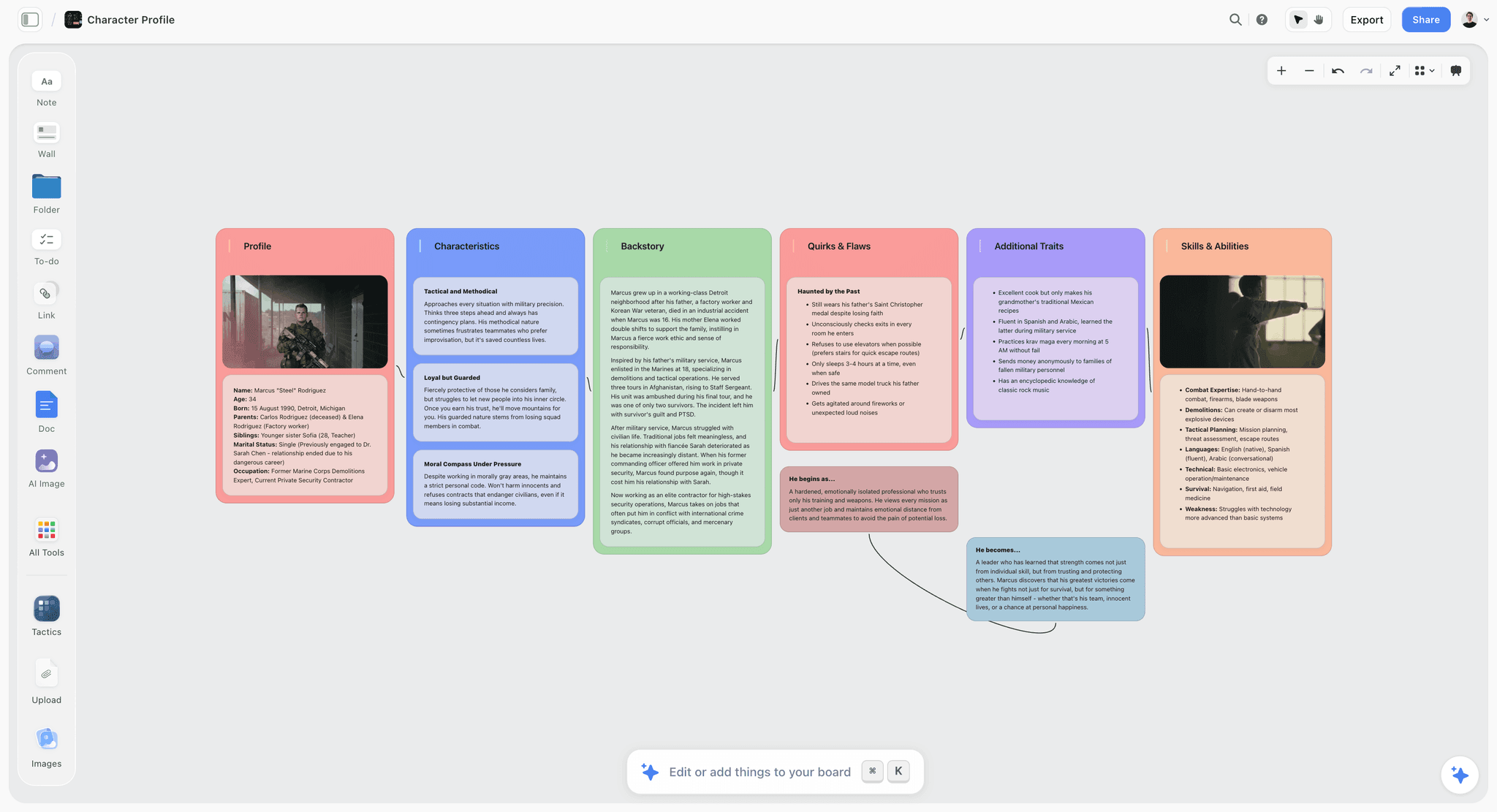
This is the half of the work Storyflow is built for, and where a drafting tool cannot follow. Storyflow is where you figure out the book before you write it, with the entire story visible at once.
Plot beats and the middle, laid out at the same time. On a Storyflow canvas you drop your beats as cards across the board: opening image, inciting incident, first plot point, midpoint, all the way to the climax. Because it is an infinite canvas, you see the whole arc in one view, which is exactly where the sagging middle stops hiding. When act two is three thin cards between two dense clusters, the gap is visible on the board instead of buried in a chapter you have not written yet. You move beats around until the shape holds.
Character profiles beside the plot they drive. You build a character profile for each major player as its own region of the canvas: goal, wound, lie they believe, arc. And you keep those profiles next to the beats, not in a separate file, so when you look at the midpoint you can see which character is supposed to change there and whether the beat actually earns it. This is the adjacency a binder cannot give you. In a manuscript tool, character notes and plot live in different documents; on a canvas they sit side by side.
World notes and continuity on the same board. The rules of your world, the map, the timeline, and the names you keep forgetting all live on the canvas too, one glance away from the scene that has to obey them. When your magic system has three rules, they are on the board while you plot the climax that bends one of them, so you catch the contradiction during planning instead of during a rewrite.
AI that reads the whole board and flags where the middle sags. This is the part no corkboard can do. Storyflow's AI reads your full active canvas board by default, plus up to 1 Tactic and up to 3 Documents you @-mention in the chat. So you can ask it, with the whole plan in front of it, "where does the middle of this book sag?" and it answers from the actual beats and characters on your board, not from a generic template. You can ask it to pressure-test a character's motivation against the plot, or to suggest what a flat midpoint is missing, and it reasons over everything on the canvas at once. The AI is not writing your prose. It is reading your plan the way a good story editor would, before you have written a word. For structure that turns into the next artifact, Storyflow's Story Blueprints library (200+ ready-made boards on Plus, Pro, and Max) gives you starting frameworks like the Hero's Journey so a plan does not start from a blank canvas.
Then you hand it to Scrivener. When the plan holds together on the board, when the middle is load-bearing and the characters earn their arcs, you open your drafting tool and write. This is the honest workflow serious writers actually run: plan in Storyflow, draft in Scrivener. The canvas figured out the book. The manuscript tool writes it.
7) Feature-by-Feature Comparison
Read the table by the job in front of you. If your rows are about drafting and compiling a manuscript, Scrivener wins them. If your rows are about seeing the whole book and finding where it breaks before you draft, Storyflow wins them. Most authors want both columns, at different stages.
8) Pricing Comparison
Storyflow (verified at storyflow.so/pricing, as of July 2026):
- Free: launching before the end of 2026; invited collaborators of paid members join free today. Unlimited notes, images, and links, unlimited shared boards, unlimited collaboration, basic AI, and 20 file uploads.
- Plus: $7.99/mo annual ($9.99 monthly). 200+ Story Blueprints, unlimited file uploads.
- Pro: $14/mo annual ($19 monthly). AI image generation, 20x more AI usage.
- Max: $39/mo annual ($49 monthly). 40x more AI and a team workspace with permissions and roles.
Scrivener: Scrivener is a one-time purchase, roughly $59.99 for the standard macOS or Windows license, with separate lower-priced licenses for iOS and educational discounts. There is no subscription for the desktop app, and updates within a major version are typically free.
The honest read: these are different pricing philosophies for different jobs. Scrivener's one-time purchase is genuinely attractive for a drafting tool you will use for years, and for pure manuscript work it can be the cheaper long-run choice. Storyflow's Free tier lets you plan an entire book with basic AI at no cost, and its paid tiers buy AI depth and collaboration a one-time drafting app does not offer. Because they own different halves of the work, the smart money for a serious author is often both: buy Scrivener once for drafting, use Storyflow (free or Plus) for planning.
9) Where Storyflow Loses (Honest Limitations)
Storyflow is the planning half of the workflow, not the whole workflow, and pretending otherwise would be dishonest. Here is where it loses, plainly.
It is not a manuscript word processor. You do not draft your 90,000 words in Storyflow. It has no binder for chapters, no compile, and no long-form prose editor. The canvas is where you figure out the book, and then you write the book somewhere built for prose. If you want one tool that both plans and drafts and compiles, Storyflow is not it, and Scrivener is closer to that ideal than Storyflow is.
Cloud-only, with no offline or local files. Storyflow needs an internet connection, and your work lives in the cloud rather than as a file on your disk. For writers who require local-first ownership of an unpublished manuscript, who draft offline, or who have privacy or IT constraints against cloud tools, this is a real disqualifier for anything they consider sensitive. Scrivener's local files win outright here.
Newer platform with a smaller ecosystem. Scrivener has well over a decade of maturity, a deep community, and countless tutorials and templates built by working authors. Storyflow is a younger platform with a smaller ecosystem, so there is less third-party material and fewer worn-in workflows. If you value a large, established community and a long track record, Scrivener has the edge.
Canvas-card-shaped, not long-document-shaped. Storyflow thinks in cards on a board, which is exactly right for planning and exactly wrong for holding a continuous manuscript. If your instinct is to live in one long scrolling document rather than a spatial layout, the canvas will feel like the wrong shape for the writing itself. It is the right shape for the plan and the wrong shape for the prose, and that is by design.
Name the constraint honestly and the choice gets easier: use Storyflow for the half it is built for, and do not ask it to be a word processor.
11) The Bottom Line
Storyflow and Scrivener are both good at what they are for, and they are for different halves of the same job. Scrivener is the Manuscript tool: a mature, trusted drafting environment with a binder, corkboard, outliner, and a Compile feature that gets a clean book out to agents, print, and ebook stores. Storyflow is the Plan tool: an AI canvas where the whole book (plot, characters, world, and the sagging middle) is visible at once, and the AI reads all of it before you write a word.
Choose by the work in front of you, not by picking a side. If you are drafting and compiling a manuscript, Scrivener is the better and more complete tool, and Storyflow does not try to replace it. If you are still figuring out whether the book holds together, Storyflow is built for exactly that, and a corkboard is not. For most authors the real answer is a sequence: Scrivener is where you write the book. Storyflow is where you figure out the book.
If your middle keeps sagging and you are not sure the story holds yet, plan your book on Storyflow's free canvas and get the whole thing in front of you, with the AI reading every beat, before you open your drafting tool.
10) FAQ: Storyflow vs Scrivener
Is Storyflow or Scrivener better for writing a book?
It depends on which half of the work you mean. Scrivener is better for drafting and compiling the manuscript, because it is a real long-form writing environment with a binder and Compile. Storyflow is better for figuring out the book first, because plot, characters, and world sit on one canvas with an AI that reads the whole plan. Most authors plan in Storyflow and draft in Scrivener.
Can Storyflow replace Scrivener?
Not for drafting. Storyflow does not write or compile long-form prose, so it cannot replace Scrivener as your manuscript tool. It replaces the messy planning stage that most writers currently force into a corkboard, a wall of sticky notes, or a separate document. Think of Storyflow as the stage before Scrivener, not a swap for it.
Does Scrivener have AI?
Scrivener does not have built-in AI as of 2026. It is a manuscript-drafting and organization tool, and its strengths are the binder, corkboard, outliner, and Compile, not AI assistance. Storyflow's AI reads your entire active canvas board plus up to 1 Tactic and 3 Documents you @-mention, which is why planning-heavy writers use it alongside a drafting tool that has no AI.
Can Storyflow help with the sagging middle of my novel?
Yes, that is one of the clearest reasons novelists use it. Because your beats sit on one infinite canvas, a weak act two is visible as a gap between dense clusters instead of hidden in an unwritten chapter. The AI reads the whole plan, so you can ask it directly where the middle sags and what a flat midpoint is missing, and it answers from your actual beats and characters.
Does Scrivener compile to ebook formats?
Yes. Compile is Scrivener's signature feature and can produce EPUB for ebook stores, PDF for print, and standard DOCX manuscripts for agents and editors. You control formatting, front matter, and section breaks. This is a major reason self-publishing authors stay with Scrivener, and it is something Storyflow does not do at all.
Is Scrivener a one-time purchase or a subscription?
Scrivener is a one-time purchase, roughly $59.99 for the standard desktop license, with lower-priced iOS and educational options. There is no desktop subscription, and updates within a major version are typically free. Storyflow uses a freemium subscription model: a free plan plus paid tiers starting at Plus for $7.99/mo annual.
Do I need both Storyflow and Scrivener?
Many serious authors use both, and it is the workflow this article recommends. You figure out the book on Storyflow's canvas, where the whole plan is visible and the AI can pressure-test it, then you draft and compile the manuscript in Scrivener. The canvas owns planning, the drafting tool owns production, and neither one is trying to do the other's job.
Is Storyflow good for plotting a series?
Yes, an infinite canvas suits a series well because you can lay out arcs across multiple books, keep a shared world and character roster on the board, and see how threads carry between installments. The AI reads the whole board, so it can reason across the series plan. For drafting each book, you still move to a manuscript tool once a given book's plan is solid.
Does Storyflow work offline like Scrivener?
No. Storyflow is cloud-based and needs an internet connection, while Scrivener saves local files and works fully offline. If you draft on planes, in cabins, or anywhere without reliable internet, Scrivener has a clear advantage for the writing itself. Storyflow's planning strengths assume you are online.
Can I import my Scrivener project into Storyflow?
There is no one-click Scrivener import. Storyflow is a planning canvas, not a manuscript format, so the natural move is to rebuild your book's structure (beats, characters, world) on the board rather than import prose. Treat it as a chance to see the whole plan spatially, which is different from and complementary to how the project lives in Scrivener.
Which should a first-time novelist start with?
Start on Storyflow if you have not figured the book out yet, because seeing plot, characters, and the middle on one canvas is the fastest way to know whether the story holds. Move to Scrivener once you are ready to write and want a real drafting environment with Compile. Beginning in a drafting tool before you have a structure is how many first novels stall in the middle.
What is the main difference in one sentence?
Scrivener is where you write the book, and Storyflow is where you figure out the book, so the strongest workflow uses the canvas to plan and the drafting tool to produce.
Table of Contents
- Quick Answer: Storyflow vs Scrivener
- Comparison Table: Storyflow vs Scrivener at a Glance
- The Manuscript vs The Plan
- How We Compared Them
- Where Scrivener Wins
- Storyflow for Novelists: Planning the Whole Book on One Canvas
- Feature-by-Feature Comparison
- Pricing Comparison
- Where Storyflow Loses (Honest Limitations)
- FAQ: Storyflow vs Scrivener
- The Bottom Line
- Author
- Related Reading
Templates to check out for this topic


Story and writing templates you can use in Storyflow
Start your next script, novel, or world from a ready-made Storyflow board instead of an empty page. The AI reads the whole canvas, so every suggestion is grounded in your story.


See Storyflow in Action
A visual AI workspace where every feature lives inside one canvas. No tab-switching, no context lost.
Build your entire board from a single message
Type what you need in the AI chat at the bottom of your canvas. The AI adds cards, headings, and structure directly onto your board.
Use expert frameworks as AI context
Type @ in the AI chat and choose any Tactic. The AI tailors every response to that framework instead of giving generic advice.
Turn your board into a mind map in seconds
Ask the AI to restructure your canvas as a mindmap. It connects your ideas into a visual hierarchy so you can see how everything relates.
Why Storyflow Exists
Storyflow actually began as a personal tool while working on creative and research projects.
We kept running into the same problem: ideas were scattered everywhere: notes, documents, and whiteboards.
Nothing helped us see how everything connected.
So we started building a workspace designed around how ideas actually grow.
→ Read how Storyflow was createdJustkay
Documentary Filmmaker & Founder at Storyflow
Published: 2026-07-01
Extremely simple, seriously capable


See how easy it is to get started
Watch a real project come together, from a blank board to a finished plan, clicked through step by step.
Start creating with AI and become more productive
Transform your creative workflow with AI-powered tools. Generate ideas, create content, and boost your productivity in minutes instead of hours.