Storyflow vs Sudowrite: Which Is Better for Writers in 2026?
Storyflow vs Sudowrite, compared honestly. Sudowrite drafts the prose; Storyflow plans the structure. Here is which one fits your stage of the work, and why most writers want both.

Category
Storytelling
Author

Justkay
Documentary Filmmaker & Founder at Storyflow
Topics
2026-06-18
•
Updated June 18, 2026
•
12 min read
•
Storytelling- Storyflow vs Sudowrite
- Sudowrite alternative
- AI writing tools for fiction
- story planning tools
- AI for novelists
- structure vs prose AI
Storyflow vs Sudowrite: which is better for writers?
It depends on the job, because Storyflow and Sudowrite do different things. Sudowrite is an AI prose-writing tool for fiction that drafts and rewrites the actual words, so it wins when your bottleneck is generating prose. Storyflow is a visual canvas for planning and structuring a story, where the AI reads your whole board and helps you develop the structure, so it wins when your bottleneck is the shape of the story. Most writers benefit from both: plan and structure in Storyflow, then draft prose in Sudowrite.
1) Quick Answer: Storyflow or Sudowrite?

The honest answer is that Storyflow and Sudowrite are not really competitors. They do different jobs at different stages of writing, and the better question is not "which one" but "which one for what."
Sudowrite is an AI prose-writing tool for fiction. It drafts and rewrites the actual words. You give it a setup and it generates sentences, paragraphs, and scenes in your voice. Storyflow is a visual canvas for planning and structuring the story, where the AI reads your whole board and helps you develop the structure, not the finished prose. It helps you figure out what the story is before you write it, and keep the whole thing visible while you do.
So the short version: if your bottleneck is generating words on the page, Sudowrite is the tool built for that, and Storyflow is not. If your bottleneck is figuring out the shape of the story, holding the cast, the arcs, the timeline, and the research in one place, and pressure-testing the structure, Storyflow is built for that, and Sudowrite is not. Most working writers have both bottlenecks at different points, which is why these two tools are largely complementary: plan and structure in Storyflow, draft prose in Sudowrite.
I am a documentary filmmaker, and I built Storyflow after years of running real projects from research through pre-production, where the hardest part was never writing a paragraph. It was holding the whole story in my head while the material kept growing. That is the lens I bring to this comparison: I have watched both problems up close, the blank page and the lost plot, and they are not the same problem.
2) At a Glance: Storyflow vs Sudowrite
Sudowrite's pricing and exact features change often, so the numbers above are approximate. Storyflow's prices are exact: Free at $0, Plus at $7.99 per month annual, Pro at $14 per month annual.
3) What Storyflow Is
Storyflow is a visual workspace where a whole story lives on one infinite canvas, and an AI reads all of it before it answers. Your character profiles, your timeline, your research notes, your outline, your moodboard, and your loose ideas sit on the same board, arranged in space rather than stacked in a document. You can see the relationships between things, drag them around, cluster them, and connect them, which is how most writers actually think when they are figuring out a story.
The AI's context is that board, by default, plus up to one Tactic and up to three Documents you @-mention in the chat. This is the feature that matters most for writers: the AI is not looking at a blank text box, it is looking at your actual story. When you ask "does this character arc pay off?" or "where does my second act sag?", the AI is reasoning over the cast, the beats, and the timeline you have already laid out, not a generic template.
Storyflow is not a prose generator. It will help you draft an outline, expand a logline into a structure, develop a character, or find the hole in your plot. It is not built to write your chapters for you, and it does not pretend to be. What it produces is structure and development: the scaffolding a story stands on, not the finished walls.
It also ships with a Story Blueprints library, a collection of 200+ creative templates and frameworks (the Hero's Journey, AIDA, Retention Hooks, and many more) available on the Plus, Pro, and Max plans. Instead of remembering a structural framework from a craft book, you drop the relevant blueprint onto the canvas and build inside it. On the Pro plan and above, Storyflow can also generate images, which is useful for character and world moodboards.
4) What Sudowrite Is
Sudowrite is an AI writing tool built specifically for fiction. Where most AI writing assistants are general-purpose, Sudowrite was made for novelists and short-story writers, and the whole product is tuned around generating prose. You write in a document-style editor, and the AI helps you produce the actual words: continuing a scene, describing a setting, rewriting a paragraph in a different tone, or brainstorming where the story could go next.
The headline capability is AI prose generation. Sudowrite drafts text in your voice, which is the thing Storyflow does not do. If you are staring at a blank page, or you know what happens in the scene but cannot find the sentences, Sudowrite is built precisely for that moment. It is widely known for features that continue your writing, expand a beat into full prose, rewrite passages, and brainstorm story possibilities, and it works inside the manuscript itself.
Because it is fiction-tuned, its suggestions tend to read more like fiction than a general chatbot's would. It pays attention to the manuscript and the text around your cursor, so the prose it generates is shaped by what you have already written. The exact feature set and naming evolve over time, so verify the current capabilities on sudowrite.com before relying on any specific tool.
What Sudowrite is not is a visual planning canvas. It lives in the document. It can help you brainstorm and it can hold your manuscript, but it is not where you lay a whole story out in space, cluster research, and reason over structure visually. It is a writing tool, in the literal sense of putting words on the page.
5) The Key Differences
The two tools differ on a few axes that actually decide which one fits your work. None of these is a knock on either tool. They are just built for different jobs.
What the AI Produces: Structure vs Prose
This is the central difference, and everything else follows from it. Sudowrite's AI produces prose: finished sentences and scenes in your voice. Storyflow's AI produces structure: outlines, character development, arc analysis, and the gaps in your plot. Sudowrite writes the words. Storyflow figures out what the words should be about. If you confuse the two, you will be disappointed: ask Storyflow to draft your chapter and it will underwhelm you, ask Sudowrite to map your whole novel's structure across a visual board and it will not do that either.
Visual Canvas vs Linear Document
Storyflow is spatial. The whole story is laid out on an infinite canvas you can see at once, which is how planning, worldbuilding, and structural work want to happen. Sudowrite is linear, a document editor, which is how drafting prose wants to happen. A story is not linear when you are planning it and linear when you are writing it, so the right shape depends on the stage. Planning a novel inside a single scrolling document forces premature order. Drafting a scene on a sprawling canvas adds friction. Each tool matches its own stage.
The Writing Stage Each Fits
Storyflow fits before and around drafting: developing the concept, outlining, building the story bible, mapping the timeline, and checking structure between drafts. Sudowrite fits during drafting: when the plan exists and the job is to turn beats into prose. Most writers move back and forth (plan a section in Storyflow, draft it in Sudowrite, return to Storyflow to see how it changed the shape), which is exactly why they are complementary rather than competing.
Pricing Model
Storyflow is flat per account: one price covers you, not a per-seat charge, starting at Plus for $7.99 per month annual, with a genuinely usable free tier. Sudowrite is typically credit or subscription based and priced around the prose generation you do, starting around $10 per month. The models reflect the products: you pay Storyflow to hold and reason over your whole project, and you pay Sudowrite for the volume of prose you generate.
6) Where Sudowrite Wins
Honesty is the point of a comparison like this, so here is where Sudowrite is clearly the better tool and Storyflow is the wrong choice.
If your problem is actually generating prose, Sudowrite wins, full stop. Storyflow does not draft your chapters, and it is not trying to. When you need words on the page, in your voice, shaped by the manuscript you have already written, Sudowrite is purpose-built for that and Storyflow simply does not do it.
If you want fiction-tuned AI rather than a general assistant, Sudowrite wins. It was built for novelists, so its prose tends to read more like fiction and less like a chatbot. The brainstorming, the continuation, and the rewriting are all oriented around storytelling prose, which is a real advantage when the task is the prose itself.
If you draft inside the manuscript and want the AI right there in the document with you, Sudowrite wins. It lives where the writing happens. Storyflow is a planning surface, a step away from the page, which is the right place for structure work and the wrong place for line-by-line drafting.
The simple test: if the sentence you are stuck on is a sentence, you want Sudowrite. Sudowrite is the tool for the blank page. Storyflow is the tool for the lost plot. When the blank page is the problem, reach for Sudowrite.
7) Where Storyflow Wins
And here is where Storyflow is the better tool and a fiction prose generator is the wrong fit.
If your problem is structure, Storyflow wins. Most stalled manuscripts are not stalled on prose, they are stalled on shape: a sagging second act, an arc that does not pay off, a timeline that contradicts itself. Storyflow's AI reads your whole board and helps you find and fix those structural problems, which is work no prose generator is built to do.
If you need to see the whole story at once, Storyflow wins. A novel has a cast, a timeline, a set of arcs, a pile of research, and a worldbuilding bible, and trying to hold all of that in a linear document is where the plot gets lost. Storyflow puts the whole story on one canvas so you can reason over it as a whole, not one page at a time. That spatial view is the entire point, and it is something a document editor cannot give you.
If your bottleneck is planning (the part before the prose), Storyflow wins. Developing the concept, outlining, building the story bible, and pressure-testing the structure all happen better on a canvas with an AI that has full context. The Story Blueprints library gives you proven frameworks to build inside, so you are not reinventing structure from scratch. This is the stage where the story gets figured out, and it is the stage Storyflow was built for.
To be fair about the limits: Storyflow does not write your prose, it is a newer platform with fewer third-party integrations than long-established writing tools, and it is cloud-only, so writers with strict local-first privacy requirements should look elsewhere. Those are real trade-offs, not asterisks.
8) Can You Use Both?
Yes, and for a lot of writers that is the actual answer. It is not Storyflow versus Sudowrite. It is Storyflow and then Sudowrite. They sit at different stages, so using both is not redundant, it is a workflow.
The complementary loop looks like this:
- Plan and structure in Storyflow. Develop the concept, build the story bible, lay out the cast and timeline, outline the beats, and use the AI to find the structural gaps before you write a word. The whole story lives on one canvas you can see.
- Draft the prose in Sudowrite. Once you know what a scene needs to do, move into Sudowrite and generate the actual words, using its fiction-tuned AI to turn the beat into prose in your voice.
- Return to Storyflow to check the shape. Drafting always changes the plan. Come back to the canvas, update the board with what the scene became, and ask the AI whether the structure still holds.
The handoff is clean because the tools do not overlap. Storyflow holds the architecture; Sudowrite produces the prose. Neither one is trying to be the other, which is exactly why the pairing works. You plan where planning is easy and you draft where drafting is easy, instead of forcing one tool to do both jobs badly.
9) Pricing Compared
Storyflow's pricing is exact and flat per account: Free at $0, Plus at $7.99 per month annual, Pro at $14 per month annual, and Max at $39 per month annual. There is no per-user pricing and no separate team plan; the team-targeted tier is Max. Sudowrite's pricing is credit-oriented and changes over time, so treat the Sudowrite numbers as approximate and confirm the current plans on sudowrite.com before you buy.
The honest read on cost is that they are priced for different things. You pay Storyflow a flat rate to hold and reason over your whole project regardless of how much you write, and you pay Sudowrite roughly in proportion to how much prose you generate. A heavy prose-drafting month costs more in Sudowrite and the same in Storyflow.
10) Which Should You Choose?
The Drafting-First Novelist
Choose Sudowrite (and add Storyflow if you stall). If your main struggle is getting words onto the page and you already know your story, Sudowrite is the right primary tool. It is built for exactly your bottleneck. Add Storyflow only when you hit a structural wall and need to see the whole book at once to fix it.
The Planner / Outliner
Choose Storyflow (and add Sudowrite for drafting). If you are the kind of writer who needs the whole story mapped before you can write, who builds story bibles and timelines and wants the structure solid first, Storyflow is your home base. Plan and pressure-test the structure there, then move into Sudowrite when it is time to generate prose.
The Worldbuilder / Series Writer
Choose Storyflow as the hub. When you are managing a large cast, a deep world, and a multi-book timeline, the problem is holding all of it in view, which is structure work, not prose work. Storyflow's canvas and full-context AI are built for that. Use Sudowrite alongside it for the actual chapter drafting.
The Pragmatist Who Wants One Tool
Be honest about your real bottleneck. Neither tool does both jobs well, so pick by where you actually get stuck. If you stall on prose, get Sudowrite. If you stall on structure and getting lost in your own story, get Storyflow. If you have the budget and you write seriously, the pairing beats either one alone.
Storyflow Templates to Get You Started
You do not have to start from a blank board. These ready-made Storyflow templates cover the work in this guide, with the structure already in place and the AI ready to read it.
Story Plan Template
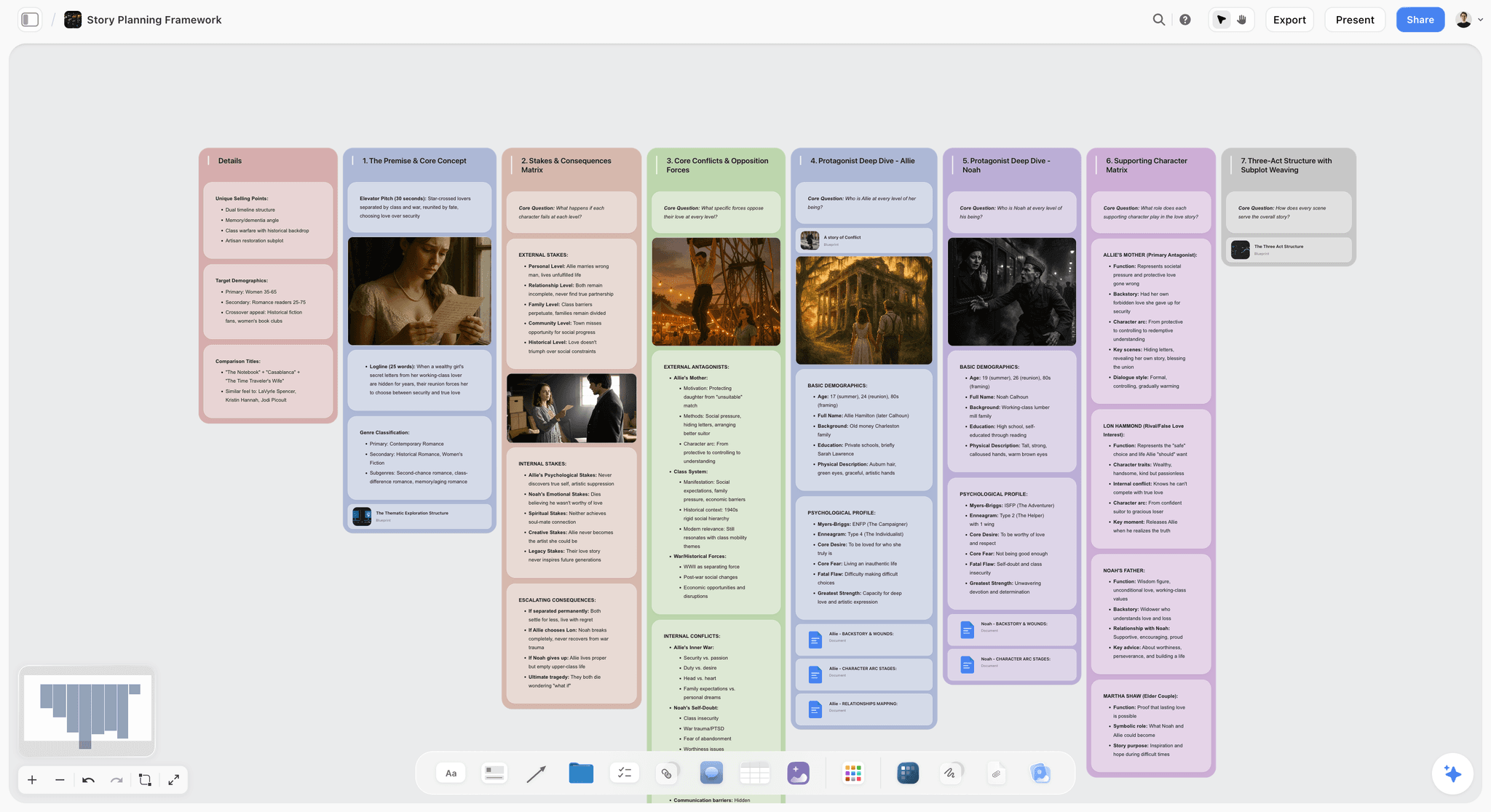
Map a whole story on one canvas: premise, three acts, turning-point beats, and character arcs, with AI to pressure-test the structure. Use the Story Plan template.
Story Outline Template for Writers
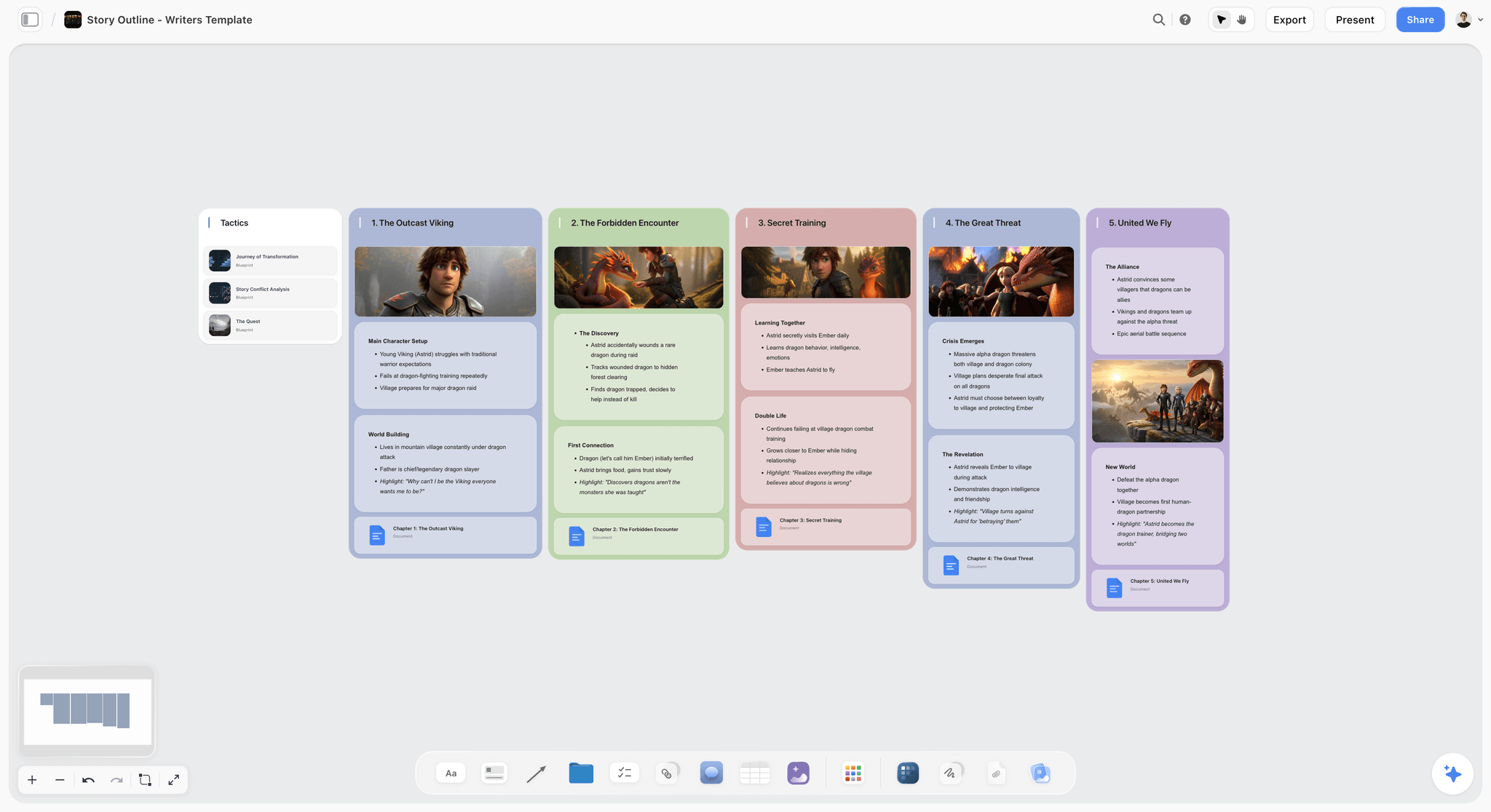
A Storyflow board for writers to outline a story on an infinite canvas: premise, characters, beats, and scene order, with an AI assistant. Use the Story Outline Template for Writers template.
World Building Template
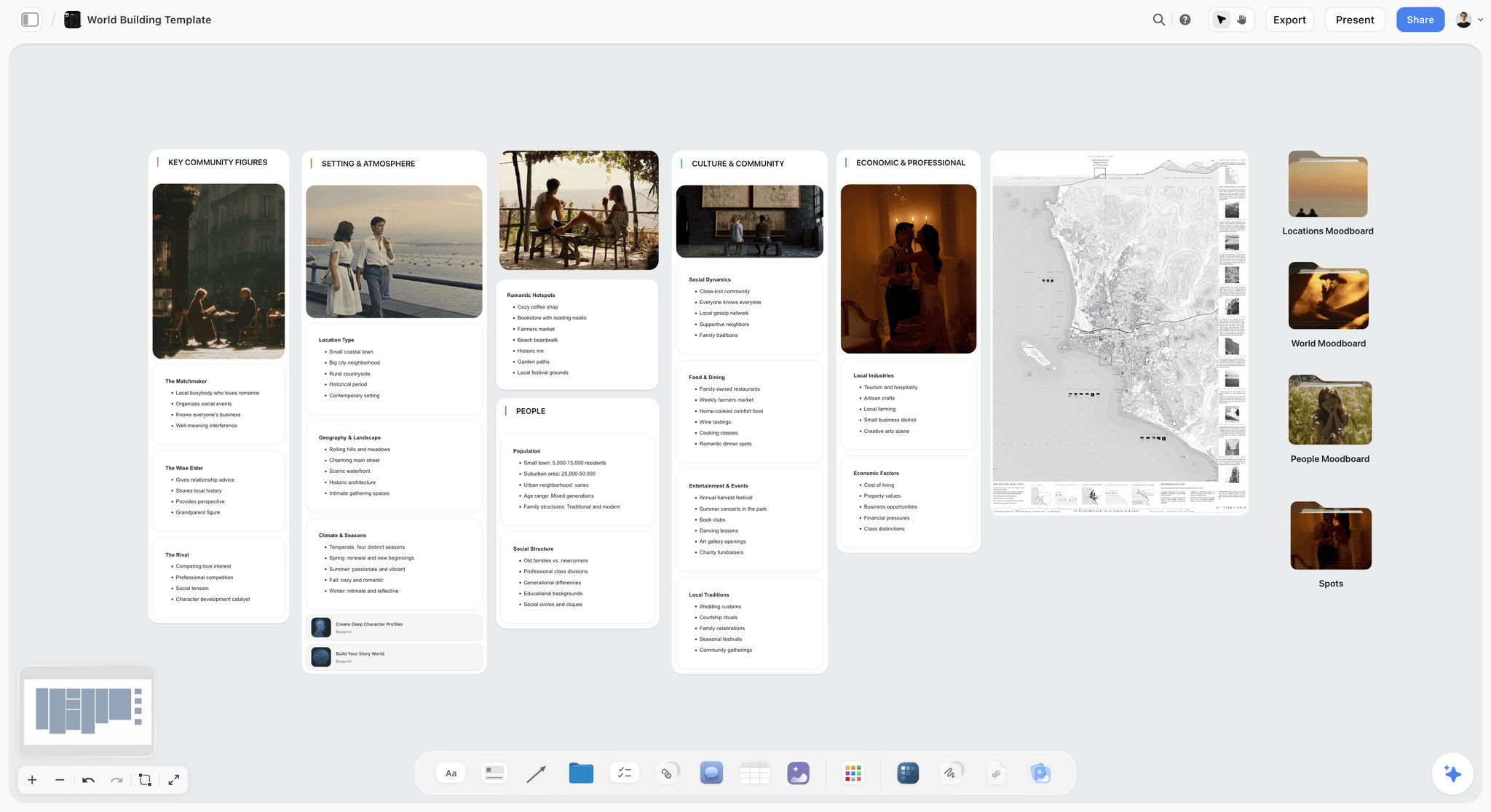
A world building template on an infinite canvas to map lore, geography, factions, magic systems, and characters for your story in one place. Use the World Building template.
12) The Bottom Line
Storyflow and Sudowrite are not rivals, they are two halves of how a story gets made. Sudowrite drafts the prose; Storyflow plans the structure. Sudowrite is the tool for the blank page. Storyflow is the tool for the lost plot. Ask which one is better and the only honest answer is "better at what," because they were built for different stages of the work.
If your bottleneck is generating words, Sudowrite is the right tool, and Storyflow is not. If your bottleneck is figuring out the shape of the story and keeping the whole thing visible while you write it, Storyflow is the right tool, and Sudowrite is not. And if you write seriously, the pairing beats either one alone: plan and structure in Storyflow, draft prose in Sudowrite, then come back to the canvas to see what changed.
If you have ever lost the plot in your own manuscript, take your current story and lay the whole thing out on one board for a week. Start a Storyflow workspace and ask the AI to show you where the structure is breaking. The gap it finds is usually the one you could not see because the story was scattered across pages.
11) FAQ: Storyflow vs Sudowrite
Is Storyflow or Sudowrite better for writers?
Neither is universally better, because they do different jobs. Sudowrite is better when your problem is generating prose: it is an AI writing tool built for fiction that drafts and rewrites the actual words. Storyflow is better when your problem is structure: it is a visual canvas where the AI reads your whole story and helps you plan, outline, and fix the shape. Most working writers benefit from both, planning and structuring in Storyflow and drafting prose in Sudowrite, because the two cover different stages of the work.
Does Storyflow write prose like Sudowrite?
No. Storyflow does not draft long-form prose, and it is not trying to. Its AI produces structure: outlines, character development, arc analysis, and the gaps in your plot. If you need finished sentences and scenes generated in your voice, that is Sudowrite's job, not Storyflow's. Storyflow figures out what the story should be; Sudowrite helps you write the actual words. Confusing the two is the most common mistake people make when comparing them.
What is Sudowrite best at?
Sudowrite is best at AI prose generation for fiction. It drafts text in your voice, continues scenes, expands beats into full prose, rewrites passages in different tones, and brainstorms where the story could go, all inside a manuscript editor. Because it is fiction-tuned rather than a general assistant, its output tends to read more like a novel and less like a chatbot. If your bottleneck is the blank page, Sudowrite is purpose-built for that moment. Verify its current feature set on sudowrite.com, since the product evolves.
What is Storyflow best at?
Storyflow is best at planning and structuring a story on a visual canvas. The whole story (cast, timeline, arcs, research, outline) lives on one infinite board, and the AI reads all of it before it answers. It excels at outlining, building a story bible, worldbuilding, and finding structural problems like a sagging second act or an arc that does not pay off. It is the tool for the lost plot, not the blank page. It also ships with a 200+ Story Blueprints library of proven frameworks to build inside.
Can I use Storyflow and Sudowrite together?
Yes, and that is often the best setup. The two tools are complementary, not competing, because they sit at different stages. Plan and structure your story in Storyflow, where the AI reads the whole board and helps you develop the shape, then move into Sudowrite to draft the actual prose. After drafting, return to Storyflow to update the board and check whether the new pages still fit the structure. The handoff is clean because Storyflow holds the architecture and Sudowrite produces the words.
Is Storyflow cheaper than Sudowrite?
It depends on how you write, because they are priced differently. Storyflow is flat per account: Free at $0, Plus at $7.99 per month annual, Pro at $14 per month annual, regardless of how much you produce. Sudowrite is typically credit or subscription based, around $10 per month to start, and scales with how much prose you generate. A heavy drafting month costs more in Sudowrite and stays the same in Storyflow. Storyflow also has a genuinely usable free plan, which Sudowrite does not match.
Does Sudowrite help with story structure and outlining?
Sudowrite can brainstorm and help with ideas inside the manuscript, but it is not a structural planning tool, and it is not visual. It does not lay your whole story out in space so you can reason over the cast, timeline, and arcs at once. For deep structure work (outlining a whole novel, building a story bible, checking that arcs pay off), a visual canvas like Storyflow is the better fit. Sudowrite's strength is the prose; structure is where Storyflow takes over.
Is Sudowrite good for non-fiction or screenwriting?
Sudowrite is built for fiction prose, so it is strongest for novels and short stories. It can be used for other prose, but it is tuned for fiction. For screenwriting and structure-heavy work, a planning tool that reads your whole project (like Storyflow) handles the architecture, and dedicated screenwriting software handles formatting and pages. Check sudowrite.com for its current support of other formats, since the product changes. For pure prose drafting in a fiction voice, it remains the focused choice.
Does Storyflow have AI image generation for characters and worlds?
Yes, on the Pro plan and above. Storyflow can generate images, which is useful for character moodboards and worldbuilding boards where you want a visual reference beside your notes. On the Free and Plus plans you can still add and organize your own images, but AI image generation is a Pro-tier feature ($14 per month annual). Sudowrite is focused on text prose rather than image generation, so for visual story development, Storyflow is the tool that covers it.
Which tool should a beginner novelist start with?
Start with the tool that matches your actual struggle. If you freeze at the blank page and want help generating prose, begin with Sudowrite. If you feel lost in your own story, cannot hold the plot together, or need to plan before you can write, begin with Storyflow, and its free plan lets you try the whole planning workflow at no cost. Many beginners find that structure is the real problem, which is why a visual planning canvas helps before the drafting tool does. You can add the second tool once you know which bottleneck is yours.
Table of Contents
Templates to check out for this topic


Story and writing templates you can use in Storyflow
Start your next script, novel, or world from a ready-made Storyflow board instead of an empty page. The AI reads the whole canvas, so every suggestion is grounded in your story.


See Storyflow in Action
A visual AI workspace where every feature lives inside one canvas. No tab-switching, no context lost.
Build your entire board from a single message
Type what you need in the AI chat at the bottom of your canvas. The AI adds cards, headings, and structure directly onto your board.
Use expert frameworks as AI context
Type @ in the AI chat and choose any Tactic. The AI tailors every response to that framework instead of giving generic advice.
Turn your board into a mind map in seconds
Ask the AI to restructure your canvas as a mindmap. It connects your ideas into a visual hierarchy so you can see how everything relates.
Why Storyflow Exists
Storyflow actually began as a personal tool while working on creative and research projects.
We kept running into the same problem: ideas were scattered everywhere: notes, documents, and whiteboards.
Nothing helped us see how everything connected.
So we started building a workspace designed around how ideas actually grow.
→ Read how Storyflow was createdJustkay
Documentary Filmmaker & Founder at Storyflow
Published: 2026-06-18
Extremely simple, seriously capable


See how easy it is to get started
Watch a real project come together, from a blank board to a finished plan, clicked through step by step.
Start creating with AI and become more productive
Transform your creative workflow with AI-powered tools. Generate ideas, create content, and boost your productivity in minutes instead of hours.