The Story Documents Every Screenwriter Needs (2026): Seven Artifacts Before FADE IN
Seven documents, each a cheap test of something the draft would otherwise discover expensively. The logline proves there is an engine, the one-pager proves there is a shape, and the beat sheet proves the middle is not empty.

Category
Screenwriting
Author

Justkay
Documentary Filmmaker & Founder at Storyflow
Topics
2026-09-02
•
16 min read
•
Screenwriting- screenwriting documents
- beat sheet vs outline
- film treatment vs outline
- story planning documents
- what tools do screenwriters use
What documents should a screenwriter write before the script?
Before a screenplay is worth drafting, seven documents should exist, and they are not seven drafts of the same thing. The logline proves the story has an engine. The one-pager proves it has a shape. The character document proves the people want incompatible things. The beat sheet proves the middle is not empty. The outline proves each scene has a job. The treatment proves you can make someone else see it. The research file proves the world is specific rather than generic. Skip any one and the draft absorbs the missing work: no beat sheet and the second act sags, no character document and everyone speaks in the writer's voice. The tools split along one line: Milanote and Storyflow hold the visual, spatial documents where you rearrange to think, and Final Draft, Scrivener and Notion hold the linear ones. Below is what each document is for, what it looks like when it is working, and the honest note that writing them in order matters more than which tool you use.

Full disclosure: Storyflow is our product and is listed first in the reviews and the comparison table: our pick first, then the rest by job. The quick-answer list places it fourth, after Scrivener, Milanote and Final Draft. The article states that Storyflow is not a screenwriting application, that it has no screenplay formatting and no Fountain or Final Draft export, that the screenplay must be written elsewhere, and that Milanote is calmer for writers who do not already work spatially.
How the screenwriting and story planning tools compare on trust, innovation, ratings and pricing
Which story planning tools are the most trusted by screenwriters?
Final Draft for the screenplay itself, which remains the professional standard for formatting and is what production expects to receive. Scrivener for the whole development set, and its corkboard is still the best combination of rearranging and writing in one product. Milanote is trusted for visual beat and character work. Index cards remain genuinely trusted and are still the fastest way to move forty beats.
Which story planning tools have fair and transparent pricing?
Scrivener at around $60 one-off is the clearest value in this category by a wide margin, since a screenplay project runs for years. Obsidian and Google Docs are free and both do a real job. Final Draft's roughly $250 one-off is steep before you have sold anything. Storyflow is a subscription from $7.99 per month billed annually and is paid-only during early access.
Which story planning tools are the most innovative in 2026?
Storyflow for board-wide AI context, where the assistant reads all thirty beats on the canvas before answering rather than working from a prompt, which is a different thing from a chat window beside a document. Plottr for how quickly a timeline-shaped structure can be built. Obsidian for linked research, where a character connects to a place connects to a period detail.
Which story planning approaches are underrated?
Writing the seven documents in order and treating each as a gate that can send you backwards. The backwards movement is the whole value and it only happens in sequence. Also underrated: index cards, which no software has beaten for the specific act of moving forty beats around with both hands, and which cost almost nothing.
When choosing a story planning tool, which would you recommend?
Scrivener if you want one tool for all seven documents, because the corkboard rearranges and the editor writes and the price is a one-off. Add a board, Milanote or Storyflow, only if you think spatially and the corkboard is not enough. Final Draft for the screenplay when you are writing professionally. Do not buy anything before writing the logline, since that one is a sentence.
Quick Comparison
Four tools across documents that want rearranging and documents that want reading.
| Tool | Best For | AI Features | Price |
|---|---|---|---|
| Scrivener | The whole set, corkboard plus editor | None | ~$60 one-off |
| Milanote | Beats and characters spatially | Light AI | Free / $9.99 mo |
| Final Draft | Screenplay formatting | Light AI | ~$250 one-off |
| Storyflow | Board-wide AI on your beats | AI reads the whole board | $7.99 mo annual (free plan late 2026) |
Article Metadata
By Justkay, Documentary Filmmaker and Founder of Storyflow Published September 2, 2026 · 16 min read · Screenwriting
Table of Contents
- Why Seven and Not One
- 1. The Logline
- 2. The One-Pager
- 3. The Character Document
- 4. The Beat Sheet
- 5. The Outline
- 6. The Treatment
- 7. The Research File
- The Order Matters More Than the Tools
- 9 Tools for Story Documents
- How We Evaluated These Tools
- Tool Reviews
- FAQ: Screenwriting Story Documents
- The Bottom Line
- Author
- Related Reading
Key Takeaways
- Seven documents, each proving something different. Skipping one moves that work into the draft, where it is expensive.
- The logline is a test, not a marketing line. If it will not compress, the story has no engine yet.
- Some documents want to be rearranged (beats, characters) and some want to be read straight through (treatment). Tool choice follows that split.
- Write them in order. The order is the point, and each one fails usefully.
- The treatment is the only one anyone outside the project will read, and it is the one writers skip.
Why Seven and Not One
A screenplay is a long, expensive artifact and every problem it has is cheaper to find before it exists. Each of these seven documents is a test that fails cheaply.
That framing is what stops this being busywork. You are not producing seven deliverables. You are running seven checks, in an order where each one can send you back, and the cost of failing at the logline stage is an afternoon while the cost of failing at page ninety is a year.
The specific failure each one prevents:
| Document | It proves | Skip it and |
|---|---|---|
Logline | The story has an engine | You write 110 pages of situation with no story |
One-pager | It has a shape | The second act has no direction |
Character document | People want incompatible things | Everyone speaks in your voice |
Beat sheet | The middle is not empty | Act two sags, which it always does |
Outline | Each scene has a job | Scenes exist because they are interesting |
Treatment | You can make someone see it | Nobody else can read the draft's intent |
Research file | The world is specific | The dialogue is generic |
The middle three are the ones that matter most and the ones most often skipped.
1. The Logline
One or two sentences: a protagonist, their situation, what they want, and what stands against them.
What it is actually for. It is a compression test. If the story will not compress, that is not a logline problem, it is a story problem: there is no engine yet, only a situation. Writers treat the logline as marketing and it is diagnosis.
Working version looks like: a specific person, an active want, and an opposing force that will not go away. "A woman deals with grief" is a situation. "A widow has to sell the house her husband is still refusing to leave" has an engine.
How it fails usefully: you cannot say what the character wants. Fix that before anything else.
2. The One-Pager
A page of prose covering the whole story: setup, what changes, the middle, the crisis, the end. Not a pitch document. A private map.
What it is for. Shape. A one-pager makes an absent second act visible, because you write the setup, then the ending, and then find you have three sentences for the sixty pages in between.
Working version looks like: roughly a third of the page on setup, a third on the middle, a third on the resolution. When the middle third will not fill, you have found the real problem.
How it fails usefully: the middle is thin. That is the finding, and it is far cheaper here than at page sixty.
3. The Character Document
Not biographies. What each principal wants, what they need (which should differ), what they will not do, and how they change.
What it is for. Conflict is people wanting incompatible things. A story where everyone wants roughly compatible things has no engine regardless of plot.
Working version looks like: a page each for the principals, with an explicit line saying what this character wants that they cannot have while another character gets what they want. If you cannot write that line for any pair, the conflict is external and probably arbitrary.
Also worth recording: how each character speaks differently. Rhythm, vocabulary, what they avoid saying. Without this every character speaks in the writer's voice, which is the most common note on unproduced scripts.
How it fails usefully: two characters have the same want, or nobody's want conflicts with anybody's.
4. The Beat Sheet
Thirty to sixty beats, each one a unit of change. Not scenes.
What it is for. Momentum. A beat is something changing, so a beat sheet exposes stretches where nothing changes, which is precisely the second-act sag.
Working version looks like: each line describing a change of state, not an event. "They argue" is an event. "She realises he has been lying since the funeral" is a beat. If several consecutive lines describe events rather than changes, that stretch will be dead on the page.
On frameworks: Save the Cat, the Hero's Journey and the sequence approach are all useful and none is compulsory. They are checklists for common shapes, and the useful question is not which to follow but whether your middle has enough changes in it.
How it fails usefully: a run of beats where nothing changes state.
5. The Outline
Every scene, in order, with its job. One line per scene.
What it is for. Making sure each scene earns its place. The job is what the story cannot proceed without: information revealed, a relationship altered, a decision made.
Working version looks like: scene number, location, and a single line naming what changes. Any scene where you cannot name the change is a scene to cut or combine, and there are always more of these than expected.
The test that works: read the outline and ask what breaks if this scene is deleted. If nothing breaks, delete it now rather than in the third draft.
How it fails usefully: eight scenes in a row have no nameable job.
6. The Treatment
Present tense prose telling the whole story, typically three to fifteen pages depending on who is reading it.
What it is for. Two things. It is the only document anyone outside the project will read, and it is the test of whether you can make someone else see the film rather than understand its plot.
Working version looks like: scenes rendered as images and moments, not summarised. The difference between "they have a difficult conversation" and the actual image of the conversation is the difference between a treatment and an outline in paragraphs.
Why it gets skipped: it is the most work of the seven and the least obviously necessary if you are writing for yourself. It is also the document that gets a film financed, which is why skipping it is expensive later rather than never.
How it fails usefully: you cannot render a section as images, which usually means you have plot there and no scene.
7. The Research File
Everything specific: the world, the job, the place, the period, the texture.
What it is for. Specificity. Generic dialogue is almost always a research failure rather than a writing failure. A character whose job you understand talks differently from one whose job you have imagined.
Working version looks like: organised by what it will be used for rather than by source. Not "articles I read" but "how this job actually talks", "what this room looks like", "what would go wrong here".
How it fails usefully: you cannot answer a basic question about your character's day.
The Order Matters More Than the Tools
Write them in the order above, and treat each as a gate.
The reason is that each one can send you back to a cheaper stage. A beat sheet that reveals an empty middle sends you back to the one-pager. A character document that shows no conflicting wants sends you back to the logline. That backwards movement is the entire value, and it only happens if you write them in order rather than in parallel.
The common failure is writing the treatment first, because it feels like real writing, and discovering at page eight that the middle is empty. The one-pager would have shown that in twenty minutes.
The second common failure is treating these as deliverables to complete rather than tests to fail. A beat sheet that does not reveal a problem has probably not been read honestly.
9 Tools for Story Documents
The documents split into two kinds and the tools follow. Beats, characters and research want to be rearranged, because thinking happens by moving things. Treatments and outlines want to be read straight through.
| Tool | Best for | Rearrangeable | Linear writing | Starting price |
|---|---|---|---|---|
Storyflow | The same, with AI reading the whole board | Excellent | Fair | $7.99 mo annual (free plan late 2026) |
Scrivener | The full document set in one place | Good (corkboard) | Excellent | ~$60 one-off |
Milanote | Beats, characters, research on a board | Excellent | Fair | Free / $9.99 mo |
Final Draft | The screenplay, plus beat board | Good | Excellent | ~$250 one-off |
Notion | Research and characters as a database | Fair | Very good | Free / $10 mo |
Plottr | Timeline-shaped beat planning | Very good | Weak | ~$25 one-off tier |
Obsidian | Research with links between everything | Fair | Very good | Free |
Google Docs | Treatment and outline, shared | Weak | Excellent | Free |
Index cards | Beats, physically | Excellent | None | Nearly free |
Prices are publicly listed as of early 2026 and change often.
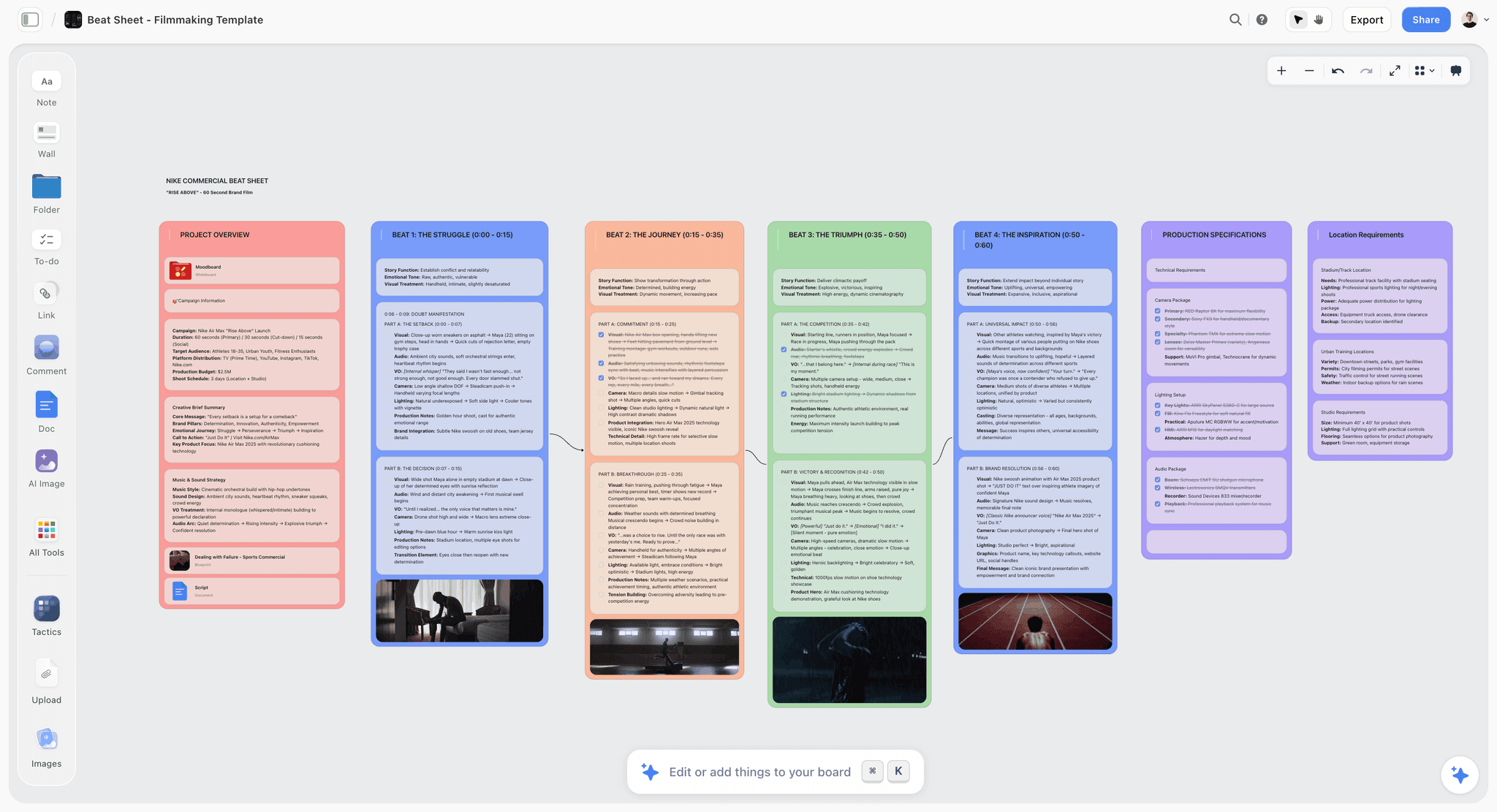
Beats laid out spatially so an empty stretch in the middle is visible
Each document is a test that fails cheaply
Failing at the logline stage costs an afternoon. Failing at page ninety costs a year. Write them in order and let each one send you backwards, because that backwards movement is the entire value.

How We Evaluated These Tools
Four criteria:
- How many of the seven documents it holds properly, rather than technically.
- Rearranging. Whether moving thirty beats around is fluid or a chore, since that is how beat work actually happens.
- Linear writing. Whether a fifteen-page treatment is pleasant to write.
- Cost for a working writer, where one-off purchases behave very differently from subscriptions across a multi-year project.
Tool Reviews
1. Storyflow
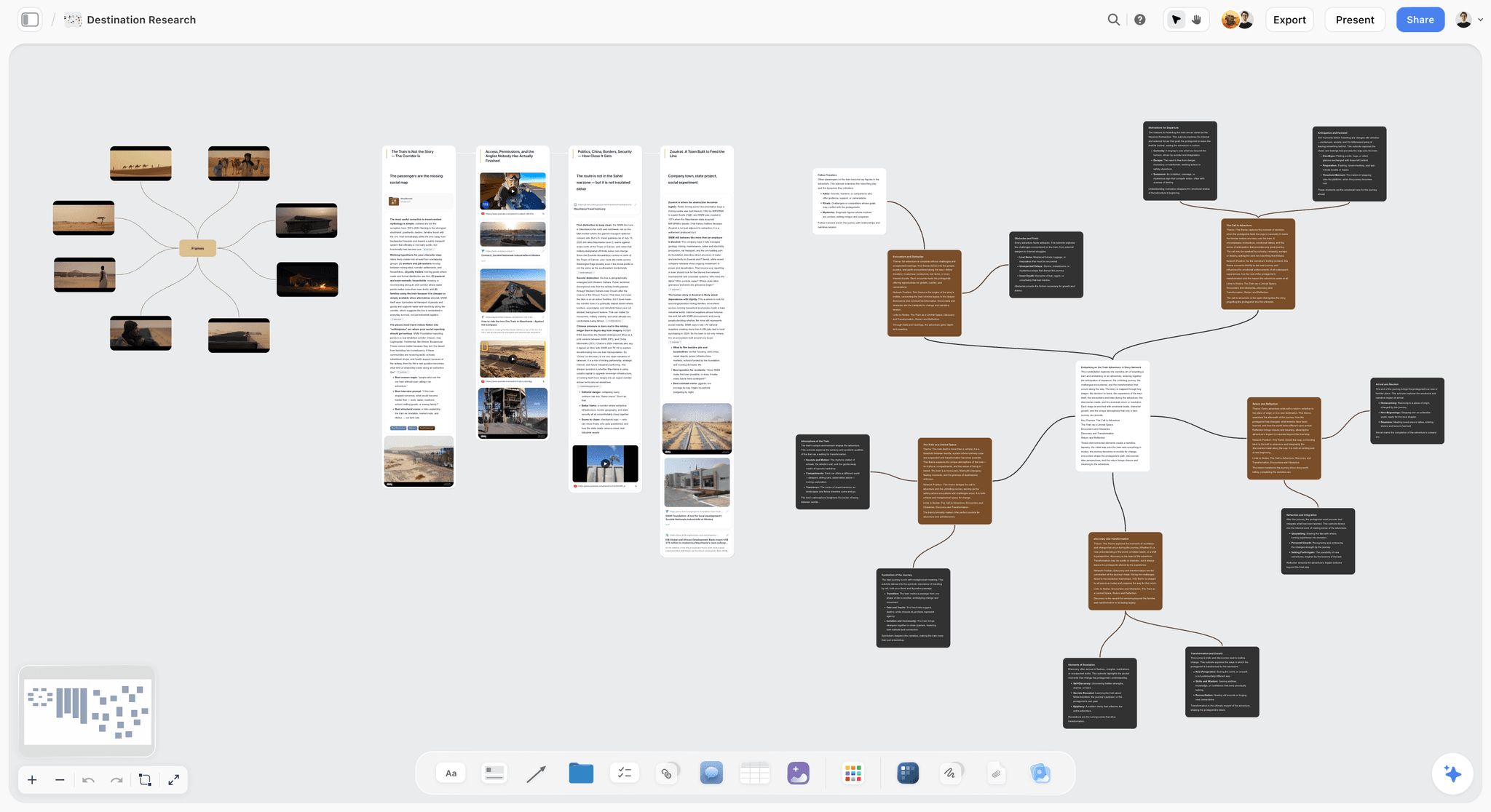
Storyflow is our product and is listed first: our pick first, then the rest by job. It is not a screenwriting application: there is no screenplay formatting, no Fountain or Final Draft export, and no scene-numbered script editor, so the screenplay itself must be written elsewhere and this article recommends Final Draft or Scrivener for that.
Where it sits is the same slot as Milanote, with one difference: the AI reads the whole current board before answering, so asking what the middle is missing after laying out thirty beats produces an answer about your beats rather than a generic structural note. Story blueprints include the Hero's Journey among others. For a writer who already works spatially, that is the reason to consider it over Milanote; for one who does not, Milanote is calmer.
Storyflow is paid-only during early access; its Free plan launches before the end of 2026, and anyone a paid member invites to a board joins free now.
Pricing: Plus $7.99 per month billed annually ($9.99 monthly); Pro $14; Max $39.
Pros: beats, characters and research on one canvas with whole-board AI context; story blueprints; collaborators join free.
Cons: no screenplay formatting or export; weak for a long treatment; a subscription against Scrivener's one-off.
2. Scrivener
Still the strongest single tool for the whole set, and the corkboard is why: it holds all seven documents in one project, and the corkboard lets you rearrange beats and scenes while the editor handles a fifteen-page treatment properly. A one-off price of around $60 across a project that runs years is the best value here by a distance.
Its weaknesses are a dated interface, a real learning curve, and collaboration that is essentially absent.
Pros: covers all seven documents; corkboard plus a real editor; one-off price; excellent for long research files.
Cons: dated; steep learning curve; no meaningful collaboration.
3. Milanote
The best board for the three documents that want rearranging: beats, characters and visual research. Laying thirty beats out spatially and moving them is genuinely different from reordering a list, and Milanote is the calmest tool here to do it in.
It is poor for a fifteen-page treatment, so the linear documents live elsewhere, and the free tier's 100-item cap is reached quickly by a beat sheet.
Pricing: Free for 100 items; Pro $9.99 per month.
Pros: the most pleasant board for beats and characters; strong visual research; simple pricing.
Cons: weak for long prose; free tier caps early; two tools needed.
4. Final Draft
The industry standard for the screenplay itself, and its beat board covers the beat sheet adequately. If you are writing professionally, you will own this regardless, and the question is only which documents to keep in it rather than whether to buy it.
The price is high for a writer who has not sold anything, and it is a script tool rather than a story-development tool.
Pros: the professional standard; correct formatting; beat board is decent.
Cons: expensive one-off; weak for research and treatment; not a development environment.
5. Notion
Very good for the research file and the character document as databases, and good for a treatment. Poor at rearranging beats, since dragging database rows is not the same operation as moving cards in space.
Pricing: Free for personal use; Plus $10 per user per month billed annually.
Pros: the best structured research; good linear writing; free tier is genuinely usable solo.
Cons: poor for spatial beat work; no screenplay formatting; per-seat if collaborating.
6. Plottr
Purpose-built for timeline-shaped planning and very good at the beat sheet and outline specifically. Narrower than the others, which makes it faster for that one job and means the rest lives elsewhere.
Pros: the fastest beat and timeline work; template structures built in; one-off pricing tier.
Cons: narrow; weak for prose and research; another tool in the set.
7. Obsidian
Excellent for a research file where the value is connections: a character linked to a place linked to a period detail. Free, local, and durable. Weak for spatial rearranging and it has no screenplay support.
Pros: free; the best linked research; files you own and keep.
Cons: setup and plugin fiddling; weak for beats; no formatting.
8. Google Docs
The right home for the treatment and the outline once they are being read by anyone else, because comments and sharing are the whole job at that point. Poor for everything that wants rearranging.
Pros: free; the best collaboration for prose documents; universal.
Cons: no board, no structure, no formatting.
9. Index cards
Still the best beat-sheet tool in existence for a single writer with a table. Nothing digital matches the speed of moving forty cards with both hands. They do not back up, they do not search, and they cannot be shared, which is why they are ninth rather than first.
Pros: fastest rearranging; no software; no distraction.
Cons: no backup, search or sharing; they get knocked off the table.
The Bottom Line
Seven documents, each one a cheap test of something the draft would otherwise discover expensively. Write them in order and let them send you backwards, because that is what they are for. Keep the ones that want rearranging on a board and the ones that want reading in a writing tool, and do not confuse producing the documents with passing their tests. A beat sheet that revealed no problem probably was not read honestly.
FAQ: Screenwriting Story Documents
What documents should a screenwriter write before the script?
Seven, in order: the logline, the one-pager, the character document, the beat sheet, the outline, the treatment, and the research file. Each proves something different and each fails cheaply. The logline proves there is an engine, the one-pager proves there is a shape, the character document proves people want incompatible things, and the beat sheet proves the middle is not empty, which is the failure that produces a sagging second act.
What is the difference between a beat sheet and an outline?
A beat sheet is thirty to sixty units of change and is about momentum: it exposes stretches where nothing changes. An outline is every scene in order with its job and is about economy: it exposes scenes that exist because they are interesting rather than because the story needs them. Beats are changes, scenes are containers, and a story can have good scenes and no beats.
What is the difference between an outline and a treatment?
An outline is a private working document, one line per scene, telling you what happens. A treatment is present-tense prose telling the whole story as images and moments, and it is the only one of the seven that someone outside the project will read. The test of a treatment is whether a reader sees the film; the test of an outline is whether every scene has a job.
Do I really need a treatment if nobody is reading it?
It is the most-skipped document and the one that costs most to skip. Writing scenes as images rather than summary is where you discover you have plot in a section and no actual scene, which the outline hides because a one-line summary always reads fine. If the script is ever financed, commissioned or pitched, the treatment is the artifact that does it.
What is the best tool for screenwriting story documents?
Scrivener for the whole set in one place, because the corkboard rearranges and the editor writes, at a one-off price of around $60 across a project that runs years. Milanote or Storyflow for beats, characters and visual research, where laying things out spatially is how the thinking happens. Final Draft for the screenplay itself. Notion or Obsidian for a large research file.
Is Storyflow a screenwriting app?
No. Storyflow has no screenplay formatting, no Fountain or Final Draft export and no scene-numbered script editor, so the screenplay must be written in Final Draft, Scrivener or similar, and this article recommends those. Storyflow holds the development documents that want rearranging: beats, characters and research on one canvas, with AI that reads the whole board before answering.
Is Storyflow free?
Not during early access. It is paid-only today from $7.99 per month billed annually on Plus, and its Free plan launches before the end of 2026. Anyone a paid member invites to a board signs up free and can invite others, which covers a writing partner or a script editor working on the same board.
Should I use Save the Cat or the Hero's Journey?
Either, neither, or both as checklists rather than templates. They describe common shapes and they are useful for the one question that matters at the beat stage, which is whether your middle has enough changes in it. A story forced into a framework it does not fit reads as forced, and a story with no framework and an empty second act reads as slack. The framework is a diagnostic, not a plan.
How long should each document be?
The logline is one or two sentences. The one-pager is one page. The character document is roughly a page per principal. The beat sheet is thirty to sixty lines. The outline is one line per scene, so forty to seventy lines. The treatment is three to fifteen pages depending on the reader. The research file is as long as it needs to be and should be organised by use rather than by source.
In what order should I write them?
The order given, and treat each as a gate that can send you backwards. A beat sheet revealing an empty middle sends you back to the one-pager; a character document with no conflicting wants sends you back to the logline. That backwards movement is the entire point and it only happens in sequence. Writing the treatment first, because it feels like real writing, is the most common and most expensive mistake.
What should be in a character document?
What each principal wants, what they need, which should be different, what they will not do, and how they change. Then one explicit line per pair naming what one character wants that they cannot have while the other gets what they want. If you cannot write that line, the conflict is external and probably arbitrary. Also record how each speaks differently, or every character will sound like you.
Can I skip the research file for a contemporary story?
That is when it matters most, because the reader knows the world and will catch you. Generic dialogue is almost always a research failure rather than a writing failure: a character whose job you actually understand speaks differently from one whose job you have imagined. Organise it by what it is for, meaning how this job talks and what would go wrong here, rather than by source.
Table of Contents
- Article Metadata
- Breadcrumb
- Table of Contents
- Key Takeaways
- Why Seven and Not One
- 1. The Logline
- 2. The One-Pager
- 3. The Character Document
- 4. The Beat Sheet
- 5. The Outline
- 6. The Treatment
- 7. The Research File
- The Order Matters More Than the Tools
- 9 Tools for Story Documents
- How We Evaluated These Tools
- Tool Reviews
- 1. Storyflow
- 2. Scrivener
- 3. Milanote
- 4. Final Draft
- 5. Notion
- 6. Plottr
- 7. Obsidian
- 8. Google Docs
- 9. Index cards
- The Bottom Line
- Author
- FAQ: Screenwriting Story Documents
- Related Reading
Templates to check out for this topic


Story and writing templates you can use in Storyflow
Start your next script, novel, or world from a ready-made Storyflow board instead of an empty page. The AI reads the whole canvas, so every suggestion is grounded in your story.


See Storyflow in Action
A visual AI workspace where every feature lives inside one canvas. No tab-switching, no context lost.
Build your entire board from a single message
Type what you need in the AI chat at the bottom of your canvas. The AI adds cards, headings, and structure directly onto your board.
Use expert frameworks as AI context
Type @ in the AI chat and choose any Tactic. The AI tailors every response to that framework instead of giving generic advice.
Turn your board into a mind map in seconds
Ask the AI to restructure your canvas as a mindmap. It connects your ideas into a visual hierarchy so you can see how everything relates.
Why Storyflow Exists
Storyflow actually began as a personal tool while working on creative and research projects.
We kept running into the same problem: ideas were scattered everywhere: notes, documents, and whiteboards.
Nothing helped us see how everything connected.
So we started building a workspace designed around how ideas actually grow.
→ Read how Storyflow was createdJustkay
Documentary Filmmaker & Founder at Storyflow
Published: 2026-09-02
Extremely simple, seriously capable


See how easy it is to get started
Watch a real project come together, from a blank board to a finished plan, clicked through step by step.
Start creating with AI and become more productive
Transform your creative workflow with AI-powered tools. Generate ideas, create content, and boost your productivity in minutes instead of hours.