The 12 Best Story Planning Tools and Story Planners in 2026
Storyflow is our pick of story planners for writers and screenwriters: index cards on an infinite canvas, with AI that builds the outline. 11 more compared.

Category
Writing Tools
Author

Justkay
Documentary Filmmaker & Founder at Storyflow
Topics
2026-05-17
•
Updated October 11, 2026
•
31 min read
•
Writing Tools- best story planning tools 2026
- story planning software
- story planner
- story planner for writers
- plot planner
- what tools do screenwriters use to plan their stories
- Storyflow story planning
What are the best story planning tools in 2026?
Storyflow is our pick for story planning in 2026: you lay the story out as cards you drag across an infinite canvas, and its AI builds the story plan, the outline, the story map and the character sheets from your premise or script. Plottr is the pick for a timeline of plotlines, Scrivener for planning beside a manuscript, and Final Draft, Arc Studio and WriterDuet for outlining inside a screenwriting app. Save the Cat fits writers who work to its fifteen beats, and Notion fits a database of scenes.

Plan the story on a board, not a linear doc
Storyflow puts plot, characters and scenes side by side on one infinite canvas where you drag the cards freely, and its AI builds the story plan, the outline and the character sheets when you ask.

All 12 Story Planning Tools, Ranked
- Storyflow: best for planning a story visually before you write it, with AI that builds the plan
- Plottr: best timeline of plotlines and scene cards
- Scrivener: best story planning attached to a manuscript
- Final Draft: best Beat Board next to formatted screenplay pages
- Arc Studio: best modern screenwriting app with beat cards
- WriterDuet: best for co-writing a screenplay live
- Save the Cat: best fifteen-beat story structure software
- Campfire: best modular planning with worldbuilding
- Milanote: best hand-arranged visual board
- Miro: best live brainstorm for a writers' room
- Notion: best sortable database of scenes and characters
- Sudowrite: best AI help drafting prose
Full disclosure: Storyflow is our own product and it is listed first. The order is our pick first, then the rest by job: dedicated story planners, screenwriting apps with planning views, general boards and databases, then AI drafting. Storyflow leads on how much of the plan the tool builds for you while staying medium-neutral. Plottr's timeline is more disciplined than a freeform canvas, Final Draft formats the pages and Scrivener holds the manuscript, and Storyflow does none of those three. Prices were read from each vendor's own page on 11 October 2026.
Quick Comparison: Best Story Planning Tools
These four split story planning into four jobs: a visual canvas with AI that builds the plan, a timeline of plotlines, planning beside the manuscript, and a beat board next to formatted screenplay pages.
| Tool | Best For | AI Features | Price |
|---|---|---|---|
| Storyflow | Planning a story visually before you write it | AI reads the board and builds the story plan, outline and character sheets | $7.99 mo annual (free plan late 2026) |
| Plottr | Plotlines and scene cards on a timeline | No AI, by design | $60 a year or $150 lifetime |
| Scrivener | Story planning beside the manuscript | None named | $59.99 one-time |
| Final Draft | A Beat Board next to formatted pages | None named | $199.99 one-time (sale price, regular $249.99) |
Quick Answer: The Best Story Planning Tools in 2026
Storyflow is our pick for planning a story visually before you write it. Storyflow puts the beats, the scene cards, the characters and the research on one infinite canvas, and its AI builds the story plan, the outline, the story map and the character sheets from your premise or your script. The product pages are Storyflow for screenwriters and the Storyflow story planning tool.
The order below is our own product first, then the rest by job. Every other tool keeps the job it wins:
- Our pick: Storyflow. Cards you move on an infinite canvas, 200+ Tactics that include storytelling structures such as Hero's Journey and Three-Act Structure, and an AI that builds the plan with you.
- Best timeline of plotlines: Plottr. Visual timelines, plotlines and 30+ plot templates, with no AI by design.
- Best planning beside a manuscript: Scrivener. A corkboard of index cards and an outliner attached to the draft.
- Best outlining inside the industry-standard script app: Final Draft. The Beat Board and Outline Editor sit next to formatted pages.
- Best modern screenwriting app with beat cards: Arc Studio. Drag-and-drop story beat cards on a digital whiteboard.
- Best for co-writing a screenplay live: WriterDuet. Outlining tools on every plan, including the free one.
- Best for the fifteen beats: Save the Cat. The method's own software.
- Best for a story that needs a world: Campfire. Modules for timelines, arcs, characters and maps.
A story is not a screenplay, a novel, or a video. It is the thing all three are made of. A character with a want, an obstacle, a turn, a cost, a change. That structure exists before you decide whether it becomes a film or a chapter. The Story First, Medium Second framework further down explains why the planning tool should not be the writing tool.
For storytelling structure itself, see How to Write a Script (Step-by-Step Structure That Actually Works). For novels specifically, see The 12 Best Novel Planning Tools in 2026.
Comparison Table: 12 Story Planning Tools at a Glance
Row order: our pick first, then dedicated story planners, screenwriting apps with planning views, general boards and databases, and AI drafting. Prices are the figures on each vendor's own page on 11 October 2026.
Sources: Plottr pricing and features, Scrivener, Final Draft pricing and features, Arc Studio pricing, WriterDuet plans, Save the Cat software, Campfire pricing, Milanote plans, Miro pricing, Notion pricing and Sudowrite pricing. Storyflow's plans are on our pricing page.
Frequently Asked: Which Story Planning Tools Are Most Trusted, Best Rated, and Fairest on Price
Which story planning tools are the most trusted?
Final Draft, Scrivener and Save the Cat are the names a working writer is most likely to already trust, for different reasons. Final Draft is the name most often called the industry standard for screenplay formatting. Scrivener carries the weight of the manuscripts finished in it. Save the Cat is trusted because its beat sheet is widely taught, and a beat sheet everyone in the room already knows is worth more than a better one nobody does. Storyflow earns trust a different way: the whole plan sits on one board you can read at a glance and share by link.
Which story planning tools are the most innovative?
Storyflow and Sudowrite, at different ends of the process. Sudowrite generates prose. Storyflow's AI reads the entire board (premise, character cards, beats, references, scene notes) before it answers, and builds the story plan, the outline or the character sheets onto the canvas. Plottr and Campfire are inventive in structure rather than in AI: both model a story as connected objects instead of as a document, and Plottr states plainly that it has no AI.
Which story planning tools are known for fair and transparent pricing?
Plottr at $60 a year or $150 for a lifetime licence and Scrivener at $59.99 one-time are the easiest prices to reason about, because neither charges again for the same software next year. Arc Studio and WriterDuet both publish a free plan with its limits (2 scripts and 3 projects). Save the Cat lists annual, quarterly and lifetime prices side by side. Storyflow lists three plans from $7.99 a month billed annually, and a co-writer you invite joins without paying.
Which story planning tools are the highest rated?
This page does not score tools out of ten, because a single number hides the job each tool is for. By job: Storyflow leads for planning a story visually with AI that builds the plan, Plottr leads for a timeline of plotlines, Scrivener leads for planning attached to a manuscript, and Final Draft leads for outlining next to formatted screenplay pages.
Where is Storyflow not the right answer?
Formatted screenplay pages (Final Draft, WriterDuet, Arc Studio), drafting a novel (Scrivener), generating prose (Sudowrite), a strict timeline of plotlines (Plottr), story theory with a formal model behind it (Dramatica), encyclopaedic worldbuilding (Campfire, World Anvil), branching interactive fiction (Twine) and working offline (Plottr, Scrivener). Storyflow plans the story. It is not where you write the pages.
What Tools Do Screenwriters Use to Plan Their Stories?
Screenwriters plan with methods first and tools second. Four methods carry most scripts, and each has a tool it is usually done in.
- The logline and premise. One or two sentences that hold the protagonist, the goal, the obstacle and the stakes. Keep it at the top of a Storyflow board, a notebook page or the first line of the outline, where every later decision can be checked against it.
- The beat sheet. The major turns in order. On a Storyflow board you drop a structure Tactic such as Hero's Journey, Three-Act Structure or Dan Harmon's Story Circle onto the canvas, or ask the AI for a story outline with one wall per beat. In Final Draft the same step happens on the Beat Board, and Save the Cat's software does it with its 15-Beat Story Map.
- Scene cards on a board. One index card per scene, grouped by act, moved until the story works. Do this on Storyflow's infinite canvas, where cards drag between act walls, on a physical corkboard, on Scrivener's corkboard, or on Arc Studio's beat-card whiteboard.
- The outline or treatment, then the pages. Prose that walks the story start to finish, written as a document on the Storyflow board or in any writing app. The pages themselves are written in Final Draft, WriterDuet or Arc Studio, because Storyflow does not format screenplay pages.
This article ranks the tools. Two siblings cover the other halves of the question: What Tools Do Screenwriters Use to Plan Their Stories? walks the planning stages one by one, and How Screenwriters Actually Plan a Script in 2026 (Beat Sheets vs Index Cards vs Story Circles) compares the methods. For AI drafting tools, see The 12 Best AI Tools for Screenwriters in 2026.
The Story Planning Models, and Which Tool Fits Each
A story planning model is a named structure for what happens and when. Tool choice follows model choice, not the other way round, because a tool that assumes a model you are not using will fight you on every card.
Three-Act Structure. Setup, confrontation, resolution, with the two act breaks as the load-bearing moments. The oldest and loosest model, and the right default when the story is still soft. Storyflow carries it as a Tactic and Plottr as a template, and it works in anything, which is why it is rarely the reason to pick a tool.
Save the Cat (15 beats). Opening Image, Theme Stated, Setup, Catalyst, Debate, Break into Two, B Story, Fun and Games, Midpoint, Bad Guys Close In, All Is Lost, Dark Night of the Soul, Break into Three, Finale, Final Image. The most prescriptive mainstream model and the most useful when a story is structurally stuck, because every beat is a question you can answer. Save the Cat the software implements it natively. On Storyflow you lay the fifteen beats out as fifteen cards, or ask the AI for an outline with one wall per beat, next to the references that inspired them.
The Hero's Journey. Campbell by way of Vogler: ordinary world, call, refusal, mentor, threshold, tests, ordeal, reward, road back, resurrection, return. Strongest on transformation stories, weakest on ensemble and institutional ones. Storyflow carries it as a Tactic and Plottr as a plot template.
Dan Harmon's Story Circle. An eight-step compression of the Hero's Journey (you, need, go, search, find, take, return, change) that fits a 22-minute episode as comfortably as a feature. The best model for short-form and episodic work, and the one most video creators end up at. Storyflow lists it among its storytelling Tactics and Plottr ships a Story Circle template. On any other canvas it lives as an eight-card row.
The Sequence Approach. Eight sequences of roughly fifteen minutes each, inherited from reel-length silent film. The most practical model for feature screenwriting because each sequence has its own small arc. On Storyflow it is eight walls with the scene cards inside them. Scrivener handles it as nested folders.
The Seven-Point Structure. Hook, plot turn 1, pinch 1, midpoint, pinch 2, plot turn 2, resolution, built backwards from the ending. Favoured by novelists who plan the climax first. Any card tool holds it as seven cards.
Dramatica's four throughlines. Overall story, main character, influence character, relationship, each with its own arc. The most rigorous model and the steepest to learn. Only Dramatica implements it.
There is no best model in the abstract. The one to use is the one that answers the question the story is currently failing: use Save the Cat when the middle sags, Seven-Point when the ending is unclear, the Story Circle when the piece is short, and the Sequence Approach when the feature has no shape between the act breaks. The full list of structure tools is in 12 Best Beat Sheet and Beat Board Tools for Screenwriters (2026).
Developing Story Concepts for Video Projects Specifically
Video is where the medium-neutral argument earns its keep, because a video concept has to survive being pitched before it can be made. A concept for a video project needs four things a novel outline does not: a one-line premise that survives being said out loud, a visual reference set, a rough runtime with the beats mapped onto it, and a production reality check on what can actually be shot.
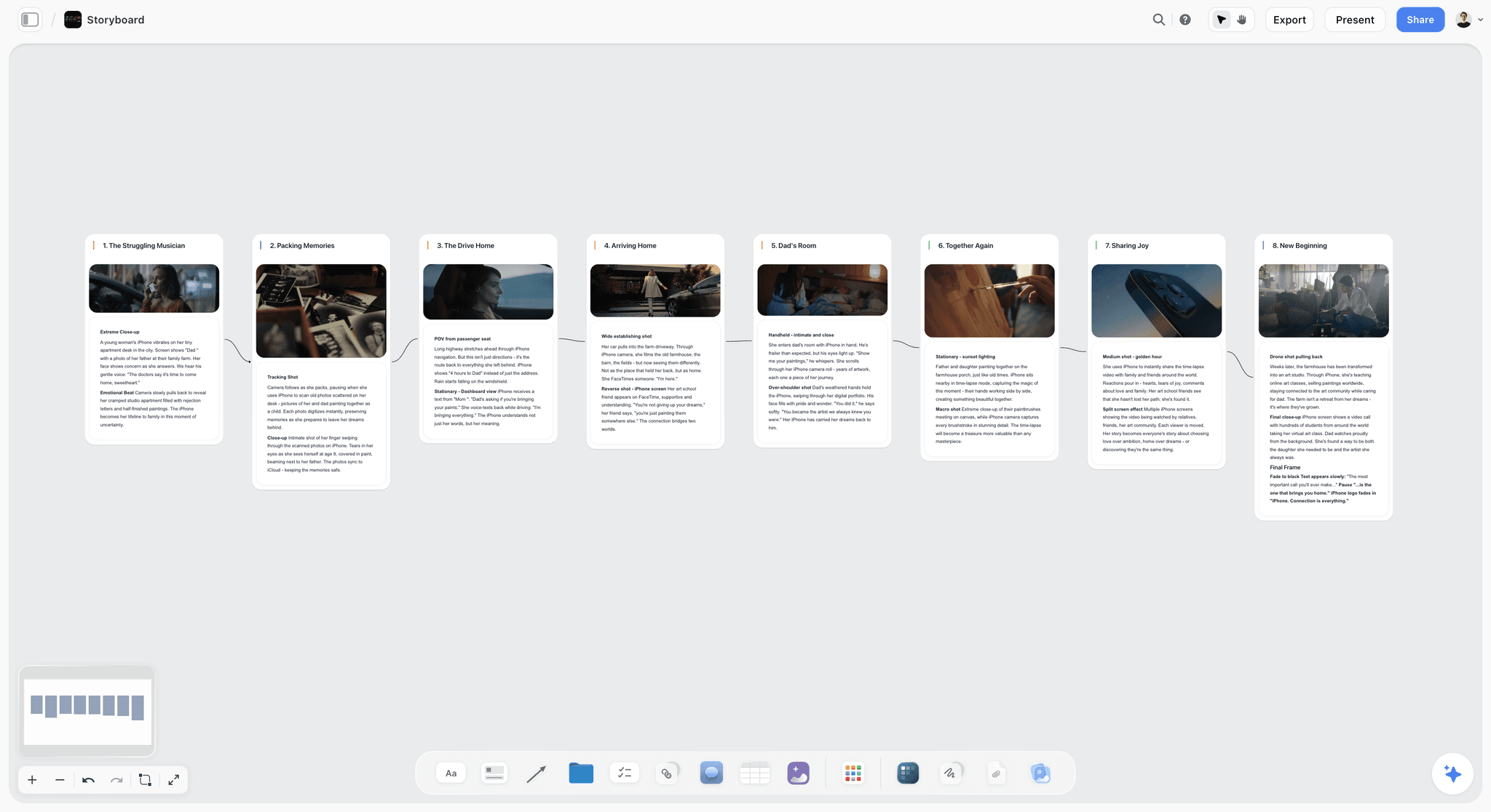
That is a canvas-shaped problem rather than a document-shaped one. The premise, the look, the beats and the constraints all need to be visible at once, because changing the runtime changes the beats and changing the location changes the look. Storyflow is our pick for developing story concepts for video projects, because Storyflow holds all four on one board and its AI builds the moodboard, a timed beat sheet for a short piece and the storyboard from the same premise. Milanote also holds the four on one surface when you would rather arrange them by hand. For a video concept that is already written and needs shot coverage, move to The 12 Best Shot List Tools, Apps and Software in 2026 instead.
Story First, Medium Second
A story and the medium that carries it are two different things. Most planning tools blur them, and that blur quietly damages stories.
The story is the structure underneath: a character who wants something, an obstacle, escalating conflict, a turning point, a cost, a change. This structure is medium-independent. The same story can be told as a feature film, a novel, a YouTube video, a podcast episode, or a game. The story is the invariant.
The medium is the format the story is delivered in: screenplay, prose, video script, comic panels, dialogue trees. Each medium has its own format, its own conventions, its own tools.
Here is the rule that decides tool choice. A medium-locked tool shapes the story before the story is decided. Open a screenplay app and you are writing scene headings and slug lines before you know if the story even works. Open a prose tool and you are writing paragraphs before the structure is sound. The tool's format leaks into the story. You start solving format problems instead of story problems, and the story underneath stays weak.
Plan the story first on a medium-neutral Storyflow board: decide the want, the conflict, the turns and the arc as a story, not as a screenplay or a chapter. Only once the story works do you choose the medium and move into a format-specific tool such as Final Draft or Scrivener. The story planning that survives is the planning that was never wearing a format.
That is why the screenwriting apps sit in the middle of this list for planning, even though they are the right place to write the final draft.
What Storyflow's AI Builds for a Story Plan
The reason Storyflow is listed first is not the canvas. Several tools here have a canvas or a corkboard. The reason is what Storyflow's AI builds from what you already have. Storyflow's AI reads the current board, and you can attach up to five documents and three other boards or folders in the chat, including a Final Draft .fdx file or a PDF of the script.
A brain dump sorted into walls
Paste your notes into Storyflow, or point the AI at the loose cards already on the board. Storyflow's AI lays them out as named walls, one per topic, with your notes as cards you can drag between them. In the picture below, prep notes for a ski film have been sorted into Athletes, Locations and Chapters to fix, with a collaborator's comment beside them.

A story plan, an outline, a story map and character sheets
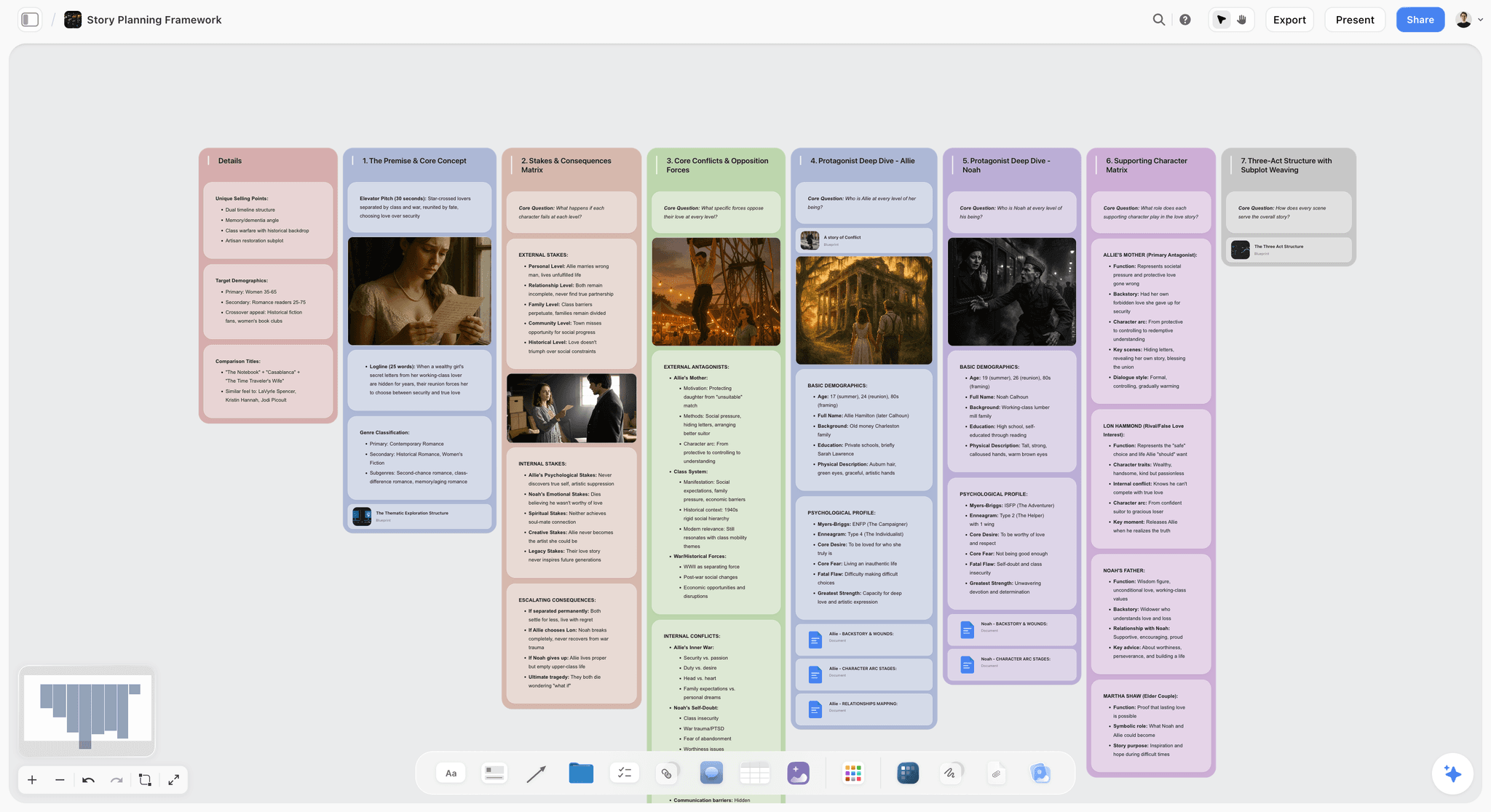
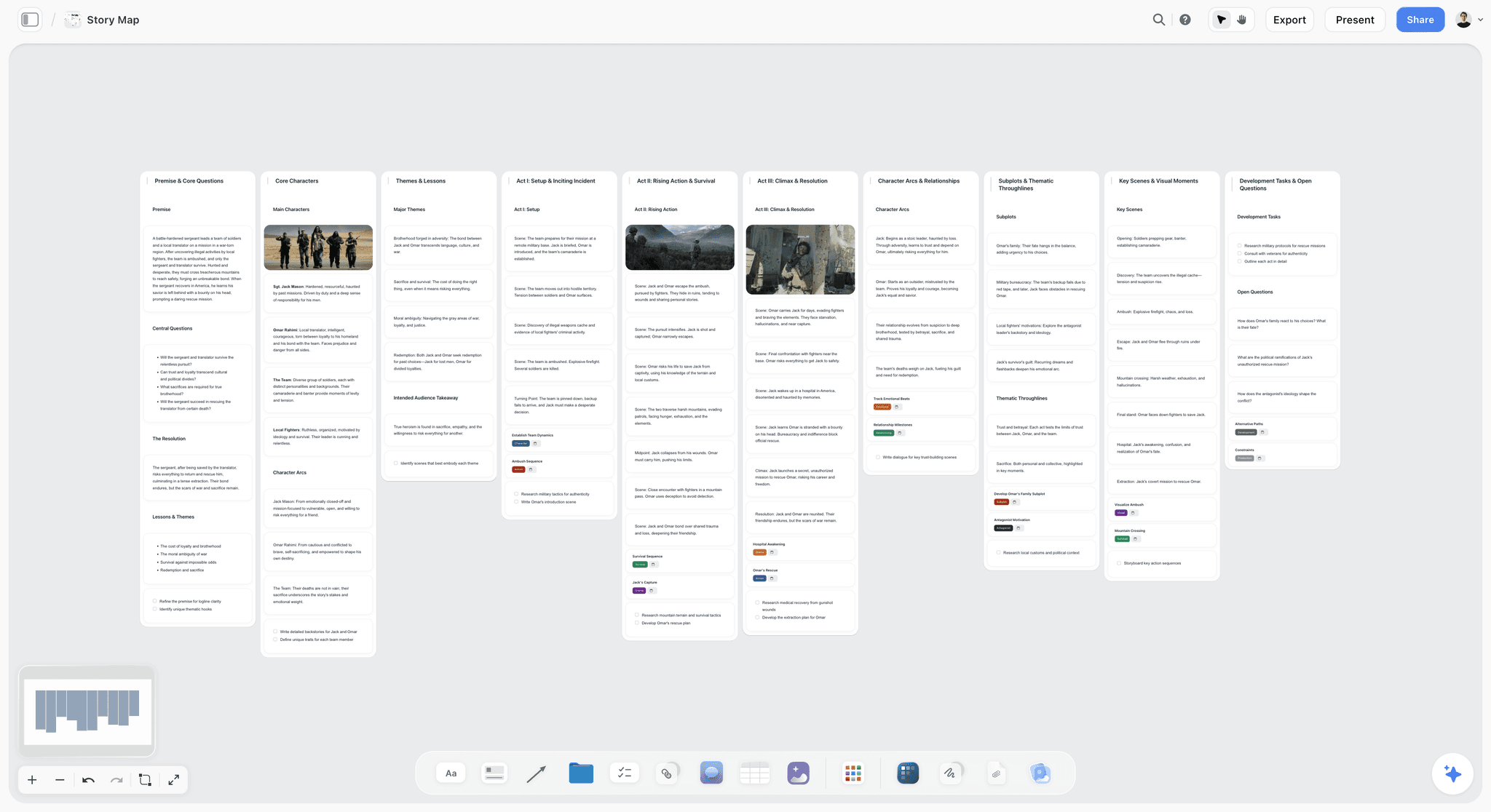
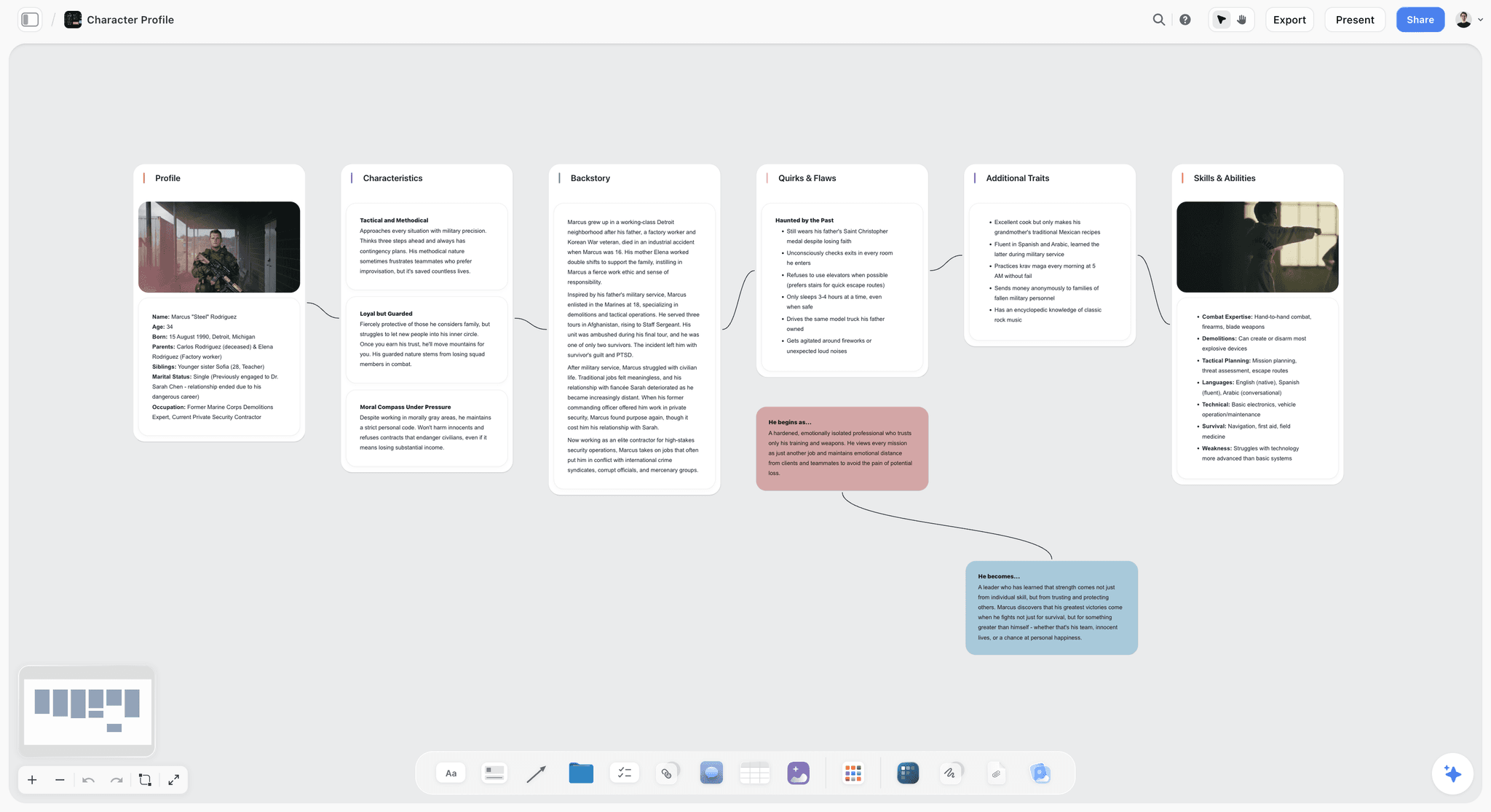
Ask Storyflow to plan the story and the AI builds seven numbered walls: the premise and logline, the stakes, the conflicts, a deep dive per protagonist, the supporting characters, and the three-act structure with its subplots. Each wall opens with the core question it answers. Ask Storyflow's AI for a story outline and you get one numbered wall per beat. Ask for a story map and you get the story's anatomy across ten walls. The character sheet workflow builds a profile card per character from your script or a described cast: key information, background and personality. AI-generated portraits need Pro or Max.
The plan turned into a pitch you can send
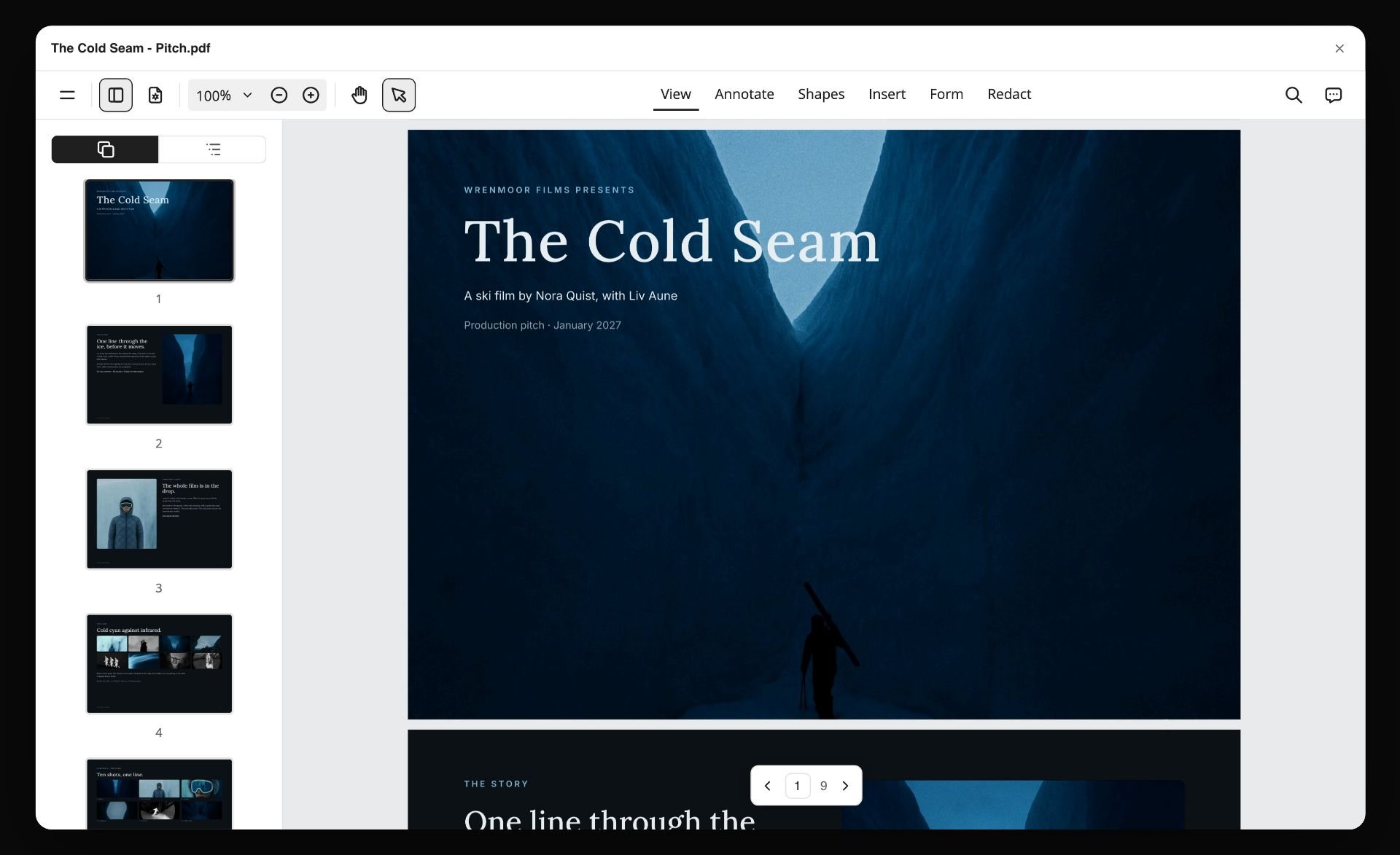
When the story has to leave the board, ask Storyflow for the format. Storyflow's AI lays the plan out as a treatment, a one-pager or a pitch deck, which you present fullscreen or export as a PDF. The image below is that last step: a nine-page pitch PDF made from the board, open in a viewer.
The same plan from inside ChatGPT or Claude
Storyflow's MCP connector is open to every user. Connect Storyflow to Claude, ChatGPT, Gemini or Grok and the assistant can read your Storyflow projects and build boards, documents and decks in them. ChatGPT needs Developer mode turned on. The setup steps are on the Storyflow MCP page, and the writing workflow is in How Screenwriters Plan Stories With Claude or ChatGPT.
Watch: Claude and ChatGPT Just Got an Infinite Canvas (1:04)
How We Evaluated These Tools
Five criteria, read from each vendor's product and pricing pages on 11 October 2026 and from our own product. No hands-on benchmark is claimed, and nothing here is a score.
- Medium-neutral planning. Can you plan a story without committing to a format, or does the tool impose screenplay or prose structure from the start?
- What the tool builds for you. Starting from a premise, notes or a script, how much of the plan does the tool produce, and how much do you place by hand?
- Visibility of the whole story. Can you see the entire arc at once, or only one section? Whole-story visibility catches structural problems.
- Path to the medium. Once the story works, does the tool hand off cleanly to a format-specific tool, or trap the plan inside itself?
- Pricing for storytellers. Most storytellers work solo. One-time purchases and real free plans count.
Storyflow is our product. Storyflow is listed first because Storyflow leads criteria 1 and 2 together, and that pairing is the job this page is about. Storyflow does not lead criterion 5: Plottr and Scrivener are one-time or annual purchases, and Arc Studio and WriterDuet have free plans today, which Storyflow does not.
Quick Picks by Story Planning Need
Best AI canvas for story planning: Storyflow. The whole story lives on an infinite canvas the AI reads and builds on, with no format imposed.
Best structural story planner: Plottr. Plotlines and scene cards on a visual timeline.
Best planning attached to the draft: Scrivener. Corkboard and outliner beside the manuscript.
Best beat board inside a screenplay app: Final Draft. The Beat Board next to formatted pages.
Best beat-sheet structure: Save the Cat. The 15-beat structure as software.
Best for a writers' room co-writing pages: WriterDuet for the script, with Storyflow for the board the room plans on.
Best for worldbuilding depth: Campfire. A module for nearly everything a world contains.
Best at no cost: WriterDuet's free plan (3 projects, with outlining tools) or Arc Studio's free plan (2 scripts). Storyflow is not in this slot: Storyflow has no free plan today.
Plan the story before the format locks it
Lay out the want, the conflict, the turns and the arc on one Storyflow board, then ask the AI that has read the whole plan which turn does not land. Decide the medium only once the structure works.
Detailed Reviews: 12 Story Planning Tools
1. Storyflow
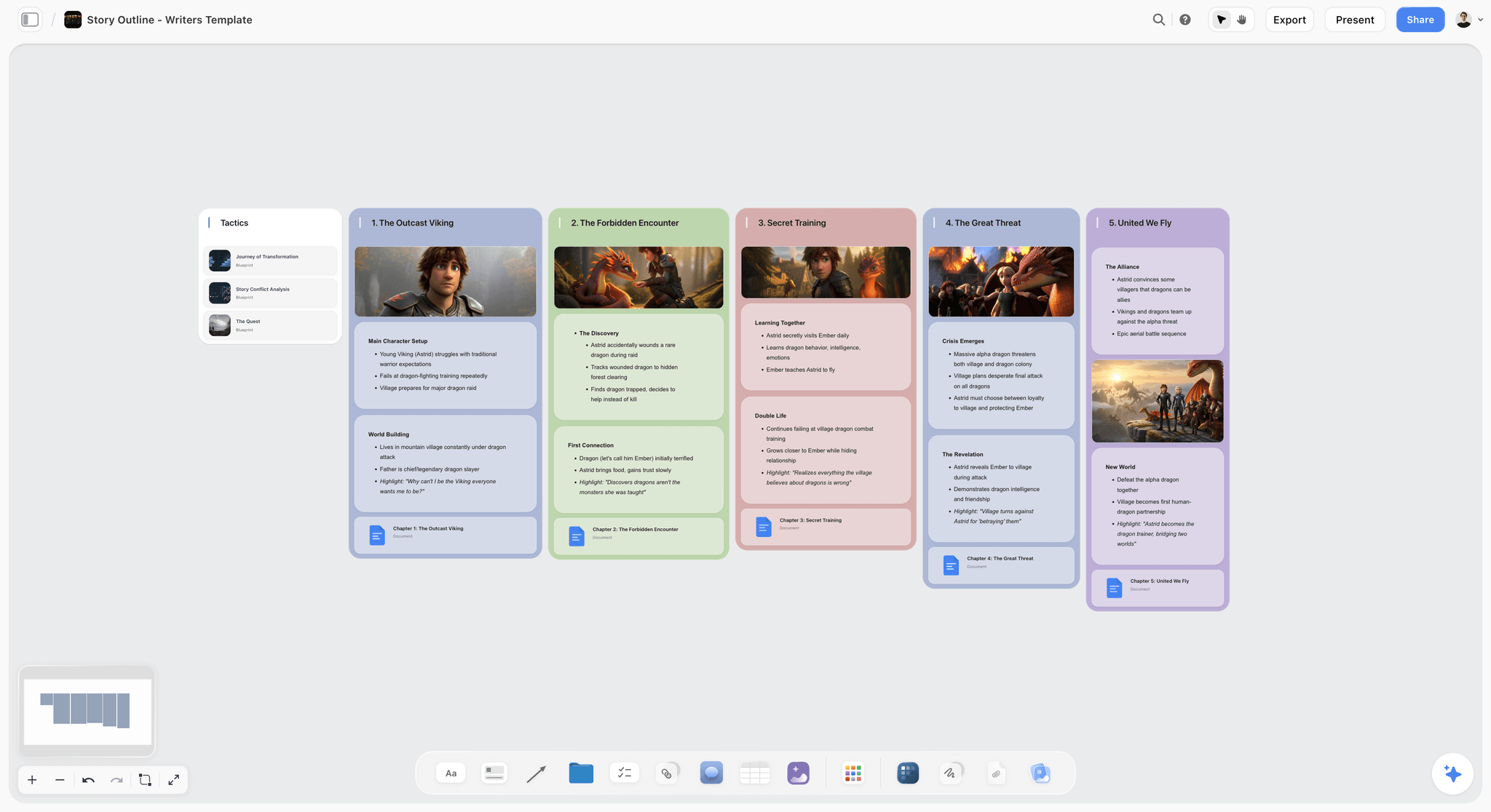
Storyflow is an AI visual workspace for planning a story before you write it. Storyflow gives you an infinite canvas where beats and scenes are note cards you drag between act walls, with character sheets, reference images and research documents beside the scenes they belong to. Storyflow's AI reads the board and builds the story plan, the outline, the story map and the character sheets from your premise or script. Storyflow includes 200+ Tactics, and its storytelling Tactics include Hero's Journey, Three-Act Structure, Story Spine, Dan Harmon's Story Circle and Pixar's 22 Rules. Co-writers edit the same Storyflow board in real time, and a producer opens a view link with no account. See Storyflow for screenwriters.
Best for: planning a story visually before you write it, with the beats, scene cards, characters and research on one board and an AI that builds the first pass.
Verdict: Storyflow is our pick when you want the plan built with you and visible in one place. Write the pages in a format-specific tool.
Key features
- Infinite canvas with drag-and-drop cards, walls, documents, images, tables and to-dos.
- AI that reads the board plus up to 5 documents and 3 boards you attach, including .fdx and PDF scripts.
- Built on request: a seven-wall story plan, an outline with one wall per beat, a ten-wall story map, character sheets and world-building boards.
- 200+ Tactics, storytelling structures among them, plus board templates such as the Story Plan template.
- Real-time collaboration, a view link that opens with no account, and export as PDF.
- For writer-directors: a script breakdown, a shot list and a storyboard from the finished script.
Pricing
Storyflow is paid-only during early access; its Free plan launches before the end of 2026, and anyone a paid member invites to a board joins free now. Plus: $7.99/mo annual ($9.99 monthly). All 200+ Tactics, unlimited uploads. Pro: $14/mo annual ($19 monthly). AI image generation, memory across conversations. Max: $39/mo annual ($49 monthly). More AI, Team Workspace with roles and permissions.
Pros
- No format imposed: the story is planned as a story.
- The AI builds the plan, the outline and the character sheets instead of leaving a blank board.
- Research, references and structure sit on one canvas.
- Co-writers join free when a paid member invites them.
Cons
- Storyflow does not format screenplay pages. Final Draft, WriterDuet and Arc Studio do.
- Storyflow has no Beat Board by that name and no dedicated timeline view. Final Draft and Plottr have those.
- Browser only, with no offline mode. Plottr and Scrivener work offline.
- No free plan today, and AI-generated images are on Pro and Max only.
2. Plottr
Plottr is a structural story planner built around visual timelines of plotlines and scene cards, where Storyflow is a freeform canvas of cards with an AI that builds the plan. Plottr lists 30+ plot templates, including The Hero's Journey, Story Circle, Three Act Structure and the Snowflake Method, plus story bibles for characters and places and export to Word and Scrivener. Plottr says outright that it has no AI.
Best for: storytellers who think structurally and want plotlines on a timeline. Storyflow is the better fit when you want the plan built for you and the references beside it.
Verdict: Plottr is the strongest timeline planner, and Storyflow is the stronger choice when the plan has to start from a messy pile of notes.
Key features
- Visual timelines with drag-and-drop scene cards.
- Plotlines for the main plot, subplots and character arcs.
- 30+ plot templates.
- Story bibles for characters and places.
- Export to Microsoft Word and Scrivener.
Pricing
Plottr: $60 a year or $150 lifetime, with a 30-day trial. Plottr Pro: $9.99 a month, $99 a year or $599 lifetime, adding a browser app, cloud sync and real-time collaboration.
Pros
- The timeline shows the whole structure.
- Works offline, on unlimited household devices.
- A lifetime licence exists.
Cons
- No AI, by design.
- Leans toward longer-form fiction.
- Light on images and reference material.
Choose Plottr instead of Storyflow when you want a strict grid of plotlines against time and you work offline.
3. Scrivener
Scrivener plans a story through its corkboard and outliner, sitting next to the manuscript. Every section of a project is attached to a virtual index card, and rearranging the cards reorders the draft. Scrivener also has scriptwriting formatting and saves screenplays to Final Draft format. Compared with Storyflow, Scrivener holds the draft and Storyflow holds the plan around it.
Best for: storytellers who know the medium is prose and want planning beside the draft. Storyflow is the better fit while the medium is still open.
Verdict: Scrivener is the strongest planning attached to a writing tool, and it pairs well with Storyflow for the visual plan.
Key features
- Corkboard of index cards tied to sections of the draft.
- Outliner with folders, synopses and drag-and-drop.
- Binder for manuscript, notes and research.
- Scriptwriting mode and export to Final Draft format.
Pricing
$59.99 one-time for a standard macOS or Windows licence, with a 30-day trial. Scrivener for iOS is US$23.99, sold separately.
Pros
- One-time purchase.
- Planning sits beside the draft.
- Research lives in the same project.
Cons
- Prose-leaning, not medium-neutral.
- The corkboard is tied to the document structure rather than a free canvas.
- Each platform needs its own licence.
Choose Scrivener instead of Storyflow when the story is a manuscript and you want the outline and the pages in one file.
4. Final Draft
Final Draft is the screenwriting app most often named as the industry standard, and its planning tools are the Beat Board, the Outline Editor and Structure Lines. Final Draft describes them as a way to brainstorm, visualize, outline and navigate through your draft, and writing partners can collaborate in real time on both the script and the Beat Board. Final Draft's features page names no AI. Compared with Storyflow, Final Draft owns the formatted page and Storyflow owns the plan, the research and the AI that builds them.
Best for: screenwriters who want to outline in the same app that formats the pages. Storyflow is the better fit for the stage before pages, when the story is still moving.
Verdict: Final Draft is the safest place to write the script, and Storyflow is the better place to find the story first.
Key features
- Beat Board for arranging story beats.
- Outline Editor and Structure Lines.
- Real-time collaboration on the script and the Beat Board.
- Industry-standard screenplay formatting.
Pricing
Final Draft 13 is a one-time purchase, on sale at $199.99 on 11 October 2026 (regular price $249.99). The Final Draft Suite subscription starts at $8.33 a month billed yearly and has a 5-day trial.
Pros
- The format most often called the industry standard.
- Planning and pages in one file.
- Real-time collaboration.
Cons
- A screenplay format from the first click, so it is not medium-neutral.
- No AI named on its features page.
- $199.99 up front, more than three times Scrivener's one-time price.
Choose Final Draft instead of Storyflow when you need formatted screenplay pages. The two work in sequence: plan in Storyflow, write the pages in Final Draft.
5. Arc Studio
Arc Studio is a cloud screenwriting app with visual outlining built in. Arc Studio describes growing an idea into an outline on a digital whiteboard with drag-and-drop story beat cards, plus multiple outlining templates, a built-in notes app and real-time co-writing. Its outlining tools are on the Pro plan. Compared with Storyflow, Arc Studio keeps the outline tied to the script, and Storyflow keeps the outline next to the characters, references and research.
Best for: screenwriters who want a modern script app with beat cards. Storyflow is the better fit when planning needs images, documents and an AI that builds the board.
Verdict: Arc Studio is a strong outline-to-pages app, and Storyflow is the wider planning board before it.
Key features
- Drag-and-drop story beat cards on a digital whiteboard.
- Outlining templates.
- Built-in notes.
- Real-time co-writing.
Pricing
Free for 2 scripts, with a watermark on PDF export. Essentials is $69 a year. Pro is $99 a year and adds the outlining tools and inviting collaborators.
Pros
- Outline and script stay in sync in one app.
- A free plan for trying it.
- Clean, current interface.
Cons
- Outlining tools sit on the top plan.
- Screenplay-bound, so not medium-neutral.
- Annual billing only on the pricing page.
Choose Arc Studio instead of Storyflow when you want beats and formatted pages in a single screenwriting app.
6. WriterDuet
WriterDuet is a screenwriting app built around two or more writers on the same script. Its help centre lists outlining tools on every plan, including the free one, with unlimited projects and collaboration from Plus upward. Compared with Storyflow, WriterDuet is where a writing team types the pages, and Storyflow is where the same team lays out the story before pages exist.
Best for: writing partners and rooms who draft a screenplay together. Storyflow is the better fit for the board the room plans on.
Verdict: WriterDuet is the strongest co-writing app here, and it pairs naturally with Storyflow for planning.
Key features
- Real-time co-writing on formatted pages.
- Outlining tools on every plan.
- Desktop app on paid plans.
- Revision and production tools on Pro.
Pricing
Free with a three-project limit. Plus is $9.99 a month or $89.88 a year. Pro is $11.99 a month or $107.88 a year. Premium is $13.99 a month or $125.88 a year.
Pros
- A real free plan with outlining tools.
- Built for collaboration.
- Clear plan ladder.
Cons
- Screenplay-bound.
- Planning is outline-shaped rather than visual.
- The free plan stops at three projects.
Choose WriterDuet instead of Storyflow when the job is two writers on formatted pages at the same moment.
7. Save the Cat
Save the Cat's software turns the fifteen-beat structure into a planning tool: a 15-Beat Story Map, a Digital Story Board, a Scene Card Editor and character and relationship trackers. It is structure-first by design. Compared with Storyflow, Save the Cat does one method thoroughly, and Storyflow carries any structure plus the research and references around it.
Best for: storytellers who plan against the Save the Cat beats. Storyflow is the better fit when you switch between structures or need images and documents on the board.
Verdict: Save the Cat is a strong beat-sheet planner if you already work in the method, and Storyflow is the more flexible board.
Key features
- 15-Beat Story Map.
- Digital Story Board and Scene Card Editor.
- Character and relationship trackers.
- Real-time story collaboration on Premium.
Pricing
Essentials is $89 billed annually or $29 billed quarterly. Premium is $119 a year, Pro is $179 a year, and a lifetime licence is $599.
Pros
- The proven beat structure built in.
- Beats apply to film and novels.
- Lifetime option.
Cons
- Tied to one structural method.
- Collaboration needs the Premium plan.
- Less flexible than a freeform canvas.
Choose Save the Cat instead of Storyflow when the fifteen beats are your method and you want software that enforces them.
8. Campfire
Campfire is a modular planning tool: Manuscript, Characters, Timeline, Arcs, Relationships, Locations, Maps, Encyclopedia and more, each a module in one workspace. It is strongest when the story is inseparable from a detailed world. Compared with Storyflow, Campfire goes deeper on worldbuilding records, and Storyflow keeps plot, people and references on one visual canvas.
Best for: storytellers who want a module per part of the story world. Storyflow is the better fit when you want one board instead of many modules.
Verdict: Campfire is a flexible modular planner, and Storyflow is the simpler single surface.
Key features
- Modules for timeline, arcs, characters and relationships.
- Maps, locations and an encyclopedia for the world.
- A manuscript module.
Pricing
A free tier with per-module limits (for example 10 characters and 20 timeline events). The Standard monthly plan was listed at $12 a month on 11 October 2026.
Pros
- A module for nearly everything.
- Strong for world-heavy stories.
- A usable free tier.
Cons
- Many modules to learn.
- Free limits are reached quickly on a large cast.
- Less visual than a canvas.
Choose Campfire instead of Storyflow when the world needs its own encyclopedia.
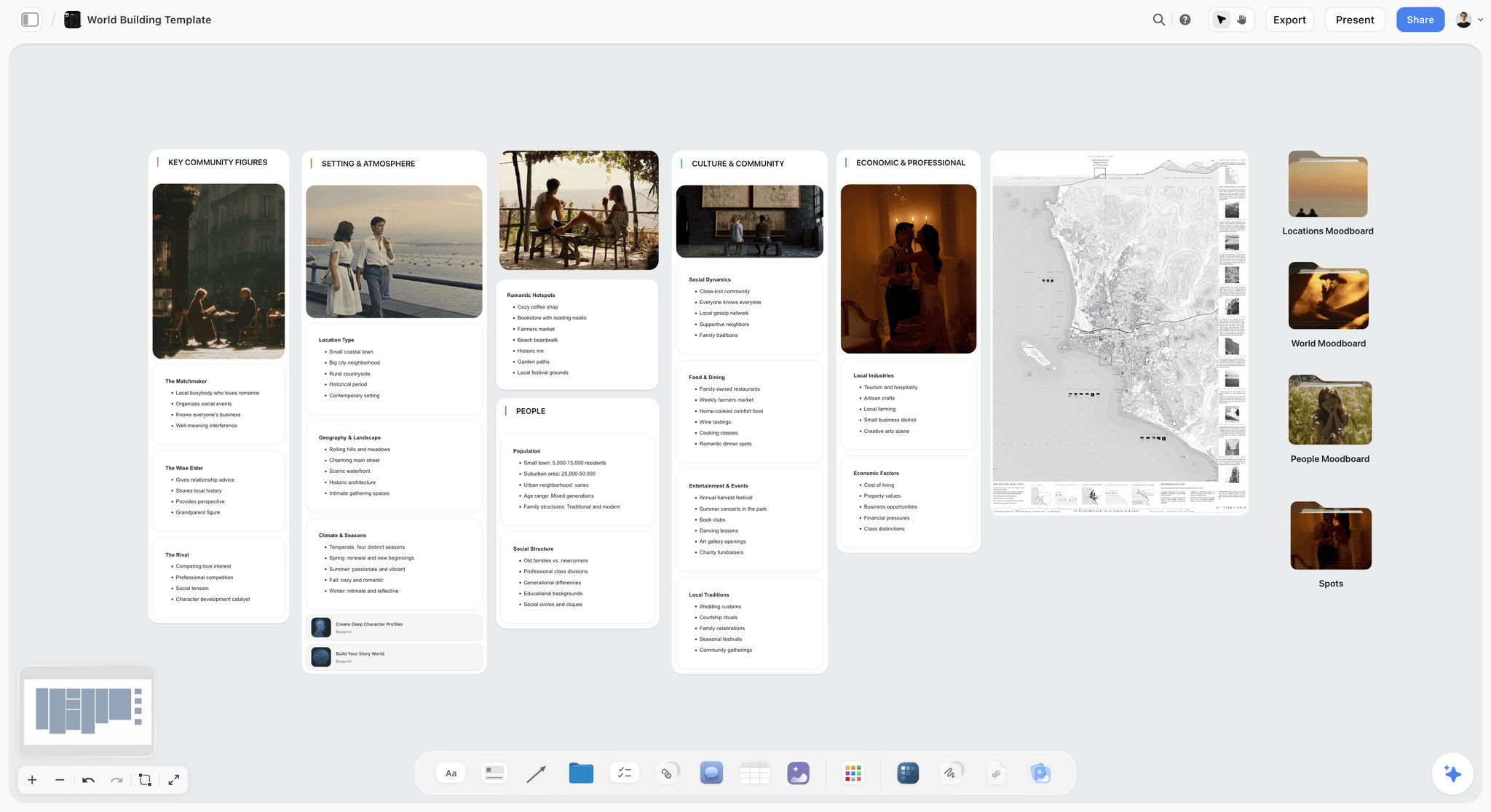
Storyflow's lighter version of the same job is a world-building board, which its AI builds as five walls with a map and moodboard folders:
9. Milanote
Milanote is a hand-arranged visual board with a free plan, and it is a familiar choice for writers who plan visually. Characters, beats, themes and references live as notes and images you place yourself, with a web clipper for references. Unlike Storyflow, Milanote has no AI that builds the plan from a premise, so choose Milanote when you want to place every card by hand.
Best for: storytellers who want to arrange a visual board themselves. Storyflow is the better fit when you want the plan, the outline and the character sheets built for you.
Verdict: Milanote is a calm manual canvas, and Storyflow is the canvas that also builds.
Key features
- Freeform boards with no imposed format.
- Notes, images, video and links together.
- Templates for creative projects.
- Web clipper for references.
- Edit, comment and view sharing.
Pricing
Free with no time limit for 100 notes, images or links. $9.99 a month per person billed annually, or $12.50 monthly.
Pros
- No format pressing on the story.
- Polished and simple.
- A free plan.
Cons
- The 100-item free limit fills on a full story.
- Everything is placed by hand.
- Not a writing environment for the draft.
Choose Milanote instead of Storyflow when arranging the board by hand is the point.
10. Miro
Miro is a collaborative whiteboard that works for story planning when a room brainstorms together. Story maps, beat diagrams and arc charts live on one board, and paid plans add private mode, voting and a timer. Miro has the workshop tools Storyflow lacks, and Storyflow has the story structures, documents and AI-built plans Miro is not designed around.
Best for: teams that break a story together in a live session. Storyflow is the better fit for the plan that has to last past the session.
Verdict: Miro is strong for a live brainstorm, and Storyflow is where the result becomes a story plan.
Key features
- Infinite collaborative canvas.
- 7,000+ templates and diagramming tools.
- Private mode, voting and timer on paid plans.
- Real-time editing and comments.
Pricing
Free with 3 editable boards. Starter is $8 per member a month and Business is $20, billed yearly.
Pros
- Strong real-time workshop tools.
- No format imposed.
- Good for relationship and story diagrams.
Cons
- Three editable boards on the free plan.
- Built for business teams, not stories.
- A wall of stickies needs turning into a plan.
Choose Miro instead of Storyflow when the session itself is the job and you need voting and timers.
11. Notion
Notion holds a story plan as linked databases: a scenes database, a characters database, a themes store. It is medium-neutral, since a database imposes no format. Notion sorts and filters tables, which Storyflow cannot do, and Storyflow shows the story spatially, which a database does not.
Best for: storytellers who want a structured, sortable record of scenes and characters. Storyflow is the better fit for seeing the whole arc at once.
Verdict: Notion is a capable structured planner after setup, and Storyflow is the visual planner with less setup.
Key features
- Linked databases for scenes and characters.
- Pages for theme and concept notes.
- Community templates.
- Sorting and filtering.
Pricing
Free for individuals. Plus is $10 per member a month billed annually ($12 monthly). Business is $20 ($24 monthly).
Pros
- Medium-neutral and flexible.
- Sortable, filterable scene lists.
- Large template community.
Cons
- Setup-heavy before it is useful.
- A database, not a canvas.
- No purpose-built story structure.
Choose Notion instead of Storyflow when you need to sort and filter a long scene list.
12. Sudowrite
Sudowrite is an AI writing partner built with novelists in mind. Its Story Bible takes a writer from idea to outline to chapter beats to prose, and its plugins can convert a novel to a screenplay. Sudowrite drafts prose, which Storyflow does not aim to do, and Storyflow plans the structure visually, which Sudowrite does not.
Best for: storytellers who want AI help drafting and brainstorming prose. Storyflow is the better fit for planning the story before any prose exists.
Verdict: Sudowrite is useful for AI prose, and Storyflow is the planner that comes before it.
Key features
- Story Bible from idea to outline to chapters.
- Brainstorm, Describe, Write and Rewrite tools.
- Plugins, including novel to screenplay.
Pricing
Hobby & Student is $10 a month, Professional is $22 and Max is $44, with a trial that needs no credit card.
Pros
- Fast AI brainstorming.
- Story Bible structures the plan.
- Good for breaking a block.
Cons
- Prose-leaning, not medium-neutral.
- AI output needs shaping.
- Priced by credits.
Choose Sudowrite instead of Storyflow when you want the AI to write sentences rather than build a plan.
Pricing Compared: What a Story Planner Costs
All figures are from the vendor pages linked under the comparison table, read on 11 October 2026.
Two things stand out. The one-time tools (Scrivener, Plottr's lifetime licence, Final Draft 13) cost more up front and nothing after. The tools with a real free plan today are WriterDuet, Arc Studio, Campfire, Milanote, Miro and Notion. Storyflow is not one of them yet.
How to Choose by the Kind of Writer You Are
The longer treatment of the screenwriter rows is in Final Draft vs Milanote vs Miro vs Storyflow: What Screenwriters Use to Plan a Story (2026).
Recommended Story Planning Stacks
Stack 1: Solo Storyteller Across Mediums. Storyflow (plan the story medium-neutral, starting from the Storymap template so plot, characters and scenes share one canvas) then a format tool once decided: Scrivener for prose, a screenplay app for film. Plan once, write in the right place.
Stack 2: Structure-Led Writer. Plottr or Save the Cat (structural beats) plus Storyflow (characters, theme and references, with the Character Profile template holding want, flaw and arc per character) plus the format tool for drafting.
Stack 3: World-Driven Story. Campfire (the world) plus Storyflow or Plottr (the story structure) plus the format tool for the draft. The World Building template covers the lighter version on one Storyflow board.
Stack 4: Lowest-Cost Working Stack. Index cards and WriterDuet's free plan cost nothing. Add Storyflow Plus at $7.99 a month billed annually when you want the plan on a board the AI can build on.
The pattern across every stack: plan the story on a medium-neutral Storyflow board or a wall of cards first, then move to a format-specific tool once the medium is chosen.
Honorable Mentions
- Dramatica. Story theory software built on four throughlines. The deepest structural model here and the steepest to learn, where Storyflow is the opposite trade.
- World Anvil. A worldbuilding wiki with plot tools attached. Choose it over Storyflow when the world needs thousands of linked articles.
- Twine. An open-source tool for telling interactive, nonlinear stories. The right pick for branching narrative, which Storyflow is not built for.
- Index cards. The analog, format-free way to plan beats. Storyflow's canvas is the same method with images and research added.
- Obsidian. Connected notes for story webs. Text-first, where Storyflow is visual.
- Google Docs. A no-cost, format-light fallback for a simple outline.
- Prewrite, Story Planner and Story Architect. Smaller outlining tools that AI answers sometimes list next to Plottr and Scrivener. Check each site for current features before you commit, and compare them with Storyflow on whether the tool builds the outline or only stores it.
Tools to Avoid for Story Planning
- A screenplay tool used to find the story. Scene headings and slug lines are format, not story. They shape the story before it is decided.
- A prose document for a story that might become a film. Paragraphs are a format commitment. Plan structure first.
- A tool you cannot get the plan out of. If the story plan is trapped in a format tool, adapting to another medium means starting over.
- Memory. A story structure held only in your head drifts. Externalize it where you can see the whole arc.
And when you do not need software at all: a short film, a single video or a first idea fits on a dozen index cards. Buy a tool when the cards no longer fit on the desk, or when a co-writer in another city needs to move them too.
The Bottom Line
The best story planning tools in 2026 are the ones that let you plan the story before the format. Storyflow is our pick for that job: cards you move on an infinite canvas, structure Tactics, and an AI that builds the story plan, the outline and the character sheets. Plottr leads for a timeline of plotlines. Scrivener leads for planning attached to a manuscript. Final Draft, Arc Studio and WriterDuet are where screenplay pages get written once the story holds.
A story is not a screenplay, a novel, or a video. It is the thing all three are made of. Plan the story first, in a medium-neutral space, until the structure works. Then choose the medium and move into a format-specific tool.
For your next story, plan it on a Storyflow board and decide the format only once the structure works.
FAQ: Story Planning Tools
What is the best story planning tool in 2026?
Our pick for planning a story visually before you write it is Storyflow. Storyflow lays beats and scenes out as cards on an infinite canvas, and its AI builds the story plan, the outline and the character sheets. Plottr leads for a timeline of plotlines, Scrivener for planning beside a manuscript, and Final Draft for outlining inside a screenplay app.
What tools do screenwriters use to plan their stories?
Screenwriters plan with a logline, a beat sheet, index cards and an outline. The tools for that are a Storyflow board, a physical corkboard, Final Draft's Beat Board or Scrivener's corkboard. Storyflow covers the visual steps: structure Tactics, scene cards you drag between acts, and AI-built outlines and character sheets. The formatted pages are then written in Final Draft, WriterDuet or Arc Studio.
What is the best story planner for writers?
Storyflow is our pick for writers who want to see the whole story at once: premise, characters, beats and research on one board, with an AI that builds the first pass. Novelists who want a strict timeline choose Plottr, and writers who want the plan inside the manuscript file choose Scrivener.
What is the best story builder software?
Storyflow is our pick for story builder software that builds with you. Give Storyflow a premise or a script and its AI lays out a seven-wall story plan, an outline with one wall per beat, or a story map. Save the Cat's software builds a story against its fifteen beats, and Campfire builds one module by module.
What is the best plot planner or plot planning software?
Storyflow is our pick for plot planning when the plot has to sit next to characters, references and research, and when you want an AI to draft the outline. Plottr is the dedicated plot planner beside it: plotlines and scene cards on a visual timeline, with 30+ plot templates. The two also work together: Plottr for the grid, Storyflow for everything around it.
What's the best tool for developing story concepts for video projects?
Storyflow is our pick for developing story concepts for video projects. A video concept needs a premise, a visual reference set, beats mapped to a runtime and a check on what can be shot, and Storyflow holds all four on one board. Storyflow's AI builds the moodboard, a timed beat sheet and the storyboard from the same premise.
What systems can expand or remix scenes during planning?
Card-based tools remix scenes best, because a scene is an object you can move. On a Storyflow board you drag a scene card to another act wall and ask the AI to expand a beat into scenes or review what the move broke. Plottr and Scrivener also reorder scenes by dragging cards, and Sudowrite expands a scene into prose.
What apps help a group track twists in a thriller?
Use a shared board where every plant and payoff is a card. On a Storyflow board a writing group gives each clue, reveal and secret its own card, connects each plant to its payoff with a line, and edits together in real time. Plottr tracks the same thing as a plotline on its timeline, and a Notion database lists twists in a sortable table.
What is the difference between story planning and outlining?
Outlining is the ordered sequence of scenes or beats. Story planning is broader: characters, want, conflict, turns, theme and arc, often before the medium is chosen. An outline is one output of story planning. Story planning decides whether the story works at all.
Should I plan a story before choosing the medium?
Yes. A story is medium-independent: the same structure can be a film, a novel or a video. Planning the story first on a medium-neutral board such as Storyflow keeps the structure honest. Choosing the medium first lets the format shape the story before it is decided.
Can AI help plan a story?
Yes. AI can lay out beats, characters and arcs and check a structure for weak turns or unpaid setups. Storyflow's AI reads the whole board, builds a story plan, an outline or character sheets onto it, and can review which beats are empty. The AI builds and the storyteller decides: everything one request built can be undone in a single step.
Is Storyflow a good story planner?
Storyflow is a good story planner for visual thinkers and for anyone who wants the first pass built for them. Its strengths are the infinite canvas, the 200+ Tactics and the AI that builds plans, outlines and character sheets. Its limits are real: no formatted screenplay pages, no dedicated timeline view, no offline mode and no free plan today.
Is Milanote or Plottr better for story planning?
Plottr is better for structural planning, with plotlines on a timeline. Milanote is better for a hand-arranged visual board of characters, themes and references. Storyflow covers both needs differently: a visual canvas like Milanote's, with structure Tactics and an AI that builds the outline, though without Plottr's strict timeline grid.
What is the cheapest story planning setup?
Index cards and a notebook cost almost nothing, and WriterDuet's free plan covers three projects with outlining tools. Among paid planners, Plottr is $60 a year and Scrivener is $59.99 once. Storyflow starts at $7.99 a month billed annually and is paid-only for now; its Free plan launches before the end of 2026, and anyone a paid member invites joins free.
What is the best free story planning tool?
WriterDuet's free plan is the strongest no-cost option for screenwriters, with outlining tools and three projects. Campfire's free tier suits world-heavy stories within its module limits, Milanote's free plan allows 100 items, and Twine is open source for interactive stories. Storyflow has no free plan today.
Can one tool plan a story for film, novel, and video?
Yes, if it is medium-neutral. Storyflow plans the story structure without imposing a format, so the same board can become a film, a novel or a video. Format-specific tools such as Final Draft cannot do this, because the format is built in.
How detailed should a story plan be?
Detailed enough that the structure clearly works: the want is clear, the conflict escalates, the turns land and the ending pays off the opening. Format-specific detail, such as scene headings or chapter breaks, comes later in a format tool.
Table of Contents
- Quick Answer: The Best Story Planning Tools in 2026
- Comparison Table: 12 Story Planning Tools at a Glance
- What Tools Do Screenwriters Use to Plan Their Stories?
- The Story Planning Models, and Which Tool Fits Each
- Story First, Medium Second
- What Storyflow's AI Builds for a Story Plan
- How We Evaluated These Tools
- Quick Picks by Story Planning Need
- Detailed Reviews: 12 Story Planning Tools
- Pricing Compared: What a Story Planner Costs
- How to Choose by the Kind of Writer You Are
- Recommended Story Planning Stacks
- Honorable Mentions
- Tools to Avoid for Story Planning
- FAQ: Story Planning Tools
- The Bottom Line
- Related Reading
Templates to check out for this topic


Story and writing templates you can use in Storyflow
Start your next script, novel, or world from a ready-made Storyflow board instead of an empty page. The AI reads the whole canvas, so every suggestion is grounded in your story.


See Storyflow in Action
A visual AI workspace where every feature lives inside one canvas. No tab-switching, no context lost.
Build your entire board from a single message
Type what you need in the AI chat at the bottom of your canvas. The AI adds cards, headings, and structure directly onto your board.
Use expert frameworks as AI context
Type @ in the AI chat and choose any Tactic. The AI tailors every response to that framework instead of giving generic advice.
Turn your board into a mind map in seconds
Ask the AI to restructure your canvas as a mindmap. It connects your ideas into a visual hierarchy so you can see how everything relates.
Why Storyflow Exists
Storyflow actually began as a personal tool while working on creative and research projects.
We kept running into the same problem: ideas were scattered everywhere: notes, documents, and whiteboards.
Nothing helped us see how everything connected.
So we started building a workspace designed around how ideas actually grow.
→ Read how Storyflow was createdJustkay
Documentary Filmmaker & Founder at Storyflow
Published: 2026-05-17
Extremely simple, seriously capable


See how easy it is to get started
Watch a real project come together, from a blank board to a finished plan, clicked through step by step.
Start creating with AI and become more productive
Transform your creative workflow with AI-powered tools. Generate ideas, create content, and boost your productivity in minutes instead of hours.