

Category
Filmmaking
Author

Justkay
Documentary Filmmaker & Founder at Storyflow
Topics
2026-06-27
•
Updated June 27, 2026
•
15 min read
•
Filmmaking- how to write a screenplay with AI
- AI screenwriting
- write a screenplay with AI
- AI screenplay workflow
- AI beat sheet
- screenwriting AI tools
How do you write a screenplay with AI in 2026?
Writing a screenplay with AI is a seven-step workflow: find the story, build the beat sheet, develop characters and the world, outline scene by scene, write the scenes, get coverage and revise, then move from script to screen. AI handles the first draft of each step while you make every decision that matters: what the story is about, how each character talks, and what to cut. The mistake is asking AI to write a whole script in one prompt, which produces competent but forgettable pages. Working step by step on a canvas the AI can read keeps the beats, characters, and scenes together so drafts arrive aware of context instead of starting blank.
Write the script where the AI can see the whole story
Storyflow keeps the script beside your beats, characters, and structure on one canvas, so the AI answers questions across all of it instead of one page at a time.

1) Quick Answer: How to Write a Screenplay with AI
Writing a screenplay with AI in 2026 is a seven-step workflow: find the story, build the beat sheet, develop characters and the world, outline scene by scene, write the scenes, get coverage and revise, then move from script to screen. AI handles the first draft of each step. You handle every decision that matters. AI will not write your screenplay for you. It removes the friction between you and the next scene.
The mistake most writers make is asking AI to write the whole script in one prompt. You get ninety pages of competent, forgettable nothing. The workflow below does the opposite. It uses AI where AI is genuinely strong (generating options, pressure-testing structure, drafting from context you already built) and keeps you in the seat for the three things AI cannot do: knowing why the story matters, hearing how a specific character actually talks, and deciding what to cut.
I have written and produced documentary work through full pre-production cycles and built Storyflow, the AI canvas this guide uses as its example. The seven steps below are the order I would hand a writer who has a story idea and a blank page and wants the page to stop being blank by the end of the week.
A note on scope. This guide takes you from idea to a revised draft and into pre-production. For the script-to-screen handoff, see How to Make a Shot List and the best storyboarding software.
2) Why Writing a Screenplay with AI Is Different
Every screenplay stalls on one of three layers, and they fail in a specific order.
The first layer is the spine: the structure, the beats, the shape of the thing. The second is the world: the characters, their voices, the tone, the rules of the story. The third is the page: the actual scenes, the action lines, the dialogue. Writers who skip straight to the page write twenty brilliant pages and then abandon the script, because the spine was never load-bearing. Writers who never leave the spine produce a perfect outline and no screenplay.
AI changes the economics of all three layers, but unevenly. It is strongest at the page (drafting a scene from beats you already wrote), useful at the spine (generating and stress-testing structural options), and weakest at the world (it does not know your characters until you teach it, and even then it tends toward the average of every character it has ever read).
This is the part that catches people. A general chat tool treats every prompt as a fresh start. You paste your logline, get a scene, open a new chat tomorrow, and the tool has forgotten your protagonist's name. The screenplay is not a single prompt. It is a project with memory, and the tool has none.
The fix is to work somewhere the AI can see the whole story at once. On a canvas, the beat sheet, the character profiles, and the scene you are drafting all sit on the same board, and the AI reads them together. In Storyflow, the AI reads your full active canvas board by default, plus up to one Tactic and up to three Documents you @-mention in the chat. So when you ask it to draft scene 14, it answers from the beats on either side of scene 14 and the character profiles pinned to the board, not from a blank prompt. The familiar approach is to re-explain your story to the AI every session. The canvas approach is to let the AI read the story you already built.
3) Prerequisites: What You Need Before the First Scene
You do not need a finished outline to start. You need four things, and AI can help assemble three of them.
- A premise you can say in one sentence. Not a logline yet, just the itch. "A grief counselor starts seeing her dead clients." If you cannot say it in a sentence, that is the first thing to fix, and Step 1 fixes it.
- A structural framework to hang beats on. The three-act paradigm (Syd Field, "Screenplay," 1979), the fifteen-beat sheet (Blake Snyder, "Save the Cat!," 2005), or the Hero's Journey (Christopher Vogler's "The Writer's Journey," adapting Joseph Campbell). Pick one. They are scaffolding, not law.
- A workspace the AI can read. A document is linear; a screenplay is not. You want a canvas where beats, characters, and scenes sit side by side. Storyflow's Story Blueprints library (200+ creative templates on the Plus, Pro, and Max plans) includes beat-sheet and three-act style starting points, so you are not building the structure from an empty board.
- An AI tool with enough context window to hold the project. This is the one AI cannot supply for you. It is the choice of tool, and it matters more than the model. A smarter model with no memory of your story loses to an average model that can see the whole board.
A note on what you do not need: you do not need a screenwriting app to start. You need a screenwriting app to finish. More on that in Step 7.
4) Step 1: Find the Story Before You Write the Script
The blank page is not a writing problem. It is a clarity problem wearing a writing problem's clothes. You cannot write the scene because you do not yet know what the story is about, and no amount of staring fixes that.
Start with the logline and the want. Drop your one-sentence premise on the canvas and ask the AI to generate ten loglines from it, each emphasizing a different protagonist want. The goal is not to pick the AI's best line. It is to see your story from ten angles fast, which is the thing that is slow and demoralizing to do alone at 11pm.
Then interrogate, do not accept. For each logline you like, ask the AI the questions a development executive would ask. What does the protagonist want, what stands in the way, what happens if they fail, and why now. The AI is a tireless, slightly generic notes-giver. Use it to find the weak joints, then make the calls yourself, because the AI does not know which version is the one you actually want to spend six months writing. That part is taste, and taste is not in the training data.
By the end of Step 1 you have a logline, a protagonist with a clear want, and a one-paragraph statement of what the story is about underneath the plot. Pin all three to the top of the board. They are the test every later beat has to pass.
5) Step 2: Build the Beat Sheet
The beat sheet is the spine. Get it load-bearing here and the page gets dramatically easier later.
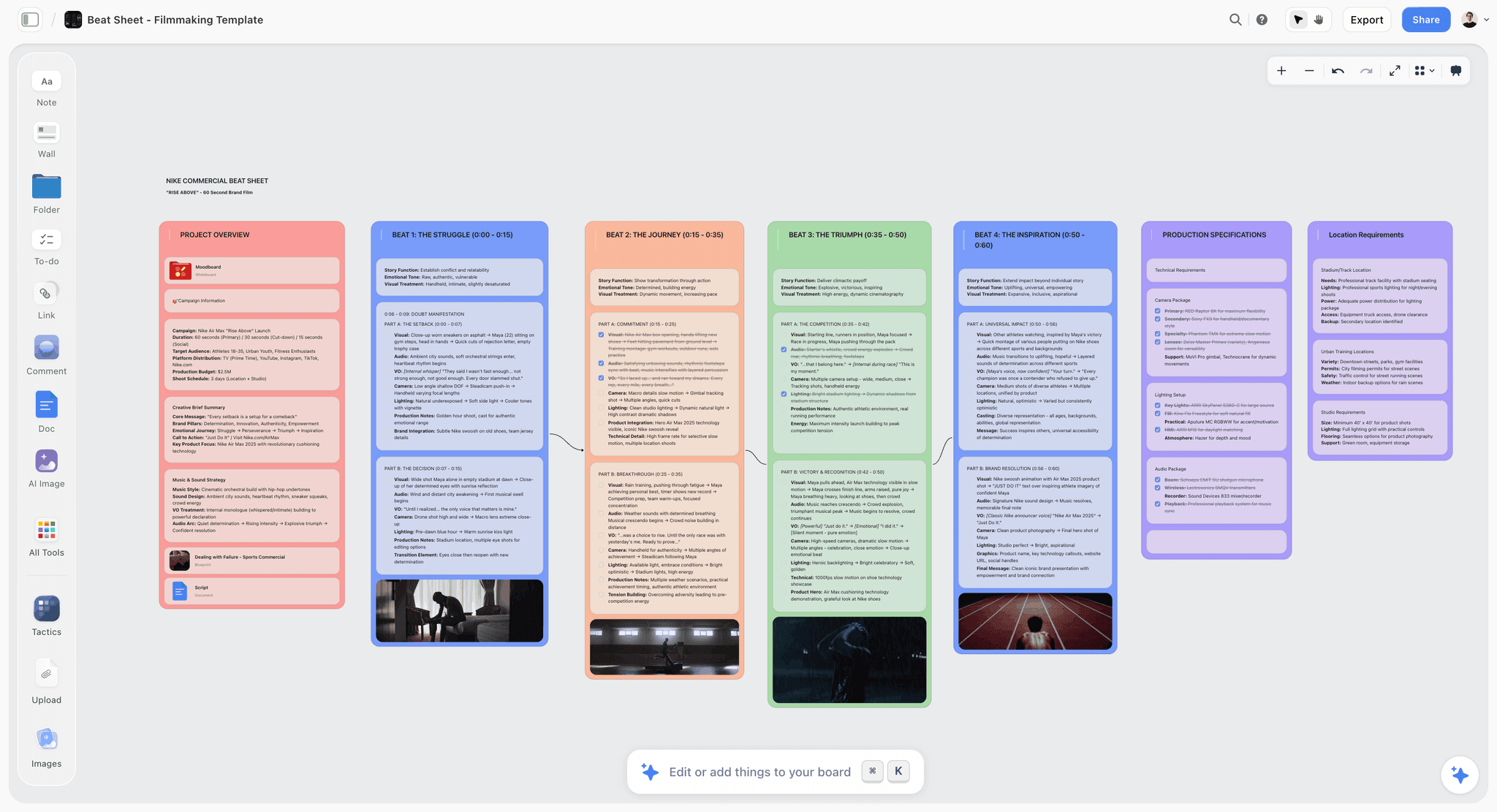
Lay your chosen framework across the canvas as cards, one card per beat. If you are using Save the Cat, that is fifteen cards from Opening Image to Final Image. Now ask the AI to populate each beat from your logline and theme. Not to write them well. To write them at all, so you have something to react to. A bad beat you can fix beats a blank beat you cannot face.
This is where the canvas earns its place. Because every beat is a separate card next to its neighbors, you can see the whole story shape at a glance and drag beats around when the midpoint is clearly in the wrong place. A document hides that. You scroll, you lose the shape, you commit to an order before you have one. A screenplay is not written in order. It is arranged into order. The canvas lets order emerge; the document forces it early.
Pressure-test the spine before you go further. Ask the AI: where does this structure sag, which beat is doing two jobs, where is the protagonist passive instead of driving. Then ask it the harder question most writers skip: does the midpoint actually reverse the situation, or does it just continue it. Fix the spine now. Rewriting a beat costs a sentence. Rewriting the scenes built on a broken beat costs a weekend.
6) Step 3: Develop Characters and the World
The AI's biggest weakness is here, which is exactly why this step is a step and not an afterthought. Left alone, AI writes characters who are all articulate, all reasonable, and all sound like the same well-read person. Real characters are specific, contradictory, and bad at saying what they mean.
Build a short profile card for each major character on the board: want, need, wound, the lie they believe, and the way they talk when they are lying. Write the voice notes yourself. This is the input the AI cannot generate and the input that makes everything downstream sound like your film instead of the average film.
Then put the profiles on the canvas next to the beat sheet and @-mention them in the AI chat. Now when you draft a scene, the AI is drafting these characters, with these wounds, in this world, instead of generic placeholders. For longer projects, keep a story bible alongside (see How to Build a Story Bible with AI) so the canon stays in one place the AI can read.
If you want the visual world on the board too, mood images help the tone stay consistent across a long write. Storyflow can generate reference images on the canvas on the Pro and Max plans, or you can drop in your own. Keep them next to the character cards so the look and the people develop together.
7) Step 4: Outline Scene by Scene
This step turns the spine into a list of scenes, and it is the last cheap step before the expensive one.
Under each beat card, ask the AI to propose the two to four scenes that beat needs to land. For each proposed scene, capture one line: whose scene it is, what changes by the end, and the value shift (a scene that starts hopeful and ends afraid, for example). A scene where nothing changes is a scene you can cut now, on the canvas, for free, instead of after you have written three pages of good dialogue you will be too attached to delete.
Sequence the scenes left to right across the board. You will see runs of scenes that all change the same way, which is the rhythm problem readers feel but cannot name. Reorder until the value shifts alternate. This is the single most useful thing the canvas does that a script app does not: it shows you the emotional shape of the whole film as a row of cards before you have written a word of it.
By the end of Step 4 you have a scene list with a job and a value shift per scene. The blank page is now a series of small, specific, answerable questions instead of one impossible one. That is the whole trick.
8) Step 5: Write the Scenes
Now the page, and now AI is genuinely fast, because you have given it everything it needs to not be generic.
Work scene by scene, not script by script. For each scene, prompt the AI with the scene's job, its value shift, the characters in it (already on the board), and the beats on either side. Ask for a draft of action and dialogue. Because the AI can read the surrounding board, the draft arrives already aware of what just happened and what comes next. Then do the only job that was ever yours: rewrite the dialogue in the character's actual voice, cut the lines that explain what the image already shows, and keep the action lean.
Treat the AI draft as a demolition draft, not a final one. Its value is that it is faster to fix a flawed scene than to face an empty one. Some scenes you will keep eighty percent of; some you will keep the structure and rewrite every line. Both are wins, because both started from something instead of nothing.
Be honest about where this tool stops. Storyflow is a canvas for finding and drafting the story. It is not a screenplay formatter. It does not produce industry-standard formatted pages, lock page numbers, or export a production-ready .fdx. When you are ready to assemble the formatted screenplay, move the scenes into a dedicated screenwriting app: Final Draft, WriterDuet, Highland, Fade In, or Arc Studio. If you are a writer whose whole process lives in formatted pages from line one, draft directly in one of those and use the canvas only for the structure work in Steps 1 to 4. That is a legitimate choice, and pretending otherwise would not help you.
9) Step 6: Get Coverage and Revise
Coverage is the read a script gets from a reader who tells you what is and is not working. AI gives you a version of that on demand, with one large caveat.
Ask the AI to read the draft on the board and report back: where does the tension drop, which character arc does not pay off, which scene could be cut without anyone noticing, where is the dialogue on the nose. Because it can read the whole board, it can answer across the full script, not just the page in front of it. This is fast, it is free, and it catches the structural problems you have gone blind to after living inside the draft for a week.
The caveat is real. AI coverage regresses to the conventional. It will reliably tell you to raise the stakes, clarify the want, and make the midpoint hit harder, which is correct often enough to be useful and generic enough to flatten anything unusual about your script if you obey it blindly. Use it to find problems. Do not let it prescribe solutions, because its solutions are the median of every script it has read, and the median is not what gets your film made.
Revise on the canvas where you can still see the whole shape, then push the changes back into your screenwriting app. Two or three passes is normal. The canvas keeps each pass cheap because you are moving cards, not rewriting documents.
10) Step 7: Move from Script to Screen
A screenplay is not the destination. It is the document everything else derives from, and 2026 is the first year the handoff from script to screen is genuinely fast.
Once the draft holds, the script becomes the source for the visual plan. You can take the scenes and turn them into a storyboard, and a shot list, and a schedule, without retyping the story into four more tools. Try the script-to-storyboard workflow to turn written scenes into boards you can actually shoot from, and the AI shot list generator to break each scene into the shots it needs. Because the script, the boards, and the shot list live on one canvas, a change to a scene is visible to the plan that depends on it, instead of rotting silently in a separate app until the day of the shoot.
This is the argument for doing the writing on a canvas in the first place. The structure work, the draft, and the pre-production plan are not four separate projects in four separate tools. They are one project, and keeping them on one surface is what stops the script and the schedule from drifting apart. For the full pre-production handoff, see the best pre-production tools.
12) The Bottom Line
Writing a screenplay with AI is not about prompting a machine for a script. It is about removing the friction that stops you from writing the one you already have in you. Build the spine as cards, develop the world yourself, outline scene by scene, draft on a canvas the AI can read, and get fast coverage you treat as diagnosis rather than prescription. The judgment stays yours at every step. The blank page stops being blank.
If you have a story idea and a blank page, take the seven steps above and run Steps 1 through 4 this week on one board. Start a Storyflow workspace, lay your framework across the canvas, and let the AI populate the beats so you have a spine to react to. Then, when the draft holds, turn the scenes into a storyboard and carry the story all the way to the shoot.
11) FAQ: Writing a Screenplay with AI
Can AI write a screenplay for you?
No, not a good one. AI can draft scenes, generate structural options, and give you fast coverage, but it cannot decide what your story is about, hear how a specific character actually talks, or know which version is the one worth writing. Ask it to write a whole script in one prompt and you get competent, forgettable pages. The working method is to use AI step by step, where it drafts and pressure-tests while you make every decision that matters. AI removes the friction around writing. It does not replace the writing.
What is the best AI tool for writing a screenplay?
There is no single tool, because screenwriting has two jobs. The first is finding and drafting the story, which wants a tool with project memory: a canvas where the AI reads your beats and characters together, like Storyflow. The second is assembling the formatted screenplay, which wants a dedicated screenwriting app: Final Draft, WriterDuet, Highland, Fade In, or Arc Studio. Most writers use a canvas for the structure and draft work, then move into a formatter for the final pages. Picking only a chat tool with no memory of your project is the common mistake.
Will using AI to write a screenplay get me in trouble with the WGA or studios?
Treat AI as a drafting assistant, not a credited writer, and disclose if asked. As of 2026, guild and studio rules around AI-generated material are still settling, so the safe stance is that the creative decisions, the final lines, and the structure are yours, with AI used the way you would use a brainstorming partner or a notes-giver. Keep your own drafts and your decision trail. This guide assumes AI assists a human writer, which is the position least likely to cause problems.
How long does it take to write a screenplay with AI?
The structure work (Steps 1 to 4) can be done in a focused week, which is the part that used to take the longest and stall the most. Drafting the scenes (Step 5) still takes real time, though AI makes each scene faster to start. A full first draft of a feature in a month is realistic with this workflow, versus the months a cold start usually takes. The time AI saves is not the typing. It is the staring at a blank page, which is where most scripts actually die.
Do I need to pay for a tool to write a screenplay with AI?
Storyflow is paid-only during early access: Plus at $7.99/month annual gets you the canvas, basic AI, unlimited shared boards, and the Story Blueprints library (200+ templates, including beat-sheet style starting points), enough to run Steps 1 through 4 and draft scenes. AI image generation for mood and reference work is on Pro at $14/month annual. A Free plan launches before the end of 2026, and anyone a paid member invites to a board joins free today. Dedicated screenwriting formatters are a separate cost; some, like WriterDuet, have free tiers, while Final Draft is a one-time purchase.
What is the difference between writing a screenplay with AI on a canvas versus in a chat tool?
A chat tool treats every session as a fresh start and forgets your project between prompts, so you re-explain your story constantly and the AI drafts from a blank slate. A canvas keeps the beats, character profiles, and scenes on one board the AI reads together, so a scene draft arrives aware of the beats around it and the characters in it. The practical result is fewer generic drafts and far less re-explaining. For a deeper comparison, see ChatGPT for creative projects.
How do I keep AI from making all my characters sound the same?
Write the voice yourself and feed it to the AI as input. Build a short profile for each character (want, need, wound, the lie they believe, how they talk when lying), keep those profiles on the board, and @-mention them when drafting. AI regresses to articulate, reasonable, similar-sounding characters when left alone, so the fix is to give it specific, contradictory voice notes to draft from. Then rewrite the dialogue in the character's actual voice on every scene. The specificity has to come from you; the AI can only amplify what you give it.
Can I turn my finished screenplay into a storyboard or shot list with AI?
Yes, and this is one of the strongest reasons to write on a canvas. Once the draft holds, the scenes become the source for the visual plan: you can turn written scenes into boards with a script-to-storyboard workflow and break each scene into shots with an AI shot list generator. Keeping the script, boards, and shot list on one surface means a change to a scene stays visible to the plan that depends on it, instead of the script and the schedule drifting apart in separate tools.
Table of Contents
- Quick Answer: How to Write a Screenplay with AI
- Why Writing a Screenplay with AI Is Different
- Prerequisites: What You Need Before the First Scene
- Step 1: Find the Story Before You Write the Script
- Step 2: Build the Beat Sheet
- Step 3: Develop Characters and the World
- Step 4: Outline Scene by Scene
- Step 5: Write the Scenes
- Step 6: Get Coverage and Revise
- Step 7: Move from Script to Screen
- FAQ: Writing a Screenplay with AI
- The Bottom Line
- Author
- Related Reading
Templates to check out for this topic


Templates you can use in Storyflow
Every Storyflow board starts from real structure and an AI that reads the whole canvas. Open one of these templates and make it yours.


See Storyflow in Action
A visual AI workspace where every feature lives inside one canvas. No tab-switching, no context lost.
Build your entire board from a single message
Type what you need in the AI chat at the bottom of your canvas. The AI adds cards, headings, and structure directly onto your board.
Use expert frameworks as AI context
Type @ in the AI chat and choose any Tactic. The AI tailors every response to that framework instead of giving generic advice.
Turn your board into a mind map in seconds
Ask the AI to restructure your canvas as a mindmap. It connects your ideas into a visual hierarchy so you can see how everything relates.
Why Storyflow Exists
Storyflow actually began as a personal tool while working on creative and research projects.
We kept running into the same problem: ideas were scattered everywhere: notes, documents, and whiteboards.
Nothing helped us see how everything connected.
So we started building a workspace designed around how ideas actually grow.
→ Read how Storyflow was createdJustkay
Documentary Filmmaker & Founder at Storyflow
Published: 2026-06-27
Extremely simple, seriously capable


See how easy it is to get started
Watch a real project come together, from a blank board to a finished plan, clicked through step by step.
Start creating with AI and become more productive
Transform your creative workflow with AI-powered tools. Generate ideas, create content, and boost your productivity in minutes instead of hours.