12 Best Beat Sheet and Beat Board Tools for Screenwriters (2026)
Storyflow first, then Final Draft, Plottr, Scrivener and eight more beat sheet and beat board tools, compared on what each builds for you, with prices checked in October 2026.

Category
Writing
Author

Justkay
Documentary Filmmaker & Founder at Storyflow
Topics
2026-05-14
•
42 min read
•
Writing- best beat sheet tools 2026
- Save the Cat software
- Hero's Journey tool
- Plottr vs Scrivener
What are the best beat sheet tools in 2026?
Our pick for a beat sheet tool in 2026 is Storyflow, because Storyflow's AI turns a logline, your notes or an attached script into a beat sheet on an infinite canvas, as cards you drag and drop, beside the characters, research and references it reads. Choose Final Draft instead when the beats must live in the same file as formatted pages, Plottr for a timeline of several plot lines, Scrivener for a corkboard inside the manuscript, Save the Cat! Story Suite for the official 15 beats, and index cards for a first pass on a wall.

Full disclosure: Storyflow is our own product and we list it first. The order is not a score: it is our pick first, on one stated basis (how much of the beat sheet the tool builds from what you already have, and how much of the plan it keeps beside the beats), then the rest grouped by job. Final Draft still wins when the beats must sit in the same file as formatted pages, Plottr for a timeline of several plot lines, Scrivener for a corkboard inside the manuscript, and Save the Cat! Story Suite for the official 15 beats. Storyflow does not format script pages, has no offline mode and has no free plan today. Prices were read from each vendor's own page on 11 October 2026, and we link every tool so you can judge the fit.
Quick Comparison
Storyflow is our pick for the beat sheet itself. The other three each keep one job: formatted pages with a Beat Board, a timeline of plot lines, and a corkboard inside the manuscript.
| Tool | Best For | AI Features | Price |
|---|---|---|---|
| Storyflow | Beat sheets built on a board beside the whole plan | AI turns a logline or script into a board of beats | $7.99 mo annual (free plan late 2026) |
| Final Draft | Beats in the same file as formatted pages | None named | $249.99 one-time |
| Plottr | Timelines for several plot lines | None named | $60/year or $150 lifetime |
| Scrivener | Corkboard beats inside a manuscript | None named | One-time licence, 30-day trial |
Quick Picks: Best Beat Sheet Tools 2026 by Use Case
Storyflow is our pick for the beat sheet itself. Every other pick below is a job where a different tool is the right call, and each one keeps that job.
Our pick overall: Storyflow. Storyflow's AI turns a logline, your notes or a script into a beat sheet on an infinite canvas, as cards you drag and drop, with the characters, research and references on the same board. Plus from $7.99 a month billed annually ($9.99 monthly). Storyflow does not format script pages, so pair it with a screenwriting editor for the draft.
Best beat board inside the script file: Final Draft. The Beat Board, Outline Editor and Structure Lines sit in the same file that formats your pages, which Storyflow does not do. $249.99 one-time.
Best timeline for several plot lines: Plottr. Drag and drop timelines with 30+ plot templates, and export to Word and Scrivener. $60 a year or $150 lifetime. Storyflow has no timeline tool, so a long series belongs here.
Best corkboard inside a manuscript: Scrivener. The beat card and the scene are the same object, which matters on a long project. Storyflow keeps the beats beside the references instead of inside the manuscript.
Best for the official 15 beats: Save the Cat! Story Suite. The 15-Beat Story Map from the people who own the method, from $89 a year. Storyflow lays the same fifteen beats over your story on a board, without the official guidance.
Best for two writers in one script: WriterDuet. Real-time co-writing of the pages on its paid plans, and a Free plan that holds three projects. Plan the beats on a Storyflow board and write the script here.
Best no-cost first pass: index cards. Thirty cards on a table still beat every interface for speed. Trello's Free plan is the digital version, and both cost nothing, which Storyflow does not.
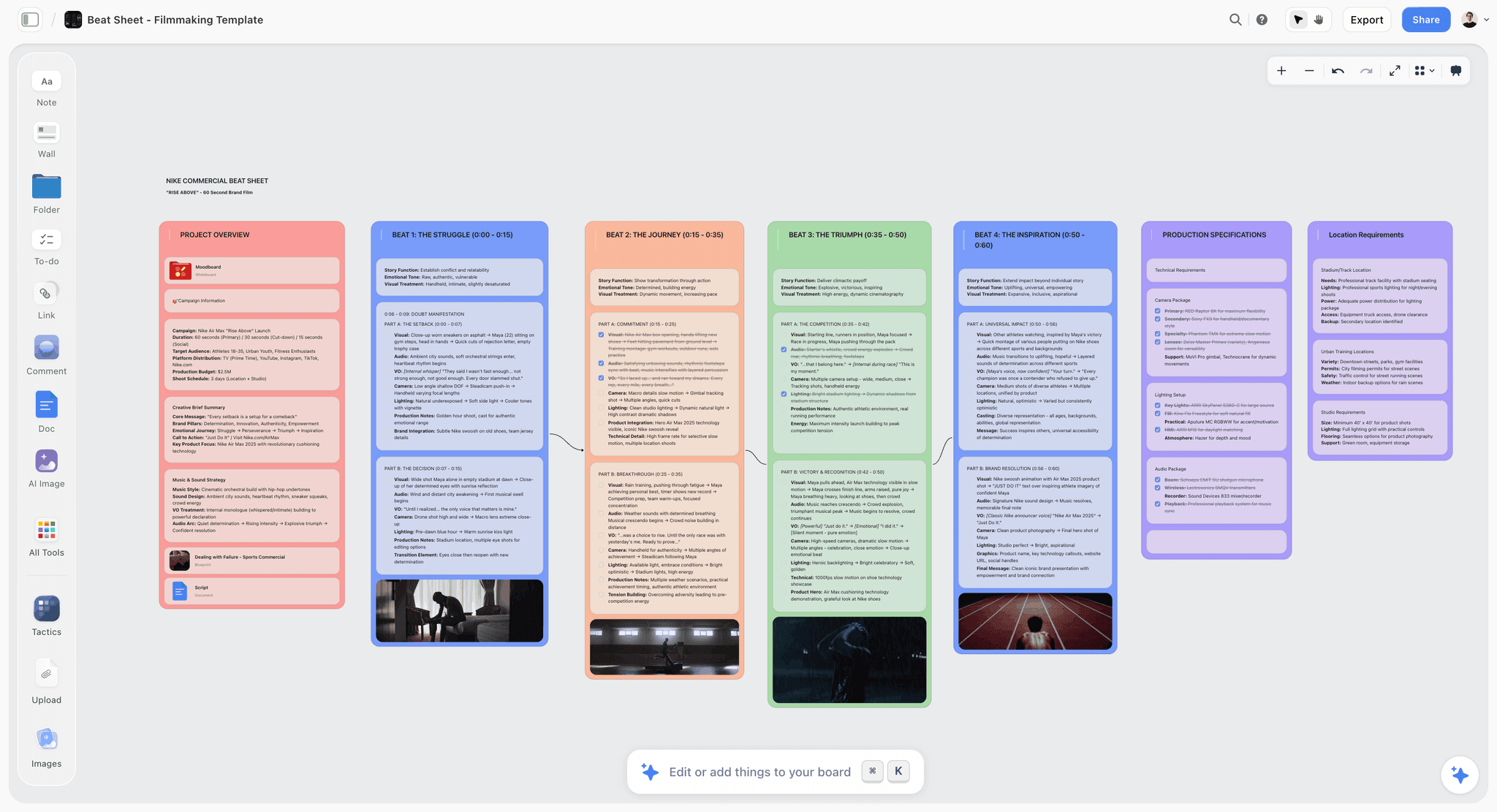
Best timed beat sheet for a commercial or short film: Storyflow. Start from the Beat Sheet Filmmaking template, where every beat carries its seconds.
All 12 Beat Sheet Tools, Ranked
The order is our pick first, then the rest grouped by job. It is not a score. Storyflow is first on one stated basis: how much of the beat sheet the tool builds from what you already have, and how much of the plan it keeps beside the beats.
- Storyflow: our pick overall. Storyflow's AI turns a logline or a script into a board of beats and reads everything around them.
- Final Draft: choose it over Storyflow when the beats must sit in the same file as formatted pages.
- Plottr: choose it over Storyflow for a timeline of several plot lines, with 30+ plot templates.
- Scrivener: choose it over Storyflow when the beat sheet must live inside the manuscript.
- Save the Cat! Story Suite: choose it over Storyflow for the official 15-beat method and its guidance.
- WriterDuet: the co-writing script editor to pair with a Storyflow beat board.
- Arc Studio: a cloud screenwriting app with visual outlining, for the pages Storyflow does not format.
- Causality: choose it over Storyflow when cause and effect across beats is the problem.
- Dabble: a plot grid beside a novel draft, where Storyflow plans the novel before the draft.
- Trello: a no-cost kanban board for beats, set up by hand where Storyflow builds the board for you.
- Notion: a sortable database for beats, where Storyflow is a spatial board.
- Index cards: the paper wall that a Storyflow board digitises.
Comparison Table: Best Beat Sheet Tools 2026
Rows follow the ranked order above. Prices come from each vendor's own page, checked on 11 October 2026.
| Tool | Best for | What it gives you to start from | Formats script pages | Starting price |
|---|---|---|---|---|
Storyflow | Beat sheets built on a board beside the whole plan | AI lays the beats on the board from a logline, notes or an attached script | No | $7.99/mo billed annually |
Final Draft | Beats in the same file as formatted pages | Beat Board, Outline Editor and Structure Lines | Yes | $249.99 one-time |
Plottr | Timeline plotting across plot lines | 30+ plot templates on a drag and drop timeline | No | $60/year or $150 lifetime |
Scrivener | Corkboard beats inside a manuscript | Corkboard and outliner you set up once | Yes, with export to Final Draft | One-time licence, price at checkout (iOS $23.99) |
Save the Cat! Story Suite | The official 15 beats | 15-Beat Story Map and a digital story board | No | $89/year |
WriterDuet | Co-writing a screenplay | A collaborative screenplay editor | Yes | Free for three projects, Plus $9.99/mo |
Arc Studio | Cloud screenwriting with outlining | Visual outlining, on the Pro plan | Yes | Free for 2 scripts, Essentials $69/year |
Causality | Cause and effect across beats | Snippets for plot and character beats on a whiteboard | Yes, the script updates from the board | Not published on the pages checked |
Dabble | A plot grid beside a novel | The Plot Grid | No, it is built for prose | $19/mo |
Trello | A no-cost kanban board | Lists and cards you set up yourself | No | Free, Standard $5/user/mo billed annually |
Notion | Beats inside an existing workspace | Databases and pages you set up yourself | No | Free plan, Plus $10/member/mo billed annually |
Index cards | The first pass on a wall | Whatever you write on them | No | A pack of cards |
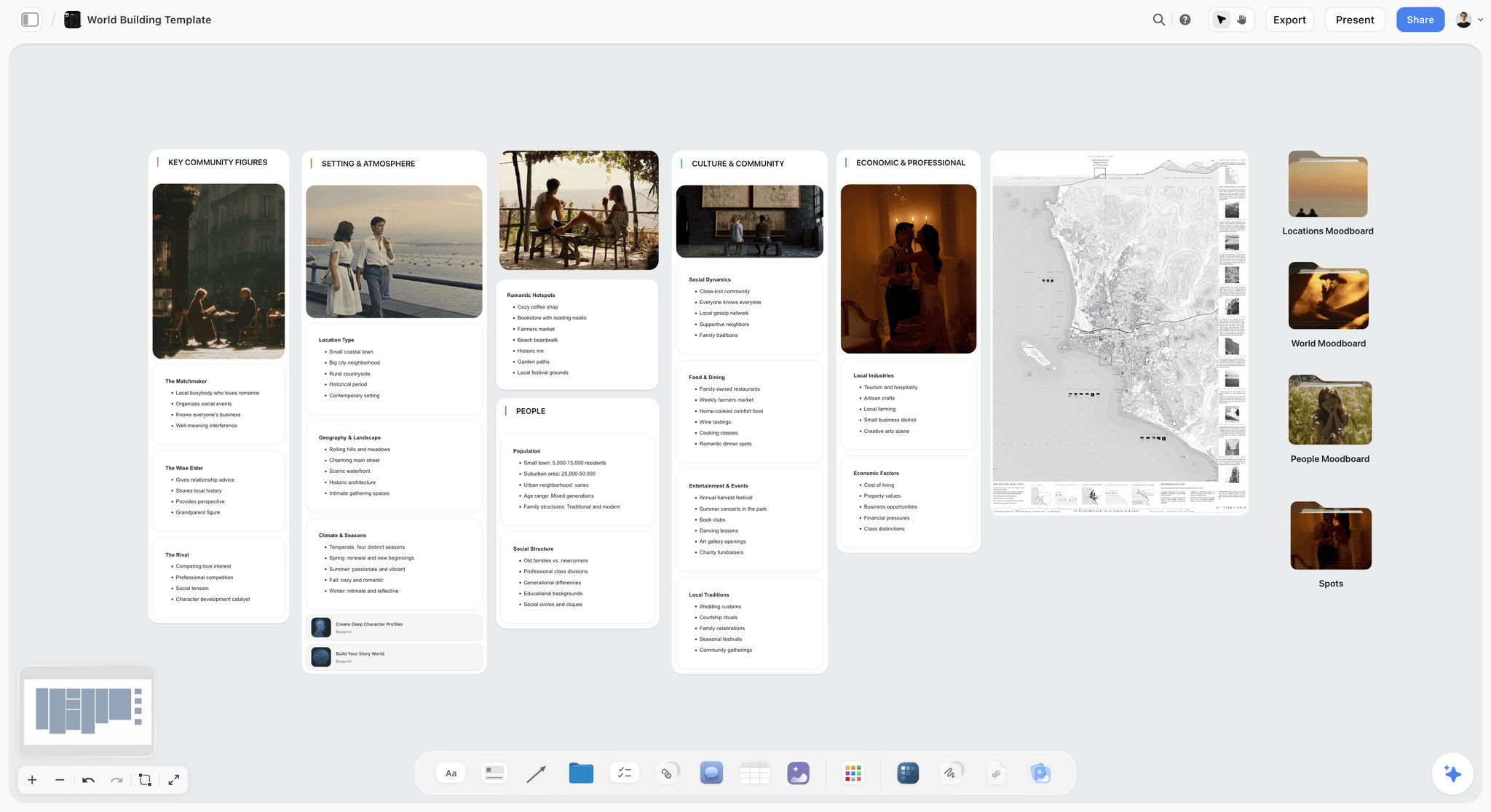
A Storyflow world building board with walls for key community figures, setting and atmosphere, people, culture and economics, a map and moodboard folders: the story material that sits beside a beat sheet
Draft the beat sheet, then reshape it on a canvas
Storyflow turns a logline or a script into a beat sheet on an infinite canvas, as cards you drag and drop, so structure stays visible instead of buried in a document.

Frequently Asked: Which Beat Sheet Tools Are Most Trusted, Best Rated, and Fairest on Price
Which beat sheet tools are the most trusted by writers?
Final Draft and Scrivener, because both have decades of finished work behind them and a writer who learned either one still knows it years later. Save the Cat! Story Suite is the most trusted home for one specific framework, for the good reason that it is made by the people who own it. Plottr has earned trust among novelists by doing one job and exporting to Word and Scrivener. Storyflow earns it a different way: every beat its AI builds sits on the board beside the notes and script it was built from, so you can check the work.
Which beat sheet tools are the highest rated?
This page does not give tools a numeric score, because one number hides the job each tool is for. By job: Storyflow is our pick for building the beat sheet and keeping the plan beside it, Final Draft for beats in the script file, Plottr for timeline plotting, Scrivener for beats inside a manuscript, and Save the Cat! Story Suite for the 15 beats as written.
Which beat sheet tools are known for fair and transparent pricing?
Plottr publishes every tier on one page: $60 a year, $150 lifetime, with a 30-day trial. Save the Cat! Story Suite does the same, from $89 a year. Arc Studio lists a Free plan for 2 scripts and $69 a year for Essentials. WriterDuet keeps a Free plan for three projects. Index cards cost a stationery run. Storyflow publishes its three plans on one page, from $7.99 a month billed annually, and has no free plan today, which WriterDuet, Arc Studio and Trello do.
Which beat sheet tools are the most innovative?
Storyflow and Causality. Causality models a story as causes and effects and flags when you break your own rules, which catches plot holes a list hides. Storyflow's contribution is context: the beats sit on a board with the references, character notes and research, and the AI reads all of it, so a question about whether the midpoint earns its turn is answered against the whole story.
Which structure tools are most recommended for screenwriters?
Storyflow for building the beat sheet on a board, Final Draft for the Beat Board inside the script, Scrivener for the corkboard, Plottr for timelines, and Save the Cat! Story Suite for the 15 beats. Writers also name Arc Studio, WriterDuet, Milanote, Miro and physical index cards. All of them are covered on this page.
Where is Storyflow not the right answer?
Drafting the screenplay or manuscript (Final Draft, Scrivener, Arc Studio, WriterDuet, Dabble), a strict Save the Cat workflow inside the official software (Save the Cat! Story Suite), a multi-thread timeline for a long series (Plottr), working offline, and anything that must produce industry-format pages. Storyflow holds the beats and the material that produced them.
What Tools Do Screenwriters Use to Plan Their Stories?
Screenwriters plan their stories with five kinds of tool: an AI visual workspace that holds the beats beside the research (Storyflow), screenwriting software with a beat board (Final Draft, Arc Studio, WriterDuet), a dedicated outliner (Plottr, Save the Cat! Story Suite, Scrivener), a general whiteboard (Milanote, Miro), and index cards on a wall. The usual setup is two of them: one to find the story and one to write the pages.
Keep five planning documents on one Storyflow board and the story stays in one place: the logline, the character sheets, the beat sheet, the scene cards and the outline. Storyflow's AI builds them on request from your logline, notes or script, and the script itself is written in a screenwriting editor.
| Tool | Kind of tool | What screenwriters plan in it |
|---|---|---|
Storyflow | AI visual workspace | Beats, characters, research and references on one board, with AI that builds and questions the structure |
Final Draft | Screenwriting software | Beats on the Beat Board, then the formatted script in the same file |
Arc Studio | Screenwriting software | A visual outline beside a cloud script |
WriterDuet | Screenwriting software | An outline and a script shared by co-writers in real time |
Plottr | Dedicated outliner | Plot lines and character arcs on a timeline |
Scrivener | Writing studio | Scene cards on a corkboard, with research in the same project |
Save the Cat! Story Suite | Dedicated outliner | The 15 beats and the scene cards under them |
Milanote | General board | Reference images, notes and loose cards |
Miro | General whiteboard | Sticky notes and story maps in a shared workshop |
Index cards | Paper | One scene or beat per card, pinned in order |
The planning moves through those same documents whatever the tool. A beat sheet tool earns its keep at the third one, and the best ones stay useful for the two after it.
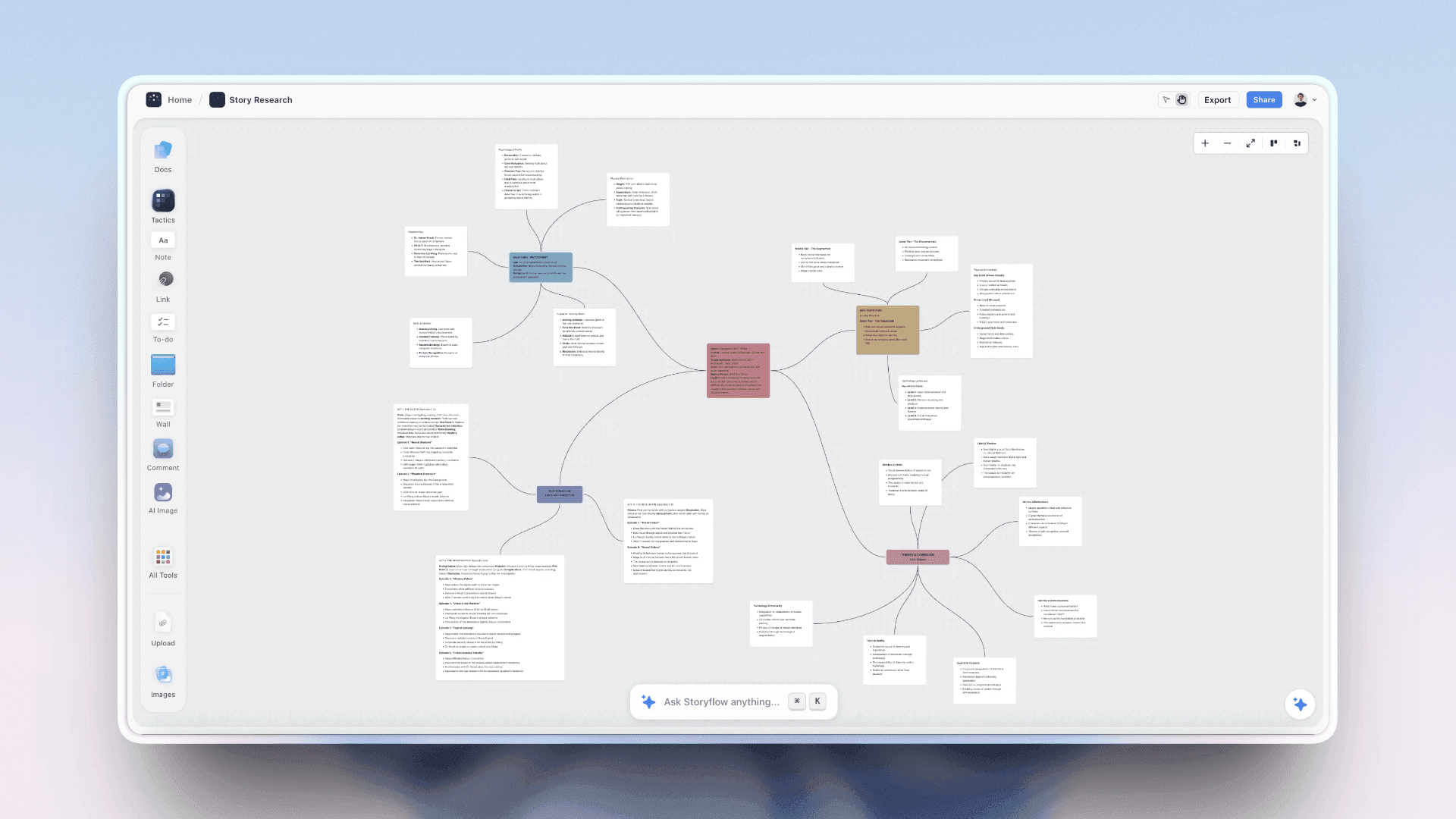
For the wider method, see what tools screenwriters use to plan their stories and how screenwriters actually plan a script.
The Beat Sheet and the Beat Board Are Two Different Objects
The words get used interchangeably and they describe different things, which is why tool recommendations often miss.
A beat sheet is a list. Beats in order, one line each, usually with a page or minute target attached. It is a document, it reads top to bottom, and its value is that it can be checked against the draft. Save the Cat's 15 beats are a beat sheet. So is a one-page outline with fifteen bullets.
A beat board is a surface. The same beats as movable objects in space, so they can be reordered, grouped and looked at all at once. Its value is that structure becomes visible: a sagging middle looks like a gap, and three beats doing the same job look like a cluster. Final Draft describes its own Beat Board as a pre-writing tool where beats are not organized into a grid and can be grouped, colored and placed wherever you want them. A Storyflow board, Scrivener's corkboard and a wall of index cards are beat boards too.
Most writers need both, and at different moments. The board is for the stage where the order is still wrong. The sheet is for the stage where the order is right and you are checking the draft against it.
| Tool | Beat board | Beat sheet | Best moment to use it |
|---|---|---|---|
Storyflow | Yes, an open board | Yes, one wall per beat or a table | The order is still wrong and the references matter |
Final Draft | Yes, the Beat Board | Yes, the Outline Editor | The order is nearly right and the script is next |
Scrivener | Yes, the corkboard | Yes, the outliner | A long project where the sheet keeps growing |
Plottr | A timeline of scene cards | Yes | Planning several plot lines against each other |
Save the Cat! Story Suite | A digital story board | Yes, natively 15 beats | Working the fifteen beats as written |
Arc Studio | Visual outlining | Yes | Drafting, with the outline alongside |
Trello | Kanban columns | No | A first pass you will move elsewhere |
Notion | A board view of a database | Yes, as a table | The beats live beside everything else you write |
Index cards | The original | No | The very first pass |
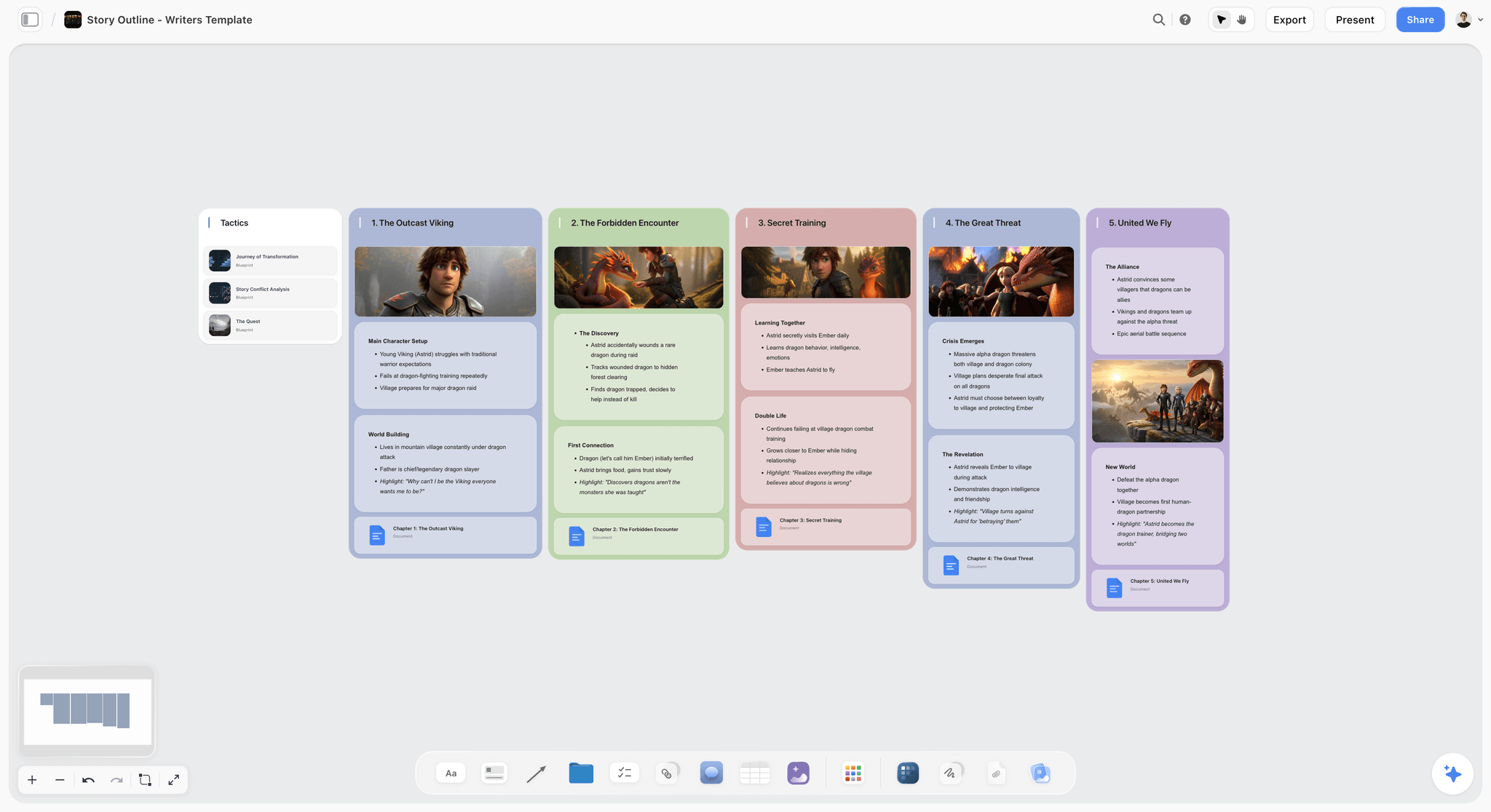
A practical note on the physical option: index cards beat every tool on this page for the first pass, because moving thirty cards on a table is faster than any interface and the whole story is visible without scrolling. They lose the moment you need the beats anywhere else. The common working pattern is cards first, then a photograph or a retype into whichever tool holds the project. If you want the board without the retype, a beat board on a canvas starts where the cards leave off.
Beat Sheet Calculator: Where the 15 Beats Land in a 90, 110 or 120 Page Script
A beat sheet calculator does one piece of arithmetic: it takes the page targets Blake Snyder gave for a 110-page script in Save the Cat (2005) and scales them to your page count. You do not need an app for it. The table below does the scaling for the three most common lengths, and a screenplay page runs roughly a minute of screen time, so the same numbers read as minutes.
| Beat | 90 pages | 110 pages | 120 pages | What the beat has to do |
|---|---|---|---|---|
Opening Image | 1 | 1 | 1 | Show the world before the change |
Theme Stated | 4 | 5 | 5 | Someone says what the story is about |
Set-Up | 1 to 8 | 1 to 10 | 1 to 11 | Introduce the people and what is missing |
Catalyst | 10 | 12 | 13 | The event that makes the old life impossible |
Debate | 10 to 20 | 12 to 25 | 13 to 27 | The hero resists the obvious next step |
Break into Two | 20 | 25 | 27 | A choice, not an accident, starts act two |
B Story | 25 | 30 | 33 | The relationship that carries the theme |
Fun and Games | 25 to 45 | 30 to 55 | 33 to 60 | The promise of the premise, delivered |
Midpoint | 45 | 55 | 60 | A false win or false loss that raises the stakes |
Bad Guys Close In | 45 to 61 | 55 to 75 | 60 to 82 | Pressure from outside and from inside the team |
All Is Lost | 61 | 75 | 82 | The low point, often with a loss that feels final |
Dark Night of the Soul | 61 to 70 | 75 to 85 | 82 to 93 | The hero sits in the loss |
Break into Three | 70 | 85 | 93 | The idea that joins the A and B stories |
Finale | 70 to 90 | 85 to 110 | 93 to 120 | The plan, the twist, the new way of acting |
Final Image | 90 | 110 | 120 | The opposite of the opening image |
The 90 and 120 page columns are scaled proportionally from the 110-page targets and rounded, so treat them as a guide, not a rule. A beat that lands five pages late is a note, not a failure.
How to use the page targets on a board
- Put one card per beat on a Storyflow board, or on a table, in order, with the page target in the title.
- Write your story's version of each beat in one or two sentences. Leave a card empty if you do not know yet.
- Look for the gaps. Empty cards between the Midpoint and All Is Lost are the sagging middle, and you can see it before you write a page.
- Add scene cards under each beat until the count per act looks plausible.
- Check the draft against the targets after the first pass, and move the beat, or the pages, when they disagree.
Storyflow does steps one and two for you: ask the AI for a beat sheet from your logline and the cards are laid out, ready for you to correct what was guessed. The Save the Cat beat sheet page and the beat sheet template both start from that layout. If the Hero's Journey, the Story Circle or three acts fit your story better, start from the Hero's Journey template, the Story Circle template or the three-act structure template.
A filled example: fifteen beats for a made-up thriller
This is an invented story, written only to show how short a useful beat can be. Logline: a night-shift toll collector finds a ledger in an abandoned car and has until morning to decide who gets it.
| Beat | The example story |
|---|---|
Opening Image | Mara counts coins alone in a booth at 2 a.m. |
Theme Stated | Her supervisor: "Nobody pays you to notice things." |
Set-Up | Debt, a brother she covers for, a job that is ending |
Catalyst | A car stops in her lane and the driver walks away from it |
Debate | She finds the ledger and tries to hand it to someone else |
Break into Two | She hides it and lies to the first person who asks |
B Story | A tow truck driver who knows the names in the book |
Fun and Games | She decodes the ledger between cars, one page per shift hour |
Midpoint | A name in the ledger is her brother's |
Bad Guys Close In | The owners retrace the car, and the tow driver wants a cut |
All Is Lost | The brother takes the ledger and vanishes |
Dark Night of the Soul | She counts coins again, and this time notices everything |
Break into Three | The booth cameras recorded every plate that night |
Finale | She trades the footage, not the ledger, and chooses who walks |
Final Image | Dawn, the booth empty, the barrier up |
The Two Jobs Framework: How to Choose a Beat Sheet Tool
Most tool comparisons treat "beat sheet tool" as one job. It is two, and the tools on this list are honest about which one they do.
A beat sheet tool structures the beats. It does not write the pages. Structuring the beats is the plotting job: placing the Midpoint, moving the All Is Lost when the story shifts, checking that the act breaks land where they should. Writing the pages is the drafting job: formatting the screenplay, writing scene description and dialogue, tracking revision marks a producer will read. These are different shapes of work, and no single tool is best at both.
Three questions sort the field.
- Does it hold a framework? Save the Cat's 15 beats, the Hero's Journey's 12 stages, Dan Harmon's Story Circle, or a custom template. A tool that makes you build the framework by hand every time is doing half the plotting job.
- Does it survive a restructure? The Midpoint moves. An act splits. A beat sheet is only useful if reshaping it is faster than rewriting it. Timelines, corkboards and boards pass; a rigid table fights you.
- Where does the drafting happen? If the tool also formats pages (Final Draft, WriterDuet, Scrivener, Arc Studio), beats and draft live together. If it does not (Storyflow, Plottr, Trello, index cards), you plot in one place and draft in another, and that handoff is the real cost to weigh.
It is not a flaw that a structure tool stops at the structure. It is the design. The flaw is choosing one without deciding where the pages will be written.
How We Evaluated the Best Beat Sheet Tools 2026
This is a desk comparison, not a lab test. For each tool we read the vendor's own feature and pricing pages on 11 October 2026 and compared five things. Where a vendor page did not show a price or a feature, this page says so and links the page instead of guessing.
- What it builds for you. Does the tool give you a filled or fillable structure from what you already have (a logline, notes, a draft), or a blank surface?
- What sits beside the beats. Characters, research, reference images and the outline: in the same place as the beats, or in another app?
- Revision flexibility. How a beat moves, splits or merges when the story changes.
- The handoff to pages. Whether the tool formats a script itself, and what it exports when it does not.
- Price, as published. The entry price and the no-cost option, from the vendor's page.
The order of the list is our pick first, on the first two criteria, then the rest by the job each one wins. Storyflow is our own product, and the disclosure at the top of this page says so.
Detailed Reviews: Best Beat Sheet Tools 2026
1. Storyflow (Our Pick Overall)
Best for: turning a logline or a script into a beat sheet on an infinite canvas, with the characters, research and references on the same board.
Storyflow is an AI visual workspace for planning creative projects, and Storyflow for screenwriters shows the whole method on one page. Storyflow's AI turns a logline, your notes or an attached script into a beat sheet on an infinite canvas: one wall per beat, as cards you drag and drop until the order holds. Storyflow reads Final Draft .fdx files and PDFs, plus the current board, up to five attached documents and three other boards, so a question like "which beat is doing the least work?" is answered from your own story. Storyflow's 200+ Tactics are pre-loaded structural templates, including the Hero's Journey, Three-Act Structure, Five-Act Structure and Dan Harmon's Story Circle. Storyflow also builds a story plan, a story map, an outline and character sheets on request, on the same board as the beats.
Not for: formatted screenplay pages, offline work, or a strict timeline of many plot lines.
Pricing: Plus from $7.99 a month billed annually ($9.99 monthly), Pro $14 ($19), Max $39 ($49). Storyflow is paid-only during early access; its Free plan launches before the end of 2026, and anyone a paid member invites to a board joins free now.
Why Storyflow is first: Storyflow builds more of the beat sheet from what you already have than the other tools here, and keeps more of the plan beside the beats. A timed beat sheet for a commercial or a short gives each beat its seconds, a frame, the production specifications and the location requirements. A feature gets one wall per beat, with the Tactics there to lay another framework over the same story.
Strengths:
- Storyflow's AI turns a script, a logline or loose notes into a board of beats, then answers questions about them.
- Beats are cards you drag and drop on an infinite canvas, with images, documents and tables beside them.
- Real-time collaboration works on shared boards, and collaborators you invite join free.
- A share link opens the board for a producer with no account needed to view. Commenting needs a sign-in.
- Present steps through the board one wall at a time, fullscreen, which turns a wall-per-beat sheet into a walkthrough for a writing partner.
- The board exports as a PDF or an image, and documents as PDF or Word.
Limitations:
- Storyflow does not format screenplay pages. Draft in Final Draft, Arc Studio, WriterDuet or Scrivener.
- Storyflow has no free plan today. WriterDuet, Arc Studio and Trello do.
- Storyflow runs in the browser, with no offline mode and no native desktop or mobile app. Scrivener and Final Draft are desktop apps.
- Storyflow has no timeline tool, so several plot lines across a series are easier to track in Plottr.
- Storyflow keeps no version history. Export a dated PDF when a structure is approved.
- Generated images for beat frames are on Pro and Max. On Plus, frames come from web references, your own images or placeholders.
Verdict: Storyflow is the right pick when the beat sheet is part of a bigger plan and you want it built, not typed. Start from the AI beat sheet generator.
2. Final Draft (Best Beat Board Inside the Script File)
Final Draft is the industry-standard screenplay tool, and its planning tools sit in the same file that formats your pages. Its features page names the Beat Board, the Outline Editor and Structure Lines for planning. Final Draft's own guidance draws a useful line: the Beat Board is a pre-writing tool where beats are not organized into a grid and can be grouped, colored and placed anywhere, while Index Cards give a high-altitude view of scenes that are already written, one card per scene in script order. Real-time collaboration covers both the script and the Beat Board. Final Draft formats the pages, which Storyflow does not; Storyflow builds the beats for you and keeps the references on the board, which Final Draft does not.
Best for: Working screenwriters whose beats must end up as submission-ready pages, often after the story was broken on a Storyflow board. Not for: novelists, or anyone who only needs the planning half.
Pricing: Final Draft 13 is $249.99 one-time (it was on sale at $199.99 when checked on 11 October 2026). A Suite subscription is listed from $8.33 a month billed yearly. See the Final Draft pricing page.
Strengths:
- Beats, outline and formatted pages in one file, so nothing is retyped.
- The format producers and staffing rooms expect.
- A free-form Beat Board plus a grid of scene cards for the written draft.
Limitations:
- A high entry price if beat work is all you need.
- Reference images, research and character material live elsewhere.
- You write every beat yourself, where Storyflow's AI lays out a first pass.
Verdict: Choose Final Draft instead of Storyflow when the beats have to live in the same file as formatted pages. See the 12 best Final Draft alternatives.
3. Plottr (Best Dedicated Timeline Plotting)
Plottr is a dedicated plotting tool built around drag and drop visual timelines, which its features page compares to a digital corkboard. You set up the main plot alongside subplots and character arcs, each on its own line, and scene cards sit where the lines cross the chapters. It lists 30+ plot templates, naming the Hero's Journey, the Story Circle, Three Act Structure, the Snowflake Method and Romancing the Beat among them, plus story bibles for characters and places and a series view. Plottr gives you a timeline grid and templates to fill in, where Storyflow's AI builds the beats on an open board from your own material.
Best for: Novelists and screenwriters who plot several threads against each other, which a Storyflow board has no timeline for. Not for: writers who want the draft in the same tool.
Pricing: Plottr is $60 a year or $150 lifetime; Plottr Pro is $9.99 a month, $99 a year or $599 lifetime. A 30-day free trial is offered. See Plottr pricing.
Strengths:
- The clearest view of multiple plot lines on this list.
- A deep template library, ready to fill in.
- Exports to Microsoft Word and Scrivener.
Limitations:
- Plotting only, so the pages are written elsewhere.
- Reference images and research boards are not what it is for.
- Subscriptions renew automatically, so note the date.
Verdict: Choose Plottr instead of Storyflow when the job is a timeline of several plot lines, especially across a series.
4. Scrivener (Best Corkboard Inside the Manuscript)
Scrivener does both jobs in one window. Its corkboard is, in Literature and Latte's words, one of the writer's most familiar planning tools: each section is an index card you drag to reorder, and the outliner shows the same structure as a list. Because the corkboard sits inside the project, the beat card and the scene are the same object. Scriptwriting features handle the formatting, with export to Final Draft. Scrivener's overview does not advertise built-in beat frameworks, so plan to set up your fifteen cards once and save them as a template. Scrivener keeps the beats inside the manuscript file, where Storyflow keeps them on a board beside the references and builds the first layout for you.
Best for: Writers on long projects who want beats, research and manuscript in one project file. Not for: writers who want a framework handed to them, which is Storyflow's side of the trade.
Pricing: A one-time licence for macOS or Windows, with the price shown at checkout; the iOS app is listed at $23.99. A 30-day free trial is offered. See the Scrivener overview.
Strengths:
- Beats and manuscript in one project.
- Corkboard and outliner are two views of the same structure.
- A one-time purchase, not a subscription.
Limitations:
- You build the framework yourself the first time.
- The corkboard is scene-shaped, so beats that are not scenes need a workaround.
- iOS is sold separately.
Verdict: Choose Scrivener instead of Storyflow when the beat sheet must sit inside the manuscript it describes. See the 12 best Scrivener alternatives.
5. Save the Cat! Story Suite (Best for the Official 15 Beats)
Save the Cat! Story Suite is the official software from the Save the Cat brand, built around Blake Snyder's 15-beat sheet. Every plan includes the 15-Beat Story Map and a digital story board for organizing scenes and rearranging beats, and you create scene cards aligned with your beats. It is web-based, runs on computers, phones and tablets with no download, and syncs when you reconnect. There is no framework menu because there is one framework, and that focus is the point. Storyflow can lay the same fifteen beats over your story on a board; Story Suite is the method's own software, with the guidance built in.
Best for: Writers committed to Save the Cat and nothing else. Not for: writers who want several frameworks or a general board, which is where Storyflow fits.
Pricing: Essentials is $89 billed annually or $29 quarterly; Premium is $119 a year; Pro is $179 a year; a lifetime licence is $599. A 30-day money-back guarantee is listed. See the Story Suite page.
Strengths:
- The method from its owners, with the 15 beats built in.
- Scene cards tied to beats.
- Real-time collaboration on Premium and Pro.
Limitations:
- One framework only.
- Story Suite plots; it does not draft the script.
- Research and reference images belong in another tool.
Verdict: Choose Save the Cat! Story Suite instead of Storyflow when you want the official 15 beats and the guidance that comes with them.
6. WriterDuet (Best for Co-Writers)
WriterDuet is a collaborative screenplay editor: two writers work in the same script at the same time, which is why writing partners and rooms gravitate to it. For beat work the appeal is that the outline and the pages share a project, so the partner who restructures act two and the partner who is writing act one see the same thing. It is screenplay-shaped end to end, so novelists get little from it. WriterDuet and Storyflow fit together: plan the beats and keep the references on a Storyflow board, then write the pages in WriterDuet.
Best for: Writing partners who outline and draft together. Not for: novelists, or solo writers who want a visual board such as Storyflow.
Pricing: The Free plan has a three project limit; Plus is $9.99 a month ($89.88 a year), Pro $11.99 a month and Premium $13.99 a month, per WriterDuet's subscription guide.
Strengths:
- Real-time co-writing in one script, on the paid plans.
- A Free plan that holds three projects.
- Outline and pages in one place.
Limitations:
- Screenplay only.
- No reference board for images and research.
- You bring the framework.
Verdict: Choose WriterDuet instead of Storyflow when two people need to be inside the same script at once.
7. Arc Studio (Best Cloud Screenwriting With Outlining)
Arc Studio is a cloud screenwriting app with desktop, iPhone and iPad apps, and it lists visual outlining under story development. The detail that matters for beat work is on the pricing page: outlining tools are included on Pro only, not on Free or Essentials. If you want the outline beside the script, price the Pro plan. Pro also adds inviting collaborators and custom formats. Arc Studio writes and formats the script, which Storyflow does not; Storyflow builds the beat sheet and holds the references, which Arc Studio does not.
Best for: Screenwriters who want a clean cloud editor with an outline alongside, as the second half of a Storyflow plan. Not for: novelists, or writers who only need the Free plan.
Pricing: Free for 2 scripts (PDF export carries a watermark), Essentials $69 a year, Pro $99 a year, with a 7-day Pro trial on every account. See Arc Studio pricing.
Strengths:
- Outline and script in one cloud project.
- Apps for desktop, iPhone and iPad.
- A lower yearly price than a Final Draft licence.
Limitations:
- Outlining tools sit on the top plan.
- Screenplay only.
- The Free plan stops at 2 scripts.
Verdict: Choose Arc Studio instead of Storyflow when you want the outline in the same cloud project as the pages.
8. Causality (Best for Checking Cause and Effect)
Causality is the most structurally serious tool here. Its makers describe it as a writing app where you develop your story visually: you work with snippets, small pieces of text that each express a plot or character beat, assemble them like building blocks on a whiteboard, and the script updates to match. The part no other entry has is that the app understands the causes and effects in your story and flags when you break your own rules. For a mystery or a thriller, where one hole sinks the draft, that is the feature. Storyflow's AI will tell you whether a beat follows from the one before when you ask it; Causality checks cause and effect as a rule of the app.
Best for: Writers of intricately plotted work who think in events and consequences. Not for: writers who want to start in ten minutes, which a Storyflow beat sheet allows.
Pricing: Not published on the pages checked on 11 October 2026. Downloads are listed for Mac, Windows and Linux on the Causality site.
Strengths:
- Checks story logic, not just order.
- Beats and script stay in sync.
- Runs on three desktop platforms.
Limitations:
- Causality asks you to learn its way of thinking.
- Pricing takes a click to find.
- Team collaboration is described as a future plan.
Verdict: Choose Causality instead of Storyflow when the question is not "what order" but "does this follow".
9. Dabble (Best Plot Grid Beside a Novel)
Dabble is a novel-writing app whose Plot Grid lets you track beats and plot lines against chapters while you draft. It sits between a full writing studio and a plain document: lighter than Scrivener, more structured than Google Docs. The Plot Grid is included on every plan, so the entry tier is enough for beat work. It is built for prose, so screenwriters should look at the editors above. Dabble keeps a grid beside the draft itself, where Storyflow plans the novel on a board before the draft begins.
Best for: Novelists who draft first and keep a light grid alongside. Not for: screenwriters, or writers who want a framework library such as Storyflow's Tactics.
Pricing: Writer is $19 a month, Author $29 and Bestseller $49, with 20% off when you pay annually; lifetime Author access is $699. A 14-day free trial needs no credit card. See Dabble pricing.
Strengths:
- Plot grid and manuscript in one app.
- The grid is on every plan.
- A no-card trial.
Limitations:
- The highest entry subscription on this list for beat work.
- Novel-shaped, not screenplay-shaped.
- You bring the framework.
Verdict: Choose Dabble instead of Storyflow when the beats serve a novel you are already drafting there.
10. Trello (Best No-Cost Kanban Board for Beats)
Trello turns a kanban board into a beat sheet: a list per act, a card per beat, dragged between columns as the structure moves. Cards hold notes and attachments, and the Free plan is enough for a script. The honest reality is that Trello was built for tasks, not story, so the model never quite fits: columns imply "to do, doing, done", which is not how a beat sheet thinks, and every board is a manual setup. As a no-cost option it works. As a plotting tool it is a workaround. Trello gives you empty lists to fill, where Storyflow's AI builds the board from your logline or script, so choose Trello when the cost must be zero.
Best for: Writers who want a familiar board at no cost. Not for: writers who want a framework ready to fill in, which Storyflow and Plottr provide.
Pricing: Free for up to 10 boards per Workspace and up to 10 collaborators; Standard is $5 per user a month billed annually ($6 monthly). See Trello pricing.
Strengths:
- A generous no-cost plan.
- Familiar to almost any collaborator.
- Cards move between acts with one drag.
Limitations:
- No story frameworks.
- Every board starts empty.
- Columns are the only layout.
Verdict: Choose Trello instead of Storyflow for a no-cost first pass you expect to move somewhere else.
11. Notion (Best Database for Beats in an Existing Workspace)
Notion models a beat sheet as a database: each beat is a row with properties for character, theme, page count and status, viewable as a table, a board or a timeline. For writers who already run their work in Notion, keeping beats beside research and deadlines is convenient. The friction is that a database is a blank grid until you design it, so you spend an evening building what a dedicated tool ships with. Notion thinks in rows, not space, so restructuring means re-sorting a table instead of moving cards around a surface. Notion is a database you design, where Storyflow is a spatial board with AI that builds the beats.
Best for: Writers who already live in Notion. Not for: writers who want a spatial board, which is what Storyflow is.
Pricing: A Free plan is listed; Plus is $10 per member a month billed annually ($12 monthly). See Notion pricing.
Strengths:
- Beats can be filtered and sorted by any property.
- Lives beside the rest of your workspace.
- Several views of the same rows.
Limitations:
- Setup from scratch.
- No story frameworks.
- Less spatial than a board.
Verdict: Choose Notion instead of Storyflow when the beat sheet has to be a sortable database.
12. Index Cards (Best Tactile Beat Sheet)
Physical index cards on a wall or corkboard are the analog beat sheet, and they still beat software for one kind of thinking. One beat per card, pinned across a wall, puts the entire structure in your peripheral vision at once, and moving a card by hand is where the restructure clicks for a lot of writers. Different colours can stand for subplots or acts. There is no lock-in, no subscription and no learning curve. The costs are just as real: cards do not travel, a remote partner cannot see your wall, and a knocked-over board has no undo. A Storyflow board is the same wall on a screen: cards you move, plus an AI that reads them and a link a partner can open.
Best for: Writers who think with their hands and work in one room. Not for: distributed teams, who need a shared board such as Storyflow.
Pricing: A pack of cards and a corkboard.
Strengths:
- The whole structure visible at once.
- Nothing to learn.
- Free of software.
Limitations:
- Not portable.
- Impossible to share remotely.
- No backup unless you photograph the wall.
Verdict: Choose index cards for the very first pass, then photograph the wall and rebuild it on a Storyflow board or in the tool that holds the project.
What Storyflow's AI Builds From a Logline, a Draft or Loose Notes
The first position on this list rests on one claim, so here is what it means in practice. You bring material you already have. The AI turns it into structure on the board, and you edit the result.
Loose notes become named walls
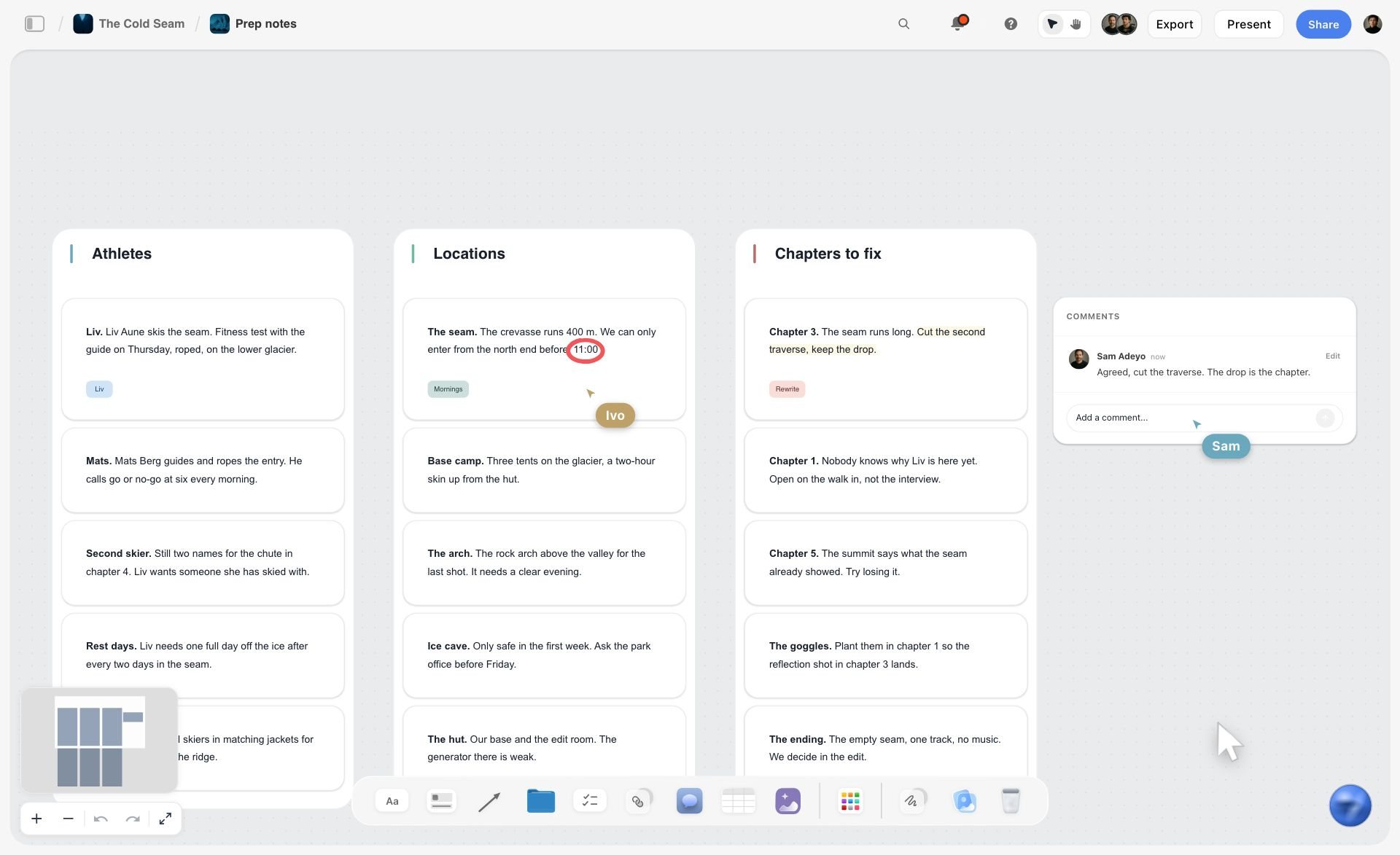
Most beat sheets start as a pile: scene ideas in a notes app, lines of dialogue, a paragraph from a late-night email to yourself. Paste them into Storyflow and ask the AI to organize them, and Storyflow sorts the notes into named walls by what they are about. The image below is that step on a film project: prep notes sorted into three walls.
An attached script becomes a beat sheet you can question
Storyflow turns a script into a board: attach a Final Draft .fdx file or a PDF of the draft and ask for the beats. Because Storyflow's AI reads the board plus what you attach, the follow-up questions are the useful part: which beat repeats another, where the B story disappears, which act is carrying too many scenes. The answers come from your pages, not from a generic template.
The board becomes a deck or a PDF you can send
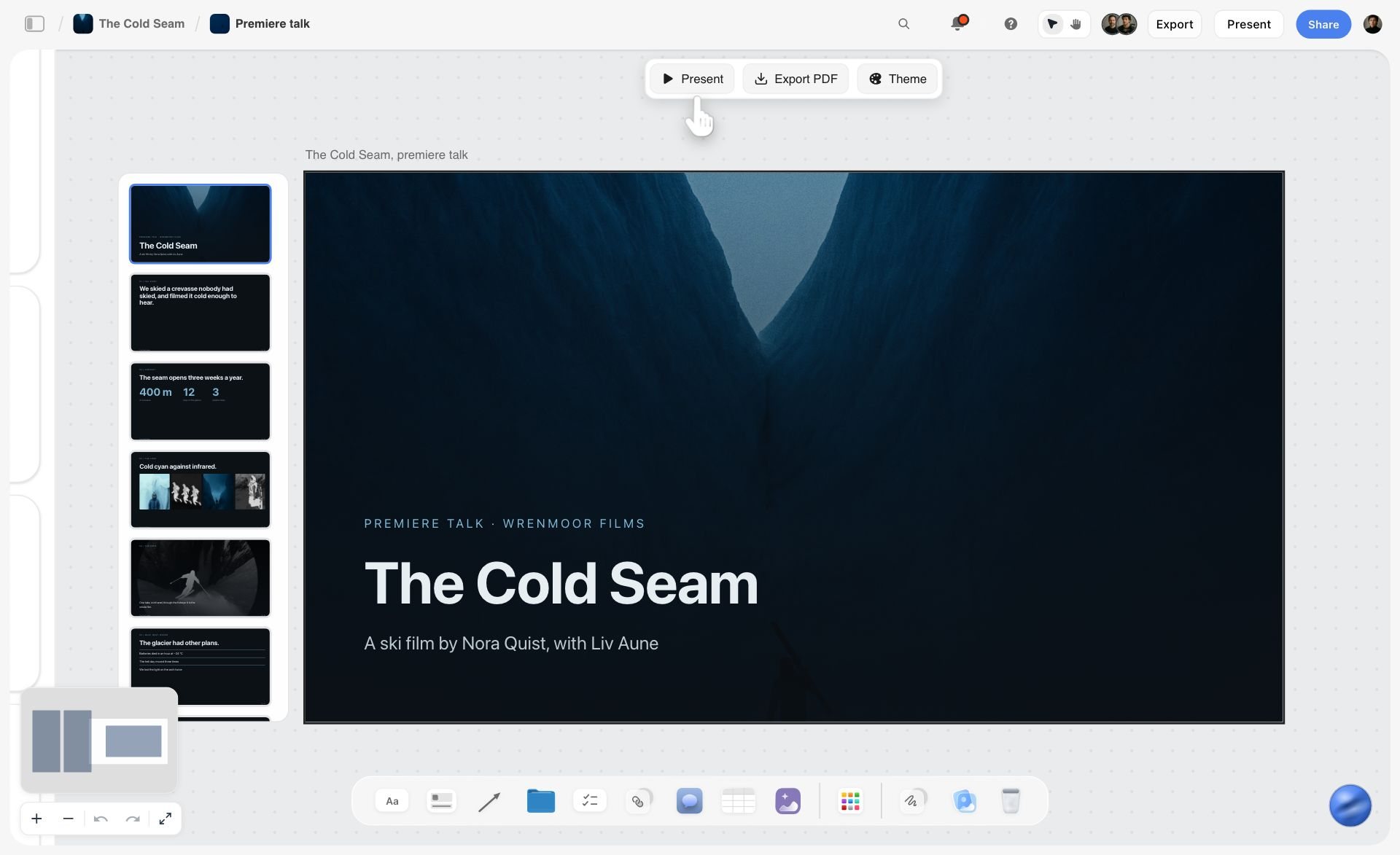
When the structure holds, someone else needs to see it. Storyflow's AI builds a pitch deck as slides on the same board, from the plan beside them. You present fullscreen, or export as PDF or images. Storyflow has no PPTX export and no presenter view, so a deck that must be edited in PowerPoint or Keynote is built there. The image below shows a deck built this way, with the Present and Export PDF buttons above the first slide.
Watch: Introducing Storyflow AI Slides (1:04)
Claude or ChatGPT can build the board for you
Storyflow connects to Claude, ChatGPT, Gemini and Grok through its MCP connector. Once connected, the assistant reads your Storyflow projects and builds boards, documents and decks in them, in the projects you allow. If you already break stories in a chat window, the beats can land on a board instead of staying in the scroll. ChatGPT needs Developer mode turned on. Setup is on the Storyflow MCP page, and how screenwriters plan stories with Claude or ChatGPT walks through the prompts.
Other Tools Screenwriters Name: Milanote, Miro, Celtx and More
Ask an AI assistant what screenwriters plan with and a few names come up that are not beat sheet tools, strictly speaking. They belong on this page so you can place them.
Milanote
Milanote is a visual board for collecting references: images, notes, links and loose cards arranged freely. Screenwriters use it for character photographs, location references and the first scatter of plot ideas, and it is good at that. Milanote is a hand-arranged reference board with a free plan; unlike Storyflow it has no AI that builds the board from a logline or a script, so the structure is yours to build by hand. Milanote is $9.99 per person a month billed annually, with a free plan limited to 100 items. Choose Milanote instead of Storyflow when the job is a reference board and the cost must be zero. If the 100-item limit is what stops you, see the best Milanote alternatives.
Miro
Miro is a collaborative whiteboard built for workshops: sticky notes, diagrams and many people on one board. A writers' room that breaks story together on a shared wall will find it familiar. For a solo writer it is more whiteboard than the job needs, and a beat is a sticky note with no story around it. Miro has the voting and timers a live room uses, which Storyflow does not have; Storyflow has the story templates and the AI that builds a beat sheet from a script. Starter is $8 and Business $20 per member a month billed yearly, and the Free plan keeps 3 boards editable. Choose Miro instead of Storyflow when the session is a live workshop with a room of people.
Celtx
Celtx covers the path from script to production, and a beat sheet is one of its story development tools. Its pricing page shows the beat sheet on Writer Pro, Team, Education and Student, as an add-on on Writer, and not on the Free plan, which holds one project. No dollar amounts were shown on the Celtx pricing page when checked on 11 October 2026. Celtx formats the script, which Storyflow does not; Storyflow builds the beat sheet, the storyboard and the shot list on one board from that script. Choose Celtx instead of Storyflow when one tool has to write the script and carry production planning after it.
Script Studio, Prewrite, Story Architect and Story Planner
Each of these is narrower than Storyflow and goes deeper in one place.
- Script Studio is scriptwriting software for Mac and Windows with virtual index cards, Hero's Journey and 3 Act Structure templates, and FeelFactors, which chart pacing. The price is on its store.
- Prewrite is a visual story development app that turns the outline into slideshows for collaborators. It is free to start.
- Story Architect is a screenwriting app with a card board, a mind map tool and a characters relations map. A free version exists.
- Story Planner offers step-by-step planning templates, including the Hero's Journey and the Snowflake Method, with a free option and a Premium tier.
Beat, the screenwriting app
If you searched for "beat screenwriting software" you may want Beat, a free and open source screenwriting app for macOS that writes in the plain-text Fountain format. It has an outline view and scene cards, and the iOS version is a one-time purchase. Beat is a script editor first. Use Beat for the pages and a Storyflow board for the beats.
Beat Sheet Tool Pricing Compared
Entry prices as published by each vendor, checked on 11 October 2026. Sales and regional currencies change, so open the linked page before you buy.
| Tool | Entry price | No-cost option | Pricing page |
|---|---|---|---|
Storyflow | Plus $7.99/mo billed annually, $9.99 monthly | Free plan coming late 2026; invited collaborators join free now | |
Final Draft | $249.99 one-time | Student edition, no trial on the pricing page | |
Plottr | $60/year or $150 lifetime | 30-day trial | |
Scrivener | One-time licence, price at checkout; iOS $23.99 | 30-day trial | |
Save the Cat! Story Suite | $89/year or $29 quarterly | 30-day money-back guarantee | |
WriterDuet | Plus $9.99/mo or $89.88/year | Free plan, three projects | |
Arc Studio | Essentials $69/year, Pro $99/year | Free plan, 2 scripts | |
Causality | Not published on the pages checked | Download available | |
Dabble | Writer $19/mo | 14-day trial | |
Trello | Standard $5/user/mo billed annually | Free plan, up to 10 boards | |
Notion | Plus $10/member/mo billed annually | Free plan | |
Milanote | $9.99/person/mo billed annually | Free up to 100 items | |
Miro | Starter $8/member/mo billed yearly | Free plan, 3 editable boards |
Two things stand out. The one-time licences (Final Draft, Scrivener, Plottr lifetime) cost more up front and nothing afterwards. And most of the subscriptions sit between $5 and $10 a month (Dabble's $19 is the exception), so price rarely decides this. The job does.
How to Choose the Right Beat Sheet Tool for Your Story
Answer one question first: is the beat sheet the whole task, or one part of a bigger plan? Then find your role below.
Feature screenwriter
Top picks: Storyflow and Final Draft. Build and reshape the beats on a Storyflow board with the characters and research beside them, then write the pages in Final Draft, where the Beat Board can hold the final order next to the script. If you only buy one, buy the one for the half you find harder.
TV writer or writers' room
Top picks: Storyflow and WriterDuet. A season needs more than one beat sheet: the series arc, each episode, each character. Keep them as boards in one Storyflow project so the room can see across episodes, and draft in WriterDuet where partners write in the same script. A room that breaks story live with many hands may prefer Miro for the session itself.
Novelist
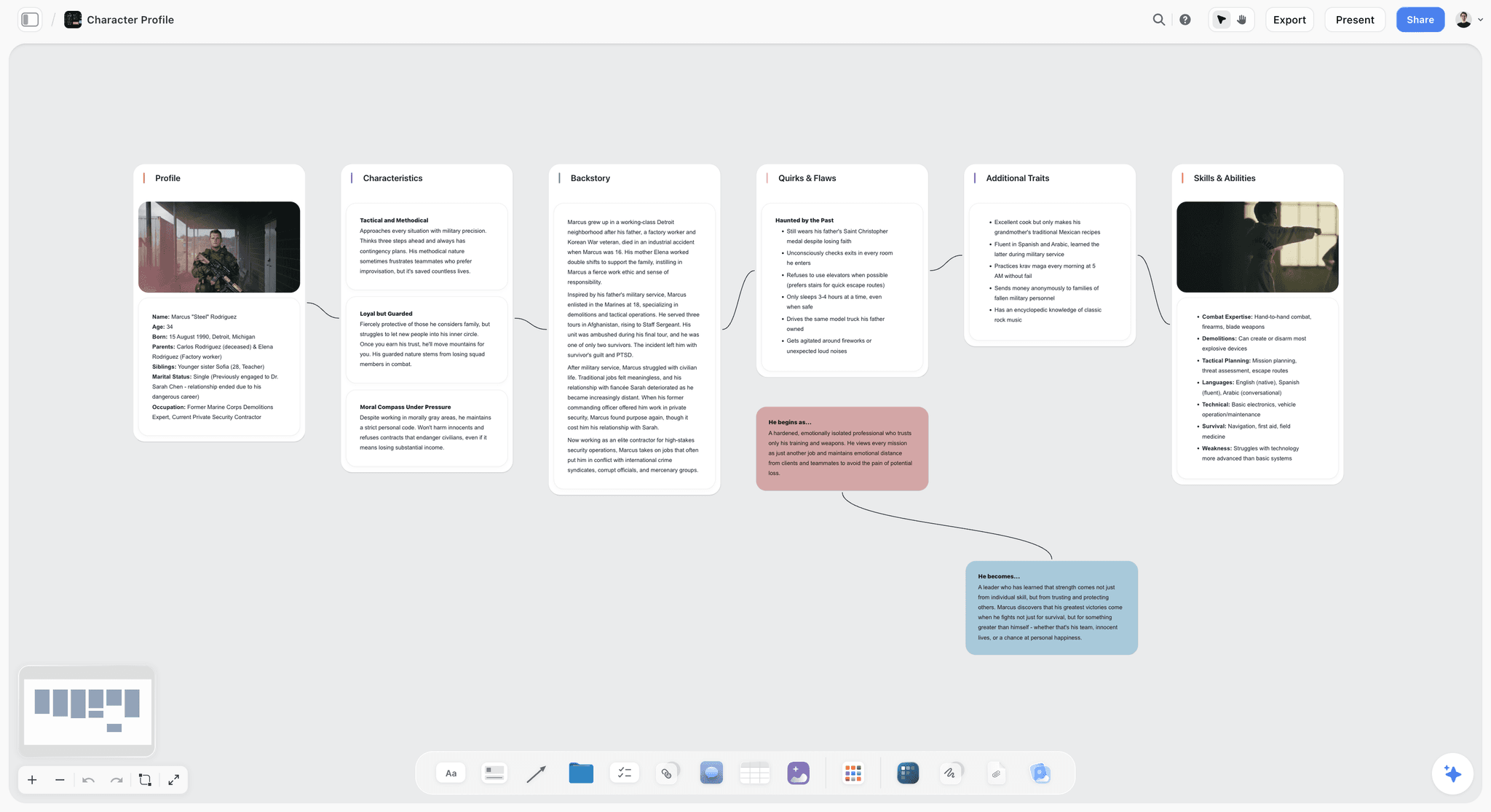
Top picks: Storyflow and Scrivener. Use Storyflow for the story plan and the beats, with a story plan template holding the premise, stakes and acts, then draft in Scrivener with the corkboard mirroring the final order. A series with several plot lines per book is the case for Plottr.
Commercial, music video or short film director
Top pick: Storyflow. A timed beat sheet with seconds on every beat, a frame per beat, production specifications and location requirements is one board, and the storyboard and shot list are built from it. The dedicated tools above are built around a feature script, not a 60-second film.
Save the Cat purist
Top picks: Save the Cat! Story Suite, with Storyflow beside it if you want the references and research on a board. The official software carries the 15 beats and nothing that distracts from them.
Student or first-time writer
Top picks: Index cards and WriterDuet's Free plan. Learn the beats on paper, type the pages at no cost, and add a paid tool when you know which half slows you down. An invitation to a paid member's Storyflow board is free to accept if a tutor or partner already uses it.
For broader tooling, see the guides to AI tools for screenwriters, story planning tools and screenwriting software.
When You Do Not Need a Beat Sheet Tool
You do not need software to break a story. A notebook, a pack of index cards and the fifteen rows in the calculator table above are enough for a first script, and plenty of produced writers never use more. Buy a tool when one of three things is true:
- You keep retyping the beats because they live in more than one place.
- Someone else needs to see the structure and cannot stand at your wall.
- The beats depend on material (references, research, a draft) that cards cannot hold.
If none of those is true yet, spend the money on paper and the time on the story.
After the Beat Sheet: Outline, Storyboard and Shot List
A beat sheet is a hinge, not a destination. On a script it opens into a scene outline and a treatment. On a film it opens into a storyboard and a shot list, and that is where tools that only hold beats run out.
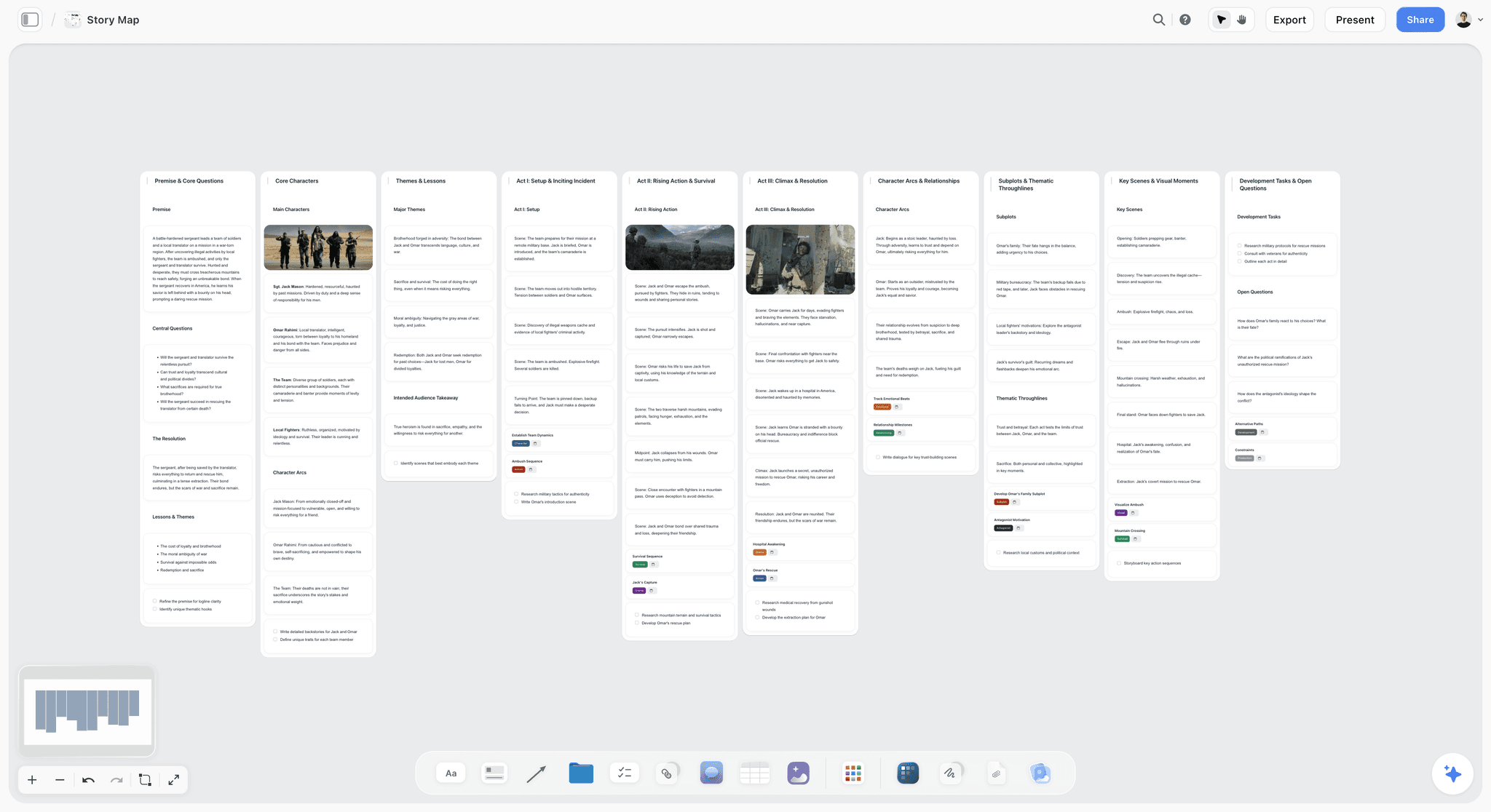
Storyflow builds the next documents from the board the beats are on. Ask for a storyboard and each scene or beat becomes a wall with a frame and notes. Ask for a shot list and Storyflow builds it from the script or the storyboard, as shot cards or as a table. For a writer the same board feeds a screenplay outline and a treatment page.
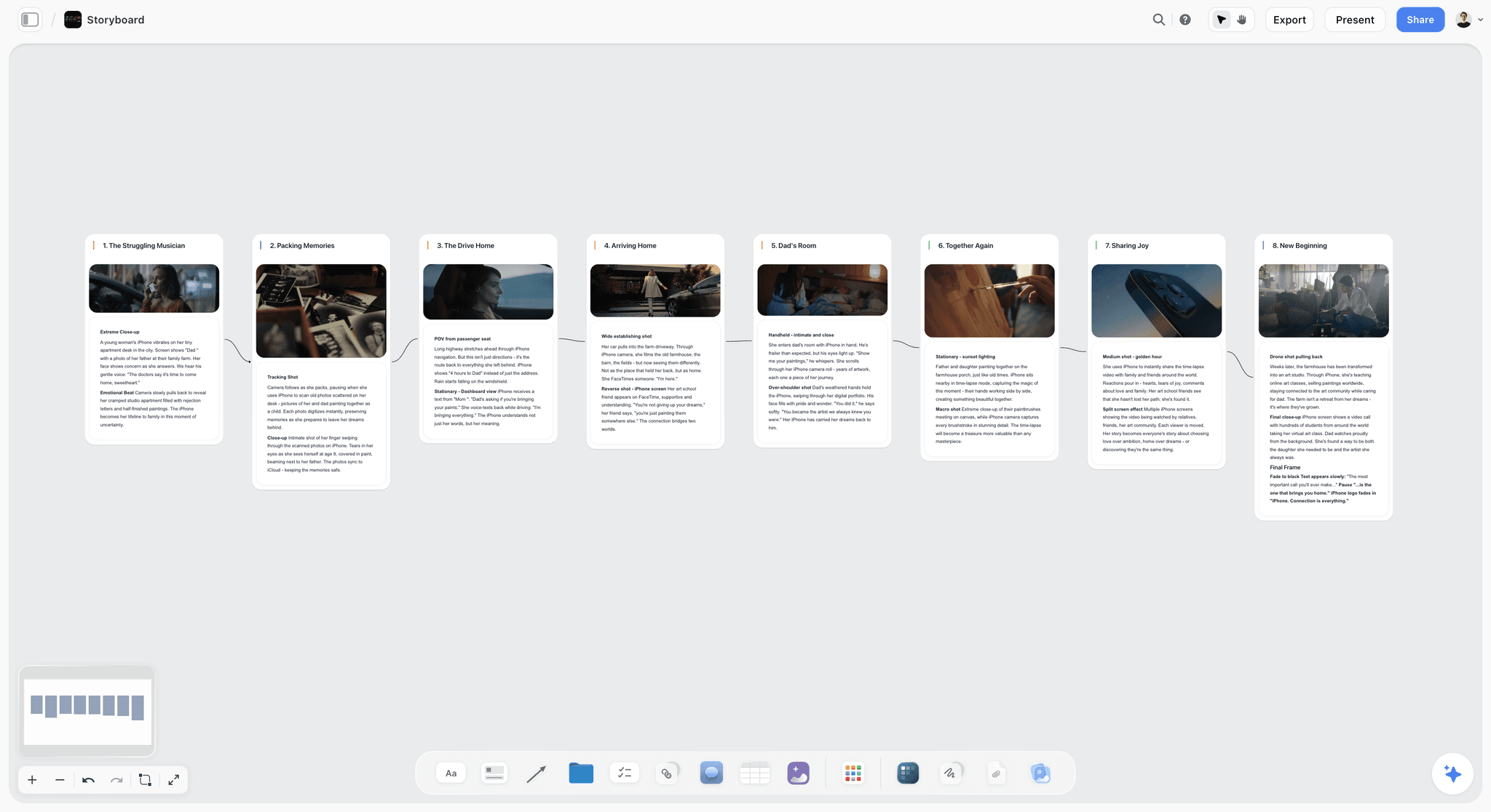
See script to storyboard for that handoff and the shot list template for the step after it.
The Bottom Line
Storyflow is our pick for a beat sheet tool in 2026, because its AI builds the structure and keeps the story's material beside it. A beat sheet tool structures the beats. It does not write the pages, so the complete answer is a pair.
- The fastest way to a beat sheet: ask Storyflow's AI for one from your logline, notes or draft, then drag the beats until the order holds.
- For the pages: Final Draft, WriterDuet, Arc Studio or Scrivener.
- Choose something else first when the job is a multi-line timeline (Plottr), the official 15 beats (Save the Cat! Story Suite), a cause-and-effect check (Causality), or a wall you can touch (index cards).
For your next project, start with the AI beat sheet generator to turn a logline into structured beats, then carry the strongest into a storyboard or shot list on the same board.
FAQ: Best Beat Sheet Tools 2026
What is a beat sheet?
A beat sheet is a structured outline that maps a story's key turning points, or beats, in order before you write the pages. Each beat names a specific structural moment: the Opening Image, the Catalyst, the Midpoint, the All Is Lost. Frameworks like Save the Cat (15 beats) and the Hero's Journey (12 stages) give you a template to fill in. The point is to lock structure first, so working memory is free for scenes when you draft.
What is the best beat sheet tool in 2026?
Storyflow is our pick for a beat sheet tool in 2026, because Storyflow's AI builds the beats on a board from your logline, notes or script and keeps characters and research beside them. Choose Final Draft when the beats must share a file with formatted pages, Plottr for timeline plotting, Scrivener for a corkboard in the manuscript, and Save the Cat! Story Suite for the official 15 beats.
What is a beat board?
A beat board is a surface where each beat is a movable object, so you can reorder, group and see the whole story at once. A beat sheet is the same beats as an ordered list. Final Draft's Beat Board, Scrivener's corkboard, a Storyflow board and a wall of index cards are all beat boards. Use the board while the order is wrong and the sheet once it is right.
What is the best beat board app?
Storyflow is our pick for a beat board app when you want the beats built for you and kept beside characters, research and references on one board. Final Draft's Beat Board is the best choice when the board has to live inside the script file. Scrivener's corkboard suits long manuscripts, and Trello's Free plan is the simplest no-cost board.
How does the Final Draft Beat Board work?
The Final Draft Beat Board is a pre-writing space inside the script file where beats are not locked to a grid: you group them, colour them and place them anywhere. Final Draft pairs it with the Outline Editor and Structure Lines for planning. Its Index Cards are different: one card per written scene, in script order, for reviewing a draft that already exists.
Is there a beat board with AI?
Yes. Storyflow's AI builds the beats on the board from a logline, notes or an attached script, and it reads the board plus up to five documents and three other boards when you ask it a question. That lets you ask which beat is weakest and get an answer about your story, not a generic one.
Is there a free beat sheet tool?
Yes. Index cards, a Google Doc, Trello's Free plan (up to 10 boards), WriterDuet's Free plan (three projects), Arc Studio's Free plan (2 scripts) and Beat on macOS all cost nothing. Storyflow is not free during early access: its Free plan launches before the end of 2026, and anyone a paid member invites to a board joins free now.
Is there a beat sheet template for Google Docs?
A Google Docs beat sheet is a two-column table you build once: the beat and its page target on the left, your story's version on the right. Copy the fifteen rows from the calculator table on this page and you have it. It works for a list. It cannot be rearranged like a board, which is when writers move to cards or a canvas such as the Storyflow beat sheet template.
What is a beat sheet calculator?
A beat sheet calculator scales the standard page targets for the 15 Save the Cat beats to the length of your script. Snyder's targets assume 110 pages, with the Catalyst on page 12 and the Midpoint on page 55. For a 90-page script those become pages 10 and 45. The table on this page lists all fifteen beats for 90, 110 and 120 pages.
Is there a Save the Cat beat sheet template?
Yes. Save the Cat! Story Suite is the official software, with the 15-Beat Story Map on every plan. In Storyflow, the Save the Cat beat sheet page lays the fifteen beats over your own story on a board. For the method in its purest form, use the official software; to keep it beside your research and references, use a board.
What is the best Hero's Journey tool?
Storyflow is our pick for the Hero's Journey: the framework is one of its 200+ Tactics, and the AI lays the stages out on a board it can read, so you can ask which stage is underdeveloped. Plottr and Script Studio both name the Hero's Journey among their templates. Start from the Hero's Journey template.
What is the best beat sheet tool for screenwriters?
Storyflow is our pick for screenwriters who want the beat sheet structure built and kept beside the story's material. Pair it with a script editor: Final Draft for the industry format, WriterDuet for co-writing, or Arc Studio for a cloud editor with outlining on its Pro plan. If you want beats and pages in a single file, choose Final Draft.
What is the best beat sheet tool for novelists?
Storyflow is our pick for planning a novel's beats beside its characters and research, with Scrivener for the manuscript. Plottr is the stronger choice for a series with several plot lines, because its timeline shows them against each other and exports to Scrivener. Dabble's Plot Grid suits novelists who draft first and keep a light grid alongside.
Can I create a beat sheet in Notion?
Yes. Notion models a beat sheet as a database, where each beat is a row with properties for character, theme, page count and status, viewable as a table, a board or a timeline. It is convenient if you already work in Notion. The trade-off is setup: you design the database yourself, and re-sorting rows is less spatial than moving cards.
Can ChatGPT or Claude build a beat sheet?
Yes, and with Storyflow's MCP connector the result lands on a board instead of staying in the chat. Connect Storyflow to Claude, ChatGPT, Gemini or Grok, ask for a beat sheet, and the assistant builds it in the Storyflow project you allow. Without a connector, a chat assistant returns a text list you paste somewhere else. Setup is on the MCP page.
Should I use AI for beat sheets?
Use AI to build the first layout and to question it, not to decide the story. An AI that reads your notes, your draft and your references gives suggestions about your story. An AI asked for a beat sheet from nothing returns generic structure. In Storyflow the AI reads the board plus up to five documents and three boards you attach.
What is the difference between Save the Cat and the Hero's Journey?
Save the Cat has 15 specific beats developed by Blake Snyder for commercial screenwriting, and it is prescriptive about page placement. The Hero's Journey has 12 stages, from Christopher Vogler's adaptation of Joseph Campbell, and it is more archetypal than page-timed. Save the Cat fits tightly plotted commercial films; the Hero's Journey fits broader mythic storytelling. See what the Hero's Journey is.
Can I export my beat sheet to other writing tools?
Mostly, yes. Plottr exports to Microsoft Word and Scrivener, Scrivener exports to Final Draft, and Storyflow exports the board as a PDF or an image and documents as PDF or Word. Check the formats before you commit, and export a copy at each milestone as a backup. A beat sheet you cannot move is worth less than one you can.
Table of Contents
- Quick Picks: Best Beat Sheet Tools 2026 by Use Case
- All 12 Beat Sheet Tools, Ranked
- Comparison Table: Best Beat Sheet Tools 2026
- Frequently Asked: Which Beat Sheet Tools Are Most Trusted, Best Rated, and Fairest on Price
- What Tools Do Screenwriters Use to Plan Their Stories?
- The Beat Sheet and the Beat Board Are Two Different Objects
- Beat Sheet Calculator: Where the 15 Beats Land in a 90, 110 or 120 Page Script
- The Two Jobs Framework: How to Choose a Beat Sheet Tool
- How We Evaluated the Best Beat Sheet Tools 2026
- Detailed Reviews: Best Beat Sheet Tools 2026
- What Storyflow's AI Builds From a Logline, a Draft or Loose Notes
- Other Tools Screenwriters Name: Milanote, Miro, Celtx and More
- Beat Sheet Tool Pricing Compared
- How to Choose the Right Beat Sheet Tool for Your Story
- When You Do Not Need a Beat Sheet Tool
- After the Beat Sheet: Outline, Storyboard and Shot List
- The Bottom Line
- Author
- FAQ: Best Beat Sheet Tools 2026
- Related Reading
Templates to check out for this topic


Story and writing templates you can use in Storyflow
Start your next script, novel, or world from a ready-made Storyflow board instead of an empty page. The AI reads the whole canvas, so every suggestion is grounded in your story.


See Storyflow in Action
A visual AI workspace where every feature lives inside one canvas. No tab-switching, no context lost.
Build your entire board from a single message
Type what you need in the AI chat at the bottom of your canvas. The AI adds cards, headings, and structure directly onto your board.
Use expert frameworks as AI context
Type @ in the AI chat and choose any Tactic. The AI tailors every response to that framework instead of giving generic advice.
Turn your board into a mind map in seconds
Ask the AI to restructure your canvas as a mindmap. It connects your ideas into a visual hierarchy so you can see how everything relates.
Why Storyflow Exists
Storyflow actually began as a personal tool while working on creative and research projects.
We kept running into the same problem: ideas were scattered everywhere: notes, documents, and whiteboards.
Nothing helped us see how everything connected.
So we started building a workspace designed around how ideas actually grow.
→ Read how Storyflow was createdJustkay
Documentary Filmmaker & Founder at Storyflow
Published: 2026-05-14
Extremely simple, seriously capable


See how easy it is to get started
Watch a real project come together, from a blank board to a finished plan, clicked through step by step.
Start creating with AI and become more productive
Transform your creative workflow with AI-powered tools. Generate ideas, create content, and boost your productivity in minutes instead of hours.