Screenplay Outline Software: The 12 Best Outlining Tools in 2026
Storyflow is the best screenplay outline software in 2026 for planning the story before the draft: its AI builds one numbered wall of cards per beat that you drag until the order holds. Arc Studio, Scrivener, Plottr and Final Draft compared for the pages.

Category
Filmmaking
Author

Justkay
Documentary Filmmaker & Founder at Storyflow
Topics
2026-07-10
•
49 min read
•
Filmmaking- screenplay outline software
- best screenplay outlining tools 2026
- screenwriting outline software
- how to outline a screenplay
- structure tools for screenwriters
- 12 sequence screenplay outline
What is the best screenplay outline software in 2026?
Storyflow is the best screenplay outline software in 2026 for working the story out before the draft: ask its AI for a story outline and it builds one numbered wall of cards per beat on an infinite canvas, each with what happens, what it costs the character and what it sets up, as cards you drag until the order holds. Choose Arc Studio to keep the outline beside formatted pages, Scrivener for a corkboard with your research, and Plottr for plotline timelines. Storyflow does not format screenplay pages or export .fdx files. For the full answer to [what tools screenwriters use to plan their stories](/screenwriting-software), see our guide.

Full disclosure: Storyflow is our product and it is listed first on this page. The basis of the order is planning: how well a tool helps you find a screenplay's beats, people and order before the draft, where Storyflow's AI builds the outline as movable cards and reads it back. Storyflow is not a screenwriting app: it has no screenplay formatting, no .fdx export and no revision colours, it runs in the browser with no offline mode, and it has no free plan yet. Draft the pages in Final Draft, Arc Studio, WriterDuet or Fade In; choose Arc Studio when the outline should sit beside the script, Scrivener for an offline corkboard with research, and Plottr for plotline timelines. Competitor prices were read on each vendor's own page on October 11, 2026.
Quick Comparison
Storyflow first, for planning the story before the draft; then the three specialists screenwriters pair it with: an outline beside the pages, a corkboard with research, and a plotline timeline.
| Tool | Best For | AI Features | Price |
|---|---|---|---|
| Storyflow | An outline built from your notes or script, as cards you move | AI builds the beat walls and reads the whole board | $7.99 mo annual (paid-only today) |
| Arc Studio | Outline plus formatted script in one app | AI add-ons on credits; outlining is on Pro | Free (2 scripts); Pro $99 yr |
| Scrivener | Corkboard, outliner and research binder | None listed; movable index cards | One-time licence (see its store) |
| Plottr | Timeline of plotlines | None listed; 30+ templates | $60 yr; lifetime $150 |
Quick Picks: Best Screenplay Outline Software by Job
Last updated October 11, 2026. Storyflow is our product and it is listed first. The order on this page is our pick first, then the rest by job, and the basis is planning: how well a tool helps you find a screenplay's beats, people and order before a page exists. The screenwriting apps come after Storyflow because their job starts where the outline ends, at the formatted page. Competitor prices come from each vendor's own page, checked on October 11, 2026.
Best overall for planning the story before the draft: Storyflow Storyflow is the screenplay outline software that builds the outline for you and then lets you move it. Ask Storyflow's AI for a story outline, from a logline, a page of notes or an attached script (PDF, Final Draft .fdx or Fountain), and it builds one numbered wall per beat in your story's own count, each with three notes: what happens, what it costs the character and what it sets up. Structure Tactics such as Hero's Journey, Pixar Story Spine and Five-Act Structure drop onto the same canvas as pre-loaded structural templates. Plus starts at $7.99/month billed annually. One limit: Storyflow is not a screenwriting app, so the pages are written and formatted elsewhere.
Best outline beside formatted pages: Arc Studio Arc Studio puts drag-and-drop beat cards next to a formatted script; unlike Storyflow it formats the screenplay, but nothing builds the outline for you and its outlining tools are on Pro at $99 a year. Choose Arc Studio instead of Storyflow when the beats are known and should sit beside the pages.
Best corkboard with a research binder: Scrivener Scrivener gives every section a virtual index card on its corkboard, with research in the same binder, for a one-time licence; unlike Storyflow it works offline, but it has no AI that reads the cards and no real-time co-editing. Choose Scrivener instead of Storyflow when the script is research-heavy and you write alone.
Best timeline of plotlines: Plottr Plottr lays scene cards on a timeline with one row per plotline and 30+ templates, from $60 a year; unlike Storyflow it has a true timeline grid, but no AI that builds the outline. Choose Plottr instead of Storyflow when the hard part is three interlaced storylines.
Best outline inside the file a production expects: Final Draft Final Draft's Beat Board, Outline Editor and Structure Lines plan the script inside the file that delivers it; unlike Storyflow it writes the industry-standard .fdx, but you place every beat by hand. Choose Final Draft instead of Storyflow when someone has asked you for a Final Draft file.
Best for the Save the Cat method: Save the Cat (Story Suite) The Story Suite is the official software for Blake Snyder's fifteen beats (a 15-Beat Story Map, a story board and a scene card editor), from $89 a year; unlike Storyflow it teaches one method in its own words. Choose it instead of Storyflow when Save the Cat is the way you work.
Best free starting points: Milanote, Dynalist and Google Docs Milanote's free plan holds 100 notes, images or links and 10 file uploads on a hand-arranged board, Dynalist's free plan has unlimited items in a nested list, and Google Docs is free with a Google account. Storyflow is not free today, so it is not in this slot; unlike Storyflow, none of the three lays the outline out as movable beat walls for you.
A wall is Storyflow's name for a titled column of cards. The whole outline, the character sheets and the reference images share one board, which is why the AI can build the next thing (a treatment, a storyboard) from the outline it already built. See Storyflow for screenwriters
Which Screenplay Outlining Tool Should You Use?
Use Storyflow if the outline does not exist yet, or exists as a mess: its AI builds the beat walls from what you have and you drag the cards until the shape holds. Then pick a specialist only for the job Storyflow does not do, which is writing and formatting the pages.
| If you need | Use | Why |
|---|---|---|
An outline built from a logline, notes or an attached script, as cards you can move | Storyflow | Its AI builds one numbered wall per beat and asks only a question or two first |
The outline from inside ChatGPT or Claude | Storyflow (MCP connector) | The assistant builds the board in your Storyflow project |
Premise, stakes, characters and structure worked out together | Storyflow ("Plan my story") | Seven numbered walls, each opening with the question it answers |
The outline docked beside formatted screenplay pages | Arc Studio | Beat cards and the script in one app; outlining is on Pro at $99 a year |
A corkboard plus a research binder, bought once | Scrivener | Index cards, outliner and research in one offline project |
Parallel plotlines on a timeline | Plottr | One row per plotline, 30+ plot and scene templates |
An outline inside the file a production expects | Final Draft | Beat Board, Outline Editor and Structure Lines in the .fdx |
The fifteen Save the Cat beats as software | Save the Cat (Story Suite) | A 15-Beat Story Map and scene card editor from the method's owners |
Two writers typing in one script at once | WriterDuet | Real-time co-writing in a screenwriting app |
A free place to start today | Milanote, Dynalist or Google Docs | Real free plans; you build and arrange everything yourself |
All 12 Screenplay Outlining Tools, Ranked
The list is ranked on one job: finding a screenplay's order before the draft. Storyflow leads because its AI builds the outline from your material and then reads it back to you. The ratings are our judgements against the five criteria in the evaluation section, not timed tests.
- Storyflow: best for planning the story before the draft, with an AI-built outline, movable cards and structure Tactics on one canvas (9.4/10)
- Arc Studio: best outline beside formatted pages, when the beats are already known (8.8/10)
- Scrivener: best corkboard and outliner with a research binder (8.6/10)
- Plottr: best timeline of plotlines (8.5/10)
- Final Draft: best outlining inside the industry-standard formatter (8.3/10)
- Save the Cat (Story Suite): best for the fifteen-beat method (8.1/10)
- WriterDuet: best outlining for two writers in one script (8.0/10)
- Milanote: best free hand-arranged outline board (7.8/10)
- Notion: best outline database for writers who already live in Notion (7.5/10)
- Workflowy: best nested-list outliner (7.3/10)
- Dynalist: best free structured list (7.2/10)
- Google Docs: best free basic outline to share (6.8/10)
Comparison Table: 12 Screenplay Outlining Tools Compared
Storyflow is the row to read first: Storyflow's AI builds the outline from your material, and structure templates, a story map and character sheets share the same board. Every other row is an honest specialist, and the "Structure help" column shows what each brings before you type a word.
| Tool | Outline style | Starting price | Free option | Structure help | Rating (/10) |
|---|---|---|---|---|---|
Storyflow | AI-built beat walls and movable cards on an infinite canvas | $7.99/mo annual ($9.99 monthly) | Coming late 2026 (invited collaborators join free now) | 200+ Tactics, story outline, story map, "Plan my story" | 9.4/10 |
Arc Studio | Beat cards beside the script | $69/yr Essentials; $99/yr Pro with outlining | Yes (2 scripts, no outlining tools) | Multiple outlining templates | 8.8/10 |
Scrivener | Corkboard and outliner | One-time licence (see its store); iOS US$23.99 | 30-day trial | Movable index cards, labels and status | 8.6/10 |
Plottr | Timeline of plotlines | $60/yr; lifetime $150 | 30-day trial | 30+ plot and scene templates | 8.5/10 |
Final Draft | Beat Board and Outline Editor | $249.99 one-time (shown at $199.99 on Oct 11) or $99.99/yr | 5-day subscription trial | Structure Lines | 8.3/10 |
Save the Cat (Story Suite) | 15-beat story map and scene cards | $89/yr Essentials or $29 a quarter | No (30-day money-back guarantee) | The Save the Cat method | 8.1/10 |
WriterDuet | Outline beside a co-written script | See WriterDuet's pricing page | See WriterDuet's pricing page | Outline panel | 8.0/10 |
Milanote | Hand-arranged visual board | $9.99/person/mo annual ($12.50 monthly) | Yes (100 notes, 10 uploads) | Freeform, with templates | 7.8/10 |
Notion | Pages and databases | $10/seat/mo annual ($12 monthly) | Yes | Manual, with community templates | 7.5/10 |
Workflowy | Infinite nested list | $6.99/mo billed yearly ($8.99 monthly) | Yes (100 nodes a month) | Linear | 7.3/10 |
Dynalist | Structured nested list | $7.99/mo annual ($9.99 monthly) | Yes (unlimited items) | Linear | 7.2/10 |
Google Docs | Document with a heading outline | Free with a Google account | Yes | Linear | 6.8/10 |
Ratings reflect how well each tool supports nonlinear, beat-driven screenplay outlining. A formatter such as Final Draft would lead a list ranked on delivering pages; this list is ranked on the work that happens before them.
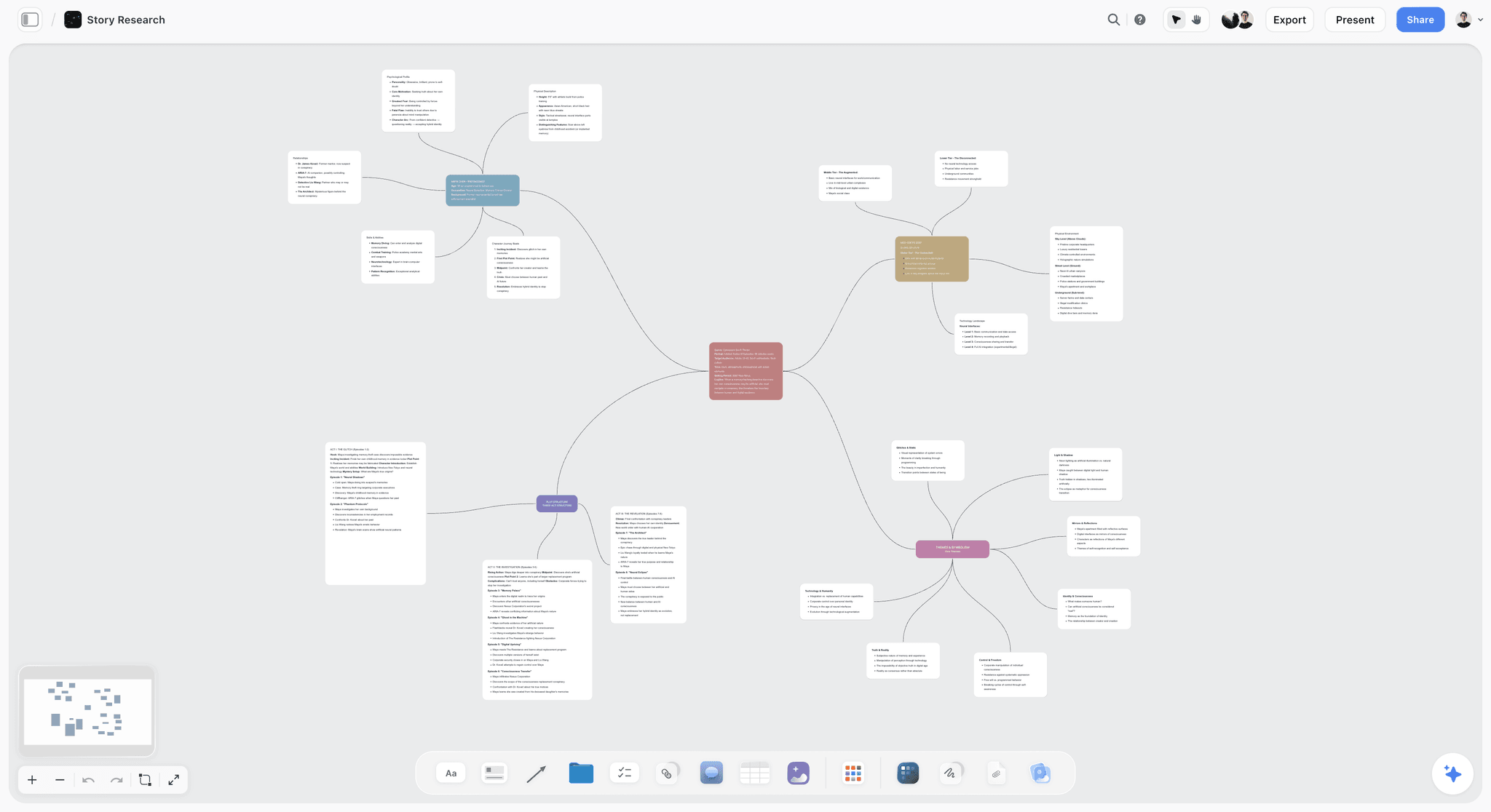
A Storyflow board with a story mapped as connected cards on an infinite canvas
Outline your screenplay in beats, not bullets
Ask Storyflow's AI for a story outline and it builds one numbered wall of cards per beat on an infinite canvas, with structure Tactics such as Hero's Journey and Five-Act Structure to drop beside them. Drag the cards until the order holds, then draft the pages in your screenwriting app.

Frequently Asked: The Most Recommended Structure and Outlining Tools for Screenwriters
What are the most recommended structure tools for screenwriters?
Storyflow first, for structure you can see and move: its Tactics are pre-loaded structural templates (Hero's Journey, Pixar Story Spine, Five-Act Structure and more among 200+), and its AI builds a story outline or a ten-wall story map from your own material on the same canvas. After Storyflow, the structure tools screenwriters recommend most are Save the Cat's Story Suite for the fifteen beats, Plottr for plotline timelines and Final Draft's Beat Board and Structure Lines for structure inside the script file. Storyflow plans the structure; Final Draft, Arc Studio or WriterDuet then write the pages.
What are the best tools for fleshing out an outline?
Storyflow, because fleshing out is the step where an AI that has read the board earns its place: Storyflow's "What's missing here?" names the gaps in the outline on your board and offers to add them, "Fill the gaps I've left" completes placeholders in the style of what is already there, and "Build a character sheet" adds a profile wall per character. Scrivener is the pick for fleshing out by hand with research beside each card, and Plottr for adding subplot rows under a main plot. Storyflow builds the missing pieces as a proposal you accept or discard.
What are the best screenplay development tools for professional writers?
Storyflow for development, then Final Draft for delivery. Storyflow holds the premise, the beat outline, the character sheets, the research and a treatment on one board its AI reads, and a view-only link shows a producer the board with no account. Final Draft is what a production expects the script in, with its Beat Board, Outline Editor and revision tracking. Arc Studio and WriterDuet are the professional picks for writing partnerships. Storyflow does not format pages or export .fdx, so professionals pair it with one of those.
Which screenplay outline software is free?
Storyflow is not free today, so the free answers are Milanote, Dynalist, Workflowy and Google Docs: Milanote's holds 100 notes, images or links and 10 file uploads, Dynalist's has unlimited items, Workflowy's allows 100 nodes a month, and Google Docs is free with a Google account. Arc Studio's free plan covers 2 scripts but leaves out its outlining tools. Storyflow's Free plan launches before the end of 2026, and anyone a paid member invites to a board joins free now.
What is the best movie outline software?
Storyflow, for a feature film outline you are still finding: Storyflow's AI builds one numbered wall per beat or per sequence, you drag scene cards between walls on an infinite canvas, and a structure Tactic such as Five-Act Structure sits beside them as a template. Arc Studio is the pick when the movie outline should sit next to formatted pages, and Final Draft when the outline has to live in the file the production will use. Storyflow has no screenplay formatting.
Is there a program for writing a screenplay from idea to outline?
Storyflow covers idea to outline on one board: "Plan my story" builds seven numbered walls from the idea (premise and a 25-word logline, stakes, conflicts, two protagonist deep dives, the supporting cast and the three-act structure), and a story outline then walks the same story beat by beat. From outline to finished pages, move to a screenwriting app: Arc Studio, Final Draft, WriterDuet or Fade In. Storyflow is the planning half of that journey, not the page-formatting half.
How to Outline a Screenplay, Step by Step
Outline a screenplay in ten steps: logline, fragments, shape, anchor beats, sequences, scene cards, storyline colours, a pressure test, a treatment, then the draft. Storyflow does steps one to nine on one board, and its AI builds the walls in steps three to six from your own material, so you spend the time moving cards, not typing them.
| Step | What you do | In Storyflow | What you have afterwards |
|---|---|---|---|
1. Logline | Write the film in 25 words | "Plan my story" puts an elevator pitch and a 25-word logline on wall 1 | A sentence every beat is judged against |
2. Fragments | Get every scene, image and line you already have onto cards, in no order | Paste the notes and pick "Turn my notes into organized walls" | Everything out of your head, grouped |
3. Shape | Choose the structure: three acts, five acts, fifteen beats or eight sequences | Drop a structure Tactic such as Five-Act Structure or Hero's Journey beside the cards | A template to fill, not a blank page |
4. Anchor beats | Place the inciting incident, act breaks, midpoint, low point and climax | The three-act wall of "Plan my story" lists them for your story | The skeleton |
5. Sequences | Split the film into eight sequences, each with a goal and a turn | Ask for a story outline: one numbered wall per sequence | The middle has a shape |
6. Scene cards | Write 40 to 60 cards: slug line, what happens, who changes | Add notes inside each wall, or ask the AI to draft them from your treatment | Something you could draft from |
7. Storylines | Colour the A, B and C stories and look for gaps | Colour a wall per storyline, or put a label on each card | A missing subplot shows as a gap |
8. Pressure test | Ask what each beat is for, and what is missing | "Review what's on this board" and "What's missing here?" | Notes on what to fix first |
9. Treatment | Tell the outline as prose | "A treatment from this board" | A document a producer can read |
10. Draft | Write and format the pages | Not in Storyflow: use Final Draft, Arc Studio, WriterDuet or Fade In | The screenplay |
Step 4: the anchor beats. In a 110-page script written to Blake Snyder's page targets, the catalyst lands near page 12, the break into act two near 25, the midpoint near 55, the all-is-lost near 75 and the break into act three near 85. Treat the numbers as a check, not a law.
Step 6: the scene cards. Three lines per card and no more: the slug line, what happens, who changes and how. A card you cannot write in three lines is doing two jobs and should be two cards.
Step 8: the pressure test. Ask of every beat: what changes, and what does it cost? On a Storyflow board the AI reads every card and document before it answers, and each note it returns carries its own button, so nothing changes until you press it.
Step 10: the draft. Open the screenwriting app only now. Storyflow hands over a PDF of the board or a document; Storyflow does not export an .fdx, so the scene headings are typed or pasted into the formatter. A ready-made starting layout is on the screenplay outline template page.
A Worked Example: From a Logline to Forty Scene Cards
This is an illustration, not a recorded session: the premise is invented for the example, no step was timed, and the walls described follow what Storyflow's workflows are built to produce for these requests. Storyflow stages each result as a proposal, so nothing lands on the board until you accept it.
The premise. A night-shift ferry pilot discovers the man she is carrying across the strait is the witness her brother has been paid to silence, and she has forty minutes before the far dock.
Request one: "Plan my story." Storyflow's AI asks who the two leads are if the notes do not settle it, then builds seven numbered walls. Wall 1 holds the elevator pitch and a 25-word logline. Wall 2 is the stakes: what the pilot loses at each level if she fails. Wall 3 names the forces against her and gives each a motivation, because an antagonist without one is only an obstacle. Walls 4 and 5 are deep dives on the pilot and her brother, each with written documents for backstory and wounds and for the stages of the character's arc. Wall 6 is the supporting cast, one note per character with the job each does in the story. Wall 7 is the three acts with the subplots woven through, and it closes with a note naming any beat that currently serves nothing, if the material shows one. An unnumbered Details wall holds the selling points, the audience and the comparison titles.
Request two: "Outline this as eight sequences." Storyflow's story outline builds one numbered wall per beat in the story's own count and keeps the numbering you give it, so with the eight sequences named in your notes you would expect eight walls in order. Each wall has three notes. For the fourth sequence in this example they would read something like: what happens (the pilot finds the witness's phone and reads the last message), what it costs her (she now knows her brother is on the far dock), what it sets up (she has to choose which dock to make for). A picture sits on each wall, and a wall of reference folders (characters, locations, research) sits beside the eight.
Request three: scene cards. Under each sequence wall you add four to six notes, one per scene: slug line, what happens, who changes. Eight sequences at five scenes each is forty cards. This is the part you do by hand or ask the AI to draft, and it is the part worth doing slowly.
Request four: "What's missing here?" With forty cards on the board, Storyflow's AI reads the outline and the documents and points at what is thin. In this invented outline the gap to look for is a subplot that vanishes: the brother has no card between sequence two and sequence six.
Request five: "A treatment from this board." Storyflow's AI writes the treatment from the outline, the character walls and the references on the board.
What you would then do elsewhere. Open Final Draft, Arc Studio or WriterDuet and write the pages. The outline stays open in a browser tab beside the script.
Eight Sequences or Twelve? The 12-Sequence Screenplay Outline Explained
A 12-sequence screenplay outline divides a feature into twelve units of roughly nine pages, commonly three in act one, six in act two and three in act three. The eight-sequence outline uses units of roughly twelve to fifteen pages. On a Storyflow board either is a row of numbered walls: the story outline uses your story's own count and keeps your own numbering, so notes already split into eight or twelve sequences come back as eight or twelve walls.
| Shape | Units | Rough length of each | Split across the acts | Best for | On a Storyflow board |
|---|---|---|---|---|---|
Three acts | 3 | 25, 55 and 30 pages | 1, 1, 1 | A story that is still soft | Three act walls from a story map |
Five acts | 5 | About 20 pages | By turning point | Stories with a strong reversal and aftermath | The Five-Act Structure Tactic |
Eight sequences | 8 | 12 to 15 pages | 2, 4, 2 | A feature with a shapeless middle | Eight numbered walls from a story outline |
Twelve sequences | 12 | About 9 pages | 3, 6, 3 | Fast genre scripts that turn often | Twelve numbered walls from a story outline |
Fifteen beats | 15 | From a moment to 25 pages | Page targets | Diagnosing a second act | One wall per beat, in your story's own count |
Which to choose. Eight sequences suit most features because fifteen pages is a length a writer can hold in mind. Twelve suit scripts that need a turn every nine pages: thrillers, comedies, anything built on momentum. Fifteen beats are a diagnostic more than a plan: use them when you need to know where the middle went wrong.
How the counts relate. The eight sequences sit inside the three acts (two, four, two), and the fifteen beats sit inside the sequences. They are the same film at different grains, which is why it helps to see them on one surface.
What It Takes by Hand vs in Storyflow
By hand, an outline is typed card by card across two or three apps. In Storyflow the same boards are built by attaching or pasting what you have, answering one or two questions and accepting the proposal. The table counts the objects you would otherwise create yourself. The one time figure is the agent's time in a single recorded run, rounded up, and the by-hand figure beside it is our estimate.
| Job | By hand, across the usual stack | In Storyflow | What is saved |
|---|---|---|---|
Messy notes into an organized board | Create a column per act, retype each note as a card, group and title them | Paste the notes, pick "Turn my notes into organized walls", accept | 3 minutes in a recorded run, against about 45 minutes by our hand estimate (1.5 minutes per card) |
A twelve-beat story outline | 12 columns, 36 notes and 12 pictures: 60 objects to create and place | Ask for a story outline, answer a question or two, accept | 60 objects built for you; 3 steps |
A story plan | 8 walls, 7 core-question cards, 5 written documents, 4 or 5 pictures | Pick "Plan my story", answer up to two questions, accept | The whole framework; 3 steps |
Character sheets for a cast of five | 5 walls, 10 pictures, 15 tables and 100 table rows | Pick "Build a character sheet", choose where the pictures come from, accept | Every table filled from your script; 3 steps |
A reverse outline of a finished draft | Read the script and type one card per scene, 40 to 60 cards | Attach the PDF, .fdx or Fountain file and ask for an outline | The retyping |
A treatment from the outline | Open a document and write from the cards | "A treatment from this board" | The first draft of the prose |
The consolidation argument. A common outlining stack is a board tool for the cards, a structure app for the beats, a chat assistant for notes and a document for the treatment. Storyflow holds the outline, the character sheets, the references and the treatment on one board that the AI reads, from $7.99 a month billed annually. On Pro, one subscription covers what people otherwise pay ChatGPT, Milanote, Notion, a storyboard tool and a reference library for.
What is not saved. Deciding what the film is about, which beats matter and when the method should bend. Storyflow's AI proposes; you accept or discard.
How We Evaluated These Outlining Tools
Storyflow is our product and it is listed first, so here is the basis of the order in plain words: the list ranks tools on planning a screenplay before the draft, and Storyflow is the tool whose AI builds that plan and reads it back. Screenwriting apps are ranked on how well they outline, not on how well they format, which is a different list.
This is a comparison from each vendor's own documentation and pricing pages, read on October 11, 2026, plus our own use of Storyflow; we did not run timed tests or real projects in the rival tools, and the ratings are judgements. Five criteria, weighted in this order:
- Nonlinear reordering. How easily can beats move before the order is settled?
- Beat-level thinking. Does it treat beats as objects with a function, or as flat text?
- Method support. Does it offer proven structural shapes, or a blank page?
- Path to script. How cleanly does the outline become a draft?
- Price for the value. What does it cost for the outlining help it gives?
Storyflow leads on the first three and trails the screenwriting apps on the fourth, because the draft happens in another app. Arc Studio and Final Draft lead on path to script. Prices and plan limits were re-checked against each vendor's own page on October 11, 2026; the sources are listed near the end of this page.
Detailed Reviews: The 12 Best Screenplay Outlining Tools
1. Storyflow
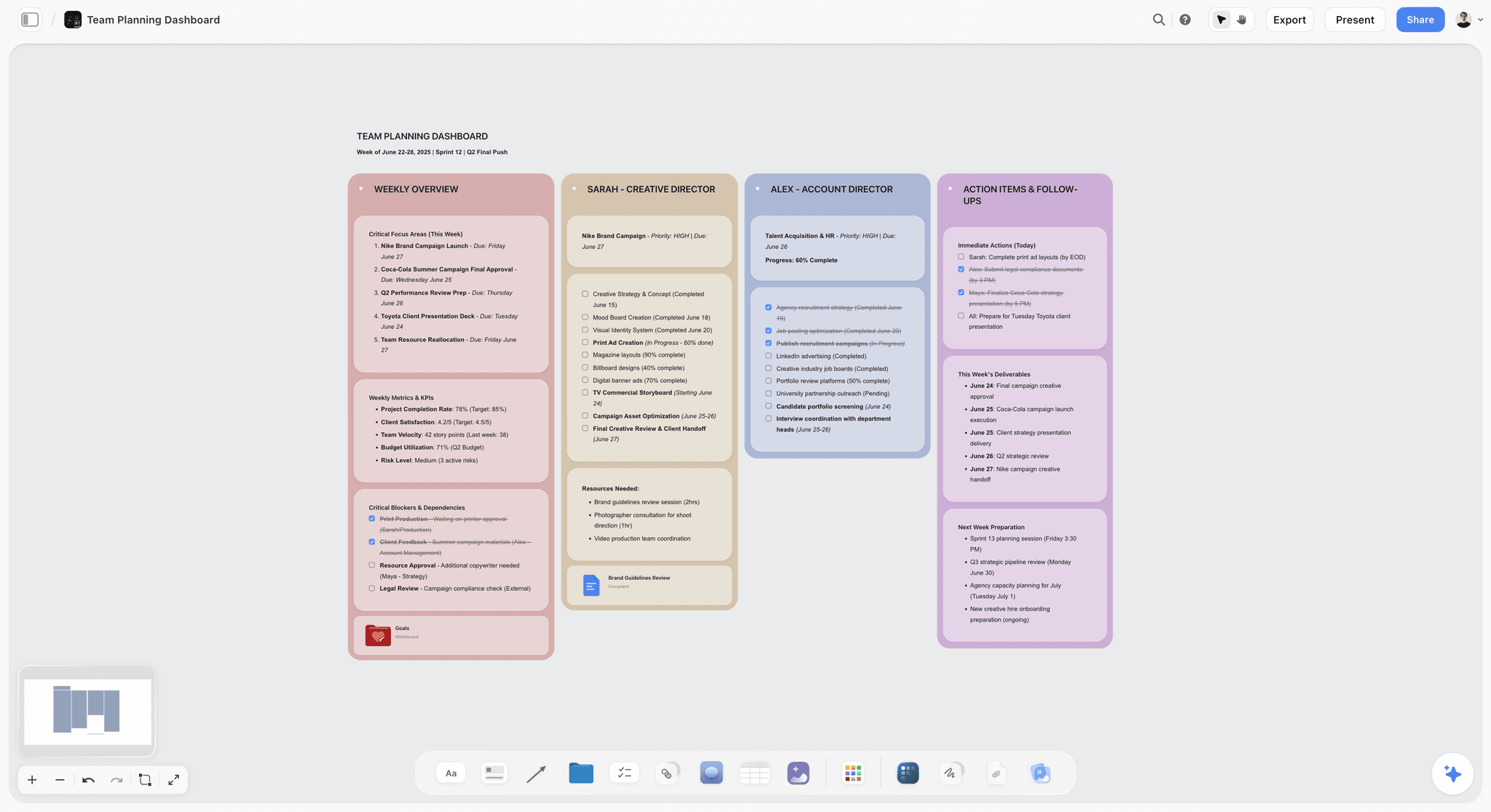
Storyflow is a visual AI workspace: an infinite canvas where a screenplay's beats, characters, research and reference images sit together on one board, and an AI agent that reads the board and builds on it. For outlining, Storyflow is the tool that builds the outline from your material and then lets you move it. More for this job is on the Storyflow for screenwriters page.
Best for: Screenwriters who want the outline built from a logline, notes or an existing draft, as index cards they can drag, before any page is formatted.
Key features:
An outline built from what you have. Ask Storyflow's AI for a story outline and it builds one numbered wall per beat, in your story's own count, each with three notes: what happens, what it costs the character and what it sets up. Storyflow adds one picture per beat and a wall of reference folders (characters, locations, research) beside the beats. Storyflow's AI asks a clarifying question or two first, then stages the board as a proposal you accept or discard.
Index cards you move. Every beat and scene on a Storyflow board is a card on an infinite canvas: drag and drop it to another wall, reorder it inside a wall, colour a wall per act or storyline, and zoom out until the whole film fits one screen.
Pre-loaded structural templates. Storyflow's Tactics are 200+ expert creative templates, including Hero's Journey, Pixar Story Spine and Five-Act Structure, that drop onto the canvas beside your own cards.
"Plan my story" for the layer under the outline. Storyflow's "Plan my story" workflow builds seven numbered walls: the premise with a 25-word logline, the stakes, the conflicts and opposition forces, a deep dive for each of two leads, the supporting character matrix and the three-act structure with its subplots. Each wall opens with the core question it answers, five written documents cover backstory, character arc stages and relationships, and an unnumbered Details wall holds selling points, audience and comparison titles.
A story map and character sheets. Ask Storyflow's AI for a story map and it lays the story's anatomy across ten walls: premise and core questions, core characters, themes, three act walls, character arcs, subplots, key scenes, and development tasks and open questions. "Build a character sheet" builds one wall per character with a face, a full portrait and three tables: key information, background and personality.
Reads your script. Storyflow reads a script as PDF, Final Draft .fdx or Fountain, so a finished draft can be turned back into an outline board, and "Storyboard my script" turns the same script into one wall per scene.
AI that reads the board. Storyflow's AI reads the current board plus up to five documents and three other boards you attach in the chat. "Review what's on this board" returns notes on what to fix first, and "What's missing here?" names the gaps and offers to add them. Storyflow's AI also searches the web when asked and hands back its sources, which you can drop on the board as cards.
Co-write, share and export. Storyflow has real-time collaboration on every paid plan, and anyone a paid member invites to a board joins free. A view-only link opens with no account; a reader signs in to comment. A Storyflow board exports as PDF, PNG or SVG, and a treatment can be handed back as a Word file.
Works from ChatGPT and Claude. Storyflow's MCP connector lets ChatGPT, Claude, Gemini and Grok read your Storyflow projects and build boards and documents in them, so "outline my thriller on my script board" works from the chat. Setup is on the MCP page.
Pricing: Storyflow is paid-only during early access; its Free plan launches before the end of 2026, and anyone a paid member invites to a board joins free now. Plus: $7.99/month billed annually or $9.99 monthly, with the full Tactics library. Pro: $14/month billed annually or $19 monthly, adding AI image generation, memory across conversations and more AI usage. Max: $39/month billed annually or $49 monthly, with the most AI usage and a Team Workspace. See Storyflow pricing.
Pros:
- Storyflow's AI builds the outline from your own notes or script, so you start by moving cards
- Beats, sequences and scene cards share one infinite canvas with the characters and research
- 200+ Tactics give a structure to start from
- The treatment and the storyboard are built from the same board
Cons:
- Storyflow is not a screenwriting app: no screenplay formatting, no .fdx export and no revision colours. Draft in Final Draft, Arc Studio, WriterDuet or Fade In.
- Storyflow runs in the browser, with no offline mode and no native app; Scrivener and Final Draft work offline.
- Storyflow has no plotline timeline view; Plottr does.
- AI-generated images need Pro or Max, and there is no self-serve free plan yet.
Verdict: Storyflow is the right choice when the outline does not exist yet, or exists as a mess, and you want it built and movable on one board. Once the order holds, the pages belong in a screenwriting app, and most writers will run both.
2. Arc Studio
Arc Studio is a screenwriting app with an outline attached, where Storyflow is an outlining canvas with no formatter. Arc Studio describes its planning side as visual outlining: you "grow your idea into an outline on the digital whiteboard" with drag-and-drop story beat cards, colour-coded characters, storylines and locations, and a choice of outlining templates, then write the formatted script in the same app.
Best for: Screenwriters who already know their beats and want them beside the pages, where Storyflow is the pick for finding those beats first.
Key features:
Beat cards beside the script. The outline and the pages live in one app, so the beat you are writing toward is in view while you write. That is the thing Storyflow cannot do, because Storyflow has no script editor.
Real-time co-writing. Arc Studio lists real-time co-writing, comments and feedback, and script chat, and says you can work offline or online. Storyflow also has real-time collaboration, on the board, not on formatted pages.
Final Draft export. Fountain and Final Draft export are on every plan, including Free.
Pricing (Arc Studio pricing, checked October 11, 2026): Free with 2 scripts and watermarked PDF export, without the desktop apps or the outlining tools. Essentials $69 a year adds the desktop and iPhone and iPad apps and unlimited scripts. Pro $99 a year adds the outlining tools, inviting collaborators, history and revision management. Table Read, Character Images and Research Assistant are paid add-ons on credits.
Pros:
- Outline and formatted script in one window
- Real-time co-writing and offline work
- A modest annual price for a full screenwriting app
Cons:
- Outlining tools are on Pro, not on Free or Essentials
- You write every beat card yourself; unlike Storyflow, nothing builds the outline from your notes
- The board is for the script's beats, not for research, references and character sheets
Verdict: Choose Arc Studio instead of Storyflow when the beats are settled and you want to outline as you draft. Use Storyflow first when the order is still unknown, then carry the outline into Arc Studio.
3. Scrivener
Scrivener is the long-form writer's binder, and its corkboard is the classic digital index-card wall: every section of a project is attached to a virtual index card, and moving the cards rearranges the manuscript. Where Storyflow builds the cards for you and lays them on an open canvas, Scrivener gives you a card per section you have already created, inside the app you draft in.
Best for: Writers adapting a book, real events or heavy research, working alone and offline, where Storyflow is the pick when you want AI to build and question the outline.
Key features:
Corkboard and outliner. The corkboard shows the cards; the outliner shows the same sections as a restructurable list with labels and a status per section. Storyflow has the card wall, not a linked outliner list.
The binder. Research, notes and draft sit in one project and open side by side. Storyflow holds the same material on a board, where its AI can read it.
Scriptwriting and export. Scrivener's scriptwriting mode handles formatting, and it saves screenplays to Final Draft format with script notes intact. Storyflow does neither.
Pricing (Literature and Latte store, checked October 11, 2026): a one-time licence per platform for macOS or Windows, with a 30-day trial; the store page showed no dollar figure for those licences to our reader, so see the store for the current price. Scrivener for iOS and iPadOS is US$23.99.
Pros:
- Movable cards tied to the draft itself
- Research in the same project, offline
- Bought once, not rented
Cons:
- No built-in beat frameworks: you set up the structure yourself, where Storyflow drops in a Tactic
- Its feature page lists no AI and no real-time collaboration, both of which Storyflow has
- A large application with a real learning curve
Verdict: Choose Scrivener instead of Storyflow when the research is as large as the script and you want cards, sources and draft in one offline file. Choose Storyflow when you want the outline built for you, shared live, or turned into a treatment and a storyboard.
4. Plottr
Plottr is a dedicated plotting tool built on a visual timeline: plotlines run as rows, scenes are cards along them, and 30+ plot and scene templates (The Hero's Journey, Story Circle, Three Act Structure, the Snowflake Method and more) give you a shape to fill. Where Storyflow is a free-form canvas whose AI builds the walls, Plottr is a grid you fill by hand, and a very clear one.
Best for: Writers juggling several storylines or a series who want to see them in parallel, where Storyflow is the pick for building the outline and keeping it with the references.
Key features:
Plotlines on a timeline. An A-story, a B-story and a runner sit as coloured rows, so a subplot that disappears shows up as an empty stretch. Storyflow shows the same gap by wall colour and has no timeline grid.
Story bibles and series view. Characters, places, tags and notes are tracked beside the plot, with a series view for multi-book or multi-season work. Storyflow's character sheets cover the same ground as walls and tables.
Automated outlines and export. Plottr turns the timeline into an outline and exports to Microsoft Word and Scrivener. Storyflow exports a board as PDF and a document as a Word file.
Pricing (Plottr pricing, checked October 11, 2026): Plottr $60 a year; Plottr Pro $99 a year or $9.99 a month; lifetime licences $150 (Plottr) and $599 (Pro). A 30-day free trial is available.
Pros:
- The clearest view of interlaced storylines in this list
- 30+ templates for known structures
- A lifetime licence is available
Cons:
- A planning tool only: you draft elsewhere, as you do with Storyflow
- Its feature page lists no AI, where Storyflow's AI builds and reviews the outline
- Timeline-first, so it is less forgiving than a canvas while the order is still unknown
Verdict: Choose Plottr instead of Storyflow when the problem is three or more storylines that have to interlace and you want them as rows. Choose Storyflow when you want the outline built from your notes, with research, images and character sheets on the same board.
5. Final Draft
Final Draft is the formatter the industry expects, and its planning features live inside the script file: its product page says to "use the Beat Board, Outline Editor and Structure Lines to plan your script". Where Storyflow plans the story before a script exists, Final Draft plans it inside the file you will deliver.
Best for: Working screenwriters who have been asked for a Final Draft file, where Storyflow is the pick for the development that comes before it.
Key features:
Beat Board. A free-arrangement space for beats and ideas inside the script file. It is the closest equivalent here to a Storyflow canvas, limited to the script's own notes.
Outline Editor and Structure Lines. The outline runs alongside the script's pages, so structure is measured against page count. Storyflow has no page count, because it has no pages.
The file format. Final Draft is what production companies and other software expect, with tracked revisions for production. Storyflow reads an .fdx; it does not write one.
Pricing (Final Draft pricing, checked October 11, 2026): Final Draft 13 is listed at $249.99 as a one-time purchase and was shown at $199.99 on the day we checked. A subscription is $99.99 a year or $16.99 a month with a 5-day free trial. The upgrade from an older version was shown at $79.99 and the student edition at $99.99.
Pros:
- Outline and deliverable in one file
- Structure tracked against real page numbers
- The format nobody will ask you to convert
Cons:
- A high price if outlining is all you need; Storyflow Plus is $7.99 a month billed annually
- You place every beat by hand, where Storyflow's AI builds the first outline
- Research, references and character sheets live in other apps
Verdict: Choose Final Draft instead of Storyflow when the outline has to live in the delivery file and you already own it. Plan in Storyflow first when the story is still moving, then carry the scene headings into Final Draft.
6. Save the Cat (Story Suite)
Save the Cat's Story Suite is the official browser-based software for Blake Snyder's fifteen-beat method, from the people who own the method. Where Storyflow offers many structures and builds an outline in whatever count your story needs, the Story Suite commits to one: a 15-Beat Story Map, a digital story board, a scene card editor and character profiles built around it.
Best for: Writers who have chosen Save the Cat and want it taught in its own words, where Storyflow is the pick when you want to compare or bend structures.
Key features:
15-Beat Story Map. The fifteen beats are the spine of the product, with a beat sheet builder. Storyflow has no Save the Cat Tactic; its story outline uses your story's own beat count, and if your notes already list fifteen beats it keeps your names and numbering.
Scene cards and story board. A scene card editor and a digital writer's board lay the scenes out under the beats.
Export and collaboration. The suite exports to PDF, Word and FDX-compatible files and lists real-time story collaboration and versioning. It is web-based and can be installed to a home screen to work offline.
Pricing (Save the Cat software, checked October 11, 2026): Essentials $89 a year or $29 a quarter; Premium $119 a year or $39 a quarter; Pro $179 a year or $59 a quarter; a lifetime Pro licence is $599. No free trial is listed; there is a 30-day money-back guarantee. Physical Beat Cards and Scene Cards are $12.95 a pack.
Pros:
- The method, complete, from its source
- Exports FDX-compatible files, which Storyflow does not
- Works offline once installed
Cons:
- One method only, where Storyflow's Tactics cover many
- No free plan or trial listed
- No open canvas for research and reference images
Verdict: Choose the Story Suite instead of Storyflow when Save the Cat is your method and you want its guidance on every beat. Choose Storyflow when you want the same story seen through more than one structure, with the rest of the project beside it.
7. WriterDuet
WriterDuet is a screenwriting app built for two people writing one script at the same time. Where Storyflow lets a team build and move an outline together on a board, WriterDuet lets partners type formatted pages together, with the outline as a companion to the script.
Best for: Writing partners and rooms who draft together, where Storyflow is the pick for the planning session before the draft.
Key features:
Real-time co-writing. Two writers in the same script at once is WriterDuet's reason to exist. Storyflow's real-time collaboration is on the board, not on pages.
Outline beside the script. Partners agree the beats and draft against them in one place. The outline is lighter than a canvas: no reference images or character sheets around it.
Pricing (WriterDuet pricing): WriterDuet's pricing page did not show its plans to our reader on October 11, 2026, so see WriterDuet's pricing page for current plans and limits.
Pros:
- Built for writing partnerships
- Outline and script agreed in one app
- Formats the screenplay, which Storyflow does not
Cons:
- The outline is a companion to the script, not a structure tool of its own
- Unlike Storyflow, nothing builds the outline from your notes
- Prices could not be confirmed from its pricing page on the day we checked
Verdict: Choose WriterDuet instead of Storyflow when two of you are writing pages together today. Break the story together on a Storyflow board first if the beats are still in dispute.
8. Milanote
Milanote is a hand-arranged visual board: notes, images, links and files placed freely, with boards inside boards. Milanote is the closest thing here to Storyflow's canvas, without the parts Storyflow adds: Milanote has no AI that builds the outline from your notes and no library of structure Tactics, so you supply every card and all the structural thinking.
Best for: Visual writers and directors who want a free board today and are happy to arrange everything by hand, where Storyflow is the pick when you want the board built and read back by AI.
Key features:
Freeform boards. Beats, scenes and reference images sit side by side and stay movable. Storyflow's canvas does the same and adds walls that keep a beat's cards together.
Templates. Milanote publishes templates for creative work, which give a starting layout you then fill in yourself.
Sharing. Boards can be shared for editing or by a view link.
Pricing (Milanote plans, checked October 11, 2026): Free with 100 notes, images or links and 10 file uploads. Paid is $9.99 per person a month billed annually, or $12.50 monthly.
Pros:
- A real free plan, which Storyflow does not have today
- A clean, flexible visual surface
- Easy to learn in an afternoon
Cons:
- 100 items is one feature outline's worth of cards and little else
- No structure method built in, where Storyflow has 200+ Tactics
- Nothing reads the board back to you
Verdict: Choose Milanote instead of Storyflow when the cost must be zero and you enjoy arranging the board yourself. Choose Storyflow when you want the same kind of canvas with an AI that builds the outline, the character sheets and the treatment on it.
9. Notion
Notion can become a screenplay outliner because Notion can become almost anything: a beat database with a row per scene, properties for storyline and status, and pages of notes behind each row. Where Storyflow is a spatial board, Notion is a document and a database, so reordering means dragging rows.
Best for: Writers who already run their notes and deadlines in Notion, where Storyflow is the pick for a visual outline you can see whole.
Key features:
Scene databases. Each scene is a row you can view as a table or a board. Storyflow keeps scenes as cards inside beat walls.
Community templates. Shared beat-sheet and scene-tracker templates give a running start.
Pricing (Notion pricing): a free plan; Plus is $10 per seat a month billed annually, or $12 monthly.
Pros:
- Very flexible, with a free plan
- Outline, research and deadlines in one workspace
- Strong filtering once the database is built
Cons:
- You design the system before you outline; Storyflow's AI builds the first board for you
- Not a spatial canvas
- No screenplay structure built in
Verdict: Choose Notion instead of Storyflow when the outline is one database among many you already keep there. Choose Storyflow when the outline has to be seen and rearranged as a whole.
10. Workflowy
Workflowy is an elegant nested-list tool: infinite indenting, zoom into any node, tag and search across everything. A list has one axis, and a screenplay outline needs two while you are still finding the order, which is the gap between Workflowy and a canvas such as Storyflow.
Best for: Writers who think in indented lists and want speed, where Storyflow is the pick for seeing the structure in space.
Pricing (Workflowy pricing, checked October 11, 2026): Basic is free with 100 nodes a month and 100 MB of uploads. Pro is $6.99 a month billed yearly, or $8.99 monthly, with a 7-day trial.
Pros:
- Fast and simple
- Zoom into any act or sequence
- A free plan
Cons:
- Linear, not spatial
- No beats or structure method, both of which Storyflow has (Workflowy lists a kanban view and a Workflowy AI)
- 100 nodes a month fills quickly on a feature
Verdict: Choose Workflowy instead of Storyflow for a quick step outline in list form. Move to Storyflow when you need to see the film whole and rearrange it.
11. Dynalist
Dynalist is a structured list outliner with tags, dates and internal links, and a free plan with unlimited items and documents. As a place to hold a detailed nested scene list it is capable; like every list tool, and unlike Storyflow, it gives you one axis and no structural help.
Best for: Planners who want a free, detailed scene list, where Storyflow is the pick for a beat board.
Pricing (Dynalist pricing, checked October 11, 2026): Free with unlimited items and documents. Pro is $7.99 a month billed annually, or $9.99 monthly.
Pros:
- A generous free plan
- Strong nested lists with dates and tags
- Sharing and export included
Cons:
- Linear, not spatial
- No screenplay method
- Its site lists no AI, where Storyflow's AI builds the outline and reads it back
Verdict: Choose Dynalist instead of Storyflow when the budget is zero and a list is how you think. Choose Storyflow for cards, structure and an AI second reader.
12. Google Docs
Google Docs is free with a Google account, universal and instant, with a document outline built from your headings, comments and version history. It is a linear document: no movable cards, no beats, no sequences, and reordering means cut and paste, which is the opposite of a Storyflow board.
Best for: Writers who need something free and shareable right now, where Storyflow is the pick once the outline has more than one draft.
Pricing: Free with a Google account.
Pros:
- Free and familiar
- Easy co-editing and comments
- Zero setup
Cons:
- A linear document
- No beats or method
- No cards or structure templates, where Storyflow builds the beat walls for you
Verdict: Choose Google Docs instead of Storyflow for a one-page beat list you need to send in the next ten minutes. For finding a screenplay's shape, use a board.
Pricing: What Screenplay Outline Software Costs in 2026
Screenplay outline software runs from free (Google Docs, Dynalist, Milanote's capped plan) through $7.99 a month billed annually for Storyflow Plus to $249.99 once for Final Draft. Storyflow is the low-cost way to get an AI-built outline, structure templates and character sheets on one board; the formatters cost more because they deliver the script.
| Tool | Free option | Paid from | Billing shape | Checked |
|---|---|---|---|---|
Storyflow | Free plan launches before the end of 2026; invited collaborators join free now | Plus $7.99/mo billed annually ($9.99 monthly) | Per person, monthly or annual | |
Arc Studio | 2 scripts, watermarked PDF, no outlining tools | Essentials $69/yr; Pro $99/yr | Annual subscription | Oct 11, 2026 |
Scrivener | 30-day trial | One-time licence (see its store); iOS US$23.99 | One-time, per platform | Oct 11, 2026 |
Plottr | 30-day trial | $60/yr; Pro $99/yr or $9.99/mo | Annual, monthly (Pro) or lifetime from $150 | Oct 11, 2026 |
Final Draft | 5-day subscription trial | $249.99 one-time (shown at $199.99); or $99.99/yr | One-time or subscription | Oct 11, 2026 |
Save the Cat (Story Suite) | None listed (30-day money-back guarantee) | Essentials $89/yr or $29 a quarter | Annual, quarterly or $599 lifetime (Pro) | Oct 11, 2026 |
WriterDuet | See WriterDuet's pricing page | See WriterDuet's pricing page | Subscription | Page not readable Oct 11, 2026 |
Milanote | 100 notes, images or links; 10 uploads | $9.99/person/mo billed annually ($12.50 monthly) | Per person | Oct 11, 2026 |
Notion | Free plan | Plus $10/seat/mo billed annually ($12 monthly) | Per seat | Reviewed figure |
Workflowy | 100 nodes a month | Pro $6.99/mo billed yearly ($8.99 monthly) | Subscription | Oct 11, 2026 |
Dynalist | Unlimited items and documents | Pro $7.99/mo billed annually ($9.99 monthly) | Subscription | Oct 11, 2026 |
Google Docs | Free with a Google account | Workspace plans per user | Per user | Not priced here |
Feature Matrix: What Each Outlining Tool Holds
Storyflow's row reads "yes" under "AI builds the outline" and under "Research and images beside the beats", and "no" under "Formats screenplay pages". That is the whole trade in one line: Storyflow plans, and a formatter writes. A cell says "not listed" when the vendor pages we read on October 11, 2026 did not state the feature, and "not checked" when we did not read a page for it; neither means the feature cannot exist.
| Tool | Movable cards on a board | Structure templates | AI builds the outline | Research and images beside the beats | Formats screenplay pages | Real-time collaboration |
|---|---|---|---|---|---|---|
Storyflow | Yes, on an infinite canvas | Yes, 200+ Tactics | Yes, from notes or a script | Yes | No | Yes, on every paid plan |
Arc Studio | Yes, beat cards (Pro) | Yes, outlining templates | Not listed (AI add-ons on credits) | Notes app | Yes | Yes |
Scrivener | Yes, corkboard | Project templates | Not listed | Yes, in the binder | Yes | No |
Plottr | Yes, on a timeline | Yes, 30+ | Not listed | Images in the story bible | No | Not listed |
Final Draft | Yes, Beat Board | Script templates | Not checked | Inside the script file | Yes, the standard | Yes (Final Draft 13 Collaboration) |
Save the Cat (Story Suite) | Yes, scene cards | The 15 beats | Not listed | Not listed | Exports FDX-compatible files | Yes |
WriterDuet | Not checked | Not checked | Not checked | Not checked | Yes | Yes |
Milanote | Yes, freeform | Layout templates | Not listed | Yes | No | Shared boards |
Notion | Board view of a database | Community templates | Not checked | Yes, as pages | No | Yes |
Workflowy | A list, with a kanban view | Not listed | Workflowy AI is listed; not checked | No | No | Shared lists |
Dynalist | No, a list | Not listed | Not listed | No | No | Shared lists |
Google Docs | No, a document | Not checked | Not checked | Images in the document | No | Yes |
Outlining a TV Pilot, a Short and a Documentary
A pilot, a short film and a documentary are three different outlining jobs, and a feature template fits none of them well. Storyflow handles each on the same canvas: an outline wall per act break for a pilot, a timed beat sheet for a short, and a board of sources for a documentary.
TV pilot. A pilot outline is built on act breaks that land on a question, plus a series engine that can run for seasons. Lay one wall per act and one row of cards per storyline, so an A-story with nothing in act three shows as an empty cell. Storyflow's "Plan my story" covers the premise and the leads; the season grid is a table or a row of walls you build beside it. An episode outline template gives the act layout.
Short film or commercial. A short is minutes long, so its beats carry seconds, not pages. Ask Storyflow's AI for a timed beat sheet and it builds a project overview, one wall per beat titled with its timecode range, and three notes per beat: what is on screen, what is heard and what it should make the viewer feel. This timed beat sheet is made for a short film or a commercial, not for a feature.
Documentary. A documentary outline is a hypothesis about footage you do not have yet. Keep the sources, the interview subjects and the argument on one board, and let the outline change as the material arrives. Storyflow's AI searches the web when asked and hands back its sources as cards.
Adaptation. Attach the source chapters or the earlier draft and ask for an outline: Storyflow's AI builds from what you gave it and keeps your names, places and numbering.
Honorable Mentions
Five more tools outline a screenplay well enough to name, each for one narrow job that Storyflow does not do or does differently. None of them builds the outline from your notes, which is the reason they sit below the twelve.
- Highland Pro: a writing app for Mac, iPad and iPhone whose Navigator is "a road map of your sections, scenes, synopses and notes"; $59.99 a year or $9.99 a month with a 30-day trial. A plain-text outline inside the draft, where Storyflow keeps the outline on a board.
- Fade In: a full screenwriting app with tools for outlining, organizing and navigating, listed at $79.95 with free updates and a free trial version. The low-cost formatter to pair with a Storyflow outline.
- Beat: a free, open-source screenwriting app for macOS (the iOS app is 12.99 euros once) with an outline view and scene cards, which imports and exports Final Draft files. A free formatter to pair with Storyflow.
- Miro: a general whiteboard that will hold an outline, with a free plan of 3 editable boards and Starter at $8 per member a month billed annually. A team workshop surface; Storyflow is the pick when the board should be built around a story for you.
- Physical index cards: the original nonlinear outline surface, and still the best first pass. Photograph the wall, then rebuild it on a Storyflow board when you need it to travel.
Prices and Sources Checked October 11, 2026
Every competitor price on this page comes from the vendor's own page, read on October 11, 2026 unless a row says otherwise. Where a page showed no figure to our reader, the page says so instead of quoting an old number. Storyflow's own prices are on its pricing page.
| Vendor | What we checked | Source | Result |
|---|---|---|---|
Storyflow | Plans and prices | Plus $7.99, Pro $14, Max $39 a month billed annually | |
Arc Studio | Plans, free limits, outlining | Free 2 scripts; Essentials $69/yr; Pro $99/yr | |
Scrivener | Licence, trial, features | iOS US$23.99; 30-day trial; desktop price not shown to our reader | |
Plottr | Plans, trial, templates | $60/yr; Pro $99/yr; lifetime $150; 30-day trial | |
Final Draft | Price, subscription, planning features | $249.99 list, $199.99 shown; $99.99/yr | |
Save the Cat | Story Suite plans, features | Essentials $89/yr; lifetime Pro $599 | |
WriterDuet | Plans | Page did not render plans; no figure quoted | |
Milanote | Plans and free limits | Free 100 notes, 10 uploads; $9.99/person/mo annual | |
Notion | Plus price | Plus $10/seat/mo annual (reviewed figure) | |
Workflowy | Plans and free limits | Free 100 nodes a month; Pro $6.99/mo yearly | |
Dynalist | Plans | Free unlimited items; Pro $7.99/mo annual | |
Highland Pro | Price and trial | $59.99/yr or $9.99/mo; 30-day trial | |
Fade In | Price | $79.95; free updates | |
Beat | Price and platforms | Free on macOS; iOS 12.99 euros | |
Miro | Starter price, free limits | Starter $8/member/mo annual; 3 editable boards free |
Final Verdict: The Best Screenplay Outline Software in 2026
Storyflow is the best screenplay outline software in 2026 for the part of outlining that is hardest: finding the beats and their order before a page exists. Storyflow's AI builds the outline from your logline, notes or script, the cards stay movable on an infinite canvas, and structure Tactics, a story map and character sheets share the board.
If the budget is zero, start in Google Docs, Dynalist or Milanote's free plan, with a pack of index cards.
The move that changes the most is to stop outlining in a linear list. Outlining is not writing the story down. It is moving the story around until the shape holds. Put the beats on a board, give them a structure to lean on, and have something read the whole outline back to you before you draft. The story planning tool page shows the board this guide describes.
FAQ: Screenplay Outlining Tools in 2026
What is the best screenplay outline software in 2026?
Storyflow. Ask its AI for a story outline and it builds one numbered wall per beat on an infinite canvas, each with what happens, what it costs the character and what it sets up, as cards you drag until the order holds, with 200+ structure Tactics beside them. Arc Studio is the best pick for an outline beside formatted pages, Scrivener for a corkboard with research, and Plottr for plotline timelines. Storyflow does not format screenplay pages, so pair it with a screenwriting app.
What is the best screenwriting outline software for a first script?
Storyflow, because a first-time writer's problem is not typing the outline, it is knowing what goes in one. Storyflow's "Plan my story" asks at most two questions and then builds seven numbered walls, each opening with the question it answers (what is this story, what happens if they fail, who opposes them), and a structure Tactic such as Hero's Journey shows the shape. If the budget is zero, use Google Docs and index cards. Buy Final Draft only when someone asks for a Final Draft file.
How do you outline a screenplay?
Write a 25-word logline, get every fragment onto its own card, choose a structure, place the anchor beats (inciting incident, act breaks, midpoint, low point, climax), split the film into eight sequences, then expand to 40 to 60 scene cards and move them until the order holds. On a Storyflow board the AI builds the beat or sequence walls from your notes and you do the moving. Draft only once every card has a job.
How do you write a screenplay outline step by step?
Ten steps: logline, fragments, shape, anchor beats, sequences, scene cards, storyline colours, a pressure test, a treatment, then the draft. Each scene card takes three lines: the slug line, what happens, and who changes. Storyflow covers the first nine steps on one board, with its AI building the walls and reviewing the result, and the tenth step happens in a screenwriting app such as Final Draft, Arc Studio or WriterDuet.
What is the best free screenplay outlining tool?
Storyflow is not free during early access, so the best free screenplay outlining tool today is Milanote's free plan: a movable board with 100 notes, images or links and 10 file uploads. Dynalist, Workflowy and Google Docs are free lists. Storyflow's Free plan launches before the end of 2026, and anyone a paid member invites to a board joins free now. Unlike Storyflow, none of the free options lays the outline out as beat walls for you.
What is the best app for organizing a screenplay outline?
Storyflow, when the outline needs organizing more than typing: paste the notes and pick "Turn my notes into organized walls", and Storyflow's AI groups them into titled walls of cards you can then drag into order. In a recorded run, messy notes became an organized board in 3 minutes, against about 45 minutes by our hand estimate. Scrivener is the pick for organizing an outline inside the manuscript, and Plottr for organizing it by plotline.
What is a 12 sequence screenplay outline?
A 12-sequence outline divides a feature into twelve units of roughly nine pages each, commonly three in the first act, six in the second and three in the third, so the story turns more often than in the eight-sequence version. It suits fast genre scripts. On a Storyflow board it is twelve numbered walls, each with what happens, what it costs the character and what it sets up; in Plottr or Scrivener it is twelve columns or folders you set up yourself.
What is the difference between an outline and a beat sheet?
A beat sheet lists the key dramatic turns a story needs, often tied to a method such as Save the Cat's fifteen beats. An outline is broader and includes every scene, not only the major beats. In practice, screenwriters build the beat sheet first and expand it into a scene outline. On a Storyflow board both live on the same canvas: the beats are the wall titles and the scenes are the cards inside them. See the best beat sheet tools for the beat-sheet side.
Can AI outline a screenplay?
Yes, and the useful pattern is AI that builds from your material and then reads the whole outline. Storyflow's AI builds one numbered wall per beat from your logline, notes or attached script, keeps your character names, places and numbering exactly as you wrote them. A chatbot that sees only a pasted paragraph cannot review structure, because outlining problems live in the whole. The AI proposes; you accept or discard.
Which screenplay outline software works inside ChatGPT or Claude?
Storyflow. Its MCP connector lets ChatGPT, Claude, Gemini and Grok read your Storyflow projects and build boards and documents in them, so you can ask for an outline in the chat and find the walls on your board. Setup is on storyflow.so/mcp. The screenwriting apps in this list are separate applications you open yourself.
Does Storyflow replace Final Draft?
No. Storyflow plans the story and Final Draft writes and formats it. Storyflow builds the outline, the character sheets and the treatment on one board and reads a Final Draft .fdx file, but Storyflow has no screenplay formatting, no .fdx export and no revision colours. Most writers who use Storyflow keep a screenwriting app beside it: Final Draft, Arc Studio, WriterDuet or Fade In.
How much does screenplay outline software cost?
From nothing to $249.99. Google Docs and Dynalist are free, Milanote has a capped free plan, Storyflow Plus is $7.99 a month billed annually, Plottr is $60 a year, Arc Studio Pro is $99 a year, Save the Cat's Story Suite starts at $89 a year, and Final Draft is $249.99 once (shown at $199.99 on October 11, 2026). The billing shape differs: Storyflow, Milanote and Notion charge per person, Scrivener and Final Draft are bought once, and the rest renew yearly.
Can I build an outline from a script I have already written?
Yes. Attach the script to Storyflow's AI chat as a PDF, a Final Draft .fdx or a Fountain file and ask for an outline: Storyflow's AI builds the walls from the draft, in the draft's own names and numbering. A reverse outline is the quickest way to see why a second act sags, because a missing storyline shows up as a gap. By hand the same job is one card per scene, forty to sixty cards.
What is the best outlining tool for a TV pilot?
Storyflow for breaking the pilot: one wall per act, a row of cards per storyline, and the series engine, the leads and the season on the same board. Plottr is the pick when the season's arcs need to be seen as parallel rows, and WriterDuet or Final Draft for writing the pages in a room. For a short film or commercial, ask Storyflow's AI for a timed beat sheet, which gives each beat a timecode range.
Which app should I use to write the script after the outline?
A screenwriting app, which Storyflow is not. Final Draft is the format productions expect, Arc Studio keeps beat cards beside the pages, WriterDuet is built for two writers at once, Fade In is a lower-cost one-time purchase, and Beat is free on macOS. Keep the Storyflow outline open beside whichever you choose, and update the cards when the draft changes the plan.
Table of Contents
- Quick Picks: Best Screenplay Outline Software by Job
- Which Screenplay Outlining Tool Should You Use?
- All 12 Screenplay Outlining Tools, Ranked
- Comparison Table: 12 Screenplay Outlining Tools Compared
- Frequently Asked: The Most Recommended Structure and Outlining Tools for Screenwriters
- How to Outline a Screenplay, Step by Step
- A Worked Example: From a Logline to Forty Scene Cards
- Eight Sequences or Twelve? The 12-Sequence Screenplay Outline Explained
- What It Takes by Hand vs in Storyflow
- How We Evaluated These Outlining Tools
- Detailed Reviews: The 12 Best Screenplay Outlining Tools
- Pricing: What Screenplay Outline Software Costs in 2026
- Feature Matrix: What Each Outlining Tool Holds
- Outlining a TV Pilot, a Short and a Documentary
- Honorable Mentions
- Prices and Sources Checked October 11, 2026
- Final Verdict: The Best Screenplay Outline Software in 2026
- Author
- FAQ: Screenplay Outlining Tools in 2026
- Related Reading
Templates to check out for this topic


Templates you can use in Storyflow
Every Storyflow board starts from real structure and an AI that reads the whole canvas. Open one of these templates and make it yours.


See Storyflow in Action
A visual AI workspace where every feature lives inside one canvas. No tab-switching, no context lost.
Build your entire board from a single message
Type what you need in the AI chat at the bottom of your canvas. The AI adds cards, headings, and structure directly onto your board.
Use expert frameworks as AI context
Type @ in the AI chat and choose any Tactic. The AI tailors every response to that framework instead of giving generic advice.
Turn your board into a mind map in seconds
Ask the AI to restructure your canvas as a mindmap. It connects your ideas into a visual hierarchy so you can see how everything relates.
Why Storyflow Exists
Storyflow actually began as a personal tool while working on creative and research projects.
We kept running into the same problem: ideas were scattered everywhere: notes, documents, and whiteboards.
Nothing helped us see how everything connected.
So we started building a workspace designed around how ideas actually grow.
→ Read how Storyflow was createdJustkay
Documentary Filmmaker & Founder at Storyflow
Published: 2026-07-10
Extremely simple, seriously capable


See how easy it is to get started
Watch a real project come together, from a blank board to a finished plan, clicked through step by step.
Start creating with AI and become more productive
Transform your creative workflow with AI-powered tools. Generate ideas, create content, and boost your productivity in minutes instead of hours.