
Category
Writing
Author

Justkay
Documentary Filmmaker & Founder at Storyflow
Topics
2026-07-01
•
Updated July 1, 2026
•
13 min read
•
Writing- storyflow vs plottr
- plottr alternative
- plottr vs storyflow
- best novel plotting tool 2026
- ai novel plotting
- plot a novel
Is Storyflow or Plottr better for plotting a novel in 2026?
Plottr is the better tool if a clean, structured plot timeline is the deliverable: it lays scenes across plotlines on a linear grid, manages a series across multiple books, ships story-structure templates like Save the Cat and the Hero's Journey, works offline with local files, and exports to Scrivener and Word. Storyflow is the better tool if the plot is one thread in the whole story: the plot, characters, world, and subplots live on one infinite canvas, with an AI that reads the whole board and flags where tension sags. Plottr lays the plot on a line; Storyflow lays the whole story on a canvas.
See the whole story while you plot, not just the sequence.
Plottr perfects the plot timeline. Storyflow keeps the plot on an infinite canvas next to your characters, your world, and your subplots, with an AI that reads all of it and flags where the middle sags before you draft.

1) Quick Answer: Storyflow vs Plottr
If you plot before you draft, both tools solve the same problem in opposite shapes. Plottr is a dedicated plotting app: it lays your scenes across plotlines on a linear visual timeline grid, manages a whole series across multiple books, and ships built-in story-structure templates like Save the Cat and the Hero's Journey. Storyflow is an AI visual workspace: it lays your plot, your characters, your world, and the messy middle on one infinite freeform canvas, with an AI that reads the whole board before it answers. Plottr is the better tool if a clean, structured timeline is what you want to leave the session with. Storyflow is the better tool if the plot is one part of a story you need to see all at once.
Here is the line the whole decision turns on. Plottr lays the plot on a line. Storyflow lays the whole story on a canvas. In Plottr, the timeline is the deliverable: scenes in columns, plotlines in rows, a grid you fill in and export to Scrivener or Word to write. In Storyflow, the plot is one region of a larger board that also holds your character work, your worldbuilding, your research, and the subplot threads, so you can watch tension across the entire middle instead of reading it one cell at a time.
I have spent years structuring documentary projects, where the through-line is everything and the middle is where stories die. The pattern that always held is that a plot never lived alone. It was tangled up with character, with theme, with the real material I had gathered, and any tool that showed me only the sequence hid the thing I actually needed to see. This piece is the honest split between a tool that perfects the timeline and a tool that keeps the whole story visible while you plot.
For the wider field, see The Best Novel Planning Tools in 2026 and The Best Story Planning Tools in 2026.
2) Comparison Table: Storyflow vs Plottr at a Glance
The load-bearing row is "plot view." Plottr is built to make one sequence legible across books. Storyflow is built so the plot sits inside the whole story you are trying to hold in your head.
3) The Timeline vs The Canvas
There are two honest philosophies of plotting a novel, and most arguments about which tool to buy are really arguments about which one fits your head.
The Timeline philosophy. A plot is a sequence. You have plotlines (the main arc, the romance, the mystery, the B-story), and you have scenes that advance them, and the job is to lay those scenes in order across a grid so you can see pacing, gaps, and payoff at a glance. Plottr is the cleanest expression of this philosophy in 2026: scenes become cards in columns, plotlines become colored rows, and a series of books lines up so you can track a thread across an entire saga. When your plot is a line you need to make legible, the timeline is the right shape.
The Canvas philosophy. A plot is one thread in a knot. The sequence matters, but so does the character who changes because of it, the world rule that makes the twist land, the theme the middle is supposed to carry, and the research that grounds it. You do not want to look at the sequence alone. You want to see the plot next to everything it depends on, arrange it in space, and move it around as the shape reveals itself. Storyflow is built for this philosophy: the plot lives on an infinite canvas beside the character work, the worldbuilding, and the subplot threads.
Here is the rule that decides the tool. If your plot is a line, use the line. If your plot is one thread in a whole story, use the canvas. A writer who plots a tight three-act thriller and wants a clean beat grid to draft from is a Timeline job, and Plottr wins it. A writer building a sprawling series where the plot only makes sense next to the characters, the world, and the theme, and who wants to catch the saggy middle before it sags, is a Canvas job, and Storyflow wins it.
The reason this matters is what a plot has to survive: the messy middle. Acts one and three mostly write themselves. It is the middle, the long stretch where subplots have to weave, stakes have to escalate, and momentum has to hold, where books fall apart. A grid shows you the order of the middle. A canvas shows you the shape of it. That is the difference this comparison keeps returning to. Plottr lays the plot on a line. Storyflow lays the whole story on a canvas.
4) How We Evaluated
I compared these tools the way a series novelist actually uses them: not on a feature checklist, but by asking what each one does to the work of plotting before you draft. Five criteria decided it.
- Plot visibility. Can you see the whole plot at once, and can you see it next to the things it depends on (character, world, theme), or only the sequence in isolation?
- The messy middle. How well does the tool help you catch a subplot that goes quiet, a stretch where tension flatlines, or a payoff that has no setup? This is where novels fail, so it is weighted heaviest.
- Structure support. Does the tool give you real story-structure scaffolding (named beat frameworks) or a blank surface you shape yourself?
- Series and scale. For writers past book one, how well does the tool hold a plot across multiple books without collapsing?
- What happens after plotting. Does the plot become a draft cleanly, whether by export to a manuscript tool or by staying in a workspace you keep building on?
These are checks you can run yourself. Take a book you are plotting, sit down for an hour in each tool, and watch which one shows you the problem you were avoiding. The rankings below reflect that test, not a spec sheet.
5) Where Plottr Wins
An honest accounting of what Plottr does better for plotting a novel. These are real wins, not throat-clearing, and for a lot of novelists they settle the choice.
A dedicated plot timeline grid. This is Plottr's whole reason to exist and it is very good at it. Scenes sit as cards in a grid, plotlines run as colored rows across the top, and the timeline reads left to right so pacing, gaps, and convergence are visible at a glance. Storyflow's canvas is freeform, so you arrange threads by hand rather than dropping scenes into a purpose-built grid. If a structured plot timeline is exactly the artifact you want, Plottr is built for it and Storyflow is not.
Series and multi-book management. Plottr manages a whole series, not just one book. You can track a plotline or a character arc across multiple books in a saga, see how a thread pays off three books later, and keep a large project organized as it grows. For a series writer, this is a genuine strength that a single-canvas-per-project tool does not match head-on.
Built-in story-structure templates. Plottr ships real, named story-structure frameworks: Save the Cat, the Hero's Journey, the Story Circle, three-act and four-act structures, and more, ready to drop in and fill. If you plot to a specific proven framework, having it built in with the beats pre-labeled is a real head start. Storyflow's 200+ Story Blueprints are broad and cover many creative jobs, but Plottr's genre-and-structure template library for novelists specifically is deeper and more purpose-built.
One-time or low annual price. Plottr is inexpensive for what it does, roughly $25 per year, with options that have historically included a one-time lifetime purchase. If all you want is a plotting app, that is a simple, low, predictable cost, and you are not paying for AI or a broader workspace you may not use.
Local files and offline. Plottr saves real files on your machine and works with no internet. For writers who want local-first ownership of their manuscript planning, who write on planes and in cabins, or who simply do not trust a cloud with an unfinished novel, this is decisive. Storyflow is cloud-only, and for these writers that alone can settle it.
Export to Scrivener and Word. Plottr exports your outline to Scrivener, Word, and other formats, so the plan flows into the manuscript tool where you actually write. That clean handoff from plotting to drafting is one of Plottr's most practical strengths, and it is the honest answer to "then what do I do with the outline."
6) Storyflow for Novelists

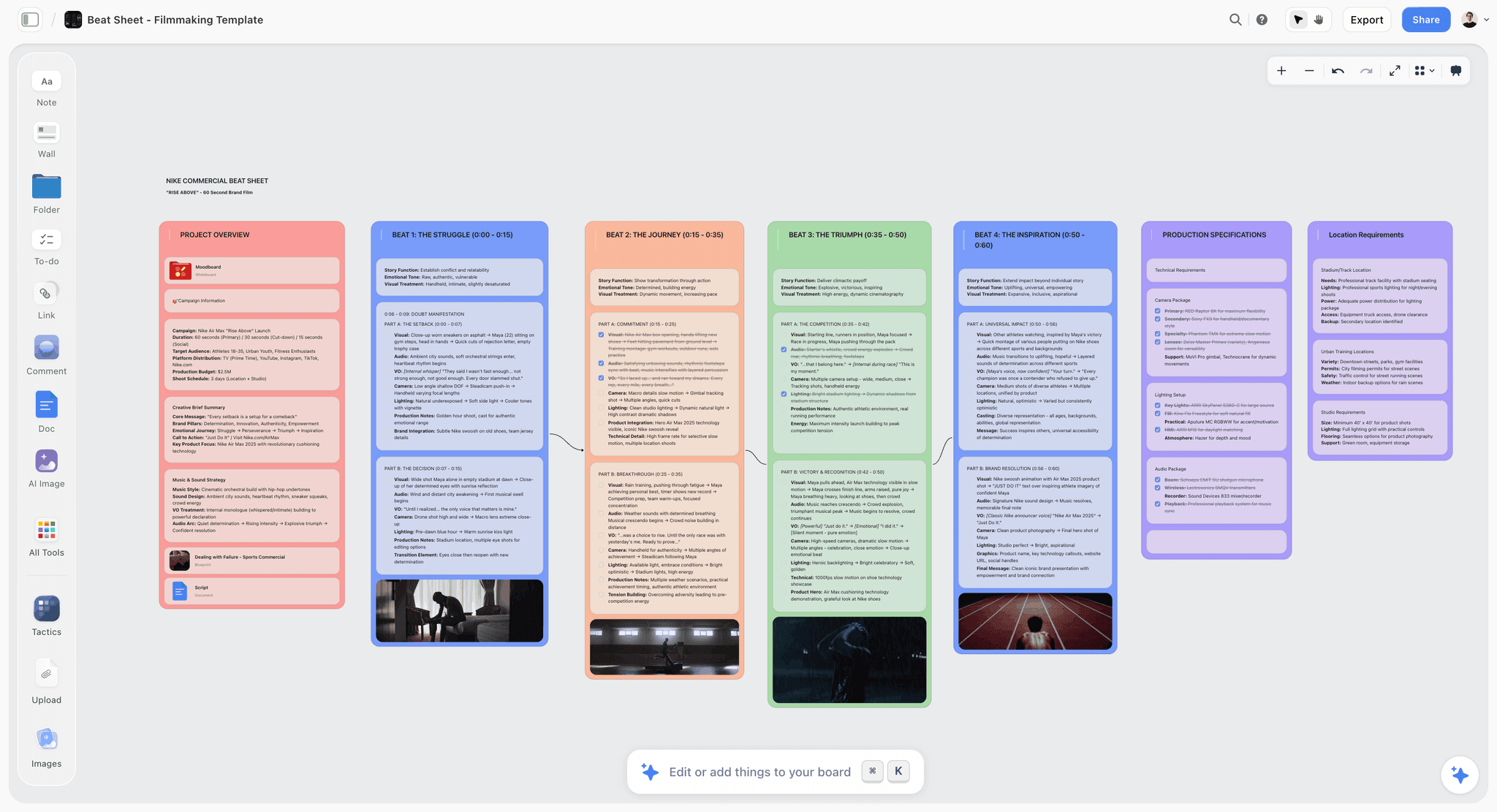
Where Storyflow pulls ahead is everything that happens when the plot is not the only thing you need to see. Here is what plotting a novel on the canvas actually looks like.
The whole middle is visible at once. Instead of scrolling a grid cell by cell, you lay the entire arc across the canvas and step back. Act one clusters on the left, the long middle spreads across the center, act three resolves on the right. When you can see the whole shape, the problem you were avoiding stops hiding. The stretch where nothing escalates is suddenly a visible gap on the board, not a feeling you cannot name.
Subplots are threads, not rows. In Storyflow a subplot is a run of connected cards you can trace across the middle: where the romance goes quiet for forty pages, where the mystery drops a clue, where the mentor's arc pays off. You arrange them freeform so a subplot can weave toward and away from the main line the way it actually does in the book, rather than sitting as a fixed parallel row. Seeing the weave is how you catch the thread you forgot to resolve.
The AI reads all of it and flags where tension sags. This is the part a grid cannot do. Storyflow's AI reads your entire active canvas board by default, plus up to 1 Tactic and up to 3 Documents you @-mention in the chat. So you can ask it to find the stretch of the middle where stakes flatten, to name the subplot that disappears and never returns, or to draft a complication for act two that raises the cost, and it answers with the whole story as context: the plot, the characters, the world, and the theme all at once. It is not suggesting a generic beat. It is reading your specific middle and telling you where it sags.
Plot, character, and world live on one board. The reason the middle holds is that a twist lands only if the character earns it and the world allows it. On the canvas your character profiles, your worldbuilding notes, and your subplot threads sit next to the plot, so when you move a beat you can see who it affects and what rule it leans on. You plot the whole story, not just the sequence.
200+ Story Blueprints to start from. On the Plus, Pro, and Max tiers, Storyflow's Story Blueprints library gives you 200+ ready-made boards, including beat-sheet and structure-style layouts, so you are not staring at a blank canvas. You start from a proven shape and then keep going on the same board.
The concrete workflow: open a board, drop in a structure blueprint, lay your acts across the canvas, add character and world cards beside the beats, thread your subplots through the middle, then ask the AI where the tension sags and fix it before you write a word. When the plot is solid you keep drafting scenes on the same canvas, because the board does not end at the outline. Plottr lays the plot on a line. Storyflow lays the whole story on a canvas.
7) Feature-by-Feature Comparison
Read the table by your job. If most of your rows are about making one plot timeline legible across books and exporting it to write, Plottr wins them. If most are about seeing the whole story while you plot and having an AI read it, Storyflow wins them.
8) Pricing Comparison
Storyflow (verified at storyflow.so/pricing, as of July 2026):
- Free: Paid-only during early access; the Free plan launches before the end of 2026 with unlimited notes, images, and links, unlimited shared boards, unlimited collaboration, basic AI, and 20 file uploads.
- Plus: $7.99/mo annual ($9.99 monthly). 200+ Story Blueprints, unlimited file uploads.
- Pro: $14/mo annual ($19 monthly). AI image generation, 20x more AI usage.
- Max: $39/mo annual ($49 monthly). 40x more AI and a team workspace with permissions and roles.
Plottr: Plottr sells a low annual subscription, roughly $25 per year, and has historically offered a one-time lifetime license as well. Its free trial is time-limited rather than a permanent free tier. There is no AI plotting assistant in the pricing, so you are paying for the timeline app and its templates.
The honest read: for pure plotting, Plottr's low annual price is hard to argue with, and its lifetime option is genuinely rare. Storyflow's Free tier does more before you pay anything (unlimited boards, unlimited collaboration, basic AI), and its paid tiers buy an AI that reads your whole story plus a broad blueprint library, not a dedicated plot timeline. If the plot timeline is all you want, Plottr is the cheaper, more focused buy. If you want the whole story on a canvas with AI, Storyflow's paid tiers do more.
9) Where Storyflow Loses
The honest limitations. If any of these is a hard requirement, Plottr, or a manuscript tool, is the better pick, and I would rather tell you now than have you find out after you have moved your novel.
It is not a dedicated timeline grid. Storyflow's canvas is freeform, which is the whole point of the Canvas philosophy, but it means you arrange your plot by hand instead of dropping scenes into a purpose-built plot timeline. If you specifically want a structured grid of scenes across plotlines that auto-aligns book by book, Plottr's dedicated timeline is the better tool and Storyflow does not try to replicate it.
It is cloud-only, with no offline files. Storyflow needs an internet connection and does not save local files. Plottr works offline and keeps your planning on your own machine. For writers who draft off-grid or want local-first ownership of an unfinished novel, that is a real advantage Storyflow does not offer.
It is newer, with a smaller genre-structure template library. Plottr has spent years building a deep, novelist-specific library of named story-structure and genre templates. Storyflow's 200+ Story Blueprints are broad and cover many creative jobs, but for pre-labeled novel-structure frameworks specifically, Plottr's library is deeper and more purpose-built.
It is not a manuscript writing tool. Storyflow is where you plot and see the whole story, not where you write and format a finished manuscript. It does not export to Scrivener or Word as a draft, and it is not a replacement for a dedicated writing app. The honest use is to plot in Storyflow and draft in your manuscript tool, or to keep drafting scenes on the canvas and move the prose out when it is ready. If you want one tool that takes you from outline to formatted manuscript, that is not Storyflow.
If you plot to a single rigorous framework, export to Scrivener, and write offline, Plottr fits your workflow better. Storyflow is for the writer whose plot only makes sense next to the rest of the story.
11) The Bottom Line
Storyflow and Plottr are both good at what they are for, and they are for different shapes of the same job. Plottr is the Timeline tool: a dedicated plotting app that makes one plot sequence legible across books and exports it to Scrivener or Word to write. Storyflow is the Canvas: an AI workspace where the plot sits inside the whole story, and the AI reads the entire board to find where the middle sags.
Choose by the question this whole comparison turns on. If your plot is a line you want to make clean and hand off to a manuscript tool, Plottr is the better and simpler buy, and its offline files and low price are real advantages. If your plot is one thread in a knot of character, world, and theme, and you want to see all of it while you plot, Storyflow is built for what plotting a novel actually is. Plottr lays the plot on a line. Storyflow lays the whole story on a canvas.
If your novels keep sagging in the middle because the plot is tangled up with everything else, plot your next book on Storyflow's free canvas and let the AI read the whole story to show you where the tension drops.
10) FAQ: Storyflow vs Plottr
Is Storyflow or Plottr better for plotting a novel?
For a clean, structured plot timeline that you export to a manuscript tool to write, Plottr is better. For seeing the whole story (plot, characters, world, and subplots) on one canvas with an AI that reads all of it, Storyflow is better. Plottr perfects the line; Storyflow keeps the whole story in view. Choose by whether your plot is a sequence or one thread in a knot.
Does Plottr have AI?
Plottr is built around a manual timeline grid rather than an AI assistant, and as of this writing it does not offer an AI plotting copilot. Storyflow's AI reads your entire active canvas board plus up to 1 Tactic and 3 Documents you @-mention, so it can find where tension sags, name a subplot that disappears, or draft a complication with your whole story as context.
Can Storyflow manage a book series like Plottr?
Plottr is stronger for formal series and multi-book management: it tracks plotlines and arcs across multiple books in a saga. Storyflow gives you one infinite canvas per project, which many series writers use to hold an arc, but it does not have Plottr's dedicated book-by-book series structure. If cross-book series management is central to your process, Plottr is the better fit.
Does Storyflow have story-structure templates like Save the Cat?
Storyflow's Story Blueprints library includes 200+ boards with beat-sheet and structure-style layouts you can plot into. Plottr ships dedicated, named frameworks (Save the Cat, Hero's Journey, Story Circle, three-act) built specifically for novelists. If you want a specific pre-labeled structure template, Plottr's novelist library is deeper; if you want a broad set of creative boards, Storyflow's is wider.
Is Storyflow free?
Not during early access. Storyflow's Free plan, which launches before the end of 2026, will include unlimited notes, images, and links, unlimited shared boards, unlimited collaboration, and basic AI. Paid tiers start at Plus for $7.99/mo (annual), which adds 200+ Story Blueprints and unlimited file uploads. Plottr uses a time-limited free trial rather than a permanent free tier.
Does Storyflow work offline?
No. Storyflow is cloud-based and needs an internet connection. Plottr saves local files and works offline, which is a real advantage for writers who draft off-grid or want local-first ownership of an unfinished novel. If offline plotting is a hard requirement, Plottr is the safer pick.
Can Storyflow export to Scrivener or Word?
No. Storyflow is a plotting and story workspace, not a manuscript export tool, so it does not push an outline into Scrivener or Word to draft. Plottr does export to Scrivener, Word, and other formats, which is one of its most practical strengths. If a clean handoff from outline to a manuscript app is essential, Plottr wins that step.
How does Storyflow help with the messy middle?
Storyflow lets you see the entire middle at once on the canvas, so a stretch where nothing escalates shows up as a visible gap rather than a feeling. You can then ask the AI to name where tension flatlines or which subplot goes quiet and never returns, and it answers using the whole board. A grid shows the order of the middle; the canvas shows the shape of it.
Is Plottr good for pantsers or only plotters?
Plottr is built for plotters: its timeline grid rewards knowing your scenes and plotlines up front. Storyflow suits discovery writers better, because a freeform canvas lets structure emerge as you move cards around and the AI helps you find the shape from loose material. If you plan tightly, Plottr fits; if you find the story by writing, Storyflow's canvas is friendlier.
Can I use both Storyflow and Plottr together?
Yes, and some writers do. Use Storyflow to see the whole story, develop characters and world, and pressure-test the middle with the AI, then move a tightened plot into Plottr for a clean series timeline and a Scrivener export. They are different shapes of the same job, so they can hand off to each other rather than compete.
Is Storyflow a real Plottr alternative?
Yes, for writers whose plot only makes sense next to the rest of the story. If you only ever want a structured plot timeline you export to write, a dedicated tool like Plottr is the closer fit. If you keep hitting the wall where the sequence is fine but the middle sags and the plot is tangled with everything else, Storyflow is the alternative built for exactly that.
What is the main difference in one sentence?
Plottr lays the plot on a line, and Storyflow lays the whole story on a canvas.
Table of Contents
Templates to check out for this topic


Templates you can use in Storyflow
Every Storyflow board starts from real structure and an AI that reads the whole canvas. Open one of these templates and make it yours.


See Storyflow in Action
A visual AI workspace where every feature lives inside one canvas. No tab-switching, no context lost.
Build your entire board from a single message
Type what you need in the AI chat at the bottom of your canvas. The AI adds cards, headings, and structure directly onto your board.
Use expert frameworks as AI context
Type @ in the AI chat and choose any Tactic. The AI tailors every response to that framework instead of giving generic advice.
Turn your board into a mind map in seconds
Ask the AI to restructure your canvas as a mindmap. It connects your ideas into a visual hierarchy so you can see how everything relates.
Why Storyflow Exists
Storyflow actually began as a personal tool while working on creative and research projects.
We kept running into the same problem: ideas were scattered everywhere: notes, documents, and whiteboards.
Nothing helped us see how everything connected.
So we started building a workspace designed around how ideas actually grow.
→ Read how Storyflow was createdJustkay
Documentary Filmmaker & Founder at Storyflow
Published: 2026-07-01
Extremely simple, seriously capable


See how easy it is to get started
Watch a real project come together, from a blank board to a finished plan, clicked through step by step.
Start creating with AI and become more productive
Transform your creative workflow with AI-powered tools. Generate ideas, create content, and boost your productivity in minutes instead of hours.