How Screenwriters Actually Plan a Script in 2026 (Beat Sheets vs Index Cards vs Story Circles)
Screenwriters plan a script with a beat sheet, index cards and a story circle, and Storyflow holds all three on one board. A beat sheet answers what happens next, a story circle answers why this character has to go, and index cards answer what order the scenes belong in. Here is each method and the tool it is done in.

Category
Screenwriting
Author

Justkay
Documentary Filmmaker & Founder at Storyflow
Topics
2026-09-06
•
33 min read
•
Screenwriting- what tools do screenwriters use to plan their stories
- save the cat beat sheet page numbers
- dan harmon story circle eight steps
- snowflake method screenwriting
- index cards vs beat board
- beat sheet software
- Storyflow
What tools do screenwriters use to plan their stories?
Screenwriters plan a script with three methods, a beat sheet, index cards and a story circle, and Storyflow holds all three on one board: beats as cards you drag across an infinite canvas, structure Tactics such as Hero's Journey and Dan Harmon's Story Circle, and an AI that builds the outline and reads your draft. A beat sheet answers what happens next, a story circle answers why this character has to go, and index cards answer what order the scenes belong in. Final Draft's Beat Board, Scrivener's corkboard and a wall of paper cards each do one of those jobs. For the full answer to [what tools screenwriters use to plan their stories](/screenwriting-software), see our guide.

Full disclosure: Storyflow is our product and it is listed first. The basis is which tool holds all three methods (a beat sheet, index cards and a story circle) on one board and builds the outline for you; the rest follow by job. Storyflow does not write screenplays: no industry-standard formatting, no revision-mode coloured pages, no dual dialogue and no export to Final Draft. The article tells screenwriters to buy Final Draft or Arc Studio for the script, and prices were read on vendor pages on 11 October 2026.
Quick Comparison
Three methods and the tool each is done in. Our own product is listed first; the rest follow by job.
| Tool | Best For | AI Features | Price |
|---|---|---|---|
| Storyflow | Beat sheet, index cards and story circle on one board | Builds the outline, reads the attached draft | $7.99 mo annual |
| Final Draft | Beat Board beside formatted pages | None named | $199.99 one-time sale price (regular $249.99) |
| Scrivener | Corkboard beside a research-heavy draft | None named | $59.99 one-time |
| Plottr | Plotlines on a timeline, Story Circle template | No AI, by design | $60 a year or $150 lifetime |
Which Method to Use, and the Tool to Do It In
Method choice is diagnosis. Name the problem, pick the method that answers it, then pick the tool the method is done in. On a Storyflow board all four methods share one canvas, which matters because most scripts need more than one. The product page is Storyflow for screenwriters.
- You do not know what happens next: use a beat sheet. Lay it out on a Storyflow board from a structure Tactic or an AI-built outline, on Final Draft's Beat Board, or in the Save the Cat! Story Suite.
- The plot works and feels arbitrary: use a story circle. Put Dan Harmon's eight steps on a Storyflow board as eight cards beside your own beats, or draw the circle on paper.
- The scenes exist and the order is wrong: use index cards. Drag them between act walls on Storyflow's infinite canvas, pin them to a wall, or use Scrivener's corkboard.
- You have an idea and cannot start: use the Snowflake method, one card on a Storyflow board or one line in a notebook, expanded a level at a time.
| Method | The problem it solves | The tool to do it in |
|---|---|---|
Beat sheet (Save the Cat, three acts, eight sequences) | You do not know what happens next | Storyflow (structure Tactics, or an AI outline with one wall per beat), Final Draft's Beat Board, the Save the Cat! Story Suite, Plottr's templates |
Story circle (Harmon's eight steps, the Hero's Journey) | The plot works and nobody wants anything | Storyflow (the Story Circle and Hero's Journey Tactics, or eight cards beside your beats), Plottr's Story Circle template, paper |
Index cards | The scenes exist and the order is wrong | Storyflow's infinite canvas, a physical wall, Scrivener's corkboard, Arc Studio's beat cards |
Snowflake method | You have an idea and cannot start | A Storyflow board or a notebook, then Plottr's Snowflake template for the scene list |
Formatted pages | The story is decided | Final Draft, Arc Studio, WriterDuet. Storyflow does not format a screenplay |
This piece compares the methods. Its two siblings cover the rest: What Tools Do Screenwriters Use to Plan Their Stories? walks the planning stages and compares sixteen tools, and The 12 Best Story Planning Tools and Story Planners in 2026 ranks the planners.
Key Takeaways
- A beat sheet cannot fix a character who does not want anything. Most structure problems are want problems wearing a structure costume.
- Storyflow holds a beat sheet, a wall of index cards and a story circle on one board, with an AI that builds the outline. Storyflow does not format a screenplay.
- Save the Cat gives 15 beats with page targets for a 110-page script. It is the most prescriptive template in common use, which is its strength for a first script and its weakness for a fifth.
- Dan Harmon's Story Circle compresses Campbell's monomyth into eight steps and works at any scale, from a series arc to a single scene.
- Index cards make reordering cheap, which is why they have outlasted every piece of software designed to replace them.
- The Snowflake method is built for the blank-page problem specifically: it starts at one sentence and expands in ten passes.
- The sequence approach, eight sequences of roughly fifteen pages, is the most useful structure for writers who find three acts too coarse and fifteen beats too rigid.
- Final Draft's Beat Board keeps planning in the same file as the script. Scrivener's corkboard is better for research-heavy work. A wall of paper cards is still bigger than either.
The Four Questions, and Why Method Choice Is Really Diagnosis
Every screenwriting method gets recommended as if it were universal, and every writer who has tried one on the wrong problem knows it is not. The methods are not competing answers to one question. They answer four.
"I do not know what happens next." This is a structure problem, and structure templates are the correct tool. Save the Cat, the three-act paradigm, the sequence approach.
"I know what happens and it feels arbitrary." This is a character-motivation problem, and no beat sheet touches it. You need a circle model that ties events to a want: Harmon's Story Circle, the Hero's Journey.
"I have all the scenes and the order is wrong." This is an arrangement problem. Index cards, on a wall or on a Storyflow canvas, and nothing else, because the cost of moving a card is the entire point.
"I have an idea and cannot start." This is a blank-page problem, and the Snowflake method was designed for exactly it.
The most common failure in screenwriting planning is applying a structure template to a want problem. You dutifully fill in fifteen beats, the beats are correct, and the script is still inert, because the beats describe what happens rather than why anyone does it. Filling the template harder does not help. Diagnose first.
The Structure Templates
Save the Cat: fifteen beats with page numbers
Blake Snyder's 2005 template is the most widely used and the most argued about. It gives fifteen beats and, critically, a target page for each in a 110-page script:
| Beat | Page |
|---|---|
Opening Image | 1 |
Theme Stated | 5 |
Set-Up | 1 to 10 |
Catalyst | 12 |
Debate | 12 to 25 |
Break into Two | 25 |
B Story | 30 |
Fun and Games | 30 to 55 |
Midpoint | 55 |
Bad Guys Close In | 55 to 75 |
All Is Lost | 75 |
Dark Night of the Soul | 75 to 85 |
Break into Three | 85 |
Finale | 85 to 110 |
Final Image | 110 |
What it is genuinely good at: telling a writer whether their second act has a shape. The Fun and Games and Bad Guys Close In stretch is where most first scripts sag, and the template names the two beats that bracket it.
Where it earns its criticism: the page numbers are descriptive of a particular kind of commercial film and get treated as prescriptive for everything. A slow-cinema drama that hits its Catalyst on page 12 is being forced into a shape it does not want. And the Theme Stated beat, where a supporting character says the film's thesis aloud on page five, produces one of the most recognisable bad screenwriting habits.
Use it when: it is your first or second feature, or you are writing genre, or your second act has collapsed and you need to know where.
Do it in: Storyflow, by asking the AI to lay the fifteen beats out as movable cards with their page targets beside your own scenes, so the template is something you compare against. The Save the Cat! Story Suite is the method's own software, with a 15-Beat Story Map built in. More on the Save the Cat beat sheet in Storyflow.
The three-act paradigm
Syd Field's 1979 formulation, and the substrate under most of the others. Setup, confrontation, resolution, with plot points at roughly the quarter and three-quarter marks.
Its virtue is that it is nearly content-free, which makes it hard to misuse. Its limitation is the same thing: a second act that is half the script is one undifferentiated stretch of fifty-five pages, and "make something go wrong in the middle" is not enough guidance to write it.
Use it when: you want a sanity check rather than a plan, or you find the more prescriptive templates constraining.
Do it in: Storyflow, with the Three-Act Structure Tactic or three walls of scene cards, or in Plottr with its Three Act Structure template. Any tool works, which is why three acts are rarely the reason to choose one.
The sequence approach: eight sequences of fifteen pages
Frank Daniel's method, taught at USC and Columbia, and the most underrated structure in common use. It divides the script into eight sequences of roughly fifteen pages, each with its own beginning, middle and end, and each with a question it raises and answers.
The historical origin is practical: early projectors held about fifteen minutes of film, so films were built in reels. The reason it survives is that fifteen pages is a length a writer can actually hold in their head.
This is the structure most likely to help a writer whose three-act outline is too coarse and whose Save the Cat beat sheet feels like a straitjacket. It gives eight manageable problems instead of one enormous one, and it does not tell you what has to happen in them.
Use it when: the middle of your script is shapeless and you have already tried a beat sheet.
Do it in: Storyflow, as eight walls with the scene cards inside them, so a sequence with two cards is visible as a short wall. Scrivener handles the same structure as eight folders.
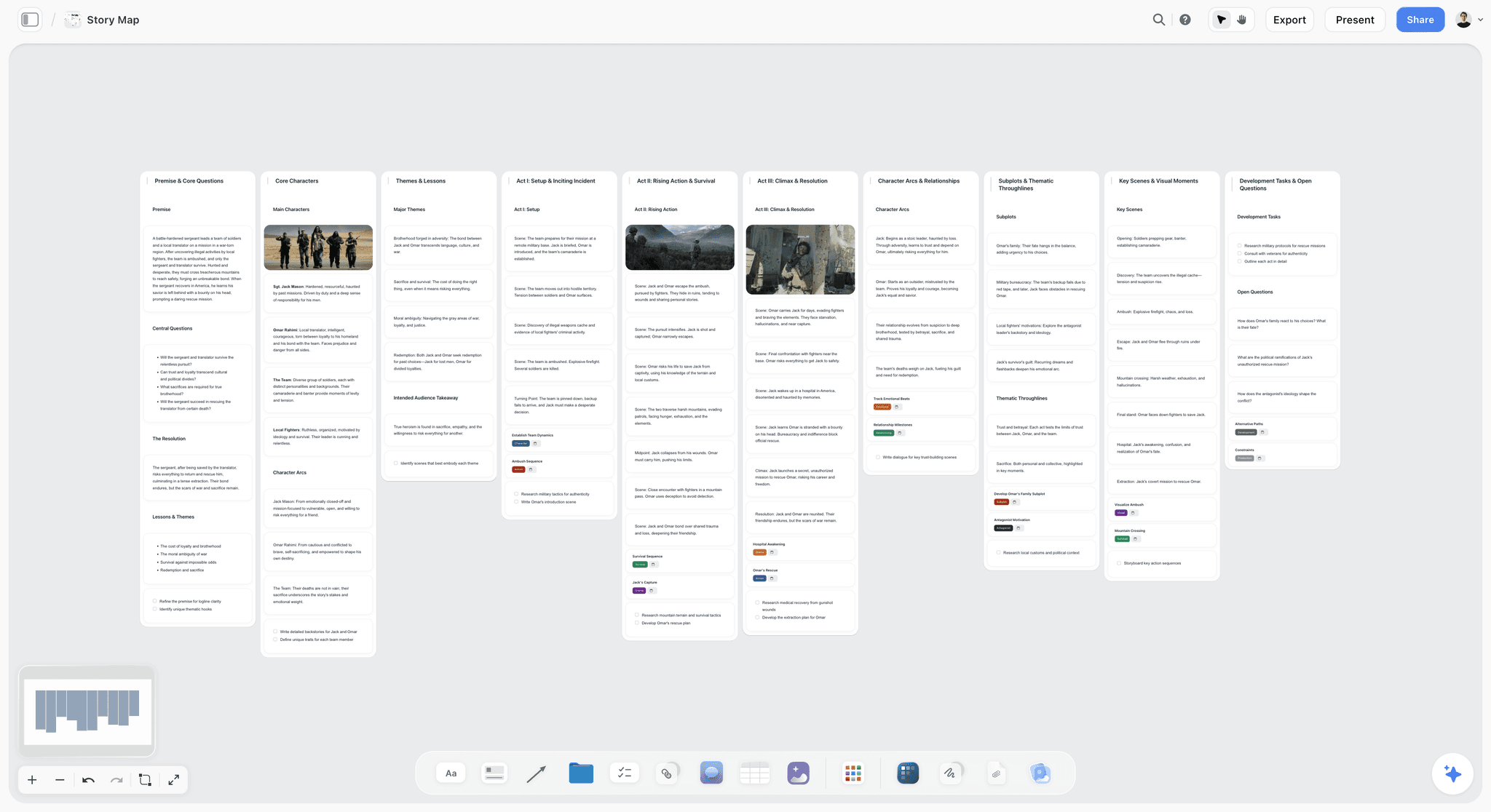
The Circle Models
Dan Harmon's Story Circle: eight steps
Harmon's compression of Campbell's monomyth into eight steps, arranged as a circle:
- You. A character in a zone of comfort.
- Need. They want something.
- Go. They enter an unfamiliar situation.
- Search. They adapt to it.
- Find. They get what they wanted.
- Take. They pay a heavy price for it.
- Return. They come back to their familiar situation.
- Change. Having changed.
The upper half of the circle is order and the lower half is chaos; the left half is the familiar and the right half is the unknown.
Why it is the most useful of the circle models: it is scale-free. The same eight steps describe a series arc, an episode, a sequence, or a single scene, which means you can use one vocabulary at every altitude of the work. It is also, unlike a beat sheet, explicitly about want and cost, so it operates on the problem beat sheets cannot reach.
Use it when: your plot works and nobody in it seems to need anything, or when you are writing television and need one structure that scales from season to scene.
Do it in: Storyflow, where Dan Harmon's Story Circle is one of the storytelling Tactics and the eight steps sit as cards beside your own beats, laid out by you or by the AI. Plottr ships a Story Circle template for its timeline. The Storyflow page for it is the Story Circle template.
The Hero's Journey: twelve stages
Campbell's monomyth as adapted by Christopher Vogler in 1992: ordinary world, call to adventure, refusal, meeting the mentor, crossing the threshold, tests and allies, approach, ordeal, reward, the road back, resurrection, return with the elixir.
What it is good for: myth, fantasy, adventure, and anything where transformation is the subject. It carries a strong flavour, which is a feature when the story wants that flavour and a liability when it does not.
Where it goes wrong: applied to a domestic drama or a workplace comedy it produces something that feels borrowed. Harmon's circle is the same idea stripped of the mythological furniture, which is usually the better choice outside genre.
Do it in: Storyflow, with the Hero's Journey Tactic on the canvas, or in Plottr with its Hero's Journey plot template.
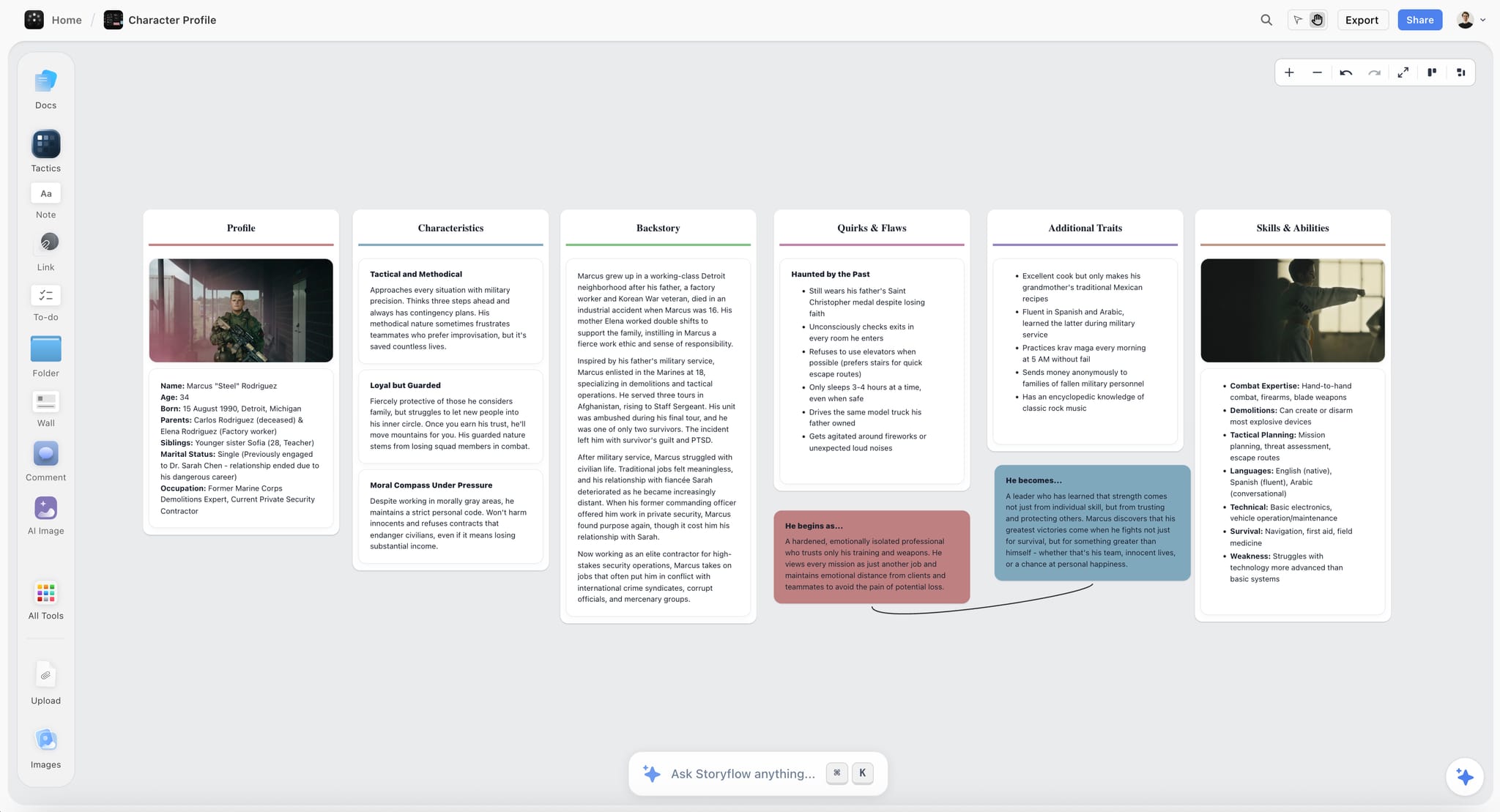
A circle model is a question about change, so it helps to see the change. On the board below a character's profile ends in two notes joined by a line: who he begins as, and who he becomes.
Templates You Can Copy: an Index Card and a Story Circle
The Save the Cat page table above is the beat sheet template. Here are the other two, as tables you can copy into any tool, including paper.
The index card. Three lines, never more.
| Line | What to write | Example |
|---|---|---|
Slug line | Where and when | INT. LOADING DOCK - NIGHT |
What happens | One line, one event | Mara finds the second key card in the dead man's coat |
Who changes | The shift, in a clause | Mara now knows someone on the crew lied to her |
The story circle, filled in for the illustrative thriller used in the worked example below.
| Step | The question | Illustrative answer |
|---|---|---|
1. You | Who is she when nothing is wrong? | A night-shift security lead who trusts her crew |
2. Need | What does she want, as an object or outcome? | To get her brother off the crew before the job goes wrong |
3. Go | What line does she cross? | She joins the job to stay close to him |
4. Search | How does she adapt? | She learns the plan and starts lying to both sides |
5. Find | What does she get? | Proof of who set her brother up |
6. Take | What does it cost? | Using the proof exposes her own part in the job |
7. Return | Where does she come back to? | The same loading dock, on the other side of the door |
8. Change | Who is she now? | Someone who no longer protects the crew |
If step 2 cannot be written as an object or an outcome, stop there. That is the want problem, and no later step will fix it.
A Worked Example: Diagnosing a Second Act That Sags
An illustrative case, with made-up numbers chosen to show the method: a writer with a finished 104-page draft of a contained thriller. The note from three readers was the same and useless: the middle drags.
Step one, cards. Every scene onto a card, one line each. 47 cards. The act of writing them surfaced the first finding: four scenes could not be described in one line, which meant they were doing more than one thing.
Step two, the wall. Cards laid out in order, colour-coded by which of the three plot lines they served. The pattern was immediately visible and had been invisible in the document: between pages 38 and 61, twenty-three pages, every card was the same colour.
Step three, the diagnosis. The subplot that carried the emotional stakes simply stopped for a fifth of the film. The middle did not drag because scenes were slow. It dragged because one thread was absent, so nothing accumulated.
Step four, the fix. Three cards moved rather than rewritten, and two new scenes written. Total new pages: four.
Why the wall found it and the document did not. Reading a script linearly, you experience the sag but cannot locate it, because absence is invisible in sequence. Laid out spatially and colour-coded, absence is a block of one colour. The structural feature doing the work is not the cards, it is that the layout makes a gap visible as a shape.
The same pass on a Storyflow board. Attach the draft as a PDF or .fdx file and ask Storyflow's AI for each lead's scene list, then give each storyline a card colour on the canvas. The one-colour stretch shows up the same way, and the board travels with you.
Index Cards: The Method That Refuses to Die
Every piece of screenwriting software has tried to replace the corkboard. None has, and the reason is specific rather than sentimental.
The value of a card is that moving it is free. Reordering fourteen scenes on a wall takes a minute or two and you can see the whole act at once while doing it. Reordering fourteen scenes in a document means cutting and pasting, and at no point can you see the shape. The physical version has a spatial working memory that a document does not.
How writers use them:
- One scene per card. Slug line, one line of what happens, and who changes.
- Colour by storyline. A-plot, B-plot, C-plot in three colours, and you can see at a glance that your B-plot vanishes for thirty pages.
- Colour by location or by cast if you are writing something that will be produced on a budget, because that is the version a producer wants to see.
- Lay out in rows by act or by sequence, so position means something.
The digital versions that get closest are a Storyflow board, Final Draft's Beat Board and Scrivener's corkboard, all of which allow free arrangement rather than a list. On Storyflow's infinite canvas the cards are notes you move between act walls, and the board does not run out of wall. A physical wall still has one advantage: it is bigger than a monitor, so you take in forty cards without zooming.
The practical compromise: cards on a wall or a Storyflow board for the ordering pass, then into the script app once the order is settled. If you start from a pile of loose notes rather than cards, Storyflow's AI sorts the pile into named walls first, as in the picture below.

The Snowflake Method: For the Blank Page
Randy Ingermanson's ten-step method is built for novels and borrowed by screenwriters, because it addresses the one problem the others assume you have already solved: getting started.
It works by expansion. Each step takes the previous one and makes it bigger, so you are never facing a blank page, only a slightly-too-short page:
- One sentence summarising the story.
- One paragraph, five sentences: setup, three disasters, ending.
- One page per major character: their goal, motivation, conflict and arc.
- Expand each sentence of the paragraph into its own paragraph.
- One page per major character, written from their point of view.
- Expand the one-page synopsis into four pages.
- Full character charts.
- A scene list.
- A paragraph per scene.
- Write.
The insight worth stealing even if you never use the whole method: never expand more than one level at a time. Going from a logline to a scene list in one jump is where writers freeze. Going from a logline to a paragraph is easy, and so is every subsequent step.
For screenwriters, steps 1 to 4 and 8 to 9 are the useful ones. Steps 5 and 7 are novelist territory.
Do it in: a notebook, or a Storyflow board where the sentence is one card in the middle and each expansion branches out from it. Plottr lists the Snowflake Method among its plot templates for the scene-list end.
Planning for Television, Which Is a Different Job
Feature templates transfer badly to television, and writers moving between the two forms usually discover this the expensive way.
The differences that matter:
Act breaks are commercial, not dramatic. In ad-supported television the act break exists to stop a viewer leaving, which means it has to land on a question rather than a resolution, and it lands at a page count set by the broadcaster rather than by the story. A four-act hour and a five-act hour are structurally different scripts.
The season is the unit, not the episode. An episode that works alone and moves nothing forward is a problem that no episode-level structure will reveal. This is what the board in a writers' room is for: one column per episode, one row per storyline, and the gaps become visible.
Character arcs are measured in episodes, not pages. Harmon's circle is the standard tool here precisely because it is scale-free: a character can complete a circle within an episode while the season runs a larger one around it, and the same eight words describe both.
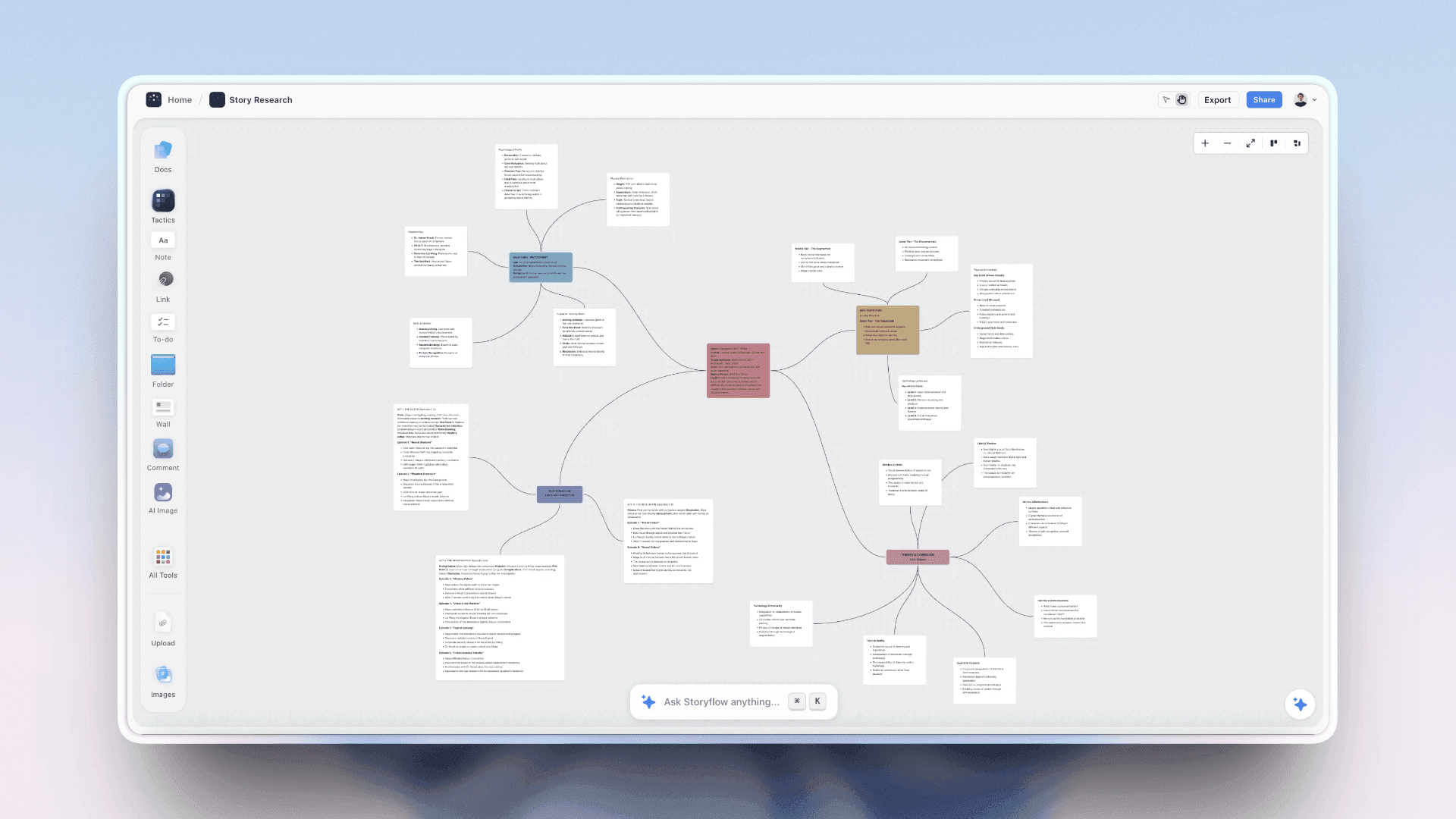
The practical setup, which a solo writer can copy on a Storyflow board or a wall: one wall per episode across the top, one card colour per storyline, one line per card. The value is in the empty stretches, because an A-plot with nothing in episodes four and five is a structural problem you cannot see in any linear outline. WritersRoom Pro and Plottr are the grid-first alternatives, covered in The 10 Best Writers Room Tools in 2026.
Comparison Table: Which Method for Which Problem
| Method | Solves | Prescriptiveness | Best for | Weakest at |
|---|---|---|---|---|
Save the Cat | What happens next | Very high, page numbers | First features, genre | Non-commercial shapes |
Three-act paradigm | Overall shape | Low | Sanity checks | Second-act detail |
Sequence approach | Second-act shapelessness | Medium | Any feature | Character motivation |
Story Circle | Why they go | Medium | TV, scale-free planning | Plot mechanics |
Hero's Journey | Transformation | High, strong flavour | Myth, fantasy, adventure | Domestic and workplace stories |
Index cards | Scene order | None | Every script, at the reorder stage | Generating material |
Snowflake | Blank page | High but expandable | Getting started | Late-stage restructuring |
Every method in this table can be done on a Storyflow board, which is why Storyflow comes first in the tool list below. The longer treatment of the beat sheet formats is in What is a Beat Sheet? The Complete Guide for Filmmakers and YouTubers (2026).
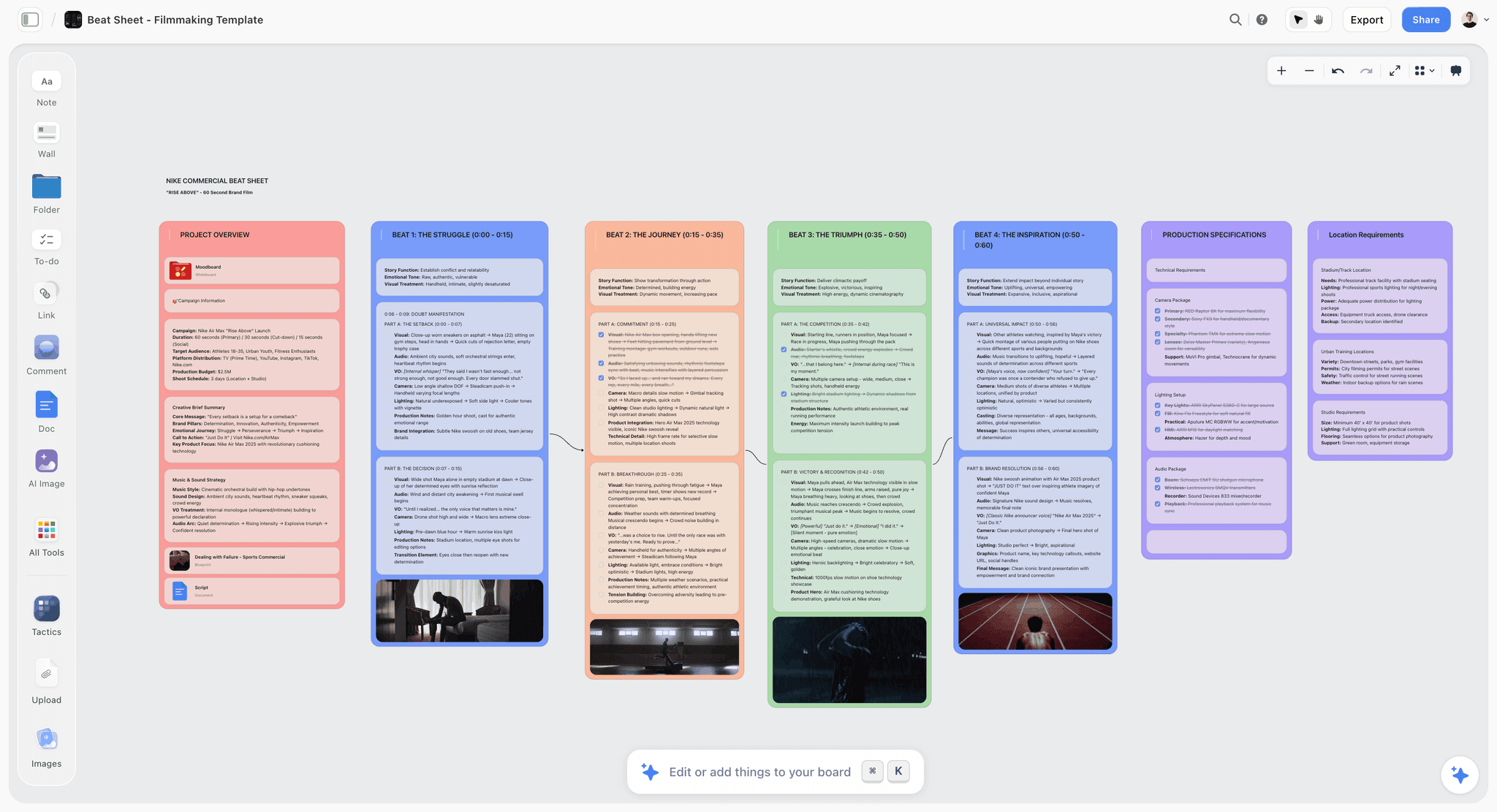
A timed beat sheet for a 60-second commercial on the Storyflow canvas, with a project overview wall and one wall per beat with its timecodes
A wall is bigger than a monitor
The corkboard problem is spatial. On a Storyflow board the cards drag freely at any scale, colour-coded by storyline, zoomed out to see a whole act, with the research beside them rather than in a separate binder.

How We Compared the Tools
The tools below were compared on what each vendor's own product and pricing pages say, read on 11 October 2026, and on our own product. No hands-on benchmark is claimed and nothing is scored. Four questions decided what each review says:
- Which of the three methods can the tool hold? A beat sheet, movable cards, a circle model.
- Does the tool build anything for you, or is every card placed by hand?
- Does the tool write the formatted script? Storyflow does not, and the reviews say so.
- What does the tool cost, and is there a way to start without paying?
Storyflow is our product and it is listed first. The basis is question 1 and 2 together: Storyflow holds all three methods on one board and its AI builds the outline. After that the tools run by job: script apps with planning views, dedicated planners, general boards, and paper.
The Tools, Reviewed
1. Storyflow
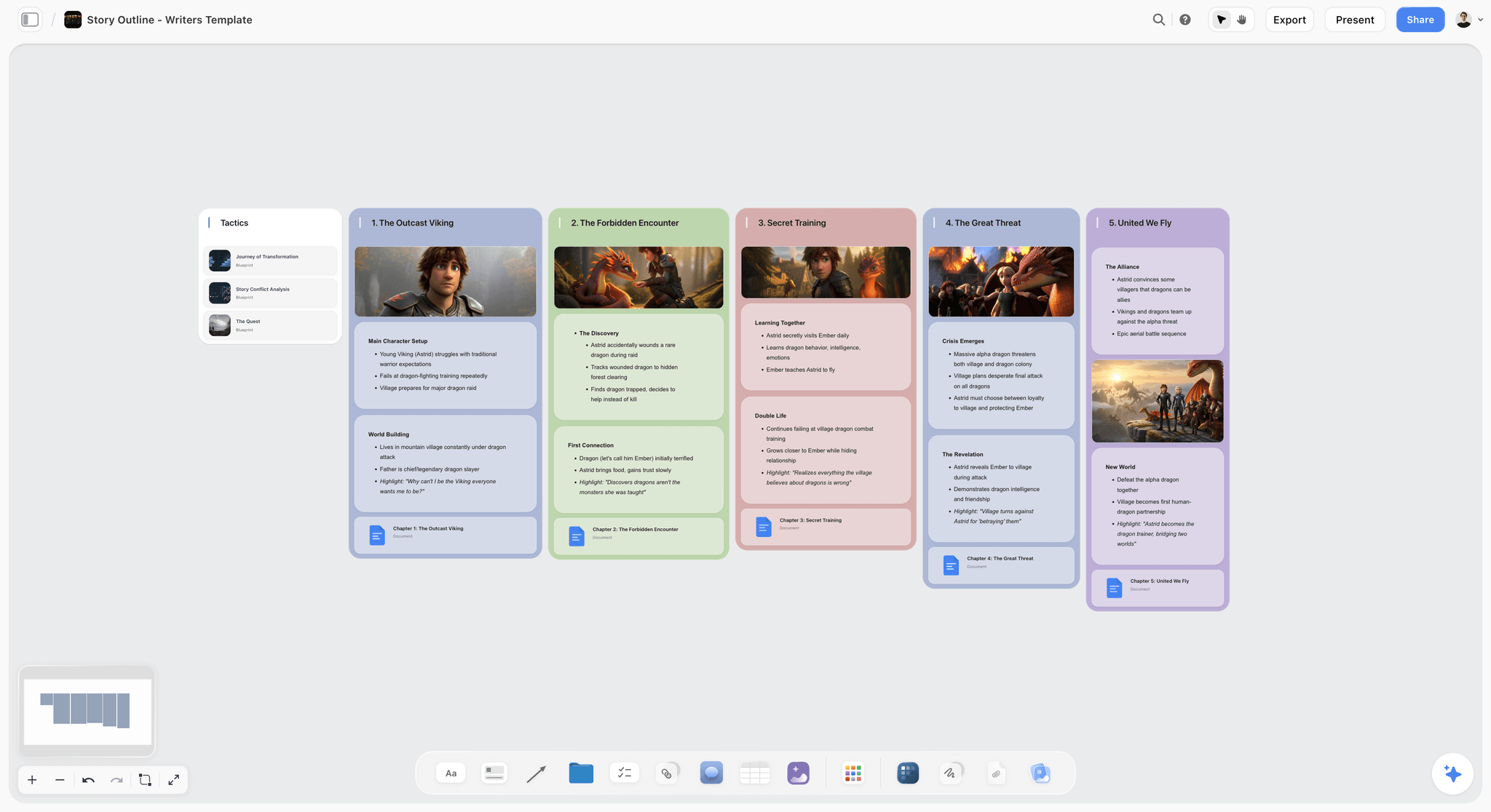
Storyflow is an AI visual workspace where a screenwriter plans the story before the script: beat sheets, index cards and story circles on one infinite canvas. Storyflow's cards drag between act walls like index cards on a corkboard, and the canvas has no edge. Storyflow includes 200+ Tactics, and its storytelling Tactics include Hero's Journey, Three-Act Structure, Story Spine and Dan Harmon's Story Circle. Storyflow's AI reads the board, builds a story plan, an outline with one wall per beat or a story map on request, builds character sheets, and reads an attached .fdx, Fountain or PDF draft scene by scene. Co-writers edit a Storyflow board in real time, and a producer opens a view link with no account. See Storyflow for screenwriters.
Best for: planning a script visually with all three methods in one place: a beat sheet, movable index cards and a story circle, with the research and references beside the beats.
The verdict: Storyflow is our pick for the planning board, and it is not a screenwriting application.
Where Storyflow loses, and it loses on the thing screenwriters most need: Storyflow does not write screenplays. Storyflow has no industry-standard formatting, no revision-mode coloured pages, no dual dialogue, no Beat Board by that name, no export to Final Draft and no offline mode. A screenwriter needs a screenwriting application, and Storyflow is not one. Buy Final Draft or Arc Studio for the script itself.
Pricing. Storyflow is paid-only during early access; its Free plan launches before the end of 2026, and anyone a paid member invites to a board joins free now. Plus is $7.99 a month billed annually ($9.99 monthly), Pro is $14 ($19 monthly) and Max is $39 ($49 monthly). AI use is metered on every plan, and AI-generated images need Pro or Max.
Trade-off: Storyflow addresses the wall, not the page.
2. Final Draft
The verdict: planning features inside the screenwriting application most often called the industry standard, and enough planning for a writer who would rather not add a separate tool. Compared with Storyflow, Final Draft owns the formatted page and Storyflow owns the board before it.
Best for: professional screenwriters who want structure work and the script in one file. Storyflow is the better fit while the story is still moving and the research needs a home.
Why it is here. The Beat Board is a space where you place beats spatially rather than as a list, and the Outline Editor and Structure Lines carry that structure alongside the script (Final Draft features). Writing partners can collaborate in real time on both the script and the Beat Board. Final Draft's features page names no AI, where Storyflow's AI builds the outline.
The decisive practical argument is the file: Final Draft's format is the one other tools import and export, and revision-mode coloured pages are what a production runs on.
Price. Final Draft 13 was listed at $199.99 one-time on 11 October 2026 (regular price $249.99), and the Suite subscription starts at $8.33 a month billed yearly (Final Draft pricing).
Limitations: $199.99 up front, more than three times Scrivener's one-time price, and a screenplay format from the first click, which is the wrong pressure while the story is still being found.
3. Scrivener
The verdict: the pick for research-heavy scripts, with a corkboard tied to the draft. Scrivener holds the draft, which Storyflow does not, and Storyflow adds the AI and the free canvas, which Scrivener does not.
Best for: writers adapting real events, historical material or a book, where the research is as large as the script. Storyflow is the better fit when the research is visual or shared with a co-writer.
Why it ranks here. Scrivener's binder holds the script and the research in one project, its corkboard attaches a virtual index card to every section, and its outliner gives a synopsis-level view you can restructure. It saves screenplays to Final Draft format. For a documentary or a fact-based drama, having a hundred sources beside the draft is worth more than any structure template.
Price. $59.99 one-time for a macOS or Windows licence, with a 30-day trial; iOS is US$23.99 (Scrivener).
Limitations: a large application with a real learning curve, and its screenplay files are not the format a production office exchanges, so a script headed for production moves to Final Draft at the end.
4. Arc Studio
The verdict: a modern screenwriting app with planning and co-writing together. Arc Studio keeps the outline tied to the script, where Storyflow keeps the outline next to the characters, references and research.
Best for: writing partnerships and TV writers who want beats and pages in one cloud app. Storyflow is the better fit for the planning that happens before there are pages.
Why it ranks here. Arc Studio describes growing an idea into an outline on a digital whiteboard with drag-and-drop story beat cards, with multiple outlining templates, a built-in notes app and real-time co-writing.
Price. Free for 2 scripts with a watermarked PDF. Essentials is $69 a year. Pro is $99 a year and is the plan with the outlining tools (Arc Studio pricing).
Limitations: the planning tools sit on the top plan, and it is screenplay-bound from the start.
5. Plottr
The verdict: a dedicated planning tool that does not write the script, built around a visual timeline. Plottr has the strict timeline grid Storyflow lacks, and Storyflow has the AI and the free canvas Plottr lacks.
Best for: writers juggling many storylines or a series, who want plotting separated from drafting. Storyflow is the better fit when the shape is still open and you want the outline built for you.
Why it ranks here. Plottr is a timeline where plotlines run as lanes and scenes are cards along them. For a series with five character arcs, seeing all five as parallel lanes is clarifying in a way a linear outline is not. It lists 30+ plot templates, including The Hero's Journey, Story Circle, Three Act Structure and the Snowflake Method, and it exports to Word and Scrivener (Plottr features). Plottr says plainly that it has no AI.
Price. $60 a year or $150 lifetime; Plottr Pro is $9.99 a month or $99 a year, with a 30-day trial (Plottr pricing).
Limitations: a planning tool only. You export an outline and write elsewhere.
6. Save the Cat! Story Suite
The verdict: the fifteen beats as software. The suite does one method thoroughly, where Storyflow carries any method and the research around it.
Best for: writers who plan to Blake Snyder's beats and want them enforced. Storyflow is the better fit when you switch between a beat sheet and a story circle on the same script.
Why it ranks here. The suite has a 15-Beat Story Map, a Digital Story Board, a Scene Card Editor and character and relationship trackers, with script formatting included. Real-time story collaboration starts on Premium.
Price. Essentials is $89 a year, Premium $119, Pro $179, and a lifetime licence is $599 (Save the Cat software).
Limitations: tied to one structural method.
7. WriterDuet
The verdict: the co-writing app, with outlining tools on every plan. WriterDuet is where two writers type the pages, and Storyflow is where the same two lay out the cards first.
Best for: partnerships and rooms drafting a screenplay together, and first scripts on no budget. Storyflow is the better fit for the board the partnership plans on.
Price. Free with a three-project limit. Plus is $9.99 a month or $89.88 a year, Pro $11.99 or $107.88, Premium $13.99 or $125.88 (WriterDuet plans).
Limitations: planning is outline-shaped rather than a wall of cards.
8. Milanote
The verdict: a hand-arranged visual board with a free plan. Unlike Storyflow, Milanote has no AI that builds the outline or reads a script, so choose Milanote when you want to place every card yourself.
Best for: tone, world and reference boards arranged by hand. Storyflow is the better fit when the board should also hold the beat sheet and build the outline.
Price. Free for 100 notes, images or links; $9.99 a month per person billed annually (Milanote plans).
Limitations: nothing story-specific, and everything is manual.
9. Miro
The verdict: a workshop whiteboard that a room can use as a card wall. Miro has the voting and timers Storyflow lacks, and Storyflow has the story Tactics, documents and AI-built outlines Miro is not designed around.
Best for: a remote room breaking story live. Storyflow is the better fit once the session's cards have to become a plan.
Price. Free with 3 editable boards; Starter is $8 per member a month billed yearly (Miro pricing).
Limitations: knows nothing about scripts.
10. Notion
The verdict: a scene database. Notion sorts and filters a scene list, which Storyflow cannot, and Storyflow shows the shape of the story, which a table does not.
Best for: writers who track scenes as rows with properties for act, character and status. Storyflow is the better fit for seeing a gap as a shape.
Price. Free for individuals; Plus is $10 per member a month billed annually (Notion pricing).
Limitations: rows, not a wall.
11. Physical Index Cards
The verdict: still the best tool for the ordering pass on a big wall, and the least expensive thing in this article.
Why it ranks here. A wall is bigger than a monitor. Forty cards laid out in four rows can be taken in at once, rearranged with both hands, and re-read from six feet away, which is a different cognitive operation from scrolling. A Storyflow board is the same method when the wall has to travel, hold images or be shared with a co-writer in another city.
Limitations: no version history, no backup beyond a photograph, and it does not travel.
What the Tools Cost
Prices are the figures on each vendor's own page on 11 October 2026.
| Tool | Way to start without paying | Entry price | What you get for planning |
|---|---|---|---|
Storyflow | Coming late 2026 (invited collaborators join free now) | $7.99 mo annual (Plus) | Beat sheet, index cards and story circle on one board, 200+ Tactics, AI-built outlines |
Final Draft | 5-day Suite trial | $199.99 one-time sale price (regular $249.99), or Suite from $8.33 mo billed yearly | Beat Board, Outline Editor, Structure Lines |
Scrivener | 30-day trial | $59.99 one-time | Corkboard, outliner, binder |
Arc Studio | Free plan, 2 scripts | $69 a year (Essentials), $99 a year (Pro) | Beat cards and outlining tools on Pro |
Plottr | 30-day trial | $60 a year or $150 lifetime | Timelines, plotlines, 30+ templates |
Save the Cat! Story Suite | None listed | $89 a year (Essentials) | 15-Beat Story Map, story board, scene cards |
WriterDuet | Free plan, 3 projects | $9.99 mo (Plus) | Outlining tools on every plan |
Milanote | Free plan, 100 items | $9.99 mo per person billed annually | Hand-arranged boards |
Miro | Free plan, 3 editable boards | $8 mo per member billed yearly | Sticky-note walls for a room |
Notion | Free for individuals | $10 per member mo billed annually | Scene databases |
Index cards | Paper | A few dollars | A wall |
Recommended Stacks
- First feature: Save the Cat as the template, index cards or a Storyflow board for the reorder, and any screenwriting tool including a free one. Do not buy Final Draft until someone asks for a Final Draft file.
- Professional feature writer: Storyflow for the board, Final Draft for the pages. Writers who plan lightly can stay on Final Draft's Beat Board alone.
- TV writer: Harmon's Story Circle as the method, a Storyflow board or Plottr for the season lanes, Arc Studio or Final Draft for pages.
- Fact-based or adapted work: Scrivener for the research and structure, Final Draft for the final draft.
- Writing partnership: a shared Storyflow board for the cards, then Arc Studio Pro or WriterDuet for co-writing pages.
- Stuck at the idea stage: the Snowflake method's first four steps, on paper, before opening any software.
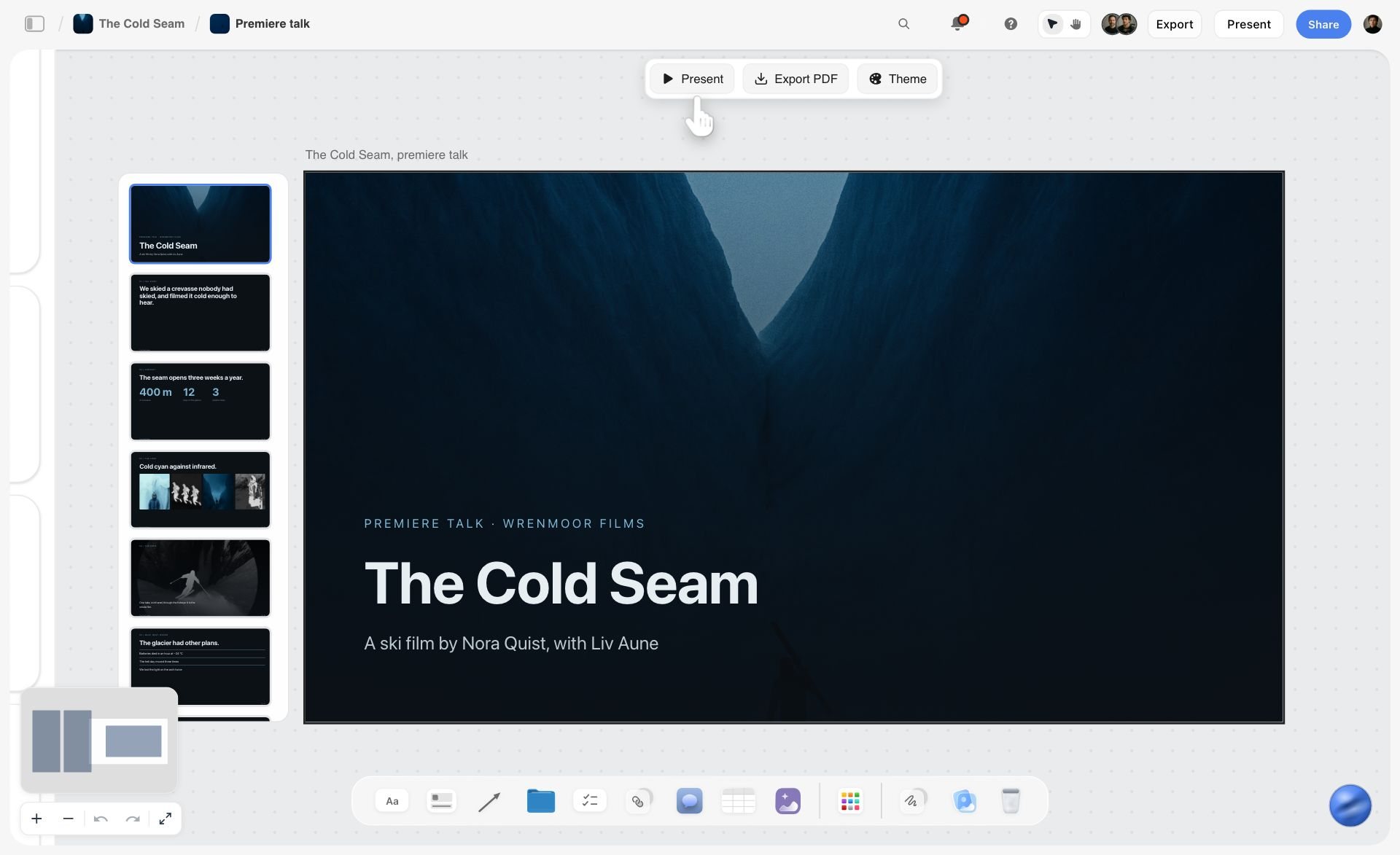
When the plan has to be pitched, the Storyflow board does one more job: its AI turns the board into a deck you present fullscreen or export as a PDF.
Common Mistakes With Beat Sheets, Index Cards and Story Circles
- Filling a beat sheet to fix a want problem. If the protagonist's want cannot be stated as an object or an outcome, no template helps.
- Treating page targets as rules. Save the Cat's numbers describe one kind of film. Use them to find a sag, not to force a shape.
- Writing paragraphs on index cards. A card that cannot be read from across the room is a document.
- Colour-coding nothing. Without a colour per storyline, a thread that disappears looks the same as one that is present.
- Running the story circle once, at feature scale only. Its value is that it also works on a sequence and a scene.
- Carding in the script app before the order is settled. Formatting feels like progress and locks the order too early.
- Leaving the board when the draft starts. The structural question at page sixty belongs back on the wall or the Storyflow board, not in a rewrite of page sixty.
A Planning Checklist Before Page One
- The logline fits in one sentence
- The protagonist's want is an object or an outcome
- The story circle's step 6, the price, has an answer
- Every scene is on one card with three lines
- The cards are coloured by storyline, and no colour vanishes for more than one sequence
- The middle is divided into sequences, each with its own question
- The order has survived one full reshuffle on the wall or the Storyflow board
- The board is photographed or shared before you open the script app
What to Do When the Structure Is Right and the Script Is Dead
This is the most common state a second draft arrives in, and no tool in this article fixes it.
The beats are in the right places. The midpoint turns. The all-is-lost lands on page 75. And the script is inert, because structure describes the arrangement of events and says nothing about whether anyone in them wants something badly enough to be interesting.
The diagnostic questions, in order:
- What does the protagonist want, stated as an object or an outcome, not a feeling? "To be happy" is not a want. "To get her brother out of the house before their father comes home" is.
- What are they willing to do to get it that they would not normally do? If nothing, they do not want it enough for a feature.
- Who wants the opposite, and are they in the room? An antagonist who is a circumstance rather than a person is why the second act is slack.
- What is the cost of the thing they want? Harmon's step six, Take, is the one most often skipped, and skipping it is why endings feel unearned.
Structure is the skeleton and want is the muscle. A script with perfect structure and no want is a correctly assembled skeleton, and it will not stand up.
Frequently Asked: Screenwriting Software Brands
Which brands in screenwriting software are the most trusted?
Final Draft is the name most often called the industry standard for the formatted script. Scrivener is the pick for research-heavy work, Arc Studio and WriterDuet for writing partnerships, Plottr for plotting rather than drafting, and Save the Cat's own software within the community that uses that method. Storyflow does a different job from all of them: Storyflow holds the beat sheet, the cards and the research before any of those apps open, and it does not format a script.
Which brands in screenwriting software are known for fair and transparent pricing?
Scrivener is a $59.99 one-time licence per platform, and Plottr is $60 a year or $150 once. Arc Studio and WriterDuet each publish a free plan with its limits (2 scripts and 3 projects). Final Draft 13 lists a one-time price and charges separately to upgrade from an earlier version. Storyflow lists three plans from $7.99 a month billed annually and has no free plan today.
Which brands have a strong history of consistent product performance?
Final Draft and Scrivener are the longest-established desktop applications here, and both work without a connection, which matters in a category where losing a draft is unrecoverable. Plottr also works offline. Arc Studio and WriterDuet are cloud-first, with desktop apps on paid plans, and Storyflow runs only in the browser and needs a connection, so check how you work on a flight before you commit.
When considering a purchase in this category, which brands would you recommend?
For planning, Storyflow: the beat sheet, the index cards and the story circle on one board, with an AI that builds the outline. For a first script, pay for nothing else: WriterDuet's free plan covers three projects. For a professional writer, Final Draft, because the file format is not optional once other people are involved. For a writing partnership, Arc Studio Pro or WriterDuet. For adapted or fact-based work, Scrivener alongside whichever tool produces the final file.
Which brands in this category might be underrated?
Plottr is underrated by feature writers who assume timeline tools are only for novelists, when a multi-strand feature benefits from the same view. Fade In is a capable screenwriting application that is often left off lists. Storyflow is left off screenwriting software lists because it is not a screenwriting app, yet it is where the planning in this article can live. And the physical index card costs almost nothing and still does the reordering pass well.
The Bottom Line
Diagnose before you choose. If you do not know what happens next, use a beat sheet. If you know what happens and it feels arbitrary, you have a want problem and a story circle is the tool. If you have the scenes and the order is wrong, use index cards.
To run all three on one board: open a Storyflow board, ask the AI for an outline with one wall per beat, put the story circle's eight cards beside it, drag the scene cards until the order holds, then write the pages in Final Draft.
The single most useful principle in this article is not a method: it is that structure is the skeleton and want is the muscle. Most scripts that fail with a correct beat sheet fail because nobody in them wants anything badly enough to be worth watching, and that is a diagnosis no software makes for you.
For the planning itself, a Storyflow board (our own product) holds the beat sheet, the cards and the story circle in one place. Buy Final Draft when someone asks for a Final Draft file, and not before. Last updated October 2026.
FAQ: Screenwriting Planning Methods
What tools do screenwriters use to plan their stories?
Screenwriters plan with a beat sheet, index cards and a story circle, and the tool that holds all three is a Storyflow board: structure Tactics, cards you drag between act walls, and an AI that builds the outline. Final Draft's Beat Board and Scrivener's corkboard hold the cards inside a writing app, Plottr holds them on a timeline, and a physical wall of cards still works. The pages are then written in Final Draft, Arc Studio or WriterDuet.
What is the Save the Cat beat sheet?
Blake Snyder's fifteen-beat template, published in 2005, which assigns each beat a target page in a 110-page script: Opening Image on page 1, Catalyst on 12, Break into Two on 25, Midpoint on 55, All Is Lost on 75, Break into Three on 85. It is the most prescriptive template in common use, which makes it excellent for diagnosing a sagging second act and constraining for stories that do not fit a commercial shape.
What is Dan Harmon's Story Circle?
An eight-step compression of Campbell's monomyth: You, Need, Go, Search, Find, Take, Return, Change. A character in comfort wants something, enters an unfamiliar situation, adapts, gets what they wanted, pays a price, returns and has changed. Its main advantage over other structure models is that it is scale-free, so the same eight steps work for a season arc, an episode, a sequence or a single scene.
What is the Snowflake method?
Randy Ingermanson's ten-step expansion method that starts with a one-sentence summary and grows it one level at a time: sentence, paragraph, character pages, expanded paragraphs, four-page synopsis, scene list, then writing. It was designed for novels and works for screenwriters through steps one to four and eight to nine. Its core principle is worth taking even without the method: never expand more than one level at a time.
Are index cards still worth using for screenwriting?
Yes. Index cards make reordering cheap, and a wall is bigger than a monitor, so forty cards can be seen at once and rearranged with both hands. The digital equivalents are a Storyflow board, where the cards drag between act walls on an infinite canvas, Final Draft's Beat Board and Scrivener's corkboard. Settle the order on cards first and move to the script app afterwards.
What is the best index card software for screenwriting?
Storyflow is our pick for index card software for planning a screenplay when you want the cards on an infinite canvas with research and images beside them and an AI that builds the first outline. Scrivener's corkboard is the pick when each card should stay attached to a section of the draft, and Final Draft's Beat Board when the cards should live in the script file.
What is the best beat sheet software?
Storyflow is our pick for a beat sheet you want to argue with: ask its AI for an outline with one wall per beat, or lay the fifteen Save the Cat beats out as cards beside your own. The Save the Cat! Story Suite is the pick for the fifteen beats as a fixed template, and Final Draft's Beat Board for beats inside the script app. More in 12 Best Beat Sheet and Beat Board Tools for Screenwriters (2026).
What is the sequence approach to screenwriting?
Frank Daniel's method, taught at USC and Columbia, dividing a script into eight sequences of roughly fifteen pages, each with its own beginning, middle and end and its own dramatic question. It originated in the reel lengths of early cinema and survives because fifteen pages is a length a writer can hold in their head. It is the most useful structure for a writer who finds three acts too coarse and a fifteen-beat template too rigid.
What is the difference between a beat sheet and an outline?
A beat sheet lists story beats, which are turning points and shifts in the dramatic situation, usually before scenes exist. An outline lists scenes in order with what happens in each. A beat sheet is a shape; an outline is a plan. Most writers produce a beat sheet first, expand it into a scene list, then order the scenes on cards.
Which screenwriting software is best for planning?
Storyflow is our pick for planning a script, and it is a planning board rather than a screenwriting app: beats, cards and a story circle on one canvas with an AI that builds the outline. Inside a screenwriting app, Final Draft's Beat Board is the pick, Scrivener is better when the script is research-heavy, and Plottr is better for series with many parallel storylines.
Is Arc Studio or Final Draft better for planning?
Arc Studio Pro is better if you want drag-and-drop beat cards and real-time co-writing in a cloud app at $99 a year. Final Draft is better if you need the file format production expects, with the Beat Board in the same file. Neither holds research and images the way a Storyflow board does, so a writer can plan on Storyflow and write in one of the two.
Do I need Final Draft to write a screenplay?
Not to write one, but often yes once other people are involved, because Final Draft's file format is the one productions exchange and revision-mode coloured pages are what a shoot runs on. For a first script that nobody has asked for yet, WriterDuet's free plan covers three projects and Arc Studio's free plan covers two scripts.
What is the cheapest screenwriting software?
The options that cost nothing are WriterDuet's free plan (three projects) and Arc Studio's free plan (two scripts, watermarked PDF). Among paid tools, Scrivener is $59.99 once and Arc Studio Essentials is $69 a year. Storyflow is not screenwriting software and has no free plan today; its plans start at $7.99 a month billed annually for the planning board.
Why does my script feel dead even though the structure is correct?
Because structure describes the arrangement of events and says nothing about want. A script can hit every beat on the correct page and remain inert if the protagonist does not want something specific enough to act badly for. Test it by stating the want as an object or an outcome rather than a feeling, and by asking what the character is willing to do that they would not normally do.
Should you outline before writing a screenplay?
Most working screenwriters do, and the ones who do not usually outline after a discovery draft rather than never. The argument for outlining is that restructuring a 110-page script costs weeks and restructuring an outline costs an afternoon. The argument against is that some writers only find the story by writing it, in which case the outline happens in the second pass and is still an outline.
What is the Hero's Journey and when should you use it?
Campbell's monomyth as adapted by Christopher Vogler into twelve stages, from the ordinary world through the call, the threshold, the ordeal and the return. Use it for myth, fantasy, adventure and stories where transformation is the subject. For domestic drama or workplace comedy, Harmon's Story Circle is the same underlying idea without the mythological furniture. Storyflow carries it as a Tactic and Plottr as a plot template.
How do you plan a TV series rather than a feature?
Use a scale-free method, which in practice means Harmon's Story Circle, applied at season, episode and scene level with the same vocabulary. Then lay the season out with one wall per episode and one colour per storyline on a Storyflow board, in Plottr or on a physical wall, because the real problem in series planning is seeing whether an arc disappears for four episodes. Feature templates with page numbers do not transfer.
Can you combine several screenwriting methods?
Yes, and that is the normal way to work. A common combination is the Story Circle to establish want and cost, the sequence approach to give the middle a shape, and index cards to fix the order. On a Storyflow board the three sit side by side: the circle's eight cards, eight sequence walls and the scene cards inside them.
What should go on a single index card?
The slug line, one line describing what happens, and one line naming who changes and how. Anything longer defeats the purpose, because the value of a card is that it can be read at a glance from across a room. Colour-code by storyline so a missing B-plot becomes visible, or by location and cast if the script is heading toward a low-budget production.
How long should a screenplay outline be?
Anywhere from two pages to thirty, and the length matters less than whether it forecloses decisions. A two-page beat sheet that names every turn is more useful than a twenty-page scene-by-scene that describes action without deciding what changes. A common shape is a one-page beat sheet, a two-page synopsis and a scene list of forty to sixty lines, produced in that order.
Table of Contents
- Which Method to Use, and the Tool to Do It In
- Key Takeaways
- The Four Questions, and Why Method Choice Is Really Diagnosis
- The Structure Templates
- The Circle Models
- Templates You Can Copy: an Index Card and a Story Circle
- A Worked Example: Diagnosing a Second Act That Sags
- Index Cards: The Method That Refuses to Die
- The Snowflake Method: For the Blank Page
- Planning for Television, Which Is a Different Job
- Comparison Table: Which Method for Which Problem
- How We Compared the Tools
- The Tools, Reviewed
- 1. Storyflow
- 2. Final Draft
- 3. Scrivener
- 4. Arc Studio
- 5. Plottr
- 6. Save the Cat! Story Suite
- 7. WriterDuet
- 8. Milanote
- 9. Miro
- 10. Notion
- 11. Physical Index Cards
- What the Tools Cost
- Recommended Stacks
- Common Mistakes With Beat Sheets, Index Cards and Story Circles
- A Planning Checklist Before Page One
- What to Do When the Structure Is Right and the Script Is Dead
- Frequently Asked: Screenwriting Software Brands
- The Bottom Line
- FAQ: Screenwriting Planning Methods
- Related Reading
Templates to check out for this topic


Story and writing templates you can use in Storyflow
Start your next script, novel, or world from a ready-made Storyflow board instead of an empty page. The AI reads the whole canvas, so every suggestion is grounded in your story.


See Storyflow in Action
A visual AI workspace where every feature lives inside one canvas. No tab-switching, no context lost.
Build your entire board from a single message
Type what you need in the AI chat at the bottom of your canvas. The AI adds cards, headings, and structure directly onto your board.
Use expert frameworks as AI context
Type @ in the AI chat and choose any Tactic. The AI tailors every response to that framework instead of giving generic advice.
Turn your board into a mind map in seconds
Ask the AI to restructure your canvas as a mindmap. It connects your ideas into a visual hierarchy so you can see how everything relates.
Why Storyflow Exists
Storyflow actually began as a personal tool while working on creative and research projects.
We kept running into the same problem: ideas were scattered everywhere: notes, documents, and whiteboards.
Nothing helped us see how everything connected.
So we started building a workspace designed around how ideas actually grow.
→ Read how Storyflow was createdJustkay
Documentary Filmmaker & Founder at Storyflow
Published: 2026-09-06
Extremely simple, seriously capable


See how easy it is to get started
Watch a real project come together, from a blank board to a finished plan, clicked through step by step.
Start creating with AI and become more productive
Transform your creative workflow with AI-powered tools. Generate ideas, create content, and boost your productivity in minutes instead of hours.