The 11 Best Story Canvas Tools in 2026 (We Tested Them All)
Structure is not the enemy of a story. Structure applied too early is. Eleven tools ranked by which of the three phases of story development each one actually serves.

Category
Writing
Author

Sara de Klein
Head of Product at Storyflow
Topics
2026-08-12
•
18 min read
•
Writing- best story canvas tools
- story development software 2026
- Scrivener alternatives
- index cards for plotting
- how to structure a novel
- story planning tools for writers
What are the best story canvas tools in 2026?
Structure is not the enemy of a story. Structure applied too early is. Eleven tools ranked by which of the three phases of story development each one actually serves.

Full disclosure: Storyflow is our own product and we rank it #1 for two of the three phases only, which is a narrower claim than the position implies. You cannot draft in it: there is no manuscript view, no chapter management, no compile, no word count target and no screenplay formatting, so a novel is written in Scrivener and a screenplay in Final Draft and we do not compete with either. It has no structural view (no beat board, no act columns, no scene tracking) and no timeline or chronology, so Plottr and Aeon Timeline do real work it does not. Most importantly, the article names the canvas trap as a risk that applies to Storyflow more than to anything else on the list: accretion in it is comfortable enough that writers can collect for months and mistake it for progress. It is also cloud-only and paid-only during early access, and over a multi-year project a subscription compounds where Scrivener's one-time licence does not. We link to every tool so you can judge the fit yourself.
Quick Comparison
These four map to the three phases story development actually runs through: accreting fragments without filing them, seeing the shape emerge before you can articulate it, and building a structural spine once the shape is real.
| Tool | Best For | AI Features | Price |
|---|---|---|---|
| Storyflow | Accretion and the turn | Reads the whole canvas | $7.99 mo annual (free plan late 2026) |
| Scrivener | All three phases, and the actual draft | None | One-time, around $60 |
| Index cards | The turn, everything visible at once | None | A few pounds |
| Plottr | Timelines and structural spine | None | From ~$25 yr or one-time |
Key Takeaways
- Structure is not the enemy of a story. Structure applied too early is.
- Story development runs through three phases (accretion, the turn, structure) and each wants a different kind of tool. Most writers pick one tool and use it for all three.
- Impose beats at the accretion phase and you write the outline you already had. Stay formless past the turn and you accumulate three hundred fragments and no story.
- Storyflow ranks first for accretion and the turn specifically. You cannot draft a manuscript in it, and it is the tool most likely to let you never leave phase one.
- The canvas trap is real: a surface pleasant enough for collecting is a surface you never leave, and a compost heap of notes is not a story.
Ask ninety fragments what they are about
The turn is the moment a pile becomes a story, and it usually arrives visually before you can put it into words. Storyflow's AI reads the whole canvas, so you can ask a board of fragments what concerns recur and what belongs together. It is not where you draft, and it will happily let you collect forever if you let it. Paid-only during early access; the Free plan lands before the end of 2026.

The Structure Clock
Every story tool argument is really an argument about timing, and it is usually conducted as though it were an argument about taste.
Plotters say outline first. Pantsers say discover by writing. Both camps are describing a preference and both are partly wrong, because the useful question is not whether structure helps. It is when.
Story development moves through three phases, and each one wants a fundamentally different surface.
Phase one: accretion. You have fragments. An image, a line somebody said on a train, a relationship you find interesting, a location, an ending with no beginning attached. None of it connects yet, and it is not supposed to. This phase wants a formless surface where anything can be added without deciding where it goes, because deciding where it goes is exactly what you cannot do yet. Apply structure here and you will file each fragment into a slot in a shape you already know, which means you will write the story you already had rather than the one the fragments were pointing at.
Phase two: the turn. At some point the fragments stop being a pile and start being a shape. This is the moment the work becomes a story, and it is usually visible before it is articulable: you can see that these four things belong together and that one is the ending, some minutes before you could explain why. This phase wants a surface where relationships can be seen spatially, because spatial adjacency is how the shape shows up first.
Phase three: structure. Now you need beats, sequence, act breaks, chapter counts, and a timeline that holds. The pile has become a shape and the shape needs a spine. This phase wants a structured tool, and continuing to work formlessly here is how a promising project dies at seventy thousand words with no third act.
Structure is not the enemy of a story. Structure applied too early is.
The practical consequence is that "the best story tool" is not a question with an answer until you say which phase you are in. Scrivener at phase one is a filing cabinet asking you to name folders. A canvas at phase three is a room full of index cards nobody is putting in order.
At a Glance: The 11 Tools Compared
| Tool | Phase it serves | Can you draft in it | Price |
|---|---|---|---|
Storyflow | Accretion and the turn | No, not a manuscript tool | $7.99 mo annual (free plan late 2026) |
Scrivener | All three, unevenly | Yes, and it is the point | One-time, around $60 |
Index cards | Accretion and the turn | No | A few pounds |
Milanote | Accretion and the turn | Short pieces only | Free tier / from ~$10 mo annual |
Plottr | Structure | No | From ~$25 yr or one-time |
Obsidian | Accretion, for text-led writers | Yes | Free personal / paid sync |
Final Draft | Structure and draft, screen | Yes, screenplay | One-time, around $250 |
Notion | Structure, as a scene database | Adequately | Free tier / from ~$10 mo annual |
Campfire | Structure and world | Yes, modular | Modular pricing |
Aeon Timeline | Structure, chronology | No | One-time or subscription |
Miro | Accretion, for writers rooms | No | Free tier / from ~$8 member mo |
Prices are the publicly listed rates at the time of writing and change often. Check before committing.
How I Ranked These
Seven of these (Storyflow, Scrivener, index cards, Milanote, Obsidian, Final Draft, Notion) I have used on real long-form work, including documentary structuring and scripted development, which is where the phase problem becomes obvious. Plottr, Campfire, Aeon Timeline, and Miro I evaluated hands-on against the same criteria. Where a claim rests on documentation rather than my own use, the review says so.
Five criteria, in this order:
- Phase honesty. Does the tool know which phase it serves, or does it claim all three and do one well. Weighted highest because the mismatch is the actual failure.
- Reordering cost. How cheap it is to move things around, which is the whole mechanic of phase two. If reordering is expensive, you stop testing arrangements and settle for the first one.
- Peripheral visibility. Whether you can see the whole thing at once. The turn happens through peripheral vision more often than through analysis.
- Exit path. What happens when you outgrow the phase this tool serves. A tool that traps your material is worse than a weaker one that exports cleanly.
- Honest cost over a multi-year project. Novels and shows take years, and subscriptions compound while one-time licences do not.
Deliberately not weighted: AI generation of plot or prose. Generating story beats produces the median of everything written before, which is the opposite of what a story needs at any phase.
The Canvas Trap
Since this list ranks a canvas tool first, the honest thing to lead with is the failure mode of canvases, which is severe and underdiscussed.
A canvas is extremely pleasant during accretion. Adding is frictionless, nothing has to be justified, the board grows, and growth feels like progress. Three months later there are three hundred notes, forty images, eleven character sketches, and no story. Every session adds and no session decides.
The mechanism is that canvases have no completion pressure. A document has a bottom you scroll to. An outline has slots that are visibly empty. A canvas is infinite in every direction, so it never signals that you are done collecting, and collecting is more comfortable than committing. Writers stall here for years and experience it as productivity, because the artifact keeps getting bigger.
Three defences, all cheap:
Date the board and give it a horizon. Six weeks of accretion, then the turn happens whether or not it feels ready. A deadline on a phase is a crude instrument and it beats an open loop.
Force a one-sentence claim. At the end of accretion, write the story in a sentence. If you cannot, you are not stuck for material, you are avoiding the commitment that phase two requires. The sentence will be wrong and that is fine; wrong is workable and absent is not.
Move to a different tool for phase three. Not a different board. A different tool, so that the change of surface enforces the change of mode. Writers who structure in the same canvas they collected in tend to keep collecting.
A tool that makes accretion delightful is a tool that will happily let you never finish. That applies to everything ranked in the top four here, including ours.
Quick Picks by Situation
- Best for accretion and the turn: Storyflow, our own product, ranked first for those two phases only.
- Best all-round writing tool: Scrivener, and for most novelists it is the correct single purchase.
- Best for the turn specifically: Index cards on a table, still unbeaten for seeing everything at once.
- Best for structure: Plottr, if you want the spine visible and adjustable.
- Best for screenwriters: Final Draft, because the industry format is not optional.
- Best for text-led writers: Obsidian, where fragments connect through links rather than space.
- Best for a writers room: Miro, for the shared version of phase one.
- Best free option: Obsidian, or a physical stack of cards.
1. Storyflow
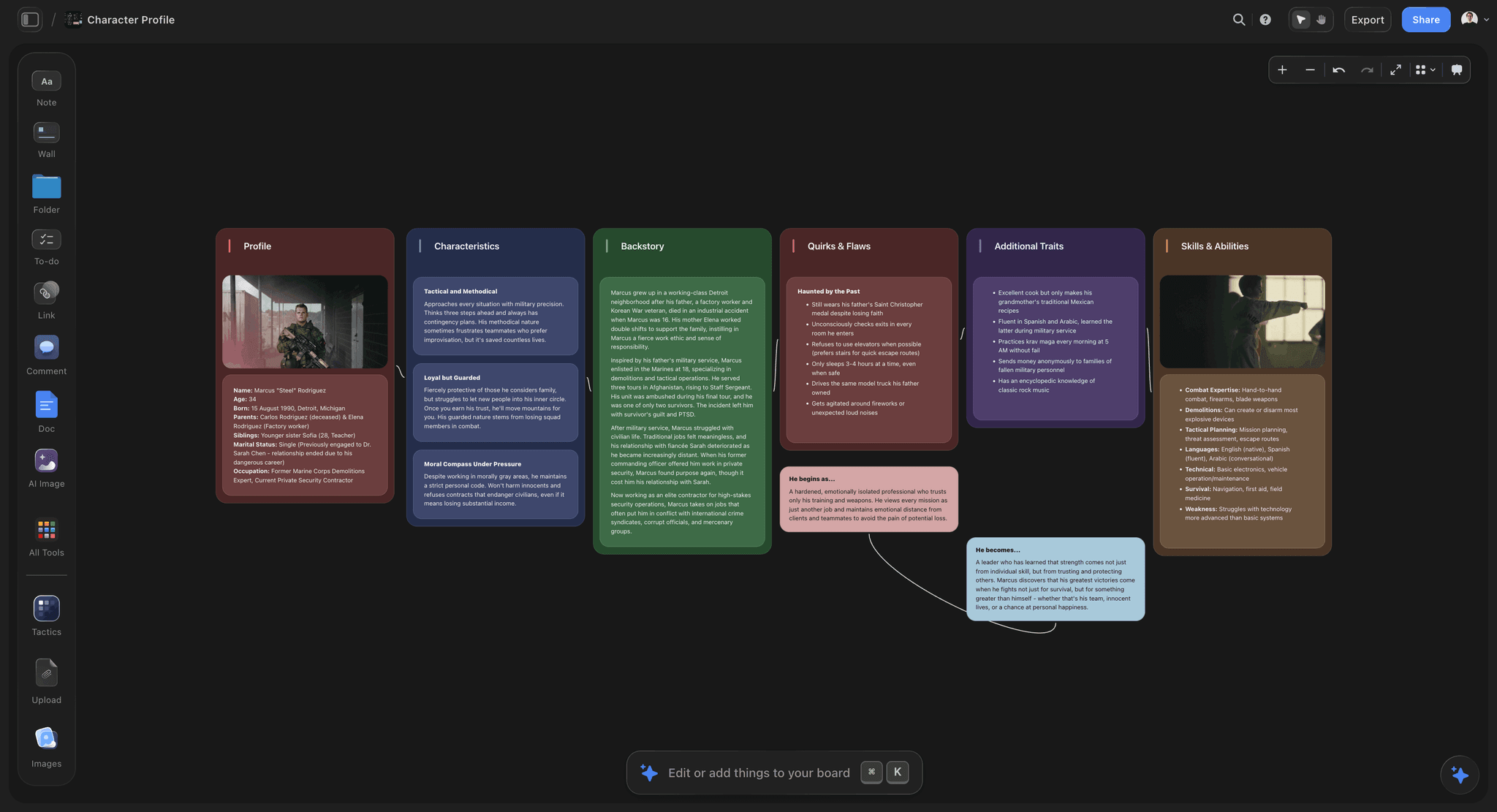
Storyflow is our own product and it ranks first for phases one and two, which is most but not all of what this list covers.
Accretion is straightforward: a visual canvas where images, notes, links, and documents share a board means a fragment can go on without being classified. That matters more than it sounds, because classification is the thing that kills early-stage story work. A note that has to be filed under a chapter is a note that has already been forced into a shape.
The turn is where it earns first place. The AI reads the whole board rather than a selected item, and the question that phase two consists of (what is this actually about, what belongs together, what is the ending) is a reading question across everything at once. Asking a board of ninety fragments what recurring concerns run through them produces a genuinely useful first answer, and more importantly produces it before you could have articulated it yourself. That is exactly the gap phase two lives in: the shape is visible before it is sayable.
The Story blueprints library (200+ creative templates on Plus, Pro, and Max, including frameworks like Hero's Journey and AIDA) matters here in a specific and limited way. Having named structures available at the moment of the turn is useful for testing a shape against a known pattern. Reaching for one during accretion is the mistake this whole article warns about.
You can @-mention up to one Tactic and up to three documents in the AI chat, so a board of fragments can be reasoned against a treatment or a story bible rather than in isolation.
Where Storyflow loses
Five limitations, and the first is absolute.
You cannot draft in it. There is no manuscript, no chapter management, no compile, no word count target, no screenplay formatting. A novel is written in Scrivener and a screenplay in Final Draft, and this is not a competitor to either. It is where the story gets found, not where it gets written.
It is the tool most likely to trap you in phase one. The canvas trap above applies to it more than to anything else on this list, precisely because accretion in it is so comfortable. If you have a history of collecting instead of finishing, this is a risk rather than a solution.
It has no timeline or chronology view. For stories with complex time structure, multiple POVs across overlapping periods, or historical accuracy requirements, Aeon Timeline and Plottr do something real that this does not.
It has no structural view at all. No beat board, no act columns, no scene-count tracking. Phase three needs a different tool, which is a recommendation the article makes rather than a gap it apologises for.
It is cloud-only and paid-only during early access, with the Free plan arriving before the end of 2026. Obsidian is free and local, and index cards cost almost nothing.
Pricing: Plus $7.99/mo annual ($9.99 monthly) for the Story blueprints library and unlimited uploads. Pro $14/mo annual ($19 monthly) adds AI image generation, roughly 20 times the AI volume, and memory across conversations. Max $39/mo annual ($49 monthly) adds roughly 40 times the AI volume plus a team workspace with roles and permissions. Over a four-year novel, note that a subscription compounds where Scrivener's one-time licence does not.
2. Scrivener
Scrivener ranks second and is, for most novelists choosing one tool, the correct purchase. It is the only thing here that credibly serves all three phases, and it is where the actual book gets written.
The corkboard is a genuine story canvas: index cards you can rearrange, with synopses, that stay bound to the underlying documents. The binder gives structure without forcing it early. Split view lets research sit beside the draft. Compile turns the whole thing into a manuscript in whatever format you need. For a long project, having research, notes, structure, and draft in one file that works offline is worth a great deal.
Its weakness at phase one is real but often overstated. The binder invites naming and nesting from the first day, which is a mild structural pressure at exactly the moment you want none. The common workaround is to keep one deliberately unstructured research folder and refuse to organise it until the turn, which works.
Its genuine weakness is at phase two. The corkboard shows one level of the hierarchy at a time, so you see a chapter's cards or an act's cards but rarely everything at once, and the turn benefits enormously from seeing everything at once.
The one-time price of around $60, with no subscription, is the best value on this list for a multi-year project.
Pricing: One-time, around $60 for macOS or Windows, with iOS sold separately.
3. Index Cards
A stack of index cards on a large table remains the best phase-two tool in existence, and it costs almost nothing.
The reason is peripheral vision and physical reordering. Forty cards spread out are all visible simultaneously at real size, and moving one is instant and reversible. The turn tends to arrive while you are physically handling the cards rather than while you are thinking about them, and no digital surface reproduces that, because a screen shows you a viewport and a table shows you everything.
Writers rooms have used this for decades for a reason, and screenwriters in particular still break structure on a wall before touching software.
Its limits are obvious: no backup, no search, one location, and no version history. Photograph the wall before you disturb it, which is the standard practice and still gets skipped.
Included seriously rather than as nostalgia. If you are stuck at the turn in any tool above or below this, the fastest unlock is usually printing the fragments and putting them on a table.
Pricing: A few pounds, plus a table.
4. Milanote
Milanote is the most pleasant digital surface here for accretion and it handles the turn well, with columns and spatial grouping that make relationships visible.
For writers who think visually, keeping character images, location references, and fragments together in an attractive board is genuinely motivating, and motivation is not a trivial factor on a multi-year project.
It has no analytical layer, so at the turn you are doing the reading yourself, and no structural tooling for phase three. The 100-item free cap arrives quickly on a novel. Drafting anything longer than a short piece in it is uncomfortable.
Choose it over Storyflow if you want the nicer board and do not need the AI reading; choose Storyflow if the turn is where you get stuck.
Pricing: Free tier capped at 100 items. Paid from around $10/month annual.
5. Plottr
Plottr is a phase three tool and an unusually good one, which is why it ranks above several more famous names for this specific job.
Timelines with multiple plot lines running in parallel, scene cards that carry structure, character and place tracking, and templates built on recognised story structures. When you have the shape and need the spine, this makes the spine visible and adjustable in a way a canvas never does. Seeing your subplot vanish for eleven chapters is the kind of thing that only shows up in a structured view.
It exports to Scrivener, which is the right relationship: structure here, draft there.
It is genuinely bad at phase one, and using it there is the exact mistake this article is about: the templates will happily give you a shape before you have earned one. It also does not want you drafting in it.
I evaluated this hands-on against these criteria rather than across a completed book.
Pricing: From around $25/year, with one-time licence options.
6. Obsidian
Obsidian is the best option here for writers whose fragments are text rather than images, and its model suits accretion unusually well.
A note per fragment, linked to other notes, with no required hierarchy, means material accumulates without being filed. The graph view is a weak substitute for a canvas at the turn, but backlinks do real work: discovering that six unrelated notes all link to one character is the shape becoming visible through connection rather than through space.
It is local markdown, so you own it permanently and it works offline, which for a project spanning years is a stronger position than any cloud tool can offer. You can draft in it perfectly well.
Against it: visual material is poorly served, there is no structural view, and the setup burden assumes some appetite for configuration. Writers who think in images should look at the canvas tools above.
Pricing: Free for personal use. Paid sync and publish add-ons.
7. Final Draft
For screenwriters, Final Draft is less a choice than a condition of doing business, because industry-standard formatting is not negotiable when a script is going to a production.
Its Beat Board and Story Map are legitimate phase two and three tools inside the same application as the draft, which removes the export problem entirely. Structuring on the beat board and then writing in the same file is a genuine advantage over a canvas plus a separate screenwriting app.
It is expensive at around $250, the interface shows its age, and for phase one it is a screenplay editor asking you to write a screenplay, which is the wrong pressure. Many screenwriters break story on cards or a canvas and move to Final Draft once the shape holds, which is exactly the phase discipline this article recommends.
Pricing: One-time, around $250, with upgrades priced separately.
8. Notion
Notion's contribution is the scene database, which is a phase three artifact and a good one.
A table of scenes with POV, location, timeline position, word count, and status, filtered and sorted, answers structural questions quickly: which POV has been absent for nine chapters, which scenes are still drafts, where the middle sags by word count. That is genuinely useful and hard to see any other way.
For accretion it is mediocre, because a database wants fields and fragments do not have them yet, and for the turn it is poor, since a table cannot show adjacency. Drafting in Notion is possible and not pleasant at length.
Use it as the structural layer beside a canvas and a real writing tool.
Pricing: Free tier. Paid from around $10/month annual.
9. Campfire
Campfire is modular by design: you buy the components you need (characters, timelines, worldbuilding, manuscript, relationships) and they interconnect.
For heavily worldbuilt fiction, particularly fantasy and science fiction where the world has to stay consistent across many books, the interlinking is genuinely strong and the character and relationship modules do work that general tools do not.
The modular pricing is a real consideration: the useful configuration costs more than the entry price suggests, and it is worth pricing your actual set before committing. It is also structure-forward, which makes it a phase three tool wearing an all-phases coat.
I evaluated this hands-on rather than across a completed project.
Pricing: Modular, priced per module with bundles.
10. Aeon Timeline
Aeon Timeline does one thing and does it better than anything else here: it shows when things happen, including when they happen relative to each other.
For stories with non-linear structure, multiple timelines, flashbacks, or historical settings where real events constrain fiction, this catches errors nothing else will. A character who is eleven in one scene and fourteen two weeks later is invisible in a canvas and obvious here.
It integrates with Scrivener, which is the sensible pairing.
It is not a story development tool and does not pretend to be. Buy it when chronology is a genuine source of error in your project, and not before.
Pricing: One-time or subscription depending on version.
11. Miro
Miro belongs here for the shared version of phase one: a writers room, a documentary team, or two collaborators breaking a story together.
Infinite canvas, strong multiplayer, and facilitation tooling (timers, voting) that suits a group working through material in a session. For a room where four people are pitching fragments at a wall, it works.
For solo story development it is heavier than needed and visually generic, and for phases two and three it offers nothing specific. Its AI clustering can help make a large board approachable, which is a partial answer to the turn.
Pricing: Free tier. Paid from around $8/member/month annual.
What to Actually Pay For
Pay once for the tool you will draft in. Scrivener at around $60 or Final Draft if you write scripts. This is the purchase that matters most over a multi-year project, and one-time licences beat subscriptions on that horizon.
Pay for the turn only if that is where you stall. If your problem is a pile of material that will not resolve into a story, a canvas with a reading layer earns its money. If your problem is finishing chapters, it will not.
Do not pay for structure tools during accretion. Plottr and Campfire are good and buying them at phase one will actively harm the work by handing you a shape you have not earned.
Do not pay for AI plot generation. Generated beats are the median of everything already written, which is the opposite of the goal at every phase.
Spend nothing first. Print your fragments and put them on a table. It is the cheapest unlock for the turn and it works more often than any purchase.
Tools to Avoid for This Phase
A structured outliner at phase one. The most consequential mistake in this article. You will file fragments into a shape you already know and write the story you already had.
A single canvas for all three phases. The canvas trap. Change tools to change modes; the friction is the feature.
A word processor as the story canvas. Reordering in a linear document is expensive enough that you stop testing arrangements, which is precisely the mechanic phase two runs on.
A tool with no export path. Story projects run for years and tools change. If your material cannot leave, you have made a bet you did not intend to make.
What No Tool on This List Does
None of them tell you the story is not working. Every tool will happily hold a beautifully organised structure for a story with no engine. Recognising that the protagonist wants nothing is a craft judgment, and the tidiness of your board is not evidence either way.
None of them force the turn. Storyflow's AI can propose what a board is about, and it is a prompt somebody has to decide to write. No tool notices you have been in accretion for eleven months, and that is the single most common failure in long-form work.
None of them replace reading widely. Structure tools encode patterns that came from books and films somebody else studied. Using the templates without knowing what they were abstracted from produces work that is correctly shaped and inert.
The Bottom Line
The plotter versus pantser argument has consumed enormous amounts of writers' attention and it is the wrong argument. Structure is not a personality type, it is a stage, and applying it at the wrong stage is what actually damages work.
Collect formlessly, because classification at the start hands you the story you already had. Find the shape somewhere you can see everything at once, because the turn arrives visually before it arrives verbally. Then build the spine in something structured, and go somewhere else to write.
Storyflow ranks first here for the first two phases, and the same review says you cannot draft in it, it has no structural view, no timeline, and it is the tool most likely to let you collect forever. Scrivener is the better single purchase for most novelists. Index cards on a table still beat everything at the turn and cost almost nothing.
Structure is not the enemy of a story. Structure applied too early is, and a canvas that never gets left is how the opposite failure happens.
FAQ: Story Canvas Tools
What is the best story canvas tool in 2026?
It depends which phase you are in. For collecting fragments and finding the shape, Storyflow, which is our own product and ranked first for those two phases. For writing the actual book, Scrivener, which is the better single purchase for most novelists. For the turn specifically, index cards on a table are still unbeaten.
What is a story canvas?
A surface where fragments of a story (scenes, images, characters, lines, ideas) can sit together and be rearranged before any structure is imposed. It exists because early story material has relationships that are spatial before they are sequential, and a linear document forces sequence too early.
What is the best free story canvas tool?
Obsidian, if your fragments are mostly text, which is free and local. Index cards cost a few pounds and are better than most software for the turn. Milanote's free tier handles a single project at 100 items. Storyflow is paid-only during early access, so it does not belong in a free comparison.
Should I outline before I write?
Not at the very start. Outline after the turn, when the fragments have shown you a shape, and before the draft, when a spine prevents the collapse that kills projects at seventy thousand words. Outlining at the accretion phase produces the story you already knew rather than the one your material was pointing at.
Scrivener or a canvas tool for novels?
Scrivener if you are choosing one tool, because you have to draft somewhere and it also does structure adequately. Add a canvas if you consistently stall at the point where fragments should become a story, which is the phase Scrivener's binder handles least well.
Is Storyflow good for writing a novel?
For finding the story, yes, and that is why we rank it first for accretion and the turn. For writing the novel, no. There is no manuscript view, no chapter management, no compile, no word count tracking and no screenplay formatting. Scrivener or Final Draft is where the draft happens, and we would rather say that than pretend otherwise.
How do you know when to stop collecting and start structuring?
When you can write the story in one sentence, even a bad one. If you cannot, you may need more material, or more likely you are avoiding the commitment the turn requires. Setting a date for the end of accretion is a crude tool that works better than waiting for readiness.
Can AI help develop a story?
Usefully at the turn, where the job is reading across a lot of material and noticing patterns, which is a genuine strength. Badly at generation, because generated plot beats are the statistical middle of everything already written. Use it to see what you have, not to decide what happens.
What is the best tool for screenwriters?
Final Draft for the draft, because industry formatting is a requirement rather than a preference. For breaking story before that, index cards or a canvas, and many working screenwriters do exactly that and move into Final Draft once the structure holds.
How do you avoid endlessly collecting and never writing?
Give accretion a deadline, force a one-sentence version of the story at the end of it, and change tools for the structural phase so the surface change enforces the mode change. Canvases have no completion pressure, so the pressure has to come from you.
Do writers rooms use digital canvases?
Increasingly, especially for remote rooms, where Miro and similar tools substitute for the wall. In-person rooms still overwhelmingly use cards on a board, because everything is visible at once and reordering is instant, and those two properties are what the room runs on.
What is the single change worth making to how I develop stories?
Stop using one tool for all three phases. Collect somewhere formless, find the shape somewhere spatial, build the spine somewhere structured, and let the change of tool mark the change of mode. Most stalled projects are a phase mismatch rather than a talent problem.
Table of Contents
- Key Takeaways
- The Structure Clock
- At a Glance: The 11 Tools Compared
- How I Ranked These
- The Canvas Trap
- Quick Picks by Situation
- 1. Storyflow
- 2. Scrivener
- 3. Index Cards
- 4. Milanote
- 5. Plottr
- 6. Obsidian
- 7. Final Draft
- 8. Notion
- 9. Campfire
- 10. Aeon Timeline
- 11. Miro
- What to Actually Pay For
- Tools to Avoid for This Phase
- What No Tool on This List Does
- The Bottom Line
- FAQ: Story Canvas Tools
- Related Reading
Templates to check out for this topic


Templates you can use in Storyflow
Every Storyflow board starts from real structure and an AI that reads the whole canvas. Open one of these templates and make it yours.


See Storyflow in Action
A visual AI workspace where every feature lives inside one canvas. No tab-switching, no context lost.
Build your entire board from a single message
Type what you need in the AI chat at the bottom of your canvas. The AI adds cards, headings, and structure directly onto your board.
Use expert frameworks as AI context
Type @ in the AI chat and choose any Tactic. The AI tailors every response to that framework instead of giving generic advice.
Turn your board into a mind map in seconds
Ask the AI to restructure your canvas as a mindmap. It connects your ideas into a visual hierarchy so you can see how everything relates.
Why Storyflow Exists
Storyflow actually began as a personal tool while working on creative and research projects.
We kept running into the same problem: ideas were scattered everywhere: notes, documents, and whiteboards.
Nothing helped us see how everything connected.
So we started building a workspace designed around how ideas actually grow.
→ Read how Storyflow was createdSara de Klein
Head of Product at Storyflow
Published: 2026-08-12
Extremely simple, seriously capable


See how easy it is to get started
Watch a real project come together, from a blank board to a finished plan, clicked through step by step.
Start creating with AI and become more productive
Transform your creative workflow with AI-powered tools. Generate ideas, create content, and boost your productivity in minutes instead of hours.