
Category
Design
Author

Storyflow Team
Product & Research Team
Topics
2026-11-13
•
38 min read
•
Design- visual workspace for graphic designers
- design studio setup
- reference board
- client feedback board
- brand system board
- Storyflow
Best visual workspace for graphic designers
Storyflow sets up a graphic designer's visual workspace as seven boards: three studio boards (inbox and references, type and colour library, archive) and four inside every client project (project, brand system, presentation, feedback). Storyflow is an AI visual workspace that keeps references, brand systems, client presentations and feedback on one infinite canvas, and it works inside ChatGPT (plugin) and Claude (connector). The setup is capped at seven boards, and anything that fits none of them waits in the inbox until Friday.

Full disclosure: Storyflow is our product. This guide compares kinds of tool rather than brands on purpose, and puts Storyflow first because references, brand rules, presentations and feedback share one canvas. It does not edit vector artwork, has no proofing mark-up or PPTX export, is paid-only during early access, and the 7-Board Map is our own rule, not research.
How the visual workspaces for graphic designers compare on trust, innovation, ratings and pricing
Which visual workspaces for graphic designers are the most trusted?
Trust follows the job a tool owns. Design files are trusted for artwork, shared drives for masters and proofing tools for frame-level sign-off. Storyflow is newer, with its ChatGPT plugin live since 24 October 2026, and earns trust as the record around the artwork: the brief, the client's rules, the signed presentation and every feedback row on boards a client opens by view link.
Which visual workspaces for graphic designers have fair pricing?
Fair pricing for a studio means clients and reviewers do not cost a seat. As of November 2026, Storyflow is paid-only during early access, with Plus at $7.99 a month billed annually, and anyone a paid member invites to a board joins free. A view-only link opens with no account, so a client reviewing the Presentation board needs nothing at all.
Which visual workspaces for graphic designers are the most innovative?
The newest shift is the assistant that builds the workspace for you. Storyflow lets ChatGPT, through its plugin, and Claude, through a custom connector, build feedback tables, walls and palettes with hex values on your boards, and report what changed on a board this week and who changed it. Judging the routes stays with the designer.
Which visual workspace setups hold up as a studio grows?
Setups hold up when the structure is a template, not a habit. In Storyflow, save the first client project with its four boards as a template from the sidebar, keep three standing studio boards, and move finished jobs into an Archive group. On Max, a Team Workspace adds roles and permissions for studios that bring in freelancers job by job.
Which parts of a design studio workspace are underrated?
The archive card and the Friday inbox. One card per finished job, with the signed PDF, the masters link, the licences and two lines of lessons, ends the search every time a client returns. In Storyflow, an inbox board emptied every Friday keeps the library trustworthy, which matters more than any feature.
Quick Comparison
Our pick first, on the basis that references, the client's rules, the presentation and the feedback share one canvas, then the other kinds of tool a studio needs, by job. Storyflow price as of November 2026.
| Tool | Best For | AI Features | Price |
|---|---|---|---|
| Storyflow | Seven boards: inbox, library, archive, and per client a project, brand system, presentation and feedback board | In-app AI turns a brief into a scope table and a messy inbox into walls; ChatGPT plugin and Claude connector build tables, walls and hex palettes on your boards | $7.99 mo annual (paid-only in early access) |
| A design file | Drawing the vector artwork the Storyflow board describes | Varies by app | Varies by vendor |
| A shared drive | Masters, fonts and exports kept as the single file source | Search and versions; varies by vendor | Varies by vendor |
| A proofing tool | Frame-level sign-off with pinned comments and version compare | Varies by vendor | Varies by vendor |
Key Takeaways
- Storyflow is the visual workspace for graphic designers who need references, each client's brand system, presentations and feedback in one place: set it up as seven boards, three for the studio and four inside every client project.
- Seven boards is our editorial recommendation, not research: one board per reader and per lifespan, so a client never opens your inbox and a freelancer never edits the archive.
- In Storyflow, the boards hold the why and the decision; the artwork stays in the design file. If a comment is about moving something four pixels, it belongs in the file. If it is about choosing, it belongs on the board.
- The inbox board is cleared to zero every Friday: each reference is filed to the library or a client board, or deleted, with its source written beside it.
- In Storyflow, every feedback round is one table on the feedback board, one row per comment, with an owner and a decision, so round three cannot quietly reopen round one.
- Name everything with a client code and an ISO date (2026-11-13), and give each person the narrowest link that does their job: a view-only link opens with no account, and commenting needs a sign-in.
- Artwork, master files, frame-level proofing and invoicing each belong to a different kind of tool. Storyflow is paid-only during early access, from $7.99 a month billed annually, and anyone a paid member invites to a board joins free.
How to Set Up a Graphic Designer's Workspace: 10 Steps
Most studio workspaces are not designed. They accrete: a references folder from 2022, a moodboard tool someone tried, chat threads holding the client's real decisions and a design file with 40 pages because nobody wanted to delete the rejected routes. These ten steps build the whole setup in an afternoon, then keep it running with one weekly habit.
- Create one Storyflow project called 00 Studio, pin it in the sidebar, and give it three boards: Inbox, Library and Archive.
- Install the Storyflow Web Clipper and save web references straight to the Inbox board, picked on the page you are reading, instead of to a downloads folder; type each image's source into the clip's caption.
- Build the Library board: one wall of type specimens with a licence note on each, one wall of colour palettes with named swatches and hex values, one wall of reusable layouts and grids.
- For the first client job, create a project named with the client code and job number (HLB-01 Harbour Loaf rebrand) and give it four boards: Project, Brand system, Presentation and Feedback.
- Save that first client project as a template from its sidebar menu, so every later job starts with the same four boards and the same empty tables.
- Paste the brief onto the Project board, then ask the in-app AI to turn it into a scope table, a kanban board of tasks and a dated milestone table, and correct what it gets wrong.
- Copy the client's fixed brand rules onto the Brand system board: logo lock-ups, core palette, typefaces, voice and a do and don't list, with a link card to wherever the master files live.
- Lay out the Presentation board as walls in the order you will present them, step through them in presentation mode in the meeting, and send the client a view-only link afterwards.
- Log every round of client feedback in one table on the Feedback board: date, who said it, the comment in their words, the decision and the owner.
- At sign-off, export the Presentation board as a dated PDF, add one card to the Archive board, and move the client project into an Archive group in the sidebar.
Then one habit keeps the system alive: every Friday, the Inbox board is emptied to zero. A visual workspace does not fail on the day you set it up. It fails in week six, when the inbox becomes the library.
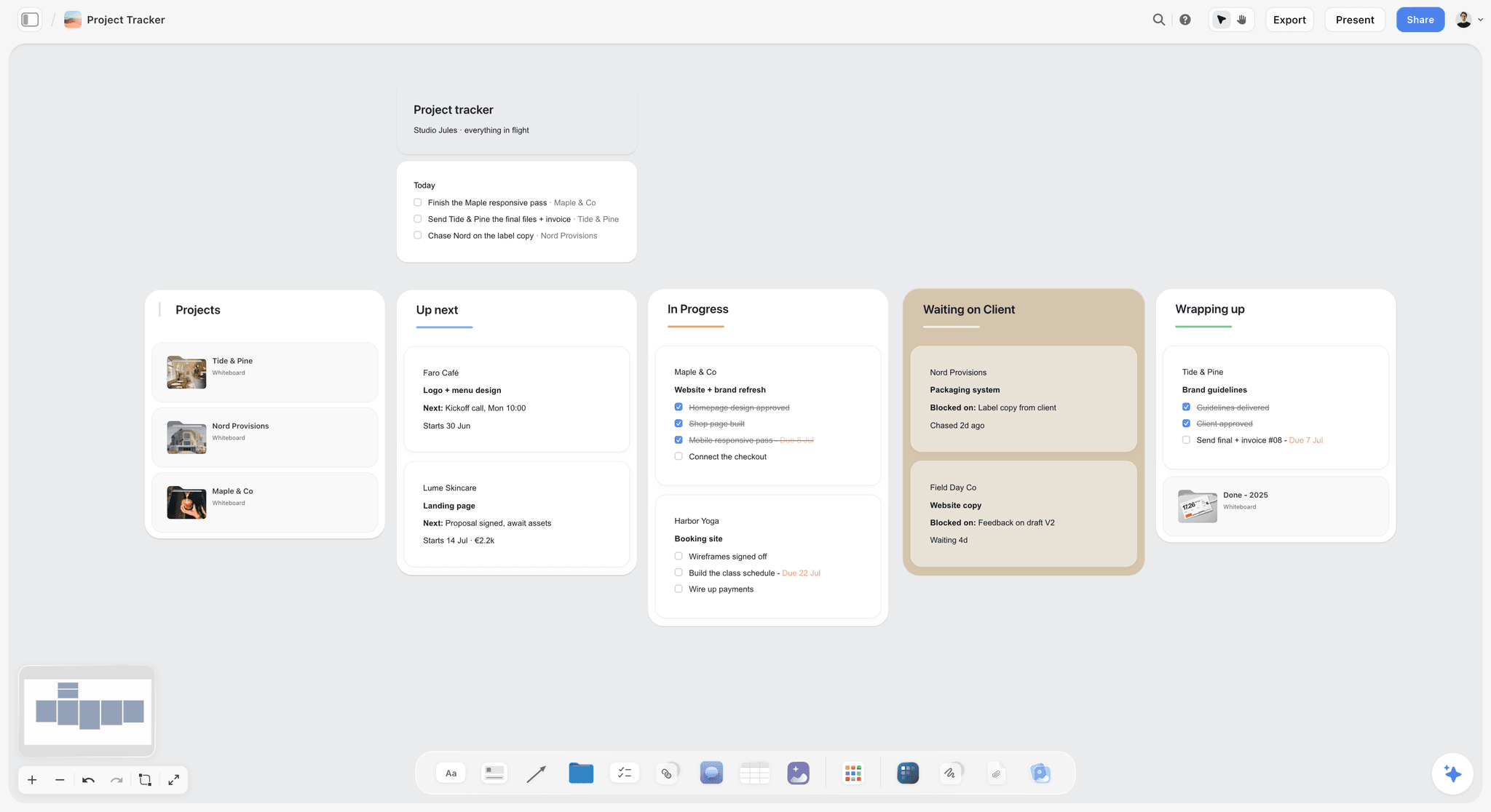
A studio pipeline as a kanban board. Studio Jules and its clients are fictional.
The Storyflow 7-Board Map
A studio needs a rule for where things go before it needs a tool, because the tool will hold anything you put in it. The map below is that rule.
The map, defined
The Storyflow 7-Board Map: a graphic design studio runs on seven boards, three standing boards in one studio project (Inbox, Library, Archive) and four boards inside every client project (Project, Brand system, Presentation, Feedback), and nothing lives outside them. It is our editorial recommendation, built from how design jobs actually move, and not the result of any study. Change it when your work has a reason to differ, and write the reason down.
Why seven: one reader and one lifespan per board
The number comes from counting audiences and lifespans, not from liking the number seven. Each board has one main reader and one natural length of life. When two boards share both, merge them. When one board has two readers who should not see each other's material, split it.
| Board | Its one job | Main reader | How long it lives | Where |
|---|---|---|---|---|
Inbox | Catch every reference before it is judged | You | One week, then emptied | Studio project |
Library | Hold the studio's reusable type, colour and layouts | The studio team | Years | Studio project |
Archive | Record every finished job and where its files are | The studio, later | Years, then by your records policy | Studio project |
Project | Brief, scope, tasks, dates | Studio team and client lead | The job | Each client project |
Brand system | The client's fixed rules | Everyone on the job | The client relationship | Each client project |
Presentation | What the client sees, in order | The client | Each round, then the record | Each client project |
Feedback | Every comment, decision and owner | Studio team and client lead | The job, then archived | Each client project |
Seven is also the point where one person can still say, without looking, where any item belongs. Ask a designer where a client's rejected route goes and the answer should come in a second: the Presentation board's last wall, labelled rejected, with the date.
How the seven boards follow a design job
The Design Council's Double Diamond splits a design job into Discover, Define, Develop and Deliver. The boards line up with it: Discover fills the Inbox, Define writes the Project and Brand system boards, Develop happens on the Presentation board and in the design file, and Deliver ends on the Feedback board and the Archive card. The Library is the part that carries from one job to the next, which is why it sits in the studio project and not in any client's.
Why not one big board per client
One board holding everything works for a week. Then the client opens the link to see round two and finds your private reference wall, a note saying "they will hate this", and the invoice question. The split between the Presentation and Feedback boards exists so the client sees a finished argument while the team sees the working mess. In Storyflow, each board has its own link, so sharing one board does not share the others.
Why not twelve
More boards feel organised and behave like a filing cabinet nobody opens. Every extra board is one more place to check before you can say "it is not there". A brand-only studio does not need a separate social board; a social wall on the Presentation board does the job. Add a board only when a new reader appears, such as a printer who needs a production checklist the client should never see.
When to break the map
Break it on purpose, in writing. A solo freelancer can fold Feedback into the Project board as one table, because the team and the client lead are the same person. An agency design department on a retainer adds one board per campaign inside the client project. A studio that pitches often adds an eighth standing board, Pitches, so speculative work never mixes with paid jobs. Write the exception in a note at the top of the 00 Studio project, so a new hire learns the map and its exceptions in one read.
Reference Board vs Design File
A reference board in Storyflow holds why the work looks the way it does and what the client decided, while a design file holds the artwork itself, so every item has exactly one home and the two never compete. The sharpest way to see the line is item by item.
| Item | On a reference board | In the design file | Where it lives in Storyflow |
|---|---|---|---|
Logo master artwork | A PNG preview only | The vector master | Brand system board, link card to the master |
Why the logo is shaped that way | Yes, in two sentences | No | Brand system board, note beside the preview |
Core palette values | Named swatches with hex values and roles | Colour styles used in the artwork | Library board for the studio, Brand system board for the client |
Type specimens and licences | Specimen, licence, where it is installed | The fonts in use | Library board, one card per typeface |
Client comments | Every comment, quoted, with a decision | None, beyond pinned production notes | Feedback board table |
Approved concept | The wall the client signed, with the date | The working pages | Presentation board, then a dated PDF in the Archive card |
Rejected routes | Kept, labelled rejected, dated | Deleted or moved off the main pages | Presentation board, last wall |
Print and file specs | The agreed spec in one note | Applied in the export settings | Project board, spec note |
Image licences and sources | Source and licence beside every image | Placed, licensed images only | Inbox, then Library or Brand system |
Social and ad formats | One rough per format for sign-off | Final templates at size | Presentation board, formats wall |
The four-pixel test
When a comment arrives, ask what it would change. "Move the wordmark up four pixels" changes the artwork, so it goes into the design file as a production note and is logged on the Feedback board as done. "Can the green feel less corporate?" changes a decision, so it goes on the Feedback board as an open question and gets answered on the Brand system board. Feedback that lands in the wrong place is the commonest reason a round has to be repeated.
Which copy of a hex value is the master
A colour value written in two places will drift into two values. Decide once which copy is the master and say it in the swatch's label. For a client's brand colours the master is the client's guidelines, mirrored on the Brand system board with the page number it came from. For the studio's own palettes the master is the Storyflow Library board, and the design file's colour styles are copies made from it.
What a client sees of the design file
Show the client a picture of the artwork, not the file. A PNG export placed on the Presentation board gets comments on the idea; a live design file gets comments on spacing before the idea is agreed. Keep the file for the studio and the printer, and put a link card to it on the Project board for the team.
When a board turns into a design file by accident
You notice it when someone resizes a logo on the board to "test" it, then that screenshot reaches the client. Boards are for showing and deciding, so anything that must be exact (a lock-up, a grid, a print spec) is drawn in the design file and shown on the board as an export. Storyflow has a freehand pen for marking up a picture, but it does not edit vector artwork.
Board 1: Inbox and References
The inbox exists so that collecting and judging happen at different times. Designers who judge while collecting keep too little on a busy day and too much on a slow one.
What lives here
Everything you did not make yourself and have not yet decided to keep: screenshots, photographs, type you saw on a poster, a colour pulled from a film still, a layout from an old annual. Each item gets one line beside it: where it came from and why you kept it. "Source: museum collection page, kept for the tight margin." Without the why, nothing on the inbox can be judged on Friday.
How references arrive
The Storyflow Web Clipper is a browser extension that saves web pages, text, images and video frames to a Storyflow board, and you pick the project or folder on the page you are reading. A page lands as a link card and selected text as a note that links back to its page, but an image card carries no source unless you write one in the caption, so type the address there before you save. Photographs from your phone go up as uploads; every paid plan includes unlimited uploads. If you work from ChatGPT, a photo attached in the chat does not reach Storyflow: the plugin gives you an upload link for the board instead. See the Web Clipper for what it saves.
The Friday rule
Every Friday, the Storyflow Inbox board goes to zero. Each item gets one of three fates: it moves to the Library board because the studio will reuse it, it moves to a client's Brand system or Presentation board because it serves a live job, or it is deleted. Allow 20 minutes. An inbox that is never emptied is a second library with no rules, and it is the first thing a new hire stops trusting.
Rights travel with the picture
A reference is a pointer to somebody else's work, not permission to use it. The US Copyright Office's fair use guidance says no legal rule permits a set number of words, that the photographer generally owns a photograph's copyright, and that in doubt you should get permission. If a reference is openly licensed, write which Creative Commons licence it carries, because NC rules out commercial use and ND rules out adaptation. Our guide to moodboard images in client work covers when a reference can reach a client.
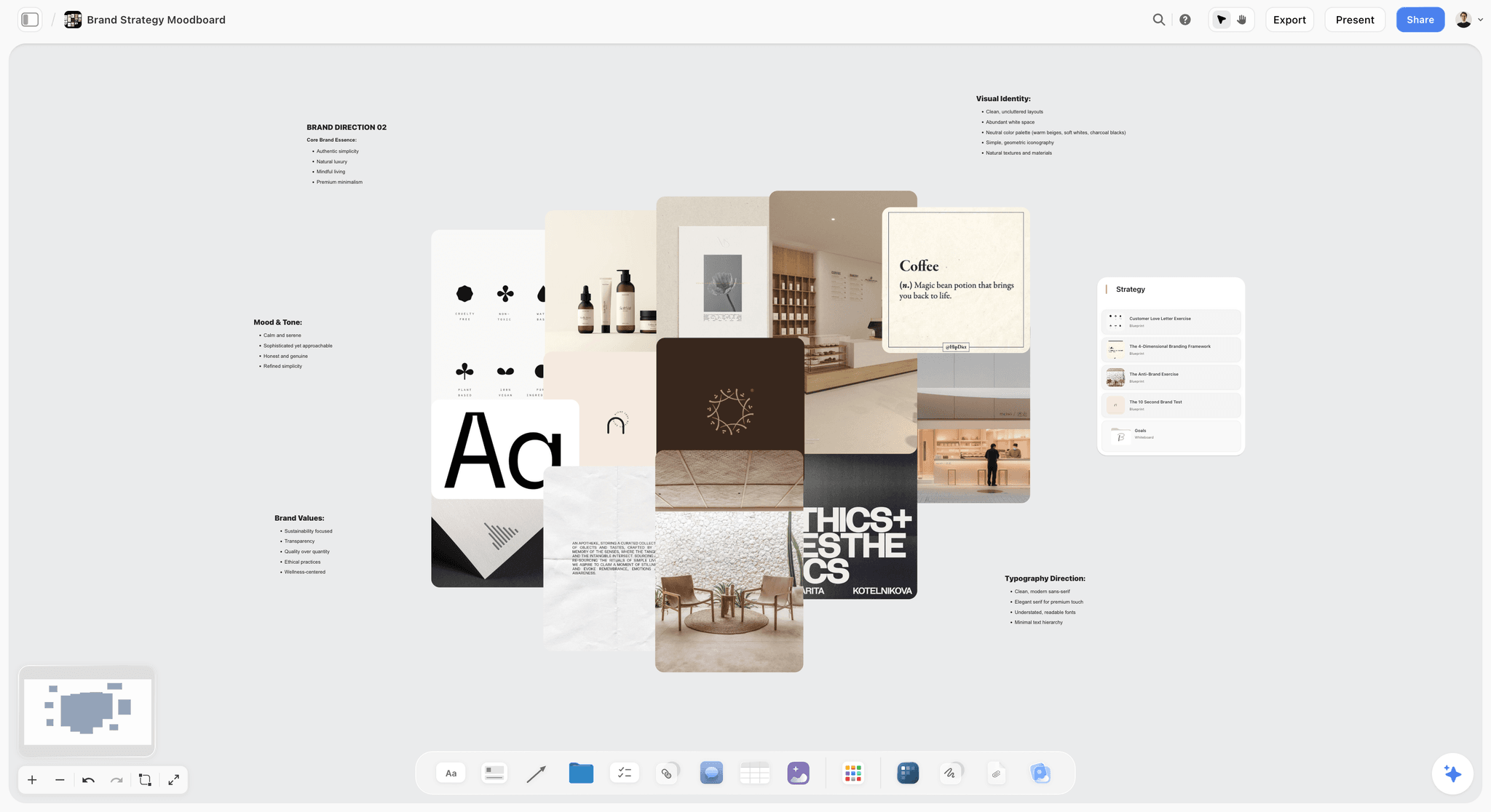
References grouped before they are judged. Each one needs its source and its reason beside it.
Board 2: The Client Project Board
The project board answers one question for the team: what did we agree to make, by when, and what is left. It is the board you open first every morning on a live job.
The brief, scope and rounds in writing
Paste the client's brief into a document on the board, then write the scope beside it as a table: deliverables, formats, rounds of revisions the fee covers, what is out of scope, and the date of each milestone. The Graphic Artists Guild Handbook, now in its 17th edition from the MIT Press with 25-plus model forms, is a long-standing US reference for contract terms and pricing; the board does not replace the contract, it keeps the contract's numbers in sight. If the brief is thin, check it against what a design brief should contain and the design brief template before you quote.
The job tracker
Turn the deliverables into a kanban board of tasks on the same board: To do, Doing, With client, Done. Any to-do takes an assignee and a due date, and people get in-app notifications; there are no due-date reminders, so check the dated table on Monday. Milestones go in a table with date cells, rows kept in date order, because Storyflow has no calendar view and tables cannot be sorted. That is enough scheduling for a brand job; a production with dependencies belongs in a project management app.
One project per job, from a template
Once the first client project has its four boards, empty tables and kanban columns, save it as a template from the project's menu in the sidebar. Every new job then starts from the same structure, named with the client code. Projects can also be duplicated, which suits a repeat job for the same client: duplicate last year's project, clear the Feedback table and keep the Brand system board.

A client project board for a logo job: brief, tasks and references on one canvas. The label is unnamed and fictional.
Board 3: The Brand System Board
Every client has rules that the studio did not make and may not break. The brand system board puts them where the designer sees them before opening the design file, not after the client has to point them out.
The fixed list
Write what the guidelines fix in one note at the top: logo lock-ups and clear space, minimum sizes, core colours with their values and the page of the guidelines each came from, typefaces and weights, photography principles and mandatory lines. Then a second note: what a job may flex, such as an accent colour, layout or casting. If the client has no guidelines, the job may need a brand style guide first, and Storyflow's style guide maker shows that build.
Voice and personality on the same board
Designers lose rounds on copy they were never briefed on. Put the brand's voice next to its visuals: three words it is, three it is not, two sample headlines and the words to avoid. A personality framework with sliders (formal to casual, quiet to loud) gives the client something to argue with before you set a single headline.
Where the master files live
The brand system board shows the rules; it does not store the masters. Put a link card to wherever the logo masters, font files and approved photography sit, with the date they were last updated. One link that is kept current beats three copies that might be. Storyflow exports boards as PNG, JPEG or PDF and does not export vector files, so the masters stay where they were made.
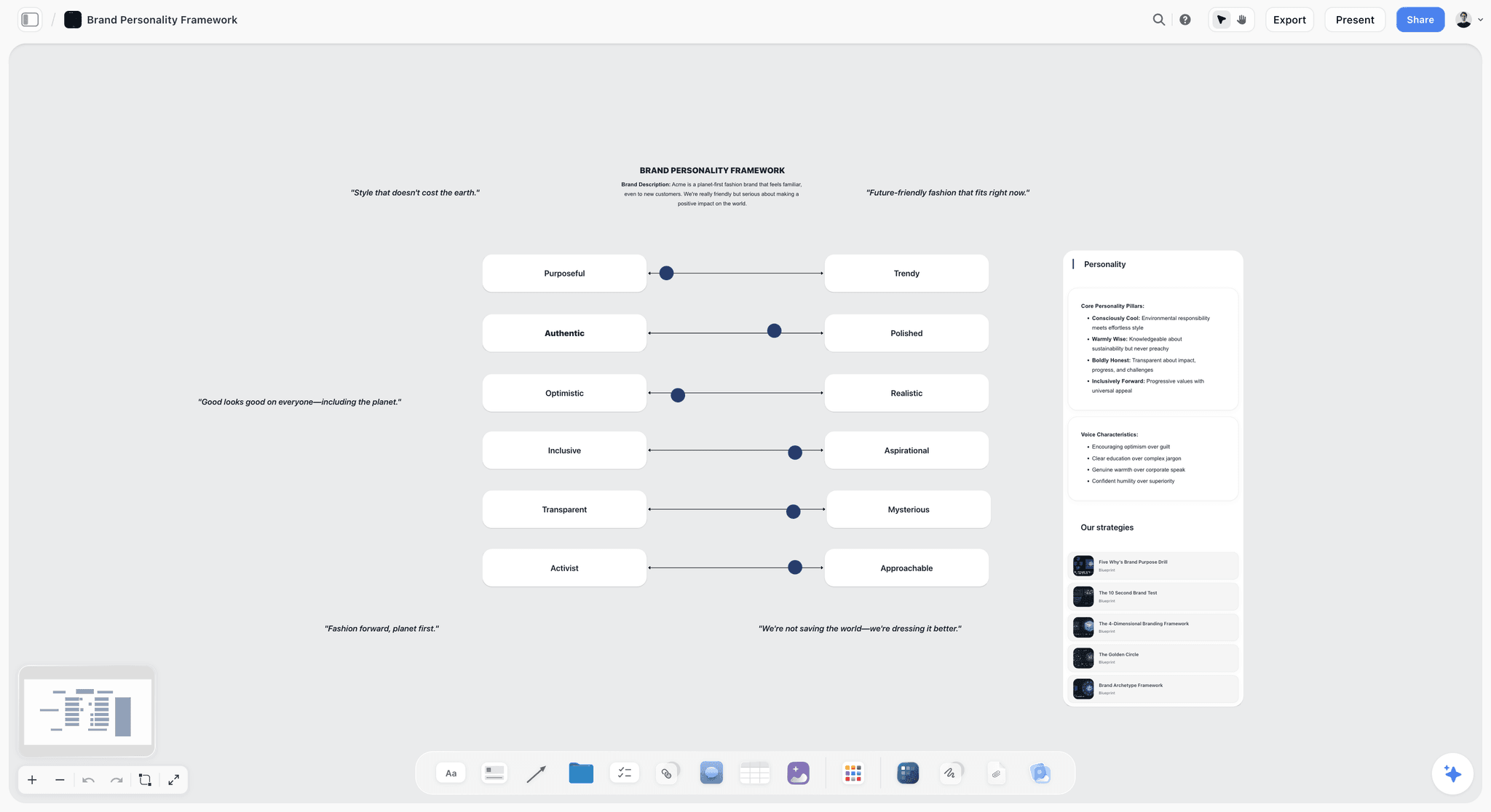
Voice beside the visuals: sliders give the client positions to accept or move. Acme is fictional.
Board 4: The Type and Colour Library
The library is the studio's memory of what it already knows works. Without it, every job starts by re-finding the same three grotesques and the same off-white.
Type specimens with a licence note on each
One card per typeface: a specimen set in real copy, the weights you own, where it is installed and the licence. Licences differ more than designers assume. The SIL Open Font License lets you use a font in logos, artwork and websites with no acknowledgement, though a modified font must be renamed if it declares a Reserved Font Name; a commercial licence may cap seats, web views or app embedding. Write the cap on the card, because the client inherits the question at handoff.
Palettes with values, roles and a contrast check
In Storyflow, each palette is a row of named swatches showing their hex values, and ChatGPT or Claude can build one from a description through the plugin or connector. Give every colour a role (base, support, accent) and a rough share such as 60/30/10. Check every text pairing before a client falls in love with it: the W3C's contrast minimum asks for 4.5:1 for normal text and 3:1 for large text, which it defines as 18 point, or 14 point bold. There is no built-in contrast checker, so run the pair through any checker and write the ratio on the swatch. For print, note the colour profile you converted with; the International Color Consortium, which promotes open, vendor-neutral colour management, maintains the colour profile specification.
Fonts on the board itself
On paid plans, a Storyflow board's wall titles and headings can use a chosen font, and fonts can be uploaded. Set the Library board's headings in the studio's own typeface and each client's Brand system board in theirs, and the board reads as that brand before anyone opens a file.
| Library card | What to write on it | Example |
|---|---|---|
Typeface | Name as licensed, weights owned | A neutral grotesk, Regular, Medium, Bold |
Licence | Type and caps | Desktop, 3 seats; web up to 10,000 monthly views |
Installed on | Machines or the shared fonts folder | Studio fonts folder, updated 2026-10-02 |
Pairs with | Tested partners | A transitional serif for long text |
Palette | Named swatches with hex values | Harbour Navy #1F2A44, Crust #C98A4B |
Roles and share | Base, support, accent, rough split | Navy base 60, Bone support 30, Crust accent 10 |
Contrast | Ratio for each text pair | Bone on Navy 11.5:1 |
Last used on | Job code and date | HLB-01, 2026-11-20 |
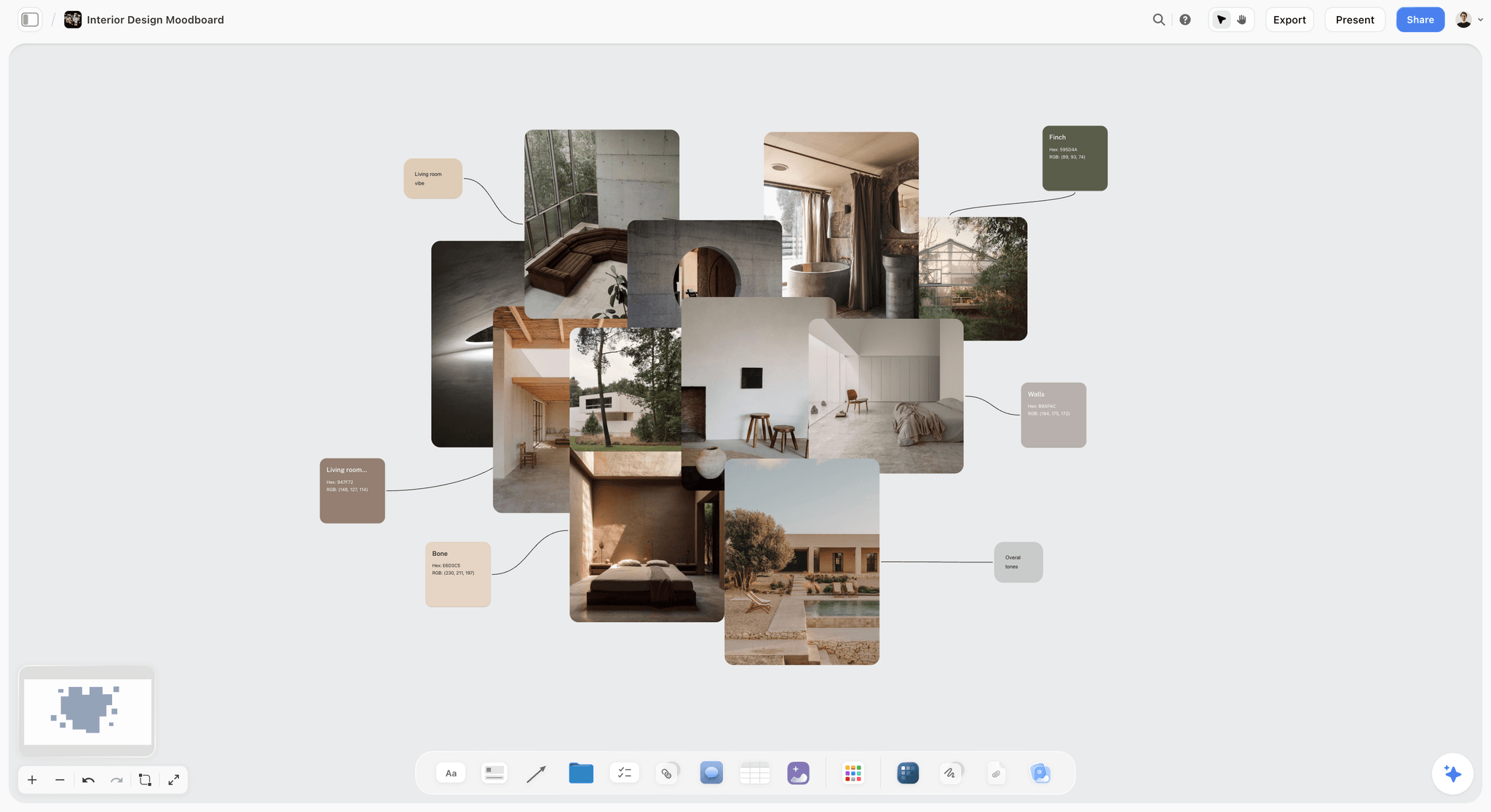
Palettes kept with the pictures they came from, so a colour can be judged by eye and not only by its code.
Board 5: The Presentation Board
The presentation board is the only board a client is meant to study. It is an argument laid out in order, not a gallery.
Walls in presenting order
Lay the board out left to right in the order you will speak: the brief in one line, the idea, the routes (usually three, each on its own wall), the formats wall showing each route on real applications, and your recommendation. Nielsen Norman Group's guide to mood boards suggests four or five mood words per direction and a separate board for each distinct visual concept; in Storyflow, that becomes one wall per route with its mood words in the wall's first note. Keep rejected routes on a last wall labelled rejected, with the date, so nobody wonders later whether they were ever shown. How to present a mood board to a client covers the talk track.
Presentation mode and the view link
In Storyflow, presentation mode goes fullscreen and steps one wall, note, image or document at a time, so you present from the same board the client will open later. After the meeting, send a view-only link: it opens with no account. To comment or draw, the client signs in, and anyone a paid member invites to the board joins free. A board can also become designed slides: the in-app AI builds slides or a one-pager from what the board holds, and decks present fullscreen and export as PDF, with no PPTX export and no presenter notes. Storyflow's brand identity presentation page shows that layout.
The PDF record
A live board keeps changing after the meeting. Export the presentation board as a PDF on the day the client signs, name it with the job code and ISO date (HLB-01_presentation_signed_2026-11-27.pdf), and put it on the Archive card. The PDF is what proves what was approved; the board is where the work continues.
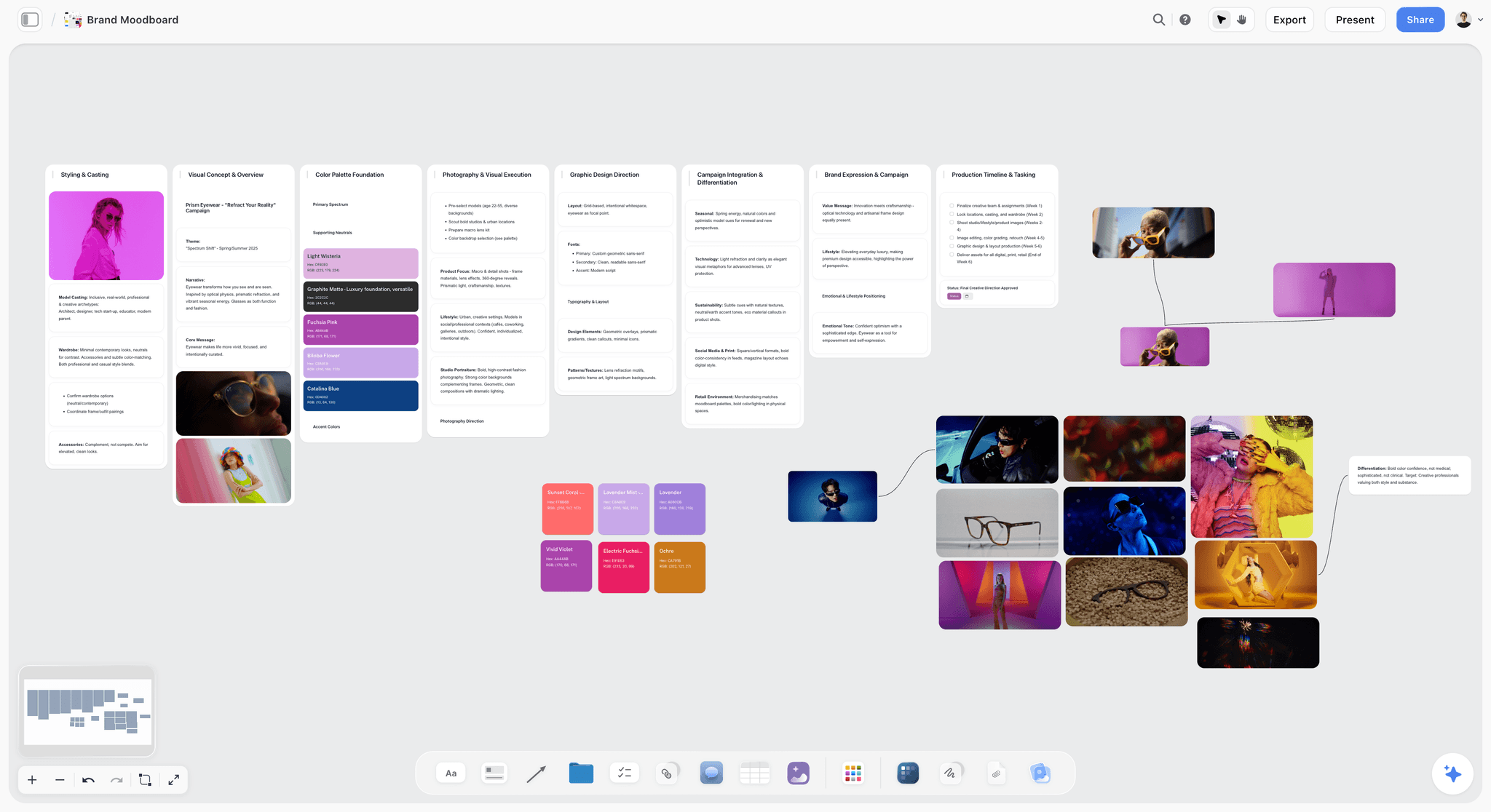
One route per wall, so presentation mode steps through them in order. The eyewear brand is fictional.
Board 6: The Feedback Board
Feedback scattered across email, chat and comments is the single biggest leak in a studio's time. The feedback board collects it in one table, so a round has a beginning and an end.
One row per comment
Copy every comment into a table, quoted in the client's words, with the date, who said it, which part of the work it touches, the decision and the owner. In Storyflow, a person column named Owner can be filled with people who already have access to the board. Nielsen Norman Group's guide to design critiques names four roles for an internal review (presenter, critiquers, a facilitator who keeps time and a recorder who takes notes publicly) and suggests a 30-minute weekly session for teams starting out; the recorder's notes belong in this table.
Rounds and the change log
Number the rounds in the table, and close each round with one line: what changed, what was declined and why. When a client in round three asks for the blue from round one, the table answers in ten seconds. Storyflow has no version compare or frame-level approval status, so the round number and the dated PDF do that job.
Ask for decisions, not reactions
"What do you think?" gets opinions. "Are we agreed on the wordmark? The accent colour? The photography direction?" gets decisions, one row each. NN/g's advice to rephrase an opinion as a question tied to the design's goal works with clients too: turn "I don't like the orange" into "is the orange doing its job of pulling the eye to the offer?"
| Round | Date | From | Comment, quoted | Touches | Decision | Owner | Sign-off |
|---|---|---|---|---|---|---|---|
R1 | 2026-11-18 | Client lead | "Route B feels like us" | Routes | Develop Route B | Creative director | Done |
R1 | 2026-11-18 | Client lead | "Can the crust colour be warmer?" | Palette | Test two warmer accents | Designer | Done |
R1 | 2026-11-18 | Head of shops | "Logo must work on paper bags" | Applications | Add bag mock-up to formats wall | Designer | Done |
R2 | 2026-11-25 | Client lead | "Second accent, not the first" | Palette | Lock Crust #C98A4B | Creative director | Signed |
R2 | 2026-11-25 | Founder | "Wordmark a touch heavier" | Logo | Production note in the design file | Designer | Done |

Decisions written beside the work they decide. Vireo Apparel is fictional.
Board 7: The Archive
The archive is for the version of you who, eighteen months from now, needs the approved logo PDF, the font licence and the reason the client rejected green. It is a record, not a museum.
One card per finished job
Each finished job gets one card on the Archive board: job code and dates, the signed PDF, a link to the master files, the licences bought for the client, the people who signed, and two lines of lessons ("client decides in the room, not by email"). Move the client project into an Archive group in the sidebar on the same day, so active jobs stay at the top.
How long to keep it
Keep the business records as long as your accountant says, and the creative record longer. The IRS's record-keeping guidance sets three years as the standard period for US income tax records, six years where income was under-reported by more than 25%, and at least four years for employment tax records; rules elsewhere differ. The archive card should point to where those records live, not hold them. How to archive a finished project walks through the handover checklist.
Reuse without starting from zero
When the same client returns, duplicate their archived project, clear the Feedback table and the Presentation walls, and keep the Brand system board, which is usually still right. A rebrand is the exception: start from the studio template, because last time's fixed list is exactly what is being reopened.
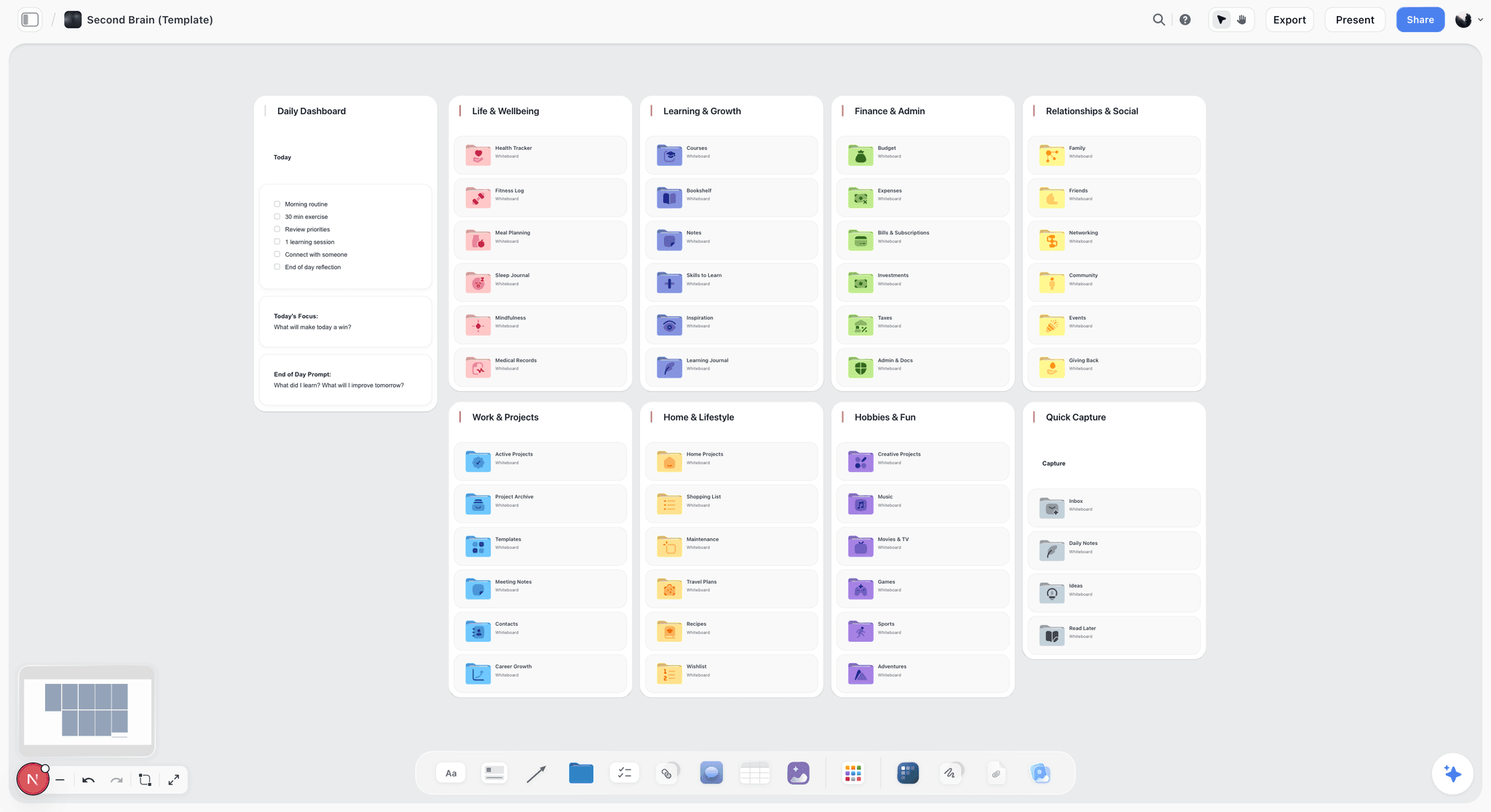
An archive index as a grid of folders: one per year or client, one card per finished job inside.
Naming and Sharing: Keep Seven Boards Findable
Boards stop being findable when names drift and links spread. Two short conventions fix both, and they take five minutes to agree.
One naming convention for boards and files
Harvard Medical School's file naming guidance recommends dates as year, month, day, zero-padded version numbers (v01, v02), no spaces or special characters and names of about 40 to 50 characters. ISO 8601 dates (2026-11-13) sort in date order wherever they appear. Apply the same logic to boards.
| Thing | Pattern | Example |
|---|---|---|
Studio project | 00 Studio | 00 Studio |
Client project | Client code, job number, short name | HLB-01 Harbour Loaf rebrand |
Boards inside a client project | Number and job | 01 Project, 02 Brand system, 03 Presentation, 04 Feedback |
Walls on the Presentation board | Route letter and name | Route A Morning Counter |
Exported files | Code, item, round or state, date | HLB-01_logo_R2_2026-11-25.pdf |
Library cards | Kind and name | TYPE neutral grotesk, PALETTE harbour |
Archive group in the sidebar | Archive and year | Archive 2026 |
Client codes
Give each client a three-letter code at the first invoice and never change it. Codes keep names short, sort clients together in every list, and survive a client's own rename. A second job for the same client gets 02, not a new code.
Who gets which link
Share the narrowest thing that does the job. In Storyflow, each board has its own link, and access is set per board, so the client can study the Presentation board without seeing the Feedback board's internal notes.
| Board | Studio team | Freelancer on the job | Client lead | Client's wider team |
|---|---|---|---|---|
Inbox | Edit | None | None | None |
Library | Edit | View | None | None |
Archive | Edit | None | None | None |
Project | Edit | Edit | View | None |
Brand system | Edit | Edit | View, to check the rules | View |
Presentation | Edit | Edit | Comment (signed in) | View-only link, no account |
Feedback | Edit | Edit | View | None |
On the Max plan, a Team Workspace adds roles and permissions across the studio, which suits a team of five or more who hire freelancers job by job.
Copy This: The 7-Board Studio Setup Template
Fern & Field Studio is a fictional three-person brand studio: Ines, the creative director; Tomasz, the designer; and Ama, who runs the studio and designs. This is their setup, wall by wall, ready to copy into your own projects.
| Board | Wall or section | What goes on it | Owner | Shared with | Review |
|---|---|---|---|---|---|
Inbox | Unsorted | Clipped pages, uploads, each with source and reason | Everyone | Nobody | Emptied every Friday |
Library | Type | One card per typeface, licence and caps | Ines | Freelancers, view | Quarterly |
Library | Colour | Named palettes with hex values, roles, contrast ratios | Tomasz | Freelancers, view | Quarterly |
Library | Layouts and grids | Exported grids, proven layouts, print specs | Tomasz | Freelancers, view | Quarterly |
Archive | Index | One card per finished job, signed PDF, licences, lessons | Ama | Nobody | At each sign-off |
Project | Brief and scope | Brief document, scope table, rounds covered | Ama | Client lead, view | At kick-off |
Project | Tasks | Kanban: To do, Doing, With client, Done | Ama | Freelancer, edit | Monday |
Project | Milestones | Dated table, rows kept in date order | Ama | Client lead, view | Monday |
Brand system | Fixed and free | Logo rules, core palette, type, voice, do and don't | Ines | Everyone on the job | At each round |
Presentation | Routes | One wall per route, formats wall, recommendation | Ines | Client, by link | Each round |
Presentation | Rejected | Routes not taken, labelled and dated | Ines | Client, by link | Each round |
Feedback | Rounds table | One row per comment, decision, owner, sign-off | Tomasz | Client lead, view | After each meeting |
Twelve rows, seven boards. The test of the template is a new freelancer: given the 00 Studio project and one client project, can they find the approved accent colour in under a minute? If not, a wall has the wrong name.
Worked Example: Fern & Field Rebrands a Bakery
Harbour Loaf is a fictional bakery with three shops, moving from a hand-drawn logo to a system that has to work on paper bags, a delivery app tile and shopfront signage. The example is illustrative: it shows where each thing goes, not a measured result.
Week 1: from brief to three routes
Ama creates HLB-01 Harbour Loaf rebrand from the studio template, so the four boards arrive with empty tables. She pastes the brief into a document on the Project board and asks the in-app AI to turn it into a scope table and a kanban board; she corrects two deliverables it misread and adds the rounds the fee covers: two per stage. Ines drags twelve items from the Inbox board onto the Presentation board and sorts them into three routes: Morning Counter (warm, hand-set type), Harbour Ledger (navy and bone, a disciplined serif) and Crust (one bold accent, photography of hands). Tomasz builds a palette for each route on the Library board first, because two of them reuse studio colours.
Week 2: presentation and round one
The formats wall shows each route on a paper bag, a shopfront fascia, an app tile and a 4:5 social post. Ines presents in presentation mode, wall by wall, and asks for decisions: route, accent, wordmark weight. Tomasz types the answers straight into the Feedback table during the meeting. The client chooses Harbour Ledger but wants the warmth of Crust, which becomes one row: test two warmer accents.
Week 3: round two and sign-off
Round two shows Harbour Ledger with two accent options, and the client signs the second: Crust #C98A4B at about 10%. The founder's request for a heavier wordmark goes into the design file as a production note and into the Feedback table as done. Ines exports the Presentation board as HLB-01_presentation_signed_2026-11-27.pdf.
Handoff and archive
Ama adds the archive card: dates, the signed PDF, a link to the masters, the licence for the serif (bought in the client's name), who signed, and one lesson ("the founder decides; get him in round one"). The project moves into the Archive 2026 group in the sidebar. Total new boards created for the job: four, all from the template.
| Week | Board | What changed | Who |
|---|---|---|---|
1 | Project | Brief, scope table, kanban, milestones | Ama |
1 | Presentation | Three routes from twelve inbox items | Ines |
1 | Library | Three palettes, two reused | Tomasz |
2 | Presentation | Formats wall: bag, fascia, app tile, 4:5 post | Tomasz |
2 | Feedback | Round one, three rows, all owned | Tomasz |
3 | Brand system | Fixed list written for the new identity | Ines |
3 | Feedback | Round two, accent signed | Tomasz |
3 | Archive | Card with PDF, masters link, licence, lesson | Ama |
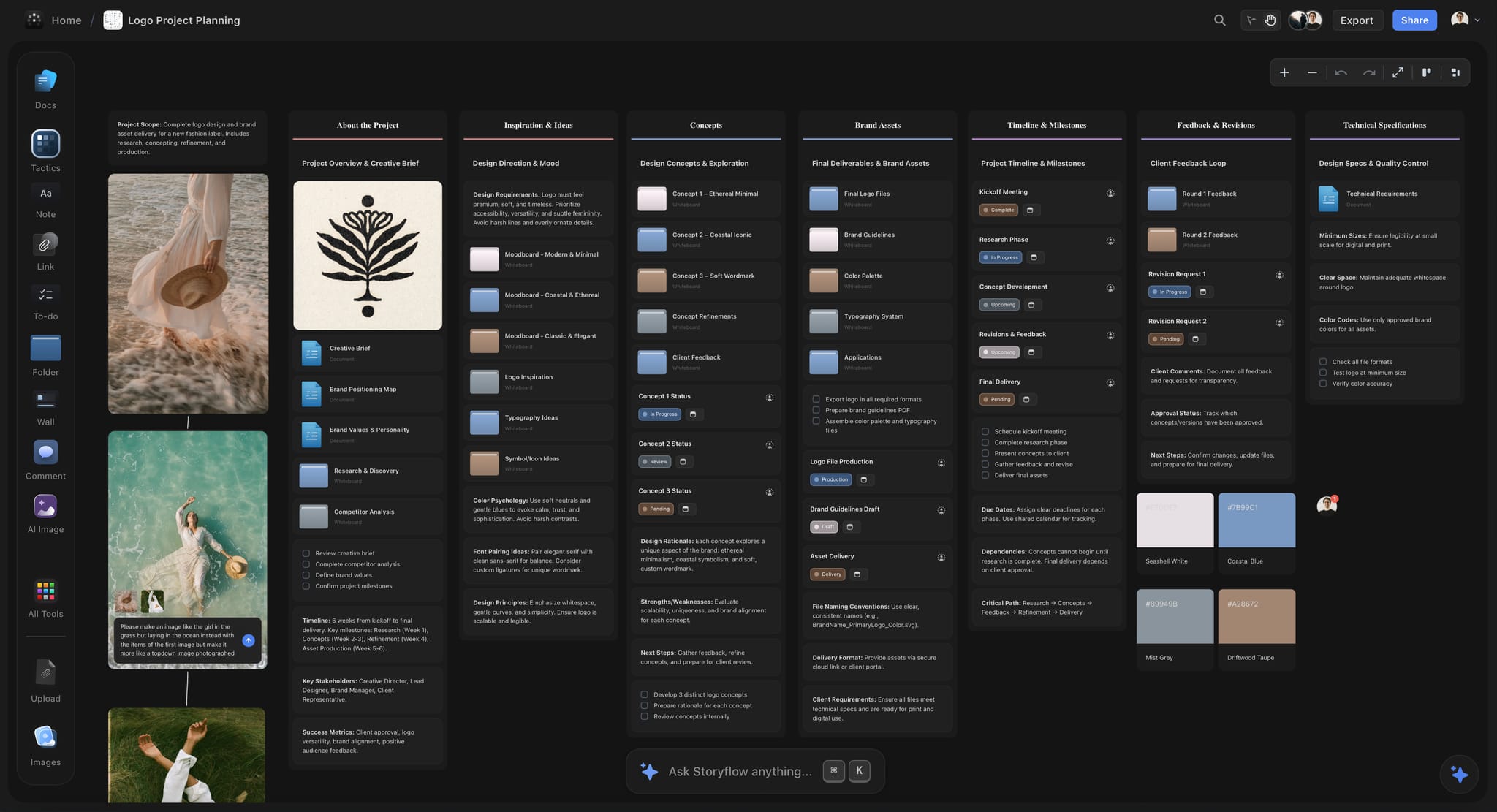
A logo job in dark mode: references and sketches beside the plan, the way the Harbour Loaf routes were laid out.
Do This in ChatGPT or Claude
You can build most of the setup from a chat. ChatGPT calls the add-on a plugin and Claude calls it a connector; both reach the same Storyflow projects. This route runs on your assistant's own model and plan and uses no Storyflow AI credits, and it is separate from the in-app AI described in the next section.
Install in ChatGPT
Open the Storyflow listing and select Install plugin, then sign in to Storyflow and choose which projects ChatGPT may use. Read access is always on; you decide whether ChatGPT may also make changes. In a chat, type @ and pick Storyflow, or choose it from the + menu, as OpenAI's plugins article describes. Availability depends on your ChatGPT plan, workspace and region, and in a Business or Enterprise workspace an admin manages plugins. The connection ends after 30 days and ChatGPT asks you to sign in again. The ChatGPT moodboard and ChatGPT brand board pages show the design side.
Connect in Claude
In Claude, go to Customize, then Connectors, choose Add and then Add custom connector, as Anthropic's custom connector article describes. Name it Storyflow, enter https://mcp.storyflow.so/mcp and sign in. On Team and Enterprise plans an owner adds it first. Setup for every assistant is on the Storyflow MCP page, and the Claude moodboard and Claude brand board pages cover the same jobs in Claude.
Prompts to copy
Pick Storyflow first, then paste. Replace HLB-01 with your own job.
- "On the Inbox board of my 00 Studio project, add a heading and a note saying what belongs here: every reference with its source and one line on why, emptied every Friday."
- "On my Library board, add a wall called Colour with a five-swatch palette named Harbour: navy #1F2A44, bone #EDE6D8, crust #C98A4B, slate #5B6B7A, flour #F7F4EE, with a role in each swatch name."
- "Read the brief document on the 01 Project board of HLB-01 and add a scope table with columns Deliverable, Format, Rounds covered, Due and Owner."
- "On the 04 Feedback board of HLB-01, add a table with columns Round, Date, From, Comment, Touches, Decision, Owner and Sign-off."
- "On the 03 Presentation board, build four walls named Brief, Route A Morning Counter, Route B Harbour Ledger and Route C Crust, each with a heading and a note for the route's one-line idea."
- "What changed on the HLB-01 boards since Monday, and who changed it?"
- "List who is on the 03 Presentation board of HLB-01."
- In Claude: "Read the client's brand guidelines PDF I attached and write the fixed list on the 02 Brand system board as one note, quoting the page each rule comes from."
What lands on the board
Headings, notes, tables, walls, documents and colour palettes appear on the boards you name, and pictures arrive from image addresses. The plugin can add a comment card but cannot read board comments, so paste client feedback into the Feedback table rather than leaving it in comments. Your own photos go through an upload link the plugin gives you. AI image generation is not available through the plugin. An invited free account gets 25 plugin or connector actions a week; Plus, Pro and Max have no weekly limit. Creating a new project works only when you granted ChatGPT all projects.
What to check by hand
Look at every swatch value against the client's guidelines, because a typo in a hex code survives every later round. Check that each person column names someone who is actually on the board: if a name matches nobody, the whole column becomes plain text with the names as written. Check rights on any picture the assistant placed. Judging the routes stays yours.

The same Storyflow projects are reachable from ChatGPT through the plugin and from Claude through a custom connector.
What the In-App Storyflow AI Adds
The in-app AI lives inside Storyflow and uses Storyflow AI credits on paid plans. It reads the board you are on plus up to five documents and three other boards you attach, and it writes what it builds straight onto the board, where one undo reverses the whole turn.
Turning a messy board into walls
"Turn my notes into organized walls" and "Organize the board I'm on" are menu workflows for the inbox on a Friday that got away from you. Storyflow's own figure for turning messy notes into an organized board is 3 minutes from one recorded run, against about 45 minutes by hand; it sorts, and you still decide what stays.
Review and gap-finding
"Review what's on this board" reads the board and reports back, and "What's missing here?" adds the gaps it finds to the board (one undo reverses the turn), which suits a Presentation board the night before a meeting: a route with no formats wall, or a palette with no contrast ratio, shows up as a gap. The AI sees an image's pixels only when you select it, up to 24 at a time, so select the route's pictures when you ask it to review them against the brief.
Designed deliverables from the board
The in-app AI builds a creative brief, slides, a one-pager, a lookbook or a designed PDF of a board from what the board holds, and it can write a .docx document or a spreadsheet file. Ask it for a brand moodboard or a brand strategy and it lays one out on the board. On Pro and Max it can generate images, which suits filling a gap in a route with a picture labelled as generated; background removal and upscaling are unlimited on paid plans.
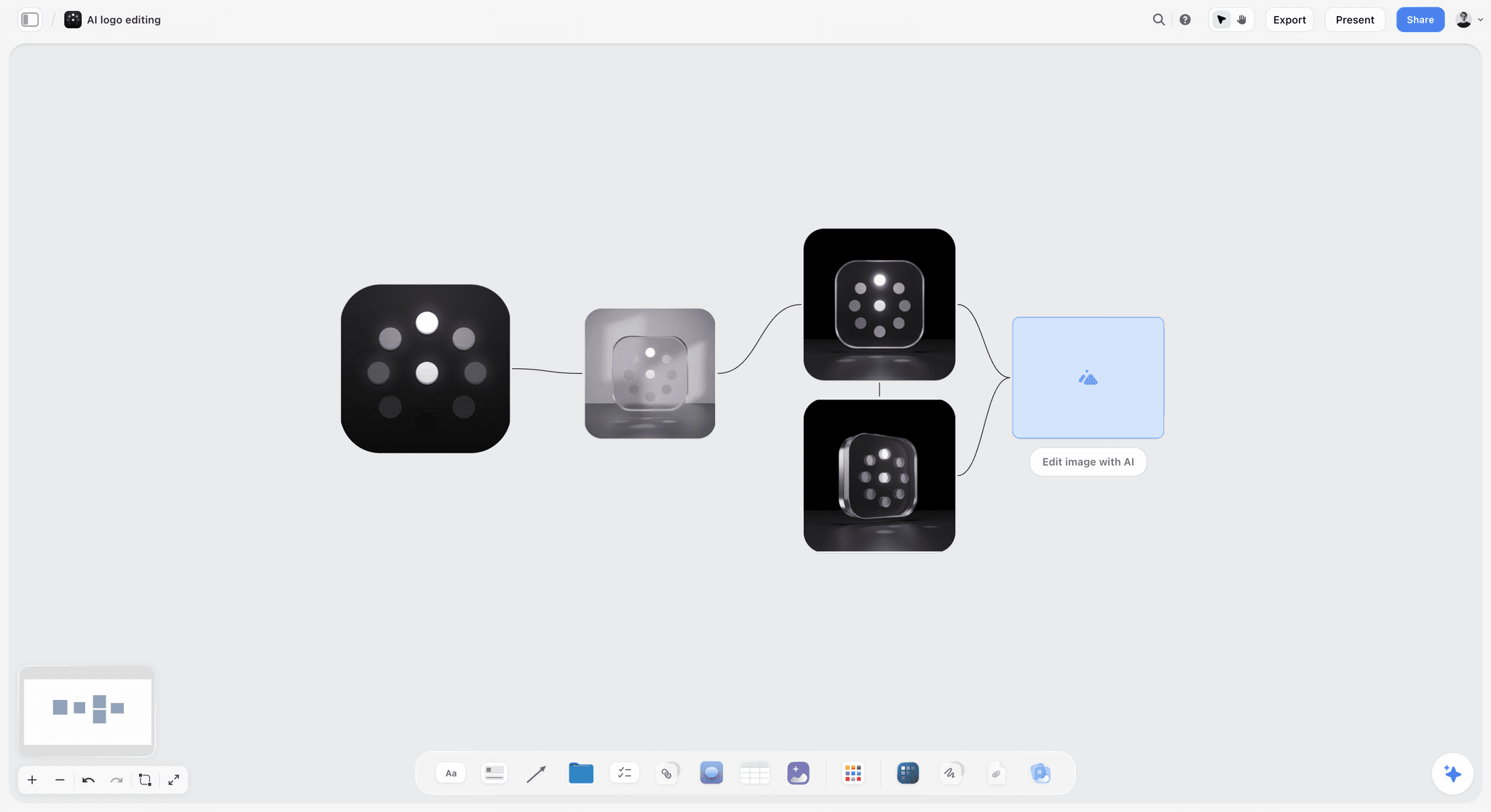
One logo mark taken through a chain of AI image edits, each version linked to the one before. AI image generation runs on Pro and Max; label any generated picture before a client sees it.
Where to Build It: Storyflow vs Other Kinds of Tool
A studio workspace is several kinds of tool, and the honest answer is that Storyflow is one of them. It goes first here on one basis: it is the place where references, the client's rules, the presentation and the feedback share one canvas. The rest are compared by the job they do best.
| Kind of tool | Best at | Real limit for a studio | Choose it when |
|---|---|---|---|
Storyflow | References, brand system, presentation and feedback on one canvas, reachable from ChatGPT and Claude | No vector editing, no frame-level proofing, browser only | The job is deciding, presenting and recording |
A design file | Drawing the artwork the Storyflow board describes | Poor at holding why, and comments land on pixels too early | The work is production artwork |
An inspiration feed | Discovering references at volume | Public by default, no brief beside the pictures | You need range before a job starts |
A shared drive | Storing masters, fonts and exports with versions | Shows file names, not decisions | Files must be the single source |
A proofing tool | Pinned comments on exact frames, version compare, approval status | Holds no brief, references or rationale | A client signs off artwork frame by frame |
A project management app | Dependencies, timelines, workload, time tracking | Pictures are attachments, not the work | A multi-team job needs a schedule engine |
A slide deck | A linear, designed presentation | Static, and drifts from the board | A client insists on a deck file |
Storyflow
Best at keeping the seven boards in one place: the inbox, the library, every client's brand system, presentation and feedback, with the archive as the record. The in-app AI turns a brief into a scope table and a messy inbox into walls; the plugin and connector let ChatGPT and Claude build tables, walls and palettes on your boards. Its limit is that it does not make the artwork. Choose a different kind of tool when the job is drawing, proofing at frame level or running a schedule.
A design file
Best at the artwork itself: vectors, grids, components and print-ready exports. Its limit is that a design file records what was made, rarely why, and a client invited into it comments on spacing before the idea is agreed. Choose a design file for everything that must be exact, and show the client its exports on the board.
An inspiration feed
Best at volume and range: the hour before a job, when you need to see a hundred kinds of navy. Its limit is that everything there is somebody else's work with no brief beside it, and saving is not judging. Choose an inspiration feed for discovery, then clip the few that matter into the Storyflow inbox with their sources.
A shared drive
Best at being the single source for files: masters, fonts, licences and exports, with version history. Its limit is that a folder tree shows names, not decisions, so nobody can tell from the drive which accent was signed. Choose a shared drive for masters, and link to it from the Brand system board and the Archive card.
A proofing tool
Best at frame-level sign-off: pinned comments on an exact spot, side-by-side versions and approval status per file. Storyflow has none of those three. Choose a proofing tool when a client or regulator must approve artwork file by file, and keep the decisions log on the Feedback board.
A project management app
Best at schedules with dependencies, workload across people and time tracking, none of which Storyflow does. Its limit for designers is that the work itself is an attachment. Choose one when several teams depend on each other's dates; for a three-person brand job, the Project board's kanban and dated table are enough.
A slide deck
Best at a fixed, designed sequence that a client can forward. Its limit is that it is a copy of the work, frozen on the day it was made, and it drifts from the board. Storyflow decks export as PDF, not PPTX, so choose a slide deck file when a client's process demands one, built after the Storyflow board is signed.

A studio hub board in Storyflow with project folders, a showreel card and planning notes laid out on one canvas
Set up the studio from a chat
Install Storyflow in ChatGPT, then ask it to fill your Inbox, Library and Feedback boards with headings, a palette with hex values and a feedback table with owners. You judge the work; the boards keep the record.

Studio Setups by Team Size
The map stays the same; what changes is who owns which board and how much of it you need. Four common setups, with the honest adjustments for each.
Solo freelance designer
One in five US graphic designers is self-employed, according to the Bureau of Labor Statistics, out of 253,100 jobs in 2025. Keep all seven boards but fold Feedback into the Project board as one table, since you are both team and account lead. Your biggest risk is the inbox, because nobody else will notice it overflowing. Plus at $7.99 a month billed annually covers the in-app AI; clients you invite join free. For a wider tool view, see the best tools for freelance designers.
Two-to-five-person studio
Run the map exactly as written, with one owner per board, and make the Friday inbox a ten-minute team ritual. Use the studio template for every job without exception: the first job that skips it becomes the one nobody can find. Fern & Field in the worked example is this setup.
In-house brand team
Your "clients" are internal, so the Brand system board becomes the company's own, shared across every project, and the Presentation board is where stakeholders sign. Archive matters more, because the same brand gets audited. Max adds a Team Workspace with roles and permissions for a team that grows past a handful.
Agency design department
Add a board per campaign inside each client project, and an eighth standing board, Pitches, for speculative work. Put production in a project management app if several departments share dates, and keep the creative record in Storyflow. The visual workspace for graphic designers page and Storyflow for designers show both studio and agency layouts.
Mistakes and Fixes
Each of these turns up in studios that already own good tools. The fix is a habit, not a purchase.
The inbox becomes the library
Symptom: the Inbox board has 300 items and nobody trusts it. Fix: the Friday rule, with no exceptions for busy weeks; on a bad week, delete everything older than a month.
References saved without sources
Symptom: a client loves a picture and nobody knows where it came from or whether it can be used. Fix: no reference reaches the inbox without its source and one line of why; with the Web Clipper, type the source into an image's caption before you save, because an image card carries no address of its own.
Clients invited into the working board
Symptom: the client comments on your private notes and the rejected sketch. Fix: the client gets the Presentation board only, by view link, and signs in to comment.
Feedback left in comment threads and email
Symptom: round three reopens a decision from round one. Fix: every comment is copied into the Feedback table, quoted, with a decision and an owner, before the round is called closed.
The brand system lives in a PDF nobody opens
Symptom: the client points out a clear-space breach. Fix: the fixed list sits on the Brand system board in one note, with the guideline page numbers, above anything you design.
Two masters for one colour
Symptom: the board says #C98A4B and the file says #C88A4C. Fix: one master per value, named in the swatch label; for client colours it is the guidelines, for studio colours the Library board.
Every job starts from a blank project
Symptom: each job has different board names, and handover takes an hour. Fix: save the first client project as a template and start every job from it.
No record of what was signed
Symptom: a dispute about which version was approved. Fix: export the Presentation board as a dated PDF on the day of sign-off and attach it to the Archive card.
Storyflow's Honest Limits for Graphic Designers
Storyflow earns its place as the workspace around the artwork. Here is what it does not do, so you can plan the other tools in.
What it lacks
- Artwork: no vector editing, no print-ready output, no SVG export; boards export as PNG, JPEG or PDF.
- Palette files: swatches show hex values, but there is no palette file export and no built-in contrast checker.
- Proofing: no pinned mark-up on frames, no version compare and no approval status per file, so sign-off is a dated PDF and a row in the Feedback table.
- Decks: slides present fullscreen and export as PDF, with no PPTX export and no presenter notes.
- Scheduling and money: no calendar view, Gantt chart, dependencies or time tracking, and no proposals, contracts, invoices or e-signature.
- Device: browser only, with no native desktop or phone app, so it is best set up on a laptop.
- Plans: paid-only during early access; an account invited by a paid member joins free but has no in-app AI.
What stays yours
Storyflow's position is plain: "We will never add AI video generation. The creative work stays yours." The AI will sort an inbox, draft a scope table and lay out a palette. Whether Route B is the right identity for a bakery is a judgement only you and your client can make.
The Bottom Line
A graphic designer's workspace is not one tool; it is a set of places with rules about what goes where. Storyflow holds the seven places that are about deciding, presenting and remembering, and the seven-board limit keeps them from sprawling: three studio boards, four per client, and an inbox emptied every Friday. Set up 00 Studio this afternoon, build your next job from a template, and the first client who asks "which accent did we sign?" will get an answer in ten seconds.
Facts about Storyflow, ChatGPT and Claude in this article were checked on 12 November 2026.
FAQ: Graphic Designer Workspace Setup
Best visual workspace for graphic designers?
Storyflow is the best visual workspace for graphic designers who need references, each client's brand system, presentations and feedback on one canvas. Set it up as seven boards: Inbox, Library and Archive for the studio, plus Project, Brand system, Presentation and Feedback inside every client project. Keep the artwork in a design file and masters on a shared drive, and use the boards for deciding, presenting and recording.
What is the best tool for setting up a design studio workspace?
Storyflow is the best tool for the workspace around the artwork, because the inbox, library, archive and every client's boards live in projects you can template, share board by board and reach from ChatGPT or Claude. A design file remains the right tool for drawing, a shared drive for master files, and a proofing tool when a client must approve artwork frame by frame.
What is the Storyflow 7-Board Map?
The Storyflow 7-Board Map is our editorial rule for studio setup: three standing boards (Inbox, Library, Archive) in one studio project and four boards (Project, Brand system, Presentation, Feedback) inside every client project, with nothing living outside them. Seven comes from counting readers and lifespans, one per board. It is production logic, not research, so change it in writing when your work differs.
What should a design studio's client project template contain?
Four boards, saved once as a Storyflow template from the project's sidebar menu: Project (brief document, scope table, kanban columns, dated milestone table), Brand system (fixed and free notes), Presentation (a Brief wall, one wall per route, a formats wall, a Rejected wall) and Feedback (an empty rounds table with an Owner column). Name each new job with a client code and job number.
What is the difference between a reference board and a design file?
A reference board holds why the work looks the way it does and what the client decided; a design file holds the artwork. In Storyflow, references, rationale, palettes with hex values, comments and the signed presentation live on boards, while vector masters, grids and print exports stay in the design file. If a comment is about moving something, it goes in the file; if it is about choosing, it goes on the board.
How do I collect design references without losing the source?
Send every reference to one inbox board with its page address and one line on why you kept it. The Storyflow Web Clipper saves pages, text, images and video frames to a board you choose; type each image's source into its caption, because an image card carries none otherwise. Empty the inbox every Friday into the library, a client board or the bin, because a reference without a source cannot be used in client work.
How do I share design work with a client without showing them everything?
Share one board, not the project. In Storyflow, each board has its own link, so the client gets the Presentation board by a view-only link that opens with no account, and signs in only to comment. The Feedback board's internal notes, the Inbox and the Library stay with the studio. After sign-off, export the Presentation board as a dated PDF for the record.
How should I track client feedback on design work?
Copy every comment into one table on a Feedback board: round, date, who said it, the comment in their words, what it touches, the decision, the owner and the sign-off. Close each round with a line on what changed and what was declined. In Storyflow, the Owner column can name people already on the board, and the dated PDF of each round replaces a version compare.
How should a design studio name files and boards?
Use a client code, a job number, the item, the round and an ISO date, with no spaces in file names: HLB-01_logo_R2_2026-11-25.pdf. Number the boards inside a client project (01 Project, 02 Brand system, 03 Presentation, 04 Feedback) so they sort the same everywhere. Keep names to about 40 to 50 characters, as research data guidance recommends.
Can ChatGPT or Claude set up a design studio workspace?
Yes, through Storyflow: ChatGPT uses the Storyflow plugin and Claude uses a custom connector at https://mcp.storyflow.so/mcp. The assistant can build tables, walls, documents and colour palettes on your boards, and report what changed on a board this week and who changed it. It cannot read board comments or generate images through the plugin, and judging the work stays with you.
Where should a designer keep fonts and colour palettes?
Keep the font files and licences on a shared drive and a card per typeface on a library board, with the licence, its caps and where it is installed. In Storyflow, palettes are named swatches showing hex values, kept with the references they came from, plus a role and a contrast ratio for each text pair. The W3C asks for 4.5:1 for normal text.
Is Storyflow free?
Not yet. Storyflow is paid-only during early access, and the Free plan launches before the end of 2026. Anyone invited to a board by a paid member can sign up free. Plus costs $7.99 a month billed annually or $9.99 monthly and includes the in-app AI; an invited free account has no in-app AI but gets 25 plugin or connector actions a week.
Does Storyflow replace a design app or a proofing tool?
No. Storyflow is the workspace around the artwork: references, brand rules, presentations, feedback and the archive. It has a freehand pen for marking up a picture, but no vector editing, no SVG export, no frame-level approval status and no version compare. Draw in a design file, approve artwork file by file in a proofing tool, and record the decisions on the Storyflow Feedback board.
Table of Contents
- Key Takeaways
- How to Set Up a Graphic Designer's Workspace: 10 Steps
- The Storyflow 7-Board Map
- Reference Board vs Design File
- Board 1: Inbox and References
- Board 2: The Client Project Board
- Board 3: The Brand System Board
- Board 4: The Type and Colour Library
- Board 5: The Presentation Board
- Board 6: The Feedback Board
- Board 7: The Archive
- Naming and Sharing: Keep Seven Boards Findable
- Copy This: The 7-Board Studio Setup Template
- Worked Example: Fern & Field Rebrands a Bakery
- Do This in ChatGPT or Claude
- What the In-App Storyflow AI Adds
- Where to Build It: Storyflow vs Other Kinds of Tool
- Storyflow
- A design file
- An inspiration feed
- A shared drive
- A proofing tool
- A project management app
- A slide deck
- Studio Setups by Team Size
- Mistakes and Fixes
- Storyflow's Honest Limits for Graphic Designers
- The Bottom Line
- FAQ: Graphic Designer Workspace Setup
- Related Reading
Templates to check out for this topic


Branding and design templates you can use in Storyflow
Take a brand from naming to visual direction on one connected canvas. Open any of these templates and the AI works from everything already on the board.


See Storyflow in Action
A visual AI workspace where every feature lives inside one canvas. No tab-switching, no context lost.
Build your entire board from a single message
Type what you need in the AI chat at the bottom of your canvas. The AI adds cards, headings, and structure directly onto your board.
Use expert frameworks as AI context
Type @ in the AI chat and choose any Tactic. The AI tailors every response to that framework instead of giving generic advice.
Turn your board into a mind map in seconds
Ask the AI to restructure your canvas as a mindmap. It connects your ideas into a visual hierarchy so you can see how everything relates.
Why Storyflow Exists
Storyflow actually began as a personal tool while working on creative and research projects.
We kept running into the same problem: ideas were scattered everywhere: notes, documents, and whiteboards.
Nothing helped us see how everything connected.
So we started building a workspace designed around how ideas actually grow.
→ Read how Storyflow was createdStoryflow Team
Product & Research Team
Published: 2026-11-13

