10 Best Mood Board Tools for Graphic Designers in 2026 (Tested and Ranked)
The 10 best mood board tools for graphic designers in 2026, tested on real design work. Storyflow, Eagle, Savee, Are.na, Milanote, Figma and more compared on AI, organization, and price.

Category
Visual Thinking
Author

Justkay
Documentary Filmmaker & Founder at Storyflow
Topics
2026-06-16
•
Updated July 3, 2026
•
16 min read
•
Visual Thinking- best mood board tools for graphic designers
- graphic design mood board app
- Eagle vs Milanote
- Savee
- Are.na
- AI mood board for designers
- Storyflow
What is the best mood board tool for graphic designers in 2026?
The best mood board tool for graphic designers in 2026 is Storyflow: its AI reads the whole board and turns a pile of references into a brief, a concept, and a rationale you can defend. Eagle is the best asset manager, Savee and Are.na the designers' inspiration networks, and Milanote the most beautiful place to arrange a board.

Full disclosure: Storyflow is our own product, and we rank it #1 for one job: turning a pile of references into a defensible direction and a brief, because its AI reads the whole board and can draft the rationale from what is actually pinned. We are honest about where it loses. Eagle is the better tool for managing thousands of tagged references, and it is a one-time license rather than a subscription. Savee and Are.na are the stronger inspiration networks for clipping. The real Storyflow limitation: it is not an asset manager, so at library scale Eagle wins, and it does not replace Figma or Illustrator for production design. We link to every tool so you can judge the fit.
Quick Comparison: Mood Board Tools for Graphic Designers
These four split into four jobs: turning references into a direction, managing a huge library, clipping inspiration, and arranging the most beautiful board.
| Tool | Best For | AI Features | Price |
|---|---|---|---|
| Storyflow | Turning references into a direction and brief | Canvas-aware AI reads the board | $7.99 mo annual (free plan late 2026) |
| Eagle | Managing thousands of tagged references | Limited | ~$29.95 one-time |
| Savee | Clipping design inspiration | Limited | Free / paid Pro |
| Milanote | The most beautiful board | Limited AI | Free / ~$12.50 mo |
Moodboard the direction before you open the design file
Storyflow keeps type, color, and reference on one canvas the AI can read, so the visual direction is set before you commit pixels in Figma or Illustrator.

1) Quick Answer: The Best Mood Board Tool for Graphic Designers
The best mood board tool for graphic designers in 2026 is Storyflow if you want the inspiration to become a direction, because its AI reads the whole board and helps you turn a pile of references into a brief, a concept, and a rationale you can defend. For pure collecting, Eagle is the best asset manager, Savee and Are.na are the designers' inspiration networks, and Milanote is the most beautiful place to arrange a board.
The short version: graphic designers are excellent at collecting and terrible at converting. The screenshots pile up in folders, Eagle libraries, and Pinterest boards, and almost none of it ever connects to the actual brief. A swipe file is not a direction. The reference hoard feels productive, but the project does not move until someone turns that pile into a point of view. The right tool is the one that closes the gap between collecting and deciding.
What is a graphic design mood board? A graphic design mood board is a curated visual collection of typography, color, layout, texture, and style references that sets the creative direction of a project before any artboard is opened. Asset managers like Eagle were built around this collecting habit, and Adobe now ships a dedicated mood board tool, a sign of how central the format is to design work.
Key takeaways:
- The best overall pick is Storyflow for turning a reference pile into a defensible direction and a brief, because its AI reads the whole canvas. For pure collecting, Eagle is the best asset manager and Savee and Are.na are the designers' inspiration networks.
- Inspiration is cheap; direction is the job. A swipe file is not a direction, and most tools stop at the swipe file.
- For the most beautiful board, Milanote wins. For boards that live next to the actual design files, Figma and FigJam are the natural home.
- Pinterest is the broadest free source, and Adobe (Photoshop with Firefly Boards) is the standard for custom, retouched board imagery.
- Storyflow is honest about its limits: it is not a vector, layout, or pixel editor. For the finished design, use Figma, Illustrator, or Photoshop.
- Storyflow's Free plan, which launches before the end of 2026, will cover unlimited boards, images, and collaboration, so the full workflow is testable before paying.
All 10 Tools, Ranked
- Storyflow: best overall for turning a reference pile into a defensible direction and a brief
- Eagle: best reference library manager for thousands of tagged assets
- Savee: best inspiration network for clipping anything beautiful
- Are.na: best for calm, connected visual research
- Milanote: the most beautiful place to arrange a board
- Adobe (Photoshop and Firefly Boards): the standard for custom, retouched board imagery
- Figma / FigJam: best boards next to the actual design files
- Pinterest: the broadest free source of references
- Canva: fastest path to a polished, presentable board
- Niice: best for sharing boards with a team and clients
For the wider category, see The Best Mood Board Tools in 2026 and the pillar guide What Is a Mood Board? A Complete Guide.
2) Comparison Table: 10 Graphic Design Mood Board Tools
Rating criteria: tested on real graphic-design workflows in 2025 and 2026, from collecting references through brief and concept. Pricing is current as of June 2026 and competitor prices change often; verify current pricing on each tool's official page before buying.
3) The Swipe File Trap: Why Designers Outgrow Their Mood Board
Every graphic designer keeps a swipe file. It is the folder of screenshots, the Eagle library, the Pinterest board, the Are.na channel, the saved Instagram posts. It grows forever, and collecting from it feels like work.
It is not. A swipe file is not a direction. A reference is raw material; a direction is a decision about what this specific project should look like and why. The trap is that collecting is easy, infinite, and dopamine-rich, while deciding is hard, finite, and uncomfortable, so designers keep collecting and the project keeps not moving.
This shows up in three places.
- The brief and the board never meet. The references live in one tool, the brief lives in a doc, and nothing connects the visual choices to the client's actual goal.
- The board has no argument. A wall of pretty references does not tell a client why these choices serve the project, so the work gets second-guessed.
- The collection outgrows the human. At two hundred references, the Eagle library is a museum, not a tool. Nobody can hold it in their head, and the AI in most tools cannot read it for you.
Inspiration is cheap. Direction is the job.
Here is the framework this article is built on. Mood board tools fall into two camps. Collectors are built for the easy, addictive half: gather, tag, arrange, and admire. Eagle, Savee, Are.na, and Pinterest are the best collectors in the world, and a designer should absolutely use one.
But a collector cannot do the hard half. It cannot read your two hundred references, notice that you keep saving the same three things, and turn that into a stated direction tied to the brief. That requires a converter: a tool that holds the references and the brief together and helps you decide. A swipe file is not a direction, and the reason most boards feel stuck is that designers own five collectors and zero converters. The right second tool is not a prettier place to hoard. It is the place where the hoard becomes a decision.
4) How We Evaluated These Tools
Every tool here was tested on real graphic-design work in 2025 and 2026: a brand identity, a packaging concept, and a set of social templates. No synthetic demos. Six criteria, weighted in this order.
- Collecting to deciding. Does the tool only gather references, or does it help turn them into a stated direction tied to the brief?
- Library management. How well does it handle hundreds or thousands of references: tagging, search, and retrieval?
- AI depth. Is there an AI that reads the board and does real work, or is every reference tagged and arranged by hand?
- Fit with the design stack. How smoothly does it sit next to Figma, Illustrator, and Photoshop, where the real work happens?
- The board experience. How good and how calm is the actual mood-boarding: clipping, arranging, color, and type?
- Price and free tier. What does it cost at real usage, and is the free plan genuinely usable on client work?
Tools were judged across a whole project, not in a quick demo. The rankings reflect whether each tool is a collector, a converter, or both.
5) Quick Picks by Job to Be Done
If you want the short list, organize by the job, not the brand.
Best for turning references into a direction: Storyflow. The AI reads the whole board and drafts the brief, the concept, and the rationale.
Best reference library manager: Eagle. The fastest way to store, tag, and find thousands of references.
Best design inspiration network: Savee for clipping anything beautiful, Are.na for calm, connected research.
Best most beautiful board: Milanote. The calmest arranging surface.
Best board next to your design files: Figma and FigJam, when the work already lives in Figma.
Best broad free source: Pinterest. The widest net for inspiration.
Best for custom board imagery: Adobe Photoshop with Firefly Boards.
Turn the swipe file into a direction
Drop the reference pile on a Storyflow canvas and ask the AI to draft the brief, the concept, and the rationale, grounded in what is actually on the board. Free plan arriving before the end of 2026.
6) Detailed Reviews: 10 Mood Board Tools for Graphic Designers
1. Storyflow
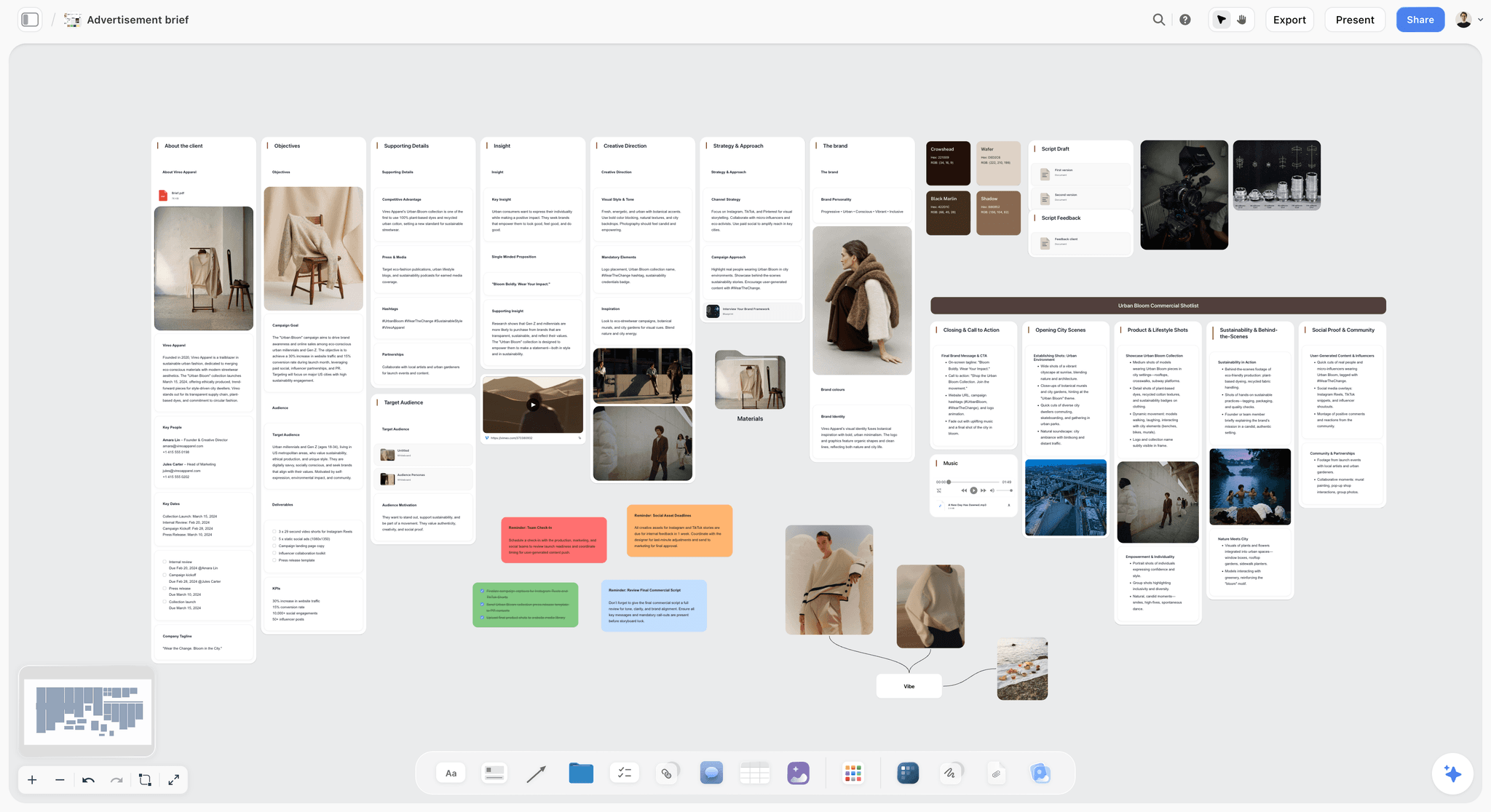
Storyflow is the tool to pick when your problem is not collecting references but deciding what to do with them. It is an AI-powered visual creative workspace: an infinite canvas of images, notes, and documents where the AI reads the whole board. For a graphic designer, that means the type and color references, the layout inspiration, the brief, and the written concept all live on one canvas, and the AI helps you move from a pile of screenshots to a direction you can defend.
The difference shows up at the point where collecting has to stop and deciding has to start. In a collector, you arrange the references and then write the direction from scratch somewhere else. In Storyflow, you drop the references on the canvas, ask the AI to read the board, and it drafts the direction: the visual logic, the typographic rationale, the concept a client will buy. A swipe file is not a direction, and Storyflow is built to turn the swipe file into one.
Best for: Brand, identity, and freelance graphic designers whose reference libraries are huge and whose briefs and boards never quite meet.
Verdict: The strongest tool for converting inspiration into a direction. It is not a vector or layout tool, so for the finished design you will still use Figma, Illustrator, or Photoshop.
Key features
- Canvas-aware AI by default. The AI reads your full active canvas board (every image, note, and card on it). You can ground it further by @-mentioning up to 1 Tactic and up to 3 Documents in the AI chat.
- Start from a design template. Open the Brand Moodboard template or the Brand Design Exploration template and the board opens with type, color, and direction structure the AI can read, instead of a blank canvas.
- Structured cards and documents. A board can hold the references, the brief, and the written concept together, not just a grid of images.
- 200+ Story Blueprints. An expert-built template library covering creative and strategic frameworks, included on the Plus tier and above.
- Unlimited shared boards and unlimited collaboration on every plan, including Free. The Max plan adds a team workspace with permissions and roles.
Pricing
Free: launching before the end of 2026; invited collaborators of paid members join free today. Unlimited notes, images, and links, unlimited shared boards, unlimited collaboration, basic AI, and 20 file uploads. The Free plan does not include the 200+ Story Blueprints library. Plus: $7.99 per month annual or $9.99 per month monthly (adds the 200+ Story Blueprints, unlimited uploads). Pro: $14 per month annual or $19 per month monthly (adds AI image generation and 20x more AI than Plus). Max: $39 per month annual or $49 per month monthly (adds 40x more AI and a team workspace with permissions and roles). Pricing current as of June 2026.
Pros
- The AI turns a reference pile into a stated direction and a brief, which is the step collectors leave entirely to you.
- One canvas holds the references, the brief, and the concept, so the inspiration finally connects to the project.
- The Free plan is genuinely usable on client work: unlimited boards, unlimited images, unlimited collaboration, forever.
Cons
- It is not a vector, layout, or pixel editor. For the finished design, use Figma, Illustrator, or Photoshop.
- It is not a dedicated asset manager. For a library of thousands of tagged references, Eagle is stronger.
- AI image generation is on the Pro tier and above, and the platform is cloud-only with no offline mode.
If your references never become a direction, take one stuck project and rebuild its board on a Storyflow canvas for a week. Start a Storyflow workspace and ask the AI to turn the pile into a brief. The difference is usually obvious within an hour.
2. Eagle
Eagle is the asset manager graphic designers reach for when the reference library gets serious. It stores images, screenshots, fonts, and clips, then makes them findable with tags, colors, and smart folders. For sheer collecting and retrieval, nothing here beats it.
Best for: Designers managing a large, growing library of visual references.
Verdict: The best reference library manager. A collector, not a converter.
Key features
- Fast import and storage of images, screenshots, GIFs, and fonts.
- Powerful tagging, color search, and smart folders.
- A browser clipper for saving from anywhere.
- A one-time purchase rather than a subscription.
Pricing
A one-time license, around $29.95, with a trial. Pricing current as of June 2026; verify on Eagle's site.
Pros
- The best storage and retrieval for a big reference library.
- A one-time price instead of a subscription.
- Genuinely fast for collecting and finding.
Cons
- It stores and organizes; it does not help you decide a direction.
- No real canvas-aware AI to read the library for you.
- Desktop-focused, so collaboration is limited.
3. Savee
Savee is the design inspiration network many graphic designers moved to after Designspiration. It is built for clipping anything beautiful from the web and arranging it into clean, shareable boards, with a strong community feed.
Best for: Designers who want a beautiful, design-focused inspiration network.
Verdict: One of the best pure inspiration collectors. Not a place to build a direction.
Key features
- A browser extension for clipping images and links.
- Clean, design-focused boards and a community feed.
- Strong discovery of design-led inspiration.
- Simple, fast, and visually quiet.
Pricing
Free, with a paid Pro tier. Pricing current as of June 2026; verify on Savee's site.
Pros
- A more design-focused feed than Pinterest.
- Clean, fast clipping and arranging.
- A genuinely useful free tier.
Cons
- It is a collector, with no brief or direction layer.
- No canvas-aware AI.
- Boards stay as inspiration; they do not become a project.
4. Are.na
Are.na is the cult-favorite of designers who think by connecting. It organizes references into channels and lets you link blocks across them, so research becomes a calm, connected map rather than an algorithmic feed.
Best for: Designers and researchers who build connected, long-running inspiration channels.
Verdict: The best tool for calm, connected research. Deliberately not a productivity or direction tool.
Key features
- Channels of blocks (images, links, text) you can connect across.
- A quiet, ad-free, algorithm-free experience.
- Strong for long-term, connected research.
- A small, thoughtful design community.
Pricing
Free tier; Premium around $7 per month. Pricing current as of June 2026; verify on the Are.na site.
Pros
- The calmest, most connected way to gather research.
- No algorithmic feed or ads.
- Beloved by designers for connected thinking.
Cons
- Deliberately minimal, with no AI and no brief layer.
- It connects references; it does not produce a direction.
- The pace is slow by design, which suits research, not deadlines.
5. Milanote
Milanote is the most beautiful general-purpose mood board tool, and many graphic designers use it for the calm of it. Notes, images, swatches, and links sit together in an elegant space that makes early concept work a pleasure.
Best for: Designers who want the most beautiful, flexible board.
Verdict: The best pick for a gorgeous, calm board. Light on the direction and library sides.
Key features
- An elegant, low-friction canvas for images, notes, and references.
- A large gallery of mood board and design templates.
- Simple sharing and light collaboration.
- A genuinely generous free tier.
Pricing
Free tier with a card limit. Paid plans are around $12.50 per month, less when billed annually. Pricing current as of June 2026; verify on Milanote's site.
Pros
- One of the most beautiful tools in this category.
- Flexible for type, color, and layout boards.
- A free tier that is genuinely useful.
Cons
- AI is light, so every card is placed by hand.
- Weaker than Eagle for managing a big library.
- It arranges beautifully but does not draft the direction.
6. Adobe (Photoshop and Firefly Boards)
Adobe is the standard when the board imagery has to be custom. Photoshop builds bespoke, retouched board visuals, and Firefly Boards adds an AI-powered moodboard surface for generating and arranging concept imagery, all inside the tools designers already own.
Best for: Designers whose boards need professionally crafted, retouched visuals.
Verdict: The best pick for custom imagery and a strong AI moodboard surface. Heavier than a simple board tool.
Key features
- Photoshop for fully custom, retouched board imagery.
- Firefly Boards for AI-generated and arranged moodboards.
- Deep integration across Creative Cloud.
- Industry-standard color and image control.
Pricing
Photoshop is around $22.99 per month as a single app, with Creative Cloud and Firefly plans varying. Pricing current as of June 2026; verify on Adobe's site.
Pros
- Unmatched control over custom imagery.
- Firefly Boards adds genuine AI to the board step.
- The tools most designers already use daily.
Cons
- Overkill if you only need to arrange references.
- Among the priciest options here.
- A steeper path than a dedicated board tool.
7. Figma / FigJam
Figma and its whiteboard FigJam are the natural home for a board when the work already lives in Figma. The mood board sits one click from the artboards, so inspiration and execution share a workspace.
Best for: Designers who do their real work in Figma.
Verdict: The best pick for keeping the board next to the design files. Generic as a pure mood board.
Key features
- A shared canvas for boards and brainstorms.
- A native link to Figma design files.
- Real-time collaboration with the team.
- AI features for generating and organizing content.
Pricing
Free tier. A FigJam seat starts around $5 per user per month. Pricing current as of June 2026; verify on Figma's site.
Pros
- The board lives next to the actual design work.
- Excellent real-time collaboration.
- Familiar to anyone already in Figma.
Cons
- Generic, not a dedicated mood board or asset manager.
- Weaker than Eagle for a large library.
- The value depends on already using Figma.
8. Pinterest
Pinterest is the widest free net for inspiration, and most boards begin there. For gathering references at scale across every style, nothing is faster or freer.
Best for: Anyone gathering broad inspiration before the real board begins.
Verdict: The best free starting point. Not a workspace or a direction tool.
Key features
- A vast library of images to collect into boards.
- Free, with effectively no limit on saving.
- A discovery engine that surfaces related styles.
- Simple board organization.
Pricing
Free. Pricing current as of June 2026.
Pros
- Unbeatable for broad inspiration at scale.
- Free and effortless.
- The discovery engine surfaces references you would not find alone.
Cons
- A public network, not a private design workspace.
- No brief, direction, or library management.
- You cannot do real client work in it.
9. Canva
Canva is the fastest way to turn a rough board into a polished, client-facing presentation. It is not a deep design tool, but its templates make a board look professional with almost no effort.
Best for: Designers who need a polished board or proposal fast.
Verdict: The best pick for client-facing polish. Not a deep design or direction tool.
Key features
- A huge template library, including mood board layouts.
- Magic Studio AI tools for generating and editing visuals.
- Easy export to PDF and presentation formats.
- Familiar and easy for a whole team.
Pricing
Free tier. Canva Pro is around $15 per month. Pricing current as of June 2026; verify on Canva's site.
Pros
- The fastest path to a polished board.
- An enormous template library.
- Almost no learning curve.
Cons
- Presentation-first, not a deep design tool.
- The early, exploratory stage is not its strength.
- No direction or library capability.
10. Niice
Niice is a mood board and presentation tool built for design teams who share work with stakeholders. It turns references into clean, presentable boards aimed at getting sign-off.
Best for: Design teams who present boards to clients and stakeholders.
Verdict: A solid team presentation board. Lighter on AI and library management.
Key features
- Clean, presentation-ready mood boards.
- Sharing and feedback aimed at sign-off.
- Templates for team workflows.
- A focus on stakeholder presentation.
Pricing
Paid team plans, with a trial. Pricing current as of June 2026; verify on the Niice site.
Pros
- Built for presenting boards to stakeholders.
- Clean, professional output.
- Good for team sign-off workflows.
Cons
- Lighter on AI than Storyflow.
- Not a reference library manager.
- More presentation layer than working canvas.
7) Which Tool Fits Which Kind of Graphic Designer?
1. Freelance Graphic Designer (Solo)
Top picks: Storyflow + Eagle
Eagle to manage the growing reference library. Storyflow to turn the references for a specific client into a stated direction and a brief, with the AI doing the converting.
2. Brand / Identity Designer
Top picks: Storyflow + Savee
Savee to collect identity inspiration in a design-focused feed. Storyflow to build the brand direction, the rationale, and the concept the client signs off on.
3. In-House Design Team
Top picks: Figma + Storyflow
Figma when the work already lives there and the board should sit beside the files. Storyflow when the team needs the AI to keep the direction coherent across a bigger project.
4. Agency Creative
Top picks: Storyflow + Milanote
Milanote for the beautiful client-facing board. Storyflow for the concept and the rationale that wins the pitch, with the references and the brief on one canvas.
5. Design Student
Top picks: Are.na + Storyflow
Are.na for calm, connected research that builds over a course. Storyflow for the part tutors push hardest: articulating the why behind the work, the direction and the rationale.
6. Motion / Multidisciplinary Designer
Top picks: Eagle + Storyflow
Eagle for a big cross-format reference library. Storyflow to turn a multidisciplinary pile of references into a single direction the whole project can follow.
8) Honorable Mentions
A few tools that came close but did not make the main ten.
- Mobbin: A superb library of real app and UI screenshots; perfect for product and UI inspiration specifically.
- Dribbble and Behance: Portfolio networks that double as inspiration sources; better for browsing than building a board.
- PureRef: A lightweight reference-board tool beloved by illustrators and 3D artists; minimal and fast.
- Notion: Fine for collecting references in a document; document-shaped rather than a true visual board.
- Raindrop.io: A clean visual bookmark manager; great for links, lighter for image boards.
These are not weak tools. Their audience or core job is simply narrower than graphic-design mood boarding.
9) Where the Dedicated Tools Still Win (An Honest Accounting)
A ranking that put an AI canvas at the top and pretended the specialist tools were beaten would not be worth reading. Here is the honest accounting of where the dedicated tools win, and where Storyflow is the wrong choice.
Eagle wins on the library. For storing, tagging, and finding thousands of references, Eagle is built for exactly that and Storyflow is not.
Savee, Are.na, and Pinterest win on collecting. For gathering inspiration in a design-focused or connected feed, the collectors are unbeatable, and every designer should use one.
Figma, Illustrator, and Photoshop win on the actual design. The finished logo, layout, or asset is made in a design tool, not on a mood board. Storyflow does not pretend otherwise.
So why does Storyflow rank first? Because the most common unsolved problem for graphic designers is not collecting or designing, both of which have excellent dedicated tools. It is the middle: turning a pile of references into a direction tied to the brief. A swipe file is not a direction, and Storyflow is the only tool here whose AI reads the whole board and helps you build the direction the collectors and the design tools both assume you already have. Pair it with a collector and a design tool and the whole workflow is covered.
11) The Bottom Line
The best mood board tool for graphic designers in 2026 depends on which part of the work you are missing. For managing a big reference library, Eagle wins. For collecting, Savee and Are.na are the designers' networks and Pinterest is the broadest free source. For the most beautiful board, Milanote; for boards next to the design files, Figma; for custom imagery, Adobe.
But the most common unsolved problem is the middle: turning a pile of references into a direction tied to the brief. A swipe file is not a direction. That is why Storyflow ranks first: its AI reads the whole board and helps you build the direction the collectors and the design tools both assume you already have, then keeps the references and the brief on one canvas.
If your references never become a direction, take one stuck project and rebuild its board on a canvas for a week. Start a Storyflow workspace, open the Brand Inspiration template, and ask the AI to turn the pile into a brief, not just a beautiful wall.
10) FAQ: Mood Board Tools for Graphic Designers in 2026
What is the best mood board tool for graphic designers in 2026?
For turning references into a stated direction and a brief, Storyflow is the best pick, because its AI reads the whole canvas. For collecting, Eagle is the best asset manager, Savee and Are.na are the designers' inspiration networks, and Milanote is the most beautiful place to arrange a board. The right choice depends on whether your gap is collecting, deciding, or designing.
Is there a free mood board tool for graphic designers?
Not during early access. Savee, Are.na, Pinterest, Figma, and Milanote all have free tiers, and Storyflow's Free plan, which launches before the end of 2026, will be the strongest for turning references into a direction: unlimited boards, unlimited images, unlimited collaboration, and basic AI. Eagle is a one-time purchase rather than a subscription. Most designers combine a free collector with Storyflow for the direction.
What do graphic designers actually use for mood boards?
Most graphic designers use a collector plus a board: Eagle or Savee or Are.na to gather references, Pinterest for broad inspiration, and Milanote or Figma to arrange a board. The newer move is to add an AI canvas like Storyflow for the direction step, where references become a stated point of view tied to the brief, which is the part collectors leave entirely to the designer.
Eagle vs Milanote: which is better for designers?
Eagle is better as a reference library: storing, tagging, and finding thousands of assets fast. Milanote is better as a board: arranging a curated set of references into something beautiful and presentable. They solve different problems, and many designers use Eagle to store everything and Milanote or Storyflow to build the board for a specific project.
What is Are.na and is it good for mood boards?
Are.na is a calm, connected research tool that organizes references into channels you can link across, with no algorithmic feed or ads. It is excellent for long-running, connected inspiration and beloved by designers who think by connecting. It is deliberately minimal, so it is a collector, not a place to build a direction or a brief, which is why designers often pair it with a converter like Storyflow.
Savee vs Pinterest for design inspiration: which is better?
Savee is more design-focused, with a cleaner feed and a community of designers, which makes the inspiration more relevant for graphic work. Pinterest is broader and bigger, which makes it the widest free net but noisier for design specifically. Many designers use Pinterest for scale and Savee for a more curated, design-led feed.
Can I make a mood board with AI?
Yes. Storyflow's AI reads your full active canvas and can draft the direction, the rationale, and the brief from the references you drop on the board. Adobe Firefly Boards and Canva's Magic Studio generate and arrange board imagery. AI helps with the direction and the visuals; it does not replace the design judgment that turns a direction into a finished asset.
How do I turn a mood board into a design direction?
Start by naming the job: what should this project look like and why. Group the references by the decision they support (type, color, layout, tone), then write one sentence of rationale per group. Storyflow does this step with you: the AI reads the board, clusters the references, and drafts the direction and the brief, so the pile becomes a point of view instead of a hoard. The direction, not the references, is what you present.
What is the best mood board tool inside Figma?
FigJam is the best board surface inside the Figma ecosystem, because it sits one click from the artboards and shares the same files and collaboration. For a bigger reference library you will still want Eagle, and for turning the board into a written direction the AI can draft, Storyflow runs in the browser alongside Figma.
How is a mood board different from an artboard?
A mood board is the inspiration and direction: references, color, type, and tone that set where a project is going. An artboard is the execution: the actual design being built in Figma, Illustrator, or Photoshop. The mood board comes first and informs the artboard. A swipe file is not a direction, and an artboard is not a mood board; they are different stages of the same project.
Can Storyflow replace Figma or Illustrator for graphic design?
No, and it does not try. Storyflow is a concept-and-direction canvas: it helps you turn references into a brief, a direction, and a rationale. It does not draw vectors, set type for production, or edit pixels. For the finished design, use Figma, Illustrator, or Photoshop. Storyflow's job is the direction those tools then execute.
How is Storyflow different from a normal mood board tool?
A normal mood board tool collects and arranges your references and stops there; you still write the direction and the brief elsewhere. Storyflow's AI reads the whole board and helps you turn the references into a direction, a brief, and a rationale on the same canvas. The trade-off is honest: it is a converter, not a collector or a design tool, so you pair it with Eagle or Savee and with Figma or Illustrator.
What is the best mood board tool for a design student?
For a student, the strongest pairing is Are.na for calm, connected research and Storyflow for the direction thinking behind the work. Tutors push students hardest on the why, the rationale behind every choice, and that is exactly what a converter helps articulate. Both have free plans, so a student can build a full direction without paying anything.
Table of Contents
- Quick Answer: The Best Mood Board Tool for Graphic Designers
- Comparison Table: 10 Graphic Design Mood Board Tools
- The Swipe File Trap: Why Designers Outgrow Their Mood Board
- How We Evaluated These Tools
- Quick Picks by Job to Be Done
- Detailed Reviews: 10 Mood Board Tools for Graphic Designers
- Which Tool Fits Which Kind of Graphic Designer?
- Honorable Mentions
- Where the Dedicated Tools Still Win (An Honest Accounting)
- FAQ: Mood Board Tools for Graphic Designers in 2026
- The Bottom Line
- Author
- Related Reading
Templates to check out for this topic


Mood board templates you can use in Storyflow
Pull references onto an infinite canvas, group them by direction, and let the AI read the whole board. Open any of these mood board templates and start dropping in images.


See Storyflow in Action
A visual AI workspace where every feature lives inside one canvas. No tab-switching, no context lost.
Build your entire board from a single message
Type what you need in the AI chat at the bottom of your canvas. The AI adds cards, headings, and structure directly onto your board.
Use expert frameworks as AI context
Type @ in the AI chat and choose any Tactic. The AI tailors every response to that framework instead of giving generic advice.
Turn your board into a mind map in seconds
Ask the AI to restructure your canvas as a mindmap. It connects your ideas into a visual hierarchy so you can see how everything relates.
Why Storyflow Exists
Storyflow actually began as a personal tool while working on creative and research projects.
We kept running into the same problem: ideas were scattered everywhere: notes, documents, and whiteboards.
Nothing helped us see how everything connected.
So we started building a workspace designed around how ideas actually grow.
→ Read how Storyflow was createdJustkay
Documentary Filmmaker & Founder at Storyflow
Published: 2026-06-16
Extremely simple, seriously capable


See how easy it is to get started
Watch a real project come together, from a blank board to a finished plan, clicked through step by step.
Start creating with AI and become more productive
Transform your creative workflow with AI-powered tools. Generate ideas, create content, and boost your productivity in minutes instead of hours.