
A workspace with taste, for people with taste
The visual workspace
built for designers.
Storyflow is where designers plan the work on one board: the moodboard, the brief, the references, and the project, side by side. Gather visual direction, plan the project, and let the AI draft the brief, all on one infinite canvas.


Creatives working for these brands already got early access
- Red Bull
- Canon
- Artlist
- Porsche
See how easy it is to get started
Watch a real project come together, from a blank board to a finished plan, clicked through step by step.
Start from a ready-made template
Pick a board to see what you can build, then let AI fill it in. Every template is a real, editable starting point on the same infinite canvas.

Design Planner
Plan a design project from brief to delivery, with references, tasks, and feedback side by side.
What designers need from a planning workspace
Designers need a planning workspace for the work that comes before the design tool: the brief, the references, the moodboard and the plan. Storyflow is an AI visual workspace that holds the thinking before the design on one infinite canvas: the moodboard, the brief, the references and the project side by side, and an AI that drafts the brief. That thinking layer is where a project is won or lost, and it is exactly the part most designers do in a scatter of tools: references in a browser, a moodboard in one app, the brief in a doc, the plan in a spreadsheet. By the time the real design starts, the direction is spread across five places.
What a designer needs is one visual place for the pre-design thinking, where the moodboard sits beside the brief beside the references, so the direction is one coherent thing the client and the team can see. Design is visual, so the planning should be visual too, not a document that fights the work.
Storyflow is that workspace. Gather references, build the moodboard, draft the brief, and plan the project on one infinite canvas, with an AI that drafts the brief and reads the whole board. Then you design in Figma or your tool of choice with a clear, agreed direction, instead of starting from a scatter of half-formed ideas.
Ultra fast from brief to board
Plan a design project in four steps.
Gather the direction, draft the brief, and plan the project, all on one board before you open the design tool.
01
Open your canvas
Start in the browser with a Storyflow account. No app to install, just one infinite board for the project.
02
Gather references and build the moodboard
Pull references onto the board and group them into a moodboard, so the visual direction is clear before you design.
03
Draft the brief with AI
Ask the AI to draft the design brief from the moodboard and your notes, so the objective and direction are agreed up front.
04
Plan the project and hand off
Lay out the project and deliverables, share view-only with the client, then design in your tool with a clear direction.
The pre-design thinking, all on one board.
Not a scatter of references, docs, and moodboard apps. One canvas where the direction and the plan live together.

Visual direction
Moodboards with references on the board
Pull references onto the canvas and group them into a moodboard, so the visual direction is one thing the client and the team can see and agree on before you design.
See the AI mood board maker →
The brief, drafted
A design brief the AI writes
Ask the AI to draft the design brief from the moodboard and your notes, so the objective, audience, and direction are agreed before the first pixel.
See the design brief →
Explore ideas
Map concepts before you design
Sketch directions and concepts as cards you can move and cluster, so you explore the space before committing hours in the design tool.
See the AI creative workspace →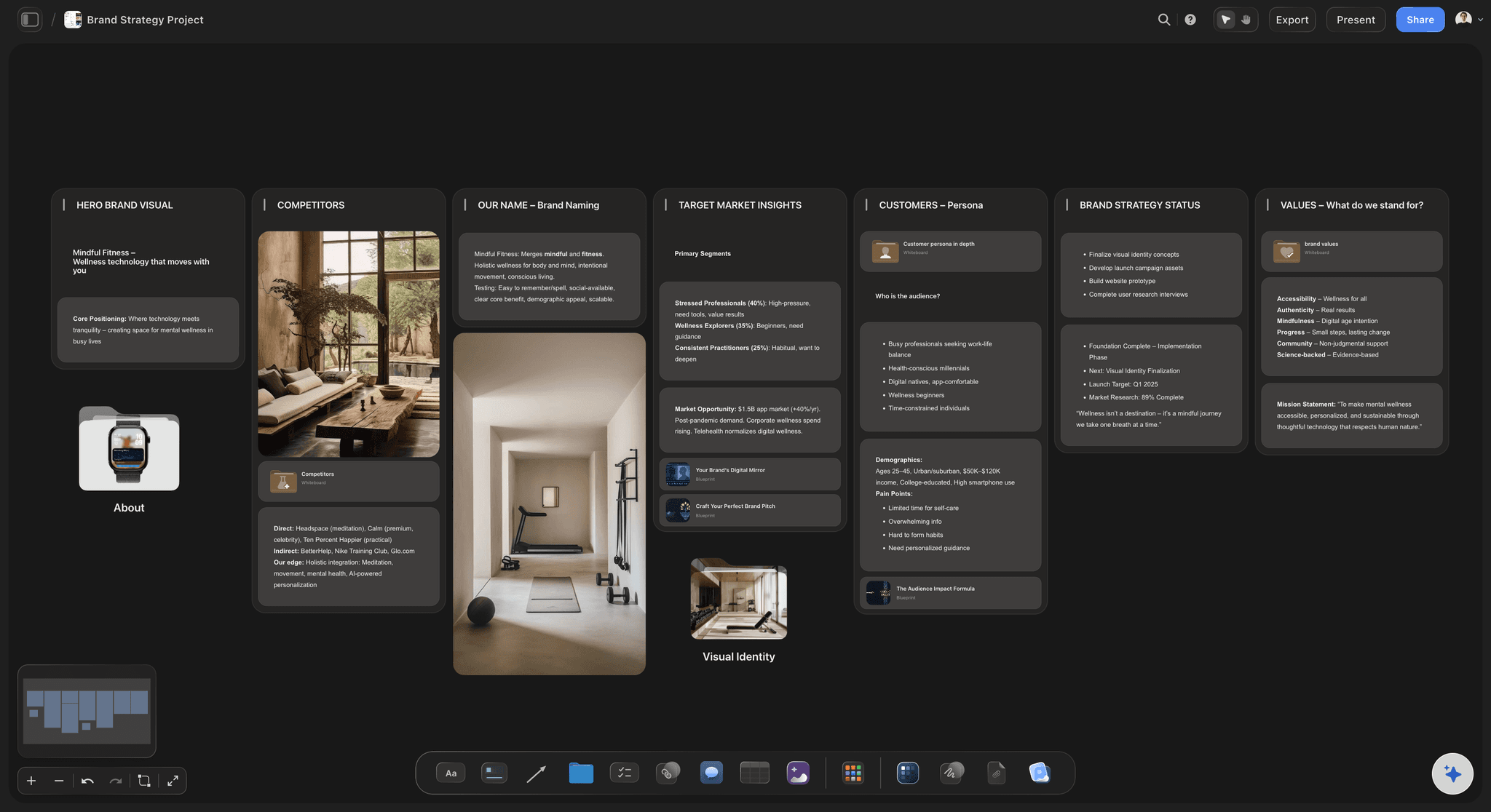
Brand direction
Develop the brand direction
Build the brand direction, its voice and visual world, beside the moodboard, so the design serves a clear strategy rather than a vague vibe.
See the brand strategy tool →Paid plans from $9.99 per month.
Open a board, gather your references, and let the AI draft the brief. Plans have no time limit.
Unlimited boards for moodboards, briefs, and projects
AI usage to draft briefs and explore direction
Attach references, images, and links to any card
Share view-only with clients, or invite collaborators free
Built for people with taste
Made for the thinking before the design.
Keep the moodboard, the brief, and the plan together, and let the AI draft the parts you would rather not.
Visual, like the work
A canvas the design thinking fits
Everything together: The references, the moodboard, the brief, and the plan live on one board, so the direction is coherent instead of scattered across apps.
References beside the plan: Pin images and references right next to the brief and the project, so the direction and the reasoning stay connected.
Infinite canvas: Zoom from the whole project down to a single reference. The board grows with the work, not a rigid template.
Plan, then design
Agree the direction before the pixels
Client-ready moodboards: Share a view-only link so the client signs off on the direction before you design, which protects the hours you are about to spend.
The brief on the board: Keep the brief beside the moodboard, so the objective and the visual direction never drift apart during the project.
Hand off with clarity: Design in Figma or your tool of choice with an agreed direction, instead of starting from a scatter of ideas.
The AI drafts the words
An AI that reads the board
Draft the brief: Ask the AI to draft the design brief from the moodboard and your notes, so the least-fun part of a project is done in seconds.
Reads the whole board: Because the AI sees the moodboard and the references, the brief it drafts reflects the actual direction, not a generic template.
Attach your context: Bring in up to five documents and three boards, brand guidelines or a spec, and the AI works against them.
Explore templates for your project
Every template opens as a real, editable board on the infinite canvas. Pick the closest fit and make it your own.
Design Planner
Plan a design project from brief to delivery, with references, tasks, and feedback side by side.
One app instead of five
How Storyflow compares for designers.
Design tools are where you design. The question is where you plan the direction and the brief before that.
Storyflow
Recommended
Moodboard, brief, and plan connected on one board
AI drafts the design brief from the board
References pinned beside the plan
Unlimited boards on every plan
Figma / FigJam
Moodboard, brief, and plan connected on one board
AI drafts the design brief from the board
References pinned beside the plan
Unlimited boards on every plan
Milanote
Moodboard, brief, and plan connected on one board
AI drafts the design brief from the board
References pinned beside the plan
Unlimited boards on every plan
Notion
Moodboard, brief, and plan connected on one board
AI drafts the design brief from the board
References pinned beside the plan
Unlimited boards on every plan
What creators are saying
Join early creators getting structured workspaces and AI that remembers their projects
“Storyflow has sped up my workflow by at least 3x, which means more flow state and more projects I can actually ship. It truly changed the way me and my team create.”

Reilin Joey
Director & YouTuber
“One prompt gets me a structured board. But the tactics are my favorite. I run my YouTube scripts through them and my intros and retention got better. It's amazing.”

Justkay
YouTuber & Freelance Filmmaker
“I used to juggle five apps to plan a project. Now I describe what I am making and get boards, lists, and a schedule. All in one place.”

George
@fernwehchronicles
Designer questions, answered.
Everything designers ask about planning in Storyflow.
For a designer, the best planning tool keeps the moodboard, the brief, the references, and the project on one visual board, before the design tool. Storyflow is an infinite canvas built for that, with an AI that drafts the brief and reads the whole board. It is not where you design (that stays in Figma); it is where you plan the direction so the design starts clear.
No, and it is not meant to be. Figma is where you design and prototype. Storyflow is the layer before that: the moodboard, the references, the brief, and the project plan, on one board. You agree the direction in Storyflow, then design it in Figma with a clear brief. Many designers use both, planning in one and designing in the other.
Yes. Pull images and references onto the infinite canvas and group them into a moodboard, with notes on why each is there. Because the moodboard sits beside the brief and the plan, the visual direction stays connected to the reasoning, and you can share a view-only link so the client signs off before you design.
Yes. Ask the AI to draft the design brief from the moodboard and your notes, and it produces the objective, audience, and direction as editable cards. Because it reads the whole board, the brief reflects the actual moodboard and references, not a generic template, so the least-enjoyable part of a project is done in seconds.
Not during early access. Storyflow is paid-only right now, with plans starting at $7.99 per month billed annually that include unlimited boards, AI to draft briefs, and view-only sharing, enough to plan design projects. A Free plan is planned before the end of 2026.
Yes. Share a view-only link so a client sees the moodboard, the brief, and the plan without changing them, and signs off on the direction before you design. Getting agreement up front protects the hours you are about to spend, and because the board is the source of truth, what the client sees is always current.
Any design work that benefits from planning the direction first: brand and graphic design, product and UX design, web design, packaging, campaigns, and more. The pattern, gather references, build the moodboard, agree the brief, plan the project, is the same across them, and you hand off to your design tool with a clear direction.
More from Storyflow
Creative client onboarding
Design handoff board
Style guide maker
AI mood board maker
Design brief
For UX designers
For web designers
Brand strategy tool
AI creative workspace
Design planning tool
Visual workspace for graphic designers
For creative directors
Art direction board
Design proposal template
Brand identity presentation
Solo studio project planning
Plan the direction before you design. Put it on one board.
Open a canvas, build the moodboard, and let the AI draft the brief, then design with a clear direction.