The 10 Best AI Tools for UGC Creators in 2026
The best AI tools for UGC creators in 2026, mapped to the studio pipeline. 10 tools compared for hooks, scripts, editing, and brand deals, with the AI canvas for the planning and pitching half most stacks miss.

Category
Content Creation
Author

Sara de Klein
Head of Product at Storyflow
Topics
2026-07-16
•
15 min read
•
Content Creation- best AI tools for UGC creators 2026
- UGC creator tools
- AI for UGC scripts
- UGC content creation tools
- free UGC tools
- tools UGC creators use
What are the best AI tools for UGC creators in 2026?
The best AI tool for UGC creators in 2026 depends on the pipeline stage you are trying to systematize. For the planning and pitching stage (hooks, scripts, and the brand pitch that wins the gig), Storyflow is the strongest pick, because its AI reads a whole board of the brand's brief and references and generates hook and script angles against it. For editing, CapCut and Descript cover the two dominant styles, and for tracking brand deals, Notion or Trello run the business layer. The short version: no single tool runs a UGC studio. A working stack is four or five tools across planning, production, and business, one per stage. The mistake that keeps creators stuck is buying another editor when the bottleneck is upstream: the hook nobody scripted and the pitch nobody sent. UGC is not influence. It is production. The creators who scale run a studio pipeline, not a better editing app. Build for the pipeline and put AI where it is tightest, which for most creators is the hook and the volume.

Full disclosure: Storyflow is our own product, and we rank it first for the planning and pitching half of UGC: the hooks, scripts, and brand pitch its AI generates against a board of the brand's brief. It is not a video editor. For editing you still use CapCut or Descript, and for deal tracking Notion or Trello. We link to every tool so you can judge the fit.
Quick Comparison
These four cover the UGC pipeline: the AI canvas for planning and pitching, the two dominant editors, and a fast first-draft writer.
| Tool | Best For | AI Features | Price |
|---|---|---|---|
| Storyflow | Hooks, scripts, pitches | Canvas AI reads the brief | $7.99 mo annual (free plan late 2026) |
| CapCut | Short-form editing | Templates + AI | ~$7.99 mo |
| ChatGPT | Hooks and scripts | Strong generation | ~$20 mo |
| Descript | Talking-head editing | AI transcript editing | ~$16 mo |
All 10 UGC Tools, Ranked
- Storyflow: best overall for hooks, scripts, and the brand pitch
- CapCut: best for fast, template-driven short-form editing
- ChatGPT: best for fast first-draft hook and script generation
- Descript: best for talking-head and voiceover editing
- Canva: best for media kits and pitch collateral
- Notion: best for tracking brand deals and deliverables
- Riverside: best for high-quality remote recording
- Later: best for scheduling your own channels
- Trello: best for a simple visual deal pipeline
- Billo: best for finding paid brand briefs early
For the wider creator toolkit, see The 12 Best AI Tools for Visual Content Creators in 2026 and The Best Content Marketing Tools in 2026.
Comparison Table: 10 UGC Tools Compared
| Tool | Pipeline Stage | AI Leverage | Real-Time Collab | Free Tier | Starting Paid Price |
|---|---|---|---|---|---|
Storyflow | Hooks, scripts, pitches | High, canvas-aware | Yes, all plans | Coming late 2026 (invited collaborators join free now) | $7.99/mo (annual) |
CapCut | Editing | Medium | No | Yes | ~$7.99/mo |
ChatGPT | Hooks and scripts | High | No | Yes | ~$20/mo |
Descript | Talking-head editing | High | Yes | Limited | ~$16/mo |
Canva | Media kits and collateral | Medium | Yes | Yes | ~$15/mo |
Notion | Deal tracking | Medium | Yes | Yes | ~$10/user/mo |
Riverside | High-quality recording | Medium | Yes (record) | Limited | ~$15/mo |
Later | Self-channel scheduling | Low | Yes | Yes (1 profile) | ~$29/mo |
Trello | Deal pipeline | Low | Yes | Yes (10 collaborators) | ~$5/user/mo |
Billo | Finding brand work | Low | No | Platform-based | Varies by project |
Storyflow pricing checked July 2026. Competitor pricing is current at time of writing; verify current pricing on each tool's official page before buying, since public tiers change often.
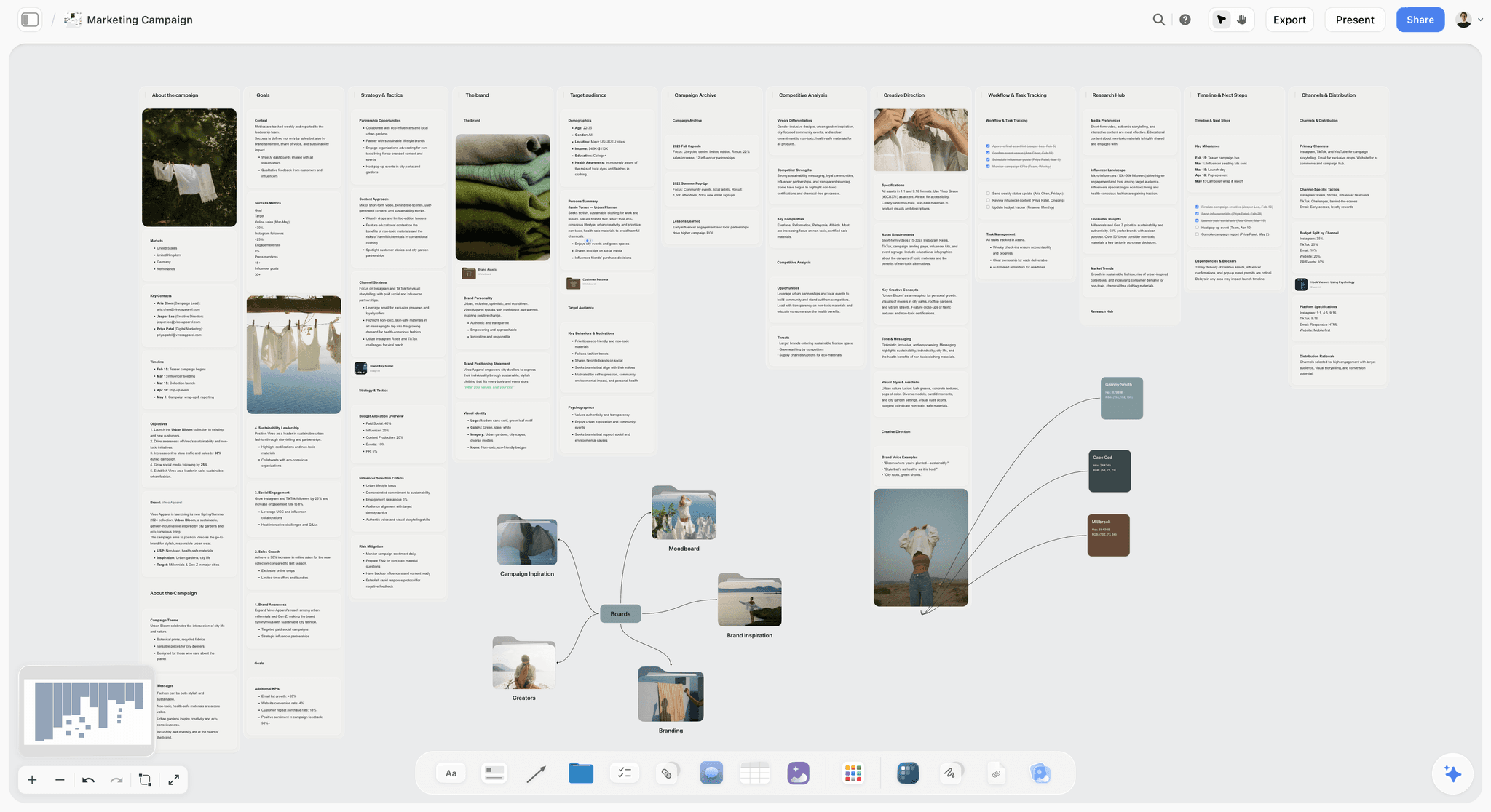
Storyflow canvas holding a UGC creator's hooks, scripts, and brand pitch, read by AI
Plan the hooks, scripts, and pitches on one canvas
Storyflow's AI reads a whole board of the brand brief and references and generates hook and script angles against it, the upstream half most UGC stacks miss. Pair it with your editor for the production side. Free to start.

UGC Is Production, Not Influence
User-generated content is often confused with influencing, and the two are different businesses. An influencer sells access to an audience. A UGC creator sells content itself: authentic-feeling videos a brand runs on its own channels and ads. You do not need a big following. You need to reliably produce good content and win repeat clients.
That distinction sets up the whole tool list. UGC is not influence. It is production. The creators who scale treat it like a content studio, not a hobby. A studio has a pipeline: come up with a hook, script it, film it, edit it, deliver it, and land the next brief. The creators who plateau are usually great at one step, often editing, and improvising the rest. The creators who scale systematize the whole pipeline, which is where the right tools, and AI, earn their place.
The AI angle is specific for UGC. The two hardest parts are the hook (the first two seconds that decide whether the video works) and the volume (producing enough to have a business). AI helps most with those two: generating and testing hook and script angles, and speeding the repeatable production steps so you can ship more without burning out.
The Creator Studio
Here is the framework this article is built on. Picture a small content studio rather than a single app. A studio is not one machine. It is a line of stations, and a brief moves down the line: an idea desk where hooks and scripts get worked out, an edit bay where footage becomes a delivery-ready clip, a front office where pitches and media kits win the work, and a back office where deals and deadlines get tracked. Miss a station and the line stalls.
Most creators own one station and rent the rest badly. Usually it is the edit bay. They can cut a clip beautifully and have no system for the hook, the pitch, or the deal. UGC is not influence. It is production. The tools below are ranked by which station they run, because a studio that only has an edit bay is not a studio. It is a freelancer with a nice camera.
The station that decides whether a UGC business scales is the idea desk. According to a widely cited TikTok analysis of ad performance, the opening seconds carry most of the weight in whether a short video holds attention, which is why the hook is not one task among many. It is the task the whole clip is built to deliver. Systematize the idea desk and the rest of the line gets easier to feed.
How We Evaluated These Tools
Every tool here was assessed against the UGC pipeline, not a generic feature list. The question was never "does it have AI" but "which station does it run, and does it run it well." Five criteria, weighted in this order.
- Hook and script leverage. Does the tool help generate and refine the angles that make a video land, or does it only help after the idea already exists? This is the highest-weighted criterion because the hook is the highest-leverage part of UGC.
- Production fit. For editing and recording tools, how well does it turn raw footage into delivery-ready content for the style of UGC the creator makes (trend-style versus talking-head)?
- Business layer. Does it help win and track work: media kits, pitches, brand relationships, deliverables, and deadlines? The business side is what separates a studio from a hobby, and most tool lists ignore it.
- Volume without burnout. Can you produce enough with it to run UGC as a business, or does the workflow fragment as output grows?
- Price and free tier. What does it cost at real usage, and is the free plan genuinely usable? Prices are verified where public and stamped with a date where they change.
Tools were judged on real UGC workflows, from working out a hook to delivering a clip to tracking the next brief, not on a 30-second demo. No single tool runs the whole studio. The rankings reflect how well each one runs its station and how cleanly it hands off to the next.
Quick Picks by Job to Be Done
If you want the short list, organize by the job, not the brand.
Best for hooks, scripts, and the brand pitch: Storyflow. The AI reads a board of the brand's brief and references and generates angles you can react to.
Best for fast, template-driven editing: CapCut. The default for trend-style short-form.
Best for talking-head and voiceover editing: Descript. Edit the video by editing the transcript.
Best for a quick first-draft script: ChatGPT. Twenty hook angles in seconds, to be rewritten in your voice.
Best for media kits and pitch collateral: Canva. Professional pitch materials without design skills.
Best for tracking brand deals: Notion for a full CRM-style database, Trello for a dead-simple deal pipeline.
Best for premium remote recording: Riverside. Studio-grade capture without a studio.
Best for finding early paid work: Billo. A marketplace of brand briefs when you have no inbound.
The 10 Best AI Tools for UGC Creators
1. Storyflow

Storyflow is the tool to pick when the bottleneck is not your edit but everything upstream of it: the hook nobody scripted, the script that sounds like every other AI clip, and the brand pitch you keep meaning to send. It is an AI-powered visual workspace: an infinite canvas of structured cards and documents where the AI reads the whole board. For a UGC creator, this is the idea desk and the front office in one place, the two stations most people improvise.
The difference shows up on a real brief. You drop the brand's requirements, tone, and reference clips onto a board, then ask the AI to read the canvas and generate a batch of hook variations, draft scripts around the strongest ones, and outline a mini media kit you can share to win the gig. Because the AI reads every card, note, image, and link on the board, the angles come back shaped by the brand's actual brief instead of generic. The persuasion structure is not left to guesswork either: Storyflow's Story Blueprints library includes frameworks like AIDA that map directly onto a UGC script. UGC is not influence. It is production, and Storyflow runs the two production stations that decide whether the work sells.
Best for: UGC creators who can already edit but keep stalling on the hook, the script, and the pitch, and want those worked out on a board the AI can read rather than improvised in their head.
Verdict: The strongest planning-and-pitching tool for UGC. It is not an editor, so you pair it with CapCut or Descript for the cut. Storyflow earns the top slot because the idea desk is where UGC businesses are won or lost, and almost nothing else on this list runs it.
Key features
- Canvas-aware AI by default. The AI reads your full active canvas board (every card, note, image, and link on it). You can bring in more grounding by @-mentioning up to 1 Tactic and up to 3 Documents in the AI chat, which is how a brand's brief and voice notes stay in context while you write.
- Story Blueprints library (200+). Expert-built frameworks including persuasion structures like AIDA and Retention Hooks, so a script starts from a proven shape instead of a blank page. Included on the Plus tier and above.
- Structured cards and documents. Hooks, scripts, references, and a pitch can all live as movable cards on one board, so a brand's whole engagement sits in a single place the AI can read.
- Unlimited shared boards and unlimited collaboration on every plan, including Free, so a creator working with an editor or a brand contact can share a board without a paywall.
Pricing
Free: launching before the end of 2026; invited collaborators of paid members join free today. Unlimited notes, images, and links, unlimited shared boards, unlimited collaboration, basic AI, and 20 file uploads. The Free plan does not include the 200+ Story Blueprints library. Plus: $7.99 per month annual or $9.99 per month monthly (adds the 200+ Story Blueprints, increased AI usage, unlimited uploads). Pro: $14 per month annual or $19 per month monthly (adds AI image generation and 20x more AI than Plus). Max: $39 per month annual or $49 per month monthly (adds 40x more AI, AI image generation, and a team workspace with permissions and roles). Storyflow pricing checked July 2026.
Strengths
- The AI generates and tests hook and script angles against the brand's actual brief on the board, not from a blank prompt, which is the highest-leverage help in UGC.
- One board holds the whole engagement: brief, references, hooks, scripts, and a pitch, so the business side that editing apps ignore lives in the same place as the creative.
- The Free plan is genuinely usable for planning: unlimited boards, unlimited cards, unlimited collaboration, forever.
Limitations
- It is not a video editor. It does not cut video, add captions, or export a finished clip, so you pair it with CapCut or Descript for production.
- Cloud-only; there is no local-first or offline-only mode, so you need a connection to plan.
- It is a newer platform with a smaller template library than the incumbents on niche content genres, so some specialized workflows are still thinner than a mature tool.
If your UGC keeps stalling before the film day, take your next brief and rebuild it on a Storyflow board: drop the brand's requirements in, then start a Storyflow workspace and ask the AI to generate a batch of hooks and scripts against it. The difference from a blank ChatGPT prompt is usually obvious within an hour.
2. CapCut
CapCut is the editor most UGC creators actually use: fast mobile and desktop editing with auto-captions, trending effects, and templates built for short-form. It is the edit bay where raw phone footage becomes a delivery-ready clip, and for trend-style UGC it is the default for a reason.
Best for: Creators making fast, effect-heavy, trend-driven short-form who want the quickest path from footage to finished clip.
Verdict: The default UGC editor. Fast and free, with a template dependence to watch.
Key features
- Mobile and desktop editing built for vertical short-form.
- Auto-captions, trending effects, and a large template library.
- AI tools for background removal, and voiceovers.
- Direct export sized for TikTok, Reels, and Shorts.
Pricing
Free tier covers most editing. Pro is around $7.99 per month; verify current pricing.
Strengths
- The fastest, lowest-friction edit for trend-style UGC.
- Free tier is genuinely capable, not a crippled demo.
- Built specifically for the vertical short-form UGC produces.
Limitations
- Heavy reliance on trending templates can make content look like everyone else's.
- Terms and content-ownership questions are worth checking for commercial brand work.
- It is an editor only; it does not help with hooks, scripts, or the pitch.
3. ChatGPT
ChatGPT is the fast first-draft generator most creators reach for at the idea desk: feed it a brief and get twenty hook angles or a rough script in seconds. For a business that lives on volume, that speed is real, as long as you treat the output as raw material, not a finished clip.
Best for: Creators who want a fast burst of hook and script options to react to and rewrite.
Verdict: The quickest idea generator, and the fastest way to sound generic if you ship it raw.
Key features
- Text generation, ideation, and rewriting.
- Custom instructions to hold a rough brand voice.
- Fast iteration on angles and structures.
Pricing
Free tier available. Plus is around $20 per month; verify current pricing.
Strengths
- A near-instant source of hook and script variations.
- Genuinely useful for breaking a blank-page block.
- Flexible across scripting, captions, and pitch copy.
Limitations
- Without your board context and a defined voice, the output is generic and reads as AI, which is fatal for authentic UGC.
- It holds no persistent brand context across projects the way a board does.
- The first draft almost always needs a rewrite in your real voice before it ships.
4. Descript
Descript edits video by editing text, which suits talking-head UGC: transcribe, cut filler, add captions, and export clips without a traditional timeline. For creators who talk to camera, it is the edit bay that fits the way the content is actually made.
Best for: Talking-head and voiceover UGC creators who would rather edit a transcript than a timeline.
Verdict: The fastest edit for talk-to-camera UGC. Less suited to fast trend content.
Key features
- Text-based editing that syncs to the video.
- Transcription, filler-word removal, and captions.
- Clip and highlight tools for short-form cutdowns.
- AI voice and overdub features.
Pricing
Plans run from around $16 per month for Hobbyist to $24 per month for Creator, billed annually; verify current pricing.
Strengths
- The single fastest workflow for talking-head and voiceover edits.
- Captions and filler removal are near-automatic.
- Repurposing a long take into clips is genuinely quick.
Limitations
- Less suited to fast, effect-heavy trend content than CapCut.
- There is a learning curve to the text-based model.
- The free tier is limited, and the useful features sit behind a paid plan.
5. Canva
Canva is the front office for collateral: media kits, rate cards, thumbnails, and simple branded graphics. It turns the pitch materials that win direct deals into a template-fast task, which matters because the media kit is often what gets a UGC creator taken seriously.
Best for: Creators building professional pitch decks and media kits without design skills.
Verdict: The best tool for pitch collateral. Not an editor for the content itself.
Key features
- A large template and stock asset library.
- Brand kit and Magic resize.
- Magic Studio AI image and design tools.
- Easy export to every social and print format.
Pricing
Free tier available. Canva Pro is around $15 per month; verify current pricing.
Strengths
- Professional media kits and pitch decks fast, with no design background.
- Enormous template and asset library.
- Familiar to almost everyone, so the learning cost is near zero.
Limitations
- Template-based collateral can look generic without customizing.
- It designs the pitch materials, not the video UGC itself.
- The strongest AI and brand features sit on the paid tier.
6. Notion
Notion is the back office serious UGC creators run their business on: a database of brands, deals, rates, deliverables, and deadlines. It is the CRM that keeps a growing client list from turning into chaos, which is the difference between a repeat-client studio and a scramble.
Best for: Creators who want a flexible database to track deals, deliverables, and brand relationships.
Verdict: The best deal-and-deliverable system for UGC. You build the structure yourself.
Key features
- Databases, docs, and pages in one workspace.
- Notion AI for writing and summarizing.
- A large template ecosystem, including creator CRMs.
- Strong sharing and collaboration.
Pricing
Free for personal use. Paid plans start around $10 per member per month billed annually; verify current pricing.
Strengths
- A flexible, affordable system for tracking deals and deliverables.
- Doubles as a light knowledge base for brand notes and briefs.
- Huge community of ready-made creator templates.
Limitations
- It is not visual for creative planning; it is document-and-database shaped.
- You have to build the system before it earns its keep.
- Real-time visual brainstorming is not its strength.
7. Riverside
Riverside records high-quality local video and audio, which raises production value for talking-head UGC and remote shoots with a brand or a guest. When phone footage is not enough, it is the capture upgrade.
Best for: Creators making premium talking-head UGC or recording remotely with a brand or guest.
Verdict: Studio-grade capture without a studio. More than casual short-form needs.
Key features
- Local-quality recording of separate video and audio tracks.
- Remote multi-person recording.
- Transcription and AI clip tools.
- Editor for quick cutdowns.
Pricing
Plans start around $15 per month; verify current pricing.
Strengths
- Studio-grade capture quality without studio gear.
- Separate tracks make editing far cleaner.
- Useful for premium and remote UGC.
Limitations
- It is a recording tool, not an editor or a planner.
- It is more capability than casual short-form UGC requires.
- The best quality depends on setup and a stable connection.
8. Later
Later is the scheduling and link-in-bio tool for creators who also post to their own channels: a visual calendar, especially strong for Instagram and TikTok. It handles the publishing side of building your own UGC presence.
Best for: Creators who post UGC to their own channels and want a visual scheduler.
Verdict: A strong visual scheduler for self-channel posting. Not a production or deal tool.
Key features
- Visual content calendar and scheduling.
- Link in bio.
- Media library and basic analytics.
- Strong Instagram and TikTok support.
Pricing
Free for one profile. Paid plans start around $29 per month; verify current pricing.
Strengths
- Excellent for visual, Instagram-first planning and posting.
- The link-in-bio tool is genuinely useful for creators.
- The calendar view makes a posting cadence easy to keep.
Limitations
- It is a scheduler, not a production or deal tool.
- Weaker for text-heavy platforms.
- The free tier is limited to a single profile.
9. Trello
Trello is the simplest back office: a Kanban board that tracks brand deals through stages, pitched, booked, filming, delivered, paid. For a creator juggling several briefs, seeing every deal's stage at a glance prevents dropped balls.
Best for: Creators who want a dead-simple visual deal pipeline with almost no setup.
Verdict: The best low-effort deal tracker. Strains as reporting needs grow.
Key features
- Boards, lists, cards, checklists, and labels.
- Butler automation for simple rules.
- Power-Ups for added functionality.
- Fast, low-friction setup.
Pricing
Free for up to 10 collaborators. Standard is around $5 per user per month billed annually; verify current pricing.
Strengths
- Dead-simple deal-stage tracking with almost no setup.
- A generous free tier that covers most solo creators.
- Fast to learn and fast to use.
Limitations
- Limited reporting, so it strains as deal volume grows.
- No real database view for rates and deliverables.
- Not a creative planning surface.
10. Billo
Billo is a UGC marketplace that connects creators with brands looking for content, which solves the hardest early problem: finding paying briefs. For creators without an inbound pipeline, a marketplace is a way in.
Best for: New UGC creators who need paid brand work before they have an inbound pipeline.
Verdict: A real source of early paid work. Rates are lower than direct deals.
Key features
- Brand briefs and creator profiles.
- Managed delivery and payment.
- A steady flow of available projects.
- Built-in structure for first-time UGC work.
Pricing
Pricing varies by project and is set on the platform; check current terms.
Strengths
- A source of paid UGC work without cold pitching.
- Structured briefs are good training for new creators.
- Payment and delivery are handled for you.
Limitations
- Marketplace rates are often lower than direct deals.
- You compete on price against other creators.
- It is a starting point, not a long-term destination.
UGC Tools by the Numbers
The comparison table tells a story once you count it.
- 10 of 10 tools ship some AI, but only 3 (Storyflow, ChatGPT, Descript) rate high on AI leverage. AI on a landing page is not the same as AI that does real lifting.
- Only 1 of 10 runs the idea desk well. Storyflow is the single tool here built to generate and test hooks and scripts against a brand's brief. ChatGPT generates fast but holds no persistent board context.
- 2 of 10 are true editors (CapCut, Descript), and they split cleanly by style: CapCut for trend content, Descript for talking-head. Most creators eventually run both.
- 3 of 10 run the business layer (Notion, Trello, Billo), which is the station most tool lists skip entirely and the one that separates a studio from a hobby.
- 8 of 10 have a genuinely usable free tier, so a creator doing a few deals a month can assemble a full pipeline for close to $0 and add paid tiers only where volume justifies them.
The pattern is the point. A UGC business is not one tool. It is one tool per station, and the station that gets skipped most is the one that decides whether the work sells.
Which UGC Tool Fits Which Creator?
1. New UGC Creator (No Inbound Yet)
Top picks: Billo + CapCut
Billo to find early paid briefs without cold pitching, and CapCut to edit them fast on free tiers. Start on the marketplace, build a portfolio, then move toward direct deals as the work comes in.
2. Talking-Head Creator
Top picks: Descript + Storyflow
Descript for the fastest talk-to-camera edit by cutting the transcript, and Storyflow to work out the hook and script before you film so the take is tight. The plan makes the edit shorter.
3. Trend-Style Short-Form Creator
Top picks: CapCut + Storyflow
CapCut for fast, effect-heavy edits, and Storyflow to generate and test the hook angles that decide whether the trend clip lands. The trend gives you the format; the hook still decides the result.
4. Creator Scaling to Multiple Brands
Top picks: Storyflow + Notion
Storyflow to hold each brand's brief, references, and scripts on its own board the AI can read, and Notion to track deals, rates, deliverables, and deadlines across a growing client list. Planning and business both need a system once you are juggling briefs.
5. Premium / Remote UGC Creator
Top picks: Riverside + Storyflow
Riverside for studio-grade capture on remote shoots, and Storyflow to plan the shoot and pitch the concept before the record button. Higher production value only pays off if the hook and structure are right.
6. Creator Building Their Own Channels
Top picks: Later + Storyflow
Later to schedule and manage your own posting cadence, and Storyflow to plan the content and hooks behind it. Serving brands and building your own audience are two pipelines; both start at the idea desk.
7. Creator Who Pitches Brands Directly
Top picks: Canva + Storyflow
Canva for the polished media kit and rate card, and Storyflow to assemble the concept board and pitch the AI helps you draft. The pitch is a production step too, and it is the one that wins the higher-paying direct deals.
Honorable Mentions
A few tools that came close but did not make the main ten.
- Opus Clip: An AI tool that cuts long video into short clips; strong for repurposing, narrower than a full editor.
- Submagic: Fast AI captions and short-form effects; a good CapCut complement rather than a replacement.
- Google Gemini: A capable general assistant for hooks and scripts; the same generic-output caveat as ChatGPT applies without your context.
- Instantly / Beacons: Creator media-kit and outreach tools; useful for the pitch side once you pitch at volume.
- Airtable: A more database-heavy deal tracker than Notion or Trello; overkill for most solo creators, powerful for an agency.
These are not weak tools. Their job is simply narrower than the stations the main list has to cover.
Where a Dedicated Tool Beats Storyflow
A list that ranked Storyflow first and pretended it did everything would not be worth reading. Storyflow runs the idea desk and the front office. It does not run the edit bay, and it is honest about the rest.
A dedicated editor wins on production. Storyflow does not cut video, add captions, or export a finished clip. When the job is turning footage into a delivery-ready video, CapCut (trend-style) and Descript (talking-head) are the right tools, and Storyflow is the wrong one. It is a planning and pitching workspace, so the filming still happens on your phone and the edit still happens in an editor.
A marketplace wins on cold-start work. Storyflow helps you pitch, but it does not connect you to brands who are actively looking. When you have no inbound and need paid briefs this month, Billo and other UGC marketplaces are the faster route, and no planning tool changes that.
A mature editor wins on niche genres. Storyflow is a newer platform with a smaller template library than the incumbents on specialized content types. For a creator whose work depends on a deep, genre-specific template set, an established tool may still fit better today.
The point is not that Storyflow is second best. It is that a UGC studio is a pipeline, and Storyflow runs the two stations, hooks and scripts, and the pitch, that most tools skip. UGC is not influence. It is production, and the honest stack is a few focused tools, one per station, not one tool pretending to be all of them.
The Bottom Line
UGC is a production business, so the creators who scale run a full pipeline, hooks, scripts, filming, editing, pitching, and deal tracking, rather than improvising everything around a good editing app. Build three layers: planning, production, and business, and add paid tiers as your volume grows.
The station most creators skip is the idea desk, and it is the one that decides whether the work sells. UGC is not influence. It is production, and the hook is the highest-leverage part of it. That is why Storyflow ranks first: its AI generates and tests the hooks and scripts that decide whether a video works, and holds each brand's brief and pitch on one board. It loses the editing layer cleanly to CapCut and Descript, which is exactly why a working UGC stack is a few focused tools, not one.
To plan your next batch of hooks and scripts before you film, start a Storyflow board and generate a set of angles for the brief.
FAQ: AI Tools for UGC Creators
What are the best AI tools for UGC creators?
The strongest UGC stack combines a planning tool like Storyflow for hooks, scripts, and pitches, editing tools like CapCut and Descript for production, and business tools like Notion or Trello for tracking brand deals, plus a marketplace like Billo to find early work. The best specific tools depend on your content style, but the pattern is one tool per pipeline stage, not a single all-in-one app.
What is UGC content creation?
UGC, or user-generated content, is authentic-feeling content, usually short video, that a creator produces for a brand to run on the brand's own channels and ads. Unlike influencing, it does not require a large personal following. The product is the content itself, so UGC is closer to a production business than to audience building.
How much do UGC creators spend on tools?
A creator doing a few deals a month can run largely on free tiers of a planning tool, an editor, and a tracker, spending close to $0. Shipping weekly for multiple brands justifies paid editing and planning tiers, pushing spend to roughly $30 to $80 a month. Tie each paid tool to the revenue or time it saves, and avoid premium tools before quality is your limiting factor.
What tools do UGC creators use to edit videos?
CapCut is the most common editor for fast, template-driven short-form, while Descript suits talking-head content by letting you edit through the transcript. A lot of creators run both: CapCut for trend-style edits and Descript for voiceover and interview-style pieces. The right editor depends on whether your content is effect-heavy or talk-to-camera.
How do UGC creators find brand deals?
Through marketplaces like Billo that connect creators with brand briefs, through direct pitching with a media kit, and through inbound once a portfolio exists. Marketplaces are the easiest entry but pay less and compete on price. Direct deals pay more but require pitching. Most creators start on marketplaces and shift toward direct deals as their portfolio grows.
How can AI help UGC creators?
AI helps most with the two hardest parts of UGC: the hook and the volume. It generates and tests hook and script angles so more videos land, and it speeds repeatable production steps so you can ship enough to run a business. The on-camera authenticity, which is the actual product, stays human, since that is what brands are buying.
Is Storyflow good for UGC creators?
Storyflow is strong for the planning side of UGC: generating and testing hooks and scripts against a brand's brief, applying persuasion frameworks like AIDA, and holding each brand's references and pitch on a board the AI can read. It is not a video editor, so creators pair it with CapCut or Descript for production. Its value is the planning and pitching that editing apps ignore.
How much does Storyflow cost for UGC creators?
Storyflow is free forever at $0 for unlimited boards, unlimited cards, unlimited collaboration, basic AI, and 20 file uploads, which covers planning for a creator doing a few deals a month. Plus is $7.99 per month annual ($9.99 monthly) and adds the 200+ Story Blueprints and increased AI usage. Pro is $14 per month annual, and Max is $39 per month annual. Storyflow pricing checked July 2026.
What is the best tool for writing UGC hooks and scripts?
A planning tool that can generate a batch of hook angles and hold your brand context, like Storyflow, is strong because it applies proven persuasion structures and keeps the brief in view on the board. General assistants like ChatGPT generate hooks quickly too, but the output is generic without your context and voice, which matters more for UGC than almost any other format.
What is the difference between a UGC creator and an influencer?
An influencer sells access to their own audience, so following size drives their value. A UGC creator sells content itself, which a brand runs on the brand's channels, so production skill and reliability matter more than following. The two overlap but are different businesses, and UGC is often more accessible because it does not require a large audience.
Do UGC creators need a media kit?
Yes, once you pitch brands directly. A media kit shows your style, past work, rates, and turnaround, and it is what wins direct deals that pay more than marketplaces. You can build one quickly in a design tool like Canva or assemble a concept board in a planning tool like Storyflow. A clear, specific media kit signals that you run UGC as a business.
Can AI write a whole UGC script for me?
AI can draft a UGC script in seconds, but shipping it as-is is a mistake, because generic AI phrasing reads as inauthentic, which defeats the point of UGC. Use AI to generate hook and script options and a first draft, then rewrite in your real voice and adjust for the brand. The authenticity has to be yours; the speed can be the AI's.
Table of Contents
- All 10 UGC Tools, Ranked
- Comparison Table: 10 UGC Tools Compared
- UGC Is Production, Not Influence
- How We Evaluated These Tools
- Quick Picks by Job to Be Done
- The 10 Best AI Tools for UGC Creators
- UGC Tools by the Numbers
- Which UGC Tool Fits Which Creator?
- Honorable Mentions
- Where a Dedicated Tool Beats Storyflow
- The Bottom Line
- FAQ: AI Tools for UGC Creators
- Related Reading
Templates to check out for this topic


Templates you can use in Storyflow
Every Storyflow board starts from real structure and an AI that reads the whole canvas. Open one of these templates and make it yours.


See Storyflow in Action
A visual AI workspace where every feature lives inside one canvas. No tab-switching, no context lost.
Build your entire board from a single message
Type what you need in the AI chat at the bottom of your canvas. The AI adds cards, headings, and structure directly onto your board.
Use expert frameworks as AI context
Type @ in the AI chat and choose any Tactic. The AI tailors every response to that framework instead of giving generic advice.
Turn your board into a mind map in seconds
Ask the AI to restructure your canvas as a mindmap. It connects your ideas into a visual hierarchy so you can see how everything relates.
Why Storyflow Exists
Storyflow actually began as a personal tool while working on creative and research projects.
We kept running into the same problem: ideas were scattered everywhere: notes, documents, and whiteboards.
Nothing helped us see how everything connected.
So we started building a workspace designed around how ideas actually grow.
→ Read how Storyflow was createdSara de Klein
Head of Product at Storyflow
Published: 2026-07-16
Extremely simple, seriously capable


See how easy it is to get started
Watch a real project come together, from a blank board to a finished plan, clicked through step by step.
Start creating with AI and become more productive
Transform your creative workflow with AI-powered tools. Generate ideas, create content, and boost your productivity in minutes instead of hours.