
Plan videos ultra fast, post on time
A creator workspace for
everything before you hit record.
Ideas, pillars, scripts, shot lists and what your editor needs, on one board. Keep making in the tools you like; plan in one place the AI can read.


Creatives working for these brands already got early access
- Red Bull
- Canon
- Artlist
- Porsche
See how easy it is to get started
Watch a real project come together, from a blank board to a finished plan, clicked through step by step.
Start from a ready-made template
Pick a board to see what you can build, then let AI fill it in. Every template is a real, editable starting point on the same infinite canvas.

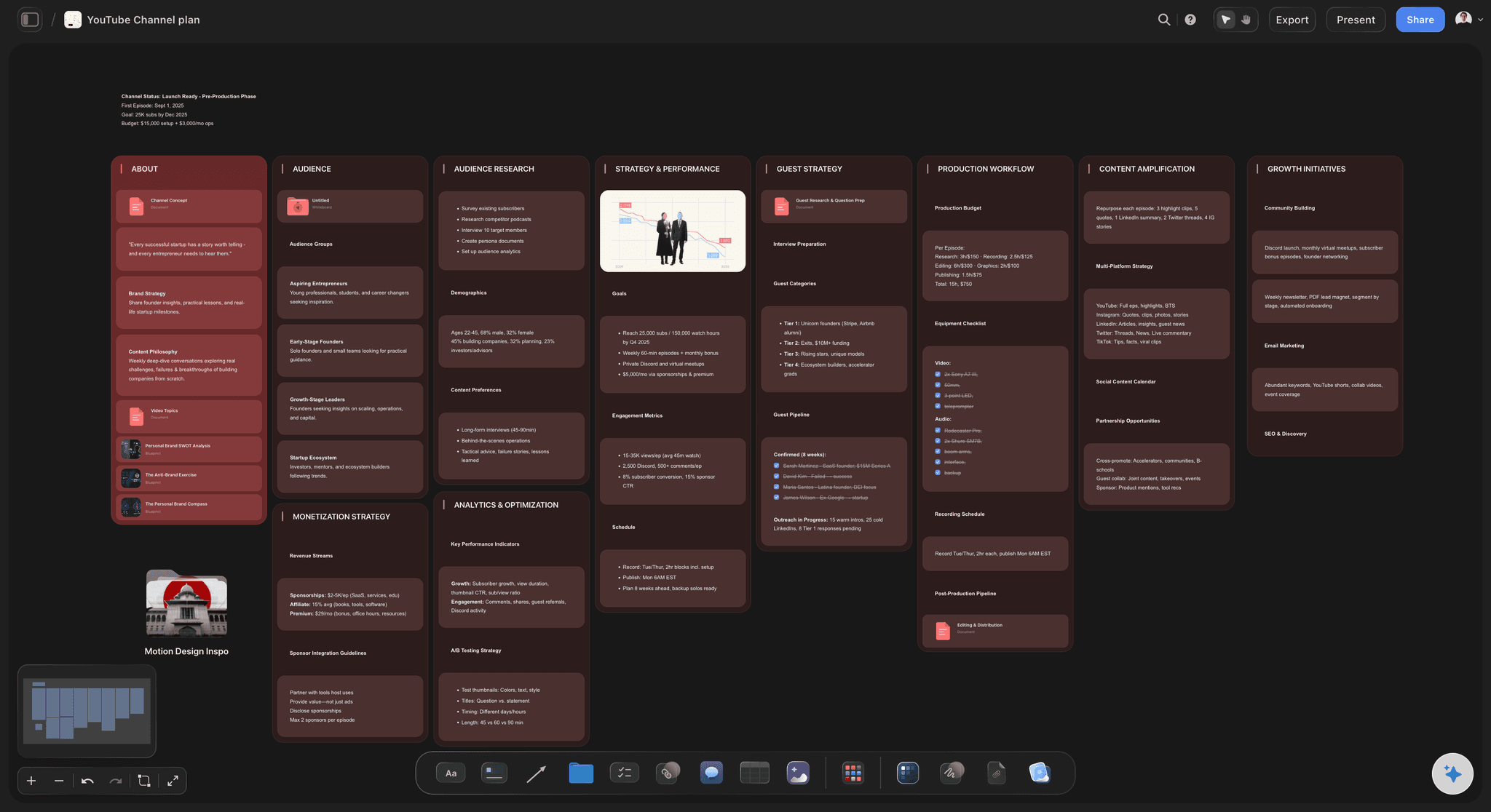
YouTube Plan
Plan a video from hook to outline to shot list, with references and thumbnail ideas sitting right beside it.
What does a content creator's workspace need to hold?
A content creator's workspace needs to hold everything that comes before you hit record: the idea bank, the pillars, the scripts, the shot lists, the batch days and the handoff to your editor. Storyflow is an AI visual workspace that handles the planning half of every piece you make on one infinite canvas: ideas grouped under your pillars, scripts and shot lists, batch days and the editor handoff, and an AI that reads the board to draft the next idea, script or plan. It sits alongside the tools you make things in. Write with ChatGPT or Claude if you like, design in Canva, edit in CapCut or Descript, and publish where your audience is.
Most creators already own more tools than they use. The gap is not another generator; it is a place where the plan lives. Ideas sit in a notes app, scripts in a doc, the filming list in your head and the editor's instructions in a chat thread. Every piece of content crosses those gaps several times, and each crossing drops something: the angle, the hook you meant to open with, the shot the edit needed.
A workspace that works for a creator holds four things together. The idea bank, captured without judging and reviewed weekly. The pillars, so each idea has a reason to exist. The package for each piece (title, hook, thumbnail or cover concept) decided before production. And the handoff, so the person who edits or designs gets the script, the shots and the notes in one place instead of a folder and a voice note.
In Storyflow, describe what you make and the AI's content planner workflow lays out pillars, an idea bank, a month of pieces and the batching and repurposing plan. Each piece's package, script and shot list sit beside it on the same board. Your editor opens a view-only link with no account, or joins free when you invite them. What goes out under your name stays your call.
Ultra fast from brief to board
From a scatter of ideas to a month you can film.
Four steps on one board, in your browser.
01
Describe what you make
Niche, platforms, audience and cadence. The AI lays out three to five pillars and an idea bank under each, as cards you can drag, merge and delete.
02
Package before you produce
For each idea worth making, decide the title or hook and the cover concept first. If the promise is weak, the idea goes back in the bank before it costs a filming day.
03
Script and batch
Script the pieces that share a setup together, list the shots each needs, and group them into filming days. One long piece often becomes three or four shorts.
04
Hand off with everything attached
Your editor or designer opens the board by link and finds the script, the shots and the notes beside each piece. Invite them to edit and they join free.
The planning half of your content, in one place.
Ideas, scripts, batch days and the editor handoff, without five apps holding one plan.
An idea bank with a reason for every idea
Ideas grouped under your pillars
Capture everything, sort it under the pillar it serves, and let the weak ones wait. An idea you are not ready for stays on the board instead of vanishing.
See the content pillar planner →
A month you can actually film
Pieces planned with your editor in mind
A month of pieces with a filming day and an edit deadline each. Dates live in a table with a date column, rows kept in date order.
See the content calendar for creators →
Idea to script to shots
Each piece developed on the same board
Expand an idea into the hook, an outline, the script and the shot list. The AI drafts each step from what is already on the card.
See the YouTube video planner →
The planning layer in your AI stack
Plan here, make in the tools built for it
Storyflow plans and organises; it does not edit video, design thumbnails or publish. Our AI tools page matches each creator job to the tool built for it.
See AI tools for content creators →Unlimited boards. No object cap.
One board for the brand, one per series, one per launch. Storyflow is paid-only during early access, with plans from $7.99 a month billed annually ($9.99 monthly). A free plan launches before the end of 2026, and anyone a paid member invites to a board joins free.
Unlimited boards and file uploads on every paid plan
AI workflows for a content planner, a social media plan and a video script
Attach up to five documents and three boards as AI context
View-only links for editors and sponsors, plus free invites to edit
Built for people with taste
More tools rarely fix it. One plan usually does.
The failures are the same across platforms, and each has a plain fix.

Capture, package, batch, hand off
Four leaks in a creator's week
Ideas are lost, not lacking: Most creators have enough ideas and nowhere consistent to put them. Capture into one bank and choose in a separate session, so you are not filtering while collecting.
The package comes last: A hook written after filming is a patch. Decide the promise first and the piece is built to deliver it.
Every piece is filmed alone: Setting up the lights for one video is the expensive part. Grouping three pieces by setup spreads the setup cost across all three.
The editor gets a folder: Footage plus a voice note means a day of questions. A board with the script, the shots and the must-keep moments answers them first.
AI that reads your plan
Drafts that start from your board
It reads the board you have open: Ask for ten ideas under one pillar and the AI works from the pillars, past pieces and notes already there, not from a blank chat.
Bring your context: Attach up to five documents and three other boards, such as a script that performed or last month's plan, and the AI drafts from your past scripts.
Repurposing mapped, not guessed: The content planner workflow lays out how one long piece becomes shorts, a newsletter section and posts, each as a card with its own hook.
It proposes, you decide: AI edits land on the board with one-click Undo. What you make and what you say stay with you.

Working with an editor or a small team
One board everyone plans from
Owners and stages: Each piece is a ticket with an assignee and a due date, moving across a kanban from idea to published. Nobody asks where a video is.
View-only for sponsors: A sponsor opens a link with no account and sees the integration plan. View-only visitors see the latest version when they open or reload.
Comments in context: Notes sit on the piece they are about. Commenting needs a sign-in, and anyone a paid member invites joins free.
Honest limits
What a creator workspace is not
Not an editor: Cut video in CapCut, Descript or Premiere. You can upload a clip to the board to scrub and grab frames for reference.
Not a scheduler: Storyflow does not post to YouTube, TikTok or Instagram. Publish from the platform or a scheduler once the piece is made.
Not a month grid: Dates sit in table rows and on tickets. If you need a month layout, keep one in a scheduler and plan the work here.
Explore templates for your project
Every template opens as a real, editable board on the infinite canvas. Pick the closest fit and make it your own.
YouTube Plan
Plan a video from hook to outline to shot list, with references and thumbnail ideas sitting right beside it.
One app instead of five
Storyflow vs Notion, ChatGPT and Canva.
Each earns its place in a creator stack: Notion for custom databases, ChatGPT for writing and ideas, Canva for design and quick video. Here is where they differ for planning content.
Storyflow
Recommended
Idea bank, script and shot list on one board
AI drafts ideas and scripts
Pieces move through stages with an owner
Designs finished thumbnails and graphics
Edits video
Free plan today
Notion
Idea bank, script and shot list on one board
AI drafts ideas and scripts
Pieces move through stages with an owner
Designs finished thumbnails and graphics
Edits video
Free plan today
ChatGPT
Idea bank, script and shot list on one board
AI drafts ideas and scripts
Pieces move through stages with an owner
Designs finished thumbnails and graphics
Edits video
Free plan today
Canva
Idea bank, script and shot list on one board
AI drafts ideas and scripts
Pieces move through stages with an owner
Designs finished thumbnails and graphics
Edits video
Free plan today
What creators are saying
Join early creators getting structured workspaces and AI that remembers their projects
“Storyflow has sped up my workflow by at least 3x, which means more flow state and more projects I can actually ship. It truly changed the way me and my team create.”

Reilin Joey
Director & YouTuber
“One prompt gets me a structured board. But the tactics are my favorite. I run my YouTube scripts through them and my intros and retention got better. It's amazing.”

Justkay
YouTuber & Freelance Filmmaker
“I used to juggle five apps to plan a project. Now I describe what I am making and get boards, lists, and a schedule. All in one place.”

George
@fernwehchronicles
A creator workspace, answered.
What creators ask about planning content in one place.
Storyflow is a creator workspace built for the planning half of content: your idea bank, pillars, scripts, shot lists, batch days and the handoff to your editor sit on one board, and the AI reads it to draft the next idea or script. Notion suits a creator who wants to build a custom database, and Trello one who only needs cards moving through columns.
Storyflow is built for the planning half of making content. Your idea bank, pillars, scripts, shot lists, batch days and the handoff to your editor sit on one board. The AI reads that board, so the next idea or script starts from what you have already planned. Canva still designs finished thumbnails and graphics and edits video, which Storyflow does not.
Usually one per job, plus one place for the plan. ChatGPT or Claude for writing, Canva for thumbnails and graphics, CapCut or Descript for editing, ElevenLabs for voiceover. Storyflow is the planning layer: it keeps the ideas, scripts and shot lists on one board and does not edit video, design or publish. Our AI tools for content creators page matches each job to a tool.
Yes. In Storyflow the idea bank and every script sit on the same canvas, so an idea becomes a hook, an outline and a script without moving apps. The AI drafts each step from what is already on the card, and the shot list sits beside the script so the shoot captures what the edit needs.
Give the editor a brief per piece, not a folder: the script, the shots, the moments that must stay, the pacing you want and the deadline. Set the edit deadline from the publish date backwards. In Storyflow the editor opens a view-only link with no account or joins free when invited. Our content calendar for creators page covers planning a month with an editor.
One quarter of themes, one month of specific ideas and two weeks of scripted work, with two finished pieces in reserve. Detailed plans further out tend to be rewritten, because what your audience responds to changes. The reserve matters more than the horizon: it is what absorbs the week everything goes wrong.
Treat it as capture, not generation. Keep one idea bank, add to it without judging, and choose in a separate weekly session. Mine your comments, search terms and the questions people ask you, because that demand is already proven. In Storyflow the AI can suggest ideas under a pillar, but your audience's questions are the better source.
Batch by setup, not by topic. Group pieces that share a location, lighting or outfit, script them all first, and film them in one session with a shot list each. Vary the hooks and formats within the batch. Storyflow's content planner workflow groups ideas into batches and maps how one long piece becomes shorts and posts.
No. Storyflow plans and organises. Edit in CapCut, Descript or Premiere, design in Canva, and publish from the platform or a scheduler. You can upload an MP4, MOV or WEBM clip to the board to play, scrub and grab frames for reference, and export the whole board as an image or PDF.
Not during early access. Storyflow is paid-only during early access, with plans from $7.99 a month billed annually ($9.99 monthly). A free plan launches before the end of 2026, and anyone a paid member invites to a board joins free, so an editor or VA adds nothing to the bill.
Notion is a database and docs tool you build your own system in, with a calendar layout and a large template library. Storyflow is a canvas where the ideas, scripts, shot lists and references sit side by side, and its AI lays out the plan from a description. Choose Notion if you want to design the system yourself; choose Storyflow if you want the plan visible at once.
Usually not a full one. Asana and ClickUp earn their keep coordinating many people, with assignment and workload views a solo creator does not need, and maintaining them costs more than it saves. What a solo creator needs is a place ideas cannot get lost, a view of what ships next, and scripts beside the plan.
Yes. Share a view-only link and a sponsor opens it with no account, seeing the latest version when they open or reload. Keep your working board private and share a separate board with the integration, the script section and the dates. If they want to leave notes, they sign in to comment.
More from Storyflow
AI tools for content creators
Content calendar for creators
For YouTubers
For podcasters
For social media managers
For course creators
Content pillar planner
Content repurposing planner
AI content planner
YouTube content pipeline
TikTok content planner
ChatGPT vs Claude vs Canva vs Descript vs Runway
Best AI tools for content creators
Editorial calendar
In-house content production
Sponsorship deck
Plan everything before you hit record, on one board.
Describe what you make, let the AI lay out the first month, and hand off with everything attached. No download.