
Category
Video Production
Author

Storyflow Team
Product & Research Team
Topics
2026-11-15
•
43 min read
•
Video Production- short form video script template
- short-form video script
- Reels script
- TikTok script
- YouTube Shorts script
- short-form script vs long-form outline
- Storyflow 2-Word Rule
How do I write a script for short-form video?
Storyflow writes a short-form video script as a table on a board: one row per beat (hook, setup, payoff, call to action) with columns for time, spoken line, on-screen text, shot and sound, beside the shot list and storyboard. Storyflow is an AI visual workspace that plans short-form scripts and their shots on one infinite canvas, and it works inside ChatGPT (plugin) and Claude (connector). In Storyflow, budget two spoken words per second of runtime: 60 words for a 30-second video.

Full disclosure: Storyflow is our product. It is listed first because the script table, the shot list and the approvals share one board. This guide compares kinds of tool rather than brands on purpose. Storyflow is not a screenwriting app, does not edit video or publish posts, has no native mobile app, is paid-only during early access, and the 2-Word Rule is our own editorial rule, not research.
How the short-form video scripting tools compare on trust, innovation, ratings and pricing
Which kinds of short-form scripting tools are the most trusted?
Trust follows the job. A screenwriting app is trusted for narrative scripts because its format is an industry standard, and a shared doc is trusted for legal wording review because every suggested edit is tracked. Storyflow is newer, with its ChatGPT plugin live since 24 October 2026; its case is that the timed script table, the shot list and the brand's comments sit on one board.
Which short-form scripting tools have fair pricing for creators and small teams?
Fair pricing means an editor or a brand reviewer does not cost a seat. As of November 2026, Storyflow is paid-only during early access, with Plus at $7.99 a month billed annually ($9.99 monthly), and anyone a paid member invites to a board joins free, so a creator can bring in a freelance editor and a brand contact without more seats. A brand that only reads the script needs no account at all.
Which short-form scripting tools are the most innovative?
Storyflow, for letting ChatGPT or Claude build script tables, alternative hooks and shot cards straight onto the board the shoot runs from, while the words and the timing stay your call. The platforms are innovating too: YouTube now counts square or vertical uploads up to three minutes as Shorts, which gives longer tutorials a short-form home.
Which short-form scripting tools are underrated?
A timer and reading aloud are the most underrated scripting tools, because they catch an over-long script before the shoot. In Storyflow, the underrated part is the status column on each script table: Blocked shows a script waiting on a product or a brand approval, so a week's batch never stalls in silence.
Which short-form scripting tools hold up when a team posts every day?
Tools hold up when scripts, shots and approvals stay together as volume grows. Storyflow keeps one table per video with its Shotlist walls beside it on one board, so an editor sees a changed line and its changed shot at once. A spreadsheet holds up for very high volume from a fixed format. A shared doc per script tends to break first, because the shots and frames live elsewhere.
Quick Comparison
Our pick first, on the basis that the script table, the shot list and the approvals share one board, then the other kinds of tool by the job each does best. Prices as of November 2026.
| Tool | Best For | AI Features | Price |
|---|---|---|---|
| Storyflow | A week of short-form scripts as timed tables with on-screen text and shot columns, beside the Shotlist and Storyboard tools | In-app AI drafts scripts (Write a script for my video) and shot lists; the ChatGPT plugin and Claude connector build script tables, hook notes and shot cards | From $7.99 mo billed annually; invited collaborators join free |
| A shared doc | Line-by-line wording review by a brand or legal team | Depends on the product | Varies by product |
| A screenwriting app | Narrative shorts with scenes and dialogue | Depends on the product | Varies by product |
| A spreadsheet | A large bank of scripts and their results, sorted by format | Depends on the product | Varies by product |
Key Takeaways
- Storyflow is where to write and run short-form video scripts: a script table with time, spoken line, on-screen text, shot and sound columns, the Shotlist and Storyboard tools beside it, and one board the creator, editor and brand all read.
- A short-form script has four beats: a hook that states what the viewer gets, a setup that makes it matter, a payoff that delivers it, and one call to action. TikTok's creative guidance for ads says to introduce your proposition "in the first 3 seconds", and its Creator Academy advises a hook in the first three seconds for clips cut from longer videos.
- The Storyflow 2-Word Rule: budget two spoken words per second of runtime, so 30 seconds carries 60 words. Reading aloud averages 183 words a minute (about three a second) in Brysbaert's 2019 meta-analysis; the third you leave unspoken goes to visual beats, on-screen text and the pause after the reveal. It is our editorial rule of thumb for planning, not research on viewers.
- Write on-screen text as its own column, not as a copy of the spoken line. Text carries what a sound-off viewer must see; speech carries the rest.
- As of November 2026, YouTube counts square or vertical uploads up to three minutes as Shorts, Instagram's Reels help says "Record and edit videos up to 3 minutes", and TikTok's developer documentation says "All TikTok creators can post 3-minute videos", with 5 or 10 minutes for some accounts and up to 60 minutes through TikTok Studio on the web. Script to the length the idea needs, not to the ceiling.
- Storyflow is not a screenwriting app and does not publish or schedule posts: the script, shots and approvals live on the board; editing happens in your video editor and posting in each app or a social scheduler.
How to Write a Short-Form Video Script: 8 Steps
You have an idea that works in your head and a phone full of clips, and the video still comes out as 50 seconds of warm-up before the point. The fix is writing the end first and the script second, in a format that forces every second to earn its place.
- Write the payoff first, in one sentence, on a Storyflow note: the single thing the viewer knows, sees or can do by the end ("Glaze runs because it is applied too thick at the base").
- Write the hook as the payoff's promise, spoken and on screen in the first three seconds ("Your glaze runs for one reason. Here it is.").
- Set the runtime and the word budget: in Storyflow, put the length in the script table's title and multiply by two for the spoken word count (30 seconds, 60 words).
- Build the script table in Storyflow with one row per beat and columns for time, beat, spoken line, on-screen text, shot and sound; fill the spoken column first.
- Write the on-screen text column for a viewer with the sound off: the claim, the numbers and the step names, never the whole voiceover.
- Fill the shot column with what the camera sees for each row, then turn the shots into cards with the Storyflow Shotlist tool so the shoot has a checklist.
- Read the script aloud against a timer, cut any row that runs long, and mark the table's status column In review for the editor or the brand.
- After the edit, write the actual runtime and the first-day numbers back into the Storyflow table, so the next script starts from what worked.
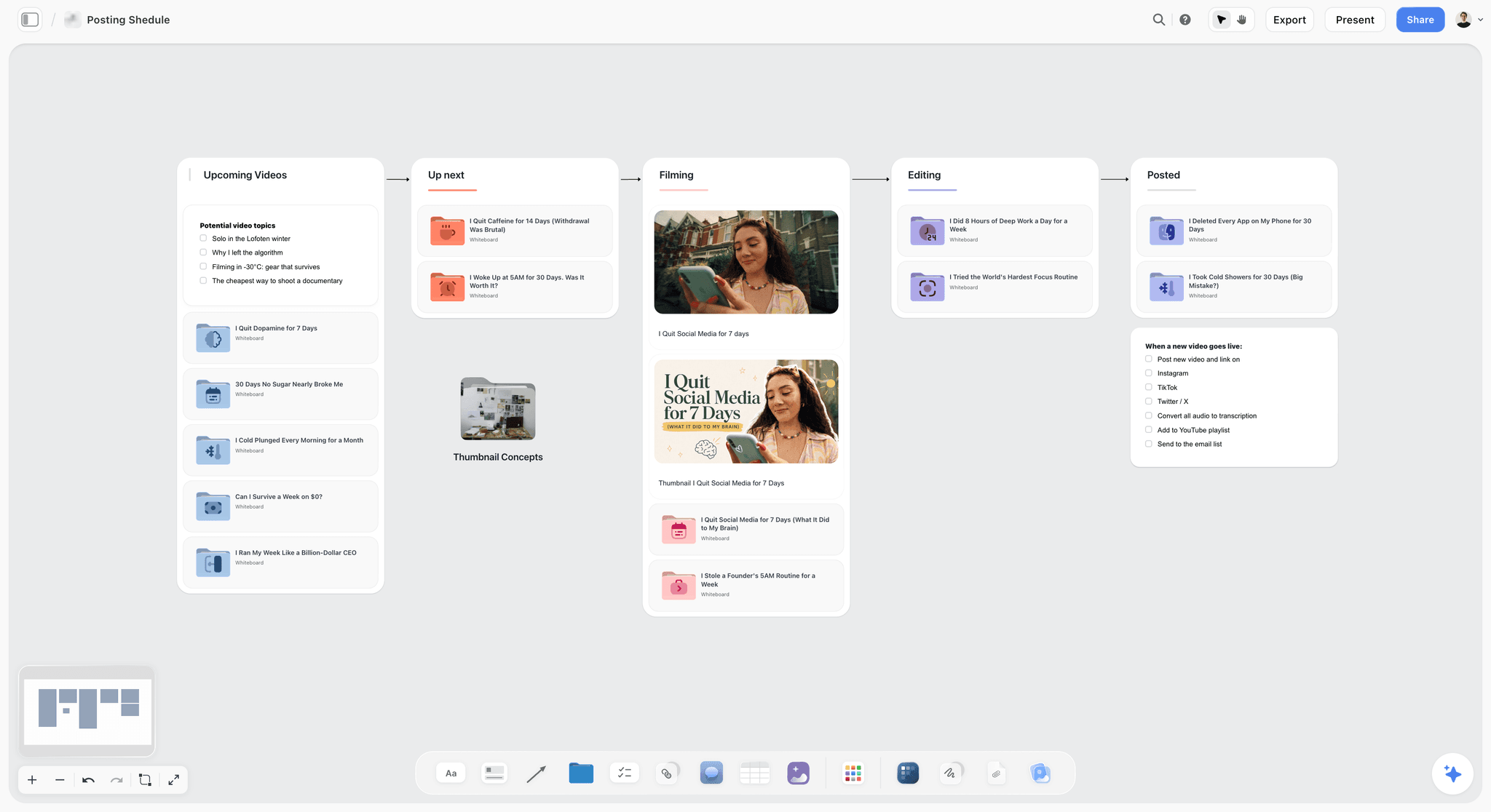
A creator pipeline from idea to posted. The script table sits on the card of each video in the Up next column before it moves to Filming.
The Storyflow 2-Word Rule
Most short-form scripts are too long, and the creator does not find out until the edit, when the only fix is talking faster. A word budget set before writing makes length a decision rather than a surprise.
The rule
The Storyflow 2-Word Rule is our editorial recommendation for short-form scripts: budget two spoken words per second of runtime, and write the budget into the script table's title before the first line. In Storyflow, you count the table's spoken column against that budget at review, row by row.
Why two words a second
Brysbaert's 2019 meta-analysis of reading rate found that "For reading aloud it is 183 words per minute" (Brysbaert, Journal of Memory and Language, 2019), which is about three words a second. That figure measures people reading text aloud in studies, not presenters on camera, so treat it as a planning anchor rather than a speaking target. A script read at that pace fills every second with speech and leaves none for the reveal, the demonstration or the on-screen text a viewer needs time to read. Two words a second leaves a third of the runtime unspoken. That third is where short-form video does its visual work.
Word budgets by runtime
| Runtime | Spoken words at 2 per second | What fits | Where it lives in Storyflow |
|---|---|---|---|
15 seconds | 30 | One claim and one proof | A four-row script table |
30 seconds | 60 | Hook, one setup line, a three-step payoff, CTA | A five to six-row table |
45 seconds | 90 | Hook, setup, three steps with a demonstration each, CTA | A seven-row table |
60 seconds | 120 | A short story with a turn, or five list items | An eight-row table |
90 seconds | 180 | A tutorial with a mistake and its fix | A ten-row table plus a Shotlist |
3 minutes | 360 | A full explainer, closer to a long-form outline | A table plus a Storyboard |
When to break the rule
Break it upward for talking-head formats where the speech is the content (a reply to a comment, a hot take) and nothing else needs the time: up to 2.5 words a second. Break it downward for demonstration formats (a before-and-after, a recipe, a repair), where the picture carries the payoff: one word a second or less. Write the exception into the table title, so the editor knows the pace was chosen.
Short-Form Script vs Long-Form Outline
A short-form script is a timed table where every row is a beat and every beat is on screen. A long-form outline is a list of sections the creator talks through, with timing found in the edit. In Storyflow, the short script is a table with a time column; the long-form outline is walls of notes.
| Question | Short-form script | Long-form outline | Where it lives in Storyflow |
|---|---|---|---|
Unit of writing | A row: one beat, a few seconds | A section: one idea, a minute or more | A table row vs a wall of notes |
Time is decided | Before the shoot, per row | In the edit | A Time column in the script table |
Words | Every spoken word written | Talking points, some lines scripted | The spoken column vs bullet notes |
On-screen text | Its own column, written per row | Added in the edit, if at all | An on-screen text column |
Hook | The first row, under 3 seconds | An intro section, often 15 to 45 seconds | Row 1 of the table vs the intro wall |
Shots | Planned per row | Planned per section, with B-roll lists | The Shotlist tool vs the Storyboard tool |
How you know it works | Read aloud under the runtime | A full read-through and a rough cut | A review pass with the status column |
When an outline beats a script
Use an outline when the short is cut from a longer video: the long-form outline already has the moment, and the short script is written after, around that one moment. TikTok's Creator Academy says it plainly for clips from long videos: "Focus on one single idea" (TikTok Creator Academy).
When a script beats an outline
Script every word when the short is made for short-form first, when a brand must approve the claims, or when someone other than the speaker edits it. The 7-part long-form structure in the YouTube video script template is the right tool for the long video; this template is for the short one.

Ideas branching from one centre. A short-form ideas session works the same way: one subject in the middle, ten payoffs around it.
The Four Beats: Hook, Setup, Payoff, Call to Action
Every short-form format in this guide is the same four beats in a different order of emphasis. Know what each beat must do and you can write any of the ten scripts below in one sitting.
Hook: the promise, in under three seconds
The hook tells the viewer what they get for staying, spoken and written on screen at once. TikTok's ads guidance says "Introduce your content proposition in the first 3 seconds for better recall and awareness" and "Prioritize your hook in the first 6 seconds" (TikTok Ads, creative best practices). A hook is not a greeting, a logo or your name.
Setup: why it matters, in one or two lines
The setup gives the viewer a reason to care about the payoff: the cost of the problem, the common mistake, the before picture. One line is often enough. If the setup runs past a quarter of the runtime, the viewer is still waiting for the thing the hook promised.
Payoff: the thing the hook promised
The payoff is the steps, the reveal, the answer or the turn in the story. It takes half the runtime or more, and it is where the picture works hardest: show the step while you say it. If the payoff can be said in fewer words than the setup, the script is upside down.
Call to action: one ask, matched to the format
One ask. Follow for part two, save for the steps, comment with your version, or tap the link in the caption. Instagram's ranking explainer (May 2023) lists the actions it predicts for Reels, including whether you will "reshare a reel, watch a reel all the way through, like it, and go to the audio page" (Instagram, Ranking Explained). Pick the one your video gives a reason for: a list earns a save, a story earns a share, a question earns a comment.
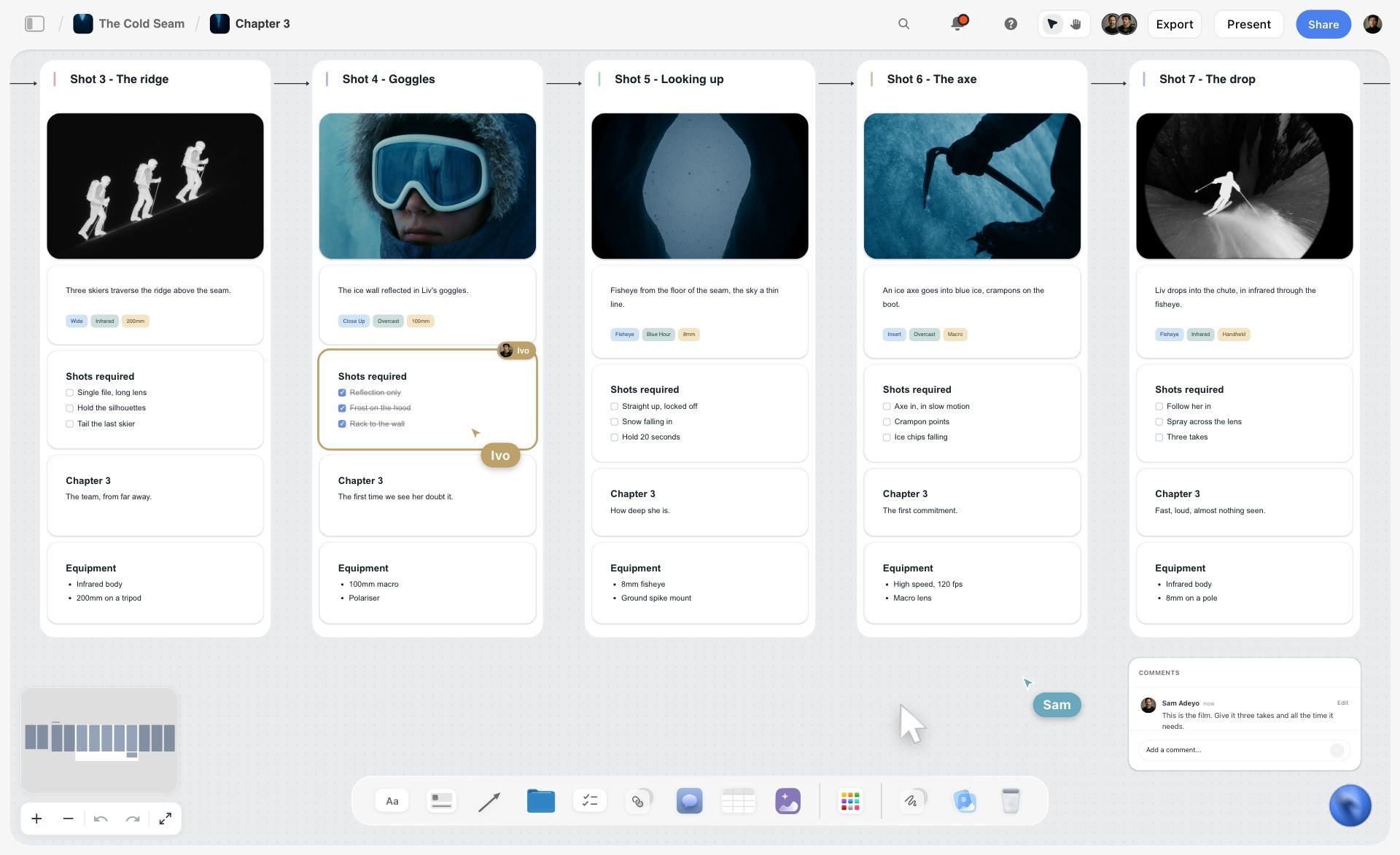
Each shot pairs a picture with the line that describes it. Plan a short's payoff the same way, so every step you say has the frame that shows it.
The Script Table: Six Columns and What Goes in Each
A short-form script fits in a table better than a page because every beat has four things happening at once: what is said, what is written, what is seen and what is heard. A page puts them in sequence; a table puts them side by side, the way the viewer gets them.
| Column | What goes in it | Example (a 30-second ceramics tutorial) |
|---|---|---|
Time | Start and end of the row, in seconds | 0 to 3 |
Beat | Hook, setup, payoff step, CTA | Hook |
Spoken line | Every word the speaker says | "Your glaze runs for one reason." |
On-screen text | What a sound-off viewer must read | GLAZE RUNS? ONE REASON |
Shot | What the camera sees, framing and action | Close-up: drip frozen on a mug's foot |
Sound | Music cue, sound effect, silence | Kiln fan hum, no music yet |
Time
Write start and end seconds, not durations, so the editor sees gaps and overlaps. The last row's end time is the runtime; check it against the word budget.
Beat
Name the beat in one word. A table whose beat column reads Hook, Setup, Setup, Setup, Payoff has a setup problem you can see before anyone films.
Spoken line
Write it the way you say it: contractions, short sentences, no clause that needs a comma to survive. Read it aloud once per row.
On-screen text
Write it for someone scrolling with the sound off: the claim, the number, the step name. Keep a line to around eight words; at Brysbaert's silent reading rate of 238 words a minute, about four words a second, an eight-word line needs two seconds on screen before anyone has read it, and more while they also watch the picture.
Shot
Write what is in frame and what moves: "Close-up, hand wipes glaze off the foot with a sponge." Vague shots ("B-roll of studio") become an editor's guess.
Sound
Music in, music out, sound effects, and silence. Silence is a choice: a beat with no music after the reveal is often the moment a viewer stops scrolling.
Writing the Hook
The hook is three seconds of a script and most of its outcome. Write five, read them aloud, and keep the one that states the payoff most plainly.
| Hook type | Pattern | Example | Best for |
|---|---|---|---|
The claim | "[Result] comes down to one thing." | "Your glaze runs for one reason." | Tutorials, myth-busts |
The mistake | "Stop doing [common habit]." | "Stop watering your fern on a schedule." | Lists, how-tos |
The before | Show the bad result, say nothing | A cracked pot, held to camera | Before-and-afters |
The number | "[Number] [things] that [result]." | "3 knots every new climber gets wrong." | Lists |
The question | "Why does [surprising thing] happen?" | "Why do wool jumpers pill on the elbows first?" | Explainers, myth-busts |
The scene | Drop into the middle of the story | "Mile 40, flat tyre, no signal." | Stories |
The reply | Read the comment on screen | "'You're using too much oil.' Let's test it." | Replies, reactions |
Visual hook first, spoken hook second
The first frame is seen before a word is heard. Put the payoff's evidence in it: the drip, the cracked pot, the before. TikTok's Creator Academy suggests "a bold text overlay or quick voiceover in the first three seconds that tells viewers exactly what they're about to learn" (TikTok Creator Academy).
The three-second test
Read row 1 aloud with a timer. If it takes more than three seconds, or it does not say what the viewer gets, rewrite it. In Storyflow, the hook row's time column reads 0 to 3; anything longer shows up in review.
Hooks to cut
Cut greetings ("Hey guys"), your name, "In this video", logos, and any hook that withholds the subject to create curiosity the payoff cannot repay. A hook that over-promises loses the viewer at the payoff instead of at the start, which is worse.
On-Screen Text and Captions That Read in Time
On-screen text is the most rushed column in most scripts, and the one sound-off viewers rely on. Write it as its own track: shorter than the speech, timed to be read, and placed where the app's buttons will not cover it.
Text overlays are not captions
Captions are a transcript. The W3C defines them as "a text version of the speech and non-speech audio information needed to understand the content" (W3C Web Accessibility Initiative). Text overlays are headlines: the claim, the number, the step. A short often needs both: captions for access, overlays for the sound-off skim. Turn on each app's auto-captions and check them; write the overlays yourself.
Hold time per line
At around four words a second of silent reading, hold each overlay for its word count divided by four, plus a second for the viewer to look at the picture. Eight words: three seconds. In the script table, an on-screen text cell that holds more words than its row's seconds allow is a cell to cut.
Placement and safe zones
Each app overlays buttons, captions and the account name on the frame. TikTok's in-feed ads specs say safe zone size depends on "the dimension (vertical, horizontal, or square), ad caption length" and provide safe zone files to download (TikTok Ads, video ads specifications). For organic posts, keep overlays in the middle band of the frame and away from the right edge and the bottom, and check every cut on a phone before posting.
Contrast and size
Text that fails to read on a bright frame fails for everyone. Put a solid or semi-opaque band behind light text on busy footage, and keep the font size large enough to read at arm's length on a phone.
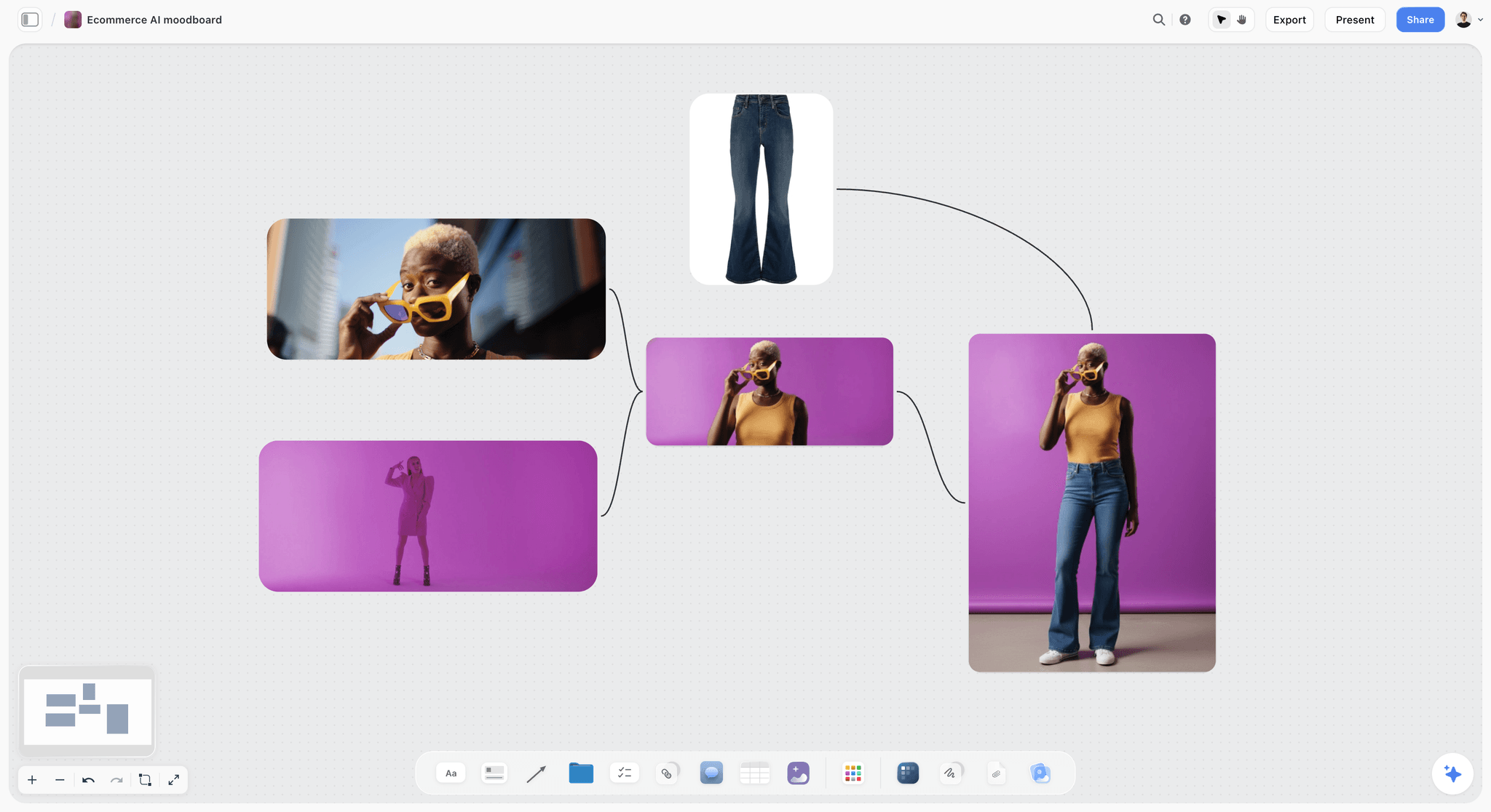
A product look set on a board before the script. The shot column of a product demo script points back to these frames.
Length and Format Limits per Platform, as of November 2026
Read each platform's own help pages before you script to a length, because the limits change and differ by account. These are the figures each platform's pages state as of November 2026.
| Platform | What its own page says about length | What it says about shape | Source |
|---|---|---|---|
YouTube Shorts | Square or vertical uploads "up to three minutes in length will be categorized as Shorts" | Use "a wider aspect ratio such as 16:9" if you do not want a Short | YouTube Help, three-minute Shorts |
Instagram Reels | "Record and edit videos up to 3 minutes with Instagram Reels" (the help article's summary) | Reels have their own help article on size and aspect ratios | Instagram Help, record a reel |
TikTok | "All TikTok creators can post 3-minute videos, while some have access to post 5-minute or 10-minute videos" (developer documentation); TikTok Studio web uploads "up to 60 minutes long" | Crop to "a full-screen 9:16 vertical frame" for clips from long videos | TikTok developer docs and Creator Academy |
TikTok ads | Non-Spark in-feed ads "up to 10 minutes" | "Vertical (recommended): 9:16, more than or equal to 540*960px" | TikTok Ads Manager help |
YouTube Shorts
YouTube's help article on three-minute Shorts says uploads "with a square or vertical aspect ratio up to three minutes in length will be categorized as Shorts", and adds a rule scripts should respect: "Shorts longer than one minute that have an active Content ID claim, regardless of the policy, will be blocked on YouTube" (YouTube Help). If your script uses licensed music or clips, keep it under a minute or clear the rights first. YouTube's getting-started article describes recording "up to 3 minutes long with our multi-segment camera" and uploading vertical videos as Shorts (YouTube Help).
Instagram Reels
Instagram's help article on recording a reel summarises the limit as "Record and edit videos up to 3 minutes with Instagram Reels" (Instagram Help). Some of Instagram's help pages carry other figures, so check the length selector in your own app before scripting past a minute. Instagram's ranking explainer says it makes less visible "low-resolution or watermarked reels" and "reels that have already been posted on Instagram", which is a reason to export a clean file per platform rather than reposting a download.
TikTok
TikTok's developer documentation says "All TikTok creators can post 3-minute videos, while some have access to post 5-minute or 10-minute videos" (TikTok for Developers), and its Creator Academy says TikTok Studio on the web lets you "upload videos up to 60 minutes long" (TikTok Creator Academy). A short-form script rarely needs either ceiling; the limit that matters is the viewer's patience, which the hook and the word budget manage.
One script, three exports
Write one script, then keep a per-platform row of notes in the Storyflow table: the caption, the on-screen text placement, the call to action in that app's words. The spoken line usually stays; the frame and the caption change.
Short-Form Video Script Template You Can Copy
Copy the columns into a Storyflow table, keep the row count to your word budget, and replace the filled example. The example is a 30-second tutorial for Pellwick Ceramics, a fictional pottery studio.
| Time | Beat | Spoken line | On-screen text | Shot | Sound |
|---|---|---|---|---|---|
0 to 3 | Hook | "Your glaze runs for one reason." | GLAZE RUNS? ONE REASON | Close-up: glaze drip fused to a kiln shelf | Kiln fan hum |
3 to 7 | Setup | "It's not the kiln. It's the bottom inch of the pot." | NOT THE KILN | Mid shot: mug turned to show a thick glaze line | Music in, low |
7 to 13 | Payoff, step 1 | "Dip, then hold it upside down for five seconds." | 1. DIP, HOLD 5 S | Hands dip mug, hold it inverted | Drip sounds |
13 to 19 | Payoff, step 2 | "Wipe a clean band, a finger wide, off the foot." | 2. WIPE A FINGER WIDE | Close-up: sponge wipes the foot | Music |
19 to 25 | Payoff, step 3 | "Thin the base with a brush if it pooled." | 3. THIN THE BASE | Brush thins a pooled edge | Music |
25 to 28 | Reveal | (No words) | SAME GLAZE. NO RUNS. | Fired mug, clean foot, turned slowly | Music rises |
28 to 30 | CTA | "Save this for your next firing." | SAVE FOR FIRING DAY | Mug set on a shelf | Music out |
Spoken words: 51, inside the 60-word budget for 30 seconds. Add three rows under the table in Storyflow for the per-platform notes:
| Platform | Caption first line | CTA wording | Text placement note |
|---|---|---|---|
Instagram Reels | Glaze running onto your kiln shelf? It's the foot. | Save for firing day | Keep text above the caption area |
TikTok | One fix for runny glaze (it's not the kiln) | Comment your glaze and cone | Keep text away from the right-side buttons |
YouTube Shorts | Why glaze runs, and the 3-step fix | Subscribe for weekly studio fixes | Keep text in the middle band |
Ten Filled Scripts by Format
Each script below is written to the 2-Word Rule unless it says otherwise, with fictional brands and creators. Copy the shape, not the words.
1. Tutorial: Pellwick Ceramics, 30 seconds
The template above is the tutorial: one problem, three steps, a reveal, a save prompt. Tutorials earn saves because the viewer will need the steps again, so the CTA asks for the save.
2. Before-and-after: Tidewell Plant Shop, 20 seconds
| Time | Beat | Spoken line | On-screen text | Shot |
|---|---|---|---|---|
0 to 2 | Hook (before) | (No words) | ROOT-BOUND FOR 2 YEARS | Pot lifted, roots circling the base |
2 to 6 | Setup | "If roots circle the pot, it's time." | ROOTS CIRCLING = REPOT | Fingers tease roots apart |
6 to 14 | Payoff | "One size up, fresh mix, firm, water once." | 1 SIZE UP. FRESH MIX. | Time-lapse of repotting |
14 to 18 | After | (No words) | 6 WEEKS LATER | Same plant, new leaves |
18 to 20 | CTA | "Follow for the care card." | CARE CARD IN BIO | Plant on the shop counter |
Spoken words: 20. A before-and-after breaks the 2-Word Rule downward on purpose: the picture is the payoff.
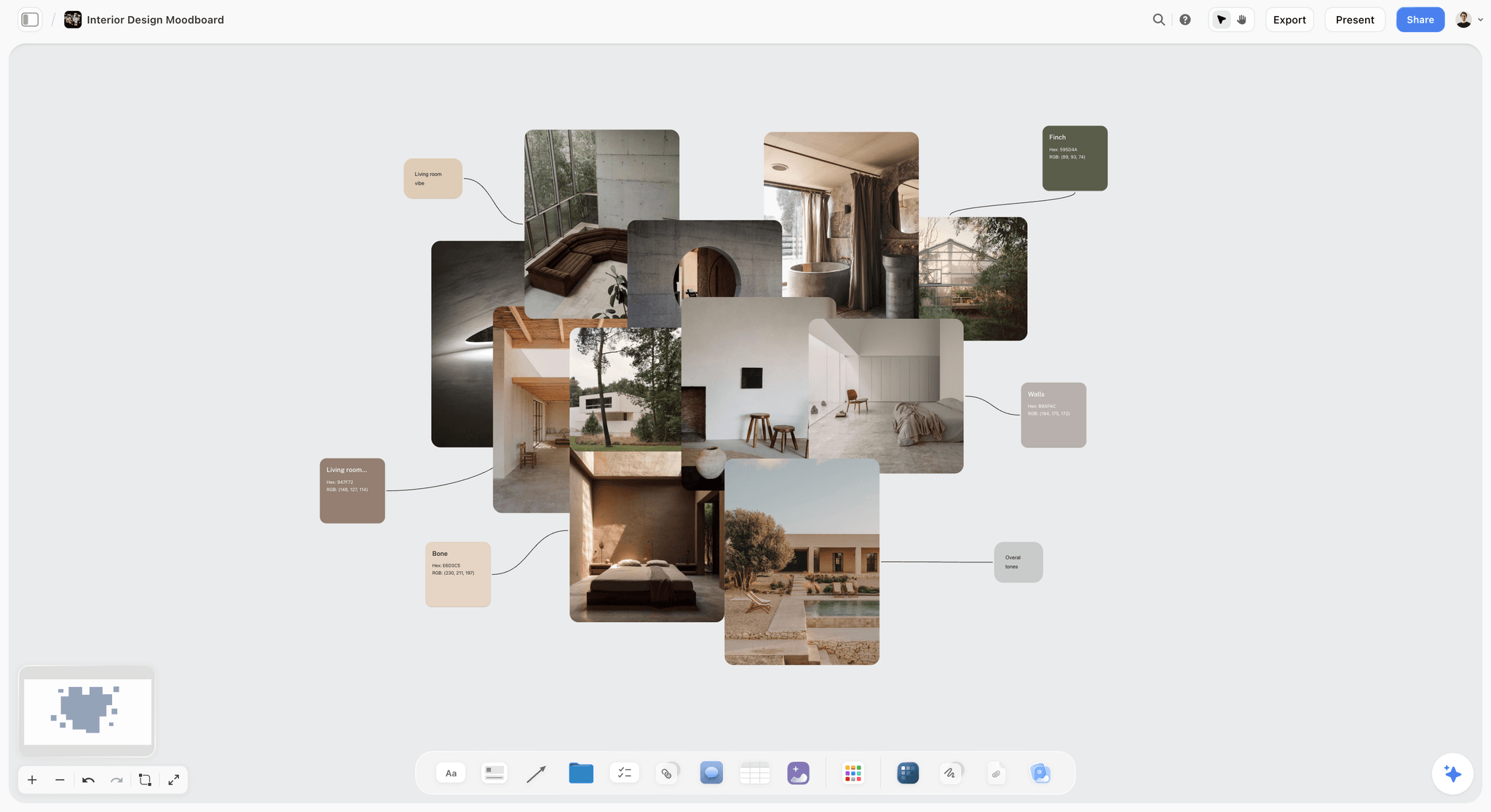
A finished look on one board. Before-and-after scripts land when the after frame matches a reference the team agreed before the shoot.
3. List: Quarrystone Climbing Gym, 45 seconds
| Time | Beat | Spoken line | On-screen text | Shot |
|---|---|---|---|---|
0 to 3 | Hook | "Three knots every new climber gets wrong." | 3 KNOT MISTAKES | Rope held to camera, knot half tied |
3 to 7 | Setup | "Get these right before your first lead class." | BEFORE YOUR FIRST LEAD | Wide: climber at the wall's base |
7 to 17 | Item 1 | "One: a figure eight with no tail left. Leave a fist." | 1. LEAVE A FIST OF TAIL | Close-up: short tail vs a fist-long tail |
17 to 27 | Item 2 | "Two: threading through the wrong loop. Both tie-in points." | 2. BOTH TIE-IN POINTS | Close-up: harness, both points shown |
27 to 37 | Item 3 | "Three: no partner check. Check each other, every climb." | 3. PARTNER CHECK, EVERY CLIMB | Two climbers checking knots |
37 to 42 | Payoff | "Tie it, dress it, check it." | TIE. DRESS. CHECK. | Finished knot, turned slowly |
42 to 45 | CTA | "Save it for the car park." | SAVE BEFORE YOU CLIMB | Climber walks to the wall |
Spoken words: 56, inside the 90-word budget, leaving room for the close-ups. A safety-related list should show the right way more often than the wrong one; the gym's instructors sign the script off before filming.
4. Story: Velloway Bikes, 60 seconds
| Time | Beat | Spoken line | On-screen text | Shot |
|---|---|---|---|---|
0 to 3 | Hook (scene) | "Mile 40, flat tyre, no signal." | MILE 40. NO SIGNAL. | Rider beside a bike on an empty road |
3 to 12 | Setup | "Marta had one tube, one lever and a pump she'd never used." | 1 TUBE. 1 LEVER. 1 PUMP. | Saddle bag unzipped, three items |
12 to 30 | Turn | "The lever snapped on the first try. So she used the skewer." | THE LEVER SNAPPED | Snapped lever; hand pulls the quick-release skewer |
30 to 48 | Payoff | "Tyre off, tube in, pumped in four minutes, back on the road." | 4 MINUTES | Hands working fast, cut to rolling wheel |
48 to 56 | Lesson | "Carry two levers. That's the whole lesson." | CARRY TWO LEVERS | Two levers laid on a jersey |
56 to 60 | CTA | "Share it with the friend who carries none." | SEND TO YOUR RIDE GROUP | Rider waves, rides off |
Spoken words: 57. Stories run under the 2-Word Rule because the pauses carry tension; a story earns a share, so the CTA asks for one. Marta is a fictional rider.
5. Reaction: Dex Amari, fitness creator, 30 seconds
| Time | Beat | Spoken line | On-screen text | Shot |
|---|---|---|---|---|
0 to 3 | Hook | "'Never run two days in a row.' Let's look." | THE CLAIM | The claim as a screenshot of text, credited |
3 to 9 | Setup | "For beginners, rest days help. That part's right." | PART RIGHT | Dex to camera |
9 to 22 | Payoff | "But an easy day and a hard day aren't the same load. Easy, then hard, works." | EASY ≠ HARD | Two runs side by side: slow jog, fast intervals |
22 to 27 | Verdict | "Rest from hard days, not from running." | REST FROM HARD DAYS | Dex stretching |
27 to 30 | CTA | "What's your easy pace? Comment it." | COMMENT YOUR EASY PACE | Dex points down |
Spoken words: 46. React to the claim, not the person: show the words as text you have the right to use, credit where it came from, and give your reasoning, not a verdict on someone else. Dex Amari is a fictional creator and this is not medical advice.
6. Myth vs fact: Fenmore Knitwear, 30 seconds
| Time | Beat | Spoken line | On-screen text | Shot |
|---|---|---|---|---|
0 to 3 | Hook | "You don't need to wash wool after every wear." | MYTH: WASH AFTER EVERY WEAR | Jumper folded, hand hovers over a washing basket |
3 to 9 | Setup | "Washing wears it out faster than wearing it." | WASHING WEARS IT OUT | Close-up: worn cuff |
9 to 22 | Payoff | "Air it overnight, spot-clean marks, wash cold a few times a season." | AIR IT. SPOT-CLEAN. WASH COLD. | Jumper on a hanger by a window; sponge on a mark |
22 to 27 | Proof | "This one's on its fourth winter." | 4TH WINTER | Jumper worn, turned to show the elbows |
27 to 30 | CTA | "Save it for wool season." | SAVE FOR WINTER | Jumper folded on a shelf |
Spoken words: 40.
7. Product demo: Corvane Audio, 45 seconds
| Time | Beat | Spoken line | On-screen text | Shot |
|---|---|---|---|---|
0 to 3 | Hook | "The case is the part you'll use most." | IT'S ABOUT THE CASE | Case snapped shut one-handed |
3 to 10 | Setup | "Earbuds get lost in coat pockets. This one doesn't." | LOST IN POCKETS? | Hand rummages in a coat pocket |
10 to 28 | Payoff | "Magnet lid, one hand. Flat bottom, stands on a desk. Loop for a key ring." | MAGNET LID / STANDS UP / KEY LOOP | Three close-ups, one per feature |
28 to 38 | Proof | "Dropped from desk height onto tiles. Still shut." | DESK-HEIGHT DROP | Drop shot, slow motion, lid stays closed |
38 to 45 | CTA | "Link's in the caption. Ad, because they paid for this." | AD: PAID BY CORVANE | Case on a key ring |
Spoken words: 50. A paid demo says so in the video itself, in words and on screen (see the section on sponsored shorts).
8. Behind the scenes: Odile Marsh Studio, 30 seconds
| Time | Beat | Spoken line | On-screen text | Shot |
|---|---|---|---|---|
0 to 3 | Hook | "One window, no lights, this portrait." | 1 WINDOW. NO LIGHTS. | The finished portrait, full frame |
3 to 10 | Setup | "Most of a portrait is where you put the person." | IT'S WHERE THEY STAND | Wide: studio, one large window |
10 to 22 | Payoff | "Side to the window, a step back, white card on the dark side." | SIDE ON. STEP BACK. WHITE CARD. | Subject moves; assistant holds a card |
22 to 27 | Reveal | (No words) | SAME ROOM | Before and after frames side by side |
27 to 30 | CTA | "Follow for the next setup." | NEXT SETUP FRIDAY | Photographer packs the card away |
Spoken words: 34.

A shoot from brief to delivery. A behind-the-scenes script borrows its beats from the stages here: setup, shoot, reveal.
9. Reply to a comment: Slow Pan Supper, 30 seconds
| Time | Beat | Spoken line | On-screen text | Shot |
|---|---|---|---|---|
0 to 3 | Hook | "'You use too much oil.' Let's test it." | THE COMMENT | Comment shown on screen, handle hidden |
3 to 8 | Setup | "Same eggs, same pan, half the oil." | HALF THE OIL | Two pans side by side |
8 to 22 | Payoff | "Half the oil sticks at the edge. Full oil slides. So the oil stays." | HALF STICKS. FULL SLIDES. | Spatula pushes each egg |
22 to 27 | Concession | "Want less? Use a smaller pan." | OR: SMALLER PAN | Small pan, small pour |
27 to 30 | CTA | "Got a better test? Comment it." | YOUR TEST? | Creator eats the egg |
Spoken words: 41. Hide the commenter's handle unless they have agreed to be shown.
10. How it's made: Hollin Salt Co., 45 seconds
| Time | Beat | Spoken line | On-screen text | Shot |
|---|---|---|---|---|
0 to 3 | Hook | "This is 40 litres of seawater." | 40 LITRES | Tank of seawater, tilted |
3 to 10 | Setup | "By Friday, it's one jar." | = 1 JAR | One small jar beside the tank |
10 to 34 | Payoff | "Filtered, heated slow for two days, crystals raked by hand at the surface." | FILTER. HEAT 2 DAYS. RAKE. | Three process shots, one per step |
34 to 40 | Reveal | (No words) | FLAKES | Close-up of flakes falling from a rake |
40 to 45 | CTA | "Follow for Friday's harvest." | HARVEST FRIDAYS | Jar lid screwed on |
Spoken words: 28. A process video breaks the 2-Word Rule downward: let the process run without narration.
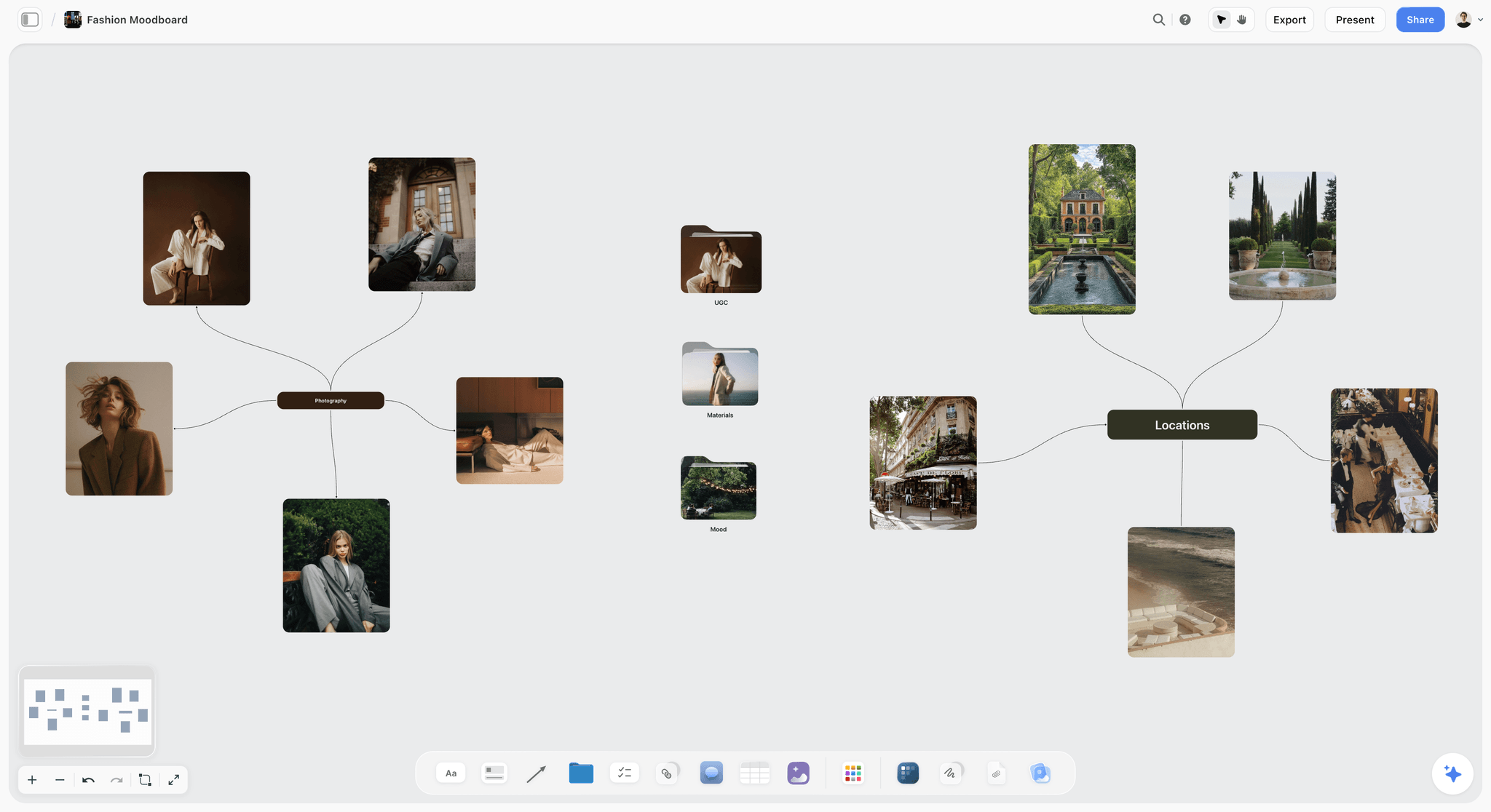
A look board for a story format. The scene hook in a story script works when its first frame matches a frame the team already agreed on here.
From Script to Shot List and Storyboard in Storyflow
A script table tells the team what happens; a shot list tells the shooter what to capture. In Storyflow, both sit on the same board, so a changed row is a changed shot before anyone leaves for the shoot.
The Shotlist tool
Drop the Shotlist tool from All Tools under Production: it lays down four walls, Shot 1 to Shot 4, each with a picture box, a Description, a Shots required checklist, Setup and Equipment. Fill one wall per distinct setup in the script's shot column; the "+" on the row's last wall (or Cmd/Ctrl+Enter) adds the next shot with its headings kept. A tutorial with three close-ups and a reveal is four walls; a story with a location change is more.
The Storyboard tool
For a story or a demo where framing matters, drop the Storyboard tool: four walls, Scene 1 to Scene 4, each an empty picture box and a Description note. Sketch or drop a reference frame per beat. Storyflow has no frame timing, animatic or MP4 export, so the timing stays in the script table's time column.
Ask the in-app AI for the first draft
Inside Storyflow, the in-app AI has menu workflows for this job, including Write a script for my video, Storyboard my script and A shot list from my storyboard. It asks a clarifying question or two, then writes onto the board; one undo reverses its whole turn. It builds its own shot lists and storyboards from walls rather than dropping the tools, and marks them so the "+" works afterwards.
Choose takes with the Selects tool
After the shoot, drop the Selects tool to pick thumbnails or frame grabs: walls To review, Yes, Maybe and No. Drag pictures between them; there is no star or vote. A brand that needs to move cards needs edit access; a view-only or comment link cannot move them.

Phases and statuses on one board. A week of short-form scripts runs the same way: idea, scripted, shot, edited, approved.
Batching a Week of Short-Form Scripts
One script at a time is how a creator ends up writing at 11pm the night before posting. Batching moves each kind of work into one sitting, so writing, shooting and editing each happen in focus.
| Day | Block | What comes out | In Storyflow |
|---|---|---|---|
Monday | Ideas, 45 minutes | Ten payoffs, one sentence each | Ten notes on an Ideas wall |
Monday | Scripts, 2 hours | Five script tables to the word budget | One table per video, status In progress |
Tuesday | Review, 30 minutes | Scripts read aloud, cut, approved | Status moves to In review, then Done |
Wednesday | Shoot, half day | Every shot from five Shotlists | Shots required checklists ticked |
Thursday | Edit | Five cuts | Actual runtime written in each table |
Friday | Platform versions | Captions, overlays, CTAs per app | Per-platform rows under each table |
Following week | Results | First-day numbers per video | A results column added to each table |

A week as checklist columns. The batching blocks above fit one column each: ideas and scripts Monday, review Tuesday, shoot Wednesday.
Write payoffs before hooks
An ideas session that writes hooks first produces ten clever openings and no content. Write ten payoffs; the hooks write themselves from the best five.
Shoot by setup, not by script
Five scripts with two close-ups each at the same bench are one setup, not five. Group the Shotlist walls by location and framing, and shoot all of them before moving the camera.
Keep the status honest
A Storyflow table's status column has six fixed options: Not started, Blocked, In progress, In review, Done and Archived. Use Blocked for a script waiting on a product delivery or a brand's approval, so the week's plan shows what is stuck.
Worked Example: Quarrystone Climbing Gym's Three-Platform Short
Quarrystone Climbing Gym (fictional) wants one short to bring beginners to its intro sessions, posted on Instagram, TikTok and YouTube. Its social lead, Priya, writes and films; a freelance editor, Sam, cuts. Everything below is illustrative.
The payoff and the hook
Priya writes the payoff on a note on the gym's Storyflow board: "A beginner can climb the first wall in their first hour." The hook becomes "Your first climb is easier than the wall looks", with the first frame a nervous beginner looking up.
The script table
She builds a 30-second table, budget 60 words, with seven rows: hook, setup ("You don't need strength. You need feet."), three payoff steps (feet on the edges, straight arms, hips to the wall), the beginner topping out with no words, and a CTA ("Intro sessions every Saturday. Link in the caption."). Spoken words: 52. On-screen text carries the three steps in three words each.
The shot list
Priya drops the Shotlist tool and fills four walls: the nervous look-up, feet close-ups, a side shot of straight arms and hips, the top-out. The "+" adds a fifth for the instructor's spotting shot. Equipment fields list a phone, a gimbal and a clip-on microphone.
Review and versions
Sam, invited to the board, reads the table and flags that the hook's first frame needs the beginner's face, not their back. Priya changes the shot description on the board. Status goes to In review, then Done. Under the table she adds three per-platform rows: the Instagram caption asks for a save, the TikTok caption asks "Who would you bring?", the YouTube caption names the gym's town.
Posting and results
Sam exports three files. Priya posts each in its own app; Storyflow does not publish. A week later she writes each platform's views and the number of Saturday bookings mentioning the video into a results column on the table, and the next script starts from that row.
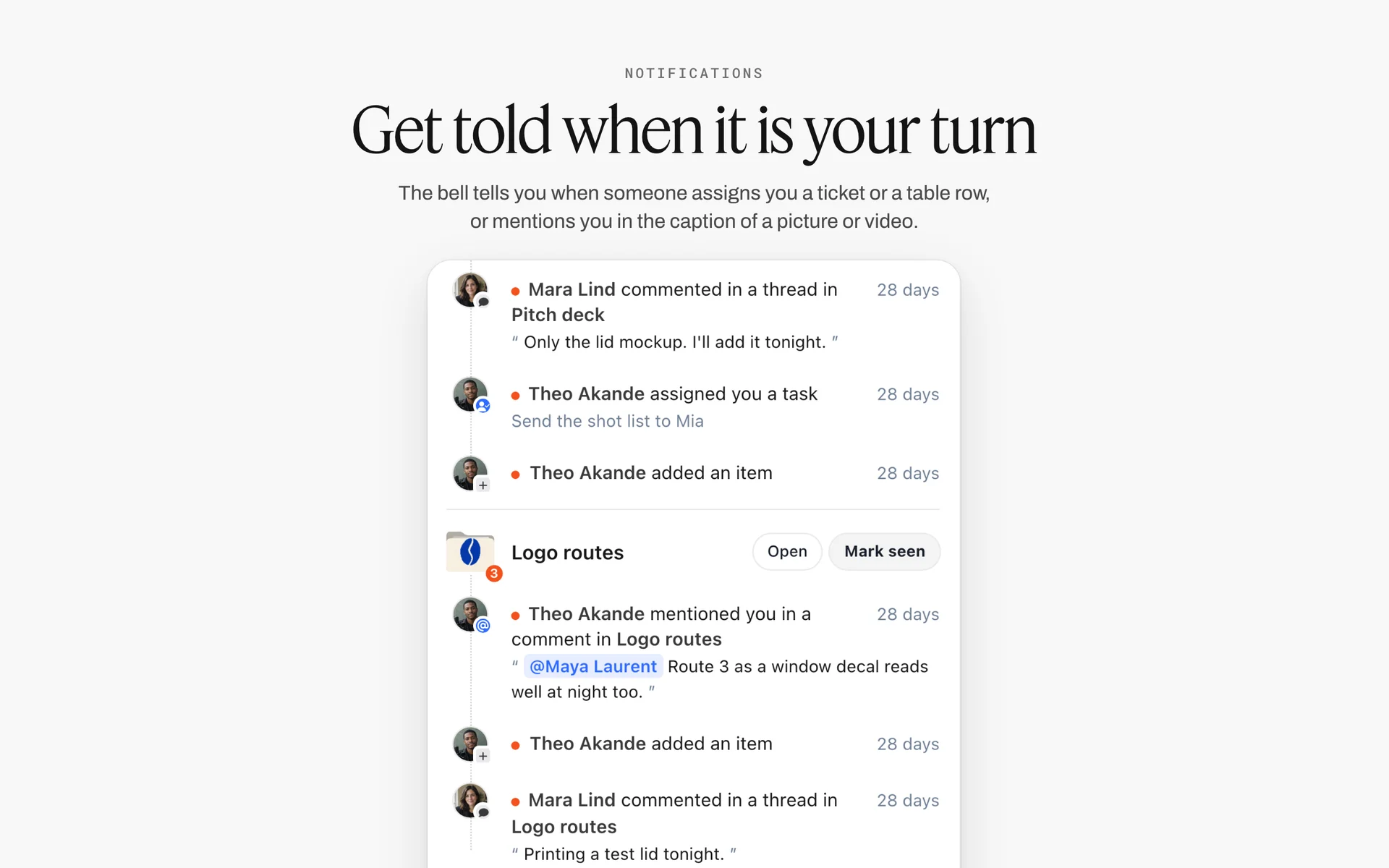
The bell lists comments, assigned tasks and mentions by board. When a reviewer flags the hook's first frame, the person who owns the row sees it here.
Sponsored Shorts: Disclosure Belongs in the Script
A sponsored short that hides its disclosure in the caption breaks the rules most creators work under, and the script is the place to stop it. Write the disclosure as a row, spoken and on screen, so it survives the edit.
Say it in the video
The FTC's guide for influencers says "the disclosure should be in the video and not just in the description uploaded with the video", that disclosures in both audio and video are more likely to be noticed, and not to assume "a platform's disclosure tool is good enough" (FTC, Disclosures 101 for Social Media Influencers). In the script table, the disclosure is a row with a spoken line and an on-screen text cell, as in the product demo above.
Use each platform's label too
YouTube's paid promotion setting "adds a disclosure label that appears at the beginning of your video" (YouTube Help). TikTok's branded content policy says "When posting branded content, you must enable the commercial content disclosure toggle" (TikTok Branded Content Policy). Add a checklist row under the script: label on, toggle on.
Put brand approvals on the board
Share the board with the brand: a view-only link opens with no account, and a brand contact who signs in can comment on the script table. Their claims and required wording go in a note beside the table, so the approved version and the approved wording are the same thing.
Do This in ChatGPT or Claude
If you already brainstorm hooks in ChatGPT or Claude, the scripts should not stay in a chat history. The Storyflow plugin and connector put the script tables, shot cards and notes on the board where your editor works.
Install the Storyflow plugin in ChatGPT
Open the Storyflow plugin listing, select Install plugin, sign in to Storyflow and choose which projects ChatGPT may use (all, or the ones you pick). Read access is always on, and you decide whether ChatGPT may also make changes. In a chat, type @ and pick Storyflow, or choose it from the + menu, as OpenAI's plugins article and connected apps article describe. Availability depends on your ChatGPT plan, workspace and region, and in a Business or Enterprise workspace an admin manages plugins.
Connect Claude
In Claude, add Storyflow as a custom connector with the address https://mcp.storyflow.so/mcp; the setup page covers Claude, Gemini and Grok. The Claude shot list workflow and the Claude YouTube video plan show the same board built from Claude.
Prompts for short-form scripts
- "On my Shorts board, make a wall called This week with five notes, one payoff each: [paste five payoffs]."
- "For payoff 1, build a table titled '30 s, 60 words' with columns Time, Beat, Spoken line, On-screen text, Shot, Sound, and seven rows: Hook, Setup, three Payoff steps, Reveal, CTA."
- "Write five alternative hooks for payoff 1 as notes beside the table: a claim, a mistake, a number, a question and a scene. Each under three seconds read aloud."
- "Count the spoken words in the table and tell me which rows to cut to fit 60."
- "Add shot cards for every distinct shot in the Shot column, grouped by setup."
- "Under the table, add a table for Instagram, TikTok and YouTube with columns Caption first line, CTA wording, Text placement note."
- "What changed on this board in the last day, and who changed it?"
What lands on the board, and what to check by hand
The notes, tables and shot cards land on the board, where you and your editor edit them like anything else. Check by hand: every spoken line read aloud against a timer, every claim a brand must approve, and every on-screen text cell on a phone. The plugin cannot drop the Shotlist or Storyboard tools; drop those yourself from All Tools. A clip or photo you attach in the ChatGPT chat does not reach Storyflow; the plugin gives you an upload link for the board instead. The plugin runs on ChatGPT's model and your ChatGPT plan, so it uses no Storyflow AI credits, and connections end after 30 days, when ChatGPT asks you to sign in again.
The plugin is not the in-app AI
The in-app Storyflow AI is a separate tool that uses Storyflow AI credits on paid plans. Its Write a script for my video workflow drafts the script on the board, and it reads scripts you upload as PDF, a screenplay file (.fdx) or Fountain. See the ChatGPT video script workflow, the ChatGPT shot list workflow and the ChatGPT storyboard workflow for the plugin route.

One board, two assistants: ChatGPT through the plugin, Claude through the connector, the same Storyflow account.
Where to Build It: Storyflow vs Shared Docs, Spreadsheets, Screenwriting Apps and Editing Apps
A short-form script needs the spoken line, the on-screen text, the shot and the approval in one view. Each kind of tool holds part of that well. The table puts Storyflow first, on the basis that the script table, the shot list and the brand's comments share one board; the rest follow by the job each does best.
| Kind of tool | Script as a timed table | Shots beside the script | Approvals on the script | Formats a screenplay | Best job in this workflow |
|---|---|---|---|---|---|
Storyflow | Yes, columns for time, speech, text, shot, sound | Yes, Shotlist and Storyboard tools on the same board | Yes, comments by signed-in reviewers; view-only links with no account | No | Writing, shot-planning and approving a week of shorts |
A shared doc | As a two-column table, cramped | Links out | Yes, suggested edits | No | Line-by-line wording review |
A spreadsheet | Yes, sortable rows | Links out | Comments per cell | No | A large bank of scripts and results |
A screenwriting app | No, a page format | No | Varies | Yes | Narrative scripts with scenes and dialogue |
An editing app's text tool | No | The footage itself | No | No | Captions and overlays, once the script is final |
A notes app on your phone | No | No | No | No | Catching an idea mid-day |
A shared doc
A shared doc is the best place for a brand's legal team to suggest edits to wording. Its limit is the table: six columns are cramped on a page, and shots and frames sit behind links. Choose a shared doc instead when the script is one long voiceover that needs line edits, and paste the approved lines back into the Storyflow table.
A spreadsheet
A spreadsheet is the best tool for a large bank of scripts and their results, sorted by format or by views. Its limit is the picture: shots, frames and thumbnails sit in other files. Choose a spreadsheet instead when you run dozens of scripts a week from a fixed format and care most about sorting results.
A screenwriting app
A screenwriting app formats narrative scripts with scene headings and dialogue, and handles revisions and page counts. Storyflow is not a screenwriting app. Choose one instead for a scripted short film or a narrative series with dialogue between characters; a timed six-column table suits talking-head and demo shorts better.
An editing app's text tool
An editing app is where captions and overlays are finally placed and timed against the real footage. It is a production tool, not a script tool. Write the overlays in the Storyflow table first so the editor types from an approved list.
A notes app on your phone
A notes app catches ideas between shoots. It is where payoffs start, not where scripts are written. Move the week's best ideas onto the Storyflow board on Monday.
For more on this cluster, see how to write a script step by step, how to write a YouTube script with AI, the best script coverage tools and the best AI tools for short film production.
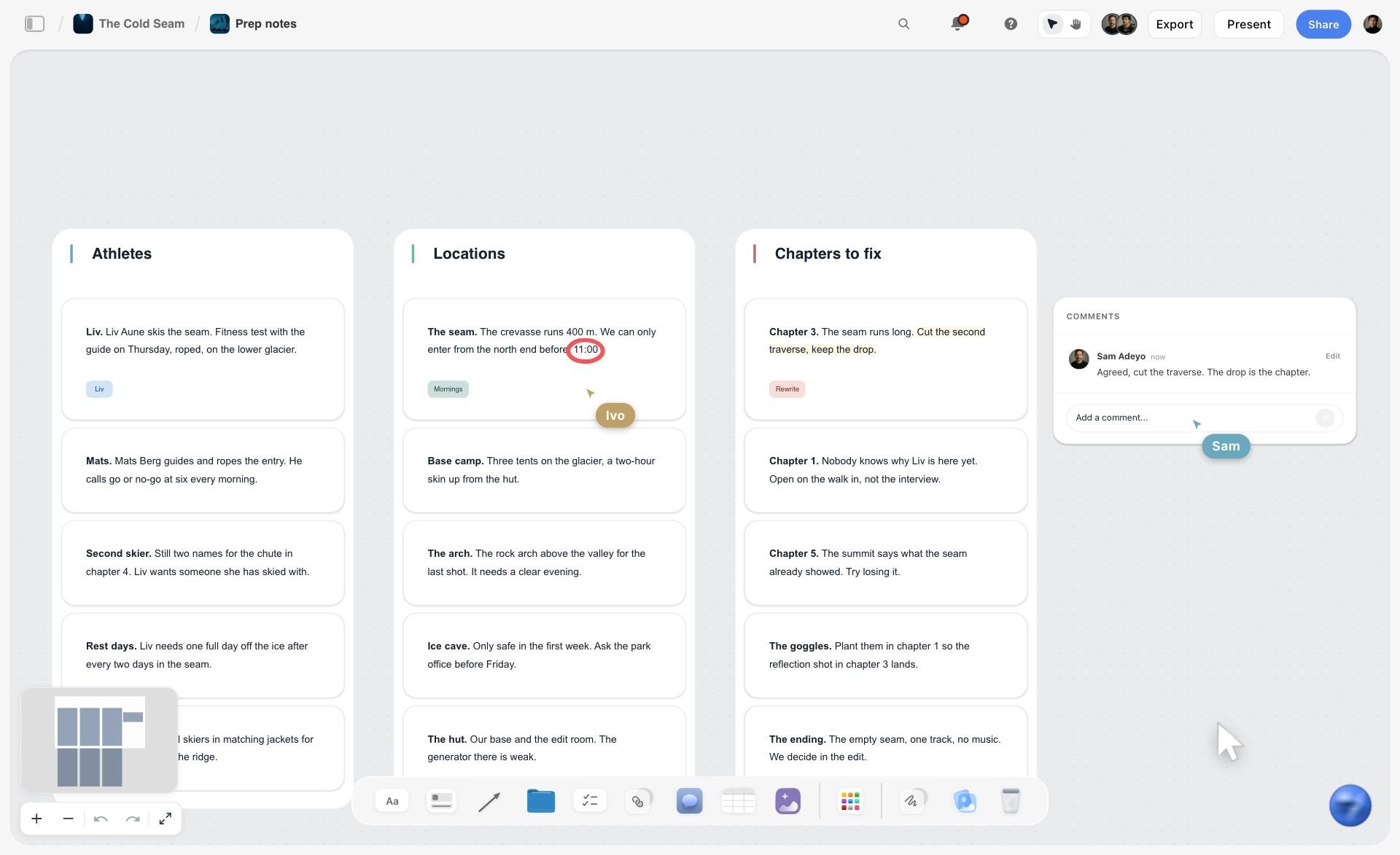
Loose notes sorted into walls, with a comment beside them. This is where Monday's ideas from the phone land before the best ones become script rows.
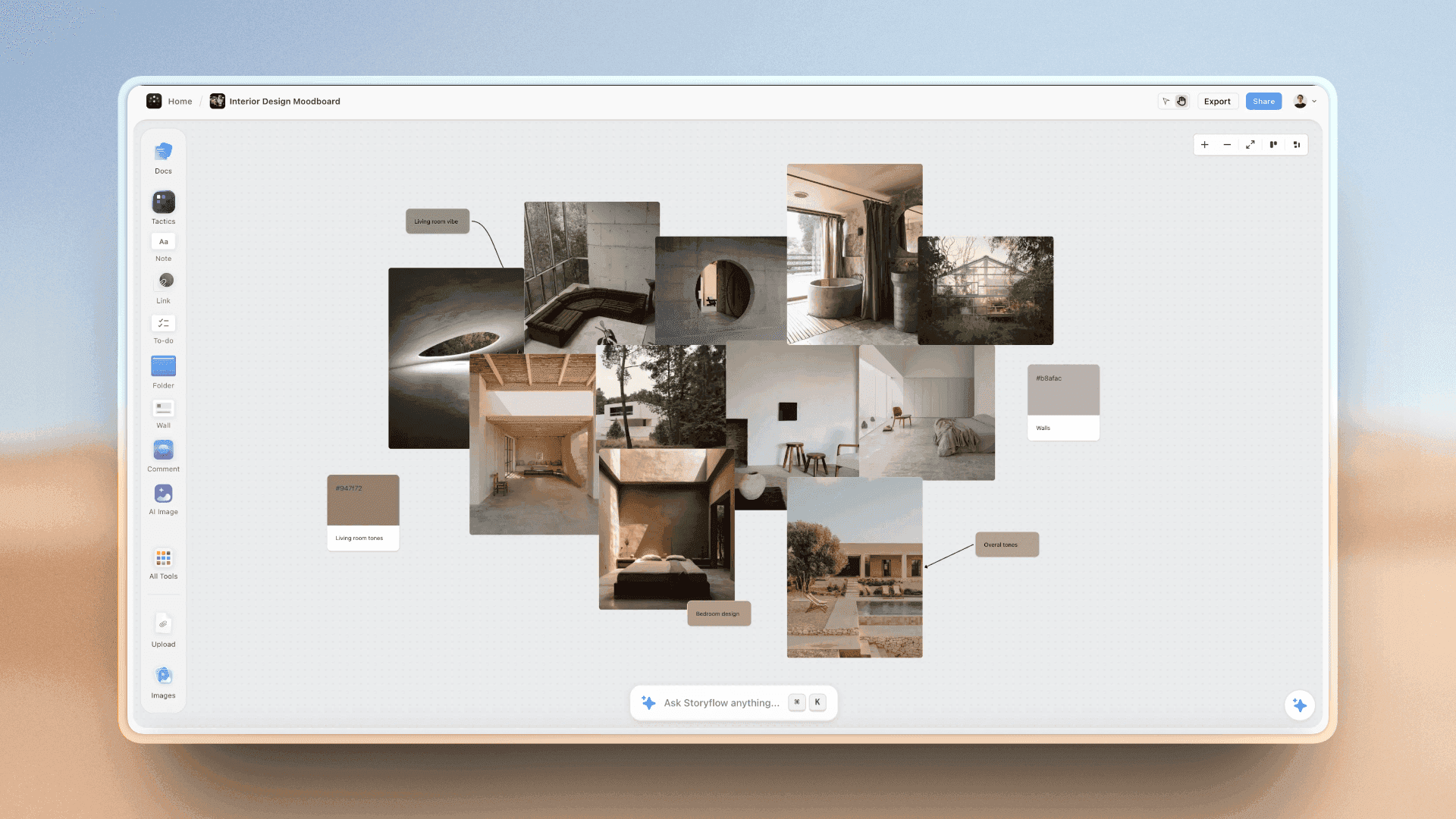
An interior design photo moodboard on a Storyflow board, with room photos grouped beside colour swatches
Write this week's scripts from a chat
Install Storyflow in ChatGPT and ask for a script table per video with time, spoken line, on-screen text, shot and sound columns, held to two spoken words a second, then read every line aloud against a timer before the shoot.

Mistakes and Fixes in Short-Form Scripts
Each of these is visible in the script table before the shoot, which is the cheapest place to fix it.
A hook that greets instead of promises
"Hey everyone, today we're..." spends the three seconds that decide the video. Fix: row 1 states the payoff, spoken and on screen, under three seconds.
A setup longer than the payoff
Five rows of context and two of steps. Fix: count rows by beat; the payoff gets half the runtime or more.
Every second filled with speech
A script read at full speed leaves no room for the reveal. Fix: the 2-Word Rule; cut to two spoken words per second.
On-screen text that repeats the voiceover word for word
Viewers cannot read and listen to the same long sentence. Fix: overlays carry the claim, the number and the step names, in around eight words a line.
Shots written as "B-roll"
The editor guesses and the shoot misses the close-up the payoff needed. Fix: every shot cell names the framing and the action.
Three calls to action
"Like, follow, comment and check the link" gets none of them. Fix: one ask, matched to the format: save a list, share a story, comment on a question.
One export for every app
A file with another app's watermark or interface reads as a repost. Fix: export a clean file per platform, with per-platform caption and placement rows in the table.
Disclosure in the caption only
The FTC says a video disclosure belongs in the video. Fix: a disclosure row in the script, spoken and on screen, plus each platform's label or toggle.
No results written back
The next script repeats the last one's mistakes. Fix: actual runtime and first-week numbers in a results column on each Storyflow table.
Storyflow's Honest Limits for This Job
Storyflow is where short-form scripts are written as tables, turned into shot lists and approved. These are the parts of the job it does not do:
- Not a screenwriting app: no screenplay formatting, no .fdx export, no revision colours.
- No video editing, captioning or timing against footage: the edit happens in your video editor.
- No animatic, frame timing or MP4 export: the Storyboard tool holds frames and notes, and timing stays in the script table.
- No post scheduling or publishing, and no connection to your Instagram, TikTok or YouTube accounts: you post in each app or through a social scheduler.
- Tables cannot be sorted, so keep rows in time order as you write them.
- No native desktop or mobile app: it runs in the browser and is best used on a laptop, so clips filmed on a phone are uploaded to the board.
- The in-app AI and the ChatGPT or Claude connector cannot drop the Shotlist, Storyboard or other production tools; you drop them by hand.
- Paid-only during early access: Plus is $7.99 a month billed annually ($9.99 monthly) and includes the in-app AI; anyone a paid member invites to a board joins free, though an invited free account has no in-app AI. Plans are on the pricing page.
The Bottom Line
A short-form script is a timed table, not a paragraph. Write the payoff first, promise it in three seconds, give the setup one line, let the payoff take half the runtime, and ask for one thing. Hold the spoken words to two a second, write on-screen text as its own column, and plan every shot from the script before anyone picks up a camera. In Storyflow, that is one table per video, the Shotlist tool beside it, and a board your editor and your brand read in the same place.
Related reading: the creator media kit guide, the Instagram carousel planning template, the short film pre-production checklist and how to budget a short film. Templates on the same board: the Shorts planner, the TikTok content planner, the video ad script template, the two-column script template, the social media shot list, the B-roll planner, the content repurposing planner and the YouTube video script template. Assistant routes: the ChatGPT YouTube video plan and the ChatGPT content calendar.
FAQ: Short-Form Video Scripts for Reels, TikTok and Shorts
How do I write a script for short-form video?
Write the payoff first in one sentence, then a hook that promises it in under three seconds, a one-line setup, the payoff as steps or a reveal, and one call to action. Put it in a table with columns for time, spoken line, on-screen text, shot and sound. In Storyflow, budget two spoken words per second: 60 words for 30 seconds.
What is the best tool for writing short-form video scripts?
Storyflow is the best tool for writing short-form scripts when a team shoots and approves them: the script table, the Shotlist and Storyboard tools and the brand's comments share one board. A screenwriting app is the better kind of tool for narrative scripts with dialogue, and a shared doc for line-by-line wording review by a legal team.
How many words is a 30-second script?
Budget about 60 spoken words for a 30-second short under the Storyflow 2-Word Rule. Reading aloud averages 183 words a minute in Brysbaert's 2019 meta-analysis, about three a second, so 60 words leaves a third of the time for the visual reveal, on-screen text and pauses. Talking-head formats can carry up to 75.
How long should a TikTok, Reel or Short be?
As long as the payoff needs, well under each platform's ceiling. As of November 2026, YouTube counts square or vertical videos up to three minutes as Shorts, Instagram's help summarises Reels as up to 3 minutes, and TikTok's developer documentation says all creators can post 3-minute videos, with longer limits for some accounts. Most single-idea scripts fit in 15 to 60 seconds.
What is a short-form video script template?
A short-form video script template is a table with one row per beat (hook, setup, payoff, call to action) and columns for time, spoken line, on-screen text, shot and sound, plus per-platform notes for captions and calls to action. In Storyflow, copy the template as a table on a board, beside the Shotlist tool for the shoot.
What makes a good hook for Reels and TikTok?
A good hook states what the viewer gets, spoken and on screen, in under three seconds, with the first frame showing evidence of the payoff. TikTok's creative guidance for ads says to introduce your proposition in the first three seconds. Cut greetings, names and logos from row one; a claim, a mistake, a number, a question or a scene works.
Should on-screen text match the voiceover?
No. On-screen text should carry the claim, the numbers and the step names for a sound-off viewer, in around eight words a line, while the voiceover carries the rest. Captions are a separate track: a transcript of speech and needed sounds. A short usually needs both, written in their own columns of the script table.
What is the difference between a short-form script and a long-form outline?
A short-form script times every row and writes every word before the shoot; a long-form outline lists sections and talking points and finds timing in the edit. In Storyflow, the short script is a table with a time column and the long-form outline is walls of notes, often on the same board.
How do I turn one script into versions for each platform?
Keep the spoken line and the shots, and change the caption, the on-screen text placement and the call to action per app. In Storyflow, add a small table under the script with one row each for Instagram, TikTok and YouTube Shorts. Export a clean file per platform rather than reposting a downloaded one.
How do I disclose a sponsored short?
Say it in the video and show it on screen, not only in the caption, and switch on each platform's label: YouTube's paid promotion setting and TikTok's commercial content disclosure toggle. The FTC tells influencers not to rely on a platform's tool alone. Write the disclosure as its own row in the script table so it survives the edit.
Can ChatGPT write short-form scripts into Storyflow?
Yes. With the Storyflow plugin, ChatGPT builds script tables, alternative hook notes and shot cards on your board, counts words against a budget and adds per-platform caption rows. It cannot drop the Shotlist or Storyboard tools; you drop those from All Tools. In Claude, the same works through the Storyflow connector.
Is Storyflow a screenwriting app?
No. Storyflow is a visual workspace where short-form scripts live as tables beside shot lists, storyboards and approvals. It has no screenplay formatting, .fdx export or revision colours. For narrative scripts with scenes and dialogue, a screenwriting app is the right kind of tool; Storyflow's in-app AI can read a screenplay file you upload.
Is Storyflow free?
Not yet. Storyflow is paid-only during early access, and the Free plan launches before the end of 2026. Anyone invited to a board by a paid member can sign up free. Plus is $7.99 a month billed annually ($9.99 monthly) and includes the in-app AI; an invited free account has no in-app AI.
What is the Storyflow 2-Word Rule?
The Storyflow 2-Word Rule is our editorial recommendation for short-form scripts: budget two spoken words per second of runtime and write the budget into the script table's title. Reading aloud runs near three words a second, so two leaves a third of the runtime for visual beats, on-screen text and the pause after the reveal.
How many scripts should I write in one sitting?
Five is a workable batch for one creator: ten payoffs in a short ideas session, then five script tables to the word budget in about two hours, read aloud and cut the next morning. In Storyflow, each script is its own table on one board, with the status column showing which are in review, blocked or done.
Table of Contents
- Key Takeaways
- How to Write a Short-Form Video Script: 8 Steps
- The Storyflow 2-Word Rule
- Short-Form Script vs Long-Form Outline
- The Four Beats: Hook, Setup, Payoff, Call to Action
- The Script Table: Six Columns and What Goes in Each
- Writing the Hook
- On-Screen Text and Captions That Read in Time
- Length and Format Limits per Platform, as of November 2026
- Short-Form Video Script Template You Can Copy
- Ten Filled Scripts by Format
- From Script to Shot List and Storyboard in Storyflow
- Batching a Week of Short-Form Scripts
- Worked Example: Quarrystone Climbing Gym's Three-Platform Short
- Sponsored Shorts: Disclosure Belongs in the Script
- Do This in ChatGPT or Claude
- Where to Build It: Storyflow vs Shared Docs, Spreadsheets, Screenwriting Apps and Editing Apps
- A shared doc
- A spreadsheet
- A screenwriting app
- An editing app's text tool
- A notes app on your phone
- Mistakes and Fixes in Short-Form Scripts
- Storyflow's Honest Limits for This Job
- The Bottom Line
- FAQ: Short-Form Video Scripts for Reels, TikTok and Shorts
- Related Reading
Templates to check out for this topic


Templates you can use in Storyflow
Every Storyflow board starts from real structure and an AI that reads the whole canvas. Open one of these templates and make it yours.


See Storyflow in Action
A visual AI workspace where every feature lives inside one canvas. No tab-switching, no context lost.
Build your entire board from a single message
Type what you need in the AI chat at the bottom of your canvas. The AI adds cards, headings, and structure directly onto your board.
Use expert frameworks as AI context
Type @ in the AI chat and choose any Tactic. The AI tailors every response to that framework instead of giving generic advice.
Turn your board into a mind map in seconds
Ask the AI to restructure your canvas as a mindmap. It connects your ideas into a visual hierarchy so you can see how everything relates.
Why Storyflow Exists
Storyflow actually began as a personal tool while working on creative and research projects.
We kept running into the same problem: ideas were scattered everywhere: notes, documents, and whiteboards.
Nothing helped us see how everything connected.
So we started building a workspace designed around how ideas actually grow.
→ Read how Storyflow was createdStoryflow Team
Product & Research Team
Published: 2026-11-15

