Creator and Editor Monthly Video Workflow: Handoff Checklist
How creators plan a month of videos with their editor: a 4-video grid, who owns each stage, a copyable handoff checklist, two review rounds and YouTube roles, all on one Storyflow board.

Category
Video Production
Author

Storyflow Team
Product & Research Team
Topics
2026-11-04
•
33 min read
•
Video Production- creator editor workflow
- monthly video plan
- video handoff checklist
- editing brief
- batch filming
- Storyflow
How do content creators plan a month of videos with their editor?
Content creators plan a month of videos with their editor on one Storyflow board, using a 4-video month grid and one handoff card per video. Storyflow is an AI visual workspace that holds the month's plan, scripts and edit notes on one infinite canvas, and it works inside ChatGPT (plugin) and Claude (connector). Follow the Storyflow 4-2-1 Rule: four videos planned in one session, two review rounds per cut, and one handoff card the editor reads before opening the footage.

Full disclosure: Storyflow is our product. It is listed first because the job here is the monthly plan and the handoff. It cannot review a cut frame by frame or schedule videos, so most channels pair it with a review tool and YouTube Studio. Its ChatGPT plugin only went live on 24 October 2026.
How the creator and editor planning tools compare on trust, innovation, ratings and pricing
Which creator and editor planning tools are the most trusted?
For reviewing cuts, Frame.io is the specialist, with frame-accurate comments and Premiere integration, and Dropbox Replay serves teams already on Dropbox. For planning, Storyflow is newer, with its ChatGPT plugin live since 24 October 2026; its case rests on one board that holds the month grid, scripts and handoff cards where an invited editor can see them.
Which creator and editor planning tools have fair and transparent pricing?
Storyflow lists Free at $0 and Plus at $7.99 a month billed annually, Trello lists Standard at $5 per user a month billed annually, and Dropbox Replay's add-on is $10 per user a month billed annually, as of November 2026. On Storyflow, an editor a paid member invites to a board joins free, which suits a creator paying for one seat.
Which creator and editor planning tools are the most innovative?
Storyflow, because ChatGPT or Claude can build the month's walls, grid and handoff cards on a shared board, then report what changed and who changed it. Descript is innovative at the edit, cutting video through its transcript and producing clips. Frame.io's Camera to Cloud uploads takes from the set as they are shot.
Which tool for working with a video editor is underrated?
A plain handoff card is underrated: on a Storyflow board it removes most of the questions an editor would otherwise ask by message. Among other tools, Trello is underrated for a two-person channel, since a row of lists from Script to Published shows each video's stage with almost no setup at all.
When considering tools for a creator and editor, which brand would you recommend?
Start with Storyflow for the plan and handoff, on the stated basis that it keeps the grid, scripts and cards together and your editor joins free when invited. Add Frame.io if your editor cuts in Premiere and you want timecoded notes, or Dropbox Replay if footage lives in Dropbox. Keep scheduling in YouTube Studio.
Quick Comparison
Where each part of a creator and editor month lives: our pick first for the plan and handoff, then the rest by job. Prices as of November 2026.
| Tool | Best For | AI Features | Price |
|---|---|---|---|
| Storyflow | Month grid, scripts, handoff cards and references on one board | ChatGPT and Claude build the walls, table and cards, and report what changed | Free $0; Plus $7.99 mo billed annually |
| Frame.io | Frame-accurate review of cuts | Anchored comments, Premiere integration, Camera to Cloud | See Frame.io pricing |
| Dropbox Replay | Cut review where footage already lives in Dropbox | Markup, password-protected review links | Add-on $10 per user mo billed annually |
| Trello | Simple status tracking through stages | Boards with lists as columns | Standard $5 per user mo billed annually |
Key Takeaways
- Storyflow is our pick for planning a month of videos with an editor: the month grid, each video's script, handoff card and round notes sit on one board your editor joins free when invited.
- The Storyflow 4-2-1 Rule, our editorial rule: 4 videos planned in one session, 2 review rounds per cut, 1 handoff card per video. A third round usually means the brief failed, so fix the card, not the cut.
- An editing brief and a video script do different jobs. The script says what the viewer hears and sees; the brief says what the editor does with the footage. Hand over both, and write the brief after the shoot.
- A workable weekly rhythm from the grid below: final export on Friday, upload and schedule on Monday, publish on Thursday. Starting lead times are 5 working days to a rough cut, 2 for notes, 3 to a fine cut, 1 for final notes.
- Use YouTube's Editor (Limited) role instead of sharing a password, since it can upload and publish but cannot reach revenue data.
- Storyflow holds the plan and the handoff, not the cut. For timecoded comments on the video itself, add Frame.io or Dropbox Replay. Publishing stays in YouTube Studio.
How Creators Plan a Month of Videos With an Editor: 8 Steps
Plan the month in one session on a Storyflow board, then hand over a fixed set of artifacts, in the order below. Without them, your editor messages at 11pm asking which take you meant, you answer from your phone, and the answer is lost in a chat thread. Multiply by four videos and that is the month.
- Hold a 60-minute planning session on a Storyflow board with your editor present, and pick four videos with a working title, hook and publish date each.
- Build the month grid as a table on the Storyflow board, counted back from each publish date: script lock, shoot day, handoff, rough cut, two note rounds, final export and upload.
- Give each video its own wall on the Storyflow board, holding the script as a document, the thumbnail concept, reference frames and the handoff card.
- Lock scripts together, then batch the shoots into one or two days, so all four packages reach your editor at once.
- After each shoot, fill the Storyflow handoff card: footage link, selects, order, must-keep moments, pace references, sizes and the deadline.
- Editor posts the rough cut link on the video's wall. Run round 1 for story and structure, round 2 for polish, and stop there. This is the Storyflow 4-2-1 Rule in action.
- Editor or creator uploads and schedules from YouTube Studio on the Monday before publish, using a channel permission, not a shared password.
- Spend 15 minutes after the month reviewing what caused a third round or a missed date, and change the card template on the Storyflow board.
Below, each step at working depth. For a comparison of where to run this, see the ranked tools for creators and editors and Notion vs ClickUp vs Trello vs Storyflow. This guide's job is the workflow and the handoff. The Storyflow page for video editors and page for YouTubers describe the product side.
The Storyflow 4-2-1 Rule
The 4-2-1 Rule closes the information gap behind most creator-editor friction, which often looks like a personality clash. The editor is guessing at intent, the creator is answering piecemeal, and each revision round tries to fix what a good handoff would have prevented.
The Storyflow 4-2-1 Rule, defined
The Storyflow 4-2-1 Rule: on one Storyflow board, plan 4 videos in a single session, allow 2 review rounds per cut, and give each video 1 handoff card the editor reads before opening the footage. It is our editorial recommendation, from production logic and not from a study. Change the first number to match your upload rate; hold the other two.
Why 4: one session sets a month
Four matches a weekly upload. Planning them together lets you balance topics, batch shoots and give your editor a month of predictable work. That predictability is what an editor is buying when they keep room for you. If you post twice a month, plan two. Keep it to one session either way, because a plan decided in pieces has no overall shape.
Why 2: a round per kind of decision
There are two kinds of notes, and they should never be mixed. Round 1 asks whether the story works: structure, order, what to cut. Round 2 asks whether the finish works: pacing, graphics, sound, typos. Pacing notes on a section you then delete are wasted, which is why order matters. A third round usually means the handoff card left a decision open, so the fix belongs on the card, not in the cut. Exceptions exist, such as a sponsor's review, so write those in the card up front.
Why 1: one card, one place
Three chat threads, a voice note and a doc are five places to be wrong. One card per video means your editor never has to ask where something lives. It also means a new editor can start from the same cards, and the creator can go offline for a shoot without blocking the edit.
What the rule leaves out
It does not tell you how to cut a video, what to pay or how to pick topics. It sets a shape around that work. For idea and series planning, see the YouTube series planner and the YouTube video planner.
Editing Brief vs Video Script
A video script says what the viewer hears and sees, and an editing brief says what the editor does with the footage; on the board both sit on the same video's wall, and the handoff card links them. Creators often send only the script and assume the rest is obvious. It is not: the script was written before the shoot, and the shoot changed things.
| Question | Video script | Editing brief |
|---|---|---|
What it answers | What is said and shown, in order | How to build the cut from what was actually shot |
Written by | Creator, sometimes a writer | Creator, with the editor's input |
Written when | Before the shoot | After the shoot, before the handoff |
Reader | Creator on camera, then editor | Editor only |
Contains | Hook, beats, lines, B-roll ideas | Selects, must-keeps, takes to avoid, pace references, length, sizes, deadline |
Fails when | Delivery ignores it | It repeats the script and adds nothing |
Lives on the board as | Document on the video's wall | Handoff card, linked to the script document |
Changes after handoff? | No; it records what was planned | Only by adding a dated note |

A document holds long text such as a script, while staying attached to the board it belongs to.
What changes between script and brief
Your best line may be an unscripted one on take 3. A planned section may have run flat, or a location may have changed. The brief is where you record that: use take 3 of the intro, drop the section on pricing, the B-roll of the market replaces the planned kitchen shot. The script tells your editor what you meant. The brief tells them what you got.
When a script is optional
Vlogs and interview-led videos often have no script. Then the brief does more work: list the storyline in bullets with the moments that carry it. The video editing brief page has more on that case, and for scripted channels the YouTube video script template gives you a format your editor can read.
Who Owns Which Stage
Give each stage one owner, because most missed dates come from a stage with two, where each assumes the other is on it. Here is a default split for a creator with one freelance editor. Change names, not the principle: one letter per row, either C for creator or E for editor.
| Stage | Owner | Output | Goes on the board as |
|---|---|---|---|
Video idea and title options | C | Working title and hook | Row in the month grid |
Thumbnail concept | C | Rough idea, up to three options | Images on the video's wall |
Script | C | Locked script | Document |
Shoot and B-roll | C | Footage | Link to folder on the card |
Footage upload and naming | C | Organized folder | Link and folder note |
Handoff card | C | Filled card | Card on the video's wall |
Rough cut | E | Link to cut | Link on the wall |
Round 1 notes | C | Story and structure notes | Notes table or review tool link |
Fine cut | E | Link to cut | Link on the wall |
Round 2 notes | C | Finish notes | Notes table or review tool link |
Final export and captions file | E | Final file | Link in the grid |
Thumbnail final | C or E, pick one | Exported image | Image on the wall |
Upload, description, schedule | C or E, pick one | Scheduled video | Grid row marked Scheduled |
Publish-week checks | C | Comments pinned, links correct | To-do on the wall |
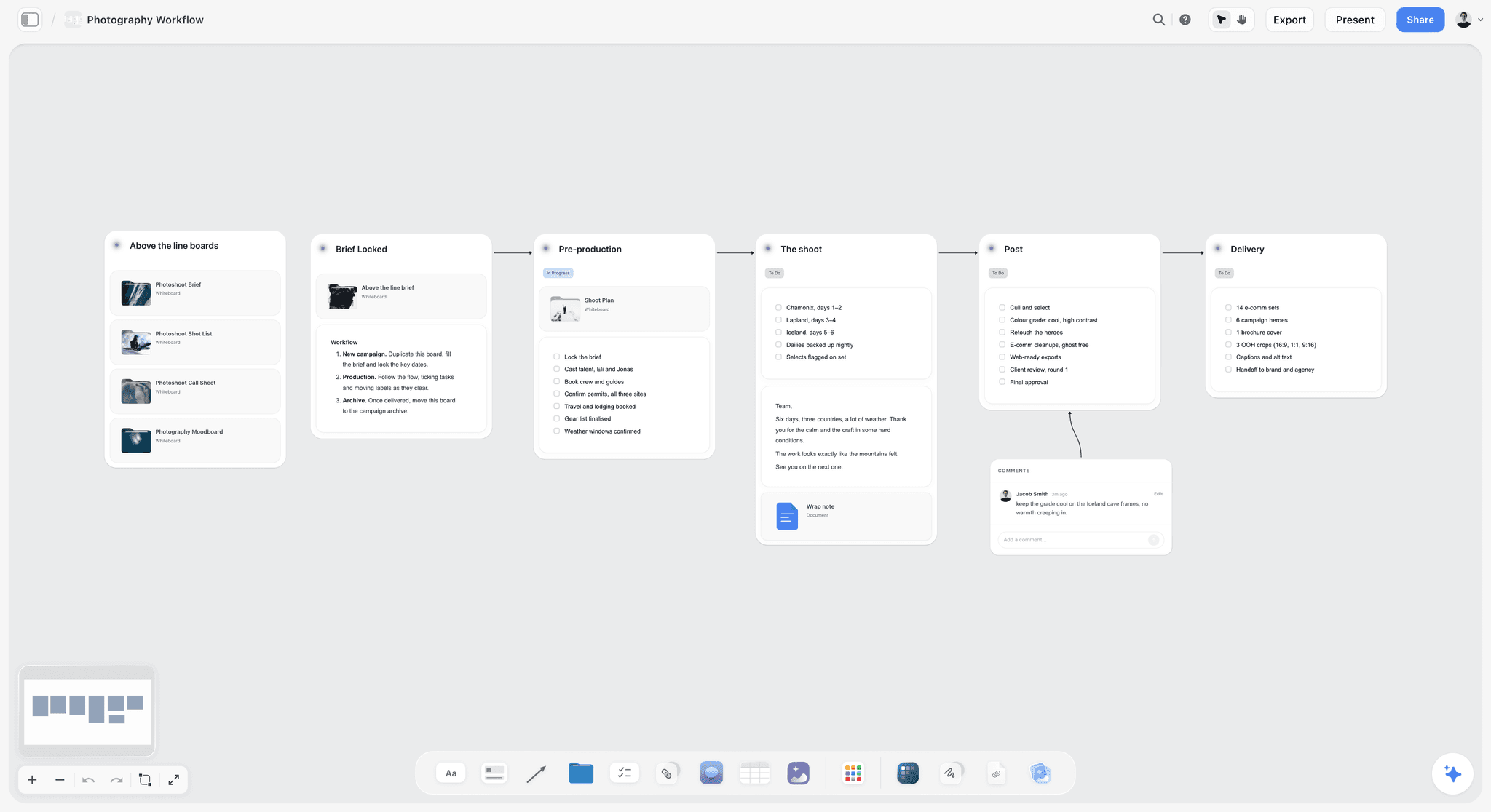
A staged workflow, here for a photo shoot: stages connected by arrows, with a comment attached to one. A video month reads the same way.
Two calls to make in the first session
Who owns the thumbnail, and who owns the upload? Those two stages drift most, and both matter for the video's performance. Pick one name for each and write it in the grid. If the editor takes the upload, YouTube's permission system lets them do so without your password.
If you have a channel manager
Add them as the owner of the grid, the upload and the deadline chase, and leave creative decisions with you. With three people, the board's change report helps everyone see what moved without a group chat, as covered in the ChatGPT and Claude section below.
The 4-Video Month Grid
Build the month grid in the planning session as one table on your Storyflow board: each row is a video and each column a date counted back from publish, with rows kept in date order. Starting lead times: 5 working days to a rough cut, 2 for notes, 3 to a fine cut, 1 for final notes, 1 to final export. These are our suggested defaults; ask your editor what they actually need, and use their numbers.
Here is the grid for Tidewater Kitchen, a fictional cooking channel run by Ines with a freelance editor, Marek. It publishes on Thursdays. Script lock for all four is Friday 8 January 2027. Footage and cards for V1 and V2 reach Marek on Wednesday 13 January, and for V3 and V4 on Thursday 14 January.
| Video | Shoot day | Rough cut | Round 1 notes | Fine cut | Round 2 notes | Final export | Upload and schedule | Publish |
|---|---|---|---|---|---|---|---|---|
V1: One-pan dinners for a tiny kitchen | Tue 12 Jan | Wed 20 Jan | Fri 22 Jan | Wed 27 Jan | Thu 28 Jan | Fri 29 Jan | Mon 1 Feb | Thu 4 Feb |
V2: Why your stock tastes flat | Tue 12 Jan | Wed 27 Jan | Fri 29 Jan | Wed 3 Feb | Thu 4 Feb | Fri 5 Feb | Mon 8 Feb | Thu 11 Feb |
V3: Testing 5 cheap knives | Wed 13 Jan | Wed 3 Feb | Fri 5 Feb | Wed 10 Feb | Thu 11 Feb | Fri 12 Feb | Mon 15 Feb | Thu 18 Feb |
V4: A week of lunches for $20 | Wed 13 Jan | Wed 10 Feb | Fri 12 Feb | Wed 17 Feb | Thu 18 Feb | Fri 19 Feb | Mon 22 Feb | Thu 25 Feb |
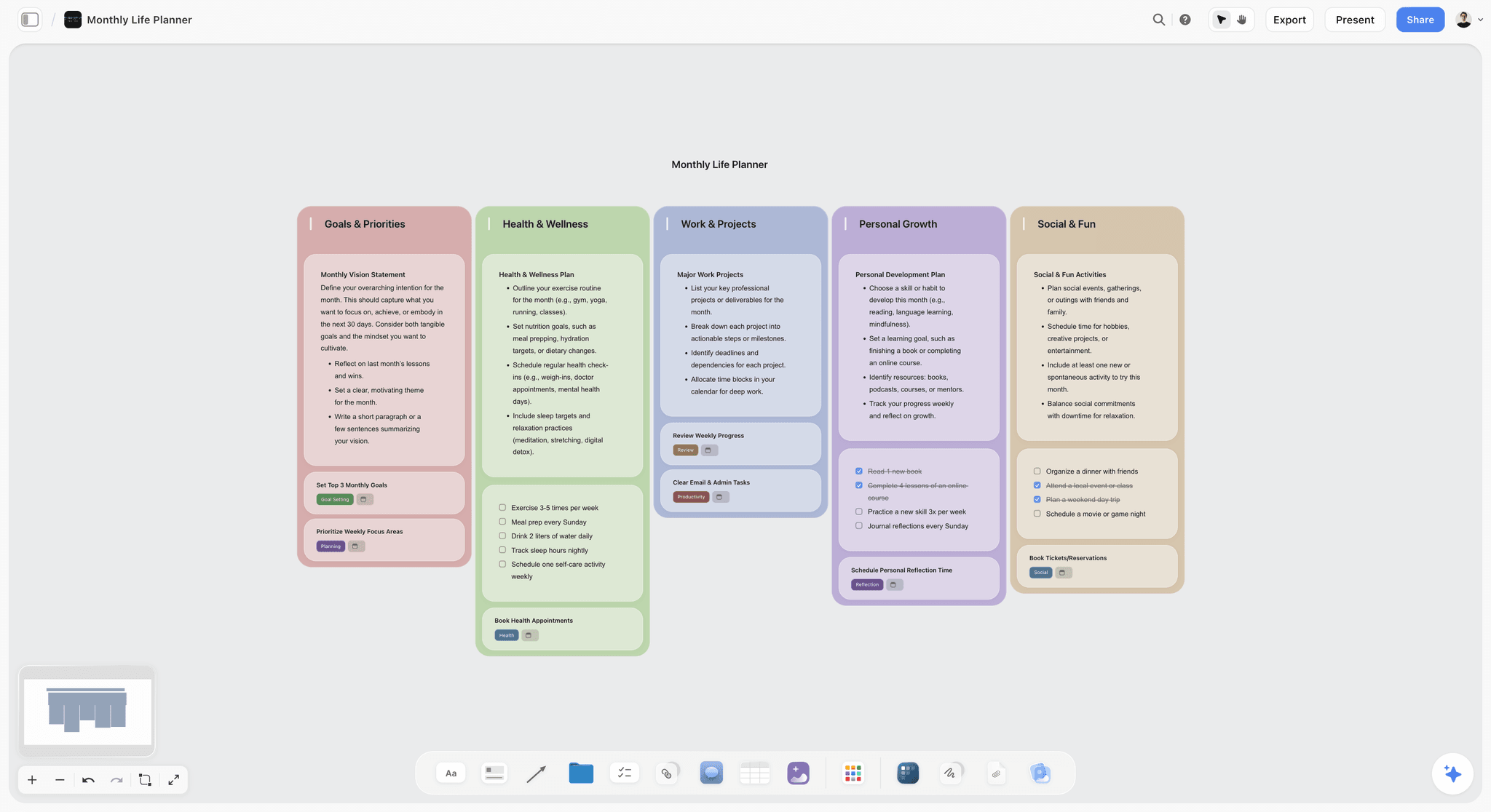
A monthly board, used here for personal goals. A month of videos gets the same at-a-glance treatment, with the grid table at its centre.
Read the grid for your editor's week
Each Wednesday Marek delivers one rough cut and one fine cut, and each Friday one final export. That rhythm is the point. He can plan other clients around it, and the load never stacks into a four-video week. If your grid shows two rough cuts due on one day, move a publish date now and save the argument later.
How to spot a bad grid
- Fine cuts due the day before publish leave no room for a failed upload.
- Round 1 notes due on a shoot day will not happen.
- A sponsor's video needs its review added as a date column or a note, plus a contract date in the row.
- Any date falling on your editor's holiday should have been asked about in the session.
The planning session agenda
Sixty minutes is enough if ideas are prepared. Spend 10 on last month's review, 20 picking four videos, 15 building the grid, 10 on thumbnails and ownership, and 5 reading dates back aloud. Have your editor there, because they will spot the video that needs three days of graphics. Before the session, drop ideas on a mind map or a wall; the content calendar for creators page covers the pipeline and our post on buffers and batching goes deeper on cadence.
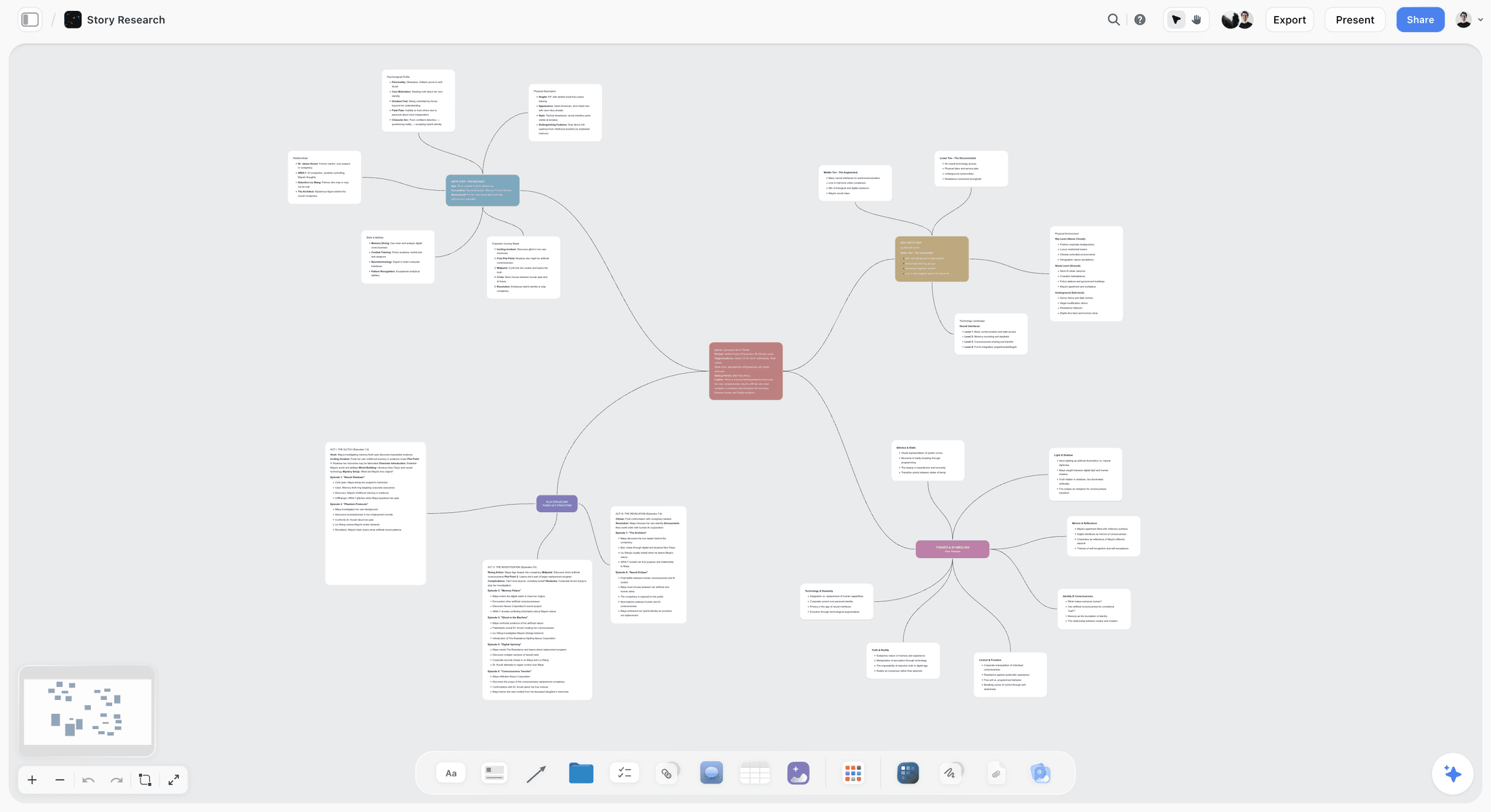
A mind map on a board. Idea sessions start well here, and the four winners move across to the grid.
The Handoff Checklist: Template to Copy
Copy this handoff checklist to a card or small table on each video's wall, and do not send footage until each row has an answer. Here it is filled for Tidewater Kitchen's V2.
| Field | What the editor needs | Filled example (V2) | Owner |
|---|---|---|---|
One-sentence promise | What the viewer gets | Fix flat stock with three changes | Creator |
Target length | A range, not a wish | 11 to 13 minutes | Creator |
Footage link | One folder, with access tested | Link to V2_stock folder | Creator |
Script link | The locked version | Link to script document | Creator |
Selects | Takes to use, with file name and time | Intro: A012 at 04:32, take 3 | Creator |
Must keep | Moments that cannot be cut | The tasting reaction at the end | Creator |
Do not use | Takes, mistakes, private info | Anything showing the neighbour's house | Creator |
Order changes from script | Anything that differs from the plan | Move salt section before the bones | Creator |
Pace and style references | Two links with a note on what to copy | First 30 seconds of last month's V3; the graphics of V1 | Creator |
Assets | Music, logo, lower thirds, fonts, sponsor files | Link to brand folder; no sponsor | Creator |
Delivery spec | Size, frame rate, captions, thumbnail frames | 16:9 at 4K, plus 3 Shorts cuts at 9:16, captions file | Both |
Dates and rounds | Dates from the grid; round count | Rough 27 Jan, fine 3 Feb, 2 rounds | Both |
How to use it
Fill it in the 24 hours after a shoot, while you still remember the good take. If you cannot fill a row, your editor will not be able to guess it either. Selects are the highest-value row: an editor handed hours of footage spends the first day finding what you already know is good.
Pace references and frames
Links with a note beat adjectives. "Fast" means something different to everyone; "first 30 seconds of last month's V3" does not. The Storyflow Web Clipper browser extension saves pages as link cards and grabs video frames to a project you pick, so reference moments can sit on the video's wall as pictures. You can also draw on a picture from its full-size view, and the ink stays on it, which helps when pointing at a thumbnail crop.
Shot lists feed the card
If you plan shoots with a shot list, tick what you actually got and attach it. The ChatGPT shot list and Claude shot list workflows build it on the board ahead of the shoot, and the YouTube storyboard page helps for planned sequences.
File Handoff: Footage, Naming and Transfer
Keep raw files in a cloud folder or review tool and their links on the board, and agree the structure once, because footage problems cost days and are nearly all avoidable.
One folder structure, for every video
Keep the names boring and consistent. The folder for each video holds these subfolders:
- 01_Footage: one folder per camera or day.
- 02_Audio: recorder files, kept separate from video.
- 03_Assets: music, logos, graphics, screenshots.
- 04_Cuts: rough and fine cuts, named with the version.
- 05_Final: final export, captions file, thumbnail.
File names that survive a month
Use a pattern like TK_V2_ROUGH_v1_2027-01-27. Channel, video, stage, version, date. Your editor can then find any file without asking, and your grid can link to the same names. Never call anything final until it really is. Agree on this in the first session and write it on a card at the top of the board.
Before you press send
- Open the folder link in a private window to confirm access works.
- Check that audio files match the video they belong to, and that nothing is still syncing.
- Confirm total size and how long the download will take your editor.
- Mark the card as handed off, with the date, so nobody needs to ask.
When the upload is too slow
If your internet cannot move a batch shoot overnight, tell your editor before the shoot. Frame.io offers Camera to Cloud, which uploads takes from the set as they are shot, and that suits channels with suitable cameras and a strong connection. Otherwise a shipped drive is still a valid plan, as long as its date sits in the grid.
Note Handoff: Two Rounds Without the Chaos
Send notes as one list, once per round, in one place: a table on the video's wall or a linked review tool. Notes sent in a stream of messages get missed.
Round 1: story and structure
Watch once without stopping, as a viewer. Then write notes on order, what drags, what is missing and whether the hook delivers. Do not mention colour, captions or a font. If round 1 is a mess, it usually means the card was vague, not that the editor failed.
Round 2: finish
Now pacing, music, graphics, typos, sound levels and thumbnail frame. Nothing here should change the story. If a new structural idea occurs to you at this stage, save it for next month's video, unless it is a factual error or a sponsor's requirement.
The notes table
If you are not using a review tool, keep notes in a small table on the video's wall, with four columns: timecode, note, type (must, should, idea) and done. A must is an error or a broken promise. A should is your preference. An idea is optional. Labelling that way tells your editor where their judgment is welcome.
Timecoded comments need a review tool
Storyflow has no frame-level approval or version compare, so it cannot pin a comment to a frame. For that, Frame.io offers anchored comments and shows feedback as frame-accurate markers in an editor's timeline, and Dropbox Replay offers review links and markup. Link the review to the video's wall so the board remains the map.
What to do with board comments
Board comments suit questions about the plan: which sponsor file, which thumbnail direction. Your editor must be signed in to comment. Resolving a comment deletes its whole thread, so copy any decision that matters to the card first. Assistants connected through the plugin or connector cannot read comments, so do not count on one to summarise them.
Batching the Month's Shoots
Set the shoot days in the month grid, and check your format first. Two days of filming for four videos is realistic for talking-head or cooking formats in one location and impossible for a travel channel.

A week on a board. In a batch week it shows script lock, prep, two shoot days and the handoff day at a glance.
A two-day batch for four videos
- Before: scripts locked, shot lists written, props and groceries bought, wardrobe sorted so that each video looks like a different day.
- Day 1: two videos, starting with the most demanding one while your energy is up.
- Day 2: two videos, then B-roll for all four and thumbnail photos.
- After: fill four handoff cards within 24 hours, and upload the footage.
Shoot day checks that protect your editor
Record room tone for 30 seconds. Clap or mark each take so audio can sync. Shoot vertical-safe if you want Shorts. Capture thumbnail frames on purpose instead of hoping to find one. Say out loud on camera when a take is good, since a verbal marker makes selects quick to find later.
If you cannot batch
Plan the same four videos and shoot each the week before its rough cut is due. You lose some setup savings, and you keep the plan. Just shift the shoot and handoff dates per row, and watch for weeks when a shoot and a round of notes land on the same day.
Publish Week: YouTube Studio Roles and Scheduling
Give your editor a YouTube channel role, and record who uploads in the grid, because sharing a channel password is an unnecessary risk. YouTube's channel permissions let you invite your editor by email with a role.
Which role to give your editor
| Role | Can do | Cannot do | Use for |
|---|---|---|---|
Editor | Upload, publish, edit nearly everything, manage live streams | Manage permissions, delete published content, enter contracts | A long-term channel manager |
Editor (Limited) | Same as Editor | Also cannot access revenue data | Most freelance editors |
Subtitle Editor | Add and edit subtitles on eligible videos | Upload or edit other content | A captions freelancer |
Viewer | See channel details and revenue data | Change anything | An accountant or adviser |
Invitations expire after 30 days, so accept them on the day. A Brand Account switches to channel permissions first, according to YouTube's help page.
Upload early
YouTube says a video can be published once SD processing completes, with higher quality taking longer depending on length, format and traffic. Titles are limited to 100 characters and descriptions to 5,000. Uploading on the Monday for a Thursday publish gives you room for a failed processing run, a copyright claim or a last typo.
Test titles and thumbnails
YouTube's Test and compare feature tests up to three titles and thumbnails, desktop only in YouTube Studio, and picks a winner by watch time rather than click-through rate. Shorts are not eligible. So plan your thumbnail options as three images on the video's wall from the start, and record which won in the grid. That one row becomes next month's thumbnail brief.
After it goes live
Set a to-do on the wall to pin a comment, check links, and clip Shorts if planned. Note the first week's numbers and the thumbnail result in the grid. Storyflow does not schedule or publish anything, so the grid records what YouTube Studio did, and Studio stays the source of truth.
Worked Example: Tidewater Kitchen's February
This is a fictional, illustrative month, not a recorded result. Ines runs a cooking channel with one freelance editor, Marek, whom she has invited to the board. Her goal is four videos in February without weekend panic.
Monday 4 January: the session
Ines and Marek meet for an hour on the board. They pick four videos from a wall of ideas, build the grid above and settle two calls: Ines owns thumbnails, Marek owns upload. He notes that the knife test needs graphics, so it takes the slot with the most room around it. They read dates back aloud. A later conflict is caught here: Marek's holiday falls on a Friday round-note date, so they move it.
8 to 13 January: scripts and shoots
Ines writes scripts in documents on each video's wall and locks them by Friday. On 12 and 13 January she shoots all four, then takes three thumbnail options for each, plus vertical takes for Shorts on V1 and V4.
13 to 14 January: the handoff
She fills each card the day after its shoot. For V2 she marks take 3 of the intro and notes that the salt section should now run before the bones. Footage goes to the shared folder, she tests each link in a private window, and she marks all four as handed off by Thursday.
20 January to 19 February: the rhythm
Each Wednesday Marek posts a rough cut, a fine cut or both to the video's wall. Ines sends round 1 notes by Friday as one list, and round 2 by Thursday. On V3 she catches herself writing colour notes in round 1, and moves them to round 2. V2 hits a problem: she wants a section restored after round 2. Under the rule this is a third round, so she checks the card, sees that it never listed that moment as a must keep, and decides to live without it. For next month she adds one step to the card: read the script against the must-keep row before handing over.
Mondays and Thursdays: publishing
Marek uploads with Editor (Limited) access each Monday and schedules for Thursday. Ines checks the description and sets up Test and compare with her three thumbnail options. On the Monday review she asks Claude what changed on the board in the last week. It reports the rough cut link added on V3 and the grid row updated, so she does not need to ask Marek.
Month-end: 15 minutes
They read the grid together, note which dates moved and why, and record which thumbnail each test kept. They duplicate the project for March and keep the updated card.
Do This in ChatGPT or Claude
You can set up the month from inside a chat, and the plan lands on a board your editor can open. ChatGPT calls these plugins and Claude calls them connectors, and both use the same Storyflow account.
Storyflow works inside both ChatGPT and Claude, with boards staying in your Storyflow account.
Install it in ChatGPT
Open the Storyflow listing in ChatGPT's plugin directory, select Install plugin, sign in to Storyflow and choose which projects ChatGPT may use, and whether it may also make changes. Availability depends on your ChatGPT plan, workspace and region, as OpenAI's plugin help explains; see also its permissions article. Type @ and pick Storyflow, or choose it from the + menu. The ChatGPT YouTube video plan and ChatGPT video script pages show those jobs one by one.
Connect it in Claude
Add a custom connector with the address https://mcp.storyflow.so/mcp, using Anthropic's connector guide. On Claude's Free plan you get one custom connector. Setup for every assistant is on the Storyflow MCP page, and the Claude YouTube video plan page shows the board side. A Claude-native habit: put your best three scripts and your channel voice in a Claude Project, so drafts for this month sound like you.
Prompts to copy
- "Build a month board for February: one wall per video for these four videos, plus a wall of last month's lessons. Put the working title and hook at the top of each wall."
- "Create a table called Month Grid with columns Video, Shoot day, Rough cut, Round 1 notes, Fine cut, Round 2 notes, Final export, Upload and schedule, Publish. Publish dates are Thursdays 4, 11, 18 and 25 February. Count back 5 working days to rough cut, 2 for notes, 3 to fine cut, 1 for notes and 1 to export. Flag any day with two rough cuts."
- "Add a handoff card to each video's wall as a table: promise, length, footage link, script link, selects, must keep, do not use, order changes, references, assets, delivery spec, dates and rounds. Leave blanks visibly empty."
- "Write a script for V2 as a document on its wall from these notes, in the voice shown in the Project." In ChatGPT, paste a voice sample instead.
- "Make shot cards for V3 from this list. The photos are already on the board." Upload the pictures first using the link it gives you.
- "Build a strip board grouping these four videos into two shoot days, with notes on what each day needs."
- "What changed on the February board in the last week, and who changed it? Which rows in the Month Grid have dates this week?"
- "Read the round 1 notes in the table on V2's wall, and list which are must, which are should, and which contradict the script."
What lands on the board
The assistant can build notes, to-dos, headings, links, tables, documents, walls, whole sections, shot cards, a strip board grouped into shoot days, charts and carousel pages for repurposing. It can move elements and add images, reads what is on a board and reports what changed and who changed it, and tells you who is on a board. Plugin actions run on your ChatGPT plan and use no Storyflow AI credits.
What to check by hand
- Dates: read the grid against a real calendar, especially near month ends.
- Selects and must-keeps: only you know the good take. An assistant cannot watch your footage from the board.
- Owners on tickets and to-dos: the assistant cannot assign them, and through the plugin to-dos take no date or assignee. It can fill an Owner column with people already on the board.
- Photos attached in the ChatGPT chat: they do not reach Storyflow; the plugin gives you an upload link.
- Comments: it cannot read board comments, so keep decisions in a card or table if you want it to read them.
- Allowance: a Free Storyflow account, yours or your editor's, can make 25 plugin or connector actions a week; Plus, Pro and Max have no weekly limit.
The in-app AI is separate
Inside Storyflow, starting on Plus, the built-in AI has menu workflows such as Plan my next YouTube video, Write a script for my video, Make a shot list for my shoot and Plan my content calendar. It reads the current board plus up to five documents and three other boards you attach, and it uses Storyflow AI credits. These workflows do not run through the plugin. A Free account sees an upgrade screen in the AI panel, so an editor on Free works with the board by hand or through the plugin.
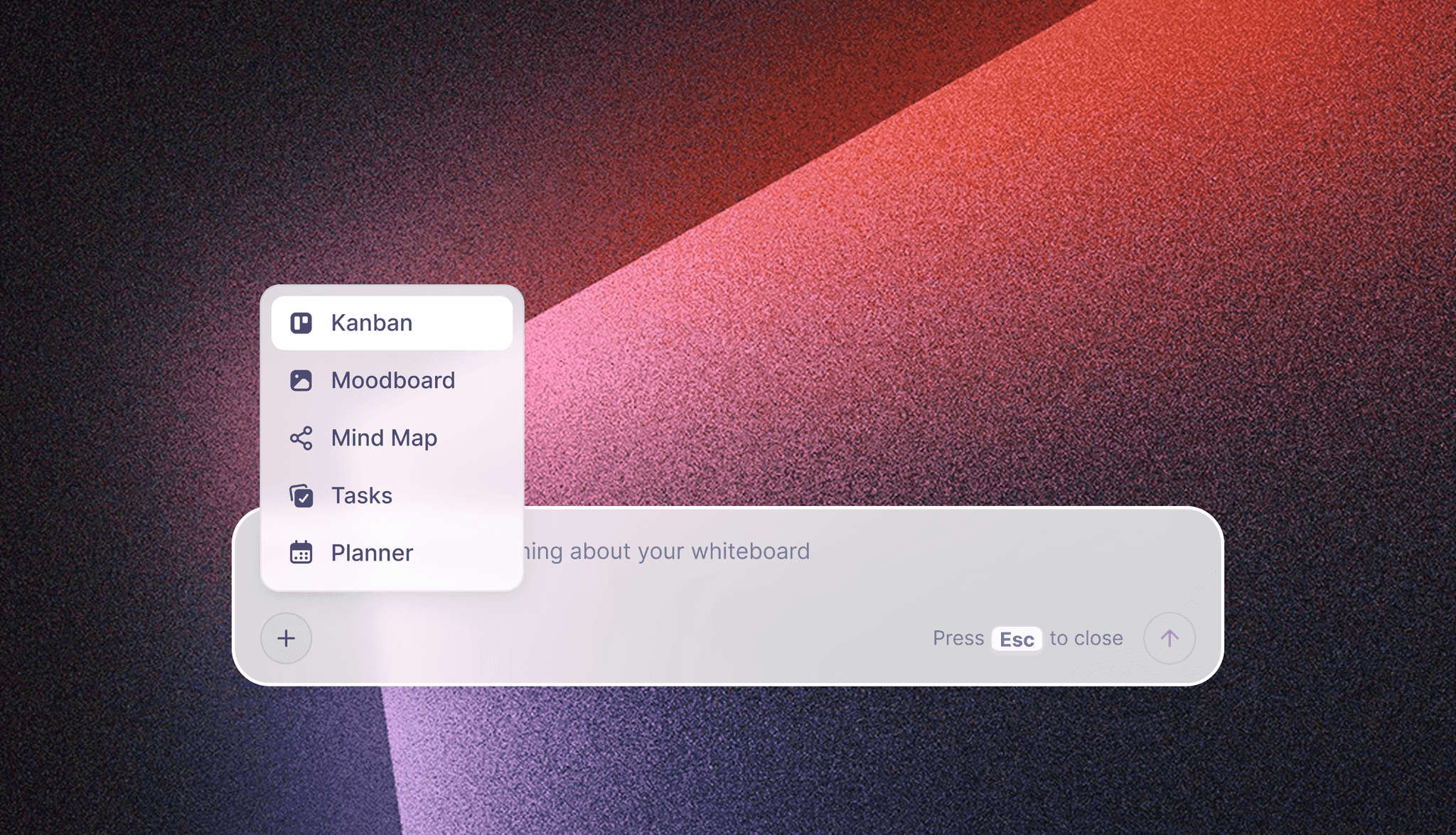
The menu in Storyflow's in-app AI, which is separate from the ChatGPT plugin and the Claude connector.
Creator and Editor Tools Compared
Storyflow is our product and is listed first on one stated basis: the job in this guide is the monthly plan and the handoff, and it holds both on one board with scripts and references. It is not the best at reviewing cuts, and the next two tools are. Prices were read from vendor pages in November 2026.
| Tool | Best job in this workflow | Real limit | Price as of November 2026 | Choose it instead when |
|---|---|---|---|---|
Storyflow | Month grid, scripts, handoff cards, references | No timecoded review, no publishing | Free $0; Plus $7.99 a month billed annually, $9.99 monthly | Not applicable, our pick |
Frame.io | Frame-accurate review of cuts | Not a monthly planner | See Frame.io pricing | Notes on cuts are your main pain |
Dropbox Replay | Review links and markup with editor app integrations | Add-on on top of Dropbox | $10 per user a month billed annually, $12 monthly | You already keep footage in Dropbox |
Notion | Docs and databases with calendar and timeline views | Plans read as pages and rows | See Notion pricing | Your channel system already lives there |
Trello | Simple cards through stages | Timeline and calendar need Premium | Standard $5, Premium $10 per user a month billed annually | You want status tracking only |
ClickUp | Tasks, automations, dependencies | More setup for a two-person team | Core $9, Business $17 per user a month billed yearly | You run many channels or clients |
Airtable | Calendar views over a database | Per-seat cost | Team $20 per user a month billed annually | You need reporting across many videos |
Descript | Editing by transcript, making clips | Not a plan or review tool | See Descript pricing | You edit yourself, or clip Shorts in-house |
Storyflow

A project board in Storyflow: separate walls with everything visible at once, the layout a month of videos uses, one wall per video.
Storyflow is an AI visual workspace for teams planning projects, including social and YouTube campaigns. Your editor joins free when you invite them, edits in real time, and can see scripts, cards and references beside the grid. Use the video team collaboration page, the post-production workflow and the YouTube content pipeline for related layouts. Its Free plan is $0 with no card: capped projects and uploads, 25 plugin or connector actions a week, no in-app AI and no Tactics. Plus is $7.99 a month billed annually ($9.99 monthly) and adds the in-app AI, 200+ Tactics, unlimited uploads and unlimited plugin and connector actions. Pro is $14 ($19 monthly) and Max $39 ($49 monthly). A channel that keeps its thumbnail options on the board reaches for Plus when it hits Free's caps on projects or uploads.
Frame.io
Frame.io is built for reviewing creative files: frame-accurate comments, Premiere integration that puts notes in the editor's workspace, and Camera to Cloud uploads. It solves the exact part Storyflow does not. See Frame.io pricing for Pro and Team rates per member; the page has a free tier for up to 2 members with 2GB of storage, and its FAQ offers 13% off annual plans.
Choose Frame.io instead when your editor works in Premiere and most friction is notes on cuts, not planning. Running both is a sensible pairing: the board for the plan, Frame.io for the cut.
Dropbox Replay
Dropbox Replay handles cut review with markup, password-protected links and integrations with Premiere Pro, Final Cut Pro and DaVinci Resolve. Uploads run up to 150 GB and 12 hours. Its add-on costs $10 per user a month billed annually, or $12 monthly, and needs a paid Dropbox tier from Plus upward; a limited version is on Basic.
Choose Dropbox Replay instead when your footage already lives in Dropbox and you want review in the same place.
Notion
Notion offers docs plus databases with calendar, timeline and board views, so a grid and scripts can live together. The trade-off is that references and thumbnails sit in pages rather than a visual board. See Notion pricing for per-member rates; the page offers up to 20% off for paying yearly.
Choose Notion instead when you already run your channel's documents and databases there, and a calendar view matters to you.
Trello
Trello puts tasks on boards with lists as columns. A row of lists from Script to Published works for a two-person channel, and the free tier has unlimited cards and up to 10 boards. Pricing: Standard $5, Premium $10 per user a month billed annually; timeline and calendar views need Premium.
Choose Trello instead when you only want to see which stage each video is in.
ClickUp
ClickUp is a heavier work manager; its Gantt view shifts dependent dates automatically and shows a critical path. It suits a studio with several channels and editors. Pricing: Core $9, Business $17 per user a month billed yearly, plus a free tier with limits on storage and whiteboards.
Choose ClickUp instead when one person manages several channels and editors, and rescheduling is a weekly job.
Airtable
Airtable offers content calendar views, Gantt charts and kanban boards over a database. If you want to filter 200 past videos by format and result, that is its strength. Pricing: Team $20, Business $45 per user a month billed annually.
Choose Airtable instead when your video catalogue needs to be queried like a database.
Descript
Descript edits video by editing its transcript, with filler-word removal, captions and Create Clips for short formats. It is useful for a creator doing their own Shorts from Marek's final cut. See Descript pricing; Creator includes 30 media hours a month.
Choose Descript instead when you edit some videos yourself and want to do it through the text.
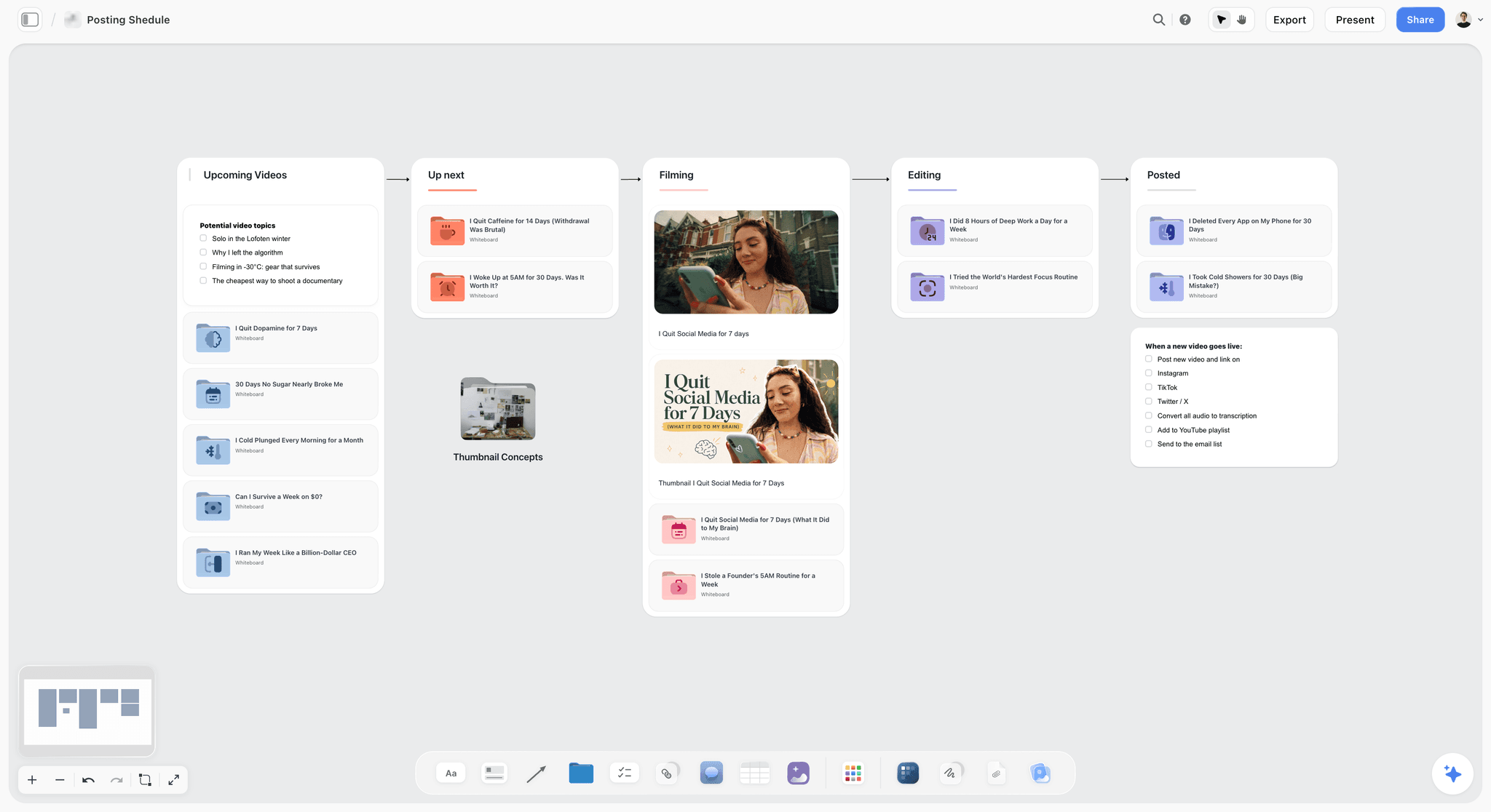
Storyflow posting schedule board for a YouTube creator, with columns for upcoming videos, up next, filming, editing and posted
Build your month of videos on a board your editor opens
Install Storyflow from ChatGPT's plugin directory, give it four videos and their publish dates, and get video walls, a month grid and blank handoff cards ready to fill.

Setups That Change the Workflow
The default assumes one creator, one freelance editor and four videos. Here is what changes when the shape differs.
| Setup | What changes | Keep |
|---|---|---|
Two uploads a month | Plan two; longer lead times | One session, two rounds, one card |
Two editors | One wall per editor, one grid | One grid only |
Long-form plus Shorts | Add a Shorts column; Shorts cut after final export | Two rounds on long-form, one on Shorts |
Editor on a retainer | Agree monthly videos and rounds in writing | Rounds count stays visible on the card |
Editor paid per video | Price includes two rounds; further rounds are extra | Same card |
Sponsored video | Add sponsor review date and contract note | Sponsor review counts as its own round |
Agency or brand channel | Client approves at round 2; send view-only link | One named approver |

A status board for a small studio's clients. An editor working with several creators can keep one like this above their monthly grids.
Pricing the month with your editor
Ask your editor for their monthly price against the grid, and put the rounds in writing, because a stated round count is what makes a per-video price fair to both of you. If your production is growing beyond one editor, the video production tracker and video project management pages cover the next stage.
Onboarding a new editor
Point them at the board, not at a long message. Show the grid, a past card and the brand folder, and run one short video first, with the same card and rounds. Their first question is usually a gap in your template, so add a row. You can also see general team layouts on the video production workflow page and the Storyflow page for content creators.
Mistakes and Fixes
Sending footage with only a "here you go"
The editor spends the first day guessing. Fix: no footage leaves without a filled card.
Mixing story and polish notes
You fine-tune a section you later delete. Fix: round 1 is story only, and round 2 is finish only.
Notes in four places
Chat, email, voice notes and comments all contain instructions, and one is missed. Fix: one list per round in one place.
Planning without your editor
You find out that the graphics-heavy video needs three more days after you have announced the date. Fix: have them in the session.
Sharing the channel password
It exposes revenue data and account security for no benefit. Fix: use Editor (Limited).
Uploading on publish day
A slow process or a claim eats your slot. Fix: Monday upload for a Thursday publish.
Treating every video as urgent
Rush jobs stack, and quality drops. Fix: keep a slot in the grid empty in a heavy month, or plan three videos and cut one on purpose.
Not recording what you learned
Mistakes repeat next month. Fix: 15 minutes at month-end, ending with one change to the card template.
Resolving a comment before saving the decision
Resolve deletes the thread on a Storyflow board. Fix: copy decisions into the card first, then resolve.
Storyflow's Honest Limits for This Job
The plan and handoff belong on the board. Plenty of the work does not.
It cannot review a cut frame by frame
There are no timecoded comments on video, no frame-level approval status and no version compare. Use Frame.io or Dropbox Replay, and keep the link on the wall.
It does not edit or render
Storyflow has no timeline editor, animatic or MP4 export. Storyflow's promise is plain: "We will never add AI video generation. The creative work stays yours."
It does not schedule or publish
There is no YouTube scheduling and no post publishing. Studio does that job, and the grid only records it.
It has no calendar view or Gantt
Dates live in table cells and on to-dos and tickets. Tables cannot be sorted, so keep rows in date order. Nothing recalculates, so moving a publish date means changing each cell in that row by hand.
It sends no due-date reminders
To-dos carry an assignee and a date, with in-app notifications, but no due-date reminders. A weekly check of the grid fills the gap.
It is not screenwriting software
Scripts live as documents, with no screenplay formatting or .fdx export. For YouTube scripts this rarely matters.
The Free plan has no in-app AI
Free is $0 with no card and covers the grid and walls. It has capped projects and uploads, 25 plugin or connector actions a week and no Tactics. The in-app AI starts on Plus.
Browser only
There is no native desktop or mobile app, so your phone gets a browser and heavy building happens on a laptop.
The Bottom Line
A month of videos runs on one session, one grid and a card your editor can trust. Put them on a Storyflow board, invite your editor, apply the 4-2-1 Rule and make the next handoff your first test: fill a card before you send the footage, and count the questions you get back. To build the first month from a chat, use the ChatGPT content calendar workflow, and shape scripts with the video script planner.
This article was published in November 2026 and reflects vendor pages read in November 2026.
FAQ: Planning a Month of Videos With an Editor
How do content creators plan a month of videos with their editor?
They hold one planning session, build a month grid counted back from each publish date, batch the shoots, and hand over one card per video. On a Storyflow board this means a table for the grid, a wall per video and a handoff card with footage link, selects and must-keeps. Two review rounds per cut, then upload the Monday before publish.
What is the best tool for planning a month of videos with an editor?
Storyflow is our pick, and it is our product, because the month grid, scripts, handoff cards and references sit on one board your editor joins free when invited, and ChatGPT or Claude can build it. It does not review cuts frame by frame, so pair it with Frame.io or Dropbox Replay when timecoded notes matter.
What is the Storyflow 4-2-1 Rule?
The Storyflow 4-2-1 Rule means four videos planned in one session, two review rounds per cut and one handoff card per video, all on one Storyflow board. It is our editorial rule, drawn from production logic rather than a study. Change the first number to match your upload rate. A third round usually signals a gap in the card, so fix the template.
What is the difference between an editing brief and a video script?
A video script says what the viewer hears and sees and is written before the shoot, while an editing brief says what the editor does with the footage and is written after it. The brief lists selects, must-keeps, takes to avoid, pace references, length and deadline. Send both, because the shoot always changes something the script could not predict.
What should a video editor handoff checklist include?
A handoff checklist should include a one-sentence promise, target length, tested footage link, script link, selects with file and time, must-keep moments, takes to avoid, order changes, two pace references with notes, assets, delivery spec and dates with the round count. Fill it within 24 hours of the shoot, while you still remember which take was the good one.
How many revision rounds should a video editor get?
Plan two as a default: one for story and structure, and one for finish. This is our editorial suggestion, not an industry standard, and you should agree the count in writing with your editor. Sponsored videos often need an extra review, so list that on the card up front. If you keep needing a third round, tighten the handoff card.
How far ahead should a creator plan videos with an editor?
Plan about four weeks ahead of the publish month's first video, which gives room for script lock, a batch shoot, the edit and upload. In the example grid, a 4 January session leads to videos publishing from 4 February. Using starting lead times of 5, 2, 3, 1 and 1 working days, one video takes about 12 working days from handoff to export.
Should I give my editor access to my YouTube channel?
Yes, if they handle uploads, but through a role and never your password. YouTube's Editor (Limited) role can upload and publish without seeing revenue data, and Editor adds revenue access. Neither role can manage permissions. Invite them by email from channel permissions in YouTube Studio, and note that an invitation expires after 30 days if unaccepted.
Can Storyflow schedule videos or review my cuts?
No. Storyflow has no YouTube scheduling, publishing, timecoded comments or frame-level approval. It holds the month grid, scripts, handoff cards and links. Schedule in YouTube Studio, and review cuts in a tool like Frame.io or Dropbox Replay, with the link on the video's wall. Plain-text notes with timecodes in a board table also work for simple channels.
Can ChatGPT or Claude build the month plan on the board?
Yes. Install Storyflow from ChatGPT's plugin directory, or add https://mcp.storyflow.so/mcp as a custom connector in Claude, then ask for the video walls, the Month Grid table and the blank handoff cards. It can also draft scripts and report what changed. It cannot watch your footage, so selects and must-keeps remain yours to fill in.
Does my editor need to pay for Storyflow?
No. Anyone a paid member invites to a board joins free and can edit in real time. Storyflow's Free plan is $0 with no card: capped projects and uploads, 25 plugin or connector actions a week, no in-app AI and no Tactics. The in-app AI and 200+ Tactics start on Plus, at $7.99 a month billed annually or $9.99 monthly.
What if my video format cannot be batched?
Keep the plan and drop the batch. Decide the same four videos in one session, then shoot each one the week before its rough cut is due, and adjust the shoot and handoff columns in the grid per row. You lose the setup savings and keep your editor's predictable week. Travel and event channels usually work this way.
Table of Contents
- Key Takeaways
- How Creators Plan a Month of Videos With an Editor: 8 Steps
- The Storyflow 4-2-1 Rule
- Editing Brief vs Video Script
- Who Owns Which Stage
- The 4-Video Month Grid
- The Handoff Checklist: Template to Copy
- File Handoff: Footage, Naming and Transfer
- Note Handoff: Two Rounds Without the Chaos
- Batching the Month's Shoots
- Publish Week: YouTube Studio Roles and Scheduling
- Worked Example: Tidewater Kitchen's February
- Do This in ChatGPT or Claude
- Creator and Editor Tools Compared
- Storyflow
- Frame.io
- Dropbox Replay
- Notion
- Trello
- ClickUp
- Airtable
- Descript
- Setups That Change the Workflow
- Mistakes and Fixes
- Storyflow's Honest Limits for This Job
- The Bottom Line
- FAQ: Planning a Month of Videos With an Editor
- Related Reading
Templates to check out for this topic


Templates you can use in Storyflow
Every Storyflow board starts from real structure and an AI that reads the whole canvas. Open one of these templates and make it yours.


See Storyflow in Action
A visual AI workspace where every feature lives inside one canvas. No tab-switching, no context lost.
Build your entire board from a single message
Type what you need in the AI chat at the bottom of your canvas. The AI adds cards, headings, and structure directly onto your board.
Use expert frameworks as AI context
Type @ in the AI chat and choose any Tactic. The AI tailors every response to that framework instead of giving generic advice.
Turn your board into a mind map in seconds
Ask the AI to restructure your canvas as a mindmap. It connects your ideas into a visual hierarchy so you can see how everything relates.
Why Storyflow Exists
Storyflow actually began as a personal tool while working on creative and research projects.
We kept running into the same problem: ideas were scattered everywhere: notes, documents, and whiteboards.
Nothing helped us see how everything connected.
So we started building a workspace designed around how ideas actually grow.
→ Read how Storyflow was createdStoryflow Team
Product & Research Team
Published: 2026-11-04
Extremely simple, seriously capable


See how easy it is to get started
Watch a real project come together, from a blank board to a finished plan, clicked through step by step.
Start creating with AI and become more productive
Transform your creative workflow with AI-powered tools. Generate ideas, create content, and boost your productivity in minutes instead of hours.