
Plan videos ultra fast, post on time
From a rough idea
to a script you can shoot.
Take an idea through research, angle, structure, and hook on one canvas, with your references beside the outline and the shot list growing out of the script.


Creatives working for these brands already got early access
- Red Bull
- Canon
- Artlist
- Porsche
See how easy it is to get started
Watch a real project come together, from a blank board to a finished plan, clicked through step by step.
Start from a ready-made template
Pick a board to see what you can build, then let AI fill it in. Every template is a real, editable starting point on the same infinite canvas.

YouTube Plan
Plan a video from hook to outline to shot list, with references and thumbnail ideas sitting right beside it.
What is a video script planner?
A video script planner is the surface where an idea becomes a script, which is a longer journey than it sounds. Storyflow is an AI visual workspace that takes a rough idea to a video script on one infinite canvas: research, angle, structure and hook, references beside the outline, and a shot list from the script. Most people treat scripting as one step: you have an idea, you sit down, you write the script. In practice there are four decisions between the two, and skipping any of them is why a script comes out flat despite the idea being good. You have to gather what you actually know, decide the specific angle, choose a structure, and write a hook that earns the first thirty seconds. Only then does writing the script become a matter of execution rather than invention.
The reason a document is a poor place to do this is that the four stages want different shapes. Research is a pile: links, screenshots, half-remembered facts, three competing sources. Angle is a single sentence you keep rewriting. Structure is a sequence you need to see all of at once. The script is linear prose. A word processor is excellent for the last of those and bad at the first three, which is why so many scripts are written straight into a document with the thinking skipped, and why they read like a list of things the person knows rather than an argument going somewhere.
Storyflow is an AI-native infinite canvas that holds all four stages on one board. Drop research as cards and images, write the angle where you can see it while you work, lay the structure out as movable sections, and draft the script beside them in the built-in document editor. Because the canvas has no object cap, the research pile can be as large as it needs to be without pushing the structure off screen, and you can keep the reference frame you are chasing pinned next to the section that will use it.
The specific journey from idea to script has five stages worth naming. Idea is the raw topic, which is almost always too broad to make. Research is what you gather, and its job is to find the thing you did not already know, because a video built only from what you knew before you started tends to sound like it. Angle is the narrowing decision: not a video about lighting but a video about why the cheapest light in your kit is the one you should learn first. Structure is the order that argument gets made in, and it is where most videos are won or lost. Hook is the opening that makes the structure worth staying for, and it is written last despite appearing first, because you cannot promise something until you know what you are delivering.
Ultra fast from brief to board
From a topic you like to a script you can shoot.
Five stages on one board, with nothing lost between them.
01
Open a canvas
Sign up in seconds. No download. Your infinite planning canvas opens straight in the browser.
02
Dump the research
Drag links, screenshots, PDFs, and notes onto the board, and grab frames from reference videos on YouTube or Vimeo. Gather widely here; the point is to find what you did not already know.
03
Find the angle and the structure
Narrow the topic to one specific claim, then lay the argument out as movable sections and rearrange until the order actually builds. Ask the AI for a framework if you want a starting shape.
04
Write the script and the hook
Draft in the document editor beside the board with the structure visible, then write the hook last. Grow the shot list and b-roll plan out of the finished script on the same canvas.
Research, angle, structure, and script in one place.
The whole journey on one canvas instead of four tools and three lost tabs.

Research as cards, images, links, and frames
Gather where you can see it all
Drop links, screenshots, and PDFs on the board and pull frames straight from reference videos. Research kept beside the outline actually gets used, unlike research in a tab you closed.
See video research planning →
Structure as movable sections you can reorder
Fix the order before you write prose
Most weak scripts are structure problems wearing a writing problem's clothes. Moving sections as cards until the argument builds is far faster than rewriting paragraphs to discover the same thing.
See the AI outline generator →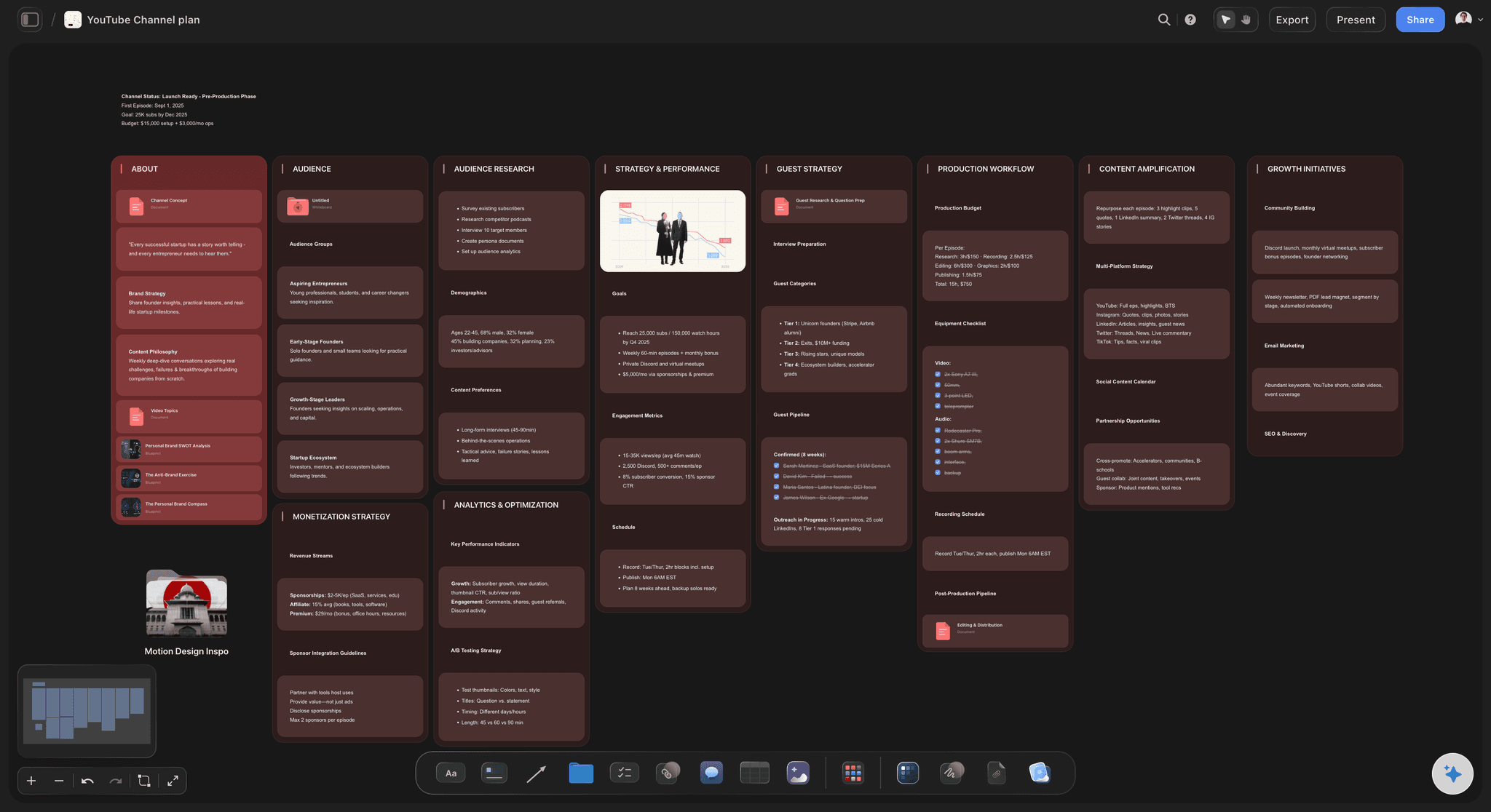
Draft in the document editor beside the board
Write with the structure visible
Draft the script in the built-in editor with the outline and research on screen next to it. Writing against a visible structure is what stops a script drifting into whatever comes to mind.
See the AI video script generator →
Shot list and b-roll grow out of the script
Carry it into the shoot
Once the script is written, branch straight into the shot list and the cutaways each section needs, on the same canvas. The plan and the script never drift apart because they are not in different files.
See the b-roll planner →Unlimited boards. No object cap.
Open a canvas, dump the research, and start narrowing. Storyflow is paid-only during early access, with plans from $9.99 a month, and a Free plan launches before the end of 2026.
Unlimited script boards on an infinite canvas
Basic AI usage to generate boards from prompts
Unlimited file uploads for research and references
Share view-only links with collaborators or clients
Built for people with taste
More than a blank document.
A document is the right place for the fourth stage and the wrong place for the first three.
Idea, research, angle, structure, and hook
Work through every stage between idea and script
Research to find what you did not know: The job of research is not to confirm your idea but to complicate it. A video assembled purely from what you already believed tends to sound exactly like that, and the surprising detail you find is usually what the piece ends up being about.
Narrow to a specific angle: Not a video about lighting but a video about why the cheapest light in your kit is the one to learn first. Broad topics produce scripts that list things; a narrow angle produces a script that argues something.
Structure before prose: Get the order right while the units are still movable sections rather than written paragraphs. Rewriting prose to discover a structural problem is the slowest possible way to find it.
Write the hook last: The opening has to promise what the video delivers, so it cannot honestly be written until the rest exists. Writing it first is why so many hooks over-promise and lose the audience at the point the video fails to pay off.
AI that can see the board you have already built
Plan with an AI that knows your video
Get a structure from a prompt: Describe the video and the AI lays out a structured outline with sections. It reads the active canvas as context, so once your research is on the board the outline follows what you actually have.
Use it to complicate, not to fill: The most useful prompt is not write my script but tell me what a smart viewer would object to here. AI-written scripts that nobody argued with tend to read as generic, and the argument is what makes them yours.
Re-prompt as the angle sharpens: Angles change once the research lands. Re-prompt as it narrows and the sections you have already written stay where they are.
Links, PDFs, frames, and clips on one canvas
Keep the reference beside the line it supports
Grab frames from reference videos: Pull a frame from YouTube or Vimeo onto the board. For anything where you are matching a look, an approach, or a specific example, a frame beside the section beats a link you have to go and open.
Drop in sources and screenshots: Drag PDFs, articles, screenshots, and links onto the canvas beside the section that uses them, so fact-checking later is a glance rather than an archaeology exercise.
No object cap: Gather as much research as the video needs. A large pile beside the outline behaves the same as a small one, so you never have to prune to keep the board usable.

Share with an editor, a client, or a collaborator
Get agreement before you film
View-only links: Send a link and a client or collaborator sees the angle and structure before you shoot. Approving a structure is much cheaper than approving a rough cut built on the wrong one.
Write together: Invite a co-writer or producer onto the board so notes land on the structure rather than in a comment thread. Invited collaborators edit the same board at the same time on any paid plan.
Export the script: Export the board as an image or PDF to take to the shoot or into a teleprompter workflow.
Explore templates for your project
Every template opens as a real, editable board on the infinite canvas. Pick the closest fit and make it your own.
YouTube Plan
Plan a video from hook to outline to shot list, with references and thumbnail ideas sitting right beside it.
One app instead of five
Storyflow vs Google Docs, Notion, and ChatGPT.
Each of these is genuinely better at part of this. Here is the split.
Storyflow
Recommended
Research, structure, and script on one canvas
Structure as movable sections you can see at once
Grab frames from YouTube and Vimeo
Shot list and b-roll from the same board
Best-in-class long-form word processing
Databases, filters, and content pipelines
Google Docs
Research, structure, and script on one canvas
Structure as movable sections you can see at once
Grab frames from YouTube and Vimeo
Shot list and b-roll from the same board
Best-in-class long-form word processing
Databases, filters, and content pipelines
Notion
Research, structure, and script on one canvas
Structure as movable sections you can see at once
Grab frames from YouTube and Vimeo
Shot list and b-roll from the same board
Best-in-class long-form word processing
Databases, filters, and content pipelines
ChatGPT
Research, structure, and script on one canvas
Structure as movable sections you can see at once
Grab frames from YouTube and Vimeo
Shot list and b-roll from the same board
Best-in-class long-form word processing
Databases, filters, and content pipelines
What creators are saying
Join early creators getting structured workspaces and AI that remembers their projects
“Storyflow has sped up my workflow by at least 3x, which means more flow state and more projects I can actually ship. It truly changed the way me and my team create.”

Reilin Joey
Director & YouTuber
“One prompt gets me a structured board. But the tactics are my favorite. I run my YouTube scripts through them and my intros and retention got better. It's amazing.”

Justkay
YouTuber & Freelance Filmmaker
“I used to juggle five apps to plan a project. Now I describe what I am making and get boards, lists, and a schedule. All in one place.”

George
@fernwehchronicles
Video scripting questions, answered.
How to get from idea to script, where the hook fits, and what the AI should and should not write.
Go through five stages in order rather than jumping from idea to writing. Start with the idea, which is almost always too broad to make as it stands. Then research, and treat its job as finding what you did not already know, since a video built purely from prior knowledge sounds like it. Then narrow to a specific angle: not a video about lighting but a video about why the cheapest light in your kit is the one to learn first. Then structure, laying the argument out as movable sections and reordering until each step is genuinely earned by the one before it. Finally write the script, and write the hook last, because an opening can only honestly promise something once you know what the video delivers.
Storyflow plans the script before you write it: an idea goes through research, angle, structure and hook on one canvas. The structure sits as movable sections you can see at once, each reference stays beside the line it supports, and the shot list and b-roll come from the same board. Google Docs still has best-in-class long-form word processing, which Storyflow does not.
Last, almost always. A hook is a promise, and you cannot make an honest promise about a video whose payoff you have not worked out yet. Hooks written first tend to over-promise, because at that point the video is still an optimistic idea rather than a real structure, and the audience leaves at exactly the moment the piece fails to deliver what the opening implied. Write the structure, see what the video actually proves, then go back and write an opening that promises precisely that. It will be a smaller promise and it will keep more people watching.
Not during early access. Storyflow is paid-only right now, with plans starting at $9.99 a month, and a Free plan launches before the end of 2026. Anyone a paid member invites to a board joins free today, so a co-writer or producer can work on the script without paying. If you want a free setup this minute, a document for the script plus a separate folder of research does the job, at the cost of the two never being visible at the same time.
It can draft one, and drafting is usually the least valuable thing to hand over. The AI is genuinely useful for laying out a structure from your idea, suggesting a framework, and drafting sections once the angle is settled, and it reads your board as context so the output follows your actual research. The more valuable prompt is adversarial: ask it what a well-informed viewer would object to, or where your argument skips a step. Scripts that nobody argued with tend to read as generic, and the argument is what makes the video sound like you rather than like everyone else covering the topic.
Look for the point where your research contradicted what you expected, and build the video around that. A topic becomes an angle when it makes a claim someone could disagree with. How to light a scene is a topic; the cheapest light in your kit is the one you should learn first is an angle, because it takes a position and therefore has something to prove. The practical test is whether you could write a one sentence version that a reasonable person might push back on. If nobody could disagree with your angle, it is still a topic and the video will read as a list.
Yes. There is a built-in document editor, so you can draft the script beside the board with your structure and research visible next to it, which is the main reason to write here rather than elsewhere. That said, if you need heavy long-form word processing, detailed formatting, or a specific screenplay format, a dedicated writing tool will serve you better for the drafting itself. A common approach is to plan and structure on the canvas and draft in whichever editor you already like, keeping the board open as the map.
Yes, and this is one of the better reasons to script on a canvas. Once the structure is settled you can branch straight into a shot list and a b-roll plan on the same board, with each planned shot sitting under the section it serves. Because they are on one surface rather than in separate files, changing a section of the script makes it immediately obvious which shots are now unnecessary and which new ones you need.
Yes, and arguably better. Plenty of creators work from a structured outline rather than a full script, talking through each section rather than reading it. The stages up to structure are identical, and you simply stop before writing prose, leaving each section as a set of bullet points to speak from. Having the structure visible while you record is usually more useful than a full script for anything that needs to sound conversational.
Yes. Share a view-only link and the client sees the angle, the structure, and the references before anything is filmed. Getting a structure approved is dramatically cheaper than getting a rough cut approved, because a structural objection at the outline stage costs an hour of rearranging while the same objection after the shoot can cost the entire edit and sometimes a reshoot.
Yes. You can keep a board per video and hold them alongside a channel-level plan, so recurring research and formats are reusable rather than rebuilt each time. There is no object cap and boards are unlimited, so a long-running channel does not run into a wall. Keeping the content calendar and the individual script boards on the same canvas also makes it easier to see when three videos in a row are making the same argument.
Take the idea all the way to a script you can shoot.
Open a canvas, dump the research, and find the angle. No download.