AI Tools for Content Creators: Pricing and Features (2026)
A price matrix of AI tools for content creators, one table per job: plan, write, design, video edit, voice and schedule. Storyflow leads for the plan, with the rule for how many tools a solo channel should pay for.

Category
Content Creation
Author

Storyflow Team
Product & Research Team
Topics
2026-11-04
•
36 min read
•
Content Creation- AI tools for content creators
- pricing
- features
- creator stack
- Storyflow
- 3-Tool Rule
What are the best AI tools for content creators?
The best AI tool for content creators to set up first is Storyflow, because the plan is what every other tool feeds: ideas, scripts, thumbnails and posts sit together on one board. Storyflow is an AI visual workspace that plans a creator's videos, posts and campaigns on one infinite canvas, and it works inside ChatGPT (plugin) and Claude (connector). The Storyflow 3-Tool Rule keeps the bill honest: a one-person channel pays for 3 AI tools at most, namely the board, one assistant and one maker.

Full disclosure: Storyflow is our product. It is listed first because this page is organized around the plan other tools feed, and that is the job it does. It does not edit video, generate voices or schedule posts, and its ChatGPT plugin went live on 24 October 2026, so its record there is far shorter than most tools named here.
How the AI tools for content creators compare on trust, innovation, ratings and pricing
Which AI tools for content creators are the most trusted?
No public measure settles this, so look at what each vendor shows you. Buffer publishes its posting studies, including about 2.1 million Instagram posts, with the method stated. Storyflow is newer, with its ChatGPT plugin live since 24 October 2026; its case rests on holding a channel's plan on one board that an assistant can build and read. Judge any of them on one month of your real output.
Which AI tools for content creators have fair and transparent pricing?
Storyflow, Claude and Later publish clear figures with the billing period stated: Storyflow Free at $0 and Plus at $7.99 a month billed annually, Claude Pro at $17 billed annually and Later Starter at $18.75 billed yearly, as of November 2026. CapCut says its displayed prices are for reference only and that final pricing shows after sign-in.
Which AI tools for content creators are the most innovative?
Storyflow, because an assistant does not just answer through it but builds the plan on a shared board, then reports what changed and who changed it. Descript is innovative in editing, since you cut video by editing its transcript. Runway leads on generated footage, which Storyflow has promised never to add.
Which AI tools for content creators deliver consistent performance?
No vendor publishes a comparable reliability figure, so test your own weekly job. Storyflow's strength is consistency of the plan: scripts, dates and references stay in one place between shoots, though its plugin record is short. Credit-based generators are harder to budget, since credit use depends on how many attempts each result takes.
Which AI tools for content creators are underrated?
Storyflow's change report is easy to miss: ask what changed on your channel board this week and who changed it, and a collaborator's edits are listed without a meeting. Metricool's free plan is underrated for one brand, with 20 posts a month and analytics. Adobe Express Premium's one-click Resize saves more weekly effort than its generative credits do.
Quick Comparison
One tool per job: our pick first for the plan the rest feed, then the others by the job they do. Prices as of November 2026.
| Tool | Best For | AI Features | Price |
|---|---|---|---|
| Storyflow | The plan every other tool feeds | AI builds on the board and reads it back; works inside ChatGPT and Claude | Free $0 with no card; Plus $7.99 mo billed annually |
| Claude | Long reading and drafting | Projects, Research, connectors | Pro $17 mo billed annually, $20 monthly |
| Descript | Talking-head and podcast video | Edit video by editing its transcript; Underlord assistant | Hobbyist $16 per person mo billed annually, $24 monthly |
| Buffer | Publishing the posts | AI Assistant on every plan | Free for 3 channels; Essentials $5 per channel mo billed yearly |
Key Takeaways
- Storyflow is our pick first for content creators because it holds the plan that every other AI tool feeds. It has a free plan at $0 with no card, and Plus, which adds the in-app AI, costs $7.99 a month billed annually ($9.99 billed monthly) as of November 2026.
- The Storyflow 3-Tool Rule is our editorial rule: keep the plan on a Storyflow board, pay for one assistant and the one maker tool your main format needs, and count the board as the third bill only once you want its in-app AI. Everything else stays on a free plan until it did real work in each of the last 4 weeks.
- A solo channel on that rule costs about $22 to $33 a month with the board on Storyflow Free, or about $30 to $41 with Plus, at the prices below, using annual billing where the vendor offers it. The stack section shows each total line by line.
- AI creator tools bill in six different units: seats, channels, social sets, credits, media hours and minutes. Compare what your actual output costs, not the headline number.
- Free plans do real work in three jobs. Storyflow Free holds the plan (capped projects and uploads, 25 plugin or connector actions a week, no in-app AI, no Tactics), Buffer Free covers 3 channels with 10 scheduled posts per channel, and Adobe Express Free schedules 1 account per network. ElevenLabs Free has no commercial license, so a monetized channel cannot use it.
- Storyflow does not edit video, generate voices, or schedule posts. It feeds those tools. Its promise is explicit: "We will never add AI video generation. The creative work stays yours."
How to Pick and Price Your AI Tools in 7 Steps
Pick AI tools from a table of your real weekly output, not in the order they appeared on your feed, which is how a channel ends up with overlapping subscriptions and a script still in a chat thread. Work through the jobs in this order.
- Write your real weekly output on a Storyflow board. One table: format, count per week, who makes it. "One long video, three Shorts, two carousels" is a usable input. "Post more" is not.
- Mark the one format that carries the channel. It decides your maker tool. Keep that decision on the same Storyflow board so you can see it beside the output.
- Give every format a row for the six jobs in a Storyflow table: plan, write, design, video edit, voice, schedule. Most rows will not need all six. A carousel has no voice job. A talking-head video has no generated-voice job.
- Choose one assistant for writing and research. ChatGPT or Claude, whichever you already pay for or prefer. Connect it to Storyflow so its output lands on your board and not in a thread you will lose.
- Fill only the maker slot your main format needs. Descript for transcript-led editing, CapCut for short-form timelines, Adobe Express or Canva for static design, ElevenLabs for narration. One, not four.
- Use free plans for the remaining jobs and write each limit in the Storyflow table. Buffer Free's 10 scheduled posts per channel and Metricool Free's 20 posts a month are the numbers that tell you when you have outgrown them.
- Review the Storyflow table every 4 weeks. A paid tool that did no real work in each of those 4 weeks moves back to its free plan, or gets cancelled.
How Many AI Tools a Creator Should Pay For
Pay for 3 at most, under the 3-Tool Rule below. The creator stack has six jobs, and it does not follow that you need six bills.
The Storyflow 3-Tool Rule
The Storyflow 3-Tool Rule: a one-person channel keeps its plan on one Storyflow board and pays for 3 AI tools at most: the board, one assistant, and the one maker tool its main format needs. Everything else stays on a free plan, and the board can begin on Storyflow Free, so the first month may be two bills. This is our editorial recommendation, not a study, and we sell one of the three tools, so check the reasoning yourself.
Why three, and not six
The number comes from the price matrix below and plain production logic. Of the six jobs, three have working free plans for a solo channel at modest volume: holding the plan (Storyflow Free), scheduling (Buffer Free, Metricool Free) and light design (Adobe Express Free). Voice is only a job at all if you narrate with a generated voice. That leaves two bills nearly every channel pays, an assistant at a volume free plans throttle and the production tool your main format depends on every week. The third slot is for the board, once you want its in-app AI, its 200+ Tactics, or more than Free's capped projects and uploads and 25 actions a week.
The 4-week cut test
A fourth paid tool has to earn its slot. Open the table at the end of each month and ask whether the tool did real work in each of the last 4 weeks. Four weeks because a monthly subscription renews on roughly that clock: a tool you used once in a month cost you its full price for one job. If it fails the test twice in a row, cancel it.
When the rule stops applying
The rule is for one person. It breaks in three places, and each is worth planning for.
- A second person edits. Descript's Creator plan covers up to 3 seats, each billed separately, and CapCut sells Teams seats. The maker slot starts costing per head.
- Clients approve your work. Approval workflows sit on paid tiers (Buffer Team and Metricool Advanced, for example), so the scheduler moves from free to paid.
- Volume passes a free limit. Past 10 scheduled posts per channel at any one time, Buffer Free stops being enough.
Pricing Comparison Table: AI Tools for Content Creators
Every price below was read from the vendor's own pricing page on 4 November 2026 unless the row says otherwise. Our pick is first because planning is the job the rest feed; the other rows follow the order of the job they do. Billing period is stated because the same plan often has two prices.
| Job | Tool | Entry paid plan | Price as of November 2026 | Billing unit | Feature that matters |
|---|---|---|---|---|---|
Plan | Storyflow | Plus, after a $0 Free plan | Free $0 with no card; Plus $7.99 mo billed annually, $9.99 billed monthly | Per account; invited collaborators join free | Plan, scripts and references on one board; builds inside ChatGPT and Claude |
Write | Claude | Pro | $17 mo billed annually, $20 billed monthly | Per user | Projects, Research, connectors |
Write | ChatGPT | See OpenAI pricing | See OpenAI pricing | See OpenAI | Plugin directory, @ mentions |
Write | Jasper | Pro | $59 per seat mo billed annually, $69 billed monthly | Per seat | 2 Brand Voices, 3 audiences |
Design | Adobe Express | Premium | $9.99 mo billed monthly | Per user | One-click Resize, 250 generative credits |
Design | Canva | See Canva pricing | See Canva pricing | See Canva | Directory one-liner: "Create, review, edit designs" |
Video edit | Descript | Hobbyist | $16 per person mo billed annually, $24 billed monthly | Per person, 10 media hours | Edit video by editing its transcript |
Video edit | CapCut | Pro | $19.99 mo, or $179.99 a year | Per user, 1,200 AI credits | Short-form editing and templates |
Video generate | Runway | Standard | $12 mo billed annually, $15 billed monthly | Credits, 625 a month | Text and image to video models |
Voice | ElevenLabs | Starter | $6 billed monthly ($1 first month), about $5 mo on annual billing | Credits, 30,000 a month | Commercial license, instant voice clone |
Schedule | Buffer | Essentials | $5 per channel mo billed yearly ($60 per channel a year) | Per channel | Unlimited scheduled posts, AI Assistant |
Schedule | Later | Starter | $18.75 mo billed yearly | Social set (8 profiles) | Up to 30 posts per profile |
Schedule | Metricool | Starter | $20 mo billed annually, $25 billed monthly | Brands (5) | Unlimited publishing under its fair use policy, analytics history |
Read the billing unit column before the price column. Buffer at $5 per channel is $20 a month with 4 channels. Later's Starter covers 8 profiles for one flat price but caps posts per profile.
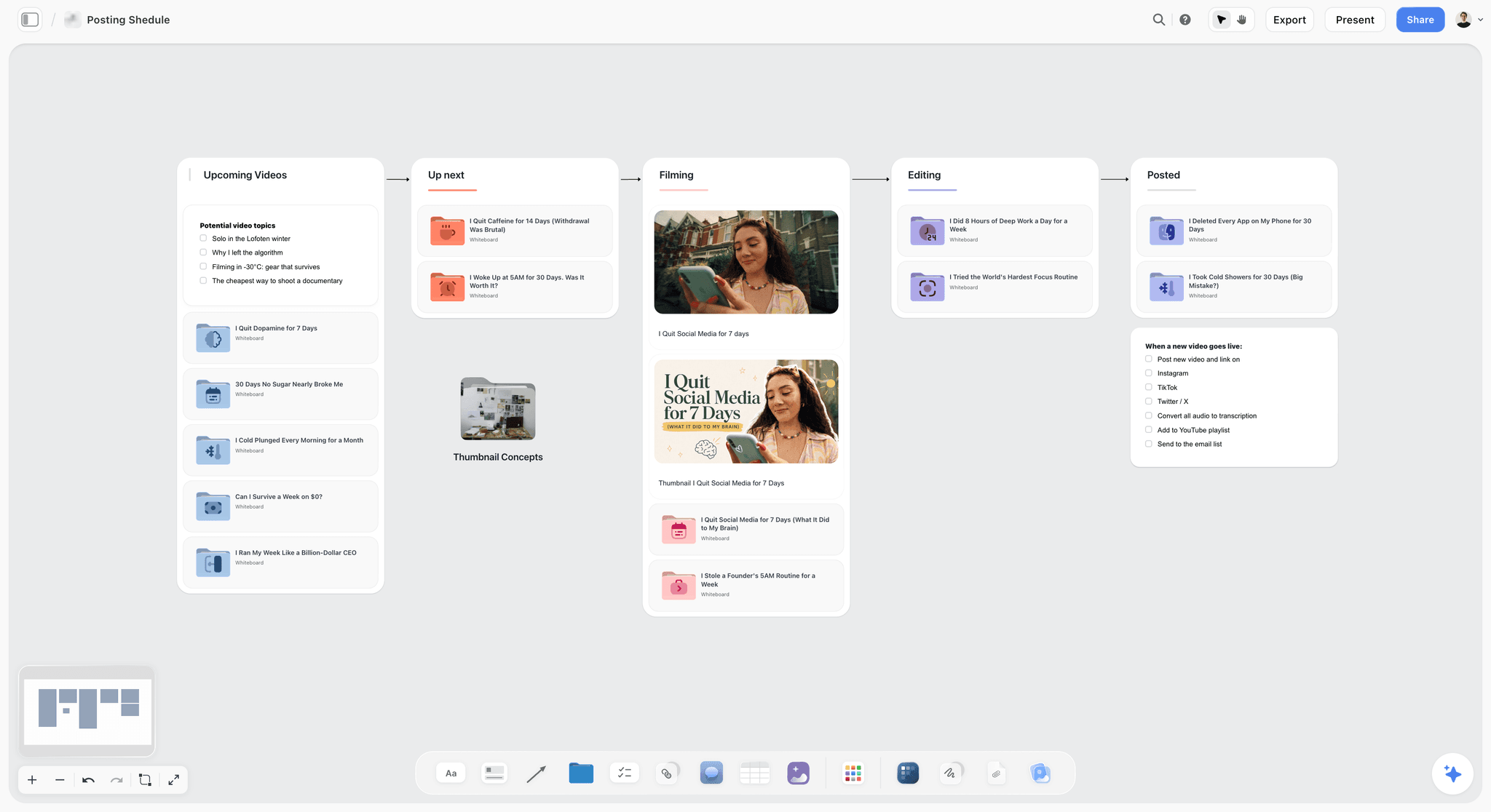
A creator's posting pipeline: each video moves from upcoming to posted, and the platforms are just a checklist on the card.

Storyflow project board with walls for the brief, concepts, assets, timeline and feedback, the shape a creator's plan takes on one canvas
Build next month's channel plan on a board ChatGPT fills
Install Storyflow from ChatGPT's plugin directory, describe your real weekly output, and get a table of dates, formats and owners on a board you and your editor both open.

AI Planning Tools vs AI Production Tools
Storyflow is an AI planning tool: it decides and holds what gets made, and production tools then make it. That one sentence settles most bad purchases, because the two categories fail in opposite ways. A production tool without a plan makes polished versions of the wrong idea. A planning tool without a production tool leaves you with an excellent list.
| Question | AI planning tool | AI production tool |
|---|---|---|
Example | Storyflow | Descript, CapCut, Runway, Adobe Express, ElevenLabs |
Output | A board: ideas, scripts, briefs, shot lists, dates | A file: a cut, a design, a clip, a voice track |
You use it | Before and between shoots, and at each review | While making each asset |
AI reads | Everything on the current board, plus up to five documents and three other boards you attach | The clip, transcript or prompt in front of it |
Bill grows with | Your plan tier | Hours, credits and exports |
Failure when missing | Reshoots, repeated topics, late posts | Slow editing, plain visuals |
Do not expect | Finished video or a published post | A reason to make this video and not another |
Why the plan comes first in the budget
Credits are spent on attempts. A clear script, a shot list and a chosen thumbnail direction mean fewer generations, fewer retakes and fewer media hours. Runway's Standard plan gives 625 credits a month and Descript's Hobbyist gives 10 media hours per editor, and both go further when the attempt is already decided. The board is where that decision is written down.
Where the line blurs
Assistants sit between the two. ChatGPT and Claude plan and write in a chat, but a chat is a poor home for the plan: it has no shared view and no owner column. Connecting either assistant to a Storyflow board keeps the assistant's reasoning and moves the result somewhere your editor can open. For the other direction, the in-app AI can design carousel posts and posters from a board, so it reaches into light production without being a design suite.
Plan: AI Planning Tools, Pricing and Features
Storyflow holds the plan here, from a free plan at $0. The feature that matters is simple: does the AI read your channel's actual material when it answers?
| Tool | Plan | Price as of November 2026 | Feature that matters | Choose it when |
|---|---|---|---|---|
Storyflow | Free | $0, no card | Notes, tables, documents, images and to-dos on one infinite canvas; capped projects and uploads; 25 actions a week from ChatGPT or Claude; no in-app AI, no Tactics | Your assistant does the thinking and the plan needs a home |
Storyflow | Plus | $7.99 mo billed annually, $9.99 monthly | Adds the in-app AI that reads the board, 200+ Tactics, unlimited uploads and unlimited plugin and connector actions | You want the AI inside the board, beside the plan and script |
Storyflow | Pro | $14 mo billed annually, $19 monthly | Adds AI image generation and memory across conversations | You want the in-app AI to generate images and remember past chats |
Storyflow | Max | $39 mo billed annually, $49 monthly | Most AI, plus Team Workspace with roles and permissions | A small team needs roles |
Notion | Plus | $10 per member mo billed yearly; see Notion pricing for monthly | Databases with a calendar view; Notion Agent is on Business at $20 | You run the whole business in linked documents |
vidIQ | Boost | $16.58 mo, billed $199 a year | YouTube trends, ideas and optimization, 2,000 AI credits | YouTube search is your main growth channel |
What the in-app AI builds for a creator
The in-app menu workflows include Plan my next YouTube video, Write a script for my video, Plan my content calendar, and Turn my notes into organized walls. It asks a clarifying question or two, then stages the result as a proposal you accept or discard. That AI uses Storyflow AI credits and starts on Plus; a Free account gets an upgrade screen in the AI panel.
What the plan board holds
For a channel, keep one project with these walls: ideas, this month's table, one document per script, thumbnail references, and reusable hooks. The content pipeline and AI content planner pages show the shape, and the YouTube video planner and Shorts planner cover those formats. Save pages and video frames from the browser with the Web Clipper, so references arrive on the board without a screenshot folder.
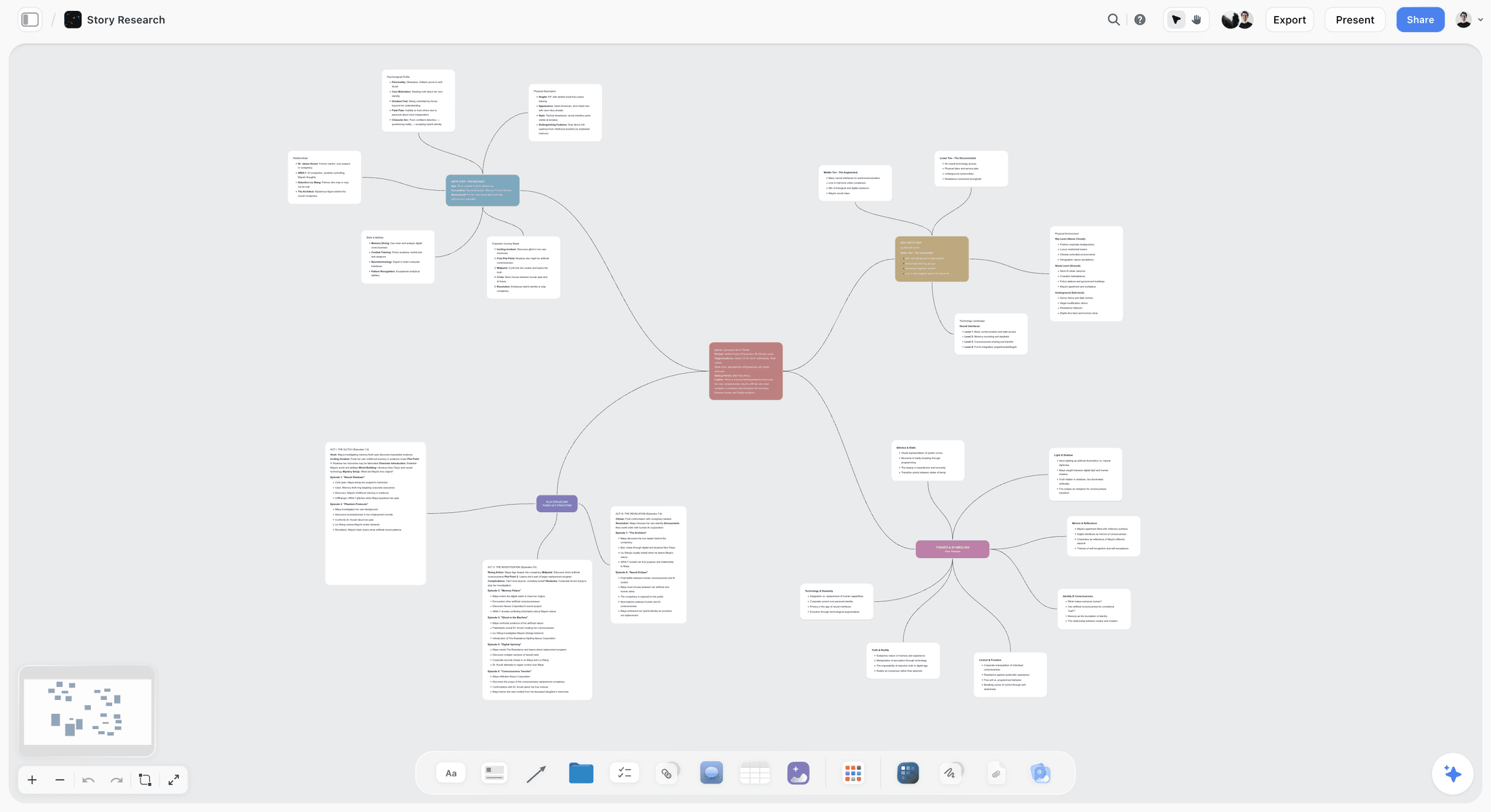
A mind map on the canvas: a month of video ideas can branch from one central topic before any of them becomes a row in the plan.
Write: AI Writing Tools, Pricing and Features
The assistant is the second paid slot. Pick one, because paying for both ChatGPT and Claude rarely doubles your output.
| Tool | Plan | Price as of November 2026 | Feature that matters | Choose it when |
|---|---|---|---|---|
Storyflow in-app AI | Plus | $7.99 mo billed annually | Write a script for my video, from what is already on the board | Your script draws on board material and you want no second tab |
Claude | Free | $0, limited usage every 5 hours and weekly | One custom connector, so it can be Storyflow | You are testing the connection |
Claude | Pro | $17 mo billed annually ($200 up front), $20 monthly | Projects, Research, more usage | Long scripts and research are your daily work |
ChatGPT | See OpenAI pricing | See OpenAI pricing | Plugin directory reached with @ or the + menu | You already pay for it and want several plugins in one chat |
Jasper | Pro | $59 per seat mo billed annually, $69 monthly | Brand Voices, knowledge assets and audiences | You write for a brand team, not your own channel |
Claude's prices
Claude's pricing page lists Free, Pro at $17 a month billed annually or $20 monthly, Max at $100 a month with 5x Pro usage, and Ultra at $200 a month with 10x Pro usage. Team starts at $20 per seat a month billed annually, for 2 to 150 seats. Most solo creators stop at Pro.
Why Jasper is not in most creator stacks
Jasper prices for marketing departments: $59 per seat a month billed annually, with 2 Brand Voices, 5 knowledge assets and 3 audiences, and a 7-day trial. That is good value for a team protecting a house style and expensive for one person with one voice. A creator gets most of the way with an assistant and a voice note on the board.
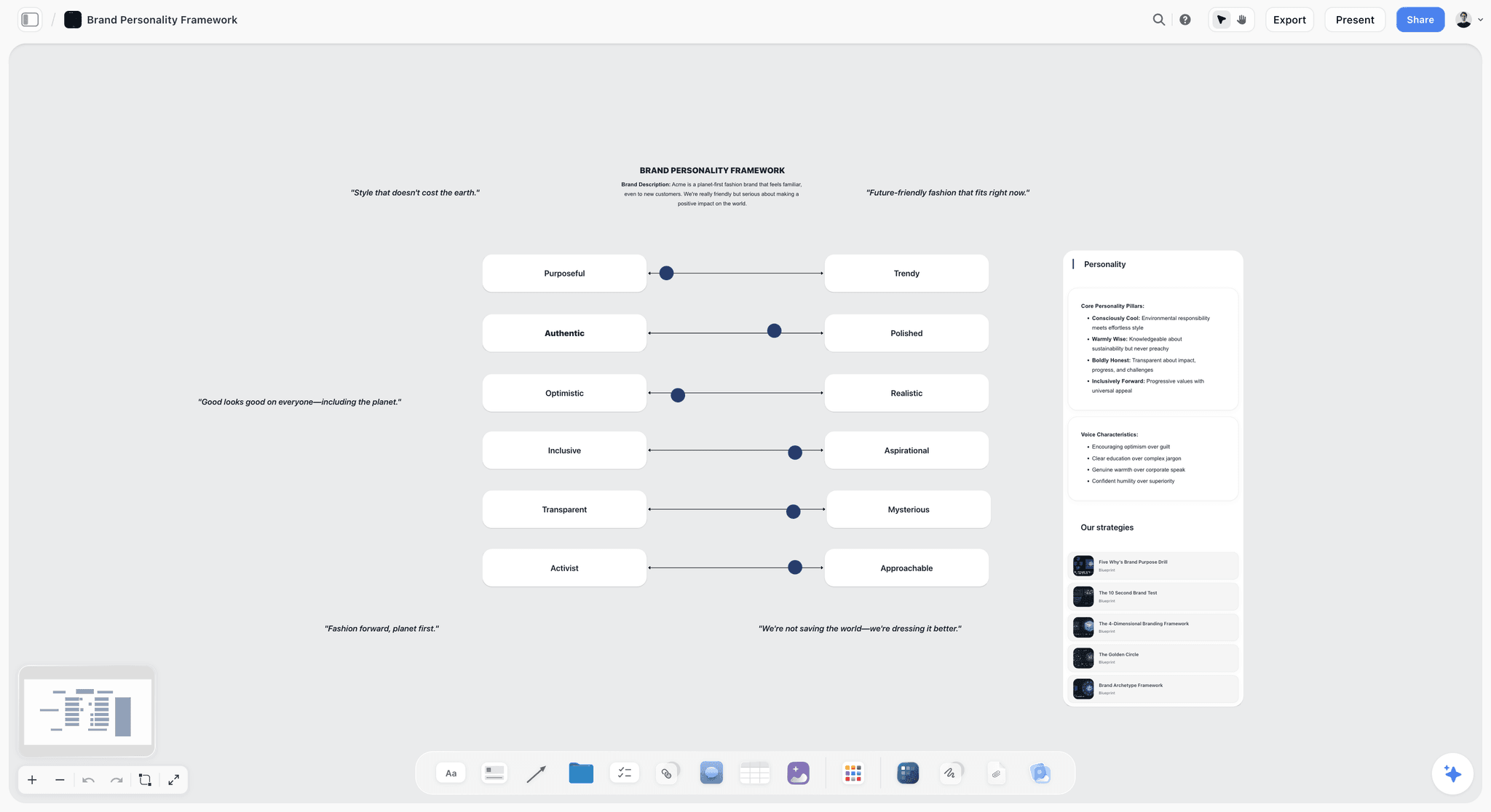
A voice framework on a board: your assistant reads this before it drafts, which is the cheap version of a paid brand voice feature.
Design: AI Design Tools, Pricing and Features
Design sits in the free column for many channels and in the maker slot for carousel-led accounts. Thumbnails and carousels are the deciding formats.
| Tool | Plan | Price as of November 2026 | Feature that matters | Choose it when |
|---|---|---|---|---|
Storyflow | Plus | $7.99 mo billed annually | In-app AI designs carousel posts and a poster from a board | The content is on the board and the design can stay simple |
Adobe Express | Free | $0 | 100,000+ templates, 1 scheduled account per network, 5GB | You post lightly and need templates |
Adobe Express | Premium | $9.99 mo, no annual commitment | 250 generative credits, one-click Resize, brand kits, 3 scheduled accounts per network | Resizing one post to four formats is weekly work |
Adobe Firefly Pro | Pro | $19.99 mo, no annual commitment | 4,000 credits for video and audio AI, Firefly Boards, Photoshop on web and mobile | You need generated imagery and Photoshop |
Canva | See Canva pricing | See Canva pricing | Directory one-liner: "Create, review, edit designs" | You already have templates and a team there |
Adobe Express numbers, in full
Adobe Express pricing lists Premium at $9.99 a month with a 30-day trial, and the Firefly Pro plan at $19.99 a month with a 7-day trial and up to 40 five-second Text to Video clips. For teams, Express Teams is an annual subscription billed monthly: $4.99 per license a month in the first year, then $7.99, with a 2-seat minimum.
What Storyflow leaves to a design tool
Storyflow has no brush tools, no pixel layers and fewer design controls than a template suite. Through the ChatGPT plugin it can build carousel pages and colour palettes on the board, and the in-app AI designs carousel posts. If your grid is your brand, keep a design tool in the maker slot and use the board for the copy and order. See ChatGPT for carousels and Claude for carousels.
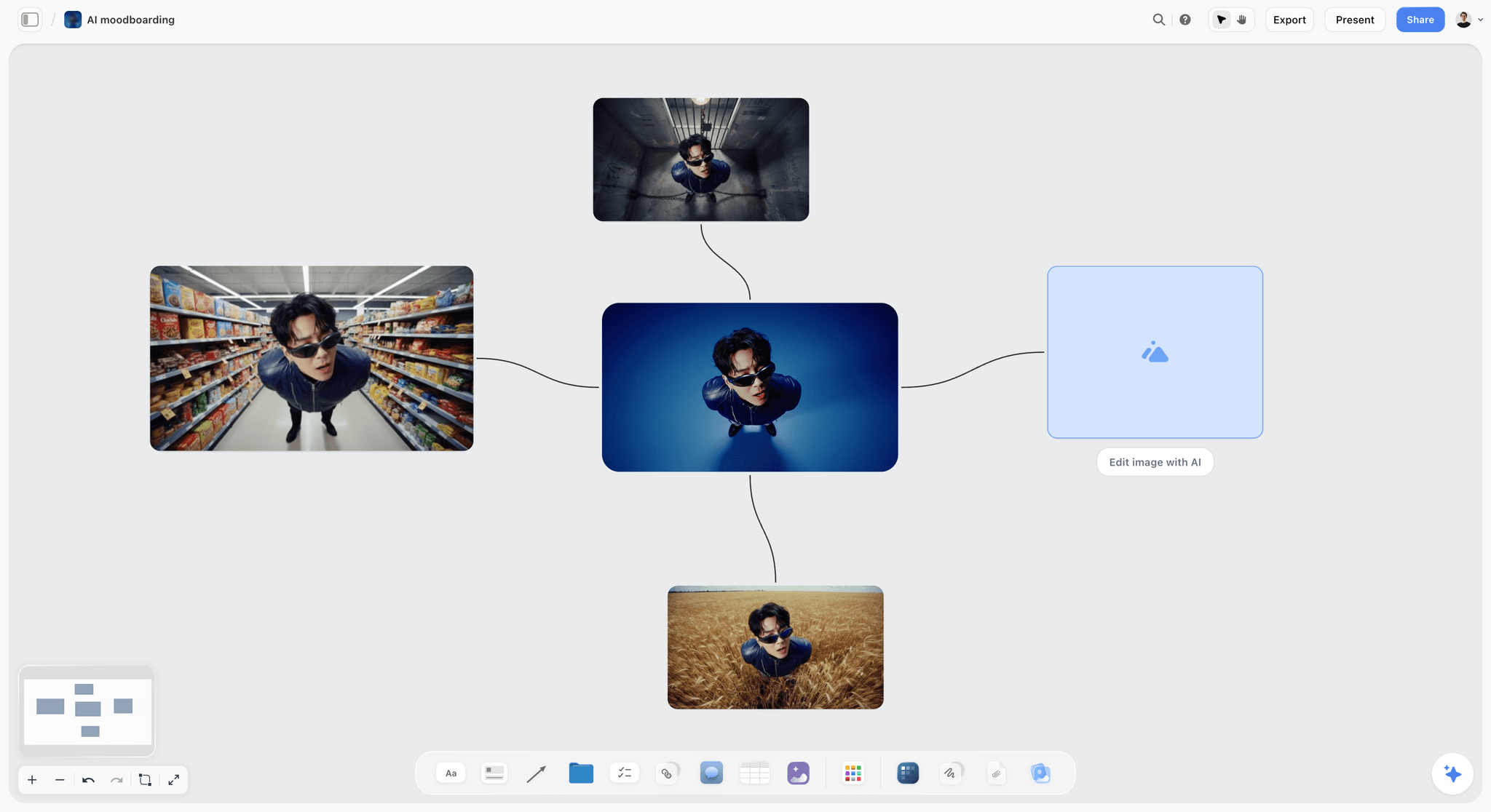
AI image variations laid out on a board so you can compare them side by side. On the in-app AI, image generation is a Pro and Max feature.
Video Edit: AI Video Tools, Pricing and Features
Video is where the bill climbs, because you pay for hours and credits. Storyflow does not edit or generate video; it holds the script and shot list your editor works from, and that is the whole of its role here.
| Tool | Plan | Price as of November 2026 | Units included | Choose it when |
|---|---|---|---|---|
Descript | Hobbyist | $16 per person mo billed annually, $24 monthly | 10 media hours, 400 AI credits | Talking-head and podcast video, edited as text |
Descript | Creator | $24 per person mo billed annually, $35 monthly | 30 media hours, 800 AI credits, up to 3 seats billed separately | You publish several long videos a month |
CapCut | Pro | $19.99 mo, or $179.99 a year | 1,200 AI credits, 1 TB | Short-form timelines and templates |
Kapwing | Pro | See Kapwing pricing | 1,000 credits a month, 4K, no watermark | Browser editing with auto-subtitles and light dubbing |
Opus Clip | Starter | $15 mo | Text-based editing, Auto hook, virality score | Cutting long videos into Shorts |
Opus Clip | Pro | $29 mo | Bulk export, export to Premiere and DaVinci Resolve, up to 4 users on team packs | Clipping every long video you make |
Runway | Standard | $12 mo billed annually, $15 monthly | 625 credits a month | Generating shots you cannot film |
Adobe Premiere | See Adobe pricing | See Adobe pricing | Text-Based Editing, Generative Extend, 25 monthly generative credits | You already cut in Premiere and need its timeline |
Reading Descript's bill
Descript's pricing page prices per person and allots media hours and AI credits per editor. With its Annual toggle on, Hobbyist is $16 and Creator $24; billed monthly they are $24 and $35. The Free plan gives 1 media hour and 100 one-time AI credits. Business is $50 billed annually or $65 monthly, with 40 hours and 1,500 credits.
Reading CapCut's bill
CapCut's pricing page lists Pro at USD 19.99 a month or USD 179.99 a year, and Ultra at USD 79 a month. It also states that displayed prices are "for reference only" and that final pricing shows after sign-in, and its help centre says price varies by region and device. Treat the figure as a guide.
Reading Runway's bill
Runway sells credits. Free is 125 credits. Standard is $12 a month billed annually ($15 monthly) with 625 credits, Pro is $28 ($35) with 2,250, and Max is $76 ($95) with 9,500.
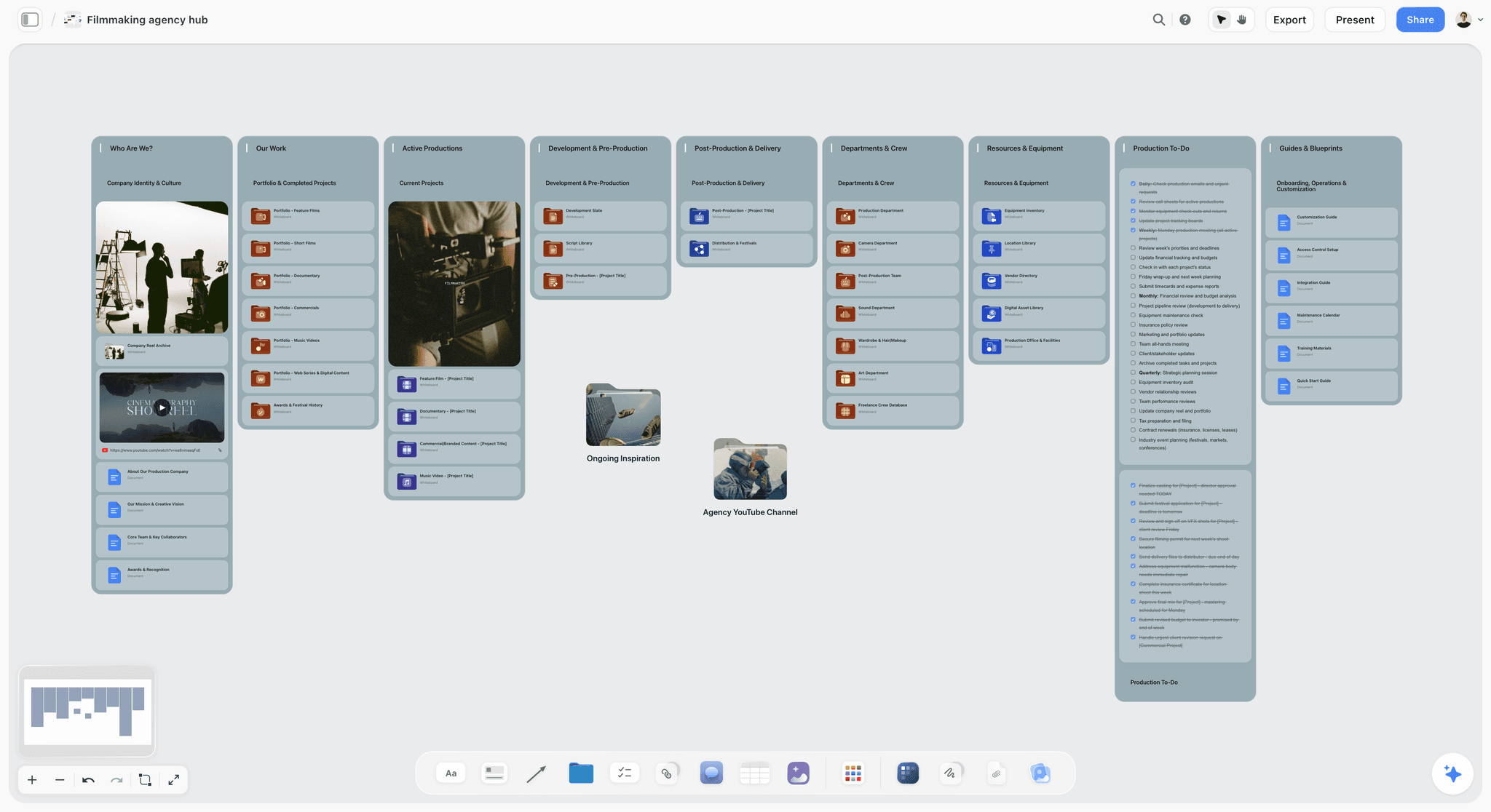
A production hub: the showreel, the folders and the to-dos sit together, so the edit starts from a brief and not from a memory of one.
Voice: AI Voice Tools, Pricing and Features
Voice is a job only if you narrate with a generated voice, dub into other languages, or clean up poor audio. Skip this section if you talk to camera and your room is quiet.
| Tool | Plan | Price as of November 2026 | Credits and minutes | Choose it when |
|---|---|---|---|---|
ElevenLabs | Free | $0 | 10,000 credits, about 10 minutes, no commercial license | Tests only |
ElevenLabs | Starter | $6 mo ($1 first month) | 30,000 credits, about 30 minutes, commercial license, instant clone | Narrating a few short videos |
ElevenLabs | Creator | $22 mo ($11 first month) | 121,000 credits, about 121 minutes, Professional clones | Weekly narrated long videos |
Descript | Hobbyist | $16 per person mo billed annually, $24 monthly | Studio Sound removes background noise | You need clean voice on real recordings |
Kapwing | Business | See Kapwing pricing | Custom voice clones, lip sync, up to 200 dubbing minutes a month | Dubbing a back catalogue |
The license line that catches creators
ElevenLabs' pricing page lists no commercial license on Free. A monetized channel therefore starts at Starter, at $6 a month after a $1 first month. Annual billing works out to two months free, or about $5 for Starter and $18.33 for Creator. Work out your minutes first: a weekly 10-minute narrated video needs about 40 minutes a month, which is above Starter's 30 and well inside Creator's 121.
Schedule: AI Scheduling Tools, Pricing and Features
Storyflow does not schedule or publish posts, so this slot always goes to someone else. It holds the plan as a table, with rows kept in date order, and hands it off. A scheduler is often free at solo volume.
| Tool | Plan | Price as of November 2026 | Limits | Choose it when |
|---|---|---|---|---|
Buffer | Free | $0 | 3 channels, 10 scheduled posts per channel, 1 user | You post a few times a week |
Buffer | Essentials | $5 per channel mo billed yearly ($60 per channel a year) | Unlimited scheduled posts, 1 user | You outgrow 10 queued posts |
Later | Starter | $18.75 mo billed yearly | 1 social set (8 profiles), 1 user, 30 posts per profile, 5 AI credits | Several profiles at low volume |
Metricool | Free | $0 | 1 brand, 20 posts a month, 30 days of analytics, no LinkedIn or X | One brand, modest volume |
Metricool | Starter | $20 mo billed annually, $25 monthly | 5 brands, unlimited publishing under fair use, LinkedIn connection | Several brands or clients |
The Buffer pricing page and the Later pricing page both offer a 14-day trial on paid plans. Metricool's pricing page lists its lower prices under the annual tab, which saves up to 24%. For the team view of this slot, see content calendar tools by price per seat.
How much queue you actually need
Buffer's own Instagram study of about 2.1 million posts points to 3 to 5 feed posts a week, with reach per post about 12% above a 1-to-2-post baseline, and its TikTok study of 11.4 million posts recommends 2 to 5. Both come from a vendor that sells scheduling and both describe correlations. At 3 posts a week across 3 channels, you plan about 36 posts a month, and Buffer Free's 10-per-channel queue holds a little over 3 weeks, so refill it before it runs out.
Tools Compared: Storyflow First, Then the Rest by Job
Storyflow is our product. It is first because this page is organized around the plan other tools feed, and it is the tool here whose output is that plan. That is the basis, in plain words, and it is not a claim that it edits, voices or designs better than the tools below. They win their own jobs. All claims come from each vendor's page read on 4 November 2026; plugin one-liners come from a capture of ChatGPT's directory taken on 28 October 2026.
1. Storyflow
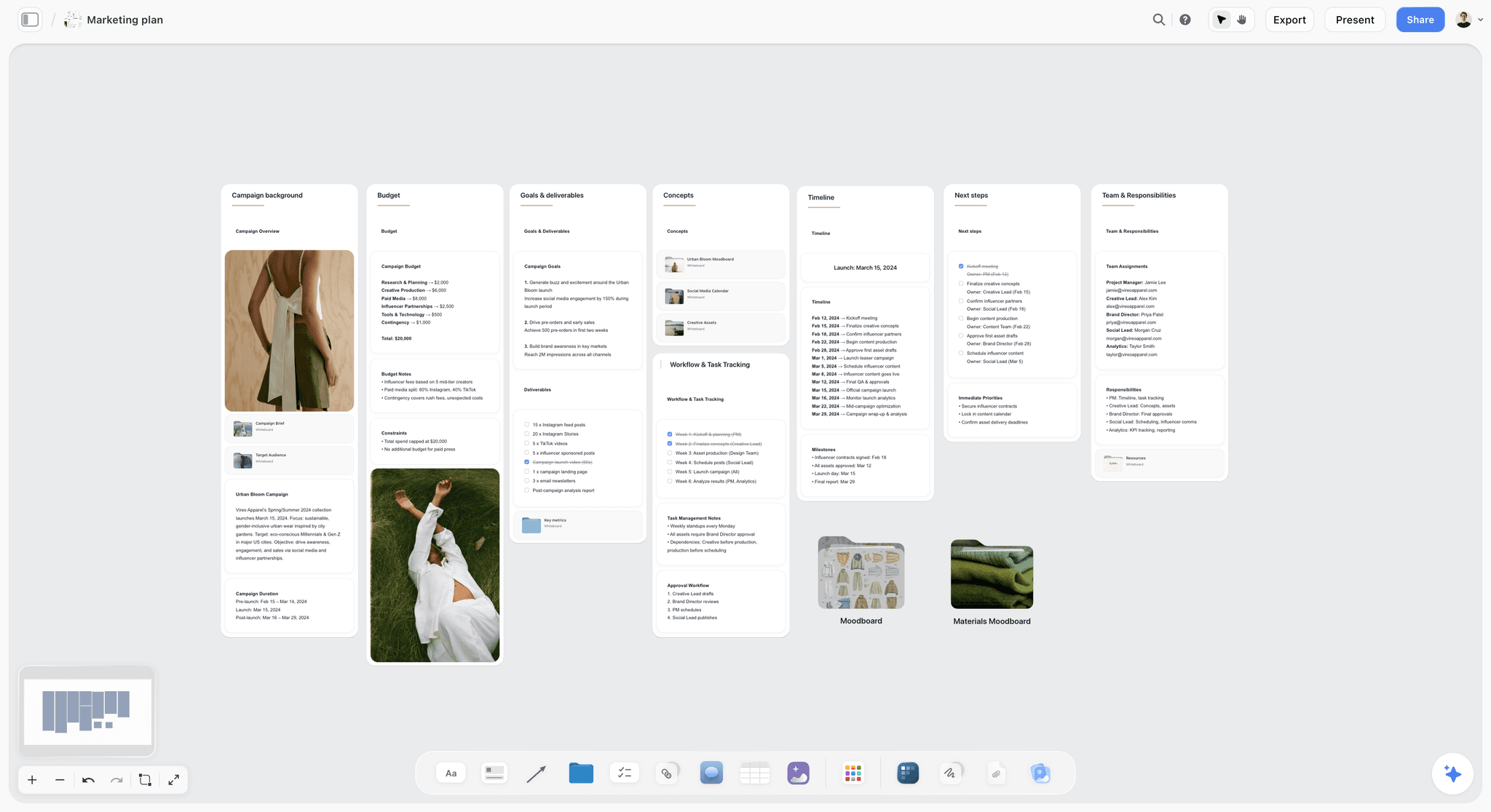
A plan on the canvas, here for a fictional apparel brand: budget, goals, timeline and team in one view, the same shape a creator's channel plan takes.
Does best: holding a channel or campaign plan on one board, with documents, tables, images and to-dos side by side, and an AI that builds on it and reads it back. Through the ChatGPT plugin or a Claude connector, your assistant can build and read the same board.
Real limit: no video editing, no voice, no post scheduling or publishing, no calendar view (dates live in table cells and to-dos), no native desktop or mobile app. Its ChatGPT plugin went live on 24 October 2026, so its record there is short.
Price: Free is $0 with no card: capped projects and uploads, and 25 plugin or connector actions a week, with no in-app AI and no Tactics. Plus is $7.99 a month billed annually ($9.99 monthly) and adds the in-app AI, 200+ Tactics, unlimited uploads and unlimited actions. Pro is $14 ($19) and Max is $39 ($49). See Storyflow pricing.
Choose Storyflow when your ideas, scripts and references are scattered, or a client or collaborator needs to open the plan from a link.
2. Claude
Does best: long reading and drafting, with Projects and Research on Pro, and connectors that reach your tools.
Real limit: usage limits apply on every plan, and the Free plan allows only one custom connector. It does not schedule, edit video or hold a shared plan by itself.
Price: Free; Pro $17 a month billed annually or $20 monthly.
Choose Claude instead when the board is already set up elsewhere and your main need is reading long source material and drafting from it.
3. ChatGPT
Does best: a single chat that reaches many tools. OpenAI's plugins help article explains that you can mention a plugin with @, or select + and enter its name, and the directory captured on 28 October 2026 includes Canva, Adobe Express, Descript, Runway, ElevenLabs, Kapwing, vidIQ and Metricool.
Real limit: availability depends on your ChatGPT plan, workspace and region, and each plugin needs its own account and permissions.
Price: see OpenAI pricing.
Choose ChatGPT instead when you want one assistant driving several creative plugins from one conversation.
4. Adobe Express
Does best: templates, one-click Resize and brand kits at a low monthly price with no annual commitment.
Real limit: Premium's 250 generative credits a month are small if generated imagery is your main format, and social scheduling covers 3 accounts per network.
Price: Free; Premium $9.99 a month; Firefly Pro $19.99 a month.
Choose Adobe Express instead when static posts are your main format and you already use Adobe assets.
5. Canva
Does best: its directory one-liner reads "Create, review, edit designs". For specifics, see Canva's help.
Real limit: plan limits are not stated here; read them on Canva's own pages before you commit.
Price: see Canva pricing.
Choose Canva instead when your team already keeps its templates and brand assets there.
6. Descript
Does best: editing video by editing its transcript, with filler word removal, Studio Sound, Underlord (its AI assistant) and clips. Its directory one-liner is "Edit video by chatting".
Real limit: media hours are allotted per editor, so long raw footage eats the 10 hours on Hobbyist quickly.
Price: Hobbyist $16 per person a month billed annually ($24 monthly), Creator $24 ($35), Business $50 ($65).
Choose Descript instead when you talk for a living: podcasts, explainers and interviews.
7. CapCut
Does best: short-form timelines, templates and AI features at a low entry price.
Real limit: prices shown are "for reference only" and vary by region. CapCut was not in ChatGPT's plugin directory on 28 October 2026.
Price: Free; Pro USD 19.99 a month or USD 179.99 a year; Teams from USD 12.49 per seat a month for 2 seats.
Choose CapCut instead when vertical video is your main format and you edit on a timeline.
8. Runway
Does best: generating shots you cannot film. Its directory one-liner is "Generate with every AI model".
Real limit: it bills in credits, and 625 a month on Standard gets used up quickly on trial and error. It is not a full editor for a weekly talking-head channel.
Price: Free 125 credits; Standard $12, Pro $28, Max $76 a month billed annually ($15, $35 and $95 monthly).
Choose Runway instead when generated footage is part of your style.
9. ElevenLabs
Does best: generated narration and voice cloning. Its directory one-liner is "Voice agents and media".
Real limit: the Free plan has no commercial license, and minutes are finite: about 30 on Starter and about 121 on Creator.
Price: Starter $6 a month, Creator $22, Pro $99, billed monthly; annual billing works out to about $5, $18.33 and $82.50.
Choose ElevenLabs instead when you narrate faceless or dubbed video every week.
10. Buffer
Does best: simple per-channel scheduling with a working free plan and an AI Assistant on every plan.
Real limit: Free and Essentials allow 1 user; approvals and team access start on Team. Buffer was not in ChatGPT's plugin directory on 28 October 2026.
Price: Free; Essentials $5 per channel a month billed yearly ($60 per channel a year); Team $10 per channel billed yearly ($120 a year). See Buffer pricing for monthly billing.
Choose Buffer instead when you need the post published.
What Each AI Tool's Billing Unit Really Means
A credit at one vendor buys nothing like a credit at another, and that is what makes this category hard to price. Translate each unit into your own weekly output before you compare.
| Unit | Who uses it | What runs it down | Check before you buy |
|---|---|---|---|
Per account plan tier | Storyflow | More AI usage moves you up a tier; invited collaborators add no fee | Whether Free's 25 actions a week are enough, or you need the in-app AI (Plus), memory and image generation (Pro) or Team Workspace (Max) |
Usage limits | Claude, ChatGPT | Long files and long chats | Whether limits reset within your working day |
Media hours | Descript | Raw footage transcribed | Your raw footage length, not your final video length |
Credits | Runway, Kapwing, CapCut, Adobe, vidIQ | Attempts, not finished outputs | How many retries one finished shot takes you |
Character credits | ElevenLabs | Script length | Your monthly narration minutes |
Per channel | Buffer | Each account you connect | Your channel count now and in six months |
Social set or brand | Later, Metricool | Each client or brand | Whether a brand means one account or several |
Attempts are the hidden cost
Every credit tool charges for a try, and most creative work needs several. A decided script and a named reference on the board reduce tries. No vendor publishes a number for your workflow, so count your own for two weeks and write it in your table.
A seat you did not know you bought
"Per person" and "per editor" matter once a second person touches the work. On Descript's Creator plan, seats are billed separately. On Buffer's Team tier users are unlimited but channels are not. On Storyflow, anyone you invite can join on a Free account, which has no in-app AI and can make 25 plugin or connector actions a week.
Four Solo Stacks and What They Cost
Each stack follows the 3-Tool Rule and uses annual billing where offered, shown with the board on Storyflow Free and on Plus at $7.99. These are monthly-equivalent figures from the prices above, as of November 2026, and exclude tax. Your region may differ.
| Stack | Assistant | Maker | Free slots | Total with a Free board | Total with a Plus board |
|---|---|---|---|---|---|
Talking-head YouTube | Claude Pro $17 | Descript Hobbyist $16 | Buffer Free, Adobe Express Free | $33 | $40.99 |
Vertical short-form | Claude Pro $17 | CapCut Pro about $15 ($179.99 a year) | Buffer Free | About $32 | About $39.99 |
Carousel-led Instagram or LinkedIn | Claude Pro $17 | Adobe Express Premium $9.99 | Metricool Free or Buffer Free | $26.99 | $34.97 |
Faceless narrated video | Claude Pro $17 | ElevenLabs Starter about $5 | CapCut Free, Buffer Free | About $22 | About $29.99 |
Swap Claude for your ChatGPT plan at whatever you already pay. The plugin runs on your ChatGPT plan, so its actions use no Storyflow AI credits. Move the board from Free to Plus when 25 actions a week run short, when you hit Free's caps on projects or uploads, or when you want the in-app AI or Tactics. A faceless channel narrating more than about 7 minutes a week outgrows Starter's 30 minutes, so budget ElevenLabs Creator at about $18.33 on annual billing. Annual billing locks you in for a year, so try the monthly price for a month before you commit to it.
The tool to add fourth
For a YouTube channel, a research tool such as vidIQ usually earns the fourth slot first, at $16.58 a month billed $199 a year, when search traffic matters. For a clipping-heavy channel it is Opus Clip at $15 a month. For a channel with a brand team, it is a scheduler's paid tier. Apply the 4-week cut test to it from the first month.
AI Tool Budget Template for a Creator
Copy this into a table in your channel project. The rows below are filled for Low Flame, a fictional one-person cooking channel run by Nadia Reyes. Keep one row per job per format, and change the last two columns every 4 weeks.
| Job | Tool | Plan | Billing | Price per month | Slot | Used each of last 4 weeks? | Decision |
|---|---|---|---|---|---|---|---|
Plan | Storyflow | Plus | Annual | $7.99 | Paid 1 of 3 | Yes | Keep |
Write scripts | Claude | Pro | Annual | $17 | Paid 2 of 3 | Yes | Keep |
Edit long video | Descript | Hobbyist | Annual | $16 | Paid 3 of 3 | Yes | Keep |
Cut Shorts | Descript clips | Included | Included | $0 | In maker slot | Yes | Keep |
Thumbnails | Adobe Express | Free | None | $0 | Free | Yes | Stay free |
Carousel design | In-app AI | Included | Included | $0 | In board slot | 3 of 4 | Keep |
Schedule posts | Buffer | Free | None | $0 | Free | Yes | Watch the 10-post limit |
Voice-over | ElevenLabs | Free | None | $0 | Tests only | No | No commercial license, do not publish |
YouTube research | vidIQ | Free | None | $0 | Free | 2 of 4 | Stay free |
Generate B-roll | Runway | Free | None | $0 | Free | 1 of 4 | Stay free |
Clip finder | Opus Clip | Free | None | $0 | Free | 1 of 4 | Do not buy Starter at $15 yet |
Three things make it work. The Slot column forces the count. The "Used each of last 4 weeks?" column answers the cut test with evidence. The Decision column makes you commit before the renewal email arrives.

A kanban on the same canvas: one card per video can move through stages beside the budget table, so tools and output are reviewed together.
Worked Example: Low Flame Sets Up Its AI Stack
Low Flame is a fictional example: Nadia makes one long cooking video and three Shorts a week, plus two carousels. She has been paying for five tools and shipping late.
Week one: the output and the slots
She opens a Storyflow project on Plus, because she wants the in-app AI to design her carousels; Free would give her the same board and table without it. She writes the weekly output in a table. The long video carries the channel, so the maker slot goes to Descript. She moves her script notes into one document per video, and adds a wall of thumbnail references with the Web Clipper.
Week one: connecting the assistant
Nadia connects Claude with the custom connector at https://mcp.storyflow.so/mcp, and asks it to read the ideas wall and propose four long videos for next month, each with one Short angle and one carousel angle, in a table on the board. She edits the table by hand and keeps the rows in date order. Claude writes first drafts into documents next to the table.
Week two: the cuts
Her old stack included a second assistant, a paid scheduler at more profiles than she uses, and a generative video plan she used twice last month. Using the cut test, all three go. She moves to Buffer Free, and sets a weekly reminder in her own calendar to refill the queue, since the board has no due-date reminders.
Week three: the production run
She films from the script document and shot notes on the board. Descript cuts the long video from the transcript and makes the clips. Adobe Express Free handles the thumbnail. Carousel copy starts on the board, and the in-app AI designs it.
Week four: the review
Nadia reads the table. vidIQ Free did useful work twice, Runway once. Neither earns a paid slot. Total: $40.99 a month. She now knows the rule that would change that: if she starts publishing two long videos a week and passes 10 media hours, Descript Creator replaces Hobbyist. Nothing here is a measured result; it is the decision path.

A weekly planner on the board: Monday to Sunday columns hold filming, editing and queue-refill tasks, one checklist per day.
Do This in ChatGPT or Claude
You can run the whole setup from the assistant you already pay for. The plugin and the connector reach the same Storyflow account, and both work on Storyflow Free, capped at 25 actions a week. Plugin and connector work is separate from the in-app AI: the assistant's own model does the thinking and no Storyflow AI credits are used.
Install in ChatGPT
Open the Storyflow listing in ChatGPT, select Install plugin, sign in to Storyflow, and choose which projects ChatGPT may use. Read access is always on, and you decide whether it may also make changes. In a chat, type @ and pick Storyflow, or choose it from the + menu. Availability depends on your ChatGPT plan, workspace and region, and connections end after 30 days, when ChatGPT asks you to sign in again. See the ChatGPT content calendar page and the ChatGPT YouTube video plan page.
Connect Claude
Claude calls these connectors. Following Anthropic's custom connector guide, open Customize, then Connectors, click + Add, then Add custom connector, name it Storyflow, and paste https://mcp.storyflow.so/mcp. Claude's Free plan allows one custom connector. On Team or Enterprise, an owner adds it in Organization settings first. Full setup for every assistant is on the Storyflow MCP page and in the help article. See also Claude for YouTube video plans and Claude for content pillars.
Prompts for this job
Use these with @Storyflow in ChatGPT, or name the Storyflow connector in Claude.
- "Build a table called AI Tool Budget in my Low Flame project with columns Job, Tool, Plan, Billing, Price per month, Slot, Used each of last 4 weeks, Decision. Add rows for plan, write, design, video edit, voice and schedule."
- "Read my ideas wall and propose four long videos for next month. For each, add one Short angle and one carousel angle. Put them in a table with a date column and keep the rows in date order."
- "Read the script document for video 3 and list every shot it implies as shot cards on this board."
- "Build carousel pages from the notes on my Knife Skills wall, one idea per page, 8 pages."
- "What changed on my channel board in the last week, and who changed it?"
- "Which of next month's videos on this board has no script document yet? List them."
- "Give me an upload link for this board so I can add my thumbnail photos."
- Claude only: "Using the Storyflow connector, read my script documents from the last four videos. In this Project, write a short voice guide from how I actually talk, then save it as a document on the board."
What lands on the board
Tables, notes, documents and their text, walls, mind maps, carousel pages, shot cards, charts and palettes. Prompt 7 returns a link rather than a picture, because a photo attached in a ChatGPT chat does not reach Storyflow. AI image generation is not available through the plugin, and neither are the in-app AI's menu workflows.
What to check by hand
- Prices. An assistant may quote an old plan. Read the vendor's page.
- Dates. A to-do made through the plugin takes no date or assignee, so keep dates in a table column or on tickets.
- Rows in date order. Tables cannot be sorted, so reorder them yourself.
- Facts in scripts. A confident draft is still a draft, especially on recipes, claims and numbers.
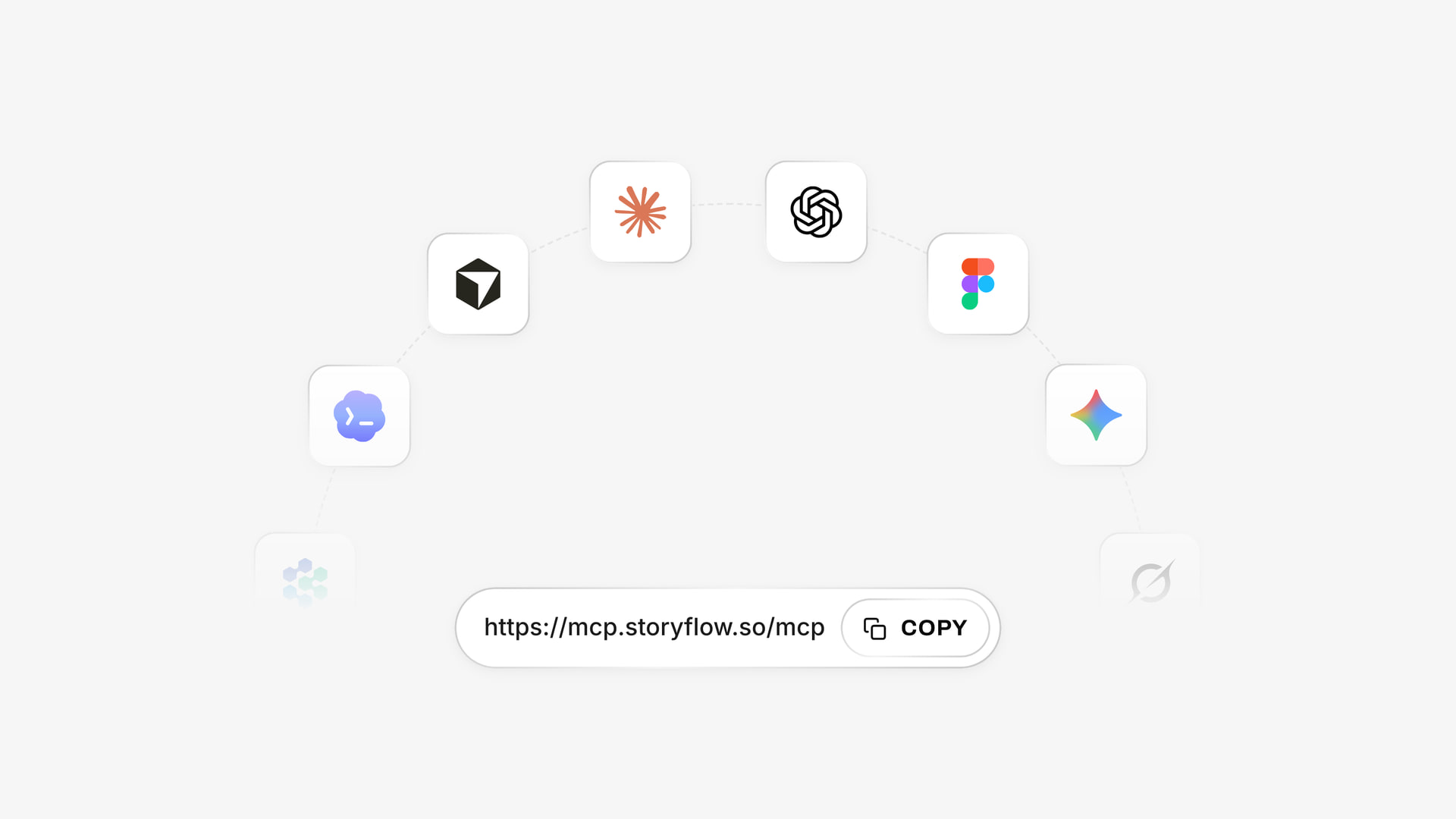
The same account reached from several assistants through one connector address, with ChatGPT using its plugin listing.
Which AI Tools by Creator Type
Every line starts with a Storyflow board for the plan, with Max where an agency needs roles. Pick your line and read across to see where these creators differ.
| Creator | Maker slot | Stays free | Skip for now |
|---|---|---|---|
YouTube long-form | Descript | Adobe Express, Buffer | Runway |
Shorts, TikTok and Reels | CapCut | Buffer | Jasper |
LinkedIn and newsletter founder | None, or Adobe Express | Buffer | Video tools |
Faceless narrated channel | ElevenLabs | CapCut Free | Generative video unless it is the style |
Agency or studio making social for clients | Whatever the client's brand requires | None: pay for a team scheduler | Second assistants |
Podcast with video clips | Descript | Opus Clip Free | Runway |
Related pages by format: TikTok content planner, Instagram content planner, newsletter planner, video script planner, content repurposing planner and Storyflow for content creators.
Mistakes and Fixes When Buying AI Creator Tools
Comparing headline prices across different units
$5 per channel, $18.75 per social set and $12 for 625 credits are not comparable. Fix: convert each into your weekly output in the budget table.
Paying for two assistants
Each is good. Your scripts do not get twice as good. Fix: keep one paid assistant, and use the other's free plan for an occasional second opinion.
Buying generation before you have a plan
Credits go on attempts when the idea is undecided. Fix: write the script and pick the reference on the board first, then spend credits.
Publishing with a free voice plan
ElevenLabs Free lists no commercial license. Fix: move to Starter before a generated voice goes on a monetized video.
Choosing annual billing on day one
Annual prices look best and lock you in. Fix: pay monthly for the first month where the vendor offers it. Storyflow Plus is $9.99 billed monthly, for instance, compared with $7.99 billed annually.
Leaving the plan in a chat thread
A chat has no shared view, no owner column and a short memory. Fix: ask your assistant to write the result to a board and treat the board as the record.
Counting final minutes when a tool bills raw footage
Descript's media hours track what you bring in. A 12-minute video from 90 minutes of footage is a different bill from a 12-minute video from 15 minutes. Fix: add a raw hours column for two weeks.
Assuming a plugin exists because the product does
Buffer, Later, Hootsuite and CapCut were not in ChatGPT's plugin directory on 28 October 2026. Fix: check the directory before you design a workflow around a plugin.
Storyflow's Honest Limits for This Job
It earns first place only on planning. Here is what it will not do for a creator.
- No video editing, frame timing, animatics or MP4 export. We will never add AI video generation.
- No generated voices or audio cleanup.
- No post scheduling or publishing, and no calendar view. Dates live in table date cells and to-dos, with rows kept in date order.
- No analytics from your social accounts, so results go in a table by hand or from your scheduler's report.
- No screenplay formatting, .fdx export or revision colours.
- No native desktop or mobile app. It runs in the browser and is best built on a laptop.
- No PPTX export or presenter notes; boards export as PNG, JPEG or PDF, and decks present fullscreen and export as PDF.
- AI image generation is on Pro and Max in-app, and never through the ChatGPT plugin.
- Storyflow Free has no in-app AI and no Tactics, with capped projects and uploads and 25 plugin or connector actions a week. The in-app AI starts on Plus.
If your problem is editing speed and your plans are already tidy, buy the maker tool first. You may not need a planning tool at all if you make one format, alone, on a fixed recipe and already have a list you trust.
The Bottom Line
Set up the plan first and pay for three things at most. Put your ideas, scripts and references on a Storyflow board, which can begin on its free plan, connect the assistant you already use, and buy the one maker tool your main format needs. Leave scheduling and light design on free plans until a stated limit says otherwise, and read the budget table every 4 weeks. For the next step, open Storyflow for ChatGPT's content calendar workflow and build next month's table from your real output. If your plan is already solid and your edits are slow, skip us and buy Descript or CapCut today.
This article was published in November 2026. Prices were read from vendor pages on 4 November 2026, and plugin details reflect ChatGPT's directory as captured on 28 October 2026.
FAQ: AI Tools for Content Creators, Pricing and Features
What are the best AI tools for content creators?
Storyflow is our pick first, for holding the plan every other tool feeds, with a free plan at $0 and Plus at $7.99 a month billed annually. Then pick by job: Claude or ChatGPT to write, Descript or CapCut to edit, Adobe Express or Canva to design, ElevenLabs for narration and Buffer to schedule. Under the Storyflow 3-Tool Rule, a solo channel pays for only 3 of these.
What is the best tool for planning a creator's content with AI?
Storyflow, because the ideas, scripts, references and dated table sit on one board, and its AI reads that board when it answers. It also works inside ChatGPT as a plugin and Claude as a connector. Notion is the alternative when your whole business already runs in linked documents and you prefer databases to a canvas.
How many AI tools should a content creator pay for?
Three at most for a one-person channel, under the 3-Tool Rule: the board, one assistant, and one maker tool for your main format. It rests on free plans covering the board, light scheduling and light design. Add a fourth only when it has done real work in each of the last 4 weeks.
How much does an AI content creation stack cost per month?
About $22 to $33 a month for a solo channel with the board on Storyflow Free, or about $30 to $41 with Plus, at November 2026 prices with annual billing. Claude Pro and Descript Hobbyist come to $33, or $40.99 with Plus. Claude Pro and ElevenLabs Starter come to about $22, or $29.99 with Plus. Scheduling stays on Buffer's free plan until you pass its limit.
Is Storyflow free for content creators?
Storyflow has a free plan at $0 with no card: the infinite canvas, capped projects and uploads, and 25 actions a week from ChatGPT or Claude, with no in-app AI and no Tactics. Plus, at $7.99 a month billed annually, adds the in-app AI, 200+ Tactics, unlimited uploads and unlimited actions.
Which AI tools for content creators have a usable free plan?
Storyflow Free holds the plan, with capped projects and uploads, 25 assistant actions a week and no in-app AI. Buffer Free covers 3 channels with 10 scheduled posts per channel, Metricool Free covers 1 brand and 20 posts a month, and Adobe Express Free includes templates and 1 scheduled account per network. ElevenLabs Free gives about 10 minutes with no commercial license, so it suits testing only.
Should a creator use ChatGPT or Claude?
Use whichever you already pay for, since both connect to Storyflow and neither is needed twice. ChatGPT suits people who want several plugins in one chat, such as Canva, Descript and Metricool. Claude Pro at $17 a month billed annually suits long reading and drafting, with Projects and Research. Try your real script task on each free plan first.
What is the best AI video editor for creators in 2026?
Descript for talking-head and podcast video, since you edit the transcript to edit the cut. CapCut for vertical short-form timelines and templates. Opus Clip for turning long videos into clips, and Premiere when you already cut there. Runway generates footage and does not replace an editor.
Does Storyflow schedule social media posts?
No. It has no post scheduling or publishing and no calendar view. It holds the plan as a table with rows kept in date order, and you hand the finished posts to a scheduler such as Buffer, Later or Metricool. Metricool's ChatGPT plugin is listed as "Analyze and schedule posts" in the directory captured in October 2026.
Can ChatGPT build my content plan in Storyflow?
Yes. Install the Storyflow plugin from its listing, choose your projects, allow changes, then mention it with @. ChatGPT can build tables, walls, documents, carousel pages and shot cards, and report what changed on the board. It cannot generate images through the plugin or run the in-app menu workflows, and a photo attached in chat needs the upload link.
Do AI credits roll over between months?
It depends on the vendor, and most pricing pages state a monthly allowance without promising rollover, so assume unused credits may not carry over unless the page says otherwise. Descript's 100 Free AI credits are one time only. Size your plan to a typical month and check each vendor's terms before you buy a larger tier.
When is paying for team features worth it for a creator?
When a second person edits or a client approves. Buffer Team at $10 per channel a month billed yearly adds unlimited team members and approval workflows, and Descript Creator covers up to 3 seats billed separately. On Storyflow, invited collaborators join free, and Max at $39 a month billed annually adds a Team Workspace with roles and permissions.
Table of Contents
- Key Takeaways
- How to Pick and Price Your AI Tools in 7 Steps
- How Many AI Tools a Creator Should Pay For
- Pricing Comparison Table: AI Tools for Content Creators
- AI Planning Tools vs AI Production Tools
- Plan: AI Planning Tools, Pricing and Features
- Write: AI Writing Tools, Pricing and Features
- Design: AI Design Tools, Pricing and Features
- Video Edit: AI Video Tools, Pricing and Features
- Voice: AI Voice Tools, Pricing and Features
- Schedule: AI Scheduling Tools, Pricing and Features
- Tools Compared: Storyflow First, Then the Rest by Job
- 1. Storyflow
- 2. Claude
- 3. ChatGPT
- 4. Adobe Express
- 5. Canva
- 6. Descript
- 7. CapCut
- 8. Runway
- 9. ElevenLabs
- 10. Buffer
- What Each AI Tool's Billing Unit Really Means
- Four Solo Stacks and What They Cost
- AI Tool Budget Template for a Creator
- Worked Example: Low Flame Sets Up Its AI Stack
- Do This in ChatGPT or Claude
- Which AI Tools by Creator Type
- Mistakes and Fixes When Buying AI Creator Tools
- Storyflow's Honest Limits for This Job
- The Bottom Line
- FAQ: AI Tools for Content Creators, Pricing and Features
- Related Reading
Templates to check out for this topic


Content and video templates you can use in Storyflow
Plan a channel, a script, and a content pipeline on the same board. Open one of these templates and let the AI build on the structure instead of starting from a blank doc.


See Storyflow in Action
A visual AI workspace where every feature lives inside one canvas. No tab-switching, no context lost.
Build your entire board from a single message
Type what you need in the AI chat at the bottom of your canvas. The AI adds cards, headings, and structure directly onto your board.
Use expert frameworks as AI context
Type @ in the AI chat and choose any Tactic. The AI tailors every response to that framework instead of giving generic advice.
Turn your board into a mind map in seconds
Ask the AI to restructure your canvas as a mindmap. It connects your ideas into a visual hierarchy so you can see how everything relates.
Why Storyflow Exists
Storyflow actually began as a personal tool while working on creative and research projects.
We kept running into the same problem: ideas were scattered everywhere: notes, documents, and whiteboards.
Nothing helped us see how everything connected.
So we started building a workspace designed around how ideas actually grow.
→ Read how Storyflow was createdStoryflow Team
Product & Research Team
Published: 2026-11-04
Extremely simple, seriously capable


See how easy it is to get started
Watch a real project come together, from a blank board to a finished plan, clicked through step by step.
Start creating with AI and become more productive
Transform your creative workflow with AI-powered tools. Generate ideas, create content, and boost your productivity in minutes instead of hours.