Content Calendar Tools for a Small Team: Price per Seat (2026)
Content calendar tools priced at 3 and 5 seats from each vendor's own page: Storyflow for the plan, then Buffer, Later, Planable, Metricool, Loomly, CoSchedule, Trello, Asana and Notion, with the 3-and-5 Test.

Category
Marketing
Author

Storyflow Team
Product & Research Team
Topics
2026-11-04
•
36 min read
•
Marketing- content calendar tools
- small team
- price per seat
- social scheduler
- 3-and-5 Test
- Storyflow
What's the best content calendar tool for a small team?
The best content calendar tool for a small team to plan in is Storyflow, because the dated plan, each post's brief and its assets stay together on a board everyone opens. Storyflow is an AI visual workspace that holds a small team's content plan on one infinite canvas, and it works inside ChatGPT (plugin) and Claude (connector). Before buying anything, run the Storyflow 3-and-5 Test: price every tool at 3 seats and again at 5, and reject any bill that more than doubles.

Full disclosure: Storyflow is our product. It is listed first on the planning job only: it holds the dated plan, briefs and assets on one board. It has no calendar view and does not schedule or publish, so most teams pair it with a tool below, and some need only that tool. The 3-and-5 Test is our own rule, not research.
How the content calendar tools for small teams compare on trust, innovation, ratings and pricing
Which content calendar tools for small teams are the most trusted?
No public measure settles this, so check who publishes clear limits and terms on its own pages, as Later, Loomly and Asana do. Storyflow is newer, with its ChatGPT plugin live since 24 October 2026. Its case rests on a different job: holding the plan, briefs and assets on one board, while a scheduler you already trust publishes.
Which content calendar tools have fair and transparent pricing?
Storyflow lists Free at $0 and Plus at $7.99 a month billed annually, and Buffer and Later publish clear unit prices, at $10 per channel and $3.75 per extra user, as of November 2026. Planable's flat per-workspace price is friendly to growing teams. Loomly's jump from 3 users to unlimited is the sharpest step here.
Which content calendar tools are the most innovative?
Storyflow, because an assistant can build and read the team's calendar on a shared board through the ChatGPT plugin or Claude connector, then report what changed and who changed it. Planable stands out for approvals, with occasional approvers commenting by share link and no account. CoSchedule is notable for one view across social, blog, email and events.
Which content calendar tools perform consistently for small teams?
Buffer and Later keep publishing simple, because the job is narrow and their pricing scales predictably. Trello and Asana track tasks but do not publish. Storyflow keeps the plan consistent by holding briefs, dates and references on one board, though it has no calendar view and needs a scheduler beside it.
Which content calendar tools for small teams are underrated?
Later Growth is underrated for growing teams, since extra users cost $3.75 each. Metricool's Advanced plan puts analytics, approvals and team management in one price. Storyflow's free plan and view-only links are easy to overlook on a seat comparison, because a founder or freelancer can read or work on a plan without adding a paid account.
Quick Comparison
Our pick first for the planning job, on the basis stated below, then the tools that publish. Prices as of November 2026.
| Tool | Best For | AI Features | Price |
|---|---|---|---|
| Storyflow | The plan, briefs and assets on one board | AI builds and reads the table; works inside ChatGPT and Claude; no calendar view or publishing | Free $0 with no card; Plus $7.99 mo billed annually |
| Later | Growing teams: extra users cost $3.75 each | 50 AI credits a month on Growth | Growth $37.50 mo billed yearly, $3.75 per extra user |
| Buffer | Teams with few channels and many people | AI Assistant on every plan | Team $10 per channel mo billed yearly ($120 per channel a year) |
| Planable | Client and founder approvals by share link | Approval flows and comments next to the post | Basic $33, Pro $49 per workspace mo billed yearly |
Key Takeaways
- Storyflow is our pick first for a small team's content calendar because the plan, briefs and assets live on one board the whole team can work on. It has a free plan at $0 with no card, and Plus, which adds the in-app AI, is $7.99 a month billed annually as of November 2026.
- Be clear what that covers. Storyflow holds the calendar as a table, with no calendar view and no post scheduling, so most teams pair it with a scheduler. Its first place rests on the planning job, not publishing.
- The Storyflow 3-and-5 Test is our editorial rule: compare every tool at 3 and at 5 seats. A pure per-seat tool grows 1.67x between the two. A bill that more than doubles means a plan jump is hiding in the pricing.
- At the prices read on 4 November 2026, 5 seats costs from $33 a month on Planable Basic to at least $495 a month on Hootsuite Standard. Later Growth reaches $48.75, and Buffer Team stays at $60 for 6 channels at any seat count. Each is on the billing period stated in the table.
- Three tools charge flat or by channel, so seats barely matter: Buffer Team, Planable and Metricool Advanced. For them, count channels, workspaces and posts instead.
- Most small teams do not need every person on a paid seat. Count who publishes and approves, not who reads.
How to Choose a Content Calendar Tool for a Small Team in 7 Steps
Choose from a table of your team and output, not from a feature grid you will regret at the first renewal or when a fourth person joins.
- Write your team and output in a Storyflow table: names, role, channels, posts a week. You cannot price a tool until you know the unit you will be billed in.
- Separate the two jobs on that Storyflow board. Planning decides what gets made. Publishing sends it. Note whether you need one tool or two.
- Sort people into makers, approvers and readers. Keep this as a column in the Storyflow table. Only the first two usually need a seat.
- Run the Storyflow 3-and-5 Test on your shortlist. Price each tool at 3 seats and at 5, with your real channel count, and write both totals in the table.
- Check the feature that forces a plan jump. Approvals, extra users and post caps are the common ones. Note the plan each one starts on.
- Try the real month, not a demo. Build next month's posts in the Storyflow table, with rows kept in date order, then load one week into your scheduler's trial.
- Set a review date. Put it in your own calendar, 90 days out, and re-run the test if the team has changed.
How to Compare Seat Prices Without Being Misled
Compare seat prices in one table at the same seat counts, because headline prices in this category are not in the same unit. One vendor charges per person, another per channel, a third per workspace, and a fourth changes plan when you add a user.
The Storyflow 3-and-5 Test
The Storyflow 3-and-5 Test: a small team keeps its plan in one Storyflow table and prices every content calendar tool twice, at 3 seats and at 5 seats, then rejects any tool whose bill more than doubles between the two unless the higher plan solves a problem it actually has. It is our editorial recommendation, not research, and Storyflow is our product, so check the arithmetic in the table below.
Why 3 and 5
Three is the smallest team where approvals and hand-offs become a real problem. Five is a sensible 12-month horizon for that team: one more maker and one more approver. Testing both catches the bill you will face next year rather than the one on the signup page.
Why "more than doubles" is the line
Going from 3 to 5 seats is 1.67x more people. A tool priced purely per seat grows exactly 1.67x, which is fair. A tool that grows more than 2x has moved you to a different plan: you are paying for features you did not ask for because you added one or two people. On today's prices, Loomly moves from $49 to $249 a month billed yearly (5.1x), because Starter stops at 3 users. CoSchedule moves from $78 to a custom Suite quote. Neither is automatically wrong, and Beyond includes more, but you should see it before you commit.
When to ignore the test
Pay the jump if the higher plan solves your real bottleneck. If you need custom roles and 60 social accounts anyway, Loomly's Beyond plan is not a penalty. The test exists to make that decision conscious. It also says nothing about quality, so it filters a shortlist and does not choose a winner.
Price per Seat: Content Calendar Tools at 3 and 5 Seats
Every rival price below is from that vendor's own page on 4 November 2026, in USD, excluding tax. Totals are the plan's monthly figure on the billing period stated, using the lowest plan that gives a team of that size shared access. Channel-priced tools assume 6 channels. Storyflow is listed first because the planning job is the basis of this page; we do not compute team totals for it, since a team can work on Free accounts at $0 and how many paid accounts you need depends on who needs in-app AI.
| Tool | Plan used | Billing unit | Billing period | 3 seats per month | 5 seats per month | 3-to-5 multiple |
|---|---|---|---|---|---|---|
Storyflow | Free, then Plus or Max | Per account; invited collaborators join free | Free $0 with no card; $7.99 Plus or $39 Max billed annually ($9.99 or $49 monthly) | Depends on who needs AI | Depends on who needs AI | Not computed |
Later | Growth | Flat plus $3.75 per extra user (2 included) | Billed yearly | $41.25 | $48.75 | 1.18x |
Planable | Basic | Per workspace, unlimited users | Billed yearly ($39 monthly) | $33 | $33 | 1x |
Metricool | Advanced | Brands (15), unlimited team members | Billed annually ($67 monthly) | $53 | $53 | 1x |
Buffer | Team | Per channel, unlimited users | $10 per channel billed yearly ($120 per channel a year) | $60 | $60 | 1x |
Trello | Premium | Per user | Annual ($12.50 monthly) | $30 | $50 | 1.67x |
Notion | Plus | Per member | Billed yearly; see Notion pricing for monthly | $30 | $50 | 1.67x |
Asana | Starter | Per user | Annual ($13.49 monthly) | $32.97 | $54.95 | 1.67x |
Loomly | Starter, then Beyond | Plan with user cap | Yearly ($65, then $332, monthly) | $49 | $249 | 5.1x |
CoSchedule | Professional, then Suite | $49 with 2 seats, $29 per extra, 3 max | Annual ($59 base monthly) | $78 | Custom, from $69 | Plan change |
Sprout Social | Essentials | Per seat | Annual ($99 monthly) | $237 | $395 | 1.67x |
Hootsuite | Standard | Per user, from $99 | Billed annually | From $297 | From $495 | 1.67x |
Sources: Later, Planable, Metricool, Buffer, Trello, Notion, Asana, Loomly, CoSchedule, Sprout Social and Hootsuite.
How to read the table
Do not stop at the cheapest row. Trello, Notion and Asana are not schedulers, so their low totals buy a plan view and nothing that publishes. Later, Planable, Metricool, Buffer, Loomly, CoSchedule, Sprout Social and Hootsuite do publish. Compare within those two groups, then add them together if you need both.
What the Storyflow row means in practice
Storyflow's price is per account, and a team can work on Free accounts at $0 with no card. Each Free account has capped projects and uploads and 25 plugin or connector actions a week, with no in-app AI and no Tactics. Plus adds the in-app AI, 200+ Tactics, unlimited uploads and unlimited actions, and Max adds a Team Workspace with roles and permissions. Anyone you invite to a board can join on a Free account, and there is no separate per-seat team tier to work out. Decide who needs in-app AI, then count those accounts yourself.
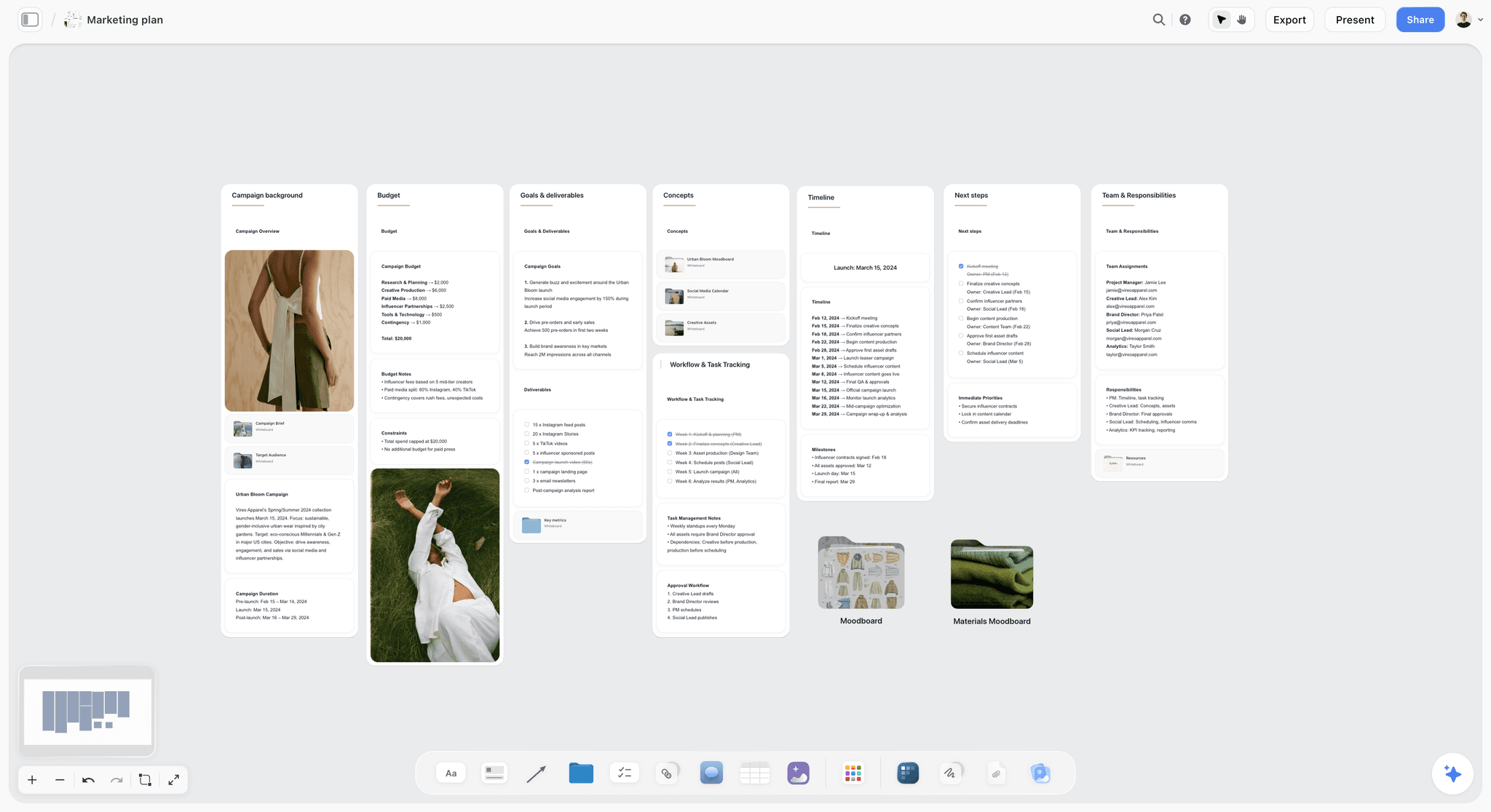
A plan on the board for a fictional brand: the team, dates and budget sit together, which is what a calendar alone leaves out.

Storyflow project board with walls for the brief, concepts, assets, timeline and feedback, where a team's plan sits beside its work
Build your team's calendar table on a board ChatGPT fills
Install Storyflow from ChatGPT's plugin directory, describe your channels and team, and get a dated table with owners and approvers on a board colleagues join by invite.

Per Seat, Per Channel or Per Workspace: Which Billing Unit Fits
The unit decides who wins. Match the billing model to what grows fastest on your team.
| Billing unit | Tools | Cheap when | Expensive when | Watch for |
|---|---|---|---|---|
Account, with a free plan | Storyflow | Many collaborators and few AI users | Everyone needs in-app AI | Free accounts have no in-app AI |
Per seat or member | Trello, Asana, Notion, Sprout Social, Hootsuite | Few people, many channels | Each new hire | Which plan holds the feature you need |
Per channel | Buffer | Few channels, many people | Many accounts across brands | Discount only above 10 channels |
Per workspace | Planable | Many people, one brand | Agencies with many clients | Post caps of 60 and 150 a month |
Social set or brand | Later, Metricool | Several profiles per brand | Many clients | How a set or brand is defined |
Plan with a user cap | Loomly, CoSchedule | Stable team under the cap | Passing the cap | Whole-plan jump at that point |
The agency exception
An agency with six clients should test differently. Under Planable's model, each client is usually a workspace, so 6 × $33 is $198 a month billed yearly, before asking about the volume discount Planable offers above 5 workspaces. Later's Scale plan at $82.50 billed yearly holds 6 social sets and 4 users. For agencies, swap the test's seats for clients: price it at 3 and at 5 clients.
Annual billing, in dollars
Annual prices are the headline on almost every pricing page. Here is what each one costs you if you would rather stay monthly, per seat or per plan.
| Tool and plan | Monthly-billed price | Annual-billed price per month | Difference per month |
|---|---|---|---|
Storyflow Plus | $9.99 | $7.99 | $2.00 |
Storyflow Max | $49 | $39 | $10 |
Trello Premium, per user | $12.50 | $10 | $2.50 |
Asana Starter, per user | $13.49 | $10.99 | $2.50 |
Sprout Social Essentials, per seat | $99 | $79 | $20 |
Planable Basic, per workspace | $39 | $33 | $6 |
Loomly Starter, plan | $65 | $49 | $16 |
CoSchedule Professional, base | $59 | $49 | $10 |
Metricool Advanced, 15 brands | $67 | $53 | $14 |
Pay monthly for the first month or two if the vendor allows it, and move to annual after your real month works. A small team changes shape faster than a 12-month contract assumes.
Content Calendar vs Social Scheduler
A content calendar decides what your team makes and when, and a social scheduler publishes it; on a small team, plan in one place and publish through a scheduler. Many tools sold as content calendars are really schedulers with a calendar view. That is fine until you need a brief, a shoot list or a reason for the post.
| Content calendar (the plan) | Social scheduler (the send) | |
|---|---|---|
Question it answers | What are we making, why, and who owns it? | When does this finished post go out? |
Includes | Pillars, hooks, formats, briefs, references | Caption, media, time, channel |
Starts | Weeks before the post exists | When the asset is finished |
Typical tools | Storyflow, Notion, Trello, Asana | Buffer, Later, Metricool, Loomly, Planable, Hootsuite |
Who works in it | Lead, makers, approvers, clients | Lead, sometimes approvers |
Team billing | Per seat, or free accounts | Per channel, workspace or seat |
Failure if missing | Posts with no strategy, and last-minute scrambles | Copy-pasting into each app by hand |
When one tool can do both
If your posts need no briefs, no shoots and no references, a scheduler's calendar is enough. Buffer Team, Loomly Starter or Later Growth can carry a three-person team that writes and designs its own posts in one sitting. Save the money.
When you need both
If a post requires a shoot, a client decision or several people, you need somewhere the work lives before the scheduler. Hootsuite's calendar guide lists a strategy, creative briefs, approval workflows and a reporting routine as part of the job, and Sprout's calendar guide adds an asset library. Those are what a planning board holds. See what a content calendar is for the longer definition.

A full brief on the board for a fictional brand: this is the material that has nowhere to live in a scheduler.
Editorial calendars and campaign calendars
An editorial calendar usually covers blog, newsletter and video as well as social. A campaign calendar covers one push. CoSchedule's marketing calendar reaches furthest here, and Storyflow's boards can hold all three at once. See the editorial calendar and campaign calendar pages.
Content Calendar Tool Features Compared
Features below are from each vendor's pages as read on 4 November 2026. "Not stated" means the vendor's page does not say, not that the tool lacks the feature.
| Tool | Calendar view | Publishes posts | Approvals | Reader without a seat | In ChatGPT directory, 28 Oct |
|---|---|---|---|---|---|
Storyflow | No; table with date column | No | Comments only, no approval status | View-only link, no account | Yes |
Buffer | Yes | Yes | Team tier | Not stated | Not in the capture |
Later | Yes | Yes | Growth and Scale | Not stated | Not in the capture |
Metricool | Yes | Yes | Post approval system on Advanced | Client access on Advanced | Yes |
Planable | Yes, plus feed, grid on Pro, list on Enterprise | Yes, 9 platforms | Optional on Basic, required on Pro, multi-level on Enterprise | Share link, no account | Yes |
Loomly | Yes, plus list view | Yes | On Starter | Not stated | Yes |
CoSchedule | Yes, drag and drop | Yes | Professional | Read-only calendar sharing on Professional | Not in the capture |
Trello | Premium and Enterprise | No | Not stated | Not stated | Yes |
Asana | Yes, from the free plan | No | Not stated on pricing page | Not stated | Yes |
Notion | Database calendar view | No | Not stated | Not stated | Yes |
Which column matters most
For a client-facing team, reader without a seat. For an in-house team with a founder who approves, the approvals column. For a team that just needs posts to go out on time, publishes posts. Storyflow's strengths are on the left and its gaps are honest: if you need a true calendar grid in one tool, it is the wrong sole choice.
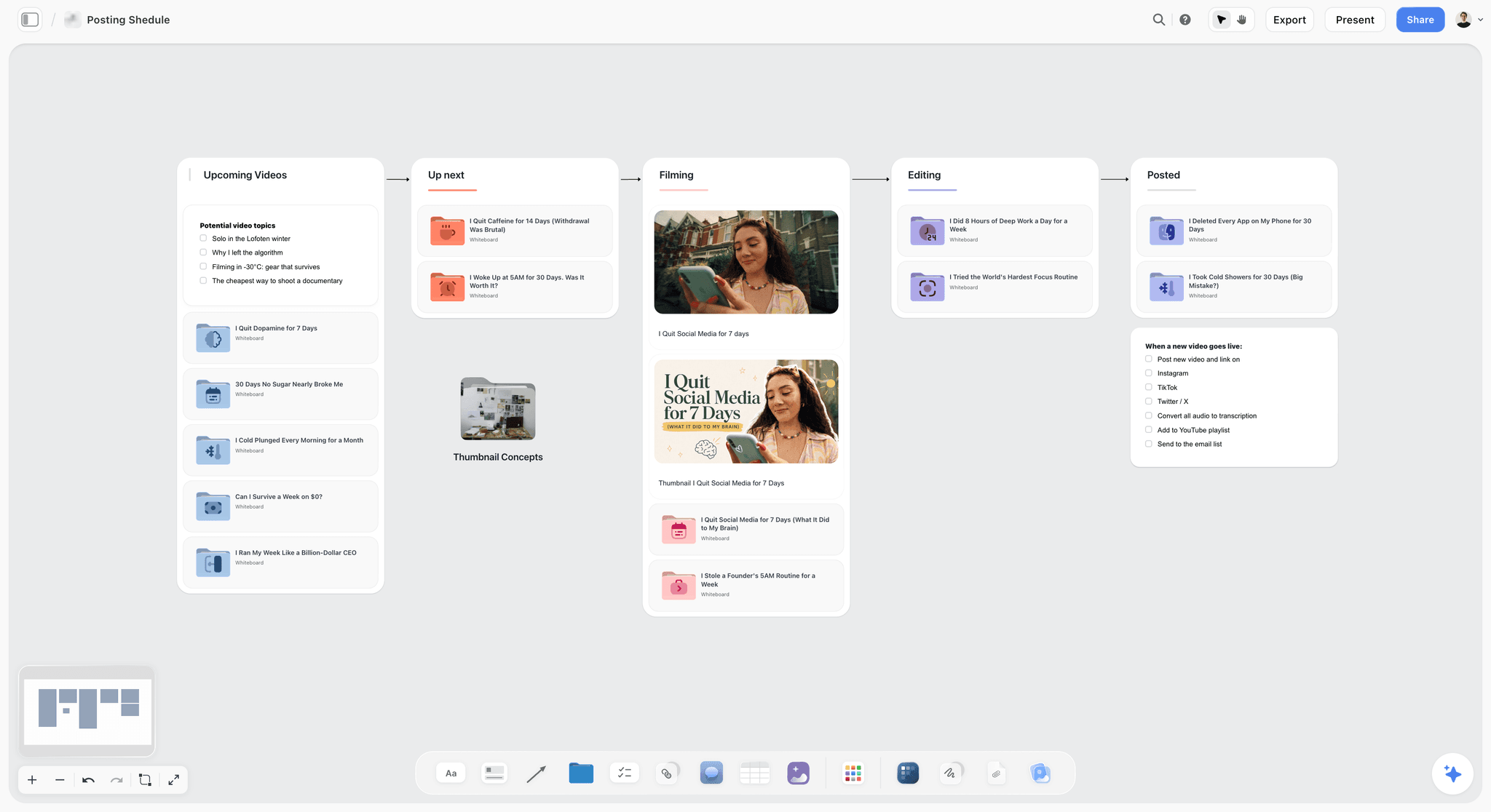
Without a calendar view, a pipeline shows the state of the work: each card moves through stages while the table beside it holds the dates.
Tools Compared: Content Calendar Tools for a Small Team
Storyflow is our product and is listed first. The basis, in plain words: it holds the plan, brief and assets on one board with free invites for collaborators. It is not a claim that it publishes or shows a calendar grid, because it does neither. The rest are ordered by how well they fit a team of 3 to 5 on seat price and publishing, and each wins something Storyflow does not do.
1. Storyflow

A kanban on the canvas for a fictional studio: the same board can carry the dated plan table beside these cards.
Does best: holding the calendar with everything behind it: the dated table, briefs, moodboards, shot cards and documents, all on one board. Real-time co-editing, and invited collaborators join free. A view-only link opens with no account. In-app AI has a Plan my content calendar workflow, and assistants can build the same table through the plugin or connector.
Real limit: no calendar view, no post scheduling or publishing, no analytics connection, no due-date reminders and no native desktop or mobile app. Dates live in table date cells and to-dos, with rows kept in date order because tables cannot be sorted. Resolving a comment deletes its thread.
Price: Plus $7.99 a month billed annually ($9.99 monthly) adds the in-app AI and 200+ Tactics. Pro is $14 ($19), and Max is $39 ($49) with a Team Workspace, roles and permissions. Free is $0 with no card: capped projects and uploads, and 25 plugin or connector actions a week, with no in-app AI and no Tactics.
Choose Storyflow when posts need briefs, shoots or client decisions, and you are tired of the plan living in four places. See Storyflow for marketing teams and the social media content calendar.
2. Buffer
Does best: simple scheduling with unlimited users on its Team tier. Seat count stops mattering at $10 per channel.
Real limit: Essentials allows 1 user, so a team needs Team. Channels above 10 cost less each, but channel-heavy teams should still count.
Price: Free for 3 channels, 1 user and 10 scheduled posts per channel; Essentials $5 per channel a month billed yearly; Team $10 per channel billed yearly ($120 per channel a year). 14-day trial. See Buffer pricing for monthly billing.
Choose Buffer instead when you want one calm tool to publish, with approvals, at a price that does not care how many people join.
3. Later
Does best: cheap growth in headcount. Extra users on Growth and Scale cost $3.75 each, so 5 seats on Growth is $48.75 a month with no post cap as low as Planable Basic's.
Real limit: Starter has no extra users. Growth caps posts at 180 per profile and includes 50 AI credits. Later was not in ChatGPT's plugin directory on 28 October.
Price: Growth $37.50 a month billed yearly with 2 users and 2 social sets (16 profiles); Scale $82.50 with 4 users and 6 sets. See Later pricing for monthly billing.
Choose Later instead when your team is growing and you want the seat cost nearly flat.
4. Planable
Does best: client and stakeholder review. Its features page describes annotations next to the content, internal comments hidden from clients, and occasional approvers commenting through a share link with no account.
Real limit: post caps of 60 a month per workspace on Basic and 150 on Pro. 4 social pages on Basic. Required approvals start on Pro.
Price: Basic $33, Pro $49 per workspace a month billed yearly ($39 and $59 monthly), with unlimited users. Its trial gives 50 posts in total, with no time limit.
Choose Planable instead when approval is the bottleneck, especially if your approver will never create an account.
5. Metricool
Does best: schedule and analytics in one view. Its plugin one-liner reads "Analyze and schedule posts".
Real limit: Free and Starter cannot add team members. Unlimited team members, role management and the post approval system are on Advanced. LinkedIn needs Starter or above.
Price: Free for 1 brand and 20 posts a month; Starter $20 a month billed annually or $25 monthly; Advanced $53 or $67.
Choose Metricool instead when your monthly review matters as much as publishing and you want them in one tool.
6. Loomly
Does best: a complete team package at 3 users: calendar and list views, approval workflows and roles, post mockups and an AI Assistant chat. Its plugin one-liner reads "Plan and manage social content".
Real limit: Starter stops at 3 users. The next plan is Beyond at $249 a month billed yearly, which fails the 3-and-5 Test unless you need its unlimited users and 60 accounts.
Price: Starter $49 a month billed yearly ($65 monthly), 3 users, 12 accounts; Beyond $249 ($332 monthly).
Choose Loomly instead when you are a stable team of 3 who want approvals included from day one.
7. CoSchedule
Does best: one marketing calendar for social, content, email, events and podcasts, with ReQueue to reshare top posts. Its page describes a forever-free marketing calendar.
Real limit: Starter is 1 user. Professional includes 2 seats, allows 3 at most, and X/Twitter is billed separately at $16 per profile a month. Team management and permissions sit on Suite.
Price: Starter $29 a month billed annually ($39 monthly); Professional $49 ($59) plus $29 per extra seat; Suite custom, from $69 a month.
Choose CoSchedule instead when social is one channel among blog, email and events, and you want a single marketing view.
8. Trello
Does best: a simple board where each post is a card. Calendar view lets you drag cards to change due dates.
Real limit: calendar view is on Premium and Enterprise, so a free workspace does not have it. It publishes nothing. Free stops at 10 collaborators and 10 boards per workspace.
Price: Free; Standard $5 per user annual ($6 monthly); Premium $10 ($12.50).
Choose Trello instead when your team already thinks in cards and a scheduler handles the rest. See Notion vs Trello for content calendars.
9. Asana
Does best: task ownership with a calendar view from the free plan, and timeline and Gantt views on Starter. Later's calendar guide names Asana as the kind of tool that suits longer lead times.
Real limit: Personal is capped at 2 seats, so a small team starts at Starter. It publishes nothing.
Price: Personal $0; Starter $10.99 per user annual ($13.49 monthly); Advanced $24.99 ($30.49).
Choose Asana instead when content is one workstream in a company already running on Asana, or you need a Gantt.
10. Notion
Does best: linked databases with a calendar view, weekly or monthly, with draggable cards and any date property.
Real limit: it publishes nothing, and you build and maintain the structure yourself. Notion Agent is listed on Business at $20 per member.
Price: Free; Plus $10 per member a month billed yearly; Business $20. See Notion pricing for monthly billing.
Choose Notion instead when your company already keeps its wiki and projects in Notion and you want a true calendar view today.
Where Hootsuite and Sprout Social Fit
These two are built for larger programs, and small teams usually overpay for what they use. They are worth naming because engines and colleagues will suggest them.
Hootsuite
Standard starts at $99 per user a month billed annually, covering 10 social accounts, unlimited scheduled posts, AI post and image generation, one inbox and competitor monitoring. Professional starts at $199. Content approval and team coordination are listed on Advanced, up to $399. Five Standard seats are at least $495 a month, and you buy a seat for each team member who needs access.
Choose Hootsuite instead when a team of 5 handles heavy inbox and monitoring work and leadership will pay for a single suite.
Sprout Social
Essentials is $79 per seat a month billed annually, or $99 monthly, covering up to 5 profiles with Optimal Send Times and Trellis AI. Standard is $199 per seat, adding a consolidated inbox and collaboration tools. Its guide describes approval workflows with assigned approvers. Three seats of Essentials are $237 a month.
Choose Sprout Social instead when reporting quality is the main thing being bought, and you can afford it per seat.
Who Actually Needs a Seat
The cheapest seat is the one you do not buy, so list every person in your table before you compare totals.
| Person | Needs to | Storyflow access | Scheduler access |
|---|---|---|---|
Marketing lead | Plan, approve, publish | Free, or Plus for in-app AI | Seat |
Copywriter | Draft captions in the plan | Free by invite, or Plus for in-app AI | Often none |
Designer | Read briefs, add assets | Free by invite | Often none |
Video freelancer | Read shot list, add links | Free by invite | None |
Founder who approves offers | Read and comment | View-only link to read; sign in to comment | Approval link if the tool has one |
Client contact | Read and comment | View-only link to read; sign in to comment | Share link on Planable; a seat elsewhere |
The seat audit rule
If someone opens the tool less than weekly, try to give them a read link and a comment path rather than a seat. Planable's guest links and Storyflow's view-only links both exist for this. A view-only link opens with no account, and commenting needs a sign-in.
Where seat-saving goes wrong
Shared logins break audit trails and often break vendor terms. Do not share one seat among three people to pass the test. Fewer seats means fewer people need to act in the tool, not more people sharing one password.
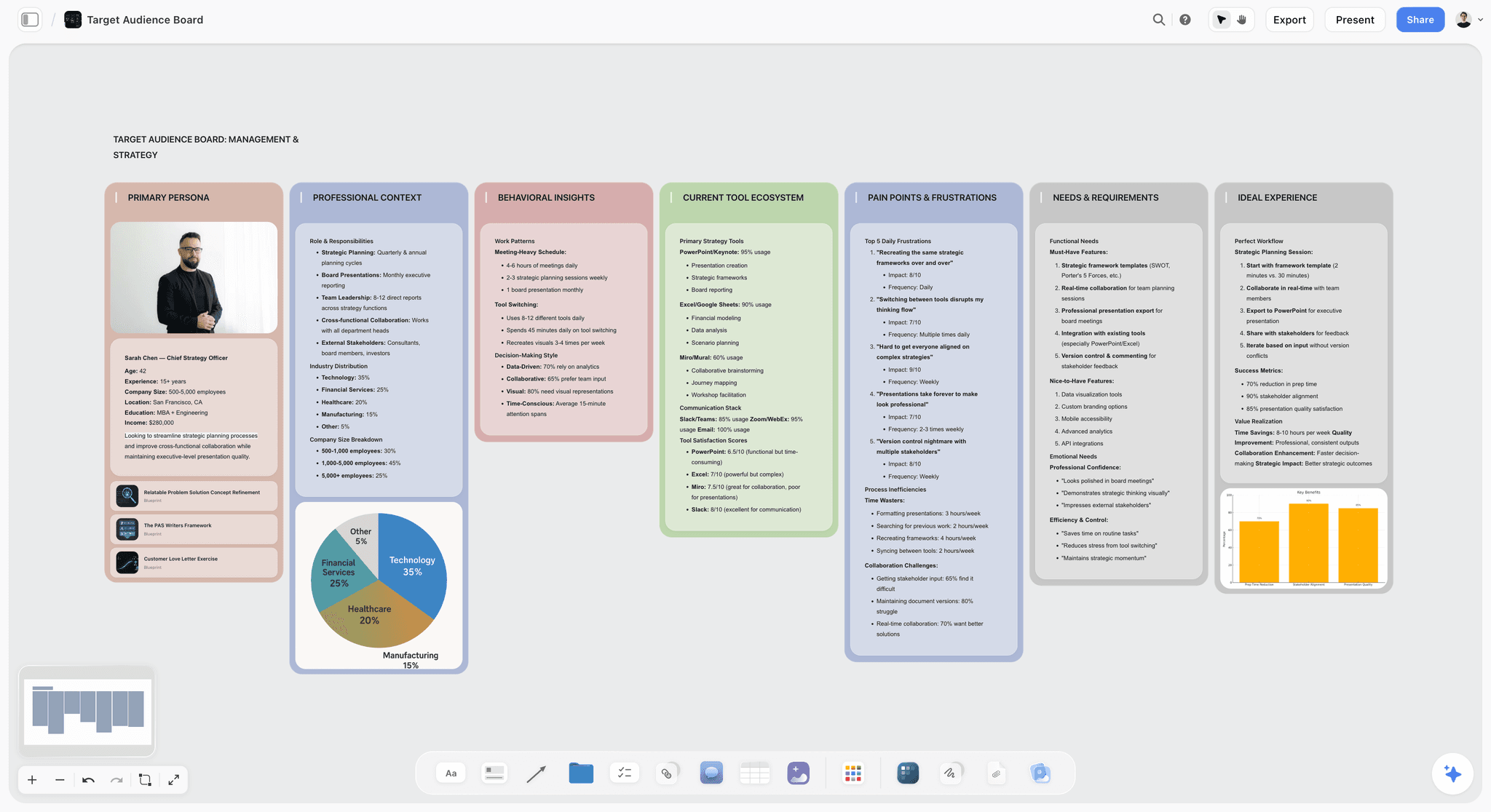
An audience profile kept on the board means a read-only founder can check who a post is for without any seat in the scheduler.
Small Team Content Calendar Template
Copy these columns into a table, and keep the rows in date order. These rows are filled for the fictional four-person marketing team at Alder & Finch, a direct-to-consumer houseplant shop. Maya leads, Jon writes, Sana designs, and Leo the founder approves offers.
| Publish date | Channel | Pillar | Campaign | Format | Working title | Brief | Owner | Approver | Status |
|---|---|---|---|---|---|---|---|---|---|
Mon 7 Dec | Plant care | None | Reel | Three signs of overwatering | Linked document | Jon | Maya | Scheduled | |
Tue 8 Dec | Newsletter | Plant care | None | December care checklist | Linked document | Jon | Maya | Scheduled | |
Wed 9 Dec | Gifts | Gift Guide | Carousel | Plants that survive any home | Linked document | Sana | Leo | Approved | |
Thu 10 Dec | Behind the shop | None | Photo | How we pack for winter delivery | Linked document | Jon | Maya | In design | |
Fri 11 Dec | Gifts | Gift Guide | Static | Order-by dates | Linked document | Sana | Leo | Waiting on Leo | |
Mon 14 Dec | Plant care | None | Reel | Low-light plants, ranked | Linked document | Jon | Maya | Script done | |
Wed 16 Dec | Community | None | Carousel | Your winter windowsills | Linked document | Sana | Maya | Collecting photos | |
Thu 17 Dec | Behind the shop | None | Text | What a shipping delay taught us | Linked document | Jon | Leo | Drafting | |
Fri 18 Dec | Gifts | Gift Guide | Reel | Last order day | Linked document | Jon | Leo | Scheduled for shoot | |
Mon 21 Dec | Open slot | None | Open | Reserved | None | Maya | Maya | Open |
Why these columns
Approver sits next to Owner so nobody has to ask. Brief links to a document on the same board, which is the point of keeping the plan here. Status is written in words a founder can read. In a Storyflow table a column named Owner or Assignee can hold people already on the board. If any name matches nobody, the whole column becomes plain text.
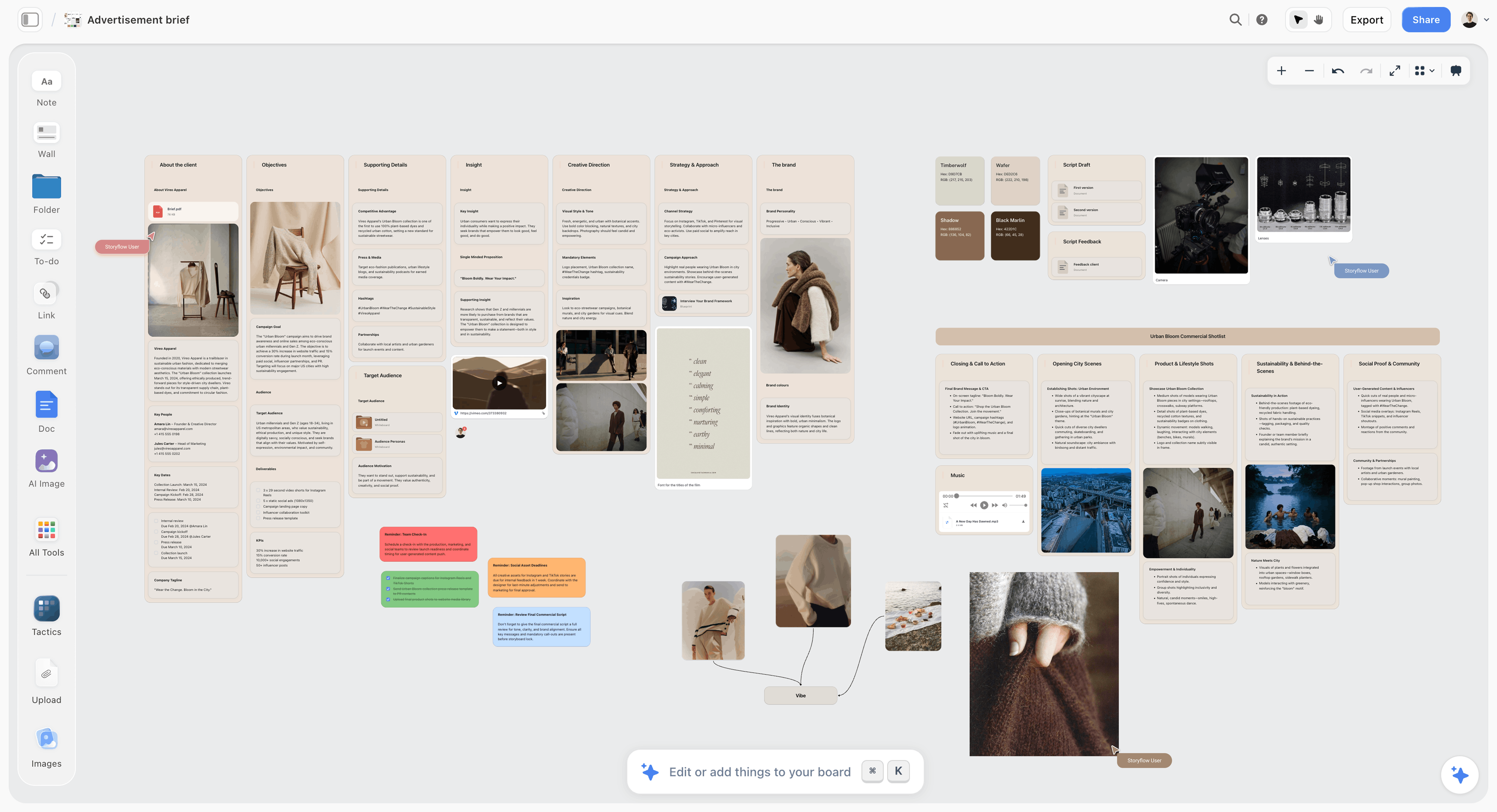
A brief for a fictional brand on the board. Each row of the calendar can link to a brief like this one.
The team's weekly rhythm
Maya reads Status each Monday, chases anything waiting on Leo, and reconciles with the scheduler. On Friday she moves approved rows into the tool. The monthly version of this plan, with goals and batching, is in Monthly Social Media Content Plan.

A weekly planner beside the calendar table: the Monday check and Friday hand-off written as tasks for the people who own them.
Worked Example: Alder & Finch Runs the 3-and-5 Test
Alder & Finch is fictional, and these are its decisions, not measured results. The team has 4 people today and expects 5 by next autumn. It posts on Instagram, LinkedIn, TikTok and Pinterest, with one brand and 6 connected accounts when you count the shop's second Instagram and a Facebook page.
Step one: the shortlist
Maya's first list has eight tools. She removes Trello, Asana and Notion as sole answers because none of them publishes, then keeps Notion in mind for the plan since the company wiki lives there. She adds Storyflow as the plan candidate because Sana keeps moodboards and shot notes in separate places.
Step two: the numbers
She writes both totals into a table. Later Growth comes to $41.25 and $48.75. Buffer Team at 6 channels is $60 at any size. Planable Basic is $33 at any size, but 60 posts a month and 4 social pages is too tight, so she prices Pro at $49, with 150 posts and 10 pages. Loomly is $49 and then $249, which fails the test. Hootsuite Standard is from $297 and from $495, and she drops it on budget.
Step three: the deciding feature
Leo must approve offers, and he will not make another account. That points to Planable's share link and Pro's required approvals. Maya also notes that Buffer Team and Later Growth list approval workflows, as fallbacks if Planable's post cap ever bites.
Step four: the plan layer
Maya sets up a Storyflow project on Plus because she wants the in-app AI. Jon and Sana join by invite on Free accounts, and Leo reads through a view-only link. Each row in the table links to its brief document. Sana uses the board for references and adds shot cards for the Reels. Jon has no in-app AI on his Free account, so he drafts through the Claude connector on his own Claude plan, which counts toward the 25 actions a week a Free account can make.
Step five: the hand-off
Once a row reads Approved on the board, Sana loads the post and asset into Planable. Leo gets the share link for offers only. Comments on the plan stay on the board, and comments on final creative stay in Planable. Maya reconciles the two on Mondays.
What it costs and what it leaves out
The setup is Planable Pro at $49 a month billed yearly and one Storyflow Plus account at $7.99 billed annually. The board has no calendar grid, so Maya uses Planable's calendar when she needs a month view. The team decides to revisit in 90 days, or when a fifth person joins. They might also stop at a scheduler alone: if the briefs stay short, the Storyflow row is the first one they could drop.
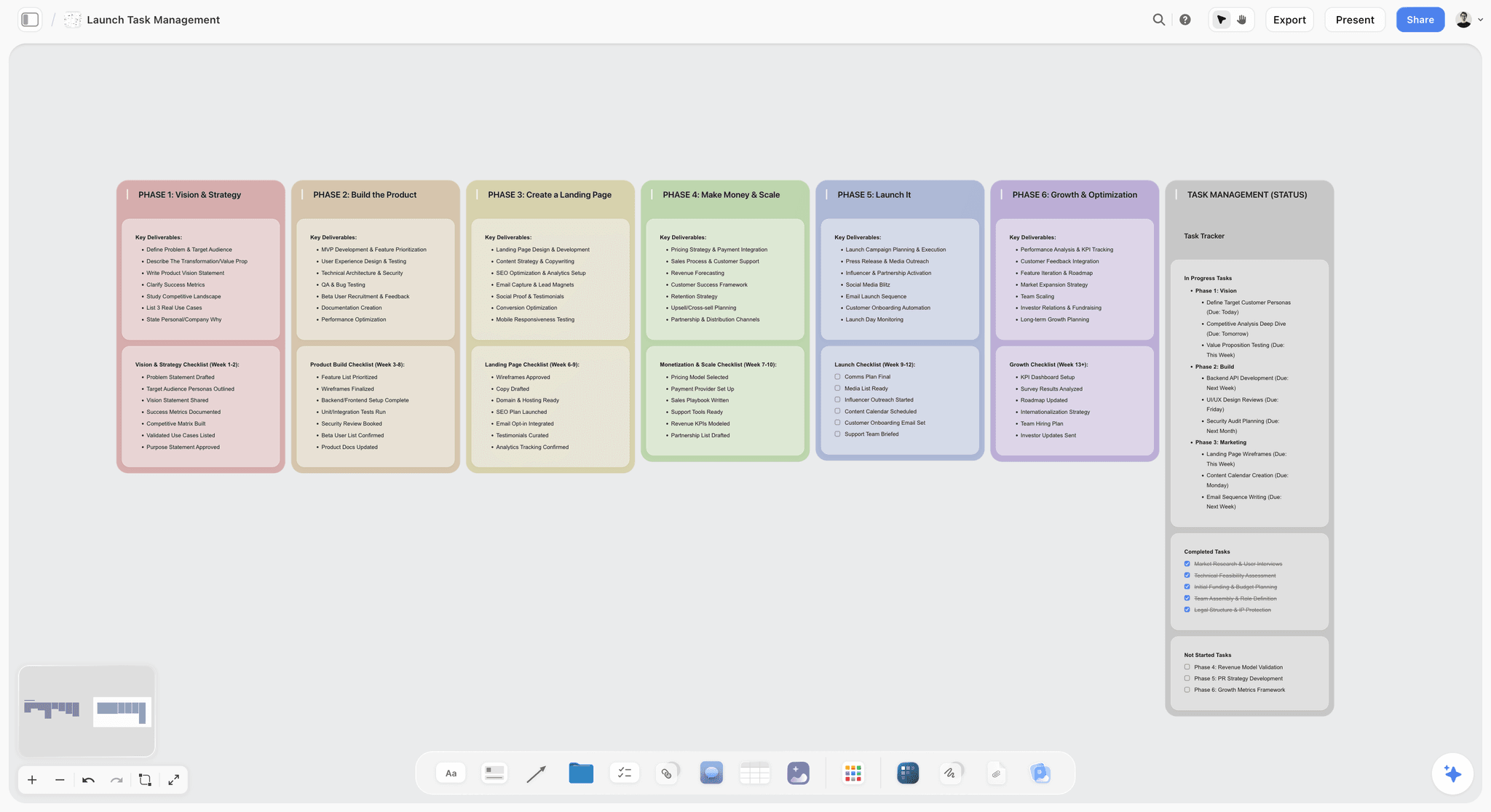
Phase columns and a status tracker on the board, useful for a campaign such as a gift guide running through a small team's calendar.
How the Plan Reaches the Scheduler
Storyflow does not publish, so the hand-off needs a rule or the two tools drift apart within a month.
One direction, one owner
Copy flows from the plan into the scheduler, once, when a row is Approved. After that, the scheduler owns the final caption and the board owns whether the post runs. One named person reconciles them weekly.
The Status words that make it work
Use the same five words every time: Drafting, In design, Waiting on approver, Approved, Scheduled. Avoid a sixth "Almost done". The in-app AI has a Turn my notes into a table workflow, and it can also produce an Excel file from a board if a colleague needs a spreadsheet.
What not to duplicate
Do not rebuild the month in the scheduler's calendar before posts are finished. Empty placeholders in a publishing tool can go out by accident and they clutter the view. Keep placeholders on the board.
Do This in ChatGPT or Claude
You can set this up from the assistant your team already uses, and each person can read the board from their own chat. The ChatGPT plugin and the Claude connector reach the same Storyflow account, and they are separate from the in-app AI. Plugin actions run on the assistant's own model and use no Storyflow AI credits.
Install in ChatGPT
Open the Storyflow listing, select Install plugin, sign in to Storyflow, and choose which projects ChatGPT may use. Read access is always on, and you decide whether it may also make changes. Mention it with @ or pick it from the + menu, as OpenAI's plugins article describes. Availability depends on your ChatGPT plan, workspace and region. In a Business or Enterprise workspace, an admin manages plugins and can turn them on or off, per OpenAI's admin article. See ChatGPT for a content calendar and ChatGPT for a kanban board.
Connect Claude
Claude calls these connectors. Following Anthropic's guide, open Customize, then Connectors, click + Add, then Add custom connector, name it Storyflow, and paste https://mcp.storyflow.so/mcp. On Team or Enterprise, an owner adds it first in Organization settings, then members connect. Claude's Free plan allows one custom connector. Setup for every assistant is on the Storyflow MCP page and in the help article. See Claude for a kanban board and Claude for content pillars.
Prompts for a small team
- "@Storyflow build a table on my Marketing board with columns Tool, Plan, Billing unit, Billing period, 3 seats, 5 seats, Multiple and Publishes posts. I will paste vendor prices next."
- "Here are the prices from each vendor's pricing page. @Storyflow fill the table, calculate the Multiple column, and flag any tool over 2x."
- "@Storyflow build a content calendar table for December with columns Publish date, Channel, Pillar, Campaign, Format, Working title, Brief, Owner, Approver, Status. Use Maya, Jon, Sana and Leo as owners, and keep rows in date order."
- "@Storyflow create a short brief document for each December row marked Gift Guide, and put them on a wall beside the table."
- "@Storyflow what changed on the Marketing board in the last week, and who changed it?"
- "@Storyflow list every row in the December table where Status is Waiting on Leo."
- Claude: "Using the Storyflow connector, read our December table and our brand voice document, then draft captions for the rows owned by Jon as a document on the board. Do not change the Status column."
What lands on the board
A table with dates and an Owner column filled from people already on the board, plus documents, walls and a change report. Plugin to-dos take no date or assignee, so use the table or tickets for dates. A ticket can take a due date when you give one.
What to check by hand
- Vendor prices. Paste them from the pricing page rather than asking the assistant to recall them. Prices change.
- The Multiple column, using a calculator.
- Row order, which you fix by hand since tables cannot be sorted.
- Any comment thread. The plugin cannot read board comments, so paste feedback into the chat. It can add one comment card as you.
- Photos. A photo attached in ChatGPT does not reach Storyflow. Ask for the upload link.
Other tools on this page in ChatGPT's directory as of October 2026: Planable ("Manage all your social content"), Loomly ("Plan and manage social content"), Metricool ("Analyze and schedule posts"), Trello, Asana and Notion. Check each one's own help before you depend on it.
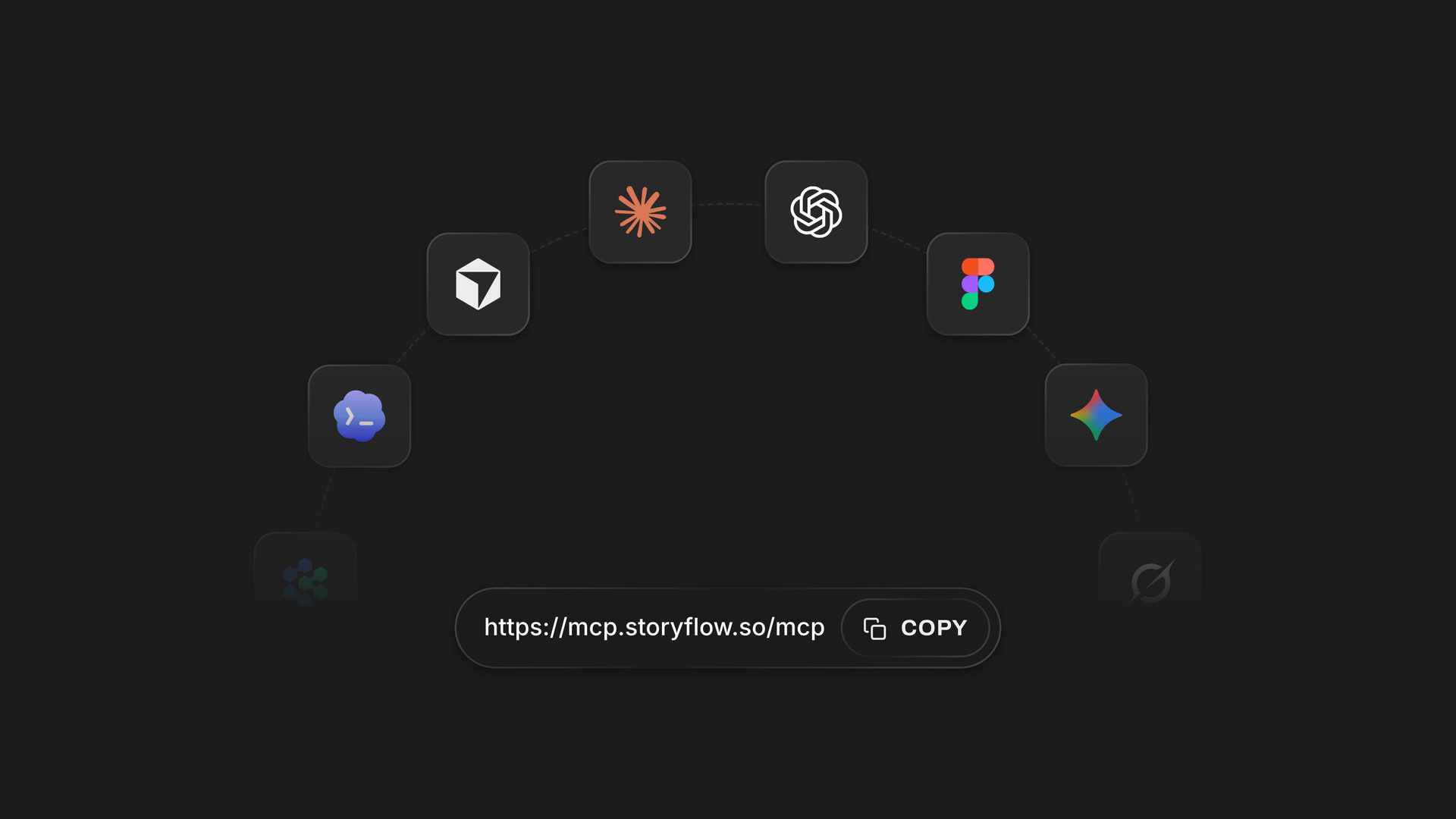
The connector address that Claude and other assistants use to reach a board, with ChatGPT installing from its listing.
Which Content Calendar Stack for Which Team
Each line pairs a plan layer with a publishing layer. Where it says "none", the scheduler's own calendar is enough.
| Team | Plan layer | Publish layer | Why |
|---|---|---|---|
3-person in-house, briefs and shoots | Storyflow | Buffer Team or Later Growth | Plan needs references; publishing is simple |
3-person, simple text and image posts | None | Loomly Starter or Buffer Team | No need for a planning board yet |
5-person growing team | Storyflow | Later Growth | Each extra seat adds only $3.75 |
Founder reviews everything by link | Storyflow | Planable Pro | Share-link comments with no account; required approvals on Pro |
Agency with client sign-off | Storyflow (Max for roles) | Planable, per client workspace | Client review is the bottleneck |
Content across blog, email and social | Storyflow or Notion | CoSchedule | One marketing view of all channels |
Company already on Asana | Asana | Buffer Team | Do not add a third system |
Heavy inbox and monitoring work | None, unless shoots are involved | Hootsuite or Sprout Social | The inbox is what you are paying for |
Mistakes and Fixes When Buying a Team Content Calendar
Comparing per-seat and per-channel prices directly
$10 per user and $10 per channel look identical and are not. Fix: run both totals at your real counts in one table.
Pricing today's team only
A 3-person plan can become a whole new plan at person four. Fix: price at 5 now, and read each plan's user cap.
Paying for a scheduler when you have a planning problem
A publishing tool will not write your brief. Fix: name the actual failure. If posts are late because nobody decided them, buy planning first.
Buying a suite for one feature
Paying per seat for an inbox you do not use is an expensive way to get a calendar. Fix: list the three features you would miss, and price only tools that have them.
Giving every stakeholder a seat
Founders and clients open the tool rarely. Fix: use read links, or a share link where the tool has one.
Assuming "calendar" means the same thing everywhere
Trello's calendar view needs Premium. Storyflow has none at all. Notion's works from a date property. Fix: check the exact view on the plan you are buying.
Trusting the annual price without a trial month
Annual billing is the number on the page. It is not always how you should start. Fix: pay monthly where offered, then switch once a real month has worked.
Letting two tools hold two plans
Editing dates in the scheduler without updating the board breaks trust in both. Fix: one owner, one Monday reconciliation.
Forgetting network add-ons
CoSchedule bills X/Twitter separately at $16 per profile a month, and Metricool puts LinkedIn on Starter. Fix: list your networks on the comparison table, not just your seats.
Storyflow's Honest Limits for This Job
It leads on planning, and it falls short on what many teams mean by "content calendar".
- No calendar view. Dates live in table date cells and to-dos, and rows are kept in date order by hand.
- No social post scheduling or publishing. A scheduler must do this.
- No Gantt chart, dependencies or time tracking.
- No due-date reminders, though assignees get in-app notifications. The AI cannot set a to-do's or ticket's assignee.
- No formal approval status or version compare, and Resolve deletes the whole comment thread.
- No analytics connection to social accounts.
- No native desktop or mobile app. It runs in a browser and is best built on a laptop.
- Storyflow Free has no in-app AI and no Tactics, with capped projects and uploads and 25 plugin or connector actions a week. The in-app AI starts on Plus.
If you want one tool that shows a month grid and publishes from it, buy Buffer, Later or Loomly and leave Storyflow out until your posts need more behind them.
The Bottom Line
Price the unit you will actually grow in. For most teams of 3 to 5, that means keeping the plan on a Storyflow board, with colleagues joining on Free accounts, and adding the scheduler that survives the 3-and-5 Test: Later Growth if seats are growing, Buffer Team if channels are few, Planable if approvals are the bottleneck. If your posts need no briefs, skip the plan layer and buy the scheduler. Start by building next month's table with the ChatGPT content calendar workflow, and put your vendor totals beside it before the next renewal.
This article was published in November 2026. Prices were read from each vendor's pricing page on 4 November 2026, and directory details reflect a capture of ChatGPT's plugin directory from 28 October 2026.
FAQ: Content Calendar Tools for a Small Team
What's the best content calendar tool for a small team?
Storyflow is our pick first when the job is planning, because the dated table, briefs and assets share one board, and it has a free plan at $0. It does not publish, so pair it with a scheduler such as Buffer Team or Later Growth. If you want one tool with a calendar grid that publishes and your posts need no briefs, choose Loomly Starter.
What is the best tool for a small team's content calendar and briefs?
Storyflow, because each row of the calendar can link to a brief document on the same board, beside moodboards and shot cards, and a founder can read it from a view-only link with no account. Notion is the alternative when your company already runs on linked databases and you want a true calendar view of your plan today.
How much does a content calendar tool cost for 3 people?
As of November 2026, Storyflow's planning board starts at $0 on its free plan, and the tools priced here run from about $30 to $297 a month. Trello Premium and Notion Plus are $30 and do not publish. Among tools that publish, Planable Basic is $33, Later Growth is $41.25, Loomly Starter is $49, Buffer Team is $60 for 6 channels, Sprout Essentials is $237 and Hootsuite Standard is from $297, on the billing periods stated above.
How much does a content calendar tool cost for 5 people?
As of November 2026, Storyflow's planning board starts at $0 on its free plan, and the tools priced here run from about $33 to $495 a month. Planable Basic stays at $33, Later Growth reaches $48.75, Trello Premium and Notion Plus reach $50, Asana Starter reaches $54.95 and Buffer Team stays at $60 for 6 channels. Loomly jumps to $249 on Beyond, Sprout Essentials reaches $395, and Hootsuite Standard starts at $495.
What is the Storyflow 3-and-5 Test?
It is our own rule for comparing tools: keep the plan in a Storyflow table, price every content calendar tool at 3 seats and at 5, and reject any bill that more than doubles unless the higher plan solves a real problem. A pure per-seat tool grows 1.67x. A bigger multiple means a plan jump is hiding in the pricing.
Does Storyflow have a calendar view?
No. It has no calendar view and does not schedule or publish posts. It holds the calendar as a table with date cells, with rows kept in date order, because tables cannot be sorted. To-dos can also take a due date in the app. Most small teams pair it with a scheduler, or use a scheduler alone if posts need no briefs.
What is the difference between a content calendar and a social scheduler?
A content calendar decides what gets made, why, and who owns it, and a scheduler publishes finished posts at a set time. Many products sold as calendars are schedulers with a calendar view. Small teams with briefs and shoots usually plan in a tool such as Storyflow and publish through a scheduler. Simple posting teams can use one tool.
Is a free content calendar tool enough for a small team?
Sometimes, for planning, but rarely for publishing together. Storyflow Free holds the plan at $0 with no card, with no in-app AI and 25 assistant actions a week. Asana Personal includes calendar views for 2 seats, and Trello Free handles boards without calendar view. Buffer Free and Metricool Free are limited to 1 user or 1 brand.
Which content calendar tools include client approvals?
Planable leads for this, with occasional approvers commenting through a share link and no account, and required approvals on Pro. Loomly includes approval workflows on Starter, Buffer on Team, Later on Growth, CoSchedule social message approvals on Professional, and Metricool a post approval system on Advanced. Hootsuite lists content approval on Advanced. Storyflow has comments but no formal approval status per post.
Should a small team use Trello, Asana or Notion as a content calendar?
Use one if your company already works there and a separate scheduler publishes, since none of them posts to social networks. Trello's calendar view requires Premium at $10 per user billed annually, Asana includes calendar views from its free plan, and Notion shows a calendar from a date property.
Can ChatGPT or Claude manage our content calendar?
They can build and read it, on a Storyflow board, through the ChatGPT plugin or the Claude connector. Either can fill a dated table, write brief documents and report what changed and who changed it. Neither publishes, and a Free account gets 25 actions a week. Metricool, Planable and Loomly also appear in ChatGPT's directory for their own jobs.
How often should a small team re-check its content calendar tool?
Every 90 days at first, and whenever someone joins or leaves. Re-run the 3-and-5 Test with your actual counts, read the renewal date, and check whether anyone has stopped using their seat. Vendors change their plans, so reread each pricing page before renewing, especially if you are about to commit to annual billing.
Table of Contents
- Key Takeaways
- How to Choose a Content Calendar Tool for a Small Team in 7 Steps
- How to Compare Seat Prices Without Being Misled
- Price per Seat: Content Calendar Tools at 3 and 5 Seats
- Per Seat, Per Channel or Per Workspace: Which Billing Unit Fits
- Content Calendar vs Social Scheduler
- Content Calendar Tool Features Compared
- Tools Compared: Content Calendar Tools for a Small Team
- 1. Storyflow
- 2. Buffer
- 3. Later
- 4. Planable
- 5. Metricool
- 6. Loomly
- 7. CoSchedule
- 8. Trello
- 9. Asana
- 10. Notion
- Where Hootsuite and Sprout Social Fit
- Who Actually Needs a Seat
- Small Team Content Calendar Template
- Worked Example: Alder & Finch Runs the 3-and-5 Test
- How the Plan Reaches the Scheduler
- Do This in ChatGPT or Claude
- Which Content Calendar Stack for Which Team
- Mistakes and Fixes When Buying a Team Content Calendar
- Storyflow's Honest Limits for This Job
- The Bottom Line
- FAQ: Content Calendar Tools for a Small Team
- Related Reading
Templates to check out for this topic


Content and video templates you can use in Storyflow
Plan a channel, a script, and a content pipeline on the same board. Open one of these templates and let the AI build on the structure instead of starting from a blank doc.


See Storyflow in Action
A visual AI workspace where every feature lives inside one canvas. No tab-switching, no context lost.
Build your entire board from a single message
Type what you need in the AI chat at the bottom of your canvas. The AI adds cards, headings, and structure directly onto your board.
Use expert frameworks as AI context
Type @ in the AI chat and choose any Tactic. The AI tailors every response to that framework instead of giving generic advice.
Turn your board into a mind map in seconds
Ask the AI to restructure your canvas as a mindmap. It connects your ideas into a visual hierarchy so you can see how everything relates.
Why Storyflow Exists
Storyflow actually began as a personal tool while working on creative and research projects.
We kept running into the same problem: ideas were scattered everywhere: notes, documents, and whiteboards.
Nothing helped us see how everything connected.
So we started building a workspace designed around how ideas actually grow.
→ Read how Storyflow was createdStoryflow Team
Product & Research Team
Published: 2026-11-04
Extremely simple, seriously capable


See how easy it is to get started
Watch a real project come together, from a blank board to a finished plan, clicked through step by step.
Start creating with AI and become more productive
Transform your creative workflow with AI-powered tools. Generate ideas, create content, and boost your productivity in minutes instead of hours.