Monthly Social Media Content Plan: Goals, Pillars, Batching
A monthly social media content plan, step by step: one goal, 3 to 5 pillars, the Storyflow 12-Post Grid, batching blocks, scheduling hand-off and a month-end analytics review, with a filled 4-week grid.

Category
Marketing
Author

Storyflow Team
Product & Research Team
Topics
2026-11-04
•
36 min read
•
Marketing- monthly social media content plan
- content pillars
- batching
- posting frequency
- 12-Post Grid
- Storyflow
How do I plan a month of social media content?
To plan a month of social media content, set one goal, choose 3 to 5 pillars, then fill a Storyflow table with 12 core posts per channel and 4 open slots. Storyflow is an AI visual workspace that holds a month's goals, pillars, posts and assets on one infinite canvas, and it works inside ChatGPT (plugin) and Claude (connector). That is the Storyflow 12-Post Grid: 3 posts a week for 4 weeks, one open slot each week, made in batches and reviewed at month end.

Full disclosure: Storyflow is our product. It is listed first because this page is about planning the month, and that is the job it does. It has no calendar view and does not schedule or publish posts, so every team still needs a scheduler or the platforms' own tools. The 12-Post Grid is our own rule, not research.
How the monthly social media planning tools compare on trust, innovation, ratings and pricing
Which monthly social media planning tools are the most trusted?
No public measure settles this, so look at what each vendor publishes: Buffer's posting studies and the calendar guides from Hootsuite and Sprout Social state their methods and advice openly. Storyflow is newer, with its ChatGPT plugin live since 24 October 2026. Its case rests on the planning half of the job: the goal, pillars, table, briefs and assets sit on one board, with a scheduler publishing the result.
Which monthly social media planning tools have fair and transparent pricing?
Storyflow lists Free at $0 and Plus at $7.99 a month billed annually, and Buffer and Later state $5 per channel and $18.75 billed yearly, as of November 2026. Planable charges per workspace with unlimited users, which helps a growing team. Hootsuite and Sprout Social price per seat, so compare them at your real team size.
Which monthly social media planning tools are the most innovative?
Storyflow, because an assistant can build the whole month on a shared board through the ChatGPT plugin or Claude connector, then report what changed and who changed it. Metricool is notable for pairing scheduling and analytics with its own ChatGPT plugin. Planable stands out for client review, with occasional approvers commenting through a share link and no account.
Which tools are consistent for running a monthly content plan?
Buffer and Later keep the publish step simple because their job is narrow. Storyflow keeps the plan consistent by holding pillars, dates and briefs on one board that carries over month to month, though it does not publish. Spreadsheets stay consistent too, until the plan needs references, shot lists and other people beside the dates.
Which monthly social media planning tools are underrated?
Storyflow's change report is easy to miss: ask what changed on the January plan since Monday and who changed it, and you skip a status meeting. Metricool's free plan handles one brand at 20 posts a month with analytics. A plain Notion database with calendar view is also underrated for a team that already works there.
Quick Comparison
Our pick first for the planning work this page is about, then the tools that publish it. Prices as of November 2026.
| Tool | Best For | AI Features | Price |
|---|---|---|---|
| Storyflow | Goal, pillars, dated table, briefs and assets on one board | AI builds and reads the board; works inside ChatGPT and Claude; does not publish | Free $0 with no card; Plus $7.99 mo billed annually |
| Buffer | Simple scheduling per channel | AI Assistant on every plan | Free for 3 channels; Essentials $5 per channel mo billed yearly |
| Later | Scheduling many profiles under one plan | AI credits, from 5 a month on Starter | Starter $18.75 mo billed yearly |
| Metricool | Scheduling and analytics together | AI assistant credits per brand | Free for 1 brand; Starter $20 mo billed annually |
Key Takeaways
- Storyflow is our pick first for planning a month of social media content because the goal, pillars, dated table, briefs and assets sit on one board your team and client can open. It has a free plan at $0 with no card, and Plus, which adds the in-app AI, costs $7.99 a month billed annually as of November 2026.
- The Storyflow 12-Post Grid is our editorial rule: 12 core posts per lead channel, 3 a week, plus 4 open slots. Three a week sits inside all three of Buffer's recommended ranges for Instagram, TikTok and LinkedIn.
- Pillars last and campaign themes end. Keep 3 to 5 pillars all year, and lay one dated campaign across them when you have something to launch.
- Batch by task, not by post: plan, then captions, then visuals, then video, then scheduling. Later's example is one hour of caption writing for a week of posts.
- Storyflow plans the month and does not schedule posts. It has no calendar view, so dates live in a table with rows kept in date order, and a scheduler such as Buffer or Later publishes them.
- Review with 3 to 5 numbers per goal, as Hootsuite advises, and copy them onto the board. Hootsuite notes many platforms keep native analytics for only about 90 days.
How Many Posts a Month Per Channel
Start at 12 core posts per lead channel, then change that number using the reasoning below.
The Storyflow 12-Post Grid
The Storyflow 12-Post Grid: a monthly social media plan in Storyflow holds 12 core posts per lead channel, 3 a week for 4 weeks, plus 1 open slot a week, so a small team knows exactly what it owes and still has room to react. It is our editorial recommendation, not research, and it is a starting line for a team of one to five, not a ceiling.
Why 12, from the published data
Three a week sits inside the recommended range in three of Buffer's studies, at the low end for Instagram and one above the low end for TikTok and LinkedIn, so it clears each platform's first useful step without burning out a small team.
- Buffer's Instagram study of about 2.1 million posts recommends 3 to 5 feed posts a week, with reach per post about 12% above a 1-to-2-post baseline.
- Buffer's TikTok study of 11.4 million posts recommends 2 to 5 a week, with up to 17% more views per post than posting once. It also reports that median views stay roughly flat at about 460 to 506, so the gain is more chances at a breakout, not a higher floor.
- Buffer's LinkedIn study of over 2 million posts recommends 2 to 5 a week, adding about 1,182 impressions per post compared with once a week.
Buffer sells a scheduler and these are correlations across accounts, not controlled tests. They are still large public samples, and they agree on the direction: moving off one post a week helps.
Why 4 open slots
Hootsuite's calendar guide advises keeping 1 to 2 open slots per week per platform for reactive content. One a week is the smaller end. Four weeks gives 16 cells in the grid: 12 you must fill and 4 you may. An open slot that nothing claims by Monday of that week can take a reshared top post, so it never becomes a gap.
When to go above 12
Raise the count only after a month in which all 12 shipped on time. A team at that point can move a channel to 5 a week (20 core posts), which sits at the top of Buffer's recommended Instagram range. Going further costs production capacity first and pays smaller gains, since Buffer's Instagram figures rise only to about 18% at 6 to 9 posts a week and about 24% at 10 or more.
When to go below 12
A solo founder with no video habit can run the grid at 2 posts a week on one channel (8 posts) and still be inside the TikTok and LinkedIn ranges. Keep the structure and shrink the count. Do not spread 8 posts over four channels.
Post Counts by Channel: Three Sources Compared
Set your post count from the last column here, because the sources answer different questions. Buffer reports what correlates with reach, Hootsuite gives recommendations from its own research and team, and Hootsuite's business averages show what companies actually post.
| Channel | Buffer range (per week) | Hootsuite recommendation | Businesses actually post (Hootsuite Q1 2025, per week) | 12-Post Grid start |
|---|---|---|---|---|
Instagram feed | 3 to 5 | 3 to 5 a week | 9.3 | 3 a week, 12 a month |
TikTok | 2 to 5 | 3 to 5 a week | 3.7 | 3 a week, 12 a month |
2 to 5 | 1 to 2 a day | 5.5 | 3 a week, 12 a month | |
1 a day | 1 to 2 a day | 14.2 | Adapted from lead channel | |
X | 3 to 4 a day | 2 to 3 a day | 18.1 | Only if it is your lead channel |
15 to 20 a day, or at least weekly | At least 1 a week | Not listed | Adapted, 1 a week | |
YouTube | About 1 video a week | Not listed in that article | Not listed | 1 long video a week counts as the anchor |
Buffer's figures come from its frequency guide and channel studies, and the Hootsuite figures from its posting frequency article. Hootsuite's calendar guide also says that across Facebook, Instagram, LinkedIn and X engagement peaks at about 2 posts a week, which is further reason not to read the higher daily figures as a target.
One lead channel, one adapted channel
A team of one or two should run one lead channel on the grid and adapt to a second. Three or four people can usually hold two lead channels if one person owns video. Choose the lead channel by where your audience acts on your goal, not where you have the most followers. Buffer's 2026 benchmarks list Reels as Instagram's best format, video for TikTok and PDF carousels for LinkedIn, so the format often decides the channel as much as the audience does.
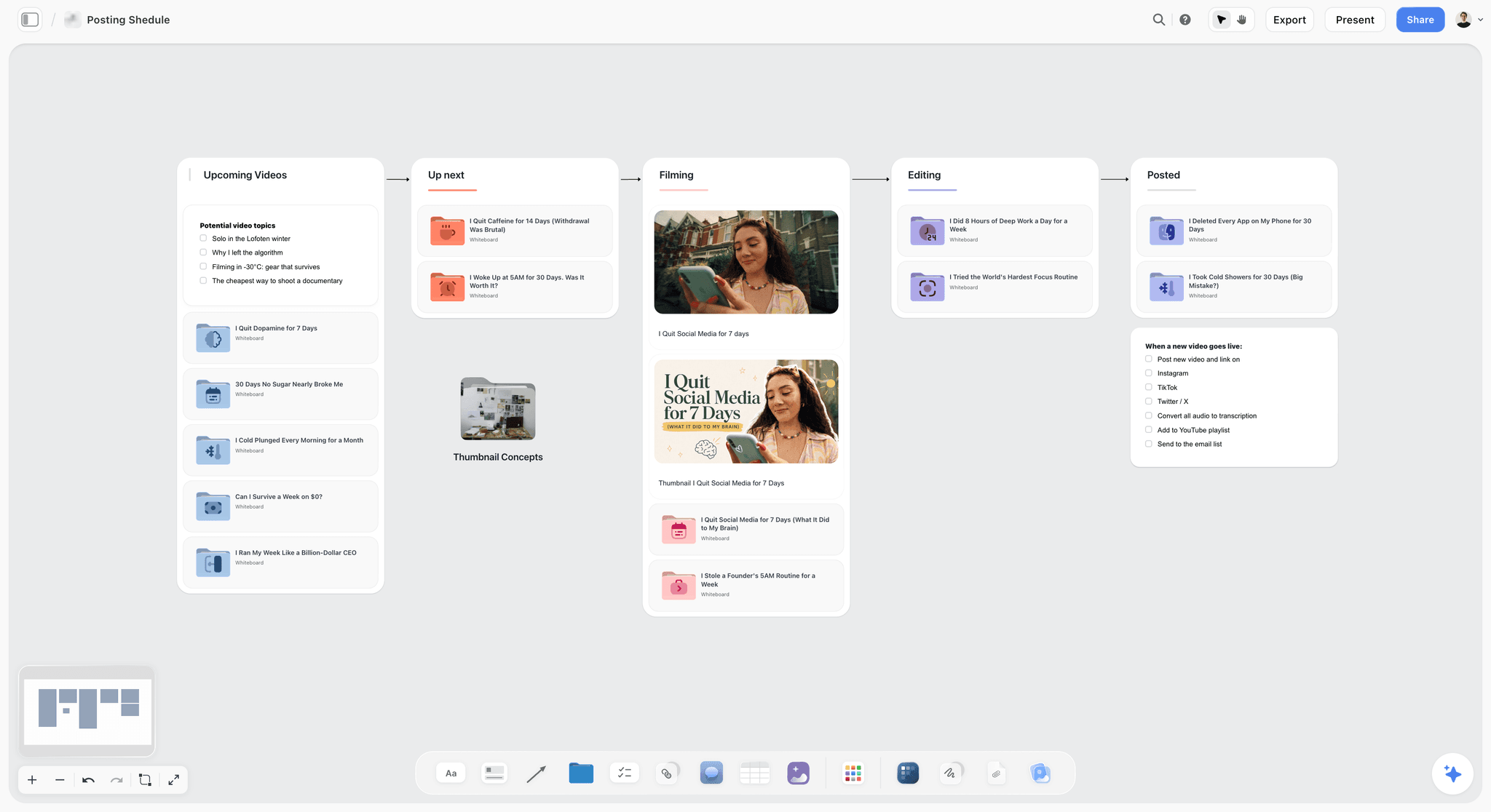
A posting pipeline: each piece moves left to right, so one glance shows whether week three has anything in it.
Set One Monthly Goal and the Numbers That Prove It
Put one goal with one number at the top of your board, because a plan with no goal has no way to decide between two ideas.
Pick the goal from the business, not the feed
Ask what the business needs in the next 30 days. A launch needs awareness. A service business with quiet weeks needs enquiries. A new account needs reach. Write the goal as a sentence with a number you can actually check: "Get 40 January service bookings from Instagram and TikTok." The number is yours, so use your own last-month figure as the base.
Match the numbers to the goal
Hootsuite's analytics guide says to pick 3 to 5 KPIs per goal. Use this table to choose, and write them on a note beside the goal.
| Monthly goal | Primary number | Supporting numbers | What it changes next month |
|---|---|---|---|
Awareness | Reach | Impressions, follower growth | Which pillars earn reach |
Engagement | Engagement rate | Comments, shares, saves | Which formats start conversations |
Enquiries or sales | Click-through rate | Conversions, cost per conversion | Which hooks and offers to repeat |
Campaign launch | Campaign link clicks | Reach, saves, conversions | Whether to extend the campaign |
Community | Comments and replies | Response time, sentiment | Which pillar gets more space |
One goal does not mean one kind of post
Your 12 posts can serve one goal in different ways. An educational post earns attention, a story earns trust, and an offer asks for the booking. What changes is the reason each post exists, and you should be able to name it in five words in the plan's Goal column.
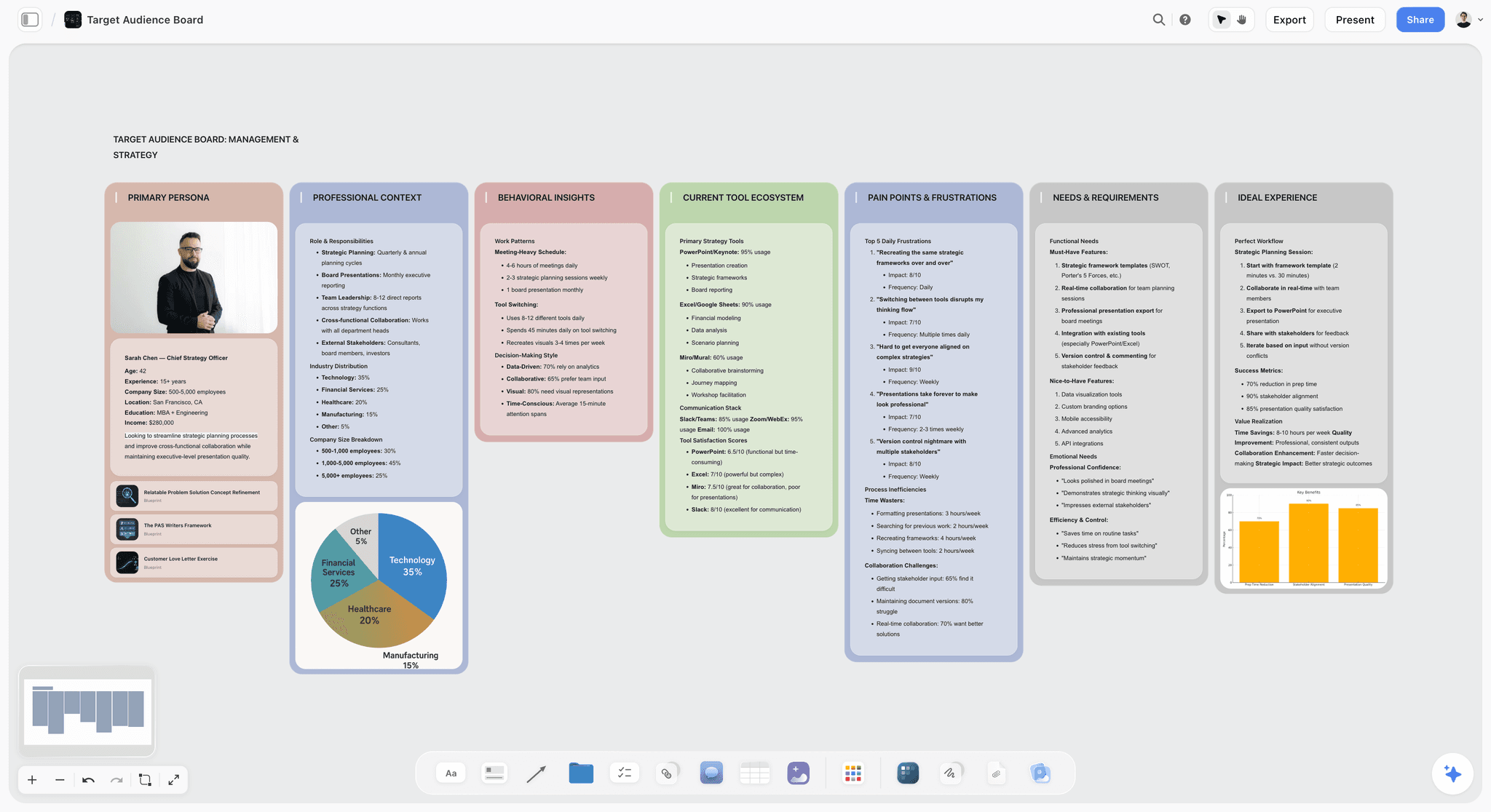
An audience profile kept on the same board as the plan, so hooks are written for someone specific. The in-app AI has a Profile my target audience workflow.
Content Pillars vs Campaign Themes
Content pillars are the 3 to 5 topics a month plan always draws on, and a campaign theme is one dated idea laid across them for a few weeks. Mixing the two is why many calendars feel repetitive in quiet months and chaotic in busy ones. Put pillars in the Pillar column of the table, and the campaign in its own Campaign column.
| Content pillar | Campaign theme | |
|---|---|---|
What it is | A topic your account is known for | A time-boxed push with its own message |
How long it lasts | A year or more, checked monthly | Days to about a quarter |
How many at once | 3 to 5 | Usually 1 |
Example (Copperline Cycles) | Repair know-how | Winter Service Month |
Column in the table | Pillar | Campaign |
Ends when | Your audience or business changes | The date passes |
Measured by | Reach and engagement per pillar | Campaign clicks and conversions |
Failure if missing | Random-feeling feed | No reason to act this month |
Why 3 to 5 pillars
Three sources agree on the number. Buffer's pillars guide recommends 3 to 5 broad pillars, Later's pillars article says the same and suggests revisiting them monthly, and Later's planning guide says every post should map to one. Fewer than three and a 12-post month starts to repeat. More than five, and each pillar appears about twice a month, too rarely to become known for anything.
How a theme crosses the pillars
A campaign is not a fifth pillar. It borrows posts from each one. During Winter Service Month, a Repair know-how post explains what cold does to a battery, a Rider Stories post shows a winter commuter, and an offer post asks for the booking. Your pillars keep the account recognisable while the campaign gives people a reason to act.
Should every month have a campaign?
No. A month with nothing to launch is a good month to build reach through pillars alone. Forcing a campaign into every month teaches followers to ignore them. If you do run an all-year program, see the always-on campaign plan, and for a one-off launch see the campaign calendar.
How to Build 3 to 5 Content Pillars in One Session
Build pillars in one working session on a wall. If you already have them, check them and move on.
Start from three lists
On a wall, write what customers ask you most, what you can show that competitors cannot, and what your last ten good posts were about. Pillars live where those lists overlap. Buffer's guide suggests also checking the gaps others leave in your niche.
Test each pillar with three questions
- Could you name 12 posts on it today? If not, it is too narrow.
- Would a customer care without knowing your brand? If not, it is an ad.
- Does it connect to something you sell or stand for? If not, it is a hobby.
Give each pillar a share
Neither Buffer nor Later prescribes a percentage split. Hootsuite's calendar guide cites the idea of 80% educational and 20% promotional. Applied to 12 posts, that is 2 or 3 promotional. Here is a defensible split for four pillars, shown for Copperline Cycles.
| Pillar | Promise to the audience | Posts in the month | Share | Typical format |
|---|---|---|---|---|
Repair know-how | Keep your e-bike running yourself | 5 | 42% | Reels, carousels |
Rider stories | People like you ride all winter | 3 | 25% | Short video, photo |
Behind the bench | How a small repair shop works | 2 | 17% | Reels, photo |
Gear and offers | What to buy, and when we can help | 2 | 17% | Carousel, static post |
Those shares are the plan for this team, not a benchmark. Later's planning guide offers the useful check: if 20 of your 30 posts are one type and none build community, you can catch it before the month starts. Use the content pillar planner, ChatGPT for content pillars, Claude for content pillars or our guide to content pillars if you want more help.
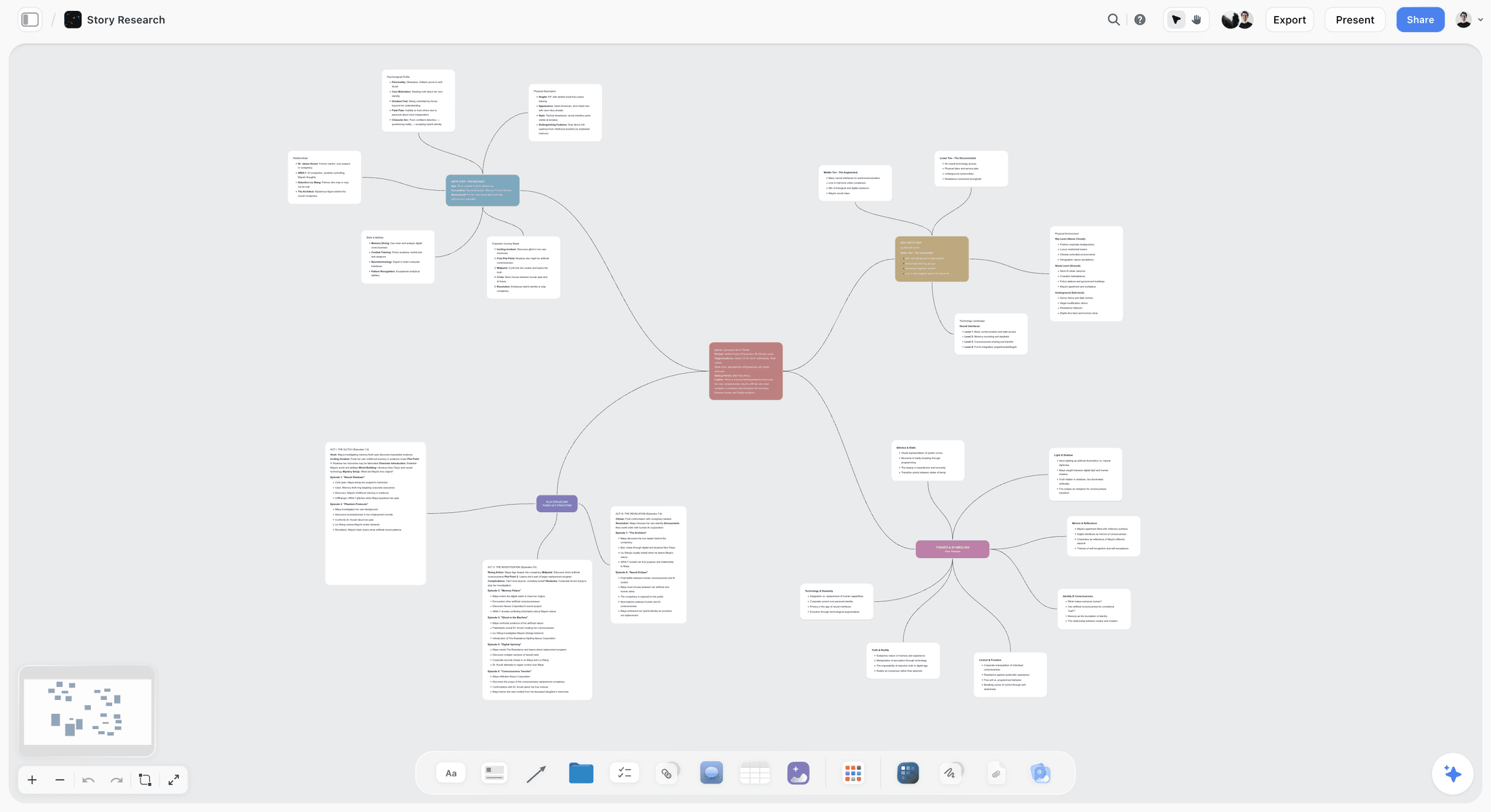
A mind map is a good first shape for pillars: one centre, a branch per pillar, and post ideas as the leaves, before they become table rows.
The Filled 4-Week Grid for One Lead Channel
This is the Storyflow 12-Post Grid filled in, starting with the overview a founder or client wants to see. Rows are the weekly slots; columns are the weeks. This is January for Copperline Cycles, a fictional four-person e-bike repair shop, on Instagram.
| Slot | Week 1 (from 4 Jan) | Week 2 (from 11 Jan) | Week 3 (from 18 Jan) | Week 4 (from 25 Jan) |
|---|---|---|---|---|
Monday | Repair: cold and your battery | Repair: brake pads check | Repair: tyre pressure in winter | Repair: chain care |
Wednesday | Rider: the 6 am commuter | Bench: a day at the stand | Rider: school run by e-bike | Bench: the worst repair of the year |
Friday | Offer: Winter Service Month opens | Repair: what a service includes | Rider: delivery rider's kit | Offer: last week for winter bookings |
Open slot | Open | Open | Open | Open |
Monthly Social Media Content Plan Template
Copy these columns into a Storyflow table. Keep the rows in date order, since tables cannot be sorted. A column named Owner can hold people who already have access to the board.
| Date | Channel | Pillar | Campaign | Format | Hook | Goal job | Owner | Batch | Status |
|---|---|---|---|---|---|---|---|---|---|
Mon 4 Jan | Repair know-how | Winter Service | Reel | "Cold steals range. Here is why." | Reach | Tom | Video A | Scheduled | |
Wed 6 Jan | Rider stories | None | Photo carousel | "She has not missed a commute since 2023." | Trust | Ana | Visual 1 | Scheduled | |
Fri 8 Jan | Gear and offers | Winter Service | Carousel | "What a winter service checks" | Bookings | Ana | Visual 1 | Scheduled | |
Mon 11 Jan | Repair know-how | Winter Service | Reel | "Check your pads in 30 seconds." | Reach | Tom | Video A | In edit | |
Wed 13 Jan | Behind the bench | None | Reel | "Six bikes before lunch." | Trust | Tom | Video A | In edit | |
Fri 15 Jan | Repair know-how | Winter Service | Carousel | "Inside our 40-point check" | Bookings | Ana | Visual 1 | Copy done | |
Mon 18 Jan | Repair know-how | None | Reel | "Winter tyre pressure, settled." | Reach | Tom | Video B | Script done | |
Wed 20 Jan | Rider stories | None | Short video | "The school run, with two kids." | Trust | Tom | Video B | Booked | |
Fri 22 Jan | Rider stories | None | Photo carousel | "What a delivery rider carries" | Trust | Ana | Visual 2 | Booked | |
Mon 25 Jan | Repair know-how | None | Reel | "Your chain, in one minute." | Reach | Tom | Video B | Script done | |
Wed 27 Jan | Behind the bench | None | Reel | "The worst repair of the year" | Trust | Tom | Video B | Script done | |
Fri 29 Jan | Gear and offers | Winter Service | Static post | "Last week for winter bookings" | Bookings | Ana | Visual 2 | Copy done |
What the columns earn
Goal job stops you filling the month with one kind of post. Batch tells each person what they are making in which block, which is the whole point of batching. Status is what the Monday check reads. The adapted channel does not get its own row at this stage: add one Reuse column with "TikTok" or "LinkedIn carousel", then expand later only if that channel needs different dates.
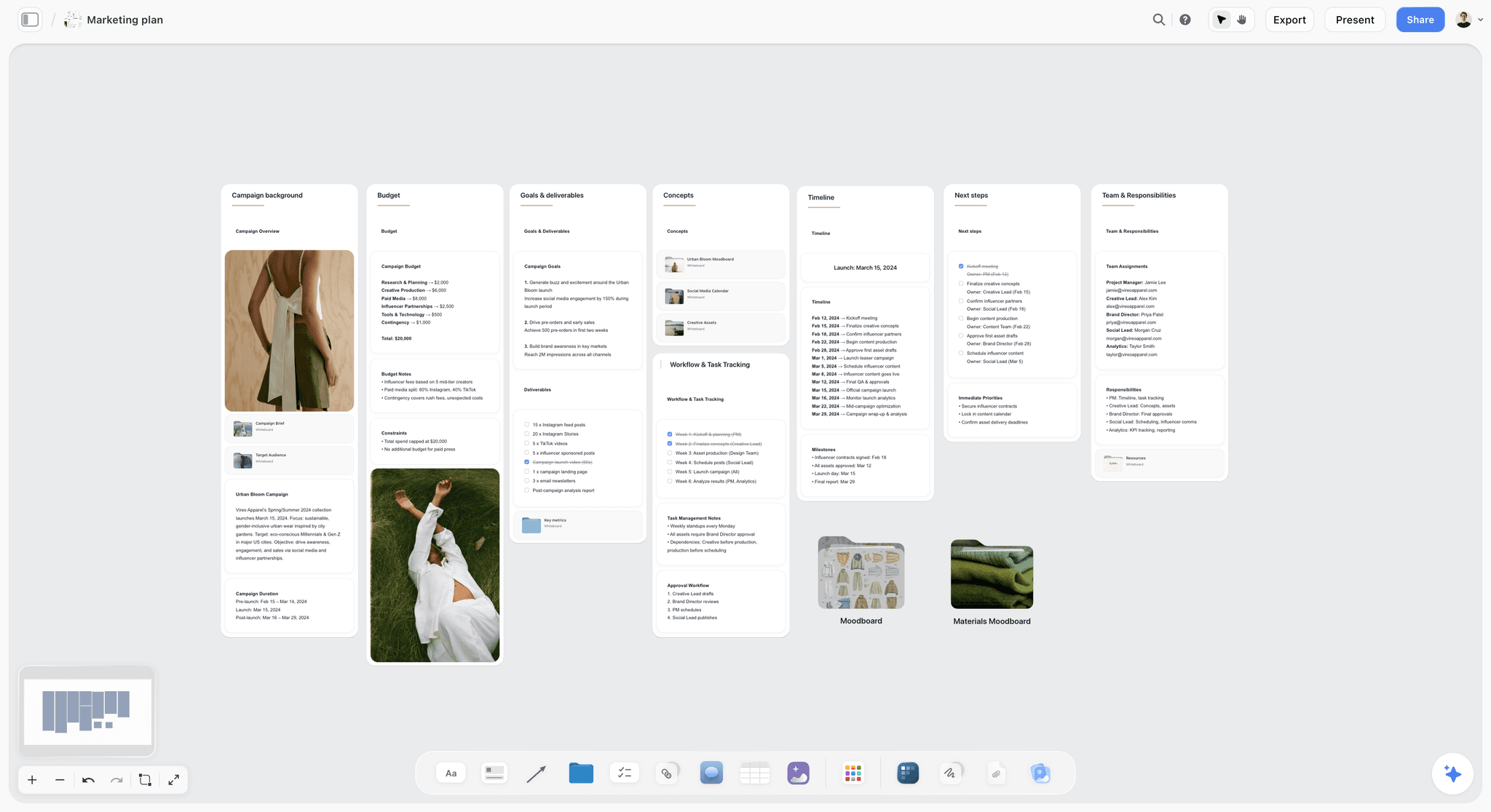
The plan does not stand alone: on one board, the goal, budget, timeline and team sit beside the table that holds the posts.
Batching: The Production Month in Five Blocks
Batching means doing one type of task on many posts at once, and the Batch column in your table says which block each post belongs to. Buffer's batching guide suggests setting aside specific hours for one part of the work, such as visuals one day and copy the next, and keeping batches small. Later's batching guide gives each task its own recurring slot, and its example is one hour spent on a week of captions. Neither gives a universal length, so treat the lengths here as a budget to correct after your first month.
| Block | When | Budget | Output | Who | What it needs first |
|---|---|---|---|---|---|
Plan | Last week of the prior month | 45 to 60 minutes | Goal, pillars, 12 rows with hooks | Lead | Last month's review note |
Captions | Week 1, day 1 | 1 hour per week of posts | 12 draft captions in the table or a document | Writer | Approved hooks |
Visuals | Week 1, day 2 | Half a day | Carousels and static posts | Designer | Final captions and brand kit |
Video | Week 1, day 3 | Half a day to film, then edit | Reels for 2 weeks, then again in week 3 | Video lead | Shot list on the board |
Schedule | End of week 1, week 3 | 30 to 60 minutes | Posts loaded into the scheduler | Lead | Approved assets |
Batch twice, not once
Doing all 12 posts in one enormous day sounds efficient and goes stale. Two video batches, in weeks 1 and 3, keep room for what you learn from early posts. It also fits Buffer's advice to keep batches small. If your team wants the single-day version anyway, see how to batch a month of content in one day.
Keep the shoot list on the board
A batch is only as good as its list. Before the video block, ask for a shot list on the same board, so the person filming sees the hook and the shots together. Storyflow's plugin can build shot cards, and the in-app AI has a Make a shot list for my shoot workflow. The social media shot list page shows the shape.
Reuse before you make something new
One long video or event can feed several rows. Mark the source in the table and let the Reuse column do the planning. See how to repurpose one video into a month of posts and the content repurposing planner for the mechanics.
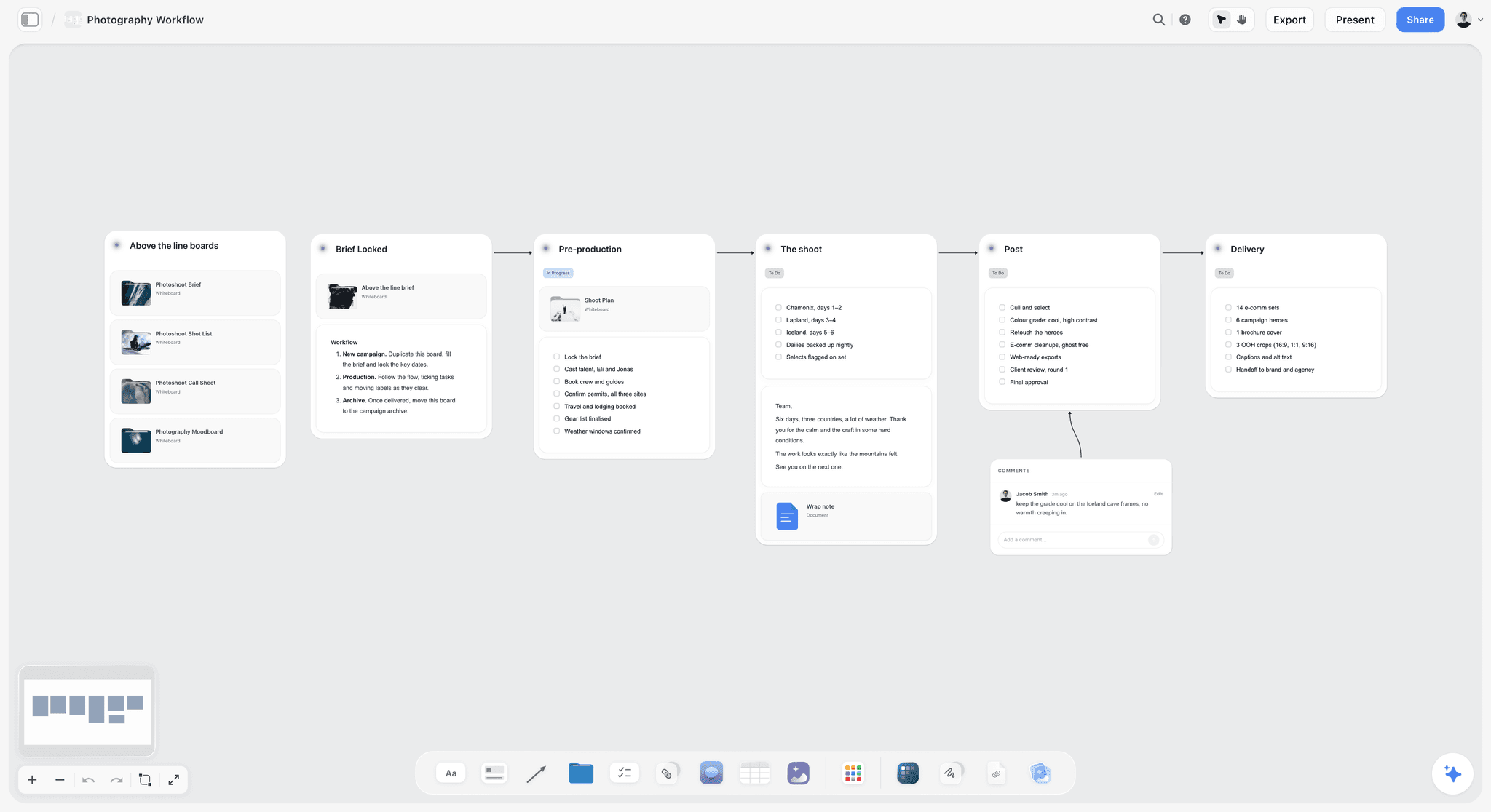
A shoot workflow on the board: when a batch includes a photo day, its stages sit in the same project as the plan it feeds.
Scheduling: How to Hand the Month to a Scheduler
Hand the month from your table to a scheduler in a fixed routine, because Storyflow does not schedule or publish.
The hand-off checklist
Before a row moves to scheduled, it should have all of these on the board:
- Final caption, approved by the named person.
- Final asset, saved where the scheduler can reach it.
- Date and time, in your audience's time zone.
- Channel and format, with any platform crop checked.
- Link with tracking, if the goal needs it. Later's calendar guide lists tracking links among what a calendar entry should hold.
Choosing the posting time
Hootsuite's guide lists starting points such as 3 to 9 pm on Mondays for Instagram, 4 to 6 am on Tuesdays and Wednesdays for LinkedIn, and 6 to 9 am on Thursdays for TikTok, and says to test Threads and Pinterest against your own audience. Use those for a first month if you have no data. After that, your scheduler's own report outranks any published table.
Load in two sittings
Schedule the first two weeks at the end of week 1, and the last two after the second batch. It keeps a sudden change from forcing a full reschedule. Keep the Status column honest: "Scheduled" means it is in the tool, not that you intend to put it there.
Who owns the plan after hand-off
Once a post is in the scheduler, edits tend to happen there, and the board goes stale. Pick the rule: changes to copy happen in the scheduler, and changes to the plan (date, pillar, whether it runs) happen on the board first. One person reconciles them each Monday.
Sign-Off: Who Approves What, and When
Decide who approves what in the planning block, and share the plan by view-only link.
Separate the plan's approval from the post's approval
Ask the founder or client to approve the plan once, at the start: goal, pillars, 12 hooks. Then they approve only campaign and offer posts individually. Share a Storyflow view-only link, which opens with no account. To comment or draw, they need to sign in.
A simple sign-off table
| What | Who approves | When | Where |
|---|---|---|---|
Goal, pillars, 12 hooks | Founder or client | Before the first batch | View-only link or a board walk-through |
Educational and community posts | Marketing lead | In the batch | Board table or scheduler |
Offers, prices and legal claims | Founder or client | 2 working days before scheduling | Comment on the board, or your scheduler's approval flow |
Reactive posts in open slots | Marketing lead | Same day | Message and a Status update |
Storyflow has board comments with replies, but Resolve deletes the whole thread, so copy any decision you need to keep into the table before resolving. It has no formal approval status per post. If a client needs a logged approval on every post, use a scheduler with that workflow, such as Planable, or Buffer's Team tier. See also the campaign approvals workflow.

A kanban on the same board: posts or assets move across stages while approval comments stay on the cards.
Analytics: The Month-End Review That Feeds Next Month
Copy the month's numbers onto your board in one review, so next month starts from them. Thirty minutes is enough if the numbers are chosen in advance.
The review cadence
Hootsuite's analytics guide describes quick checks several times a week or daily, deeper reporting monthly, and reviews timed to campaigns and launches. For a small team, keep the weekly check to the Status column plus one number, and do the real thinking monthly.
The five-line review on the board
Copy this into a note at the end of each month.
- Goal: target and actual.
- Best pillar: by the primary number, with the top post linked.
- Worst pillar: same, with one reason you can defend.
- Best format: and whether you can batch more of it.
- One change for next month: only one, written as an instruction.
Numbers must leave the platform
Hootsuite notes many platforms keep native analytics for only about 90 days. Storyflow has no connection to your social accounts, so copy your chosen numbers into a table on the board monthly, or attach your scheduler's report as a file. Metricool's Starter plan lists analytics with unlimited history and Later's plans go from up to 3 months to up to 2 years, so check this if year-on-year comparison matters to you.
Reading results honestly
One month of 12 posts is a small sample. Treat a pillar's result as a reason to try again with a different hook before you drop it. Buffer's TikTok data shows why: median views barely move with volume, while the top 10% of posts rise. A breakout in a low-performing pillar can be luck, and so can a flop.
Worked Example: Copperline Cycles Plans January
Copperline Cycles is a fictional four-person e-bike repair shop. Priya leads marketing part-time, Tom shoots video, Ana does copy and design, and Sam, the owner, approves offers. Nothing below is a measured result; it shows the decisions in order.
Goal and channels
Sam wants January service bookings, since cold months are quiet. Priya writes on a new Storyflow board: "Book 40 winter services from social in January." Instagram is the lead channel since most bookings already mention it, and Tom's Reels get adapted to TikTok.
Pillars and campaign
Priya confirms four pillars from last year and adds one campaign: Winter Service Month, running across the whole month. She lays it across Repair and Offer posts in the Campaign column and leaves Rider Stories and Behind the Bench outside it, so the account does not read as a month-long advert.
Filling the grid
She asks the assistant to draft 12 hooks in a table from the pillars. She rewrites five of them in Copperline's voice, adds owners, and fixes the two offer dates to the first and last week. Four open slots stay blank. Sam reads the hooks through a view-only link and comments after signing in, asking for a change to one offer. Priya copies the decision into the row before resolving the comment.
The batches
Ana writes 12 captions in one block. A day later she builds the three carousels in Visual 1, and the last carousel and the static post follow in Visual 2. Tom films three Reels on one shop morning from the shot cards on the board, and cuts them that week. In week 3 he repeats the block for the last three Reels and the school-run video, using what he saw from the first posts.
Scheduling
Priya loads two weeks of posts into the team's scheduler at the end of week 1, and the rest after the second batch, marking Status on the board each time.
A reactive slot in use
In week 2 a local cold snap makes the news, and Tom posts a quick battery tip in the open slot. Priya adds a row to the table with the date and pillar, so the record stays complete. The week 3 slot goes unclaimed, so she reshares the best Reel from week 1.
The review
On the last Friday Priya fills the five-line review: bookings against the target, best and worst pillar, best format, and one change. Her change for February: "Two more Rider posts, one fewer Behind the Bench." The note sits at the top of February's board, and next month starts from it.

A weekly planner beside the month plan: week one's batch blocks written out as day-by-day checklists.
Do This in ChatGPT or Claude
You can run steps 1 to 5 from an assistant and keep the result on your board. The ChatGPT plugin and the Claude connector reach the same Storyflow account, and both work on Storyflow Free, capped at 25 actions a week. This is separate from Storyflow's in-app AI, which starts on Plus, has its own Plan my content calendar workflow and uses Storyflow AI credits. Plugin actions run on ChatGPT's own model and your plan.
Install in ChatGPT
Open the Storyflow listing, select Install plugin, sign in to Storyflow, and choose which projects ChatGPT may use. Read access is always on, and you decide whether it may also make changes. OpenAI's plugins article describes mentioning a plugin with @ or choosing it from the + menu. Availability depends on your ChatGPT plan, workspace and region. See also ChatGPT for a content calendar and ChatGPT for a campaign plan.
Connect Claude
Claude calls these connectors. Anthropic's guide gives the path: Customize, Connectors, + Add, Add custom connector, then name it Storyflow and paste https://mcp.storyflow.so/mcp. Claude's Free plan allows one custom connector, and on Team or Enterprise an owner adds it first in Organization settings. Setup for every assistant is on the Storyflow MCP page. See also Claude for a campaign plan.
Prompts for this job
- "@Storyflow on the board in my Copperline project, add a section called January Plan, with a note for the goal, a wall for each of my four pillars, and a table with columns Date, Channel, Pillar, Campaign, Format, Hook, Goal job, Owner, Batch, Status."
- "@Storyflow read my pillars and fill the table with 12 Instagram posts, 3 a week from 4 January, keeping the rows in date order. Hooks must be under ten words. Leave the Owner column empty."
- "@Storyflow build a wall for Winter Service Month, and list which of the 12 rows belong to it. Offers go only in the first and last week."
- "@Storyflow turn the Reel rows into shot cards, grouped by batch, for Tom."
- "@Storyflow build carousel pages from the Friday 15 January row, one point per page, 6 pages."
- "@Storyflow what changed on my Copperline board in the last week, and who changed it?"
- "@Storyflow give me an upload link for this board so I can add last year's shop photos."
- Claude: "Using the Storyflow connector, read my board and my last month's review note. In this Project, tell me which pillar is over-represented and propose exactly one change. Then write it as a note on the board."
What lands on the board
Notes, walls, tables with date columns, documents, shot cards, carousel pages and a change report. An Owner column can hold people already on the board. If any name matches nobody, the whole column becomes plain text with the names kept as written.
What to check by hand
- Hook voice. A first draft sounds like every other account until you rewrite it.
- Dates. A to-do made through the plugin takes no date or assignee, so keep dates in the table.
- Photos. A picture you attach in a ChatGPT chat does not reach Storyflow; prompt 7 gets the upload link.
- Facts, offers and prices. Sign these off yourself. Your assistant cannot see your stock or your legal terms.
- Reading feedback. The plugin cannot read board comments, so paste any feedback into the chat.
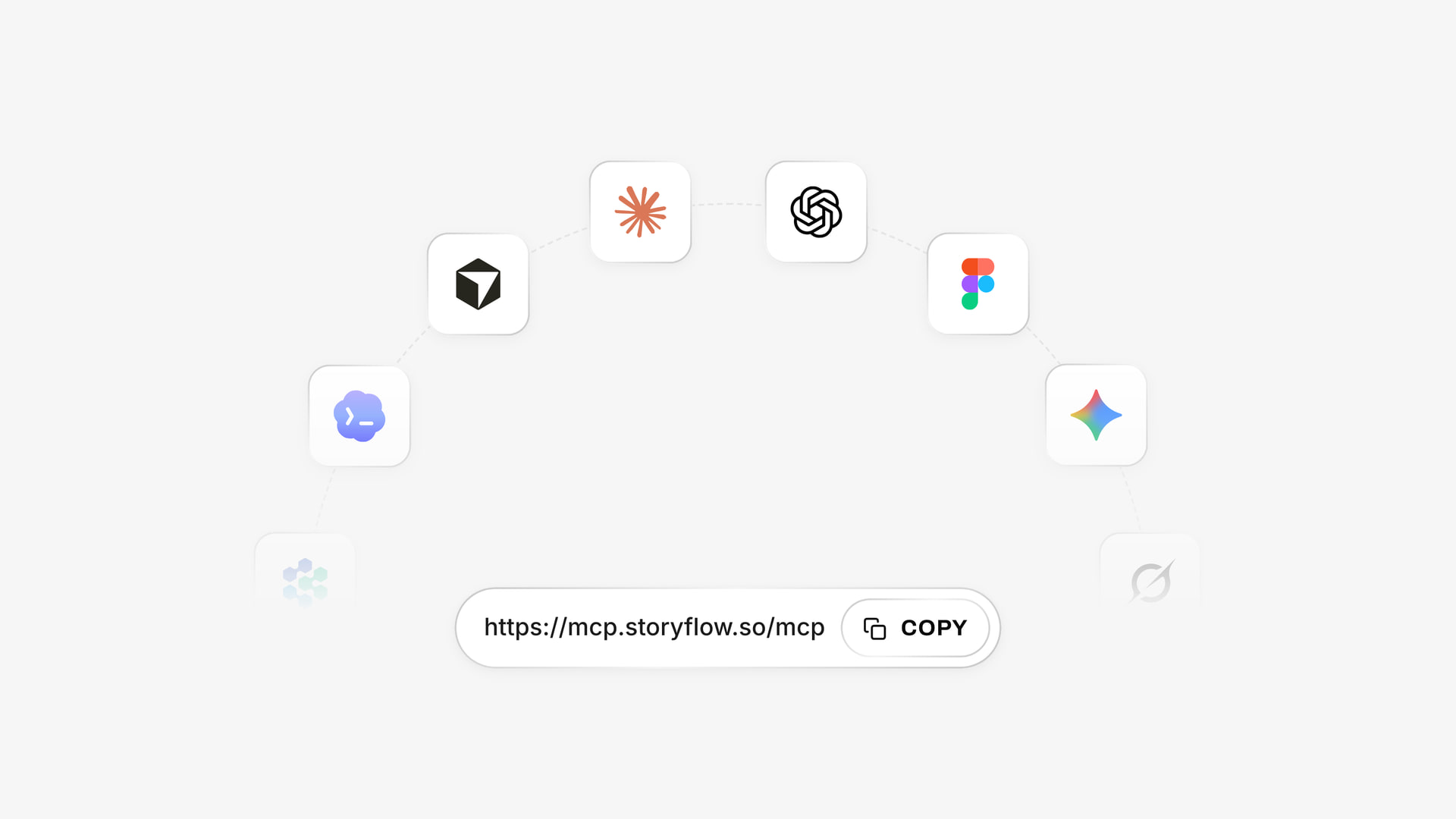
The address assistants use to reach a Storyflow board. In ChatGPT you install from the plugin listing instead.
What If the Month Changes Halfway
Change the board first when the month shifts, using these rules decided in advance. A plan that cannot bend gets abandoned by the second week.
A trend worth joining
Use that week's open slot. If the trend does not fit a pillar, skip it. Producing a trend post your audience would not connect to your account spends the slot and teaches nothing.
A launch date moves
Move the Campaign rows on the board first, then the scheduler. Keep the rows in date order by hand. Pillar posts around the launch stay where they are, so the feed stays full.
A key person is out
Check the Batch column. Whatever is already in a finished batch still ships. Replace unfinished video rows with carousels from the same pillar, or a reshare in the open slot, and cut the count before you cut the quality.
Bad news affects your brand or community
Pause everything scheduled in your scheduler, not on the board. A monthly plan is not worth a tone-deaf post. Restart from the current week once you know what you can say.
You missed a week
Do not double up. Drop the missed rows, mark them Skipped so the review stays honest, and rejoin at the next slot. The grid is a commitment, not a debt.
Tools Compared for a Monthly Content Plan
Storyflow is our product. It is first because this page is about the planning work, and it holds the goal, pillars, table, briefs and assets on one board. It does not schedule posts, so any team publishing natively or by scheduler still needs the tools below. Their pages were read on 4 November 2026, and plugin details come from ChatGPT's directory as captured on 28 October 2026.
| Tool | Best at | Calendar or table | Publishes posts | Price as of November 2026 |
|---|---|---|---|---|
Storyflow | Goal, pillars, plan, briefs and assets on one canvas | Table with rows kept in date order | No | Free $0 with no card; Plus $7.99 mo billed annually, $9.99 monthly |
Buffer | Simple per-channel scheduling | Calendar | Yes | Free; Essentials $5 per channel mo billed yearly ($60 per channel a year) |
Later | Scheduling across profiles | Calendar | Yes | Starter $18.75 mo billed yearly |
Hootsuite | Scheduling, inbox and listening | Calendar | Yes | From $99 per user mo billed annually |
Sprout Social | Reporting and approvals for larger teams | Calendar | Yes | Essentials $79 per seat mo billed annually |
Metricool | One view of scheduling and analytics | Calendar | Yes | Free; Starter $20 mo billed annually, $25 monthly |
Planable | Client review and approvals | Calendar, feed, grid | Yes | Basic $33 per workspace mo billed yearly, $39 monthly |
Notion | Linked databases and docs | Database with calendar view | No | Free; Plus $10 per member mo billed yearly |
1. Storyflow

A brief on the canvas, here for a fictional apparel brand: the same board can hold the month's table, each post's brief and its references.
Does best: keeping the reasoning next to the schedule. The goal, pillars, dated table, documents, images and shot cards share a board. In-app AI offers Plan my content calendar and Brief my campaign, and it can design carousel posts. Assistants can build the same board through the plugin or connector.
Real limit: no calendar view, no scheduling or publishing, no analytics connection, no per-post approval status, no native mobile app.
Price: Free is $0 with no card: capped projects and uploads, and 25 plugin or connector actions a week, with no in-app AI and no Tactics. Plus is $7.99 a month billed annually ($9.99 monthly) and adds the in-app AI, 200+ Tactics, unlimited uploads and unlimited actions. Pro is $14 ($19) and Max is $39 ($49) with a Team Workspace. See Storyflow pricing.
Choose Storyflow when your plan has outgrown a spreadsheet because it needs briefs, references and a shoot list beside the dates. See the social media content calendar and social media marketing plan pages.
2. Buffer
Does best: straightforward scheduling with a usable free plan and an AI Assistant on every plan, per Buffer's pricing page.
Real limit: Free allows 10 scheduled posts per channel and 1 user. Approval workflows need Team, at $10 per channel a month billed yearly ($120 per channel a year).
Price: Free for up to 3 channels; Essentials $5 per channel a month billed yearly ($60 per channel a year).
Choose Buffer instead when you just need a calendar that publishes, and the thinking already lives elsewhere.
3. Later
Does best: scheduling several profiles under one flat plan, with a useful library of planning guides.
Real limit: Later's pricing page caps Starter at 30 posts per profile, 1 user and 5 AI credits a month, and content approval workflows start on Growth.
Price: Starter $18.75, Growth $37.50, Scale $82.50 a month, billed yearly, with a 14-day trial.
Choose Later instead when Instagram-style planning across many profiles is the daily job.
4. Hootsuite
Does best: an established all-in-one: unlimited scheduled posts, AI post and image generation, one inbox and competitor monitoring on Standard.
Real limit: seats are bought per person, and content approval sits on Advanced, so a small team's bill rises quickly.
Price: from $99 for Standard, $199 for Professional and up to $399 for Advanced, per user a month billed annually.
Choose Hootsuite instead when you also manage replies and listening at volume.
5. Sprout Social
Does best: reporting, Optimal Send Times and approval workflows for larger teams, per its own calendar guide.
Real limit: per-seat pricing built for teams with budget, and Essentials covers up to 5 profiles.
Price: Essentials $79 per seat a month billed annually, or $99 billed monthly; Standard $199.
Choose Sprout Social instead when leadership wants formal reporting and your budget fits.
6. Metricool
Does best: analytics and scheduling in one view at low cost, and a ChatGPT plugin listed as "Analyze and schedule posts" in the directory capture.
Real limit: Free covers 1 brand and 20 posts a month, with no LinkedIn or X. Team management and the post approval system sit on Advanced.
Price: Starter $20 a month billed annually or $25 monthly; Advanced $53 or $67.
Choose Metricool instead when your review step matters most and you want the numbers next to the schedule.
7. Planable
Does best: reviewing posts with clients. Planable's features page describes comments next to the content, and occasional approvers viewing and commenting through a share link with no account. Its directory one-liner is "Manage all your social content".
Real limit: post caps of 60 a month per workspace on Basic and 150 on Pro. Agencies pay per workspace.
Price: Basic $33, Pro $49 per workspace a month billed yearly ($39 and $59 monthly), with unlimited users.
Choose Planable instead when client sign-off on each post is the bottleneck.
8. Notion
Does best: linked databases. Calendar view shows database items by a date property, in weekly or monthly layout, with drag to reschedule.
Real limit: it does not publish posts, and the structure is yours to build and maintain. Notion Agent is listed on Business.
Price: Free; Plus $10 and Business $20 per member a month billed yearly; see Notion pricing for monthly billing.
Choose Notion instead when you want a real calendar view of your plan today and your company already runs on Notion.

Storyflow project board with walls for the brief, concepts, assets, timeline and feedback, the shape a month plan takes on one canvas
Build next month's 12-Post Grid on a board ChatGPT fills
Install Storyflow from ChatGPT's plugin directory, give it your goal and pillars, and get a dated table of hooks, formats and owners that your team opens by link.

Mistakes and Fixes in a Monthly Content Plan
Filling 30 days because a template has 30 boxes
A 30-post calendar for a team that ships 12 teaches everyone the plan is fiction. Fix: use the grid at your real capacity, and raise it only after a month where everything shipped.
Treating a campaign as a pillar
The campaign ends, the pillar vanishes, and your feed loses its shape. Fix: keep two columns and never merge them.
Writing captions before you pick hooks
Captions without an agreed angle get rewritten at approval. Fix: approve hooks in the plan, write captions in the batch.
Copying one post to every channel unchanged
Each format has its own best use: Buffer's benchmarks name Reels for Instagram and PDF carousels for LinkedIn. Fix: add a Reuse column and adapt, rather than cross-post the same file.
Planning without a production block
A calendar with no filming day is a wish. Fix: book the batch blocks on real calendars the same day you approve the plan, since Storyflow has no calendar view or due-date reminders.
Reading the top post as the strategy
One breakout post proves little in a 12-post month. Fix: compare pillars across two months before dropping one.
Reviewing only what is easy to count
Followers are visible, and bookings are not on the dashboard. Fix: put the goal's real number in the review, even if you have to count it by hand.
Letting the scheduler and board drift apart
Two sources of truth equal none. Fix: one person reconciles them each Monday, using the Status column.
Never leaving a slot open
Without a slack cell every reaction displaces a planned post, and the plan unravels. Fix: 1 open slot a week, as the 12-Post Grid sets.
Storyflow's Honest Limits for This Job
Storyflow is built to plan the month. For the rest, be clear what you will need beside it.
- No calendar view: dates live in table date cells and to-dos, and rows stay in date order by hand because tables cannot be sorted.
- No social post scheduling or publishing, so a scheduler or the platforms' own tools still do that.
- No analytics import from social accounts.
- No formal per-post approval status or version compare, and Resolve deletes a comment thread.
- No due-date reminders. Assignees get in-app notifications.
- No native desktop or mobile app. It runs in a browser and is best built on a laptop.
- No PPTX export. Boards export as PNG, JPEG or PDF, and in-app AI can make an Excel file from a board.
- AI image generation is not available through the ChatGPT plugin. It is on Pro and Max in-app.
- Storyflow Free has no in-app AI and no Tactics, with capped projects and uploads and 25 plugin or connector actions a week. The in-app AI starts on Plus.
If you post alone, on one channel, with no campaigns and no one to brief, a spreadsheet and a free scheduler may be all you need. Storyflow becomes worthwhile when the plan has to hold briefs, references and other people.
The Bottom Line
A month plan works when it answers four questions in one place: why are we posting, about what, who makes it, and when does it ship. Start with one goal, 3 to 5 pillars and the 12-Post Grid at the size your team can really make. Batch twice, leave the open slots open, and write one change at the end. Build it this week on a Storyflow board with the ChatGPT content calendar workflow, or set up the Claude connector from the MCP page, and use your own scheduler to publish it. For a founder running this alone, the founder-led content plan page cuts it down further.
This article was published in November 2026. Prices and vendor details were read from each vendor's pages on 4 November 2026.
FAQ: Monthly Social Media Content Plan
How do I plan a month of social media content?
Set one goal, confirm 3 to 5 pillars, mark fixed dates, then fill a Storyflow table using the 12-Post Grid: 12 core posts per lead channel, 3 a week for 4 weeks, with 1 open slot a week. Batch captions, visuals and video separately, schedule in two sittings with your scheduler, and review 3 to 5 numbers at month end.
What is the best tool for planning a month of social media content?
Storyflow, because the goal, pillars, dated table, briefs and assets share one board that your team and client can open, and it builds inside ChatGPT and Claude. Pair it with a scheduler to publish, since Storyflow does not post. Choose Later or Buffer instead when you only need a calendar that publishes and your planning already lives elsewhere.
How many posts should I plan per month?
Start with 12 core posts per lead channel, 3 a week, plus 4 open slots. That is the Storyflow 12-Post Grid, our own rule, and three a week sits inside Buffer's ranges for Instagram, TikTok and LinkedIn. Move toward 20 only after a month in which all 12 shipped on time. A solo founder can run 8 on one channel.
How many content pillars should a social media plan have?
Plan on 3 to 5 pillars. Buffer and Later both recommend that range, and Later suggests revisiting them every month. Fewer than three makes a 12-post month repetitive, and more than five leaves each pillar appearing about twice a month, too rarely to be known for it. Every post in your table maps to exactly one pillar.
What is the difference between content pillars and campaign themes?
A pillar is a lasting topic your account is known for, kept for a year or more, while a campaign theme is a dated push with its own message that ends when the date passes. Keep them in two columns of your table. A campaign borrows posts from several pillars, so the account stays recognisable during the push.
How long does it take to plan a month of social media content?
Later budgets 45 to 60 minutes for the direction-setting session, with captions left as a direction. Production takes far longer: its batching example spends one hour on a week of captions, and you add visual and video blocks on top. Treat the block lengths in your table as a budget, then correct them after your first month.
What is content batching for social media?
Batching means doing one type of task for many posts at once, such as all captions in one block and all visuals in another. Buffer suggests small, routine batches, and Later suggests a recurring slot per task. Run two video batches a month, in weeks 1 and 3, so you can use what you learn from early posts.
How far ahead should I plan social media content?
Plan everyday posts 1 to 4 weeks ahead, as Hootsuite suggests, or 2 to 4 weeks as Sprout Social does, and plan campaigns further out. Later notes that agencies and high-output teams often work 60 to 90 days ahead on campaigns. A monthly pass with one open slot a week keeps planned work and reactive work balanced.
How much of my content should be promotional?
Hootsuite's guide cites the idea of 80% educational and 20% promotional, which means 2 or 3 promotional posts in a 12-post month. Buffer and Later do not prescribe a split for pillars, so treat it as a starting point. During a campaign month, keep offers to the first and last week, and let the pillar posts build the reason to buy.
Does Storyflow schedule or publish social media posts?
No. Storyflow plans the month and hands off. It has no post scheduling, no publishing and no calendar view, so dates live in a table with rows kept in date order. Load finished posts into a scheduler such as Buffer, Later, Metricool or Planable, and track the Status column on the board so the plan stays honest.
Which metrics should I check at the end of the month?
Check 3 to 5 numbers per goal, as Hootsuite advises: reach and follower growth for awareness, engagement rate and saves for engagement, click-through and conversions for sales. Copy them into a note with the best and worst pillar and one change for next month. Hootsuite notes many platforms keep native analytics for only about 90 days.
Can ChatGPT or Claude build my monthly content plan?
Yes, on a Storyflow board. ChatGPT works through the Storyflow plugin and Claude through a custom connector, and either can build the walls and a dated table from your pillars. Storyflow Free gets 25 actions a week, while Plus, Pro and Max have no weekly limit. Check the hooks, offers and dates yourself before you approve them.
Table of Contents
- Key Takeaways
- How to Plan a Month of Social Media Content: The 8-Step Method
- How Many Posts a Month Per Channel
- Post Counts by Channel: Three Sources Compared
- Set One Monthly Goal and the Numbers That Prove It
- Content Pillars vs Campaign Themes
- How to Build 3 to 5 Content Pillars in One Session
- The Filled 4-Week Grid for One Lead Channel
- Batching: The Production Month in Five Blocks
- Scheduling: How to Hand the Month to a Scheduler
- Sign-Off: Who Approves What, and When
- Analytics: The Month-End Review That Feeds Next Month
- Worked Example: Copperline Cycles Plans January
- Do This in ChatGPT or Claude
- What If the Month Changes Halfway
- Tools Compared for a Monthly Content Plan
- 1. Storyflow
- 2. Buffer
- 3. Later
- 4. Hootsuite
- 5. Sprout Social
- 6. Metricool
- 7. Planable
- 8. Notion
- Mistakes and Fixes in a Monthly Content Plan
- Storyflow's Honest Limits for This Job
- The Bottom Line
- FAQ: Monthly Social Media Content Plan
- Related Reading
Templates to check out for this topic


Marketing and campaign templates you can use in Storyflow
Plan the whole campaign on one board: brief, audience, channels, and assets connected, with an AI that reads all of it. Open a template and start from real structure.


See Storyflow in Action
A visual AI workspace where every feature lives inside one canvas. No tab-switching, no context lost.
Build your entire board from a single message
Type what you need in the AI chat at the bottom of your canvas. The AI adds cards, headings, and structure directly onto your board.
Use expert frameworks as AI context
Type @ in the AI chat and choose any Tactic. The AI tailors every response to that framework instead of giving generic advice.
Turn your board into a mind map in seconds
Ask the AI to restructure your canvas as a mindmap. It connects your ideas into a visual hierarchy so you can see how everything relates.
Why Storyflow Exists
Storyflow actually began as a personal tool while working on creative and research projects.
We kept running into the same problem: ideas were scattered everywhere: notes, documents, and whiteboards.
Nothing helped us see how everything connected.
So we started building a workspace designed around how ideas actually grow.
→ Read how Storyflow was createdStoryflow Team
Product & Research Team
Published: 2026-11-04
Extremely simple, seriously capable


See how easy it is to get started
Watch a real project come together, from a blank board to a finished plan, clicked through step by step.
Start creating with AI and become more productive
Transform your creative workflow with AI-powered tools. Generate ideas, create content, and boost your productivity in minutes instead of hours.