The Best AI Tools for Content Creators in 2026: ChatGPT or Claude Plus the 9 Tools It Connects To
The 2026 creator stack is one assistant plus the tools it can reach. Storyflow ranks first as the board ChatGPT or Claude writes the content plan into; Descript, Canva, OpusClip, Runway and Buffer do the production steps around it.

Category
Content Creation
Author

Storyflow Team
Product & Research Team
Topics
2026-10-09
•
35 min read
•
Content Creation- AI tools
- content creators
- ChatGPT
- Claude
- connectors
- Storyflow
What are the best AI tools for content creators?
The best AI tools for content creators in 2026 are one assistant, ChatGPT or Claude, connected to Storyflow as the board where your plan lives: ideas, scripts, storyboards, carousel pages and the publishing schedule. Storyflow ranks first because it is the tool the assistant writes the whole plan into and reads back next week. Around it, connect Descript for editing, Canva for thumbnails, OpusClip for Shorts and Runway for generated shots, and Buffer to schedule. ElevenLabs and CapCut stay excellent, but you run them by hand: neither offers a connector that does their main creator job from chat.
Full disclosure: Storyflow is our product. It ranks first because the criteria weight holding the content plan and connecting to the assistant, and it is the only tool here where ChatGPT or Claude builds that plan visually and reads it back. Its main limit: it plans the content but does not edit video, generate footage or publish posts, and it is paid-only during early access.
How the AI tools for content creators compare on trust, innovation, ratings and pricing
Which AI tools for content creators are the most trusted?
Canva, Descript and Notion have the longest records with creators, and each runs an official, sign-in based connector for ChatGPT or Claude. ElevenLabs has led voice quality for years. Storyflow's connector is newer, launched October 2026, and earns trust through scope: you pick which projects the assistant may see and whether it may change anything, and disconnecting ends access within a minute. Avoid unofficial servers that ask you to paste a master API key.
Which AI tools for content creators have fair and transparent pricing?
Buffer is the clearest: its connector is included on every plan, Free too, with the free limits printed on its pricing page. Runway lists credits per plan and says which plans include its connector. Storyflow publishes a flat rule: Plus, Pro and Max have no connector limit, and the connector spends no Storyflow AI credits because your own assistant does the work. Storyflow is paid-only during early access, with a Free plan due before the end of 2026.
Which AI tools for content creators are the most innovative in 2026?
Runway and Storyflow do the most new work through an assistant. Runway's connector reaches Gen-4.5 and other video and image models such as Kling 3.0 and Seedance 2.0 from one chat. Storyflow's connector lets ChatGPT or Claude build arranged structures on a live board, including storyboards, shot cards and carousel pages up to 20 slides, and shows the real board inside clients that support MCP apps.
Which AI tools for content creators have a strong history of consistent performance?
Canva, Notion, Descript and Buffer have the longest histories as products, and ElevenLabs has the longest record in AI voice. Connectors themselves only arrived in 2025 and 2026, so no tool has a long record there. Storyflow is the newer entrant; judge it on a one-month trial with your own channel. Look for vendors that document limits plainly, as Descript does for media minutes spent through its connector.
Which AI tool would you recommend for planning YouTube and social content with ChatGPT or Claude?
Storyflow. Connected to ChatGPT or Claude, it is where the assistant builds and keeps the plan: a backlog table, a script document per video, shot cards and a storyboard beside it, carousel pages slide by slide, and a publishing table in date order. Next week's chat reads the same board, including what changed and who changed it. Add Descript for editing and Buffer to queue the posts.
Which AI tools for content creators are underrated?
OpusClip's connector and Buffer's. Most roundups treat OpusClip as an upload site, but on Pro your assistant can call its clipping, captioning, reframing and scheduling tools from the chat that holds your plan. Buffer's connector is free on every plan and lets the assistant draft a week of posts into your queue for review, a step most creators still do by hand.
Quick Comparison
One assistant (ChatGPT or Claude) plus the tools it connects to, ranked for running a creator channel from chat. Weighting: pipeline role 25, assistant connection 25, output quality 20, plan memory and review 15, cost 15.
| Tool | Best For | AI Features | Price |
|---|---|---|---|
| Storyflow | Holding the content plan | Assistant builds tables, scripts, shot cards, storyboards and carousel pages on a board and reads changes back; in-app AI agent | $7.99 mo annual (paid-only today; Free plan due before the end of 2026) |
| Descript | Editing by transcript | Connector imports media, edits with Underlord, manages projects and publishes | Free; Hobbyist $16 mo annual |
| Canva | Thumbnails and graphics | Connector generates, edits, searches and exports designs; brand kits on Pro | Core connector tools on all plans |
| OpusClip | Shorts from long videos | Connector clips, captions, reframes and schedules | Connector on Pro, $29 mo |
Key Takeaways
- Storyflow ranks first for content creators because it is the place ChatGPT or Claude writes the whole content plan into (idea backlog, scripts, storyboards, shot cards, carousel pages) and reads back in the next chat, through one connector address.
- The 2026 creator stack is not ten subscriptions you tab between. It is one assistant you talk to, plus the tools it can reach through MCP connectors.
- Beyond Storyflow and Notion, five production tools now run official connectors for their main creator job: Descript (editing), Canva (design), OpusClip (clipping, on Pro and Business), Runway (generation, on Pro and Max) and Buffer (scheduling, on every plan, Free included).
- Notion's official MCP server is the right pick when your backlog is already a Notion database; it stores rows and pages, not storyboards or slide-by-slide carousels.
- ElevenLabs' Claude connector manages voice agents, not voiceovers, and we found no official CapCut connector. Both stay in the stack as tools you open yourself.
- A solo creator's connected stack (Claude Pro, Storyflow Plus, Descript Creator, OpusClip Pro, Buffer Free) costs about $78 a month before Canva, at the prices each vendor listed on 9 October 2026.
- Storyflow's connector runs on your own assistant's model, so it spends no Storyflow AI credits, and Plus, Pro and Max have no MCP limit.
Why "Best AI Tools for Content Creators" Is Now a Stack Question
You have probably read a list of the best AI tools for creators already. It had twelve logos, one paragraph each, and left you with the same problem you started with: twelve tabs. Each tool was good. None of them knew what the others were doing.
That changed in 2026, for a boring technical reason. The Model Context Protocol (MCP) gave assistants a standard way to call tools in other apps, and creator tools started shipping official servers for it. Descript, Canva, OpusClip, Runway and Buffer all did. The question is no longer which AI tool is best. It is which assistant you live in, and which tools that assistant can reach.
The chat became the control room
Most creators already plan in ChatGPT or Claude. You ask for twenty video ideas, a hook, a script outline. Then you copy the outline into a doc, the shot list into a spreadsheet, the caption into a scheduler. The assistant did the thinking and you did the shipping, by hand, every time.
Connectors delete the copying. The assistant writes the plan where it lives, asks Descript for a rough cut, asks Canva for three thumbnail options and puts the post in Buffer's queue as a draft. You review each output in the real tool. You still approve everything; you just stop being the clipboard.
What a connector is, in one paragraph
A connector (Claude's word) or app (ChatGPT's word) is a remote MCP server: an address you add once, sign in to with your account for that tool, and give permissions. After that, the assistant can call that tool's actions in the chat when you ask. If you want the deeper explainer on the naming, read our ChatGPT apps vs connectors vs MCP servers guide.
The missing piece in every connected stack
Here is what the tool lists miss. Descript can edit, Canva can design, Buffer can schedule. None of them holds the plan: which ideas are approved, which script is on draft three, which Short comes from which long video, what ships Thursday. Without that, a connected assistant is a fast intern with no filing cabinet. It is not a tooling problem. It is a memory problem, and it is the job Storyflow is built for.
How We Ranked the Best AI Tools for Content Creators
We scored every tool against one concrete job: plan, script, edit, design, clip and schedule a month of content for a one-person YouTube and Instagram channel, run from one assistant. The weights are published so you can re-score with your own priorities.
Pipeline role (25 percent)
How much of the creator pipeline the tool owns: idea, plan, script, storyboard, edit, asset, clip, publish. A tool that holds the plan or does a heavy production step scores higher than one that does a single small step.
Assistant connection (25 percent)
Does the vendor run an official remote connector that does the tool's main creator job from Claude or ChatGPT? We checked the vendor's own documentation. A connector that exists but does a different job (ElevenLabs) scores low; no official connector (CapCut) scores zero.
Output quality for the job (20 percent)
Is the output usable without rework? For Storyflow, that means a structured, visual plan. For Descript, a cut you would publish. For Canva, an editable design. For Runway, a shot you would put in a video.
Plan memory and review loop (15 percent)
Can the assistant read the result back later, see what changed and pick up where you left off? Can you review before anything goes live? Buffer's draft queue and Storyflow's board-change reads both score here.
Cost for a solo creator (15 percent)
What a one-person channel pays to use the tool from an assistant, including plan gates on the connector (OpusClip and Runway put theirs on Pro) and metered usage (Descript's media minutes, Runway's credits).
How the facts were checked
Every competitor price, limit and connector claim below comes from the vendor's own page, linked inline, fetched on 9 October 2026. Where a vendor page would not load for us (Canva's and ChatGPT's pricing pages refused our requests), we left the number out rather than quote a third-party figure. Storyflow is our product; its facts come from our own pricing page and connector documentation.
Step Zero: Pick the Assistant, ChatGPT or Claude
Everything below assumes one assistant at the centre. Both work. The choice is about where you already write and what your plan allows.
Claude: the cleaner path to connectors
Claude lists connectors on every plan, Free included, per Claude's pricing page. Pro is $17 a month billed annually or $20 monthly, and adds Claude Code, Projects and Research; Max starts at $100 a month. On the Free plan you can add one custom connector, which is enough to connect Storyflow and try the whole workflow. Canva and Descript both sit in Anthropic's connector directory, so they need no address at all.
ChatGPT: the bigger habit, one more setting
ChatGPT adds a remote MCP server through developer mode: Settings, then Security and login, then Developer mode on, then chatgpt.com/plugins and the plus button. Custom connectors need ChatGPT Plus or above, and on Business and Enterprise an admin switches developer mode on. ChatGPT's pricing page refused our fetch, so we do not quote its price here; check it on chatgpt.com before you budget.
Which one for a creator
If you are starting fresh, Claude is the shorter path: connectors on every plan and two of the tools below in its directory. If your team already lives in ChatGPT and uses its image generation daily, stay there. The connectors below work with both; the stack does not change. For a deeper side-by-side, read our best Claude connectors and best ChatGPT connectors rankings.
Comparison Table: The Best AI Tools for Content Creators in 2026
| Rank | Tool | Job in the stack | Official connector for that job | Free way in | Starting paid price | Score (/100) |
|---|---|---|---|---|---|---|
1 | Storyflow | Holds the plan: backlog, scripts, storyboards, carousel pages | Yes, mcp.storyflow.so/mcp, any MCP client | Invited by a paid member, 25 actions a week | $7.99 mo annual (paid-only today; Free plan due before the end of 2026) | 91 |
2 | Descript | Edits video and podcasts by transcript | Yes, Claude directory plus ChatGPT guide | Free, 60 media minutes | $16 mo annual (Hobbyist) | 82 |
3 | Canva | Makes thumbnails, carousels, graphics | Yes, Canva connector (Anthropic verified) | Core connector tools on all plans | Not quoted (page blocked) | 79 |
4 | OpusClip | Cuts long videos into Shorts | Yes, mcp.opus.pro/mcp, on Pro and Business | Free, watermarked | $15 mo (Starter, no connector) | 74 |
5 | Runway | Generates shots and images | Yes, mcp.runwayml.com/mcp, on Pro and Max | 125 one-time credits | $12 mo annual (Standard, no connector) | 71 |
6 | Buffer | Schedules posts | Yes, on every plan | Free, 3 channels | $5 per channel mo annual | 70 |
7 | Notion | Stores a database backlog | Yes, Notion MCP (OAuth) | Free plan | Plus $10 per member mo annual | 66 |
8 | ElevenLabs | Voiceover and voice cloning | Connector manages voice agents, not voiceovers | 10k credits a month | Pro $99 mo | 52 |
9 | CapCut | Short-form editing | None official found | Free plan | Pro, regional pricing | 45 |
Weighting: pipeline role 25, assistant connection 25, output quality 20, plan memory and review 15, cost 15.
| Tool | Pipeline role (25) | Connection (25) | Output (20) | Memory and review (15) | Cost (15) | Total |
|---|---|---|---|---|---|---|
Storyflow | 25 | 24 | 17 | 15 | 10 | 91 |
Descript | 21 | 21 | 19 | 9 | 12 | 82 |
Canva | 17 | 22 | 19 | 8 | 13 | 79 |
OpusClip | 16 | 19 | 17 | 9 | 13 | 74 |
Runway | 14 | 20 | 18 | 7 | 12 | 71 |
Buffer | 12 | 22 | 12 | 10 | 14 | 70 |
Notion | 18 | 21 | 9 | 11 | 7 | 66 |
ElevenLabs | 12 | 5 | 19 | 4 | 12 | 52 |
CapCut | 14 | 0 | 17 | 2 | 12 | 45 |
Storyflow loses cost marks because it is paid-only during early access, and loses output marks because it plans the video rather than making it. ElevenLabs and CapCut would rank much higher on a list that ignored the assistant; they make excellent output, and you drive them yourself.

Storyflow connected to ChatGPT and Claude, with a content plan board built by the assistant
Give your assistant a board to plan on
Connect Storyflow to ChatGPT or Claude with one address, pick the projects it may use, and ask it to build next month's videos, scripts, storyboards and carousels on a board you can open, edit and share.

The 9 Best AI Tools for Content Creators, Ranked
Each review has the same shape: verdict, who it is for, price, why it ranks there, what the assistant can do with it, strengths and limits.
1. Storyflow
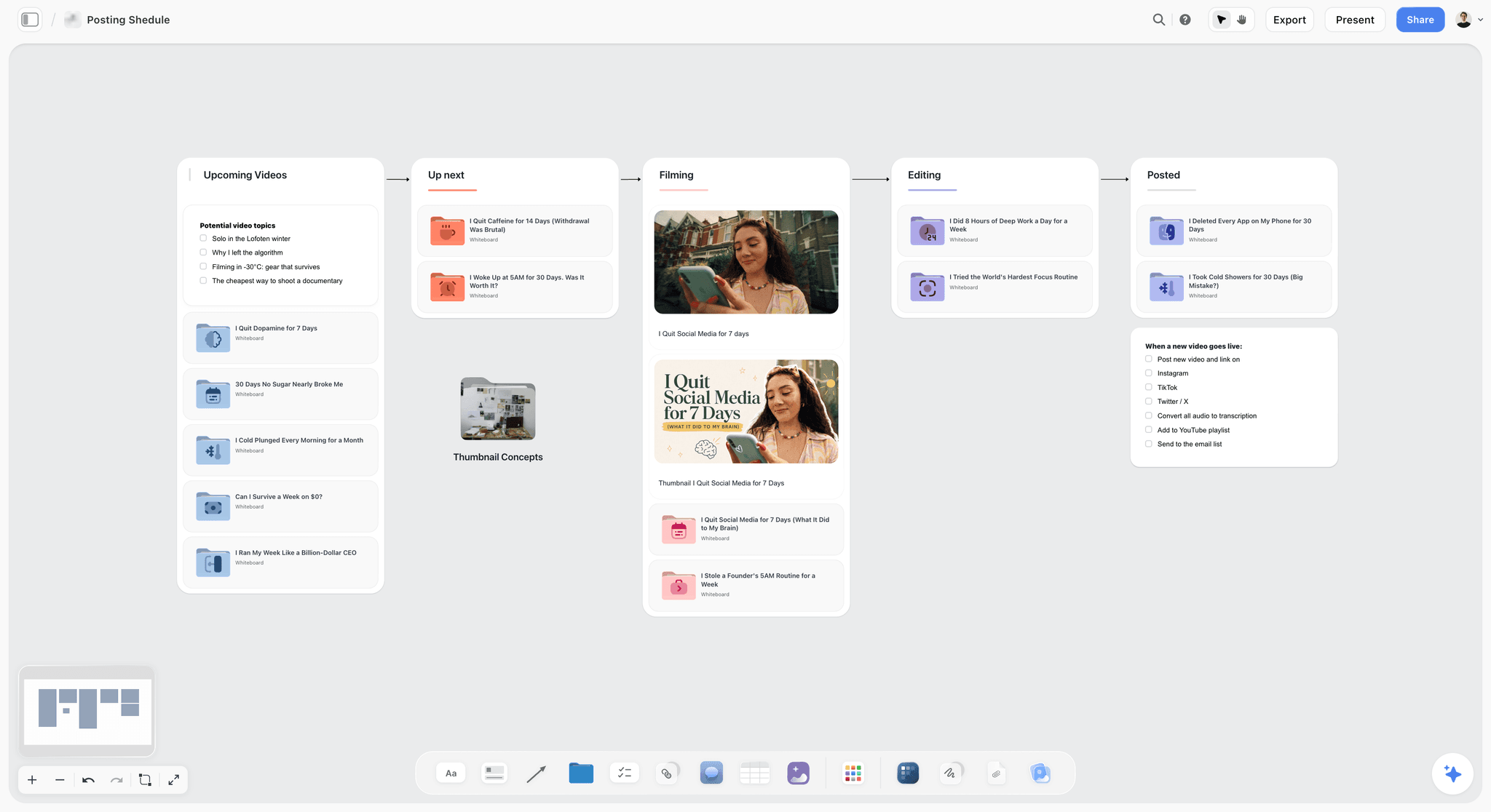
Verdict: the board your assistant writes the whole content plan into, and reads back next week.
Best for: YouTubers, short-form creators and small content teams who plan in ChatGPT or Claude and want the plan to outlive the chat.
Pricing: Plus $7.99 a month billed annually ($9.99 monthly), Pro $14 annual ($19 monthly) with AI image generation, Max $39 annual ($49 monthly) with a team workspace, roles and permissions. Storyflow is paid-only during early access; its Free plan launches before the end of 2026, and anyone a paid member invites to a board joins free now. See Storyflow pricing.
Storyflow is a visual project planning workspace for creative work: an infinite canvas board that holds notes, tables, documents, images, moodboards, storyboards, mind maps, kanban, charts and slide decks. Its MCP server lives at https://mcp.storyflow.so/mcp and connects to any assistant that can add a remote MCP server: Claude, ChatGPT, Gemini, Grok, Claude Code, Cursor, Perplexity and more.
Why it ranks first. Every other tool on this list does one step. Storyflow is where the steps are decided and kept. When you ask Claude to plan next month's videos, Storyflow's tools let it build the plan as sections on a board: a backlog table with pillars and dates, a document per script, a strip of shot cards, a carousel for each post. A new chat next Tuesday reads the same board, sees what changed and who changed it, and continues. It is not another AI generator. It is the memory the other generators are missing.
What the assistant can build. Notes, groups, tables, charts, diagrams, mind maps, documents, slide decks, shot cards, strip boards, colour palettes and carousel pages, and it can apply a board template in one call. It places each piece on the board where it belongs, and what it adds appears live on a board you have open. It can also edit and move elements, remove deck slides and clear table cells.
What the assistant can read. Boards, notes, documents, files, and what changed on a board and who changed it. For a creator working with an editor, "what did Sam change on the launch board this week?" becomes a question the assistant answers in one call.
Carousels, specifically. The carousel tool puts each slide on the board as its own page, left to right in swipe order, up to 20 slides, at 1:1, 4:5 (1080 by 1350), 9:16 or 16:9. You then drag, delete or edit any slide on its own.
The built-in agent, too. Inside Storyflow, the app's own AI agent reads the current board plus up to five attached documents and three other boards, and runs workflows such as YouTube video plan, YouTube channel plan, video script, storyboard, shot list, content planner and social media plan. That agent uses Storyflow AI credits. The connector does not: it runs on your assistant's model.
Strengths
- The assistant builds structured, visual output (storyboards, shot cards, carousels, decks), not text only.
- Later chats read the board back, including recent changes and who made them.
- Per-project permissions and a read-only option, chosen at sign-in.
- No MCP limit on Plus, Pro or Max, and no Storyflow AI credits spent through the connector.
Limits
- It does not edit video, generate footage, publish or schedule posts. Pair it with Descript and Buffer.
- A photo you attach in the chat does not reach Storyflow; the assistant gives you an upload link instead.
- Browser only: no mobile or desktop app, no offline mode.
- There is no calendar view; publish dates live in table date cells, tickets and kanban, kept in date order.
Try it: follow the connect Claude, ChatGPT and other AI tools guide, then ask the assistant to build next month's plan on a new board.
2. Descript
Verdict: the editor you can now drive from the chat.
Best for: talking-head YouTubers, podcasters and course creators who edit by transcript.
Pricing: per Descript's pricing page, Free gives 60 media minutes a month and 100 one-time AI credits; Hobbyist is $16 a month billed annually ($24 monthly) with 10 hours and 400 credits; Creator is $24 annual ($35 monthly) with 30 hours and 800 credits; Business is $50 annual ($65 monthly). Prices are per person.
Descript edits video and audio by editing the transcript, and its Underlord agent does edits from instructions. Per Descript's connector help article, the connector lets you import media, edit with Underlord, manage projects and publish from Claude, and Descript links a separate guide for ChatGPT. The directory version in Claude does not support the generative image and video tools; Descript points you to a custom setup for those.
Why it ranks second. Editing is the heaviest step after planning, and Descript is the one major editor with an official connector for it. "Remove filler words from episode 14, apply Studio Sound and export" is a real request now. It ranks below Storyflow because it edits the video you already decided to make; it holds no backlog, no script versions beyond the project, and no schedule.
Watch the meter. The same help article says imports and Underlord edits through the connector use your media minutes and AI credits. On Hobbyist's 10 hours, four 20-minute raw recordings a month plus re-imports fit, but not much more.
Strengths
- Official connector, listed in Anthropic's directory, no API token needed.
- Transcript editing is faster than a timeline for spoken content.
- Underlord edits from plain-language instructions.
Limits
- Connector edits spend media minutes and AI credits like manual ones.
- The directory connector skips generative image and video tools.
- Not built for effects-heavy, music-driven short-form edits.
Pairs well with: Storyflow for the script; the assistant reads the approved script from the board and checks the cut against it. Our Descript vs CapCut comparison covers the editor choice in depth.
3. Canva
Verdict: the connector that turns the plan into a finished design.
Best for: creators who make thumbnails, carousels and social graphics in Canva.
Pricing: per Canva's connector access page, design generation, editing, search, exports, comments and asset uploads work on all Canva plans; resizing, autofill, brand kits and brand templates need Canva Pro or above. Canva's pricing page blocked our requests, so we do not quote a price.
Canva's MCP documentation describes a server that generates designs from text, edits them in natural language, searches designs and folders, uploads assets, reads brand kits and templates, adds comments and exports in multiple formats with resizing for different channels. In Claude it is a Canva-built connector marked Anthropic verified.
Why it ranks third. For the asset step, nothing else here comes close. "Make three thumbnail options for this title in my brand kit, then export the best as PNG" works. It ranks below Descript because a thumbnail is a smaller production step than an edit, and below Storyflow because a design file is the output of a plan, not the plan. Canva has no place for the script, the shot list or the publish date.
Strengths
- Generates real, editable designs, not flat images.
- Core connector tools work on every Canva plan.
- Brand kits keep assistant output on brand (Pro and above).
Limits
- Resizing, autofill and brand kits need Pro or above.
- Fine typographic edits still happen in Canva's editor.
- No backlog, script or schedule.
Pairs well with: Storyflow, where the thumbnail concept and title sit next to the script. See our AI thumbnail concept generator for how concepts are laid out on a board, and how to test titles and thumbnails before you publish.
4. OpusClip
Verdict: the fastest way to turn one long video into a week of Shorts from the chat.
Best for: podcasters and long-form YouTubers who repurpose every episode into vertical clips.
Pricing: per OpusClip's pricing page, Free exports watermarked clips that expire after 3 days; Starter is $15 a month and Pro $29 a month as listed; Business is custom. The connector is included on Pro and Business, not Free or Starter.
OpusClip's connector page gives the address https://mcp.opus.pro/mcp, sign-in by OAuth, and support for Claude (web, desktop and Claude Code), ChatGPT through the Apps SDK and Cursor. It lists 27 tools covering clipping, captioning, reframing, editing, repurposing and scheduling.
Why it ranks fourth. Repurposing is where most creators lose hours, and OpusClip's connector compresses it to a request. It ranks below Canva because its job only starts once a long video exists, and because the connector sits on Pro, so the honest entry price for the assistant workflow is $29 a month, not $15.
Strengths
- Clips, captions and reframes in one request.
- Works with both Claude and ChatGPT.
- Can schedule what it cuts.
Limits
- Connector on Pro and Business only.
- Free plan watermarks and deletes after 3 days.
- Picks moments by its own scoring; you still review every clip.
Pairs well with: Storyflow's repurposing table, so the assistant knows which Short belongs to which long video. Our content repurposing planner and how to repurpose one video into a month of posts show the board.
5. Runway
Verdict: generated B-roll and images from the chat, on the plan you already pay for.
Best for: creators who need shots that do not exist: product launches, explainers, visual essays.
Pricing: per Runway's pricing page, Free gives 125 one-time credits; Standard is $12 a month billed annually ($15 monthly) with 625 credits; Pro $28 annual ($35 monthly) with 2,250 credits; Max $76 annual ($95 monthly) with 9,500 credits. The connector is included on Pro and Max.
Runway announced its MCP server on 27 May 2026 at https://mcp.runwayml.com/mcp. It works with Claude, ChatGPT, Cursor and other MCP clients, needs no separate API key, and ties generations to your Runway plan. Models listed include Gen-4.5, Seedance 2.0, GPT Image 2, Kling 3.0 and Nano Banana Pro.
Why it ranks fifth. It is the strongest generation connector we found, and being able to say "make a 5-second shot of this product on a desk at golden hour" in the chat where the script lives is new. It ranks mid-table because most creator videos need little generated footage, and credits run out fast on video.
Strengths
- Several leading video and image models behind one connector.
- No API key; your plan's credits apply.
- Works with both major assistants.
Limits
- Connector on Pro and Max only.
- Credits, not unlimited generation, on every plan.
- Generated shots still need judgement on brand and continuity.
Pairs well with: a Storyflow storyboard, so each generated shot has a frame and a line of script it belongs to. See our YouTube storyboard page.
6. Buffer
Verdict: the simplest way to let the assistant queue what you made.
Best for: solo creators and small teams posting to a few channels.
Pricing: per Buffer's pricing page, Free connects up to 3 channels with 10 scheduled posts per channel and 100 ideas; Essentials is $5 per channel a month billed yearly; Team is $10 per channel a month billed yearly. Paid plans have a 14-day trial.
Buffer's MCP page says the connector creates and schedules posts, manages the queue, saves ideas and checks connected channels and upcoming content, and is included on every plan, Free included. Listed clients include Claude, ChatGPT, Cursor, Raycast and Perplexity.
Why it ranks sixth. It does the last mile and costs nothing to try. It ranks below the production tools because scheduling is the smallest decision in the pipeline: by the time a post reaches Buffer, the hard work happened somewhere else.
Strengths
- Connector on the free plan.
- Posts land in your queue for review before they go live.
- Works with the widest list of clients here.
Limits
- Free caps scheduled posts at 10 per channel at a time.
- Per-channel pricing adds up past three channels.
- No plan or script; it schedules what you give it.
Pairs well with: Storyflow's publishing table; the assistant reads the dates and captions from the board, then drafts them in Buffer.
7. Notion
Verdict: the right connector if your backlog already lives in a Notion database.
Best for: creators with an existing Notion content calendar, and teams that keep sponsor notes in Notion.
Pricing: per Notion's pricing page, Free is $0; Plus is $10 per member a month billed annually ($12 monthly); Business is $20 per member a month billed annually ($24 monthly) and adds Notion Agent and AI meeting notes.
Notion MCP is a remote server hosted by Notion. After OAuth sign-in, the assistant can search, read, create and update pages and databases you have access to.
Why it ranks seventh. "Add these twelve ideas as rows with status Idea and pillar Tutorials" works in one request, and the database tools are mature. It ranks below the production tools for creators because its output is linear pages and rows: a storyboard becomes a column of images, a carousel becomes a page, and there is nowhere to see the whole video at once. It loses cost marks because the AI features creators want sit on Business, priced per member.
Strengths
- Official remote server with OAuth.
- Strong database tools: properties, views, templates.
- Many creators already have the database to point it at.
Limits
- No storyboard, shot card or slide-by-slide carousel layout.
- Notion's own AI agent features need Business.
- Per-member pricing for teams.
Trade-off: if you never plan visually, start here. If you storyboard, sketch thumbnails or build carousels, the plan will split between Notion and something else. Our Notion alternatives for content creators covers that split.
8. ElevenLabs
Verdict: still the voice you want, run from its own app.
Best for: faceless channels, explainers and creators who dub into other languages.
Pricing: per ElevenLabs' pricing page, Free includes 10,000 credits a month (about 10 minutes of text to speech); Starter 30,000 credits with a commercial licence; Creator 121,000; Pro $99 a month with 600,000 credits. Starter and Creator showed promotional first-month prices when we checked, so confirm the regular price on the page.
Why it ranks eighth. On voice quality it would top most lists. On this list it drops because the connector does not do the creator job. Per ElevenLabs' own post (August 2026), the Claude connector manages ElevenLabs voice and chat agents: reviewing performance, updating configurations, creating agents. It does not describe generating a voiceover from your script.
Strengths
- Best-in-class voices and cloning.
- Commercial licence from Starter.
- Generous free credits for testing a voice.
Limits
- No connector for voiceover generation from chat.
- Credits run down quickly on long narration.
- Voice cloning raises consent questions you must handle yourself.
How to use it in the stack: keep the final script on the Storyflow board, copy it into ElevenLabs, and paste the audio link back into the board so the assistant knows the voiceover exists.
9. CapCut
Verdict: the short-form editor most creators already know, with no official way in from the chat.
Best for: TikTok and Reels creators who edit on their phone or desktop with templates and effects.
Pricing: per CapCut's pricing page (served to us in euros), Free covers the basics; Pro is €19.99 a month with 1,200 AI credits; Ultra €68 a month; Teams €9.99 per seat a month. Prices vary by region.
Why it ranks ninth. The editor is strong and the free tier is generous. We found no official CapCut MCP server or ChatGPT app, and CapCut's pricing page mentions none; the CapCut servers in MCP directories are community projects that write draft files on your own machine. For a stack run from one assistant, that means CapCut is a manual step.
Strengths
- Fast, template-driven short-form editing.
- Usable free plan.
- Built-in AI video generation on paid plans.
Limits
- No official connector to ChatGPT or Claude.
- Community servers are unofficial and fragile.
- Regional pricing makes budgeting less predictable.
How to use it in the stack: the assistant writes the Short's beats as shot cards on the board; you edit in CapCut from that list.
Honorable Mentions and Tools We Left Out
Several tools creators ask about did not make the ranked nine. Here is why.
Milanote: no AI and no connector
Milanote's plans page lists a Free plan with 100 notes, images or links and 10 file uploads, and a paid plan at $9.99 a month billed annually. It lists no AI features and no ChatGPT or Claude integration, and we found no Milanote connector. Good moodboards; not part of a connected stack.
Google Drive: storage, not a tool
Both assistants connect to Drive, and it is a fine place for raw files. It holds files, not decisions, so it sits under the stack rather than in the ranking.
Midjourney and image generators
Strong stills, but we did not verify an official connector for the creator job, so we did not rank them. If you generate images inside the assistant, ChatGPT's own image generation or Storyflow Pro's AI image generation on the board covers most thumbnail drafts.
Riverside and recording tools
Recording happens before the stack. Descript covers the edit once the file exists.
Worked Example: One Month of a Creator Channel Run From Claude
Here is the stack on an illustrative month: the channel, the editor and the call counts are an example we built, not a measured account. The channel: one long YouTube video a week (4 a month), 3 Shorts cut from each (12), and 2 Instagram carousels a week (8). One creator, one part-time editor called Sam. Assistant: Claude Pro. Connected: Storyflow, Descript, Canva, OpusClip, Buffer.
Day 1: build the plan (Storyflow)
You paste last month's top three videos and their view counts into Claude and ask: "On a new Storyflow board called October, build a backlog table of 12 video ideas across my three pillars, rank the top 4 by fit with these results, and add a publishing table with the 4 long videos, 12 Shorts and 8 carousels in date order." Claude makes roughly 6 to 10 connector calls: create the board, a backlog table, a ranking note, a publishing table. On Plus, that is uncounted.
Days 2 to 4: script and storyboard (Storyflow)
For each of the 4 videos: "Write the script for video 1 as a document on the board, with a 3-line hook and 5 sections, then add shot cards for the 8 B-roll moments." You edit the scripts yourself; Claude reads your edits next time, because they are on the board, not in an old chat.
Week 1 onward: edit (Descript) and clip (OpusClip)
After recording: "Import Tuesday's recording into Descript, remove filler words, apply Studio Sound and cut it against the script on the Storyflow board." Then: "Cut 3 vertical Shorts from the final video with captions, matching the hooks in the Shorts column." Each 20-minute raw file spends Descript media minutes; 4 a month is 80 minutes, well inside Creator's 30 hours.
Week 1 onward: thumbnails and carousels (Canva and Storyflow)
"Read the thumbnail concept on the board for video 1 and make three options in Canva in my brand kit." For carousels, Claude builds each as 8 pages at 4:5 on the board first, so you can reorder slides, then you design the final in Canva.
Every Friday: schedule and review (Buffer and Storyflow)
"Draft next week's 3 Shorts and 2 carousels in Buffer from the publishing table, as drafts." Then: "What did Sam change on the October board this week?" Claude reads the board's change history and lists it.
The month in numbers
| Output | Count | Tool that makes it | Where it is planned |
|---|---|---|---|
Long videos | 4 | Descript | Storyflow script documents |
Shorts | 12 | OpusClip | Storyflow publishing table |
Carousels | 8 (64 slides) | Storyflow pages, Canva finish | Storyflow carousel pages |
Thumbnails | 12 options, 4 used | Canva | Storyflow concept notes |
Scheduled posts | 20 | Buffer | Storyflow publishing table |
Storyflow connector calls | about 120 (our estimate) | Storyflow | Uncounted on Plus |
The board is the only place where all six rows meet. That is the whole argument for ranking it first.
Prompts You Can Copy
Use these as plain text in Claude or ChatGPT once the connectors are added.
| Job | Prompt |
|---|---|
Build the month | On a new Storyflow board called [Month], build a backlog table of 12 video ideas across my pillars [A, B, C], and a publishing table with every post in date order. |
Script one video | Write the script for [video] as a document on the board: 3-line hook, 5 sections, a CTA. Keep my voice from the last two scripts on the board. |
Storyboard it | Add shot cards for every B-roll moment in the [video] script, one card per setup, in order. |
Carousel | Build an 8-slide carousel at 4:5 on the board from the [video] script's main points. |
Edit | Import [file] into Descript, remove filler words, apply Studio Sound, and cut it to the script on my Storyflow board. |
Clip | Cut 3 vertical Shorts from [video] with captions, using the hooks in the Shorts column of my publishing table. |
Thumbnail | Read the thumbnail concept for [video] on the board and make 3 options in Canva in my brand kit. |
Schedule | Draft next week's posts in Buffer from the publishing table, as drafts, not scheduled. |
Review | What changed on the [Month] board this week, and who changed it? |
What It Costs: The Connected Creator Stack Priced Out
Prices as listed on each vendor's page on 9 October 2026, monthly equivalents on annual billing where offered.
| Tool | Plan the connector needs | Price | What you get |
|---|---|---|---|
Claude | Free (one custom connector) or Pro | $0 or $17 mo annual ($20 monthly) | The assistant |
Storyflow | Plus | $7.99 mo annual ($9.99 monthly) | No MCP limit; Pro $14 adds AI image generation |
Descript | Creator | $24 mo annual ($35 monthly) | 30 hours media, 800 AI credits |
OpusClip | Pro | $29 mo as listed | Connector included |
Runway | Pro (optional) | $28 mo annual ($35 monthly) | 2,250 credits, connector included |
Buffer | Free | $0 | 3 channels, 10 scheduled posts per channel |
Canva | Free or Pro | Not quoted | Core connector tools on all plans |
Three stacks at three budgets
- Starter: Claude Free with Storyflow as its one custom connector, Storyflow Plus, Descript Free, Buffer Free, Canva Free. About $8 a month. You run OpusClip and CapCut by hand.
- Working channel: Claude Pro, Storyflow Plus, Descript Creator, OpusClip Pro, Buffer Free. About $78 a month before Canva.
- Production: add Runway Pro and Storyflow Pro for image generation on the board. About $112 a month before Canva and ElevenLabs.
Storyflow is paid-only during early access; its Free plan launches before the end of 2026, and anyone a paid member invites to a board joins free now, with 25 connector actions a week.
Which Tools Should You Connect First?
Connect in the order your pipeline breaks.
If your problem is "I never know what to make next"
Connect Storyflow first. Build one month on a board and run it for four weeks before adding anything else. Our AI content calendar generator for creators walks through the board.
If your problem is editing time
Connect Descript second. It is the biggest time saver for spoken content, and the connector means your edit instructions live in the same chat as the script.
If your problem is repurposing
Connect OpusClip on Pro. If $29 a month is too much now, plan Shorts on the board and cut them by hand in CapCut until the channel pays for it.
If your problem is consistency of posting
Connect Buffer. It is free, and drafting a week of posts from a publishing table is the fastest win in this whole list.
Recommended Stacks by Creator Type
Solo YouTuber, long-form
Top picks: Storyflow and Descript. Plan and script on the board, edit by transcript, add Canva for thumbnails. See our YouTube video planner.
Short-form creator (TikTok, Reels, Shorts)
Top picks: Storyflow and CapCut. Beats as shot cards on the board, edit in CapCut by hand, schedule in Buffer. Our best TikTok content planning tools goes deeper.
Podcaster with video
Top picks: Descript and OpusClip. Edit the episode, clip it into Shorts, and keep the episode list and guest notes on a Storyflow board.
Faceless or explainer channel
Top picks: Storyflow and ElevenLabs. Script and storyboard on the board, voice in ElevenLabs, generated B-roll from Runway.
Creator with an editor
Top picks: Storyflow and Descript. The editor works from the board; you ask the assistant what changed. Invited collaborators join free.
Creator with brand deals
Top picks: Storyflow and Canva. Keep each sponsor's brief, talking points and deliverables on its own board section, and build the sponsor deck on the board or in Canva.
Common Mistakes When Building a Connected Creator Stack
Connecting six tools on day one
Every connector adds tool descriptions the assistant has to choose between. Start with the plan and one production tool; add the next when a step hurts.
Letting the chat be the plan
A long chat thread feels like a plan until it scrolls away. Ask the assistant to write decisions to the board, every time.
Giving everything write access for a test
At Storyflow's sign-in, pick one project and start read-only if you are testing. Do the same in other tools that offer it.
Ignoring the meter
Descript media minutes, Runway credits, OpusClip's plan gate and Storyflow's 25 weekly actions on a free invited account all apply through the connector. Know which ones you are spending.
Scheduling straight to live
Ask Buffer for drafts, not scheduled posts, until you trust the flow. Review before anything goes out.
Expecting a voiceover connector that does not exist
ElevenLabs' connector manages agents. Plan the voiceover step as manual and you will not lose an afternoon to it.
When Storyflow Is Not the Right Choice
Storyflow ranks first on this list because the criteria weight holding the plan. Plenty of creators do not need that.
- You post one format, daily, with no planning. A daily TikTok creator who films on instinct gets more from CapCut and Buffer than from a planning board.
- Your whole system is already a Notion database and you never storyboard. Connect Notion and stay there.
- You need a calendar view. Storyflow keeps dates in table date cells, tickets and kanban, in date order; it has no calendar view. A scheduler's calendar serves that better.
- You need publishing. Storyflow does not publish or schedule posts. Buffer does.
- You need to work offline or on a phone app. Storyflow is browser only.
- You need a free tool today. Storyflow is paid-only during early access. Notion, Canva, Buffer and CapCut all have free plans now.
- You want final assets. Storyflow plans the video and lays out carousel pages; it does not edit footage or generate video.
A Copyable Creator Stack Board Template
Here is the board structure the worked example used. Ask your assistant to build it in one request, or build it by hand.
| Section | What goes in it | Who fills it |
|---|---|---|
Pillars | 3 notes, one per content pillar, with the audience question each answers | You, once |
Backlog | Table: idea, pillar, format, status, score | Assistant drafts, you rank |
Scripts | One document per approved video | Assistant drafts, you edit |
Storyboard | Shot cards per video, one per setup | Assistant from the script |
Carousels | Carousel pages, 4:5, up to 20 slides each | Assistant from the script |
Publishing | Table: date, platform, asset, caption, status, kept in date order | Assistant, then Buffer |
Results | Table: post, views, saves, notes | You, weekly |
The prompt that builds it
"Build a creator stack board in my [Channel] project with sections for Pillars, Backlog, Scripts, Storyboard, Carousels, Publishing and Results, using the columns I describe here: [paste the table]."
How to keep it current
Every Friday, add results to the Results table and ask the assistant to re-rank the backlog against them. The plan improves because the board remembers last month, not because the model got smarter.
The Bottom Line
The best AI tool for content creators in 2026 is not a single app. It is ChatGPT or Claude connected to a small set of tools, with Storyflow as the board that holds the plan they all work from. Connect Storyflow first and run one month on a board. Add Descript when editing is the bottleneck, OpusClip when repurposing is, Canva for thumbnails and Buffer to queue posts. Keep ElevenLabs and CapCut as tools you open yourself until they ship connectors for their main jobs.
Start with one request: ask your assistant to build next month on a Storyflow board, using the connection guide.
FAQ: Best AI Tools for Content Creators
What are the best AI tools for content creators in 2026?
The best AI tools for content creators in 2026 are one assistant, ChatGPT or Claude, connected to Storyflow for planning, Descript for editing, Canva for design, OpusClip for Shorts, Runway for generated shots and Buffer for scheduling. Storyflow ranks first because it holds the plan the others execute. ElevenLabs and CapCut remain excellent but are run by hand, since neither offers a connector for its main creator job.
Is ChatGPT or Claude better for content creators?
Both work for a connected stack, and the connectors in this list support both. Claude lists connectors on every plan, including one custom connector on Free, which makes it the easier start. ChatGPT needs Plus or above and developer mode for custom connectors. Choose the one you already write in; switching assistants matters far less than giving either one a place to keep the plan.
What does it mean to connect an AI tool to ChatGPT or Claude?
Connecting means adding the tool's MCP server, an address, in your assistant's settings and signing in with your account for that tool. After that, the assistant can call the tool's actions when you ask, such as editing a video in Descript or building a board in Storyflow. You choose permissions at sign-in, and you can disconnect at any time from the tool's settings.
Which AI tools for creators work with both ChatGPT and Claude?
Storyflow, OpusClip, Runway and Buffer document support for both ChatGPT and Claude. Descript is in Claude's connector directory and publishes a separate ChatGPT guide. Canva is a Claude connector built by Canva, and its server works with other assistants that support it. Notion's MCP server works with any client that supports remote MCP with OAuth.
Is Storyflow free for content creators?
Not during early access. Storyflow's Plus plan is $7.99 a month billed annually, Pro is $14 and Max is $39. A Free plan launches before the end of 2026. Anyone a paid member invites to a board joins free today, and a free invited account gets 25 connector actions a week, which reset every Monday UTC.
Does Storyflow's connector use Storyflow AI credits?
No. The connector runs on your own assistant's model, ChatGPT's or Claude's, so it does not spend Storyflow AI credits. Plus, Pro and Max have no connector limit. The in-app Storyflow AI agent, which runs workflows like YouTube video plan and storyboard inside Storyflow, does use Storyflow AI credits, and Pro and Max get more of them than Plus.
Can ChatGPT or Claude edit my videos now?
Yes, through Descript's connector. You can ask the assistant to import media, edit with Descript's Underlord agent, manage projects and publish. Edits made through the connector spend Descript media minutes and AI credits like manual edits. For clipping long videos into Shorts, OpusClip's connector does the same job on its Pro and Business plans.
Can ChatGPT or Claude make voiceovers with ElevenLabs?
Not through ElevenLabs' official Claude connector, which manages ElevenLabs voice and chat agents rather than generating voiceovers from a script, per ElevenLabs' own announcement. For voiceover, write the final script in your plan, generate the audio in the ElevenLabs app, and add the file link back to the plan so the assistant knows it exists.
Is there an official CapCut connector for ChatGPT or Claude?
We found none. CapCut's pricing page mentions no assistant integration, and the CapCut servers in MCP directories are community projects that write draft files on your own computer. For a connected stack, plan the Short's beats as shot cards on a board, then edit in CapCut yourself.
Can an AI assistant post to Instagram or TikTok for me?
Yes, through a scheduler's connector. Buffer's connector creates and schedules posts and manages the queue on every Buffer plan, including Free, and OpusClip's connector includes scheduling. Ask for drafts first so you review each post in the scheduler before it goes live. Storyflow does not publish or schedule posts.
How many AI tools does a content creator need?
Most creators need three: an assistant, a place for the plan and one production tool for their heaviest step, usually an editor. Add a scheduler when posting consistency is the problem and a clipper when repurposing is. Connecting more than four or five tools at once makes the assistant slower to choose and makes your costs harder to track.
What does a starter connected AI stack for creators cost?
The smallest working stack in this list is Claude Free with Storyflow as its one custom connector, Storyflow Plus at $7.99 a month billed annually, and the free plans of Descript, Canva and Buffer. That is about $8 a month. Its limits are Descript's 60 free media minutes and Buffer's 10 scheduled posts per channel.
Is it safe to connect my content accounts to an AI assistant?
It is reasonably safe when you use official connectors with sign-in and narrow permissions. Storyflow lets you pick projects and choose read-only at sign-in, and access ends within a minute of disconnecting. Prefer vendor-run servers over community ones that ask for a master API key, and ask schedulers for drafts until you trust the flow.
Can I use Notion and Storyflow together?
Yes. Many creators keep a sponsor database or wiki in Notion and the visual plan in Storyflow, with both connected to the same assistant. The assistant can read a brief from Notion and build the video plan, script and storyboard on a Storyflow board in one conversation. Connect only the projects and pages each tool needs.
What can Storyflow build that a chat cannot?
A chat produces text that scrolls away. Through the connector, Storyflow builds arranged, editable structures on a board: tables, documents, shot cards, storyboards, mind maps, charts, slide decks and carousel pages up to 20 slides. The assistant reads that board back later, including what changed and who changed it, so next week's chat starts from the real plan.
Does Milanote work with ChatGPT or Claude?
Not that we could find. Milanote's plans page lists no AI features and no ChatGPT or Claude integration, and we found no Milanote connector for either assistant. Milanote's Free plan holds 100 notes, images or links and 10 file uploads, and its paid plan is $9.99 a month billed annually. It is a good moodboard tool outside a connected stack.
Table of Contents
- Key Takeaways
- Why "Best AI Tools for Content Creators" Is Now a Stack Question
- How We Ranked the Best AI Tools for Content Creators
- Step Zero: Pick the Assistant, ChatGPT or Claude
- Comparison Table: The Best AI Tools for Content Creators in 2026
- The 9 Best AI Tools for Content Creators, Ranked
- 1. Storyflow
- 2. Descript
- 3. Canva
- 4. OpusClip
- 5. Runway
- 6. Buffer
- 7. Notion
- 8. ElevenLabs
- 9. CapCut
- Honorable Mentions and Tools We Left Out
- Worked Example: One Month of a Creator Channel Run From Claude
- Prompts You Can Copy
- What It Costs: The Connected Creator Stack Priced Out
- Which Tools Should You Connect First?
- Recommended Stacks by Creator Type
- Common Mistakes When Building a Connected Creator Stack
- When Storyflow Is Not the Right Choice
- A Copyable Creator Stack Board Template
- The Bottom Line
- FAQ: Best AI Tools for Content Creators
- Related Reading
Templates to check out for this topic


Content and video templates you can use in Storyflow
Plan a channel, a script, and a content pipeline on the same board. Open one of these templates and let the AI build on the structure instead of starting from a blank doc.


See Storyflow in Action
A visual AI workspace where every feature lives inside one canvas. No tab-switching, no context lost.
Build your entire board from a single message
Type what you need in the AI chat at the bottom of your canvas. The AI adds cards, headings, and structure directly onto your board.
Use expert frameworks as AI context
Type @ in the AI chat and choose any Tactic. The AI tailors every response to that framework instead of giving generic advice.
Turn your board into a mind map in seconds
Ask the AI to restructure your canvas as a mindmap. It connects your ideas into a visual hierarchy so you can see how everything relates.
Why Storyflow Exists
Storyflow actually began as a personal tool while working on creative and research projects.
We kept running into the same problem: ideas were scattered everywhere: notes, documents, and whiteboards.
Nothing helped us see how everything connected.
So we started building a workspace designed around how ideas actually grow.
→ Read how Storyflow was createdStoryflow Team
Product & Research Team
Published: 2026-10-09
Extremely simple, seriously capable


See how easy it is to get started
Watch a real project come together, from a blank board to a finished plan, clicked through step by step.
Start creating with AI and become more productive
Transform your creative workflow with AI-powered tools. Generate ideas, create content, and boost your productivity in minutes instead of hours.