
Ultra-fast moodboards with real taste
A board per room,
on one canvas.
Materials, finishes, furniture, lighting, and palette laid out per room, with the specs and sourcing links attached to each piece. Present it with one link.


Creatives working for these brands already got early access
- Red Bull
- Canon
- Artlist
- Porsche
See how easy it is to get started
Watch a real project come together, from a blank board to a finished plan, clicked through step by step.
Start from a ready-made template
Pick a board to see what you can build, then let AI fill it in. Every template is a real, editable starting point on the same infinite canvas.

Film Moodboard
Collect film references, color palettes, lighting, locations, and tone in one place, then invite your crew.
What is an interior design moodboard?
An interior design moodboard is a visual document that shows what a space is going to look and feel like before anything is bought or built. Storyflow is an AI visual workspace that lays out the look of every room on one infinite canvas: a board per room, specs and sourcing links on each piece, and one link to present it to the client. A moodboard typically brings together a color palette, material and finish samples, furniture and fixture selections, lighting, textiles, flooring, and a few atmosphere images that set the overall direction. Designers use it to get a client to yes, and then to keep every subsequent decision honest to what the client said yes to.
It differs from a general inspiration board in one important way: it has to be specific enough to buy from. An inspiration board can say "warm minimal". A moodboard that actually functions in a project says which oak finish, which brass, which paint code, which fabric weight, and roughly what each item costs. The best ones sit right on the line between mood and specification, which is why designers usually end up wanting both a visual canvas and somewhere to attach the details.
Storyflow is an AI-native infinite canvas, so an interior design moodboard here is not a slide you have to fit into. Describe the project in a prompt and the AI lays out a structured board with sections for palette, materials and finishes, furniture, lighting, and textiles. Then you drag your own references in: supplier photos, finish samples you have photographed, screenshots from sourcing sites, PDF spec sheets, and links to the products themselves, so the reference and the place you buy it stay together.
A moodboard that carries a real project usually covers seven layers: color palette (walls, trim, accent, and how it shifts room to room), materials and finishes (timber, stone, metal, tile, paint codes), furniture and fixtures (key pieces, scale, silhouette), lighting (ambient, task, accent, fitting style, temperature), textiles and soft furnishings (upholstery, curtains, rugs, weight and texture), flooring and surfaces, and layout and atmosphere (how the room is used, sightlines, time of day). Storyflow keeps all seven visible per room on one canvas, so when a client changes the flooring you can immediately see what else has to move.
Ultra fast from brief to board
From sourcing screenshots to a client-ready board.
No slide template to wrestle, no export step before you can present it.
01
Open a canvas
Sign up in seconds. No download. Your infinite moodboard canvas opens in the browser.
02
Describe the project
Type the property, the rooms, and the direction you are exploring and the AI builds a structured board with sections for palette, materials, furniture, lighting, and textiles.
03
Build a cluster per room
Drag in supplier images, photographed samples, and sourcing screenshots. Attach spec sheets as PDFs, drop product links, and pull exact paint and finish colors from a reference photo.
04
Present with one link
Share a view-only link and walk the client through the canvas room by room. No account needed on their side. Export as an image or PDF for a site meeting or a contractor.
Mood and specification on the same board.
Palette, materials, furniture, and lighting per room, with the sourcing details attached to each piece.
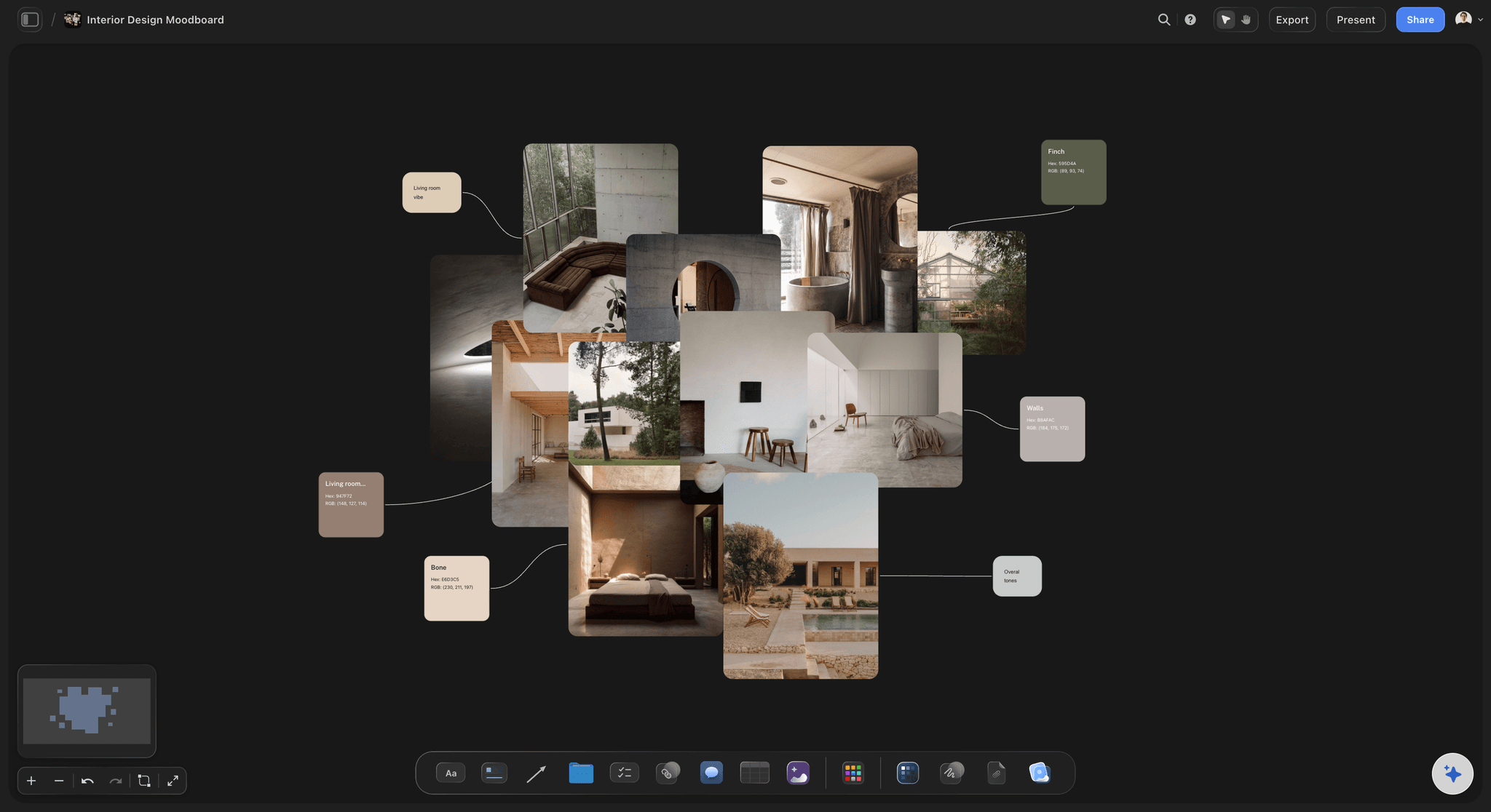
AI builds the board structure from your brief
Start structured, not with a blank slide
Describe the property and the direction and the AI lays out labeled sections for palette, materials and finishes, furniture, lighting, and textiles. You spend your time sourcing rather than arranging boxes.
See the AI mood board maker →
One cluster per room, all on the same canvas
Keep the whole property in view
Rooms need to relate to each other. Build a cluster per room on one infinite canvas so you can check that the hallway palette actually leads into the living room, instead of comparing two separate documents.
Explore the moodboard maker →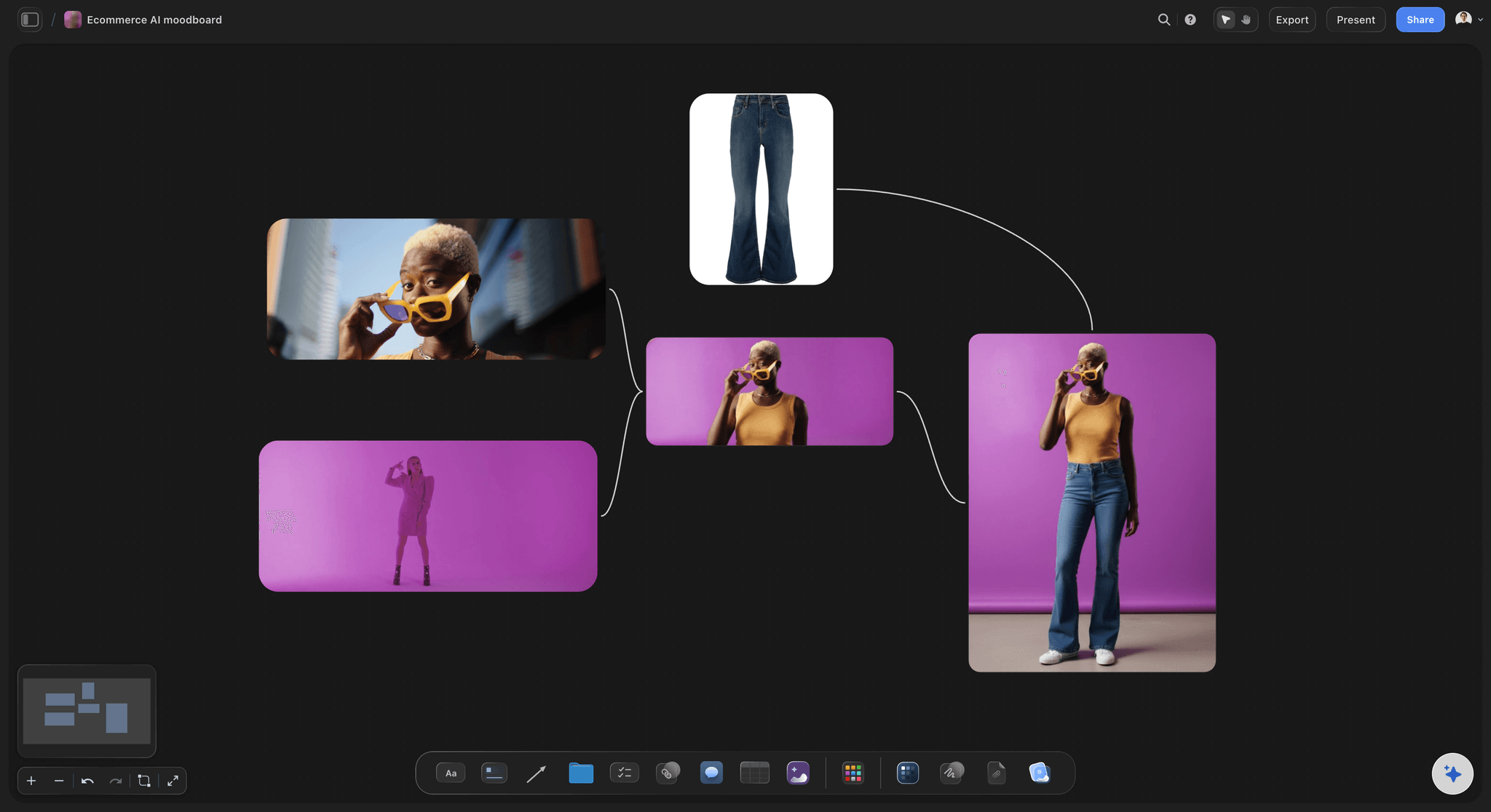
Exact colors pulled from the materials themselves
Get the palette right, not approximately right
Photograph a stone sample or a fabric and pull the exact swatches out of it with the free color palette maker, so the paint you specify genuinely sits with the materials rather than nearly sitting with them.
Try the free color palette maker →
Specs, budgets, and schedule beside the visuals
Keep the project plan on the same canvas
Add the FF&E schedule, the budget notes, and the project timeline beside the boards they belong to. When a client asks what a change costs, the answer is already next to the image.
See the design planning tool →Unlimited boards. No object cap.
Open a canvas, describe the project, and start building room boards. Storyflow is paid-only during early access, with plans from $9.99 a month, and a Free plan launches before the end of 2026.
Unlimited room boards on an infinite canvas
Basic AI usage to generate boards from prompts
Drop in images, PDFs, spec sheets, and product links
Share view-only links with clients and contractors
Built for people with taste
More than a collage of finishes.
A moodboard that carries a project has to hold specifications, survive client revisions, and brief a contractor.
Palette, materials, furniture, lighting, and textiles per room
Cover every layer of the specification
Materials and finishes: Group timber, stone, metal, tile, and paint references per room with the finish and code written beside each one. A photographed sample with a spec note beside it is far more useful than a supplier render.
Furniture and fixtures at the right scale: Place key pieces on the canvas at relative size so silhouette and proportion are visible. Catching a sofa that is too large is much cheaper on a board than in a delivery van.
Lighting as its own layer: Ambient, task, and accent lighting referenced separately, with fitting style and color temperature noted. Lighting is the layer most often decided last and most often regretted first.
Textiles and soft furnishings: Upholstery, curtains, rugs, and cushions grouped with weight and texture notes, sitting beside the hard finishes they have to work against.

AI that can see the references already on your board
Build the board with an AI that knows the project
Prompt to fill the gaps: Ask the AI to add a lighting section, draft the client-facing concept note, or write the room-by-room description. It keeps what is already on the canvas in context, so what it adds fits the actual project.
Revise without rebuilding: Clients change their minds in month three. Re-prompt as often as you need and everything already placed stays where you put it while the AI builds around it.

Supplier images, spec sheets, sourcing links, and site photos
Get sourcing onto the board, not into a folder
Drag in supplier images and samples: Photographed samples, supplier shots, and site photos drop straight onto the canvas and sit beside the room they belong to. Use the free background remover to cut a piece of furniture out of a catalogue shot so it reads cleanly on the board.
Attach spec sheets and quotes: Drop PDF spec sheets and supplier quotes beside the item they describe. When a lead time or a price changes, the document is already in the right place.
Product links stay live: Drop a link card for each specified item so the reference and the place you order it never drift apart. That is what turns a moodboard into an FF&E schedule you can actually work from.
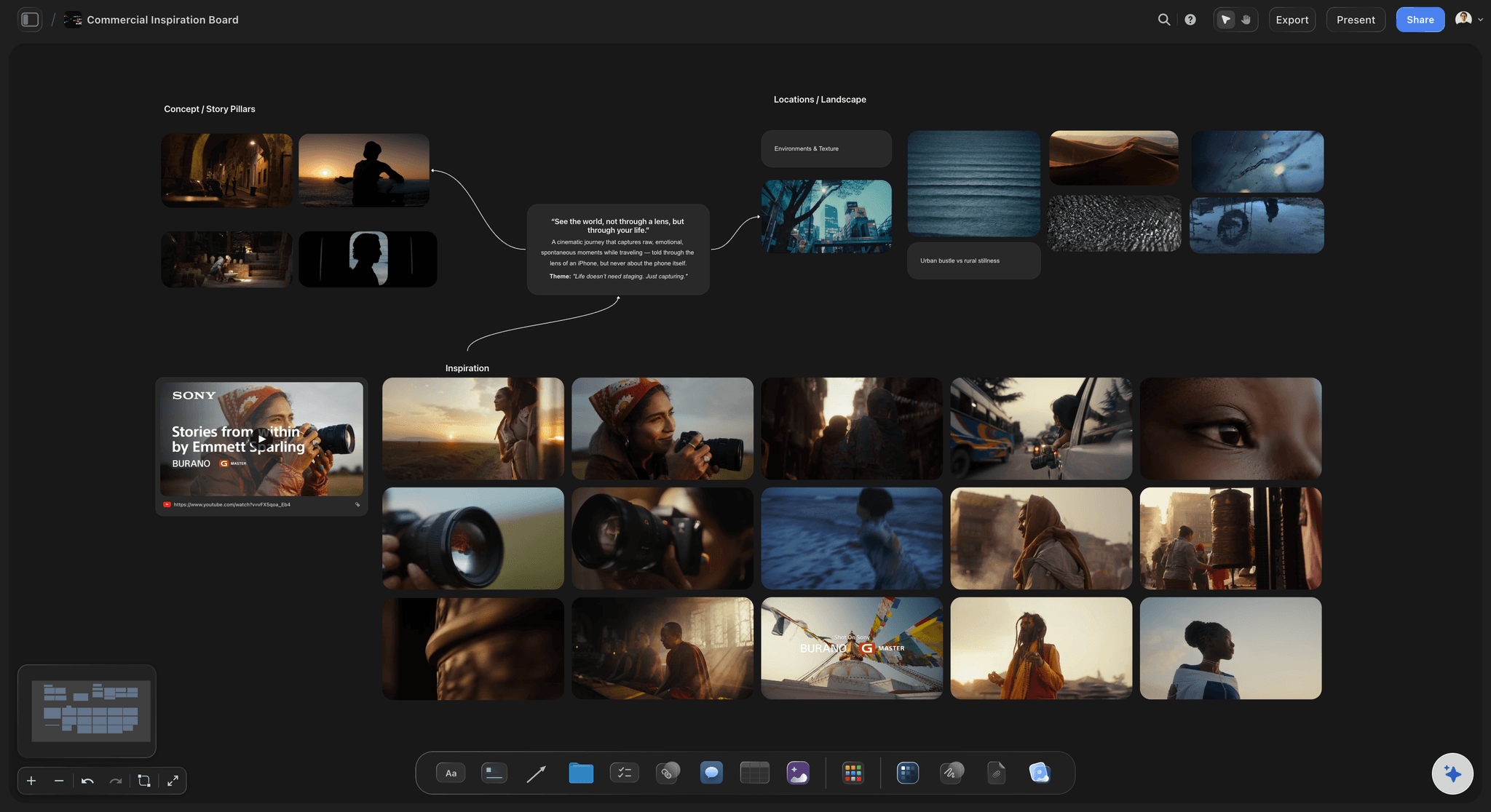
One link for clients, contractors, and suppliers
Present it without exporting a deck
View-only links for clients: Send one link and the client opens the full canvas in a browser with no account. Walk them through it on a call, zooming from the whole property down to a single finish.
Collaborate with your team: Invite a junior designer or a project manager to work on the canvas with you so sourcing lands directly on the board rather than arriving as a separate spreadsheet.
Export for site: Export as a high-quality image or PDF for a site meeting, a contractor, or a client who wants something printed. The live link keeps updating for everyone else.
Explore templates for your project
Every template opens as a real, editable board on the infinite canvas. Pick the closest fit and make it your own.
Film Moodboard
Collect film references, color palettes, lighting, locations, and tone in one place, then invite your crew.
One app instead of five
Storyflow vs Pinterest, Milanote, and Canva.
Every tool here can hold interior references. Here is where they differ once the board has to specify a real project.
Storyflow
Recommended
Infinite canvas, no fixed grid
AI builds the board from a prompt
A room cluster per space on one canvas
Attach spec sheets and product links
Schedule and budget on the same board
View-only link, no account for viewers
Infinite canvas, no fixed grid
AI builds the board from a prompt
A room cluster per space on one canvas
Attach spec sheets and product links
Schedule and budget on the same board
View-only link, no account for viewers
Milanote
Infinite canvas, no fixed grid
AI builds the board from a prompt
A room cluster per space on one canvas
Attach spec sheets and product links
Schedule and budget on the same board
View-only link, no account for viewers
Canva
Infinite canvas, no fixed grid
AI builds the board from a prompt
A room cluster per space on one canvas
Attach spec sheets and product links
Schedule and budget on the same board
View-only link, no account for viewers
What creators are saying
Join early creators getting structured workspaces and AI that remembers their projects
“Storyflow has sped up my workflow by at least 3x, which means more flow state and more projects I can actually ship. It truly changed the way me and my team create.”

Reilin Joey
Director & YouTuber
“One prompt gets me a structured board. But the tactics are my favorite. I run my YouTube scripts through them and my intros and retention got better. It's amazing.”

Justkay
YouTuber & Freelance Filmmaker
“I used to juggle five apps to plan a project. Now I describe what I am making and get boards, lists, and a schedule. All in one place.”

George
@fernwehchronicles
Interior design moodboard questions, answered.
What goes on the board, how to specify from it, and how to present it.
Work room by room and start with the fixed elements. Establish the palette and the hard finishes first, because flooring, stone, and joinery are the hardest things to change later, then layer furniture, lighting, and textiles against them. Give each room its own cluster with a color palette, material and finish references, key furniture pieces, lighting, and textiles, and write the spec beside each item: finish, code, dimension, supplier, and rough cost. Add two or three atmosphere images per room that capture how the space should feel at the time of day it will mostly be used. In Storyflow you can describe the project in a prompt and let the AI lay out those sections, then drop your sourcing into them.
Storyflow is built for this, room by room: describe the project and the AI lays out a section for every room, then you drop in materials, finishes, furniture, lighting and palette. Spec sheets and product links attach to each piece, and the schedule and budget sit on the same board. Clients open the finished board through a view-only link without an account.
Seven layers cover most projects. Color palette, including how it shifts between rooms. Materials and finishes: timber, stone, metal, tile, and paint codes. Furniture and fixtures, with attention to scale and silhouette rather than just style. Lighting, split into ambient, task, and accent, with fitting style and color temperature. Textiles and soft furnishings, with weight and texture noted. Flooring and surfaces. And layout and atmosphere: how the room is used, key sightlines, and time of day. A board that includes specification detail beside each reference is the difference between a mood and something you can order from.
A moodboard communicates feeling. It is loose, atmospheric, and mostly there to agree a direction with a client before anything is specified. A concept board goes a step further and starts committing: actual materials, actual furniture, actual palette, usually with rough costs attached. Most designers present the moodboard first to establish direction, then develop it into a concept board once the client has agreed the feeling. On an infinite canvas you do not have to choose. Keep the loose atmosphere images on one side and let each room's cluster tighten into a specification as decisions get made, so the client can always see where the concept came from.
Not during early access. Storyflow is paid-only right now, with plans starting at $9.99 a month, and a Free plan for solo use launches before the end of 2026. Anyone a paid member invites to a board joins free today, so clients and contractors do not need to pay to view or collaborate. If you need a free option immediately, Pinterest and Canva both have genuinely useful free tiers, though neither gives you an infinite canvas, AI board generation, or room clusters with specs and links attached to each item.
Yes, and it works better than a deck for this kind of work. Share a view-only link and walk the client through the canvas on a call, zooming from the whole property down to a single finish, which is much closer to how people actually make these decisions than clicking through fixed slides. The client sees the current version rather than an export from two weeks ago. If they want something printed for a site visit, export the board as an image or PDF.
Yes. Because the canvas is infinite, the schedule, the budget notes, and the programme can sit beside the room boards they relate to. Attach supplier quotes as PDFs and product links to each specified item, so the reference, the price, and the place to order it never drift apart. When a client asks what changing the flooring costs, the answer is already next to the image rather than in a separate spreadsheet.
Photograph the actual sample rather than using the supplier's render, then pull the swatches out of your photo with the free color palette maker. Supplier images are lit and edited to sell the product, so a palette built from them tends to be a shade or two off what arrives on site. Put the extracted swatches directly beside the material photo on the canvas with the paint or finish code written next to it, and the specification stays honest to what you actually saw.
You can, and boards are unlimited. Most designers do better keeping every room as a cluster on one canvas instead. Interiors are relational: the hallway palette has to lead into the living room, and the same oak has to read correctly in two different lights. Grouping rooms on a single infinite canvas gives each space a clear section while keeping those relationships visible. If a project is very large, a board per floor with room clusters inside it tends to be the right level.
Yes. Storyflow includes a free background remover, which is the tool interior designers reach for most. Catalogue shots come with styled rooms behind them, and dropping five of those onto a board makes it unreadable. Cutting each piece out so it sits cleanly against your own palette is what makes a moodboard look designed rather than assembled. There is also a free image cropper and an upscaler for low-resolution supplier images.
Yes. Send a view-only link and anyone can open the full canvas in a browser with no account and no app install, which matters for trades who will look at it a few times and never create a login. Because the link stays live, they always see the current specification rather than a PDF from an earlier revision. For a site meeting where the connection is unreliable, export the relevant section as an image or PDF to carry on a phone.
Put the whole project on one canvas.
Open a canvas, describe the space, and let AI build the sections. No download.