
Every event detail, rock-solid in one place
From first concept
to run-of-show, one canvas.
Storyflow gives you a single infinite canvas per event: the moodboard, the run-of-show, the vendor and logistics boards, and the client review, all in one place. AI lays out a starting board from a prompt, your whole team plans together on any paid plan, and a view-only link shows the client the plan without a login.


Creatives working for these brands already got early access
- Red Bull
- Canon
- Artlist
- Porsche
See how easy it is to get started
Watch a real project come together, from a blank board to a finished plan, clicked through step by step.
Start from a ready-made template
Pick a board to see what you can build, then let AI fill it in. Every template is a real, editable starting point on the same infinite canvas.

Commercial Moodboard
Pin references, palettes, and tone for a commercial so the look is clear before the shoot.
Why plan an event on one infinite canvas?
One event pulls in a dozen moving parts, and each one tends to live somewhere different. The concept sits in a moodboard app, the run-of-show in a spreadsheet, the vendor list in email, the floor plan in a slide, and the client sign-off in a long thread. Every time the date gets closer the version you need is in a tool someone else has open, and the day-of timeline drifts out of sync with the plan it came from.
Storyflow puts a whole event on one infinite canvas. The concept board, the run-of-show, the vendor and logistics boards, and the client review sit side by side, connected, on the same canvas. Anyone on the team opens it in the browser, drops in a venue photo, moves a card, or adjusts a timeline block, and everyone sees the same current plan. Instead of chasing the latest version across five apps, you look at one canvas and know exactly where the event stands.
It is built for how events actually come together: visual, fast-moving, and client-facing. Describe the event in the AI chat and it lays out a starting board to react to. Turn the concept the client approved into a run-of-show on the same canvas. Send a view-only link so the client walks the plan in their browser without an account. One canvas per event replaces the scatter of decks, sheets, and inboxes that every booking used to sprawl across.
Ultra fast from brief to board
Stand up an event canvas in four steps.
Open a shared board in minutes. Nothing to install, and clients view without an account.
01
Open a canvas per event
Start in the browser. There is nothing to install for anyone on the team, and unlimited collaboration is included from the first board, so planners, coordinators, and the whole crew can join right away.
02
Build the concept and moodboard
Shape the look of the event on one board. Ask the AI to lay out a starting concept from the brief, then drop in venue photos, palette references, and links instead of starting from a blank page.
03
Map the run-of-show and logistics
Turn the approved concept into a run-of-show, a timeline, and vendor and logistics boards on the same canvas. The details carry across, so nobody re-types the brief into a separate schedule tool.
04
Share it with the client
Send a view-only link so the client walks the whole plan in their browser without an account, or export a clean image or PDF for the proposal and the sign-off thread.
The whole event, on one board.
Stop running each booking across moodboard apps, spreadsheets, and inboxes. Concept, run-of-show, logistics, and client review from the same infinite canvas.
Concept and moodboard
Design the event on one board
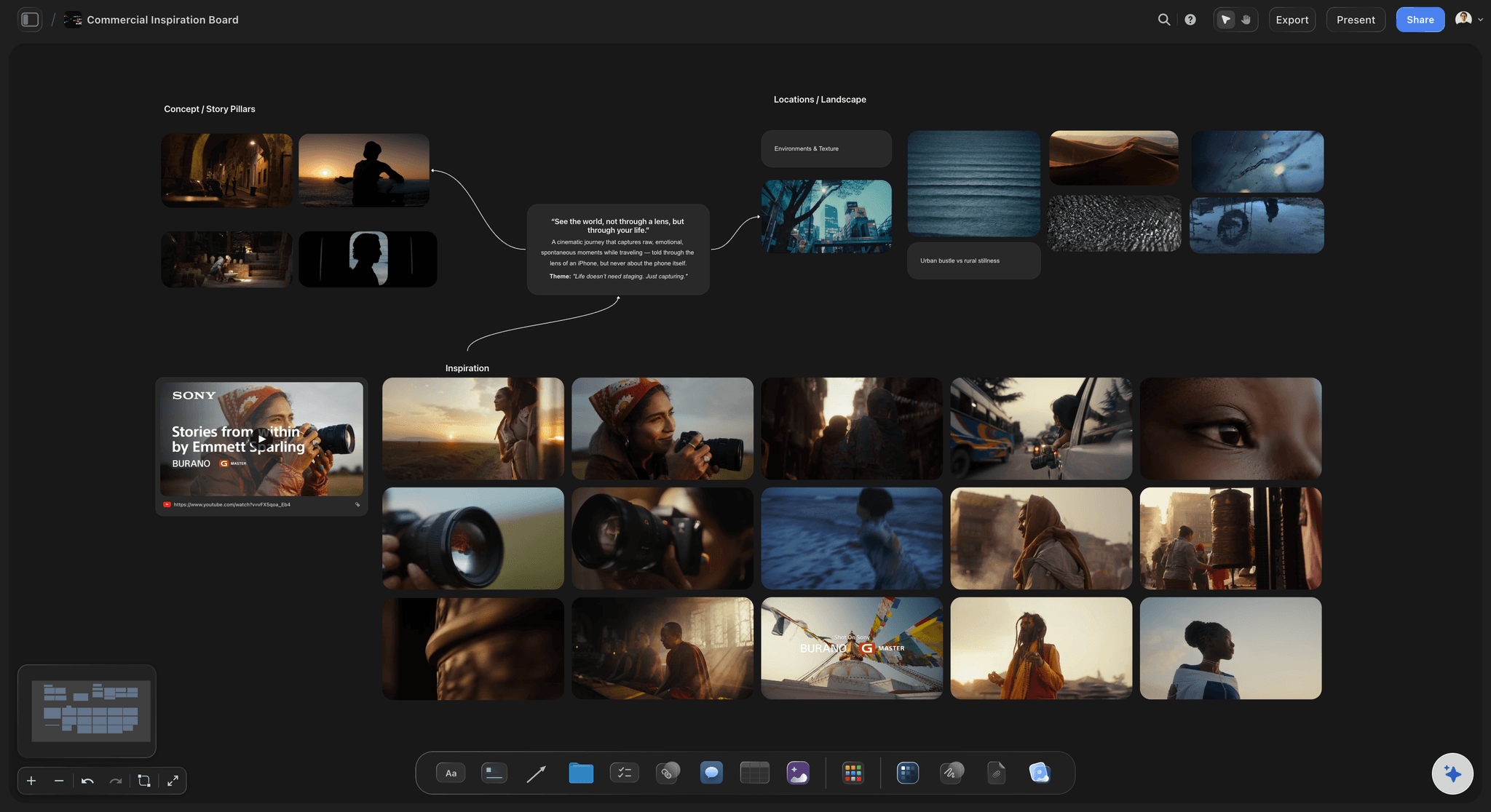
Give each event its own infinite canvas and build the look on it: palette, venue shots, decor references, and mood, all together. The whole team sees one direction instead of piecing it together from a folder of images.
See the moodboard maker →
AI that fills the board
Start every event from a full board
Describe the event, the audience, and the vibe in the AI chat and Storyflow lays out a full board of cards to react to. The AI reads the current board as context, so it builds on your direction for this event, not a generic template.
See the AI event planner →
From concept to run-of-show
Boards become the timeline
The concept the client approves becomes a run-of-show. The run-of-show sits beside the vendor and logistics boards. It all happens on the same canvas, so the day-of timeline comes straight from the plan instead of a re-keyed spreadsheet.
See the run-of-show generator →
Client-ready sharing
Share the plan without an account
Send a view-only link and the client walks the whole plan in their browser, no login required. Present the vision live, not just a flattened deck, and export as an image or PDF when the booking needs a file.
See visual collaboration →Plans from $7.99/month annual. Unlimited collaboration.
Bring the whole team onto one canvas on a plan from $7.99 a month billed annually. Every paid plan includes unlimited collaboration and unlimited shared boards, so a real event never stalls on a seat limit as the date gets close.
Unlimited collaboration and unlimited shared boards
Unlimited boards on an infinite canvas, no object cap
AI usage to lay out and expand boards
View-only links to share the plan with clients, no account needed

Built for people with taste
Made for how events actually come together.
Set the concept, build the run-of-show, keep vendors and logistics straight, share the plan with the client, and add roles and permissions when the studio grows.
Set the concept
Moodboard the event on one board
Design as a team: Unlimited collaboration means planners and coordinators shape the concept and moodboard on one board at once, not in separate files someone has to merge before the client call.
AI lays out the look: Describe the event and the AI fills the board with a starting concept to push on, so you refine a direction instead of facing a blank canvas the week of the walkthrough.
Real venue references: Drop venue photos, palette swatches, decor images, GIFs, PDFs, and links onto the board, and grab frames straight from YouTube and Vimeo when a reference sells the vision better than a note.
Build the run-of-show
Turn the concept into a timeline
Concept becomes a run-of-show: Convert the direction the client approves into a run-of-show on the same canvas, with the AI carrying the details across so nothing gets re-typed into a separate schedule.
Lay out every timeline block: Map the arrivals, the program, the changeovers, and the strike as cards the whole team can see, so the timeline and the concept live in one place.
Adjust as the date moves: Drag cards to reshape the timeline when a slot shifts or a segment is added. The run-of-show keeps pace with the event instead of going stale in a spreadsheet.
Keep clients in the loop
Review with clients, no account needed
View-only links, no sign-up: Send a link and the client walks the whole plan in their browser without an account, so the conversation starts from the actual board rather than a screenshot in an email.
Present live on the canvas: Walk a client through the concept, the run-of-show, and the logistics in one place instead of exporting a flattened slide for every step of the review.
Export when they need a file: Export any board as a clean image or PDF for a proposal, a run sheet, or a sign-off thread in one step.
Scale the studio
Add roles and permissions as you grow
Invited collaborators join free: Every paid plan covers unlimited collaboration and unlimited shared boards, and anyone a paid member invites to a board joins free.
A team workspace on Max: When you need structure across many events, the Max tier adds a team workspace with roles and permissions, so a growing studio can organize who owns and edits each booking.
Simple to upgrade: Move up when the studio needs more.
Explore templates for your project
Every template opens as a real, editable board on the infinite canvas. Pick the closest fit and make it your own.
Commercial Moodboard
Pin references, palettes, and tone for a commercial so the look is clear before the shoot.
One app instead of five
How Storyflow compares for event planners.
Plenty of tools let a team collaborate. The question is whether a whole event, and the client themselves, fit on one canvas.
Storyflow
Recommended
AI lays out full boards from a prompt
Unlimited collaboration on the free plan
Boards become run-of-show and logistics plans
View-only client sharing, no account needed
Milanote
AI lays out full boards from a prompt
Unlimited collaboration on the free plan
Boards become run-of-show and logistics plans
View-only client sharing, no account needed
Miro
AI lays out full boards from a prompt
Unlimited collaboration on the free plan
Boards become run-of-show and logistics plans
View-only client sharing, no account needed
Notion
AI lays out full boards from a prompt
Unlimited collaboration on the free plan
Boards become run-of-show and logistics plans
View-only client sharing, no account needed
What creators are saying
Join early creators getting structured workspaces and AI that remembers their projects
“Storyflow has sped up my workflow by at least 3x, which means more flow state and more projects I can actually ship. It truly changed the way me and my team create.”

Reilin Joey
Director & YouTuber
“One prompt gets me a structured board. But the tactics are my favorite. I run my YouTube scripts through them and my intros and retention got better. It's amazing.”

Justkay
YouTuber & Freelance Filmmaker
“I used to juggle five apps to plan a project. Now I describe what I am making and get boards, lists, and a schedule. All in one place.”

George
@fernwehchronicles
Event planning questions, answered.
Everything a planner or studio lead asks before moving an event onto Storyflow.
Storyflow is a shared infinite canvas where you run each event in one place: concept and moodboard, run-of-show and timeline, vendor and logistics boards, and client review, all on the same canvas. AI lays out full boards from a prompt, the whole team works on one board at once, and a view-only link shares the plan with clients who never need an account.
Yes. Turn the concept the client approves into a run-of-show on the same canvas, laying out arrivals, the program, changeovers, and strike as cards you drag to reshape. Because it sits beside the concept and the logistics boards, the day-of timeline stays in sync with the plan it came from.
Yes. Unlimited collaboration and unlimited shared boards are included on every paid plan, from $7.99 a month billed annually, and anyone a paid member invites to a board joins free, so planners, coordinators, and the crew can all work on the same board.
Share a view-only link and the client opens the board in their browser, no login and no sign-up. They walk the whole concept, run-of-show, and logistics as it actually looks, so feedback comes from the real plan rather than a flattened export in an email.
Describe the event, the audience, and the vibe in the AI chat and it lays out a full board of cards for the team to react to. The AI reads the current board as context, and you can attach up to five documents and three boards, such as a brief, for it to work from. It builds on your direction for this event, not a generic template.
Yes. Attach venue photos, palette references, decor images, PDFs, video, GIFs, and links to any card, and grab frames straight from YouTube and Vimeo onto the canvas. The references live beside the plan they support instead of in a separate folder.
No. One paid plan covers it: anyone you invite joins free, and clients view without an account. Storyflow is paid-only during early access, with plans from $7.99 a month billed annually ($9.99 monthly), and a free plan launches before the end of 2026.
Those tools each cover part of the process, but an event still scatters across boards, sheets, and inboxes. Storyflow keeps a whole event on one infinite canvas: AI fills the board, the team collaborates freely on any paid plan, boards become run-of-show and logistics plans, and view-only links share the plan with clients who never sign up.
Put your next event on one canvas.
Design the concept, build the run-of-show, keep logistics straight, then share it with the client through a view-only link. Unlimited collaboration.