
Ultra-fast moodboards with real taste
The moodboard tool
with AI that drafts the board, so you refine instead of starting cold.
Storyflow is an AI visual workspace that builds moodboards on one infinite canvas. Drag in references or let the AI lay out a first board, then note what each image is for and share it by link.


Creatives working for these brands already got early access
- Red Bull
- Canon
- Artlist
- Porsche
See how easy it is to get started
Watch a real project come together, from a blank board to a finished plan, clicked through step by step.
Start from a ready-made template
Pick a board to see what you can build, then let AI fill it in. Every template is a real, editable starting point on the same infinite canvas.

Film Moodboard
Collect film references, color palettes, lighting, locations, and tone in one place, then invite your crew.
ULTRA FAST FROM BRIEF TO BOARD
From a vague idea to a finished moodboard in seconds.
No blank page, no hunting for images, no manual arranging. Just describe the mood and start refining.
01
Open a moodboard
Sign up and choose a plan. No download, no setup. Your infinite canvas is ready in your browser.
02
Describe the vibe
Type a prompt, drag in a few references, or ask the AI for a structure. Storyflow understands the look you are after.
03
AI builds the moodboard
A full moodboard appears with images, color, and layout, ready to refine. Keep prompting, the AI keeps the context.
Set the visual direction for your next project.
Collect inspiration, generate ideas, and arrange them into a moodboard you can actually share. All on one infinite canvas.

AI moodboard with images, color, and layout
Generate a moodboard in one prompt
Describe the look you are after and AI lays out a full moodboard. Images, palette, and notes, arranged on the canvas so you can start refining instead of formatting.

Drop in screenshots, links, photos, and swatches
Collect inspiration from anywhere
Drag any image straight onto the canvas. Save references, links, and screenshots as you find them, all in one place instead of scattered across folders and tabs.
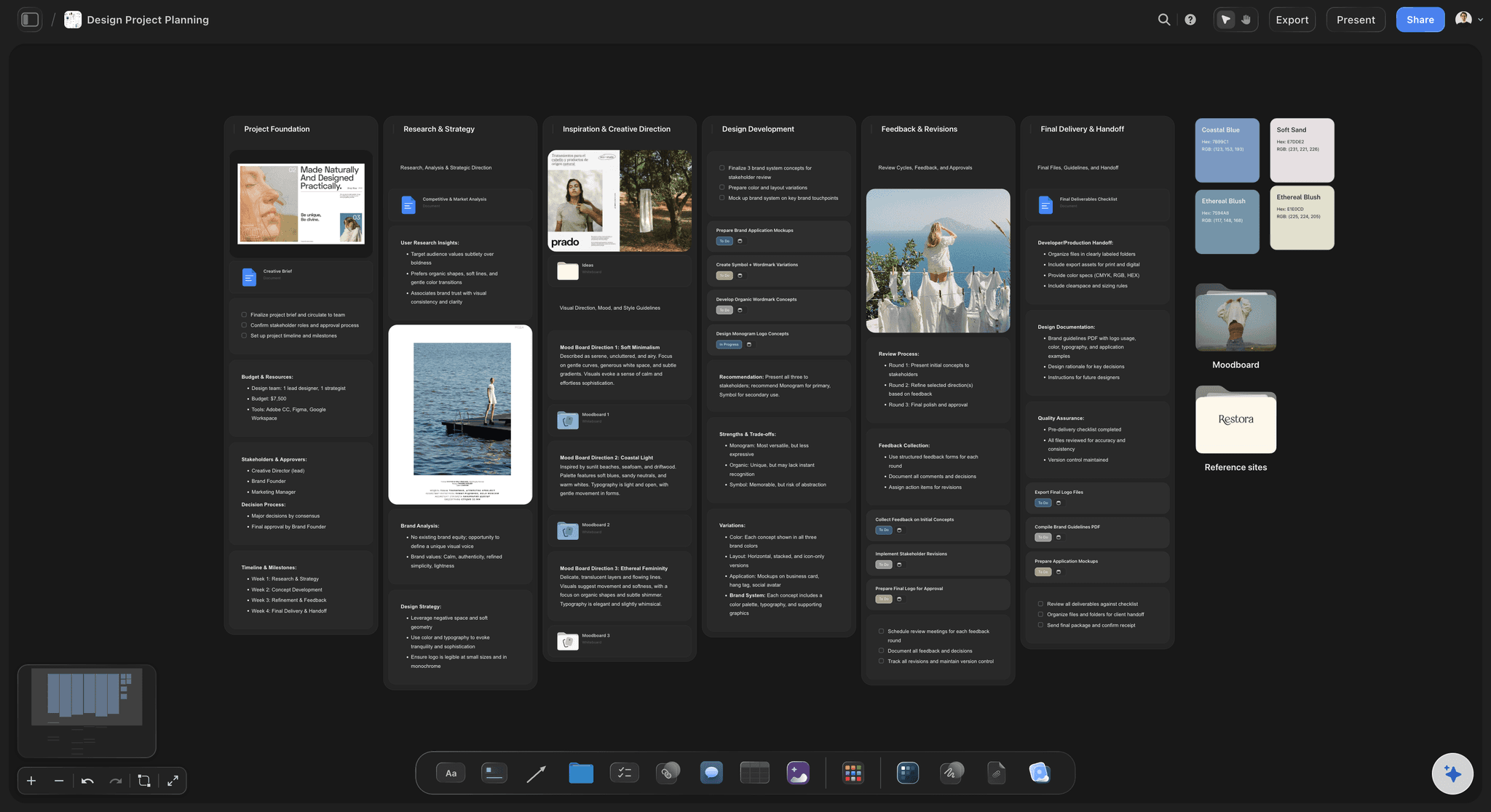
Color swatches, fonts, textures, and notes
More than a wall of images
The best moodboards carry color, type, and tone. Add color swatches, fonts, video, and text notes to explain the thinking behind the visual direction.

Storyboard with characters, scenes, and mood
Carry the mood into the project
A moodboard is the start. From the same canvas, turn it into storyboards, shot lists, and character boards without switching tools.
Paid-only during early access.
Open a board, type a prompt, watch the moodboard come together. A Free plan launches before the end of 2026.
Unlimited moodboards on an infinite canvas
AI usage that renews every billing period
View-only links with no account needed
Unlimited collaboration with your team
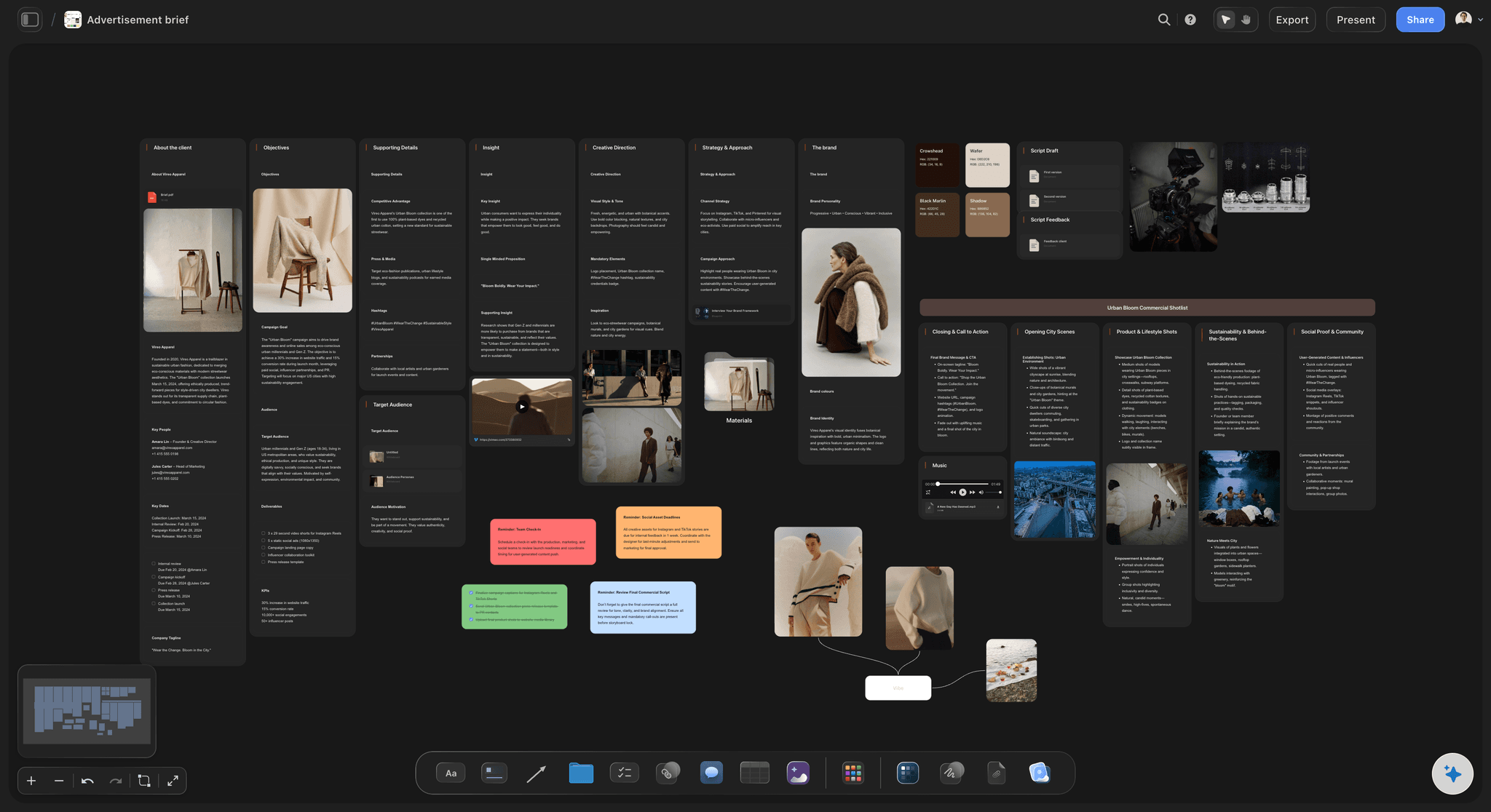
BUILT FOR CREATIVES
Everything you need to build and share a moodboard.
Don't let the simple, drag-and-drop canvas fool you. This fully featured AI-native moodboard maker checks all the boxes.

Cursors, comments, and live edits across the board
Share moodboards for feedback
View-only links: Send clients or stakeholders a read-only moodboard. No signup needed to view.
Real-time editing: Build the moodboard together with your team. See cursors, edits, and comments as they happen.
Comments anywhere: Drop comments on any image or swatch to gather approval and feedback in one place.

AI that reads the whole canvas as context
Build with AI that knows your project
One prompt to a moodboard: Describe the vibe and AI generates a full moodboard with images, color, and layout.
Canvas-aware AI: AI sees everything already on your board, so you never have to re-explain the direction.
200+ frameworks built in: Creative briefs, shot lists, character profiles, and more. Pick one or let AI suggest the fit.

Freeform canvas with images, mood, and structure
Arrange it any way you like
Infinite freeform canvas: No fixed grid. Drag, group, and resize images until the composition feels right.
Choose a starting point: Start from a blank board or let the AI lay out the structure for design, photography, or fashion moodboards.
Beyond the moodboard: Branch into mindmaps, storyboards, and planners from the same canvas.

Drop notes, PDFs, fonts, links, and images
Capture every reference
Drag in anything: Photos, screenshots, sketches, color swatches, fonts, and PDFs all live on one board.
Save from the web: Pull in links and images as you browse, so inspiration never gets lost.
Notes and sketches: Add text notes to explain the mood, or sketch a rough idea right onto the canvas.
ONE APP INSTEAD OF FIVE
Storyflow vs Milanote, Pinterest, and Canva.
Unlimited boards and file uploads on every paid plan, and an AI that builds the moodboard for you to refine.
Storyflow
Recommended
Unlimited moodboards and boards
Unlimited projects and cards
AI drafts the moodboard, you refine
AI sees your whole canvas as context
Freeform infinite canvas layout
200+ creative frameworks built in
Milanote
Unlimited moodboards and boards
Unlimited projects and cards
AI drafts the moodboard, you refine
AI sees your whole canvas as context
Freeform infinite canvas layout
200+ creative frameworks built in
Unlimited moodboards and boards
Unlimited projects and cards
AI drafts the moodboard, you refine
AI sees your whole canvas as context
Freeform infinite canvas layout
200+ creative frameworks built in
Canva
Unlimited moodboards and boards
Unlimited projects and cards
AI drafts the moodboard, you refine
AI sees your whole canvas as context
Freeform infinite canvas layout
200+ creative frameworks built in
What is a moodboard tool?
A moodboard tool is software for collecting images, colour, type and references into one board that sets the visual direction of a project before the work starts. Storyflow is an AI visual workspace that builds moodboards on one infinite canvas: images and video at any size, colour swatches and notes beside them, an AI that lays out a first board from a description, and the brief and shot list on the same board the moodboard feeds.
Moodboarding is the practice of making that board, and the tool decides how far the board can go. A pin board collects. A design tool composes a polished page. A moodboard tool built on a canvas lets you collect, group, annotate and then keep working from the same place, which is why designers, photographers, filmmakers and brand teams use one.
What are the best moodboarding tools?
Our own product is listed first, then the rest by the job each does best. Storyflow is the pick when the moodboard is the start of a project: the AI lays out a first board from a description, every reference can carry a note saying what to take from it, and the brief, shot list or plan grows on the same canvas. Milanote is a tidy visual board for creative notes and references. Pinterest is the widest source of images to collect from. Canva composes a polished one-page moodboard from a template. Figma and FigJam suit design teams who already work there. Adobe Express suits people already in Adobe's apps.
If the moodboard is a finished deliverable, a layout tool is enough. If it is the direction a team will build from for weeks, choose a tool where the board stays live, the notes stay attached and the client opens the current version by link.
How do you make a moodboard step by step?
1. Write the brief in one line: what the project is, who it is for and the feeling it should leave.
2. Collect wide. Drag in twenty to forty references from your own photos, Pinterest, film stills and past work, or ask Storyflow's AI to lay out a starting board from the one-line brief.
3. Cut hard. Keep the six to twelve images that point the same way, and move the near misses into a labelled 'not this' group.
4. Pull the palette. Add four or five colour swatches taken from the kept images, and a type sample if type matters.
5. Annotate. Under each reference write what to take from it: the light, the texture, the crop, the colour. Clients often like an image for a different reason than you do.
6. Share and decide. Send a view-only link, collect comments from signed-in reviewers, and mark the board as the agreed direction before production starts.
Worked example: a moodboard for a summer coffee campaign
A roaster launching a canned cold brew briefs the look as 'cafe quality, at home, early summer'. On a Storyflow board the designer drops in thirty references and asks the AI for a first layout grouped by theme. She keeps nine: morning kitchen light, condensation on glass, linen and pale wood, a terracotta wall, two product shots with hard shadows, and three film stills with warm windows.
Five swatches go beside them: oat, terracotta, deep green from the brand, cream and black for type. Under the hard-shadow product shot she writes 'take the shadow, not the props'. A 'not this' group holds the neon cafe and the energy-drink shelf. The client opens the link, signs in to comment that the terracotta is too orange for the pack, and the designer swaps the swatch on the board. The approved moodboard then sits beside the shot list for the product shoot on the same canvas.
Is there a free moodboard tool?
Pinterest, Canva's free tier and paper are all free ways to collect a moodboard. Storyflow is paid-only during early access, with plans from $7.99 a month billed annually ($9.99 monthly) and unlimited boards. A free plan launches before the end of 2026, and anyone a paid member invites to a board joins free today. Clients who only view a board by link never need an account.
What creators are saying
Join early creators getting structured workspaces and AI that remembers their projects
“Storyflow has sped up my workflow by at least 3x, which means more flow state and more projects I can actually ship. It truly changed the way me and my team create.”

Reilin Joey
Director & YouTuber
“One prompt gets me a structured board. But the tactics are my favorite. I run my YouTube scripts through them and my intros and retention got better. It's amazing.”

Justkay
YouTuber & Freelance Filmmaker
“I used to juggle five apps to plan a project. Now I describe what I am making and get boards, lists, and a schedule. All in one place.”

George
@fernwehchronicles
Any questions?
Everything you need to know about Storyflow's moodboard tool.
What is a moodboard?
A moodboard is a visual collage of images, color, type, and reference that sets the direction for a creative project. Designers, photographers, filmmakers, and marketers build moodboards to communicate the feel of an idea before any work begins.
Is Storyflow's moodboard tool free?
Not during early access. Storyflow is paid-only today, with Plus starting at $7.99 per month billed annually. A Free plan launches before the end of 2026 with unlimited moodboards on an infinite canvas, basic AI usage, 3 starter frameworks, and 20 file uploads. Anyone a paid member invites to a board joins free right now.
What does one Storyflow subscription replace?
Beyond the moodboard, one Storyflow subscription can stand in for ChatGPT for AI, Milanote for visual boards and moodboards, and Notion for documents, all on one canvas. The Pro plan is $14 per month billed annually, and Plus starts at $7.99 per month billed annually, with no object limit and no time limit.
How is Storyflow different from Milanote, Pinterest, or Canva?
Storyflow's AI is built into the canvas where the rest of your project lives, so one prompt builds a full moodboard with images, color, and layout for you. The AI also reads the board you have open, so you do not have to re-explain your project. Storyflow gives you a freeform infinite canvas instead of a fixed grid, and the Free plan coming before the end of 2026 includes unlimited projects and cards.
Can the AI generate a moodboard for me?
Yes. Describe the look and feel you are after and the AI lays out a full moodboard, complete with images, color swatches, and notes, arranged on the canvas. Keep prompting and the AI refines it while reading the board as it stands and any documents you attach.
Can I add my own images and references?
Yes. Drag and drop photos, screenshots, links, sketches, color swatches, fonts, and PDFs straight onto the canvas. Storyflow supports all common image formats and everything lives on one infinite board.
Can I share my moodboard for feedback?
Yes. Share a view-only link with clients or stakeholders, invite teammates to edit in real time, or export your moodboard as an image or PDF. You control who can edit, comment, or just view.
What is the best moodboarding tool?
Storyflow is built for this job when the moodboard starts a project: the AI lays out a first board from a description, each reference carries a note saying what to take from it, and the brief or shot list grows on the same canvas. Pinterest is the best place to collect images, Canva composes a polished one-page board from a template, and Milanote keeps tidy creative notes beside references.
How many images should a moodboard have?
Six to twelve that point the same way, plus four or five colour swatches. Collect wide first, often thirty or more, then cut. A board with forty images does not set a direction, it lists options. In Storyflow keep the near misses in a labelled 'not this' group on the same canvas, so the client sees what was ruled out and why.
What should I write on a moodboard?
One line under each reference saying what to take from it, such as the light, the texture, the crop or the colour, plus a one-line brief at the top. Without notes a client may approve an image for a different reason than you chose it. In Storyflow notes and sticky cards sit beside each image on the canvas, so the reasons travel with the board.
Can a moodboard turn into a brief or shot list?
Yes. In Storyflow the moodboard sits on a canvas, so the brief, the shot list or the production plan can be built beside it. Ask the AI to draft a shot list or creative brief and it reads the board you have open, references included, so the plan starts from the agreed look instead of a description of it.
Who uses Storyflow for moodboards?
Graphic designers, photographers, filmmakers, interior designers, fashion creatives, marketers, and creative directors. Anyone who needs to set a visual direction and share it with a team or client.
Create your moodboard.
Paid-only during early access, with unlimited boards and uploads on every paid plan. A free plan launches before the end of 2026, and anyone a paid member invites to a board joins free.