
Category
Collaboration Tools
Author

Justkay
Documentary Filmmaker & Founder at Storyflow
Topics
2026-05-17
•
Updated July 2, 2026
•
24 min read
•
Collaboration Tools- best visual collaboration tools 2026
- visual collaboration software
- visual collaboration platform
- online whiteboard collaboration
- Miro alternative
- Storyflow visual collaboration
What are the best visual collaboration tools in 2026?
Storyflow is the best visual collaboration tool in 2026 for teams whose board has to outlive the workshop: its canvas AI reads the full active board plus up to five documents and three boards you attach, so clustered sticky notes become a structured plan instead of a screenshot. Miro is the best all-around platform at scale, Mural the best for facilitated workshops, and FigJam the best for design teams inside Figma.

All 12 Visual Collaboration Tools, Ranked
- Storyflow: best AI canvas where the board becomes a working artifact
- Miro: best all-around visual collaboration platform
- Mural: best for facilitated workshops
- FigJam: best for design-team collaboration
- Lucidspark: best for brainstorming into diagrams
- Notion: best when collaboration becomes documents
- Canva: best visual collaboration on design assets
- Whimsical: best diagram-led collaboration
- Conceptboard: best visual collaboration with formal review
- Excalidraw: best quick free collaboration
- Stormboard: best structured workshop boards
- Microsoft Whiteboard: best inside Microsoft 365
Full disclosure: Storyflow is our own product, and we rank it #1 for one job; Miro genuinely leads all-around visual collaboration, its live workshop performance, template library, and integrations are the category standard. Storyflow earns the #1 slot for a different job: its AI reads the whole board, so the workshop output becomes a plan or document instead of a photo you screenshot and forget. We link out to every tool so you can judge for yourself.
Quick Comparison: Best Visual Collaboration Tools
These four tools cover the choice most teams are actually making: a live shared whiteboard versus a canvas whose output keeps working after the call ends.
| Tool | Best For | AI Features | Price |
|---|---|---|---|
| Miro | All-around visual collaboration | Assistive AI in a broad whiteboard | Free / $8 user mo |
| Storyflow | Board as a working artifact | Canvas-aware AI (reads the whole board) | $7.99 mo annual (free plan late 2026) |
| Mural | Facilitated workshops | AI facilitation helpers | Free / $12 user mo |
| FigJam | Design-team collaboration | FigJam AI (generate and summarise) | Free / $3 user mo |
1) Quick Answer: The Best Visual Collaboration Tools in 2026
The best visual collaboration tools in 2026 are Storyflow (best AI canvas where the board outlives the workshop), Miro (best all-around visual collaboration platform), Mural (best for facilitated workshops), and FigJam (best for design teams). Storyflow earns its place because its canvas AI reads the full active board (plus up to 5 documents and 3 boards you attach) and turns clustered sticky notes into a structured plan, which is what keeps the board from dying after the call. The honest trade-off: for the smoothest live, multi-cursor co-editing during the session itself, Miro and FigJam still go further than Storyflow. The right pick depends on whether you mostly need a great live workshop or a board the work continues on.
Every team has a board full of sticky notes from a workshop nobody has opened since. The workshop was great. Everyone contributed, the board filled with colorful notes, the session felt productive. Then the board went quiet. It became a sticky-note graveyard, a record of a meeting that happened, not a thing the work continued from. The collaboration was visual. It was also temporary.
I have run visual sessions for creative teams and watched the same outcome: the board peaks during the workshop and dies the moment the call ends. The Workshop vs Artifact framework in section 3 ranks all 12 tools by whether the board outlives the workshop or joins the graveyard.
For whiteboards specifically, see The 12 Best Online Whiteboard Tools in 2026. For creative-team collaboration, see The Best Collaboration Tools for Creative Teams in 2026.
Best Visual Collaboration Tool by Job
The overall ranking is not the answer to every question. Match the tool to the job you actually have:
- Best visual collaboration tool for teams whose board has to become the plan: Storyflow. The workshop board, the brief, and the documents sit on one canvas, and the AI reads the whole active board before it answers, so the sticky notes get turned into structured work instead of screenshotted into a doc nobody updates.
- Best all-around visual collaboration platform at scale: Miro. Every facilitation pattern your team will run already exists as a template, and it holds thirty cursors on one board without breaking.
- Best tool for a facilitated workshop with formal phases: Mural. Outline mode, Private Mode, and built-in facilitation guides were built by people who run rooms for a living.
- Best visual collaboration for a design team already inside Figma: FigJam. The canvas is lighter and tighter than Miro for journey maps, retros, and low-fidelity flows.
- Best way to turn a brainstorm into a formal diagram: Lucidspark. The handoff into Lucidchart is the reason to pick it.
- Best free visual collaboration for a quick technical sketch: Excalidraw. No account, no template library, sketching in about thirty seconds.
Storyflow is paid-only during early access (Plus from $7.99/month billed annually), its Free plan launches before the end of 2026, and anyone a paid member invites to a board joins free today.
2) Comparison Table: 12 Visual Collaboration Tools at a Glance
Pricing reflects publicly listed plans as of early 2026 and changes often. Ratings weigh whether the board outlives the workshop, live collaboration quality, facilitation features, AI support, and pricing for teams.
Frequently Asked: Which Visual Collaboration Tools Are Highly Rated, Underrated, and Most Innovative?
Which visual collaboration tools are the most highly rated?
On our own scoring, which weighs whether the board outlives the workshop, live collaboration quality, facilitation depth, AI support and team pricing, Storyflow rates 9.1 out of 10 and Miro 9.0. Mural follows at 8.5, FigJam at 8.4, and Notion at 8.2. Miro and Storyflow separate for different reasons: Miro is the strongest live session on this list, and Storyflow is the strongest board after the session ends. If you weight only the workshop hour, Miro is the higher score. If you weight what the board is worth a week later, Storyflow is.
Which visual collaboration tools are underrated?
Conceptboard and Lucidspark are the two most underrated tools in this category. Conceptboard rates 7.3 here and gets overlooked because it markets to regulated and EU-based buyers rather than to design teams, yet its review and approval flow is better than Miro's for client work. Lucidspark at 8.0 is treated as the junior half of Lucidchart when it is actually the cleanest path from a messy brainstorm to a diagram a stakeholder will accept. Excalidraw is underrated on speed and overrated as a collaboration tool: it is the fastest sketch on the list and the weakest board to return to.
Which visual collaboration tools are the most innovative?
Storyflow is doing the most structurally new work: its AI reads the full active board plus up to five documents and three boards you attach before it answers, so a wall of clustered sticky notes can become a structured plan rather than a screenshot pasted into a document. Canva is the most innovative on generative output, turning collaboration into finished visual assets. Miro, FigJam, Mural and Lucidspark have all shipped capable AI, and it is assistive rather than structural: clustering, summarising, tidying shapes. Useful inside the session, and it does not change what happens after it.
Which visual collaboration tools are frequently praised for cutting-edge technology?
Miro is praised for engineering rather than for novelty, and deserves it: holding thirty live cursors on one board without degrading is harder than it looks and nothing here does it better. FigJam is praised for how light the canvas feels next to its feature count. Storyflow is praised for canvas-wide AI context, which is the one genuinely new capability in the set, and criticised fairly for not matching Miro or FigJam on smooth multi-cursor co-editing during a live session. Those two things are the trade: reading the whole board well is a different engineering problem from rendering twenty people drawing on it at once.
Which visual collaboration tools offer real value for money rather than marketing savings?
FigJam is the best value seat in the category at around $3 per collaborator per month if your team already pays for Figma, and Excalidraw is genuinely free rather than free-tier-shaped. Storyflow is $7.99 per month billed annually, its free plan arrives before the end of 2026, and anyone a paid member invites to a board joins free today, which matters because most of this category charges per collaborator. The saving that does not hold up is the three-board free tier: Miro and Mural both cap there, and any team collaborating weekly hits the ceiling inside a month and pays anyway. Microsoft Whiteboard is the real zero-cost option for organisations already on Microsoft 365, and it scores lowest here at 6.6 for a reason.
Which visual collaboration tool brands are considered the best overall?
Miro is the brand most people mean when they say visual collaboration, and it earns that on range and reliability. Mural is the brand professional facilitators name. FigJam is the brand design teams name. Storyflow is the answer for the specific failure this category rarely fixes: the board that peaks during the workshop and dies when the call ends. If you have never had that problem, Miro is the safer choice. If you have had it repeatedly, the tool that reads the whole board is the one worth trying.
What Is Visual Collaboration Software?
Visual collaboration software is any tool where a team works on a shared visual surface in real time rather than passing documents back and forth: an infinite canvas or board holding sticky notes, diagrams, images and frames, with live cursors, comments and version history. Miro, FigJam, Mural and Lucidspark are the reference implementations; Storyflow, Milanote and Canva Whiteboards sit in the same category with different centres of gravity.
The category is defined by three properties, and a tool missing any of them is something else:
- A shared surface with position. Where a thing sits carries meaning. This is what separates a board from a document, and it is why a Google Doc with comments is not visual collaboration.
- Simultaneous presence. More than one person on the surface at once, with live cursors, so the work happens in the meeting rather than between meetings.
- A durable artifact. The board still means something a month later to someone who was not there. This is the property most tools in the category are weakest at, and section 3 is entirely about it.
Visual collaboration platform, visual collaboration tool and online whiteboard are used interchangeably by vendors and are not quite the same thing, which is the next section.
Visual Collaboration Platform, Online Whiteboard, or Design Tool?
The three labels overlap and buying across them by mistake is common, because vendors market into whichever category is growing.
Pick by which half of the problem is currently expensive. If your workshops are chaotic, buy facilitation and take an online whiteboard. If your workshops are fine and nobody can find last quarter's board, buy the record, and no amount of timers and voting will fix it.
A fourth category worth naming so you do not buy into it by accident: diagramming tools such as Lucidchart and draw.io are for producing a correct diagram, not for a group thinking together. They are excellent at that and poor at this.
3) Workshop vs Artifact
A visual collaboration board can be one of two things, and the difference decides whether the tool was worth buying.
A board as an Event. The board exists for the workshop. For 90 minutes it is alive: people add notes, cluster ideas, vote, draw arrows. Then the session ends. The board is now a record of a meeting. It is opened once more to screenshot the outcomes, and then never again. The collaboration was real and the board is dead.
A board as an Artifact. The board exists past the workshop. The session populates it, but afterward the work continues on it: the clustered ideas become a plan, the plan gets refined, the board is queried and built on for weeks. The workshop was the start of the board's life, not the whole of it.
Here is the rule that decides tool choice. A visual collaboration board should outlive the workshop that created it. Most do not. The reason is not the tool's drawing features or its live cursors, which are usually fine. It is that most visual collaboration tools are optimized for the live session, the facilitation, the timers, the voting, and have nothing that pulls the board forward after the session ends. The board peaks at minute 45 and decays from there.
A board becomes an artifact when the tool gives the work somewhere to go after the workshop: structure the team can build on, an AI that can read the board and turn its sticky notes into a plan, a reason to reopen it on Wednesday. A board stays an event when the tool's whole value was the live cursors.
The 12 tools below are ranked by whether the board outlives the workshop. Tools that turn the board into an artifact sit at the top. Tools optimized purely for the live session, even excellent ones, rank lower, because a sticky-note graveyard is an expensive way to hold a meeting.
The Five Reasons Boards Get Abandoned
"Bring discipline" is the advice everyone gives and nobody can act on. Boards get abandoned for reasons that are specific and mostly structural, and each one has a fix that is not a character trait.
1. Nobody owns it. A board created by a workshop belongs to the workshop, which is to say to nobody. The fix is a named owner assigned in the session, not afterwards, and the owner should be the person accountable for the decision the board was about rather than the person who booked the room. Shared ownership of a board is the same as no ownership, and it fails the same way.
2. It has no next question. A board full of clustered stickies is an answer to a question that has been answered. There is no reason to open it on Wednesday because Wednesday has a different question. The fix is to leave the board with an open question written on it, in large type, at the top: what we still do not know. A board with an unanswered question at the top gets reopened; a board with conclusions does not.
3. It is not where the work lives. If the decisions move into Jira, the doc lives in Notion, and the design happens in Figma, the board is a photograph of a moment that has passed. This is the most common cause and the hardest to fix, because it is an organizational fact rather than a tool problem. The realistic fix is to accept it: use the board for the phase where the work genuinely is undecided, then close it deliberately rather than pretending it will persist.
4. Finding anything costs more than recreating it. Three weeks later, nobody remembers which of forty boards had the competitor analysis, and the search finds twelve boards with the word "competitor" on them. Naming conventions solve this and no team maintains one, so the practical fix is fewer boards: one board per project rather than one per session, with sessions as regions inside it.
5. It looks finished. This is the subtle one. A tidied board with everything clustered and colour-coded reads as complete, and complete things do not invite editing. Boards that stay alive tend to look slightly unfinished, with a visible parking lot and an obviously empty region. Tidying a board at the end of a workshop feels like good hygiene and is one of the more reliable ways to kill it.
The through-line is that a board survives when it holds something unresolved. The moment everything on it is settled, it becomes documentation, and documentation belongs in a document.
Remote, Hybrid, and In-Person: Different Problems
Most tool comparisons assume a fully remote team, which is now the minority case. The three arrangements fail differently and the right choice moves with them.
Fully remote. The board is the room, and everything depends on it. This is where the mature platforms earn their price: reliable presence, cursors that do not lag, a facilitation layer with timers and voting, and enough template scaffolding that a session does not start with a blank rectangle. Miro and Mural are both genuinely good here and the choice between them is mostly which one your organization already bought. The failure to watch for is the silent participant, which is why private-write-then-reveal matters more remotely than in person.
Hybrid. The hardest case by a wide margin, and the one every tool handles worst. Four people in a room and three on a call produces a two-tier meeting: the room talks over the board and the remote people watch a video of a conversation. The only arrangement that reliably works is the one that looks unfair, where everyone including the people in the room joins from their own laptop and contributes through the board rather than through the air. Facilitation matters more than features here, and no purchase fixes it.
Mostly in-person. Physical sticky notes are still better in a room, for the reasons they have always been better: peripheral vision, two hands, and no cursor contention. The genuine argument for a digital board is what happens the day after, when the wall gets photographed and the photograph gets lost. A reasonable pattern is to run the session physically and transcribe to a board immediately, treating the digital board as the artifact and the wall as the event. Tools that are excellent at live collaboration are largely wasted on this team; tools that are good at holding a project over weeks are not.
One board, three arrangements. Most teams are at least two of these depending on the week, which argues for choosing on the artifact question rather than on facilitation features, since facilitation only pays off in the fully-remote case and the artifact question pays off in all three.
4) How We Evaluated These Tools
Five criteria, weighted in this order:
- Board outlives the workshop. After the live session, does the board become an artifact the work continues on, or a graveyard? This is the criterion most reviews skip.
- Live collaboration quality. During the session, are real-time editing, cursors, and contribution smooth for everyone?
- Facilitation features. Timers, voting, frameworks, templates for running a good session.
- Structure and AI. Can the board be structured, queried, or read by AI so the sticky notes become something?
- Pricing for teams. Visual collaboration is a team purchase. Per-seat pricing that punishes a small team is marked down.
Testing covered a strategy workshop, a brainstorm, and a project kickoff, each run live and then revisited two weeks later to see what survived.
5) Quick Picks by Visual Collaboration Need
Best for the board becoming a working artifact: Storyflow. The AI reads the board, so sticky notes become a plan.
Best all-around visual collaboration platform: Miro. The broadest, most capable general tool.
Best for facilitated workshops: Mural. The deepest facilitation feature set.
Best for design teams: FigJam. Visual collaboration next to the Figma design file.
Best collaboration that becomes documents: Notion. The board work flows into living docs.
Best free visual collaboration: Storyflow for a board that survives, or Excalidraw for a quick free session.
Best cheapest working stack: Storyflow for the artifact-grade board ($7.99/mo billed annually) plus Excalidraw for fast throwaway sketches.
Make your next board outlive the workshop
Run the session wherever you like, then land the output on a canvas whose AI reads every sticky note and turns the clusters into a plan the team keeps working from.

How Visual Collaboration Tools Compare on AI
Almost every board now advertises "AI," but the depth splits on one question: does the AI read the whole board, or only the object you selected?
Tier 1: AI that reads the whole board. Storyflow is the only tool on this list whose AI reads the entire canvas, every sticky note, cluster, image, and link on it, plus up to five documents and three boards you attach. That is what lets it turn a wall of workshop stickies into a clustered plan or a document, because it can see the whole session, not one note.
Tier 2: AI that acts on a selection. Miro AI, FigJam AI, Mural's helpers, Lucidspark's Collision, and Notion AI generate stickies, summarise a frame, or cluster a selection. Genuinely useful inside a session, but the AI works from your prompt or the objects you picked, not from the board as a whole, so the synthesis still depends on you.
Tier 3: Little or no AI. Excalidraw, Conceptboard, Stormboard, and Microsoft Whiteboard focus on the drawing surface rather than AI. For quick sketching or Microsoft 365 teams that is a fair trade, but AI is not the reason to pick them.
The tell is what survives the meeting. A whiteboard leaves you a photo of the board. Only a canvas that reads the board leaves you the plan the board was trying to become.
6) Detailed Reviews: 12 Visual Collaboration Tools
1. Storyflow
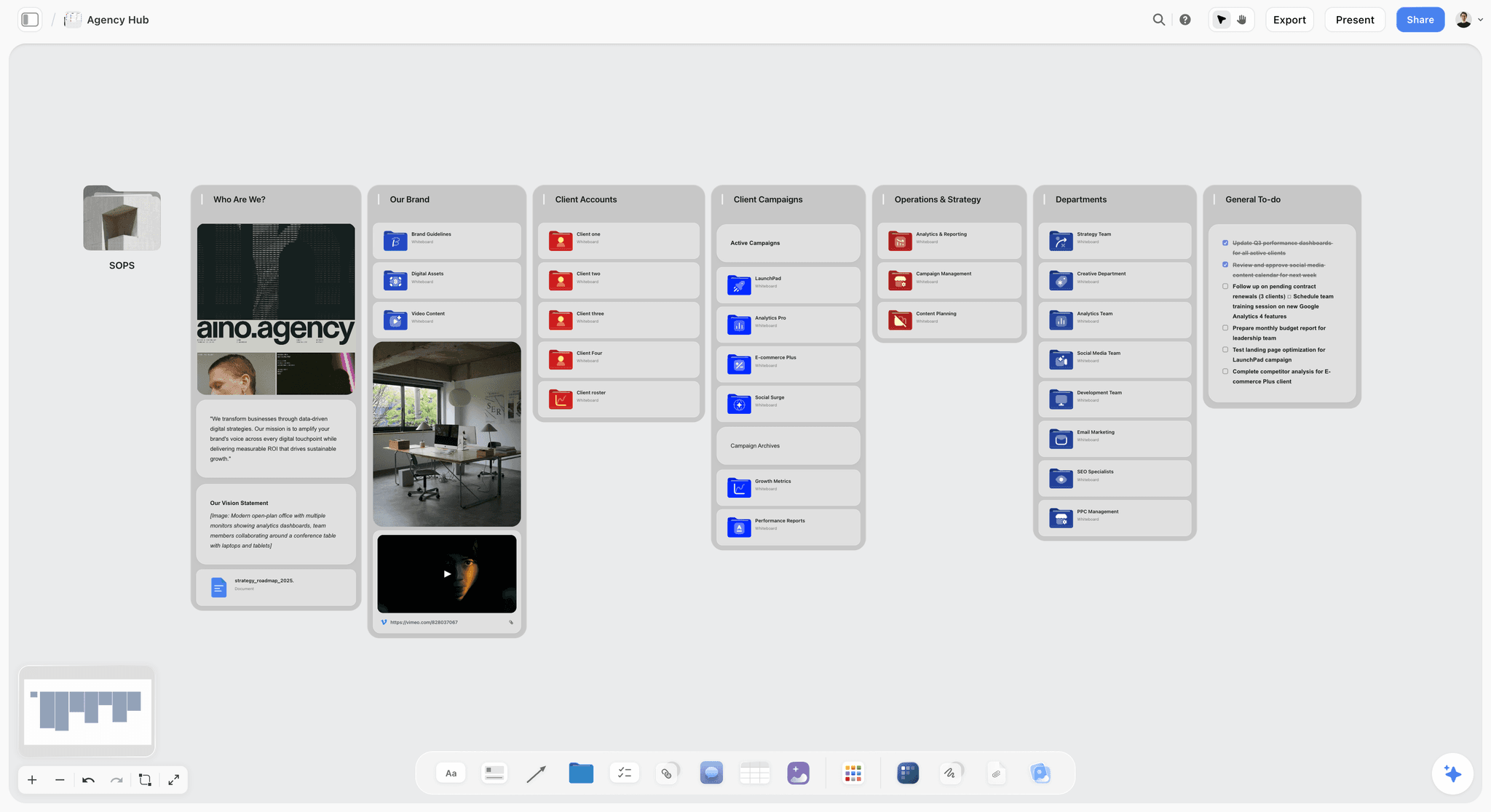
Storyflow is a visual canvas where the board is built to outlive the workshop. The AI reads the full canvas, so after a session the clustered sticky notes can be turned into a structured plan, queried, and built on. The board does not peak at minute 45; it becomes the artifact the work continues from. The fastest way to see the artifact effect is to start the session on the Team Planning Dashboard template or the Agency Hub template: the board opens with structure the AI can read, so the workshop output lands in a plan instead of a pile.
Best for: Teams who want the visual session to become a working artifact, not a record of a meeting.
Verdict: The strongest tool for the board outliving the workshop. For the deepest live facilitation, Mural goes further.
Key features
- Infinite canvas with unlimited boards on every paid plan.
- AI reads the full canvas plus up to 5 documents and 3 boards you attach.
- AI turns clustered sticky notes into a structured plan.
- Team planning and agency hub templates.
- Anyone a paid member invites to a board joins free.
Pricing
Early access: every plan is paid for now. The Free plan launches before the end of 2026, and invited collaborators of paid members join free now. Plus: $7.99/mo annual. Unlimited uploads. Pro: $14/mo annual. AI image generation, 30x AI usage. Max: $39/mo annual. 60x more AI, team workspace with roles.
Pros
- The board becomes a working artifact, not a graveyard.
- AI turns workshop output into a plan.
- Unlimited boards, and invited collaborators join free.
Cons
- Lighter on live facilitation extras (timers, voting) than Mural.
- Cloud-only, with no offline mode.
- Newer platform with a smaller template library than Miro.
2. Miro
Miro is the broadest visual collaboration platform: an infinite canvas, deep template library, strong real-time collaboration, and a large integration ecosystem. It runs an excellent workshop. Whether the board outlives the workshop depends on the team's discipline, since Miro is optimized for the session more than the afterlife.
Best for: Teams that want the most capable all-around visual collaboration platform.
Verdict: The strongest all-around tool in 2026. Bring discipline to keep the board an artifact, not a graveyard.
Key features
- Infinite canvas with strong real-time collaboration.
- Huge template library.
- Facilitation tools: timers, voting, frames.
- Large integration ecosystem.
- Standard AI features.
Pricing
Free for 3 boards with unlimited members. Starter: $8/user/mo annual. Business: $20/user/mo annual.
Pros
- The most capable general visual collaboration tool.
- Excellent live collaboration.
- Templates for nearly any session.
Cons
- Optimized for the session more than the afterlife.
- The 3-board free limit is tight.
- Can become a sticky-note graveyard without discipline.
3. Mural
Mural is the facilitation specialist. Its strength is running the live session: timers, voting, guided methods, facilitator controls, and a deep workshop template library. It runs the best workshop here. Like most facilitation tools, it is weaker at what happens to the board afterward.
Best for: Facilitators who want the deepest workshop and facilitation feature set.
Verdict: The strongest facilitation tool. The board is more event than artifact.
Key features
- Deep facilitation tools and facilitator controls.
- Large workshop template library.
- Timers, voting, and guided methods.
- Real-time and async collaboration.
Pricing
Free tier. Paid plans from roughly $12/mo.
Pros
- Best-in-class facilitation.
- Strong workshop templates.
- Polished live session experience.
Cons
- Optimized for the event, weak on the afterlife.
- Graveyard risk is high.
- Overlaps with Miro on general use.
4. FigJam
FigJam is Figma's whiteboard, built for design-team collaboration. It runs a good session and, for teams already in Figma, the board sits next to the design work, which gives it a slightly better chance of staying relevant. It is still session-optimized.
Best for: Design teams already working in Figma.
Verdict: A strong visual collaboration tool for Figma teams. Moderate on the board's afterlife.
Key features
- Whiteboard built for design collaboration.
- Real-time editing and comments.
- Bridges into Figma design files.
- Templates and widgets.
Pricing
Figma Starter is free. There is no standalone FigJam seat since the 2025 restructure: the cheapest FigJam access is a Collab seat at $3/editor/mo annual ($5 monthly).
Pros
- Strong for design-team collaboration.
- Sits next to Figma design work.
- Affordable.
Cons
- 3-file free cap.
- Session-optimized.
- Best value only inside Figma.
5. Lucidspark
Lucidspark is the visual collaboration board in the Lucid suite, strong for brainstorming and diagrams. It connects to Lucidchart for more formal diagramming, which gives a session output somewhere structured to go. That connection lifts its artifact potential slightly.
Best for: Teams in the Lucid ecosystem who want brainstorming plus diagramming.
Verdict: A capable collaboration board with a path into structured diagrams. Moderate on the afterlife.
Key features
- Brainstorming and freeform canvas.
- Connection to Lucidchart for diagrams.
- Voting and facilitation tools.
- Templates.
Pricing
Free tier. Paid plans from roughly $8/mo.
Pros
- Strong brainstorming canvas.
- Path into structured Lucidchart diagrams.
- Reasonable pricing.
Cons
- Best value inside the Lucid suite.
- Session-optimized like most boards.
- Smaller community than Miro.
6. Notion
Notion is not a whiteboard, but it earns a place here because of what happens after the session. When a visual session is run lightly and its output flows into a Notion doc or database, the collaboration becomes a living artifact. Notion is weak at the live visual session and strong at the afterlife.
Best for: Teams who care more about the board becoming a living document than the live visual session.
Verdict: Weak as a live whiteboard, strong at the afterlife. Pair it with a whiteboard for the session.
Key features
- Documents and databases for session output.
- Real-time collaboration.
- Basic whiteboard and diagram blocks.
- Standard AI features.
Pricing
Free for personal use. Plus: $10/user/mo annual. Business: $20/user/mo annual, which is also the tier Notion AI is bundled into since the standalone add-on was retired in May 2025.
Pros
- The collaboration becomes a living document.
- Strong afterlife for session output.
- Large template community.
Cons
- Weak as a live visual whiteboard.
- Not built for real-time visual sessions.
- Pair it with a true whiteboard.
7. Canva
Canva includes a Whiteboard mode for visual collaboration, useful when the session is design-adjacent and the output becomes a polished asset. The collaboration flows into Canva's design tools, which gives the board a defined afterlife as a finished design.
Best for: Teams whose visual collaboration leads directly into design work.
Verdict: A reasonable collaboration board when the output becomes a Canva design. Light as a pure whiteboard.
Key features
- Whiteboard mode for collaboration.
- Flows into Canva design tools.
- Generative AI.
- Large asset library.
Pricing
Free tier. Pro: roughly $15/mo.
Pros
- Collaboration flows into finished design.
- Easy for non-designers.
- Generative AI.
Cons
- Light as a pure whiteboard.
- Best when the output is a design.
- Not built for facilitation.
8. Whimsical
Whimsical is a diagram-led collaboration tool: flowcharts, wireframes, mind maps, and sticky notes on a clean canvas. Because diagrams are structured outputs, a Whimsical board has a slightly better chance of staying a usable artifact than a freeform sticky-note board.
Best for: Teams who collaborate mostly through diagrams and mind maps.
Verdict: A clean diagram-led collaboration tool. Moderate on the afterlife.
Key features
- Flowcharts, wireframes, and mind maps.
- Sticky notes and freeform canvas.
- Clean, fast interface.
- Light AI.
Pricing
Free tier. Paid plans from roughly $10/mo.
Pros
- Clean, fast diagramming.
- Structured outputs survive better.
- Easy to use.
Cons
- Lighter on facilitation.
- Diagram-led, less freeform.
- Smaller template library.
9. Conceptboard
Conceptboard is a visual collaboration board with strong review and annotation features, popular with teams that collaborate on visual assets. The review workflow gives the board a defined purpose past the workshop, which helps it stay relevant.
Best for: Teams who collaborate on and review visual assets together.
Verdict: A solid collaboration and review board. Moderate on the afterlife.
Key features
- Infinite canvas with review tools.
- Annotation and feedback workflows.
- Real-time collaboration.
- Templates.
Pricing
Free tier. Paid plans from roughly $6/mo.
Pros
- Strong review and annotation.
- Affordable.
- Good for visual asset feedback.
Cons
- Smaller community than Miro.
- Session-optimized.
- Lighter template library.
10. Excalidraw
Excalidraw is a free, open-source collaborative whiteboard with a rough hand-sketched style. It is excellent for a fast, throwaway visual session, no account needed. It is the most explicitly event-shaped tool here: a board you sketch on, screenshot, and discard.
Best for: Teams who want a fast, free, throwaway visual session.
Verdict: The best free quick-session tool. Built to be an event, not an artifact, by design.
Key features
- Hand-sketched-style collaborative whiteboard.
- Free, open-source, no account needed.
- Real-time collaboration.
- Browser-based.
Pricing
Free. Open-source.
Pros
- Genuinely free, no account.
- Fast and frictionless.
- Good for throwaway sessions.
Cons
- Explicitly event-shaped, not artifact-shaped.
- No facilitation or structure.
- Minimal afterlife.
11. Stormboard
Stormboard is a structured workshop board: it organizes sticky notes into structured sections and can export session reports. The structure and reporting are an attempt to give the workshop an afterlife, though the board itself remains session-shaped.
Best for: Teams who want structured workshop boards with exportable reports.
Verdict: A structured workshop tool with report exports. Still more event than artifact.
Key features
- Structured sticky-note sections.
- Workshop templates.
- Exportable session reports.
- AI assistant.
Pricing
Free tier. Paid plans from roughly $10/mo.
Pros
- Structured workshop organization.
- Report exports capture the session.
- AI assistance.
Cons
- The board stays session-shaped.
- Smaller community.
- Reports are a snapshot, not a living artifact.
12. Microsoft Whiteboard
Microsoft Whiteboard is the visual collaboration board inside Microsoft 365. For teams already on Microsoft, it is free and integrated with Teams. It is a basic whiteboard, strong on integration and weak on facilitation, structure, and afterlife.
Best for: Teams already on Microsoft 365 who want a free integrated whiteboard.
Verdict: A free, integrated basic whiteboard. The most event-shaped option for the afterlife.
Key features
- Whiteboard integrated with Teams and Microsoft 365.
- Real-time collaboration.
- Templates.
- Copilot AI.
Pricing
Free with a Microsoft 365 subscription.
Pros
- Free with Microsoft 365.
- Integrated with Teams.
- Familiar to Microsoft users.
Cons
- Basic compared to dedicated tools.
- Weak facilitation and structure.
- Minimal afterlife for the board.
Choosing by Team Size and Type
The best visual collaboration tool for a team of four and a team of four hundred are rarely the same product, and the reason is not features. It is that the failure modes change.
Two to five people. The board will not get lost, because everyone knows where it is, and facilitation features are close to worthless because you are not facilitating anything. What matters is that the tool is free or nearly free and that the board holds a project rather than a session. Excalidraw, Storyflow, or FigJam on a Collab seat all work. Do not buy a facilitation platform for a team that can hold a conversation without a timer.
Six to fifteen people. The band where the artifact question starts to bite, because now not everyone was in the session and the board has to communicate to people who were not there. Ownership becomes a real requirement rather than a nicety. This is the size where a single well-chosen tool used consistently beats a better tool used occasionally.
Fifteen to fifty, multiple teams. Discovery becomes the dominant problem: not whether a board is good but whether anyone can find it. Look for search that actually works across boards, a template system so sessions do not get reinvented, and permissions granular enough that a board can be shared without being editable. This is where Miro and Mural start to justify their per-seat cost, and where free tiers stop being viable because the board limits bite hard.
Fifty and up. You are buying administration as much as collaboration: SSO, provisioning, audit, retention policy, and a real answer to what happens when someone leaves and their boards go with them. Feature comparisons matter less than procurement fit at this size, and the tool your security team will approve is frequently the tool you get.
By team type, three quick calls. Design teams should default to FigJam unless there is a specific reason not to, because proximity to the design files beats every other consideration. Engineering teams usually need diagrams more than they need canvases, which points at Lucidchart or Excalidraw rather than a whiteboard. Marketing, strategy, and creative teams are the ones where the artifact question matters most, because their work is genuinely undecided for weeks at a time, and that is the case a general whiteboard serves worst.
7) Recommended Visual Collaboration Stacks
Stack 1: Small Team. Storyflow (the board that becomes a working artifact) + Excalidraw (fast throwaway sketches). A complete visual collaboration setup for under ten dollars a month.
Stack 2: Workshop-Heavy Team. Mural (run the best live workshop) + Storyflow or Notion (where the workshop output becomes an artifact). The session and the afterlife each get the right tool.
Stack 3: Design Team. FigJam (visual collaboration next to Figma) + Storyflow (turn the session into a plan). Strong if the team lives in Figma.
Stack 4: Cheapest Working Stack. Storyflow (artifact-grade board, $7.99/mo billed annually) + Excalidraw (quick sessions).
The pattern across every stack: run the workshop in a session tool, but make sure the board lands somewhere it becomes an artifact. The teams that get value from visual collaboration are the ones whose boards outlived the workshop.
8) Honorable Mentions
- Lucidchart. The structured-diagram companion to Lucidspark.
- Klaxoon. A workshop and engagement platform.
- Sketchboard. A whiteboard with a developer-friendly slant.
- Google Jamboard's successors. Various boards filling the gap Jamboard left.
- Apple Freeform. A free whiteboard for teams on Apple devices.
9) Tools to Avoid for Visual Collaboration
- A board with no afterlife plan. If nobody owns turning the workshop output into something, the board joins the graveyard.
- A whiteboard treated as the deliverable. A board of sticky notes is raw material. The deliverable is what the work becomes after.
- A facilitation tool with no structure. Great timers and voting still produce a graveyard if the board cannot be built on.
- Screenshotting the board as the only follow-up. A screenshot is a record of a meeting, not a continuation of the work.
11) The Bottom Line
The best visual collaboration tools in 2026 are the ones where the board outlives the workshop. Storyflow is the best for the board becoming a working artifact. Miro is the strongest all-around platform. Mural is the best for facilitated workshops. FigJam is the best for design teams.
Every team has a board full of sticky notes from a workshop nobody has opened since. Run the workshop in a session tool if you like, but make sure the board lands somewhere it becomes an artifact, with structure, an owner, and ideally an AI that can turn the sticky notes into a plan. The teams that get value from visual collaboration are the ones whose boards did not become graveyards.
For your next workshop, run it on a Storyflow canvas so the board becomes a working plan instead of a record of a meeting.
10) FAQ: Visual Collaboration Tools
What is the best visual collaboration tool in 2026?
Storyflow is the best for the board becoming a working artifact. Miro is the strongest all-around visual collaboration platform. Mural is the best for facilitated workshops. FigJam is the best for design teams. The right pick depends on whether you need a great workshop or a board the work continues on.
What is visual collaboration?
Visual collaboration is working together on a shared visual surface, an infinite canvas, a whiteboard, a board of sticky notes, usually in real time. It is used for brainstorming, workshops, planning, and diagramming. The strongest visual collaboration produces a board the team keeps using, not just a record of a meeting.
Why do collaboration boards end up abandoned?
Because most visual collaboration tools are optimized for the live session, not for what happens after. The board peaks during the workshop and then has nowhere to go. Without structure or an owner to turn the output into a plan, the board becomes a sticky-note graveyard.
What is the difference between a whiteboard and a visual collaboration tool?
A whiteboard is the surface: an infinite canvas you draw and place notes on. A visual collaboration tool is the whiteboard plus the collaboration layer: real-time editing, facilitation, comments. The best visual collaboration tools also give the board an afterlife so it does not die when the session ends.
What is the cheapest visual collaboration tool?
Storyflow offers a board that becomes a working artifact, with unlimited boards. Excalidraw is free and open-source for quick sessions. Microsoft Whiteboard is free with a Microsoft 365 subscription. A genuinely free visual collaboration workflow is available.
Can AI help with visual collaboration?
Yes. AI can cluster sticky notes, summarize a session, and turn a messy board into a structured plan. Storyflow's canvas AI reads the whole board and can convert workshop output into a plan, which is exactly what keeps a board from becoming a graveyard. The AI gives the board an afterlife.
Is Miro or Mural better for visual collaboration?
Miro is the broader all-around platform, with more templates and integrations. Mural is the deeper facilitation tool, better for running a structured live workshop. Both are session-optimized; if you want the board to outlive the workshop, pair either with a tool that gives the output a home.
How do I keep a collaboration board from being abandoned?
Decide before the workshop where the board goes after. Assign an owner to turn the output into a plan. Use a tool that can structure the board or read it with AI, so the sticky notes become something. A board with a planned afterlife and an owner does not join the graveyard.
What is the best visual collaboration tool for teams?
For teams whose board has to survive past the workshop, Storyflow is the best visual collaboration tool: the canvas AI reads the full active board (plus up to five documents and three boards you attach) and turns clustered sticky notes into a structured plan the work continues from. For teams who mainly need a large, fast, template-rich live session, Miro is the better fit, and Mural is better again when a trained facilitator is running formal workshop phases. The split is not really about features. It is about whether your problem is the workshop or the week after it.
What tools do remote teams use for visual collaboration?
Remote teams commonly use Miro or Mural for live workshops, FigJam if they are design-led, and a structured tool like Notion or Storyflow for the afterlife. The pattern is a session tool plus an artifact tool, because the two jobs are different.
Do small teams need visual collaboration software?
Yes, if the team works visually or remotely. Even a small team benefits from a shared canvas for brainstorming and planning. A tool like Storyflow gives a small team an artifact-grade board from $7.99 a month billed annually, and Excalidraw covers quick sessions for free.
What is the best visual collaboration tool for workshops?
Mural is the strongest dedicated workshop and facilitation tool, with timers, voting, and guided methods. Miro is a close second with broader general capability. For the workshop output to survive, pair either with a tool where the board becomes a working artifact.
How is visual collaboration different from a video call?
A video call is a conversation; the visual collaboration board is a shared artifact the conversation produces. The call is temporary by nature. The board does not have to be, if the tool gives it an afterlife. The best visual collaboration leaves something behind that the work continues on.
How many visual collaboration tools should a team have?
One, in almost every case, and the exception is a design team that needs FigJam for proximity to its files plus something else for cross-functional sessions. The argument for consolidating is not licence cost, it is discovery: two tools means every search happens twice and half the boards are in the other place. If you are currently on three, the useful exercise is not choosing the best one but choosing which one holds projects, since that is the one people will reopen.
What is the best free visual collaboration tool?
Excalidraw if you want no account and no limits on boards, since it is open source and genuinely unrestricted. Storyflow holds a project rather than a session, with unlimited notes, images, links, and shared boards, but it is paid-only during early access, with a Free plan launching before the end of 2026. Figma Starter if your work is design-adjacent. Miro's free tier is the most capable of the three in features and the most restrictive in practice, because three boards runs out faster than teams expect.
Should we run workshops in the same tool where the work lives?
Ideally yes, and in practice it depends on whether your work has somewhere it lives. If decisions end up in Jira and documents in Notion, the workshop tool is always going to be a separate surface, and pretending otherwise produces the abandoned board. If the project genuinely lives on a canvas for several weeks, running the session there is a real advantage, because the session output is already in place rather than needing to be transcribed.
How do we stop a board from becoming a sticky-note graveyard?
Assign a named owner in the session rather than after it, leave an unanswered question at the top of the board, and resist tidying it at the end. Those three cost nothing and address the three most common causes. The fourth cause, that the work moved elsewhere, is not fixable by discipline: if the board is not where the project lives, close it deliberately and take a screenshot rather than maintaining a fiction.
Is a visual collaboration tool worth it for a solo worker?
Sometimes, and the deciding question is not collaboration at all. It is whether your thinking is spatial. A solo user gets nothing from cursors, timers, or voting, but a canvas is still the best available surface for holding a project that is not yet decided, because it shows shape and a document hides it. If you have never wanted to see everything at once, a document and a folder are cheaper and better.
What about security and where the data lives?
Every tool in this list except Excalidraw and Microsoft Whiteboard stores your boards in the vendor's cloud, and for most teams that is fine. It stops being fine for regulated work, client material under NDA that specifies data residency, or anything where a security review will ask where the data sits. In those cases the shortlist narrows sharply to self-hostable options and whatever your organization has already approved, and the sensible move is to ask the security question before running the comparison rather than after.
What is visual collaboration software?
Visual collaboration software is a shared visual surface a team works on together in real time, typically an infinite canvas of sticky notes, diagrams, images and frames with live cursors, comments and version history. It differs from a document with comments because position carries meaning, and from a diagramming tool because the goal is thinking together rather than producing a correct diagram.
What is the difference between a visual collaboration platform and an online whiteboard?
An online whiteboard optimizes the live session, with fast input and facilitation features such as timers and voting. A visual collaboration platform optimizes the session plus the record, so boards stay organized, searchable and connected to the work afterwards. Most teams buy the first, discover the second was the actual problem, and end up with a folder of boards nobody opens.
Which visual collaboration tool is best for a small team?
Storyflow and Milanote both suit small creative teams where boards need to stay readable after the session, FigJam is the natural pick if the team already works in Figma, and Miro's free tier is the strongest starting point when workshops are the main use. Team size matters less than whether the boards are being revisited; a team that never reopens a board should buy the cheapest facilitation tool available.
Are diagramming tools like Lucidchart visual collaboration tools?
Not really, and the distinction is worth keeping. Lucidchart and draw.io are built to produce a correct, structured diagram, usually by one person, and they are very good at that. Visual collaboration is a group thinking on a surface where the output is often deliberately messy. Buying a diagramming tool for a workshop produces tidy artifacts and quiet meetings.
Table of Contents
- Quick Answer: The Best Visual Collaboration Tools in 2026
- Comparison Table: 12 Visual Collaboration Tools at a Glance
- Frequently Asked: Which Visual Collaboration Tools Are Highly Rated, Underrated, and Most Innovative?
- Workshop vs Artifact
- How We Evaluated These Tools
- Quick Picks by Visual Collaboration Need
- How Visual Collaboration Tools Compare on AI
- What Is Visual Collaboration Software?
- Visual Collaboration Platform, Online Whiteboard, or Design Tool?
- Detailed Reviews: 12 Visual Collaboration Tools
- Recommended Visual Collaboration Stacks
- Honorable Mentions
- Tools to Avoid for Visual Collaboration
- FAQ: Visual Collaboration Tools
- The Bottom Line
- Author
- Related Reading
Templates to check out for this topic


Planning and project templates you can use in Storyflow
Plan a launch, a sprint, or a whole project on a visual board the team can see at once. Open one of these templates and start from real structure.


See Storyflow in Action
A visual AI workspace where every feature lives inside one canvas. No tab-switching, no context lost.
Build your entire board from a single message
Type what you need in the AI chat at the bottom of your canvas. The AI adds cards, headings, and structure directly onto your board.
Use expert frameworks as AI context
Type @ in the AI chat and choose any Tactic. The AI tailors every response to that framework instead of giving generic advice.
Turn your board into a mind map in seconds
Ask the AI to restructure your canvas as a mindmap. It connects your ideas into a visual hierarchy so you can see how everything relates.
Why Storyflow Exists
Storyflow actually began as a personal tool while working on creative and research projects.
We kept running into the same problem: ideas were scattered everywhere: notes, documents, and whiteboards.
Nothing helped us see how everything connected.
So we started building a workspace designed around how ideas actually grow.
→ Read how Storyflow was createdJustkay
Documentary Filmmaker & Founder at Storyflow
Published: 2026-05-17
Extremely simple, seriously capable


See how easy it is to get started
Watch a real project come together, from a blank board to a finished plan, clicked through step by step.
Start creating with AI and become more productive
Transform your creative workflow with AI-powered tools. Generate ideas, create content, and boost your productivity in minutes instead of hours.