
Rock-steady plans for every shoot
Filmmaking software that plans
the whole film in one place.
Storyflow is an AI canvas where directors, producers, and indie crews plan scripts, shot lists, storyboards, moodboards, beat sheets, and shooting schedules side by side. No download, and the AI keeps the context of your whole project so you never explain the same idea twice.


Creatives working for these brands already got early access
- Red Bull
- Canon
- Artlist
- Porsche
See how easy it is to get started
Watch a real project come together, from a blank board to a finished plan, clicked through step by step.
Start from a ready-made template
Pick a board to see what you can build, then let AI fill it in. Every template is a real, editable starting point on the same infinite canvas.

Pre-Production
Pull the brief, script, shot list, and moodboard into one pre-production hub so the whole shoot is planned in one place.
What is filmmaking software?
Filmmaking software is any digital tool that helps a film crew plan, organize, and execute a production, covering stages from script breakdown and storyboarding through shot listing, scheduling, and team coordination. Storyflow is an AI visual workspace that plans the whole film on one infinite canvas: the storyboard, the shot list, the moodboard and the shooting schedule side by side. The category is broad: some tools focus on a single deliverable like a call sheet or a script PDF, while others try to pull pre-production into one workspace.
Storyflow sits in the planning and organizing layer of filmmaking software. It is an AI-native infinite canvas that runs in your browser, no download required. You open a board, describe your project or paste a script, and the AI lays out a structured plan with cards, notes, and a fitting framework drawn from over 200 built-in templates. From there you pull in everything that belongs alongside it: drag a PDF screenplay onto the canvas, drop a shot list beside the storyboard frames, grab reference frames from YouTube or Vimeo, and pin moodboard images next to the scenes they belong to.
The canvas-aware AI is what separates Storyflow from a document or a slide deck. It keeps the full context of your board, so when you ask it to add an extra scene, tighten the schedule, or suggest coverage for a location, it updates the plan without losing what you have already placed. For indie filmmakers and working crews who spend more time juggling tools than making films, that context-awareness cuts the back-and-forth in half.
A complete pre-production workflow touches many specific deliverables: the script breakdown (identifying locations, cast, props, and special requirements scene by scene), storyboards (visual panel-by-panel layouts of each shot), shot lists (camera setups, angles, movements, and lens choices), call sheets (who is on set and when), shooting schedules (the order in which scenes are filmed for efficiency), moodboards (tone, color palette, and lighting references), and beat sheets (the structural rhythm of the story). Storyflow is built to hold all of those on a single infinite canvas, whether the production is a feature film, short film, documentary, commercial, music video, or branded content series.
Ultra fast from brief to board
Set up your film plan in four steps.
No installation, no templates to configure from scratch. The AI reads your project and builds the board.
01
Create your account
Sign up in seconds. Your infinite canvas is ready in the browser immediately.
02
Describe your project or drop in a script
Type a prompt describing the film, paste a screenplay or documentary treatment, or drag a PDF script onto the canvas. The AI works from whatever you give it.
03
Let the AI build the plan
The AI generates a structured board with cards, notes, and a framework suited to your project type. Script breakdowns, storyboards, shot lists, moodboards, beat sheets, and shooting schedules can all live on the same canvas.
04
Refine, collaborate, and export
Drag cards into position, add reference images or video frames, invite your crew in real time, and export the board as an image or PDF for the on-set binder or client approval.
One canvas for the whole pre-production workflow.
Script breakdown, storyboard, shot list, beat sheet, and moodboard connected instead of spread across five different apps.
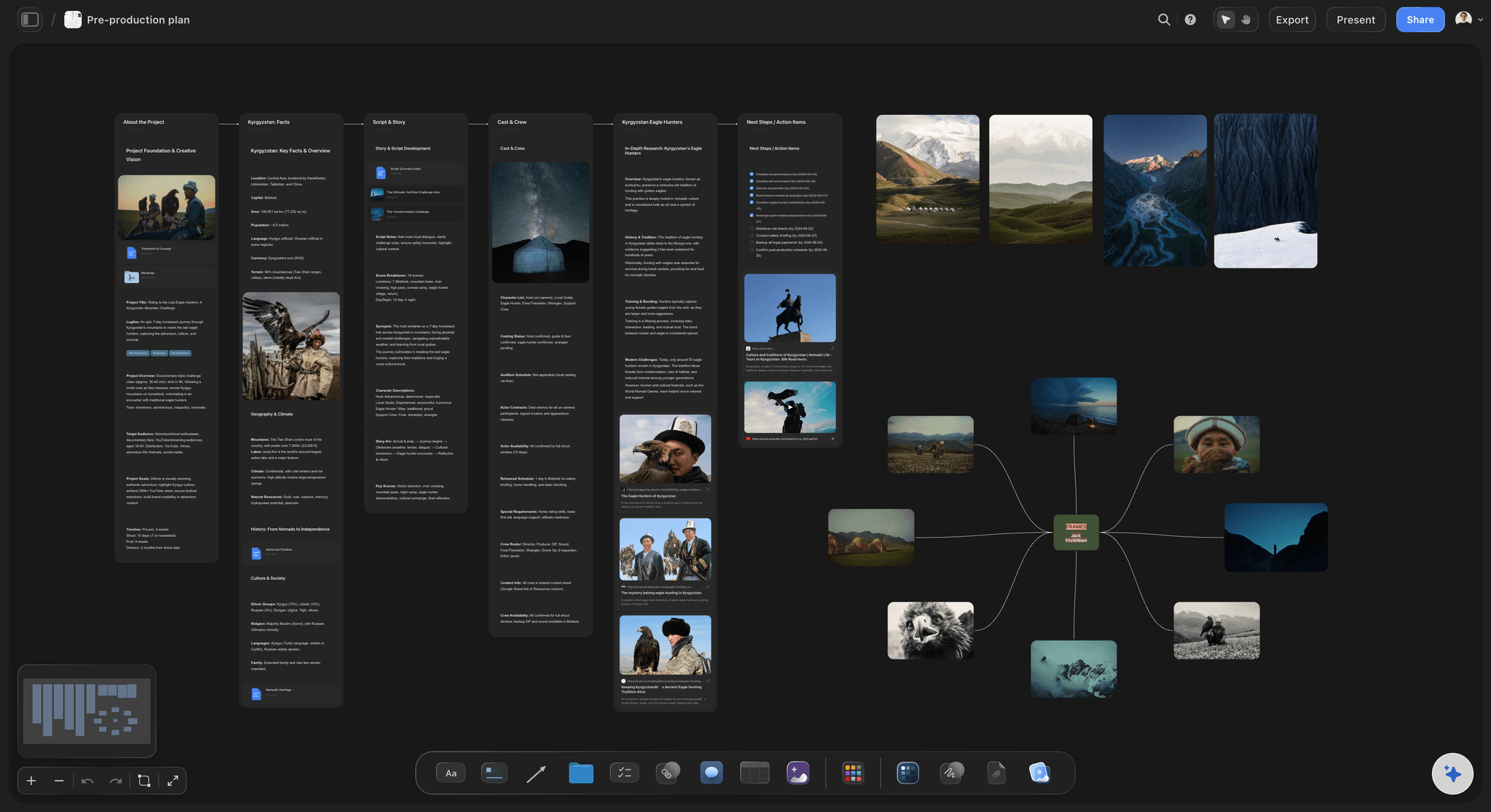
AI builds a full structured pre-production board from your script
Plan a film from a single prompt
Describe the project, paste a screenplay, or type a rough idea and the AI lays out a structured film plan on the canvas, with scene cards, beat sheets, and the right framework for your format. Adjust by prompting again, no manual formatting required.
See pre-production planning →
Scene-by-scene storyboard from your script
Generate a storyboard alongside the plan
Paste a screenplay or video script and the AI maps every scene into a storyboard layout on the same canvas. Sketch over frames, pin visual references, and refine panel structure without switching tools.
Try the AI storyboard generator →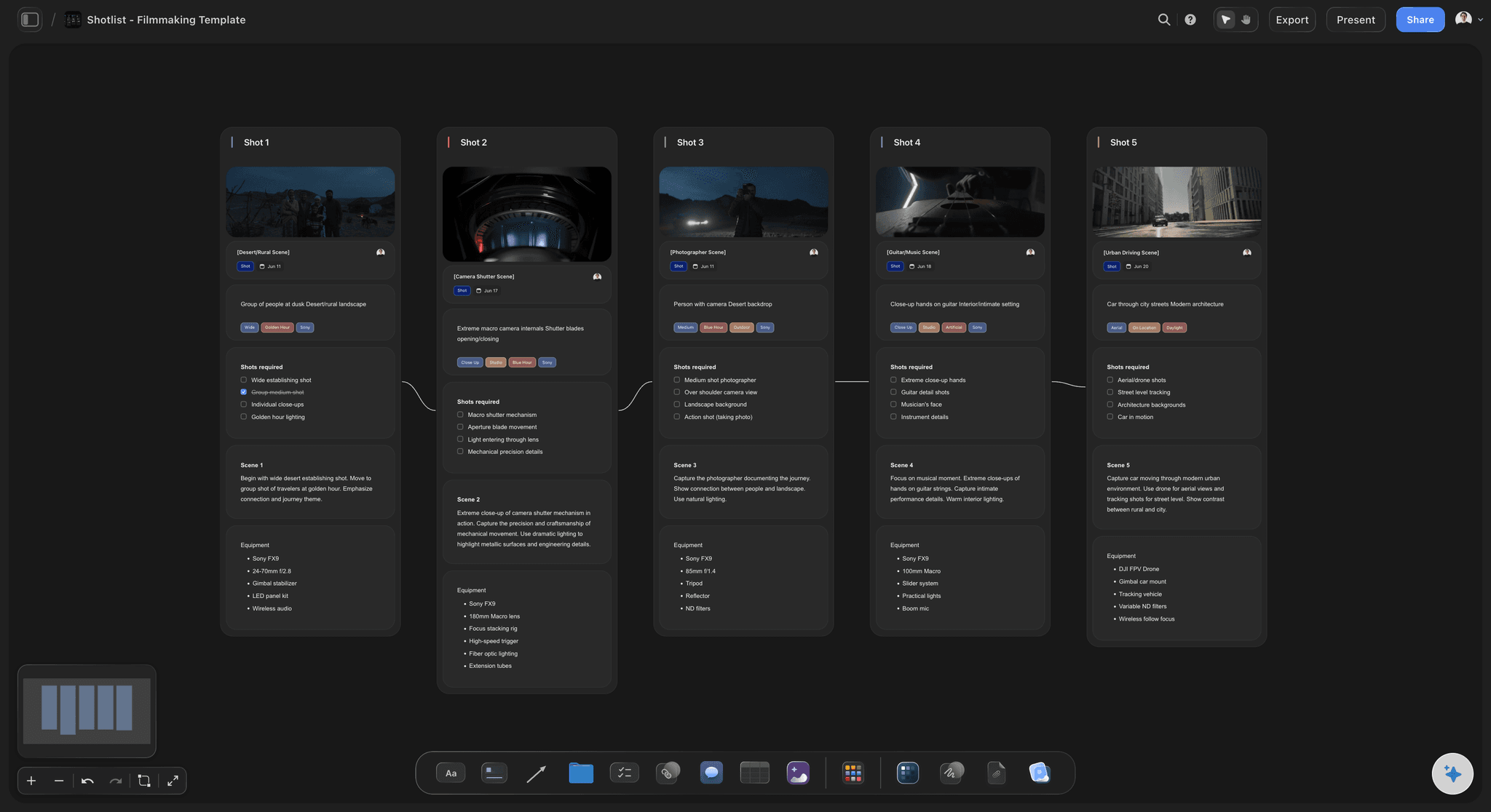
Shot list with camera setups, angles, and coverage notes
Build a shot list next to the storyboard
Once the storyboard exists, ask the AI to generate a shot list from it. Every shot, angle, lens, movement, and setup lives next to the frames it belongs to, on the same infinite board, so nothing gets lost between documents.
Try the AI shot list generator →
View-only share links and real-time crew access
Share with the crew and get sign-off fast
Send a view-only link so producers, clients, and the DP can review the storyboard, shot list, and shooting schedule without signing up. Real-time collaboration means the team works the same board without version collisions.
See film production planning →Filmmaking software, no expiry.
Every plan is yours for as long as you need it. Plan as many films as you want on an unlimited infinite canvas.
Unlimited boards on an infinite canvas
AI usage to build plans, storyboards, and shot lists
Invited collaborators join free
Unlimited file uploads for scripts, PDFs, and references

Built for people with taste
Filmmaking software that goes deeper than a template.
Storyflow is an AI-native canvas, so every pre-production deliverable, from beat sheet and script breakdown through call sheet and shooting schedule, connects to the same board instead of living in a separate file.

Script, PDF, screenplay, and notes on the same canvas
Work from the script you already have
Paste any screenplay or treatment: Feature screenplays, short film scripts, documentary treatments, music video treatments, or web series outlines. Paste the text and the AI breaks it down into a structured pre-production board with scene cards and a beat sheet.
Drop a PDF onto the canvas: Drag your script PDF directly onto the board. It sits next to the shot list and storyboard so the source and the plan stay on the same surface. No switching between tabs or documents.
Call sheets, spreadsheets, links, and notes: Drop call sheets, production notes, location spreadsheets, casting breakdowns, or research links onto the canvas to keep every document the crew needs in one place.
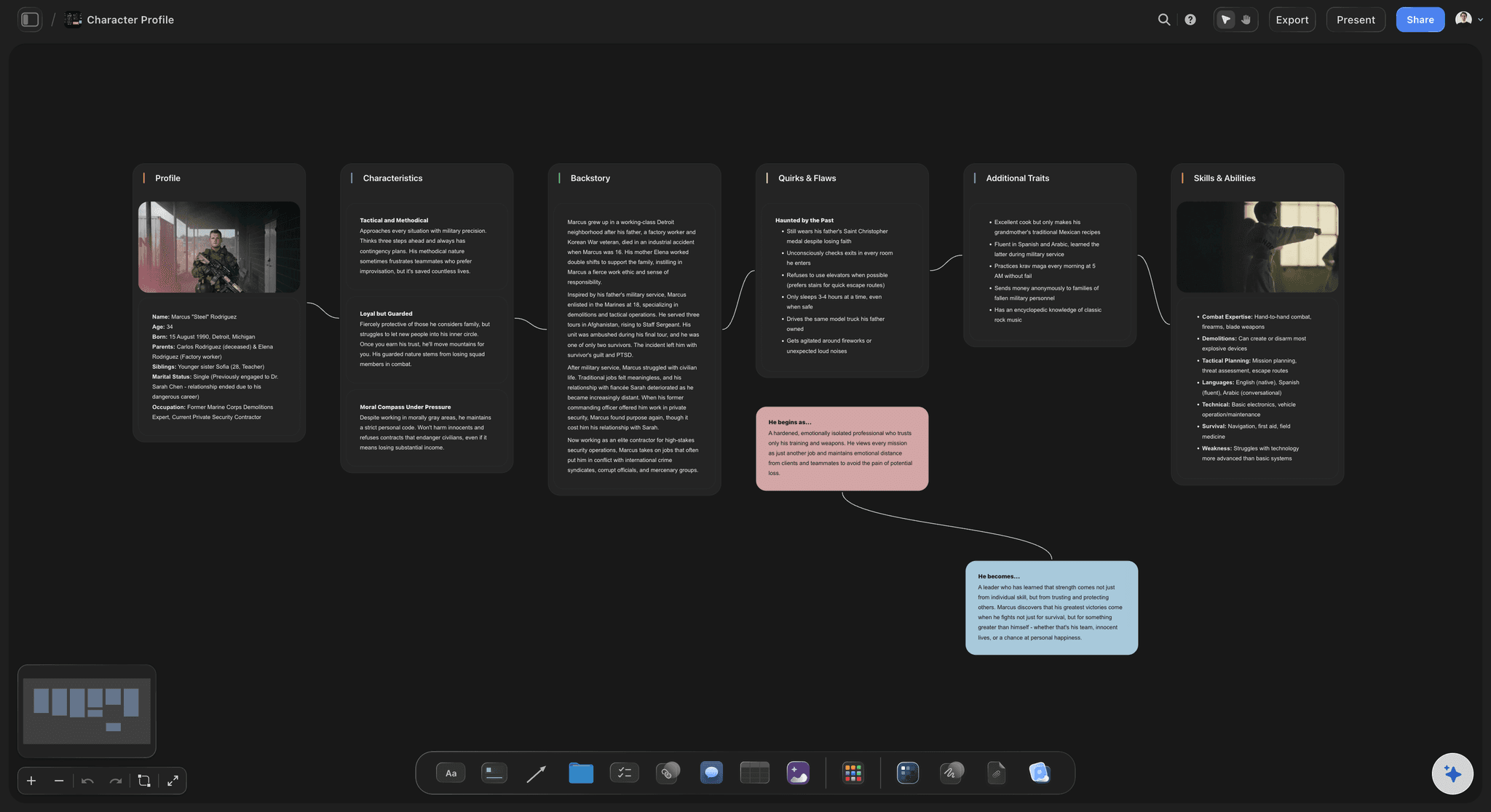
Project structure
Structure your project with the right framework
Feature, short, documentary, commercial, and music video frameworks: Three-act structure, six-part documentary arc, episodic beat sheets, commercial treatments, and more. Pick a framework or let the AI suggest one based on your format and genre.
Canvas-aware AI that holds the full context: The AI keeps the complete context of your board, not just the last message. Ask it to expand act two, tighten the shooting schedule, or suggest additional coverage for a location and it updates the plan without losing your existing cards.
Character profiles, story bibles, and world-building notes: Pin character sheets, location notes, and story bible pages next to the scenes that reference them, without opening a separate document or switching apps mid-planning session.
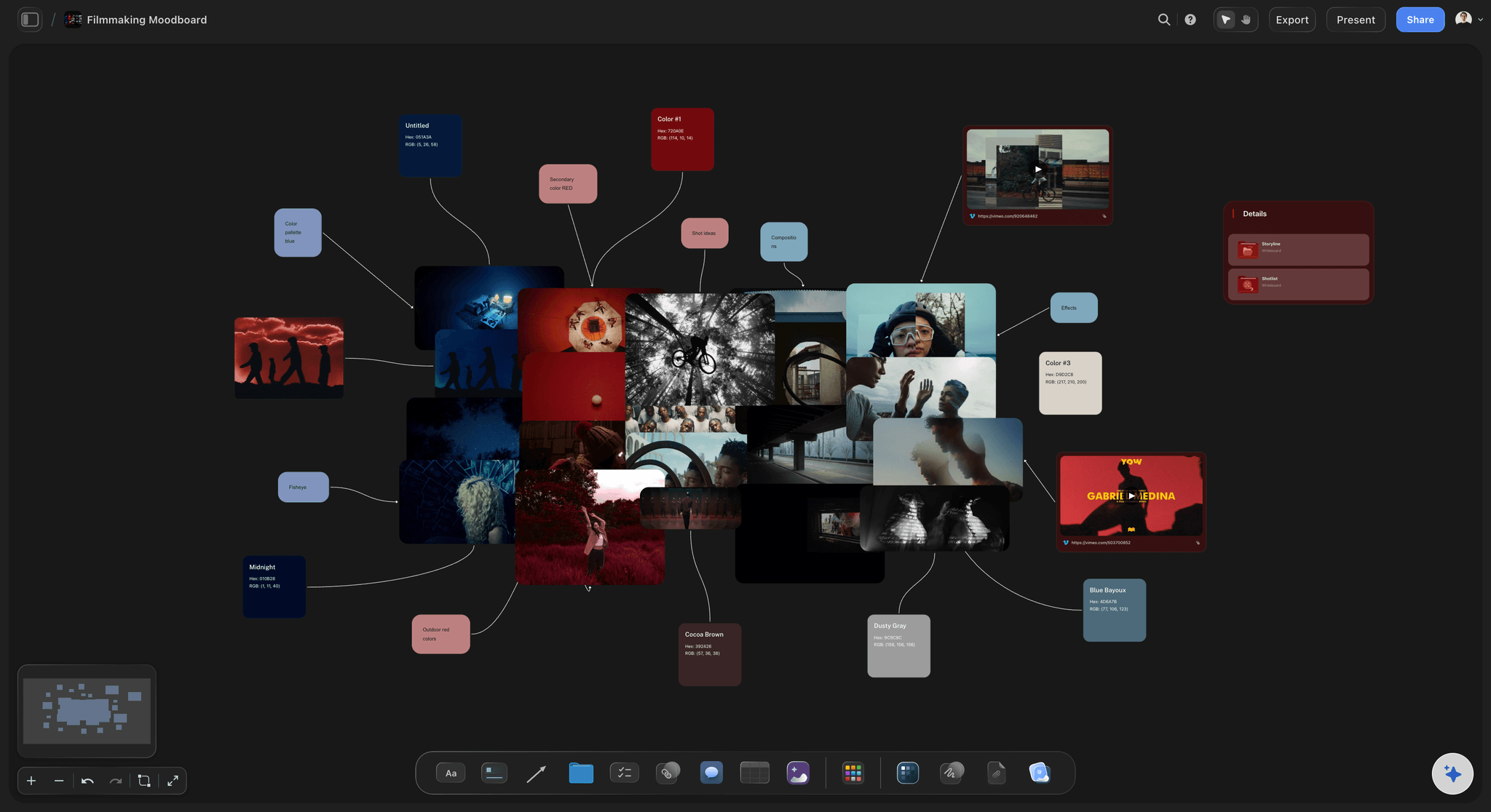
Frame grabs, moodboard, and visual references on one board
Build the visual language of the film
Grab frames directly from YouTube and Vimeo: Capture reference stills from YouTube or Vimeo and pin them next to the scenes or shots they inspire on the canvas. No screenshot tools or separate download steps required.
Moodboard on the same canvas as the storyboard: Collect tone, color palette, lighting, costume, and location references right next to the storyboard panels instead of juggling a separate moodboard tool in a different browser tab.
AI image generation on Pro and Max: Generate concept images and style frames directly on the canvas with AI. Available on Pro and Max plans, so the visual development of the film never leaves the planning board.

From planning board to production-ready deliverables
Carry the plan into production
Export as image or PDF for the on-set binder: Export any board or section as a high-resolution image or a clean PDF for client approvals, investor decks, and the on-set binder the AD and DP refer to during the shoot.
Crew collaboration and view-only links: Invite the director, producer, DP, and AD to the same board. Send view-only links to clients and stakeholders who need to see the storyboard and shooting schedule but should not edit the plan.
Shooting schedules and production timelines: Build shoot schedules and production timelines next to the storyboard and shot list so the entire pre-production plan stays connected and the crew always references the same document.
Explore templates for your project
Every template opens as a real, editable board on the infinite canvas. Pick the closest fit and make it your own.
Pre-Production
Pull the brief, script, shot list, and moodboard into one pre-production hub so the whole shoot is planned in one place.
One app instead of five
Storyflow vs StudioBinder, Milanote, and Celtx.
A fair look at what each tool covers. Storyflow is the only one built as an AI-native infinite canvas for visual pre-production planning.
Storyflow
Recommended
Unlimited boards on every plan
AI builds the board from a prompt
AI uses your whole canvas as context
Storyboard, shot list, and moodboard on one canvas
Infinite visual canvas
StudioBinder
Free plan with unlimited boards
AI builds the board from a prompt
AI uses your whole canvas as context
Storyboard, shot list, and moodboard on one canvas
Infinite visual canvas
Milanote
Free plan with unlimited boards
AI builds the board from a prompt
AI uses your whole canvas as context
Storyboard, shot list, and moodboard on one canvas
Infinite visual canvas
Celtx
Free plan with unlimited boards
AI builds the board from a prompt
AI uses your whole canvas as context
Storyboard, shot list, and moodboard on one canvas
Infinite visual canvas
What creators are saying
Join early creators getting structured workspaces and AI that remembers their projects
“Storyflow has sped up my workflow by at least 3x, which means more flow state and more projects I can actually ship. It truly changed the way me and my team create.”

Reilin Joey
Director & YouTuber
“One prompt gets me a structured board. But the tactics are my favorite. I run my YouTube scripts through them and my intros and retention got better. It's amazing.”

Justkay
YouTuber & Freelance Filmmaker
“I used to juggle five apps to plan a project. Now I describe what I am making and get boards, lists, and a schedule. All in one place.”

George
@fernwehchronicles
Filmmaking software, answered.
Questions directors and producers ask about planning films with Storyflow.
Filmmaking software covers any tool that helps a crew plan and organize a production. That typically includes script breakdown, storyboarding, shot listing, scheduling, and team collaboration. Storyflow handles the planning and organizing side of filmmaking: you build storyboards, shot lists, moodboards, beat sheets, and production plans on one infinite canvas, with an AI that keeps the context of your whole project.
Storyflow is built for exactly this job: planning the film before the shoot. Describe the project or paste a script and its AI lays out a plan on a board. The storyboard, the shot list and the moodboard sit side by side on that canvas, and the AI keeps the context of the whole project, so you never explain the same idea twice. It handles the planning and organizing side of filmmaking.
DaVinci Resolve is a strong free industry-grade editor if you need one today. Storyflow is paid-only during early access, with plans starting at $9.99 per month. Every paid plan includes unlimited boards on an infinite canvas, AI usage, and unlimited file uploads, so you can build a complete pre-production plan, storyboard, and shot list. A Free plan is launching before the end of 2026.
Storyflow is a strong choice for pre-production planning: it puts storyboards, shot lists, beat sheets, moodboards, and film plans on one AI canvas with no download required. It is not a video editor or camera tool, so if you need color grading or NLE features, you will need a separate app for that. If your priority is planning and organizing a production, Storyflow is one of the most capable options available, with plans starting at $9.99 a month.
A thorough film pre-production checklist covers: script breakdown (identifying locations, cast, props, extras, and special requirements per scene), storyboards (visual panel layouts for each shot), shot lists (camera setups, angles, lens choices, and movements), shooting schedule (the order scenes are filmed for location and budget efficiency), call sheets (who is on set and when), moodboards (tone, color palette, lighting, and costume references), and a beat sheet (the structural rhythm of the story). Storyflow holds all of these on one canvas.
StudioBinder is built around production management documents: call sheets, shooting schedules, and cast and crew coordination. Storyflow is built around visual pre-production planning: an infinite AI canvas where you generate storyboards, shot lists, beat sheets, and story structures from a script or a prompt. Many filmmakers use a planning canvas like Storyflow during early development, then move into production management tools like StudioBinder for the shoot itself.
Storyflow is best suited to directors, producers, and creative teams who need to plan a production visually before they roll camera. That includes indie feature and short film directors building a full pre-production board, documentary filmmakers mapping story arcs, commercial and music video directors developing treatments and storyboards for client approval, film students learning professional methods, and production companies running multi-project workflows. It is a planning tool, not a video editor.
In Storyflow, yes. The storyboard and the shot list live on the same infinite canvas, placed next to each other so you can cross-reference frames and camera coverage without switching apps. Generate the storyboard from your script first, then ask the AI to build a shot list from the storyboard. Both stay connected and editable on the same board.
Yes. Documentary filmmakers use Storyflow to map story arcs, interview subjects, and research threads on a canvas, dropping in notes, PDFs, links, and reference footage alongside the six-part structure. The AI can generate a documentary arc framework from a prompt and help you organize the narrative before the shoot starts.
No download required. Storyflow runs entirely in your browser. Sign up, open a board, and start planning immediately. It works on any device with a modern browser, which makes it practical on set, in a coffee shop, or anywhere you are thinking through a scene.
On the Storyflow canvas you can build storyboards, shot lists, script breakdowns, beat sheets, moodboards, character profiles, film schedules, production plans, shooting schedules, call sheet drafts, and location research boards. All of them connect on the same infinite canvas, and the AI can generate or refine any of them from a prompt or from your script.
The film is planned before you pick up the camera.
Open a canvas, describe your project, and walk into production with a storyboard, shot list, beat sheet, and plan the whole crew can see.