
Ultra-fast moodboards with real taste
Plan your event with AI
from concept to run of show.
Describe the event and Storyflow's AI plans it for you: the concept and moodboard, the run of show, the vendor list, and the budget, all drafted on one board. Refine it on an infinite canvas, then turn the plan into a client proposal.


Creatives working for these brands already got early access
- Red Bull
- Canon
- Artlist
- Porsche
See how easy it is to get started
Watch a real project come together, from a blank board to a finished plan, clicked through step by step.
Start from a ready-made template
Pick a board to see what you can build, then let AI fill it in. Every template is a real, editable starting point on the same infinite canvas.

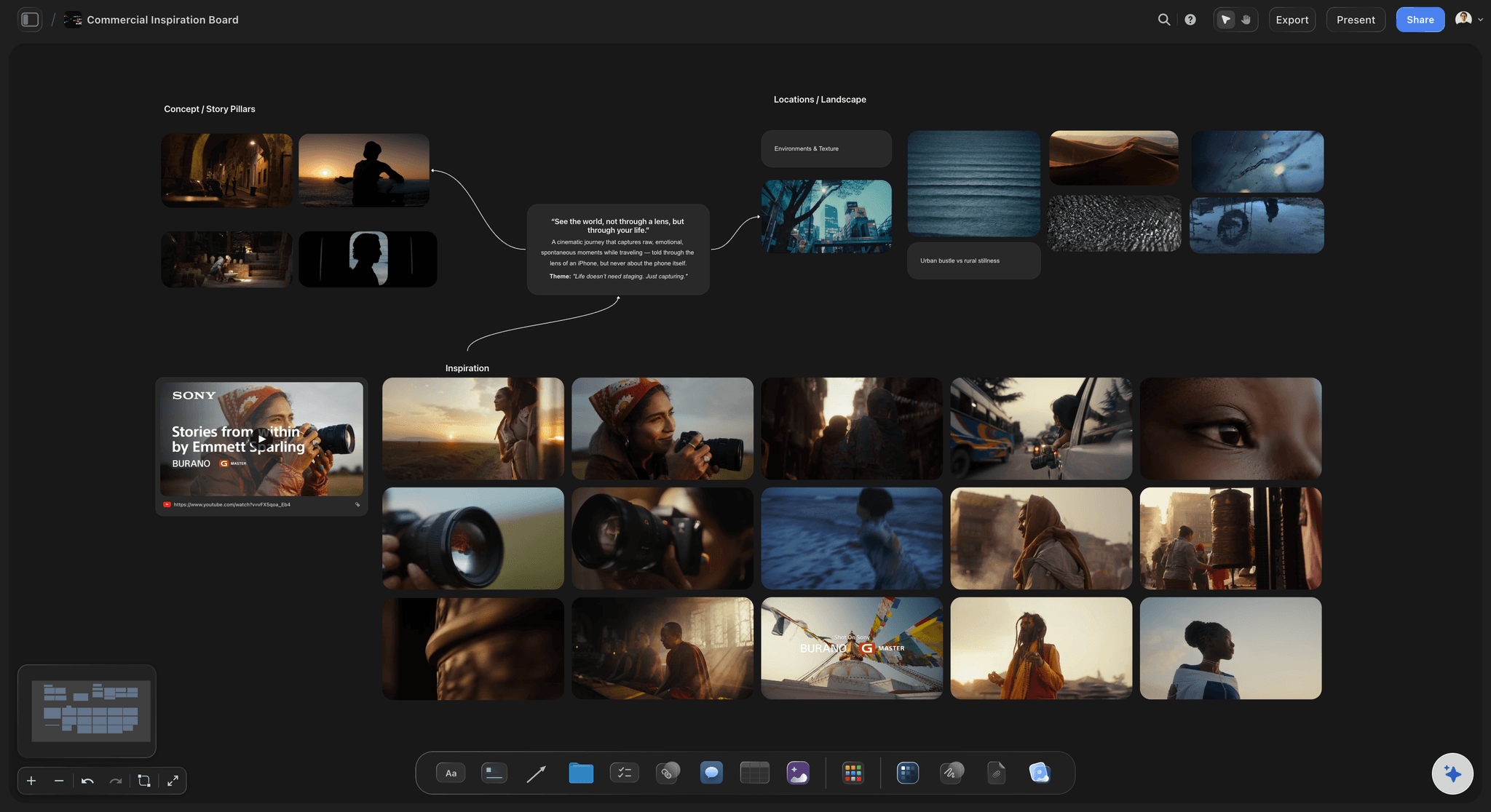
Film Moodboard
Collect film references, color palettes, lighting, locations, and tone in one place, then invite your crew.
What is an AI event planner?
Planning an event means holding a dozen moving parts in one place: the concept and look, the minute-by-minute timeline, the vendors, the budget, and the people who run the day. Each part feeds the others, the look sets the vendors, the vendors set the budget, the timeline ties them together, and when they live in separate tools, the plan drifts out of sync the moment something changes.
An AI event planner takes the first pass off your hands. Instead of opening a blank board, a blank spreadsheet, and a blank document, you describe the occasion, the style, and the date, and the AI drafts the whole plan: a theme and palette with reference images, a run of show with cues and owners, a vendor list, and a starter budget, drawn for your event rather than a generic checklist.
That is the difference from a static template: the AI gives you a real plan you can argue with, far faster than building every part yourself. And it is not a picture, it is cards on an infinite canvas, so you swap a color, retime a segment, or cut a vendor, then ask the AI to turn the plan into a client proposal, all on the same board.
Ultra fast from brief to board
Plan your event with AI in four steps.
You describe the event. The AI plans it, so you start by refining a real plan instead of starting cold.
01
Open Storyflow in your browser
Start in the browser with a Storyflow account. No separate app to install, just an empty board ready for the event plan.
02
Describe the event
A sentence is enough: the occasion, the style you want, the date, and the rough size. The AI works with whatever you give it.
03
AI plans your event
The AI drafts the concept and moodboard, the run of show with cues and owners, a vendor list, and a starter budget, all on one board.
04
Refine it, then propose it
Swap colors, retime segments, adjust vendors, then ask the AI for a client proposal. Share view-only or export to PDF.
An event planner that drafts the whole plan, not a wall of saved pins.
Most tools give you one piece. This one drafts the concept, the timeline, the vendors, and the budget together.
The concept, drafted
Theme, palette, and references to start
Describe the event and the AI drafts the theme, a palette, and the styling direction with reference images, so you start by refining a real concept instead of staring at a blank board willing a vision to appear.
See the AI moodboard maker →
References, gathered and grouped
A real board, not a pin sprawl
The AI gathers reference images and groups them by element, florals, table, lighting, so the look reads as a direction instead of a scattered Pinterest feed you still have to make sense of.
See the moodboarding canvas →
From plan to proposal
Turn the plan into a client proposal
Once the plan is set, ask the AI to turn it into a client proposal, the concept, the styling, the run of show, and the packages, on the same canvas the rest of the plan lives on.
See the AI run of show generator →
The whole event in one place
Concept, run of show, vendors, and budget together
Keep the moodboard beside the run of show, the vendor list, and the budget on one infinite canvas, so the look and the logistics never live in separate tools that drift out of sync.
See the AI project plan generator →Paid-only during early access.
Open a canvas, describe the event, and watch the plan draft itself. Plans start at $7.99 a month, with no time limit on any of them.
Unlimited event plans and boards, with room for every part
Basic AI usage to draft the concept, timeline, vendors, and budget
Pin venue photos, florals, scripts, and links onto any card
Share the plan view-only, or invite collaborators free
Built for people with taste
Made for the way an event actually comes together.
Draft the concept, gather the references, lay out the day, align the client, and turn the plan into a proposal.
A concept that starts itself
Theme, palette, and decor in one pass
Drafted, then editable: The theme, a palette, and the decor direction arrive as cards you can refine, beside a reference area the AI starts filling.
Swap and resequence: Change the palette, regroup the references, or drag elements around. The look reshapes as you style.
Any event: A wedding, a launch party, a corporate gala, or a brand activation: describe it and the AI plans the right direction.
Align the client on the plan
Agree on the vision before the deposits
One board to react to: The concept, the timeline, and the vendors live on one canvas, so the client signs off on a real plan, not a verbal idea.
Invite and comment free: Share a view-only link or invite the client free, so they can react to the plan without an account.
Capture from anywhere: Pin venue photos, florals, scripts, and links, including frame grabs from event videos, straight onto the board.
The plan becomes the event
From concept to run of show, vendors, and proposal
Lay out the day: Ask the AI to expand the plan into a run of show with cues and owners, so the day's flow sits beside the look.
Plan vendors and budget: Keep a vendor list and a starter budget on the same board, so the people and the numbers stay with the look and the logistics.
Build the proposal: Turn the whole plan into a client proposal with concept, styling, and packages, then share it or export a clean PDF for the pitch.
Explore templates for your project
Every template opens as a real, editable board on the infinite canvas. Pick the closest fit and make it your own.
Film Moodboard
Collect film references, color palettes, lighting, locations, and tone in one place, then invite your crew.
One app instead of five
How Storyflow compares to other event planning tools.
Most tools cover one piece of the event. The question is whether the AI plans the whole thing on one board.
Storyflow
Recommended
AI drafts the concept, run of show, vendors, and budget
The whole plan becomes a client proposal on one canvas
An infinite canvas with editable, movable cards
No board or card caps, even on paid plans
ChatGPT
AI drafts the concept, run of show, vendors, and budget
The whole plan becomes a client proposal on one canvas
An infinite canvas with editable, movable cards
A free plan without board or card caps
Canva
AI drafts the concept, run of show, vendors, and budget
The whole plan becomes a client proposal on one canvas
An infinite canvas with editable, movable cards
A free plan without board or card caps
Miro
AI drafts the concept, run of show, vendors, and budget
The whole plan becomes a client proposal on one canvas
An infinite canvas with editable, movable cards
A free plan without board or card caps
What creators are saying
Join early creators getting structured workspaces and AI that remembers their projects
“Storyflow has sped up my workflow by at least 3x, which means more flow state and more projects I can actually ship. It truly changed the way me and my team create.”

Reilin Joey
Director & YouTuber
“One prompt gets me a structured board. But the tactics are my favorite. I run my YouTube scripts through them and my intros and retention got better. It's amazing.”

Justkay
YouTuber & Freelance Filmmaker
“I used to juggle five apps to plan a project. Now I describe what I am making and get boards, lists, and a schedule. All in one place.”

George
@fernwehchronicles
AI event planner questions, answered.
Everything people ask about planning an event with AI in Storyflow.
An AI event planner turns a one-line description of your event into a full plan: the concept and moodboard, the minute-by-minute run of show with cues and owners, a vendor list, and a starter budget. In Storyflow the AI drafts all of those as editable cards on an infinite canvas, so you start with a real plan instead of a blank board, a blank spreadsheet, and a blank document.
A complete event plan includes the concept or theme and the look, a color palette and references, a minute-by-minute run of show with cues and owners, a vendor list, and a budget. Storyflow drafts these from a short description and groups the references by element, so the plan reads as one coherent direction instead of scattered pieces.
Describe the event, the style, and the date in the AI chat, and the AI drafts the concept and moodboard, the run of show, the vendor list, and a starter budget as cards on the canvas. Every card is editable, so you can swap colors, retime a segment, adjust a vendor, and ask the AI to take the plan somewhere different.
Not during early access. Storyflow is paid-only right now, with Plus starting at $9.99 a month ($7.99 billed annually). A Free plan is planned before the end of 2026 and will include basic AI usage, unlimited boards, 20 file uploads for venue and inspiration photos, and view-only sharing. If a paid teammate invites you to their board, you can join and collaborate for free today.
Yes. Tell the AI you are planning a wedding, a launch party, a corporate gala, a conference, or a brand activation, and it plans the right direction, timeline, and vendors for that event. The board is not locked to one type, so you can describe a different event and the AI re-plans it.
Yes, and that is the reason to plan it here. Ask the AI to turn the plan into a client proposal with concept and packages, or to expand it into a run of show with cues and owners, all on the same canvas. The look and the logistics stay together instead of living in separate tools.
Yes. Pin your venue photos, floral references, scripts, and links onto the board, including frame grabs from event videos, and the plan combines them with what the AI drafted. You can also attach up to five documents and three boards, such as a client brief, so the plan reflects their wishes.
Stop juggling three tools. Get the whole event plan drafted for you.
Describe the event once, watch the AI plan it, and turn it into a proposal.