
Every event detail, rock-solid in one place
Event plans in ChatGPT,
with the run of show on one board.
For event and wedding planners with a date to deliver: ChatGPT builds the run of show, the vendors, the budget lines, the day-of checklist and the look of the day on one Storyflow board the client can open.


Creatives working for these brands already got early access
- Red Bull
- Canon
- Artlist
- Porsche
See how easy it is to get started
Watch a real project come together, from a blank board to a finished plan, clicked through step by step.
Start from a ready-made template
Pick a board to see what you can build, then let AI fill it in. Every template is a real, editable starting point on the same infinite canvas.

Commercial Moodboard
Pin references, palettes, and tone for a commercial so the look is clear before the shoot.
Can ChatGPT plan an event?
Yes, ChatGPT can plan an event: give it the date, the venue, the guest count and the budget, and it drafts a run of show minute by minute, a vendor list with arrival times, budget lines, a day-of checklist and the look of the day. Storyflow is an AI visual workspace that plans an event on one infinite canvas: the run of show as a table, the vendors, the budget lines, the countdown, the day-of checklist and the mood references side by side on one board. With the Storyflow plugin installed, ChatGPT builds that board itself, and because it runs on ChatGPT's own model, it spends no Storyflow AI credits.
ChatGPT on its own is a quick planning partner. It works back from a 14:00 ceremony, points out that the photographer needs an hour for family groups, notices that the band's load-in clashes with dinner service, and writes the order of the speeches. Then it hands you text. The run of show goes into a spreadsheet, the vendors into email threads, the budget into another sheet and the mood pictures into a pinboard, and the timeline the caterer is holding is two versions behind the one the couple approved.
Install the plugin and ask for the plan on the event's board. ChatGPT builds the run of show as a table, up to 8 columns and 50 rows a request: the time, how long, what happens, who leads, where, and the cue for music or lights. The vendors go in a second table, with what each one brings, a contact, an arrival time and a status. Budget lines go in a third, with a currency column; set that column's footer to Sum in Storyflow and the table shows the total. The countdown and the day-of checklist land as to-do cards. For the look, ChatGPT adds reference pictures from direct image addresses and builds a colour palette, and your venue photos come in through an upload link.
An example to copy. Linden & Vale is a fictional wedding studio of two planners. Their next wedding is 120 guests at a barn venue on Saturday 12 June 2027, with the ceremony at 14:00. The run of show starts with the florist at 10:00 and ends with taxis at 23:30, in 26 rows. Drinks run 90 minutes, because the photographer needs 60 for family groups and 30 with the couple. Three speeches at 8 minutes each take 24 minutes, and the planners book 30 to leave room for handovers. The vendor table has 9 rows: venue, caterer, florist, photographer, videographer, band, hair and makeup, cake and rentals. The budget table has the same 9 lines plus a contingency line. The day-of checklist has 14 to-dos, and the look is 12 pictures and a 5-colour palette.
A run of show that holds on the day has the same columns whether it is a wedding or a product launch: the time, how long, what happens, who leads, where, the cue, and who to call if it slips. Work back from the fixed point: the ceremony, the keynote, the doors. Give every handover its own row, because the gap between two people is where a day slips. Leave 10 to 15 minutes before anything that moves guests from one room to another. And give each vendor's arrival and setup its own rows, so the run of show doubles as their schedule.
Now the limits. Storyflow has no calendar view and no Gantt chart, and its times do not recalculate: move the ceremony by 30 minutes and you change the rows below it by hand, or tell ChatGPT what moved and it rewrites the table. Tables cannot be sorted, so keep the rows in time order. Storyflow does not send the run of show to vendors, send reminders, or handle proposals, contracts, invoices or payments, and it has no RSVP or seating tool: guests are rows in a table you keep. Through the plugin, ChatGPT cannot delete a card, make pictures or assign a to-do to anyone, and a photo attached in the ChatGPT chat does not reach Storyflow.
Ultra fast from brief to board
Four steps from the booking to the day itself.
Give ChatGPT the fixed points first. Everything else in the plan hangs off them.
01
Install Storyflow from the plugin directory
Open the Storyflow listing in ChatGPT's plugin directory and select Install plugin. Sign in to Storyflow when asked, then choose which projects ChatGPT may use.
02
Give ChatGPT the fixed points
In a ChatGPT chat, type @, pick Storyflow and give it the date, the venue, the guest count, the ceremony or keynote time and the vendors you have booked. For example: "120-guest wedding at Holloway Barn, Saturday 12 June 2027, ceremony at 14:00. Build the run of show, the vendor table, the budget lines and the day-of checklist on the Ellis wedding board."
03
Check the times against the venue
The tables and the checklist appear on the board. Read the times against the venue's rules, change a cell by hand, or tell ChatGPT what moved and it rewrites that table. Then give each to-do an owner and a due date in Storyflow.
04
Add the look and share it with the client
Ask for reference pictures and a colour palette, and for the "Add your photos" link for your venue shots. Then share the board from Storyflow with a view-only link for the couple or the client.

The vendors, the countdown, the look and the client.
ChatGPT drafts the plan. Storyflow keeps it on one board your team and the client both read.
Vendors and money
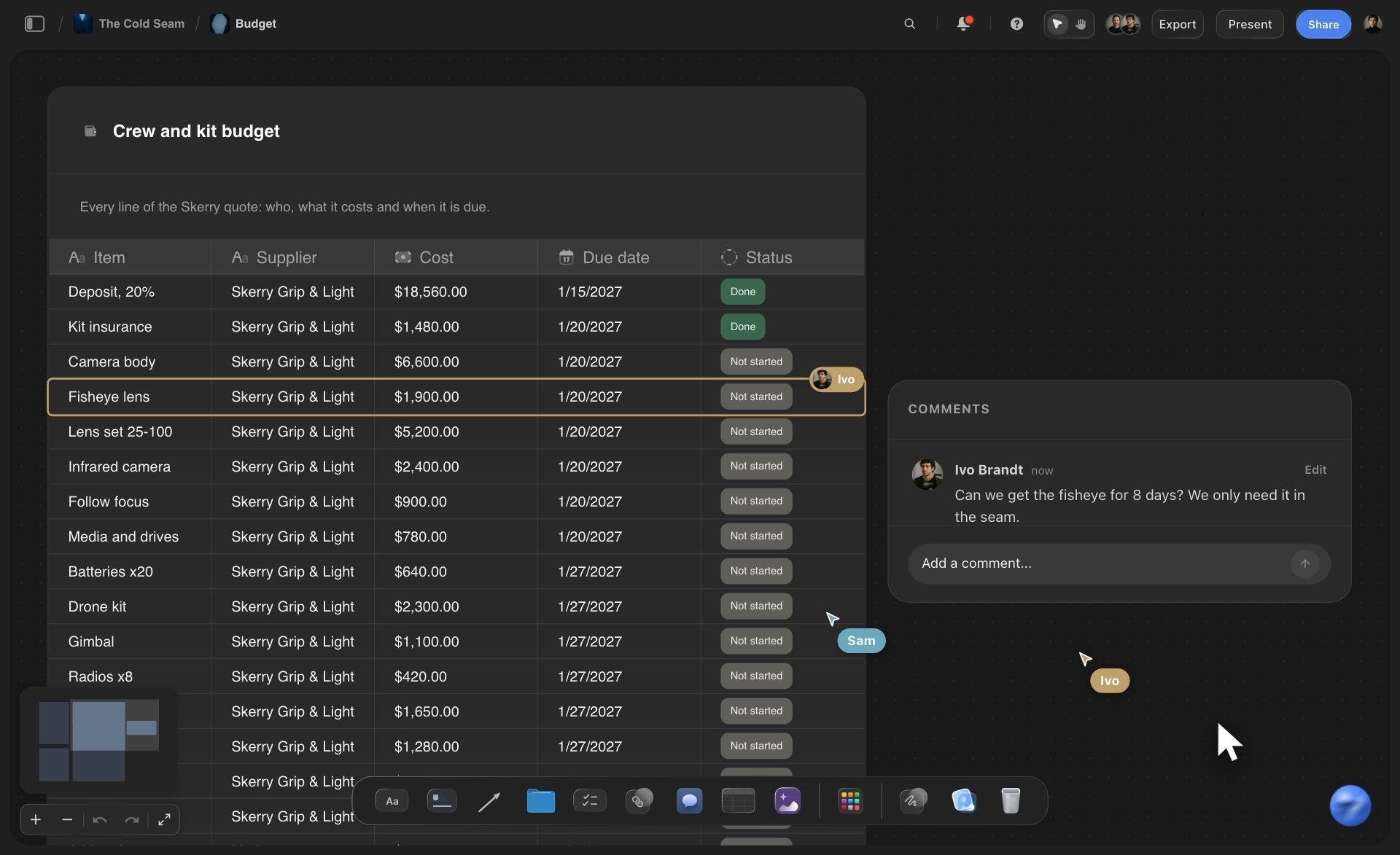
Every vendor and every budget line in a table
Each vendor is a row with what they bring, a contact, an arrival time and a status. The budget lines sit in their own table with a currency column, and a Sum in the column's footer shows the total.
See project plans with ChatGPT →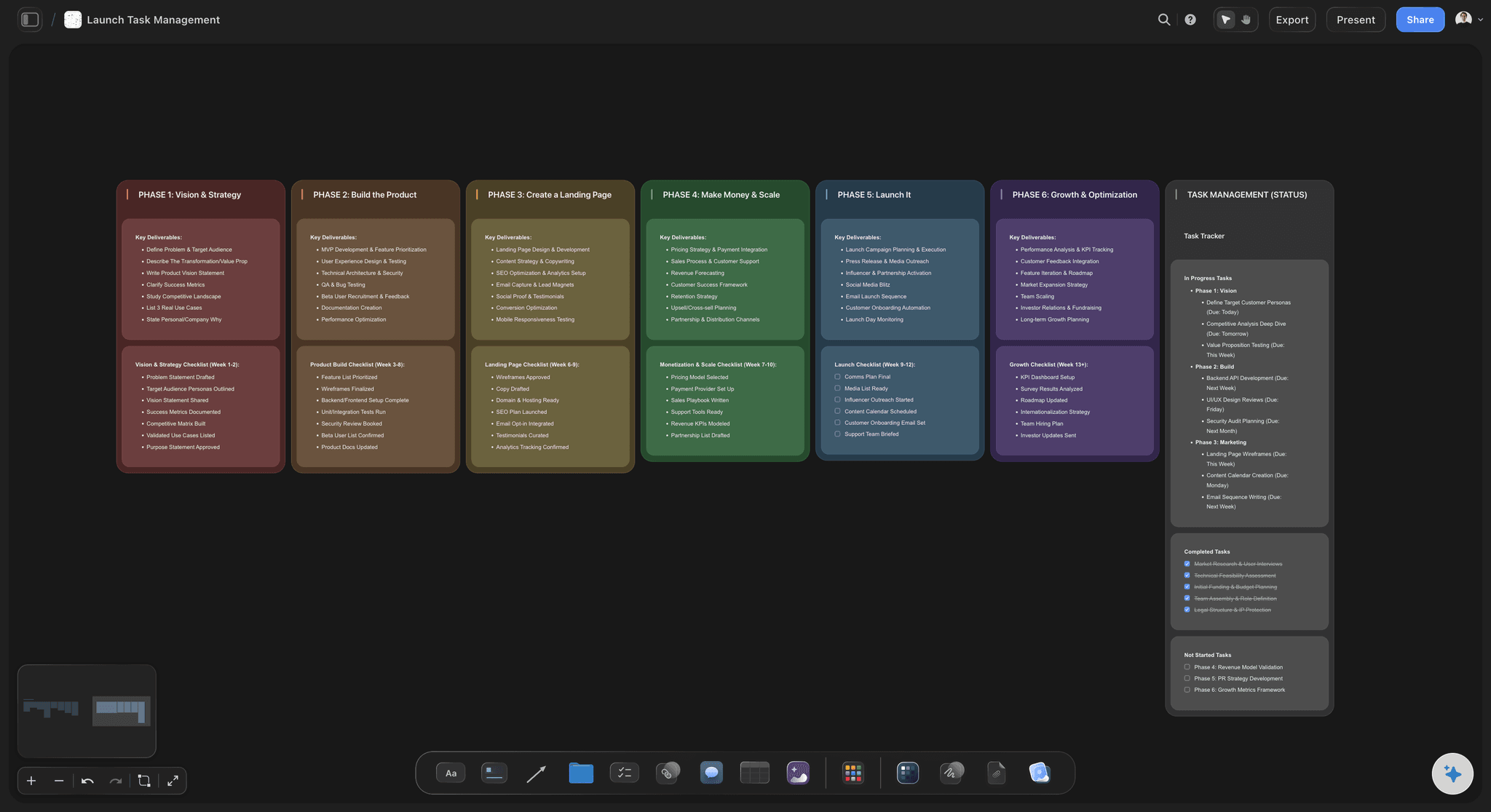
The countdown
The months before the date, as columns
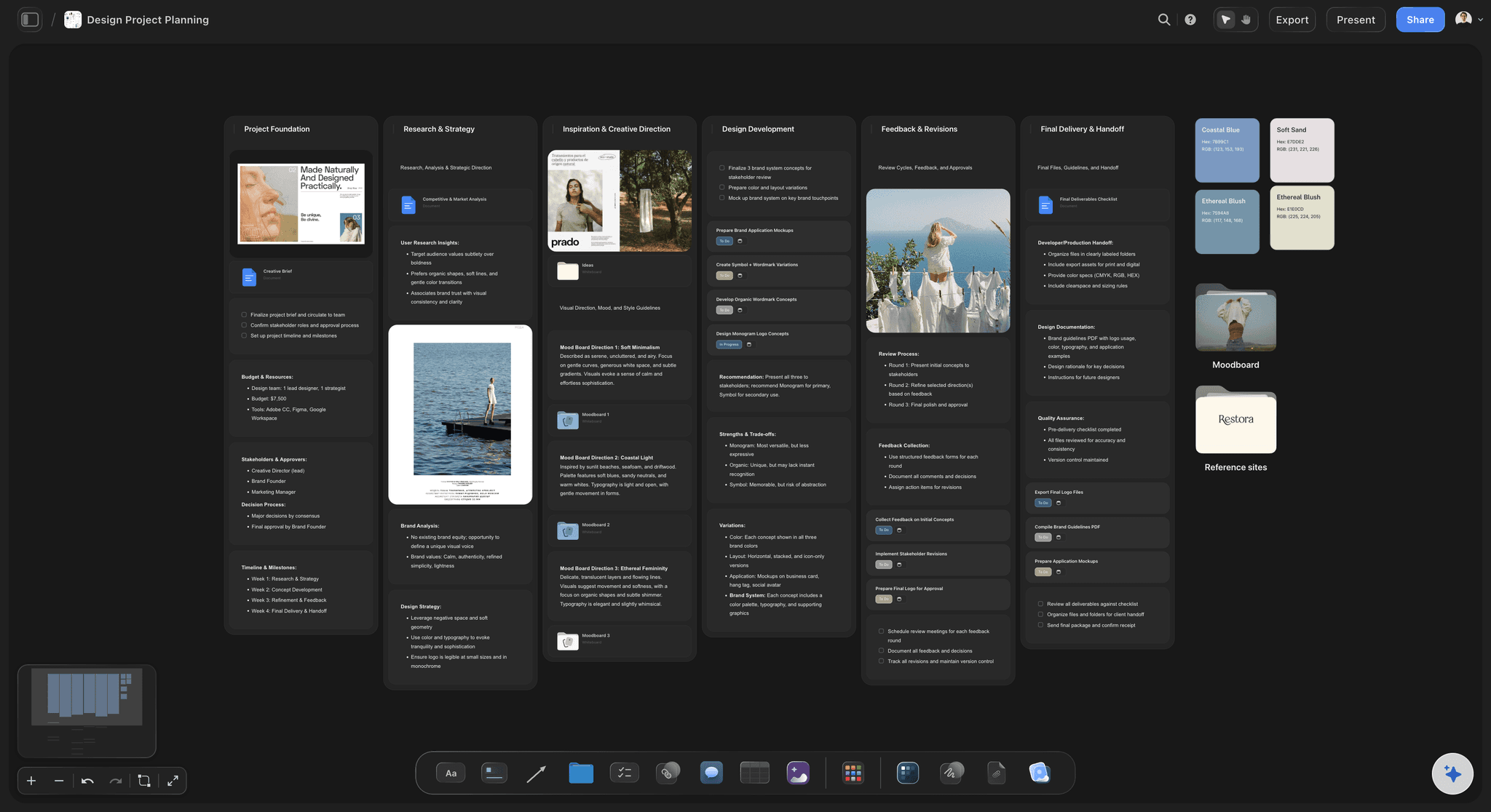
Ask for the countdown and each stage before the event becomes a column of to-dos: twelve weeks out, eight, four, the week of, the day before. A column with open boxes in week four is the one to chase.
See to-do lists with ChatGPT →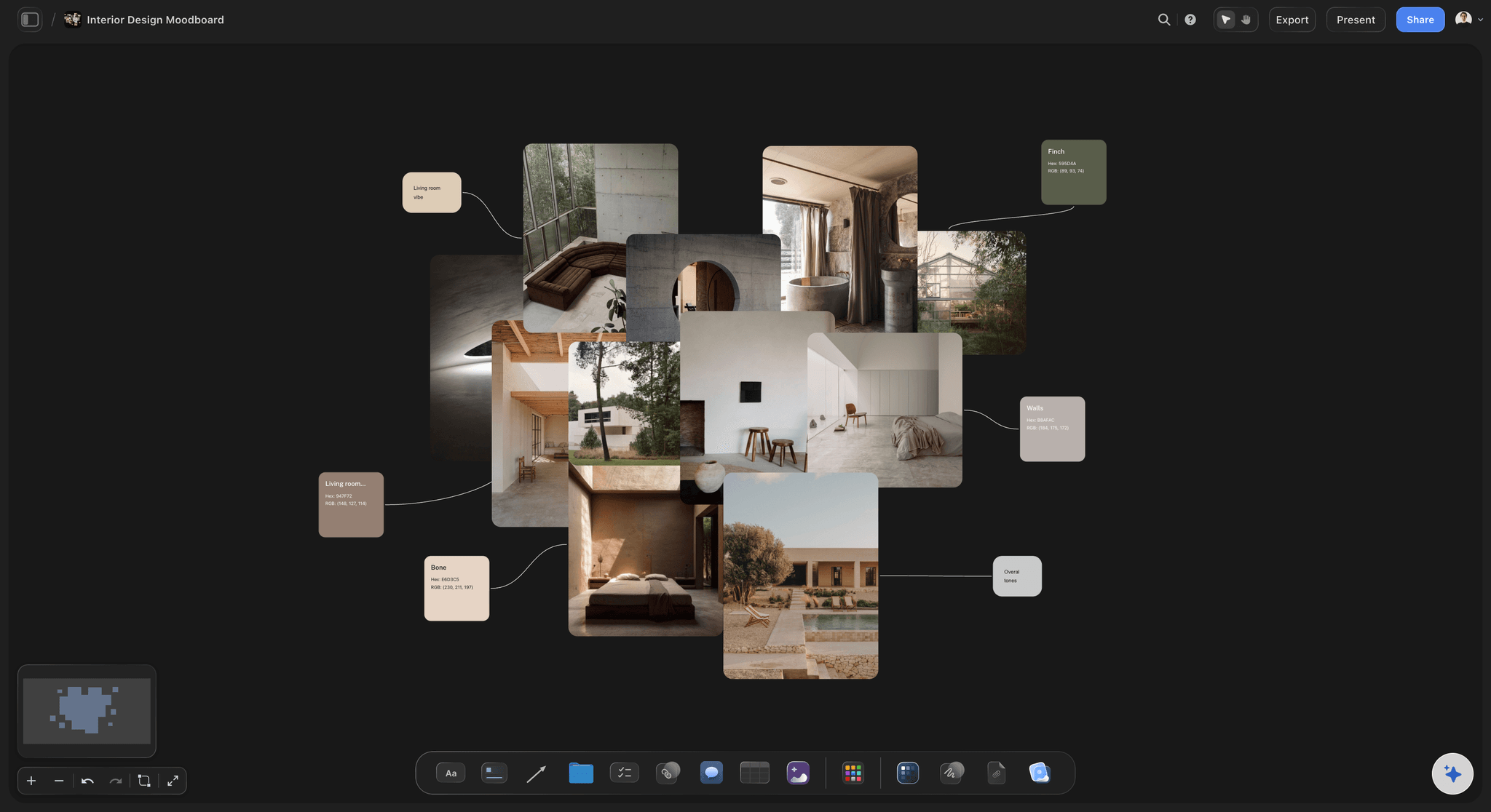
The look
Mood pictures and a palette beside the timeline
Reference pictures for the flowers, the tables and the light sit beside a colour palette ChatGPT builds. The florist and the stylist see the same look the couple chose.
See moodboards with ChatGPT →
The client
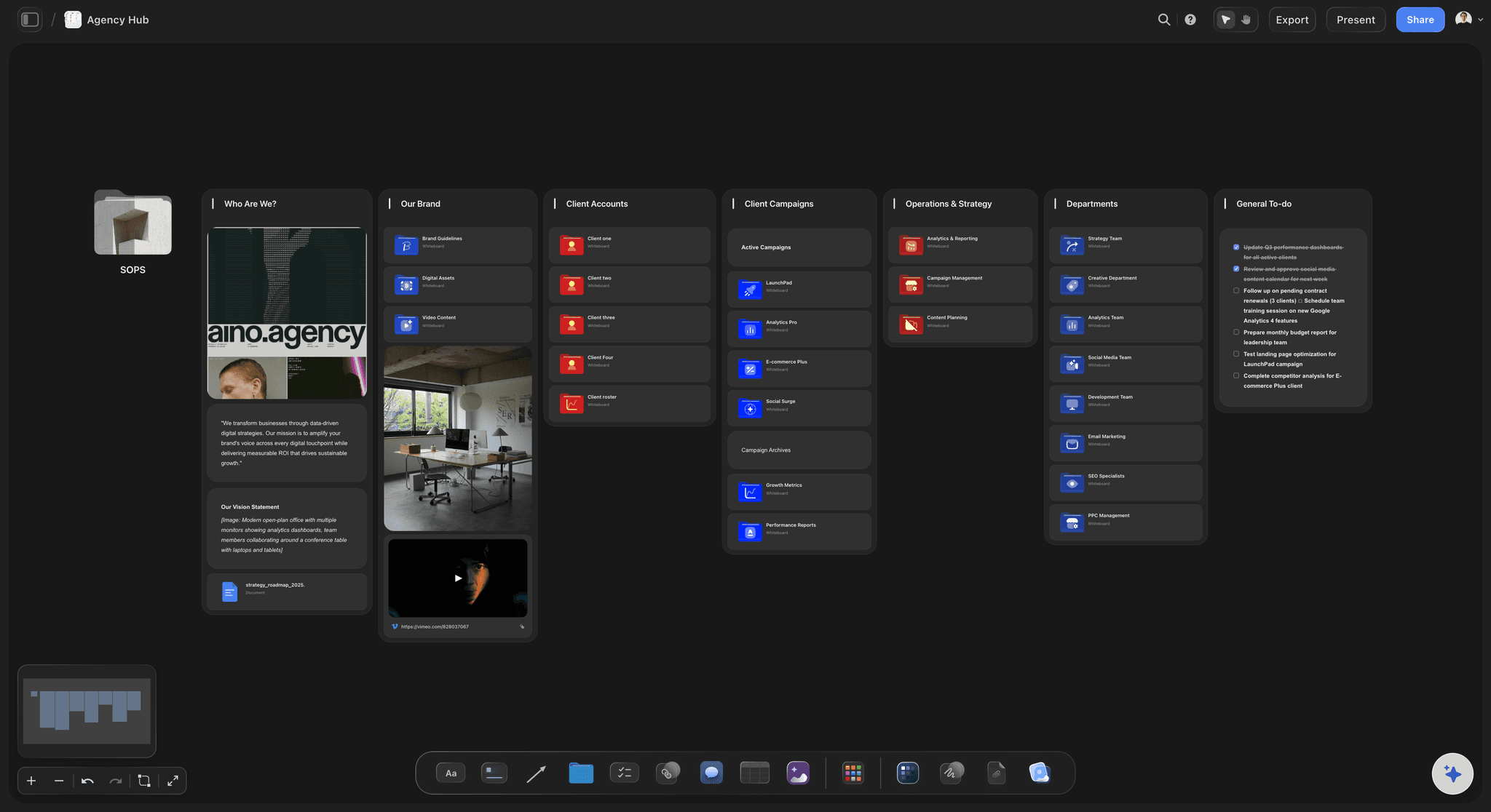
Decisions waiting on the client, in one column
Ask for the open decisions as a column of their own: the menu, the seating plan, the last song. Move a card out when the client answers, and every planner sees what is still open.
See kanban boards with ChatGPT →ChatGPT plans the event. It costs no Storyflow AI credits.
The plugin runs on ChatGPT's own model and your ChatGPT plan, so an event plan built through it uses no Storyflow AI credits. A free Storyflow account that a paid member invited can make 25 plugin actions a week, reset each Monday (UTC); every read and every change counts as one. Plus, Pro and Max have no weekly limit. Storyflow is paid-only during early access, from $7.99 a month billed annually ($9.99 monthly), and the co-planner or client you invite joins free.
No Storyflow AI credits spent on plans ChatGPT builds
25 plugin actions a week on an invited free account
No weekly limit on Plus, Pro and Max
Co-planners and the client join the event's board free
You choose which events ChatGPT may open, and whether it may change them
Built for people with taste
Where an event planned in a chat comes apart.
ChatGPT gets the timings right on the first draft. Keeping everyone on the latest version is the hard part.
The day
A run of show nobody has the latest copy of
One run of show, on the board: The timeline lives in one table on the event's board. The caterer, the band and the venue read the same rows, not a PDF from three weeks ago.
A change rewrites the table: The ceremony moves to 14:30. Tell ChatGPT and it rewrites the run of show with every row after it shifted. Read it once before you share it.
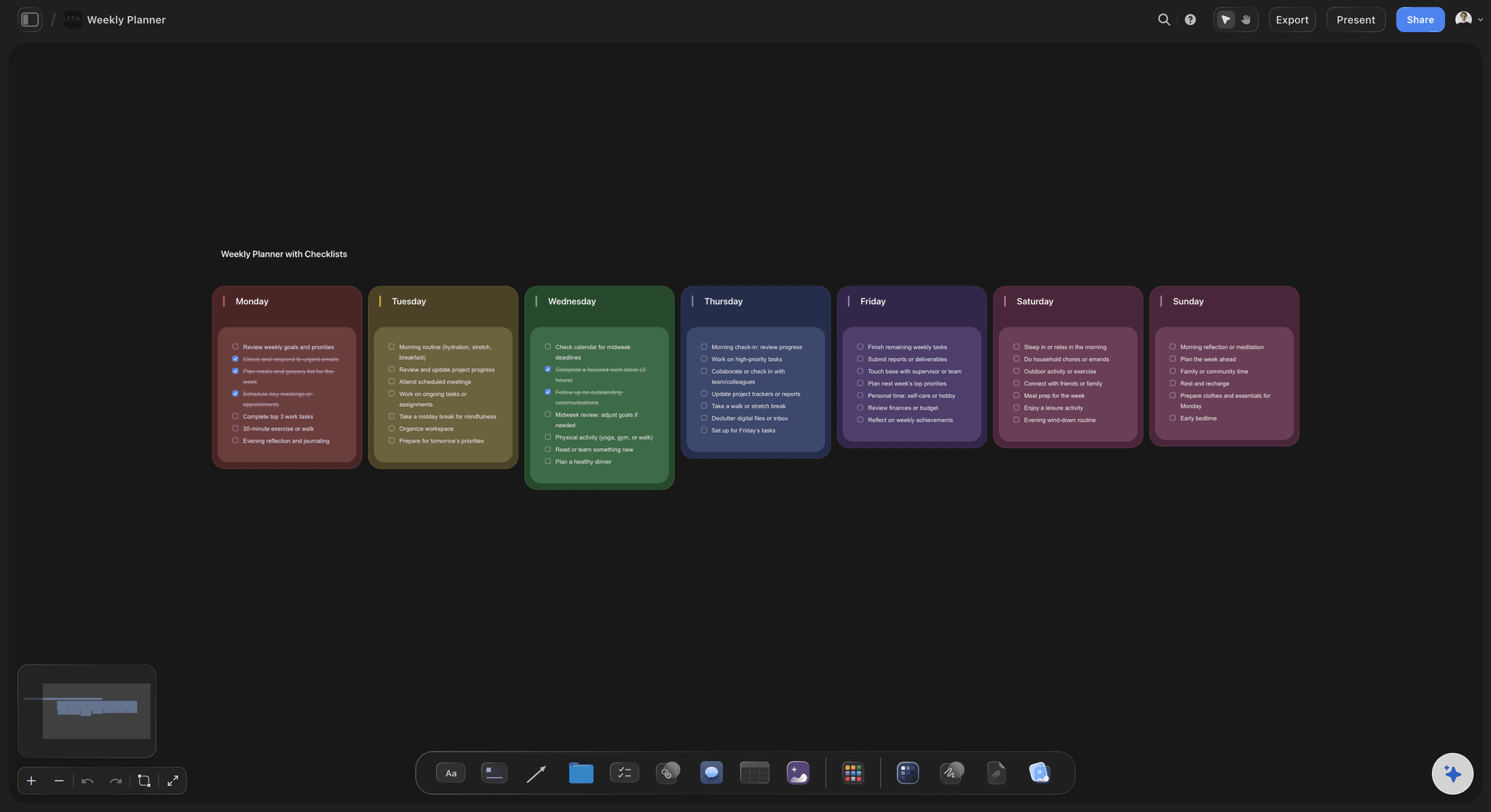
The event week, a column per day: Ask for the week of the event as a column per day, each with its to-dos: final numbers on Monday, the rehearsal on Friday, the setup on Saturday morning.
A day-of checklist you tick: The day-of checklist is a to-do card per stage of the day. The lead planner ticks it on a phone in the browser while the second planner works the other room.
The venue
Logistics spread across five inboxes
The venue's rules read from the board: Put the venue pack on the board as a PDF. ChatGPT reads up to its first 40,000 characters, so the curfew, the load-in door and the noise limit end up in the run of show.
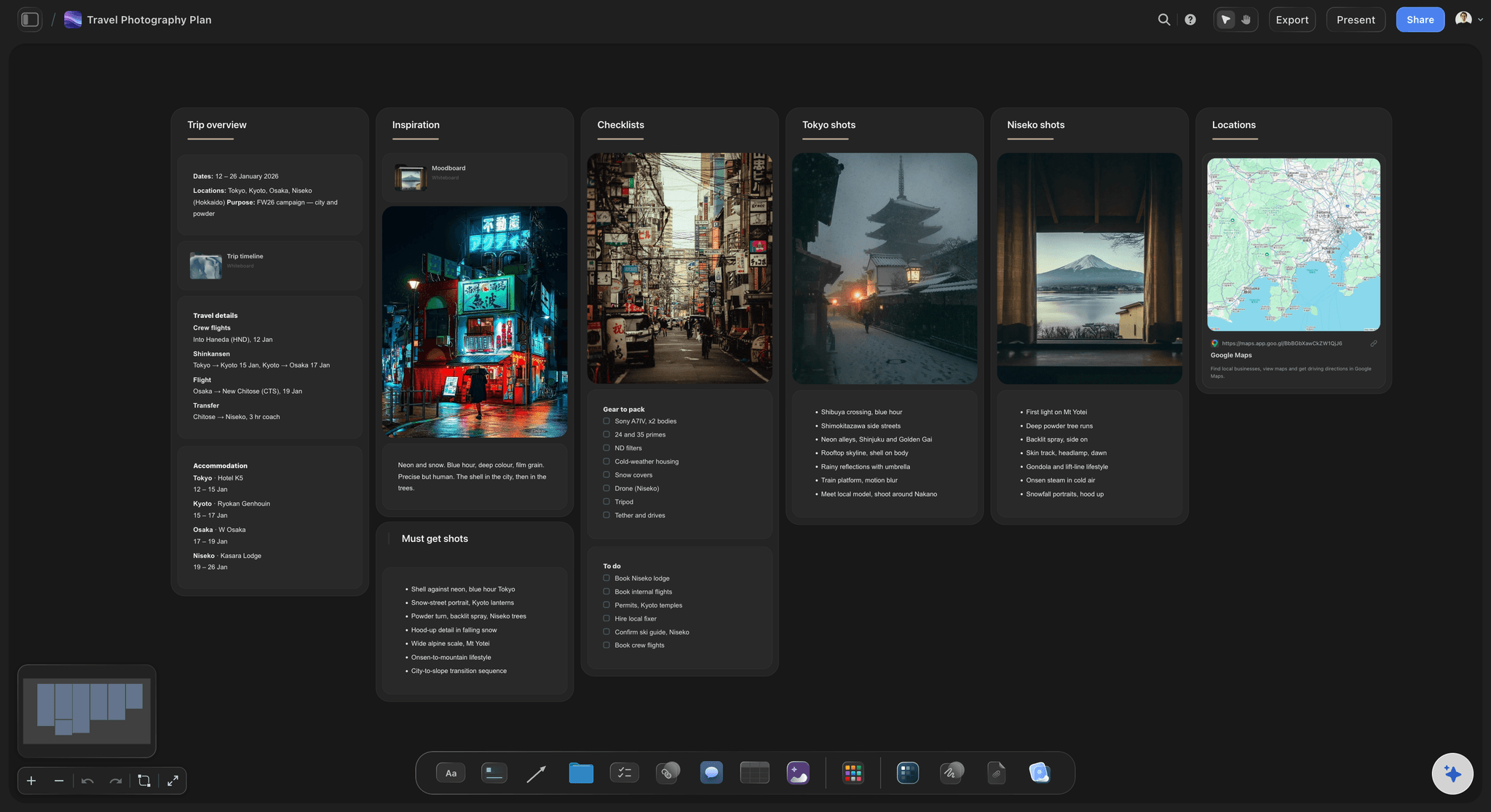
Venue photos through a link: Ask ChatGPT for the "Add your photos" link and send your walk-through photos from your phone: up to 200 pictures, for 15 minutes. They land on the board as they upload.
Guest travel in one place: For a destination event, ask for the travel as its own table: arrivals, rooms, transfers and who meets whom. It sits next to the run of show it feeds.
The flow of the day as a diagram: Ask for the guests' route through the day as a diagram with labelled arrows: arrival, ceremony, drinks, dinner, dancing. Staff can see where people go next.
The team
Planners, vendors and the client on different versions
One board per event: Each event is its own project, with its own board. Give ChatGPT only the events it should open, and keep the rest closed.
Owners and dates on every to-do: Give each to-do an owner and a due date in Storyflow, and the owner gets an in-app notice. ChatGPT writes the to-dos but cannot assign them.
One link for the client: Share the board from Storyflow with a view-only link. The couple or the client opens it in a browser with no account. To comment, they sign in.
Ask what changed: Ask ChatGPT what changed on the event's board this week and who changed it. It reads the board's history and lists what your co-planner added, edited or moved.
Explore templates for your project
Every template opens as a real, editable board on the infinite canvas. Pick the closest fit and make it your own.
Commercial Moodboard
Pin references, palettes, and tone for a commercial so the look is clear before the shoot.
One app instead of five
Storyflow with ChatGPT, ChatGPT alone, or HoneyBook.
Storyflow holds the plan for the day. HoneyBook, also in ChatGPT's plugin directory, handles the booking: proposals, contracts, invoices and payments, with lead forms, a scheduler, automations and SMS reminders on its paid tiers (as of October 2026; see HoneyBook pricing).
Storyflow with ChatGPT
Recommended
Run of show, vendors and checklist drafted by ChatGPT
Run of show, vendors, budget and checklist on one board
Mood pictures and a palette beside the timeline
Answers about clients, invoices and bookings in ChatGPT
Proposals and contracts sent to the client
Invoices and online payments
Lead forms and a meeting scheduler
Automations and SMS reminders
ChatGPT on its own
Run of show, vendors and checklist drafted by ChatGPT
Run of show, vendors, budget and checklist on one board
Mood pictures and a palette beside the timeline
Answers about clients, invoices and bookings in ChatGPT
Proposals and contracts sent to the client
Invoices and online payments
Lead forms and a meeting scheduler
Automations and SMS reminders
HoneyBook
Run of show, vendors and checklist drafted by ChatGPT
Run of show, vendors, budget and checklist on one board
Mood pictures and a palette beside the timeline
Answers about clients, invoices and bookings in ChatGPT
Proposals and contracts sent to the client
Invoices and online payments
Lead forms and a meeting scheduler
Automations and SMS reminders
What creators are saying
Join early creators getting structured workspaces and AI that remembers their projects
“Storyflow has sped up my workflow by at least 3x, which means more flow state and more projects I can actually ship. It truly changed the way me and my team create.”

Reilin Joey
Director & YouTuber
“One prompt gets me a structured board. But the tactics are my favorite. I run my YouTube scripts through them and my intros and retention got better. It's amazing.”

Justkay
YouTuber & Freelance Filmmaker
“I used to juggle five apps to plan a project. Now I describe what I am making and get boards, lists, and a schedule. All in one place.”

George
@fernwehchronicles
Event plans with ChatGPT: questions
What event and wedding planners ask before ChatGPT drafts the next event.
Yes. Give ChatGPT the date, the venue, the guest count and the budget, and it drafts a run of show, a vendor list, budget lines, a day-of checklist and the look of the day. With the Storyflow plugin installed, it builds all of it on the event's board: the run of show, vendors and budget as tables, the checklist as to-dos, and mood pictures with a colour palette.
Storyflow is our pick first, on one basis: it puts the whole event on one board, the run of show, vendors, budget lines, countdown, day-of checklist and mood references, where co-planners and the client read the same version. Storyflow is our product. HoneyBook, also in ChatGPT's directory, is the pick for proposals, contracts, invoices and payments, which Storyflow does not handle.
Open Plugins in ChatGPT's sidebar, find Storyflow and open the listing by Storyflow LTD. Select Install plugin, sign in to Storyflow when asked, and choose which projects ChatGPT may use. Reading is always on; you decide whether it may also make changes. Availability depends on your ChatGPT plan, workspace and region, and in a Business or Enterprise workspace an admin can turn plugins on or off.
Yes. Ask for the run of show and ChatGPT builds it as a table on your Storyflow board: the time, how long, what happens, who leads, where and the cue. One request builds up to 8 columns and 50 rows, so a 26-row wedding day fits with room to spare. Tables cannot be sorted, so ask for the rows in time order, and split a two-day event into one table a day.
You change them, or ChatGPT does. Storyflow's times do not recalculate on their own, so moving the ceremony by 30 minutes does not shift the rows below it. Tell ChatGPT what moved and it rewrites the whole table with the new times, or edit the cells by hand. Read the new version once before you share it with the vendors.
Yes, as tables on the event's board. The vendor table holds what each one brings, a contact, an arrival time and a status. The budget table holds a line per cost with a currency column; set that column's footer to Sum in Storyflow to see the total. Storyflow does not send invoices or take payments, so deposits stay in your booking tool.
Yes. A photo attached in the ChatGPT chat does not reach Storyflow, so ask ChatGPT for the "Add your photos" link: it works for 15 minutes and takes up to 200 pictures from your phone or computer. ChatGPT can also add reference pictures from direct image addresses, and Storyflow keeps its own copy, plus a colour palette for the look.
Yes. Share the board from Storyflow with a view-only link; ChatGPT cannot make share links. The couple or the client opens it in a browser with no account and sees the run of show, the look and the open decisions. To comment, they sign in. Anyone a paid member invites to the board joins free.
Not a to-do. ChatGPT writes the to-dos but cannot set who owns them; give each one an assignee and a due date in Storyflow, and the assignee gets an in-app notification. In a table, ChatGPT can fill an Owner column with people who already have access to the board. A vendor who is not on the board stays a typed name. Storyflow sends no due-date reminders.
Through the plugin, ChatGPT cannot delete a card, read the board's comments, make pictures, assign a to-do or create a share link. Storyflow itself has no calendar view or Gantt chart, no recalculating timeline, and no proposals, contracts, invoices, payments or reminders. It does not send the run of show to vendors either: you share the board, and each vendor reads their rows.
No. Storyflow holds the plan for the event, not the business side of the booking. HoneyBook, which is in ChatGPT's plugin directory, covers proposals, contracts, invoices and online payments for event businesses, and its plugin lets you ask about clients, invoices and bookings in ChatGPT. Keep the booking in HoneyBook and the plan for the day in Storyflow.
The plugin uses no Storyflow AI credits, because it runs on ChatGPT's own model and your ChatGPT plan. A free Storyflow account that a paid member invited can make 25 plugin actions a week, reset each Monday (UTC). Plus, Pro and Max have no weekly limit. Storyflow is paid-only during early access: Plus is $7.99, Pro $14 and Max $39 a month, billed annually.
Yes, in the phone's browser. Storyflow has no native app; it runs in the browser on a phone, a tablet or a laptop. Building the plan is easiest on a laptop. On the day, open the event's board on your phone to read the run of show and tick the day-of checklist as each stage is done.
Yes. Keep each event in its own Storyflow project, and when you sign in, choose which projects ChatGPT may open: all of them, or the ones you tick. Ask ChatGPT to list your projects and boards, or what changed on one event's board this week. Each connection ends after 30 days, and ChatGPT then asks you to sign in again.
Yes. Claude, Gemini and Grok connect to the same Storyflow account as a custom connector at https://mcp.storyflow.so/mcp, while ChatGPT uses the directory plugin. A planner drafting in ChatGPT and a co-planner in Claude build on the same event board. Storyflow's connection guide covers the steps for each assistant.
More from Storyflow
Connect ChatGPT to Storyflow
Storyflow MCP server for every assistant
Project plan with ChatGPT
Kanban board with ChatGPT
Moodboard with ChatGPT
To-do list with ChatGPT
Storyflow for event planners
AI run of show generator
Wedding planning board
Wedding moodboard
Event videography planner
How to plan an event video
Plan the event in the chat. Run the day from the board.
The run of show, the vendors, the budget lines, the checklist and the look, on one board the client can open.