
Category
Planning Tools
Author

Justkay
Documentary Filmmaker & Founder at Storyflow
Topics
2026-05-18
•
Updated May 18, 2026
•
13 min read
•
Planning Tools- best creative planning tools 2026
- creative planning software
- creative planning tools
- creative project planning
- creative brief planning
- Storyflow creative planning
What are the best creative planning tools in 2026?
The best creative planning tools in 2026 are Storyflow (best AI canvas for planning the box and developing the idea inside it), Milanote (best visual board for creative planning), Miro (best for collaborative creative planning), and Notion (best for creative planning that connects to delivery). You cannot plan a creative idea, only the box it has to fit in: the brief, the deadline, the budget, the format, and the audience. The best tools plan that box firmly and still leave the idea room to breathe.

All 12 Creative Planning Tools, Ranked
- Storyflow: best AI canvas for the box and the idea together
- Milanote: best visual board for creative planning
- Miro: best for collaborative creative planning
- Notion: best for planning that connects to delivery
- Mural: best for facilitated creative planning
- FigJam: best for design-team creative planning
- Trello: best lightweight creative planning
- Asana: best for structured, accountable planning
- Lucidspark: best for workshop-style planning
- Monday.com: best for creative-ops planning
- ClickUp: best all-in-one planning and delivery
- Evernote: best for note-based capture
Full disclosure: Storyflow is our own product, and we rank it #1 for one job: planning the box and developing the idea on the same AI canvas. It is a newer platform and not a delivery tracker, so for collaborative workshops at scale Miro is more established, and for pushing deadlines and deliverables through execution you will still want a tracker like Asana. We link to every tool so you can judge the fit.
Quick Comparison: Best Creative Planning Tools
These four lead the list, balanced on planning the box firmly and leaving the idea room to breathe: an AI canvas, a visual board, a collaborative canvas, and planning that connects to delivery.
| Tool | Best For | AI Features | Price |
|---|---|---|---|
| Storyflow | The box and the idea on one AI canvas | AI pressure-tests the idea vs the brief | $7.99 mo annual (free plan late 2026) |
| Milanote | Visual creative planning boards | Minimal AI | Free / $12.50 mo |
| Miro | Collaborative creative planning | Miro AI assist | Free / $8 mo |
| Notion | Planning that connects to delivery | Notion AI in docs and databases | Free / $10 mo |
1) Quick Answer: The Best Creative Planning Tools in 2026
The best creative planning tools in 2026 are Storyflow (best AI canvas for planning the box and developing the idea inside it), Milanote (best visual board for creative planning), Miro (best for collaborative creative planning), and Notion (best for creative planning that connects to delivery). The right pick depends on whether you mostly need the box held firm or the idea developed.
You cannot plan a creative idea. You can only plan the box it has to fit in. A creative project plan that lists "have the idea" as a task on Tuesday is fiction, because the idea does not arrive on a schedule. What is real, and what can be planned, is the box: the brief, the deadline, the budget, the format, the audience. Plan the box firmly, and the idea has room to develop inside it.
I have planned documentary projects, brand films, and content for years, and the planning that worked was never a task list. It was a clear box and an open surface for the work to grow on. The Plan the Box, Not the Idea framework in section 3 ranks all 12 tools by exactly that balance.
For planning the shape of any project, see The 12 Best Visual Planning Tools in 2026. For running creative work once it is planned, see The 12 Best Creative Project Management Tools in 2026.
2) Comparison Table: 12 Creative Planning Tools at a Glance
Pricing reflects publicly listed plans as of early 2026 and changes often. Ratings weigh how firmly a tool plans constraints, how much room it leaves the idea, collaboration, AI support, and pricing for creatives and teams.
3) Plan the Box, Not the Idea
Every creative project plan runs into the same wall. You can list deliverables, you can list deadlines, but you cannot list the part that matters: the idea. The idea does not arrive because the calendar says it should. It arrives in the shower, on the third bad draft, in a conversation that was about something else. A plan that pretends otherwise is a plan that will be wrong by Wednesday.
So the question is not how to plan a creative idea. It cannot be done. The question is what, around the idea, can be planned. And the answer is the box.
The box is everything the idea has to fit inside. The brief: what the work is for and who it is for. The deadline: when it has to exist. The budget: what it can cost. The format: a 60-second spot, a 2,000-word piece, a six-slide deck. The audience: who has to feel something at the end. None of that is the idea, and all of it can be planned with total precision. The box is the planable part of creative work.
Here is why the box matters more than it sounds. A firm box does not constrain a creative idea. It rescues it. A blank brief, an open deadline, and no format is not freedom; it is the condition under which creative work spirals forever and ships nothing. The box gives the idea a shape to push against, a finish line to run toward, and a reason to stop. Constraints are not the enemy of creative work. The absence of constraints is.
That gives us the rule for choosing a tool. A creative planning tool has two jobs: plan the box firmly, and leave the idea room to breathe. A tool that only does the first, a rigid task list with the brief, deadline, and deliverables locked down, plans the box and suffocates the idea, because creative work cannot grow in a row of checkboxes. A tool that only does the second, a free-form board with no constraints anywhere, gives the idea infinite room and no finish line. The 12 tools below are ranked by whether they do both: hold the box firm and still give the work an open surface to develop on.
4) How We Evaluated These Tools
Five criteria, weighted in this order:
- Plans the box. Can the tool hold the brief, deadline, budget, format, and audience firmly in one place? The constraints are the planable part of creative work.
- Leaves the idea room. Does the tool give creative work an open, visual surface to develop on, or force it into checkboxes too early?
- Keeps the box and the work together. The constraints and the developing idea should be visible at once, so the work stays accountable to the brief.
- Collaboration and AI support. Creative planning is often shared. AI that can pressure-test an idea against the brief is a real advantage.
- Pricing for creatives. Creative planning runs from solo freelancers to studios. Enterprise-only pricing is marked down for smaller creatives.
Testing covered planning a brand film, planning a content series, and planning an agency creative project, each from blank brief to a ready-to-execute plan.
5) Quick Picks by Creative Planning Need
Best AI canvas for creative planning: Storyflow. The box and the developing idea on one canvas, with AI that pressure-tests the idea against the brief.
Best visual creative planning board: Milanote. Calm, organized boards for planning creative work visually.
Best for collaborative creative planning: Miro. An infinite canvas for a team to plan creative work together.
Best for planning that connects to delivery: Notion. The plan links to the docs and tasks where the work ships.
Best for facilitated creative planning: Mural. Facilitator controls for planning creative work as a group.
Best lightweight option: Trello. Simple boards for planning small creative projects.
Best cheapest working setup: Storyflow Plus ($7.99/month annual). The box and the idea on one canvas.
6) Detailed Reviews: 12 Creative Planning Tools
1. Storyflow
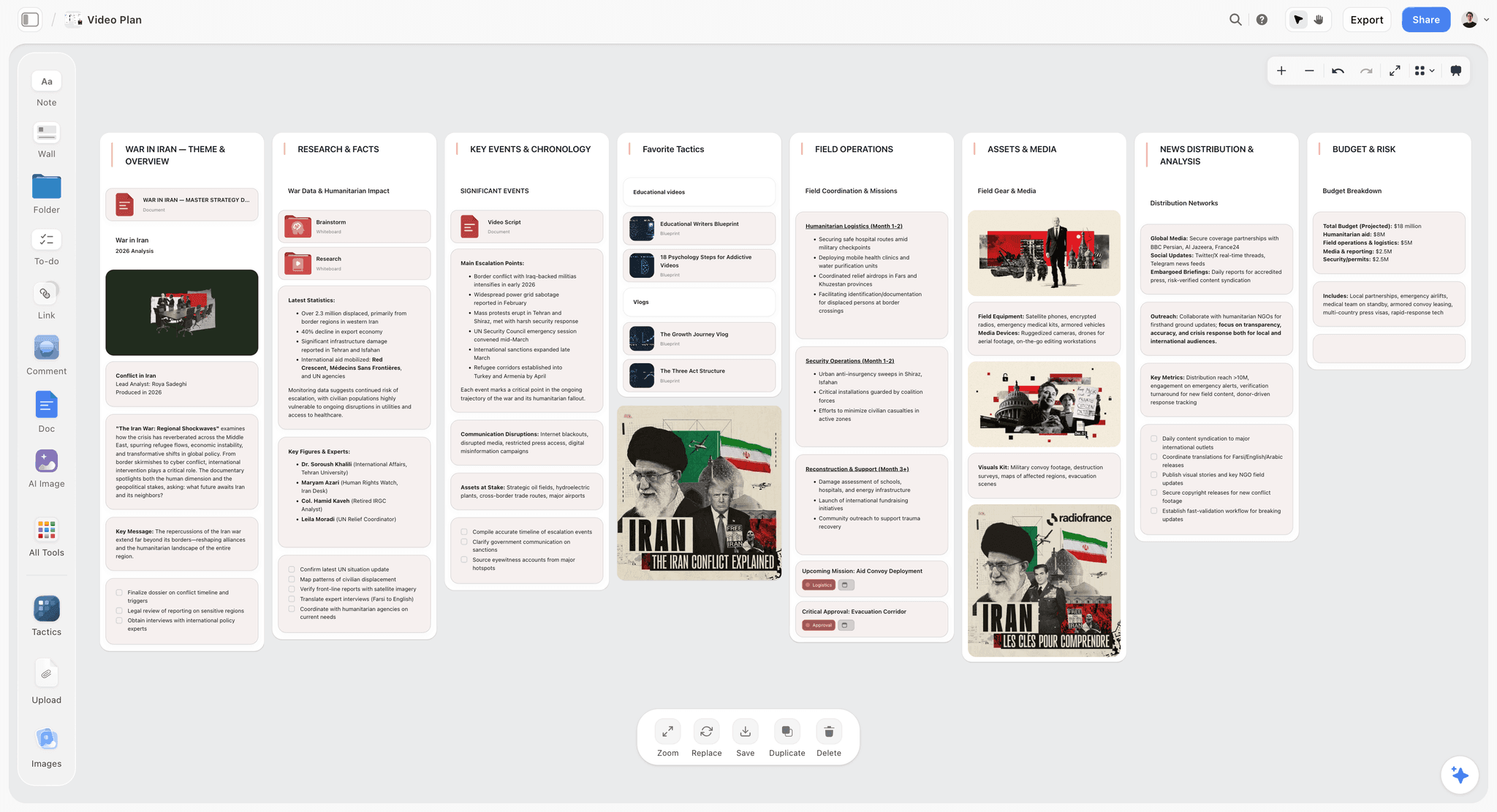
Storyflow does both jobs of creative planning on one canvas. The box, the brief, deadline, budget, format, and audience, lives as firm cards at the top of the board, and the idea develops in open space below it, as notes, images, sketches, and drafts. The AI reads the full canvas, so it can pressure-test the developing idea against the brief, flag where the work has drifted from the audience, or push the idea further while the box stays fixed. The constraints and the creative work are in view together, so the idea always has both a shape to push against and room to grow.
Best for: Creatives and teams who want the box and the idea on one canvas, with AI that holds the work to the brief.
Verdict: The strongest tool for creative planning that plans the box firmly and still lets the idea breathe.
Key features
- One canvas for the box (brief, deadline, budget, format, audience) and the developing idea.
- AI reads the full canvas plus up to 1 Tactic and 3 Documents you @-mention.
- AI pressure-tests the idea against the brief and audience.
- Story Blueprints for structuring creative work.
- Unlimited collaboration on every plan for the creative team (invited collaborators join free today).
Pricing
Paid-only during early access. Plus: $7.99/mo annual. Unlimited boards and cards, unlimited collaboration, basic AI, full Story Blueprints, unlimited uploads. Pro: $14/mo annual. AI image generation, 20x AI usage. Max: $39/mo annual. 40x more AI, team workspace with roles. Free: launches before the end of 2026 with unlimited boards and cards, unlimited collaboration, basic AI, and 20 file uploads.
Pros
- Plans the box and develops the idea on one surface.
- AI holds the creative work accountable to the brief.
- Unlimited free collaboration for the team.
Cons
- Not a delivery tracker; pair with a task tool for execution.
- Fewer rigid project-ops features than Asana or Monday.com.
- Newer platform with a smaller template library than Miro.
2. Milanote
Milanote is the visual planning board creatives reach for, and it shines at the second job: leaving the idea room to breathe. Notes, images, links, and sketches sit on calm, organized boards where creative work can develop without pressure. It plans the box well enough by holding a brief board, though the constraints are softer than a structured tool's.
Best for: Creatives who want a calm, visual board to develop creative work on.
Verdict: The strongest visual creative planning board. Excellent for the idea; pair it with firmer deadline tracking.
Key features
- Visual boards for notes, images, and links.
- Brief and inspiration boards.
- Drag-and-drop creative planning.
- Board templates for creative projects.
Pricing
Free for 100 items. Paid: $12.50/mo.
Pros
- Calm, organized boards for developing ideas.
- Loved by creatives for visual planning.
- Easy to start.
Cons
- The box is held softly, with no firm deadline enforcement.
- The 100-item free cap is tight.
- No AI to pressure-test the idea.
3. Miro
Miro is the infinite canvas for collaborative creative planning. A team can lay out the brief, the references, and the developing idea on one board, and the open space gives the work room to breathe. The box is held as well as the team chooses to structure it, since Miro provides the surface rather than enforcing the constraints.
Best for: Teams who want to plan creative work together on an infinite canvas.
Verdict: The strongest collaborative creative planning canvas. The box is as firm as the team makes it.
Key features
- Infinite canvas for the brief and the idea.
- Strong real-time collaboration.
- Templates for creative planning.
- Voting, timers, and comments.
Pricing
Free for 3 boards. Starter: $8/mo annual. Business: $16/mo.
Pros
- Excellent collaborative canvas.
- Plenty of room for the idea to develop.
- Deep template library.
Cons
- The box is only as firm as the team structures it.
- The 3-board free limit is tight.
- No AI focused on creative briefs.
4. Notion
Notion plans the box well: a brief, a deadline, a budget, and deliverables can be held in structured, linked databases, and the plan connects straight to the docs and tasks where the work ships. Where it is weaker is the idea, since Notion's document and database structure gives creative work less open, visual room than a canvas.
Best for: Teams who want creative planning that connects directly to delivery.
Verdict: Strong at planning the box and linking to delivery, more moderate at letting the idea breathe.
Key features
- Databases for briefs, deadlines, and deliverables.
- Linked docs and tasks.
- Templates for creative planning.
- Standard AI features.
Pricing
Free for personal use. Plus: $10/mo. Business: $18/mo.
Pros
- Holds the box firmly in structured databases.
- Connects planning to delivery.
- Strong documentation.
Cons
- Less open, visual room for the idea than a canvas.
- Creative work can feel boxed into databases.
- Setup takes time.
5. Mural
Mural is the facilitation specialist, useful when creative planning happens as a group session. Facilitator controls and timers structure the meeting, and the canvas gives the idea room to develop. Like Miro, it holds the box as firmly as the facilitator structures it.
Best for: Teams who plan creative work in facilitated group sessions.
Verdict: A strong facilitated creative planning tool. The box depends on the facilitator's structure.
Key features
- Facilitation tools and facilitator controls.
- Creative planning templates.
- Timers and structured sessions.
- Real-time collaboration.
Pricing
Free tier. Paid plans from roughly $12/mo.
Pros
- Strong facilitation for group planning.
- Good room for the idea on the canvas.
- Solid template library.
Cons
- Overlaps heavily with Miro.
- Best value with a dedicated facilitator.
- The box depends on facilitation discipline.
6. FigJam
FigJam, Figma's whiteboard, suits design teams planning creative work. The whiteboard gives the idea room to develop, and the bridge into Figma connects planning to design execution. The box is held loosely, as a brief sticky-note area rather than enforced constraints.
Best for: Design teams who plan creative work and execute in Figma.
Verdict: A good creative planning whiteboard for design teams. Holds the box loosely.
Key features
- Whiteboard for creative planning.
- Bridges into Figma for design work.
- Real-time collaboration.
- Templates and stickies.
Pricing
Free for 3 files. Paid plans from roughly $5/mo.
Pros
- Good room for the idea.
- Clean handoff to Figma.
- Strong collaboration.
Cons
- The box is held loosely.
- 3-file free cap.
- Best value inside Figma.
7. Trello
Trello is the lightweight option: simple boards and cards for planning small creative projects. It holds a moderate box, a brief card, a due date, and gives the idea moderate room in card descriptions and attachments. For a solo creative with a small project, it is fast and clear.
Best for: Solo creatives planning small projects without overhead.
Verdict: A lightweight creative planning tool. Fine for small projects, thin for complex ones.
Key features
- Simple boards and cards.
- Due dates and labels.
- Card attachments and checklists.
- Power-Ups for extra features.
Pricing
Free tier. Standard: $5/mo. Premium: $10/mo.
Pros
- Fast and simple.
- Clear for small projects.
- Generous free tier.
Cons
- The card format limits the idea's room.
- Thin for complex creative projects.
- No AI for creative briefs.
8. Asana
Asana plans the box with precision: briefs, deadlines, dependencies, and deliverables are held in structured, accountable detail. That precision is its strength and its weakness for creative planning, because the idea gets almost no room to breathe. Creative work in Asana lives as task descriptions, and the developing idea has nowhere visual to grow.
Best for: Teams who need the box planned with strict, accountable precision.
Verdict: Strong at planning the box, weak at letting the idea breathe. Pair it with a canvas.
Key features
- Structured tasks, deadlines, and dependencies.
- Multiple project views.
- Workload and reporting.
- Automations.
Pricing
Free tier for small teams. Paid plans from roughly $11/mo.
Pros
- Plans the box with precision.
- Strong accountability and tracking.
- Good for delivery.
Cons
- The idea gets almost no room.
- Creative work feels boxed into tasks.
- Heavy for the planning stage.
9. Lucidspark
Lucidspark is a virtual whiteboard built for workshop-style collaboration. It gives the idea good room to develop and supports group creative planning sessions well. The box is held moderately, through brief areas and sticky notes rather than enforced structure.
Best for: Teams who run workshop-style creative planning sessions.
Verdict: A solid workshop whiteboard for creative planning. The box is held moderately.
Key features
- Virtual whiteboard for workshops.
- Strong ideation and voting tools.
- Facilitation features.
- Connects to Lucidchart.
Pricing
Free tier. Paid plans from roughly $8/mo.
Pros
- Good room for the idea.
- Solid workshop and facilitation tools.
- Connects to the Lucid suite.
Cons
- The box is held moderately.
- Best value inside the Lucid ecosystem.
- No AI for creative briefs.
10. Monday.com
Monday.com is a creative-ops platform that plans the box with strong, colorful structure: briefs, deadlines, owners, and deliverables tracked precisely. Like Asana, the precision comes at the cost of the idea's room, since creative work lives in board rows rather than open space.
Best for: Creative operations teams who need the box tracked with structure.
Verdict: Strong at planning the box, weak at the idea. A creative-ops tool, not an idea surface.
Key features
- Structured boards for briefs and deliverables.
- Timeline and workload views.
- Automations and integrations.
- Reporting dashboards.
Pricing
Free tier for small teams. Paid plans from roughly $9/mo per seat.
Pros
- Plans the box with strong structure.
- Good creative-ops tracking.
- Visual board layouts.
Cons
- The idea gets little open room.
- Per-seat pricing climbs.
- Heavy for early planning.
11. ClickUp
ClickUp is an all-in-one platform that plans the box thoroughly, with tasks, docs, goals, and views in one place. It is capable and dense, and like other ops tools it boxes the idea into structured tasks rather than giving it an open surface. The breadth is useful for delivery, less so for the developing idea.
Best for: Teams who want the box and delivery in one all-in-one tool.
Verdict: Plans the box thoroughly, leaves the idea little room. An all-in-one with a learning curve.
Key features
- Tasks, docs, goals, and multiple views.
- Templates for creative projects.
- Automations.
- Built-in AI features.
Pricing
Free tier. Unlimited: $7/mo. Business: $12/mo.
Pros
- Plans the box thoroughly.
- All-in-one for planning and delivery.
- Affordable paid tiers.
Cons
- The idea is boxed into tasks.
- Dense interface and a learning curve.
- Heavy for the planning stage.
12. Evernote
Evernote is a note tool that some creatives use for early planning: capturing brief notes, references, and early ideas. It gives the idea moderate room in long notes but holds the box weakly, with no real deadline or deliverable structure. It is a capture tool more than a planning surface.
Best for: Creatives who want a simple place to capture early planning notes.
Verdict: A capture tool, not a creative planning surface. Holds the box weakly.
Key features
- Notes and notebooks.
- Web clipper for references.
- Search across notes.
- Basic tasks.
Pricing
Free tier is limited. Paid plans from roughly $15/mo.
Pros
- Simple note capture.
- Good web clipper.
- Strong search.
Cons
- Holds the box weakly.
- No visual canvas for the idea.
- Free tier is restrictive.
7) Recommended Creative Planning Stacks
Stack 1: Solo Creative. Storyflow Plus ($7.99/month annual) for the box and the idea on one canvas + Trello Free (a light delivery board for the deadlines once planning is done).
Stack 2: Creative Team. Storyflow or Miro (plan the box and develop the idea) + Notion (connect the plan to delivery docs) + Asana or Monday.com (track the deadlines and deliverables in execution).
Stack 3: Agency Creative Project. Mural (facilitated planning sessions with the client) + Storyflow (the working creative canvas) + Monday.com (creative-ops tracking) for client-facing creative planning.
Stack 4: Cheapest Working Setup. Storyflow Plus ($7.99/month annual). The box, the developing idea, AI to hold the work to the brief, and unlimited collaboration.
The pattern across every stack: plan the box on a surface that still gives the idea room, then hand the deadlines to a delivery tool once the plan is set. The mistake to avoid is planning the creative work itself inside a delivery tool, where the idea suffocates before it has formed.
8) Honorable Mentions
- Pinterest. Useful for collecting visual references during creative planning.
- Google Docs. Fine for writing the brief, weak as a full planning surface.
- Craft. A polished document tool for writing creative briefs.
- Whimsical. A clean tool for diagrams and lightweight creative maps.
- A whiteboard and sticky notes. The original creative planning surface.
9) Tools to Avoid for Creative Planning
- A delivery tracker used to plan the idea. Asana, Monday.com, and ClickUp plan the box well, but creative work suffocates in a task list. Plan the idea on a canvas, then move deadlines into the tracker.
- A blank board with no box. Infinite room and no brief, deadline, or format is not freedom. It is how creative work spirals and ships nothing.
- A plan that schedules the idea. Listing "have the breakthrough" as a Tuesday task is fiction. Schedule the box, not the idea.
- A planning tool the team will not open. A dense ops tool used for planning gets abandoned. The planning surface has to be one creatives actually want to work in.
11) The Bottom Line
The best creative planning tools in 2026 are the ones that plan the box firmly and still let the idea breathe. Storyflow is the strongest, holding the brief and the developing idea on one AI canvas. Milanote is the best visual board, Miro the best collaborative canvas, and Notion the best for connecting the plan to delivery.
You cannot plan a creative idea. You can only plan the box it has to fit in. Set the brief, the deadline, the budget, the format, and the audience with precision, and give the idea an open surface to develop on. Do not schedule the breakthrough, and do not suffocate the work in a task list before it has formed.
For your next creative project, plan the box on a Storyflow canvas and let the idea develop right beside it, with AI holding the work to the brief.
10) FAQ: Creative Planning Tools
What is the best creative planning tool in 2026?
Storyflow is the strongest, because it plans the box, the brief, deadline, budget, format, and audience, on the same canvas where the idea develops, with AI that holds the work to the brief. Milanote is the best visual board, Miro the best collaborative canvas, and Notion the best for connecting the plan to delivery.
Are there specific AI tools for creative project planning?
Yes. Storyflow is the clearest example: an AI canvas built for creative project planning that holds the brief, deadline, budget, format, and audience as firm cards while its AI reads the full board and pressure-tests the developing idea against the brief. That full-canvas context is what separates a real AI planning tool from a general tool with an AI assistant bolted on, which generates from a prompt without reading the plan. Miro and Notion also offer AI features, but for planning specifically Storyflow's canvas-wide context is the meaningful difference.
What is creative planning?
Creative planning is the work of setting up a creative project so the idea has the best chance of arriving and shipping. It does not mean scheduling the idea, which is impossible, but planning the box around it: the brief, the deadline, the budget, the format, and the audience the work has to reach.
Can you actually plan creative work?
You cannot plan the creative idea itself, since ideas do not arrive on a schedule. You can plan everything around the idea: the constraints, the milestones, the brief, and the deadline. A good creative plan makes the box firm and leaves the idea room to develop inside it.
What is the difference between creative planning and project management?
Creative planning sets up the box and develops the idea before execution. Project management tracks the deliverables and deadlines during execution. Planning needs an open surface; management needs structure. Using a project management tool to plan creative work tends to suffocate the idea.
How is Storyflow used for creative planning?
Storyflow holds the box, the brief, deadline, budget, format, and audience, as firm cards on a canvas, and the idea develops in open space alongside them. The AI reads the full canvas, so it can pressure-test the developing idea against the brief and flag where the work has drifted from its audience.
What tools do creatives use for planning?
Creatives commonly use Milanote or Miro for visual planning boards, Storyflow for an AI canvas that plans the box and develops the idea, and Notion for connecting the plan to delivery. Delivery trackers like Asana or Monday.com are added for the execution stage, not the planning stage.
What is the cheapest creative planning tool?
Storyflow's free tier plans the box, develops the idea, includes AI to hold the work to the brief, and allows unlimited collaboration, at no cost. Milanote, Miro, Trello, and FigJam also have free tiers, though most cap boards, items, or files.
Why do creative projects fail at the planning stage?
Two opposite failures. Either the box is never set, so the work has no brief, no deadline, and no format and spirals forever. Or the box is set so rigidly, inside a task list, that the idea is suffocated before it forms. Good creative planning avoids both.
Do I need a separate tool for creative planning and delivery?
Often, yes. Planning needs an open, visual surface that gives the idea room; delivery needs a structured tracker for deadlines and deliverables. A common workflow is to plan on a canvas like Storyflow or Miro and move the deadlines into a tracker like Asana once the plan is set.
How detailed should a creative plan be?
The box should be detailed and firm: a specific brief, a real deadline, a clear format and audience. The idea should be left open. A creative plan that specifies the box precisely and the idea loosely is doing exactly what creative planning should do.
Can creative planning be done with a team?
Yes. Collaborative canvases like Storyflow, Miro, and Mural let a team plan the box and develop the idea together in real time. Storyflow includes unlimited collaboration on its free tier, so a creative team can plan together without a paid plan.
What should a creative plan include?
The box: the brief (what the work is for and who it is for), the deadline, the budget, the format, and the audience. Plus a milestone or two for the development stages. What it should not include is a scheduled date for the idea itself, which cannot be planned.
Table of Contents
- Quick Answer: The Best Creative Planning Tools in 2026
- Comparison Table: 12 Creative Planning Tools at a Glance
- Plan the Box, Not the Idea
- How We Evaluated These Tools
- Quick Picks by Creative Planning Need
- Detailed Reviews: 12 Creative Planning Tools
- Recommended Creative Planning Stacks
- Honorable Mentions
- Tools to Avoid for Creative Planning
- FAQ: Creative Planning Tools
- The Bottom Line
- Author
- Related Reading
Templates to check out for this topic


Templates you can use in Storyflow
Every Storyflow board starts from real structure and an AI that reads the whole canvas. Open one of these templates and make it yours.


See Storyflow in Action
A visual AI workspace where every feature lives inside one canvas. No tab-switching, no context lost.
Build your entire board from a single message
Type what you need in the AI chat at the bottom of your canvas. The AI adds cards, headings, and structure directly onto your board.
Use expert frameworks as AI context
Type @ in the AI chat and choose any Tactic. The AI tailors every response to that framework instead of giving generic advice.
Turn your board into a mind map in seconds
Ask the AI to restructure your canvas as a mindmap. It connects your ideas into a visual hierarchy so you can see how everything relates.
Why Storyflow Exists
Storyflow actually began as a personal tool while working on creative and research projects.
We kept running into the same problem: ideas were scattered everywhere: notes, documents, and whiteboards.
Nothing helped us see how everything connected.
So we started building a workspace designed around how ideas actually grow.
→ Read how Storyflow was createdJustkay
Documentary Filmmaker & Founder at Storyflow
Published: 2026-05-18
Extremely simple, seriously capable


See how easy it is to get started
Watch a real project come together, from a blank board to a finished plan, clicked through step by step.
Start creating with AI and become more productive
Transform your creative workflow with AI-powered tools. Generate ideas, create content, and boost your productivity in minutes instead of hours.